
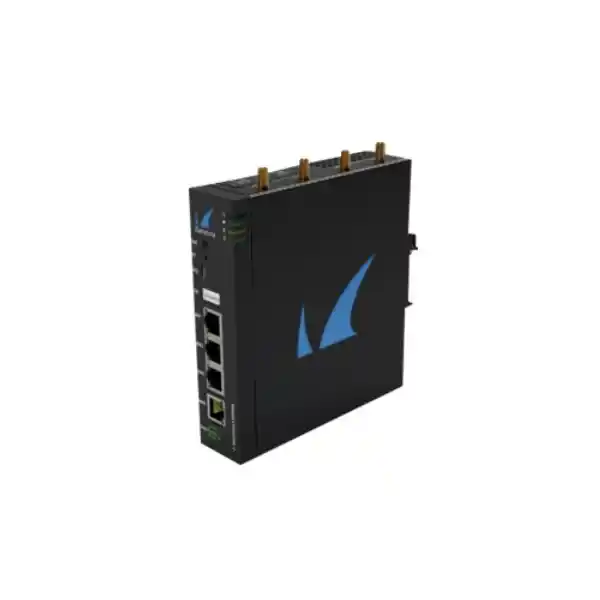
Barracuda Secure Connector SC2 in Dubai, UAE
The Barracuda Secure Connector SC2 is a compact security and connectivity platform designed for organizations that need to bring remote devices, small operational networks, kiosks, branch equipment and Internet-connected machines under centrally controlled policy without deploying a conventional full-size firewall at every location. It combines hardened edge connectivity, encrypted tunnel integration, switched LAN access, flexible power options and centralized management capabilities in a compact fanless platform suitable for distributed enterprise and operational technology use cases.
Choose SC2 when the requirement is secure, centrally governed connectivity for a small remote network or connected device estate, especially where compact installation, DIN-rail mounting, PoE-capable power, three local Gigabit ports and optional wireless or cellular variants are operationally useful.
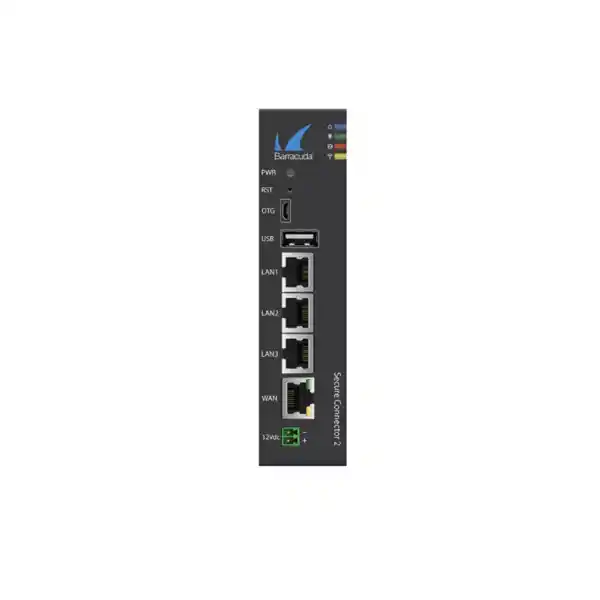
RJ45 WAN interface, documented as the management-capable port and supporting PoE+ recipient operation.
Three switched Gigabit Ethernet LAN ports for local equipment, controllers or a compact protected micro-network.
ARM Cortex A7 architecture with 1 GB RAM and 16 GB microSD storage in Barracuda’s published SC2 hardware specifications.
Compact, fanless enclosure supporting DIN-rail installation and wall or magnetic mounting options documented for the SC2 family.
What the Barracuda Secure Connector SC2 Is Designed to Solve
Distributed enterprises increasingly operate equipment that must communicate with central applications but does not justify a conventional branch firewall footprint. Examples include payment kiosks, vending systems, building management controllers, digital signage, healthcare devices, telemetry gateways, traffic systems, access-control panels, utility equipment and compact retail or service locations. These installations still need identity-aware security boundaries, encrypted transport, controlled routing and a practical way for administrators to apply policy consistently. The Barracuda Secure Connector concept addresses this gap by extending managed security and connectivity to remote devices and very small networks while reducing the amount of local administration required at each site.
The SC2 is therefore best understood as an edge connectivity and security appliance for micro-sites rather than as a direct substitute for every function of a larger branch firewall. Its architecture is optimized around compact deployment, centrally coordinated policy, secure tunnel establishment and local attachment of a limited number of Ethernet devices. In a typical design, the appliance sits between a local device network and an available WAN service, then creates a controlled path back toward Barracuda SecureEdge or a CloudGen Firewall architecture using a Secure Access Controller and centralized management. This enables security teams to govern remote traffic without requiring a highly skilled engineer to maintain each endpoint location.
For Dubai and UAE deployments, this operating model is particularly useful where businesses have equipment distributed across retail units, warehouses, campuses, hospitality properties, utility rooms, construction environments, clinics, industrial estates or remote service facilities. The practical value comes from standardization. A repeatable edge design can be documented once, adapted to the required connectivity option, and rolled out to multiple locations with consistent routing, tunnel and security policy. FourTeck can help design that standardized blueprint and align the SC2 with the larger WAN, firewall, cloud and support environment. For broader enterprise infrastructure planning, visit FourTeck UAE.
SC2 Hardware Architecture and Physical Design
Barracuda’s published SC2 hardware documentation identifies an ARM Cortex A7 processor, 1 GB of system memory and 16 GB of microSD mass storage. Those figures help explain the role of the appliance: it is an embedded edge platform intended to execute secure connectivity, routing, firewall and managed edge functions rather than a general-purpose server. The hardware is deliberately compact, power-conscious and mechanically suitable for deployments where a rack-mount chassis would be excessive or impossible. The appliance dimensions are approximately 37 × 140 × 150 mm, with a published appliance weight of about 0.55 kg. That footprint makes the SC2 practical for wall cabinets, small equipment enclosures and DIN-rail environments where available space is often one of the first design constraints.
The fanless design is equally important. Removing a mechanical cooling fan reduces one potential point of failure and can be advantageous in small cabinets where dust accumulation, acoustic noise or maintenance access are concerns. Fanless operation does not remove thermal planning requirements, however. Barracuda documents an SC2 operating temperature range of approximately 0°C to +40°C and non-condensing operating humidity from 5% to 95%. In the UAE, these figures must be considered carefully. An indoor communications room with controlled air conditioning is fundamentally different from an outdoor roadside cabinet, rooftop enclosure, production area or non-conditioned utility space. Integrators should therefore design cabinet ventilation, shading, HVAC or environmental protection so that the appliance remains within its specified operating envelope.
Mounting flexibility makes the SC2 easier to incorporate into varied physical environments. Barracuda documentation lists DIN-rail and wall mounting, along with a metal case suitable for magnetic mounting. DIN-rail support is especially valuable in operational technology and building automation environments because it aligns the appliance mechanically with PLCs, industrial power supplies, relay modules and other control-cabinet equipment. The result is a cleaner installation than placing a desktop network appliance loosely inside an electrical or communications enclosure. As with any mixed IT/OT cabinet, installation engineers should preserve appropriate cable separation, grounding practice, service clearances and power-supply design according to the broader system requirements.
Port Map: WAN, LAN, USB and Management Roles
| Label | OS Notation | Physical Type | Deployment Role |
|---|---|---|---|
| WAN | eth1 | 10/100/1000 RJ45 | Primary uplink and documented management-capable Ethernet interface; PoE+ recipient support is available on the WAN interface. |
| LAN1 | eth0 | 10/100/1000 RJ45 | Local switched network attachment for protected equipment or downstream devices. |
| LAN2 | eth3 | 10/100/1000 RJ45 | Additional switched LAN port for a second endpoint, controller or local network handoff. |
| LAN3 | eth4 | 10/100/1000 RJ45 | Third local switched attachment for compact multi-device networks. |
| OTG | — | Micro-USB B | Service and appliance-specific connectivity functions as supported by the platform. |
The port arrangement allows the SC2 to protect a very small local network without requiring an additional Ethernet switch in every design. Three local devices can be connected directly when the logical segmentation and traffic pattern allow it, or one LAN port can feed a managed downstream switch when more endpoints are needed. The key design question is not simply port count; it is whether the local network should remain one logical segment or be divided through VLANs and policy. Secure Connector supports 802.1Q VLAN functionality in the wider product architecture, so deployment planning can incorporate tagged networks where appropriate. Engineers should determine which devices need direct Layer 2 adjacency, which flows should traverse the encrypted tunnel, and which flows—if any—are allowed to use local Internet breakout.
The WAN port’s dual role deserves special attention during commissioning. It is the upstream network interface and is identified by Barracuda as the management-capable port. It can also receive power over Ethernet. This can simplify remote installations by reducing the number of power cables, but it requires a compatible PoE+ power-sourcing device and careful adherence to Barracuda’s documented electrical rules. Where the appliance is installed behind a carrier router, broadband termination device or upstream switch, network teams should document addressing, DHCP/static allocation, NAT behavior, DNS availability and required outbound tunnel reachability before field installation.
Power Design: PoE+ or External DC
The SC2 can be powered through its WAN Ethernet interface as a PoE+ powered device or through its auxiliary DC input, depending on the installation design. Barracuda publishes a WAN PoE+ voltage range of 37–54 V and compatibility with IEEE 802.3at Type 2 power sourcing. The auxiliary DC input is documented for 12–57 V. An optional external power supply converts 100–240 V AC, 50–60 Hz input to 12 V DC output, and the platform’s published maximum power draw is 40 W. These characteristics provide useful flexibility when the connector is installed in a branch communications cabinet, industrial control panel or device enclosure.
For UAE projects, the power topology should be included in the bill of materials from the beginning. The external power supply is documented as optional rather than universally included, so procurement teams should verify whether the selected SKU, distributor package and site design require a separate PSU. A PoE-powered deployment can reduce local electrical work and simplify replacement, but the upstream switch or injector must supply the correct standard, power budget and cable quality. In larger rollouts, powering every connector from centrally monitored PoE switching can also make remote restart procedures easier, provided that operational policy permits cycling the port.
Where the SC2 is placed in an OT cabinet, powering it from the DC infrastructure may be more natural. In that case, engineers should confirm voltage stability, protection, grounding and available current against the appliance specification. Power design should also consider the operational consequence of a common failure domain: if a single upstream PoE switch powers both the Secure Connector and other critical equipment, one switch outage can remove network connectivity and power simultaneously. Conversely, separate DC power may introduce an additional supply to monitor and maintain. The best approach depends on the availability objective, cabinet architecture and support model.
SC2 Family Variants: Do Not Treat Wireless and Cellular as Universal Features
The name “SC2” describes a platform family that includes multiple variants. This distinction matters during procurement because Wi-Fi and cellular functions are not present on every unit. Barracuda’s SC2 hardware table identifies SC20, SC21, SC24a and SC25a variants. All share the basic wired architecture of one Gigabit WAN interface, three Gigabit switched LAN interfaces, USB and Micro-USB OTG connectivity, but their radio capabilities differ. A correct quotation should therefore specify the exact submodel rather than assuming that “SC2” automatically means Wi-Fi or LTE.
SC20
Base wired SC2 variant. It provides the core Ethernet, USB and mounting architecture without integrated Wi-Fi or cellular radio functions.
SC21
Adds integrated 2.4 GHz Wi-Fi capability for access-point or client use while retaining the base wired interface set.
SC24a
Adds cellular capability for 3G/UMTS and LTE use, with supported bands depending on hardware serial/revision details, but does not add integrated Wi-Fi.
SC25a
Combines integrated Wi-Fi with cellular support, making it the most radio-flexible SC2-family option for sites needing both wireless local connectivity and mobile WAN possibilities.
This model split should drive the purchasing workflow. A warehouse with fixed Ethernet and a stable fiber handoff may only need the wired model. A kiosk that must join an existing Wi-Fi network might require the Wi-Fi-capable version. A mobile or difficult-to-cable site may require a cellular model, and a location needing both local wireless access and LTE backup may need the combined variant. Selecting the wrong submodel can create unnecessary cost or force additional external equipment into the design.
Cellular projects need additional validation beyond choosing a cellular-capable SC2. The exact LTE hardware revision, supported bands, SIM format, carrier plan, antenna placement and operator requirements must be checked for the deployment country and site. Barracuda documentation shows that supported LTE capabilities can vary by serial number range. For UAE procurement, FourTeck recommends validating the planned mobile operator, radio bands and site coverage before finalizing the bill of materials rather than assuming that a cellular modem automatically provides optimal service on every network.
Secure Tunnel Architecture and Centralized Control
A central architectural feature of Secure Connector is the use of an encrypted site-to-site tunnel between the remote appliance and the central Barracuda control/security environment. In the CloudGen Firewall architecture, Barracuda documents a single site-to-site VPN tunnel from the Secure Connector to the Secure Access Controller. That tunnel carries both user and management traffic and is commonly configured over TCP or UDP port 692, although deployments can change the entry port when architecture or firewall constraints require it. This design allows administrators to build a controlled overlay between many remote connectors and a central enforcement point.
The tunnel-centric approach is especially valuable for equipment that cannot run its own VPN client. Industrial controllers, printers, payment peripherals, cameras, sensors and appliances often have limited operating systems or cannot be modified without affecting certification or vendor support. By placing the Secure Connector in front of these devices, the security boundary moves to the network edge. The endpoint can continue using ordinary IP connectivity while the SC2 handles encrypted transport and network policy. This separation reduces the need to install agents on specialized equipment and can simplify lifecycle management when large numbers of identical devices are deployed.
Barracuda’s Secure Connector documentation describes TCP as the default tunnel transport for reliability and UDP as an option oriented toward higher performance. The correct mode depends on the WAN characteristics, upstream firewalls, packet loss, latency and application behavior. In a stable corporate network, UDP may reduce transport overhead. In a constrained environment where middleboxes or inconsistent packet delivery complicate connectivity, TCP may be operationally simpler. Design teams should test the actual service path rather than choosing exclusively from theoretical performance characteristics.
Centralization also reduces configuration drift. Instead of treating each remote location as a unique firewall project, engineers can develop common objects, routing expectations and access rules, then apply controlled variation only where needed. This is particularly important for large device estates where manual per-site changes become difficult to audit. For organizations standardizing perimeter and remote security architectures in Dubai, FourTeck’s Firewall Dubai practice can assist with topology, migration and policy planning around Barracuda and complementary infrastructure.
Firewall Zones, Routing and Segmentation Strategy
The Secure Connector firewall model uses a simplified zone framework aligned to its edge role. Barracuda documents LAN, Wi-Fi, WAN and VPN network zones, allowing rules to govern how traffic moves between local wired devices, optional wireless networks, upstream connectivity and the encrypted tunnel. This provides a clean mental model for micro-site security. Rather than building a complicated multi-interface branch configuration, administrators can define which local endpoints can reach central services, which traffic may access the Internet, what inbound communication is permitted, and whether network address translation is required.
Routing can be designed around manual networks, mapped networks and centrally assigned addressing depending on the deployment model. The most important principle is to avoid accidental address overlap across a large estate. A few remote sites with duplicate RFC1918 subnets may be manageable; hundreds of kiosks or machine networks using the same factory-default subnet can become a serious routing and troubleshooting challenge. Mapped network approaches can help normalize addressing in centrally managed designs, but the implementation must be planned alongside application dependencies and device management expectations.
For an IoT deployment, segmentation should start with the device’s required communication matrix rather than an assumption of broad connectivity. Identify the exact central servers, DNS resolvers, NTP sources, update repositories, cloud endpoints and management stations that each device category needs. Then build policy around those flows. If a payment terminal only needs to reach specific processing services, unrestricted access to the rest of the enterprise network should not be necessary. If a building controller requires management from a small operations subnet, that path can be permitted while user LAN access remains blocked. A Secure Connector deployment is most effective when it becomes part of an explicit zero-trust-oriented network design rather than simply an encrypted pipe.
802.1Q VLAN support allows the architecture to extend beyond a single flat local segment where the site design requires logical separation. However, VLANs should be introduced only when there is a clear policy or operational benefit. Every additional segment adds addressing, DHCP, routing and troubleshooting complexity. In small SC2 deployments, the cleanest architecture is often a limited number of well-defined segments mapped to a small set of centrally controlled policies. FourTeck can help document the source, destination, protocol, port and operational owner for each permitted flow before rollout.
Self-Healing SD-WAN Concepts for Remote Device Connectivity
Barracuda positions Secure Connector within a broader self-healing SD-WAN architecture. The practical objective is continuity: a remote device should retain a usable path even when individual uplinks degrade, change characteristics or fail. In designs that use multiple available uplinks—such as wired broadband plus cellular backup—the platform can participate in application-aware traffic steering and failover logic so that connectivity is not tied to a single transport. This is particularly relevant when the connected device performs a business-critical role but is located where enterprise-grade dual-carrier circuits would be uneconomical.
Dynamic bandwidth detection and traffic steering are valuable because small remote circuits are often variable. A nominal broadband speed says little about temporary congestion, upstream contention, wireless signal change or packet loss. SD-WAN techniques can react to path quality and move traffic according to policy. The design should still distinguish between “connectivity available” and “application service acceptable.” A cellular failover path may keep management and transactional traffic alive but may not be suitable for bulk backup, video or software distribution. Engineers should therefore define priority classes and failover behavior rather than blindly sending all traffic across any surviving link.
For UAE businesses with remote assets, the economic value of this approach can be significant. A small secure connector with a primary fixed circuit and secondary mobile path can be easier to deploy than a full branch networking stack at every equipment location. It also supports a standardized operating model: central teams can monitor connectivity, enforce policy and troubleshoot tunnel status while field staff focus on physical equipment. The approach is especially relevant for kiosks, pop-up locations, temporary project offices, isolated machinery and geographically distributed service points.
Resilience planning should nevertheless include power, carrier diversity, upstream NAT behavior and local equipment dependencies. A second WAN path does not create resilience if both links share the same building router, power supply or physical cable route. Likewise, an LTE backup can be affected by indoor attenuation or weak antenna placement. FourTeck recommends testing failover during commissioning, documenting expected reconvergence behavior and validating that the most critical applications remain functional under degraded-bandwidth conditions.
Security Services and Policy Capabilities Around the Secure Connector
Secure Connector is part of a larger Barracuda security architecture rather than an isolated Ethernet bridge. Depending on whether the organization deploys SecureEdge or a CloudGen Firewall/Access Controller design, security enforcement can be centralized and extended to traffic originating behind the connector. Barracuda’s Secure Connector portfolio references stateful packet inspection, policy-based firewalling, NAT, application control, intrusion detection and prevention, DNS reputation functions, traffic shaping, Quality of Service and advanced threat protection capabilities within the associated security stack. The exact services available at a given enforcement point depend on the chosen platform, licensing and configuration.
This architecture allows organizations to separate physical edge placement from heavy security processing. The SC2 can provide secure connectivity from a remote micro-network while sophisticated policy and inspection are applied centrally. That can be operationally attractive because security engines, signatures and administrator workflows remain consolidated. It also means sizing must include the central platform, not only the SC2. If hundreds of connectors terminate on one Access Controller or security service, the number of tunnels, aggregate throughput, inspection load and redundancy design at the hub become core engineering inputs.
From a policy perspective, the highest-value controls are often simple and specific. Restrict the remote device to required destinations. Block unsolicited inbound traffic. Prevent lateral movement from one device category to unrelated systems. Apply DNS and application controls appropriate to the endpoint. Rate-limit or deprioritize noncritical flows. Log significant security events centrally. Maintain a clear ownership model for changes. These practices reduce the attack surface even before advanced inspection features are considered.
Organizations should also define what happens when the central tunnel is unavailable. Some applications must fail closed because bypassing policy would create unacceptable risk. Other devices may require limited local access for safety or operational continuity. That decision belongs in the architecture and should be tested. A secure design is not simply the strictest configuration; it is one that matches the real operational requirement, documents exceptions and remains supportable during both normal and failure conditions.
Performance Context: How to Interpret Published SC2-Family Figures
Barracuda’s Secure Connector portfolio datasheet publishes model-table figures of approximately 300 Mbps firewall throughput and 30 Mbps VPN throughput using AES-128/SHA for SC20, SC21, SC24 and SC25 family entries. These numbers are useful for initial screening, but they should not be treated as guaranteed application throughput in every deployment. Real traffic performance depends on packet size, protocol mix, encryption settings, WAN latency, loss, NAT, security processing, tunnel mode and the behavior of upstream networks. The fact that the physical Ethernet interfaces operate at Gigabit speed does not mean encrypted application traffic will reach one gigabit per second.
Sizing should therefore begin with workload, not port speed. Measure the sustained and peak traffic generated by the local device set. Identify whether the application sends many small packets, bulk files, video, telemetry bursts or latency-sensitive control traffic. Determine how much of that traffic must cross the VPN and how much remains local. Include management overhead, software updates and future growth. If the site consistently needs hundreds of megabits of encrypted throughput, a compact Secure Connector may not be the correct edge platform even though the WAN port is Gigabit Ethernet. A larger firewall or SecureEdge appliance may be more appropriate.
For many IoT and micro-branch applications, however, bandwidth is modest. A payment device, environmental sensor gateway or building controller may transfer only a small amount of data, making security, availability and manageability more important than raw throughput. In those cases, the SC2’s compact form factor and centralized control can provide a better operational fit than over-sizing a traditional firewall. The key is to identify the application’s critical metric. For some sites it is maximum bandwidth; for others it is tunnel uptime, low packet loss, rapid failover or the ability to deploy without a local IT technician.
FourTeck recommends documenting at least four numbers for each planned site class: normal average Mbps, normal peak Mbps, emergency/failover minimum Mbps and expected encrypted percentage. Add packet-per-second sensitivity when the application generates high transaction rates. This simple profile makes it much easier to decide whether SC2 is an appropriate endpoint and to size the central termination infrastructure correctly.
Licensing and Central Infrastructure Planning
Hardware selection is only one part of a Secure Connector project. In a CloudGen Firewall architecture, Barracuda documentation states that deployment requires an Access Controller license and a Secure Connector Energize Updates pool license. The number of instances in the pool determines how many Secure Connectors may connect, and the pool size cannot exceed the maximum VPN connection capacity of the selected Access Controller. This means a project with one hundred or one thousand edge devices must be planned as a complete system rather than as a collection of standalone appliances.
Barracuda has documented virtual Access Controller options with different tunnel capacities, so the correct design should account for current device count, rollout growth, redundancy and maintenance windows. An architecture sized exactly to today’s connector count can become restrictive when new locations are added or when an HA strategy requires spare capacity. Central compute resources, firewall throughput, logging systems and management workflows also need to scale with the fleet. If SecureEdge is selected as the management and enforcement architecture, licensing and subscription structure should be quoted according to the current Barracuda commercial model available in the region.
Procurement teams should therefore request a solution-level bill of materials. The quotation should identify the exact SC2 submodel, any optional power supply, antennas or cellular accessories, support entitlement, required central controller or service subscription, security licensing and professional services. It should also state whether the project includes staging, configuration templates, shipping to remote sites, onsite installation, carrier/SIM coordination and post-deployment monitoring. This avoids the common mistake of comparing only hardware unit prices while overlooking the components needed to operate the system.
For organizations that prefer a managed implementation, FourTeck’s IT Services UAE team can support planning, rollout coordination, configuration governance and operational handover across the wider infrastructure stack.
Zero-Touch Deployment and Fleet Standardization
A major reason to deploy Secure Connector is to reduce the amount of manual work required at remote sites. Zero-touch principles allow the organization to predefine configuration and policy centrally, then ship hardware to locations where a technician may only need to connect power, WAN and local devices. The exact onboarding workflow depends on the Barracuda architecture and software version, but the operational objective remains consistent: minimize site-specific configuration and move the authoritative configuration into a controlled central system.
To make this work at scale, the organization needs disciplined naming and inventory standards. Each connector should have a unique site identifier, physical location, asset tag, WAN method, local subnet, device category, support owner and configuration template assignment. If cellular connectivity is used, add SIM ICCID or account reference, carrier, plan and antenna notes to the inventory. If Wi-Fi is used, document whether the radio operates as an access point or client and how credentials are managed. These details turn a collection of appliances into an auditable fleet.
Template design should separate global policy from local variables. Global settings may include tunnel behavior, DNS policy, logging targets, baseline firewall rules and management access. Local variables may include site subnet, circuit address, device IP, wireless credentials or cellular APN. The smaller the variable set, the easier the rollout is to automate and troubleshoot. A well-designed template also reduces the risk that field engineers make ad-hoc changes that later become undocumented dependencies.
Staging remains valuable even in zero-touch projects. FourTeck typically recommends validating a representative unit for each site class before mass shipment. Confirm power, firmware, management registration, tunnel establishment, application reachability, local routing, failover and monitoring. Once the reference configuration passes acceptance tests, it can become the baseline for larger deployment waves. This approach combines the speed of centralized provisioning with the risk control of real-world pre-production validation.
Wi-Fi-Capable SC2 Variants
SC21 and SC25a variants add integrated 2.4 GHz Wi-Fi based on IEEE 802.11b/g/n. Barracuda documents operation in the 2412–2462 MHz range and describes Wi-Fi as usable in access-point or client mode. These two modes serve very different purposes. In access-point mode, the SC2 provides wireless connectivity to local devices. In client mode, the SC2 uses Wi-Fi as an upstream network path by joining an existing wireless infrastructure. Selection should therefore be based on the required topology rather than on the presence of a radio alone.
For access-point use, consider device density, radio interference, security configuration and the limitations of 2.4 GHz spectrum. The SC2 is not intended to replace a high-density enterprise Wi-Fi system. Its integrated wireless capability is better suited to a small number of local endpoints or specialized equipment where simple edge attachment is the goal. In dense Dubai office, retail or hospitality environments, 2.4 GHz congestion can be substantial, so a dedicated enterprise access point may be preferable when coverage, capacity or roaming is important.
Client mode can be useful where a wired WAN is unavailable but the site already provides a managed Wi-Fi service. That architecture should be evaluated carefully because the Secure Connector’s availability becomes dependent on another wireless system, its authentication method and its RF environment. Guest Wi-Fi services that use captive portals or frequently changing credentials are generally poor foundations for unattended infrastructure. A managed SSID with stable authentication and suitable network policy is more appropriate.
When wireless is not needed, selecting a wired-only SC2 variant reduces unnecessary complexity. Security design benefits from minimizing active interfaces and services. Conversely, when Wi-Fi is essential, validate antenna placement and enclosure material before installation. A metal cabinet can significantly attenuate 2.4 GHz signals, so physical installation must be considered as part of the network design rather than after the appliance has been mounted.
Cellular SC2 Variants for LTE Connectivity and Backup
SC24a and SC25a variants include cellular capability, creating deployment options for remote locations that cannot rely on wired broadband or that require a secondary WAN path. Barracuda’s published documentation for later serial ranges lists a broad set of LTE FDD and TDD bands and identifies the module as a data-only LTE implementation. Because cellular hardware and supported bands can differ according to serial number range, every procurement should validate the exact unit revision against the intended carrier before deployment.
In UAE projects, cellular success depends on more than radio specifications. Site survey information should include operator coverage, indoor signal quality, expected data consumption, public or private APN requirements, NAT characteristics and whether the application needs inbound reachability. Many mobile networks use carrier-grade NAT, which can affect designs that expect unsolicited inbound sessions. A Secure Connector tunnel architecture usually reduces the need for public addressing at each remote site, but the actual transport path still needs to permit the required outbound connectivity to the central Barracuda environment.
Antenna placement is a practical engineering issue. Barracuda documentation identifies external cellular antennas on the supported variants. In a steel cabinet or basement equipment room, an antenna located directly beside the appliance may receive poor signal even when outdoor coverage is strong. Extension cables, external mounting positions and cable-loss considerations may determine whether the LTE link is stable. During commissioning, record signal indicators and test the application under realistic conditions rather than relying only on a mobile phone’s signal bars.
Cellular should also be governed by traffic policy. If LTE is used as backup, define which classes of traffic may use it and whether high-volume services should be suspended during failover. Software updates, backup jobs and video streams can consume a mobile data allowance rapidly. Prioritizing transactional, management and control traffic preserves the business value of the secondary link and makes monthly usage more predictable.
Edge Computing and Local Processing
Barracuda describes Secure Connector models as supporting centrally manageable edge computing through built-in container technology, including LXC and Docker-oriented use cases, and references integration with Azure IoT Edge. The strategic purpose is to move selected logic closer to the protected device. Instead of sending every raw event to a remote data center, an edge application can perform filtering, protocol adaptation, local control or data preprocessing before forwarding the result. This can reduce latency and bandwidth consumption and can make some operational workflows more resilient to WAN variation.
Edge computing must be approached carefully on a compact platform. The SC2’s published ARM Cortex A7 processor, 1 GB RAM and 16 GB microSD storage define a constrained environment compared with a general-purpose industrial PC or server. Container workloads should therefore be lightweight, well understood and tested for resource consumption. A connector that is responsible for secure network access should not be overloaded with an application whose memory or storage demands compromise the stability of the networking function. Engineers should establish clear CPU, memory and storage budgets and monitor them during pilot testing.
Security boundaries also matter. Running custom software at the edge expands the operational lifecycle: somebody must maintain the container image, patch dependencies, validate compatibility and define how application failures are handled. Central distribution is useful, but it does not eliminate software governance. Organizations should apply the same discipline used for other production code, including version control, testing, rollback procedures and ownership. Where IoT analytics and network security are managed by different teams, containerization can provide a useful separation, but responsibilities still need to be explicit.
Use cases that fit the SC2 edge model include small protocol translators, local health-check agents, compact telemetry collectors, event filters and control logic that must remain physically close to the protected equipment. Heavy analytics, large databases and high-throughput media processing belong on a more capable compute platform. The design goal is to place only the necessary intelligence at the edge while preserving the Secure Connector’s primary role as a secure connectivity device.
Industrial and OT Security Use Cases
Operational technology networks often contain devices that were designed for reliability and deterministic function rather than exposure to modern enterprise networks. PLCs, building controllers, meters, access systems, environmental sensors and machine interfaces may use long product lifecycles, fixed operating systems and protocols that cannot accept endpoint security agents. A network-based control point such as the SC2 can create a practical security boundary around these devices without modifying the device software itself.
Barracuda’s wider Secure Connector and CloudGen security stack references support for industrial protocols such as S7, IEC 60870-5-104, IEC 61850, MODBUS and DNP3 in the associated inspection architecture. For projects that rely on protocol-aware security, the exact enforcement location, license and software version should be confirmed during design. Protocol recognition can be valuable because an OT policy can be more precise than a rule based only on IP address and TCP/UDP port. For example, a control network may legitimately use a protocol while only a subset of operations should be permitted from a particular management zone.
Physical architecture remains critical. The SC2 should be positioned so that bypassing it is difficult and so that its LAN side represents a meaningful protected zone. If a technician can connect the device directly to an unmanaged upstream network, the security policy can be circumvented even if the connector itself is configured perfectly. Cabinet locking, cable routing, switch configuration and asset labeling are therefore part of the cybersecurity design. For high-value OT systems, organizations should also define how emergency local access is performed and logged.
Dubai industrial, facilities-management and infrastructure projects can benefit from the SC2 when there are many small remote control networks that need consistent secure connectivity. The strongest deployments combine network segmentation, encrypted tunnels, centralized logging, clear maintenance workflows and an inventory that maps every connector to the equipment it protects. FourTeck can assist with the networking layer while working alongside the client’s OT vendor so that security changes respect process safety and vendor support requirements.
Retail, Kiosk and Payment Environment Scenarios
Retail estates frequently combine large numbers of very small sites with equipment that needs reliable access to central systems. A self-service kiosk may include a payment terminal, printer, controller and digital display but no dedicated IT rack. A vending machine or unattended service point may have only a few Ethernet-connected components. Deploying a conventional rack firewall, switch and router at each location can be expensive and difficult to support. The SC2’s three LAN ports, compact enclosure and central connectivity model can be a more appropriate fit when the performance and security requirements fall within the platform’s scope.
The network design should treat payment, management and content traffic separately when the application requires it. Payment devices generally need tightly restricted destinations, while digital signage or application updates may require broader cloud access. The connector can support policy separation, but the actual topology must account for device behavior and compliance obligations. Do not assume that placing multiple devices behind one secure appliance automatically satisfies every payment-security requirement. The organization remains responsible for defining the cardholder environment, segmentation controls and applicable compliance scope.
Remote support is another advantage. When a kiosk fails, the cost of dispatching a technician can exceed the value of the network hardware. Central visibility into tunnel state, WAN reachability and policy events can help the support desk determine whether the problem is connectivity, application, power or endpoint-related before arranging a site visit. Standardized cabling and port labels further reduce diagnosis time. For example, the estate documentation can specify that LAN1 always connects to the primary controller, LAN2 to payment equipment and LAN3 to the service interface, making remote instructions more predictable.
Cellular-capable SC2 variants can also support temporary or mobile retail formats where fixed circuits are unavailable. The business should define data limits, antenna placement and failover rules before rollout. In malls or dense urban environments, signal strength can vary significantly between units, so pilot testing at representative locations is more valuable than assuming identical performance across the estate.
Healthcare, Building Management and Smart Infrastructure
Connected medical and facilities devices often have two characteristics in common: they are operationally important and they are not conventional user endpoints. Diagnostic systems, environmental monitors, HVAC controllers, access systems and energy meters may need to exchange information with central applications but should not be broadly reachable from office networks. An SC2 can establish a small protected network around such devices and transport approved traffic through an encrypted path to a controlled security boundary.
In healthcare environments, the design should prioritize availability and clear change control. A network policy change that blocks a clinical device can have a very different consequence from blocking a normal workstation. Engineers should obtain vendor communication requirements, maintenance procedures and support contacts before implementing restrictive rules. Where devices send sensitive information, encryption in transit and segmentation are important, but these controls must be combined with endpoint, application and data-governance measures appropriate to the organization.
Building management is another strong use case because equipment is physically distributed. A property portfolio may contain dozens of electrical rooms, plant rooms and remote facilities with only a handful of IP devices in each. DIN-rail installation and DC or PoE power can make the SC2 easier to integrate into these environments. Centralized connectivity can also reduce the need to expose controllers directly to the Internet for vendor remote access. Instead, access paths can be routed through controlled corporate security infrastructure.
Smart infrastructure projects should consider the full lifecycle, often measured in many years. WAN providers, SIM plans, central firewall platforms and cloud services may change during that period. Using a managed edge connector creates an abstraction layer between the local device and the transport network, making future connectivity changes easier than redesigning each endpoint. The organization should still plan replacement cycles, support renewals and configuration export procedures so that the secure edge remains maintainable throughout the asset’s operating life.
Environmental Planning for Dubai and the UAE
The SC2’s published 0°C to +40°C operating temperature is suitable for many conditioned indoor spaces, but UAE deployment planning must account for high ambient temperatures in non-conditioned environments. An outdoor enclosure exposed to direct sunlight can reach temperatures far above the surrounding air. A small metal cabinet in a service yard or rooftop plant area can become significantly hotter than the appliance’s rated operating range even when daytime weather appears manageable. For that reason, environmental engineering is not optional when SC2 units are placed outside normal office or data-room conditions.
If the connector must be installed in a harsh area, use an enclosure and thermal strategy appropriate to the site. Options can include shaded placement, forced ventilation, filtered airflow, enclosure air conditioning or relocation of the network equipment to a conditioned cabinet with extended Ethernet to the device. The correct choice depends on dust, humidity, ingress protection, electrical code and maintenance accessibility. Barracuda’s fanless design helps reduce internal mechanical maintenance, but it does not make the SC2 a high-temperature rugged model beyond its documented limits.
Humidity is documented up to 95% non-condensing. Condensation remains a concern in environments that transition between hot humid outdoor air and aggressive indoor cooling. Cable entries and enclosure sealing should be designed to avoid moisture accumulation. Dust is another practical issue in construction, industrial and outdoor settings. Even though the SC2 has no cooling fan drawing air through the chassis, ports and connectors should remain protected from contamination and service technicians should follow appropriate cleaning procedures.
A good site survey records cabinet location, expected temperature, power method, cable distance, upstream WAN equipment, mobile signal where applicable, antenna placement, grounding context and physical access. These factors often determine project success more than the software configuration. FourTeck can incorporate them into a standardized deployment checklist for multi-site UAE rollouts.
High Availability and Failure-Domain Design
A compact remote appliance should be evaluated as part of the site’s complete failure chain. The SC2 may be highly reliable, but service still fails if the upstream broadband router loses power, the PoE switch is rebooted, the cellular antenna is damaged or the central VPN termination platform is unavailable. High availability therefore requires layered thinking. Identify which components are single points of failure and determine whether the business impact justifies redundancy at each layer.
For some unattended devices, a single SC2 with dual-path connectivity may be sufficient because replacement can be arranged within an acceptable service window. For critical infrastructure, the architecture may require redundant WAN services, redundant central controllers and pre-staged spare appliances. The economics should be based on outage impact, not on hardware cost alone. A spare connector stored centrally can be more valuable than deploying two active appliances at every low-risk site, while a mission-critical process might justify full local redundancy.
Monitoring is an essential part of availability. Track tunnel state, WAN reachability, power events where observable, interface status and recurring packet loss. Define alert thresholds that distinguish a momentary mobile-network transition from a sustained outage. The support process should map each alert to an action: remote test, upstream provider check, power-cycle request, field dispatch or central policy review. Without this workflow, centralized monitoring can generate alarms without improving recovery time.
When an outage occurs, support teams should be able to answer three questions quickly: is the SC2 powered, can it reach the Internet, and is the secure tunnel established? Barracuda’s documented status LEDs provide local visual indicators for power, WAN and VPN state, with a separate WWAN indication on cellular models. Standardizing remote troubleshooting around these indicators allows non-network staff onsite to provide useful information without logging into the appliance.
Monitoring, Logging and Operational Governance
A distributed secure-edge estate can only be managed effectively if inventory, configuration and monitoring are treated as one operating system. Every SC2 should map to a business service and an owner. A connector protecting an HVAC controller should not appear in monitoring simply as an anonymous serial number; it should identify the building, cabinet, device group and escalation contact. This context helps the operations team distinguish a critical alarm from a maintenance event and makes change approvals faster.
Central logs should capture security-relevant firewall decisions, tunnel events and system state according to the organization’s retention policy. Avoid collecting large volumes of low-value data without a use case. For a fleet of hundreds of connectors, verbose logging can become expensive and make important events harder to find. Define which logs support incident response, troubleshooting, compliance and capacity planning, then route them to the appropriate monitoring or SIEM platform.
Configuration governance should include change templates, peer review for high-risk rules and rollback procedures. Remote-device security often suffers when temporary troubleshooting rules become permanent. An engineer may open broad access to resolve a field issue, then forget to narrow it later. Central management makes it easier to identify these exceptions, but only if the organization uses consistent naming and expiry processes. Where the platform supports timer-triggered or dynamic rules, they can be valuable for scheduled maintenance windows.
Periodic review should compare the deployed fleet with the asset register. Look for connectors that have been offline for long periods, units running unexpected configurations, unused cellular subscriptions, sites approaching bandwidth limits and policy objects that no longer match current applications. Security is strongest when the SC2 estate is maintained as a living service rather than installed once and ignored.
Firmware, Lifecycle and Change Management
Secure edge devices have long service lives, so firmware governance is a core part of the deployment. The organization should define who monitors Barracuda release information, how updates are tested, which maintenance windows apply and what rollback strategy is available. Large fleets should not receive untested changes simultaneously. A staged rollout—lab, pilot sites, low-risk production group and then broad deployment—reduces the chance that an unexpected compatibility issue affects the entire estate.
SC2 submodels and hardware revisions can influence feature support, particularly in cellular environments. Inventory should therefore retain both model and serial/revision information. This becomes important when documentation differentiates LTE capability or supported hardware by serial-number thresholds. A procurement system that records only “Secure Connector SC2” may not provide enough information for future support decisions. The same principle applies to optional power supplies, antennas and carrier modules.
Before any major firmware change, validate VPN establishment, WAN failover, critical application flows, central management visibility and local edge containers if used. OT and healthcare deployments may require additional vendor coordination because application devices can have strict network timing or protocol expectations. A well-maintained test unit matching the production hardware is extremely useful for this purpose. It allows teams to evaluate changes without experimenting on a live remote site.
Lifecycle planning also includes end-of-sale and end-of-support considerations. When Barracuda introduces replacement hardware or software generations, organizations should evaluate migration before support deadlines create urgency. Standardized addressing, documented policies and centralized configuration make replacement easier because the business logic can be transferred to the successor platform with less site-specific discovery.
Deployment Topology 1: Wired Micro-Branch
The simplest SC2 design uses a wired WAN service and the three local Gigabit Ethernet ports. The WAN interface connects to the ISP termination device or an upstream network segment. LAN ports connect directly to local equipment or to a small managed switch. The SC2 establishes its encrypted tunnel to the central Barracuda environment, and firewall policy controls how the local subnet communicates with central systems and the Internet. This topology is well suited to small retail units, service kiosks, branch equipment rooms and isolated controllers with reliable fixed connectivity.
Addressing can be static or DHCP-based on the upstream side depending on provider design. For unattended sites, DHCP may simplify field replacement, but static addressing may be required by managed circuits or upstream security policies. The local network should use a standardized address plan where possible. If many sites use the same device defaults, mapped networking or pre-staging may be needed to avoid overlap. DNS and NTP services should be explicitly defined because remote devices often fail in confusing ways when name resolution or time synchronization is unavailable.
Power can come from a PoE+ upstream switch or the optional external supply. A PoE design is compact and supports remote power cycling, while external DC can be preferable in control cabinets. The choice should be standardized by site type to simplify spares. Cabling documentation should identify WAN separately from LAN because the port roles are not interchangeable in the operational blueprint.
During acceptance testing, verify Internet reachability, tunnel establishment, permitted application flows, blocked unauthorized flows, central management access and restart behavior. Disconnect the WAN briefly to confirm the device recovers automatically. If there is no secondary path, record the expected behavior during provider outage so operational teams understand the limitation.
Deployment Topology 2: Fixed WAN with LTE Backup
For sites where connectivity is important but dual fixed circuits are impractical, a cellular-capable SC24a or SC25a can provide an alternate path. The primary WAN remains a wired Ethernet service, while the integrated mobile connection becomes the backup. The design should establish clear path preference and application priorities. Under normal conditions, all planned traffic uses the fixed circuit. If that path fails or falls below defined quality thresholds, critical traffic moves to LTE according to policy.
The most successful failover policies are selective. Business transactions, monitoring and management may need continuity, while large operating-system updates, media downloads or backup transfers can wait for the primary circuit. This prevents the LTE link from being saturated and keeps mobile-data costs under control. Traffic shaping and QoS should be aligned with the application’s actual importance rather than with generic protocol categories.
Test the cellular path before relying on it. Record signal quality with the cabinet closed, not only while the engineer is standing beside an open enclosure. Test during busy hours if possible because mobile network performance is shared. Confirm the SIM remains active after long periods of little use and establish a process for monitoring data-plan status. If a private APN is required, verify credentials and routing with the mobile operator before shipping hardware to remote sites.
Finally, simulate failure. Disconnect the fixed WAN, confirm that the SC2 moves essential traffic to LTE, then restore the primary circuit and confirm that normal routing returns without manual intervention. This test should be part of commissioning and periodic maintenance because backup links that are never tested can fail silently until the day they are needed.
Deployment Topology 3: Secure Device Enclave Inside a Larger Site
Not every SC2 needs to sit at a geographically remote branch. It can also create a controlled device enclave inside a larger facility. Consider a hospital, warehouse or corporate campus with a shared network but a specialized device that requires stronger isolation and a dedicated secure path to a central service. The SC2’s WAN interface can connect to an upstream enterprise VLAN while the protected equipment resides behind its LAN ports. The connector then establishes its encrypted tunnel and applies policy independently of the surrounding user network.
This model can be attractive when the enterprise networking team wants to avoid routing third-party or operational equipment directly across the campus core. The upstream network only needs to provide the connector with controlled Internet or central reachability, while the device itself remains hidden behind the secure edge. It also creates a clearer demarcation of responsibility between the enterprise network and a specialist vendor. Changes to the device network can be managed within the connector configuration without exposing the endpoint broadly.
The enclave approach should not be used to bypass campus security architecture. The SC2’s upstream path should still be placed in an appropriate VLAN with restricted access. Administrators should define whether local campus systems are allowed to reach the protected device and whether that traffic must traverse central policy. DNS, NTP and management services should follow the organization’s security model. If the connector uses Internet-based tunnel termination, upstream firewalls must permit the required outbound traffic.
Physical access is important in this topology because the appliance may be installed in a shared communications room. Label the protected LAN ports clearly and secure unused interfaces according to operational policy. The value of the enclave depends on maintaining a clean separation between the device side and the surrounding network.
Sizing Methodology for an SC2 Project
A reliable sizing exercise should answer five questions. First, how many devices sit behind each connector? Second, how much traffic do those devices generate under normal and peak conditions? Third, what percentage of that traffic must cross the encrypted tunnel? Fourth, what availability target applies to the service? Fifth, how many connectors will terminate on the central Barracuda infrastructure? These questions determine whether the SC2 is suitable locally and whether the central environment has enough capacity globally.
For each site class, build a simple traffic profile. Measure or estimate average Mbps, peak Mbps, packet rate, transaction sensitivity, upstream/downstream ratio and growth. Include periodic events such as backups, firmware updates or video uploads that may not appear during a short survey. If cellular backup is planned, identify the minimum traffic that must continue during failover. The published SC2-family throughput figures provide an upper-level reference, but real application testing should drive final acceptance.
Central sizing should include the total number of concurrent tunnels, aggregate encrypted traffic, security inspection features, logging volume and resilience. Do not size only for average use. A regional provider outage may cause many sites to fail over simultaneously, changing traffic patterns at the hub. Software distribution can also create synchronized peaks if updates are scheduled for all connectors at once. Spreading maintenance windows and using bandwidth controls can reduce these bursts.
Finally, size the operational team. A fleet of 500 edge appliances needs processes for inventory, alerts, replacement, licensing and change control even if the devices are zero-touch. Automation reduces per-unit effort but does not eliminate service ownership. Successful projects budget for lifecycle management from the start.
Security Hardening Checklist
Restrict Management
Limit administrative access to approved management paths, use role-based operational practices and avoid exposing management interfaces broadly on untrusted networks.
Use Least-Privilege Rules
Allow the protected devices only the destinations and services they require. Document every exception and remove temporary troubleshooting access promptly.
Control DNS and NTP
Define trusted resolvers and time sources so connected equipment does not depend on arbitrary public infrastructure or fail because of incorrect clock settings.
Patch Deliberately
Maintain Barracuda software according to a staged update process and include any edge containers in the same lifecycle governance model.
Monitor Tunnel State
Alert on sustained VPN loss, unusual reconnect patterns and unexpected path changes that may indicate provider instability or configuration issues.
Protect Physical Access
Install the connector in a controlled cabinet where practical, label cables, secure unused ports and prevent simple bypass of the protected network boundary.
Hardening is most effective when it becomes part of the deployment template. Rather than asking engineers to remember security steps at every site, encode the baseline in central policy, installation documents and acceptance tests. Exceptions should be explicit and tied to a business owner. This approach makes a large SC2 estate easier to audit and reduces variation between sites installed by different field teams.
Procurement Considerations in Dubai and the UAE
A complete SC2 quotation should identify the exact hardware submodel and not merely the SC2 family name. Confirm whether the requirement is SC20, SC21, SC24a or SC25a based on wired, Wi-Fi and cellular needs. Include the power method and optional external PSU where required. If cellular capability is selected, confirm antennas, hardware revision, intended operator and SIM plan. If Wi-Fi is selected, verify that integrated 2.4 GHz operation is appropriate for the site rather than assuming it replaces a dedicated enterprise access point.
Licensing must be quoted alongside hardware. For CloudGen-based deployments, include the relevant Access Controller and Secure Connector license structure. For SecureEdge deployments, align the subscription and management components with the current Barracuda offering. Support term, replacement entitlement and software access should be clear. The lowest hardware-only price may not represent the lowest operational cost if licensing, support or accessories are omitted and purchased later as urgent additions.
Project logistics matter for multi-site rollouts. Decide whether units will be staged centrally in Dubai, configured at a customer facility or shipped directly to branches. Pre-labeling each appliance with site ID, WAN instructions and local port assignments can reduce installation errors. Maintain a serial-number register before dispatch. For cellular units, map each SIM to the correct connector and site. For large projects, keep a small stock of pre-approved spares so replacement does not depend on emergency international shipping.
If the project extends beyond the UAE into regional operations, FourTeck can align standards across multiple markets while keeping local carrier and support requirements separate. For wider regional infrastructure coordination, see FourTeck Africa for cross-border technology coverage and deployment planning.
Installation and Commissioning Workflow
A repeatable commissioning workflow reduces deployment risk. Begin by verifying the product label, submodel, serial number and ordered accessories. Confirm the installation environment is within the required temperature and humidity range. Mount the appliance securely using the planned DIN-rail, wall or magnetic method. Connect the selected power source, remembering that Barracuda warns against applying external DC and PoE simultaneously. Only after the power design is confirmed should the WAN and LAN cabling be finalized.
Next validate the upstream network. Confirm link speed, IP addressing, default gateway, DNS and Internet reachability. If the WAN uses an enterprise VLAN, check switch configuration and any required access-control rules. If cellular is used, verify SIM status, APN settings and usable signal. If Wi-Fi client mode is used, confirm association and authentication stability. Troubleshooting is faster when the installer proves the underlay before investigating the secure tunnel.
Then verify enrollment and VPN establishment to the central Barracuda environment. Confirm that the correct site configuration and identity are applied. Test central reachability from a known endpoint behind the SC2, then test Internet access according to the intended policy. Verify that unauthorized destinations are blocked. If NAT or mapped networks are used, validate both directions of the required application flows. Record latency and basic throughput so future support teams have a baseline.
Complete the handover by photographing the installation, recording port assignments and updating the asset register. Include cabinet location, upstream switch port, power source, WAN provider, local subnet and support contact. A technically correct installation without documentation becomes difficult to maintain after staff changes. FourTeck can supply a standardized acceptance checklist so each site produces the same evidence before the deployment ticket is closed.
Troubleshooting Framework for SC2 Deployments
Troubleshooting should follow layers. First verify power. The front power indicator should show whether the appliance is running. Second verify physical Ethernet link and upstream network access. Barracuda documents an orange WAN indicator for Internet connectivity and a green VPN indicator for connection to the Access Controller. Cellular models also have a WWAN indicator. These visual signals let a remote technician narrow the problem before any remote management session is possible.
If the appliance has Internet access but no VPN, investigate the tunnel path. Confirm DNS if hostnames are used, confirm the central endpoint is reachable, and verify that intermediate firewalls allow the configured transport and entry port. Barracuda commonly documents TCP or UDP 692 for Secure Connector VPN to the Access Controller, but the environment may use a different configured port. Check certificate, identity and central authorization if the network path is open but tunnel establishment fails.
If the VPN is up but the application fails, move to routing and policy. Verify the source IP seen by the central service, route advertisements or static routes, NAT behavior, mapped networks and the relevant firewall rule. Test a known permitted destination first. DNS and NTP failures can appear as application problems, so validate them separately. For industrial protocols, coordinate with the application vendor before changing packet inspection or timing-related behavior.
For intermittent problems, collect a timeline. Note WAN provider events, tunnel reconnects, mobile signal changes, power interruptions and central policy changes. Compare multiple sites to determine whether the issue is local or systemic. A fleet management architecture provides valuable context: if 50 connectors disconnect simultaneously, the root cause is unlikely to be 50 independent hardware failures.
Why SC2 Instead of a Traditional Branch Firewall?
A traditional branch firewall is usually designed for a broader range of users, applications and local services. It may provide many Ethernet ports, higher encrypted throughput, local security engines, multiple WAN interfaces and richer branch features. That capability is valuable at an office, but it can be excessive at a site that contains only one controller and two peripherals. The SC2 is compelling when the requirement is narrower: attach a small number of devices, secure the traffic, centralize policy and minimize physical footprint.
The economic comparison should include operations. A smaller appliance can be easier to install and replace. Standardized templates reduce configuration time. PoE power may eliminate a local adapter. Central enforcement can simplify security updates. These benefits can outweigh differences in hardware purchase price when hundreds of sites are involved. Conversely, choosing SC2 for a location that really needs full branch firewall functionality can create bottlenecks and operational workarounds. Product fit matters more than choosing the smallest possible appliance.
Use a larger firewall when the site has many users, multiple high-speed WAN circuits, substantial local server traffic, demanding VPN bandwidth, complex segmentation or advanced local security requirements. Use SC2 when the site behaves more like a secure device island or micro-network. In mixed estates, both models can coexist: full firewalls at offices and Secure Connectors at unattended or specialized locations, all governed within a broader network security strategy.
FourTeck can compare the SC2 against suitable Barracuda firewall or SecureEdge alternatives during solution design so the edge device matches the workload rather than forcing every location into one hardware category.
SC2 Versus Generic VPN Routers
Many low-cost routers can create an IPsec or SSL tunnel, so the reason to choose Secure Connector is not simply “it has VPN.” The value is integration with the Barracuda management and security architecture, repeatable provisioning, centralized policy and a hardware design aimed at distributed secure connectivity. A generic router may be appropriate for a small standalone site, but operating hundreds of unrelated routers can create fragmented management, inconsistent firmware, different logging formats and weak change control.
Secure Connector also addresses device networks where security policy is as important as transport. Central firewalling, application-aware controls, routing governance and secure orchestration can become part of the service rather than separate products stitched together at each site. The advantage grows with fleet size. One generic router is easy to manage manually; five hundred are not. Standardization reduces the number of unique failure modes and allows support teams to build deeper expertise around one architecture.
That does not mean SC2 is always the correct choice. If an organization has already standardized on another SD-WAN or firewall platform with equivalent micro-edge hardware and management, adding a new ecosystem may increase complexity. The decision should consider current tools, staff skills, central security architecture, licensing and long-term roadmap. For existing Barracuda CloudGen or SecureEdge environments, Secure Connector has a natural integration advantage because it extends the same control model to smaller endpoints.
A technical proof of concept should compare operational outcomes: onboarding time, policy consistency, tunnel recovery, monitoring visibility, failure diagnosis and replacement workflow. These measures often reveal more about the real value of an edge platform than a simple feature checklist.
Technical Specification Summary
| Platform family | Barracuda Secure Connector SC2, including SC20, SC21, SC24a and SC25a variants in published hardware documentation. |
|---|---|
| WAN | 1 × 10/100/1000 Mbps RJ45 Ethernet; documented as PoE+ recipient and management-capable interface. |
| LAN | 3 × 10/100/1000 Mbps switched RJ45 Ethernet ports. |
| USB | 1 × USB 2.0 and 1 × Micro-USB OTG. |
| Processor | ARM Cortex A7. |
| Memory | 1 GB RAM. |
| Storage | 16 GB microSD. |
| Dimensions | Approximately 37 × 140 × 150 mm (1.5 × 5.5 × 5.9 in). |
| Weight | Approximately 0.55 kg / 1.21 lb. |
| Cooling | Fanless. |
| Mounting | DIN rail, wall and magnetic-mount-capable metal case as documented for the SC2 family. |
| Operating temperature | 0°C to +40°C / approximately +30°F to +105°F. |
| Operating humidity | 5% to 95%, non-condensing. |
| Auxiliary DC input | 12–57 V DC documented input range. |
| PoE input | 37–54 V on WAN; IEEE 802.3at Type 2 PD compatibility. |
| Maximum power draw | 40 W published maximum. |
| Wi-Fi | Optional by submodel; SC21 and SC25a support 2.4 GHz IEEE 802.11b/g/n AP/client functionality. |
| Cellular | Optional by submodel; SC24a and SC25a provide UMTS/LTE capabilities subject to hardware revision and supported bands. |
Published hardware components and capabilities can change across revisions. Confirm the exact Barracuda part number, revision, licensing and radio requirements before ordering for a production project.
Frequently Asked Technical Questions
Is every SC2 model equipped with Wi-Fi?
No. Wi-Fi is variant dependent. Barracuda documentation identifies SC21 and SC25a as Wi-Fi-capable, while SC20 and SC24a do not provide the integrated Wi-Fi function.
Does every SC2 include LTE?
No. Cellular capability is associated with SC24a and SC25a variants, and supported LTE bands can depend on hardware revision or serial number range.
Can SC2 be powered through Ethernet?
Yes. The WAN interface is documented as a PoE+ recipient compatible with IEEE 802.3at Type 2 PSE within the supported voltage range.
Can PoE and DC power be connected together?
Barracuda explicitly warns not to operate the appliance with external DC and PoE simultaneously as parallel power sources.
How many local Ethernet devices can connect directly?
The platform has three switched Gigabit Ethernet LAN ports. A downstream switch can be used when more physical ports are required and the logical design permits it.
Is SC2 a full branch firewall replacement?
Not in every case. It is optimized for secure micro-networks and connected-device use cases. Larger sites may require a higher-capacity Barracuda firewall or SecureEdge appliance.
What VPN port is commonly used?
Barracuda documents TCP or UDP port 692 for Secure Connector tunnels to the Access Controller, although deployments can use another configured entry port.
Can it be used in an outdoor UAE cabinet?
Only if the enclosure keeps the appliance within its documented environmental limits. The published SC2 operating range is 0°C to +40°C, so direct hot outdoor exposure requires appropriate thermal engineering.
FourTeck Deployment Services for Barracuda Secure Connector SC2
FourTeck supports Barracuda Secure Connector projects from product selection through production rollout. The engagement can begin with requirements discovery: number of sites, device types, application flows, connectivity options, security objectives, central Barracuda architecture, environmental conditions and support expectations. We then translate those inputs into an SC2 submodel decision, power plan, addressing strategy, tunnel design and licensing bill of materials.
For multi-site projects, we can help define a standard configuration template and site-data worksheet. This reduces the amount of information required for each location and makes deployment repeatable. A pilot validates the template against real circuits and endpoints before larger rollout waves begin. Documentation can cover rack or cabinet location, port mapping, power source, upstream addressing, local device IPs, failover behavior, acceptance tests and escalation procedures.
Operational handover can include monitoring requirements, asset registers, spare strategy and change-control guidance. When a project spans more than the Secure Connector itself, FourTeck can coordinate surrounding switching, firewalling, server, cloud and support requirements so the SC2 does not become an isolated appliance in the architecture. You can also review FourTeck’s wider portfolio through FourTeck Global.
The objective is a deployment that remains understandable after installation. A secure edge is valuable only when it can be monitored, supported, updated and replaced consistently. FourTeck focuses on creating that operational model alongside the technical configuration.
Decision Guide: When Barracuda Secure Connector SC2 Is the Right Fit
Strong Fit
SC2 is a strong candidate when the site has a small number of connected devices, moderate bandwidth, a requirement for encrypted centrally governed connectivity, limited installation space and a desire to reduce local configuration. It is particularly attractive for IoT, OT, kiosks, controllers, compact retail/service locations and distributed assets where DIN-rail, PoE, Wi-Fi or cellular options solve real deployment problems.
Consider a Larger Platform
Choose a larger firewall or SecureEdge appliance when the site has high encrypted throughput, many users, multiple complex security zones, heavy local inspection, several high-speed WAN circuits or extensive branch services. The presence of Gigabit Ethernet ports should not be used alone to justify SC2 for high-bandwidth branch workloads.
The decision should also consider ecosystem alignment. Organizations already using Barracuda CloudGen Firewall or SecureEdge can gain operational consistency by extending the same security architecture to micro-sites. Organizations committed to another centrally managed SD-WAN platform should evaluate whether introducing a second control plane provides enough benefit. FourTeck can perform this comparison during solution design and recommend the architecture that best fits the existing environment.
Quotation Input Checklist
To receive an accurate Barracuda Secure Connector SC2 proposal for Dubai or the UAE, provide the information below. A complete input set allows the hardware variant, licensing, power accessories, central capacity and implementation effort to be sized correctly without assumptions.
Number of connectors, cities/emirates, indoor or outdoor cabinets, and whether sites are permanent, temporary or mobile.
Number of Ethernet/Wi-Fi endpoints per site, device type, IP requirements and any vendor-specified communication matrix.
Fixed broadband, enterprise circuit, upstream Wi-Fi, LTE, or primary-plus-backup design, including carrier details where available.
Average and peak traffic, expected VPN percentage, critical applications and minimum bandwidth required during failover.
Existing SecureEdge, CloudGen Firewall, Firewall Control Center or Access Controller details and current licensing where applicable.
PoE+ availability, DC source, need for optional PSU, DIN rail/wall mounting and enclosure environmental conditions.
Required central destinations, Internet breakout, inbound management, VLANs, NAT, logging and compliance constraints.
Staging location, onsite installation requirement, rollout phases, spare quantity, support term and operational handover expectations.
Final Consultation Panel
Barracuda Secure Connector SC2 is best deployed as part of a defined architecture: exact submodel, known WAN method, explicit application flows, correct licensing, central tunnel capacity and a documented lifecycle process. For Dubai and UAE projects, environmental design and cellular validation can be just as important as firewall policy. FourTeck can review these elements together and produce a solution bill of materials that distinguishes mandatory components from optional accessories.

Reviews
There are no reviews yet.