
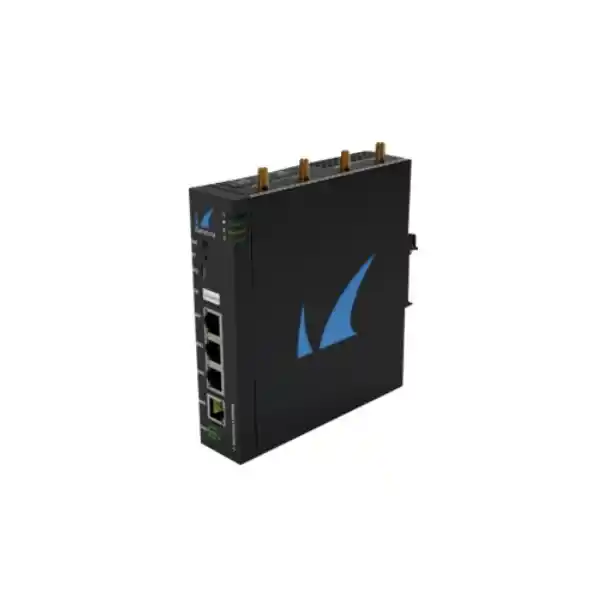
Barracuda Secure Connector SC2 Wi-Fi — Secure, Centrally Managed Branch Connectivity
The Barracuda Secure Connector SC2 Wi-Fi is built for organizations that need to connect many small or distributed sites to a centrally governed security architecture. Instead of treating every remote location as an independent firewall project, the SC2 provides a compact network edge that can establish protected connectivity, enforce branch-level policy, participate in centrally controlled routing, and provide local wired and Wi-Fi access in a form factor suitable for counters, cabinets, technical rooms and edge installations. For UAE organizations operating retail outlets, service desks, warehouses, clinics, temporary offices, branch facilities or machine networks, the SC2 can be used as a repeatable building block for standardized site rollout.
Choose the SC2 Wi-Fi configuration when a small branch needs three local Gigabit Ethernet LAN connections plus integrated 2.4GHz Wi-Fi, secure VPN connectivity and centrally controlled firewall/SD-WAN behavior. Barracuda documentation identifies Wi-Fi support on SC21 and SC25a SC2-family variants; confirm the exact hardware code and licensing against the final bill of materials before ordering.
What the Barracuda Secure Connector SC2 Wi-Fi is designed to do
The SC2 is not simply a small wireless router. Its role is to extend a centrally administered Barracuda security and networking environment to remote sites where a traditional full-featured branch firewall may be larger, more complex or more expensive than necessary. The platform is designed around secure connectivity, policy control, automation and consistent operations. A remote site can use its WAN port for upstream Internet access, its three switched LAN interfaces for local devices or an access switch, and its integrated Wi-Fi capability for nearby wireless endpoints. The secure connector then ties the site into a broader architecture managed through Barracuda components such as an Access Controller and centralized firewall administration.
This approach is particularly useful when the operational problem is scale. One branch is easy to configure manually. Fifty, one hundred or several hundred small sites are different: address plans must remain consistent, firewall rules must be version controlled, VPN establishment must be reliable, templates must be reusable and troubleshooting information must reach a central team. Barracuda positions Secure Connector for zero-touch deployment and centrally administered configurations, helping the networking team define repeatable standards instead of creating a custom branch design for every address.
In a UAE deployment, that can translate into faster rollouts across Dubai, Abu Dhabi, Sharjah and other emirates, provided the overall design is sized correctly for application traffic, Internet circuits, cloud usage and operational resilience. FourTeck can assist with the network design, product selection and deployment scope through the Firewall Dubai practice and wider FourTeck UAE infrastructure portfolio.
SC2 Wi-Fi hardware at a glance
| Area | SC2 Wi-Fi capability | Deployment meaning |
|---|---|---|
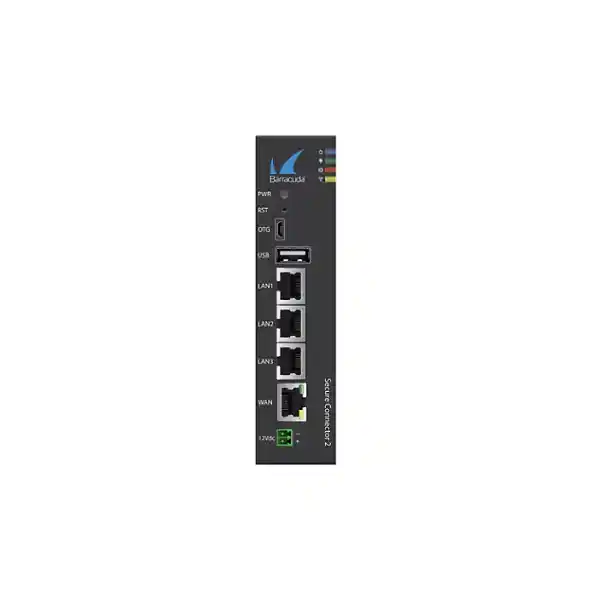
| WAN | 1 × 10/100/1000 Mbps RJ45; PoE+ recipient capability documented for SC2 | Connect to ISP handoff, upstream router or Ethernet service while simplifying power in suitable designs. |
| LAN | 3 × 1GbE switched RJ45 | Directly attach a small number of devices or uplink a downstream access switch. |
| Wi-Fi | Integrated IEEE 802.11b/g/n, 2.4GHz, AP or client mode on Wi-Fi variants | Useful for low-density branch wireless access or wireless uplink/client scenarios where 2.4GHz coverage is appropriate. |
| USB | USB 2.0 plus Micro-USB OTG on SC2 Revision A documentation | Supports appliance service and compatible accessory workflows according to Barracuda configuration guidance. |
| Reference firewall throughput | 300 Mbps UDP | A laboratory reference, not a promise of application throughput; real sizing must account for VPN, inspection and traffic mix. |
| Reference VPN throughput | 30 Mbps using the documented AES-128/SHA test profile | Critical for sites whose important traffic is primarily encrypted back to a hub or Access Controller. |
| Reference Wi-Fi throughput | 80 Mbps UDP for supported Wi-Fi models | Appropriate for modest branch wireless use; not a substitute for enterprise Wi-Fi 6/6E infrastructure where high client density is required. |
| Form factor | Compact metal appliance; wall/DIN-rail support documented for SC2 family | Suitable for branch cabinets and space-constrained edge locations when environmental limits are respected. |
Technical values above reflect Barracuda SC2 family documentation and published Secure Connector datasheet references. Exact interfaces, radio, modem capability, power accessories and regional hardware revision must be validated against the ordered SC2 variant.
Architecture: a small edge with centralized control
The most important design concept behind Secure Connector is separation between the remote edge and the central policy plane. The remote appliance provides local packet forwarding, VPN connectivity and branch services, while policy and lifecycle administration can be driven centrally. This matters because the operational cost of a branch network is rarely determined by the cost of its Ethernet ports. It is determined by how much engineer time is consumed during rollout, change control, fault isolation, security updates and policy consistency.
A centrally defined approach makes the SC2 suitable for a repeatable branch template. A network team can define addressing conventions, VLAN use, allowed application flows, routing logic, DNS behavior, DHCP scope strategy, traffic prioritization and secure tunnel policies in a controlled model. A new branch can then be installed with minimal local networking expertise compared with a bespoke firewall build. Zero-touch principles are valuable for multi-site organizations because the person physically installing the device does not need to be the person designing the security policy.
Barracuda documentation lists centralized administration for large numbers of Secure Connectors, template and repository-based management, REST/API integration, multi-administrator workflows and rule-control capabilities. This enables an enterprise or managed service provider to operate remote appliances as a fleet. The practical value is consistency: when policy changes, the architecture should make it possible to apply approved standards across appropriate groups of branches instead of logging in to every individual site and editing it manually.
For organizations integrating broader cloud, endpoint, server and networking projects, FourTeck can coordinate the branch-security work with the FourTeck IT Services UAE team. This helps avoid a common deployment mistake: treating the secure edge as an isolated appliance instead of designing it together with WAN circuits, addressing, identity, server access, monitoring and change-management processes.
Integrated 2.4GHz Wi-Fi: where it fits and where it does not
Access-point mode
In access-point mode, a Wi-Fi-capable SC2 can provide local 2.4GHz wireless connectivity for a modest number of nearby devices. This may be useful for service terminals, handheld devices, isolated management laptops, sensors or lightweight office access where the site does not justify a separate enterprise wireless platform. Because the radio is 802.11b/g/n on 2.4GHz, the design should prioritize coverage and compatibility rather than very high throughput or dense-user capacity.
Client mode
Client mode allows the Secure Connector to associate with an upstream wireless network in supported configurations. This can be helpful in constrained locations where a wired handoff is unavailable, during temporary deployments, or where the upstream facility provides an approved Wi-Fi service. The design must still account for RF quality, security requirements and the fact that a wireless uplink introduces shared-medium behavior and interference risks that are not present on dedicated Ethernet.
The integrated radio should not be confused with a current-generation high-density enterprise access point. Wi-Fi 4 / 802.11n at 2.4GHz can be effective for narrow branch use, but it operates in a congested band shared by neighboring networks, Bluetooth devices and many other sources of interference. If the branch has dozens of concurrent users, voice-over-Wi-Fi, high-resolution video, large cloud file synchronization, or latency-sensitive applications, a separate enterprise WLAN design may be preferable. In that design the SC2 remains the secure network edge while dedicated access points provide the RF layer.
The published 80 Mbps UDP Wi-Fi reference should therefore be read as a platform benchmark rather than a guaranteed user speed. Real wireless throughput depends on channel width, RF noise, signal-to-noise ratio, client capabilities, retransmissions, distance, wall materials, antenna placement and airtime contention. In UAE offices with reinforced concrete, metal partitions, elevators, machinery or dense neighboring Wi-Fi deployments, a basic spectrum survey is often more valuable than relying on an open-area range assumption.
Security functions at the branch edge
Barracuda Secure Connector works as part of a firewall architecture rather than as a simple NAT gateway. Published capabilities include policy-based firewalling for TCP and UDP traffic, stateful packet inspection, network address translation, port address translation, spoofing and flooding protections, packet anomaly defenses and centrally controlled rule sets. This gives the network team a way to prevent a small branch from becoming a flat, uncontrolled extension of the corporate network.
A practical branch policy usually begins with segmentation. Point-of-sale terminals, employee devices, voice endpoints, building systems, guest equipment and management interfaces should not automatically share unrestricted Layer-3 access. The SC2 platform supports 802.1Q VLANs, allowing a downstream managed switch or appropriate topology to carry logically separated networks. Policies can then define which zones may reach corporate applications, Internet destinations, DNS services, update repositories or management networks.
Barracuda also documents intrusion-detection and prevention functions, automatic signature updates, advanced anti-evasion techniques, DNS reputation filtering, botnet/spyware protection and advanced threat protection capabilities within the wider Secure Connector/CloudGen architecture. The exact effective service set at a given branch depends on the deployed architecture, licenses and where inspection is performed. Procurement should therefore map required security outcomes to the Access Controller, firewall service and subscription design rather than assuming every feature is executed locally on the compact appliance.
The strongest deployment pattern is to define allowed business flows first and then build policy around them. For example, a retail branch may need DNS and NTP to controlled sources, HTTPS to specific SaaS services, encrypted access to ERP resources, payment traffic to authorized endpoints, management access from a restricted operations network and limited software-update paths. Everything else can be denied or routed through the appropriate inspection path. This model reduces attack surface and makes incident response easier because expected communication patterns are known in advance.
Self-healing SD-WAN and application-aware path control
Barracuda lists Self-Healing SD-WAN functions as part of the Secure Connector architecture, including dynamic bandwidth detection, application-aware traffic routing, traffic shaping, quality of service and built-in data-deduplication features. The value of SD-WAN at a small branch is not merely the presence of a VPN tunnel. It is the ability to make routing decisions based on the condition and role of available paths while maintaining centrally defined policy.
Consider a branch that accesses Microsoft 365, a cloud CRM platform and an internal ERP system. Sending every Internet-bound packet through a distant headquarters may create unnecessary latency and consume hub bandwidth. A policy-driven architecture can distinguish traffic categories, select suitable egress paths and maintain secure connectivity for private applications. Where multiple WAN options or compatible backup connectivity are used, dynamic path logic can improve resilience by reacting to degraded links rather than treating every circuit as equivalent.
For sizing, however, the encrypted-path requirement is decisive. The published SC2 VPN reference is 30 Mbps under the stated AES-128/SHA test condition. A branch with a 500 Mbps Internet circuit does not automatically obtain 500 Mbps of encrypted tunnel capacity through an SC2. If the business expects high-volume backup, file replication, VDI, surveillance upload, software distribution or private-cloud access across a tunnel, the network must be sized according to the protected traffic profile rather than the ISP’s headline line rate.
A useful capacity plan separates local-breakout traffic from tunnelled traffic, estimates typical and peak rates for each business application, adds growth and failure-mode headroom, and checks whether simultaneous usage exceeds the appliance’s realistic forwarding and encryption envelope. This method prevents two opposite mistakes: overspending on a branch platform far larger than necessary, or deploying a compact device into a site whose encrypted workload belongs on a higher-throughput firewall.
Networking services: IPv4, IPv6, VLANs, DHCP and routing
The Secure Connector platform supports core services expected at an enterprise network edge, including IPv4 and IPv6, DHCP server and relay functions, 802.1Q VLANs, DNS cache services and routing capabilities associated with the Barracuda architecture. Barracuda documentation also references dynamic routing protocols including BGP, OSPF and RIP in the Secure Connector/CloudGen environment. The key design question is not whether a protocol exists, but where that protocol should terminate and how much routing complexity belongs at a small branch.
For many SC2 deployments, simplicity is an advantage. A branch can use a small number of well-defined VLANs with predictable address ranges. Local DHCP can provide endpoint addressing where appropriate, while DHCP relay can forward requests to centralized services in designs that require central control. DNS caching can reduce repeated lookups and improve local responsiveness, but enterprise DNS policy should still account for split-horizon records, secure resolvers and internal name resolution across VPN paths.
VLAN design should correspond to security trust boundaries rather than organizational labels alone. A branch might implement separate segments for corporate workstations, payment devices, voice, cameras, building management, guest/contractor access and network management. Not every site requires all of these segments, but the template should leave room for controlled expansion. Each segment should have an explicit default policy, a documented DHCP scope, a gateway ownership model and a defined path to the resources it actually needs.
Dynamic routing becomes more relevant when the branch is part of a larger routed topology, carries multiple internal prefixes or must exchange reachability with data-center/cloud infrastructure. In those situations, protocol timers, route filtering, prefix summarization and failure convergence should be designed centrally. A compact edge should not become a dumping ground for unnecessary route complexity. Clean branch summarization and template-based routing reduce troubleshooting effort and help prevent accidental route leaks.
VPN design and secure access-controller integration
Secure Connector deployments rely on an Access Controller architecture for secure branch connectivity. Barracuda documentation states that an Access Controller license is required and that Secure Connector Energize Updates pool licensing is assigned according to the number of connector instances. This is an important procurement detail: buying the hardware alone is not the complete solution. A usable deployment needs the correct central controller capacity, licensing and operational design.
The hub or Access Controller should be sized for the aggregate number of branch tunnels and the total traffic that may converge on it. An individual SC2 may be modest in bandwidth, but hundreds of branches can create a substantial aggregate demand. The controller tier, compute allocation, HA design and upstream network capacity need to accommodate normal traffic plus failure scenarios. If traffic normally exits locally but switches to centralized inspection during an incident, the failure-mode aggregate can be far larger than the steady-state average.
Cryptographic policy should be standardized and documented. The published benchmark references AES-128/SHA, but the production design must use the cryptographic parameters approved by the organization’s current security policy and supported software release. Throughput may differ with other algorithms, packet sizes and security services. Performance testing should use representative application flows rather than a single synthetic transfer.
Operationally, tunnel health must be observable. Teams should monitor reachability, latency, loss, reconnect frequency, WAN interface state and application symptoms, not merely whether a VPN LED is green. The SC2 hardware includes visual status indications for power, VPN and WAN connectivity, which can help a field technician perform first-level checks. Central telemetry, however, remains essential for identifying recurrent circuit issues and for separating ISP faults from local switching, DNS, policy or application problems.
Performance sizing: how to decide whether SC2 is the right appliance
A branch firewall should be selected from the workload inward, not from the product name outward. The SC2 family carries published reference numbers of approximately 300 Mbps UDP firewall throughput, 30 Mbps VPN throughput using the specified AES-128/SHA benchmark, and 80 Mbps UDP Wi-Fi throughput on supported Wi-Fi variants. Those numbers are useful boundaries, but they do not describe every production workload. Small packets, concurrent sessions, encryption, security inspection, routing features, logging and RF conditions all change effective performance.
Start by measuring or estimating four traffic classes: Internet breakout, encrypted private traffic, local inter-VLAN traffic and wireless traffic. Internet breakout includes SaaS, web browsing, software updates and cloud services. Encrypted private traffic includes ERP, file services, private cloud, data-center applications and centralized infrastructure accessed over VPN. Inter-VLAN traffic may traverse policy boundaries locally. Wireless traffic is additionally constrained by RF airtime. The highest of these is not enough; the design must consider concurrency between them.
Then identify peak behavior. A five-person sales office may use only a few megabits most of the day yet trigger large cloud synchronization after employees arrive. A retail store may have steady low usage but burst during software rollout. A warehouse may send high-resolution images periodically. A CCTV topology may be low on user traffic but very high on continuous upstream video. These patterns determine whether a 30 Mbps encrypted reference ceiling is comfortable or restrictive.
Next account for growth and abnormal states. If a secondary branch suddenly becomes an operations center during a site outage, its traffic profile changes. If the primary Internet path fails and traffic moves to an alternate uplink, bandwidth and latency may shrink. If local breakout is disabled during a security incident, more traffic may traverse centralized inspection. Good sizing reserves headroom for these conditions rather than planning to run the edge at a benchmark limit all day.
Finally, confirm application sensitivity. Voice, VDI, remote desktop and transactional systems may require modest bandwidth but low loss and predictable latency. Backup and replication tolerate more latency but consume significant throughput. The design should apply QoS to protect interactive applications from bulk transfers. If the required encrypted throughput or session scale materially exceeds the SC2 profile, select a larger Barracuda edge platform rather than attempting to compensate with policy tuning.
Six deployment patterns where SC2 Wi-Fi can make sense
Retail branch
Connect POS, a management terminal and local peripherals on separated LAN/VLAN policies while providing limited wireless access for approved operational devices. Use a secure tunnel for private business systems and local breakout for approved SaaS where policy permits.
Kiosk or micro-branch
Deploy at small sites with only a handful of Ethernet and Wi-Fi endpoints. A compact edge reduces the physical footprint while central management keeps configuration aligned with larger locations.
Temporary project office
Use a standardized template to bring up a construction, event or project location rapidly. Wi-Fi client capability can be useful where the approved upstream medium is wireless, although a wired WAN remains preferable when available and stable.
Industrial edge
Segment controllers, sensors or machine networks and carry only required flows toward central systems. Barracuda documentation includes support for multiple industrial protocol families in its security capabilities, making architecture-level policy relevant to OT environments.
Remote service location
Secure service centers, clinics, ticketing offices or customer-service desks where a few endpoints need controlled corporate access. Central templates can reduce variation between sites maintained by different field teams.
Managed-service branch fleet
For an MSP, the value is operational repeatability. Multi-tenant and multi-administrator capabilities, API workflows and centralized management can support standardized onboarding, policy updates and monitoring across many customer sites.
Ports, switching and branch topology planning
The SC2 platform’s three switched Gigabit LAN ports are adequate for a very small branch but should be treated as an edge switch function, not as a replacement for a managed access switching layer where the endpoint count is higher. One port may connect directly to a workstation or appliance, another to a voice endpoint or controller, and another to an access switch. In a structured branch, a single trunk to a managed switch can carry multiple VLANs while keeping the secure connector physically simple.
Port planning should include failure isolation and documentation. Label every SC2 interface, record the upstream ISP handoff, define whether the WAN receives DHCP or static addressing, and document the LAN VLAN/native VLAN behavior. Where an access switch is used, match allowed VLAN lists on both sides of the trunk. A surprising number of branch outages arise from mismatched tagging rather than firewall failure.
The WAN interface is also a PoE recipient in the SC2 design, which can simplify cabling when a compatible power source is intentionally used. Barracuda cautions against operating the appliance simultaneously from the 12V DC supply and PoE as parallel power sources, and recommends disabling PoE if 12V DC is connected. That instruction should be included in the installation method statement so that field teams do not improvise dual-power arrangements.
If the site requires redundant LAN switching, multiple high-bandwidth uplinks, large numbers of physical segments or high-availability edge appliances, the topology may have outgrown the role of an SC2. The right response is not to add unmanaged switches until the diagram becomes opaque; it is to move to a branch platform and switching design that matches the availability requirement.
Zero-touch deployment and repeatable site activation
Zero-touch deployment is most effective when the organization has completed the design work before the appliance reaches the branch. The device should have an assigned site identity, intended management object, network template, addressing plan, approved WAN method and expected firmware/software baseline. Shipping a device to a branch before these details are prepared only moves configuration work from the office to the field.
A disciplined activation workflow starts with inventory. Record the appliance serial, model/revision, power accessories, site name, contact, intended WAN service and deployment group. Pre-stage the logical configuration centrally. Send a concise field instruction describing where to mount the appliance, which cable connects to WAN, which port connects to the local switch, and how to verify power/WAN/VPN status indicators. The field technician should not need to design VLANs or decide firewall policy.
After the appliance comes online, verify more than a basic ping. Confirm tunnel establishment, expected public IP or upstream route, DNS resolution, DHCP delivery, VLAN reachability, policy enforcement and application behavior. Test at least one allowed flow and one intentionally denied flow. If local breakout is configured, validate both Internet and private application paths. If Wi-Fi is enabled, test with a representative client from the intended service area rather than standing directly beside the appliance.
Finally, capture an acceptance record. A useful handover includes software version, policy revision, interface status, circuit information, assigned subnets, Wi-Fi mode, monitoring state, support contacts and any site-specific exceptions. This creates an operational baseline that makes future incident handling substantially faster.
Central operations, monitoring and automation
Distributed security is only effective when the operations team can see and control it. Barracuda’s published Secure Connector capabilities include SNMP and IPFIX support, centralized administration, REST API integration, JSON lifecycle automation API functions, template management and multi-administrator controls. These capabilities can be used to integrate branch operations with network monitoring, change workflows and asset management.
SNMP can provide infrastructure-level status to a network management system, while IPFIX can help teams understand traffic behavior and identify unexpected flows. Monitoring should focus on actionable indicators: WAN availability, tunnel state, packet loss, latency, bandwidth consumption, device resource health, repeated reconnects and unusual traffic changes. Alerting on every transient event creates noise; a better operations design correlates events and uses thresholds aligned with business impact.
API integration becomes valuable at fleet scale. Site provisioning can be tied to an internal service catalog, asset database or customer onboarding workflow. The purpose is not automation for its own sake. The purpose is to reduce manual drift and ensure that the approved configuration data used by the business is the same data used to instantiate the network. Where APIs are used, credentials should be least-privileged, stored securely and rotated according to policy.
Change management should distinguish global templates from site-specific exceptions. A global rule modification can affect many branches at once, so testing and staged deployment are essential. Conversely, excessive one-off exceptions destroy the value of centralization. Teams should periodically review deviations, retire temporary rules and bring sites back into standard templates whenever possible.
Industrial, IoT and machine-network considerations
Barracuda lists security awareness for industrial protocols and subprotocols such as S7/S7+, IEC 60870-5-104, IEC 61850, MODBUS and DNP3 within the Secure Connector/CloudGen feature set. That makes the platform relevant to certain operational-technology edge designs, but protocol recognition alone is not an OT security architecture. Industrial environments require careful segmentation, safety consideration, maintenance windows and an understanding of the devices being protected.
An OT branch should begin by identifying controllers, HMIs, gateways, engineering workstations and external dependencies. Document which devices initiate connections, what protocols they use, which destinations are essential and which flows should never occur. Then create narrowly scoped security policy. Broad any-to-any rules are especially risky in machine networks because legacy devices may have weak authentication and long service lives.
Physical environment also matters. Compact SC2 variants are fanless and support DIN-rail/wall mounting, but environmental ratings must be checked against the actual site. A Dubai warehouse cabinet without cooling can exceed indoor appliance limits even when the ambient office temperature appears acceptable. Heat generated inside an enclosure, direct sun exposure and restricted airflow can raise device temperature considerably. If the location is harsh, use an appropriately rated enclosure and select the hardware revision suitable for the operating range.
Remote maintenance should be designed before commissioning. If a controller vendor needs occasional access, define the secure workflow, permitted source identities, approved maintenance window and logging requirements. Do not create a permanent unrestricted VPN path solely because a contractor may need access later. The edge should help enforce operational boundaries, not bypass them.
Licensing and controller capacity
Secure Connector hardware requires the supporting Barracuda architecture and licenses to deliver its intended managed connectivity. Barracuda documentation specifically notes the need for an Access Controller license and a Secure Connector Energize Updates pool license. The pool size determines how many Secure Connectors are allowed to connect, and the pool must be aligned with the VPN connection capacity of the Access Controller model.
This means a procurement quote should not contain only the SC2 appliance line item. It should identify the central controller deployment, required license count, support term, subscription term, spare strategy and any optional components such as power supply or cellular-capable hardware variant. Where the organization already operates Barracuda CloudGen infrastructure, the existing controller capacity and license pool should be checked against the proposed branch expansion.
License planning should also consider growth. If twenty sites are planned now but another thirty are expected during the year, controller and pool capacity should be evaluated against the target fleet rather than the first purchase batch. Similarly, HA or disaster-recovery controller arrangements may affect licensing and capacity assumptions. The goal is to avoid a successful pilot that cannot scale cleanly when the rollout accelerates.
FourTeck can structure UAE procurement and deployment around the intended topology rather than quoting disconnected components. For organizations with projects spanning multiple regions, the FourTeck global site provides the broader company reference while the UAE team can coordinate local implementation scope.
Power, mounting and environmental planning for UAE sites
SC2 deployment often occurs in places that were not designed as data rooms. The edge may sit behind a counter, inside a wall cabinet, near machinery or in a small communications enclosure. Physical planning therefore deserves the same attention as logical configuration. Barracuda’s SC2 documentation lists compact dimensions around 37 × 140 × 150 mm for Revision A and a device weight around 0.55 kg. The small footprint is useful, but it can encourage installers to place the appliance wherever there is spare space. That is not always safe.
Power method should be decided in the design. SC2 supports external DC power and PoE on the WAN interface depending on model/revision. Barracuda warns not to operate 12V DC and PoE simultaneously as parallel power sources. If a separate PSU is required, confirm whether it is included in the ordered package; Barracuda documentation for SC2 Revision A notes that the power supply may need to be ordered separately. This should be clarified before field installation to prevent project delays.
For UAE environments, the most important environmental variable is heat. Air-conditioned offices are generally predictable, but warehouses, ceiling spaces, outdoor cabinets and near-window enclosures can experience much higher temperatures. Published SC2 family operating limits vary by model; compact variants in the datasheet show a lower temperature range than rugged SC30-series variants. Never assume that a compact SC2 can be installed outdoors simply because it is fanless or DIN-rail mountable.
Humidity, dust and airflow also matter. A fanless appliance avoids fan failure and dust intake through a fan, but heat still needs to leave the enclosure. Keep ventilation space around the chassis, avoid placing the device directly on heat-producing power supplies, and use a cabinet appropriate to the environment. Where the site is dusty, humid or industrial, confirm ingress and environmental requirements at the enclosure level.
Cable management should preserve serviceability. Leave enough bend radius for Ethernet and power leads, label both ends, and avoid routing antenna or data cables against high-current electrical runs where possible. If DIN-rail mounting is used, ensure the rail and cabinet arrangement allows an engineer to see status LEDs and remove the appliance without dismantling adjacent equipment.
UAE rollout methodology: from pilot to multi-site deployment
A successful UAE rollout should start with a controlled pilot that is representative of the wider estate. The easiest head-office lab is not always a useful pilot. Choose a site with the same ISP handoff, LAN device mix, application dependencies, Wi-Fi conditions and support model expected in production. If branches vary significantly, pilot one example from each major site class.
During design, create a standard branch profile. Define WAN addressing, DNS, NTP, VLAN numbers, subnet convention, DHCP behavior, private routes, local breakout policy, QoS classification, logging and management access. Decide whether the integrated Wi-Fi radio will be used and, if so, in AP or client mode. Document every intended deviation by site type. The result should be a template that can be explained on one architecture page rather than a long collection of exceptions.
The pilot should test application workflows from the user’s perspective. Open the ERP, place a VoIP call if voice traverses the edge, access SaaS, print, resolve internal DNS names, authenticate, transfer a representative file and run any critical point-of-sale or operational workflow. Then test resilience. Disconnect the WAN briefly, observe recovery, verify that the tunnel returns and confirm that applications recover within acceptable limits. Test a policy update and a rollback procedure.
After pilot acceptance, freeze the baseline and automate as much of the repetitive provisioning as practical. Maintain a site data sheet containing only variables such as site code, subnets, circuit details and Wi-Fi settings while keeping security logic in reusable templates. This reduces the risk that a branch deployed in Sharjah has materially different firewall logic from an equivalent branch in Dubai just because different engineers performed the installation.
Rollouts should proceed in manageable waves. Each wave should have an installation schedule, pre-check, remote support window, acceptance test and rollback path. A central dashboard should track branch state. Failed activations should be analyzed for root causes and the installation method updated before the next wave. This feedback loop turns deployment experience into a better template rather than repeatedly solving the same issue.
Application-aware policy and quality of service
Small branches commonly run a mixture of transactional applications and bandwidth-hungry background traffic. Without prioritization, a cloud backup or operating-system update can fill the WAN path and degrade voice, remote desktop or payment transactions. Barracuda’s application-aware routing and QoS capabilities are intended to let the network treat different traffic according to business importance.
The first step is classification. Identify real-time traffic such as voice; interactive traffic such as VDI, RDP and transaction systems; business-critical web/SaaS applications; normal browsing; and bulk/background traffic. Policy can then protect higher-priority classes during congestion. QoS cannot create bandwidth, so the design still needs adequate circuit capacity, but it can prevent a lower-priority transfer from consuming every available bit when the link becomes constrained.
Application-aware routing is also relevant when traffic can follow different paths. Private applications may need a tunnel to a data center while approved SaaS can break out locally. Security policy must remain aligned with routing policy: a path should not be selected solely for speed if it bypasses required inspection or identity controls. The architecture should explicitly state which applications may use which egress options.
Performance monitoring should validate the policy after deployment. Look for queue drops, latency during busy hours and unexpected applications dominating bandwidth. If users complain that the network is slow, aggregate utilization alone may not reveal the problem. A 20 Mbps link at 60 percent average utilization can still experience short bursts that harm voice. Fine-grained telemetry and flow records are therefore valuable for tuning.
Migration from legacy branch routers or firewalls
Replacing a legacy branch router with an SC2 should be treated as a network migration, not a box swap. Begin by collecting the existing configuration and observing actual traffic. Old devices often contain undocumented static routes, NAT rules, port forwards, DHCP reservations or temporary exceptions that became permanent. Some of those rules may be obsolete; others may be business-critical. Copying everything blindly preserves technical debt, while ignoring it can cause outages.
Create a migration matrix with the current subnet, default gateway, DHCP scope, DNS servers, VLAN IDs, static routes, VPN destinations, inbound services, outbound policy and local devices. For each item, decide whether it will be retained, redesigned or retired. This is an opportunity to simplify the branch. A ten-year-old configuration may contain services that no longer exist or security openings created for equipment that has been removed.
Plan the cutover around dependencies. If changing the gateway address, understand which endpoints have static configuration. If replacing DHCP, preserve required reservations. If the branch accesses a central ERP by IP allowlist, confirm the source address after migration. If local breakout changes the public IP seen by a SaaS provider, update allowlists before cutover. If voice systems depend on SIP behavior, test call registration and media paths.
Rollback should be mechanical. Keep the old device and cabling plan available until acceptance is complete. Document the exact physical reconnection and any ISP CPE steps required to restore service. Avoid making unrelated LAN changes during the same maintenance window unless they are necessary to the new design; fewer simultaneous changes make fault isolation easier.
After migration, monitor for several business cycles. Some applications run only at end of day, during scheduled reconciliation or weekly maintenance. A branch can appear healthy for hours and still fail a low-frequency but critical workflow. Acceptance should therefore include application owners where the site handles business-critical transactions.
Security hardening checklist for SC2 deployments
Segment user, IoT, payment, voice and management networks according to actual risk and required communication.
Allow administrative access only from approved management paths and named operator roles. Avoid exposing management interfaces to untrusted networks.
Define approved infrastructure services so branches use consistent resolvers and time sources needed for logging, certificates and troubleshooting.
Maintain an approved software baseline, staged update process and documented rollback path rather than leaving remote sites on inconsistent releases.
Centralize security and connectivity events at a level that supports investigation without overwhelming storage with unactionable noise.
Every temporary permit rule should have an owner, purpose and review date. Remove exceptions that are no longer needed.
Hardening is an operational process, not a one-time configuration. Device ownership, administrator roles, update cadence, rule review and incident response should be defined before large-scale deployment. A secure default template reduces risk, but the organization must continue to manage changes as applications and branch functions evolve.
Troubleshooting methodology for remote branches
Troubleshooting is faster when engineers follow the packet path in layers. Start with power and physical link. Confirm the appliance is powered, the WAN Ethernet link is established and the upstream service is active. Then verify addressing: WAN IP, gateway, DNS and any ISP-specific requirements. Next check whether the secure tunnel is established. Only after the transport path is healthy should the team investigate application policy.
If Internet access works but private applications fail, check tunnel routes, policy and name resolution. If a private application works by IP but not by hostname, focus on DNS rather than changing firewall rules. If one VLAN works and another does not, inspect tagging, gateway assignment, DHCP and inter-zone policy. If wired clients work but Wi-Fi clients do not, separate RF association issues from Layer-3 policy issues.
For intermittent problems, collect time-correlated data. A single successful ping does not disprove packet loss. Review WAN state changes, latency, link errors, IPFIX flows, application logs and tunnel events around the time users reported the issue. Ask for the exact timestamp and application action. Statements such as “the Internet was slow this morning” are hard to diagnose; “ERP save operations timed out between 10:22 and 10:28” can be correlated with network telemetry.
For Wi-Fi symptoms, inspect channel interference and client signal quality. A branch may have perfect WAN health while wireless endpoints retransmit heavily on a crowded 2.4GHz channel. Move the test client to Ethernet; if the problem disappears, investigate RF before changing SD-WAN policy. Likewise, test a representative site location rather than the equipment cabinet, because wireless performance beside the appliance says little about coverage behind walls.
Maintain a known-good configuration snapshot and a change log. If a problem begins immediately after a policy deployment, compare the active state with the last accepted baseline. Centralized templates are powerful, but that also means a configuration error can affect multiple sites quickly. Staged deployment and rapid rollback are core operational safeguards.
SC2 Wi-Fi versus a conventional branch firewall
The SC2 is strongest when the branch is small, standardized and centrally controlled. A conventional branch firewall may be preferable when the site requires substantially higher encrypted throughput, many local interfaces, advanced local services, large-scale user authentication, extensive direct Internet inspection, redundant appliances or more demanding wireless requirements. The correct product is determined by site role, not by physical size alone.
| Requirement | SC2 Wi-Fi fit | When to consider a larger edge |
|---|---|---|
| Small branch LAN | Strong fit with three local Gigabit switch ports | Many physical ports, redundant switching or complex local topology |
| Wireless | Low-density 2.4GHz 802.11n use | High density, Wi-Fi 6/6E, multiple APs or advanced WLAN features |
| VPN | Modest encrypted traffic within validated capacity | High-volume private traffic, replication, VDI or large file movement |
| Operations | Excellent where template-based central management is the priority | Highly bespoke sites with many local features and exceptions |
| Resilience | Suitable for standard branch resilience designs | Appliance HA, multiple high-speed WAN links or zero-downtime local edge requirement |
Detailed procurement guidance for Dubai and the UAE
A correct SC2 quote starts with the exact variant. Barracuda’s SC2 family includes models with different combinations of Wi-Fi and cellular capability. Wi-Fi is documented on SC21 and SC25a variants, while cellular capability differs across the family. If the requirement is simply “SC2 Wi-Fi,” the bill of materials should explicitly state whether the project requires Wi-Fi only or Wi-Fi plus cellular. This prevents the purchasing team from comparing unlike SKUs.
Next confirm the power method and accessories. If PoE will power the unit, validate the upstream injector or switch capability and cabling. If DC power will be used, include the correct approved power supply if it is not bundled. Do not plan to use DC and PoE simultaneously as redundant feeds, because Barracuda documentation specifically warns against that arrangement on SC2.
Licensing should be quoted with the same precision. State the number of Secure Connector instances, controller capacity, subscription term, support coverage and any required central components. For an existing Barracuda customer, document whether the current Access Controller and license pool have capacity for the new sites. For a new deployment, include controller design in the scope so the branch devices do not arrive before the central environment is ready.
Support expectations should also be explicit. Decide whether FourTeck is supplying hardware only, staging devices, configuring the central policy, installing on site, performing remote activation, integrating monitoring, or providing ongoing support. Multi-site projects benefit from a clear RACI matrix stating who owns ISP coordination, cabling, LAN switching, firewall policy, application testing and final acceptance.
For related infrastructure planning and local sourcing, customers can review Server Dubai for data-center and server-side project context where branch connectivity is part of a wider compute modernization. Keeping branch, firewall, server and support responsibilities coordinated reduces integration gaps during go-live.
Designing for cloud applications and local Internet breakout
Modern branches frequently consume more cloud traffic than private data-center traffic. Microsoft 365, CRM, ticketing, collaboration, cloud storage and browser-based line-of-business platforms may all be Internet-native. Sending those flows through a headquarters hub can add latency and increase central bandwidth requirements. A secure SD-WAN design can permit local breakout for approved applications while retaining protected tunnels for internal resources.
Local breakout should be controlled, not treated as a shortcut around security. Define which application categories or destinations may exit directly, which traffic requires central inspection, and how DNS security, threat controls and logging apply. If branch users access corporate SaaS directly, identity controls and endpoint security become even more important because the traffic may no longer pass through a traditional headquarters perimeter.
The routing design should also consider SaaS geolocation and public IP allowlisting. Some cloud services restrict access by known public addresses. If branches break out through local ISP addresses, those IPs may need to be registered or the service architecture adjusted. Dynamic ISP addresses can complicate this model. Application owners should be involved before changing egress behavior.
For cloud-heavy branches, the SC2’s firewall throughput may be less restrictive than its VPN benchmark because only private traffic traverses the encrypted tunnel. That is why traffic classification is essential to sizing. A branch with 150 Mbps of Internet usage but only 10 Mbps of private application traffic may fit differently from a branch with 40 Mbps total usage where nearly all 40 Mbps must be encrypted to a central data center.
Designing for voice, POS, cameras and specialized endpoints
Voice endpoints require predictable latency and packet delivery. Barracuda documentation references VoIP protocol awareness including H.323, SIP and SCCP within the broader platform feature set. In practice, the network should place voice traffic in a dedicated VLAN where appropriate, prioritize its packets, and avoid unnecessary hairpin routing. If phones obtain configuration by DHCP options or need specific DNS records, those dependencies should be incorporated into the branch template.
Point-of-sale systems are often low bandwidth but high business impact. Their network policy should be tightly scoped. POS devices normally need specific payment, update, management and business-system destinations, not unrestricted lateral access to employee networks. Where payment compliance requirements apply, segmentation and logging must be designed with the organization’s compliance team. The secure edge is one control in a larger process that includes endpoint hardening, application controls and operational procedures.
Cameras require a different capacity model. A small number of IP cameras can generate continuous traffic far above typical office applications, especially if video is uploaded to a remote recorder or cloud platform. Multiply each stream’s bitrate by the number of cameras and include peak/overhead. If that video must traverse the VPN, compare the aggregate against the SC2 encrypted throughput budget. A branch firewall selected for user traffic may be undersized for surveillance transport.
IoT and building systems should be placed on restricted segments. Many such endpoints have limited update mechanisms, long lifecycles or weak default security. Deny lateral access by default and permit only the management servers, cloud endpoints or local controllers they require. Flow visibility is useful for identifying devices that begin communicating with unexpected destinations.
What “Wi-Fi” in the SC2 product name should mean in a quotation
Because the SC2 family has multiple hardware combinations, a buyer should not rely on the phrase “SC2 Wi-Fi” alone as a manufacturer SKU. Barracuda documentation shows Wi-Fi on SC21 and SC25a configurations, with SC25a also belonging to the cellular-capable portion of the family. A FourTeck quotation should state the precise Barracuda part number, hardware revision and radio/cellular features being supplied.
If the requirement is a branch with wired WAN and integrated Wi-Fi only, the design can focus on the Wi-Fi-capable non-cellular configuration. If the site also requires an embedded LTE path, then the cellular-capable Wi-Fi variant may be more appropriate, subject to regional modem compatibility, carrier bands, SIM requirements and approved part availability. The product name on this page is intentionally descriptive rather than a substitute for the final manufacturer BOM.
This distinction protects the project from a common procurement failure: comparing two quotes that both say “SC2” but include different models, subscriptions and accessories. Technical evaluation should compare complete solutions line by line—hardware revision, Wi-Fi, cellular, power supply, controller licensing, subscriptions, support and services.
Operational lifecycle: maintainability after the installation
The value of a standardized branch platform continues after deployment. Every site should enter the organization’s asset register with serial number, model/revision, location, assigned configuration object, support entitlement and replacement status. If an appliance fails, the operations team should be able to identify a spare, associate it with the site configuration and restore service without reconstructing the design from old emails.
Firmware and software updates should follow a staged ring model. A small lab group can validate new releases, followed by non-critical pilot sites, then wider production waves. The process should include pre-change health verification and post-change application tests. Remote branches often have limited local IT staff, so avoiding preventable update incidents is more important than applying every change simultaneously.
Configuration backups and version history should support rapid rollback. Central management simplifies this, but human process remains important: every major policy change should have an owner, reason, implementation time and validation result. When a branch issue appears, the first operational question should be whether anything changed in the network, application, ISP or site environment around the time of the incident.
Capacity should be reviewed periodically. A site originally designed for five users may grow to twenty, add cameras or adopt cloud backup. The SC2 may still function, but its performance margin can shrink. Monitoring real traffic helps identify branches that should migrate to a larger edge before users experience persistent congestion.
Frequently asked technical questions
Is the Barracuda SC2 Wi-Fi a Wi-Fi 6 access point?
No. Barracuda documentation for Wi-Fi-capable SC2 models specifies integrated IEEE 802.11b/g/n operation in the 2.4GHz band. It is intended as integrated branch connectivity, not as a replacement for a modern high-density enterprise WLAN where Wi-Fi 6/6E or multiple radios/access points are required.
How many Ethernet ports does SC2 provide?
SC2 documentation lists one 1GbE WAN RJ45 and three 1GbE switched LAN RJ45 interfaces. The WAN interface is also documented as a PoE recipient. An access switch can be connected if the branch needs more endpoint ports.
What is the SC2 firewall throughput?
Barracuda’s Secure Connector datasheet lists 300 Mbps UDP firewall reference throughput for SC2 family models. Production performance depends on packet profile, enabled services and deployment topology, so use the figure as a sizing reference rather than a guaranteed application rate.
What is the VPN throughput?
The published reference is 30 Mbps using an AES-128/SHA test profile. If a site expects large encrypted transfers, VDI, video or replication over the tunnel, capacity should be modelled carefully and a larger platform selected when required.
Can SC2 Wi-Fi operate as an access point and a client?
Barracuda documents Wi-Fi capability as AP or client mode on supported SC2 models. The intended mode should be defined in the site template and validated against the deployment’s radio and security requirements.
Does the SC2 support VLANs?
Yes. Barracuda lists IEEE 802.1Q VLAN support in the Secure Connector architecture. VLANs are useful for segmenting employee, voice, POS, IoT, guest and management traffic while using a compact physical edge.
Can the SC2 provide DHCP?
Barracuda lists DHCP server and relay functions. The design can therefore use local scopes for simple branches or relay requests to centralized services where enterprise policy requires it.
Is a power supply included?
Barracuda’s SC2 Revision A documentation notes that the power supply is not included in the packaging and may need to be ordered separately. The exact contents of a FourTeck quotation should therefore state the PSU/accessory position explicitly.
Can I use PoE and the DC power adapter together for redundancy?
Barracuda warns not to operate the SC2 simultaneously with 12V DC and PoE as parallel power sources and recommends disabling PoE when 12V DC is connected. Design the power method accordingly.
Does SC2 require central licensing?
Yes. Barracuda documentation states that the Secure Connector and Access Controller deployment requires an Access Controller license plus a Secure Connector Energize Updates pool license sized to the number of connector instances.
Can the SC2 be used in industrial networks?
It can participate in segmented industrial/IoT edge architectures, and Barracuda documents support for multiple industrial protocols within the platform’s inspection capabilities. Environmental limits, safety requirements, traffic determinism and OT change procedures must still be evaluated for the specific facility.
Is SC2 suitable for a large office?
It is primarily suited to small distributed sites and edge use. Large offices with high VPN throughput, dense wireless usage, multiple WAN services or complex segmentation may require a larger Barracuda firewall and dedicated WLAN/access switching.
A deeper look at design limits and engineering trade-offs
Compact appliances are valuable because they constrain complexity, but those constraints must be understood. The three-port LAN switch, single physical WAN interface and 2.4GHz radio define a clear target: small sites with controlled requirements. If the design begins accumulating multiple external switches, separate wireless bridges, unusual routing workarounds and heavy encrypted traffic, the branch may be signaling that it needs a larger integrated platform.
The SC2 should therefore be evaluated as one component in a system. The ISP circuit determines raw WAN availability. The access switch determines endpoint port density and PoE to downstream devices. The Secure Connector determines branch policy and tunnel behavior. The Access Controller and central firewall architecture determine broader control, aggregation and security services. Monitoring determines how quickly faults are detected. Support processes determine how quickly faults are resolved. No single appliance compensates for weaknesses in all the other layers.
This systems view is especially important for price comparisons. A cheaper edge device may require more manual administration. A more expensive branch firewall may be unnecessary if centralization removes the need for local complexity. The appropriate economic comparison should include deployment labor, central management, subscriptions, support, travel, failure recovery and expected lifecycle—not only the unit price of the appliance.
Security architecture also involves trade-offs between local and centralized inspection. Centralizing inspection can simplify policy governance but consumes encrypted WAN bandwidth and may add latency. Local breakout improves cloud performance but requires appropriate branch-side controls and visibility. Hybrid designs can optimize both, provided the routing and security rules are explicit and testable.
For this reason, FourTeck’s recommended starting point for an SC2 Wi-Fi project is a traffic and topology worksheet, not a product quantity. Once the number of branches, user/device counts, applications, circuit speeds, private traffic rates, Wi-Fi expectations and resilience requirements are known, the correct model mix and controller capacity become far easier to justify.
Suggested reference topology for a small UAE branch
Ethernet WAN handoff
Policy, VPN, routing, branch Wi-Fi
VLAN trunk / local switch
Users, POS, voice, IoT
In a simple design, the ISP terminates on the SC2 WAN interface. The SC2 provides the default gateway for branch VLANs or connects to a managed switch using the chosen tagging design. Private business traffic enters the secure tunnel toward the centrally managed Barracuda environment, while approved Internet traffic can follow the defined local or centralized route. The integrated Wi-Fi radio provides a separate access method for selected local devices if the coverage and capacity requirement is modest.
For a very small office, endpoints may connect directly to the three LAN switch ports. For most standardized commercial deployments, however, a downstream managed switch gives better flexibility, more port capacity and clearer VLAN control. If phones or access points need PoE, use a suitable access switch; the SC2 LAN ports should not be assumed to provide PoE output.
The diagram should be expanded with actual VLAN numbers, IP subnets, DHCP source, DNS servers, route policy and security zones before implementation. A logical diagram that only shows boxes without address and trust boundaries is insufficient for operational handover.
Acceptance testing after installation
Every SC2 site should pass the same acceptance checklist before it is considered production-ready. Begin with inventory: correct serial, correct hardware variant, correct site assignment and expected power method. Verify WAN speed/duplex negotiation and public/upstream addressing. Confirm the VPN state and the routes expected through it. Check LAN interface state and VLAN tags.
Test addressing from at least one endpoint in every important VLAN. Confirm DHCP lease content, DNS resolution, default gateway and reachability to approved destinations. Validate policy by testing a prohibited cross-zone connection as well as allowed business traffic. This confirms that segmentation is actually enforced rather than merely documented.
For Wi-Fi, verify association, address assignment, DNS, intended Internet/private access and signal quality at normal user positions. Do not accept wireless operation solely because a technician can connect next to the appliance. If the device will operate in client mode, test stability over the expected upstream WLAN and observe behavior after an access-point restart.
Measure application performance, not only speed-test results. A speed test may use local Internet breakout while the business application travels through the VPN. Test the actual ERP, POS, voice, file transfer or cloud workflow. Record latency and throughput where relevant. If a branch has a known peak workload, simulate or observe it before declaring the design complete.
Finally, test recovery. Reboot the SC2 during the maintenance window, confirm that it returns to service and that central management sees the correct status. Where the design includes secondary connectivity, fail the primary path and observe route transition. Acceptance evidence should be stored with the site record.
Why organizations choose a centrally managed secure connector model
The central value proposition is operational consistency. A distributed enterprise may have hundreds of locations that each need only a modest amount of bandwidth, but every location still represents a potential security boundary. Traditional standalone routers solve reachability but often create configuration drift. Large firewalls at every location can provide extensive features but may increase hardware cost and operational complexity. A secure connector model occupies the middle ground: a small branch edge governed by centralized security and networking policy.
This is attractive to retail, franchise, logistics, healthcare, service and industrial organizations because site openings and closures are frequent. A standardized edge can be associated with a template, deployed, monitored and eventually repurposed using repeatable processes. The network becomes a service delivered to the branch rather than a collection of individually engineered boxes.
Centralization also improves auditability. Policy changes can follow common administrative controls, and the organization can maintain clearer records of which branch groups receive which rule sets. API integration allows network lifecycle tasks to align with other operational systems. When a site is decommissioned, its connectivity and policy objects can be retired through a defined workflow instead of remaining forgotten on a VPN concentrator.
The model is not automatically simpler in every environment. It depends on disciplined templates, controller capacity, reliable monitoring and a well-defined branch architecture. Organizations with highly diverse sites may need several templates or a mix of SC2 and larger appliances. The objective is standardization where requirements are truly similar, not forced uniformity.
Planning a mixed estate of SC2 and larger Barracuda appliances
Many enterprises do not have one branch type. A micro-branch may have three employees and a payment terminal, while a regional office has one hundred users, server workloads, multiple ISP links and high VPN traffic. Standardization does not mean deploying the same hardware everywhere. It means defining a small number of approved site classes with clear sizing thresholds.
An example classification might include Micro, Small, Regional and Critical. Micro sites could use SC2 Wi-Fi where the interface and throughput profile is sufficient. Small sites might use a larger secure edge when encrypted traffic or port requirements increase. Regional offices could use full CloudGen Firewall appliances with more interfaces and performance. Critical sites may add high availability and diverse WAN circuits. All classes can still follow common security principles and centralized governance.
Define triggers for moving a site to the next class: encrypted traffic above a threshold, more than a specified number of VLANs, requirement for appliance HA, sustained WAN use beyond safe headroom, large wireless client populations, local server services or multiple high-speed WANs. Quantitative triggers prevent model selection from becoming subjective.
This tiered approach also simplifies procurement and spares. The organization can stock a limited set of approved hardware configurations rather than a unique model for every site. Documentation and technician training become easier, and capacity upgrades follow a known path.
Data collection before FourTeck sizes your SC2 Wi-Fi deployment
The fastest way to obtain an accurate quotation is to provide network requirements rather than only a device quantity. FourTeck can map those requirements to the correct SC2 variant, central licensing and implementation scope. For each branch type, provide the expected number of wired endpoints, Wi-Fi endpoints, VLANs, Internet circuit speed, estimated private/VPN traffic, critical applications and any cellular backup requirement.
Also identify current firewall/router models and whether the project is a new deployment or replacement. For migrations, provide existing subnet and route information. If the branch uses static public IPs, note the ISP details. If SaaS platforms use IP allowlists, list those dependencies. If the site has payment, voice, video or industrial equipment, include it because those workloads influence segmentation and bandwidth planning.
For Wi-Fi, state what the integrated radio is expected to support. One handheld terminal is very different from thirty office laptops. Describe the approximate floor area, wall construction, neighboring Wi-Fi density and whether users need roaming between multiple coverage zones. If requirements exceed a simple 2.4GHz integrated radio, FourTeck can keep the SC2 as the secure edge and design dedicated wireless access separately.
Finally, define service expectations: supply only, remote configuration, on-site installation, centralized controller work, monitoring integration, documentation, training or ongoing support. This avoids comparing a bare-hardware quote against a fully implemented solution.
Engineering notes on Wi-Fi placement and RF behavior
An integrated radio follows the physical location of the secure connector. That is convenient when the appliance can be mounted centrally in the service area, but networking equipment is often placed where cabling and power are easiest—inside a metal cabinet, under a counter or in a back room. Those locations may be poor for radio propagation. If Wi-Fi is an important part of the design, physical placement must satisfy both network-cabling and RF requirements.
The 2.4GHz band penetrates walls better than higher-frequency Wi-Fi in many situations, but it has fewer non-overlapping channels and more interference. Nearby access points, Bluetooth devices, cordless equipment and consumer hotspots can all occupy airtime. Channel selection and transmit behavior should be reviewed in context. A radio can show strong signal strength but still deliver poor throughput if the channel is busy.
For predictable business Wi-Fi, test signal and application performance in the actual operating area. Measure from the service counter, office desk, handheld scanning area or machine location. If the site needs broad coverage, roaming, guest services or many concurrent clients, use dedicated access points with a proper RF plan. Keeping WLAN and WAN-edge functions separate can improve placement flexibility because the firewall stays near cabling while APs are installed where coverage requires them.
When SC2 Wi-Fi operates as a client rather than an AP, the upstream WLAN becomes part of the WAN dependency chain. Document its SSID/security settings, coverage, support owner and change process. An upstream Wi-Fi password change or access-point replacement can otherwise appear to the branch team as a firewall outage.
Decision recap: is Barracuda Secure Connector SC2 Wi-Fi right for your branch?
The SC2 Wi-Fi is a strong candidate when you need a compact, centrally managed security edge for a small branch with modest encrypted throughput, a small wired LAN, and optional integrated 2.4GHz wireless access. Its one Gigabit WAN and three switched Gigabit LAN ports provide a simple physical topology, while Secure Connector architecture brings centrally controlled firewall policy, VPN connectivity, SD-WAN behavior, VLAN support, DHCP functions, monitoring and automation capabilities.
The key limits should remain visible in the decision. The Wi-Fi radio is 802.11b/g/n on 2.4GHz, not a modern high-density WLAN platform. The published VPN reference is 30 Mbps under Barracuda’s stated test profile, so branches with substantial tunnelled traffic need careful sizing. The exact SC2 Wi-Fi hardware variant must be confirmed because the family contains different Wi-Fi and cellular combinations. Controller and pool licensing are part of the solution, and power accessories should be verified in the BOM.
Good fit
Small branch, kiosk, service outlet, low-density retail, remote office, OT edge or managed-service site; modest VPN demand; need for central templates; limited local ports; 2.4GHz Wi-Fi acceptable; standardized deployment model.
Reassess sizing
High encrypted throughput, large office, Wi-Fi 6/6E requirement, many local interfaces, large camera uploads, multiple high-speed WAN links, appliance high availability, dense user count or extensive site-specific services.
Quotation input checklist
To prepare a technically accurate UAE quotation, send the following information with your inquiry. Providing these details allows FourTeck to verify whether the SC2 Wi-Fi profile is suitable or whether another Barracuda model should be proposed.
Consult FourTeck UAE for SC2 Wi-Fi design, supply and deployment
FourTeck can help convert a branch requirement into a complete Barracuda bill of materials and deployment plan. The engagement can include model validation, Access Controller and license sizing, branch template design, VLAN and routing policy, SD-WAN behavior, Wi-Fi role, rollout methodology, migration planning, installation support, monitoring integration and operational documentation.
For a single Dubai branch, the objective may be a clean and supportable installation. For a multi-site UAE estate, the objective becomes repeatability: every site should have a known role, standard configuration, measurable acceptance criteria and centralized visibility. The same engineering principles apply, but the deployment process must be designed for scale.
Contact FourTeck with your site count, WAN bandwidth, VPN traffic estimate, wired/wireless device count and any cellular requirement. We can then validate whether Barracuda Secure Connector SC2 Wi-Fi is the appropriate edge profile and structure the quotation around the complete solution rather than an isolated appliance.

Reviews
There are no reviews yet.