
Barracuda Secure Connector SC2 LTE in UAE
The Barracuda Secure Connector SC2 LTE is designed for organizations that need to connect small, distributed or operationally remote networks without placing a full-size firewall at every site. It combines compact hardware, Gigabit Ethernet switching, centrally orchestrated secure connectivity and integrated cellular capability on LTE variants, making it particularly useful for branches, retail outlets, kiosks, industrial cabinets, construction sites, utility locations and temporary facilities across the United Arab Emirates.
FourTeck supplies and supports Barracuda secure connectivity solutions for UAE deployments, with assistance for model selection, bill of materials, access-controller sizing, LTE variant validation, SIM planning, WAN failover design, installation standards and multi-site rollout. The key buying point is to select the correct SC2 LTE hardware revision and licensing combination for the intended Barracuda management architecture rather than treating the appliance as a generic standalone 4G router.
Direct answer: what is the Barracuda Secure Connector SC2 LTE?
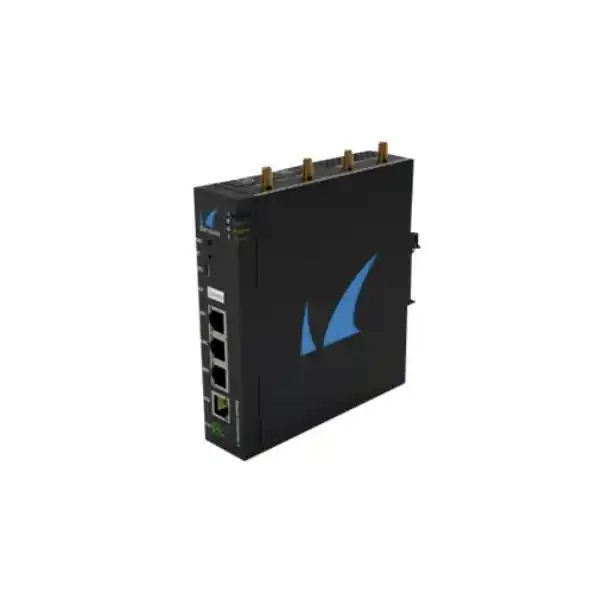
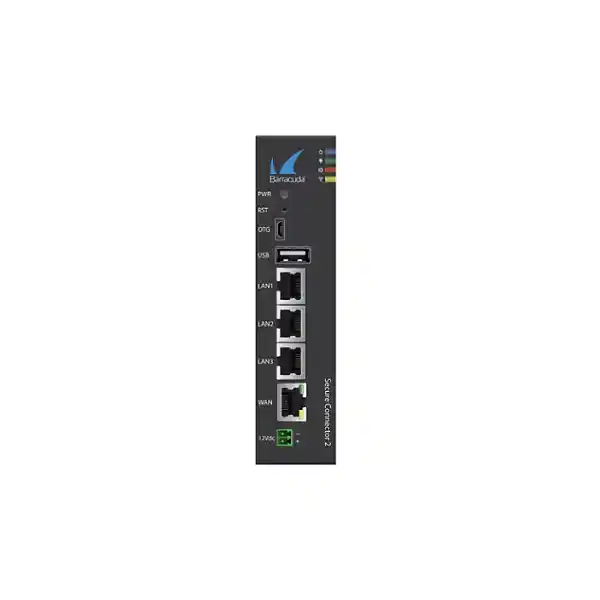
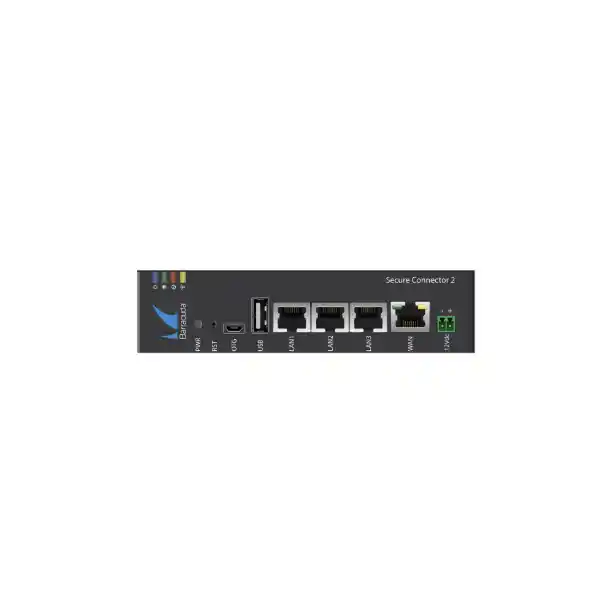
Barracuda Secure Connector SC2 is a purpose-built compact appliance used as the remote endpoint in a centrally managed Barracuda secure networking design. The LTE-capable SC2 variants add cellular connectivity to the core SC2 platform, allowing a remote site to use mobile broadband as a primary path, alternate path or recovery link depending on how the WAN policy is designed. Published Barracuda hardware documentation identifies the SC2 family with one 10/100/1000 Mbps RJ45 WAN port that can receive Power over Ethernet, three 10/100/1000 Mbps RJ45 LAN switch ports, one USB 2.0 interface and one Micro-USB OTG interface. LTE is integrated on SC24 and SC25 variants, while the SC25 family also includes integrated 2.4 GHz Wi-Fi capability.
The appliance is not simply an unmanaged LTE gateway. A Secure Connector deployment is designed to operate with the Barracuda control architecture, including centralized management and an Access Controller function. This changes the engineering approach: instead of manually configuring dozens or hundreds of small sites independently, administrators can define networks, policy, addressing and connectivity centrally and then bring remote appliances into the managed environment. For organizations with many similar outlets or field locations, this architecture can reduce configuration variance and make replacement or expansion more predictable.
For a UAE quotation, the phrase “SC2 LTE” should therefore be translated into a precise bill of materials. Barracuda documentation distinguishes LTE-capable SC24 and SC25 hardware, including hardware revisions and serial-number-dependent cellular implementations. A procurement request should state whether integrated Wi-Fi is required, whether the LTE modem must be the global/universal version, what cellular bands are needed for the chosen UAE operator, how the appliance will be powered, what antennas and mounting method are expected, and how many Secure Connector endpoints the selected Access Controller and license pool must support.
Why SC2 LTE fits distributed UAE networks
Small-site footprint
At approximately 37 × 140 × 150 mm and about 0.55 kg for documented SC2 hardware, the appliance is suited to small communications cabinets, wall-mounted enclosures, retail counters, industrial control cabinets and temporary site infrastructure where a rack-mount firewall would be disproportionate. Its compact metal enclosure, fanless cooling and DIN-rail or wall-mount options make physical integration comparatively straightforward.
Wired and cellular resilience
The Gigabit Ethernet WAN port provides the normal fixed-network path, while LTE-capable models can maintain site connectivity when fiber, broadband or local last-mile service is unavailable. Cellular connectivity can also be useful for rapid deployment before a fixed circuit is delivered, provided the project validates SIM plan, operator coverage, antenna placement and required traffic volume.
Central operations
Secure Connector is engineered for centralized provisioning rather than isolated device-by-device management. This is important when an enterprise has many branches with nearly identical security and network requirements. Central policy and lifecycle control reduce the operational burden of maintaining separate manual configurations and simplify governance when sites are frequently opened, moved or replaced.
Operational technology use
Barracuda positions Secure Connector for distributed and IoT-oriented connectivity, and its published feature set includes support relevant to industrial environments. In practice, the SC2 can provide a controlled connectivity boundary for small operational networks, but engineering teams should still define segmentation, permitted flows, central inspection points and recovery behavior according to the specific OT risk model.
SC2 LTE hardware architecture and platform characteristics
The published SC2 hardware specification identifies an ARM Cortex-A7 processor, 1 GB of RAM and 16 GB of Micro SD mass storage. Those specifications should be interpreted in the context of the product’s role. The SC2 is not designed to replace a high-throughput data-center firewall or to run every advanced security service locally at branch scale. It is a compact edge connector intended to establish secure, centrally governed connectivity for remote networks. This architectural distinction matters when a project team is sizing bandwidth, encryption demand and the number of devices behind each endpoint.
Barracuda’s published Secure Connector performance tables list 300 Mbps firewall throughput for UDP traffic and 30 Mbps VPN throughput under the stated AES-128/SHA test profile for the SC2 generation. These figures are useful as platform reference points, but they should not be treated as application guarantees. Real deployments are affected by packet size, traffic mix, encryption settings, WAN latency, cellular radio conditions, rule complexity, logging, software version and the design of the central Access Controller path. For that reason, a site expected to sustain significant encrypted traffic should be sized around measured or conservatively estimated business traffic rather than around a raw LTE modem headline rate.
A notable design property is the fanless enclosure. Fanless operation avoids a mechanical cooling component that would otherwise draw dust and require maintenance, which is helpful in remote cabinets. However, fanless does not mean installation conditions are irrelevant. UAE deployments can experience elevated ambient temperatures inside closed outdoor or plant-room enclosures. The installation design should respect Barracuda’s environmental guidance, avoid direct solar exposure, maintain appropriate ventilation around the enclosure and ensure that any third-party cabinet has suitable thermal management for the total equipment load.
The hardware documentation does not list a separate security ASIC for SC2. Engineering decisions should therefore be grounded in Barracuda’s published platform performance and supported use cases rather than assuming acceleration characteristics that are not stated for the product. This is especially important when comparing the SC2 with larger next-generation firewall appliances whose hardware architecture, port density and inspection capacity serve a different branch or campus profile.
Detailed port map and interface planning
| Physical label | Published notation | Type | Deployment role |
|---|---|---|---|
| WAN | eth1 | 10/100/1000 Mbps RJ45, PoE recipient | Primary wired uplink and documented management port role. Can simplify power and data delivery where the upstream PoE design is validated. |
| LAN1 | eth0 | 1GbE RJ45 | Local endpoint or downstream switch connectivity as part of the three-port LAN switch. |
| LAN2 | eth3 | 1GbE RJ45 | Additional local device, switch or segmented branch connectivity according to logical network design. |
| LAN3 | eth4 | 1GbE RJ45 | Third local switched connection for small-site devices or downstream infrastructure. |
| USB 2.0 | USB | USB 2.0 | Accessory or supported modem use depending on model and software support. Do not assume arbitrary USB devices are supported. |
| OTG | — | Micro-USB B OTG | Service and installation-related functions according to Barracuda documentation and support procedures. |
The three LAN ports make the appliance convenient for a very small site, but they should not be mistaken for a substitute for a managed access switch when the branch needs many endpoints, PoE delivery to phones or cameras, detailed VLAN fan-out, redundant switching or advanced Layer 2 features. A common architecture is to use the SC2 as the secure branch edge while a compact managed switch handles endpoint density. This keeps the roles clear: the Secure Connector provides the centrally governed edge and secure tunnel path, while the switch provides the physical access layer.
4G/LTE capabilities: what UAE buyers should validate
The LTE capability is the most important differentiator in this product request, and it is also the area where model precision matters most. Barracuda’s current SC2 documentation identifies SC24a and SC25a as the integrated cellular models. SC24a provides cellular capability without integrated Wi-Fi, while SC25a combines cellular capability with 2.4 GHz Wi-Fi. The documentation also distinguishes earlier EMEA LTE hardware from later global or universal LTE revisions by serial-number ranges. For a new UAE project, the exact orderable part and revision should be confirmed on the supplier quotation so the delivered modem implementation matches the required regional bands and certification profile.
For the newer global LTE implementation documented for SC24a and SC25a, Barracuda lists a broad set of FDD and TDD LTE bands, including common bands used across multiple world regions, and describes the cellular module as LTE Category 18 with a theoretical downstream capability of up to 1.2 Gbps using features such as 4×4 MIMO and carrier aggregation. This figure describes radio-module capability under supported conditions; it is not the expected encrypted application throughput of the entire Secure Connector. The SC2 platform’s own published firewall and VPN performance, mobile operator scheduling, signal level, channel bandwidth, congestion and routing path are all practical constraints.
The supported cellular interface uses a SIM and external antenna connections. Barracuda specifies SMA antenna interfaces and omni-directional antennas for the documented LTE models. In a UAE office with good indoor coverage, the supplied antenna arrangement may be sufficient. In a metal cabinet, basement, plant room or remote industrial enclosure, however, radio design can become the dominant availability factor. Antennas should not be buried inside shielded metalwork. The project should consider antenna placement, feeder loss, cable length, lightning and surge strategy where external antennas are introduced, and the difference between strong signal strength and genuinely usable LTE capacity.
SIM design also deserves more attention than simply ordering a data plan. Enterprises should decide whether the LTE service will be primary or standby, whether the operator provides private APN options, whether inbound reachability is required, how carrier-grade NAT affects troubleshooting, whether the plan has usage limits or throttling, and whether the SIM is permitted in routers or machine-to-machine applications. Where LTE is strictly a failover service, monitoring should detect accidental long-term cellular operation after a wired circuit fault because large software downloads or normal user traffic can otherwise consume the data allowance unexpectedly.
For resilient multi-site deployments, it can also be useful to diversify access technologies rather than merely adding a second circuit from the same physical path. A fiber link and LTE path generally have different last-mile dependencies. That diversity is valuable, but cellular towers, upstream operator networks and building power can still represent shared risks. A business continuity design should therefore specify the outage scenarios it is expected to survive instead of treating “LTE backup” as a universal guarantee of continuity.
FourTeck can assist with the network-side planning around the appliance, while the mobile service itself should be selected according to local operator coverage, enterprise contract terms and the target site. For broader UAE infrastructure integration, organizations can also align branch security deployment with FourTeck IT Services UAE for switching, structured cabling, rack and site-readiness requirements.
SC24 LTE versus SC25 LTE: model selection
SC24 family
Choose the SC24 LTE path when the site requires integrated cellular connectivity but does not need the SC2 itself to provide Wi-Fi access point or Wi-Fi client functionality. This is often the cleaner choice when wireless LAN is already delivered by dedicated enterprise access points or when the site is entirely wired.
The reduction in overlapping functions can simplify support boundaries. Dedicated WLAN infrastructure remains responsible for radio access, while the Secure Connector handles branch connectivity and LTE resilience. The quotation should still identify the exact SC24 revision because older and newer LTE implementations differ.
SC25 family
Choose the SC25 LTE path when the deployment benefits from both integrated cellular and the SC2’s integrated 2.4 GHz IEEE 802.11b/g/n Wi-Fi capability. Barracuda supports the Wi-Fi interface in access point or client mode on the Wi-Fi-equipped models, enabling compact deployments where a separate AP may not be justified.
The integrated Wi-Fi should be evaluated as a convenience and connectivity function, not as a replacement for a modern high-density enterprise WLAN. Where the site has many wireless users, demanding roaming requirements or current multi-band WLAN standards, a dedicated access-point design is generally more appropriate.
The “SC2 LTE” product label on this page therefore describes the LTE-capable SC2 deployment class, while the final purchase order should resolve to the exact Barracuda part number. This prevents a common procurement error in which “LTE included” is assumed to also mean “Wi-Fi included,” or where an older region-specific cellular model is ordered without validating its lifecycle and modem profile.
Secure Connector architecture: endpoint, control and central enforcement
A Secure Connector project should be designed as a system rather than as a single box. Barracuda documentation describes the Secure Connector working with an Access Controller and Control Center. The remote appliance establishes the branch-side connectivity, while central components provide the management and VPN termination framework. This allows an enterprise to use a consistent operating model across many small locations, which is particularly valuable when local staff are not network specialists.
At the remote site, the Secure Connector can obtain or use WAN addressing through supported connection types that include DHCP client, static IP, Wi-Fi client on applicable models and WWAN modem connectivity. On the LAN side, the network can be defined in multiple ways. Barracuda documentation describes manually entered DHCP-server networks, mapped DHCP networks and automatically assigned networks. This flexibility enables standardized deployments while still accommodating branch-specific addressing when necessary.
The central management model is especially useful for lifecycle operations. Instead of treating every shop, kiosk or cabinet as a bespoke firewall configuration, administrators can build repeatable templates and onboarding procedures. A replacement unit can be introduced into an established design with a known policy baseline, reducing the amount of branch-specific CLI or GUI work. This can also improve governance because changes to connectivity rules are less likely to diverge among sites over time.
Centralization does not remove the need for network design. Address plans must avoid unintended overlap, route propagation must match the topology, critical services should be identified, and failover paths should be tested under realistic conditions. When hundreds of Secure Connectors are deployed, a small design mistake can be replicated at scale, so template quality becomes more important rather than less important. Pilot deployments should therefore validate site addressing, DNS behavior, MTU, VPN recovery, application dependencies and cellular fallback before broad rollout.
Organizations standardizing wider firewall estates can review regional security integration options through Firewall Dubai by FourTeck, while the SC2 itself remains most appropriate where the remote location needs a compact connector rather than a larger full-featured branch firewall appliance.
Security functions and traffic control
Barracuda’s Secure Connector literature lists policy-based firewall capability for TCP and UDP traffic, stateful packet inspection and forwarding, NAT functions and centrally controlled secure connectivity. The wider Barracuda architecture can provide application-aware policy and additional inspection at the appropriate enforcement point. The practical objective for a small remote site is to avoid exposing local devices directly to the public network while giving authorized applications a controlled path to headquarters, data centers, cloud services or internet security services according to policy.
For retail environments, this can mean separating point-of-sale systems from general office devices and guest-access infrastructure. For industrial environments, it can mean limiting which management systems are allowed to communicate with a controller network. For digital signage, kiosks or telemetry devices, it can mean restricting outbound destinations and blocking unnecessary inbound reachability. The appliance is most valuable when its deployment is tied to a clear policy model rather than simply inserted as a router.
Barracuda documentation also references VLAN support, including IEEE 802.1Q, in the Secure Connector feature set. VLANs can help separate logical traffic classes, but the small number of physical LAN ports means the overall access design should be planned carefully. If a site needs several VLANs across many endpoints, a managed switch is usually the right companion device. The SC2 then carries the required logical networks while the switch provides local port mapping and, where necessary, endpoint PoE.
Where the environment includes OT or industrial protocols, Barracuda materials list awareness of protocols such as S7, IEC 60870-5-104, IEC 61850, Modbus and DNP3 in the broader feature set. Security teams should not infer that merely recognizing an industrial protocol makes the deployment safe. Industrial security requires a documented zone-and-conduit model, strict source and destination definitions, change control, recovery planning and coordination with the operations team. The Secure Connector can be an edge component in that architecture, but it does not replace plant-specific risk analysis.
The same principle applies to encrypted traffic and advanced inspection. If inspection occurs centrally, the bandwidth and latency of the tunnel path become part of the application experience. Cloud applications, voice traffic, remote desktop sessions and transaction systems have different sensitivity to delay and packet loss. A sound design decides which traffic must traverse central enforcement, which destinations can use an approved direct path, and what happens when the primary WAN is degraded or unavailable.
VPN capacity and realistic throughput sizing
The most important sizing mistake to avoid is equating LTE modem speed with encrypted branch throughput. The cellular module on newer global LTE SC2 variants is documented with a theoretical downstream rate up to 1.2 Gbps under appropriate LTE Category 18 conditions. The Secure Connector platform itself is documented with a much lower VPN throughput reference of 30 Mbps under the stated AES-128/SHA test profile. These figures describe different layers of the system. A fast radio can provide useful headroom and robust connectivity, but the end-to-end encrypted application rate is bounded by the appliance, configuration and central path.
For a branch that averages only a few megabits per second of ERP, point-of-sale, telemetry, voice signaling and administrative traffic, a 30 Mbps-class encrypted edge may be entirely appropriate. For a site expected to back up large datasets, replicate video, run high-volume file transfers or serve many users through a centralized VPN path, the SC2 may be undersized even though its physical Ethernet ports are Gigabit. Port speed describes link negotiation capacity, not application processing capacity.
A useful sizing workflow starts with observed traffic rather than user count alone. Measure the busiest 95th-percentile throughput on an equivalent site, identify peaks that are business critical, estimate growth, then distinguish latency-sensitive traffic from bulk transfers. Add the effect of central routing and the LTE contingency model. If the LTE path is only for emergency transaction traffic, policies may intentionally restrict bandwidth-heavy applications during failover. If LTE is expected to carry normal production traffic for days, data volume and encrypted throughput become more important.
At the central layer, the Access Controller must also be sized for the number of Secure Connector VPN connections. Barracuda documentation lists virtual Access Controller models with published maximum VPN connection counts, including VACC 400 up to 500, VACC 610 up to 1,200 and VACC 820 up to 2,500 connections in the referenced product documentation. Licensing must align with that architecture: an Access Controller license is required and a Secure Connector Energize Updates pool license is assigned, with the pool size determining how many Secure Connectors are allowed to connect. The pool cannot exceed the maximum VPN connection capacity of the chosen Access Controller model.
This central sizing is critical for UAE organizations planning hundreds of branches or using the same architecture across the Gulf and Africa. The remote appliance may be compact, but the service is an end-to-end system. Large rollouts should reserve capacity for growth, replacement units, test sites and staged migration rather than licensing only the exact day-one count.
Power, mounting and physical installation
PoE recipient on WAN
The SC2 WAN interface can receive Power over Ethernet, which can reduce the number of local power adapters in small cabinets. The upstream PoE source, cabling and power budget must be validated. PoE delivery is useful in standardized rollouts because a branch can receive both power and wired WAN service through a controlled installation path.
External DC option
Barracuda also documents external DC power for SC2. Current hardware guidance warns against operating the appliance simultaneously from both the 12 V DC source and PoE as parallel power sources. Installers should follow the exact hardware quick-start guidance for the delivered revision and should connect the DC plug to the appliance before energizing the adapter.
Power adapter planning
Barracuda documentation notes that the SC2 power supply may not be included in the standard packaging and identifies a separately orderable power-supply accessory for relevant hardware. A purchase request should explicitly state whether the site will use PoE or needs the manufacturer power accessory so installation is not delayed by an incomplete bill of materials.
DIN rail, wall or magnetic mounting
SC2 documentation lists DIN rail and wall mounting, together with a metal enclosure suitable for compact installation. This makes the appliance practical for control cabinets and small communications spaces. Mounting should preserve antenna clearance, cable bend radius, ventilation and technician access to LEDs, SIM and service interfaces.
UAE deployment scenarios
The UAE has a large number of business environments where connectivity is operationally important but the physical site does not justify a large firewall appliance. The SC2 LTE is particularly well suited to repeated small-site patterns. Its value is strongest when the central IT team wants one consistent branch architecture and when LTE provides either deployment speed or path diversity.
Retail outlets and point-of-sale sites
A retailer with outlets in Dubai, Abu Dhabi, Sharjah and other Emirates may need secure access to payment services, inventory systems, head-office applications and managed devices. The SC2 can provide a standardized secure edge while LTE supports temporary connectivity during new-store opening or recovery during fixed-line interruption. The network should still separate payment-related devices from staff, IoT and guest traffic according to the retailer’s security policy.
Construction and project offices
Temporary offices frequently need connectivity before permanent telecom circuits are ready. An LTE-capable connector can accelerate site activation for project-management systems, access control, printers, laptops and selected cameras. Once fixed service is installed, the same cellular capability can become the backup path. Careful antenna placement is often necessary because portable cabins and metal structures attenuate radio signals.
Industrial and utility locations
Pump stations, substations, warehouses, manufacturing cells and remote instrumentation networks often contain a small number of devices but require controlled connectivity to central systems. The SC2’s compact fanless form factor and DIN-rail-friendly installation can fit this physical environment. The cyber design should use strict allow-listing, segmentation and change control rather than broad any-to-any connectivity.
Kiosks and self-service terminals
A kiosk may only need a secure application path, monitoring, DNS and device-management connectivity. Using a centrally managed Secure Connector can reduce local configuration and provide a repeatable template for many identical locations. Cellular connectivity can eliminate dependence on local premises wiring where the application’s bandwidth requirement is modest and LTE coverage is stable.
Pop-up and event environments
Temporary exhibitions, ticketing points and seasonal facilities can benefit from hardware that is easy to stage, ship and redeploy. A pre-defined centralized configuration can shorten activation time. The project should still account for LTE congestion, especially at crowded events where thousands of consumer devices compete for cellular capacity.
Out-of-band and recovery connectivity
Where network policy permits, cellular can provide an alternate management or recovery path when the normal WAN is disrupted. The design must be deliberate about what can be reached over the recovery connection, how access is authenticated and how the site returns to the preferred path after service restoration.
WAN design: primary Ethernet, LTE failover and LTE-first sites
There are three common WAN patterns for SC2 LTE. The first is fixed-line primary with cellular failover. This is the most familiar resilience model: fiber, broadband or an Ethernet handoff carries normal traffic, while the LTE interface is held for loss or unacceptable degradation of the wired path. The failover policy should define what constitutes failure, how quickly traffic moves, whether all applications are allowed on cellular and what conditions trigger return to the primary link.
The second pattern is LTE as the day-one primary service with later migration to fixed WAN. This is useful for a new branch that must become operational before the telecom provider completes the permanent circuit. The Secure Connector can be staged with a known configuration, the site can start on cellular, and the wired link can be introduced later. The advantage is schedule flexibility; the engineering caveat is that the LTE data plan and performance must be adequate for the commissioning period.
The third pattern is LTE-first by design for very small or mobile locations. This can make sense for kiosks, temporary installations or field systems with modest traffic requirements. In this scenario, the project should pay particular attention to carrier coverage, antenna placement, monthly data consumption and the consequences of a local mobile-network outage. A dual-operator strategy may be more resilient than a single SIM, but the exact supported implementation must be validated against the chosen hardware and connectivity design rather than assumed.
Failover testing is as important as configuration. A deployment should be tested by physically removing or disabling the primary WAN, observing tunnel recovery, verifying DNS and application behavior, measuring voice or transaction impact, and then restoring the primary path. Operations teams should confirm that alarms distinguish a site running normally from a site surviving on cellular. Otherwise a branch may remain on its expensive or lower-capacity backup path unnoticed.
Where the branch estate includes conventional firewalls, secure connectors, switches and servers, the design should document each device’s role so troubleshooting does not become a multi-vendor guessing exercise. FourTeck’s broader UAE infrastructure portfolio is available through FourTeck UAE for integrated network and security projects.
LAN addressing, DHCP and branch segmentation
Barracuda Secure Connector networking supports multiple LAN assignment approaches. A DHCP Server model allows the branch network to be entered manually and the Secure Connector to issue addresses locally. A DHCP Server Mapped mode also uses a manually entered local network but maps it to an automatically assigned subnet from the Secure Connector data network. An Automatic model can assign the network through the Control Center. The appropriate choice depends on whether the organization needs fixed site addressing, centralized allocation or accommodation of existing devices.
Address overlap is a recurring problem in acquisitions, franchises and rapidly deployed branches. If every location independently uses the same private subnet, central routing becomes more complex. Mapped or centrally assigned designs can reduce that problem, but applications that embed IP addresses or depend on local broadcast behavior should be reviewed before migration. A pilot should include printers, controllers, payment terminals and any legacy devices that use hard-coded gateways or peer addresses.
The SC2’s three switched LAN ports are valuable for simple branches, yet logical segmentation may still require a managed switch. For example, a site could separate corporate devices, operational technology and an isolated service network, then carry those segments toward the Secure Connector according to the supported VLAN design. The point is not to maximize the number of VLANs but to align segmentation with actual trust boundaries and support ownership.
DHCP scope design should reserve infrastructure addresses, use appropriate lease times and ensure that DNS settings are consistent with the central application model. If a branch depends on internal DNS over the secure tunnel, the failover design should confirm that name resolution continues when LTE becomes active. If cloud applications rely on public DNS, security policy should prevent unapproved DNS bypass where inspection or logging requirements apply.
For a large fleet, keep the addressing strategy predictable. Site identifiers, subnet blocks and device classes can be mapped in an IP plan so support teams can infer where an address belongs. The strongest operational benefit of centrally managed branches appears when network naming, addressing, logging and change procedures are standardized together.
Central licensing and deployment dependencies
A Secure Connector should not be quoted as hardware alone when the customer does not already have the required Barracuda central architecture. Barracuda documentation states that Secure Connector deployment requires an Access Controller license and that a Secure Connector Energize Updates pool license must be assigned. The pool quantity determines how many Secure Connectors can connect. This makes licensing part of the technical design, not an administrative afterthought.
The selected Access Controller also has a maximum number of VPN connections. In a large project, the number of deployed endpoints, planned growth and disaster-recovery model should all be considered. If a customer has 450 active sites and expects 100 additional branches, a platform sized exactly around current consumption leaves little operational margin. Spare appliances, lab units, migration overlaps and seasonal sites can all affect the required pool.
Existing Barracuda customers should provide their current Control Center and Access Controller versions, model, licensing state and planned software lifecycle when requesting an expansion quote. New customers should request a complete architecture rather than assuming the Secure Connector can be activated independently. This information allows the solution designer to check compatibility, capacity and the correct commercial components.
Software lifecycle should also be part of procurement. Barracuda maintains hardware and software lifecycle information for Secure Connector variants. Older EMEA-specific SC24/SC25 LTE revisions reached published end-of-full-support dates, while later global revisions are listed separately. That distinction reinforces the need to quote an exact, currently supported part rather than purchasing ambiguous surplus stock based only on the family name.
FourTeck can structure the quotation around the endpoint hardware, central licensing, power accessories, deployment services and relevant support coverage. This is particularly useful for customers replacing older SC2 LTE units because the replacement decision may involve both hardware revision and software compatibility.
Deployment methodology for multi-site rollouts
A successful Secure Connector project begins with a site archetype. Rather than designing every branch separately, group locations by common requirements: for example, “retail small,” “retail with guest WLAN,” “industrial cabinet,” “temporary project office” and “LTE-only kiosk.” Each archetype should define WAN priority, LAN addressing, VLANs, permitted applications, logging, cellular behavior, switch requirements, power method, mounting and local handover instructions.
Next, build and test one representative site. Confirm the appliance can reach the Barracuda central environment from the intended ISP and LTE provider. Test initial provisioning, policy retrieval, secure tunnel establishment, DHCP behavior, application reachability, DNS, NTP and monitoring. Then test negative conditions: unplug the WAN, remove or disable the cellular path, reboot the upstream modem, interrupt DNS, and simulate an addressing conflict. The goal is to discover operational failure modes before the template is copied to dozens of branches.
Staging should record serial number, asset tag, intended site, model revision, cellular identity, SIM number, antenna pack and power method. A unit intended for one branch should not arrive at another location with an undocumented SIM or policy assignment. Label the WAN, LAN and antenna connections clearly so local installers do not need to interpret the appliance from memory. If PoE is used, label the upstream switch port and verify its budget; if external DC is used, include the correct approved power accessory.
Rollout waves should be small enough to support. A common mistake is to schedule many sites simultaneously because the hardware is compact and configuration is centralized. Physical cabling, carrier activation, local access, signal quality and legacy endpoint behavior can still produce site-specific issues. Phased waves allow the template to improve while the project is active. Track activation success, average install duration, failover test result, support tickets and recurring root causes.
After deployment, establish an operational baseline. Monitor tunnel stability, WAN transitions, LTE use, packet loss and site reachability. Define who owns the SIM account, who receives data-usage alerts, who can change centralized policy and who coordinates onsite replacement. These procedural details prevent technical incidents from becoming organizational incidents.
For organizations operating beyond the UAE, a standardized Secure Connector architecture can also support repeatable regional deployment planning. FourTeck’s broader regional capabilities can be reviewed through FourTeck Africa when the same secure branch model is being extended to African locations.
Operational monitoring and troubleshooting priorities
The SC2 front-panel LED states provide a useful first layer of onsite diagnosis. Barracuda documentation describes indicators for power, VPN status, WAN connectivity and WWAN cellular status on applicable models. A local technician can therefore distinguish basic power loss from an internet-path problem or a tunnel problem before a network engineer begins deeper analysis. Installation documentation should include a simple photo or port map and the expected healthy LED state for the site.
When a site is unreachable, troubleshoot in layers. First confirm power and physical link. Second confirm the WAN has addressing and upstream reachability. Third confirm DNS or any required bootstrap dependencies. Fourth verify that the secure tunnel to the central controller is established. Fifth check route and policy for the affected application. For LTE incidents, add SIM state, signal level, operator registration and data-plan status to the workflow. This layered approach prevents a cellular coverage issue from being misdiagnosed as a firewall rule problem.
Intermittent LTE problems can require correlation with location and time. A branch may have excellent performance overnight but poor performance during local peak periods because radio capacity is shared. Likewise, a cabinet door can materially change antenna performance if antennas are located inside metalwork. Record signal and throughput observations during commissioning so later support teams have a reference point.
Firmware and software changes should follow staged change control. Apply updates to a representative group before mass rollout, especially when sites are operationally critical. Validate tunnel establishment, LTE behavior, DHCP, application access and central management after the change. Keep replacement units aligned with the approved software baseline so a failed unit does not introduce an unexpected version gap during an incident.
Finally, monitor for silent failover. A branch that continues working on LTE can appear healthy to users while the primary circuit remains failed for days. Alerts should identify which path is active and how long cellular has been in use. This protects data allowances, highlights unresolved carrier faults and gives operations teams a clearer measure of branch availability.
Performance engineering for business applications
Application behavior should drive the final design. Voice over IP is sensitive to latency, jitter and packet loss but often uses relatively little bandwidth per call. Point-of-sale and ERP transactions may also be low bandwidth yet highly critical. Video surveillance can consume large continuous bandwidth and may be unsuitable for centralized tunneling over an SC2 LTE failover path except at controlled bitrates. Cloud backups and software distribution are usually delay tolerant and can be throttled or blocked during cellular failover.
A practical policy model classifies traffic into essential, important and deferrable categories. Essential traffic remains permitted over LTE. Important traffic may continue with rate limits or priorities. Deferrable traffic can be suppressed until the primary WAN returns. This protects the cellular path for the applications that keep the site operational. The policy should be tested, because application suites often use multiple cloud endpoints that are not obvious from a single hostname.
Latency also changes when traffic is hauled through a central VPN termination point. A Dubai branch whose application is hosted in the UAE can experience unnecessary delay if traffic is forced through a distant central location. Central security requirements must therefore be balanced with route efficiency. If the organization uses local internet breakout for approved SaaS services, define how those rules interact with LTE and what inspection controls remain in place.
MTU and fragmentation deserve testing on cellular networks because encapsulation and carrier paths can differ from the wired ISP. Symptoms can include web pages that partially load, VPN sessions that establish but transfer poorly, or specific applications failing only on LTE. Rather than immediately increasing timeouts or weakening security policy, test path MTU and inspect packet behavior. Standardizing the working setting across the site archetype can prevent repeated incidents.
Capacity planning should use a margin. If the measured peak encrypted traffic is already close to the platform reference figure, choose a larger branch security platform instead of assuming the SC2 will absorb future growth. The product is strongest when matched to its intended small-site workload.
Security design for retail, IoT and operational technology
Distributed devices often have a different risk profile from user laptops. A point-of-sale terminal, building-management controller, telemetry sensor or kiosk usually has a narrow set of legitimate destinations. This makes allow-list-oriented policy practical. Instead of giving the device broad internet access, permit only the services it needs, log denied traffic during commissioning, and review exceptions before adding them to the template.
IoT equipment also tends to remain deployed for many years. Vendors may stop issuing patches while the device continues performing a business function. Network segmentation can reduce exposure by limiting who can initiate connections to that device and by controlling outbound communication. The SC2 can serve as the remote site boundary in such a design, while centralized policy creates consistency across all similar sites.
For operational technology, availability requirements can be more important than convenience. A security change that blocks a control protocol may interrupt production. Policy development should therefore involve both cybersecurity and operations teams. Use lab validation or a representative site before broad enforcement, define rollback procedures and avoid unplanned changes during critical operational windows.
Remote administration should also be tightly governed. Do not expose device management interfaces directly to public LTE addressing even if the operator allows it. Prefer authenticated centralized access through the approved secure management architecture. Record administrator changes, use role separation where supported and maintain an asset inventory that links each Secure Connector to its site and responsible business owner.
Physical security remains relevant. A branch edge installed in a public retail area or accessible kiosk cabinet can be unplugged, reset or tampered with. Place the appliance and SIM in a controlled enclosure where possible, secure antenna leads against accidental removal and document who is authorized to access the equipment. Cybersecurity at a remote edge is only as resilient as its physical installation and operational procedures.
Wi-Fi considerations on SC25 LTE variants
The Wi-Fi-equipped SC25 variant supports integrated 2.4 GHz IEEE 802.11b/g/n operation and can operate in access point or client mode according to Barracuda documentation. This is useful for very small sites that need one local wireless connection without deploying a separate access point, or for scenarios where the appliance itself must connect to a Wi-Fi uplink.
The wireless capability should be matched to expectations. Modern enterprise WLANs typically use newer standards, multiple bands, coordinated radio management and multiple access points for capacity and roaming. The SC25’s integrated 2.4 GHz Wi-Fi is therefore best treated as a compact connectivity feature for modest requirements. A busy branch with many employees, voice over Wi-Fi or dense neighboring networks should use a dedicated wireless design.
2.4 GHz offers useful propagation but is also exposed to interference from neighboring WLANs, Bluetooth devices and other equipment. Site surveys may not be necessary for a single low-traffic device, but channel conditions should still be checked if performance matters. Avoid placing the appliance behind dense metal, inside sealed cabinets or next to high-noise electrical equipment when its integrated Wi-Fi is being used.
If the requirement is strictly LTE with wired LAN, the SC24 family can be the simpler choice. Eliminating an unused wireless function keeps the bill of materials aligned with the actual site need and reduces ambiguity for operations teams.
Procurement and lifecycle guidance for UAE customers
When purchasing SC2 LTE hardware, insist on a quotation that identifies the manufacturer part number and revision rather than only the marketing family. Barracuda’s lifecycle documentation shows that older region-specific SC24/SC25 LTE models and later global models have different lifecycle status. This is significant in 2026 because organizations may still find older stock in distribution channels. An unusually low price is not helpful if the hardware revision does not match current support expectations.
The quote should also specify whether the unit includes Wi-Fi, whether the cellular modem is integrated, which power accessory is included, what antennas are provided, what mounting accessories are required and what Barracuda support or subscription component applies. If the project depends on PoE, state that the upstream infrastructure will provide compatible power. If DC power is required, include the correct approved adapter so the installation team does not substitute an unverified supply.
For a replacement project, provide the serial number of the existing SC2, current model label, software version and reason for replacement. That information can reveal whether the installed unit is an older EMEA LTE revision, a global revision or a Wi-Fi-equipped variant. It also helps determine whether a like-for-like replacement is appropriate or whether the central architecture should be updated at the same time.
For new projects, provide site count, growth estimate, expected encrypted bandwidth per site, primary WAN type, desired LTE role, preferred UAE mobile operator, Wi-Fi requirement, LAN device count, VLAN requirement and required central services. A bill of materials can then cover the endpoint and the central licensing dependency in one design rather than leaving gaps that emerge during activation.
FourTeck can support UAE procurement and design through its regional network-security practice. Customers can use the main FourTeck UAE site for broader infrastructure engagement or the specialist Firewall Dubai resource for firewall-focused enquiries.
Sizing methodology: when SC2 LTE is the right appliance
Select SC2 LTE when the remote site is small, traffic demand is moderate, centralized management is desired and cellular connectivity is genuinely useful. Do not select it merely because the site has fewer than a certain number of users. A five-user engineering office transferring large CAD files may need more throughput than a fifty-device telemetry site sending only small updates. Traffic profile, not headcount alone, should decide the platform class.
Start with the encrypted throughput requirement. If critical traffic is comfortably below the SC2’s published VPN reference and the physical interfaces are sufficient, the product may fit. Next consider port density. Three LAN ports are enough for a few directly connected devices or one downstream switch. If the site needs multiple uplinks, fiber interfaces, large port counts or hardware redundancy, move to a larger firewall or edge platform.
Then evaluate security-service placement. If the architecture expects extensive local application inspection, large-scale TLS decryption or other processing-heavy services at every branch, validate whether those functions and performance targets belong on the Secure Connector or on a larger local firewall. The Secure Connector is intentionally optimized for centralized branch connectivity. A design that treats it as a full enterprise NGFW at the edge may create unrealistic expectations.
Evaluate environmental fit. The compact fanless metal enclosure and mounting options are an advantage in cabinets, but the site still needs a safe temperature range, correct power, cable management and antenna placement. If the environment is exposed to extreme heat, moisture, conductive dust or outdoor weather, the overall enclosure system must provide the required protection.
Finally evaluate operational scale. A handful of sites can be managed in many ways; the real advantage of Secure Connector becomes clearer across dozens or hundreds of repeated locations. Central policy, standardized onboarding and template-driven operations can reduce total administration effort. If the project has only one site and no Barracuda central infrastructure, a different appliance may be commercially and operationally simpler unless the SC2 is part of a planned wider rollout.
This sizing sequence prevents specification shopping based on a single number. The correct product is the one that matches traffic, interfaces, security architecture, environment, lifecycle and operations at the same time.
Bill of materials planning
1. Exact SC2 LTE hardware
Specify SC24 or SC25 family, current orderable revision, LTE implementation and Wi-Fi requirement. Record the manufacturer part number on the purchase order.
2. Power method
Choose PoE recipient operation or the correct Barracuda external DC power accessory. Do not plan to operate PoE and 12 V DC simultaneously as parallel power sources.
3. Cellular service
Define SIM, UAE operator, data allowance, APN requirements and ownership of the mobile contract. Validate coverage at the actual site rather than relying only on a city-level coverage map.
4. Antenna and mounting
Confirm supplied antennas and mounting accessories. For shielded or remote cabinets, design antenna placement and any external antenna cabling deliberately.
5. Central controller capacity
Check Access Controller architecture, maximum VPN connections, software compatibility and high-availability design where required.
6. Secure Connector licensing
Include the required Access Controller licensing and Secure Connector Energize Updates pool capacity for the project count and planned growth.
Frequently asked questions about Barracuda Secure Connector SC2 LTE
Is SC2 LTE a standalone firewall?
It is a secure remote-site appliance with firewall and connectivity functions, but the product is designed around Barracuda’s centralized Secure Connector architecture. Deployments require the appropriate central Access Controller and licensing. For new customers, the complete architecture should be quoted instead of purchasing the endpoint alone.
Which SC2 models have LTE?
Current Barracuda SC2 documentation identifies SC24a and SC25a as LTE-capable variants. SC25a also provides integrated 2.4 GHz Wi-Fi. Earlier SC24/SC25 EMEA LTE revisions have separate lifecycle history, so the manufacturer part number and revision should be verified before purchase.
Does SC2 LTE include Wi-Fi?
Not every LTE variant includes Wi-Fi. The SC24 LTE family is the cellular option without integrated Wi-Fi, while SC25 combines cellular and Wi-Fi. If wireless access is required, state it explicitly on the quotation.
How many Ethernet ports are available?
The SC2 platform provides one Gigabit Ethernet WAN RJ45 port and three Gigabit Ethernet LAN RJ45 ports. The WAN port can operate as a PoE recipient, subject to the supported power design.
Can LTE be used as backup internet?
Yes. LTE can be used as an alternate WAN path when the deployment policy is configured accordingly. The failover design should specify what traffic is allowed, what failure conditions trigger cellular use, how the site returns to the wired link and how operations are alerted while LTE is active.
Can LTE be the primary connection?
It can be used as the active connection for appropriate small-site scenarios, particularly temporary branches and kiosks. The mobile plan, radio coverage, antenna placement, throughput requirement and operational dependence on the carrier must be validated first.
Is the LTE speed 1.2 Gbps?
Newer global LTE models use a module documented as LTE Category 18 with theoretical downstream radio capability up to 1.2 Gbps. That is not the Secure Connector’s guaranteed VPN throughput. Barracuda’s published SC2 platform figures list substantially lower VPN throughput under the stated encryption test profile, so design around application and encryption requirements.
What are the SC2 dimensions?
Barracuda documents the SC2 appliance at approximately 37 mm wide, 140 mm deep and 150 mm high, with an appliance weight around 0.55 kg for the referenced hardware. Always check the current product documentation for the exact revision being ordered.
Is the appliance fanless?
Yes, the documented SC2 hardware uses fanless cooling. This suits compact remote installations, but the cabinet still needs appropriate environmental conditions and should avoid excessive heat accumulation.
Can SC2 be DIN-rail mounted?
Yes. Barracuda lists DIN-rail and wall-mount options for the SC2 platform, making it suitable for compact communications and control cabinets. Mounting should preserve antenna performance and technician access.
Can the WAN port power the appliance?
The WAN port is documented as a PoE recipient, so the appliance can receive power from suitable PoE infrastructure. Barracuda warns not to operate 12 V DC and PoE simultaneously as parallel power sources.
Is a power adapter included?
Barracuda documentation notes that the SC2 power supply is not included in the packaging for the referenced hardware and must be ordered separately when DC powering is required. The quotation should explicitly include the correct power accessory if PoE will not be used.
Does SC2 support VLANs?
Barracuda’s Secure Connector technical feature set includes IEEE 802.1Q VLAN support. For sites with several VLANs and many endpoints, pair the SC2 with a managed access switch rather than relying on the appliance’s three physical LAN ports for all connectivity.
What cellular bands are supported?
Band support depends on the exact cellular hardware revision. The newer global SC24a/SC25a implementation supports a broad set of FDD and TDD LTE bands. UAE buyers should still verify the exact orderable part against the chosen mobile operator and the target site rather than assuming every historical SC2 LTE unit has the same modem.
Can the SC2 use an external USB modem?
Barracuda documents supported USB cellular modems for various CloudGen Firewall and Secure Connector models. Compatibility depends on model and software. Integrated LTE variants normally provide the cellular function directly, while non-cellular SC2 models can support specified external modem options. Verify the supported modem list before ordering.
How should I size the Access Controller?
Use the total Secure Connector count, growth plan, required VPN sessions, resilience architecture and Barracuda’s published model connection limits. License pool size must also fit within the selected Access Controller’s maximum VPN connection capacity.
Migration from older SC2 LTE revisions
Organizations that already operate SC2 LTE hardware should identify the installed revision before ordering spares. Barracuda lifecycle documentation distinguishes older SC24/SC25 4G/LTE EMEA units from newer global SC24/SC25 units and lists different serial-number thresholds for the global implementation. Older EMEA-specific units reached a published end-of-full-support date of May 31, 2026. Because this date has already passed, a 2026 replacement project should not assume that an older EMEA unit is still the preferred like-for-like purchase.
Migration planning should capture the existing model, serial number, central software version, assigned license, site network, WAN type, SIM configuration, antenna arrangement and any local exceptions. The replacement can then be mapped to a supported current model while preserving the intended network behavior. If the site also uses integrated Wi-Fi, verify whether the new unit must remain in the SC25 class.
A controlled migration tests one site before bulk replacement. Validate provisioning, tunnel establishment, VLANs, DHCP, LTE registration, failover and application access. Because cellular hardware changes can affect supported bands and modem behavior, record baseline signal and throughput. Do not assume that a new modem automatically behaves identically at a difficult indoor location.
Where a fleet is approaching lifecycle boundaries, it may be more efficient to combine hardware refresh with review of Access Controller capacity, license pool sizing and central software versions. This avoids completing a physical replacement only to discover that central dependencies require a second project shortly afterward.
Implementation checklist for network engineers
Before staging
Confirm exact hardware revision, central controller compatibility, license pool availability, WAN addressing, LTE operator and SIM activation, mounting method, power source, LAN addressing, VLANs, DNS, NTP and required applications. Define the expected healthy state and failover behavior.
During staging
Record serial and asset numbers, assign the target site, apply the approved template, verify software version, test wired WAN, register LTE, confirm antenna connections, test LAN DHCP and validate secure tunnel establishment. Label each unit and accessory package for the destination site.
During installation
Verify cabinet conditions, mount securely, connect only the intended power source, confirm WAN link, place LTE antennas for acceptable signal, connect LAN or downstream switch, check LEDs, test application access and perform a controlled WAN failover to LTE.
After activation
Confirm central monitoring, document normal path and signal baseline, enable alerts for cellular failover, record data-plan ownership, hand over escalation contacts and update the asset register. Review the first deployment wave before expanding the rollout.
Decision recap: choose SC2 LTE when these conditions are true
The Barracuda Secure Connector SC2 LTE is a strong fit when the remote site needs a compact centrally governed edge, has moderate encrypted traffic, benefits from integrated cellular connectivity and can operate within the SC2 port and performance envelope. The product is particularly attractive for repeated branch patterns where operational consistency matters more than deploying a feature-heavy standalone firewall at every location.
Quotation input checklist for Barracuda SC2 LTE UAE
Providing the information below with the request for quotation allows the hardware, licensing and deployment services to be aligned from the beginning. It also helps avoid ambiguous orders that name only “SC2 LTE” without identifying whether Wi-Fi, global cellular hardware, power accessories or controller capacity are required.
Plan the SC2 LTE as a complete secure-site solution
A production-ready SC2 LTE deployment combines the correct cellular hardware revision with the right central controller capacity, Secure Connector licensing, SIM plan, power method, mounting, antennas, LAN design, monitoring and failover policy. Treating those elements as one design produces a cleaner deployment than buying the appliance first and resolving dependencies later.
For a single replacement unit, provide the existing serial number and model label. For a multi-site rollout, provide the site count and representative traffic profile. FourTeck can then help identify whether SC24-class LTE, SC25-class LTE or a larger Barracuda edge platform is the appropriate fit.
Where the project includes switching, cabling, racks, server infrastructure or broader cyber-security integration, the network design can be coordinated as one UAE deployment rather than fragmented across separate procurement tracks.
Product identification summary
Product: Barracuda Secure Connector SC2 LTE
Target region: United Arab Emirates (UAE)
FourTeck SKU: BARRACUDA-SC2-LTE-UAE
Final Barracuda manufacturer part number should be selected from the current SC2 LTE hardware options based on LTE revision, Wi-Fi requirement, lifecycle status and site design.


Reviews
There are no reviews yet.