
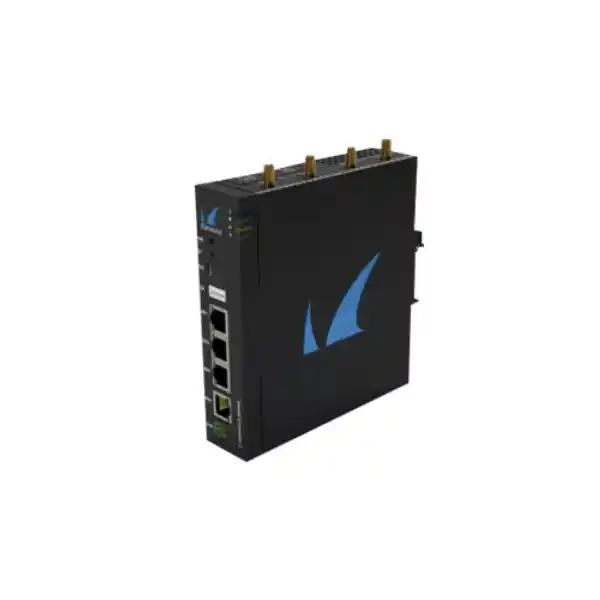
Barracuda Secure Connector SC3 Wi-Fi
A compact secure connectivity platform for organizations that must protect remote equipment, industrial endpoints, branch micro-networks and connected systems without deploying a full-size firewall at every location. The SC3 family brings rugged hardware, centralized policy, encrypted connectivity, flexible powering and Wi-Fi-capable models into a footprint suited to sites where space, local IT skills and operational simplicity matter.
Retail and payment terminals, kiosks, building systems, OT cells, clinics, logistics points, smart infrastructure and compact branch sites.
Architecture guidance, variant selection, licensing assistance, deployment planning and enterprise integration.
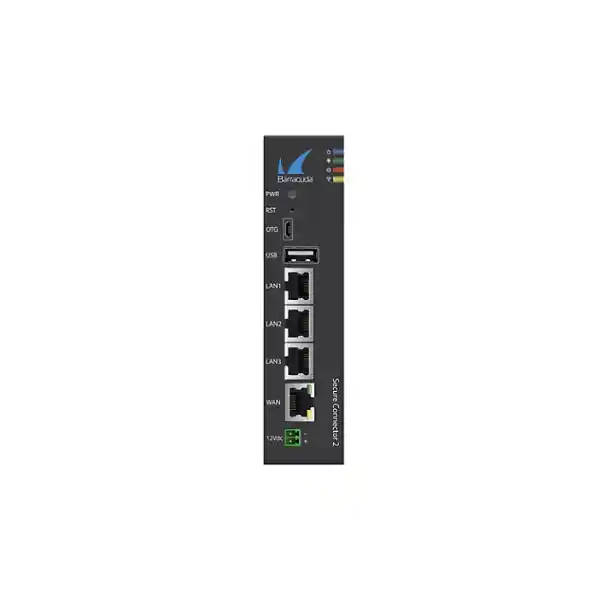
RJ45 WAN with PoE+ recipient capability for compact power and uplink designs.
Integrated switched LAN interfaces for local devices and compact micro-network segmentation.
802.11b/g/n wireless on Wi-Fi-capable SC31 and SC35 models, usable in AP or client mode.
Compact metal enclosure options suited to cabinets, industrial panels and constrained branch spaces.
What the Barracuda Secure Connector SC3 Wi-Fi is designed to solve
Many distributed networks do not look like conventional branch offices. A supermarket may have a payment controller, refrigeration monitor, CCTV gateway and back-office terminal. A logistics yard may have scanners, gate controllers and telemetry units. A hospital may operate connected diagnostic equipment in remote buildings. An industrial enterprise may need to connect a PLC cell, monitoring system or remote service interface to a central security architecture. In these locations, the business requirement is secure, reliable connectivity, but a large branch firewall can add unnecessary cost, power consumption, rack requirements and local administration.
The Barracuda Secure Connector family is built for this micro-site problem. Instead of treating every small location as an autonomous firewall island, the Secure Connector establishes protected connectivity back to centralized Barracuda security and access infrastructure. That architectural approach allows policy, connectivity and operational control to be coordinated from a central environment while the remote unit remains intentionally compact. For UAE organizations operating tens, hundreds or thousands of distributed endpoints, this changes the operating model: the remote appliance becomes a controlled extension of the central network rather than a separate security stack that must be individually managed.
The SC3 generation adds modernized hardware and current firmware support for this model. The Wi-Fi-capable variants are especially useful where the endpoint or local device cannot be practically cabled, where a temporary wireless bridge is required, or where a small protected WLAN is needed close to the equipment. Buyers should note that “SC3 Wi-Fi” describes the Wi-Fi-capable SC3 configuration rather than every SC3 model. Barracuda identifies SC31 and SC35 as the Wi-Fi-enabled variants; SC35 additionally includes integrated cellular capability, whereas SC31 focuses on Ethernet plus Wi-Fi. FourTeck can help match the actual bill of materials to the required uplink and redundancy design.
SC3 Wi-Fi model selection: SC31 versus SC35
Selecting the correct SC3 unit starts with the uplink strategy. The SC31 provides the core Ethernet interfaces and integrated 2.4GHz Wi-Fi capability. This is appropriate when the site has a dependable wired internet service and Wi-Fi is needed locally as an access point or client connection. The SC35 retains the Wi-Fi capability and adds integrated cellular functions, making it the more appropriate choice when mobile broadband is part of the primary, secondary or resilience design.
This distinction matters for procurement because a project that simply specifies “SC3 Wi-Fi” can accidentally mix two different operational requirements. If LTE resilience is mandatory, the Wi-Fi-only interpretation is insufficient. Conversely, adding cellular hardware to every location can be unnecessary when the branch standard already provides dual wired uplinks or when cellular service is intentionally delivered through a standardized external USB modem. FourTeck therefore recommends that the quotation identify the primary WAN medium, backup WAN requirement, SIM strategy, antenna placement and expected carrier coverage before the final SC3 variant is selected.
For large fleets, standardization is usually more valuable than buying each site independently. A retail estate might standardize SC31 for stores with managed broadband and reserve SC35 for kiosks, pop-up sites and areas with uncertain fixed connectivity. Industrial estates might choose SC35 where the secure cabinet can be installed independently of local carrier equipment. The right answer depends on lifecycle operations, not only the purchase price of the appliance.
Practical selection matrix
| Requirement | SC31 | SC35 |
|---|---|---|
| 1GbE WAN + 3× LAN | Yes | Yes |
| 2.4GHz Wi-Fi | Yes | Yes |
| Integrated cellular | No | Yes |
| Typical fit | Wired site plus local Wi-Fi | Wired/Wi-Fi site needing cellular resilience |
Hardware architecture and interfaces
The SC3 hardware design deliberately prioritizes useful edge connectivity over excessive interface density. The WAN side provides a single RJ45 Gigabit Ethernet interface that also supports operation as a PoE+ powered device. On the LAN side, three Gigabit Ethernet interfaces operate as a local switch. This is a practical port map for micro-networks: one uplink to the service provider or upstream network and three local ports for devices such as controllers, terminals, cameras, printers, building gateways or another local switch. Because many Secure Connector deployments attach only a handful of systems, the integrated three-port LAN switch can eliminate a separate compact switch in simple designs.
Barracuda documentation maps the WAN label to operating-system interface eth1 and LAN1, LAN2 and LAN3 to eth0, eth3 and eth4 respectively. That information is useful to engineers reviewing diagnostics, templates or support captures because the physical chassis label and operating-system notation are not identical. The WAN interface serves as the management port in the documented default configuration. Engineers should preserve an accurate port schedule in deployment documentation so that remote hands can distinguish the upstream circuit from local device connections without relying on assumptions.
The platform also includes USB connectivity and USB OTG functionality, with details varying by hardware revision and documentation generation. These interfaces support deployment and expansion scenarios including compatible Barracuda USB modem options. For current SC3 projects, hardware revision should always be captured from the appliance label because Barracuda can revise components during the lifecycle of a model family. That is particularly important when a design depends on a specific USB generation, accessory, modem, antenna or power specification.
Internally, the documented SC3 platform uses an ARM Cortex-A7 class processor, 2GB of RAM and micro-SD-based storage, with 8GB on-board and a 16GB micro-SD specification shown in Barracuda product documentation for the SC3 family. These resources are not intended to position the unit as a high-throughput data-center firewall. They are sized for the Secure Connector role: establish protected connectivity, enforce the intended remote-site functions, participate in centralized management and keep the footprint, heat and power profile suitable for edge installations.
Wi-Fi design: 2.4GHz 802.11b/g/n in AP or client mode
The integrated Wi-Fi capability on supported SC3 variants operates in the 2.4GHz band and supports IEEE 802.11b/g/n. Barracuda documents the operating range as 2412MHz to 2462MHz and lists Wi-Fi operation for SC31 and SC35. The platform can use wireless connectivity in access-point or client mode, which gives network architects two materially different deployment options. In AP mode, the SC3 can provide local wireless access to a small set of connected devices. In client mode, it can associate to an existing wireless infrastructure as part of the site connectivity design.
The 2.4GHz characteristic should be treated as an engineering constraint as well as a feature. Compared with 5GHz WLANs, 2.4GHz provides broader propagation through many indoor environments and remains compatible with a wide range of embedded, industrial and legacy devices, but it also operates in a congested spectrum shared with other Wi-Fi networks and non-Wi-Fi equipment. Dense office deployments, malls, exhibition spaces and multi-tenant towers in Dubai can have significant 2.4GHz channel contention. Site surveys, channel planning and realistic expectations about throughput are therefore important when the wireless link carries operational traffic.
For IoT and OT use, raw Wi-Fi speed is usually less important than deterministic coverage, isolation and recoverability. A controller that exchanges small telemetry messages may function perfectly on a modest wireless link but become operationally unreliable if the antenna is mounted inside a shielded cabinet or near high-interference equipment. The SC3’s external antennas should therefore be positioned based on RF conditions rather than convenience. Cabinet material, machine enclosures, ceiling height, adjacent access points and building construction can all influence the final link margin.
Organizations should also distinguish between using SC3 Wi-Fi for local device attachment and using it as the primary upstream path. Those designs have different risk profiles. Local AP mode can keep a short wireless segment under the site architecture, while client mode depends on an upstream WLAN that may be controlled by another team or third party. In the latter case, the project should document SSID ownership, authentication lifecycle, change-control responsibilities and the recovery procedure if the upstream WLAN credentials or RF plan change.
PoE+ powering and DC power engineering
Power design is one of the most useful aspects of the SC3 platform. The WAN interface can operate as an IEEE 802.3at Type 2 PoE+ powered device, allowing a suitable upstream PoE+ switch or injector to provide both Ethernet connectivity and electrical power. This can simplify cabinets, kiosks and distributed installations because the appliance may not need a dedicated AC socket beside the mounting position. Barracuda documents a PoE+ voltage range of 37V to 54V on the WAN port and a compatible IEEE 802.3at Type 2 power sourcing environment.
The appliance also supports auxiliary DC input. Barracuda documentation lists a 12V to 57V range for the two-pin DC input and describes an optional external 12V power supply with universal 100V to 240V AC input. The power supply is not necessarily included with the base appliance, so it should be explicitly checked on the bill of materials rather than assumed. This matters in UAE deployments because installation teams may otherwise receive the appliance without the expected PSU and discover the omission only at site commissioning.
A critical safety and reliability rule is that the appliance must not be operated with auxiliary DC and PoE powering simultaneously. Barracuda explicitly warns against using the 12V DC input and PoE on the WAN port at the same time. The project standard should therefore define one power method per site and communicate it to field engineers. If a design migrates from local DC to PoE at a later date, the old supply should be disconnected before PoE is enabled.
For critical sites, upstream power resilience is just as important as the SC3 power option. A PoE-powered Secure Connector attached to a switch that is protected by a UPS can remain online through short utility interruptions without needing a separate UPS outlet and AC adapter at the remote cabinet. In contrast, a direct DC design may integrate more naturally with industrial power systems. FourTeck can review the site’s power architecture, UPS strategy and switch capabilities so the SC3 is treated as part of the availability chain rather than an isolated appliance.
Compact industrial deployment
The SC3 chassis supports DIN-rail and wall-mount deployment, and Barracuda documents a metal enclosure for the family. That physical design is valuable in industrial panels, roadside cabinets, building-management enclosures and restricted back-office areas where a rack shelf is not practical. The absence of a conventional rack requirement reduces installation overhead, but engineers must still maintain cable bend radius, ventilation clearance, antenna separation and accessible service space.
Fanless operation
Barracuda’s SC3 Revision A documentation lists fanless cooling and an operating range that extends from -20°C to +70°C, with non-condensing humidity from 5% to 95%. These characteristics support challenging edge locations, but they do not remove the need for environmental assessment. Solar-heated outdoor enclosures, sealed cabinets and spaces near process equipment can exceed ambient limits even when room temperature appears acceptable.
Secure connectivity and the centralized control model
The primary value of Secure Connector is not the number of Ethernet ports; it is the operating model created by secure centralized connectivity. Barracuda positions the appliance as a way to connect remote devices and micro-networks to central corporate resources while reducing management overhead. The platform uses Barracuda’s Traffic Independent Network Architecture, commonly referred to as TINA, for encrypted VPN connectivity. This gives organizations a controlled tunnel architecture instead of relying on application owners to secure each remote device independently over the public internet.
In a conventional decentralized model, every micro-site may have its own internet router, firewall policy, credentials and ad-hoc remote-access method. Over time, configuration drift and inconsistent lifecycle practices become the main security risk. A centralized Secure Connector deployment reverses that problem: templates and policies are managed centrally, while the remote appliance is treated as a managed edge endpoint. For an enterprise with hundreds of sites, this can significantly reduce the number of unique configurations that operations teams must understand.
Current FSC 3.x documentation states that Secure Connector 3.x deployments require Barracuda Firewall Control Center 8.3 or later and that configuration is performed through configuration templates in the Control Center. The older SC Editor is not supported for FSC 3.x. This is an important migration and design point for organizations with an existing Barracuda environment: the project should validate the Control Center release before SC3 rollout and should convert legacy operational procedures to the current template-driven method rather than assuming older management workflows still apply.
Barracuda also documents that a Secure Connector deployment requires a Secure Access Controller and a Control Center. Licensing and maximum scale depend on the controller design. Before ordering a large hardware fleet, architects should therefore size the central control plane, VPN connection capacity, licensing pools and expected growth. Purchasing remote appliances first and resolving the control architecture later can create avoidable redesign work.
Licensing is part of the architecture, not an afterthought
Barracuda documentation notes that Secure Connector and Access Controller deployments require an Access Controller license and a Secure Connector Energize Updates pool license. The pool determines how many Secure Connector instances are permitted to connect, and it cannot exceed the supported VPN connection capacity of the Access Controller model. In practical terms, the remote hardware quantity, controller capacity and entitlement quantity must be planned as one system.
This becomes important during phased rollouts. Suppose a UAE retailer starts with 80 sites but plans to reach 450 locations over three years. The first-year hardware order might be 80 appliances, yet the central architecture should be evaluated against the expected long-term site count, tunnel behavior and resilience model. If controllers are deployed in high availability or distributed by region, licensing and capacity calculations need to reflect that architecture rather than only the first purchase order.
License names and commercial packaging can change over product lifecycle. FourTeck therefore treats licensing as a quotation-stage validation item. The final proposal should identify appliance quantity, controller requirements, update or pool entitlements, support term, firmware compatibility and any SecureEdge integration considerations based on the customer’s current Barracuda environment.
Resilient uplinks, automatic failover and remote-site continuity
Distributed IoT and operational sites often fail for mundane connectivity reasons rather than sophisticated attacks. A DSL modem reboots, a local switch loses power, a carrier route changes, a wireless SSID becomes unavailable or a cable is damaged. Barracuda positions Secure Connector around reliable remote connectivity and the ability to use multiple uplinks with automatic failover. This is particularly relevant when the connected equipment has no local operator who can troubleshoot network paths.
The uplink design can combine the built-in Ethernet WAN with model-specific wireless or cellular capabilities. On SC35, integrated LTE can support mobile connectivity. Barracuda also documents compatible USB cellular modem options for SC3, including its standardized 4G USB modem family. The best design depends on carrier diversity and failure domains. A wired primary and cellular secondary path usually offer better independence than two services delivered over the same last-mile infrastructure.
For mission-critical use, resilience should be tested as an operational workflow, not merely configured. Commissioning should verify loss of the primary WAN, restoration of the primary service, DNS behavior, route recovery, VPN re-establishment and reachability of the protected endpoint. Current FSC 3.x release notes include improvements related to retaining LTE settings across configuration updates and maintaining reachability through an available uplink after reboot, illustrating why supported firmware and controlled upgrade processes matter in resilient deployments.
Organizations should also define what “available” means for the application. A payment terminal might require only low bandwidth but strict latency and transaction continuity. A camera may generate high sustained traffic. An industrial controller may tolerate seconds of interruption but not minutes. The backup medium should therefore be sized for the protected application rather than selected simply because a second interface exists.
Typical UAE deployment scenarios
Retail and payment estates
Connect payment terminals, store controllers, digital-signage devices and monitoring systems through a standardized secure edge. The three LAN ports can serve a small equipment cluster directly, while Wi-Fi accommodates devices that are difficult to cable. Centralized templates reduce configuration drift between stores and can support repeatable rollout procedures for malls, street retail, petrol stations and pop-up formats.
Industrial and OT cells
Install the SC3 near PLCs, telemetry gateways or maintenance systems and use the secure tunnel architecture to reach central resources without exposing the equipment directly to the internet. DIN-rail installation and fanless operation align with many control-cabinet environments. The project should still validate temperature, power quality, grounding, RF conditions and approved segmentation requirements.
Smart building systems
BMS controllers, HVAC monitoring gateways, access-control subsystems and energy-management devices frequently sit outside the normal IT floor plan. A compact Secure Connector can bring those systems into a governed connectivity model while reducing dependence on unmanaged building networks. Wi-Fi can bridge difficult locations, though wired Ethernet remains preferable where deterministic performance is required.
Clinics and diagnostic sites
Remote healthcare facilities can use secure micro-site connectivity for supported diagnostic, administration or telemetry systems that need protected access to central services. Architecture should be coordinated with the organization’s clinical security, privacy and medical-device requirements. The appliance provides connectivity infrastructure; application-specific compliance remains part of the overall solution design.
Logistics and temporary sites
Warehouses, yards, temporary storage areas and project offices often need connectivity before permanent infrastructure is ready. SC3 Wi-Fi models can provide a standardized edge with Ethernet and wireless options, while SC35 or compatible cellular designs can reduce dependence on a fixed circuit. This is useful for phased construction and rapidly changing operational locations.
Kiosks and unattended systems
Ticketing, vending, information kiosks, parking systems and remote service terminals need connectivity that can recover without a technician standing beside the unit. Secure Connector is suited to this unattended model because the remote hardware can be centrally controlled and designed with failover paths. Physical tamper controls and cabinet access remain essential parts of the complete solution.
Segmentation and trust boundaries for IoT and OT
Connecting a remote device securely does not mean the device should be treated as trusted. Many IoT and OT systems run long software lifecycles, have limited patch windows or depend on vendor applications that are difficult to modernize. The network design should therefore assume that the Secure Connector is a transport and policy enforcement component within a broader segmentation architecture. Device classes, business functions and remote-service paths should be separated according to actual communication requirements.
A useful design method is to begin with application flows rather than VLAN names. Identify which remote system initiates traffic, which central service receives it, the required ports and protocols, whether the session is continuous or intermittent, and whether any inbound administrative access is required. That information can then be translated into centrally managed policies. The goal is to avoid an overly broad site-to-data-center tunnel in which every remote device inherits access to unrelated internal networks.
Management access should be handled separately from application traffic. Remote maintenance for a building controller or kiosk should use an authenticated, logged path defined by the enterprise security architecture. Vendor technicians should not receive general VPN reachability simply because the appliance can connect the site. Where third-party support is unavoidable, time-limited access, identity controls and activity monitoring should be integrated around the network policy.
For regulated environments, logging and change control are equally important. Central templates can simplify consistency, but a template mistake can propagate widely. Organizations should therefore use staged deployment rings, peer review, version control for configuration procedures and documented rollback plans. This is especially important for operational networks where an incorrect route or policy can interrupt physical processes even if the security intention was valid.
Sizing the SC3 correctly: focus on the site function
The SC3 is not selected by the same method used for a campus core firewall. Its most important sizing inputs are the number and type of connected devices, expected WAN bandwidth, tunnel behavior, resilience requirement, environmental conditions, wireless use and total site count managed by the central architecture. Engineers should avoid treating the presence of Gigabit Ethernet ports as proof that every security workload will sustain line-rate Gigabit throughput. Port speed describes the physical interface; application performance depends on software functions, encryption, traffic mix and architecture.
For a small telemetry site, bandwidth may be measured in kilobits or a few megabits per second, making reliability and controller scale more important than throughput. For a camera gateway or content-heavy branch, sustained traffic can be much higher and may justify a different Barracuda edge platform. A proper presales assessment should therefore collect average and peak traffic, packet characteristics, number of simultaneous flows, desired backup path and expected growth.
Central capacity must be sized at the fleet level. Hundreds of individually light sites can create a significant aggregate tunnel and connection requirement. The Access Controller and Control Center design should be validated against total connectors, VPN limits, high-availability goals and regional topology. This is one reason FourTeck treats an SC3 project as an architecture exercise rather than a simple appliance sale.
Deployment topology 1: wired WAN with local Wi-Fi access
In the most straightforward SC31 design, the WAN port connects to a fixed broadband router, managed carrier handoff or upstream Ethernet network. Local wired equipment uses the three LAN interfaces, while selected wireless endpoints associate to the SC3’s 2.4GHz WLAN. The Secure Connector then provides the protected path toward central Barracuda infrastructure. This layout works well for compact shops, service counters, utility cabinets and rooms where the remote equipment is located close together.
The upstream handoff should be documented carefully. If the service provider presents private RFC1918 addressing behind a managed router, the Secure Connector operates downstream of that device and the project must account for NAT and tunnel traversal. If the provider hands off a public address, the WAN interface becomes directly exposed to the provider network and should be configured strictly according to the approved Barracuda deployment model. Static addressing, DHCP behavior, DNS and default gateway parameters should be part of the commissioning sheet.
Local Wi-Fi should be restricted to devices that actually require wireless attachment. Where a wired path is available, Ethernet generally reduces RF variables and troubleshooting complexity. Wireless credentials, encryption settings and device onboarding should be managed as part of the security baseline rather than shared informally with local staff. For large estates, use a documented naming and credential lifecycle so that replacement appliances can be commissioned consistently.
Deployment topology 2: SC35 with cellular resilience
SC35 is the natural SC3 Wi-Fi choice when the design needs integrated cellular connectivity as well as Wi-Fi. A common topology uses wired Ethernet as the primary uplink and LTE as a backup path. This creates carrier diversity without adding a separate cellular gateway, although the final resilience still depends on antenna placement, network coverage, SIM provisioning and the independence of the mobile operator from the fixed provider’s upstream infrastructure.
Cellular performance must be assessed at the exact installation point. UAE networks generally provide strong mobile broadband in populated areas, but a device installed in a basement, elevator plant room, shielded industrial enclosure or deep interior space can have very different RF conditions from a smartphone tested outside the cabinet. External antenna leads and mounting location may therefore determine whether the backup path is truly useful. Signal strength, stability and carrier selection should be recorded during commissioning.
SIM lifecycle is another operational issue. The enterprise should define who owns the mobile subscription, whether static or dynamic addressing matters, what monthly data allowance is appropriate, how roaming is handled, and how suspended or expired SIMs are detected. A backup circuit that has not carried traffic for months may fail precisely when it is needed if the subscription has lapsed. Periodic failover tests and carrier-account monitoring should therefore be part of the runbook.
For fleets deployed across the GCC or Africa, a multinational SIM strategy can simplify procurement, but local carrier performance and regulations vary. FourTeck can coordinate the network design around the appliance while the customer or telecom provider confirms the commercial mobile service appropriate to each country.
Deployment topology 3: Wi-Fi client as an upstream path
Because the Wi-Fi-capable SC3 can operate in client mode, it can join an existing wireless network when Ethernet cabling is impractical. This may be useful in temporary facilities, heritage buildings, leased retail spaces or shared operational areas where the organization does not control structured cabling. The Secure Connector can then provide a managed boundary for the local wired micro-network while using the upstream WLAN for transport.
This design should be used deliberately because it introduces dependency on a WLAN outside the local appliance. Changes to the upstream SSID, password, authentication method, channel plan or access policy can disconnect the site. The organization must therefore identify the owner of the wireless infrastructure and establish a change-notification process. If the upstream WLAN is managed by a landlord, mall operator or event organizer, contractual and operational coordination may be more important than the configuration itself.
Where business continuity matters, a second independent path is strongly preferable. That could be wired Ethernet, integrated cellular on SC35 or a compatible cellular accessory, depending on the project. The design objective is to avoid a single environmental change—such as a WLAN controller replacement—disconnecting an unattended remote system with no alternate route.
Environmental engineering for UAE installations
The UAE presents a broad range of installation environments, from climate-controlled offices to outdoor technical cabinets exposed to solar load, dust and high ambient temperatures. Barracuda’s documented SC3 operating temperature range for Revision A extends to +70°C, which is useful for industrial and remote locations, but enclosure design remains critical. A sealed cabinet in direct sun can exceed ambient air temperature substantially. Engineers should calculate the internal thermal condition, not rely only on the weather forecast or nominal room temperature.
Dust is another practical concern. Fanless hardware reduces active air movement through the appliance, but connectors, antennas and adjacent equipment still need protection. Cabinets should provide the environmental rating appropriate to the location, and cable glands should be installed correctly. Maintenance schedules may need to include inspection of dust buildup, corrosion, loose connectors and antenna condition, particularly at industrial, coastal or construction sites.
Power quality can vary in temporary and industrial locations. If the appliance is powered by PoE, the upstream switch and its UPS become part of the critical power path. If auxiliary DC is used, the DC source should provide stable voltage within the supported range and appropriate protection. Field teams must follow Barracuda’s instruction not to power the unit simultaneously from DC and PoE.
Physical security should be considered alongside cybersecurity. A compact device can be mounted in places accessible to contractors or public-facing staff. Lockable cabinets, tamper controls, protected cable routes and clear asset labeling reduce the risk of accidental disconnection or unauthorized access. For unattended sites, a physical installation photograph and port map can significantly improve remote troubleshooting.
Commissioning workflow for a repeatable SC3 rollout
Large fleets succeed when commissioning is treated as a manufacturing process. Before shipment to site, the organization should define the device naming convention, template assignment, licensing procedure, WAN addressing method, Wi-Fi configuration, expected central controller, firmware baseline and asset inventory fields. The appliance should be associated with the correct customer, site and configuration before it arrives in the hands of remote installers wherever the deployment process allows.
At site, the installer should verify the appliance label and hardware revision, mount the unit securely, connect the designated power source, attach antennas where applicable, connect WAN and LAN cables according to the port schedule and confirm the LED sequence. The project should capture WAN circuit details, SIM information for cellular models, photos of the final cabinet, and the identity of each attached LAN device. This turns future support from guesswork into a documented process.
Connectivity tests should validate more than a successful ping. Confirm that the Secure Connector establishes its VPN path to the central architecture, that expected application flows work, that prohibited networks are not reachable, that DNS and time synchronization behave correctly, and that remote management is possible through the intended method. If a backup uplink exists, fail the primary path intentionally and verify service continuity. Restore the primary and confirm that the system returns to the desired steady state.
After commissioning, the site should enter monitoring with a known-good baseline. Record firmware version, uptime, primary and backup link status, and any unusual RF or carrier observations. For hundreds of sites, consistent baseline data makes it much easier to identify a location that deviates from the fleet standard.
Operations, monitoring and firmware lifecycle
Secure Connector is designed for centralized operation, but centralization increases the importance of disciplined change management. A firmware update or configuration-template change can affect many sites at once. Enterprises should use test groups representing different uplink types and site profiles before broad deployment. A pilot ring might include an SC31 on fixed broadband, an SC35 using LTE backup, a Wi-Fi client site and a difficult industrial location. Only after those profiles remain stable should the update move to wider groups.
Barracuda’s current FSC 3.x release notes demonstrate ongoing improvements to uplink reliability, LTE setting retention and VPN establishment behavior. That makes supported firmware a security and availability concern rather than a cosmetic upgrade. At the same time, industrial and unattended systems often have strict maintenance windows. The correct practice is to combine vendor-supported software with a controlled validation process and rollback planning appropriate to the business impact of an outage.
Monitoring should focus on states that predict user impact: connector reachability, VPN state, WAN availability, backup-link state, repeated failover, packet loss, latency and unexpected reboots. For cellular models, monitor whether the backup interface remains registered and usable rather than simply configured. For Wi-Fi paths, repeated reassociation or weak signal can be an early warning before complete service loss.
Asset management should include serial number, hardware revision, site, installation date, support entitlement, template group, WAN provider, SIM identifier where relevant and replacement status. Keeping this data aligned with the central management system reduces the time required to replace a failed unit and prevents orphaned appliances remaining licensed after decommissioning.
Migration from earlier Secure Connector generations
Organizations already using older Secure Connector hardware should treat SC3 migration as both a hardware refresh and an operational workflow update. Current Barracuda documentation states that FSC 3.0 or later requires Control Center 8.3 or later and that configuration is performed through Control Center configuration templates, with the older SC Editor no longer supported for FSC 3.x. That change can affect provisioning scripts, support runbooks and the knowledge required by network operations teams.
A migration assessment should inventory existing connectors by hardware model, firmware, location, uplink type, local addressing and central policy. Sites with unusual configurations should be identified early rather than discovered during replacement. The project should then define standard SC3 target profiles and map each legacy site to a profile. This reduces the temptation to reproduce years of configuration exceptions that are no longer required.
Physical replacement should verify power compatibility and accessories. SC3 can use PoE+ or auxiliary DC, but the connector, voltage range and accessory assumptions may differ from older units. Wireless and cellular antenna requirements should also be checked. A staged migration that replaces representative sites first will expose cabling, power and template issues before they affect the wider fleet.
Integration with Barracuda SecureEdge and modern secure access designs
Barracuda’s current Secure Connector software documentation includes support for using FSC in a SecureEdge environment. This gives organizations a migration path toward a broader secure access and SD-WAN architecture while retaining compact connector hardware for appropriate micro-sites. The design should still be validated against the customer’s licensed Barracuda services, controller versions and target policy model because feature availability depends on the complete architecture, not only the remote appliance.
A common enterprise strategy is to use different edge form factors according to site complexity. Large offices receive full SecureEdge or CloudGen Firewall appliances with higher throughput and interface density, while kiosks, OT cells and compact locations use Secure Connector. Central policy and access design then provide a common operational framework without forcing every site into identical hardware. This tiered model can reduce capital cost and support overhead while preserving governance.
The key is to decide which functions belong at the remote location and which belong centrally. SC3 is most compelling when the site needs dependable protected connectivity and modest local networking, not when it must host a large set of local security services or high-bandwidth inspection workloads. FourTeck can help classify sites so the architecture uses SC3 where it fits and larger Barracuda platforms where application or performance demands justify them.
Why centralized templates matter at scale
The operational cost of a distributed network is rarely proportional to device price. The expensive part is the human effort required to deploy, troubleshoot, audit and update every location. If 300 kiosks each have a slightly different firewall configuration, every incident becomes a discovery exercise. Central configuration templates reduce that variation by making the intended state explicit. New sites inherit a known design, and changes can be planned across groups instead of edited appliance by appliance.
Template design should mirror meaningful operational classes. A retail-store profile might use fixed broadband with no cellular backup; a kiosk profile might use SC35 with LTE; an OT profile might restrict outbound destinations more aggressively; and a temporary-site profile might use Wi-Fi client mode. Too many one-off templates recreate configuration sprawl under a different name, so exceptions should have a business reason and an owner.
Testing is essential because templates amplify both good and bad changes. Before adding a route, DNS setting or WLAN change to hundreds of devices, apply it to a controlled representative set. Monitor tunnel stability and application health, then widen deployment. Where possible, maintain clear version labels and change references so network teams can correlate an incident with a recent configuration release.
This discipline is particularly valuable for UAE enterprises with branches across multiple emirates or regional operations extending into Africa. A consistent connector standard can support centralized teams in Dubai or Abu Dhabi while local installers perform only the physical steps required at each site.
Security design beyond the appliance
A Secure Connector should be deployed as one control in a layered architecture. Identity, endpoint security, application authentication, logging, vulnerability management and physical security remain necessary. The encrypted tunnel protects traffic in transit and the central policy model controls network reachability, but it cannot make an insecure industrial protocol safe by itself or guarantee that a compromised endpoint behaves legitimately.
For connected equipment with long lifecycle constraints, network controls can compensate for some device limitations. Restrict outbound destinations, block unnecessary east-west paths, prevent direct internet exposure, and separate vendor maintenance from routine application traffic. Central security monitoring should treat remote devices as a distinct asset class with expected communication patterns. Unexpected connections from an unattended controller can then be investigated as anomalies rather than lost within general branch traffic.
Credentials associated with Wi-Fi, central management and third-party access need formal lifecycle management. Shared passwords should not remain unchanged indefinitely across the entire fleet. Where the platform and surrounding architecture support stronger identity mechanisms, use them. Asset decommissioning should revoke entitlements and remove site-specific access so an appliance taken out of service does not remain part of the logical environment.
Finally, procurement documentation should preserve the exact model and revision delivered. The name SC3 describes a family, while wireless and cellular features differ between variants. Accurate asset data prevents security teams from assuming a capability exists on a unit that does not contain the relevant radio hardware.
Technical specification summary
| Category | SC3 Wi-Fi family detail |
|---|---|
| WAN | 1 × 10/100/1000 RJ45 Ethernet; PoE+ recipient capability |
| LAN | 3 × 10/100/1000 RJ45 switched LAN ports |
| Wi-Fi | SC31 / SC35: 2.4GHz IEEE 802.11b/g/n, AP or client mode |
| Cellular | Integrated cellular on SC35; model and regional capability must be validated for the order |
| Processor / memory | ARM Cortex-A7 class CPU; 2GB RAM documented for SC3 family |
| Storage | Micro-SD based; documentation lists 8GB on-board plus 16GB micro-SD specification |
| Mounting | DIN-rail and wall-mount support; compact metal enclosure design |
| Power | PoE+ on WAN or auxiliary DC input; never use both power sources simultaneously |
| Environment | Revision A documentation lists fanless cooling, -20°C to +70°C operation and 5% to 95% non-condensing humidity |
Specifications can vary by SC3 variant, revision and lifecycle. Confirm the exact ordered part number, current datasheet, accessories and supported firmware before final procurement.
Accessories and bill-of-material considerations
A complete SC3 quotation should include more than the appliance line item. Barracuda documentation indicates that the external power supply is optional rather than automatically included, while packaging includes the appliance, network cable, USB Type-A to MicroUSB cable, quick-start material, DIN-rail bracket and two-pin power connector. Wi-Fi-capable models include the relevant Wi-Fi antennas. Cellular models have their own antenna requirements. Because packaging can change across hardware revisions, the final distributor or vendor bill of materials should be treated as authoritative for the shipment.
If PoE+ will power the unit, confirm that the upstream switch or injector supports IEEE 802.3at Type 2 and that its available power budget can support all attached powered devices. A common design mistake is to check the per-port PoE standard but ignore the total switch power budget. If multiple SC3 units share the same access switch, the engineer should verify worst-case capacity and UPS runtime.
For cellular resilience, include SIMs, data plans, antenna cabling and any external modem accessories in the project plan. For Wi-Fi installations, consider whether antenna extension or different physical placement is needed to move the radio path outside a metal cabinet. Only supported accessories should be used where warranty, regulatory or RF performance requirements apply.
Spares are advisable for large fleets. A small central stock of pre-approved replacement units can reduce outage duration when a device fails in a remote location. The replacement process should include license transfer or reassignment, template binding, asset updates and secure disposal of the failed unit according to organizational policy.
Procurement planning for UAE organizations
UAE procurement teams should request the exact SC3 variant rather than a generic family description. The quotation should state whether Wi-Fi is required, whether integrated LTE is required, the power method, optional PSU quantity, antennas and accessories, controller or pool licensing, support term and any central Barracuda platform upgrades needed for compatibility. Clear specification at quotation stage prevents substitutions that look similar commercially but change the deployment design.
Lead time can also influence architecture. A project rolling out hundreds of locations should align delivery batches with staging capacity and site readiness instead of shipping the entire fleet at once. Hardware should be stored securely, tracked by serial number and assigned to site waves. For cellular models, SIM activation dates should be synchronized with rollout so subscription charges do not begin months before commissioning.
Organizations with regional expansion plans can use a common technical standard while adapting telecom and regulatory elements by country. FourTeck supports UAE infrastructure through FourTeck UAE and can align network-security requirements with the specialist resources available through Firewall Dubai. Broader implementation services can be coordinated through FourTeck IT Services UAE, while multinational teams can reference FourTeck Africa for regional infrastructure engagement.
Commercial proposals should separate hardware, recurring licenses, optional accessories, implementation services and support. That structure makes lifecycle cost visible and helps finance teams compare a centralized Secure Connector design with alternatives that may have lower appliance cost but higher operational overhead.
Engineering checklist before purchase
Site and network
Confirm site count, location types, primary internet service, backup requirement, WAN addressing, LAN device count, VLAN or segmentation needs, DNS dependencies, central applications and expected bandwidth. Identify whether the local network is truly a three-port micro-site or whether an additional managed switch is required.
Wireless and cellular
Decide whether Wi-Fi will operate as AP or client, survey 2.4GHz conditions, check antenna placement, determine whether LTE is required, select the correct SC31 or SC35 variant, confirm SIM ownership, carrier coverage, data allowance and failover testing procedures.
Power and environment
Choose PoE+ or auxiliary DC, never both simultaneously. Check switch PoE budget, UPS runtime, cabinet temperature, humidity, dust exposure, mounting method, cable access, grounding requirements and physical security. Confirm whether the optional external PSU must be included.
Control and licensing
Validate Control Center compatibility, Access Controller capacity, Secure Connector entitlement quantity, high-availability design, template structure, support term, firmware baseline and migration requirements. Size the central system for the planned fleet, not only the first deployment wave.
How FourTeck approaches SC3 deployment projects
FourTeck’s role is to translate the customer’s remote-site requirement into a repeatable technical design. The first step is classification: identify which sites need Ethernet only, which require Wi-Fi, which need cellular resilience and which exceed the capacity or functional scope appropriate for Secure Connector. This prevents over-standardizing on one appliance where the operational profiles are materially different.
The next step is architecture validation. The central Barracuda environment, controller scale, licensing, firmware and template approach must support the intended connector fleet. Existing customers may need a compatibility review before adding SC3, especially when older Secure Connector workflows are still in use. New customers need the central components included in the solution from the start rather than discovering them after remote hardware arrives.
Deployment preparation then turns the architecture into field-ready standards: device naming, WAN options, power method, mounting, Wi-Fi settings, LTE profile, cabling, commissioning tests, monitoring expectations and documentation. The objective is that a trained installer can deploy the appliance consistently without designing the network at each site.
Finally, the project needs an operating model. Support teams should know how to identify a failed uplink, replace an appliance, validate a tunnel, test cellular backup, update firmware and restore service. A technically sound product becomes valuable only when these procedures are repeatable across the full lifecycle.
Decision recap: when SC3 Wi-Fi is the right fit
Choose Barracuda Secure Connector SC3 Wi-Fi when the site is a small, distributed or operational network that needs centrally governed secure connectivity without the footprint of a larger branch firewall. The strongest use cases have a limited number of local devices, modest traffic levels, a requirement for encrypted connectivity to central resources, and a preference for standardized remote management. Wi-Fi is valuable for device attachment or upstream client connectivity when cabling is difficult, while SC35 extends the design with integrated cellular capability where resilience or mobility is required.
Do not select SC3 solely because its interfaces are Gigabit Ethernet. High-bandwidth branches, sites requiring many local security services, dense VLAN environments or locations with significant local routing and inspection needs may be better served by a larger Barracuda platform. Likewise, if the site’s only requirement is a generic internet router with no centralized secure-access architecture, Secure Connector may introduce capabilities the organization is not prepared to operate.
The correct decision comes from the complete topology: endpoint type, primary and secondary uplinks, required application flows, central controller architecture, licensing, environment and lifecycle support. FourTeck can review these inputs and provide a bill of materials that identifies the exact Wi-Fi-capable SC3 variant rather than leaving the project with an ambiguous family description.
Quotation input checklist
To receive an accurate proposal, provide the number of sites and units, required SC3 Wi-Fi variant if already known, whether integrated LTE is needed, primary WAN type, expected bandwidth, local device count, power preference, mounting environment, required support term and current Barracuda Control Center or SecureEdge details.
For cellular designs, include preferred UAE carrier, SIM ownership, data plan expectations and whether external antenna positioning is possible. For Wi-Fi client designs, identify the upstream SSID ownership and authentication method.
Recommended technical review
A presales review should verify SC31 versus SC35 selection, central licensing, controller scale, firmware compatibility, PoE or DC power, RF conditions, failover behavior and commissioning requirements.
For multi-site projects, request a pilot design and rollout template before bulk deployment. A representative pilot is the most effective way to validate WAN, wireless, cellular and operational assumptions before they become fleet-wide standards.
Plan the SC3 Wi-Fi around your actual branch, OT or IoT topology
Share your site count, connectivity methods, expected device traffic and resilience target. FourTeck can help determine whether SC31, SC35 or another Barracuda edge model is the correct fit; validate the required controllers and licensing; and structure the deployment so power, Wi-Fi, cellular backup, security policy and lifecycle operations are defined before rollout.

Reviews
There are no reviews yet.