
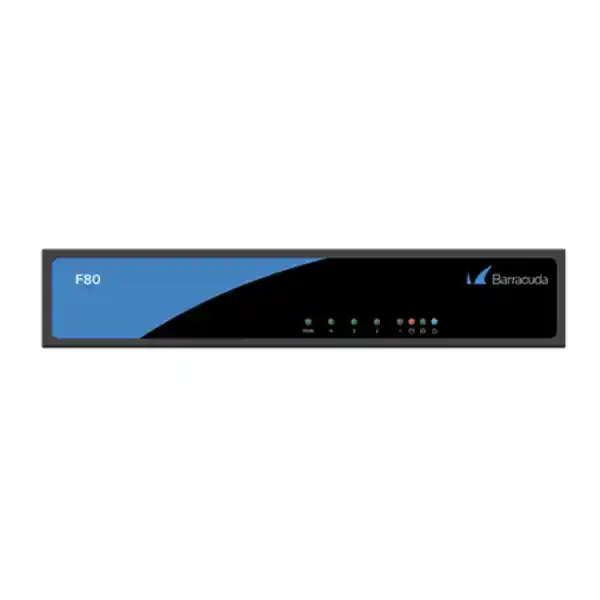
Barracuda CloudGen Firewall F80 Revision B
A compact branch-security platform for Dubai businesses that combines stateful firewalling, application-aware policy control, SD-WAN, secure VPN connectivity, intrusion prevention and integrated wireless capability in a fanless desktop appliance. The F80 Revision B, commonly identified as F80B or BNGF80B, is engineered for branch offices and small-to-medium business environments where security depth, WAN resilience and centralized management must fit within limited space and power budgets.
Direct answer: who should deploy the Barracuda F80 Revision B?
The Barracuda CloudGen Firewall F80 Revision B is best suited to a branch, professional office, retail location, service center, clinic, training facility or distributed business site that needs a dedicated next-generation firewall with several independent Ethernet zones and centrally governed security. Barracuda positions the F80B in its branch-office range, with published guidance around 50 to 100 concurrent users. That user count should be treated as a planning reference rather than a hard licensing limit: actual suitability depends on enabled security inspection, encrypted traffic ratios, simultaneous VPN use, internet bandwidth, application mix, session churn and the organization’s growth profile.
For a Dubai deployment, the F80B makes practical sense when internet circuits are in the tens to low hundreds of megabits per second, the branch requires IPsec or Barracuda TINA-based encrypted connectivity to headquarters or cloud workloads, and the customer values centralized policy rather than managing each office as an isolated firewall. It can also work well when one appliance must separate corporate LAN, voice, guest Wi-Fi, server or IoT segments using its five copper Gigabit ports. Because all five interfaces are 10/100/1000 Mbit/s RJ45 and the platform has no native SFP interface, customers needing direct optical handoff should plan for a carrier-provided Ethernet NTE, media converter or an upstream access switch as appropriate.
FourTeck can assist with model selection, BOM validation, licensing, staging and migration through the Firewall Dubai practice. For larger UAE rollouts that include switching, servers, endpoint integration or managed operations, customers can also engage the broader FourTeck UAE team for coordinated project delivery.
F80B verified hardware architecture and Revision B details
Networking and I/O
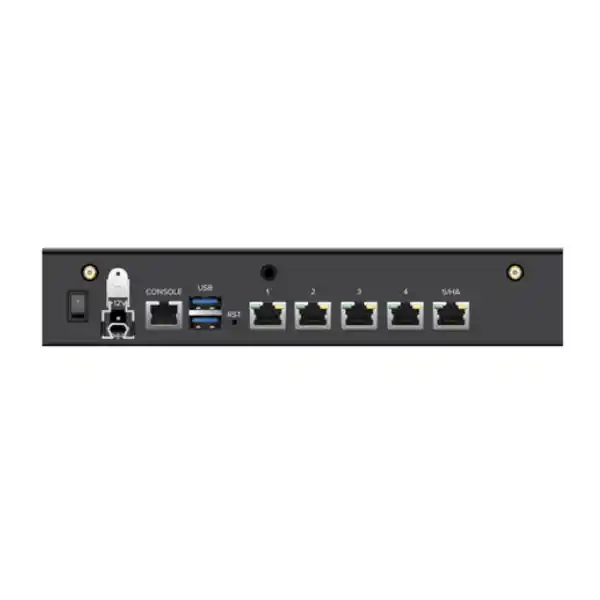
Revision B provides five 10/100/1000 Mbit/s RJ45 Ethernet interfaces. Port 1 is the default management interface in Barracuda’s hardware documentation, while ports 2 through 5 can be assigned to WAN, LAN, DMZ, guest, voice, management or other logical purposes according to the deployed network design. The appliance also includes two USB 3.0 ports and one RJ45 serial console interface for maintenance and recovery workflows.
Integrated IEEE 802.11b/g/n Wi-Fi is available on the F80B. For modern enterprise wireless, however, FourTeck generally recommends treating built-in Wi-Fi as a convenience or specialized branch feature rather than as a replacement for a current multi-AP WLAN design. Where high-density Wi-Fi 6/6E/7, roaming, guest onboarding or location-wide RF management is required, the firewall should operate as the secure WAN and policy edge while dedicated access points provide the wireless layer.
Compute, memory and storage
Barracuda’s Revision B documentation records two hardware populations differentiated by serial number. Appliances below serial number 3,597,421 are documented with a dual-core Intel Celeron processor and 4 GB of RAM, while appliances above that serial threshold are documented with a quad-core Intel Atom processor and 8 GB of RAM. This distinction matters when evaluating used stock, replacement inventory or spare units because two devices labeled F80 Revision B may not contain identical compute and memory resources.
Mass storage is SSD-based with a documented capacity of 80 GB or higher. Barracuda does not publish a proprietary packet-processing ASIC for the F80B in the Revision B hardware specification. In practical architecture terms, it is better understood as an x86-class security appliance running Barracuda CloudGen Firewall software rather than an ASIC-centric platform. Procurement teams should therefore size from measured security-service throughput and session requirements instead of assuming dedicated acceleration silicon.
Published performance profile: interpret the numbers correctly
| Metric | Published F80B class figure | Sizing interpretation |
|---|---|---|
| Firewall throughput | 2.0 Gbps | Baseline stateful forwarding under vendor test methodology; not a promise of full security inspection at 2 Gbps. |
| SD-WAN / VPN class throughput | Up to 720 Mbps | Depends on cipher, hashing, packet size and tunnel behavior; more demanding cryptography can reduce throughput. |
| IPS throughput | 600 Mbps | More representative for branches where intrusion prevention is continuously enabled. |
| NGFW throughput | 400 Mbps | Useful planning reference for application-aware inspection mixes. |
| Threat protection | 380 Mbps | The more conservative figure for heavily inspected internet traffic. |
| Concurrent sessions | 80,000 | Shows connection-table scale; SaaS-heavy users can consume many sessions each. |
| New sessions per second | 12,000 | Important for bursty web, DNS, API, guest or transaction-driven environments. |
A common firewall sizing error is to compare the customer’s ISP line speed only with the headline firewall-throughput number. A 500 Mbps internet connection does not automatically mean that a firewall rated above 500 Mbps will deliver 500 Mbps once TLS inspection, IPS, application control, web security, malware scanning, VPN encryption, reporting and traffic shaping are active together. Every security engine consumes compute resources, and encrypted application traffic can increase CPU cost because the firewall must process connection setup, cryptography, certificate handling, content inspection and logging.
For this reason, FourTeck normally starts from the service stack rather than the raw WAN speed. If a branch has a 200 Mbps primary circuit and 100 Mbps backup circuit, but most traffic is Microsoft 365, web applications, cloud CRM, video meetings and remote-access VPN, then the 380–400 Mbps threat-protection/NGFW range may be a more meaningful reference than the 2.0 Gbps firewall-only figure. Growth headroom should be reserved for higher SaaS adoption, additional users, heavier video, larger cloud backups and future circuit upgrades.
Performance is also affected by packet size. Large sequential flows are usually easier to forward efficiently than very high packet-per-second traffic composed of small packets. Voice, DNS, transactional APIs and certain telemetry workloads can generate many short sessions even when aggregate megabits per second remain modest. This is why session count, new-session rate, CPU utilization and latency should be reviewed alongside Mbps during pilot deployment or migration validation.
Firewall policy engine, segmentation and secure branch design
The value of the F80B extends beyond blocking unsolicited inbound traffic. A properly engineered CloudGen Firewall policy turns the branch into a controlled set of security zones, identities, applications and routed paths. The five Gigabit interfaces can support physically separated networks or connect to VLAN-aware switches where logical segmentation is preferred. Typical UAE branch designs may include a corporate user VLAN, voice VLAN, guest or visitor network, server or NAS segment, CCTV/IoT segment and one or two WAN circuits. The firewall then enforces explicit communication between these trust zones rather than allowing broad east-west access.
Stateful inspection tracks established sessions so return traffic is permitted only when it belongs to a valid connection. Source and destination NAT can map private addresses to public services or provide controlled publishing of internal systems. Policy-based NAT becomes especially useful when the branch has multiple WAN links, partner networks or overlapping address plans. In migration projects, FourTeck maps old rules to business intent first, then removes obsolete objects and duplicated exceptions. This prevents a common problem where a new firewall simply inherits years of accumulated legacy rules without validation.
Application-aware control adds another layer. Instead of basing access solely on TCP or UDP port numbers, modern firewalls can classify applications and apply policy based on traffic behavior. This is important because many SaaS services use HTTPS over TCP 443, meaning a basic port-only policy cannot distinguish collaboration traffic from unsanctioned file sharing or unrelated web applications. Application classification also helps prioritize business-critical services over recreational or low-priority traffic during link congestion.
Segmentation should be tied to operational ownership. CCTV cameras, access-control panels, printers, IP phones, meeting-room systems and building controllers often have longer replacement cycles than user laptops and may run restricted embedded software. Placing these devices in dedicated networks, allowing only required destinations and blocking unnecessary internet access can reduce lateral movement risk. The F80B’s interface count is useful for small sites, while larger branches can aggregate many VLANs on a managed switch and use an 802.1Q trunk toward the firewall according to design requirements.
SD-WAN for UAE branch resilience
Dual-provider and path-aware operation
CloudGen Firewall SD-WAN capabilities are designed to move routing decisions beyond simple primary/backup internet failover. Policies can consider application, source, destination and link quality so traffic uses the most appropriate path. A Dubai branch might use a business fiber circuit as the preferred path and a second ISP, wireless CPE or managed broadband service as backup. Critical ERP, voice or remote-desktop traffic can receive different handling from guest browsing or software updates.
The practical objective is continuity: when the primary path suffers packet loss, latency or outage, business applications should move to an alternate link according to configured thresholds and policy. This does not eliminate the need for provider diversity. Two circuits entering the building through the same physical route, same upstream carrier or same power dependency can still fail together. Resilient design requires attention to access technology, carrier handoff, demarcation, routing and power.
Encrypted SD-WAN fabric
For multi-site organizations, Barracuda’s secure connectivity can combine encrypted tunnels with centralized policy. Rather than treating VPN as a separate add-on, the branch firewall can participate in a WAN fabric where security and path selection are coordinated. This is useful for UAE companies with Dubai headquarters and offices in Abu Dhabi, Sharjah, other GCC locations or international sites because routing, failover and policy can be standardized.
The published F80B performance profile includes up to 720 Mbps for an AES-128 TINA standard-hash test and lower results for more computationally demanding cipher/hash combinations. That illustrates why encryption design must be matched to real requirements. Stronger cryptographic profiles can reduce throughput; the goal is not to chase the highest benchmark but to choose approved algorithms, appropriate security settings and enough platform headroom for the expected encrypted load.
Site-to-site VPN, remote access and hybrid-cloud connectivity
A branch firewall frequently becomes the trust anchor between users and resources that live elsewhere. Those resources may sit in another office, a UAE data center, a private cloud, Microsoft Azure, Amazon Web Services or a partner environment. The F80B supports site-to-site encrypted connectivity as part of the CloudGen Firewall platform, enabling administrators to define secure tunnels and route protected subnets through them. The design should include clear address planning, cryptographic standards, tunnel monitoring and failover behavior so the VPN layer supports the application architecture rather than becoming a fragile point-to-point collection.
For organizations with overlapping private IP ranges across acquisitions, partner links or long-lived branches, migration may require NAT inside VPN, selective routing or staged renumbering. These details matter because a tunnel can be technically established while application traffic still fails due to subnet overlap, asymmetric routing or local firewall policy. FourTeck’s deployment workflow therefore validates reachability from the actual source segment to the application endpoint, not merely the VPN status indicator.
Remote-access requirements have also changed. Users may need access to on-premises file services, ERP, engineering systems, CCTV management or internal web tools while working from home, traveling or visiting customer sites. The CloudGen platform can provide secure client-to-site access, but organizations should combine it with strong identity controls, least-privilege authorization, multifactor authentication where supported by the chosen identity architecture, and restricted administrative exposure. A firewall VPN should not become a universal bridge that gives every remote user unrestricted access to all internal networks.
Hybrid-cloud design should be tested for route precedence and MTU behavior. Encapsulation adds overhead, which can lead to fragmentation or application-specific performance issues when intermediate paths have restricted MTU. Long-lived TCP sessions, voice, video and database flows should be tested across failover events because they respond differently to path changes. If cloud connectivity is mission-critical, FourTeck can combine firewall configuration with broader UAE IT services covering network assessment, server integration, monitoring and operational support.
Intrusion prevention, malware defense and encrypted traffic inspection
Intrusion prevention systems examine network traffic for patterns associated with exploits, protocol abuse and known attack techniques. On the F80B, the published IPS performance reference is 600 Mbps under vendor test conditions. Real deployments must account for rule sets, traffic composition, packet size and simultaneous security services. The objective is not to enable every possible signature without context, but to deploy an inspection policy that protects exposed applications and user traffic while minimizing unnecessary processing and false positives.
Threat protection extends beyond signature inspection. Modern attacks may arrive through web downloads, compromised sites, cloud file sharing, email links or encrypted sessions. Depending on subscription and policy, CloudGen Firewall security services can add application control, malware protection, URL or web filtering and advanced threat analysis. Licensing must be confirmed at quotation stage because some features are subscription-dependent and hardware-only purchases do not necessarily include the complete security-service entitlement a customer expects.
TLS inspection deserves special planning. A large share of business traffic is encrypted, which means security controls may see only IP addresses and handshake metadata unless the organization deploys controlled decryption. SSL/TLS interception can improve visibility into threats hidden inside HTTPS, but it also introduces operational requirements: trusted enterprise certificates must be distributed to managed endpoints, privacy-sensitive categories may need bypass rules, certificate pinning can break selected applications, and inspection load can materially reduce firewall throughput. For regulated or privacy-conscious organizations, decryption policy should be documented and approved rather than enabled indiscriminately.
The F80B’s 380 Mbps threat-protection and 400 Mbps NGFW figures are therefore valuable for conservative sizing. If a branch expects a sustained 400–500 Mbps of fully inspected internet traffic with significant TLS decryption, the F80B may offer insufficient growth margin even though the headline stateful firewall figure is 2 Gbps. In that case, FourTeck should evaluate a larger CloudGen model or an alternative platform whose inspection throughput matches the real service stack.
Centralized management, templates and multi-branch operations
Policy consistency
Distributed firewalls become difficult to govern when administrators make local changes without a common framework. Central management allows standard objects, security baselines, VPN definitions and operational conventions to be reused across sites. This reduces configuration drift and helps audit teams understand what “normal” should look like at each branch.
Zero-touch methodology
For repetitive branch deployments, pre-defined configuration and zero-touch workflows can reduce engineer travel and shorten installation windows. The device still needs correct cabling, ISP details and physical power, but configuration can be prepared centrally so the site engineer follows a controlled activation sequence rather than building the firewall from scratch.
Operational visibility
Centralized events, status and policy review simplify troubleshooting across many sites. Instead of asking every branch to provide screenshots, the operations team can correlate link health, VPN state, security events and configuration changes. This is particularly valuable for companies operating across different Emirates or several countries.
The operational model matters as much as the initial installation. A firewall that is configured once and ignored for years will accumulate risk through expired certificates, unused objects, stale VPN definitions, outdated firmware and unreviewed alerts. FourTeck recommends defining ownership for patching, configuration backup, policy review, log retention, license renewal and incident escalation at the start of the project. Customers with an internal IT team may retain day-to-day control while using FourTeck for escalation and annual review. Organizations without dedicated network security resources may prefer a managed-support arrangement.
Change control should distinguish emergency response from normal policy modification. An urgent block for an active threat may need rapid implementation, while a permanent application publishing rule should be documented with source, destination, service, owner, justification and review date. This discipline becomes increasingly important when a single CloudGen management environment controls many branches because a template or shared object change can affect more than one location.
Five-port network design: practical port maps for F80 Revision B
The five copper interfaces give the F80B enough physical flexibility for several common branch patterns. Barracuda identifies port 1 as the management port in the default hardware layout, but production assignments can be designed around the customer’s needs. Physical separation is easy to understand and troubleshoot, yet it can consume interfaces quickly. VLAN trunks are more scalable but require managed switches and disciplined tagging. The right design depends on the number of trust zones, switch capabilities, redundancy strategy and whether multiple WAN circuits are required.
| Example port | Small office design | Resilient branch design | Segmented security design |
|---|---|---|---|
| p1 | Primary WAN | Primary WAN | Primary WAN |
| p2 | Corporate LAN | Secondary WAN | 802.1Q trunk to managed switch |
| p3 | Guest / Wi-Fi | LAN trunk | DMZ / local server |
| p4 | Voice | DMZ | Out-of-band management |
| p5 | Server / printer segment | Management / spare | Secondary WAN or dedicated partner link |
These examples are illustrative, not mandatory. A production port map should account for how the ISP terminates service, whether PPPoE or static public addressing is used, whether the branch receives multiple public IP addresses, and whether upstream switches support VLAN tagging. When the carrier delivers an optical circuit through its own network termination equipment, the F80B can usually connect using copper Ethernet from that device. If the carrier hands off native fiber directly, the F80B lacks an onboard SFP interface, so an appropriate conversion or switching layer is required.
For high availability, the physical design also needs scrutiny. Larger firewall platforms commonly provide dedicated HA ports or redundant power options; the F80B is a compact single-power-supply appliance. A pair may still be used in supported HA designs depending on software and topology, but customers must account for external power, switch paths and ISP connectivity. The product should not be presented as electrically redundant simply because two firewalls exist. True resilience includes power distribution, upstream switching, carrier paths and configuration synchronization.
Physical installation, power, thermals and branch-room planning
The F80 Revision B is a desktop form-factor appliance measuring approximately 23.2 cm wide, 15.3 cm deep and 4.4 cm high, with an appliance weight around 2.0 kg. Its fanless cooling is valuable for quiet offices, reception areas, clinics and small communications rooms because there is no normal fan noise and fewer moving parts. Fanless does not mean ventilation is optional: the unit still dissipates heat and should be placed where air can circulate freely, away from direct sunlight, dust accumulation and other heat-producing equipment.
Barracuda documents an operating temperature range from 0°C to +40°C and non-condensing operating humidity from 5% to 95%. In the UAE, this reinforces an important design principle: the firewall should live in an air-conditioned indoor IT environment. It is not an outdoor-rated or industrial-temperature device. Placing it in a non-conditioned cabinet, rooftop enclosure, warehouse corner or telecom space that exceeds the temperature envelope can reduce reliability. Even in air-conditioned rooms, the team should avoid positioning the unit directly on top of a hot UPS or switch without airflow.
The documented external power supply accepts 100–240 V AC at 50–60 Hz and provides 12 V DC to the appliance, with a 45 W supply rating. Maximum heat dissipation is documented around 26.7 W. For business continuity, FourTeck recommends connecting the firewall and critical ISP termination equipment to a properly sized UPS. If the branch has dual WAN circuits but both carrier devices and the firewall lose power during a short utility interruption, communications still fail. The UPS design should therefore include the firewall, ONT/NTE, essential switching and any controller required for business-critical connectivity.
Rack integration requires planning because the F80B is not a 1U full-width rack appliance. Barracuda notes that L-shaped rack-mount brackets are not included in standard packaging and must be ordered separately if required. Many customers instead use a ventilated rack shelf. The installation BOM should specify shelf or bracket method, patch leads, console access, labeling, cable management and UPS outlet availability so site engineers do not improvise during cutover.
Integrated Wi-Fi: where it helps and where a dedicated WLAN is better
Appropriate use cases
The integrated 802.11b/g/n radio can be useful in a small branch where only modest wireless coverage is required, for setup access, low-density staff connectivity or a narrowly scoped service network. Consolidating basic Wi-Fi and firewalling into one appliance can reduce equipment count at very small locations. The included wireless antenna also simplifies initial deployment.
Because the F80B’s radio generation predates current Wi-Fi standards, customers should evaluate expected client counts, channel congestion, building materials and application requirements. Dubai offices often operate in dense RF environments with many neighboring wireless networks, which can make older 2.4 GHz-focused technologies less suitable for primary business access.
When to use external access points
A dedicated WLAN architecture is preferred for multi-floor offices, high-density meeting spaces, warehouses, classrooms, hospitality areas, voice roaming, location analytics or modern laptops that benefit from newer Wi-Fi standards. In that design the F80B remains the security and WAN edge, while managed access points connect through switching infrastructure and place wireless clients into VLANs enforced by firewall policy.
This separation also improves lifecycle management. Firewalls and wireless standards evolve at different rates. Keeping wireless as an independent layer lets the customer modernize access points without replacing the branch security gateway, and it allows RF placement to follow coverage requirements rather than the location of the ISP handoff or network rack.
Licensing, subscriptions and what must be confirmed before purchase
Firewall hardware and firewall security services are not the same thing. An F80B appliance can provide core routing and firewall functions, but the exact availability of advanced security, cloud-managed services, threat intelligence, malware protection, remote-access features, reporting and support depends on the purchased Barracuda subscription, license bundle and entitlement period. A quotation should therefore state both the hardware part and the software/support package rather than describing the appliance as though every possible CloudGen capability is permanently included.
The first licensing question is operational: what must the firewall do on day one? If the requirement is basic stateful firewalling and encrypted site connectivity, the entitlement may differ from a customer that needs IPS, advanced malware inspection, web filtering, application control, cloud sandboxing, centralized management, advanced remote access and enhanced reporting. The second question is term length. One-year, multi-year and renewal options can have different commercial effects and should be aligned with the organization’s budgeting cycle and expected hardware lifecycle.
The third question is supportability of the exact unit. Barracuda’s current lifecycle information distinguishes F80 Revision A from Revision B. Revision A has reached end-of-life, while Revision B is listed separately as BNGF80B without an end-of-sale or end-of-life date set in the current lifecycle table. This is important for used-market procurement: a listing that simply says “Barracuda F80” is insufficient. The rear product label and model revision should be verified because Revision A and Revision B are not equivalent from lifecycle perspective.
Finally, buyers should confirm whether the quoted unit is new, vendor-supported stock, refurbished, pre-owned or spare inventory, and whether licenses can be activated or transferred as intended. FourTeck can validate the required BOM before commercial commitment. For organizations purchasing across multiple regions, the FourTeck global site provides a route into broader multi-country technology sourcing and delivery discussions.
Firmware planning, upgrade discipline and Revision B support context
Barracuda’s hardware-model documentation lists F80 Revision B as requiring CloudGen Firewall firmware 8.0.1 or higher. That is a minimum compatibility reference, not a recommendation to deploy an old release. Production systems should run a vendor-supported firmware train appropriate for the organization’s environment, required features and maintenance policy. Before any major upgrade, administrators should review release notes, known issues, upgrade paths, required intermediate versions and the compatibility of centralized management components.
Firmware maintenance should be treated as a security process. Delaying upgrades indefinitely can leave known vulnerabilities unaddressed, while upgrading without preparation can create service disruption. A controlled method includes verified configuration backups, current license checks, change approval, maintenance-window scheduling, pre-upgrade health validation, rollback planning and post-upgrade testing of internet access, VPNs, NAT rules, security services, routing and monitoring. In an HA or multi-site environment, sequence and compatibility become even more important.
Because the F80B exists in at least two documented hardware populations with different CPU and RAM configurations, the precise appliance serial number can be relevant during support and troubleshooting. Administrators should maintain an asset register containing model, revision, serial number, installed firmware, license expiry date, site location, WAN circuit identifiers and management ownership. This information reduces delays during an outage because the support team can identify the exact device immediately.
Lifecycle status should be reviewed periodically rather than only at purchase time. Barracuda may publish future end-of-sale or end-of-life milestones for hardware revisions. A replacement plan should begin before support expiry so budget, migration design and change windows can be scheduled. Organizations operating critical branches should also decide whether to maintain a configured spare unit or rely on vendor replacement services, balancing recovery objectives against inventory cost.
Sizing methodology for Dubai businesses
1. Users and devices
Count concurrent users, not just payroll headcount. Add phones, meeting-room systems, printers, cameras, access-control devices, servers, IoT equipment and guest clients. A 60-person office can easily have several hundred active IP endpoints. Endpoint count influences DHCP scope, session load, logging volume, switch design and security policy complexity.
2. Internet and WAN bandwidth
Document primary and secondary link speeds, expected upgrade plans and actual peak utilization. If a 100 Mbps site plans a 500 Mbps circuit next year, size for the target state. Include private WAN or dedicated cloud links because they also consume routing, inspection and VPN resources depending on topology.
3. Inspection stack
List the services that will remain enabled continuously: IPS, application control, web filtering, malware scanning, threat protection, SSL inspection, DNS controls and logging. The more features applied simultaneously, the more conservative the throughput assumption should become. Use NGFW or threat-protection figures instead of firewall-only throughput for full-security deployments.
4. VPN and SD-WAN load
Estimate site-to-site encrypted traffic, remote-user concurrency, cloud tunnel bandwidth and chosen ciphers. Backup replication or cloud synchronization across encrypted tunnels can create sustained load even after office hours. Plan capacity for the busiest combined period, not only normal interactive traffic.
5. Session behavior
SaaS applications create many parallel sessions. Browsers, collaboration clients, mobile apps and cloud agents may open dozens or hundreds of connections per user. Check concurrent-session and new-session requirements, especially for guest Wi-Fi, call centers, e-commerce branches or environments with high API activity.
6. Growth and failure mode
Reserve capacity for three to five years where practical. Also size for degraded mode: if one WAN link fails, can the surviving link and firewall carry the critical workload? If a site doubles user count or adopts cloud backup, will the appliance still provide acceptable inspection performance?
A reasonable F80B candidate is a branch whose fully inspected traffic remains comfortably below the 380–400 Mbps threat-protection/NGFW references, whose VPN demand fits the chosen cryptographic profile, and whose 80,000-session table provides adequate margin. If calculations approach those limits during normal operation, stepping up to a larger platform usually provides better lifecycle value than purchasing the smaller appliance and immediately operating it near saturation.
Migration from an existing firewall to Barracuda F80B
A firewall replacement is a network migration, not a box swap. Even when the old and new appliances have the same WAN and LAN addresses, differences in NAT behavior, routing precedence, service objects, VPN negotiation, DHCP, DNS forwarding and application inspection can cause unexpected outages. FourTeck begins migration by creating an inventory of current interfaces, VLANs, IP ranges, public IP mappings, static routes, VPNs, DHCP scopes, DNS settings, authentication dependencies, policy rules and administrative access methods.
Rules are then classified by business purpose. For example, “allow TCP 443 from any to 10.1.2.50” is not a business requirement; it is an implementation detail. The underlying requirement might be “publish customer portal from approved internet sources to the reverse proxy.” Capturing intent allows engineers to rebuild the rule cleanly, verify whether it is still needed and choose appropriate security controls. Obsolete rules can be removed instead of copied forward.
VPN migrations require coordination with the far end. Peer addresses, encryption domains, IKE versions, pre-shared keys or certificates, proposals, lifetimes and route behavior should be documented before the cutover. Where third parties control the remote peer, change windows must allow for their availability. DNS TTLs should be reduced in advance if public services will move to new IP addresses. For office internet migrations, the team should also retain temporary access to the old firewall if practical so rollback is possible.
Cutover testing must be application-oriented. Engineers should verify user internet access, Microsoft 365, email, DNS, voice, critical SaaS, printing, internal servers, published services, remote VPN, site-to-site VPN, guest network isolation and monitoring. A successful ping is not enough. Business owners should confirm that their key workflows function. After stabilization, temporary rules and migration exceptions should be removed, and the final configuration should be backed up and documented.
For customers replacing another vendor’s appliance, policy conversion tools may accelerate object migration, but automated conversion should never substitute for review. Different products express zones, NAT, identity, application control and routing in different ways. Clean migration is an opportunity to simplify the policy base and align it with current business requirements.
Security hardening checklist for production deployment
Administrative plane
Restrict management access to dedicated internal networks or trusted source addresses. Avoid exposing the management interface broadly to the internet. Use named administrator accounts, strong authentication, role separation and logging. Disable unused services and document emergency access procedures.
WAN edge
Permit only services that the business intentionally publishes. Apply destination NAT and security policy narrowly, use source restrictions where practical, and protect exposed applications with additional controls. Remove temporary test forwards after validation and keep an ownership record for every inbound rule.
Internal segmentation
Separate users, servers, voice, guest, cameras and operational technology according to risk. Deny inter-zone traffic by default where feasible, then permit required flows. This reduces the impact of compromised endpoints and makes network behavior easier to monitor.
Logging and time
Configure reliable NTP, maintain appropriate logs and send important events to centralized monitoring or SIEM platforms when available. Accurate timestamps are essential for incident investigation. Set alert thresholds for WAN failures, VPN state changes, license expiry and security events.
Hardening also includes configuration lifecycle. Backups should be protected and stored outside the appliance. A backup that exists only on the failed firewall is not a recovery strategy. Administrators should periodically test whether backups can be retrieved, identify the firmware version they correspond to and document credentials needed during recovery. The USB recovery media supplied with the appliance can support installation or recovery procedures, but operational backups remain essential.
Security policies should include review dates. Temporary contractor access, vendor support tunnels and project-specific inbound rules often remain active long after the project ends unless someone owns the cleanup. Adding expiration or review metadata to change tickets creates a trigger for removal. This simple governance measure can reduce the attack surface more effectively than adding another inspection feature to an already permissive policy base.
High availability, resilience and spare strategy
Branch resilience can be built at several layers. The F80B supports the CloudGen Firewall feature set used in centrally managed environments, but the hardware itself has a single external power supply and no built-in dual PSU. Therefore, a resilient design must address the physical dependencies around the firewall. At minimum, use a reliable UPS, protect the ISP modem or ONT, maintain spare patch leads and label all interfaces. For critical sites, consider dual WAN providers and evaluate a paired firewall or prepared spare strategy according to supported product architecture and budget.
A two-firewall topology does not automatically deliver uninterrupted service. Both devices may still depend on the same access switch, same UPS, same wall socket, same ISP handoff or same cabinet. High availability planning should map shared failure domains. If one switch failure disconnects both firewalls from the LAN, firewall redundancy does not protect the branch. Likewise, if both WAN circuits use the same carrier fiber route, logical diversity may not survive a physical cable cut.
A prepared spare can be cost-effective for remote locations where immediate engineer access is difficult. The spare should have compatible hardware revision, known firmware, valid licensing strategy and a documented restoration process. Configuration backups must be recent. The organization should know whether the spare can be activated under existing entitlements or requires vendor assistance. Keeping a spare without testing recovery steps can create false confidence.
For Dubai and UAE customers with strict uptime requirements, FourTeck can help create a recovery runbook that identifies primary and backup WAN circuits, firewall power path, switch dependencies, escalation contacts, configuration backup location, vendor support details and failover test procedures. Annual or semiannual resilience tests should be conducted during controlled windows so the team knows how the environment behaves before a real incident.
Routing, NAT and application-path engineering
CloudGen Firewall is often deployed in networks that require more than a default route toward the internet. Dynamic routing support, static routes, policy-driven path selection and SD-WAN can connect branches to headquarters, cloud environments and partner networks. Before deployment, the engineering team should document which device currently owns the default gateway for each subnet, where inter-VLAN routing occurs and whether the firewall or a Layer 3 switch will route internal networks. Moving a gateway from a switch to the firewall changes traffic paths and may increase inspection visibility but also changes failure behavior and throughput requirements.
NAT design deserves equal attention. Source NAT typically translates private user addresses to a public WAN address for internet access. Destination NAT publishes internal services through selected public IPs. Policy-based NAT can choose translations according to source, destination, service or provider, which is useful for dual-ISP designs and services that require traffic to exit through a specific public address. Administrators should avoid overly broad NAT rules because they can create asymmetric routing and make troubleshooting difficult.
Asymmetric routing occurs when forward traffic passes through one firewall path and return traffic follows another. Stateful firewalls may drop the return packets because they do not belong to a connection seen on the expected path. Multi-WAN, dynamic routing and cloud connectivity increase the likelihood of these scenarios. FourTeck validates route tables, NAT behavior and remote peer routes together so the end-to-end path is predictable.
Application performance should be considered at the path level. A firewall can show low CPU utilization while users still experience poor service because the ISP path has packet loss, a VPN introduces MTU problems or traffic is taking a suboptimal route. Troubleshooting therefore combines firewall session data with latency, jitter, packet capture and provider diagnostics. The goal is to prove where the problem exists rather than assuming every application issue is caused by the security appliance.
Operational monitoring and capacity management
Utilization
Track CPU, memory, interface throughput and storage over time. Short peaks are normal; sustained high utilization during business hours indicates reduced headroom. Compare resource trends with user growth, circuit upgrades and newly enabled security services.
Sessions
Monitor concurrent and new sessions per second, not just Mbps. A web-heavy or API-heavy site can stress session tables while bandwidth looks modest. Sudden spikes may also reveal scanning, malware or application malfunction.
WAN quality
Measure packet loss, latency and jitter on every provider. SD-WAN decisions depend on path quality, and voice or interactive applications may degrade long before a link reaches bandwidth saturation.
Capacity management should be proactive. If a branch runs at 70–80 percent of the F80B’s practical inspection capacity during normal peaks, a growth event or failover can push the system into congestion. Circuit upgrades are an obvious trigger for re-sizing, but security changes matter too. Enabling TLS inspection or advanced threat services can increase workload even when internet bandwidth remains unchanged. Review appliance capacity whenever the organization changes inspection policy, cloud backup strategy, remote-access population or branch headcount.
Logs also help detect configuration quality problems. Repeated denies from internal systems may reveal a missing rule, an obsolete application, compromised endpoint or incorrect network design. Excessive broad allows reduce the value of segmentation. Regular review of top applications, destinations, blocked traffic and VPN usage turns the firewall into an operational data source rather than a static gateway.
Procurement considerations for Dubai and the UAE
UAE firewall procurement should begin with the exact manufacturer model and revision. “Barracuda F80” is not precise enough because the lifecycle status and hardware configuration differ by revision. The required line item should identify Barracuda CloudGen Firewall F80 Revision B, manufacturer family identifier BNGF80B where applicable, and the desired subscription/support bundle. If a reseller quote includes only a hardware appliance, buyers should ask which security services, firmware updates, cloud features and support rights are included and for what term.
Stock condition is another critical point. As models age, the channel may contain new old stock, refurbished hardware, vendor-recertified units or used appliances removed from service. Those categories carry different support, warranty and licensing implications. A low hardware price can become expensive if the subscription cannot be activated as expected or if the unit is tied to another account. FourTeck can help clarify condition and entitlement before deployment.
For project scheduling, consider lead time, license activation, ISP coordination and on-site access. Firewall delivery alone does not determine the cutover date. The implementation may need public IP information from the carrier, remote peer coordination for VPNs, DNS updates, certificate issuance, access-switch changes and stakeholder testing. In new offices, it is efficient to stage the firewall before the internet service is live so policy, addressing, VLANs and management can be prepared in advance.
Organizations operating across the UAE should standardize branch BOMs where possible. Using a consistent firewall model, switch architecture, VLAN plan and naming scheme simplifies support and spare management. However, standardization should not force undersizing. A 20-user sales office and a 90-user contact center have different traffic patterns even if headcount is similar. FourTeck can create a small/medium/large branch reference architecture so each site receives the appropriate platform while preserving common management and policy principles.
Detailed F80 Revision B hardware specification table
| Ethernet interfaces | 5 × 10/100/1000 Mbit/s RJ45 |
| Default management | Port 1 / p1 |
| USB | 2 × USB 3.0 |
| Console | 1 × RJ45 serial console |
| Integrated Wi-Fi | IEEE 802.11b/g/n |
| CPU | Serial-dependent: dual-core Intel Celeron on earlier Revision B units; quad-core Intel Atom on later units |
| RAM | Serial-dependent: 4 GB on earlier Revision B units; 8 GB on later units |
| Storage | SSD, 80 GB or higher |
| Form factor | Desktop, fanless |
| Dimensions | Approx. 23.2 × 15.3 × 4.4 cm |
| Weight | Approx. 2.0 kg |
| Power | Single external supply, 100–240 V AC input, 12 V DC output, 45 W supply rating |
| Operating temperature | 0°C to +40°C |
| Operating humidity | 5% to 95%, non-condensing |
| Certifications | CE emissions, CE electrical safety, FCC emissions and RoHS compliance documented |
| Standard packaging references | Appliance, network cable, external power brick/cable, USB recovery media, wireless antenna and Quick Start Guide; packaging details can change, so confirm quotation contents |
Barracuda notes that hardware components can change over time as technology evolves, so serial-number-specific verification is appropriate when exact CPU, memory or accessory details affect a project. FourTeck can check the offered unit against the required deployment before installation.
Frequently asked technical questions
Is F80 Revision B the same as F80 Revision A?
No. They are different hardware revisions and must not be treated as interchangeable for lifecycle or specification purposes. Barracuda’s current lifecycle table lists Revision A as end-of-life and Revision B separately as BNGF80B. Verify the appliance label when sourcing hardware.
Does F80B have SFP ports?
No native SFP interface is listed for F80 Revision B. It provides five copper Gigabit RJ45 Ethernet interfaces. Direct fiber services therefore need an Ethernet handoff, media conversion or an appropriate upstream switch.
Does it include Wi-Fi?
Yes. F80B hardware documentation lists integrated IEEE 802.11b/g/n Wi-Fi. For modern high-density office WLAN requirements, separate current-generation access points are usually the better design.
Can it handle a 1 Gbps internet circuit?
It can forward traffic at a published firewall-only rate up to 2.0 Gbps, but that does not mean it can deliver 1 Gbps with all security services enabled. Published NGFW and threat-protection figures are around 400 Mbps and 380 Mbps, so a heavily inspected 1 Gbps circuit calls for a larger platform.
How many users can it support?
Barracuda publishes a recommended concurrent-user range around 50–100. Actual suitability depends on traffic and security services. Fifty heavy users running constant cloud, video and VPN workloads may demand more resources than one hundred light users.
Is the F80B fanless?
Yes. Revision B is documented as a fanless desktop appliance. It still requires normal ventilation and an indoor environment within the specified temperature and humidity limits.
Does every F80B have 8 GB RAM?
No. Barracuda documents 4 GB on earlier Revision B units below serial number 3,597,421 and 8 GB on later units above that threshold. CPU generation also differs across those serial ranges.
What firmware does Revision B require?
Barracuda’s hardware-model list gives firmware 8.0.1 or higher as the minimum for F80 Revision B. Production deployments should use a currently supported release appropriate to the installed management environment and feature requirements.
Decision recap: when F80B is a strong fit
Choose F80 Revision B when
- The site is a branch or SMB environment around the published 50–100 concurrent-user planning range.
- Five Gigabit copper interfaces are sufficient for WAN, LAN, DMZ and segmented networks.
- Expected fully inspected traffic remains comfortably within the 380–400 Mbps threat-protection / NGFW envelope.
- SD-WAN, site-to-site VPN and application-aware branch policy are important.
- A compact, quiet, fanless desktop appliance is preferred.
Consider a larger platform when
- The site expects 500 Mbps to 1 Gbps or more of sustained traffic with full security inspection.
- Native SFP/SFP+ interfaces or direct fiber handoff are required.
- The branch needs materially more than 80,000 concurrent sessions or has unusually high session churn.
- High-density modern Wi-Fi must be integrated as the primary wireless platform.
- The project demands hardware-level redundant power supplies or more extensive interface density.
The correct buying decision is based on the busiest realistic workload with the intended security features turned on. FourTeck can compare F80B against larger Barracuda models and alternative firewall platforms when the requirement sits near the edge of its capacity.
Quotation input checklist for an accurate Dubai BOM
To produce an accurate quotation and deployment plan, provide as much of the following information as possible. Missing details can be clarified during technical consultation, but these inputs help FourTeck identify whether F80 Revision B has sufficient capacity and which license package is appropriate.
FourTeck consultation and deployment support
FourTeck supports Barracuda CloudGen Firewall projects from requirements discovery through production cutover. Our UAE network specialists can validate whether the F80 Revision B matches your bandwidth, user count, session profile and security-service stack; prepare the required hardware and license BOM; plan addressing, zones and WAN design; stage configuration; migrate policies and VPNs; coordinate cutover; and document the final environment.
For customers with several locations, the engagement can extend into standardized branch templates, SD-WAN design, centralized policy, change management and operational monitoring. Where the firewall project is part of a wider infrastructure refresh, FourTeck can coordinate switching, wireless, servers, endpoint networking and related services so interdependencies are resolved before the implementation window.
Share your current firewall model, internet speeds, approximate concurrent-user count, number of sites, VPN requirements and the security functions you want enabled. FourTeck will use these inputs to determine whether F80B provides suitable headroom or whether a larger model is the safer long-term selection.

Reviews
There are no reviews yet.