
DrayTek DSL Access Platform • UAE
DrayTek Vigor166 G.fast, VDSL2 35b and ADSL2+ Modem Router
The DrayTek Vigor166 is a specialized wired broadband device for organizations that still depend on high-performance copper access, need a clean DSL handoff to an existing firewall, or want a compact modem/router that can terminate G.fast, VDSL2 profile 35b and legacy ADSL2+ services. It combines a single RJ-11 xDSL interface with two Gigabit Ethernet ports and a practical software feature set for small edge deployments. For UAE buyers, the important purchasing question is not simply whether the device is fast; it is whether the local service presented at the site is a supported xDSL technology, whether the provider permits a customer-managed modem, and whether the final architecture calls for bridge-oriented handoff or local routing. FourTeck can assist with that design decision before deployment so the Vigor166 is selected for the correct circuit and topology.
Direct answer: what the Vigor166 is designed to do
The Vigor166 is best understood as a high-speed xDSL termination platform with optional router functionality. DrayTek specifies G.fast support using both 106 MHz and 212 MHz profiles, with advertised G.fast download performance up to 1 Gbps. It also supports VDSL2 profile 35b, commonly associated with Supervectoring, with a manufacturer-listed maximum VDSL link rate of 300 Mbps, and it retains ADSL2/ADSL2+ compatibility for older copper services. This broad backward compatibility is useful when a business is migrating between copper access generations or when a network integrator wants one compact device that can accommodate more than one DSL service type.
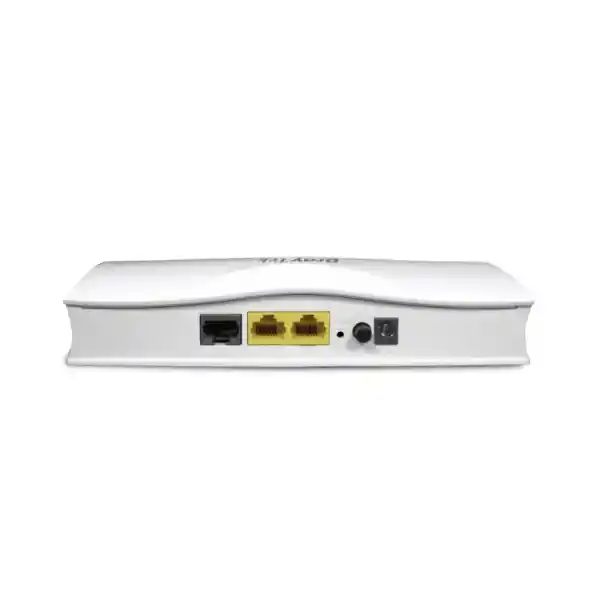
The hardware presents one RJ-11 DSL port and two 10/100/1000 Mbps Ethernet RJ-45 interfaces. In a straightforward edge design, the DSL port faces the access line while one Gigabit Ethernet port provides handoff to a downstream firewall, router or switch. In another design, the Vigor166 can operate as the routing edge itself for a small network, using its NAT, firewall, DHCP and routing functions. DrayTek lists up to 10,000 NAT sessions and recommends the platform for approximately ten hosts, which positions it as a focused access device rather than a large-enterprise security gateway.
That distinction matters. The Vigor166 can provide useful firewall and content controls, but it is not intended to replace a modern unified threat management appliance where advanced malware inspection, application control, secure web gateway functions, sandboxing or enterprise VPN concentration are required. Many professional deployments therefore use it as the DSL front end while a dedicated security appliance performs policy enforcement. For those architectures, FourTeck can align the modem with a broader firewall solution in Dubai and the UAE and validate where routing, NAT and security policy should reside.
G.fast access
Supports 106 MHz and 212 MHz G.fast operation for short-loop copper access where the service provider delivers compatible G.fast infrastructure. DrayTek lists download speeds up to 1 Gbps under suitable line and service conditions.
VDSL2 35b
Backward compatibility extends to VDSL2 profiles including 8a, 8b, 8c, 8d, 12a, 12b, 17a, 30a and 35b. DrayTek specifies a maximum VDSL link rate of 300 Mbps.
Dual Gigabit LAN
Two Gigabit Ethernet RJ-45 ports allow flexible Ethernet handoff and local connectivity. The Gigabit interfaces prevent a Fast Ethernet bottleneck when the DSL line itself is capable of higher throughput.
Compact routing edge
The router feature set includes IPv4 and IPv6 connectivity, NAT, static routing, DHCP services, firewall controls, management services and up to 10,000 NAT sessions for small-site use.
Verified hardware and performance profile
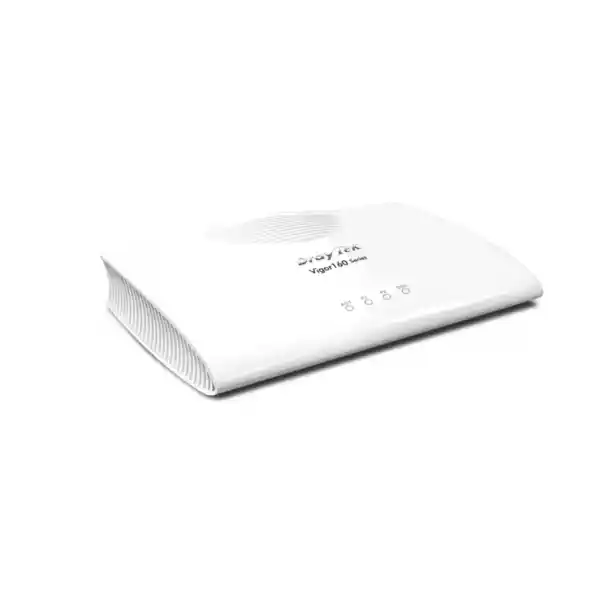
The Vigor166 is intentionally simple at the physical layer. There is no integrated Wi-Fi radio and no cellular interface. This is an advantage in designs where wireless access is already handled by managed access points or where the modem is installed in a communications cabinet close to the copper demarcation point. Removing unnecessary radio functions also makes the unit easier to treat as a dedicated WAN access component. The front-end role is clear: synchronize with the supported DSL circuit, then pass traffic into the Ethernet network according to the selected operating mode.
| Specification | DrayTek Vigor166 | Deployment meaning |
|---|---|---|
| DSL interface | 1 × RJ-11 | Connects to the supported G.fast, VDSL2 or ADSL2+ copper service. |
| Ethernet | 2 × Gigabit Ethernet RJ-45 | Provides high-speed handoff to a firewall/router and an additional local Ethernet connection. |
| G.fast profiles | 106 MHz / 212 MHz | Enables high-rate short-loop DSL when the access network supports G.fast. |
| VDSL2 profiles | 8a/8b/8c/8d, 12a/12b, 17a, 30a, 35b | Supports a wide range of VDSL2 service profiles including 35b Supervectoring. |
| Max VDSL link rate | 300 Mbps | Vendor-rated link capability; real sync depends on profile, loop, noise and provider configuration. |
| Max ADSL link rate | 20 Mbps | Legacy fallback for compatible ADSL2/ADSL2+ services. |
| NAT capacity | Up to 10,000 sessions | Appropriate for small-site routing rather than high-density enterprise edge workloads. |
| NAT performance | Up to 700 Mbps; up to 940 Mbps with hardware acceleration | Manufacturer laboratory figures under optimal conditions; actual application throughput can be lower. |
| Power | DC 12 V, 1 A; max. 6.6 W | Low power draw suits branch cabinets and compact telecom installations. |
| Dimensions | 181 × 125 × 40 mm | Compact desktop/cabinet footprint. |
| Environment | 0–45°C; 10–90% RH non-condensing | Install in a ventilated indoor equipment area and account for UAE cabinet temperatures. |
Performance figures deserve careful interpretation. DSL rate is primarily a property of the physical access path and provider configuration. Copper length, cable gauge, bridge taps, joints, electromagnetic interference, binder occupancy, vectoring environment and the access node profile can all influence synchronization rate. The 1 Gbps G.fast figure should therefore be viewed as a capability ceiling for suitable conditions, not a promise that any copper pair will operate at that speed. Likewise, NAT throughput is a router-processing figure, not a DSL sync guarantee. A correct presales process treats physical-line capability, ISP service profile and router forwarding performance as three separate sizing questions.
G.fast engineering: where the Vigor166 delivers its strongest value
G.fast was developed to extract very high throughput from short copper loops by using a much wider frequency range than traditional VDSL2. The Vigor166 supports 106 MHz and 212 MHz G.fast modes. In practical terms, this means the modem can participate in access architectures where fiber is brought close to the subscriber location and the final short segment remains copper. The technology is particularly sensitive to loop length and line quality, so the same modem can produce dramatically different results on two circuits that appear similar from a simple distance estimate.
For network architects, the value of a G.fast-capable modem is not just peak bandwidth. It can provide a controlled Ethernet demarcation between the carrier access medium and the customer routing/security stack. That separation is useful when the enterprise wants its firewall policy, VPN architecture, monitoring, logging and segmentation to remain independent of the access modem. If the provider allows the required mode, the Vigor166 can be positioned as the DSL termination layer and the downstream security appliance can own the public or logical WAN configuration. The exact handoff model must be confirmed against the ISP service, because encapsulation, authentication, VLAN tagging and addressing requirements vary by operator and access product.
G.fast is also a reason to pay attention to cabling inside the building. A technically capable access line can be compromised by poor internal copper, long extensions, parallel telephone wiring, oxidized joints, incompatible splitters or an installation that routes the DSL pair alongside sources of electrical noise. During troubleshooting, the most useful baseline is usually a short, direct connection at the service demarcation point. That baseline helps distinguish outside-plant limitations from customer-premises wiring problems. Once stable synchronization has been established, the integrator can reintroduce the internal path and observe any change in line characteristics.
In the UAE, many business locations are served by fiber, so buyers should not assume that a G.fast modem is appropriate simply because they need a high-speed WAN connection. The Vigor166 is specifically relevant when the delivered service is supported xDSL over copper. A fiber Ethernet or GPON service requires a different termination model. FourTeck can help confirm the intended WAN architecture and, where the project includes switching, Wi-Fi, security or managed services, coordinate the surrounding infrastructure through FourTeck UAE rather than treating the modem as an isolated purchase.
VDSL2 profile 35b and backward compatibility
The Vigor166 is not limited to G.fast. It supports the established VDSL2 family and includes profile 35b, which extends usable spectrum beyond profile 17a and is often referred to as Supervectoring in compatible access environments. DrayTek lists support for profiles 8a, 8b, 8c, 8d, 12a, 12b, 17a, 30a and 35b. This breadth is useful for integrators that cannot predict which exact VDSL profile will be provisioned at every location or that need a modem capable of remaining in service if the provider changes the profile within the supported range.
Vectoring is important because high-frequency DSL pairs in the same cable binder can interfere with one another. In a compatible operator environment, vectoring techniques are used to reduce crosstalk and improve attainable data rates. DrayTek lists support for ITU-T G.993.5 vectoring alongside ITU-T G.993.2 VDSL2. The modem participates at the customer end, but the achievable benefit depends on the provider’s DSL access equipment and how the line group is engineered. A customer cannot enable vectoring locally and expect the same result if the network side does not support the corresponding function.
For older circuits, the Vigor166 also supports ADSL2 and ADSL2+. DrayTek’s published specification identifies ITU-T G.992.3 ADSL2 with Annex A support and ITU-T G.992.5 ADSL2+. The manufacturer lists a maximum ADSL link rate of 20 Mbps. This legacy capability can matter at remote branches, warehouses, temporary project sites or transitional locations where a newer access circuit is not yet available. It also simplifies sparing strategy for an organization that operates mixed DSL generations, though every site should still be checked for annex requirements and local provider compatibility.
Backward compatibility should not be confused with automatic commercial compatibility. Even when the physical modulation is supported, a service can depend on specific encapsulation, authentication, VLAN or addressing settings. Procurement teams should therefore collect the service activation details before the modem is installed. The most reliable acceptance test is a documented configuration combined with successful line synchronization, correct IP assignment or PPP establishment, expected path MTU behavior, DNS resolution and a controlled throughput test. This prevents a common mistake: declaring the modem incompatible when the actual problem is an incorrect access credential or WAN parameter.
Use case 1: modem handoff to a firewall
A common business topology places the Vigor166 at the DSL edge and a dedicated firewall behind it. The design objective is to keep the modem focused on access synchronization while the firewall owns segmentation, VPN, threat prevention and policy control. This topology is attractive when the customer already standardizes on a security platform and does not want security policy distributed across multiple device types.
The exact bridge or handoff configuration must match the ISP’s service. Document authentication, address assignment, MTU, any required tagging and whether the downstream firewall must originate PPP or receive an Ethernet/IP handoff. Avoid double NAT unless there is a clear operational reason for it.
Use case 2: compact router for a small site
The Vigor166 can also act as a small router. DrayTek lists IPv4 connectivity options including PPPoE, PPPoA, DHCP, static IP and MPoA, plus multiple IPv6 mechanisms. NAT, DHCP, static routing, IP-based firewall policy, URL keyword filtering and web-feature controls provide a functional baseline for a small office or utility network.
The 10,000-session rating and recommendation for around ten hosts indicate the intended scale. For heavier security workloads, high user density or sophisticated remote-access requirements, use the Vigor166 as an access component and place a purpose-built security gateway behind it.
Use case 3: migration and service transition
Because the platform spans ADSL2+, VDSL2 including 35b and G.fast, it can be useful where a site may move from one supported copper service generation to another. A consistent modem family can simplify operational procedures, configuration backups, monitoring and field replacement.
Migration planning should still treat each circuit as a fresh activation. Check the profile, expected sync, provider credentials and handoff requirements after every service change. A new access profile can expose marginal premises wiring that was adequate at lower frequencies.
Use case 4: controlled lab or branch WAN
A compact wired modem/router is useful in labs, branch offices, network test benches and temporary installations where engineers need direct visibility into DSL status without an integrated wireless stack. Management services and DSL information can support troubleshooting and acceptance testing.
For production use, secure the management plane, limit administrative source networks, use HTTPS or SSH where practical, and keep firmware aligned with the correct hardware and modem-code requirements.
Router mode, addressing and IP service integration
When used as a router, the Vigor166 supports the mainstream mechanisms required to turn a DSL circuit into a usable IP edge. DrayTek lists PPPoE, PPPoA, DHCP, static IP and MPoA for IPv4 Internet connectivity. This range matters because DSL services are not provisioned identically. Some present PPP credentials, some assign addresses dynamically, and business services may provide static addressing. The selected WAN mode must follow the provider handoff specification rather than a generic installation template.
IPv6 capability is also part of the platform. Published support includes PPP, DHCPv6, static IPv6 and transition/tunnel mechanisms such as 6rd and 6in4. In a current enterprise design, native IPv6 from the ISP is preferable when available, but the existence of these options gives the integrator flexibility during migration. The important design task is to make IPv6 policy consistent with IPv4 policy. Enabling IPv6 without corresponding firewall, monitoring and endpoint controls can create an unmanaged path even when the IPv4 side is carefully governed.
The LAN side can provide DHCP service and custom DHCP options, with MAC binding available according to the vendor feature matrix. For a very small office, this may be sufficient to provide addressing directly. In a larger environment, DHCP may instead reside on a Windows server, firewall, core switch or centralized IPAM-integrated platform. In that case, avoid overlapping DHCP servers and document which device is authoritative. The Vigor166 should perform only the functions assigned to it in the logical design.
Static routing is available for both IPv4 and IPv6, and the published routing features also include RIP v1/v2. Static routing is usually the cleaner choice for a simple DSL edge because it is deterministic and easy to audit. Dynamic RIP may still have utility in specific legacy environments, but it should not be enabled without a reason. For most security-conscious branch designs, a default route toward the provider and a small set of explicit internal or management routes are simpler to operate.
When a downstream firewall is present, decide in advance which device performs NAT. If both the Vigor166 and the firewall translate addresses, the environment becomes double-NATed. Double NAT can work for basic browsing, but it complicates inbound services, some VPN scenarios, troubleshooting, packet captures and application visibility. A cleaner design generally keeps NAT at one logical layer. The correct choice depends on the provider handoff and whether the modem can be configured to provide the needed bridge or pass-through behavior for that specific service.
Firewall, NAT and content-control capabilities
DrayTek positions the Vigor166 as more than a transparent modem. In router deployments, its security functions include NAT, IP-based firewall policy, URL keyword filtering, controls for selected web features, denial-of-service defenses and spoofing defenses. Application Layer Gateway support is listed for SIP, RTSP, FTP and H.323, while VPN pass-through is supported for PPTP, L2TP and IPsec. These functions are useful for small networks and for compatibility with common protocols that can be affected by translation.
The important architectural point is to match the security requirement to the device class. URL keyword filtering is not equivalent to a cloud-maintained secure web gateway, and basic DoS defenses are not equivalent to carrier-scale DDoS mitigation. Likewise, a small router firewall is not a substitute for advanced intrusion prevention or malware inspection when the business risk requires those controls. The Vigor166 should therefore be evaluated as an access modem with useful routing-security functions, not oversold as a comprehensive next-generation firewall.
NAT session capacity is listed at 10,000. Session count is often more informative than user count alone because modern endpoints create many simultaneous connections for browsers, cloud applications, operating-system services, collaboration clients, updates and telemetry. A ten-user office can create thousands of sessions, while a machine-to-machine site may use fewer sessions but need strict uptime. The vendor’s recommended scale of about ten hosts gives a practical reference point. If the site has dozens of users, heavy guest Wi-Fi, large numbers of cameras, many SaaS applications or intensive peer-to-peer traffic, use a larger router/firewall and retain the Vigor166 only for DSL termination.
DrayTek lists NAT performance up to 700 Mbps and up to 940 Mbps with hardware acceleration. These figures come from controlled testing under favorable conditions and should not be treated as guaranteed application throughput. Real forwarding depends on packet size, traffic direction, enabled functions and network conditions. Additionally, the WAN access itself may synchronize far below the router’s forwarding ceiling. If a G.fast line reaches several hundred megabits, the Gigabit Ethernet ports and hardware-accelerated NAT path are appropriate for avoiding an obvious local bottleneck.
For customers that need deeper security inspection, centralized policy, SD-WAN or multi-WAN orchestration, FourTeck can integrate the modem with a dedicated security stack and related UAE IT services. The resulting design keeps access technology, routing, security and operational monitoring in clearly defined layers rather than forcing every function into one small appliance.
Multicast and media-aware branch networking
The published networking features include IGMP v2/v3, IGMP proxy, IGMP snooping and fast leave. These capabilities matter when a provider or local application uses multicast traffic. Without appropriate multicast controls, multicast frames can be flooded inefficiently across the LAN, consuming capacity on ports that do not need the stream. IGMP snooping allows the device to observe membership signaling and limit forwarding to interested receivers, while an IGMP proxy can help forward membership information across a routed boundary in supported designs.
For IPTV or other provider-managed multicast services, the exact configuration is provider specific. A modem that supports IGMP features is only one part of the path. VLAN separation, WAN encapsulation, multicast routing behavior, set-top-box expectations and quality-of-service handling can all matter. Do not assume that enabling IGMP automatically makes every IPTV service work. Obtain the operator’s technical handoff requirements and reproduce them deliberately.
In business environments, multicast can also appear in digital signage, market-data feeds, building systems, discovery protocols and video distribution. Where those applications are present, the Vigor166’s multicast capabilities can be useful at the small-site edge, but larger networks should manage multicast policy within the switching and routing infrastructure. The modem should not become an accidental control point for traffic that belongs to the campus or data-center design.
Management, monitoring and firmware lifecycle
A business modem is easier to operate when it exposes useful management and diagnostic interfaces. DrayTek lists HTTP, HTTPS, Telnet, SSH v2, FTP and TR-069 among local or remote management-related services, with firmware upgrade supported through the web interface, TFTP and TR-069. The platform also lists SNMP v1/v2c, syslog, email notification and DSL information broadcasting to the LAN. VigorACS management is supported from firmware version 4.0.5 according to the vendor matrix.
The existence of multiple management protocols does not mean they should all be enabled. A secure deployment exposes only the interfaces required by the operational model. HTTPS and SSH are generally preferable to clear-text administrative protocols. Access control should limit management to trusted source addresses or a management VLAN wherever the topology allows. Default credentials should be changed, administrative access should not be exposed indiscriminately to the Internet, and configuration backups should be protected because they can contain sensitive network parameters.
Firmware maintenance is particularly important for DSL devices because firmware bundles may include both system software and modem code. DrayTek’s resource center lists Vigor166 firmware version 4.2.7 dated 9 August 2024 and provides multiple modem-code variants for different line conditions or annex requirements. That detail is operationally significant: the newest generic image is not always the only consideration. The correct modem-code build can matter when troubleshooting synchronization on a specific access network. Before changing firmware, record the current version, save a configuration backup, confirm hardware model, read the release notes and verify which modem-code variant is appropriate for the provider environment.
A disciplined upgrade process also includes a rollback plan. Schedule maintenance during a controlled window, capture current DSL statistics, test reachability after reboot, verify line synchronization, confirm WAN addressing or PPP establishment, test DNS and representative applications, and compare line metrics with the pre-change baseline. If a new modem code changes attainable rate or stability, the baseline provides evidence for deciding whether to retain or reverse the change.
For multi-site customers, central monitoring should focus on practical indicators: device reachability, WAN status, DSL uptime, resynchronization events, negotiated rate, error counters where available, public IP changes when relevant, and latency to a stable upstream target. A modem that repeatedly retrains can create intermittent application failures long before users report a complete outage. Monitoring the access layer helps operations distinguish DSL instability from firewall, LAN, DNS or application problems.
UAE deployment planning: compatibility before purchase
The most important UAE procurement step is to verify the access medium. The Vigor166 is an xDSL device for supported copper services. It does not terminate GPON fiber directly, and it does not replace an optical network terminal supplied for a fiber service. A business should therefore confirm exactly what arrives at the premises: copper pair, Ethernet handoff, optical fiber with ONT, or another managed circuit. Buying based on the advertised broadband speed alone is not enough because two services with similar Mbps ratings can use completely different physical technologies.
If the service is xDSL, request the technical profile from the provider or inspect the existing modem status. Useful information includes G.fast versus VDSL2 or ADSL2+, VDSL profile if relevant, expected downstream and upstream rates, annex requirements, encapsulation, authentication type, username/password if PPP is used, addressing method, VLAN tagging, MTU expectations and whether customer-owned modem equipment is supported. For business static-IP services, document the assigned address block, gateway behavior and any provider-specific routing instructions.
The site environment also matters. DrayTek specifies an operating range of 0 to 45°C and 10 to 90 percent non-condensing humidity. UAE telecom cabinets can become warm when installed in unconditioned rooms, warehouses or external enclosures. Do not treat the 45°C rating as a target operating temperature. Maintain airflow, avoid direct solar heating, keep the power adapter away from heat sources and allow space around the device. If the cabinet regularly exceeds the rated environment, solve the enclosure or cooling problem rather than accepting reduced reliability.
Power quality is another practical factor. The Vigor166 uses a 12 V, 1 A DC input and has a listed maximum consumption of 6.6 W. For business-critical branches, connect the modem and downstream firewall/router to a UPS so brief mains interruptions do not force a DSL retrain. DSL re-establishment can take longer than the power event itself, and a sequence of short outages can create an extended period of unstable connectivity. A correctly sized UPS provides a simple improvement in WAN availability.
When a project spans multiple UAE sites, standardize the installation record. Capture modem serial information, circuit reference, provider support number, WAN settings, firmware and modem-code version, configuration backup location, physical patching, firewall WAN port assignment and the approved rollback method. That operational documentation often provides more value during an outage than the difference between two similar hardware models.
Sizing the Vigor166 for a branch, office or specialist WAN
Sizing starts with line technology, then expands to traffic and security architecture. First, confirm that the service is G.fast, VDSL2 or ADSL2+ and that the required profile is supported. Second, estimate the realistic synchronized speed based on the provider service and line environment. Third, decide whether the Vigor166 will route the traffic or simply act as the access modem. Fourth, determine the number of endpoints and expected concurrent sessions. Finally, verify whether required security functions exist on the Vigor166 or will be supplied by a separate firewall.
For a small site of roughly ten hosts with ordinary web, email, SaaS and VoIP traffic, the published 10,000-session capacity may be adequate if the Vigor166 is used as the router. For a site with many more clients, guest Wi-Fi, CCTV cloud connections, IoT devices, heavy collaboration traffic or application-rich endpoints, session consumption can grow quickly. In such cases, the better design is to use a larger routing/security appliance even when the DSL bandwidth itself is modest. Processor load, session state and policy complexity can be more important than WAN Mbps.
When the Vigor166 is used as a modem in front of a firewall, the downstream device should be sized for the full expected DSL rate plus any security inspection overhead. If a G.fast service can approach Gigabit rates, a firewall with only low hundreds of megabits of inspected throughput may become the bottleneck. Conversely, purchasing a multi-gigabit firewall does not improve a copper line that synchronizes at 120 Mbps. Each layer should be sized against its actual role.
Application criticality should influence redundancy planning. The Vigor166 itself is a single access device. If the branch requires continuous connectivity, consider a second WAN using Ethernet, 4G/5G or another carrier, controlled by a multi-WAN firewall or router. In that design the Vigor166 can remain the primary or secondary DSL termination while failover logic resides downstream. Test failover under real conditions, including DNS behavior, VPN re-establishment and applications that pin sessions to source IP addresses.
Capacity planning should be written as a set of assumptions rather than a vague statement that the device is suitable. Record the number of users, endpoint count, expected session range, DSL service type, target synchronization rate, routing mode, security location and redundancy method. If one of those assumptions changes, the design can be revisited systematically.
Port map and physical installation workflow
The physical interface layout is uncomplicated: one RJ-11 socket for the xDSL line, two Gigabit Ethernet RJ-45 LAN interfaces, a reset control, power switch and DC power input. This simplicity reduces cabling ambiguity, but labels should still be applied in business installations. Mark the DSL circuit reference, identify which Ethernet port connects to the firewall or LAN, and label the power source or UPS outlet. Clear labels are especially valuable when remote hands or building technicians must troubleshoot a site without the network engineer present.
Install the modem close to the DSL demarcation point when possible. Long, poor-quality internal telephone extensions can undermine high-frequency G.fast and VDSL2 performance. Use a clean copper path, avoid unnecessary splitters and adapters, and keep the DSL cable separated from high-current electrical wiring where practical. Ethernet can then carry the handoff from the modem to the network equipment over structured cabling within standard Ethernet distance limits.
Before connecting the production firewall, perform a basic power-on and line test. Confirm the modem boots normally, observe the DSL status, and verify that it synchronizes with the provider. Record downstream/upstream rates and other available diagnostics. If synchronization does not occur, simplify the path by testing at the demarcation point and confirm that the circuit is active. This isolates physical-line problems before IP configuration is introduced.
Next configure the required operating mode and WAN parameters. If the Vigor166 is routing, apply the correct PPP, DHCP or static settings and secure the management interface. If it is providing handoff to another router, configure the modem and downstream WAN interface as a coordinated pair. Then test default gateway reachability, DNS resolution, HTTPS browsing, large transfers, latency, packet loss and any critical VPN or voice services. A speed test alone is not a complete acceptance test.
Finally, save a configuration backup and document the cabling. Store the firmware version and chosen modem-code build with the site record. If the modem is part of a managed support contract, record how administrators reach it when the downstream firewall is present. A management design that works only while the WAN is healthy can make fault isolation unnecessarily difficult.
Troubleshooting DSL synchronization and unstable throughput
DSL troubleshooting should begin at Layer 1. If there is no synchronization, verify the correct socket, cable, provider activation status and service technology. Remove unnecessary extension wiring and test directly at the demarcation point. A modem that cannot establish carrier cannot be repaired with DNS changes or firewall rules. Once synchronization exists, record line statistics and compare the negotiated rate with the expected service profile.
If the line synchronizes but the rate is lower than expected, consider loop length, premises wiring, interference, provider profile and modem code. High-frequency modes such as G.fast and VDSL2 35b can expose wiring weaknesses that were invisible on ADSL. A stable but conservative rate may be preferable to a higher rate with repeated retrains. Look for patterns: instability at certain times of day can indicate environmental interference or binder activity, while immediate instability after a wiring change points toward the premises.
If synchronization is healthy but Internet access fails, move up the stack. Verify the WAN connection type, PPP credentials if used, address assignment, default route, DNS and MTU. Confirm that the provider has not bound service to a previous device or MAC address where such policies are used. If a downstream firewall is involved, determine whether the public or provider-facing address is expected on the Vigor166 or the firewall and ensure NAT is not unintentionally duplicated.
For intermittent application problems, test packet loss and latency separately from raw throughput. A 300 Mbps link with one percent packet loss can feel worse than a clean 100 Mbps link for voice, interactive sessions and TCP transfers. Run tests to the first provider hop as well as an Internet target. This helps identify whether loss begins on the local DSL/access path or farther upstream. Where possible, compare wired test results directly from the routing edge before blaming Wi-Fi.
Firmware and modem code should be considered after configuration and physical causes have been checked. DrayTek provides multiple modem-code variants for the Vigor166, including builds intended to address synchronization scenarios. Changing modem code can be a valid diagnostic step, but it should be controlled and reversible. Record the current state, consult the release information, change one variable at a time, and compare synchronization stability over a meaningful period.
Security-hardening checklist for production use
Management plane
Change default credentials, use strong unique administrative passwords, prefer HTTPS and SSH, disable unused services such as Telnet or FTP where not required, and restrict management access to trusted networks or source addresses.
Firmware control
Maintain an inventory of firmware and modem-code versions. Read release notes, back up configuration before upgrades, validate the correct image, test after reboot and retain a documented rollback path.
WAN exposure
Avoid exposing management interfaces directly to the Internet unless a specific, secured remote-management design requires it. Disable unnecessary port forwards and verify that UPnP behavior matches policy.
Logging and alerting
Send useful events to syslog or the chosen monitoring platform, configure email alerts where appropriate, synchronize operational procedures around WAN failures and watch for repeated DSL retraining.
Hardening should also account for the downstream network. If the Vigor166 operates only as a modem, the primary firewall remains responsible for Internet-edge policy, but the modem’s own management interface still needs protection. If the Vigor166 is the router, review NAT rules, firewall policy, remote administration, ALG behavior and any content filtering. Security is strongest when every enabled feature has an owner and a documented business purpose.
Architecture choices: bridge-oriented handoff versus local routing
Choosing the operating architecture is more important than choosing a cosmetic management setting. In a bridge-oriented design, the goal is to keep the Vigor166 close to Layer 2/DSL termination while a downstream router owns WAN session establishment, routing, NAT and security. This is often preferred when an enterprise has a standardized firewall platform and wants identical policy across Ethernet, fiber and DSL sites. It also centralizes logs and makes SD-WAN or VPN policy independent of the modem model.
In a local-routing design, the Vigor166 owns the WAN connection and presents a routed/NATed LAN. This can be simpler for a small site because one compact device handles DSL, addressing and basic firewalling. The trade-off is that advanced policy may be limited compared with a dedicated security appliance. If another router is placed behind it without changing the design, double NAT can appear. That may be acceptable for a simple outbound-only network but should be an explicit choice, not an accident.
There is no universally correct answer because provider restrictions matter. Some services make it easy to hand PPPoE to a downstream firewall; others use provider-specific configurations. The project should therefore start with the circuit handoff requirements, then assign each network function to the most appropriate device. The modem should not be forced into a mode that the service cannot support, and the firewall should not be deprived of direct WAN visibility when that visibility is required for policy and diagnostics.
A practical decision test asks five questions. Who should hold the provider-facing IP address? Which device should authenticate the service? Where should NAT occur? Which device must terminate VPN or SD-WAN tunnels? Where does the operations team expect to see WAN logs and traffic policy? If those answers all point to the firewall, use the Vigor166 primarily as the DSL access component where the provider permits. If the answers point to a small standalone router and the security requirement is modest, the integrated Vigor166 routing functions may be the more economical design.
FourTeck can support either pattern and integrate the result into a wider network design. Customers with multi-country projects can also coordinate standardization through FourTeck global network solutions, which is useful when a common firewall, switch and management standard must sit behind different last-mile technologies.
Performance testing and acceptance methodology
A professional acceptance test separates DSL synchronization, IP reachability and application throughput. Begin by recording the negotiated DSL rate and uptime. That tells you what the physical layer has achieved. Next verify address assignment or PPP status, default route and DNS. Only after those are stable should you run throughput tests. Mixing all three layers into one speed-test result makes diagnosis harder because a low number could come from the copper line, routing path, server, Wi-Fi or the test endpoint.
When measuring throughput, use a wired Gigabit Ethernet client whenever possible. A wireless laptop introduces radio interference, signal strength, channel congestion and access-point limits that have nothing to do with the modem. Confirm the client and switch port negotiate at 1 Gbps. Run more than one test and compare single-flow and multi-flow behavior if the tool permits. Observe latency and packet loss at the same time, because a line that reaches a high burst rate but experiences loss may perform poorly for real business traffic.
For router mode, test with the intended firewall and content features enabled. Hardware-accelerated NAT figures represent idealized forwarding conditions and may not reflect every service combination. The objective is not to reproduce a laboratory headline number; it is to confirm that the production configuration meets the contracted service level and application needs. If routing is performed downstream, test the complete path through that firewall so the customer sees the true end-to-end result.
Voice and collaboration traffic should receive a separate quality test. Measure round-trip latency, jitter and packet loss during a heavy download and upload. If calls degrade under load, the issue may be queueing rather than insufficient raw bandwidth. Correct QoS policy on the routing device can be more valuable than a small increase in sync rate. Because the Vigor166’s published bandwidth-management feature set is limited, more complex QoS may be better handled by a downstream enterprise router or firewall.
Document the accepted baseline. Include DSL rate, public or WAN addressing method, latency to the first provider hop, representative Internet latency, throughput range, firmware, modem-code build and test date. When users later report degradation, the support team can compare current data with the known-good baseline rather than troubleshooting from memory.
When the Vigor166 is the right choice — and when it is not
Choose the DrayTek Vigor166 when the site uses a supported copper broadband service and requires G.fast, VDSL2 35b or ADSL2+ termination with Gigabit Ethernet handoff. It is especially suitable when the organization already has a firewall/router that lacks an internal DSL modem, when a compact wired modem/router is needed for a small branch, or when compatibility across multiple generations of xDSL is valuable.
It is also a sensible fit for network engineers who want a dedicated access device with useful diagnostics rather than an all-in-one consumer Wi-Fi gateway. The absence of integrated wireless is beneficial in professionally managed networks where Wi-Fi is delivered by centrally managed access points. The two Gigabit LAN ports allow local flexibility without constraining high-rate DSL handoff to Fast Ethernet.
Do not choose it for a fiber-only service that requires an optical network terminal, for a 5G/LTE WAN that needs a cellular modem, or for a branch whose main requirement is advanced next-generation firewall inspection. It is also not the best stand-alone router for a high-density office with hundreds of endpoints or very high session counts. In those scenarios, use a platform sized for the actual access medium and security workload.
Likewise, do not assume that G.fast capability automatically creates G.fast service. The provider must offer the compatible access technology over a suitable copper path. A VDSL2 line remains VDSL2 when connected to a G.fast-capable modem unless the network side provisions G.fast. Equipment capability and carrier service are separate layers.
For buyers comparing models, the question should be framed around required DSL technology, desired operating mode, user/session scale and security architecture. A technically smaller device can be the correct choice when it is used purely as a WAN modem in front of a powerful firewall, while a more feature-rich router may be justified when one appliance must handle the entire branch. FourTeck can evaluate those roles before quotation so the final bill of materials fits the service rather than simply matching a model name.
Technical deployment examples
Small professional office
A ten-user office receives a compatible VDSL2 service. The Vigor166 terminates the DSL line, performs routing and NAT, and supplies DHCP to the local switch. Business applications are primarily cloud email, web, accounting and voice. This can be a reasonable all-in-one edge design if the basic firewall feature set meets policy.
Operational priority: secure management, retain configuration backups and monitor DSL stability. If the office later adopts advanced security inspection, introduce a dedicated firewall and redesign NAT/handoff roles.
Branch with enterprise firewall
A branch uses a standardized firewall for VPN, threat prevention and SD-WAN, but the access circuit is G.fast or VDSL2. The Vigor166 provides the DSL edge and Ethernet handoff. The firewall retains the enterprise policy set and monitoring workflow used at other branches.
Operational priority: confirm the provider-supported handoff mode, avoid unintended double NAT, and retain a management path to the modem for DSL diagnostics.
Temporary project location
A project office receives available copper broadband while a permanent WAN is pending. The Vigor166 supports the delivered xDSL service and provides Ethernet to a portable firewall or switch. Its compact size and low power draw suit a temporary communications cabinet.
Operational priority: document provider credentials and wiring so the equipment can be redeployed cleanly when the project ends.
DSL test and migration bench
A network team maintains legacy ADSL2+ sites while testing VDSL2 and G.fast upgrades. One platform can participate across those supported technologies, simplifying test procedures and field spares compared with carrying separate modems for every generation.
Operational priority: record modem-code variants and avoid assuming one firmware build behaves identically on all provider DSLAM or DPU environments.
Procurement considerations for UAE businesses
A product quotation should identify more than the modem model. Confirm the required power adapter, region-appropriate unit, warranty/support path, expected firmware family and whether installation or remote configuration is included. If the modem will connect to an existing firewall, include any necessary Ethernet patching and clarify who owns the final WAN configuration. A complete quote reduces handoff disputes during installation.
For replacements, capture the existing circuit settings before removing the old modem. Photographs of cabling and screenshots or exports of WAN parameters can prevent avoidable downtime. If the current provider equipment is managed or locked, determine whether a customer-owned modem is permitted before scheduling a cutover. A technically compatible VDSL2 or G.fast chipset does not override operator policy.
For multi-branch rollouts, purchase a small number of spares and keep them pre-labelled but not blindly preconfigured if sites have different credentials. Store a configuration template with variables clearly marked for circuit-specific values. Field technicians should have a concise commissioning sheet covering DSL sync, WAN establishment, LAN handoff, management security and acceptance tests. Consistency is the main advantage of standardization.
Customers that need installation, structured cabling, switching, wireless or security integration can combine the Vigor166 procurement with broader FourTeck services. Keeping design, hardware supply and commissioning under one technical scope is useful when the DSL modem interacts with a firewall, IP telephony system or branch LAN. It also creates a single configuration record for support escalation.
For regional projects beyond the UAE, availability and provider compatibility should be checked country by country rather than copied from a UAE template. FourTeck can coordinate regional sourcing and design through its approved network of country and global sites while maintaining a consistent engineering standard.
Frequently asked technical questions
Does the DrayTek Vigor166 support G.fast?
Yes. DrayTek specifies support for G.fast using 106 MHz and 212 MHz profiles and advertises G.fast download performance up to 1 Gbps under suitable service and line conditions. Actual synchronization depends on the provider network, copper loop and environmental factors.
Does it support VDSL2 profile 35b?
Yes. The published profile list includes 35b as well as 8a/8b/8c/8d, 12a/12b, 17a and 30a. DrayTek lists a maximum VDSL link rate of 300 Mbps, subject to line and service conditions.
Can it work on ADSL2+?
Yes. Backward compatibility includes ADSL2 and ADSL2+, with a vendor-listed maximum ADSL link rate of 20 Mbps. Confirm annex and provider requirements before deployment.
Does the Vigor166 have Wi-Fi?
No. It is a wired modem/router. This is often preferable in professional networks where Wi-Fi is delivered by separate managed access points and the DSL device is installed in a communications cabinet.
How many Ethernet ports are included?
The Vigor166 provides two Gigabit Ethernet RJ-45 LAN ports. These are appropriate for high-speed handoff to a downstream firewall/router and for a secondary local Ethernet connection as required by the design.
Can the Vigor166 replace an enterprise firewall?
It includes NAT, firewall policy, URL filtering, DoS and spoofing defenses, but it should not be treated as a replacement for a full next-generation firewall when advanced threat inspection, application control, enterprise VPN scale or centralized security policy is required.
How many sessions can it handle?
DrayTek lists up to 10,000 NAT sessions and recommends the device for approximately ten hosts. Session requirements vary by endpoint behavior, so large or application-heavy sites should use a higher-capacity router/firewall.
Will it work on UAE fiber broadband?
Not as a direct optical termination device. The Vigor166 is designed for supported xDSL over copper. If the service is GPON or another fiber technology, retain the required optical termination and use an Ethernet router/firewall suitable for that handoff.
What should be checked before ordering?
Confirm the access technology, DSL profile, provider support for customer-owned equipment, authentication method, VLAN/encapsulation requirements, static or dynamic addressing, expected line rate and whether the modem will route traffic or hand off to another firewall.
Decision recap: a technically focused DSL edge for the right circuit
The DrayTek Vigor166 is a strong fit when the project requires a dedicated G.fast/VDSL2/ADSL2+ edge with Gigabit Ethernet handoff and optional small-router functionality. Its technical strengths are clear: 106/212 MHz G.fast support, VDSL2 profile 35b and broad VDSL2 profile compatibility, ADSL2+ fallback, two Gigabit Ethernet ports, up to 10,000 NAT sessions, basic firewall/content controls, IPv4/IPv6 connectivity and practical management options. Those strengths are most valuable when they are mapped to a verified copper service rather than purchased on headline speed alone.
For an enterprise branch, the preferred architecture is often to let the Vigor166 solve the DSL access problem while a dedicated firewall handles security, VPN and centralized policy. For a very small office, the integrated routing functions may be sufficient. The decision should be based on session scale, security requirements, operational model and provider handoff constraints. Both patterns can be valid when implemented deliberately.
If your UAE project includes multiple sites or a mixture of DSL, fiber and mobile WANs, standardize the downstream network even when access technologies vary. A common firewall, switching, monitoring and documentation framework gives the operations team consistency while specialized devices such as the Vigor166 adapt each site to its local last mile.
Quotation input checklist
To receive an accurate DrayTek Vigor166 quotation and deployment recommendation, prepare the following information. Providing these details at the start reduces compatibility risk and allows FourTeck to quote the modem together with any firewall, switch, cabling or commissioning services required.
Circuit and provider
Site city/emirate, provider, service name, copper versus fiber handoff, G.fast/VDSL2/ADSL type, expected downstream/upstream speed and any documented profile such as VDSL2 35b.
WAN parameters
PPPoE/PPPoA/DHCP/static requirement, credentials if applicable, VLAN or encapsulation information, assigned static addresses, gateway details and expected MTU.
Network role
Whether the Vigor166 should route/NAT locally or hand off to an existing firewall, plus the downstream firewall make/model and required WAN interface type.
Site scale and resilience
Number of users/endpoints, critical applications, VoIP/VPN requirements, desired backup WAN, UPS availability, installation environment and whether remote management is required.
Consult FourTeck for DrayTek Vigor166 supply and integration in UAE
FourTeck can support product supply, compatibility review, branch-edge design, modem-to-firewall integration, configuration planning and broader network deployment. For business buyers, the most valuable presales step is validating the circuit and operating mode before hardware reaches site. That prevents the common mismatch between a capable xDSL modem and a service that actually uses a different access technology or provider-specific handoff.
Send the circuit details, existing modem model, expected service speed and downstream firewall information. The engineering team can determine whether the Vigor166 should be deployed as the primary small router or as the DSL access layer in front of a more comprehensive security appliance. Where the project includes multiple network components, FourTeck can coordinate the complete bill of materials and commissioning plan rather than treating each device independently.
For wider solution planning, explore FourTeck’s UAE infrastructure portfolio and technical services. A correctly designed WAN edge should align physical access, IP routing, cybersecurity, power protection, monitoring and documentation from the outset.

Reviews
There are no reviews yet.