
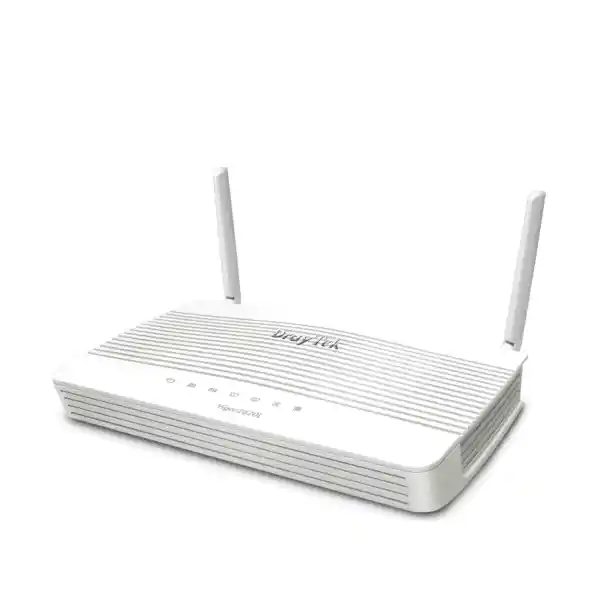
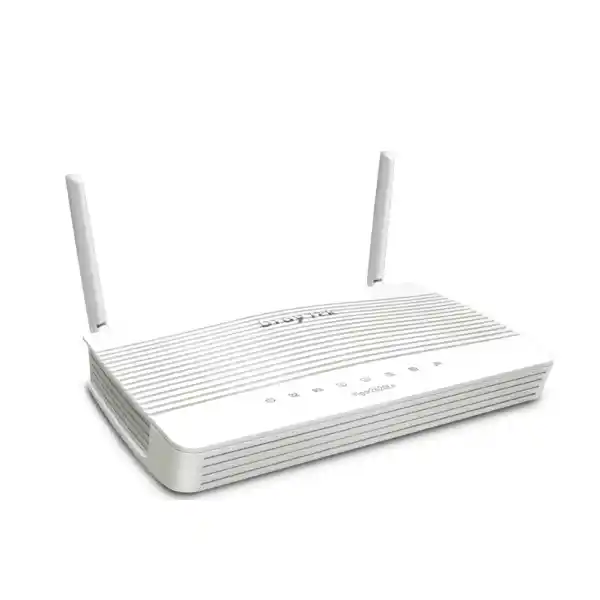
DrayTek Vigor2620L Dual-SIM LTE VDSL Router for Reliable UAE Branch Connectivity
The DrayTek Vigor2620L is a compact, non-wireless business router built for sites that need resilient Internet access from a combination of DSL, Ethernet and mobile broadband. It integrates VDSL2/ADSL2+ access, LTE Category 4 connectivity with two physical SIM slots, Gigabit Ethernet, business firewall controls, VLANs, bandwidth management, VPN services and centralized administration features in one platform. For Dubai organizations with smaller branches, retail outlets, temporary project offices, kiosks, surveillance locations or distributed operational sites, its value is not simply speed: the design is centered on maintaining service when a primary access path fails.
What the DrayTek Vigor2620L is designed to solve
The Vigor2620L addresses a common operational problem in small and distributed business networks: the Internet circuit is often a single point of failure, yet a full enterprise SD-WAN platform can be excessive for a branch with a modest user count. The router combines several access methods so that a site can use DSL when available, Ethernet WAN when a handoff from another carrier device is preferred, and built-in LTE for backup or temporary connectivity. That combination is particularly relevant in Dubai, where a business can have a high-quality primary service yet still require continuity for payment terminals, remote desktop access, cloud applications, SIP trunks, CCTV monitoring, building systems or VPN links to headquarters.
The platform is positioned for smaller networks rather than high-density campus or data-center routing. DrayTek describes the Vigor2620 LTE series as suitable for roughly thirty hosts, with up to two concurrent VPN tunnels, and its published performance numbers place it in the branch and SME category. That sizing context matters. The right engineering question is not whether the router can simply pass traffic; it is whether the combination of session count, encrypted throughput, WAN service speed and inspection features matches the site’s actual workload. A twenty-user retail branch with cloud point-of-sale traffic has a different profile from a twenty-user engineering office moving large encrypted files all day. FourTeck therefore treats product selection as a workload and topology decision, not a model-number exercise.
A particularly useful characteristic is that the Vigor2620L is the non-wireless model. It does not include the 2.4 GHz WLAN function found on the Vigor2620Ln variant. In professional deployments this can be an advantage because routing and Wi-Fi can be separated: the router remains in the communications cabinet while dedicated access points are placed where RF coverage is best. Organizations that already standardize on managed access points, or that must keep Wi-Fi architecture independent from WAN hardware, can therefore use the Vigor2620L as a compact edge platform without paying operational attention to an integrated radio.
WAN architecture: DSL, Ethernet and LTE in one compact edge
VDSL2 and ADSL access
The integrated xDSL interface supports VDSL standards including ITU-T G.993.1 and G.993.2, with VDSL2 profiles 8a, 8b, 8c, 8d, 12a, 12b, 17a and 30a. ADSL compatibility covers legacy standards such as G.dmt and G.lite. The practical benefit is deployment flexibility: where an approved DSL service is still present, the Vigor2620L can terminate that line directly rather than placing an independent modem in front of the router.
DrayTek states a maximum VDSL speed of 100 Mbps for the series. Actual line rate is determined by the provider, DSL profile, copper quality, distance, noise margin and local access network. A procurement design should therefore separate the router’s supported DSL technology from the attainable line sync at the installation address.
Ethernet WAN option
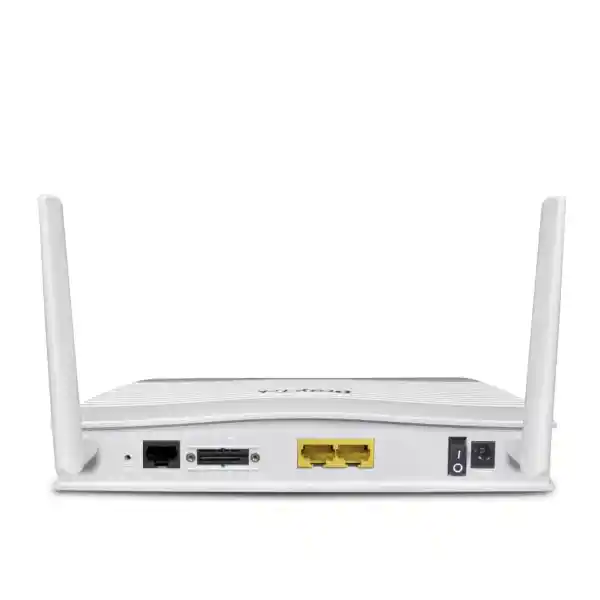
The chassis provides two Gigabit Ethernet ports, with one port usable in a LAN/WAN role. This allows the Vigor2620L to operate behind an ONT, carrier modem, microwave radio, fixed wireless CPE or another Ethernet-presenting service. It is useful when the ISP delivers connectivity as Ethernet and the integrated DSL modem is not needed.
That switchable role also helps when designing a staged migration. A site can initially use DSL and LTE, then move to an Ethernet handoff later without replacing the router solely because the access medium changed. Port planning is important, however, because using the switchable port as WAN reduces the number of interfaces available to the local network. An external managed switch is recommended for most business installations.
Embedded LTE Cat 4
The cellular modem supports LTE Category 4 with published peak receive and transmit link rates of 150 Mbps and 50 Mbps respectively. Supported FDD bands for the published Vigor2620L specification include bands 1, 3, 7, 8 and 20, with WCDMA 3G band support also listed for bands 1 and 8. LTE compatibility should always be validated against the exact carrier, current spectrum plan and SIM service used at the UAE location.
Two external LTE antennas are used, giving installers the ability to improve placement relative to an all-in-one device hidden inside a rack. Cellular performance is still governed by RSRP, RSRQ, SINR, tower loading, building materials and carrier policy. A strong deployment includes a site survey rather than assuming that a high theoretical LTE rate will be available indoors.
Dual-SIM continuity planning for Dubai branches
The Vigor2620L includes two embedded SIM slots, but the design should be understood correctly: one SIM is online at a time. The second slot is therefore a resilience mechanism rather than a way to aggregate two LTE subscriptions for higher speed. This architecture is especially useful when the two SIMs are provisioned from different operators. If the preferred mobile network is unavailable or unsuitable, the router can be configured as part of a failover strategy that gives the branch an alternate cellular path without requiring someone to visit the location and physically change the SIM.
A dual-SIM design is most valuable when carrier diversity is real. Using two SIMs on the same underlying mobile network can protect against an account or SIM issue but may not protect against a radio network outage at the site. For critical branches, procurement should consider separate carriers, appropriate data bundles, SIM lifecycle management and documented escalation contacts. Data-budget features can also be useful because backup LTE traffic can become expensive if a fixed-line fault continues unnoticed for days. Alerting by e-mail or SMS, where configured and supported by the operational design, can help teams recognize that the site is running on its secondary path.
Failover behavior must also be tested at the application layer. A router can detect WAN loss and restore Internet reachability, but existing TCP sessions, public source addresses and VPN negotiations can change when the active WAN changes. Payment gateways, hosted PBX services, IP whitelists and remote-access platforms may react differently to a path transition. FourTeck recommends validating failover with the actual services that the branch depends on rather than relying only on a ping test.
For temporary sites, LTE can also be used as the initial service while fixed access is pending. That makes the Vigor2620L useful for new retail openings, construction offices, exhibitions, pop-up locations and relocations where business operations need Internet service before the final circuit handover. Once the wired link becomes available, LTE can transition from primary access to backup without changing the core router.
Port map and physical deployment considerations
The published operating range is 0 to 45°C with 10 to 90 percent non-condensing humidity. In Dubai, that does not mean the unit should be placed in an unconditioned outdoor enclosure or a rooftop cabinet simply because the ambient environment seems manageable at some times of year. Network equipment should be installed within the specified environmental range, protected from dust, direct sunlight, condensation, voltage instability and heat buildup. A small router in a sealed cabinet can experience a significantly higher local temperature than the surrounding room.
Routing throughput and realistic sizing
DrayTek publishes a maximum NAT throughput figure of around 300 Mbps for the Vigor2620L family under its test conditions. This is an important reference point, but it is not the same as guaranteeing 300 Mbps for every real-world application mix. Routing performance depends on packet size, traffic direction, enabled services, firewall rules, VPN encryption, QoS classification and other processing. The product page itself notes that throughput figures are derived from internal testing under optimal conditions and that actual performance varies with network conditions and active applications.
For a branch with a 100 Mbps DSL circuit and LTE backup, the forwarding capacity is generally aligned with the access methods the router was designed around. For a new site receiving a 500 Mbps, 1 Gbps or multi-gigabit fiber handoff, however, the Vigor2620L would not be the natural choice if the objective is to exploit the full service rate. A higher-performance router should be selected instead. This is why model selection should begin with circuit speed, user count, concurrent sessions, encrypted traffic percentage and growth horizon.
DrayTek positions the series around approximately thirty hosts and lists 30,000 NAT sessions at series level. Those numbers are useful as design guidance but should not be treated as a hard promise that every thirty-device environment is identical. Ten surveillance cameras uploading continuously, a local backup appliance replicating to cloud storage and several always-on VPN users can place a different load on the edge than thirty light office endpoints using e-mail and SaaS applications. Session behavior can also be affected by browsers, cloud synchronization agents, mobile devices and application update mechanisms.
The most reliable sizing method is to establish three figures: peak Internet throughput, peak encrypted VPN throughput and approximate concurrent connection volume. Add application requirements such as SIP, remote support, CCTV cloud access or content filtering, then reserve sensible headroom. If the site is expected to grow materially, select the next platform tier before the branch is deployed rather than replacing an undersized router immediately after commissioning.
VPN capabilities for branch links and secure remote access
The Vigor2620L supports common business VPN protocols including IPsec, IKEv2, L2TP, L2TP over IPsec, PPTP for legacy scenarios, SSL VPN and OpenVPN host-to-LAN functionality in the published specification. It is designed for up to two VPN tunnels, which fits a small branch model: one permanent site-to-site tunnel to headquarters and a second tunnel for another office or a temporary remote-access requirement, for example. Organizations needing dozens or hundreds of simultaneous tunnels should use a larger security gateway or dedicated VPN concentrator.
Published IPsec throughput with AES-256 is up to approximately 55 Mbps in DrayTek’s test context, while SSL VPN throughput is listed around 25 Mbps. These figures are highly relevant when the WAN line itself is faster than the encrypted tunnel. A branch with a 100 Mbps Internet service may still experience lower throughput when all business traffic is forced through an encrypted overlay. Encryption, authentication, packet overhead and traffic characteristics determine the effective rate. Engineers should size to encrypted performance, not only to raw NAT throughput, whenever the branch operates primarily through VPN.
Authentication options include pre-shared keys and X.509 for IKE, with SHA-1 and SHA-256 authentication support listed in the product specification and encryption options that include AES as well as older algorithms. Modern deployments should favor current, strong cryptographic settings that are supported by both endpoints and organizational policy. Legacy algorithms remain relevant mainly for interoperability with older equipment and should not be selected simply because they appear in a feature list.
NAT traversal is supported, helping IPsec connections operate when one side is behind NAT. Dynamic DNS and DrayDDNS can assist environments without a permanently assigned public IP, although carrier-grade NAT on mobile networks can still affect inbound reachability. If inbound services over LTE are required, confirm whether the mobile operator provides a suitable public or enterprise APN. For many resilience deployments the safer architecture is an outbound-initiated VPN from the branch to a fixed hub so the branch can re-establish connectivity after WAN failover.
Firewall, NAT and content control
At the security layer, the Vigor2620L provides stateful firewall functions appropriate to a small business edge. NAT features include port redirection, open-port rules, DMZ host capability and UPnP. Application Layer Gateway support is listed for protocols such as SIP, RTSP, FTP and H.323, helping with applications whose signaling can interact with NAT. VPN pass-through is available for PPTP, L2TP and IPsec. These features make the platform suitable for straightforward branch security policies, but configuration should remain conservative: expose only services that are operationally required, restrict source access wherever possible and avoid treating DMZ host or UPnP as default conveniences.
Firewall policy can be built around IP-based rules, and the router includes DoS attack defense and spoofing protection. Content controls cover application filtering, URL keywords, DNS keywords and selected web features. Web-category filtering is listed as requiring a subscription, so buyers should distinguish between functions available as part of the base router and cloud/category intelligence that may depend on an additional service. A quotation should state explicitly whether any subscription is included, optional or excluded.
It is also important to set expectations around the product category. The Vigor2620L is not positioned as a full modern NGFW or enterprise threat-prevention appliance with the same inspection depth as dedicated platforms offering advanced malware analysis, sandboxing, large-scale IPS signatures and application-aware security analytics. It is a business router with useful firewall and content-control capabilities. If the organization has regulatory requirements, highly sensitive assets or a need for advanced security inspection, the edge design can pair the router’s access resiliency with a dedicated firewall platform rather than assuming a single compact router replaces every security layer.
For UAE businesses evaluating a broader firewall architecture, FourTeck’s Firewall Dubai solutions can be used as a reference point for separating basic branch routing from next-generation security requirements. The final design should be based on risk, application exposure and compliance obligations rather than brand or appliance size alone.
VLAN segmentation and LAN design
The Vigor2620L supports 802.1Q tag-based VLANs and port-based VLANs, with up to eight VLANs listed in the product specification. Even in a small office, segmentation can materially improve network control. A common design might separate corporate users, voice, CCTV, guest devices, building management, payment systems and network management into different logical networks. The router can then apply inter-VLAN routing and policy rules so that only authorized traffic crosses between segments.
Because the router has a small number of physical Ethernet ports, VLANs are best used with a managed access switch. A trunk from the Vigor2620L to the switch can carry multiple tagged networks, while the switch assigns access ports to the appropriate VLANs. This design keeps the router focused on WAN edge, routing and policy enforcement while the switch provides the physical port density required for endpoints. It is also easier to expand than connecting devices directly to a two-port router.
Multiple IP subnets and customizable DHCP options can support segmented services. Bind-IP-to-MAC functions can help maintain predictable addressing for selected devices, although static reservations should be documented and managed carefully. Inter-VLAN communication should follow least-privilege principles. For example, a guest VLAN usually needs Internet access but no route to corporate printers, NAS systems or cameras. A CCTV VLAN may need access to an NVR and DNS/NTP services while being blocked from normal user workstations.
In branches where a dedicated next-generation firewall is deployed behind or in front of the Vigor2620L, engineers should decide which device owns VLAN gateways and policy enforcement. Avoid unnecessary double routing or overlapping NAT domains unless they solve a specific problem. A clean design assigns each function deliberately: LTE/DSL termination and failover at one layer, security inspection at another, and LAN switching at the access layer.
Quality of Service, bandwidth limits and session control
Bandwidth management is one of the Vigor2620L’s practical strengths for a smaller branch. The platform supports IP-based bandwidth limits, IP-based session limits and Quality of Service classification using parameters such as ToS, DSCP, 802.1p, IP address and port. VoIP prioritization is also listed. These functions can reduce the chance that a single backup job, software update or cloud synchronization process consumes the available WAN capacity and degrades business-critical applications.
QoS is especially valuable on LTE backup because a branch may move from a stable fixed circuit to a mobile connection with lower, more variable capacity. A policy that works comfortably on a 100 Mbps DSL line may need stricter prioritization on a congested LTE cell. Voice, payment traffic and remote management should generally receive predictable treatment, while software updates, guest browsing and bulk synchronization can be constrained during a failover event.
Session limits can also be useful as an operational safeguard. Some endpoint infections, peer-to-peer applications or badly behaved software can create an unusually high number of connections. Limiting sessions by host does not replace endpoint security, but it can help contain the impact on a small router and preserve resources for other users. Policies should be measured rather than arbitrary; modern web applications can legitimately open many connections, so limits set too low can cause confusing user problems.
For voice deployments, QoS should be engineered end to end. Marking packets at the router helps only where the downstream devices and service provider honor or benefit from those markings. Local switch queues, WAN uplink behavior, SIP provider architecture and jitter on the active access path all matter. When LTE is used, radio variability may be the dominant factor. Test call quality during simulated failover rather than assuming that a configured priority queue guarantees acceptable voice performance.
Management, monitoring and remote operations
The Vigor2620L includes a broad set of management interfaces that help IT teams operate distributed locations. Published local services include HTTP, HTTPS, Telnet, SSH v2, FTP and TR-069, while firmware can be managed through the web interface, TFTP and TR-069 workflows. In security-conscious deployments, only the protocols actually needed should be enabled, with encrypted management preferred over clear-text alternatives. Remote administration should be restricted by source address or performed through VPN wherever possible.
SNMP v1, v2c and v3 support is listed, allowing integration with network-monitoring platforms for availability, interface state and performance visibility. SNMPv3 should be preferred when supported by the monitoring stack because it offers stronger authentication and privacy options than older community-string versions. Syslog support helps centralize events, while e-mail and SMS alerts can provide operational notifications. A good deployment sends logs to an external system rather than relying only on data stored locally on the router.
DrayTek also lists compatibility with VigorACS from firmware version 3.8.11 for this model, enabling centralized management in suitable environments. Central management is valuable when an organization operates many branches because configuration standards, firmware governance and troubleshooting can be handled more consistently. Licensing and service requirements for any management platform should be confirmed at quotation stage rather than assumed to be included indefinitely with the hardware.
The router can manage up to two supported access points according to the published specification. Because the Vigor2620L itself has no integrated WLAN, that controller function can support a simple separated Wi-Fi design. Larger wireless environments should use an architecture sized for the required AP count, roaming behavior, RF planning and centralized policy needs.
For customers who need installation, monitoring, structured cabling, WAN migration or managed support around the router, FourTeck’s UAE IT services practice can support the broader branch lifecycle rather than treating the appliance as an isolated purchase.
LTE bridge mode: using the Vigor2620L as a cellular access device
The Vigor2620L can also be useful when an organization already has a preferred firewall or broadband router but needs a reliable integrated cellular modem. DrayTek documents an LTE bridge-mode use case in which the Vigor2620L provides the mobile connection and passes it to the Ethernet WAN interface of another router. This arrangement separates cellular radio placement from the main security gateway. The Vigor2620L can be positioned where LTE signal quality is better, while the primary firewall remains in the rack or secure communications space.
That topology can be attractive in data rooms with poor mobile reception. Rather than running long RF antenna cables, which can introduce loss, installers can place the LTE device closer to a window or suitable indoor location and run Ethernet back to the security appliance. The design still needs proper physical security, power and environmental protection. Ethernet distance, VLAN requirements and whether the upstream firewall expects a public, private or translated address should be reviewed before deployment.
Bridge mode does not automatically solve carrier-grade NAT. If the mobile operator provides a private address behind CGNAT, the downstream firewall may not receive a globally routable address. For outbound Internet backup this is often acceptable; for inbound VPN or published services it may not be. Enterprise or static-IP APN products can be relevant where carrier services support them. The service contract, not only the router, determines the address model.
This use case also highlights why the Vigor2620L should be viewed as more than a basic DSL router. Its integrated cellular functions can play a dedicated role in a multi-appliance architecture, giving an existing firewall a secondary WAN without relying on a consumer USB dongle. For high-availability designs, the downstream firewall must still be configured to monitor the cellular path and fail over according to its own routing policy.
Hardware architecture and what DrayTek does not publish
Enterprise buyers sometimes ask for chipset, CPU core, forwarding ASIC or memory details when comparing routers. For the Vigor2620L, DrayTek’s public product specification focuses on measured routing, VPN and interface capabilities rather than disclosing a detailed silicon architecture. That distinction is important. A technically responsible product page should not invent an ASIC model, CPU clock, RAM quantity or hardware-acceleration pipeline when the manufacturer does not publicly specify it for this device.
The practical way to assess the platform is therefore through published behavior: approximately 300 Mbps maximum NAT performance, up to 55 Mbps IPsec AES-256 throughput in the stated test context, up to 25 Mbps SSL VPN throughput, two VPN tunnels, business-scale session capacity, Gigabit Ethernet interfaces, integrated VDSL2 and LTE Category 4. These are the metrics that determine whether the appliance fits a branch. A faster processor name would be less useful if it did not translate into sufficient real-world encrypted or routed throughput.
When evaluating newer alternatives, buyers should compare generation-level capabilities such as multi-gigabit interfaces, modern VPN protocols, hardware offload, security inspection throughput, Wi-Fi integration, centralized management and lifecycle status. The Vigor2620L remains a targeted continuity router rather than a universal choice for every site. Its strongest fit is where modest branch throughput, xDSL compatibility and integrated dual-SIM LTE resilience are more valuable than very high-speed routing.
This transparent approach also matters during procurement. If a specification is required for a tender and is not published by DrayTek, it should be marked as vendor-confirmation required rather than filled with an estimate. FourTeck can help map operational requirements to verifiable specifications so the selected device is defensible in both technical review and purchasing documentation.
Detailed specification summary
UAE deployment scenario 1: retail branch with payment continuity
Consider a retail branch with a primary fixed broadband link, cloud point-of-sale platform, card payment terminals, inventory access, CCTV remote viewing and a site-to-site VPN to headquarters. The business impact of a WAN outage is disproportionate to the size of the site: even ten employees can be unable to process transactions or access stock information if Internet connectivity fails. A Vigor2620L can terminate the primary DSL circuit or connect to an Ethernet-presented service, while LTE provides a secondary path.
The LAN should be segmented so that payment systems, staff devices, CCTV and guest traffic do not share a flat broadcast domain. A managed switch carries the VLANs, and the router enforces the permitted flows. QoS prioritizes payment and voice traffic over guest access and background downloads. The VPN reconnects to headquarters over the active WAN path. Where the cellular carrier changes the site’s public address, the HQ firewall and branch policy must be designed to accept the new source or use an outbound-initiated tunnel.
During a failover test, engineers should deliberately disconnect the primary WAN and measure time to restored DNS, Internet and VPN connectivity. They should then verify payment authorization, business application login, voice quality and remote CCTV access. This catches problems that a simple green WAN status light cannot reveal. The test should also confirm whether critical endpoints continue using the correct DNS servers and whether any application has a hardcoded IP allowlist tied to the primary ISP.
A documented rollback and alert process completes the design. Staff should know whether any local action is required, while IT should receive notification that the branch is on LTE. Data usage can then be controlled until the wired service is restored. This scenario demonstrates the Vigor2620L’s core strength: keeping a small site operational with practical redundancy rather than adding unnecessary infrastructure.
UAE deployment scenario 2: temporary project office or new site
New offices and project locations often need connectivity before a fixed circuit is delivered. The Vigor2620L can be commissioned with an LTE SIM so users have Internet access, VPN reachability and basic security from day one. When DSL or an Ethernet handoff becomes available later, the fixed service can become primary and LTE can remain as backup. This avoids purchasing a temporary consumer hotspot and then replacing it with a completely different business router.
The LTE service must still be treated as business infrastructure. Choose a suitable data allowance, verify indoor signal levels at the installation point and test sustained throughput during working hours. If the site is in a structure with metalized glass or significant concrete attenuation, the preferred location for the router may be closer to an exterior wall rather than inside a central equipment cabinet. Ethernet can then extend the LAN connection to a managed switch. Physical security should prevent unauthorized access to the SIM cover or reset button.
When the fixed line is installed, engineers should schedule a controlled cutover. The WAN priority is changed, public address dependencies are reviewed and failback behavior is tested. Some businesses prefer automatic failback to the fixed service as soon as it returns; others require a stability timer to avoid flapping if the carrier circuit is intermittent. Monitoring should clearly show which access path is currently active.
For project teams expanding into additional markets, FourTeck’s Africa technology coverage can support cross-regional planning where similar branch resiliency patterns are needed beyond the UAE, subject to local carrier, spectrum and compliance requirements.
UAE deployment scenario 3: LTE backup behind a dedicated firewall
Some customers already operate a next-generation firewall at every branch and do not want the DrayTek device to become the main policy-enforcement point. In that design, the Vigor2620L can function primarily as the access device for DSL or LTE while the downstream firewall owns security rules, site-to-site VPNs, application control and logging. LTE bridge mode can be particularly useful when the firewall has an available Ethernet WAN interface.
This architecture simplifies responsibility. The Vigor2620L handles radio and access-medium concerns, while the firewall maintains a consistent security posture across branches regardless of whether the active transport is fiber, DSL or LTE. The main engineering questions become addressing, health checks and failover routing. If the LTE path is behind CGNAT, the firewall should generally initiate tunnels outward. If a public or enterprise APN is available, inbound options may be broader, but access should still be tightly controlled.
Placement is a significant advantage. LTE signal can be poor in a basement MDF even when coverage at the front of the branch is excellent. The compact DrayTek unit can be installed in a better radio location and connected back to the firewall over structured cabling. This often performs better than placing a cellular modem in the rack and extending antennas over long coaxial runs. Every installation is different, so signal measurements should drive the final position.
The design can also support maintenance windows. If the primary carrier router or ONT requires service, the firewall can remain online over the DrayTek LTE path. For organizations that measure branch uptime formally, this provides a relatively simple second access technology without requiring a second wired circuit at every small site.
When the Vigor2620L is not the right router
Good procurement includes knowing when not to buy a product. The Vigor2620L is not the right choice for a site that expects sustained gigabit Internet throughput, a large number of VPN tunnels, advanced next-generation firewall inspection, integrated Wi-Fi 6/6E/7, multi-gigabit LAN interfaces or a dense branch with hundreds of users. Its published performance and interface set place it clearly in the small-business continuity category.
It may also be unsuitable if the required UAE mobile carrier does not support the LTE bands available in the exact hardware variant, or if the carrier service depends on a band combination outside the device specification. Cellular compatibility must be checked against the specific operator and service plan. The presence of a SIM slot should never be treated as universal carrier compatibility.
Organizations requiring more than two simultaneous VPN tunnels should step up to a larger router or security platform. Similarly, if SSL VPN performance must exceed the published branch-level figures, a higher-end appliance is appropriate. Where advanced web filtering, IPS, malware inspection, sandbox integration or centralized SOC telemetry is a mandatory control, use a dedicated security platform rather than trying to stretch a basic branch router beyond its design envelope.
The Vigor2620L is strongest when its specific combination is needed: modest branch routing, VDSL2/ADSL2+ compatibility, dual-SIM LTE resilience, basic business firewalling, segmentation, QoS and a small number of VPN connections. Selecting it for that role produces a simpler and more predictable network than selecting it solely because it has many features listed on a datasheet.
Licensing, subscriptions and operational cost planning
The core routing, NAT, VPN, VLAN, QoS and local firewall functions are part of the router platform, but not every service associated with a business router is necessarily subscription-free. DrayTek’s published specification marks web-category content filtering as a subscription-dependent feature. Centralized management platforms can also have licensing or service costs depending on how they are deployed. A professional quotation should therefore separate hardware, subscriptions, installation, configuration, support and mobile carrier charges.
The LTE data plan is often the most overlooked recurring cost. Backup links can remain mostly idle for months and then consume significant data during a prolonged fixed-line outage. Cloud backup, operating-system updates and video surveillance uploads can rapidly use a mobile bundle. Configure data-budget alerts where appropriate and consider policies that suppress non-critical bulk traffic while the branch is on LTE.
Support planning should include firmware maintenance. DrayTek continues to publish firmware resources for the Vigor2620 LTE series, and configuration backup should be part of routine operations. Before upgrades, review release notes, confirm current settings, take a backup and schedule changes when rollback is possible. For distributed sites, central management can reduce travel but only if administration credentials, secure access and device inventory are maintained correctly.
Customers purchasing through FourTeck UAE can scope the router together with switches, access points, UPS protection, cabling, SIM requirements and implementation services so the quotation reflects a deployable branch solution rather than only a boxed appliance.
Installation methodology for a reliable Vigor2620L rollout
1. Validate the access services. Confirm whether the primary circuit is VDSL2, ADSL or Ethernet presented. Record ISP authentication details, VLAN tagging requirements, static IP information, DNS details and any modem-mode constraints. For LTE, confirm the carrier, APN, SIM PIN requirements, data plan and expected addressing model.
2. Survey cellular signal before mounting. Test more than one physical location and record useful LTE measurements during normal business hours. A location that appears acceptable late at night can be much worse when the cell is busy. Avoid hiding the router behind metal cabinets or low in a rack if that degrades radio performance.
3. Define the LAN segmentation plan. Decide the VLAN IDs, IP subnets, DHCP scopes, gateway addresses and inter-VLAN policies. Coordinate the configuration with the managed switch and access points. Keep network-management interfaces in a controlled segment and document all trunks and access ports.
4. Harden administration. Change default credentials, use strong unique passwords, restrict management sources, prefer HTTPS and SSH, disable unnecessary services and synchronize time. If remote management is required, use VPN or controlled source lists. Configure syslog and SNMPv3 when the monitoring stack supports them.
5. Configure WAN health checks deliberately. Failover should not rely on a single brittle test target. Use detection logic appropriate to the available features and ensure the router distinguishes a local gateway response from true Internet reachability. Configure return-to-primary behavior according to the business tolerance for link flapping.
6. Build QoS and data controls. Prioritize voice, payment, remote management and critical SaaS traffic. Restrict guest access and large background transfers where necessary. Set LTE data-budget alerts that match the SIM plan and escalation process.
7. Test VPN on every WAN path. Confirm that tunnels establish over the primary circuit and re-establish over LTE. Validate real applications across the tunnel rather than checking only tunnel status. Measure throughput if large file transfers or remote desktop performance is important.
8. Capture a commissioning baseline. Save a configuration backup, firmware version, WAN parameters, LTE signal results, IP addressing plan, VLAN table, admin access method and failover test results. This baseline turns future troubleshooting from guesswork into comparison.
Security hardening checklist for UAE business use
Security hardening is an ongoing process rather than a one-time commissioning task. Access lists, firewall rules, VPN users and management accounts should be reviewed when staff, service providers or branch functions change. Backup LTE also deserves security attention: a secondary path should enforce equivalent policy rather than becoming an uncontrolled route around the main connection.
Procurement questions to ask before ordering
First, confirm the exact model suffix. The Vigor2620L is the non-Wi-Fi model; the Vigor2620Ln includes 2.4 GHz wireless. Buying the wrong variant can create either an unnecessary radio or an unexpected need for separate access points. Second, confirm Annex and DSL compatibility if the router will terminate a copper broadband line. Third, verify LTE band support and the intended UAE mobile operator.
Ask whether the site requires a static public IP, inbound services or a site-to-site VPN over LTE. If so, the APN and carrier addressing model can be as important as the router itself. Standard consumer mobile plans may use CGNAT, which is fine for outbound access but can complicate inbound connectivity. Enterprise SIM services may offer different options.
Define expected Internet and VPN throughput. If the primary service is faster than the router’s published branch-level forwarding capability, decide whether the Vigor2620L is being used mainly as an LTE access device or whether a higher-performance edge should be selected. Record the expected user count and any high-session or high-bandwidth applications.
Determine the required LAN port count and PoE needs. With only two Gigabit Ethernet ports on the router, most business sites should include a managed switch. If IP phones, access points or cameras require PoE, that power requirement belongs in the switch and UPS specification. Finally, confirm whether web-category filtering, centralized management, installation, remote support and firmware lifecycle services are part of the quotation.
These questions prevent the most common procurement mistake: buying a router that technically powers on and connects but does not fit the operational topology. A short pre-sales design review can save far more time than troubleshooting a mismatched platform after installation.
Frequently asked technical questions
Does the Vigor2620L have Wi-Fi?
No. The Vigor2620L is the non-wireless model. The Vigor2620Ln is the series variant with 2.4 GHz 802.11n wireless. Use dedicated access points if Wi-Fi is needed.
Can both SIM cards be active together?
The router has two SIM slots with one SIM online at a time. The purpose is resiliency and carrier switching, not cellular link aggregation.
What is the LTE speed?
The integrated modem is LTE Category 4 with published link rates up to 150 Mbps down and 50 Mbps up. Real performance depends on coverage, signal quality, spectrum, congestion, carrier policy and data plan.
Can it be used only as an LTE modem?
Yes. DrayTek documents LTE bridge-mode deployments where the Vigor2620L provides cellular connectivity to the Ethernet WAN interface of another broadband router or firewall.
How many VPN tunnels does it support?
The published maximum is two VPN tunnels. That suits small branch use but is not intended for environments needing a large tunnel count.
Is it suitable for a 1 Gbps Internet line?
Not if the objective is to route near the full gigabit rate. Published NAT performance is around 300 Mbps, so a higher-performance router is recommended for faster services.
Does it support VLANs?
Yes. It supports 802.1Q tag-based and port-based VLANs, with up to eight VLANs listed in the specification. A managed switch is recommended for practical branch segmentation.
Is web filtering included?
Keyword and content controls are available, while DrayTek identifies web-category filtering as a subscription-dependent function. Confirm subscription scope in the quotation.
Why buy the DrayTek Vigor2620L through FourTeck Dubai?
A continuity router is only effective when the access service, LTE carrier, addressing, VPN, switching and failover policies are designed as one system. FourTeck can help UAE customers evaluate whether the Vigor2620L fits the branch instead of treating the product as a generic Internet router. That includes reviewing line type, LTE requirements, expected throughput, VLAN layout, managed switching, remote access, monitoring and site support.
The same approach is useful for multi-site projects. Standardized configurations can be prepared around repeatable VLAN IDs, management settings, monitoring destinations and VPN templates while still allowing location-specific WAN and SIM details. This reduces commissioning variation and makes troubleshooting easier when branches are supported by a central IT team.
FourTeck can also help identify when a larger router, a dedicated firewall or a separate cellular gateway is the better architecture. The objective is a supportable edge design with appropriate headroom, not simply the smallest device that satisfies a checklist on the day of purchase.
Decision recap: is the Vigor2620L the right fit?
Strong fit when you need
• A compact router for a small UAE branch or remote site.
• VDSL2/ADSL2+ termination with LTE backup in one appliance.
• Two SIM slots for mobile-carrier continuity.
• Basic business firewall, NAT, content controls and DoS defenses.
• Up to eight VLANs and practical QoS for segmented branch networks.
• A small number of IPsec, SSL or other supported VPN connections.
Choose a larger platform when you need
• Near-gigabit or multi-gigabit routed performance.
• Many simultaneous VPN tunnels or heavy encrypted traffic.
• Integrated modern Wi-Fi rather than external access points.
• Advanced NGFW inspection, IPS, sandboxing or SOC integrations.
• High-density LAN port requirements without an external switch.
• Cellular features beyond the published LTE Cat 4 and supported-band scope.
Quotation input checklist
VDSL2, ADSL2+, Ethernet handoff, or LTE-first deployment.
Contracted downstream/upstream rates and expected growth.
Primary/secondary operator, APN, public-IP needs and data allowance.
Site-to-site endpoints, remote users, cryptographic policy and expected throughput.
User, guest, voice, CCTV, payment, IoT and management segmentation.
Port count, PoE budget, access points, phones, cameras and uplink design.
Content filtering, inbound publishing, management access and logging.
Supply only, preconfiguration, onsite installation, migration and support.
Plan a resilient DrayTek Vigor2620L deployment in Dubai
For the most accurate quotation, provide the primary circuit type and speed, preferred LTE carrier or carriers, number of users, required VLANs, VPN topology and whether the router will be the main firewall or a cellular access device behind another security gateway. FourTeck can then determine whether the Vigor2620L matches the branch or whether a higher-performance alternative provides better lifecycle value.
Request a model-fit review before ordering if your WAN exceeds 300 Mbps, you need more than two VPN tunnels, or the LTE carrier requirement is not yet confirmed.

Reviews
There are no reviews yet.