
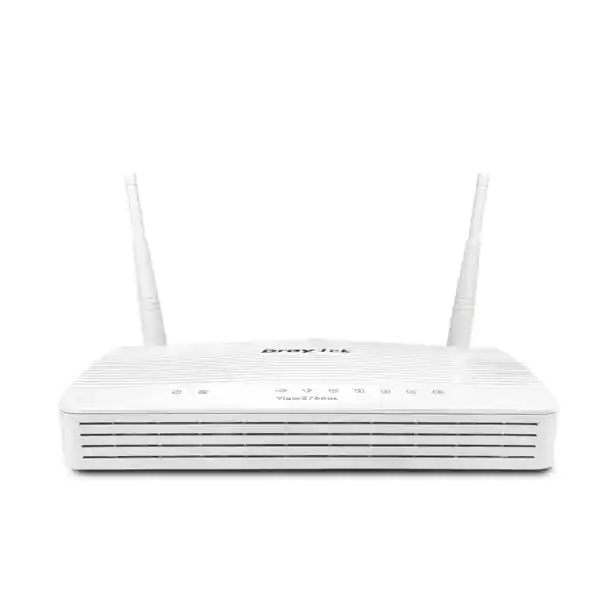
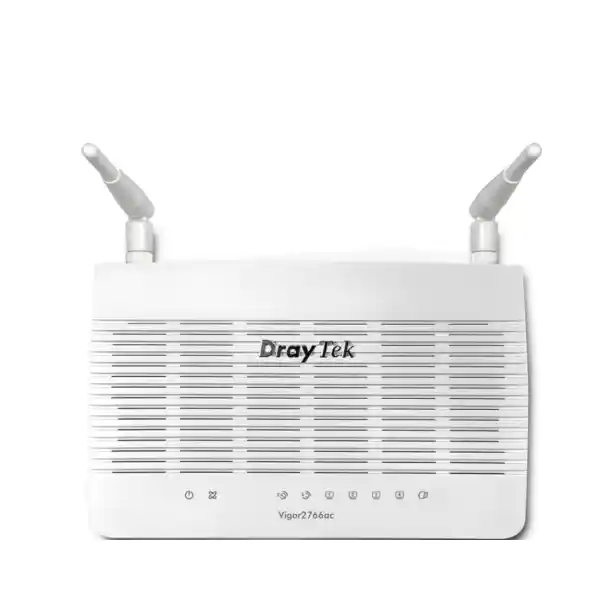
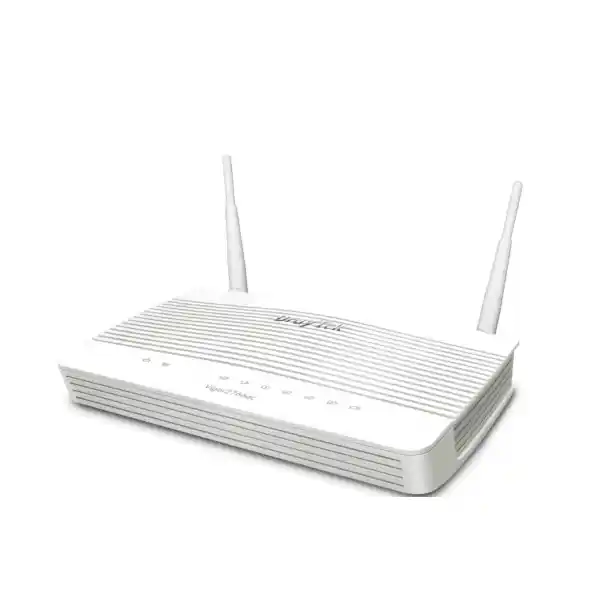
DrayTek Vigor2766ac G.fast / VDSL2 35b Router with 802.11ac Wave 2 Wi‑Fi
The DrayTek Vigor2766ac is a professional all-in-one access router for organizations that still depend on copper-based broadband but want business-class control, resilient WAN design, structured VLANs, policy-based routing, secure remote connectivity, wireless access and centralized management. It integrates a G.fast-capable DSL modem with backward compatibility for VDSL2 profile 35b and ADSL2+, while a separate switchable Gigabit Ethernet port provides an alternative Ethernet WAN path for migration, backup or service-provider handoff scenarios.
For UAE deployments, this architecture is valuable because the router can be specified for a site whose last-mile technology may change over time. A branch can begin on compatible DSL, then use Ethernet WAN when the building receives a fiber ONT or managed handoff, without discarding the routing, firewall, VPN, VLAN and wireless policy framework already built around the device.
Direct answer: where does the Vigor2766ac fit?
Choose the Vigor2766ac when a small office, professional branch, retail outlet, clinic, training center, hospitality front office, villa office or specialist remote site needs one compact gateway that can terminate compatible G.fast/VDSL2/ADSL services, route a Gigabit Ethernet WAN, create segmented LANs, enforce bandwidth policy and provide integrated dual-band Wi‑Fi.
It is not positioned as a high-density enterprise core firewall. Its published design point is up to 50,000 NAT sessions with two concurrent VPN tunnels, making correct sizing essential. For a larger head office, heavy VPN concentration, advanced threat inspection or multi-gigabit security requirement, FourTeck can instead design a separate firewall, switching and access-point architecture.
Designed for G.fast access where supported by the line, DSLAM and service profile.
DrayTek publishes up to 940 Mbps NAT with hardware acceleration under test conditions.
A practical reference point for correctly sized small-business and advanced edge deployments.
Suitable for focused site-to-site or remote-access requirements rather than VPN concentration.
Why the DrayTek Vigor2766ac is relevant to UAE branch networks
Business connectivity in the UAE is not a single-technology problem. Newer premises may present an Ethernet handoff from an optical network terminal, while other sites, managed buildings, temporary offices or legacy circuits can still depend on copper broadband technologies. A useful branch router therefore needs more than raw speed. It needs to preserve network policy when the access method changes, provide clear separation between staff and guest devices, protect internal services, prioritize voice and business applications, and expose enough monitoring information for support teams to troubleshoot without physically visiting the site.
The Vigor2766ac addresses that requirement with two logical WAN approaches. Its fixed RJ‑11 DSL interface supports G.fast and VDSL2 technologies, including profile 35b supervectoring, with backward compatibility for ADSL2/2+. Separately, port P4 can operate as a 10/100/1000Base‑T WAN or LAN interface. That switchable design allows an installer to keep the same LAN policy while changing the upstream handoff. If a location moves from DSL to an Ethernet service, the organization can reconfigure the WAN role instead of redesigning the entire local network.
This flexibility also helps during staged migrations. A company may receive a new Ethernet service before the old DSL circuit is cancelled, or may temporarily retain the original access path while testing business applications on the new circuit. The exact dual-WAN behavior and failover design should be validated against the selected firmware, service handoff and operational objective, but the underlying platform gives engineers a useful set of routing and policy tools rather than forcing a simplistic consumer-router workflow.
FourTeck positions routers such as the Vigor2766ac as part of a complete edge design, not as an isolated box. That means assessing the ISP handoff, IP addressing method, VLAN tagging, DHCP requirements, public IP needs, wireless coverage, voice traffic, remote-management policy and expected client count before configuration. Customers planning a broader UAE rollout can also engage the main FourTeck UAE team for switching, structured network design and deployment coordination around the router.
The central sizing message is equally important: the Vigor2766ac is a strong professional small-edge device, but it should not be selected merely because its accelerated NAT number approaches Gigabit speed. NAT throughput, VPN throughput, wireless airtime, content filtering, session count, QoS, encrypted applications and the behavior of real client devices are different engineering dimensions. A good design sizes the router to the traffic mix and risk profile, not to a single headline number.
Hardware interfaces and physical port map
DSL and Ethernet WAN options
The fixed RJ‑11 broadband interface is the defining feature of the platform. It is designed for G.fast, VDSL2 profile 35b and older DSL variants supported by the firmware and line environment. G.fast support is published with 106 MHz and 212 MHz profiles. For VDSL2, the series supports multiple profiles including 8a, 8b, 8c, 8d, 12a, 12b, 17a, 30a and 35b. The practical negotiated line rate is determined by the service provider, copper quality, loop length, cabinet equipment, noise conditions and configured DSL profile, so the theoretical modem capability should never be treated as a guaranteed Internet speed.
Port P4 is a switchable Gigabit Ethernet RJ‑45 interface. In LAN mode it increases the number of usable switched Ethernet ports; in WAN mode it provides a conventional Ethernet uplink. This is useful behind an ONT, media converter, upstream modem or managed Ethernet handoff where the ISP presents IP service over copper Ethernet.
LAN, USB and antenna layout
Three fixed 10/100/1000Base‑T LAN ports are provided in addition to the switchable P4 interface. These ports can connect directly to selected endpoints or, more commonly in a business deployment, uplink to a managed switch that carries multiple VLANs toward access points, IP phones, computers, cameras and other site systems. The router also provides two USB 2.0 interfaces. DrayTek documents support for functions such as compatible 3G/4G/LTE USB modems, storage, printer or thermometer use, although actual accessory compatibility must be checked against the current support list and firmware.
The Vigor2766ac uses two external dual-band dipole antennas. Published antenna gain is 2 dBi at 2.4 GHz and 4 dBi at 5 GHz. External antennas help with orientation and placement, but they do not remove the need for a proper radio-frequency design. Dense walls, metal partitions, lift shafts, neighboring WLANs and device capability can dominate real-world coverage.
G.fast, VDSL2 35b and DSL migration engineering
G.fast is intended to extract much higher data rates from relatively short copper loops by using a wider frequency spectrum than conventional VDSL2. The Vigor2766ac supports G.fast profiles at 106 MHz and 212 MHz, and DrayTek publishes a G.fast download link capability of up to 1 Gbps for the series. That figure describes modem-side capability under suitable conditions; it is not a promise that every copper pair can deliver Gigabit Internet. Copper length, binder noise, distribution-point equipment, vectoring environment, line quality and operator provisioning are decisive.
Where the service does not use G.fast, the router remains valuable because the integrated modem is backward compatible with VDSL2, including profile 35b supervectoring, and ADSL2/2+. VDSL2 35b extends the usable spectrum compared with profile 17a, enabling higher downstream rates on suitably short and clean loops. DrayTek lists maximum VDSL throughput for the series at up to 300 Mbps. Again, this is a device capability reference rather than a guaranteed access speed.
For network architects, the advantage is operational continuity. An organization can standardize user VLANs, guest isolation, DHCP scopes, DNS policy, firewall rules, QoS classes and remote-management practices even while access technologies differ among branches. The same router family can therefore simplify support documentation across locations where one site is on VDSL2 and another uses Ethernet WAN. Standardization reduces configuration variance, but template reuse should never replace site-specific checks of addressing, MTU, VLAN tagging and ISP authentication.
A UAE installation should begin with information from the service provider: whether the line is G.fast, VDSL2 or ADSL; the encapsulation and authentication method; whether VLAN tagging is required; whether the service uses a dynamic or static public IP; and whether the provider mandates its own CPE or permits customer-managed equipment. Where an ISP-supplied device must remain in place, the Vigor2766ac may instead be deployed on Ethernet WAN behind that handoff, depending on the intended topology and the provider’s configuration.
Engineers should also treat DSL physical health as part of the network, not as an external mystery. Synchronization rate, signal-to-noise margin, attenuation, retransmission behavior and error counters can reveal line problems that application-level troubleshooting cannot fix. A router with an integrated modem gives the administrator visibility into these parameters and can make escalation to the service provider more evidence-driven.
802.11ac Wave 2 wireless: capacity, security and practical expectations
The “ac” suffix identifies this model’s integrated Wi‑Fi generation. On 2.4 GHz, the router uses 802.11n 2×2 MIMO. On 5 GHz it supports 802.11ac Wave 2 2×2 MU‑MIMO. DrayTek publishes a 5 GHz link rate up to 867 Mbps with 80 MHz channel capability. The vendor’s regional material also lists up to 400 Mbps on 2.4 GHz, while some global specification tables expose a 300 Mbps value; because WLAN link reporting can vary by regional implementation and data-sheet revision, procurement should rely on the exact local hardware revision and current firmware documentation rather than treating a PHY rate as application throughput.
The distinction between Wi‑Fi link rate and usable throughput is critical. An 867 Mbps PHY connection does not deliver 867 Mbps of sustained application data. Wireless is a shared half-duplex medium with management overhead, acknowledgements, contention, retransmissions and protocol overhead. Real client speeds also depend on the client’s radio chain count, channel width, signal quality, interference and airtime utilization. A phone with a modest radio or a distant laptop behind reinforced walls may perform far below the router’s headline wireless link rate.
The router supports up to four SSIDs per band according to DrayTek specifications, which is useful for mapping WLANs to different policy zones. A business can create a corporate SSID, a guest SSID, an operations or device SSID and a temporary contractor SSID, then align those WLANs with VLANs and firewall controls. The objective is not to maximize SSID count. Every additional SSID adds management traffic and operational complexity, so good WLAN design uses the fewest broadcast domains necessary to enforce meaningful security boundaries.
Security options include modern modes such as WPA2, WPA3 and OWE in supported configurations, with 802.1X authentication also listed. In a professional environment, legacy WEP should be avoided even if the interface exposes it for compatibility. Where practical, WPA2/WPA3 with strong credentials or enterprise authentication is a better baseline. Guest traffic should be isolated from internal networks, and administrative access to the router should not be reachable from untrusted wireless segments.
The Vigor2766ac also participates in DrayTek’s wireless management ecosystem. DrayTek lists mesh support on wireless models and central access-point management features for compatible VigorAP devices. This matters when the router’s built-in radio is not enough to cover the entire office. Instead of forcing one access point to transmit through difficult building materials, a better design can place dedicated access points where users actually work and use wired backhaul wherever possible. Mesh can solve placement constraints, but wired uplinks generally provide more predictable capacity because they avoid consuming wireless airtime for backhaul.
For UAE villas, clinics, offices and retail spaces, heat, cabinet placement and building materials should be considered during installation. The router should not be hidden inside a dense metal enclosure if its built-in Wi‑Fi is expected to serve clients. Conversely, if dedicated ceiling access points are planned, the router can be installed for cable management and security while WLAN coverage is delegated to purpose-built APs.
Routing, VLAN segmentation and policy architecture
A professional router earns its value by controlling traffic between networks, not merely by sharing an Internet connection. The Vigor2766ac supports 802.1Q tag-based VLANs and port-based VLAN functions, with DrayTek listing up to eight LAN subnets and multiple IP-subnet capabilities on the series. This gives a network designer a structured way to separate users and devices according to trust level and business purpose.
A typical UAE small-office design might place employee computers in one VLAN, VoIP phones in a second, guest Wi‑Fi in a third, CCTV or IoT devices in a fourth, and network-management interfaces in a fifth. The managed switch and access points carry the relevant VLAN tags, while the router provides inter-VLAN routing and firewall policy. This approach narrows the blast radius of a compromised endpoint. A camera does not need unrestricted access to finance workstations; guest devices do not need visibility into printers or NAS systems; and ordinary user devices do not need access to the router’s management interface.
Segmentation must be accompanied by deliberate firewall rules. Creating VLANs without restricting inter-VLAN flows only changes addressing. A better policy starts with a deny-by-default concept between sensitive zones and adds explicit allowances for necessary services. For example, users may be allowed to reach a printer subnet on selected TCP ports; phones may reach the IP PBX and DNS/NTP services; cameras may reach only the recorder; and guest Wi‑Fi may be Internet-only. The exact rule set depends on the organization’s systems and should be documented so later troubleshooting does not lead to insecure “allow any” shortcuts.
Policy routing provides another layer of control. The Vigor platform can steer traffic using criteria such as IP address, port, protocol, domain or country-related policy features listed by the vendor. In practice, route policy can determine which WAN path a type of traffic should use, how selected subnets reach remote destinations, or which flows should follow a defined gateway. This can be useful when a site has a primary broadband path and a secondary upstream option, but policy must match the application’s behavior. Cloud services often use distributed endpoints, so static assumptions based only on a small set of IP addresses can age quickly.
IPv6 support is also relevant to future-proofing. DrayTek lists multiple IPv6 connection and tunnel modes for the platform. A deployment should not enable IPv6 casually while securing only IPv4; equivalent firewall intent must apply to both protocol families. Where the ISP provides native IPv6, address planning, router advertisements, DNS and security controls should be incorporated into the design from the beginning.
Organizations that need engineering assistance beyond the router can use FourTeck IT Services UAE for network assessment, segmentation planning, rollout support and operational documentation. This is especially useful when the Vigor2766ac will connect to managed switches, IP telephony, cameras, servers or cloud-managed systems that require coordinated VLAN and QoS policy.
Firewall, NAT and content-control capabilities
The Vigor2766ac includes an IP-based stateful firewall and NAT features suited to small-edge security. DrayTek documents port redirection, open ports, port triggering, DMZ host and UPnP functions, together with application-layer gateway support for protocols such as SIP, RTSP, FTP and H.323. These tools can solve compatibility requirements, but they should be used conservatively. Every inbound exposure expands the attack surface, and automatic mechanisms such as UPnP are rarely appropriate on a tightly controlled business network.
For published services, the preferred question is not “which port do we open?” but “does this service need direct Internet exposure at all?” Remote administration is often safer through a VPN than through a public management port. Internal cameras should normally be accessed through a secure remote-access method rather than broad port forwarding. If a server genuinely must be published, source restrictions, strong application authentication, patch management and logging should be part of the design.
DrayTek lists denial-of-service defense and spoofing defense features on the model. These controls can help with common network abuse patterns, but they are not a substitute for an upstream DDoS protection service or a next-generation firewall when the threat model requires advanced intrusion prevention, sandboxing, full application inspection or continuous threat-intelligence enforcement. Correct product positioning prevents the common mistake of asking a branch router to perform the job of a dedicated enterprise security platform.
Content filtering includes application, URL keyword, DNS keyword and web-feature controls, with web-category functionality indicated by DrayTek as subscription-dependent. That distinction should be reflected in procurement. Buyers should identify whether they need only local rule-based filtering or require a current categorized web database and associated subscription. Licensing and regional service availability should be confirmed at quotation time rather than assumed from a generic feature list.
Session capacity is another security-and-performance parameter. DrayTek specifies 50,000 NAT sessions for the Vigor2766 family. A network with thirty ordinary office users may remain comfortably within that figure, while a site with peer-to-peer applications, numerous cloud-connected IoT devices, heavy browser tab usage and multiple streaming endpoints can generate far more concurrent sessions than its headcount suggests. Network sizing should therefore consider device type and application behavior as well as the number of employees.
For customers comparing this integrated router with a dedicated security appliance, the Firewall Dubai portfolio provides a useful path to evaluate higher-security architectures. The Vigor2766ac can still serve as an access or branch-routing element in designs where a separate firewall becomes the security enforcement point.
VPN architecture and realistic encrypted-throughput planning
DrayTek lists two concurrent VPN tunnels for the Vigor2766 series. Supported VPN families include IPsec, L2TP, L2TP over IPsec, SSL-related remote-access modes, IKEv2 and OpenVPN features in the vendor specification. The platform also includes VPN Matcher, a DrayTek mechanism intended to simplify tunnel establishment when routers sit behind NAT. These capabilities make the model suitable for a small branch that needs a focused site-to-site tunnel to headquarters plus a limited remote-access requirement.
Two tunnels is a deliberate sizing boundary. A company planning dozens of teleworkers, multiple cloud VPN peers or a hub-and-spoke estate should not try to force that architecture onto this model. VPN capacity includes not only tunnel count but also cryptographic throughput, session behavior, route complexity and management overhead. The Vigor2766ac is best used where the topology is simple and known.
Published VPN performance differs slightly across regional DrayTek material and test revisions. DrayTek’s current global overview advertises IPsec throughput up to approximately 200 Mbps for the series, while some regional specification tables show values around 150 Mbps with AES-256. SSL VPN figures are also published in the roughly 80–100 Mbps range depending on the referenced data set. These are laboratory-oriented maxima, not service guarantees. Actual encrypted throughput varies with cipher suite, packet size, concurrent services, firmware, routing features and Internet-path conditions.
For site-to-site design, engineers should identify the traffic that truly needs to cross the tunnel. Replication, large cloud backups, video archives and bulk file transfers can saturate an encrypted link even when interactive applications remain modest. QoS or scheduled transfers can protect business-critical traffic. If the branch hosts latency-sensitive voice or virtual desktop sessions, the WAN design should account for both bandwidth and round-trip delay.
Authentication choices matter as much as encryption. Pre-shared keys should be long, unique and protected; certificate-based approaches may be preferable where operational maturity supports them. Remote-access users should have individual credentials rather than shared accounts. Management access to the router should be restricted to trusted networks or secure remote paths. Configuration backups should be encrypted or stored in a controlled repository because they can contain sensitive topology and credential information.
If the customer needs many VPN users, advanced identity integration, deep traffic inspection or high encrypted throughput, FourTeck should size a dedicated security gateway instead of simply upgrading the Internet circuit. Bandwidth without suitable cryptographic capacity does not solve a VPN bottleneck.
QoS, bandwidth control and voice-friendly branch design
Business-grade routing is often less about achieving the maximum possible speed and more about preserving the quality of important traffic during congestion. The Vigor2766ac provides IP-based bandwidth limits, session limits and QoS classification using criteria such as ToS, DSCP, 802.1p, IP address, port and application. DrayTek also highlights VoIP prioritization and application QoS support. These tools are particularly relevant to smaller WAN links where a few large uploads can otherwise degrade calls, remote desktop or cloud transactions.
A useful QoS policy begins by defining business classes. Real-time voice usually receives low-latency treatment; transactional applications may need guaranteed bandwidth; ordinary web traffic can share a default class; backups and software updates can be constrained during working hours. The goal is not to mark everything as high priority. If every packet receives preferential treatment, no meaningful priority exists.
QoS is most effective at the actual bottleneck. If the ISP provides a 200 Mbps upstream but the router shapes traffic as though 1 Gbps were available, queues may build beyond the router where it cannot control them. Correct configuration therefore uses realistic WAN rates, often slightly below the measured service ceiling, so the router becomes the point that schedules egress traffic. This is especially important for DSL, where upstream capacity can be much lower than downstream capacity.
Session limits provide a different type of protection. A single endpoint infected with malware or running aggressive peer-to-peer software can open large numbers of connections and consume router resources. Per-IP session policies can prevent one device from monopolizing the session table. Bandwidth limits can similarly stop guest users or non-business devices from consuming the entire circuit.
VoIP deployments should also coordinate VLAN, DHCP, DNS, NTP and SIP behavior. An IP phone may sit in a dedicated voice VLAN while a connected PC uses a data VLAN through the phone’s switch port. The managed switch must tag frames correctly, the router must route and police the VLAN, and the PBX path must remain reachable. SIP ALG behavior can help some environments and interfere with others, so it should be tested against the actual PBX or hosted voice provider rather than enabled by habit.
For multi-site organizations, consistent QoS templates are useful, but they must be adjusted to each circuit speed. A branch on a 100 Mbps uplink should not use the exact shaping thresholds of a branch on 500 Mbps Ethernet. Policy intent can be standardized; numeric limits should reflect the site.
Guest access, hotspot portal and hospitality or retail use
The Vigor2766 family includes hotspot web-portal capabilities intended for controlled guest access. DrayTek lists click-through, social-login, SMS PIN, RADIUS and external portal server options in the series specification. For a café, clinic waiting area, training center, salon, showroom or small hospitality location, a guest portal can provide a cleaner onboarding experience than sharing the staff Wi‑Fi key.
The network design behind the portal is more important than the splash page. Guest clients should occupy a separate VLAN and subnet, be prevented from reaching private networks, and receive appropriate bandwidth and session limits. Client isolation can reduce direct device-to-device exposure within the guest network. DNS policy, logging requirements and acceptable-use language should align with the organization’s legal and operational requirements.
When a venue needs branded onboarding, the portal can become part of the customer experience, but it should not become a barrier. Long forms, unreliable social authentication or slow captive-portal redirection can create support calls. A good guest design prioritizes predictable connectivity and clear terms, with marketing integrations added only where they provide measurable value.
Wireless density also matters. A router that serves a small waiting area may be adequate with its built-in 2×2 radios. A restaurant floor, training room or event area with many simultaneous users will benefit from dedicated access points and channel planning. The router can remain the policy and WAN gateway while access points handle coverage and capacity. This separation allows the wireless layer to scale without changing the edge routing platform.
For sites that require wider wireless coverage, engineers can use DrayTek’s central AP management and mesh options with compatible VigorAP hardware, or integrate the router into another managed WLAN design. The correct choice depends on roaming expectations, client density, cabling, PoE availability and the level of centralized control required.
Management, monitoring and lifecycle operations
A router becomes part of the business operating environment the moment users depend on it, so lifecycle management should be planned at the same time as installation. DrayTek lists web administration over HTTP/HTTPS, SSH, TR‑069, SNMP versions 1, 2c and 3, configuration backup and firmware-management functions for the Vigor2766 series. In a secure deployment, unencrypted management protocols should be disabled or restricted where possible, and administration should be limited to trusted sources.
SNMP can feed network-monitoring platforms with status information, while logs and email alerts can help administrators identify link changes or security events. SNMPv3 is preferable when supported by the monitoring workflow because it provides stronger security than community-string-based earlier versions. Whatever protocol is chosen, monitoring traffic should travel over a management network or otherwise protected path rather than being exposed broadly.
DrayTek also positions VigorACS as a centralized management option for supported models. For organizations with multiple routers, centralized configuration and monitoring can reduce the operational cost of branch management. Templates can enforce common settings; remote diagnostics can reduce site visits; and inventory information can help support teams identify firmware levels and configuration drift. The exact VigorACS edition, licensing terms and compatibility should be confirmed for the intended deployment.
Firmware governance is essential. An installation should record the initial firmware version, backup the working configuration, document any ISP-specific settings and define who is authorized to upgrade the device. Firmware should be obtained from official DrayTek channels and reviewed for security fixes and feature changes. Upgrades should be scheduled with a rollback plan when the site is business-critical. Applying changes without a saved configuration or remote recovery method can turn a routine maintenance task into an outage.
Credential management deserves similar discipline. Default administrator credentials must be changed; unnecessary services should be disabled; brute-force protection and access lists should be configured where appropriate; and management exposure from the public Internet should be avoided unless there is a well-defined secure requirement. Named administrator accounts, where supported by the operational model, simplify accountability compared with broadly shared credentials.
Organizations with broader infrastructure requirements can coordinate router lifecycle work with the international FourTeck global technology team where projects span regions, while UAE-only deployments can remain anchored to the local engineering and support workflow.
Performance specifications: how to read the published numbers
| Metric | Published reference | Engineering interpretation |
|---|---|---|
| G.fast link capability | Up to 1 Gbps | Requires compatible G.fast service and favorable copper conditions; not an Internet SLA. |
| VDSL capability | Up to 300 Mbps in regional material | Negotiated line rate depends on profile, loop and operator equipment. |
| NAT throughput | 600 Mbps standard; up to 940 Mbps with hardware acceleration | Real traffic can be lower when services, packet sizes or policy features change. |
| NAT sessions | 50,000 | Size by device/application behavior, not only employee headcount. |
| Concurrent VPN | 2 tunnels | Best for a focused small-branch topology, not a VPN hub. |
| 5 GHz Wi‑Fi | 802.11ac Wave 2 2×2 MU‑MIMO, up to 867 Mbps link rate | Application throughput is lower because Wi‑Fi is shared and protocol overhead applies. |
DrayTek explicitly notes that throughput figures are maximum values derived from internal testing under favorable conditions, with hardware acceleration enabled where relevant. Production performance can change when additional applications and policies are activated. This is standard behavior for network appliances: a router processing straightforward large-packet NAT traffic faces a different workload from one classifying many small packets, terminating encrypted tunnels, enforcing filters, handling wireless clients and logging events simultaneously.
For procurement, FourTeck therefore recommends sizing against the busiest realistic hour, expected growth and enabled feature set. If an office currently has a 250 Mbps circuit but is scheduled for a Gigabit upgrade, the design should consider whether the router will still meet the organization’s feature requirements after that upgrade. If the future security requirement includes deep inspection or many VPN users, it may be more economical to deploy the appropriate platform initially than to replace an undersized edge device later.
Physical installation, power and environmental planning
The Vigor2766ac is a compact desktop-class router with dimensions published around 207 × 131 × 42 mm. DrayTek lists a 12 V DC power input, with the ac model specified around a 1.7 A adapter and maximum power consumption around 19.8 W in global material. Operating temperature is listed at 0 to 45°C, storage temperature at approximately −25 to 70°C, and non-condensing operating humidity from 10 to 90 percent. These figures should guide placement in UAE environments where poorly ventilated telecom cupboards can become significantly hotter than the surrounding office.
The router should be installed away from direct sunlight, moisture, excessive dust and heat-generating equipment. If the built-in Wi‑Fi is being used, metal racks and enclosed cabinets can degrade radio performance. If the router is installed in a secure rack or cabinet, separate access points may be preferable for wireless coverage. Cable strain should be minimized, especially on the DSL lead and power connector.
Power protection is frequently overlooked. A small UPS can keep the router, ONT or DSL termination and core switch active during short power interruptions, preserving remote access and avoiding repeated modem resynchronization. The UPS should be sized for all network components that must remain available, not just the router. If phones depend on PoE switches, those switches and the PBX or voice gateway may also require backup power.
Surge protection and grounding practices should follow the building’s electrical standards and the service provider’s installation requirements. Copper outside-plant paths can carry transient risk, so cabling should not be improvised. Where equipment is installed in a comms room, labeling the WAN, LAN, switch uplink and power source makes future support significantly faster.
The installation record should include the router serial number, MAC addresses where operationally useful, WAN service identifier, ISP support reference, IP addressing, VLAN IDs, wireless SSIDs, administrator ownership, firmware version and date of commissioning. That documentation turns a one-time installation into a maintainable network asset.
Security hardening checklist for a Vigor2766ac deployment
Management plane
Change default credentials, use strong unique secrets, restrict administration to trusted subnets, prefer HTTPS and SSH over unencrypted management, disable unused remote-management services, and maintain a controlled configuration backup. If remote administration is required, use a secure VPN or explicit source restrictions rather than an unrestricted public login page.
Network segmentation
Separate staff, guests, IoT, voice and management traffic where appropriate. Apply inter-VLAN firewall rules that allow only documented business flows. Avoid treating VLAN creation as security by itself; segmentation becomes effective only when traffic between zones is actually controlled.
Wireless policy
Prefer WPA2/WPA3-capable modes, strong credentials or 802.1X, guest client isolation and separate guest VLANs. Avoid WEP and legacy compatibility settings unless a documented device requirement leaves no alternative, and plan to replace devices that force weak security.
Published services
Minimize port forwarding, disable unnecessary UPnP, use VPN for administrative access, and document every inbound rule with an owner and business purpose. Remove temporary rules after the project that created them is complete.
Firmware and monitoring
Track firmware advisories from DrayTek, update through controlled change management, review logs and alerts, and monitor interface state. For multi-site networks, evaluate centralized management so configuration drift and outdated software are easier to identify.
Recovery
Keep a known-good configuration backup, document reset and restoration procedures, maintain ISP credentials securely and record escalation contacts. A router replacement should be a planned recovery operation, not an attempt to rediscover the network during an outage.
Sizing methodology: is the Vigor2766ac the right model?
Start with the WAN. Identify the current service technology and speed, the expected upgrade path and whether the handoff is DSL or Ethernet. A Vigor2766ac is particularly compelling when the integrated G.fast/VDSL2 modem is useful or when a compact router with both DSL and Ethernet WAN flexibility reduces site complexity. If the site already has a multi-gigabit Ethernet service, the model’s Gigabit interfaces define an obvious ceiling and a different platform is more appropriate.
Next, size the security workload. Plain NAT is the lightest case. Add VPN encryption, web filtering, QoS classification, detailed logging and many concurrent flows, and the processor workload changes. The published up-to-940 Mbps accelerated NAT figure should not be applied unchanged to every feature combination. If sustained near-Gigabit security processing is mandatory, test the intended policy set or move to a security appliance with suitable inspected-throughput ratings.
Then evaluate users and devices. DrayTek describes the Vigor2766 series around a roughly thirty-host recommendation in its product positioning, but an engineering design should look beyond headcount. Thirty office laptops behave differently from ten laptops plus sixty cameras, sensors, phones and guest devices. Session count, broadcast traffic, DHCP scope, Wi‑Fi airtime and switch-port density may become limiting factors long before the number of employees appears large.
VPN topology is a decisive filter. Two concurrent tunnels are suitable for a branch with one site-to-site tunnel and perhaps another defined remote-access or redundancy requirement. If the site must terminate many teleworker sessions or build tunnels to multiple data centers and cloud environments, a larger DrayTek or dedicated firewall platform is more appropriate.
Wireless coverage should be sized independently. The built-in 2×2 dual-band radios are convenient for modest spaces, but they should not determine router selection for a large floor plan. Dedicated access points can scale WLAN capacity while the Vigor2766ac remains the gateway. Count users per area, identify high-density rooms and map construction materials before deciding how many radios are required.
Finally, examine lifecycle. A product that is ideal for a current 100–300 Mbps branch may not be the best purchase if the building has a confirmed multi-gigabit upgrade within months. Conversely, deploying an oversized enterprise platform to a tiny DSL-fed site can add cost and management complexity without operational benefit. FourTeck’s role is to match the appliance to the real requirement rather than maximizing specifications on paper.
Recommended UAE deployment patterns
Small professional office
Use the Vigor2766ac as the DSL or Ethernet edge, connect P1–P3 to a managed switch, and segment staff, voice, guest and management networks. Reserve the built-in Wi‑Fi for a modest office footprint or add managed APs for larger coverage. Apply QoS to voice and critical cloud applications, and use VPN for remote administration or a single headquarters connection.
This design is strong when the site needs more policy control than an ISP router but does not justify a large firewall appliance.
Retail or showroom branch
Separate point-of-sale systems, staff devices, guest Wi‑Fi, signage and cameras. Give transaction traffic predictable priority, restrict IoT and display devices from reaching administrative systems, and use the guest portal if customer access is required. Maintain a clear recovery process because Internet loss may affect payment or cloud applications.
Where backup connectivity is business-critical, validate a supported USB mobile-broadband option or a larger multi-WAN platform according to the failover requirement.
Clinic or service center
Place clinical or line-of-business systems on a protected VLAN, isolate guests and unmanaged devices, and restrict access to printers, NAS units and administrative interfaces. Use secure remote access for authorized support rather than exposing management services directly to the Internet.
Where regulatory or organizational policy requires advanced threat inspection, pair the WAN design with an appropriate dedicated firewall rather than relying exclusively on router-level filtering.
Villa office or executive residence
Use separate networks for business devices, family or guest access, home automation and surveillance. The Vigor2766ac can provide routing and policy while dedicated access points deliver coverage across multiple floors. Keep IoT systems away from sensitive work devices and manage remote access through VPN.
This pattern benefits from professional segmentation without requiring a data-center-style appliance.
Procurement, licensing and UAE quotation considerations
A complete quotation for the DrayTek Vigor2766ac should define more than the hardware model. The first line item is the exact regional unit and power supply. The next questions are whether the customer needs configuration, onsite installation, migration from an existing router, ISP coordination, VLAN setup, VPN configuration, Wi‑Fi tuning, managed-switch changes, documentation, support and spare-unit strategy.
Subscription-dependent features should be called out separately. DrayTek’s web-category filtering is identified as a subscription feature in the specification, while other functions are part of the router platform. The quote should state any required licenses, term length and renewal responsibility so the customer understands which capabilities remain active without recurring services and which depend on current subscriptions.
Accessory planning can prevent delays. If the design uses a USB mobile-broadband modem for contingency access, the exact modem must be checked against DrayTek compatibility information. If the router feeds multiple VLANs, a managed switch is normally required. If the built-in Wi‑Fi cannot cover the site, compatible access points and PoE infrastructure should be included. If uptime matters, a UPS should be sized for the router, ISP termination, switch and any dependent voice system.
For multi-site procurement, consistency is valuable. Standardized VLAN IDs, naming conventions, DHCP ranges, logging targets and backup procedures reduce support effort. However, ISP credentials, public IPs, wireless channel plans and site-specific port mappings must remain unique. A deployment template should define the structure while leaving room for local parameters.
Lifecycle and regional availability should also be confirmed at quotation time. Hardware families can move through different lifecycle stages in different markets. FourTeck should verify stock, warranty terms, supported firmware and the most suitable current equivalent before order placement rather than relying on an old online listing. If a newer DrayTek model offers materially better support for the same budget and requirement, that alternative should be presented transparently.
For UAE procurement, implementation and cross-brand network integration, customers can use the FourTeck UAE channel already referenced above. Projects that extend beyond the UAE can be coordinated through the separate global FourTeck site without changing the local technical scope.
Frequently asked technical questions
Does the Vigor2766ac support fiber?
It does not contain an optical SFP interface. It can, however, use its switchable Gigabit Ethernet WAN port behind an ISP ONT or other Ethernet handoff. In many FTTH deployments, the fiber terminates on the provider’s ONT and the router connects by RJ‑45 Ethernet.
Is G.fast automatically 1 Gbps?
No. DrayTek states a G.fast link capability up to 1 Gbps, but actual synchronization and Internet speed depend on the provider’s profile, copper loop length and quality, distribution equipment, noise and subscribed service rate.
Can it replace a dedicated firewall?
For a small branch, its stateful firewall, VLAN, filtering, VPN and DoS-defense features may be sufficient. Organizations needing advanced IPS, malware inspection, sandboxing, high VPN density, identity-driven policy or audited security controls should consider a dedicated next-generation firewall.
How many VPN tunnels does it support?
DrayTek lists two concurrent VPN tunnels for the series. This suits a focused small-branch design. A hub site or large remote-access requirement should use a platform with higher VPN scale.
Is the built-in Wi‑Fi Wi‑Fi 6?
No. The Vigor2766ac is the 802.11ac Wave 2 model. DrayTek also produced ax variants in the series. The ac model supports 2.4 GHz 802.11n and 5 GHz 802.11ac Wave 2 with 2×2 MU‑MIMO.
Can it create separate guest and staff networks?
Yes. The platform supports multiple SSIDs, VLANs, multiple IP subnets, firewall policies and hotspot portal functions. Correct implementation should map guest WLANs to isolated VLANs and explicitly block access to private business networks.
Deployment workflow recommended by FourTeck
Capture ISP type, current router settings, public IP requirements, user and device counts, business applications, VPN peers, voice systems, switch topology, Wi‑Fi coverage and future bandwidth plans.
Define WAN mode, VLANs, subnets, DHCP scopes, DNS, firewall policy, routing, QoS classes, wireless SSIDs, management access, logging and recovery procedures before installation.
Update approved firmware, configure offline where practical, save a baseline backup, label the device and validate LAN policy so onsite cutover is shorter and rollback is easier.
Connect the ISP handoff, confirm synchronization or Ethernet link, verify addressing, test DNS, applications, VPN, voice, guest isolation and inbound services, then remove temporary migration rules.
Measure WAN throughput, tune QoS to realistic circuit rates, adjust WLAN channels and power where needed, inspect logs and confirm the network behaves correctly during peak usage.
Record final firmware, backup location, IP plan, VLAN mapping, credentials ownership, ISP support details, serial information, VPN peers and maintenance responsibility.
Technical specification summary for DrayTek Vigor2766ac
| Product class | Professional G.fast / VDSL2 / ADSL2+ router with Gigabit Ethernet WAN option and integrated 802.11ac Wave 2 Wi‑Fi |
| DSL WAN | 1 × RJ‑11; G.fast, VDSL2 including 35b, backward-compatible ADSL2/2+ |
| G.fast profiles | 106 MHz and 212 MHz |
| VDSL2 profiles | 8a, 8b, 8c, 8d, 12a, 12b, 17a, 30a, 35b |
| Ethernet WAN/LAN | 1 × switchable 10/100/1000Base‑T RJ‑45, P4 |
| Fixed LAN | 3 × Gigabit Ethernet RJ‑45 |
| USB | 2 × USB 2.0 for supported modem/storage/printer/other documented functions |
| 2.4 GHz WLAN | 802.11n, 2×2 MIMO |
| 5 GHz WLAN | 802.11ac Wave 2, 2×2 MU‑MIMO, up to 867 Mbps link rate, up to 80 MHz channel bandwidth |
| Antennas | 2 × external dual-band dipoles; published gain 2 dBi at 2.4 GHz and 4 dBi at 5 GHz |
| Accelerated NAT | Up to 940 Mbps under vendor test conditions |
| NAT sessions | Up to 50,000 |
| VPN | Up to 2 concurrent tunnels; IPsec, IKEv2, L2TP variants, SSL/OpenVPN capabilities subject to firmware and client requirements |
| Segmentation | 802.1Q tag-based VLAN, port-based VLAN, multiple IP subnets, inter-VLAN routing and policy controls |
| QoS | Classification by ToS, DSCP, 802.1p, IP, port and application; bandwidth and session controls |
| Dimensions | Approximately 207 × 131 × 42 mm |
| Operating environment | 0 to 45°C operating; 10–90% non-condensing humidity |
Technical capabilities can vary by firmware, region and hardware revision. Throughput values are vendor test maxima and should be validated against the intended service mix. ISP compatibility, regulatory settings, accessory support and current product lifecycle should be confirmed before final procurement.
Decision recap: when the Vigor2766ac is a strong fit
Choose it when
The site needs an integrated G.fast/VDSL2/ADSL modem, may later use Ethernet WAN, has a modest user/device population, requires professional VLAN/QoS/firewall controls, needs no more than two concurrent VPN tunnels, and can use either the built-in Wi‑Fi or a small managed AP design.
Move up a class when
The site needs multi-gigabit WAN, many VPN tunnels, high-density remote access, advanced threat prevention, large user populations, complex SD-WAN policy, many WAN links or sustained inspected throughput near Gigabit rates. A more capable router or dedicated firewall will provide better headroom.
Use dedicated APs when
The building spans multiple rooms or floors, uses dense walls, has high client density or requires seamless roaming. The Vigor2766ac can remain the gateway while centrally managed access points provide coverage and radio capacity.
Keep the design maintainable
Document the ISP handoff, VLANs, DHCP scopes, firewall rules, VPN peers, QoS settings, wireless security, firmware and configuration backup. Good operational documentation often has more long-term value than an extra feature that nobody can safely support.
Quotation input checklist
Providing the information below allows FourTeck to prepare a more accurate DrayTek Vigor2766ac quotation and avoid assumptions that can affect compatibility, installation time or required accessories.
ISP name, DSL or Ethernet handoff, subscribed speed, static/dynamic IP, PPP credentials if applicable, VLAN tag requirements and whether an ONT or provider router must remain installed.
Number of staff, phones, printers, cameras, IoT devices, guest clients and any high-session systems. Include expected growth over the planned service life.
Required VLANs for staff, guest, voice, CCTV, servers, management or other zones, plus any existing subnet scheme that must be preserved.
Number of site-to-site peers, remote users, expected encrypted traffic, peer firewall brands, cloud gateways and authentication requirements.
Floor size, wall construction, number of floors, peak wireless clients, guest access needs and whether dedicated ceiling access points are already installed.
Supply only, preconfiguration, onsite installation, migration, documentation, remote support, UPS, managed switches, additional APs and maintenance expectations.
Specify the Vigor2766ac around the network you actually operate
The best outcome is not simply purchasing a router with a long feature list. It is deploying a gateway whose WAN mode, VLANs, firewall policy, VPN, QoS, Wi‑Fi and management settings reflect the site’s real traffic, security boundaries and support model.
FourTeck can supply the DrayTek Vigor2766ac in the UAE subject to current availability and can scope migration, configuration and related infrastructure. For broader network planning, visit IT Services UAE or the main FourTeck UAE site.
Before requesting the quote
Have the ISP handoff details, target bandwidth, user/device count, VLAN needs and VPN requirement ready.
State whether you need supply only, remote preconfiguration or onsite implementation.
Mention any planned circuit upgrade so the proposed design can include suitable performance headroom.

Reviews
There are no reviews yet.