
Business Internet Edge • Dubai & UAE
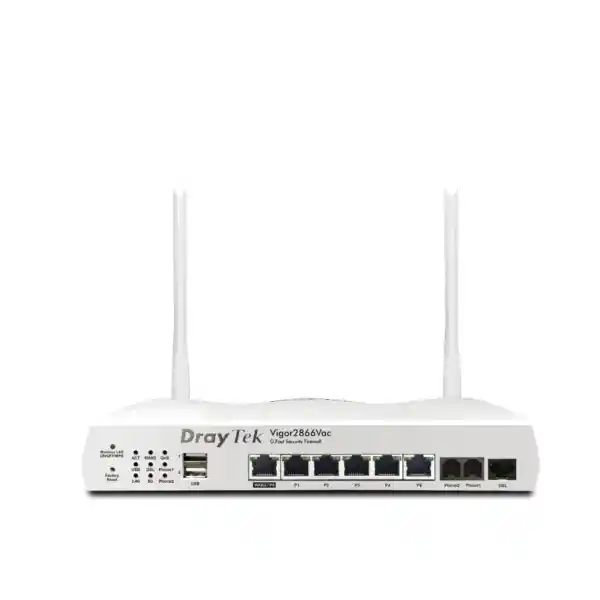
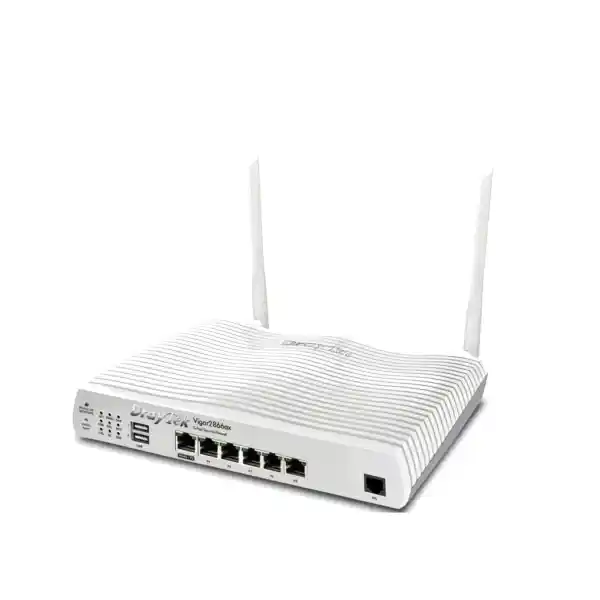
DrayTek Vigor2866ax WiFi 6 G.fast Dual WAN Firewall Router
The DrayTek Vigor2866ax brings high-speed DSL, a configurable Gigabit Ethernet WAN, AX3000-class WiFi 6, business VPN, policy routing, VLAN segmentation, traffic management and centralized device administration into one compact platform. It is designed for small and midsize organizations that want a resilient internet edge without building a stack of separate modem, router, wireless and management appliances.
Direct answer: who should deploy the Vigor2866ax?
The Vigor2866ax is a strong fit for a Dubai or UAE office that receives internet over G.fast, VDSL2, ADSL2+ or an Ethernet handoff and needs a single router to control multiple WAN paths, local wired users, secure WiFi, guest access, inter-VLAN routing and site-to-site or remote-access VPN. It is particularly relevant for professional offices, retail branches, clinics, schools, warehouses, hospitality administration networks and distributed businesses where internet continuity matters but a large data-center firewall appliance would be unnecessarily complex.
Its design is also useful when an organization is migrating between access technologies. The integrated xDSL interface can remain active while a Gigabit Ethernet service is introduced on the configurable WAN/LAN port. Administrators can then use failover or load-balancing policies rather than replacing the complete edge architecture on the migration day. For UAE organizations that operate more than one branch, the router can participate in a repeatable site design with standard VLANs, standard VPN profiles, centralized monitoring and consistent security controls.
Core hardware and platform specifications
WAN architecture
One dedicated RJ-11 xDSL WAN supporting G.fast, VDSL2 and ADSL2+, plus one Gigabit Ethernet port that can operate as WAN or LAN. Dual-WAN rules support resilience, load balancing and policy-based traffic steering.
LAN switching
Five fixed Gigabit Ethernet LAN ports plus the configurable Gigabit port when it is assigned to LAN. This gives the appliance practical flexibility for workstation, switch, server, access-point or uplink connectivity.
Wireless
Dual-band 802.11ax WiFi 6 with 2×2 radios. The 2.4 GHz radio supports up to 574 Mbps link rate and the 5 GHz radio up to 2.4 Gbps, giving an AX3000-class aggregate design with 160 MHz channel capability.
VPN and sessions
Designed for up to 60,000 NAT sessions and 32 concurrent VPN tunnels, with manufacturer-rated IPsec throughput up to 300 Mbps under suitable test conditions and configuration.
Management scale
Can manage supported DrayTek infrastructure from the router interface, including up to 20 access points, 10 switches and a mesh domain of up to 7 manageable access points, subject to model and firmware compatibility.
Physical profile
Compact desktop chassis measuring approximately 241 × 166 × 46 mm. Operating environment is specified for 0–45°C and 10–90% non-condensing humidity, supporting normal conditioned office and communications-room deployments.
Architecture: one edge platform for DSL, Ethernet, wireless and policy control
A modern branch router is more than a device that translates private addresses to the internet. It sits at the point where carrier connectivity, internal segmentation, remote connectivity, security policy and user experience intersect. The Vigor2866ax is engineered around that combined role. The xDSL modem terminates copper-based access directly, avoiding the need for a separate bridged modem in supported deployments, while the second WAN option can accept a standard Gigabit Ethernet service from an ONT, carrier router or upstream modem.
Inside the LAN, administrators can separate departments, voice systems, guest users, servers, IoT equipment and management devices into different logical networks. Route policy can then decide which WAN, VPN tunnel or gateway a specific source, destination, protocol or business application should use. This is materially different from a basic consumer router, where all clients commonly share one flat network and one default internet path.
The wireless subsystem follows the same integrated design philosophy. The ax model provides dual-band WiFi 6, WPA3 capability and business controls such as SSID policy, client isolation, access lists and scheduling. For a small site, the built-in radios may provide all required coverage. For a larger office, the Vigor2866ax can act as the wired gateway while supported VigorAP units provide distributed coverage under central AP management.
This architecture makes the platform useful for organizations that value operational consistency. Internet access, VLAN policy, firewall rules, quality-of-service priorities, VPN parameters and wireless settings can be documented as a single edge design rather than being spread across unrelated devices. FourTeck can integrate the router with structured switching, managed WiFi and broader UAE IT infrastructure services where the deployment requires coordinated onsite implementation.
G.fast, VDSL2 35b and ADSL2+: protecting the value of the access circuit
The integrated DSL interface is one of the Vigor2866ax’s defining capabilities. It supports G.fast profiles 106 MHz and 212 MHz, VDSL2 profiles including 35b Supervectoring, and backward-compatible ADSL2/ADSL2+ standards. This range matters because copper-based business circuits do not all operate at the same generation or profile. A router that supports only basic VDSL2 can become the performance ceiling when a carrier upgrades the line, whereas a G.fast-capable platform can take advantage of substantially higher physical-layer rates when the local loop, cabinet, service profile and provider all support them.
G.fast is designed to deliver very high data rates over relatively short copper loops. DrayTek rates the Vigor2866 platform for G.fast download rates up to the 1 Gbps class under suitable line conditions. That figure should be treated as a technology and platform capability rather than a promise for every site. Real DSL performance depends on loop length, copper quality, crosstalk, cabinet equipment, profile provisioning, noise margin, vectoring environment and the subscribed carrier service. During deployment, the useful engineering indicators are actual synchronization rate, SNR margin, attenuation, attainable rate, error counters and stability across business hours.
VDSL2 profile 35b is equally important for sites served by Supervectoring. Compared with earlier profiles, 35b uses a wider frequency range and can produce higher rates on suitable loops. The Vigor2866ax also supports the common VDSL2 profiles 8a, 8b, 8c, 8d, 12a, 12b, 17a and 30a, giving administrators broader compatibility when a circuit is moved, reprovisioned or supplied through a different access network.
ADSL compatibility remains practical for transitional sites and backup lines. Although ADSL2+ bandwidth is modest by current standards, retaining native support can simplify branch rollouts where an older circuit must remain in service until a new Ethernet or fiber service is delivered. The router can therefore support a phased connectivity strategy instead of forcing a complete redesign around the lowest-speed location.
For procurement in Dubai and across the UAE, FourTeck recommends confirming the carrier handoff before ordering. The question is not merely whether the site has “DSL,” but whether the provider delivers G.fast, VDSL2, ADSL2+, Ethernet from an ONT, PPPoE, DHCP, a static IP block, tagged VLANs or another access method. Correctly documenting the demarcation prevents installation-day surprises and ensures that the router configuration matches the provider’s authentication and addressing model.
Dual WAN, failover and load balancing for business continuity
The Vigor2866ax can operate with its integrated xDSL interface and configurable Gigabit Ethernet WAN as two active internet paths. This is valuable in offices where cloud applications, VoIP, card terminals, SaaS systems, remote desktop services or site-to-site VPNs cannot tolerate a single circuit failure. Instead of treating the backup link as an emergency cable that must be moved manually, the router can monitor connectivity and apply predefined failover behavior.
Connection detection can be designed around more than physical link state. A WAN port may remain electrically up even when the upstream provider cannot reach the internet, so administrators should use a monitoring method appropriate to the carrier design. The router supports connectivity detection mechanisms and policy controls that allow the network to react to service loss rather than only port loss. A well-designed deployment tests failover in both directions: primary-to-secondary during an outage and secondary-to-primary after stable recovery.
Load balancing is another option, but it should be applied with application awareness. Session-based distribution can increase aggregate use of multiple circuits, yet individual sessions normally remain bound to one path. Some applications also expect a stable public source IP, and some SaaS or security services react poorly if closely related flows appear from different addresses. The correct approach is therefore policy driven. General web traffic may use both WANs while banking, hosted PBX signaling, corporate VPNs or specific cloud services are pinned to a preferred connection.
WAN active-on-demand behavior and route policy make the platform suitable for cost-conscious backup designs. An organization can keep a secondary service ready for critical traffic without treating it as an unrestricted equal path. For managed branches, the configuration should also define how inbound services behave during failover because public IP addresses usually change when the active ISP changes. Where inbound access is business critical, VPN initiation direction, dynamic DNS, cloud relays or provider-assigned address options should be evaluated before the outage occurs.
For broader firewall and connectivity planning, the FourTeck Firewall Dubai portfolio can be used to compare the Vigor2866ax with higher-capacity dedicated security appliances when the requirement includes deeper threat inspection, larger VPN scale or multi-gigabit interfaces.
AX3000 WiFi 6: integrated wireless for modern business clients
The “ax” in Vigor2866ax identifies the WiFi 6 version of the platform. It uses 802.11ax on both 2.4 GHz and 5 GHz, with 2×2 radio architecture. DrayTek specifies a maximum link rate of 574 Mbps on 2.4 GHz and 2402 Mbps on 5 GHz, producing the familiar AX3000 class designation. These are physical-layer link rates, not expected application throughput. Real user speeds are lower and depend on client radio capabilities, channel width, signal strength, interference, spatial streams, protocol overhead and concurrent airtime demand.
The 5 GHz radio supports channel widths up to 160 MHz. A 160 MHz channel can provide high peak throughput for compatible clients, but it also consumes more spectrum and may be less suitable in dense office areas where neighboring networks create contention. In many commercial environments, an 80 MHz plan produces better overall reuse and stability. The optimal setting is therefore a site-design decision rather than a simple “widest is fastest” choice.
WiFi 6 improves efficiency in environments with many active clients through mechanisms associated with the 802.11ax standard and modern multi-user operation. The practical benefit is most visible when endpoints are also WiFi 6 capable and when RF conditions are engineered correctly. Older 802.11ac, 802.11n and legacy clients can still connect according to the supported mode set, but they do not gain every efficiency improvement available to newer stations.
Business security options include WPA3 as well as WPA2 and enterprise authentication choices. For a new deployment, FourTeck generally recommends avoiding obsolete encryption unless a documented legacy requirement makes it temporarily unavoidable. Corporate SSIDs can use stronger authentication and internal network access, while guest or visitor SSIDs can be isolated and mapped to a dedicated VLAN with internet-only policy. Client isolation, SSID scheduling and access controls further reduce the risk of treating every wireless device as equally trusted.
Coverage should be planned independently of headline speed. A router installed inside a metal communications cabinet may provide excellent routing performance and poor WiFi. Likewise, a device placed for ideal reception may be in an unsuitable location for DSL termination and structured cabling. If the office is larger, has multiple rooms with dense walls, spans floors, or carries significant voice and video traffic over WiFi, the best design may be to use the Vigor2866ax as the gateway and add centrally managed access points at RF-appropriate positions.
The router can manage supported VigorAP devices and supports mesh management for compatible units, which helps smaller organizations maintain a coherent wireless environment without introducing a separate controller platform. The design still benefits from channel planning, cable verification, PoE budgeting where relevant, roaming expectations and a basic RF survey. FourTeck can incorporate those tasks into a complete UAE network deployment rather than treating WiFi as an afterthought.
Firewall, segmentation and controlled access
The Vigor2866ax combines stateful firewalling with rule-based control over addresses, services and traffic direction. For a business network, the most important objective is not to create the largest possible ruleset; it is to create a ruleset that directly reflects the organization’s trust boundaries. A guest VLAN should not automatically reach accounting systems. CCTV cameras should not need open access to user subnets. Management interfaces should not be exposed to every employee workstation. Printers, building systems and IoT devices can be grouped into dedicated networks with only the routes and services they genuinely require.
The platform supports multiple VLANs and LAN subnets, with 802.1Q tagging for trunk connections to managed switches and access points. This permits one physical infrastructure to carry several isolated logical networks. A practical branch template might include corporate users, voice, guest WiFi, servers, cameras/IoT and network management. Inter-VLAN routing is then permitted selectively instead of allowing unrestricted east-west movement.
NAT and inbound publishing features such as port redirection, open-port rules and DMZ host functions can support externally reachable services, but they should be used cautiously. Publishing a service through NAT does not automatically make the application secure. Where possible, administrative access should be delivered through a VPN rather than direct internet exposure, and any necessary published application should be restricted by source, service, authentication and application security controls.
The router also includes URL, keyword, DNS-related and application-oriented filtering features, with some web-category capabilities dependent on subscription or service availability. These controls can assist acceptable-use enforcement, but they are not equivalent to the full TLS inspection and advanced threat-prevention stacks found in enterprise next-generation firewalls. Organizations with regulatory, high-risk or large-scale security requirements should size the edge security architecture around the threat model rather than around branch-router convenience alone.
A secure deployment also includes management-plane controls: use HTTPS or SSH rather than insecure protocols where practical, restrict administration to trusted subnets or VPN users, change default credentials, keep firmware current, back up configuration after validated changes, and forward logs to an appropriate monitoring destination. These operational steps often deliver more security value than enabling every available feature without a clear policy.
VPN capabilities for branches, remote users and private application access
The Vigor2866ax supports a broad set of VPN technologies, including IPsec, IKEv2, L2TP over IPsec, SSL VPN, OpenVPN and WireGuard in supported firmware, alongside additional legacy or specialist tunnel types. DrayTek specifies up to 32 concurrent VPN tunnels for the platform and an IPsec throughput figure up to 300 Mbps in manufacturer testing. Actual encrypted throughput depends on cipher choice, packet size, WAN characteristics, concurrent services and the processing cost of other router features.
For site-to-site architecture, the router can link a branch office to a head office, data center or another supported gateway across the public internet. The tunnel design should define local and remote subnets precisely, avoid overlapping address ranges, use modern encryption suites supported by both endpoints, and establish clear failover behavior if one site has multiple WAN links. Route policy can be particularly valuable when a site has several tunnels because administrators can send traffic to a specific destination through the required tunnel rather than relying only on a single default route.
Remote-access VPN is useful for administrators and employees who need private access to internal systems. The correct method depends on client support, authentication requirements and security policy. IKEv2, OpenVPN and WireGuard can offer modern options for compatible users, while SSL-based access may fit environments that already rely on DrayTek client workflows. Authentication can be integrated with supported local or directory mechanisms, and certificate-based designs can improve assurance compared with password-only access.
VPN capacity should be sized by traffic pattern, not tunnel count alone. Thirty low-bandwidth management tunnels are very different from thirty users simultaneously transferring large files or using high-resolution remote desktops. If the branch is expected to back up hundreds of gigabytes through an encrypted tunnel, carry sustained inter-site video, or serve as a major remote-access hub, a higher-performance security gateway may be more appropriate even if the nominal tunnel count appears sufficient.
The router can also use VPN load balancing and failover concepts so resilient sites are not tied to one provider. A robust design documents tunnel negotiation endpoints, dynamic versus static addressing, keepalive behavior, routing precedence, DNS dependencies and what should happen when the preferred WAN returns. This avoids a common failure mode where the internet fails over successfully but business applications remain unreachable because their VPN path was never tested on the secondary circuit.
For multi-country or distributed deployments, FourTeck can standardize templates while still adjusting carrier parameters and local addressing for each site. The wider FourTeck global technology portfolio can support projects that extend beyond a single UAE location and require consistent documentation, procurement and rollout methodology.
VLAN design and network segmentation methodology
The router supports up to 16 VLANs, giving a small or midsize site enough logical separation for a structured branch design. VLAN count alone, however, does not determine quality. A well-designed network assigns each VLAN a business purpose, addressing plan, DHCP scope, DNS behavior, gateway policy and documented access matrix. This makes troubleshooting and security review substantially easier than creating ad hoc VLAN IDs whenever a new device appears.
A practical office can use separate VLANs for employees, voice, guest WiFi, servers, surveillance, IoT/building devices and network management. The employee VLAN may access approved server applications and the internet. Voice can reach SIP and provisioning destinations. Guest users receive internet access without routes to private subnets. Cameras communicate with their recorder or video platform but do not initiate sessions to finance systems. Network-management interfaces are reachable only from an administrator subnet or through VPN.
When managed switches are used, the uplink from the Vigor2866ax can carry tagged VLANs over an 802.1Q trunk. Edge switch ports are then assigned as tagged or untagged according to device type. Wireless access points can map separate SSIDs to different VLANs. This keeps policy consistent from the RF edge to the router rather than placing all wireless users into a single broadcast domain.
Address planning deserves equal attention. Branch networks should use non-overlapping RFC1918 subnets if site-to-site VPN is expected. Reusing 192.168.1.0/24 at every office may seem convenient until two locations must be connected. A structured scheme based on site number and function avoids later NAT workarounds and route ambiguity. DHCP reservations or bind-IP-to-MAC functions can stabilize addresses for printers, phones and infrastructure while still allowing centralized scope management.
Segmentation also improves incident containment and fault isolation. Broadcast noise, misconfigured devices and unauthorized scanning can be limited to smaller zones. The router’s job is then to route only the business flows that are explicitly required. That approach turns VLANs from a checkbox feature into an enforceable security and operations model.
QoS, bandwidth management and application experience
Internet capacity is useful only when business-critical applications receive acceptable latency, jitter and throughput during busy periods. The Vigor2866ax includes quality-of-service and bandwidth-management tools that can classify and prioritize traffic using characteristics such as addresses, ports, applications and DSCP markings. It can also apply bandwidth limits and session controls so one endpoint does not consume disproportionate resources.
The engineering principle is to protect constrained links rather than randomly prioritize everything labeled “important.” On an asymmetric DSL circuit, upstream capacity may be the first bottleneck. A large cloud backup or file upload can fill the upstream queue and cause noticeable delay for voice, interactive sessions and acknowledgments. QoS can reserve or prioritize capacity for latency-sensitive traffic while placing bulk transfers in a lower class.
Classification should be based on measurable needs. VoIP typically values low latency and jitter more than maximum throughput. Video conferencing needs predictable bidirectional capacity. ERP and remote desktop sessions usually need responsiveness. Software updates and overnight backups can tolerate delay. Guest traffic should have enough bandwidth to remain usable without competing equally with production services. These distinctions form a meaningful QoS policy.
Session limits can also protect the router and WAN from devices that create excessive concurrent connections. This can be useful for unmanaged guest clients, compromised endpoints or peer-to-peer applications. With up to 60,000 NAT sessions available, the platform has substantial headroom for a typical SMB, but session capacity should still be monitored in environments with high connection churn or unusual applications.
QoS effectiveness should be validated under realistic load. A configuration that appears correct while the WAN is idle may not behave as expected during saturation. FourTeck can test voice calls, conferencing, VPN traffic and business applications while generating controlled background load, then tune queue weights or bandwidth limits based on observable results.
Centralized AP, switch and lifecycle management
The Vigor2866ax can serve as more than an internet gateway by managing compatible DrayTek access points and switches from a central interface. DrayTek lists support for managing up to 20 APs and 10 switches, plus up to seven manageable APs in a compatible mesh environment. For a small organization, this can reduce the need to administer each edge device independently and can provide a clearer view of the local network estate.
Central AP management can help standardize SSIDs, authentication, radio settings and maintenance processes. Central switch management can improve visibility into port status and connected infrastructure. The exact feature set depends on the managed models and firmware, so procurement should verify compatibility for the specific VigorAP and VigorSwitch units included in the project.
The router also supports common network-management mechanisms including SNMP, syslog, configuration backup and remote firmware administration workflows. These features matter because reliable networks require change control and observability. A business should be able to answer basic questions such as when a WAN began dropping, whether VPN negotiation is failing, which switch port serves a device, what firmware is installed, and whether a recent configuration change correlates with the incident.
VigorACS compatibility adds another layer for supported centralized management. Service providers or internal IT teams with multiple sites can use an ACS-oriented workflow to reduce manual per-router administration and maintain more consistent configurations. The value increases as branch count grows because drift becomes a major operational risk. A six-site deployment that starts with identical settings can diverge quickly if emergency changes are never documented or reconciled.
FourTeck recommends a lifecycle process that includes baseline configuration, named backups, firmware review, monitoring, access-control review and periodic failover testing. The router should not be treated as a sealed appliance that is configured once and ignored. Internet-edge devices sit on the boundary of the organization and benefit from regular operational attention.
Physical interfaces and installation planning
| Interface | Role | Deployment note |
|---|---|---|
| 1 × RJ-11 xDSL | G.fast / VDSL2 / ADSL2+ WAN | Connect to the supported carrier copper handoff using the correct annex and line conditions. |
| 1 × Gigabit RJ-45 switchable port | Ethernet WAN or LAN | Use for ONT/modem handoff, secondary WAN, or sixth LAN connection depending on topology. |
| 5 × fixed Gigabit LAN | Local Ethernet | Connect directly to endpoints or, more commonly, to managed access/distribution switching. |
| 2 × USB 2.0 | Supported peripheral functions | Availability and supported use vary by firmware and peripheral compatibility; confirm before project design. |
| 2 × external dual-band antennas | 2.4/5 GHz WiFi | Position clear of metal obstructions and major RF interference where integrated WiFi is used. |
Installation quality has a direct impact on reliability. The router should be placed in a ventilated, conditioned area, supplied from a stable power source and protected from accidental disconnection. In business sites, a UPS is normally advisable so brief power disturbances do not reboot the gateway and force WAN/VPN renegotiation. Cable paths should be labeled, and the DSL handoff should be kept away from avoidable electrical noise sources.
The stated chassis dimensions make the unit suitable for shelves and compact communications spaces. Rack installations can use compatible mounting accessories where available, but the design must preserve airflow and physical access. The two external antennas require clearance and should not be pressed against metal enclosure walls.
For structured LAN environments, the router typically uplinks to a managed switch rather than serving every endpoint directly. This allows PoE access points, IP phones, cameras and desktop ports to be distributed through the building while the Vigor2866ax remains the routing and policy-control point.
Dubai and UAE deployment considerations
A successful UAE deployment starts by identifying the exact internet handoff at the premises. Some locations receive an Ethernet presentation from an ONT or carrier device even when the upstream access technology is fiber. Others may still use copper-based DSL. Business services may use DHCP, PPPoE, static addressing, tagged VLANs or provider-managed edge equipment. The Vigor2866ax is flexible, but its value depends on configuring the correct interface and authentication method for the service actually delivered.
Static public IP requirements should be documented early. If the organization hosts an IPsec tunnel, remote-access service, camera gateway, mail relay or externally published application, the public addressing model affects configuration. When dual WAN is used, decide whether critical services need reachability on both circuits and how DNS or peer configuration will react if the public address changes.
Office construction can also influence wireless results. Reinforced concrete, reflective glass, metal partitions, elevator cores, dense shelving and neighboring access points can create coverage or interference problems that a specification sheet cannot predict. The built-in WiFi is convenient for compact spaces, but a larger Dubai office may achieve better roaming and capacity from centrally placed ceiling access points connected through structured cabling.
Thermal and power conditions matter in telecommunications closets. The Vigor2866ax is specified for operation up to 45°C, but electronics generally benefit from stable conditioned environments with margin below the maximum. A network cabinet that regularly becomes excessively hot can reduce reliability across routers, switches, UPS units and ISP equipment. Adequate airflow, clean power and labeled patching are part of the solution.
For businesses with branches in different emirates, configuration standardization should be balanced with site-specific carrier details. VLAN IDs, SSID policy, firewall templates, monitoring and VPN naming can be standardized, while WAN authentication, public addressing and local DHCP reservations remain site-specific. This approach improves supportability and reduces the risk of inconsistent security policy.
FourTeck can provide supply, configuration, migration and onsite integration in the UAE, including coordination with switches, wireless access points, VPN peers and existing servers. A rollout can be staged so the new router is preconfigured, validated against the addressing plan, installed during an agreed change window and supported by a rollback plan if the carrier handoff differs from the documentation.
Sizing the Vigor2866ax correctly
Router sizing should be based on the busiest realistic operating state, not just the subscribed internet speed. The Vigor2866ax supports up to 60,000 NAT sessions and DrayTek identifies the platform as suitable for networks around the 50-host class. That is a useful planning reference, but “host count” is not a universal measure. Fifty office laptops browsing and using SaaS applications create a very different load from fifty video endpoints, high-rate backup agents or public WiFi users generating thousands of short-lived connections.
Start with WAN bandwidth. If a single Ethernet WAN approaches 1 Gbps, the router’s Gigabit physical interface becomes an obvious boundary. Manufacturer specifications cite up to 940 Mbps single-WAN NAT performance with hardware acceleration under suitable test conditions and up to 1.8 Gbps aggregate dual-WAN behavior in the referenced platform data. Those figures are laboratory maxima, and activated security, VPN, QoS or other services can reduce measured throughput.
Next evaluate encrypted traffic. If the office uses site-to-site VPN only for an ERP application and administrative access, the Vigor2866ax’s VPN capability may be ample. If every user’s cloud traffic is hairpinned through an IPsec tunnel or the branch performs large encrypted backups, VPN throughput may become the primary sizing factor. The manufacturer’s up-to-300 Mbps IPsec figure should be compared with expected sustained encrypted demand, not total ISP speed.
Wireless sizing should consider client count per radio, airtime utilization and physical coverage. AX3000 describes maximum radio link-rate class, not the amount of internet bandwidth guaranteed to each user. A single Vigor2866ax can work well in a compact office, but several meeting rooms full of video-conferencing users may need multiple APs even when the router itself has adequate WAN capacity.
Session behavior also matters. Web applications, mobile devices, security cameras, software agents and IoT platforms can maintain many concurrent connections. A 60K session table provides useful headroom, but administrators should still monitor session count during peak periods. Abnormally high utilization can indicate unsuitable application behavior, malware or a policy issue.
Finally consider growth. If the site expects a near-term move to multi-gigabit fiber, hundreds of users, intensive threat inspection or a large remote-access population, it can be more economical to deploy a higher-tier gateway now. If the likely future remains within Gigabit Ethernet, moderate VPN traffic and SMB-scale segmentation, the Vigor2866ax can provide a balanced feature set without unnecessary complexity.
FourTeck can perform a requirements-based comparison before procurement. The decision model should include ISP handoff, peak throughput, number and type of clients, concurrent sessions, VPN demand, wireless coverage, VLAN count, public services, logging needs, high-availability expectations and expected growth over the intended service life.
Example deployment topologies
1. Compact professional office
Use the integrated xDSL or Ethernet WAN for internet, enable both WiFi bands, assign separate corporate and guest SSIDs, create employee and guest VLANs, and connect a small managed switch for desktops and printers. Remote administrators connect through VPN. QoS protects Teams, Zoom, SIP or other interactive traffic. This topology suits an office where one gateway can provide both routing and local wireless coverage.
2. Dual-ISP branch
Use the DSL port for one carrier and the Gigabit Ethernet WAN for a second. Apply health checks and automatic failover. Pin latency-sensitive or public-IP-dependent services to the primary circuit while allowing general browsing to load balance. Build site-to-site VPN policies that operate over both WANs and test tunnel recovery during simulated outages.
3. Segmented retail or clinic network
Separate staff, payment or clinical terminals, guest WiFi, CCTV and management devices into VLANs. Apply firewall rules that permit only required business flows. Use bandwidth controls so guest traffic cannot overwhelm business applications. Centralize logs and restrict management access to an administrator network or VPN.
4. Multi-AP office
Use the Vigor2866ax mainly as the gateway and controller while supported access points provide distributed WiFi. Trunk VLANs to managed switches, map SSIDs to the correct networks and design channels for capacity rather than maximum theoretical width. This arrangement improves coverage when the router must remain in the communications room.
5. Headquarters-to-branch VPN
Create routed IPsec or another supported secure tunnel between the branch and central firewall. Use unique, non-overlapping subnets at each location. Route only required private applications through the tunnel while local internet traffic exits directly when policy allows. Add a backup WAN path if the branch requires higher availability.
6. Migration from DSL to Ethernet
Keep the existing DSL circuit active while the new Ethernet service is commissioned on WAN2. Validate DNS, VPN, NAT and application behavior on the new circuit, then change route preference. Retain the old line temporarily as failover. This reduces migration risk and creates a controlled transition instead of a hard cutover.
Operational hardening and maintenance
A router at the business perimeter should be operated as managed infrastructure. Start by changing administrative credentials, using unique secrets and limiting management access to trusted sources. Disable unused remote-management methods and prefer encrypted administration protocols. If remote support is required, access through VPN or a tightly restricted management policy is safer than exposing a broad web-management interface to the internet.
Firmware management should follow a controlled process. Review release notes, confirm model compatibility, back up the current configuration, schedule an appropriate maintenance window, apply the update and validate WAN, VPN, DHCP, VLAN and wireless operation afterward. Critical security updates may justify accelerated deployment, while major feature releases can benefit from additional testing before production use.
Configuration backup is essential. A backup should be captured after the initial commissioned state and after significant validated changes. The filename or repository entry should identify site, router, firmware and date. A backup is only useful if the organization knows where it is stored, who can access it and which version is the approved rollback point.
Logging and monitoring reduce troubleshooting time. Syslog can provide a historical record of WAN changes, authentication events, VPN negotiation and other system activity. SNMP can feed network-management systems with availability and performance indicators. Email or SMS-style notifications may be used for selected events where supported and appropriately configured. Monitoring should avoid alert fatigue by focusing on conditions that require action.
Periodic tests should include ISP failover, VPN recovery, wireless guest isolation, DHCP scope capacity and UPS runtime. Backup services fail most often when they have never been tested under realistic conditions. A quarterly or scheduled verification can reveal expired credentials, changed carrier behavior, dead backup circuits or undocumented topology changes before a real outage.
Operational documentation should include WAN parameters, public IP details, VLAN table, DHCP ranges, reserved addresses, VPN peers, administrator access method, firmware version, device serial information, support contacts and the physical patching map. This turns the router from a “black box” into a supportable component of the business network.
Vigor2866ax versus simpler routers and larger firewalls
Compared with a typical consumer WiFi router, the Vigor2866ax adds business functions that directly affect resilience and control: integrated G.fast/VDSL/ADSL support, a second WAN option, policy routing, multiple VLANs, centralized AP/switch management, extensive VPN choices, session and bandwidth controls, more detailed firewall policy and business-oriented monitoring. The result is a platform that can be documented and administered as part of an IT environment rather than simply used as an internet appliance.
Compared with an enterprise next-generation firewall, the tradeoff moves in the opposite direction. A dedicated enterprise firewall may provide substantially higher encrypted throughput, multi-gigabit interfaces, deep application inspection, sandboxing, advanced threat intelligence, larger HA architectures and more sophisticated security subscriptions. Such systems are appropriate when the threat model, compliance requirements or traffic scale justifies them. They can also require separate modem and WiFi infrastructure.
The Vigor2866ax occupies the practical middle. It is feature-rich enough to create a well-segmented, resilient SMB network while remaining compact and integrated. That makes it attractive for branch offices where G.fast or VDSL is still relevant, where a second Ethernet WAN is useful, and where centralized management of a modest number of DrayTek APs and switches can simplify operations.
Selection should therefore start with requirements rather than brand category. If the site needs 10 Gbps interfaces, advanced inline threat prevention or hundreds of VPN users, choose a larger platform. If the site needs one resilient Gigabit-class edge with DSL flexibility, WiFi 6, VPN, VLAN, QoS and manageable branch complexity, the Vigor2866ax is positioned for that job.
Frequently asked technical questions
Does the Vigor2866ax include a DSL modem?
Yes. The dedicated RJ-11 WAN supports G.fast, VDSL2 including profile 35b, and ADSL2/ADSL2+. The exact line rate depends on provider service, loop conditions and provisioning.
Can it use an Ethernet internet service?
Yes. One Gigabit RJ-45 port is configurable as Ethernet WAN or LAN, so the router can connect to an ONT, upstream modem or carrier Ethernet handoff.
Can DSL and Ethernet WAN operate together?
Yes. The platform supports dual-WAN operation with load balancing and failover. Policy should be designed around application requirements and public-IP behavior.
Is the WiFi 6 radio AX3000?
The ax model provides up to 574 Mbps link rate on 2.4 GHz and up to 2402 Mbps on 5 GHz, which places it in the AX3000 performance class. User throughput is lower than physical link rate.
Does it support WPA3?
Yes, WPA3 is included among the supported wireless security options. The final authentication design should account for the capabilities of client devices and any enterprise identity service.
How many VPN tunnels are supported?
DrayTek specifies up to 32 concurrent VPN tunnels for the Vigor2866 series. Practical throughput depends on protocol, encryption, traffic pattern and enabled services.
What is the IPsec performance?
The manufacturer publishes an IPsec throughput figure up to 300 Mbps under test conditions. Production results vary with cipher choice, packet size and configuration.
Does it support WireGuard?
Current DrayTek platform specifications list WireGuard among supported VPN technologies. Verify the required firmware release and interoperability with the peer system before deployment.
How many NAT sessions can it handle?
The platform is specified for up to 60,000 NAT sessions. Session count is an important sizing factor for networks with many endpoints or high connection churn.
Can it create multiple VLANs?
Yes. The router supports 802.1Q VLAN operation and up to 16 VLANs, enabling segmentation of employees, guests, voice, servers, cameras and management networks.
Can guest WiFi be isolated?
Yes. Guest users can be placed on a separate SSID/VLAN and controlled through firewall and client-isolation policy so they do not receive unrestricted access to internal resources.
Can it manage other DrayTek devices?
The router supports central management for compatible VigorAP and VigorSwitch products. Published scale includes up to 20 APs, 10 switches and seven manageable mesh APs.
Is a separate access point still useful?
Yes, especially in larger or RF-challenging spaces. The integrated WiFi works well for compact coverage, but distributed AP placement can improve capacity, roaming and signal consistency.
Does it support IPv6?
Yes. The platform includes IPv6 WAN and LAN capabilities alongside IPv4. The exact deployment mode depends on the ISP’s IPv6 service and organizational addressing policy.
Can it prioritize VoIP and video meetings?
Yes. QoS and bandwidth-management functions can classify and prioritize latency-sensitive traffic, provided the policy is tuned to the actual WAN bandwidth and application behavior.
Can it replace an enterprise NGFW?
Not in every security scenario. The Vigor2866ax is a capable SMB firewall router, but organizations requiring advanced threat inspection, very high encrypted throughput or larger HA designs may need a dedicated NGFW platform.
Is it suitable for around 50 users?
DrayTek positions the series for roughly the 50-host class. Final sizing should account for traffic intensity, session behavior, VPN load, wireless density and future growth rather than user count alone.
Can FourTeck preconfigure the router?
Yes. A deployment can include WAN parameters, VLANs, DHCP, firewall rules, VPN, SSIDs, QoS, management controls and documented handover, subject to the information available from the customer and ISP.
Detailed procurement guidance for UAE organizations
Before requesting a quotation, decide whether the project is a simple hardware replacement or a network change. A replacement may only require matching current ISP settings and LAN addressing. A network change can involve new VLANs, a second ISP, a VPN migration, new wireless SSIDs, managed switching or a complete IP renumbering. The latter requires engineering time beyond product supply, and the scope should be documented so all required services are included.
Identify the current router model and how it connects to the carrier. Record whether the WAN uses RJ-11 DSL or Ethernet, whether PPP credentials are required, whether a VLAN tag is configured, and whether the site has static public addresses. If a carrier-managed modem or ONT is present, confirm whether it operates in bridge mode, routed mode or another provider-specific design. This determines whether the Vigor2866ax receives the public IP directly or sits behind another NAT device.
Document all inbound and VPN dependencies. A small office may have hidden requirements such as remote CCTV access, a site-to-site tunnel to accounting, SIP provider rules, a hosted application, a dynamic DNS hostname or a vendor support tunnel. Replacing the router without identifying these dependencies can create an outage even when general web browsing works immediately.
For WiFi, provide the approximate floor area, number of rooms, wall construction, expected concurrent wireless users and any known coverage complaints. If the Vigor2866ax will be installed inside a cabinet, say so; the design may need separate access points. If the office uses many WiFi 6 laptops and high-bandwidth collaboration tools, capacity planning is as important as nominal coverage.
For VPN, specify the peer make/model where possible, local and remote subnets, tunnel protocol, authentication method and required traffic. If the router must interoperate with a head-office firewall from another vendor, compatibility testing can be planned around common standards rather than relying on vendor-specific defaults.
Finally, define support expectations. Some customers need hardware supply only; others need staging, onsite installation, carrier coordination, after-hours migration, testing and managed support. FourTeck can structure the quotation accordingly so the project scope matches the operational risk.
Why documentation and testing matter more than a long feature list
A router can support dozens of advanced functions and still be poorly deployed. Business reliability comes from aligning a small number of necessary features with clear documentation and repeatable testing. For the Vigor2866ax, the most valuable configuration is the one an administrator can explain: which WAN is primary, when failover occurs, which VLANs exist, who can reach each VLAN, how VPN users authenticate, which traffic receives priority, where logs are sent and how to restore service after a failed change.
Commissioning should therefore include a test plan. Confirm each LAN has the expected DHCP range and DNS servers. Verify guest isolation. Test corporate internet access, inter-VLAN rules and any published services. Establish every VPN and confirm routing in both directions. Saturate the WAN sufficiently to observe QoS behavior. Disconnect the primary ISP and confirm secondary-path operation, then restore it and verify failback. Reboot the router during a controlled window and ensure all essential services recover automatically.
Wireless validation should include signal checks in key working areas, throughput sampling, roaming behavior when multiple APs are used, and authentication tests for both modern and legacy clients. Where the 160 MHz option is used, monitor whether channel availability and interference justify it. A narrower channel may outperform a wider channel in a dense RF environment because reliability and reuse outweigh theoretical peak speed.
After acceptance, retain a network diagram and configuration summary. Include WAN addressing, VLAN IDs, subnet ranges, switch trunks, AP locations, SSID-to-VLAN mapping and VPN peers. The document need not be complex; its value is that a future engineer can understand the design quickly without reverse-engineering it during an incident.
This disciplined approach is especially useful for growing UAE businesses. As more branches are added, the same template can be reused with controlled site-specific differences. The network becomes a repeatable platform rather than a collection of unrelated routers installed at different times.
Recommended deployment workflow
- Discovery: collect ISP handoff details, public addressing, PPP credentials if applicable, current topology, critical applications, VPN peers, WiFi coverage requirements and business change-window constraints.
- Design: define WAN priority, failover logic, VLANs, subnets, DHCP scopes, firewall matrix, QoS classes, SSIDs, authentication, VPN routes, monitoring and administrator access.
- Staging: update to the approved firmware, configure baseline settings, import only validated parameters, label the device and create the initial configuration backup.
- Bench validation: verify local routing, VLAN tagging, DHCP behavior, WiFi, management access and any available VPN peer connectivity before the onsite change.
- Installation: connect the carrier handoff, managed switch and required endpoints; verify synchronization or Ethernet negotiation; confirm public addressing and DNS.
- Service testing: test browsing, business SaaS, voice, VPN, published services, guest isolation, QoS and dual-WAN behavior where configured.
- Documentation: record actual WAN values, final firmware, VLAN table, IP plan, VPN peers, backup location and physical patching.
- Handover and lifecycle: define support ownership, monitoring, firmware review, backup cadence and scheduled resilience tests.
Decision recap: when the Vigor2866ax makes technical sense
Good architectural match
Choose this platform when the site benefits from integrated G.fast/VDSL/ADSL, a second Gigabit Ethernet WAN, WiFi 6, branch-scale VPN, VLAN segmentation, QoS and the ability to manage a modest DrayTek AP/switch estate. It is well aligned with SMB and branch environments that need professional network controls without a large enterprise security stack.
Consider a larger platform
Move up when the requirement includes multi-gigabit WAN interfaces, very high VPN throughput, hundreds of active users, advanced threat inspection, large high-availability clusters, extensive remote-access concentration or other workloads that exceed the Vigor2866ax’s intended branch profile.
Best value comes from design
The product’s value increases when dual WAN, VLAN policy, QoS, VPN and wireless controls are configured around actual business requirements. Buying the hardware without documenting these requirements leaves many of the platform’s strongest capabilities unused.
Plan for lifecycle support
Treat the router as maintained infrastructure. Keep firmware reviewed, configuration backed up, logs monitored and failover tested. A reliable branch edge is an operational process as much as a hardware purchase.
Quotation input checklist
For the most accurate DrayTek Vigor2866ax quotation and implementation scope in Dubai or elsewhere in the UAE, provide the following project information. Complete answers allow the router to be staged around the actual network rather than generic defaults.
ISP name, DSL or Ethernet handoff, package speed, static/dynamic IP, PPPoE credentials if required, provider VLAN ID and whether a modem/ONT is already installed.
Primary and backup services, preferred failover behavior, applications that must stay on one public IP and whether load balancing is desired.
Current IP range, required employee/guest/voice/server/CCTV/IoT networks, DHCP needs, managed switch models and any existing 802.1Q trunk configuration.
Approximate floor area, wall type, number of wireless users, key coverage zones, guest WiFi requirement and any existing access points.
Site-to-site or remote-access requirement, peer device, remote subnet, expected concurrent users, authentication approach and estimated encrypted traffic.
Any CCTV, servers, applications, SIP systems or vendor portals that currently depend on port forwarding, public IP addresses or dynamic DNS.
Preferred installation date/time, maximum acceptable downtime, onsite-access conditions and whether rollback to the old router must remain possible.
Hardware supply only, preconfiguration, onsite installation, carrier coordination, WiFi survey, managed support, documentation or multi-branch rollout.
FourTeck consultation and deployment support
FourTeck can supply the DrayTek Vigor2866ax and build the surrounding branch-edge configuration for Dubai and UAE organizations. The engagement can range from product supply and baseline setup to a complete migration including WAN commissioning, VLAN segmentation, firewall policy, VPN integration, WiFi planning, managed switch coordination, QoS and handover documentation.
For existing networks, the safest migration approach is to capture the current dependency set before changing equipment. That includes public addressing, inbound NAT, DNS, DHCP reservations, VLANs, VPN peers and application-specific routes. The new router can then be staged with a configuration that reflects the environment rather than relying on assumptions made during the change window.
For new offices, FourTeck can design the router as part of the full LAN and wireless architecture. This includes selecting access-point positions, assigning VLANs, sizing managed switches, planning IP ranges, defining guest isolation and establishing secure remote support. The objective is a network that remains understandable and supportable as the organization grows.
Customers can also use FourTeck’s UAE and global resources for wider infrastructure requirements, from branch networking through servers, telephony, security and managed IT. The recommended final product and architecture depend on verified requirements; where the Vigor2866ax is the correct fit, it offers a compact way to combine DSL flexibility, resilient WAN design, WiFi 6 and business routing controls in one platform.

Reviews
There are no reviews yet.