
Business Multi-WAN Routing for UAE Networks
DrayTek Vigor2867L in UAE
The DrayTek Vigor2867L is a business routing platform for organisations that need to combine resilient WAN design, DSL migration support, high-speed Ethernet, advanced VPN, policy control, VLAN segmentation and central network administration. In a UAE branch, office, retail, education, hospitality or professional-services environment, that combination allows the router to sit at the edge of the network and coordinate multiple connectivity paths without forcing the business to maintain separate appliances for every routing function.
Direct answer: what is the DrayTek Vigor2867L designed to do?
The Vigor2867 platform is designed as a multi-WAN VPN router with an integrated xDSL modem and high-speed Ethernet interfaces. It supports VDSL2, including profile 35b Super Vectoring, as well as ADSL standards for sites that still depend on copper access. At the same time, its Ethernet architecture provides a path toward faster fibre handoffs and high-capacity LAN or WAN interconnects. The practical advantage is transition flexibility: a business can retain a working DSL service, introduce Ethernet internet, use failover or load-balancing policies, and then migrate the primary circuit later without having to redesign the entire edge.
For UAE deployments, this matters because connectivity estates are rarely uniform. A head office may receive a high-speed managed Ethernet or fibre service, while a satellite office may still use VDSL, a secondary broadband line or a temporary upstream connection. The router can be configured around the topology rather than forcing every site into an identical carrier design. Multi-WAN policies can steer traffic by source, destination, protocol or service requirement; VPN capabilities can connect branches and remote users; VLANs can separate departments and device classes; and QoS can keep latency-sensitive traffic from being overwhelmed by bulk transfers.
FourTeck treats the exact “Vigor2867L” suffix as a procurement item that should be checked against the region-specific DrayTek bill of materials before supply. Current DrayTek global material for the Vigor2867 family identifies the core Vigor2867 and Vigor2867be models and documents the platform features used throughout this page. Therefore, any suffix-specific characteristic, especially an assumption about an integrated cellular modem, should be validated on the quotation and hardware label rather than inferred from the letter alone. This approach keeps the product specification accurate while still giving network teams a complete design guide for the Vigor2867 platform.
VDSL2 35b
Integrated xDSL support covers VDSL2 profiles including 35b Super Vectoring plus legacy ADSL standards, giving sites a practical migration path from copper services.
High-Speed Ethernet
The Vigor2867 family combines 1GbE, 2.5GbE and 10GbE connectivity, including a 10G SFP+ interface, to support modern uplinks and aggregation designs.
Business VPN
IPsec, IKEv1/IKEv2, OpenVPN and WireGuard support give network teams options for branch tunnels, teleworker access and encrypted site connectivity.
Segmentation & Control
VLAN, policy routing, QoS, session control, filtering and access policies help separate users and applications while maintaining predictable service quality.
WAN architecture: DSL today, Ethernet tomorrow, resilience throughout
The strongest reason to consider the Vigor2867 family is not simply that it contains several interfaces; it is that the router can use those interfaces as part of a deliberate multi-WAN policy. The integrated DSL interface supports ITU-T VDSL and VDSL2 standards, vectoring and retransmission technologies, with profiles 8a, 8b, 8c, 8d, 12a, 12b, 17a, 30a and 35b. ADSL support includes T1.413 Issue 2, G.992.1, G.992.3 and G.992.5, with Annex A/B/J/M support documented for the platform. That range is useful when a business is upgrading a site whose last-mile service may not change on the same timetable as its internal network.
The Ethernet side of the design is equally important. The platform includes a fixed Gigabit Ethernet WAN interface and higher-speed switchable interfaces that can participate in WAN or LAN roles depending on the deployment. The family also provides a 10G SFP+ interface and 2.5GbE connectivity. In practical design terms, this allows a network engineer to reserve high-capacity links for an ISP handoff, a core switch, a server aggregation path or another critical connection. The exact active-port combination must follow DrayTek’s port-role rules, so FourTeck validates the intended topology before implementation rather than assuming that every physical connector can operate simultaneously in every role.
A good multi-WAN design begins with failure objectives. If the business must remain online when the primary circuit fails, the secondary link should terminate through a physically and commercially independent path where possible. If the objective is capacity rather than pure resilience, sessions can be distributed across active links through load-balancing rules. If a specific cloud service or VPN peer must always see traffic from one public address, policy routing can pin that flow to a chosen WAN while allowing general web traffic to use the wider load-balancing pool. Connection detection using methods such as ARP and ping can help the router decide whether an interface is merely electrically up or genuinely able to reach an upstream destination.
For UAE offices with voice, cloud ERP, Microsoft 365, remote desktop, CCTV, guest internet and branch VPN traffic sharing the same edge, the WAN plan should be application-aware. Voice and interactive sessions benefit from stable latency and consistent source addressing; bulk backup can use available secondary capacity; guest browsing can be rate-limited or policy-routed; and site-to-site traffic can be given explicit failover behaviour. The Vigor2867 platform provides the routing tools to implement these choices in one policy framework instead of relying on unmanaged failover.
Performance planning: read the headline numbers in context
DrayTek publishes a maximum NAT performance figure of approximately 9.1 Gbps for the Vigor2867 family under its stated test conditions. The same platform documentation identifies support for up to 50 VPN tunnels and gives a single-direction IPsec figure of up to 540 Mbps using AES-256, while WireGuard single-direction throughput is listed at up to 76 Mbps. These values are useful for comparative sizing, but they should not be interpreted as guaranteed application throughput for every production configuration. Encryption method, packet size, concurrent security services, routing complexity, WAN latency and traffic direction all affect real performance.
Session capacity is another planning metric. DrayTek positions the family with a headline of up to 100,000 NAT sessions and recommends the platform for an environment around 50 hosts. Those two figures describe different dimensions. A modern endpoint can generate hundreds or thousands of short-lived sessions through browsers, SaaS applications, telemetry, messaging clients and software updates, so session capacity provides headroom beyond a simple device count. At the same time, user count remains useful for operational expectations because policy complexity, VPN concurrency and support load tend to scale with people and applications, not merely with open connection tables.
A correct sizing exercise therefore starts with real workloads. Count internet users, servers, access points, phones, cameras, IoT devices and guest clients. Estimate the peak aggregate internet requirement and identify which traffic must traverse encrypted tunnels. Record the number of branches and remote-access users, then separate peak concurrent VPN users from total named users. Note whether the business expects heavy east-west inter-VLAN routing at the router or whether a Layer 3 core switch will handle local routing. Finally, include growth, because a router selected at 95 percent of its practical limit on day one will have very little tolerance for new services.
FourTeck uses these inputs to decide whether the Vigor2867 class is appropriate as the primary edge or whether a larger platform should be considered. The goal is not to chase the highest benchmark number; it is to preserve latency, stability, security and troubleshooting clarity during the organisation’s busiest hour.
VPN design for branches, teleworkers and cloud-linked operations
The Vigor2867 family supports several established VPN technologies so the network does not have to rely on a single tunnel type. IPsec remains a common choice for permanent site-to-site links because it is interoperable with a broad range of enterprise firewalls, cloud VPN gateways and branch routers. DrayTek documents IKEv1 and IKEv2, IKEv2-EAP, IPsec-XAuth, OpenVPN and WireGuard on the platform. Authentication options include pre-shared keys and X.509 certificates for IKE, while user authentication can integrate local credentials, RADIUS, TACACS+ and time-based one-time passwords.
For a multi-branch UAE organisation, a typical design can establish route-based or policy-driven site connectivity between the head office and branches, then layer access restrictions on top of the tunnel. The encrypted link itself should not imply unrestricted trust. Finance, HR, voice, CCTV, point-of-sale and general user segments can remain separated by VLAN and firewall policy, even when their traffic crosses the same IPsec tunnel. This makes the VPN part of the routing architecture rather than a bypass around it.
Remote access should be designed around identity and least privilege. A teleworker may need only a published application subnet, a remote desktop gateway or selected internal services. Another user may require broader administrative access. Those users should not necessarily share the same policy. Combining user authentication, address pools, routing rules and firewall controls helps reduce the scope of remote access. Where two-factor methods are part of the chosen deployment, operational procedures should also cover token recovery, leaver processes and emergency access.
WAN failover introduces another VPN consideration: tunnel continuity. If the primary WAN goes down and the public IP changes, the remote peer must be able to re-establish the tunnel against the secondary path. Dynamic DNS, peer configuration and failover timing all need to be aligned. DrayDDNS can provide a stable hostname in suitable designs, but both ends of the tunnel should be tested under real failover conditions rather than assumed to recover automatically.
For larger rollouts, tunnel naming, addressing and cryptographic standards should be documented before deployment. A consistent scheme for branch IDs, local subnets, peer identifiers and proposal settings makes troubleshooting much faster. FourTeck can also align the Vigor deployment with existing firewall standards through its Firewall Dubai engineering practice when a DrayTek branch must interoperate with a different firewall platform at headquarters or in a data centre.
LAN design, VLAN segmentation and inter-VLAN policy
The Vigor2867 platform supports 802.1Q tag-based VLANs, multiple LAN subnets and DHCP functions that let an administrator separate traffic logically even when several user groups share the same switching infrastructure. DrayTek documents up to eight VLANs and eight LAN subnets for the platform. For a small or medium business, that is often enough to create clearly defined trust zones without introducing a separate routing appliance.
A sensible segmentation plan begins with business function rather than arbitrary numbering. Corporate user devices can occupy one VLAN, voice handsets another, infrastructure management a third, CCTV a fourth, guest access a fifth and building or IoT devices a sixth. Servers may be placed in their own segment, and a dedicated quarantine or onboarding VLAN can be reserved for devices that have not yet met access requirements. Each VLAN should have an explicit reason to communicate with another. When communication is required, define the exact destination and service rather than permitting unrestricted any-to-any routing.
The platform’s routing capabilities include IPv4 and IPv6 static routes, policy routing, inter-VLAN routing, RIP, BGP and OSPFv2/v3. Not every site needs a dynamic routing protocol, but having those options is useful when the router connects into a larger managed environment. A simple branch may use a default route plus static routes into a VPN. A larger office with redundant internal paths might exchange routes dynamically with a core. The design should stay as simple as the topology allows because every unnecessary protocol increases the troubleshooting surface.
DHCP design deserves similar discipline. Custom DHCP options can support phones, access points and other managed endpoints, while bind-IP-to-MAC capabilities can make addresses more predictable for devices that are not configured statically. Infrastructure addresses, DHCP pools and reserved blocks should be documented so that the help desk can identify a device quickly from its subnet and address.
For sites that require a broader switching refresh, FourTeck can combine the router with managed access and aggregation switching through the main FourTeck UAE portfolio. The router then becomes one component of a complete segmentation design rather than an isolated box at the internet edge.
QoS and bandwidth governance
Bandwidth problems are often policy problems rather than raw circuit-speed problems. A single backup task, cloud synchronization client or unmanaged guest device can consume capacity at exactly the moment that voice or remote desktop traffic needs it. The Vigor2867 platform provides traffic shaping, IP-based bandwidth limits, session limits, QoS and application-oriented QoS functions so administrators can protect critical workloads.
A useful QoS policy begins by identifying traffic that is sensitive to delay and jitter, then guarantees or prioritises that class without starving routine business applications. Bulk transfers can be limited to a ceiling or pushed to a secondary WAN. Guest access can receive a fair-share policy. Session limits can prevent one endpoint from creating an excessive number of concurrent connections. These controls are most effective when the business measures the result after implementation rather than setting arbitrary values and forgetting them.
Policy routing for predictable paths
Policy-based routing allows traffic to be directed according to more than the normal destination routing table. The Vigor2867 family can match protocol, IP address and port information, which is valuable in multi-WAN environments. A finance application can be pinned to a stable primary circuit, guest browsing can prefer a secondary broadband path, and a particular VPN or cloud service can use the WAN that best matches its addressing requirements.
The most important operational rule is to keep policy routing understandable. Every exception should be documented with a business reason, expected WAN path and fallback behaviour. Otherwise, troubleshooting becomes difficult when a link fails and a hidden rule sends one application somewhere unexpected. FourTeck designs policies in layers: default behaviour first, business-critical exceptions second, and failover logic third.
Firewall, threat controls and access governance
A business router is only useful at the perimeter if its policy model can reduce unnecessary exposure. The Vigor2867 platform includes stateful firewall filtering, URL and IP reputation functions, threat protection, MAC filtering profiles, IPv6 address security and defensive controls for threats such as ARP spoofing and IP spoofing. DrayTek also documents port-knocking functions and broader VigorShield security capabilities. These features give administrators several layers of control, but they should be configured according to an explicit security policy rather than enabled randomly.
At minimum, inbound traffic from the internet should be denied unless a published service has a documented business need. Where a service must be published, the destination should be limited, the application should be patched, and the exposure should be reviewed periodically. Port forwarding and DMZ-host functions are available, but a DMZ setting should not be used as a convenience shortcut for troubleshooting because it can unintentionally expose a device to unsolicited traffic.
Outbound policy also matters. Many organisations concentrate only on inbound filtering even though compromised endpoints often initiate outbound connections. URL and IP reputation controls can contribute to a layered defence, while DNS and web policies can reduce access to inappropriate or known-risk destinations. These controls should complement endpoint protection, identity security and patch management rather than replace them.
The platform’s IAM functions support users and groups, access policies, group policies, conditional access policy concepts, resource definitions, account status and backup/restore of relevant settings. That allows an administrator to express policy around identities and resources rather than only around source IP addresses. In environments with staff turnover or role changes, group-based rules are usually easier to maintain than dozens of individual exceptions.
FourTeck can integrate these router controls into a broader security architecture through its IT Services UAE practice, including configuration standards, documentation, change control, monitoring and handover. The objective is to make the router manageable after installation, not merely functional on commissioning day.
Physical interfaces and port planning
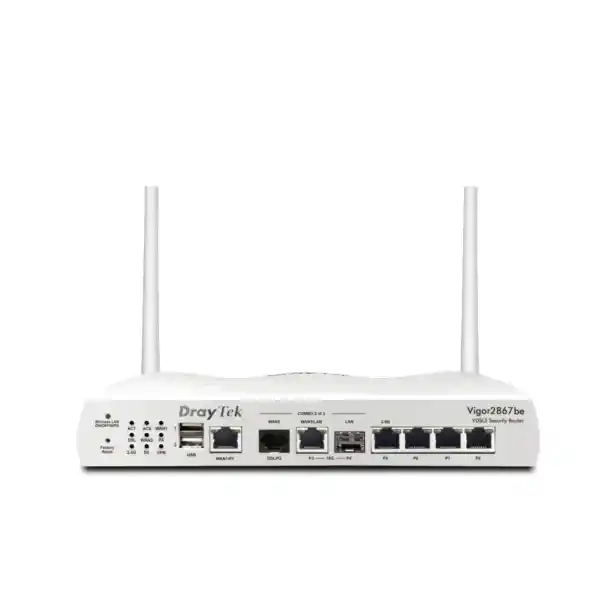
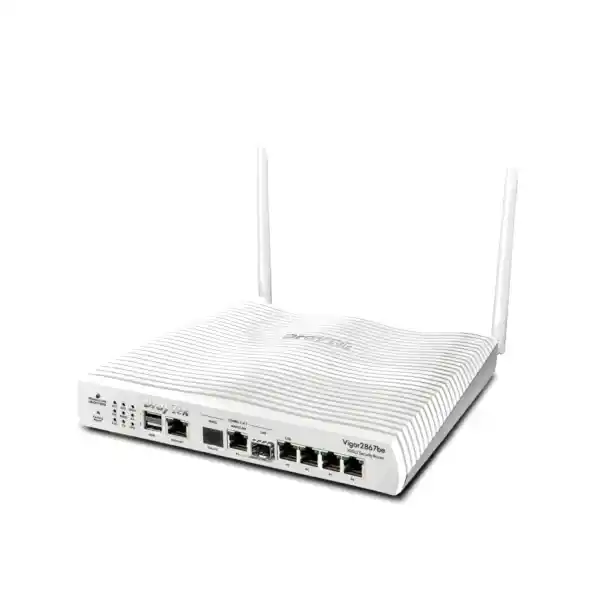
The Vigor2867 family combines legacy-access support with modern Ethernet speeds. The documented physical design includes the integrated DSL interface, a fixed 1GbE WAN port, a switchable 10GbE RJ-45 interface, a 10G SFP+ interface, a switchable 2.5GbE RJ-45 interface, three fixed 1GbE LAN ports and two USB 2.0 ports. This is a versatile collection, but a port map should be planned before installation so that every connector has a defined purpose and the selected combination complies with the model’s active-port limitations.
A small branch might allocate the DSL interface to the current carrier, use Gigabit Ethernet as a secondary WAN, connect the 2.5GbE port to a multigigabit access switch and reserve the 10G SFP+ interface for a future core. Another site may use a 10GbE handoff as the primary WAN and dedicate the faster internal interface to a server or aggregation switch. There is no universally correct map; the correct choice depends on internet speed, switching topology, transceiver requirements and the expected upgrade path.
Copper 10GbE links should be assessed for cable category, distance and heat. SFP+ links require compatible optics or direct-attach cabling, and optical choices depend on fibre type and distance. 2.5GbE can be particularly useful for modern access points or switches where standard Gigabit Ethernet is restrictive but a full 10GbE upgrade is unnecessary. The value of the Vigor2867 platform is that these speeds can coexist in one edge design.
The two USB ports can support documented applications such as user management functions, file or printer sharing in suitable configurations, status accessories and USB WAN use. In a business environment, however, the router should not be treated as a general-purpose storage server. Critical file services belong on properly protected storage with backup, permissions and monitoring. USB functionality is best used for the specific operational roles defined in the DrayTek configuration.
Important Vigor2867L suffix and LTE procurement note
The product name supplied for this page is DrayTek Vigor2867L. DrayTek’s current global Vigor2867 family page documents Vigor2867 and Vigor2867be as the listed models and does not, in that current global listing, enumerate a Vigor2867L cellular variant. The global Vigor2867 specifications also show no built-in SIM slot or integrated LTE modem for the base family entry. Because DrayTek model suffixes can vary by generation and sales region, FourTeck will verify the exact regional part number before order confirmation.
This is especially important if the project requirement depends on embedded LTE. A buyer should not assume that the letter “L” automatically guarantees a particular modem category, SIM arrangement, supported UAE frequency band or antenna configuration. The quotation should state whether cellular connectivity is integrated, supported through USB WAN, or expected through an external 4G/5G gateway. It should also list the precise DrayTek part code and, where relevant, the supported radio bands.
By separating verified platform capability from suffix assumptions, the project avoids a common procurement error: purchasing a router that is functionally similar but lacks a required cellular interface. FourTeck can confirm this point against the available regional stock before supply while preserving the Vigor2867 design described throughout this page.
Central management of DrayTek access points and switches
The Vigor2867 family can operate as a management point for compatible VigorAP wireless access points and VigorSwitch devices. For smaller estates, this can simplify operations because the branch router becomes a convenient location from which administrators can observe and maintain parts of the local network. The platform also supports management through DrayTek’s broader tooling, including VigorACS on supported firmware, which is useful when several sites need a common operational view.
Central management is most valuable when configuration standards are defined first. Access points should use consistent SSID naming, security modes, VLAN assignments and RF policies. Switches should follow a port-profile convention that clearly distinguishes uplinks, access ports, phones, cameras and management connections. Firmware versions should be tracked, and configuration backups should be stored before major changes. A management console cannot compensate for an inconsistent design; it becomes effective when the underlying templates are repeatable.
Monitoring should also be purposeful. SNMP, syslog, device status, route tables, ARP tables, DHCP tables, session information and WAN status can help diagnose failures. The best approach is to send important logs to a central system where they survive a device reboot and can be correlated with events from switches, access points and servers. Alerting should focus on conditions that require action, such as WAN loss, repeated authentication failures or unexpected device restarts, rather than generating noise for every routine state change.
For a multi-site organisation, FourTeck can standardise naming, firmware, backups and monitoring across locations. This reduces support time because engineers see the same logical layout and troubleshooting conventions at every branch, even when local WAN providers differ.
IPv6, DNS, multicast and business routing features
Modern edge design must account for IPv6 even when the business still operates primarily on IPv4. The Vigor2867 platform supports IPv6 addressing and routing functions alongside IPv4. DrayTek documents static IPv6, DHCPv6 and transition mechanisms in the family’s specification set, as well as IPv6 static routing and OSPFv3. A migration plan should define whether IPv6 is disabled, piloted on selected segments or deployed broadly; leaving it partially active without security policy can create visibility gaps.
DNS security and local DNS functions are useful for branch operations. Conditional forwarding can direct internal domain requests to corporate name servers while public requests use the designated recursive resolver. Local DNS records can provide simple name resolution for infrastructure. DNSSEC support can add validation capability where the upstream design and firmware configuration make use of it. As with firewall policy, DNS settings should be documented because incorrect forwarding is a frequent cause of symptoms that appear to be network outages but are actually name-resolution failures.
Multicast support includes IGMP v2/v3, IGMP proxy functions, snooping and fast leave. These capabilities matter for IPTV, certain surveillance platforms and other multicast applications. Multicast should be constrained to the VLANs that need it; uncontrolled flooding can waste bandwidth and complicate Wi-Fi performance. The router and switches should be configured as a coordinated multicast system rather than as independent devices.
Dynamic routing support through RIP, BGP and OSPF broadens the range of topologies the router can join. A branch that participates in an MPLS replacement, SD-WAN-like multi-carrier design or routed campus may benefit from route exchange, but protocol selection should match the organisation’s operational skill set. Static routes are often safer for very small environments; OSPF is useful inside managed networks; BGP can be appropriate when policy and multiple routing domains justify it. The feature exists, but the architecture should determine whether to use it.
UAE deployment scenarios
In a professional-services office, the Vigor2867 can terminate the primary internet circuit, retain VDSL as a fallback where available, separate corporate and guest networks, prioritise voice and video meetings, and maintain an encrypted link to a data centre or cloud environment. The emphasis is on stability and predictable policy rather than a large number of complex services.
In retail, the router can separate point-of-sale devices, staff systems, digital signage, CCTV and guest Wi-Fi. A policy can ensure that payment and business systems retain priority while customer internet is limited. Site-to-site VPN can connect the branch to head office, while a second WAN provides continuity when the primary carrier is interrupted. Logs and status data can be collected centrally so that the support team sees link failures before store staff need to explain them.
In education or training facilities, multiple VLANs can isolate administration, staff, student devices, labs and guests. Bandwidth management can prevent software downloads or cloud synchronization from consuming the entire circuit during classes. Filtering policies can be applied according to the organisation’s acceptable-use requirements. Where compatible DrayTek access points are used, central AP management can simplify branch administration.
In a warehouse or light-industrial site, the router can distinguish office traffic from scanners, IoT devices, cameras and building systems. Because these environments may have long equipment lifecycles, retaining DSL or mixed-speed Ethernet support can be useful during staged upgrades. The network design should pay particular attention to UPS runtime, cabinet temperature, cable quality and physical access to the router.
For companies that operate beyond the UAE, FourTeck can coordinate similar network standards across regional branches through its Africa technology coverage, while adapting the WAN provider and regulatory details to each country. Standardisation can reduce configuration drift, but local carrier and hardware availability should always be verified per site.
Deployment methodology: from survey to cutover
A reliable Vigor2867 deployment begins before the router is unpacked. The first step is discovery: identify current WAN circuits, public IP addressing, PPPoE or static credentials, VLANs, DHCP scopes, firewall rules, VPN peers, published services and dependencies such as SIP trunks or cloud applications. Existing configuration should be backed up, and a rollback path should be written down. If the new router replaces another device, NAT and port-forwarding rules must be translated deliberately rather than recreated from memory.
The second step is staging. Firmware should be brought to the approved release, administrative access should be secured, time and DNS settings should be configured, and unused management services should be disabled or restricted. WAN interfaces can then be prepared with their correct connection methods. LAN VLANs and DHCP scopes should be created next, followed by firewall policy, routing and VPN. Monitoring, syslog and SNMP configuration should be applied before the device goes live so that the cutover itself is visible.
Testing should cover more than basic browsing. Verify DNS resolution, outbound NAT, published services, VPN reachability, inter-VLAN restrictions, guest isolation, voice quality and application access. Force a primary-WAN outage and confirm that the correct traffic fails over. Restore the primary link and observe whether sessions recover as expected. If policy routing is used, test both normal operation and failure conditions because an otherwise correct rule may prevent fallback.
The final step is documentation. Record the management address, interface labels, WAN details, VLAN IDs, subnets, DHCP ranges, routing policies, VPN peers and configuration-backup location. Store credentials through the organisation’s approved password-management process rather than in the network diagram. Note the firmware release and the reason for any non-default setting. Good documentation turns future troubleshooting from detective work into a repeatable procedure.
FourTeck can deliver this as a supply-only engagement, a remote configuration service or a complete implementation with design, staging, deployment and handover. The required scope can be matched to the customer’s internal IT capability and change-control process.
Security hardening checklist for production use
The factory-default state should never be considered the finished security posture. Administrative credentials must be unique and strong, and management access should be allowed only from trusted subnets or through a secure remote-administration path. HTTP management should be avoided when HTTPS is available, while SSH should be restricted to authorised administrators. Telnet and other unnecessary services should remain disabled unless there is a documented temporary requirement.
Firmware maintenance should follow a defined process. Security advisories, release notes and compatibility considerations should be reviewed before upgrades. The current configuration should be exported before every significant change, and the backup should be stored off-device. Where a high-availability design depends on rapid replacement rather than clustered routers, keeping an up-to-date configuration file and hardware inventory can materially reduce recovery time.
Firewall rules should use the narrowest practical sources, destinations and services. Rules that were introduced temporarily for a test should have an owner and expiry date. Published services should be inventoried. Unused NAT and forwarding rules should be removed. IPv6 policy should be reviewed separately rather than assuming that IPv4 rules automatically provide equivalent control.
VPN cryptography should match the organisation’s current security standard. Legacy algorithms should not be retained solely for convenience when both peers support stronger alternatives. Certificate expiry, pre-shared key rotation and remote-user account lifecycle all need ownership. Failed login alerts and logs should feed into the operational monitoring process so that brute-force attempts are visible.
Segmentation completes the hardening model. Management interfaces should not be reachable from guest or IoT networks. Cameras and building systems should have only the access they need. User VLANs should not have unrestricted access to router administration. These simple boundaries often reduce risk more effectively than adding increasingly complex rules to a flat network.
Hardware, environment and installation planning
The documented Vigor2867 chassis measures approximately 241 × 210 × 44 mm. The non-wireless base Vigor2867 is specified with 12 V DC input at 1.5 A and a maximum power consumption around 18 W, while the Wi-Fi 7 Vigor2867be uses a higher-rated power input and consumption profile. Operating temperature for the family is documented from 0 to 45°C, with storage from -25 to 70°C and non-condensing operating humidity from 10 to 90 percent. These figures should guide cabinet and UPS planning.
In UAE installations, environmental conditions around the router may be more important than the building’s nominal room temperature. A small communications cabinet mounted high on a wall can accumulate heat, particularly if PoE switches, NVRs and power supplies share the same enclosure. The router should have ventilation space and should not be buried under other equipment. Dust and blocked vents can raise operating temperature even in air-conditioned buildings.
Power resilience should be proportional to the business need. A UPS that keeps the router alive but not the carrier ONT, switch or access point provides only partial continuity. Critical sites should calculate runtime for the complete connectivity chain: router, modem or ONT, switching, wireless and any required security appliance. If a secondary WAN uses a different modem or gateway, that equipment also needs protected power.
Cable management should make port roles obvious. Label both ends of every WAN and uplink cable, document SFP+ optic type, and avoid routing power leads tightly against sensitive copper runs. Where a 10GbE copper interface is used, confirm that the installed structured cabling can sustain the target speed over the actual distance. A device capable of 10GbE cannot compensate for unsuitable cabling.
For rack-based environments, a shelf or appropriate mounting arrangement should keep the router secure and accessible. The device should not be left loose on top of a switch where it can be disconnected accidentally during unrelated maintenance.
How to size the Vigor2867L requirement before requesting a quote
Start with WAN services. Record the current and planned circuit type, downstream and upstream speed, handoff medium, authentication method and public IP allocation. If the site uses VDSL, identify the provider profile where known. If the planned service is Ethernet or fibre through an ONT, record whether the handoff is 1GbE, 2.5GbE or 10GbE. If cellular failover is a requirement, state explicitly whether the design needs an integrated modem or whether an external 4G/5G device is acceptable.
Next, record the LAN. Count active users and total endpoints, including phones, cameras, printers, IoT devices and access points. List the VLANs required and note which ones must communicate. Define whether inter-VLAN routing will occur on the Vigor or on a core switch. If the router will serve DHCP, provide the scope size for each network. If a RADIUS or TACACS+ service exists, identify how administrators and VPN users will authenticate.
Then document VPN. Count permanent site-to-site tunnels, peak remote users and the approximate bandwidth of encrypted traffic. Identify third-party peers and their firewall brands when interoperability is required. Note whether dynamic public IP addresses are involved and whether the business already owns DNS names or certificates for remote access.
Finally, describe availability. Is a brief internet interruption acceptable, or is near-continuous connectivity required? Should sessions automatically use a secondary WAN? Does a cloud application require a specific source IP? Is the backup circuit truly diverse? Does the site have UPS power for every device in the path? These answers determine whether the router is merely a replacement gateway or part of a designed resilience solution.
Providing this information with the enquiry allows FourTeck to validate the model, accessories and configuration scope more accurately. It also prevents the quote from being based on assumptions about the “L” suffix or the available WAN handoff.
Detailed technical reference for the Vigor2867 platform
| Area | Documented platform capability | Design implication |
|---|---|---|
| xDSL | VDSL/VDSL2 with vectoring and profile support through 35b; ADSL/ADSL2/ADSL2+ | Useful for copper access, migration projects and secondary-circuit designs. |
| Ethernet WAN/LAN | 1GbE, 2.5GbE and 10GbE interfaces with switchable roles on selected ports | Supports faster ISP handoffs and higher-capacity internal uplinks; port-role limits must be checked. |
| Optical | 10G SFP+ interface | Allows fibre or DAC integration where compatible optics and topology are selected. |
| NAT | Maximum published NAT figure around 9.1 Gbps under DrayTek test conditions | A sizing reference, not a guaranteed production application rate. |
| VPN | IPsec, IKEv1/v2, IKEv2-EAP, XAuth, OpenVPN, WireGuard; up to 50 tunnels | Suitable for branch connectivity and remote access with appropriate security policy. |
| IPsec throughput | Up to 540 Mbps single-direction with AES-256 in published testing | Encrypted traffic volume should be sized separately from raw NAT throughput. |
| VLAN | 802.1Q tag-based VLAN, up to eight VLANs and eight LAN subnets | Supports practical segmentation for corporate, voice, guest, CCTV, IoT and management networks. |
| Routing | Static IPv4/IPv6, policy route, inter-VLAN, RIP, BGP, OSPFv2/v3 | Can join simple branches or more structured routed networks. |
| QoS | Traffic shaping, bandwidth and session limits, QoS, application QoS, VoIP prioritisation | Protects interactive workloads from bulk traffic when configured to measured needs. |
| Security | Firewall filtering, reputation, threat protection, spoofing defences, MAC filtering, IPv6 security | Provides layered edge controls that should complement endpoint and identity security. |
| Management | Web UI, SSH, SNMP, syslog, TR-069 and VigorACS support on documented firmware | Enables local and central operations, backup, monitoring and managed-service workflows. |
| Environment | 0 to 45°C operating range; 10 to 90% non-condensing humidity | Cabinet cooling and UAE site conditions should be considered during placement. |
Why a router specification alone is not enough
The edge router is where carrier behaviour, internal addressing, security policy and application requirements meet. A product can have enough ports and theoretical throughput yet still fail operationally if its topology is poorly designed. Common problems include duplicate private subnets across branches, asymmetric multi-WAN routing, unmanaged guest traffic, VPN policies that trust too much, DNS forwarding loops, poorly documented port forwards and backup links that share the same physical carrier path as the primary service.
For this reason, FourTeck approaches Vigor2867 projects as network designs rather than box sales. The engineer first identifies the traffic flows that matter. Which users need which applications? Which services are exposed from the internet? Which routes must survive a WAN failure? Which devices should never communicate with each other? Which logs must be retained? Which management systems already exist? The router configuration is then built around those answers.
This method also makes future upgrades easier. If VLANs, routing and security policy are documented cleanly, moving to a higher-capacity router later is a controlled migration rather than a rediscovery exercise. The same principle applies to WAN changes: a business can replace VDSL with fibre or add a second carrier while preserving the logical network design.
Customers that need a broader infrastructure scope can use FourTeck’s global technology platform for coordinated multi-country requirements, while UAE projects remain supported through the local engineering and procurement workflow.
Migration from an existing router
Replacing an existing edge device with the Vigor2867 platform should be treated as a migration, not a simple swap. Before cutover, export or document every WAN parameter, including VLAN tags required by the ISP, PPP credentials, static addresses, DNS servers and MTU settings. Capture all DHCP reservations, static routes, NAT rules, VPN configurations and security policies. If the current router provides voice or IPTV-specific settings, record those as well because carrier services sometimes depend on VLAN or multicast behaviour that is not obvious from a basic internet test.
Addressing conflicts are especially important. If the new router ships with a default LAN that overlaps a branch VPN or remote-management network, change it during staging. If the migration also changes VLAN structure, avoid trying to alter every subnet during the same maintenance window unless the business has planned for that scope. Separating hardware replacement from network re-addressing can reduce risk.
VPN migration requires coordination with every peer. A remote firewall may allow only the old public IP, old proposal or old subnet. Schedule peer changes in advance and establish an out-of-band communication method for the engineers performing the cutover. For remote sites, a console path or on-site contact can be invaluable if management access is lost.
After cutover, compare the observed route table, public IP, DNS behaviour and VPN status with the design. Test from more than one VLAN. Validate inbound services externally rather than from the local LAN alone. Review logs for repeated connection failures. Then leave the previous router and its configuration available until the new environment has passed an agreed stability period.
This disciplined migration process reduces the temptation to recreate undocumented legacy exceptions. When an old rule has no identified owner or purpose, confirm whether it is still required before copying it into the new configuration.
Operational monitoring and troubleshooting
A stable branch router should provide enough telemetry to answer four basic questions quickly: is the WAN up, is the route correct, is the policy allowing the traffic, and is the remote service responding? The Vigor2867 monitoring set includes WAN information, ARP and route tables, DHCP information, DNS cache information, session visibility, logging and service status. Engineers can use these views to isolate whether a failure is physical, routing-related, name-resolution-related or policy-related.
For WAN incidents, confirm interface state, assigned address, gateway reachability and connection-detection results. Then test a public IP directly before testing DNS names. If IP connectivity works but names fail, investigate DNS rather than changing firewall rules. If one WAN works and another does not, compare routing and policy rules. If a VPN is down, inspect peer reachability, IKE negotiation and authentication before changing encryption settings.
For LAN incidents, confirm that the client is in the correct VLAN and has received the expected gateway and DNS settings. Check the ARP and DHCP tables to verify that the router sees the endpoint. Test communication to the local gateway, then to a permitted inter-VLAN destination, then to the internet. This layered method prevents a simple access-switch or VLAN error from being misdiagnosed as a router failure.
Syslog should be sent to a central collector where practical. Device-local logs are useful for immediate diagnosis but may be lost or overwritten. SNMP can feed health dashboards, while configuration backups create a recovery baseline. Monitoring should also include the upstream carrier devices and core switch so that the team can distinguish a router issue from an ONT, DSL line or switching failure.
For managed deployments, FourTeck can define an escalation path that separates carrier faults, router configuration issues and internal LAN faults. Clear ownership prevents incidents from bouncing between providers without evidence.
Lifecycle, firmware and configuration governance
Network equipment remains secure and supportable only when its software and configuration are governed throughout its life. The Vigor2867 platform should therefore have an assigned owner, a documented firmware baseline and a repeatable process for reviewing vendor advisories. Upgrades should be tested against the services the business actually uses, especially VPN interoperability, DSL synchronisation, WAN failover and central management.
Configuration backups should be versioned. A single file called “latest” is not enough when a problem appears after several changes. Store dated backups and, where operationally practical, note the change ticket or purpose associated with each version. Before a major firmware update, capture both the configuration and screenshots or exports of critical status pages so that the post-upgrade state can be compared.
Administrative access should also be reviewed over time. Remove accounts belonging to former staff, rotate shared credentials, verify RADIUS or TACACS+ integration, and ensure that emergency local access remains available if the identity service is unreachable. Remote management exposure should be minimised and protected through access lists or VPN.
Lifecycle planning includes hardware replacement. Keep purchase records, serial numbers, power-supply details and, for any suffix-specific hardware such as a regionally supplied Vigor2867L, the exact part code. When replacement stock is required later, that information avoids ambiguity over interface or modem variants.
Frequently asked technical questions
Can the Vigor2867 use DSL and Ethernet WAN at the same site?
Yes. The family is specifically designed around multiple WAN options, including integrated xDSL and Ethernet. The exact active-port combination and WAN/LAN role assignment must follow DrayTek’s port rules, so the intended topology should be checked before deployment.
Does it support VDSL2 profile 35b?
Yes. The Vigor2867 family documentation lists VDSL2 profiles through 35b and markets the platform for 35b Super Vectoring deployments, alongside support for older VDSL and ADSL technologies.
Can it handle 10 Gigabit Ethernet?
The platform provides 10GbE connectivity, including a 10GbE RJ-45 interface and a 10G SFP+ interface in the family port design. Whether a specific port is used as WAN or LAN depends on the planned configuration and model rules.
How many VPN tunnels are supported?
DrayTek documents up to 50 VPN tunnels for the Vigor2867 family. Practical performance depends on encryption, traffic profile and the other services enabled at the same time.
Does it support WireGuard?
Yes. WireGuard is included in the documented VPN protocol set alongside IPsec and OpenVPN. The published single-direction WireGuard figure is lower than the IPsec headline, so traffic volume should be considered during sizing.
Does Vigor2867L definitely include built-in LTE?
That should be verified by exact regional part number. The current global Vigor2867 family page does not list a Vigor2867L model and does not show integrated cellular for the base Vigor2867 entry. FourTeck will therefore confirm the supplied hardware rather than infer LTE capability from the suffix.
Can it segment guest, voice and CCTV traffic?
Yes. 802.1Q VLANs, multiple LAN subnets, firewall policy and inter-VLAN routing provide the core functions needed to separate device classes. The segmentation policy should define exactly which VLANs may communicate.
Can FourTeck configure it before delivery?
Yes. Configuration scope can include WAN parameters, VLANs, DHCP, firewall rules, policy routing, VPN, QoS, logging and management hardening, subject to the information supplied by the customer and the final validated hardware variant.
Decision recap: when the Vigor2867 platform is a strong fit
Mixed WAN environments
A strong match when the site needs DSL continuity today but also wants Gigabit, 2.5GbE or 10GbE options for new carrier services and internal uplinks.
Branch security
Appropriate when VLAN, firewall, reputation, threat protection, IAM and VPN controls need to live in a single branch-edge platform.
Multi-site connectivity
Useful for site-to-site VPN, remote access and standardised branch routing where consistent policy is more important than appliance complexity.
Controlled application performance
Suitable when QoS, bandwidth limits, session controls and policy routing are needed to protect voice, cloud and business applications.
Quotation input checklist
For an accurate DrayTek Vigor2867L UAE quotation, provide the primary and secondary WAN types, circuit speeds, ISP handoff details, public IP requirements, number of users and endpoints, required VLANs, number of site-to-site and remote-access VPNs, expected encrypted throughput, whether 10GbE or SFP+ connectivity is required, and whether cellular failover must be integrated into the router itself.
Also specify whether FourTeck should supply only the router or include staging, migration, remote configuration, on-site cutover, documentation and post-installation support. If the project is replacing an existing router, provide an anonymised configuration summary or network diagram so that NAT, routing and VPN dependencies can be identified before the change window.
If “Vigor2867L” is a part number received from another supplier or a local DrayTek catalogue, include that exact SKU or a photo of the product label with the enquiry. FourTeck will validate the suffix and confirm whether any cellular capability is integrated, external or not applicable to the quoted unit.
Consult FourTeck for DrayTek Vigor2867L UAE supply and deployment
FourTeck can help UAE organisations validate the exact DrayTek Vigor2867L part number, map WAN and LAN interfaces, design failover, implement VPN, build VLAN and QoS policy, harden management access and document the finished network. The engagement can be sized for a single office, a branch rollout or a mixed-vendor environment that needs to interoperate with existing firewalls and switches.
Before procurement, the engineering team can review ISP handoffs, cable requirements, optical transceivers, VPN peer compatibility and any cellular requirement associated with the requested suffix. During deployment, the router can be staged with controlled management access, configuration backups, logging and rollback procedures so that the cutover is measurable and supportable.
The result is a branch edge built around verified requirements rather than model-name assumptions: the right WAN paths, the right segmentation, the right VPN capacity and a configuration that future engineers can understand.

Reviews
There are no reviews yet.