
Business G.fast • Dual WAN • VPN • Wi-Fi 5
DrayTek Vigor2866ac in Dubai, UAE
A compact business gateway built for organizations that still depend on copper DSL access yet need modern WAN resilience, secure remote connectivity, policy-based routing, segmented LAN services, centrally managed access points and switches, and integrated dual-band wireless. The Vigor2866ac brings G.fast, VDSL2 profile 35b, ADSL2+, Gigabit Ethernet WAN, enterprise-style firewall controls and 802.11ac Wave 2 wireless into one platform for small and midsize sites.
Best suited to offices that require multiple WAN paths, VPN connectivity, business Wi-Fi, VLAN separation, traffic control and unified edge management.
Direct answer: what is the DrayTek Vigor2866ac?
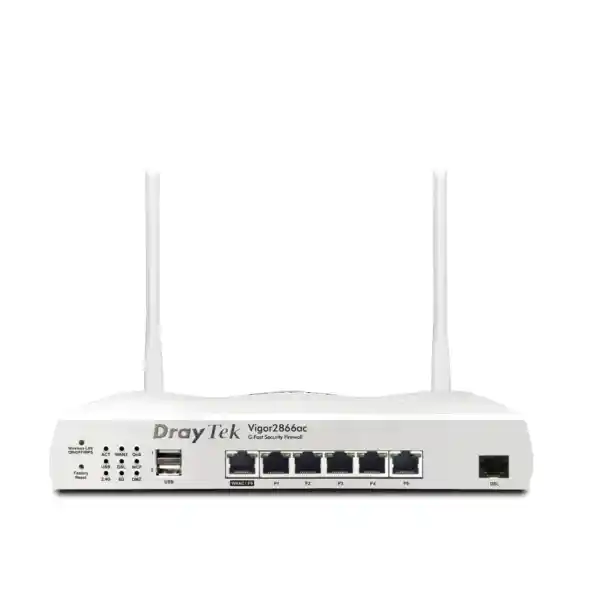
The DrayTek Vigor2866ac is a dual-WAN SMB firewall router with an integrated G.fast-capable DSL modem, a configurable Gigabit Ethernet WAN/LAN port, five fixed Gigabit LAN ports, dual-band 802.11ac Wave 2 wireless, two USB 2.0 interfaces, comprehensive VPN capability and network-management functions for compatible DrayTek access points and switches. Its integrated DSL interface supports modern G.fast profiles as well as VDSL2 profile 35b and backward-compatible ADSL services, giving organizations a practical way to retain an existing DSL circuit while adding Ethernet-based Internet from a fiber ONT, leased-line handoff or another upstream gateway.
For Dubai and wider UAE deployments, the value is not simply that several networking features exist in one enclosure. The more important architectural benefit is that WAN continuity, local segmentation, remote-access policy, inter-branch VPN, guest networking and traffic prioritization can be coordinated from one routing policy set. A small office can therefore use the DSL circuit as primary or backup connectivity, use the Ethernet interface for a second ISP, divide staff, guest, voice, CCTV and server traffic into separate logical networks, and apply different security or bandwidth policies to each segment.
DrayTek positions the Vigor2866 family for networks of roughly 50 hosts and lists 60,000 NAT sessions, 32 concurrent VPN tunnels and IPsec VPN throughput up to 300 Mbps under vendor test conditions. DrayTek also publishes hardware-accelerated NAT figures up to 940 Mbps for a single WAN and up to 1.8 Gbps across dual WAN operation. These are laboratory maximums rather than contractual application guarantees; actual site performance depends on enabled services, packet size, encryption, filtering, client behavior, wireless conditions, line quality and ISP design.
G.fast + VDSL2 35b
One integrated RJ-11 DSL WAN supports G.fast profiles 106 MHz and 212 MHz, VDSL2 profiles including 35b, plus ADSL2/ADSL2+ compatibility.
Dual-WAN continuity
Combine DSL with the configurable Gigabit Ethernet WAN to implement load balancing, failover, policy routing and traffic steering.
32 VPN tunnels
Support branch, partner and remote-user connectivity with IPsec, SSL, OpenVPN, WireGuard and additional VPN methods according to firmware capability.
Business firewall controls
Use stateful filtering, DoS defense, spoofing defense, application and URL controls, NAT services and segmentation policies to reduce unnecessary exposure.
Dual-band Wi-Fi 5
Integrated 2.4 GHz 802.11n and 5 GHz 802.11ac Wave 2 radios provide local wireless access with 2×2 MIMO-class operation and MU-MIMO support on 5 GHz.
Managed LAN ecosystem
The router can manage compatible VigorAP and VigorSwitch devices, simplifying policy, status and operational visibility for distributed SMB networks.
Hardware architecture and port map
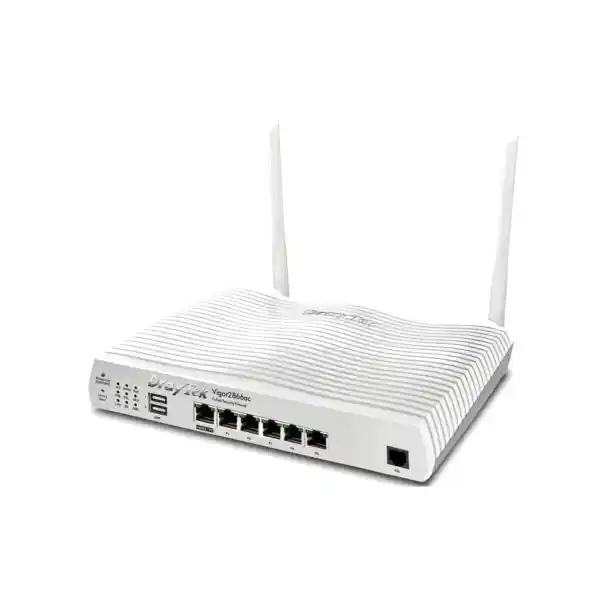
The physical design reflects the intended role of the Vigor2866ac as a converged branch gateway rather than a simple broadband router. The dedicated RJ-11 interface terminates DSL directly, avoiding a separate standalone modem in supported line environments. Beside that DSL interface, the chassis offers a switchable Gigabit Ethernet port that can operate as the second WAN or as an additional LAN connection, together with five fixed Gigabit Ethernet LAN ports. This makes it possible to connect an ISP Ethernet handoff, firewall-adjacent device, server, managed switch, IP-PBX, NVR or workstation without immediately requiring an external switch at very small sites. In structured office networks, however, the normal design is to uplink the router to managed switching and use VLAN trunks or access ports so policy remains consistent across the building.
Two USB 2.0 ports extend the platform for supported peripheral functions. Their operational value depends on the firmware feature set and chosen design, so USB should be treated as an auxiliary interface rather than a substitute for a purpose-built WAN or storage architecture. The ac model also includes two external dual-band antennas. DrayTek lists 2.3 dBi antenna gain for 2.4 GHz and 3.5 dBi for 5 GHz. The unit measures approximately 241 x 166 x 46 mm, which is practical for a small communications shelf, wall cabinet or desktop installation. A suitable rack shelf or compatible mounting accessory can be used where the router must live in a standard 19-inch cabinet.
Power input is 12 V DC at 2 A for the 2866ac specification, with a published maximum power consumption of 24 W. The operating temperature is listed as 0 to 45 degrees Celsius, storage temperature from -25 to 70 degrees Celsius, and non-condensing operating humidity from 10 to 90 percent. In UAE deployments these thermal figures matter: the router should not be placed in an unconditioned ceiling void, hot warehouse corner, sealed decorative cabinet or sun-exposed enclosure. Communications rooms should be ventilated and kept within the vendor operating range, because sustained heat can shorten component life and can also increase instability in nearby power supplies and PoE equipment.
Front-panel controls include reset and WLAN/WPS functions, while LED indicators provide immediate status feedback for technicians. The value of these details becomes obvious during fault isolation: an engineer can quickly separate physical carrier loss, local Ethernet failure, Wi-Fi state and Internet-session problems before moving into packet capture, routing, authentication or ISP escalation. For multi-site estates, this physical visibility complements centralized management rather than replacing it.
DSL WAN: G.fast, VDSL2 and legacy access
The strongest differentiator of the Vigor2866ac is its integrated high-speed DSL capability. G.fast is designed to extract very high data rates from short copper loops. DrayTek specifies support for 106 MHz and 212 MHz G.fast profiles and markets the series for downstream rates up to 1 Gbps where the access network, loop length, copper quality and ISP profile allow it. That figure should not be interpreted as a guaranteed UAE line speed. G.fast performance is especially sensitive to loop conditions, and service-provider availability varies by building and access network. A proper deployment begins by identifying the exact carrier service, handoff type, encapsulation requirements and attainable sync rate at the premises.
For VDSL2, the platform supports profiles 8a, 8b, 8c, 8d, 12a, 12b, 17a, 30a and 35b together with vectoring and retransmission-related standards. Profile 35b, frequently described as supervectoring in the market, extends usable frequency range beyond conventional profile 17a and can provide higher rates on suitably engineered short loops. The router is also backward compatible with ADSL2 and ADSL2+, which is useful for legacy sites that have not yet migrated to Ethernet or fiber-based access.
From a network-design perspective, integrated DSL has three benefits. First, it reduces the number of powered devices and failure points at the edge. Second, the router has direct visibility into the DSL state, helping administrators correlate Internet instability with line conditions rather than treating the modem as a black box. Third, the DSL connection participates directly in routing, load balancing and failover logic. That creates cleaner decision-making when a second Ethernet WAN is present.
Organizations planning a future migration from DSL to fiber can still use the Vigor2866ac during the transition. The second Gigabit Ethernet interface can accept the output of an optical network terminal or carrier-managed CPE. Once fiber becomes primary, the DSL circuit can be retained as a backup if commercially justified. This avoids throwing away the branch security and LAN policy design simply because the access medium changes.
Dual-WAN load balancing, failover and policy routing
Business continuity at a small branch is often limited less by firewall sophistication than by simple WAN dependency. If all applications, SIP calls, cloud tools, remote desktops and payment systems rely on one circuit, a last-mile fault can stop the entire office. The Vigor2866ac addresses this with multiple-WAN logic that can distribute sessions across the DSL and Ethernet WAN and can move traffic away from a failed path. DrayTek supports IP-based and session-based load balancing together with failover mechanisms, active-on-demand behavior and configurable connection detection.
The correct policy depends on applications. Session-based balancing can improve aggregate utilization for environments with many users and independent flows, but it does not magically combine two links into one faster connection for a single download. IP-based logic can help keep a source host on a consistent WAN, which may be desirable when SaaS platforms or external security systems react badly to rapidly changing public IP addresses. Policy routes can go further by steering selected subnets, services or application traffic toward a preferred WAN.
For VoIP, VPN and remote-management traffic, consistency often matters more than raw aggregate bandwidth. A design may keep latency-sensitive voice traffic on the circuit with the best quality while using the other WAN for general web and update traffic. During failure, voice can move to the backup path, but that switchover may still interrupt active sessions because public addressing and NAT state can change. High availability at the WAN level therefore improves service continuity but should not be marketed as absolutely seamless application continuity.
DrayTek publishes hardware-accelerated NAT maximums of up to 940 Mbps on a single WAN and 1.8 Gbps in dual-WAN testing for this model. These figures are valuable sizing references but require context. Firewall policy complexity, VPN encryption, content controls, QoS classification, small packet rates, traffic direction and firmware behavior influence production throughput. When the site expects sustained near-gigabit traffic with heavy encrypted inspection or a large number of security services, sizing should be based on the real feature mix rather than headline NAT numbers.
FourTeck can integrate the Vigor2866ac into a broader edge design through FourTeck IT Services UAE, including WAN migration planning, VLAN and routing design, ISP handoff validation, remote-access setup and branch standardization.
LAN switching and VLAN segmentation
The Vigor2866ac provides five fixed Gigabit LAN interfaces plus the switchable WAN/LAN Gigabit port. The router supports 802.1Q tag-based VLAN and port-based VLAN functions, with up to 16 VLANs listed in the vendor specification. That capacity is appropriate for many small and midsize branch designs because it allows logical separation without deploying a larger core routing platform.
A practical office might use one VLAN for corporate workstations, one for staff Wi-Fi, one for guest Wi-Fi, one for IP telephony, one for CCTV, one for printers and building systems, and one for servers or management. Each segment can receive its own IP subnet, DHCP scope and routing policy. Inter-VLAN traffic can then be explicitly allowed only where the business workflow requires it.
This segmentation reduces accidental exposure. A guest device does not need direct access to accounting systems, and a camera network rarely needs unrestricted initiation toward user laptops. VLANs are not security by themselves; the security value comes from combining them with firewall policy, switch configuration, wireless SSID mapping and administrative controls.
DHCP, DNS and local network services
The router supports DHCP services, multiple IP-subnet functions, custom DHCP options and Bind-IP-to-MAC capabilities. These features are useful when branch administrators need predictable addressing for phones, printers, cameras, access points, controllers or small servers while retaining dynamic allocation for user devices.
Local DNS and conditional DNS forwarding help resolve internal resources and direct selected namespace queries to appropriate resolvers. This becomes particularly useful in hybrid environments where cloud applications coexist with on-premises Active Directory, local NAS systems, branch servers or site-to-site VPN resources.
Network service design should be documented before configuration. A clean IP plan, DHCP reservation policy, DNS authority map and VLAN naming convention makes later troubleshooting far easier than ad hoc configuration. The router can enforce the design, but the design itself should originate from clear application and security requirements.
Integrated Wi-Fi 5: where it fits and where it does not
The “ac” designation identifies the integrated dual-band Wi-Fi 5 model. On 2.4 GHz it supports 802.11b/g/n operation, while the 5 GHz radio supports 802.11a/n/ac and 802.11ac Wave 2 features including 2×2 MU-MIMO. The 5 GHz maximum link rate is listed up to 867 Mbps, and the platform supports up to 80 MHz channel width. Two dual-band external antennas provide the radio interface. The key phrase is link rate: Wi-Fi PHY rates are not the same as user TCP throughput. Real application performance is lower because of protocol overhead, airtime contention, signal level, channel utilization, client radio capability and environmental interference.
For a small office, clinic, boutique, professional-services suite or temporary branch, the integrated radio can reduce equipment count and provide adequate staff and guest access. SSID security options include modern WPA modes subject to firmware support, access controls, client isolation, hidden SSID functions and WLAN scheduling. Guest wireless can be separated into its own VLAN and associated with captive-portal functions so visitors do not enter the corporate broadcast domain.
For larger floor plates, high-density meeting areas, hospitality deployments, warehouses or offices with heavy voice-over-Wi-Fi usage, a single integrated radio should not be expected to provide enterprise-wide coverage. RF design is driven by wall construction, glass, metal shelving, neighboring networks, channel reuse, client density and roaming behavior. In those cases, the Vigor2866ac should serve as the gateway while dedicated VigorAP access points provide distributed coverage.
The router can manage up to 20 compatible access points according to DrayTek’s published management specification, with mesh management listed for up to seven APs. That means a business can start with integrated Wi-Fi and later expand into a managed AP topology without immediately replacing the router. Central management can simplify SSID consistency, RF visibility and configuration deployment, although large or mission-critical WLANs still benefit from formal predictive design and on-site validation.
For procurement, it is useful to separate “wireless exists” from “wireless is engineered.” A proper quotation should identify expected concurrent users, applications, required coverage areas, wall materials, target RSSI, guest behavior, roaming requirements and whether voice or real-time collaboration is business critical. That determines whether the built-in radio is sufficient or whether external APs are required.
Firewall and security controls
The Vigor2866ac is best understood as a business routing firewall with a broad control set rather than as a dedicated next-generation security appliance designed for full-content inspection at enterprise scale. Its firewall functions include stateful packet control, DoS defense, spoofing defense, service filtering and NAT. Administrators can create rules using protocol, IP address, port and other available criteria to restrict traffic between WAN, LAN and VLAN zones.
Application, URL and keyword controls can add policy beyond simple address and port filtering. DrayTek also lists web-category functions that may require a subscription. This distinction matters during procurement: organizations should identify which security features are included in standard firmware and which rely on subscription services. A cost comparison that only looks at the router hardware price can be misleading if the operational requirement includes licensed category filtering or other recurring services.
The correct firewall policy follows least privilege. Outbound Internet access can be broad for staff where business policy allows it, while inbound WAN access should be limited to explicitly published services. Remote administration should not be exposed indiscriminately. Management access should be limited by source addresses or dedicated VPN where practical, protected with strong credentials, and logged. Unused services should remain disabled.
Port forwarding, open-port rules, DMZ host functions and UPnP can all change exposure. A camera NVR, PBX or server may require inbound connectivity, but simply placing it in a DMZ host configuration can expose far more ports than intended. The safer approach is to understand the application’s exact protocol requirements and publish only the necessary services, ideally with source restrictions and VPN access where possible.
Security also depends on lifecycle practice. Firmware should be maintained under a defined change process, configuration backups should be protected, administrative interfaces should not use default credentials, SNMP community strings should not be left weak, and logs should be retained where operationally necessary. Router security is therefore a combination of available features and disciplined administration.
Businesses looking for a broader selection of perimeter platforms and Dubai-focused firewall options can reference FourTeck Firewall Dubai when comparing the Vigor2866ac with higher-capacity or security-subscription-driven firewall architectures.
VPN architecture for branch and remote connectivity
DrayTek lists 32 concurrent VPN tunnels for the Vigor2866 series and up to 300 Mbps IPsec VPN throughput under test conditions. Supported VPN technologies in the current specification include IPsec, L2TP, L2TP over IPsec, SSL VPN, GRE, IKEv2, IKEv2-EAP, IPsec XAuth, OpenVPN and WireGuard. The availability and exact behavior of individual methods can depend on firmware, so production deployments should standardize on a small set of approved VPN types rather than enabling every possible protocol.
For site-to-site connectivity, IPsec remains a common choice. It can securely join a Dubai branch to a head office, data center, cloud VPC/VNet gateway or another DrayTek site. Routing and subnet planning should be settled before tunnels are created. Overlapping private IP ranges are a frequent cause of branch VPN complexity; two offices that both use the same 192.168.1.0/24 network cannot be cleanly routed together without renumbering or translation workarounds.
WireGuard offers a modern, lean tunnel architecture where supported by peer systems and organizational policy. OpenVPN is widely interoperable. IKEv2 is valuable for remote-access scenarios because of its resilience across changing networks. The best protocol is determined by endpoint support, identity model, security policy and operational tooling rather than by selecting the newest name on a feature list.
Remote users should authenticate through controlled credentials, certificates or supported identity integrations. The Vigor2866 specification lists authentication options that include local RADIUS, LDAP, TACACS+ and mOTP functions. Where an organization already has centralized identity infrastructure, the VPN design should align with the broader joiner-mover-leaver process so employee departures or role changes do not depend on manually finding forgotten local accounts on routers.
VPN throughput sizing must consider encryption overhead, Internet path quality and traffic profile. A 300 Mbps laboratory figure does not mean thirty users will each sustain 10 Mbps of application throughput under all conditions. Small packets, bidirectional flows, multiple tunnels, QoS and other active services change results. For branch file access and cloud applications, latency may be just as important as bandwidth.
For resilient site-to-site design, administrators can combine VPN policy with dual-WAN failover. A tunnel can be configured around preferred and backup connectivity so a branch is not isolated by failure of a single circuit. This should be tested during implementation; a failover design that has never been exercised is only an assumption.
QoS and bandwidth control
The Vigor2866ac supports IP-based bandwidth limits, session limits and Quality of Service classification using criteria such as ToS, DSCP, 802.1p, IP address, port and application. VoIP prioritization and application QoS can help preserve performance for voice and interactive business traffic when a WAN link is busy.
QoS does not create bandwidth; it decides which packets should receive preferential treatment when congestion occurs. A sensible policy identifies real business priorities. SIP and RTP, ERP transactions, virtual-desktop traffic or critical cloud sessions may deserve priority, while large operating-system updates, guest downloads and personal streaming can be constrained.
Bandwidth policies should be measured after deployment. Overly aggressive limits can cause complaints and hidden productivity problems, while no controls at all can let one backup job or cloud sync consume a limited DSL uplink. Monitoring and iterative tuning are more reliable than static guesses.
Routing and multicast support
The platform supports IPv4 and IPv6 static routing, policy routing, inter-VLAN routing and RIP, with BGP also listed in the vendor specification. These capabilities give a small branch more flexibility than a basic ISP router, especially where multiple private networks, WANs or upstream peers exist.
Multicast functions include IGMP proxy, IGMP snooping and fast-leave behavior, which can be relevant to IPTV or multicast-dependent applications. Such features should only be enabled when the application requires them because unnecessary multicast can complicate troubleshooting.
The routing table should remain simple enough for branch operations. Advanced protocols are valuable when needed, but complexity should correspond to a documented topology and support model. A static or policy route that clearly solves the problem is often preferable to introducing dynamic routing without monitoring and operational ownership.
Hotspot and guest access features
Guest access is a frequent requirement in UAE reception areas, clinics, showrooms, training centers, service businesses and professional offices. The Vigor2866 series includes hotspot web-portal features that can present a controlled sign-in or acceptance flow before Internet access is granted. DrayTek lists portal methods such as click-through, social login, SMS PIN, voucher PIN, RADIUS and external portal integration in the platform specification.
A good guest design separates visitors from trusted corporate endpoints at both Layer 2 and Layer 3. The guest SSID should map to a dedicated VLAN and subnet, and firewall policy should prevent access to internal user, server, voice, camera and management networks. Internet access can then be rate-limited so visitors receive a reasonable service without consuming all available WAN capacity.
Captive portals are not a substitute for wireless encryption or network segmentation. They are primarily an access workflow and communication layer. Depending on business requirements, they may be used to display terms of use, brand information or authentication choices. Data-retention and privacy practices should align with applicable organizational and regulatory obligations; technical logging should not be expanded simply because the router makes it possible.
When guest usage is expected to be heavy, distributed access points should be used rather than relying on the router’s integrated radio. That keeps RF capacity close to users and allows the gateway to focus on routing, firewall, VPN and WAN control.
Central management, monitoring and operations
A router becomes operationally valuable when administrators can understand its state, not merely configure it. The Vigor2866ac supports standard management methods including HTTP/HTTPS, SSH v2, SNMP and syslog, together with configuration backup and restore. Firmware can be upgraded through the web interface and other supported management paths. These functions enable the unit to fit into a broader operations process rather than remain an isolated appliance.
SNMP v1, v2c and v3 are listed. In modern managed environments, SNMPv3 is preferable where monitoring systems support it because it can provide stronger authentication and privacy than community-string-based versions. Syslog should be directed to a central collector if the organization needs durable records of firewall, VPN or administrative events. Local device logs are useful for immediate troubleshooting but are less valuable if the unit fails, reboots or is replaced.
The router can manage compatible DrayTek infrastructure, with published capacities of up to 20 access points and 10 switches, plus mesh management for up to seven APs. This is significant for small estates: an organization can obtain a single view of branch network components without deploying a separate controller appliance. Central management does not eliminate the need for design standards, however. Device naming, VLAN identifiers, SSID policy, admin permissions, firmware windows and backup routines should be standardized across every site.
DrayTek also supports VigorACS management for the platform from specified firmware versions. In multi-branch environments, centralized management can reduce travel and speed up configuration deployment. Before adopting any remote management platform, the organization should define who can administer devices, whether access is direct or role-based, how credentials are protected, where logs are retained and how emergency access is handled.
For procurement, management capability should be part of total cost analysis. A slightly more capable branch router can be cheaper over its lifecycle if it allows remote diagnostics, standardized backups and centralized changes that avoid repeated site visits.
Performance sizing for a real Dubai office
Sizing starts with users, but user count alone is insufficient. Fifty light office users reading email behave very differently from fifty users in continuous video meetings, cloud backup, VoIP, large CAD transfers and remote desktop sessions. The Vigor2866 family is positioned around a 50-host network, but the correct design considers simultaneous sessions, aggregate WAN speed, VPN load, Wi-Fi density, firewall features and traffic burst patterns.
The published 60,000 NAT-session capacity provides headroom for typical SMB usage, yet modern browsers and cloud applications can open many connections per endpoint. Cameras, IoT devices and guest clients also contribute sessions. If the office regularly hosts hundreds of transient devices or runs unusually connection-intensive applications, the session table and CPU workload should be assessed as part of acceptance testing.
Internet bandwidth should be mapped to applications. Video conferencing requires stable bidirectional bandwidth and low latency; cloud backup often consumes upload capacity; voice uses modest bandwidth but is sensitive to delay and jitter; guest access can generate unpredictable bursts. A dual-WAN design can improve aggregate capacity and resilience, but application flows must be placed intelligently across the circuits.
VPN adds cryptographic processing and path overhead. If a branch is expected to send most of its traffic through an IPsec tunnel to a data center, the VPN performance figure becomes more relevant than plain NAT. If only a handful of administrators use remote access, NAT and Wi-Fi may be the dominant sizing factors instead.
Wireless capacity should be treated separately from router throughput. A single 2×2 Wi-Fi 5 radio can support ordinary office use, but it cannot match the capacity of multiple well-positioned access points. Where a site has concrete walls, long corridors, dense meeting rooms or many mobile devices, dedicated APs are likely the correct design even if the router’s built-in WLAN remains enabled for a local zone.
FourTeck’s UAE portfolio at FourTeck UAE can be used when the requirement extends beyond one router into managed switching, wireless expansion, structured network services, servers or branch infrastructure.
Recommended deployment topologies
Topology A: DSL primary, Ethernet backup
Use G.fast/VDSL as the primary Internet path and connect a second ISP router or Ethernet service to WAN2. Configure health checks, preferred routes and automatic failover. This is useful where a strong DSL service already exists and the business wants an independent backup carrier.
Topology B: Ethernet primary, DSL standby
Place a fiber ONT or carrier Ethernet handoff on WAN2 and retain DSL as a secondary path. This design is practical for phased migrations because existing DSL can remain available for resilience while the faster Ethernet service handles daily workloads.
Topology C: dual-active branch
Use both WANs concurrently. General staff traffic can be balanced while voice, VPN or selected SaaS applications are pinned to preferred paths. This maximizes usable capacity but requires more deliberate routing and monitoring policy.
Topology D: segmented office
Connect a managed switch by tagged uplink and create VLANs for users, voice, guests, CCTV, printers and management. Apply inter-VLAN firewall policy on the router and map wireless SSIDs to the corresponding VLANs.
Topology E: branch-to-HQ VPN
Build site-to-site IPsec or another approved tunnel to headquarters. Route only required corporate networks through the tunnel while sending general Internet traffic locally, or use full-tunnel architecture when security policy requires central egress.
Topology F: managed wireless branch
Use the Vigor2866ac as gateway and local radio while adding VigorAP units for wider coverage. Manage compatible APs from the router and maintain consistent SSIDs, security settings and VLAN mapping across the site.
Typical UAE use cases
Professional offices: Accounting firms, legal practices, consultancies and small corporate branches often require secure Internet, guest Wi-Fi, site-to-site VPN and stable access to Microsoft 365, Google Workspace, ERP or line-of-business applications. The Vigor2866ac provides enough policy depth to separate staff from visitors and retain a second WAN without deploying a large appliance.
Retail and showrooms: A store may need point-of-sale connectivity, cloud inventory, guest Internet, CCTV and staff devices. These should not share one flat network. VLAN and firewall policy can isolate operational systems while dual WAN protects sales continuity if the primary circuit fails.
Clinics and service centers: Front-desk systems, staff workstations, VoIP phones, guest Wi-Fi and medical or service equipment can be placed in distinct segments. The router’s VPN capability can connect the branch to a head office or hosted application environment while keeping public guest traffic local.
Construction or temporary project offices: These sites often evolve quickly. A DSL service may be available before final fiber delivery, or vice versa. The Vigor2866ac allows the access mix to change while the internal LAN and VPN policy remains consistent.
SMB headquarters: Organizations with around several dozen active devices may use the router as the central edge device, especially where high-end threat-inspection subscriptions are not the primary requirement. Dedicated switches and access points can extend the design as staff and floor area grow.
For multi-country or broader corporate sourcing beyond the UAE, FourTeck Global provides a reference point for cross-region technology requirements and standardized infrastructure planning.
Migration from ISP routers or older DrayTek models
Replacing an existing edge router should be treated as a controlled migration, not a cable swap. The first task is to capture the current Internet authentication method, static public addresses, PPP credentials, VLAN tags, DNS configuration, port forwards, inbound services, site-to-site VPNs, remote-user accounts, DHCP reservations and any unusual policy routes. Missing one of these details can cause a deployment to appear successful until a particular application fails hours later.
DrayTek lists configuration-file compatibility with several earlier Vigor286x generations, but configuration import should not become an excuse to carry obsolete policy forward. A migration is an opportunity to remove unused rules, rename objects clearly, change weak passwords, validate VPN cryptography and document every dependency. Where configuration conversion is supported, the imported result should still be reviewed line by line against the intended design.
A pre-cutover test should verify DSL sync or Ethernet WAN authentication, DNS resolution, outbound Internet, inbound published services, site-to-site VPN, remote access, voice calling, guest isolation, inter-VLAN rules and monitoring. A rollback path should exist until all critical functions are confirmed.
When the existing router is carrier-managed, bridge mode or pass-through options may determine whether the Vigor2866ac receives the public address directly. Double NAT can be acceptable for some simple outbound-only networks but complicates inbound services, VPN and troubleshooting. The preferred architecture should be established with the ISP before the implementation window.
After migration, save a clean configuration backup, record firmware version, export network documentation and set a review date for logs, failover tests and capacity. A successful cutover is only the start of lifecycle management.
Wi-Fi and RF planning considerations in Dubai buildings
Wireless design in commercial UAE premises can be affected by reinforced concrete, metalized glass, dense partitions, elevator cores, machinery, retail shelving and neighboring tenants. A router placed in a closed communications cabinet may deliver poor coverage even though its radio is functioning perfectly. Antenna orientation and device placement should therefore be planned around the occupied space rather than the convenience of the incoming ISP cable.
The 2.4 GHz band generally travels farther and penetrates obstacles more effectively, but it has limited non-overlapping channel capacity and is frequently congested. The 5 GHz band offers more channel choices and higher 802.11ac performance but typically experiences greater attenuation through walls. Client steering, channel planning and transmit-power decisions should aim for predictable airtime use rather than maximum signal from one access point.
An 80 MHz 5 GHz channel can provide high peak link rates, but wide channels consume more spectrum. In buildings with many neighboring WLANs or multiple managed APs, narrower channels may produce better aggregate performance because more cells can reuse spectrum without overlapping. The correct channel width is therefore a capacity decision, not merely a speed setting.
If users need roaming between rooms, dedicated access points should be positioned so clients can transition before signal becomes unusable. Roaming decisions are ultimately made by client devices, so design must provide sufficient overlap without creating excessive co-channel interference. The Vigor2866ac can participate in a managed DrayTek wireless design, but physical RF principles still determine user experience.
For small premises with only a few users in open space, the integrated Wi-Fi can be cost-effective and operationally simple. For demanding sites, using the router primarily as an edge gateway and deploying dedicated APs is usually the more scalable architecture.
Security hardening checklist for deployment
A newly installed router should not remain in a factory-style administrative state. Change default credentials, use strong unique administrator passwords, restrict management interfaces to trusted networks, prefer HTTPS and SSH over clear-text alternatives, and disable management methods that are not operationally required. If remote administration is necessary, use VPN or tightly restricted source addresses rather than exposing the management interface to the entire Internet.
Create separate administrative and user networks where the environment justifies it. Management interfaces for switches, access points, cameras and the router itself should not be reachable from guest Wi-Fi. Apply firewall rules between VLANs and use explicit allow lists for services such as printing, DNS, directory authentication or PBX access.
Review UPnP carefully. While convenient for consumer applications, unrestricted automatic port mapping can conflict with business security policy. Port forwards should be documented and limited to necessary destinations and services. Exposed systems should be patched and protected independently of the router.
Use SNMPv3 where possible, forward logs to centralized storage when required, and configure alerting for meaningful events such as WAN outages or VPN failures. Back up configuration after every approved change. Store backups securely because router configuration files can contain sensitive addressing, usernames, VPN parameters and topology information.
Firmware updates should follow a change window with release-note review, configuration backup and rollback planning. Critical security fixes should not be ignored, but upgrades on business gateways should also not be performed casually in the middle of peak operations. Establish a routine that balances security and stability.
Finally, test failover, VPN recovery and restore procedures periodically. A backup WAN that has not been authenticated for months or a configuration backup that cannot be restored should not be considered a reliable resilience control.
What the Vigor2866ac is not
Clear product selection requires understanding limits as well as features. The Vigor2866ac is not a Wi-Fi 6 access point; organizations specifically requiring 802.11ax client efficiency, 160 MHz operation or the newer wireless feature set should evaluate an ax model or dedicated Wi-Fi 6 APs. The Vigor2866ac remains appropriate where Wi-Fi 5 meets client and capacity requirements.
It is not a multi-gigabit Ethernet edge platform. The WAN/LAN Ethernet interfaces are Gigabit-class, so businesses receiving 2.5 GbE, 5 GbE or 10 GbE handoffs should choose a router designed around those speeds. G.fast capability does not change the electrical speed of the Ethernet ports.
It is not a substitute for a high-density enterprise WLAN controller in a large campus. Although it can manage compatible APs and switches at useful SMB scale, large estates with hundreds of APs, advanced identity workflows and extensive analytics require a different management architecture.
It is also not a full-content next-generation firewall platform in the same class as appliances built around deep security inspection subscriptions and dedicated threat-prevention engines. The Vigor2866ac provides capable business firewall, filtering, VPN, routing and segmentation features, but organizations with mandatory IPS, advanced malware analysis, SSL inspection at high throughput or enterprise SOC integration should size a security platform specifically for those controls.
These limits are not weaknesses when the product is used for its intended role. They are boundaries that help prevent over-specification or under-specification. The right product is the one whose interface speeds, security functions, wireless capabilities and management scale match the real branch requirement.
UAE procurement and implementation considerations
A quotation for the DrayTek Vigor2866ac should identify more than the router model. Confirm the exact regional hardware, power adapter, warranty channel, firmware train, included accessories and whether any optional security or management subscriptions are required for the intended feature set. DSL Annex support and ISP interoperability should be checked against the actual service because line technology and authentication are determined by the carrier network.
For new offices, collect the ISP handoff details before ordering. A service described commercially as “fiber” may terminate in an ONT with Gigabit Ethernet, while another service may arrive through provider-managed CPE. A legacy line may be VDSL2 rather than G.fast. Knowing the physical and logical handoff prevents unnecessary adapters and cutover delays.
If the router will be installed in a rack, include a suitable shelf or mounting solution and ensure ventilation. Add a UPS sized for the router, ONT/modem, switch and access points as necessary. WAN resilience has little value if both Internet circuits and the entire LAN lose power from the same short utility interruption.
Cabling should be labeled and tested. The second WAN, LAN trunk, management ports and critical devices should be identifiable without tracing cables during an outage. For structured networks, Cat6 or better cabling is a practical default for Gigabit Ethernet and future flexibility, subject to the building’s cabling standards and distances.
FourTeck can quote the gateway together with deployment, switching, wireless, UPS and support components so the purchase corresponds to a complete network outcome rather than an isolated box.
Installation methodology
1. Discovery: Record current WAN services, public IPs, PPP credentials, existing LAN ranges, DHCP scopes, DNS servers, VLANs, VPN peers, port forwards, Wi-Fi SSIDs, device inventory and application dependencies. Confirm the target router placement and available power.
2. Design: Define WAN roles, failover priority, VLAN structure, IP addressing, SSID-to-VLAN mapping, firewall policy, VPN architecture, QoS priorities, management access and monitoring. Determine whether the integrated radio is enough or external APs are required.
3. Preconfiguration: Update to the approved firmware level, set administrative credentials, configure WAN interfaces, build VLANs and DHCP scopes, create security rules and VPNs, and save a baseline backup. Where possible, stage the router on a test bench before arriving at the site.
4. Cutover: Connect DSL and/or Ethernet WAN, validate carrier sync and authentication, connect LAN switching, confirm client addressing and test Internet resolution. Bring services online in a controlled order so faults can be isolated quickly.
5. Validation: Test wired Internet, Wi-Fi, guest isolation, critical internal services, inbound publishing, VPN, inter-VLAN access, voice quality, monitoring and failover. Run tests from representative user networks rather than only from the administrator’s laptop.
6. Documentation: Record firmware, interface roles, WAN details, public IPs, VLAN IDs, subnet assignments, DHCP ranges, VPN peers, administrative access method and support contacts. Export the final configuration backup.
7. Handover: Provide the customer with network documentation, agreed credentials handling, escalation procedure and maintenance recommendations. Schedule periodic firmware review, backup validation and failover testing.
Frequently asked technical questions
Does the Vigor2866ac support G.fast?
Yes. The integrated DSL WAN supports G.fast, including 106 MHz and 212 MHz profiles in DrayTek’s specification. Actual line rate depends on carrier deployment, copper length and quality, provisioning profile and local conditions.
Can it work with VDSL2 profile 35b?
Yes. The published profile list includes 35b together with 17a, 30a and other VDSL2 profiles. It also supports ADSL2/ADSL2+ compatibility for older services.
Can the Ethernet WAN be used with a fiber ONT?
Yes, provided the ISP presents a compatible Gigabit Ethernet handoff and the router is configured for the provider’s addressing, PPPoE, VLAN tagging or other required settings. Confirm ISP requirements before cutover.
How many LAN ports are available?
The platform has five fixed Gigabit Ethernet LAN ports plus one additional Gigabit port that is switchable between WAN and LAN roles. Port allocation should be planned around whether dual WAN is required.
How many VPN tunnels does it support?
DrayTek lists up to 32 concurrent VPN tunnels for the Vigor2866 series, with IPsec throughput up to 300 Mbps under internal test conditions. Real throughput varies with traffic, encryption, WAN quality and enabled services.
Does it support WireGuard and OpenVPN?
Both WireGuard and OpenVPN are listed among the current VPN capabilities, along with IPsec, SSL and several other methods. Firmware version and peer compatibility should be confirmed during implementation.
Is the Vigor2866ac Wi-Fi 6?
No. The ac model uses Wi-Fi 5 / 802.11ac Wave 2 on 5 GHz and 802.11n on 2.4 GHz. Businesses requiring integrated 802.11ax should evaluate an ax model or use dedicated Wi-Fi 6 access points.
Can it manage access points and switches?
Yes. DrayTek lists management for up to 20 compatible APs and 10 compatible switches, with mesh management for up to seven APs. Exact compatibility should be checked against the chosen VigorAP and VigorSwitch models.
Can guest Wi-Fi be isolated from staff?
Yes. The recommended method is a separate guest SSID mapped to its own VLAN and subnet, with firewall rules preventing access to trusted corporate networks. Captive portal and bandwidth policies can be added where required.
Does dual WAN double the speed of one application?
Not normally. Load balancing distributes independent sessions or hosts across available links. A single TCP flow usually uses one path. Dual WAN increases aggregate capacity and resilience rather than bonding every application session into one larger pipe.
Is it suitable for approximately 50 users?
DrayTek positions the series for networks around 50 hosts, but real sizing depends on traffic intensity, VPN usage, wireless density, security features and WAN speed. A 50-user video-heavy office can be more demanding than a much larger light-usage site.
Can FourTeck supply and configure it in Dubai?
Yes. FourTeck can supply the DrayTek Vigor2866ac and build a deployment around Internet handoff, VLANs, VPN, managed switching, wireless coverage, firewall policy and support requirements in the UAE.
Decision recap
Choose the Vigor2866ac when the site needs an integrated DSL modem with G.fast/VDSL2 capability, a second Gigabit Ethernet WAN, business firewall functions, 32-tunnel VPN scale, VLAN segmentation, traffic management and built-in Wi-Fi 5. It is particularly attractive when one appliance must cover several branch-edge roles without adding separate DSL, routing and wireless devices.
It is a strong architectural fit for small and midsize sites where the WAN service is at or below Gigabit Ethernet, where Wi-Fi 5 is acceptable or supplemented with dedicated APs, and where the security requirement is centered on firewall policy, routing, VPN, segmentation and controlled web access rather than high-throughput deep threat inspection.
Select another platform when the business requires multi-gigabit Ethernet, Wi-Fi 6 as an integrated radio, substantially greater VPN/security throughput, large-campus management scale or advanced next-generation inspection. Matching the platform to the real requirement is more important than maximizing the feature list.
Best-fit profile
• Existing G.fast, VDSL2 or ADSL service
• Second Ethernet WAN for resilience
• Approximately SMB-scale user population
• Multiple VLANs for staff, guest, voice or CCTV
• Site-to-site or remote-access VPN
• Integrated Wi-Fi 5 or managed VigorAP expansion
• Requirement for centralized branch operations and policy control
Quotation input checklist
WAN details
Primary ISP, backup ISP, DSL type, Ethernet handoff, PPPoE credentials, public IP allocation, required VLAN tags and target bandwidth.
Users and devices
Staff count, laptops, phones, printers, CCTV, servers, IoT devices, guest volume and expected concurrent wireless clients.
Applications
Cloud productivity, ERP, VoIP, video meetings, remote desktop, backups, hosted services, inbound applications and latency-sensitive systems.
Network segmentation
Required VLANs, IP ranges, DHCP scopes, guest policy, CCTV separation, voice requirements and permitted inter-VLAN access.
VPN requirements
Branch peers, remote users, tunnel protocols, cloud gateways, expected encrypted traffic, identity source and failover expectations.
Wireless coverage
Office area, floor count, wall type, meeting-room density, guest areas, roaming requirement and whether dedicated access points are planned.
Plan the DrayTek Vigor2866ac around your actual WAN and network design
For an accurate Dubai/UAE quotation, provide the primary and backup ISP handoffs, expected user count, required VLANs, VPN peers, wireless coverage area and any voice, CCTV, server or guest-network requirements. FourTeck can then size the router, switching, access points, UPS and implementation scope as one coordinated solution.
The goal is not merely to deliver a router. It is to establish a documented edge architecture with predictable failover, controlled segmentation, secure remote access, measured wireless coverage and a supportable configuration. That produces a network which is easier to troubleshoot, expand and audit throughout its lifecycle.
WAN & ISP validation
VLAN & firewall design
VPN & failover testing
Wi-Fi coverage planning
Documentation & handover

Reviews
There are no reviews yet.