
DrayTek Vigor2928 in UAE
The DrayTek Vigor2928 is a wired multi-WAN VPN security router built for organizations moving beyond conventional Gigabit edge routing. With 10GbE and 10G SFP+ connectivity, dual-WAN resilience, up to 50 VPN tunnels, large session capacity, policy-based routing, VLAN segmentation, QoS, security filtering, and integrated DrayTek network management, it is positioned for high-bandwidth offices, branches, managed environments, and fibre-first business networks in Dubai and across the UAE.
Choose the Vigor2928 when you need a business router that can combine multiple Internet circuits, provide 10G-capable copper or fibre handoff options, terminate site-to-site and remote-user VPNs, segment internal networks, and centrally supervise supported DrayTek switching and wireless infrastructure without turning the branch edge into a large appliance deployment.
What the DrayTek Vigor2928 is designed to solve
Business Internet design in the UAE has changed quickly. A company may have a primary fibre circuit delivering multiple gigabits, a secondary business broadband line for failover, cloud-hosted applications that create sustained north-south traffic, site-to-site VPNs linking branches, IP telephony that needs predictable latency, guest and corporate networks that must remain separated, and a growing number of managed switches and access points. A traditional Gigabit router can become the point where all of those investments are constrained. The DrayTek Vigor2928 addresses that edge problem with a multi-gigabit architecture and a feature set aimed at operational control rather than simple Internet sharing.
DrayTek positions the Vigor2928 Series as a multi-WAN VPN security router with three 10G-capable interfaces across Ethernet and fibre options. The wired Vigor2928 model is the correct reference for this page; wireless capabilities such as Wi-Fi 7 apply to the separate Vigor2928be variant and should not be assumed on the base model. For network teams, this distinction matters because the Vigor2928 is best treated as an edge routing, security, VPN, VLAN, and management platform that can sit in front of dedicated business switching and access points.
In a UAE office, the platform can be used as the traffic authority between Internet services, internal VLANs, VPN peers, guest networks, voice systems, servers, cameras, and managed network infrastructure. It supports WAN failover and load balancing so an organization can make practical use of more than one provider. It supports policy routing so specific traffic can be associated with selected paths. It provides traffic shaping and application-aware QoS mechanisms so critical services are protected when links are busy. It also includes security controls such as firewall filters, URL/IP reputation functions, threat-protection capabilities, port knocking, MAC filtering, and defensive mechanisms against spoofing attacks.
Copper and fibre edge options
10GbE RJ-45 and 10G SFP+ capabilities allow the router to participate in modern multi-gigabit Internet and backbone designs, with a 2.5GbE switchable interface and standard Gigabit Ethernet ports for mixed-speed environments.
VPN tunnel capacity
The published platform specification supports up to 50 VPN tunnels, giving branch networks room for site-to-site connectivity, teleworker access, and controlled inter-site communication without requiring a separate VPN concentrator for moderate deployments.
Session scale
A large NAT session envelope is valuable where many users, browser tabs, SaaS applications, cloud agents, mobile devices, cameras, and IoT endpoints generate thousands of concurrent connections even when the headcount is modest.
LAN subnets and VLANs
Eight LAN subnets and up to eight 802.1Q VLANs give administrators a practical segmentation framework for users, voice, guests, servers, management, cameras, building systems, and other trust zones.
Virtual AP management
The integrated Virtual Controller can manage supported VigorAP deployments, helping smaller and medium environments centralize wireless configuration and status without immediately adding a separate controller appliance.
Switch management
Supported VigorSwitch devices can be discovered, monitored, and managed from the router, including common tasks such as port-profile deployment, VLAN and QoS settings, configuration maintenance, and remote reboot operations.
Interface architecture: planning the Vigor2928 correctly
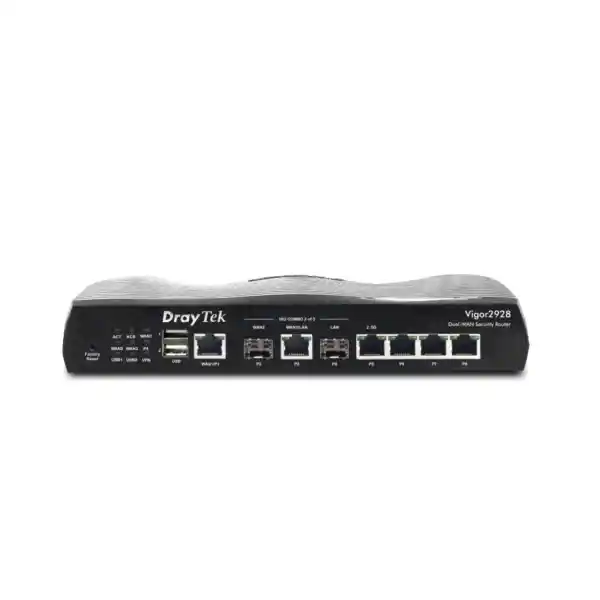
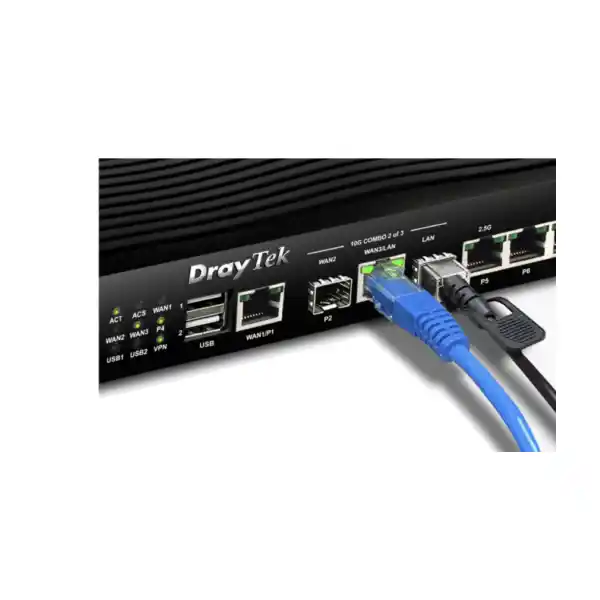
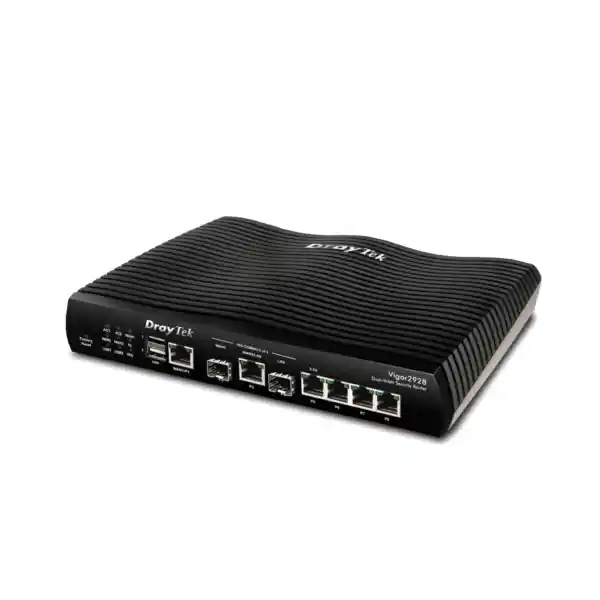
The physical interface arrangement is one of the most important reasons to evaluate the Vigor2928. The platform includes a fixed Gigabit Ethernet WAN port, a 10G SFP+ WAN-capable interface, a 10GbE RJ-45 interface that can be switched between WAN and LAN roles, a 10G SFP+ LAN-capable interface, a 2.5GbE RJ-45 interface that can also be assigned between LAN and WAN roles, and three fixed Gigabit Ethernet LAN ports. It also provides two USB 2.0 ports for supported USB applications. This mix allows a network designer to combine legacy access, modern multi-gigabit copper, fibre handoffs, and intermediate 2.5GbE devices in one edge platform.
The most important design caveat is that port roles and simultaneous 10G activation are subject to the platform’s interface restrictions. DrayTek notes that only two of the relevant 10G interfaces can be active at the same time and that certain 10G ports cannot both operate as WAN simultaneously. This is not a weakness so much as a planning requirement: before purchase, the intended ISP handoff types, LAN uplink type, copper-versus-fibre preference, and redundancy topology should be mapped to the supported port combinations. A FourTeck design review can validate that mapping before installation so there is no surprise when the WAN, LAN, and backbone roles are assigned.
For example, an office may receive the primary Internet circuit as a 10G optical handoff while the secondary ISP supplies a 1GbE copper presentation. The router can use the fibre-facing WAN interface for the primary path, the fixed Gigabit WAN for backup, and reserve a high-speed LAN path toward a core switch. In another design, the primary provider may hand off through 10GbE copper, while the LAN backbone uses SFP+ to an aggregation switch. A third deployment may use 2.5GbE for an intermediate WAN or LAN device while retaining 10G for the most bandwidth-sensitive side of the topology. The value lies in having flexible physical media choices, but those choices should be intentionally engineered.
| Interface role | Published capability | Practical UAE deployment use |
|---|---|---|
| Fixed WAN | 1 × Gigabit Ethernet RJ-45 | Secondary ISP, standard business broadband, backup circuit, or handoff from provider CPE. |
| High-speed fibre | 10G SFP+ capability | Direct high-speed optical integration, fibre backbone, or data-room switch uplink depending on assigned role. |
| High-speed copper | 10GbE RJ-45, switchable WAN/LAN | 10G copper ISP handoff or high-throughput LAN connection where Cat6A-class structured cabling is appropriate. |
| Multi-gigabit copper | 2.5GbE RJ-45, switchable LAN/WAN | Flexible handoff to access infrastructure, ISP device, or other 2.5GbE equipment. |
| Access LAN | 3 × fixed Gigabit Ethernet RJ-45 | Local management, downstream switch connections, individual infrastructure endpoints, or staged migration from a Gigabit environment. |
Throughput, sessions, and realistic sizing
Router sizing should never be reduced to one headline throughput number. The Vigor2928 has a published maximum NAT performance of up to 9.3Gbps under DrayTek test conditions, and the manufacturer notes that throughput figures are maximum values measured in controlled conditions and that real results vary with traffic patterns, applications, enabled functions, packet sizes, and network conditions. That qualification matters. A production router may be performing firewall inspection, state tracking, VPN encryption, policy decisions, QoS classification, logging, DNS functions, filtering, and management at the same time. The appropriate question is therefore not simply whether the platform can pass a 10G link rate, but whether it can sustain the required application mix with the specific security and routing features your organization plans to enable.
The 100,000-session scale is especially relevant in modern environments. One employee may create dozens or hundreds of sessions through browser tabs, Microsoft 365, cloud storage synchronization, endpoint security agents, messaging platforms, conferencing applications, software update services, mobile devices, remote support tools, and line-of-business systems. Add IP cameras, smart displays, IoT sensors, access-control devices, printers, guest devices, and cloud-managed hardware, and session count becomes a meaningful design input. DrayTek’s own positioning recommends the platform for around 50 hosts in its general product overview, but a competent design should count actual endpoints and expected session behavior rather than equating employees with devices.
For a Dubai professional services office with 30 staff, two or three devices per person, cloud collaboration, VoIP, secure VPN to a hosted environment, and a separate guest network, the Vigor2928 can provide substantial edge capacity while keeping management consolidated. For a retail group or distributed company, the router can serve a larger branch as the central node while smaller branches use compatible VPN peers. For a technology company consuming multi-gigabit Internet, the 10G-capable edge avoids an immediate one-gigabit bottleneck, but the design still needs matching switching, cabling, optics, endpoint capability, and ISP service levels. End-to-end performance is only as strong as the slowest engineered segment.
A useful sizing method
Start with the committed and burst Internet bandwidth for every WAN circuit. Then list concurrent users, total wired and wireless endpoints, peak cloud applications, VPN types, expected encrypted throughput, guest traffic, voice requirements, inter-VLAN traffic, logging expectations, and security features. Finally, decide whether the router is expected to remain in service after the next ISP upgrade. This method prevents buying an edge appliance that works on day one but becomes a constraint as fibre speeds increase.
For procurement support, FourTeck can align the Vigor2928 with switching, optics, access points, structured cabling, rack power, and implementation services through FourTeck UAE.
Avoid false 10G assumptions
A 10G physical interface does not guarantee that every enabled security workflow will process every packet at 10Gbps. VPN encryption, filtering, policy complexity, small-packet workloads, application mix, and concurrent services can reduce achievable throughput. Treat the 10G ports as the physical foundation for a multi-gigabit design and validate the operational feature set against the expected traffic profile.
This is especially important when replacing a dedicated firewall or when a compliance requirement expects deep inspection functions that may be outside the intended role of a branch-class multi-WAN router.
Multi-WAN load balancing and failover for UAE business connectivity
The strongest business case for the Vigor2928 is often resilience. Many UAE organizations operate critical SaaS platforms, cloud telephony, ERP access, remote desktops, payment systems, IP VPNs, and customer-facing applications over public Internet connections. Even a short provider outage can interrupt business. The Vigor2928 supports multiple WAN connectivity with load balancing and automatic failover so multiple active interfaces can participate in a load-balance pool while backup logic can preserve service when a preferred path fails.
Load balancing should be implemented with application awareness. Some sessions should remain pinned to a stable public IP, especially banking services, remote security portals, hosted applications that use source-IP allowlists, or sessions that can break when the egress path changes. Other traffic, such as general web browsing or software downloads, can be distributed more freely. Policy-based routing enables administrators to direct traffic according to source, destination, protocol, port, or other defined conditions. This turns multi-WAN from a simple round-robin mechanism into an operational routing policy.
A common Dubai topology uses a high-capacity fibre service as primary WAN and a second provider with different last-mile infrastructure as resilience. The backup link should ideally avoid the same physical building entry, same upstream dependency, and same provider aggregation path where possible. Router redundancy cannot compensate for two links that share a single upstream failure domain. For sites with serious continuity requirements, procurement should therefore consider the ISP diversity, demarcation equipment, power resilience, physical cabling route, and service-level commitments together with the router.
WAN health monitoring is equally important. Failover needs a reliable definition of ‘failed.’ A link with Ethernet carrier but no upstream reachability should not continue receiving business traffic. During implementation, the monitoring target and failover behavior should be tested by physically disconnecting links, simulating upstream failure, and confirming that critical services recover in the expected manner. If inbound services depend on a particular public address, DNS or failover architecture should also be planned before go-live.
VPN architecture: site-to-site, teleworker, and secure branch connectivity
The Vigor2928 supports business VPN use cases including site-to-site and teleworker connectivity, with protocol support spanning established IPsec approaches as well as modern remote-access choices supported by the firmware. DrayTek publishes a maximum of 50 VPN tunnels for the platform and cites IPsec throughput up to approximately 580Mbps in its current overview. Those numbers are useful planning references, but encrypted performance should always be validated against cipher choice, packet profile, peer behavior, WAN latency, and enabled services.
For branch interconnection, site-to-site VPN can replace ad hoc remote-access tools with a controlled routed relationship between defined subnets. A head office in Dubai can establish secure tunnels to branches in Abu Dhabi, Sharjah, other Emirates, or international offices. Each tunnel should be designed with explicit local and remote networks, clear route ownership, non-overlapping addressing, documented encryption settings, and a failover approach. If both locations use multiple WAN circuits, VPN trunk or redundant-tunnel logic can be used to reduce dependence on one path, subject to the chosen design and peer capabilities.
Remote-user VPN should be separated conceptually from site-to-site VPN. Teleworkers need identity validation, appropriate address pools, least-privilege access, DNS behavior, and endpoint security. A user who only needs an internal application should not automatically receive broad access to every VLAN. Where authentication infrastructure exists, integration with directory or RADIUS systems can centralize control. Two-factor authentication options should be assessed for the chosen VPN workflow, especially for administrative or privileged access.
EasyVPN is also part of DrayTek’s current positioning, intended to simplify secure VPN setup by reducing manual key and configuration steps. Simplicity is useful, but network teams should still document tunnel ownership, source and destination networks, authentication dependencies, and recovery procedures. A VPN that is easy to create but poorly documented can become difficult to troubleshoot months later when a peer address changes or an ISP circuit is migrated.
For organizations with many branches or a managed-services model, VPN configuration should be treated as reusable infrastructure. Standardize naming, addressing, tunnel profiles, key rotation, monitoring, backup, and incident procedures. This keeps the Vigor2928 from becoming a one-off configuration and makes support significantly easier as the estate grows.
Firewall, reputation, threat protection, and access control
The Vigor2928 is not only a high-speed router. Its current feature set includes firewall filtering, URL/IP reputation functions, threat-protection capabilities, port knocking, spoofing defenses, MAC filtering, IPv6 address security, and identity-and-access-management features. In practical terms, these tools allow the edge device to participate in layered security: controlling which traffic crosses zones, limiting unnecessary exposure, restricting unsafe destinations, and applying policy to users or groups where the deployment supports that workflow.
Firewall policy should follow a default-deny mindset between security zones where practical. Instead of creating one flat LAN in which every device can reach every other device, the network can place users, voice systems, servers, management interfaces, cameras, guests, and IoT equipment into separate VLANs and then permit only required communication. A guest network may need Internet access and DNS but no access to internal servers. Cameras may need to reach a recorder and time service but not employee workstations. Switch and access-point management interfaces can be restricted to an administrator VLAN. This segmentation greatly reduces the impact of a compromised endpoint.
URL and IP reputation functions add a decision layer based on known or categorized destinations. Cloud-assisted threat information can help identify malicious infrastructure and reduce exposure to known bad hosts. Such controls are not a replacement for endpoint protection, secure DNS, patch management, email security, identity protection, and user awareness. They are an edge layer that can block or constrain some unwanted traffic before it reaches a client or before a compromised client reaches an external target.
Port knocking is useful where an organization wants selected services to remain hidden until an authorized sequence is presented. DrayTek describes the mechanism as a way to keep target ports closed and undiscoverable in normal operation, opening them temporarily after the correct knock. This can reduce exposure for certain administrative workflows, but it should complement—not replace—strong authentication, encrypted protocols, source restrictions, and least-privilege access.
For customers evaluating a broader security architecture, the Vigor2928 should be assessed in context. If the requirement includes advanced enterprise NGFW inspection, sandboxing, high-volume SSL decryption, extensive application control, or a specific compliance-certified security stack, a dedicated firewall platform may be appropriate. FourTeck’s Firewall Dubai practice can help distinguish where the Vigor2928 is sufficient as the security edge and where it should sit alongside specialist security infrastructure.
Identity and Access Management on the router
DrayTek lists Identity and Access Management capabilities for the Vigor2928, including users and groups, access policies, group policies, conditional access, resource definitions, account status, and configuration backup/restore. This creates a more structured policy model than relying entirely on IP addresses. In environments where users move between devices or where different job functions require different network access, identity-oriented policy can make rules easier to align with business roles.
A practical deployment begins by translating organizational roles into network requirements. Finance users may need access to ERP and banking destinations; guest users need only Internet access; contractors may need a limited set of internal resources; administrators may require secure management access from a dedicated subnet. Rather than creating dozens of individual rules, groups can represent those roles and policies can be built around them. Conditional access can then provide additional context where supported by the chosen workflow.
The router should not become the only identity authority in an organization that already uses a central directory. Where possible, authentication should be integrated into established identity services and logging should be retained centrally. The goal is consistent access control, not the creation of another isolated account database that must be manually maintained. During commissioning, administrators should test user lifecycle operations, failed authentication, account disablement, privilege boundaries, password changes, and backup recovery.
VLAN segmentation, DHCP, DNS, and LAN design
The Vigor2928 supports up to eight LAN subnets and eight 802.1Q tag-based VLANs, giving small and medium business networks enough logical separation for a disciplined branch architecture. A VLAN is not merely an administrative label; it is a broadcast and policy boundary that can be carried through managed switches and wireless access points. The router terminates or routes the relevant VLAN interfaces, provides addressing services where configured, and applies policy between zones.
A useful eight-zone model might allocate separate networks for corporate users, voice, servers, infrastructure management, CCTV/security devices, printers/IoT, guests, and a special-purpose business system. Not every office needs all eight. The objective is to create boundaries based on risk, ownership, and traffic behavior. Too little segmentation produces a flat network with unnecessary lateral movement. Too much segmentation creates operational complexity that a small IT team may struggle to maintain. The right design balances security with manageability.
DHCP capabilities include multiple IP subnets, custom DHCP options, and binding of IP addresses to MAC addresses. This enables consistent addressing for phones, printers, cameras, or infrastructure devices without manually configuring static addresses on every endpoint. Custom options can support technologies that depend on vendor-specific or voice-related provisioning. For critical infrastructure, reservations should be documented in the same IP address plan as statically assigned equipment so there is a single source of truth.
Local DNS and conditional DNS forwarding can simplify branch name resolution. A company can resolve Internet names through selected resolvers while forwarding internal domains toward a private DNS server across a VPN. DNSSEC support adds validation capability for DNS security workflows. These functions are valuable, but they should be configured deliberately: split-DNS behavior, VPN reachability, internal search domains, and failover resolvers must be tested to avoid cases where Internet access appears functional but internal applications fail due to name-resolution issues.
Wired 802.1X authentication and port mirroring are also relevant to more controlled access networks. 802.1X can participate in identity-based admission when compatible switching and authentication infrastructure are present. Port mirroring supports diagnostics and security analysis by copying traffic toward a monitoring tool. These are advanced capabilities for a router in this class and can reduce the number of separate management points in a branch, although the surrounding switch infrastructure still determines how comprehensively they can be used.
QoS and bandwidth management for voice, video, and cloud applications
High-speed Internet does not eliminate the need for Quality of Service. Congestion can still occur at the WAN edge, especially when backups, cloud synchronization, software updates, large file transfers, guest traffic, or surveillance uploads compete with interactive applications. The Vigor2928 includes traffic-shaping policy, IP-based bandwidth limits, session limits, application-aware QoS, default policies, and voice prioritization features. These tools let an administrator decide which traffic should receive predictable treatment when bandwidth is constrained.
A good QoS design begins with measurement. Determine the actual upstream and downstream capacity of each WAN link and configure shaping values slightly below the real bottleneck so the router, rather than the provider queue, becomes the place where congestion is managed. Classify real-time voice and meeting traffic, business-critical applications, ordinary web traffic, bulk transfers, and guest usage. Avoid assigning the highest priority to too many categories; if everything is priority, nothing is priority.
For IP telephony, latency, jitter, and packet loss usually matter more than raw throughput. Voice packets are small and bandwidth-efficient, but a congested upload can introduce delay that users hear immediately. Prioritizing voice and controlling large upstream transfers can materially improve call quality. Similar logic applies to interactive remote desktop sessions and video conferencing, where short periods of queueing can degrade user experience even on a fast circuit.
Bandwidth policy can also create fairness. Guest networks can be given a sensible ceiling so visitors cannot consume all available capacity. Backup appliances can be limited during business hours and allowed more bandwidth overnight. High-session applications can be constrained if they create excessive connection counts. These controls are most useful when documented as business policy rather than accumulated as unexplained technical exceptions.
Centralized management of DrayTek access points and switches
One of the Vigor2928’s operational strengths is its Virtual Controller. DrayTek describes this as on-device management that can centralize supported wireless and switch administration without depending entirely on a separate cloud controller. The router can manage up to 20 supported access points in AP Management mode, and in compatible wireless-series scenarios the platform can participate in mesh management with up to seven node APs. The base Vigor2928 itself is wired, so any wireless service is delivered by separate access points; the integrated controller simply provides centralized oversight.
For switches, the Vigor2928 can manage up to 10 supported VigorSwitch devices. Administrators can monitor status, firmware information, uptime, and connected device visibility; create and push port profiles; apply VLAN and QoS settings; back up or restore configuration; and perform maintenance actions such as remote reboot or factory reset where supported. This is especially useful for branches that need centralized control but do not justify a dedicated controller platform.
The operational benefit is consistency. Suppose a branch has four access switches and eight wireless access points. Without central management, an engineer might configure each device individually, increasing the chance of mismatched VLANs, inconsistent SSIDs, forgotten management settings, or outdated firmware. Using the router as a local management point can standardize those settings and provide a more coherent view of the branch. This does not eliminate the need for documentation, but it reduces configuration drift.
For multi-site estates, VigorACS 3 can extend the management model beyond one branch. DrayTek lists capabilities including zero-touch deployment and provisioning, Auto VPN, interface quality and SLA monitoring, VoIP optimization and monitoring, application visibility, application-based SD-WAN policy, hotspot customization and analytics, and ACS server load balancing/failover. The exact feature availability should be verified against current firmware, licensing, and supported-device matrices during project design.
Organizations that want deployment, monitoring, configuration standardization, or lifecycle support can combine the hardware with professional services from FourTeck IT Services UAE. That is particularly useful when several branches need to be rolled out with identical VLAN, VPN, monitoring, and configuration-backup standards.
Routing and network services beyond basic NAT
The Vigor2928 provides features that allow it to function as a real branch router rather than merely a broadband gateway. Policy-based routing lets administrators steer traffic according to business rules. Static and dynamic routing capabilities, depending on the active firmware feature set, can integrate with more structured networks. IGMP functions such as proxying, snooping, and fast leave support multicast use cases. A local RADIUS server can serve selected authentication scenarios, while NAT functions include port forwarding, DMZ host configuration, port triggering, application-layer gateways for protocols such as SIP and RTSP, and UPnP.
NAT design deserves caution. Port forwarding should expose only required services, and each exposure should have a documented owner, business reason, source restriction where possible, and review date. DMZ-host functions are convenient but can expose a broad set of services and therefore should not be the default approach for production systems. If a service can be delivered through VPN instead of direct public exposure, that often produces a smaller attack surface.
SIP and RTSP application-layer gateways can help in some voice or media scenarios and create problems in others, depending on the PBX, provider, and NAT behavior. During deployment, the correct setting should be validated with the actual telephony platform rather than enabled automatically. The same applies to UPnP: consumer convenience is not always desirable on a business network. Where there is no requirement for devices to create their own inbound mappings, disabling unnecessary automatic exposure is typically the more controlled posture.
The guiding principle is explicit configuration. Every routing feature should exist because it supports a documented application or resilience objective. This makes troubleshooting, security review, and future migration significantly easier.
Six practical deployment patterns in Dubai and the UAE
Professional services office
Primary fibre and secondary ISP feed the Vigor2928. Corporate, guest, voice, and management VLANs are routed centrally. VPN connects to a cloud VPC or another office. QoS protects Teams, Zoom, or IP telephony while cloud backup uses spare capacity.
Retail or showroom branch
POS systems, staff devices, digital signage, CCTV, guest Wi-Fi, and management traffic are segmented. The branch maintains VPN connectivity to head office while a backup WAN preserves transaction and cloud access during primary-link interruption.
Warehouse or logistics site
Handheld scanners, printers, cameras, access control, ERP terminals, and Wi-Fi infrastructure sit in separate policy zones. Central VPN carries business applications while local Internet breakout supports approved cloud services.
Hospitality back office
Administrative systems, guest Internet, IP phones, building systems, and surveillance networks are isolated from one another. Multi-WAN design improves continuity, and hotspot portal features can support controlled guest access workflows.
Technology company edge
A multi-gigabit primary circuit feeds high-capacity switching. Developers, servers, labs, guests, management, and voice services receive separate VLANs. Policy-based routing can direct selected cloud or test traffic through different WAN paths.
Regional branch hub
The Vigor2928 terminates multiple branch VPNs, provides resilient Internet egress, and acts as a management point for supported DrayTek switching and wireless hardware while the head office retains centralized operational visibility.
How to design the surrounding 10G network
Buying a 10G-capable edge router is only useful when the surrounding network can carry the traffic. If the LAN uplink is 10G but every access switch uplink is 1G, aggregate branch traffic may still bottleneck in the switching layer. If a provider delivers 5Gbps Internet but the firewall-to-core connection is 1Gbps, the Internet upgrade is largely wasted. A complete design maps bandwidth from the ISP handoff through the router, core or aggregation switch, access switching, wireless access points, servers, and high-demand endpoints.
For copper 10GbE, cable category, channel length, patching quality, and electromagnetic conditions matter. Cat6A is the common structured-cabling choice for predictable 10GBASE-T over full horizontal distances. Shorter Cat6 runs may work in some environments, but enterprise procurement should avoid building a new 10G backbone around marginal cabling assumptions. For fibre, the transceiver type, fibre mode, connector, wavelength, link budget, and compatibility with both the router and switch must be selected as one system.
SFP+ direct-attach copper can be a cost-effective choice for short rack-to-rack or within-rack connections where compatible interfaces are close together. Optical SFP+ is appropriate for longer distances, electrical isolation, and structured fibre plant. Do not assume any generic optic will be supported identically; verify transceiver compatibility and diagnostics before procurement. The same discipline applies to 2.5GbE, which can be useful for modern access points or intermediate devices where 1GbE is restrictive and 10GbE is unnecessary.
Power and cooling are less dramatic than with a large data-centre firewall, but they still matter. The wired Vigor2928 is specified for DC 12V at 1.5A with maximum power consumption around 18W, dimensions around 241 × 165 × 43mm, and an operating range of 0 to 45°C. In a UAE equipment room, ambient temperature control and clean power are essential. Do not place edge equipment in an unconditioned cabinet exposed to high heat. A properly sized UPS protects the router and upstream ONT/CPE so short power events do not cause an avoidable WAN outage.
Migration from an existing router or firewall
A router migration should be treated as a controlled change, not a cable swap. Start by exporting or documenting the existing WAN addressing, PPPoE credentials if used, VLAN IDs, DHCP scopes, reservations, DNS servers, static routes, policy routes, NAT rules, VPN definitions, allowed services, management addresses, QoS policies, and monitoring destinations. Confirm which rules are still required. Migrations are an opportunity to remove years of obsolete exceptions rather than blindly reproducing them.
Build the Vigor2928 configuration offline or during a staging window where possible. Define administrative access first, then LAN subnets, VLANs, DHCP, WAN settings, routing, security policy, VPN, QoS, and management integrations. Keep a clear rollback plan. If the cutover fails due to an ISP authentication issue or an undocumented application dependency, the team should be able to return to the old router quickly while troubleshooting continues.
During the change window, test in layers. Confirm local gateway reachability, DNS, outbound Internet access, each WAN path, failover behavior, site-to-site VPN, remote-user VPN, internal inter-VLAN policies, voice calls, critical SaaS applications, inbound services, guest isolation, monitoring, logging, and switch/AP management. If a specific business application depends on source-IP allowlisting, confirm that it exits through the intended WAN and that failover behavior is understood.
After cutover, save a clean configuration backup and a topology diagram. Record firmware version, interface assignments, ISP circuit references, public IP information, VLANs, DHCP ranges, VPN peers, administrator roles, and support contacts. A technically successful migration is incomplete if the resulting environment cannot be supported by the next engineer.
Operational security and lifecycle management
The security value of an edge router depends heavily on how it is operated after installation. Firmware should be reviewed on a planned cadence, with release notes examined before upgrade. Configuration backups should be retained securely, preferably with a known-good version from after commissioning and additional backups before significant changes. Administrative access should use HTTPS or SSH rather than insecure protocols, should be restricted by source network where possible, and should use unique credentials with role-based privilege instead of shared administrator accounts.
SNMP support includes v1, v2c, and v3; where an organization has a compatible monitoring platform, SNMPv3 is generally preferable because it supports stronger authentication and privacy. Syslog should be forwarded to a central collector when operational visibility matters. Alerts can help identify WAN failures, VPN changes, authentication events, or other conditions before users report them. Logging is particularly important in multi-WAN networks because intermittent provider faults can be difficult to diagnose after the fact without timestamped evidence.
Configuration governance should include named change records. Every new port forward, firewall exception, VPN peer, DHCP reservation, or policy route should have an owner and reason. Temporary access should have an expiry date. When an employee, contractor, branch, or application is decommissioned, associated credentials and rules should be removed. This operational discipline is more valuable than accumulating a large number of security features that nobody reviews.
For businesses without an internal network team, managed support can provide firmware planning, configuration backup, monitoring, change control, and incident assistance. FourTeck can integrate the Vigor2928 into broader switching, wireless, server, firewall, and IT-support programs, including cross-platform deployments referenced through the FourTeck global site.
Detailed technical specification summary
| Category | Vigor2928 details and deployment interpretation |
|---|---|
| Product class | Wired multi-WAN VPN security router for business edge deployments. Wi-Fi 7 belongs to the separate Vigor2928be model, not the base Vigor2928 described here. |
| High-speed interfaces | 10GbE RJ-45 and 10G SFP+ capabilities with role flexibility subject to the platform’s simultaneous-port and WAN-role restrictions. |
| Additional Ethernet | 2.5GbE switchable LAN/WAN interface, one fixed Gigabit Ethernet WAN, and three fixed Gigabit Ethernet LAN ports. |
| USB | Two USB 2.0 ports for supported USB applications. |
| NAT performance | Manufacturer-published maximum NAT performance up to 9.3Gbps under internal test conditions. Actual throughput varies with enabled functions and traffic conditions. |
| Sessions | Up to 100,000 NAT sessions, supporting connection-dense modern business workloads. |
| VPN | Up to 50 VPN tunnels; site-to-site, teleworker, and EasyVPN use cases. Published IPsec throughput is up to about 580Mbps in the current product overview. |
| WAN resilience | Multi-WAN load balancing, failover, connection detection, WAN data budgeting, dynamic DNS, and DrayDDNS functions. |
| LAN segmentation | Eight LAN subnets and up to eight 802.1Q tag-based VLANs. |
| DHCP/DNS | Multiple-subnet DHCP, custom DHCP options, bind-IP-to-MAC, local DNS server, conditional DNS forwarding, and DNSSEC support. |
| QoS | Traffic shaping, per-IP bandwidth limits, per-IP session limits, application QoS, default policies, and voice prioritization. |
| Security | Firewall filtering, URL/IP reputation, threat protection, port knocking, spoofing defenses, MAC filtering, IPv6 address security, and IAM policy functions. |
| AP management | Virtual Controller support for up to 20 compatible access points in AP Management mode; mesh-management limits apply according to model and wireless topology. |
| Switch management | Management of up to 10 supported VigorSwitch devices, including monitoring, profile deployment, configuration maintenance, and selected remote operations. |
| Management protocols | Web UI, SSHv2 and other local services, configuration backup/restore, firmware upgrade workflows, role-based privilege, SNMP v1/v2c/v3, Syslog, and notification features. |
| Power and environment | DC 12V at 1.5A, maximum published consumption around 18W, operating temperature 0–45°C, storage -25–70°C, and 10–90% non-condensing humidity. |
| Dimensions | Approximately 241 × 165 × 43mm for the wired model, making it suitable for compact business communications rooms when installed with appropriate ventilation and power protection. |
Procurement considerations for UAE organizations
Procurement should begin with the network design, not only the router part number. Confirm whether the Internet handoff is copper, SFP/SFP+, or delivered through provider equipment. Confirm the contracted bandwidth, static IP allocation, VLAN tagging if any, PPPoE credentials if applicable, and whether the ISP allows customer-owned routing equipment directly on the service. If the provider requires its own CPE, establish whether that device will operate in bridge mode, routed mode, or provide a public-address handoff to the Vigor2928.
Next, identify the LAN uplink. A 10G edge normally deserves a 10G-capable core or aggregation switch. Decide between SFP+ fibre, direct-attach copper, or 10GBASE-T according to distance and existing infrastructure. Include compatible optics, fibre patch cords, copper patching, rack accessories, and UPS capacity in the bill of materials. Missing a transceiver or ordering the wrong fibre type can delay a deployment just as effectively as ordering the wrong router.
Support and warranty are also part of the solution. Confirm the source of the hardware, regional warranty handling, firmware access, subscription requirements for security services, and the support escalation path. Security features that depend on cloud intelligence or licensed services should be identified before purchase so the operational budget is understood. Do not assume every listed feature is permanently license-free merely because the base routing function is available.
Finally, define implementation responsibility. Will the internal team provide the addressing plan and firewall matrix? Who coordinates with each ISP? Who owns the switch and wireless configuration? Who performs acceptance testing? A short design worksheet that answers these questions can prevent days of ambiguity during installation. FourTeck can provide product supply, solution alignment, and implementation assistance across UAE locations.
For broader network and infrastructure sourcing, visit FourTeck UAE, IT Services UAE, or the specialist Firewall Dubai portal. These references are intended to help coordinate routing, security, switching, wireless, and services as one deployment rather than separate purchases.
Frequently asked technical questions
Is the Vigor2928 itself a Wi-Fi 7 router?
No. The base Vigor2928 described on this page is the wired model. Wi-Fi 7 is a capability of the separate Vigor2928be model in the same series. The wired Vigor2928 can still centrally manage supported external DrayTek access points.
Can it use two Internet providers?
Yes. Multi-WAN load balancing and failover are core use cases. The physical port roles and 10G-interface restrictions must be mapped to the provider handoffs before deployment.
Does a 10G port mean 10Gbps VPN?
No. Interface line rate and encrypted VPN throughput are different measurements. DrayTek currently cites IPsec throughput up to around 580Mbps for this platform. Real encrypted performance depends on protocol, cipher, packet size, peer capability, and configuration.
How many VPN tunnels are supported?
The published platform limit is up to 50 VPN tunnels. A design should consider not only the count but also aggregate encrypted throughput and the traffic carried by each tunnel.
Can it segment guests, staff, phones, and cameras?
Yes. Up to eight LAN subnets and eight VLANs allow a practical segmentation plan. Firewall rules should then control traffic between those zones rather than allowing unrestricted lateral access.
Can it prioritize VoIP?
Yes. QoS and voice-prioritization capabilities can protect latency-sensitive traffic, provided WAN bandwidth and classification policies are configured correctly.
Can it manage switches?
It can centrally manage up to 10 supported VigorSwitch devices through DrayTek’s switch-management functions, including monitoring and selected configuration/maintenance tasks.
Can it manage access points?
Yes, supported VigorAP devices can be centrally administered through the integrated Virtual Controller. Current specifications list up to 20 APs in AP Management mode.
Is it suitable for a 5Gbps Internet circuit?
The interface architecture and published NAT performance make it relevant to multi-gigabit edge designs, but actual application throughput must be validated against enabled security, VPN, QoS, and traffic characteristics. The rest of the LAN must also support the required bandwidth.
Does it support monitoring?
Yes. Management functions include SNMP, Syslog, status tables, interface information, notifications, and centralized DrayTek management options. For business deployments, forwarding logs and monitoring WAN state is strongly recommended.
Does it replace an enterprise NGFW?
Not automatically. It offers substantial routing, firewall, reputation, threat-protection, and identity features, but requirements such as very high SSL inspection throughput, advanced sandboxing, or specific enterprise security subscriptions may justify a specialist firewall platform.
What should be confirmed before ordering?
Confirm ISP handoff media and bandwidth, public addressing, desired WAN/LAN port mapping, switch uplink type, optics, VLAN count, VPN requirements, number of managed switches/APs, security-service requirements, support expectations, and deployment responsibilities.
Decision recap: where the Vigor2928 fits best
The DrayTek Vigor2928 is a strong fit for organizations that want a compact, business-focused edge router with multi-gigabit physical connectivity, multi-WAN resilience, robust VPN functions, VLAN segmentation, QoS, security controls, and centralized management of a moderate DrayTek network. Its combination of 10GbE/SFP+, standard Gigabit interfaces, a 2.5GbE option, up to 50 VPN tunnels, 100,000 sessions, eight LAN subnets/VLANs, and integrated controller functions makes it materially more capable than an ordinary small-business broadband router.
It is particularly compelling when a site is moving from one-gigabit Internet toward multi-gigabit fibre but still wants operational simplicity. A company can maintain a primary and backup ISP, define application-aware routing policies, preserve voice quality with QoS, segment internal device classes, connect branches securely, and manage supported access points and switches from the same platform. That consolidation reduces the number of independent systems an administrator must touch for routine branch operations.
The critical caveat is that good performance depends on design. The 10G port arrangement has role restrictions, VPN throughput is lower than raw interface line rate, security services affect real-world performance, and multi-gigabit Internet is useful only when the LAN, switching, cabling, optics, and applications are engineered to match. Treat the Vigor2928 as a capable component in a complete network architecture rather than as a box that automatically turns every connection into 10Gbps.
Good-fit indicators
- You have or plan to adopt multi-gigabit Internet.
- You require primary/secondary ISP failover or load balancing.
- You need up to 50 branch or teleworker VPN tunnels.
- You want VLAN and policy separation for business device groups.
- You run supported DrayTek switches or access points and value local centralized management.
- You need QoS, policy routing, traffic shaping, and operational visibility.
- You prefer a compact business edge platform rather than a large enterprise appliance.
Review alternatives when
- Your security policy requires high-throughput TLS inspection or sandboxing.
- You need substantially more than eight routed VLAN/subnet zones.
- Your encrypted VPN workload approaches multi-gigabit aggregate throughput.
- You require a very large enterprise routing table or advanced data-centre protocols.
- Your AP or switch estate exceeds the integrated controller scale.
- You need vendor-specific certifications or compliance functions not provided by the DrayTek platform.
- Your high-availability design requires two synchronized firewall appliances rather than dual-WAN resilience on one router.
Quotation input checklist
For an accurate DrayTek Vigor2928 quotation and deployment recommendation in the UAE, provide the following information. These details let FourTeck validate the port plan, accessories, implementation effort, and whether the Vigor2928 is the correct edge platform before the purchase order is placed.
Plan the Vigor2928 as part of the full network, not in isolation
FourTeck can help validate the Vigor2928 against your ISP speeds, physical handoffs, VLAN plan, VPN design, switch uplinks, Wi-Fi infrastructure, optics, cabling, and operational support requirements. The goal is to confirm not only that the router is technically compatible, but that the entire path from the Internet circuit to the user edge is sized and configured coherently.
For complex environments, include a simple network diagram and current router configuration summary with your request. This allows the engineering team to identify migration dependencies, public services, overlapping subnets, VPN constraints, and any need for a dedicated security platform before implementation.
Required SFP+ optics or DAC
10G/2.5G switching validation
VLAN and IP plan review
Dual-WAN design
VPN migration plan
Configuration backup and acceptance test

Reviews
There are no reviews yet.