
Enterprise Edge Routing • UAE
DrayTek Vigor3912 10G Multi-WAN Enterprise VPN Router
The DrayTek Vigor3912 is built for organizations that have outgrown conventional Gigabit dual-WAN routers but do not want the operational weight of a full carrier routing platform. It combines two 10G SFP+ interfaces, two 2.5GbE copper interfaces, multiple Gigabit Ethernet ports, a 2 GHz quad-core processor and 8 GB DDR4 memory with DrayTek’s multi-WAN, VPN, firewall, bandwidth-management and centralized network-management functions. For UAE businesses operating internet-heavy offices, shared workspaces, hospitality sites, education campuses, managed service networks and distributed branches, it provides a practical way to aggregate fast broadband and leased-line services while retaining granular policy control.
What the Vigor3912 is designed to solve
Modern UAE networks are often constrained by the edge router rather than by the access switch or internet service itself. A company can buy a 2.5 Gbps, 5 Gbps or 10 Gbps service, install multigigabit switching and deploy Wi-Fi 6 or Wi-Fi 7 access points, yet still experience a bottleneck if the gateway cannot route, translate, classify and secure traffic at comparable rates. The Vigor3912 addresses that transition point. DrayTek positions it as a high-performance enterprise gateway with a 2 GHz quad-core CPU and a published maximum bidirectional NAT figure of 15.6 Gbps under its internal test conditions. That makes the appliance relevant to organizations consolidating several ISP links or moving core internet access above the traditional one-gigabit threshold.
Its value is not limited to raw packet forwarding. Eight of the twelve network ports are configurable for WAN or LAN roles. Those flexible ports include two 10G-capable SFP+ interfaces, two 2.5GbE RJ-45 interfaces and four Gigabit Ethernet interfaces. Four additional Gigabit Ethernet ports provide fixed LAN connectivity. This architecture lets a designer build a configuration with many independent uplinks, a compact high-speed WAN/LAN handoff, or a mixture of internet, private WAN, server, distribution-switch and management links. Because the same appliance also supports policy routing, load balancing, link failover, VLANs, BGP, OSPF, high availability and multiple VPN protocols, it can replace a collection of narrowly specialized devices in many small-to-midsize enterprise environments.
For procurement teams, the key question is not simply whether the router has 10G ports. The important issue is whether its interface flexibility, VPN scale, routing protocols and policy controls align with the intended traffic model. FourTeck can assist with this design process through its UAE network infrastructure practice, including WAN planning, firewall positioning, VLAN architecture and compatibility checks with upstream ISP handoffs. The sizing sections below are intended to help technical buyers define that requirement before quotation.
Interface architecture and physical port map
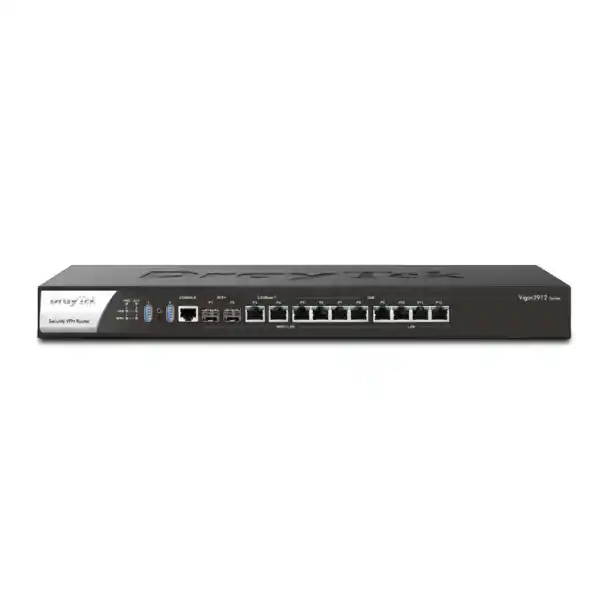
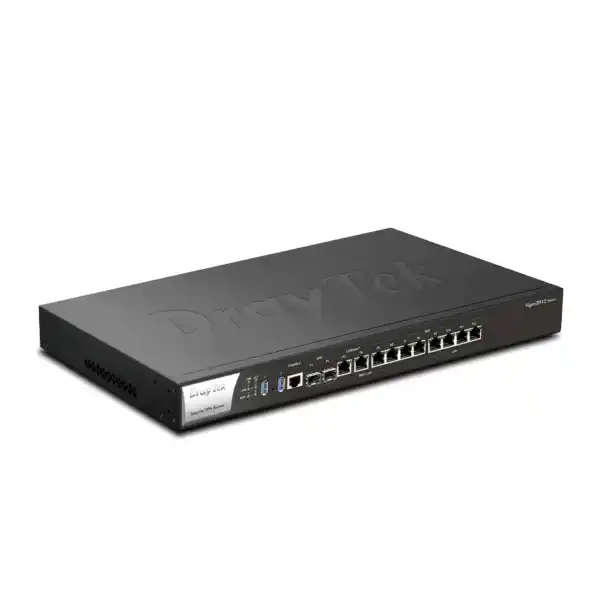
2 × 10G SFP+
Two SFP+ cages can operate at 10G, 2.5G or 1G depending on supported optics and link design. They are WAN/LAN switchable, making them suitable for high-speed ISP handoff, fiber distribution or a fast interconnect toward a core switch.
2 × 2.5GbE RJ-45
The multigigabit copper ports support 2.5G, 1G, 100M and 10M Ethernet rates and can be assigned to WAN or LAN. They are useful for faster broadband ONTs, Ethernet NIDs, multigigabit switches or local servers.
4 × flexible 1GbE
Four Gigabit Ethernet ports can be configured as independent WAN or LAN interfaces. They support common mixed-carrier designs where several branch, broadband or private Ethernet services terminate in the same rack.
4 × fixed 1GbE LAN
Four additional Gigabit Ethernet ports remain available for LAN connectivity, giving the chassis twelve network interfaces in total and retaining local access even when multiple flexible ports are consumed by WAN services.
This port design is one of the most important differences between the Vigor3912 and smaller dual-WAN security routers. DrayTek states that the platform can operate with up to eight WAN interfaces and four LAN ports, or with one WAN interface and up to eleven LAN ports, depending on configuration. That does not mean every design should maximize the number of WANs. Instead, it means the hardware can be adapted to the way a site receives connectivity. A Dubai headquarters could dedicate one 10G SFP+ cage to a primary DIA circuit, a 2.5GbE port to a secondary broadband service, a Gigabit port to an LTE/5G external modem or managed CPE, and the second SFP+ cage to a 10G LAN trunk. Another site could use both SFP+ cages as WAN links and aggregate several lower-speed circuits for resilience.
Two USB 3.0 ports, an RJ-45 console port and the front-panel network interfaces simplify rack deployment and recovery. The appliance is a wired gateway rather than an integrated Wi-Fi router, which is generally the preferred model for enterprise environments because wireless access points can be positioned where RF coverage requires them, while the gateway remains in the secured communications room. The chassis dimensions published by DrayTek are 443 × 285 × 45 mm, placing it in a standard rack-width form factor, with maximum stated power consumption of 35 W. Designers should still allow suitable ventilation and observe the published 0 to 45°C operating range, especially in compact cabinets or telecom rooms exposed to elevated ambient temperatures.
Performance: understanding the 15.6 Gbps NAT figure
DrayTek publishes up to 15.6 Gbps bidirectional NAT throughput for the Vigor3912 and lists 9.45 Gbps for software-accelerated single-direction traffic in its detailed specifications. These are laboratory-oriented maximums, not guarantees of application throughput at every site. The vendor specifically notes that performance results are obtained under optimal internal test conditions and that real throughput can vary with topology, packet size, enabled applications, network conditions and features in use. A correct design therefore treats the headline number as platform capacity guidance rather than as a promise that every encrypted, filtered, shaped or highly concurrent workload will run at that exact rate.
The benefit of the 2 GHz quad-core CPU and 8 GB DDR4 memory is headroom. Real enterprise traffic is composed of many simultaneous sessions, multiple VLANs, DNS requests, cloud applications, voice and video flows, encrypted tunnels, software updates and east-west routing between local networks. The Vigor3912 is intended to process these tasks while maintaining substantial WAN capacity. DrayTek’s router overview also lists one million NAT sessions for the Vigor3912 series, a useful characteristic for dense networks, guest environments and organizations with large numbers of endpoint-generated connections. Session scale matters because a router can reach a connection-state limit long before saturating raw bandwidth when many users, IoT systems or cloud applications open numerous concurrent flows.
For sizing, start with peak aggregate internet throughput rather than the contracted speed of only the primary circuit. If a site has two active WANs carrying traffic simultaneously, estimate the realistic combined demand during busy periods. Then consider whether significant traffic is IPsec, SSL VPN or WireGuard; whether QoS classification is extensive; whether inter-VLAN routing crosses the gateway; and whether security features such as content controls are enabled. Also consider growth. A router purchased for a 1 Gbps site may remain in service after the business upgrades to 2.5 Gbps or adds a 10G handoff. The presence of 10G SFP+ and 2.5GbE ports gives the Vigor3912 more runway than platforms whose physical ports cap the deployment at 1 Gbps regardless of CPU performance.
For UAE deployments where internet links are diverse, the most useful capacity metric is often sustained performance under the actual policy set. FourTeck can stage a design around expected WAN mix, VLAN count, VPN concurrency and traffic priorities through its UAE IT services team, allowing the router selection to follow measurable traffic requirements rather than a single marketing benchmark.
Multi-WAN load balancing and resilient internet edge design
The Vigor3912 is especially suited to locations that use more than one internet circuit. Multi-WAN does not simply mean having a backup cable connected. A useful enterprise implementation needs path monitoring, failover logic, load distribution and policy control so that important traffic follows the appropriate provider. DrayTek supports load balancing and failover functions, allowing administrators to use multiple connections for throughput and resilience. The router can monitor link health and take action when a path fails or crosses configured thresholds, reducing dependence on manual intervention during an ISP outage.
Policy-based routing adds another layer of control. Traffic can be matched on parameters such as protocol, IP address, port, domain and country, then directed through a chosen path. In practice, this allows a network designer to keep latency-sensitive traffic on a preferred low-latency circuit, route bulk software updates through a lower-cost broadband link, pin specific cloud services to a WAN with known source IP addressing, or direct selected departments through a separate provider. This can be useful when SaaS platforms, financial services, IP telephony providers or partner systems use IP allow lists that require predictable egress.
Load balancing should be designed with application behavior in mind. Some services tolerate changing public source IPs poorly, while ordinary web browsing may work well across several WANs. The correct approach is to separate traffic classes. Persistent or source-sensitive sessions can be bound to a stable WAN, while general traffic can participate in weighted load sharing. The router’s session-based and IP-based load-balancing methods give administrators options for distributing flows without treating all traffic identically. A resilient configuration also needs reliable DNS behavior, route monitoring, sensible timeout values and a tested return-to-primary strategy so that recovery does not create more disruption than the original outage.
For businesses using leased lines, enterprise broadband and secondary wireless connectivity at the same location, the Vigor3912 can act as a consolidation point. Up to eight switchable WAN interfaces provide enough physical flexibility to accommodate many combinations without external media conversion, assuming the carrier handoffs are supported by the selected copper or optical modules. The design is particularly attractive for managed service providers that want a consistent CPE platform across sites whose available connectivity differs by building or emirate.
Enterprise VPN capabilities and encrypted branch connectivity
The Vigor3912 supports up to 500 VPN tunnels, making it suitable for organizations that need a large set of site-to-site connections, remote-user access or a mixture of both. Supported VPN technologies include IPsec, IKEv2, L2TP, L2TP over IPsec, SSL VPN, GRE, OpenVPN host-to-LAN connectivity and WireGuard, alongside legacy options that may remain available for compatibility. For new designs, protocol choice should be based on security policy, interoperability, client support and performance rather than on the presence of a protocol name alone. Modern IPsec/IKEv2 and WireGuard deployments are commonly preferred where both endpoints support them, while SSL-based remote access may be useful for specific user workflows.
DrayTek’s published Vigor3912 figures list IPsec throughput with AES-256 at up to approximately 3.3 Gbps in a single direction and 5.7 Gbps bidirectionally. The same specification set lists SSL VPN throughput up to approximately 3.3 Gbps single-direction and 4.3 Gbps bidirectional, as well as WireGuard throughput around 900 Mbps single-direction and 1.08 Gbps bidirectional. These are vendor test figures and should be interpreted in the context of packet profiles, tunnel configuration, firmware and concurrent services. Even so, they show that the Vigor3912 is intended for substantially heavier encrypted traffic than a typical SMB dual-WAN router.
Authentication options are broad enough to fit many enterprise identity environments. The platform supports local RADIUS, LDAP, TACACS+, mOTP and TOTP methods in relevant functions, and DrayTek highlights VPN two-factor authentication for AD/LDAP scenarios. IKE authentication options include pre-shared keys, X.509 certificates, XAuth and EAP, while IPsec integrity algorithms include SHA-256 and SHA-512 among other compatibility choices. Security policy should prefer current cryptographic suites and remove obsolete algorithms wherever interoperability permits.
VPN trunking supports redundancy and load-balancing concepts between tunnels. This matters for branch networks where two internet providers exist at each location and the business wants private connectivity to survive a carrier outage. Instead of building one static tunnel and accepting downtime whenever its associated WAN fails, engineers can create multiple paths and establish failover logic. Single-armed VPN operation and NAT traversal add flexibility when the Vigor3912 is integrated into more complex security or data-center designs rather than used as the only perimeter device.
Before choosing tunnel counts, distinguish configured tunnels from simultaneously busy encrypted throughput. Five hundred low-utilization branch tunnels create a different workload from a smaller number of tunnels carrying backup replication or high-volume inter-site traffic. A procurement specification should therefore state expected concurrent tunnels, peak encrypted bandwidth, protocol mix, authentication source and redundancy model. This prevents a design from being sized on tunnel count alone.
Layer 3 routing: BGP, OSPF, static routing and inter-VLAN design
Unlike routers designed only for a small office internet connection, the Vigor3912 includes routing functions suitable for more advanced network edges. DrayTek lists IPv4 and IPv6 static routing, policy routing, inter-VLAN routing, fast routing, RIP v1/v2, BGP and OSPFv2. The inclusion of BGP and OSPFv2 expands the range of designs where the appliance can be considered. BGP can be relevant when exchanging routes with an ISP, private WAN provider or an upstream routing domain. OSPFv2 can be used for internal route distribution across a multi-router campus or enterprise network.
BGP should not be enabled merely because it is available. A site receiving only a default route from one provider may be simpler and safer with static routing. BGP becomes valuable when the organization has a defined autonomous-system design, multiple upstream peers, route policies or provider requirements that justify dynamic route exchange. Likewise, OSPF is most useful when the internal network has enough Layer 3 topology to benefit from dynamic convergence. Smaller networks can remain easier to operate with static or summarized routes. The Vigor3912 provides these capabilities so the same platform can support simple and more advanced deployments without forcing every installation into a complex routing model.
Inter-VLAN routing is important where departments, guest devices, voice systems, servers, CCTV, building systems and wireless SSIDs are segmented into separate broadcast domains. The router can route between those networks while applying policies and bandwidth controls at the boundary. Published platform specifications list support for large VLAN and LAN-subnet configurations, giving network teams room to create structured segmentation rather than a single flat LAN. However, the correct number of VLANs is driven by security boundaries and operational clarity, not by the maximum number a device can store.
When the Vigor3912 sits between a Layer 3 core and the internet, designers should decide deliberately where routing responsibility belongs. Large campuses may keep most east-west routing on the core switch and use the Vigor3912 primarily for WAN edge functions. Smaller distributed sites may centralize both inter-VLAN routing and internet policy on the router. Both models are viable; the choice affects traffic paths, troubleshooting, failover design and the volume of internal traffic that must traverse the gateway.
VLAN segmentation, DHCP and endpoint control
Network segmentation is one of the strongest operational reasons to deploy an enterprise gateway. The Vigor3912 supports 802.1Q tag-based VLANs and port-based VLAN concepts, allowing a single physical trunk to carry multiple logical networks toward managed switches and access points. Each VLAN can be associated with its own addressing, DHCP behavior and access policy. This is appropriate for separating corporate users from guests, isolating IP phones from general workstations, placing CCTV and IoT systems into controlled subnets, and keeping management interfaces away from ordinary client devices.
DHCP functions include custom options and multiple subnet support. Custom DHCP options matter in environments where phones, controllers, provisioning systems or specialized endpoints need parameters beyond an IP address, gateway and DNS server. Bind-IP-to-MAC functions can be used where administrators want predictable address assignments or tighter endpoint controls. These mechanisms are not substitutes for full network access control, but they are useful building blocks for stable addressing and device inventory.
A strong segmentation plan starts with trust boundaries. It is usually clearer to define a manageable set of security zones with specific purpose than to create many arbitrary VLANs. For example, a UAE office might use separate segments for employees, servers, voice, printers, security cameras, guest Wi-Fi, building management and network administration. Inter-zone traffic should then be explicitly permitted only where business workflows require it. DNS, NTP, directory services, printing and application dependencies need to be documented so that segmentation improves security without breaking legitimate operations.
Because the Vigor3912 can also centrally manage compatible DrayTek switches and access points, it can serve as a practical control point for smaller enterprise networks. DrayTek’s published management table indicates support for switch management and AP management, which can simplify VLAN rollout by reducing the number of separate interfaces an administrator must visit. For larger estates, centralized management platforms remain important for configuration consistency, change records and fleet-wide visibility.
Firewall, NAT and edge security functions
The Vigor3912 combines routing with stateful firewall and NAT functions. DrayTek lists IP-based firewall policies, NAT features such as port redirection, open ports, port triggering, fast NAT, DMZ host and UPnP server options, application-layer gateways for protocols including SIP, RTSP, FTP and H.323, VPN pass-through, denial-of-service defenses and spoofing defenses. These capabilities cover the control requirements of many business internet edges, but each service should be enabled only when it has a defined operational need.
The safest NAT posture is to avoid unnecessary inbound publishing. If an application can be accessed through a VPN or secure reverse proxy rather than an unrestricted port forward, that usually creates a clearer security boundary. Where inbound publishing is required, restrict source networks where possible, keep exposed software patched, log access and document the owner of each rule. UPnP is convenient for unmanaged consumer environments but is generally inappropriate as an unrestricted feature on corporate networks because endpoints can request automatic mappings. Enterprises should prefer deliberate, auditable firewall rules.
Content filtering features include controls based on applications, URLs, keywords, DNS keywords, web features and web categories, with DrayTek noting that category-based services can require subscription. Buyers should confirm which filtering components are included in the planned firmware and which depend on an active service. If the organization already uses secure DNS, a cloud security service or a dedicated next-generation firewall, the Vigor3912 can be positioned primarily as the high-speed edge router rather than duplicating every security function.
A security architecture should assign each control to the device best suited to enforce it. Some sites will use the Vigor3912 as both the firewall and router. Others will deploy it in front of, behind or alongside a dedicated security appliance to handle multi-WAN, BGP, high-speed NAT or VPN termination. The model supports single-armed VPN and policy-routing scenarios that can be useful in such designs. FourTeck’s Firewall Dubai engineering team can help map those roles before implementation so packet paths, NAT ownership and failover behavior are unambiguous.
Bandwidth management, QoS and application prioritization
High-speed internet does not eliminate the need for traffic management. A large software download, cloud backup or synchronized update event can still saturate an uplink and degrade voice, video or transactional applications. The Vigor3912 includes IP-based bandwidth limits, session limits and QoS functions with classification options that include ToS, DSCP, 802.1p, IP address and service type. VoIP prioritization and application-aware QoS features give administrators tools to protect delay-sensitive services when links are congested.
QoS is most effective when it is applied to a measured bottleneck. If the WAN is 1 Gbps but the router believes it can transmit at 10 Gbps, shaping cannot reliably control the actual queue at the provider handoff. Engineers should configure realistic upstream and downstream values, reserve bandwidth where required, and validate traffic marking across the full path. DSCP values set by an endpoint are not automatically trustworthy; a gateway policy can remark or classify traffic so that priority reflects the organization’s policy rather than whatever an application chooses to request.
Session limits can be valuable in guest networks, educational environments or locations with poorly behaved devices. A single endpoint opening an extreme number of sessions can consume NAT state and affect other users even if its bandwidth is modest. Combining session limits with per-IP bandwidth controls gives administrators two separate levers: one governs connection count and the other governs rate. The correct thresholds should be high enough for legitimate modern applications, many of which open multiple parallel HTTPS connections, but low enough to constrain abuse or malfunctioning clients.
For multi-WAN sites, QoS and routing policy should be planned together. A priority class routed onto a congested backup link may perform worse than ordinary traffic on a healthy primary link. Operational runbooks should define what happens to critical applications during failover, including whether they remain prioritized, whether their source IP changes and whether the backup circuit has enough capacity to carry the protected class.
High availability and gateway continuity
Internet redundancy is incomplete if all WAN circuits terminate on one router and that router is a single point of failure. The Vigor3912 supports DrayTek High Availability and VRRP-related gateway continuity functions, allowing designs with a primary and backup router where the business requirement justifies hardware redundancy. A paired-router design can reduce downtime caused by hardware failure or maintenance, but it must be engineered as a system rather than created by simply installing a second appliance.
The upstream and downstream topology must also be redundant. If both routers connect to one access switch, one PDU or one ISP NID, those components can remain single points of failure. Critical deployments should review power feeds, switching, optics, cabling and carrier presentation. Configuration synchronization, software versions and failover states need to be tested. Management access should remain available when either router is offline so that the surviving unit can be diagnosed without physical intervention.
VRRP-style designs provide a shared virtual gateway address to downstream devices. Clients keep using the same default gateway while router ownership of the virtual address moves during a failure. This is cleaner than changing endpoint configuration during an outage. However, stateful services such as NAT and VPN can have specific failover behavior, and existing sessions may not always survive in the same way as ordinary routing. The expected behavior should be validated against the selected firmware and actual production configuration during acceptance testing.
Organizations that require high availability should include failure scenarios in the scope of work: disconnect the primary WAN, power down the active router, disable the downstream trunk, restore service, and verify route convergence, DNS behavior, VPN reconnection and application continuity. A successful HA design is demonstrated by these tests, not by the presence of two devices in the rack.
Management, monitoring and operational visibility
A router at the center of eight possible WANs, hundreds of VPNs and many VLANs must be manageable after installation. The Vigor3912 supports local administration through HTTP and HTTPS, command-oriented access through SSH v2 and legacy services where enabled, configuration backup and restore, firmware upgrades, access-control restrictions and notification mechanisms. SNMP v1, v2c and v3 are listed, along with Syslog support, allowing the device to feed monitoring and log-management systems rather than operate as an isolated appliance.
For production networks, management exposure should be minimized. HTTPS and SSH should be restricted to trusted management networks or VPN access, and obsolete or unnecessary services should be disabled. SNMPv3 is preferable when the monitoring platform supports it because it offers stronger authentication and privacy controls than earlier SNMP versions. Syslog should be sent to a centralized collector with adequate retention so that WAN flaps, authentication failures, VPN events and configuration issues can be correlated during troubleshooting.
DrayTek also supports VigorACS management on the platform, giving organizations and service providers a path toward centralized provisioning, monitoring and fleet management. This becomes valuable when the same router family is deployed across numerous branches. Instead of treating each site as a standalone configuration, administrators can build standardized templates, monitor health centrally and maintain an inventory of firmware and settings. The exact ACS feature set depends on the deployed software environment, so licensing and version compatibility should be confirmed during project design.
Configuration governance is as important as the management protocol. Before commissioning, save a baseline backup, record interface roles, label WAN circuits, document routing and NAT rules, and establish an approved firmware maintenance process. Administrative accounts should be individual where feasible, with role separation when multiple teams manage the device. Alerting should focus on actionable events such as WAN failures, high resource use, VPN instability and unauthorized login attempts rather than generating excessive notifications that operators learn to ignore.
For managed deployments spanning the Gulf or Africa, standardized edge configuration can reduce support variance. FourTeck’s regional infrastructure coverage across Africa can also support organizations that want a similar architecture beyond the UAE while adapting carrier, logistics and on-site implementation details for each market.
DNS, IPv6 and supporting network services
The Vigor3912 supports IPv6 connectivity methods and routing functions alongside IPv4. DrayTek’s published platform table includes DHCPv6, static IPv6 and several transition or tunnel mechanisms. Organizations deploying new networks should consider native dual-stack operation where their carriers and applications support it rather than treating IPv6 as an afterthought. Address planning, firewall policy, monitoring and DNS all need to cover both protocol families; otherwise IPv6 can create an unexpected parallel path outside an IPv4-only security model.
DNSSEC support is listed as part of the networking feature set. DNS security matters because many user sessions begin with name resolution, and DNS failures or manipulation can affect access even when routing is otherwise healthy. Enterprises may use the router as part of their DNS forwarding design or direct clients toward dedicated internal and cloud resolvers. Whichever architecture is selected, redundancy should exist for DNS servers and the behavior during WAN failover should be tested. A multi-WAN router that moves traffic to a backup path but leaves clients dependent on an unreachable DNS resolver has not delivered full application continuity.
IGMP v2/v3, IGMP proxy, snooping-related functions and fast-leave support are included for multicast-sensitive environments. These capabilities can be relevant for IPTV, video distribution and certain enterprise multicast applications. Multicast should be enabled deliberately because flooding or incorrect querier behavior can create unnecessary traffic. Where IPTV is provided by an ISP, verify VLAN tagging, IGMP expectations and whether the carrier requires specific port or DHCP behavior.
A local RADIUS server is also part of the feature set, which can assist smaller sites that need authentication services without standing up a separate platform. Larger environments will often integrate the router with centralized directory, RADIUS or TACACS+ services so account lifecycle and policy are managed consistently across routers, switches, wireless controllers and VPN systems.
Deployment scenario 1: Dubai headquarters with 10G internet and branch VPN
Consider a headquarters with a primary high-capacity DIA service delivered over SFP+, a secondary 2.5GbE broadband service, forty branch offices and several hundred employees. The first 10G SFP+ interface can terminate the DIA handoff, while the first 2.5GbE port terminates the secondary service. The second 10G SFP+ interface can connect toward the core switch, ensuring the LAN side does not become a one-gigabit choke point. A dedicated Gigabit port can serve an out-of-band or restricted management network if the architecture requires one.
Each branch establishes redundant IPsec tunnels using its available WAN links. Critical application subnets prefer the DIA path while web and update traffic can be distributed across both headquarters circuits. Routing policy keeps cloud applications that rely on source-IP allow lists on the primary WAN. If the DIA circuit fails, the backup policy permits those applications to move only if their allow lists also include the backup public address. This small design detail prevents the common situation where the network technically has internet access after failover but important SaaS services reject the new source IP.
VLANs segment employees, voice, servers, guest Wi-Fi, CCTV and management. The core switch handles high-volume east-west traffic, while the Vigor3912 routes only those inter-VLAN flows that require edge policy enforcement. QoS protects voice and interactive traffic when a failover reduces available bandwidth. Syslog, SNMPv3 and centralized configuration backups are enabled from the first day so troubleshooting does not depend on logging into the router after a fault has already occurred.
This scenario uses the Vigor3912 as a high-performance edge and VPN concentrator rather than as an all-purpose switch. That distinction keeps its 10G capacity focused on internet, VPN and controlled routing tasks. It also allows the switching layer to scale independently as the campus grows.
Deployment scenario 2: co-working, hospitality or managed building network
The Vigor3912 is also suited to shared environments where many independent users consume internet simultaneously. DrayTek specifically positions the platform for fiber-to-the-building and similar service-provider scenarios. In a co-working facility, serviced office or managed building, one or more high-speed uplinks can be distributed across multiple tenant or service VLANs. Policy routing and per-IP controls can prevent one tenant or workload from monopolizing capacity, while session limits protect the state table from unusually aggressive devices.
The hotspot web portal can support guest-access workflows and communication with users where that function is appropriate. For commercial tenant networks, however, authentication and segmentation should usually be more deliberate than a single captive portal. Each tenant can be assigned a dedicated VLAN and IP subnet, with firewall rules preventing cross-tenant access. Bandwidth limits can be aligned with service packages, while premium tenants can receive higher committed rates or dedicated policy routes.
Multiple WAN ports allow the building operator to combine circuits from different providers or media types. A 10G primary service can carry normal tenant traffic, while a second ISP provides resilience. Dedicated customers with special routing needs can be pinned to a specific path. Where the operator manages public address blocks or receives dynamic routes, BGP can be considered if the provider relationship and network design justify it. Simpler installations should avoid unnecessary BGP complexity and use static routes or NAT.
Monitoring is crucial in multi-tenant environments because a complaint such as “the internet is slow” can have many causes: a saturated WAN, a single tenant exceeding its allocation, Wi-Fi interference, excessive sessions, DNS delay or an upstream provider issue. The router’s traffic controls and monitoring integrations should therefore be combined with switch and wireless visibility so the operations team can trace the problem across the full service path.
Deployment scenario 3: managed service provider edge appliance
Managed service providers need equipment that can be standardized while still accommodating different site conditions. The Vigor3912’s switchable ports make that practical. One customer may receive two Gigabit Ethernet circuits, another a 2.5GbE broadband handoff and a third a 10G fiber service. The same router family can be adapted without changing the operational model at every location. Templates can define interface naming, VLAN conventions, monitoring, VPN settings and management access, while site-specific parameters are inserted during deployment.
Up to 500 VPN tunnels gives an MSP room to use the unit as a regional concentration point or to support a large branch estate, provided the throughput profile also fits. VigorACS compatibility can support centralized operations, but configuration discipline remains essential. Device groups should use approved firmware, cryptographic standards, DNS settings, NTP sources and access-control lists. Customer-specific credentials should not be shared across sites, and remote management should be restricted to defined operations networks.
The router’s BGP and OSPF capability also helps when an MSP delivers more than simple internet access. OSPF can exchange routes with customer core networks or managed private WANs, while BGP can be used at appropriate provider boundaries. Route filtering must be explicit. Accepting or advertising unintended prefixes can create severe outages, so dynamic routing deployments should include prefix lists, maximum-prefix protection where available, clear ownership and documented rollback procedures.
From a support perspective, the best deployment template includes observability from the start. SNMPv3 metrics, Syslog, WAN probes, configuration backups and circuit identifiers should all be present before the site is handed to operations. The router can then be treated as part of a managed service rather than as a black box installed at the customer’s premises.
Optics, cabling and 10G implementation considerations
A 10G SFP+ port is only one part of a functioning 10G link. The transceiver, fiber type, connector, wavelength, distance and peer device must all match. Before ordering optics for the Vigor3912, confirm whether the carrier provides single-mode or multimode fiber, whether the handoff is optical or copper, the required wavelength, and whether the service uses a provider-supplied NID. Some providers deliver Ethernet over an RJ-45 interface even when the underlying circuit is fiber, in which case a 2.5GbE or Gigabit port may be the correct termination instead of SFP+.
For LAN-side 10G, direct-attach copper can be appropriate for short in-rack connections when supported by both devices, while optical modules are preferable for longer distances or electrically isolated paths. Cable management matters because bent fiber, contaminated connectors and excessive tension are common causes of intermittent link problems. Label both ends of each circuit, record the optic type, and keep spare validated transceivers for critical sites.
The 2.5GbE copper interfaces are valuable when the upstream or downstream device supports multigigabit Ethernet over twisted pair. Cabling should meet the distance and category requirements of the desired rate, and patch panels should be included in the assessment rather than assuming the horizontal cable alone determines performance. If an existing building has older cabling, validate the complete channel before promising 2.5GbE service.
During commissioning, test negotiated speed, duplex, error counters and actual throughput on both WAN and LAN paths. A speed test alone is not enough. Packet loss, optical power, CRC errors or incorrectly negotiated interfaces can create poor application performance even when headline throughput looks acceptable for a short test interval.
Technical specification summary
| Area | DrayTek Vigor3912 specification | Design relevance |
|---|---|---|
| Processor | 2 GHz quad-core CPU | Headroom for high-throughput routing, VPN and concurrent services |
| Memory | 8 GB DDR4 | Supports large state tables and enterprise feature scale |
| 10G interfaces | 2 × 10G/2.5G/1G SFP+, switchable WAN/LAN | High-speed ISP or core-switch connectivity |
| 2.5GbE interfaces | 2 × 2.5G/1G/100M/10M RJ-45, switchable WAN/LAN | Multigigabit copper broadband and LAN use |
| Gigabit interfaces | 4 × switchable 1GbE plus 4 × fixed LAN 1GbE | Flexible carrier, branch and internal connections |
| NAT throughput | Up to 15.6 Gbps bidirectional, vendor test figure | Suitable for internet edges above 1 Gbps when workload fits |
| NAT sessions | Published platform scale up to 1,000K sessions | Useful for dense user and high-concurrency networks |
| VPN tunnels | Up to 500 | Supports large branch and remote-access estates |
| IPsec throughput | Up to 3.3 Gbps single-direction / 5.7 Gbps bidirectional with AES-256 in vendor testing | High-capacity encrypted inter-site connectivity |
| Routing | Static IPv4/IPv6, policy route, inter-VLAN, RIP, BGP, OSPFv2 | Fits simple branches through dynamic-routing edge designs |
| Management | HTTPS, SSH v2, SNMP, Syslog, TR-069/VigorACS-related management | Supports centralized operations and monitoring |
| Physical | 443 × 285 × 45 mm; max. 35 W; AC 100–240 V | Rack-oriented enterprise appliance with modest power demand |
Performance values are published vendor test figures and can vary with firmware, packet size, topology, enabled features, encryption profile and traffic conditions. Confirm final requirements against the current firmware and approved deployment design.
How to size the Vigor3912 for your network
Sizing should begin with four traffic numbers: current peak internet throughput, expected 24- to 36-month peak, encrypted VPN throughput and inter-VLAN traffic that will actually cross the router. Do not simply add contracted circuit rates if some links are idle backups. Conversely, do not size only for the current primary circuit if the future design will use active-active load balancing. The goal is to estimate what the router must process during the busiest realistic interval while the full policy set is enabled.
Next, count state and control-plane scale. Record approximate endpoint count, peak concurrent sessions, VLANs, DHCP scopes, site-to-site tunnels, remote users, dynamic-routing peers and published services. A network with modest throughput but enormous session churn can challenge a small router differently from a network moving a few long-lived high-bandwidth flows. The Vigor3912’s one-million-session class and 500-tunnel ceiling provide significant room, but the architecture should still be validated against the actual workload.
Then define security features. Content filtering, extensive firewall logging, VPN encryption and traffic classification each consume resources and can alter throughput. If a dedicated next-generation firewall will perform deep inspection, document whether the Vigor3912 is upstream or downstream of it and which device owns NAT. Double NAT and overlapping policies create troubleshooting complexity. Where possible, assign one clear purpose to each layer.
Finally, size for failure mode. If two 5 Gbps circuits normally share traffic but either one must carry the entire business during an outage, the remaining path and router policy must support that load. If the backup is only 1 Gbps, QoS and application restrictions may be necessary during failover. Capacity planning is therefore not only about normal operation; it defines what the business can still do when part of the infrastructure is unavailable.
A well-formed quotation request should include circuit types and speeds, optical or copper handoffs, public IP requirements, VPN counts, branch models, VLAN count, dynamic-routing needs, rack and power details, and whether installation or managed support is required. Providing these inputs lets the supplier quote the router together with the correct optics, patching and implementation services rather than treating the appliance as an isolated box.
Firmware, licensing and lifecycle planning
Enterprise routers should be purchased with an operational lifecycle plan, not just an installation date. Firmware affects security, protocol interoperability, VPN behavior, management features and performance. Before deployment, confirm the recommended stable firmware for the exact Vigor3912 hardware revision and review release notes for features used in the project. Avoid upgrading production routers simply because a newer version exists; upgrades should have a reason, a backup, a maintenance window and a rollback plan.
Some content-filtering or cloud-related functions can involve subscriptions, while core routing and firewall features are part of the router platform. Buyers should confirm the exact service bundle required for their desired filtering and management workflow. A procurement bill of materials should separate the appliance, optics, support, subscriptions, installation and any centralized-management components so renewal obligations are visible from the start.
The Vigor3912 and Vigor3912S should not be confused. DrayTek lists the Vigor3912 with 8 GB DDR4 memory, while the Vigor3912S adds 256 GB SSD storage and support for Linux applications such as Docker-based workloads, including DrayTek-highlighted Suricata and VigorConnect use cases. If those local application functions are required, specify the S variant explicitly rather than assuming the base Vigor3912 includes the SSD. This page concerns the DrayTek Vigor3912 base model unless otherwise stated in the quotation.
Lifecycle planning should also include spare strategy. For a single critical site, an on-site spare or high-availability pair can reduce restoration time more effectively than relying only on warranty replacement. Export a current encrypted configuration backup after every major change and store it securely. Record the serial number, firmware version, rack location, ISP circuit identifiers and optic types in the asset system so replacement does not depend on institutional memory.
UAE procurement and deployment considerations
For UAE buyers, product suitability depends on more than the model number. The router has to match the carrier handoff, rack environment, branch design and support model. Before ordering, obtain the technical handoff details from the ISP: interface type, committed and burst bandwidth, VLAN tagging, static or dynamic addressing, routing protocol if any, public IP allocation and whether the provider supplies an NID. If the circuit is optical, obtain transceiver requirements rather than guessing from connector appearance.
Rack planning should include at least one suitable AC feed, ventilation, patching and cable access. In UAE facilities where communications cabinets can become warm, verify ambient temperature under normal building operation and during reduced HVAC periods. The vendor’s published operating temperature range is 0 to 45°C, so poorly ventilated wall cabinets or equipment rooms need attention. A router that is comfortably within specification during office hours can experience a very different environment overnight or on weekends.
Implementation services can include preconfiguration, firmware alignment, interface setup, VLAN creation, routing, VPN migration, firewall policies, QoS, logging and acceptance testing. For a replacement project, capture the existing router configuration and traffic dependencies before cutover. NAT rules, VPN peer addresses, static routes, DHCP reservations and public DNS records are frequent sources of migration surprises. A rollback window should remain available until core business applications, inbound services and all branch tunnels have been verified.
Organizations that prefer one supplier for hardware and implementation can use FourTeck for UAE delivery, configuration and technical coordination. This is particularly helpful when the project includes switches, access points, firewalls, server connectivity or structured network changes beyond the router itself.
Security hardening checklist for production deployment
Management plane
Restrict HTTPS and SSH administration to approved management networks or VPN users. Disable services that are not needed, prefer encrypted protocols, use unique administrator accounts, enforce strong credentials, and log authentication attempts to a central system.
Firewall policy
Start from explicit business flows. Remove temporary rules after migration, limit inbound exposure, document NAT ownership and avoid broad any-to-any inter-VLAN access. Review rules periodically so obsolete applications do not leave permanent exceptions.
VPN security
Use current encryption and integrity settings, certificates or protected pre-shared secrets, two-factor authentication for remote access where practical, and defined user groups. Remove legacy protocols when interoperability no longer requires them.
Monitoring
Send Syslog off the router, monitor WAN state and latency, collect SNMPv3 metrics, alert on repeated login failures and maintain time synchronization so logs from routers, firewalls, servers and applications can be correlated accurately.
Configuration protection
Maintain current backups before and after significant changes. Store them securely, record firmware versions and test restore procedures. Change control should identify the reason, approver, implementation steps and rollback method for impactful network modifications.
Physical resilience
Use appropriate rack mounting, airflow, UPS capacity, labeled WAN and LAN cabling, validated optics and redundant power paths where the service requirement warrants them. Network availability depends on these physical details as much as on routing features.
Frequently asked technical questions
Does the Vigor3912 include Wi-Fi?
No. It is a wired enterprise gateway. In business environments this is often advantageous because access points can be installed according to RF coverage requirements while the router remains secured in the rack or communications room.
Can both 10G SFP+ ports be used for LAN?
The two SFP+ interfaces are part of the switchable WAN/LAN port group, so they can be assigned according to the intended design. A common deployment uses one for a high-speed WAN and the second for a fast LAN or core connection.
How many WAN connections can it support?
DrayTek states that up to eight interfaces can be used as WANs, leaving four fixed LAN ports. The actual deployment should use only the number of WANs required by the resiliency and bandwidth design.
Is it appropriate for a 10G internet circuit?
It has 10G interfaces and a published maximum bidirectional NAT figure above 10 Gbps, but real performance depends on enabled services and traffic conditions. Validate VPN, firewall, filtering and routing requirements against the required sustained throughput.
Does it support BGP and OSPF?
Yes. DrayTek lists BGP and OSPFv2, along with static routing, policy routes, inter-VLAN routing and RIP. Use dynamic routing only when the topology and operational requirements justify it.
What is the VPN scale?
The published platform specification lists up to 500 VPN tunnels. Sizing must also consider encrypted throughput, protocol type, number of active users and the workload carried through each tunnel.
Can it manage DrayTek switches and access points?
Yes, centralized switch and AP management functions are listed for the platform. This can simplify smaller deployments, while larger fleets can use centralized management systems such as VigorACS where appropriate.
Is the Vigor3912 the same as the Vigor3912S?
No. The base Vigor3912 is listed with 8 GB DDR4 memory. The Vigor3912S adds a 256 GB SSD and Linux application capability. Specify the exact model required in the purchase order.
Decision recap: where the Vigor3912 fits best
The DrayTek Vigor3912 is a strong architectural fit when a site needs more than ordinary dual-WAN Gigabit routing. Its most distinctive qualities are the combination of two 10G SFP+ interfaces, two 2.5GbE copper ports, four additional switchable Gigabit interfaces, four fixed Gigabit LAN ports, a 2 GHz quad-core platform, 8 GB DDR4 memory, substantial NAT scale and a broad enterprise feature set. That combination gives technical teams room to build a fast internet edge without sacrificing multi-WAN flexibility.
It is especially relevant for multi-branch organizations, MSPs, co-working environments, hospitality networks, campuses and head offices that use several carriers or expect to move beyond 1 Gbps. BGP and OSPFv2 extend its use into networks that require dynamic routing, while VLAN, QoS, firewall and VPN features let it operate as more than a simple transit router. Up to 500 VPN tunnels and multi-gigabit published IPsec performance make it suitable for substantial encrypted branch connectivity when the real traffic profile is within platform capacity.
The final purchasing decision should be based on circuit handoffs, sustained throughput with required services, encrypted traffic volume, routing protocol design and the desired redundancy model. A 10G port alone does not make a design correct; the full path from ISP to router to switching core must support the required speed and operational behavior.
Quotation input checklist
For an accurate UAE quotation and implementation scope, provide the following information. These inputs help determine whether the Vigor3912 can be supplied as a standalone appliance or should be bundled with optics, patching, configuration, migration and support.
Plan the DrayTek Vigor3912 deployment with FourTeck UAE
FourTeck can supply the DrayTek Vigor3912 for UAE projects and assist with the surrounding design needed to make full use of its multigigabit interfaces and enterprise routing functions. A complete engagement can cover ISP handoff validation, interface mapping, VLAN architecture, NAT and firewall policy, BGP or OSPF planning, VPN migration, QoS, monitoring, switch integration and acceptance testing. The objective is to deliver a router configuration that reflects the actual network rather than a generic template.
For new offices, the gateway can be designed alongside switching, wireless and server connectivity so that 10G and 2.5GbE paths are preserved end to end. For replacement projects, existing policies and dependencies can be audited before cutover so business services, inbound publishing and branch tunnels continue to operate as expected. For MSP environments, standardized configuration and centralized monitoring can be built into the deployment model.
When requesting pricing, include the WAN circuit information, required optics, VPN scale and whether installation or support is required. This allows the bill of materials to match the deployment and avoids delays caused by missing transceivers, incorrect media assumptions or incomplete migration scope.

Reviews
There are no reviews yet.