
Enterprise Multi-WAN • 10GbE • VPN • Docker-Ready
DrayTek Vigor3912S in Dubai, UAE
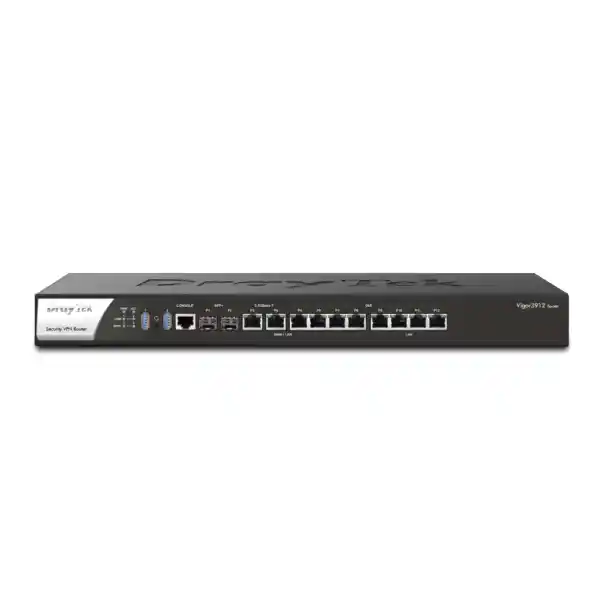
The DrayTek Vigor3912S is an enterprise-class wired gateway designed for organizations that have outgrown conventional gigabit routers and need a practical path to multi-gigabit WAN, 10GbE fibre, dense VPN connectivity, policy-based routing, high-volume NAT, advanced VLAN segmentation and on-box application hosting. The S version combines the Vigor3912 routing platform with 8GB DDR4 memory and an integrated 256GB SSD, enabling compatible Linux applications to run through Docker while the appliance continues to perform its core role as the edge router, firewall, VPN concentrator and multi-WAN policy engine.
Two 10G/1G SFP+ interfaces plus two 2.5GbE and four 1GbE switchable WAN/LAN ports allow flexible edge and core-side connectivity.
Supports a broad VPN portfolio for site-to-site, remote-access and hybrid designs, with separate vendor limits applying to SSL/OpenVPN concurrency.
The Vigor3912S adds integrated SSD storage to the 8GB DDR4 platform for supported Docker-hosted Linux applications such as Suricata and VigorConnect.
Large VLAN and subnet capacity supports granular separation of departments, guests, servers, voice, cameras, building systems, IoT devices and management networks.
Why the DrayTek Vigor3912S matters for modern UAE networks
Business internet connectivity in Dubai and across the UAE increasingly extends beyond a single one-gigabit circuit. Organizations now combine fibre internet, dedicated internet access, secondary broadband, private circuits, cloud connectivity and backup links, often while supporting hundreds of users, several segmented networks and encrypted links to branches or hosted infrastructure. The challenge is not simply purchasing a faster router. The edge platform must be able to distribute traffic intelligently, preserve application performance during circuit failures, terminate secure tunnels, enforce segmentation, provide operational visibility and fit into an environment that may already contain managed switches, wireless access points, servers, cameras, IP phones and cloud services.
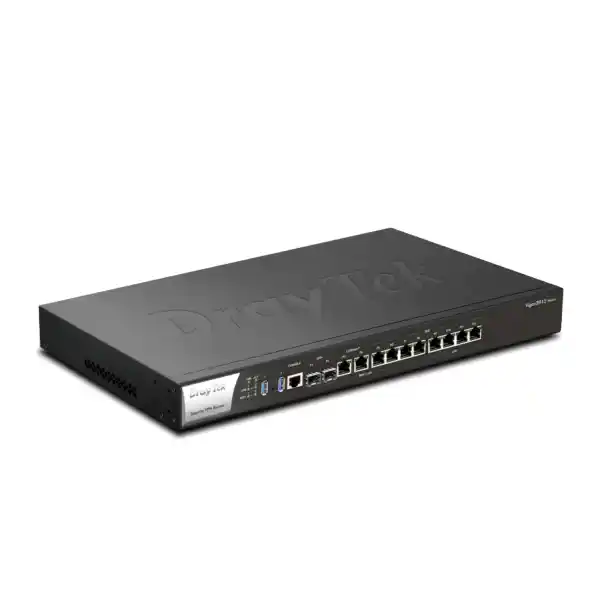
The Vigor3912S is positioned for that role. Its physical interfaces provide a practical mix of fibre and copper: two 10G SFP+ ports for high-speed uplink or LAN duties, two 2.5GbE RJ-45 ports for multi-gigabit handoff, four additional gigabit ports that can be assigned as WAN or LAN, and four fixed gigabit LAN ports. This arrangement lets an integrator build a topology around the circuits and switching fabric actually present rather than forcing every connection through a single media type or speed.
For organizations procuring a router in Dubai, the Vigor3912S also offers an important operational distinction from the standard Vigor3912: the integrated 256GB SSD. DrayTek uses the storage for its Docker-capable application environment, allowing supported tools to operate directly on the router. That does not turn the router into a general-purpose virtualization server, and application resource planning still matters, but it can reduce the need for a separate small server where the desired workload is appropriate for the appliance.
Hardware architecture and interface map
Switchable high-speed edge ports
Ports P1 through P8 are designed for WAN/LAN flexibility. P1 and P2 are 10G/1G SFP+ fibre slots. P3 and P4 are 2.5G/1G/100M/10M RJ-45 Ethernet. P5 through P8 are 1G/100M/10M RJ-45 Ethernet. Because these ports can be assigned to WAN or LAN roles, engineers can reserve the faster interfaces for the highest-demand paths. A 10G SFP+ port can face a capable ISP handoff or a core switch, while a 2.5GbE port can connect to an access aggregation layer, high-speed server segment or secondary multi-gigabit internet circuit.
Fixed LAN connectivity
Four additional gigabit RJ-45 ports, P9 through P12, provide fixed LAN connectivity. These ports are useful for local management, an access switch, a dedicated server segment or other equipment that should remain LAN-side regardless of WAN configuration. The combination of switchable and fixed ports is particularly practical in migration projects because the router can be introduced without forcing an immediate redesign of every physical connection.
Console, USB and rack deployment
The chassis includes two USB 3.0 ports and an RJ-45 serial console interface for administration and recovery workflows. The appliance is a 1U rack-mount design measuring approximately 443 × 285 × 45 mm, making it suitable for standard network racks where it can sit beside core switches, firewalls, patch panels and other edge equipment. A rack-mount kit is included in the UK hardware specification; UAE package contents should be confirmed with the supplying channel because regional bundles can differ.
Power and environmental profile
The listed power input is AC 100–240V, 50/60Hz, with a maximum power consumption of 35W. The vendor specifies an operating temperature range of 0 to 45°C, storage from -10 to 55°C and non-condensing operating humidity of 10 to 90%. In UAE deployments the router should be installed in a properly ventilated, climate-controlled communications room or rack. Cabinet temperature can be materially higher than room temperature, especially when high-density PoE switches, servers or UPS systems are mounted nearby, so thermal planning should use the conditions inside the rack rather than the ambient temperature elsewhere in the office.
Performance: interpreting the numbers correctly
DrayTek publishes several performance figures for the Vigor3912 series, and those figures should be read as laboratory maximums under defined test conditions rather than promises of identical throughput in every live network. Current global product material lists up to 15.6Gbps bidirectional NAT throughput for the platform and identifies a 2GHz quad-core processor. UK product literature describes the router as delivering more than 12Gbps NAT throughput and a UK datasheet has cited 12.5Gbps. These figures are not necessarily contradictory: vendors may use different firmware versions, acceleration modes, traffic direction, packet profiles or test methodologies across regional documents. For a Dubai deployment, the useful question is not which marketing number is larger; it is whether the configured service set can sustain the expected traffic mix with sufficient headroom.
Encrypted traffic must be sized separately. DrayTek’s current global specification table lists IPsec performance up to approximately 5.7Gbps under its test conditions, while UK product material describes up to about 5Gbps. SSL VPN figures are also workload-dependent, with UK material referencing up to around 3.5Gbps total SSL VPN performance. WireGuard is listed around the sub-gigabit to approximately 1Gbps range depending on the referenced profile. The exact result in production varies with cipher selection, tunnel count, packet size, routing policy, inspection features, logging, concurrent sessions and the processing consumed by other active services.
A good sizing exercise therefore starts with simultaneous workload, not ISP headline speed. A company may have two 2Gbps internet links but only a few hundred megabits of encrypted branch traffic, while another may have a single 1Gbps circuit but hundreds of active remote users and intensive policy rules. The Vigor3912S has the interface capacity and processing class for demanding deployments, but architecture should always include margin for growth, burst traffic, security services and failover. FourTeck can assist with that sizing as part of a broader UAE IT services engagement when the router is being introduced into an existing switching, wireless or server environment.
Multi-WAN design for resilient business connectivity
Active/active internet
Organizations with multiple live circuits can distribute sessions according to routing and load-balancing policy. The objective can be aggregate utilization, separation of services, circuit-cost control or simply reducing the dependence on one carrier.
Primary plus failover
A secondary link can remain available for resilience and become active when the preferred WAN fails. Sensible health checks are essential so the router responds to genuine upstream loss rather than only the physical state of the Ethernet port.
Policy-routed applications
Traffic classes can be assigned deliberately: guest internet through one circuit, corporate services through another, voice through a low-latency path, or selected destinations through a preferred ISP based on operational requirements.
VPN-aware resilience
Multiple WANs become more valuable when the VPN design anticipates them. Backup tunnels, alternate peer addresses and documented failover behavior can preserve branch connectivity when the primary internet service is unavailable.
The router supports IP-based and session-based load-balancing approaches and can use link-failure or traffic-threshold logic. In a business network, the preferred configuration depends on application behavior. Some services tolerate sessions moving between public addresses poorly, while others are naturally stateless. Payment platforms, hosted voice, remote desktops, SaaS sessions, site-to-site VPNs and public-facing services may each require different WAN-persistence or policy-routing treatment. Engineering those details before cutover is more important than merely enabling load balancing.
VPN capability for branches, remote staff and hybrid infrastructure
The Vigor3912S is designed to function as a substantial VPN concentrator as well as a router. DrayTek lists support for up to 500 concurrent VPN tunnels on the platform, with up to 200 concurrent DrayTek SSL VPN or OpenVPN tunnels in the relevant specification set. Supported technologies include IPsec, IKEv2, L2TP over IPsec, SSL VPN, OpenVPN, WireGuard, GRE and other legacy or compatibility modes. The presence of many protocol options does not mean they should all be used. A modern deployment should standardize on the strongest practical protocols and authentication methods supported by its clients and peers, while legacy modes should be limited to cases where interoperability genuinely requires them.
For site-to-site connectivity, IPsec remains a common choice because it is widely supported across routers, firewalls and cloud VPN gateways. A Dubai head office can terminate tunnels from branch sites in Abu Dhabi, Sharjah, the Northern Emirates or international locations and route selected networks through those tunnels. Where branches have dual internet links, tunnel redundancy can be combined with WAN failover. The routing design then determines whether traffic returns symmetrically and whether failover converges cleanly.
Remote-access design requires a different set of decisions: identity source, multifactor authentication, address pools, DNS behavior, split versus full tunnelling, endpoint compatibility and user authorization. The Vigor3912 series includes local RADIUS and can integrate with authentication systems such as LDAP and TACACS+ according to the vendor feature set, with time-based one-time-password options available for applicable workflows. Strong remote-access security should pair VPN authentication with least-privilege network access rather than treating a successful VPN login as permission to reach every internal VLAN.
Capacity planning must include concurrency and traffic shape. Five hundred configured tunnels do not imply five hundred high-bandwidth sessions can each receive maximum throughput simultaneously. The relevant calculation is aggregate encrypted throughput, expected busy-hour concurrency, the number of branch routes, inspection policies and the sensitivity of business applications to latency and loss. For organizations comparing edge platforms or planning a multi-site rollout, the Firewall Dubai team can help map the router’s VPN capabilities to actual branch and remote-user requirements.
VLAN segmentation and LAN architecture
A router at this performance level is rarely deployed into a flat network. The Vigor3912S supports up to 100 LAN subnets with 802.1Q tag-based VLAN and port-based VLAN functionality, allowing the edge to participate in a structured segmentation model. A well-designed segmentation plan controls broadcast domains, limits lateral movement, simplifies policy enforcement and gives administrators a clearer way to distinguish trusted users from less-trusted devices.
Corporate users
Employee devices can reside on dedicated VLANs with controlled access to business applications, shared services and approved internet destinations.
Voice and unified communications
IP phones can be separated from general user traffic, allowing dedicated QoS, DHCP options and security rules while keeping voice infrastructure easier to troubleshoot.
Guest access
Guest networks can be internet-only and isolated from business resources, with captive-portal workflows used where appropriate for hospitality or visitor environments.
Servers and infrastructure
Server, backup, management and storage segments can be separated so access is explicitly controlled rather than inherited from a single shared LAN.
CCTV and IoT
Cameras, access-control systems, printers and IoT devices can be contained in restricted networks, reducing unnecessary reachability into user and server zones.
Network management
Switches, access points, UPS systems and management interfaces can use a dedicated administrative network reachable only from trusted operations hosts.
The practical limit for a deployment is not merely the maximum number of VLANs. Each subnet needs a purpose, IP plan, DHCP strategy, access policy and monitoring model. Creating dozens of VLANs without documenting inter-VLAN rules can make the network harder rather than easier to operate. FourTeck generally recommends aligning segmentation with trust boundaries and business functions, then validating required traffic flows before enforcing restrictive policies.
Routing features beyond basic internet access
The Vigor3912S supports IPv4 and IPv6 static routing, policy routes, inter-VLAN routing, fast-routing capabilities and dynamic routing options including RIP, OSPFv2 and BGP in the vendor feature set. These features matter when the router is connected to more than a single access switch or when route exchange must occur with upstream providers, downstream Layer 3 switches, MPLS edges, data-centre peers or other routing domains.
Static routing remains appropriate for simple topologies where networks and next hops are stable. Policy routing is valuable when path choice depends on source, destination, protocol, service or WAN strategy. OSPF is commonly useful inside routed enterprise environments where multiple Layer 3 devices need dynamic reachability. BGP can be relevant for advanced WAN, provider or multi-homing designs, although the operational complexity is much higher and should be justified by clear requirements.
When the Vigor3912S sits at the boundary between a core switch and multiple WANs, engineers should decide where the default gateway for each VLAN lives. Terminating VLAN gateways on the router centralizes firewall and routing policy, but it also sends inter-VLAN traffic through the edge. Terminating VLANs on a Layer 3 core can keep high-volume internal traffic local while using routed transit to the Vigor3912S for internet and selected security controls. There is no universal answer; the correct architecture depends on east-west traffic volume, policy requirements, switch capability and operational preference.
For server-heavy environments, FourTeck can coordinate the router with switching and infrastructure obtained through its Server Dubai practice so that default gateways, storage paths, backup traffic and internet-facing services are planned as one system rather than as isolated purchases.
The 256GB SSD and Docker application environment
The defining hardware difference in the Vigor3912S is the built-in 256GB SSD. DrayTek positions this storage for compatible Linux applications through Docker. Supported examples include Suricata and VigorConnect, giving administrators the option to host useful network services directly on the router platform. This can be attractive where a small additional server would otherwise be needed only for a narrowly defined management or security workload.
Suricata is an intrusion-detection and network-security engine. Running a supported Suricata deployment on the Vigor3912S can add detection visibility to traffic passing the edge. However, inspection always has resource implications. Packet inspection consumes CPU, memory and storage I/O, and performance depends on the rule set, traffic rate, packet size and logging volume. Organizations should therefore avoid assuming that maximum NAT throughput, maximum VPN throughput and maximum inspection intensity can all be sustained simultaneously. A production design should prioritize the services that matter, enable them deliberately, measure actual load and preserve operating headroom.
VigorConnect is DrayTek’s network-management software for compatible DrayTek devices. Hosting it locally can simplify smaller deployments by bringing device management closer to the network without a separate computer. Larger environments may still prefer centralized platforms such as VigorACS depending on device count, administrative model, multi-site visibility and reporting requirements.
Docker support should be treated as an appliance feature, not as a substitute for a full enterprise server cluster. Before deploying third-party containers, administrators should confirm compatibility, support boundaries, resource consumption, update process and security implications. The router remains critical infrastructure: experimental applications should not be allowed to compromise the stability of routing, VPN or firewall services.
Firewall, content controls and security posture
The Vigor3912S includes a stateful packet inspection firewall and policy controls for common business edge requirements. Depending on firmware and activated services, administrators can build rules around addresses, services and traffic direction, apply URL or DNS-related controls, use application-aware filtering functions, implement web-category controls where subscription services are required, and combine routing policy with access restrictions. Security quality depends more on the rule design and operational process than on the number of checkboxes available.
A strong baseline starts by denying unnecessary inbound access. Publicly exposed services should be minimized, documented and protected with the strongest application-layer controls available. Where remote access is required, VPN access is generally preferable to directly publishing administrative interfaces. Management services should be restricted to trusted source networks or VPN users, and unused management protocols should be disabled. Administrative credentials, multifactor options and role separation should be handled as part of the security plan rather than left at defaults.
Outbound policy also deserves attention. Many organizations focus only on inbound threats, yet compromised endpoints frequently communicate outward to command-and-control infrastructure or exfiltration destinations. DNS policy, web filtering, segmentation and logging can help make these patterns easier to detect. IoT and CCTV networks are particularly suitable for restricted outbound policies because their legitimate communication requirements are often narrow and predictable.
No edge router should be treated as the only security control. Endpoint protection, identity security, secure configuration, backups, patching, email security, application-layer controls and user awareness remain important. The Vigor3912S fits into a layered architecture where the router provides traffic control, encrypted connectivity, segmentation and visibility while complementary systems protect endpoints and applications.
Practical UAE deployment scenarios
Corporate headquarters
A head office with redundant ISPs, a 10G-capable core, several branch VPNs and multiple departmental VLANs can use the Vigor3912S as the central internet and VPN gateway while preserving multi-gigabit LAN uplink capacity.
Multi-branch organization
Retail, clinic, logistics or service organizations can terminate many site-to-site VPNs at a Dubai hub, apply standardized routes and use failover WANs for resilience at the central site.
Hospitality and guest networks
Hotels, serviced offices and event venues can separate staff, guest, voice, IoT and management networks while using hotspot portal features and multiple internet circuits to protect service continuity.
Education and training
Campuses and training centres can segment administration, faculty, labs, students, guests and infrastructure while supporting substantial concurrent internet sessions and secure links to remote locations.
Managed services
An MSP can standardize VLAN, VPN, monitoring and failover templates around a repeatable platform where customers need more capacity than branch-class routers but do not require a different security architecture.
Hybrid cloud connectivity
Businesses accessing cloud-hosted applications can combine internet policy, site-to-site IPsec, redundant WAN paths and internal segmentation, provided the cloud routing and tunnel design is sized for the expected encrypted throughput.
Designing the WAN side: from ISP handoff to policy
A successful Vigor3912S deployment begins with accurate information about each internet or private circuit. Engineers should document the handoff media, speed, VLAN tagging, addressing method, gateway, MTU, PPPoE credentials where applicable, static public IP blocks, provider DNS if used and any restrictions imposed by the carrier equipment. A 10Gbps contract does not automatically imply a 10G SFP+ optical handoff; the ISP may present copper, use an ONT, require a tagged Ethernet handoff or deliver service through managed customer-premises equipment.
The Vigor3912S supports common IPv4 WAN methods such as PPPoE, DHCP and static IP, along with multiple IPv6 mechanisms. Where the provider uses PPPoE, throughput can depend on session processing and MTU considerations. Where static addressing is used, public blocks may need explicit routing or IP aliasing. For dual-WAN environments, both circuits should be tested independently before load balancing or failover is enabled so faults are not hidden by the alternate path.
Health-check design deserves special attention. Link state alone detects a disconnected cable but not every upstream failure. A router may retain Ethernet carrier while the provider loses broader internet reachability. ICMP or ARP checks, chosen carefully and monitored against stable targets, can give better information. At the same time, an overly aggressive probe interval can produce unnecessary failovers during short transient loss. The objective is stable service, not the fastest possible reaction to every missed packet.
For public-facing services, the WAN policy must also account for inbound NAT, port redirection, DMZ design, server load balancing where applicable and DNS. If services are expected to survive an ISP change, public addressing and DNS failover should be included in the continuity plan. Merely having a second WAN does not guarantee that inbound applications remain reachable after the first public address disappears.
LAN addressing, DHCP and identity-friendly operations
The router’s ability to support many LAN subnets is useful only when addressing is planned methodically. Each VLAN should receive a non-overlapping network sized for realistic device growth. Overly small subnets create avoidable migrations, while extremely large flat subnets increase broadcast scope and weaken separation. Consistent numbering can make support easier; for example, similar branch functions can use predictable subnet patterns while avoiding overlap that would complicate VPN routing.
DrayTek’s DHCP capabilities include multiple-subnet support, custom DHCP options and IP-to-MAC binding functions. Custom options are useful for services such as IP telephony, PXE or specialized devices. Reservations and binding can help keep infrastructure addresses stable, although security should not rely on MAC addresses alone because they are not strong identities. Important servers, routers and switches are generally better managed with documented static addressing or controlled reservations according to the organization’s operating standards.
DNS design should be considered alongside DHCP. Active Directory environments may require clients to use internal DNS servers. Guest networks may intentionally use public or filtered DNS. Conditional forwarding can help resolve specific internal domains without forcing every query through the same resolver path. Poor DNS design often appears to users as an internet problem even when routing is functioning correctly, so DNS testing belongs in every cutover plan.
When VLAN gateways live on the Vigor3912S, inter-VLAN security rules should be created before devices are migrated. Start with required flows such as user-to-server, phone-to-PBX, management-to-infrastructure and backup-to-storage. Avoid broad allow-any rules between security zones simply to make initial testing easy; temporary permissive policies have a habit of becoming permanent.
QoS and application-aware bandwidth management
High-speed internet does not eliminate the need for traffic management. Congestion can still occur on lower-speed backup links, encrypted tunnels, provider uplinks or specific application paths. The Vigor3912 platform includes quality-of-service mechanisms such as DSCP, 802.1p and service/IP-based classification. These controls can help protect delay-sensitive traffic when the network is busy.
Voice is a common example. IP telephony generally consumes modest bandwidth but is sensitive to latency, jitter and packet loss. If a large backup, cloud synchronization job or software update saturates an uplink, call quality can suffer. A QoS policy can reserve or prioritize traffic appropriately, provided the marking and classification rules match the actual voice architecture. Similarly, interactive remote-desktop sessions or critical ERP traffic may deserve protection from bulk transfers.
QoS should be applied where congestion is expected. Prioritizing traffic on a 10G LAN interface will not solve a bottleneck on a 200Mbps backup internet link unless the shaping and queueing policy is effective at that narrower point. Administrators should also avoid classifying too much traffic as high priority. If every application is placed in the premium queue, the queue no longer provides meaningful preference.
In dual-WAN designs, policy routing and QoS work together. A business may route voice and transactional traffic over a lower-latency circuit, general browsing over another and backups during off-peak windows. The Vigor3912S provides the control plane for these decisions, but good policy still depends on knowing the business applications and measuring real link behavior.
Management, monitoring and operational control
Enterprise edge devices need predictable administration after the installation team leaves. The Vigor3912S supports management through its web interface and other administrative methods, with access-control and brute-force-protection functions available in the platform. SNMP v1, v2c and v3 are listed, along with syslog and notification capabilities. These features allow the router to participate in a broader monitoring system rather than functioning as an isolated appliance that is checked only when users report a problem.
For security, management exposure should be minimized. HTTPS and SSH are generally preferable to older clear-text protocols, and remote administration should be restricted by source and preferably protected behind VPN or dedicated management access. SNMPv3 should be favored where the monitoring platform supports it because it offers stronger authentication and privacy controls than earlier SNMP versions. Syslog should be sent to a central collector where practical so events remain available even if the router itself is rebooted or replaced.
The Vigor3912S is compatible with DrayTek’s centralized management ecosystem, including VigorACS. Central management can be useful when multiple routers, access points and switches are distributed across locations. It can improve inventory, configuration consistency and remote visibility, although licensing and platform requirements should be confirmed for the intended deployment.
Operational documentation remains essential even with centralized tools. Record WAN details, VLAN IDs, IP ranges, static routes, VPN peers, authentication dependencies, firmware version, backup location, administrator contacts and renewal dates. A well-documented router can be restored or troubleshot quickly; an undocumented one turns every outage into discovery work.
High availability and failure-domain planning
DrayTek lists high-availability functionality for the Vigor3912 series, which can form part of a resilient design. High availability should be evaluated as a complete system rather than as a feature label. Two routers do not eliminate downtime if both depend on one power circuit, one switch, one ISP handoff or one misconfigured shared policy. The goal is to identify likely failure domains and decide which ones justify redundancy.
At minimum, critical UAE deployments should consider redundant power through an appropriate UPS arrangement, dual WAN carriers where continuity matters, resilient switching paths for core connectivity and current configuration backups. If a router pair is deployed, the downstream gateway and upstream handoff design must support the chosen HA mode. Maintenance procedures should also be tested so firmware updates or hardware replacement can occur without improvisation.
WAN diversity is especially important. Two internet services entering through the same physical duct or carrier aggregation point may fail together. Organizations with stringent continuity requirements should ask providers about physical-path diversity and building-entry diversity rather than assuming different account numbers equal independent infrastructure.
High availability also includes operational readiness. Spare optics, known-good patch leads, documented console access, recent backups and an escalation path to the ISP can shorten outages dramatically. The router is only one element in that chain.
Sizing the Vigor3912S for your organization
The correct way to size an enterprise router is to translate business requirements into concurrent technical load. FourTeck recommends collecting the following inputs before final selection or migration:
Internet circuits
Number of WANs, contracted bandwidth, handoff type, public addressing, PPPoE or static configuration, expected growth and whether links operate active/active or primary/backup.
VPN workload
Number of branch tunnels, remote users, aggregate encrypted bandwidth, protocols, authentication method, cloud peers and failover expectations.
Session volume
Approximate number of users and devices, cloud-heavy applications, guest density, IoT growth and any workloads that open unusually high numbers of simultaneous connections.
Segmentation
Required VLANs, subnet sizes, inter-VLAN traffic, management boundaries, guest isolation and where default gateways will be placed.
Security services
Inspection requirements, Suricata use, content filtering, logging volume, firewall rule complexity and integration with endpoint or identity systems.
Growth and maintenance
Expected bandwidth increases, new branches, additional cloud services, redundancy targets and the acceptable utilization level during busy periods.
A router should not be purchased for a design that already consumes nearly all of its theoretical capacity. Headroom is required for traffic bursts, future services, encryption, inspection, logging and failover scenarios in which one device or one link carries work that is normally distributed. The Vigor3912S offers substantial capacity for mid-size and demanding business environments, but capacity should be validated against the actual service mix.
10G SFP+ planning: optics, DACs and compatibility
The two SFP+ ports are a major reason to select the Vigor3912S, but a 10G slot is only one part of the link. Engineers must choose compatible transceivers or direct-attach cables, match the optical standard at both ends, use the correct fibre type and confirm connector and distance requirements. A short rack-to-rack connection may be suited to DAC depending on equipment compatibility, while building or campus links may require multimode or single-mode optics.
The remote device also matters. A core switch port operating at 10GbE must support the chosen module and speed. If the opposite side is only 1GbE, the link should be planned accordingly. Some SFP+ ports support multiple rates, but auto-negotiation behavior can vary by device and module. For ISP handoffs, confirm whether the carrier expects a specific optical standard or provides the transceiver as part of the service.
Cabling quality should not be treated as an afterthought. Dirty fibre connectors, incorrect polarity, bend-radius violations or unsupported optics can produce intermittent faults that look like router instability. Proper cleaning, labeling and power-level testing are worthwhile for critical links. Likewise, copper 2.5GbE performance depends on cabling condition and run length; existing structured cabling should be validated where the site is upgrading from 1GbE.
For new network builds, the router can be procured alongside switching, cabling and other infrastructure through FourTeck UAE, allowing interface compatibility and rack integration to be considered before equipment reaches site.
Migration from an existing firewall or router
Replacing an edge router is a high-impact change because nearly every internet-dependent service crosses it. A safe migration starts by exporting or documenting the existing configuration and separating essential functions from historical rules that no longer have a purpose. The team should inventory WAN settings, public IPs, NAT rules, VPNs, VLANs, routes, DHCP scopes, DNS behavior, QoS, remote-management restrictions, monitoring and any dependencies on the old device’s certificates or authentication database.
The new Vigor3912S can then be staged offline with its LAN addresses, VLANs, users, VPN definitions and policies. Staging reduces the time spent configuring during the maintenance window and makes peer review possible. Where the old and new routers cannot share the same addresses simultaneously, an isolated test switch or temporary addressing plan can be used to validate administrative access and configuration logic before cutover.
During migration, change one failure domain at a time when practical. Validate the primary WAN first, then DNS, outbound internet, key business services, inbound NAT, branch VPNs, remote access, secondary WAN, failover and monitoring. If multiple services are changed simultaneously, troubleshooting becomes much harder because a single symptom can have many causes.
A rollback plan should be explicit. Preserve the old router’s configuration, label cables before moving them and define the condition that triggers rollback. The goal of a maintenance window is not simply to finish the new installation; it is to protect business continuity if an external dependency such as an ISP handoff or third-party VPN peer behaves differently than expected.
Firmware, lifecycle and secure maintenance
Firmware is part of the security and stability of an edge router. New releases can address vulnerabilities, improve protocol behavior, add hardware support and fix operational issues. At the same time, firmware should not be applied blindly to a production gateway without reading release notes, confirming configuration backups and considering compatibility with VPN peers or management systems.
A reasonable maintenance process maintains a current backup, records the installed version, reviews vendor advisories, tests important releases where the network is highly sensitive, schedules changes during an approved window and validates core services immediately after reboot. High-availability deployments can offer more maintenance flexibility, but failover behavior should be tested before relying on it for an upgrade procedure.
Configuration backups should be stored outside the router, protected against unauthorized access and associated with documentation of the corresponding firmware where restoration compatibility matters. Credentials and VPN secrets deserve the same care as other privileged information.
Before procurement, customers should also confirm the regional warranty, support entitlement, firmware lifecycle and optional support programs offered through the supplying channel. Warranty and update statements published by DrayTek’s regional websites can vary by market, so UAE buyers should use their UAE quotation and distributor documentation as the commercial reference.
Vigor3912S versus Vigor3912: what does the “S” change?
The core routing platform and interface concept are shared across the Vigor3912 series. Both models provide the 10G-capable multi-WAN architecture and enterprise routing features. The practical differentiator is storage: the Vigor3912S includes 8GB DDR4 memory plus a built-in 256GB SSD, while the standard Vigor3912 is listed with 8GB DDR4 memory without the SSD. DrayTek’s UK documentation also notes that the non-S model is not upgradeable to add the SSD later.
That means the S model is the appropriate choice when the Docker application capability is part of the design. If the organization intends to run supported services such as Suricata or VigorConnect on the appliance, buying the Vigor3912S avoids relying on a later storage upgrade that the standard model does not provide. If Docker applications are not needed, the procurement decision can focus on whether the additional storage capability still has value for future use.
From an operations perspective, choosing the S model does not remove the need for an external management, logging or security platform when scale requires one. It simply gives the deployment another supported option. The deciding factor should be the intended architecture, not the assumption that more onboard storage automatically improves routing throughput.
Compatibility with switches, wireless and servers
The Vigor3912S is a wired edge router; it does not replace the access switching or wireless layer. In a typical enterprise network, its tagged VLANs connect to a managed switch stack or core switch. Access switches then present untagged or tagged networks to users, phones, access points, cameras and servers. Trunk configuration must match at both ends: the same VLAN IDs should be allowed, native/untagged behavior should be deliberate and management access should not accidentally cross trust boundaries.
Wireless access points can map SSIDs to VLANs, allowing corporate Wi-Fi, guest Wi-Fi, voice or IoT wireless networks to inherit the segmentation enforced at the router. If many access points or large client populations are present, DHCP capacity, roaming design, upstream switch bandwidth and internet policy should all be reviewed together.
Servers connected behind the router may generate traffic very differently from user devices. Backup jobs can create sustained high throughput, public servers can require inbound NAT and monitoring systems can open many management sessions. If east-west server traffic is significant, a Layer 3 switch may be better positioned to route between internal server VLANs while the Vigor3912S handles north-south internet and VPN traffic. This prevents internal traffic from consuming edge-router resources unnecessarily.
The right topology is therefore an ecosystem design. Router ports, switch uplinks, AP VLANs, server interfaces, firewall policy, monitoring and cabling should be documented as one architecture so speed and redundancy are preserved end to end.
Technical specification summary
| Category | DrayTek Vigor3912S specification | Deployment relevance |
|---|---|---|
| Processor | 2GHz quad-core platform | Designed for bandwidth-demanding multi-service routing and VPN workloads. |
| Memory and storage | 8GB DDR4 + 256GB integrated SSD | Supports the S model’s Docker application capability and substantial state tables. |
| 10G interfaces | 2 × 10G/1G SFP+ switchable WAN/LAN | Useful for fibre ISP handoff or high-speed connection to a core switch. |
| 2.5G interfaces | 2 × 2.5G/1G/100M/10M RJ-45 switchable WAN/LAN | Provides multi-gigabit copper for WAN or LAN devices without SFP+ optics. |
| 1G switchable | 4 × 1G/100M/10M RJ-45 switchable WAN/LAN | Adds flexible circuit and LAN connections. |
| Fixed LAN | 4 × 1G/100M/10M RJ-45 | Dedicated local connectivity for switches, management or server segments. |
| USB | 2 × USB 3.0 | Supports platform-specific USB functions according to firmware and compatibility. |
| Console | RJ-45 RS-232 console | Provides local administrative access for deployment and recovery. |
| NAT performance | Vendor materials cite over 12Gbps; current global page lists up to 15.6Gbps bidirectional in its stated test profile | Use as a lab maximum; validate features and real traffic mix for production sizing. |
| IPsec VPN | Up to roughly 5–5.7Gbps in vendor test materials | Appropriate for substantial branch and cloud encryption workloads with proper sizing. |
| VPN tunnel count | Up to 500 concurrent VPN tunnels | Supports multi-site and remote-access environments at enterprise scale. |
| SSL/OpenVPN | Up to 200 concurrent DrayTek SSL VPN/OpenVPN tunnels in vendor specification | Useful for remote users; authentication and aggregate throughput still determine capacity. |
| VLAN/LAN scale | Up to 100 LAN subnets; 802.1Q and port-based VLAN | Suitable for detailed segmentation of users, guests, servers, voice and IoT. |
| Routing | Static IPv4/IPv6, policy routing, inter-VLAN, RIP, OSPFv2, BGP and related functions | Supports simple through advanced routed enterprise topologies. |
| Dimensions | 443 × 285 × 45 mm, 1U rack form factor | Fits standard communications racks with suitable depth and airflow. |
| Power | AC 100–240V, maximum consumption listed at 35W | Straightforward rack power planning; UPS protection recommended for critical sites. |
| Operating range | 0–45°C; 10–90% non-condensing humidity | Install in a ventilated, climate-controlled rack environment in UAE conditions. |
Security architecture for a segmented enterprise
The Vigor3912S can enforce policy between WAN and LAN as well as between routed internal segments, but a maintainable firewall rule base requires structure. Rules should follow the network’s trust model: for example, guest-to-internal traffic denied, IoT-to-server traffic restricted to required services, management traffic limited to administrator workstations, and server publishing constrained to specific inbound ports and destinations. Naming conventions should make the intent visible without requiring an engineer to decode IP addresses manually.
Logging strategy should distinguish routine permitted traffic from security-relevant events. Logging every connection in a high-volume network may overwhelm storage and obscure meaningful alerts, while logging nothing prevents forensic analysis. Prioritize denied inbound traffic, administrative logins, VPN events, configuration changes, selected inter-zone denials and critical NAT behavior. Send logs to a central system when possible.
Remote administration should be separated from remote user access. An employee who can connect by VPN for normal business applications does not necessarily need access to the router’s management interface. Administrative access can be restricted to a dedicated group, source subnet or management VPN, reducing the attack surface if ordinary user credentials are compromised.
Security policies should also be reviewed after organizational change. New SaaS platforms, branch offices, camera systems and cloud migrations can make old rules obsolete. Periodic rule review keeps the router aligned with the current business rather than the network that existed on installation day.
Deployment considerations specific to Dubai and the UAE
UAE network projects frequently combine high-quality fibre connectivity with strict expectations for uptime, remote support and rapid change. The Vigor3912S is well suited to these environments when the design takes account of local operational realities. Internet circuits may be delivered with provider-managed equipment, static public addresses, specific VLAN requirements or restricted handoff options. Those details should be gathered before configuration, not during the cutover window.
Rack environment is another practical consideration. Dubai’s outdoor climate makes proper air conditioning, clean airflow and UPS-backed power particularly important. The router’s specified operating range is 0–45°C, but equipment should not be run intentionally near the upper limit. Heat from PoE switches, server equipment and dense cabling can raise internal cabinet temperature even when the office itself feels cool.
Procurement should verify regional power cords, warranty handling, firmware support and transceiver compatibility. If the project includes replacement of an existing router, arrange a maintenance window that accounts for carrier support availability and third-party VPN peer changes. International branches may be in different time zones, so validation ownership should be defined before the change begins.
FourTeck can provide product supply and project assistance for Dubai and wider UAE deployments, with additional international coverage available through the broader FourTeck global network. For multi-country rollouts, standardizing templates while allowing region-specific WAN settings can reduce support complexity without forcing every site into an identical circuit design.
Common configuration mistakes to avoid
Using all WANs without policy discipline: Adding more circuits can increase resilience and capacity, but it can also introduce asymmetric paths and public-address changes. Define which applications use which WANs and how sessions behave during failure.
Building a flat LAN: The router supports extensive VLAN segmentation. Keeping employees, guests, cameras, servers and management devices on one subnet wastes that capability and increases the impact of endpoint compromise.
Treating lab throughput as guaranteed production throughput: VPN encryption, inspection, logging, traffic direction, packet size and policy complexity all affect performance. Size against the service mix, not a single headline number.
Exposing the management interface broadly: Administrative access should be source-restricted and preferably available only from a management network or secure VPN path.
Ignoring backup-link bandwidth: QoS and business priorities should be tested on the slower failover circuit, because that is when contention is most likely to become visible to users.
Running containers without resource planning: Docker support is valuable, but the router’s primary responsibility remains routing and security. Monitor CPU, memory, storage and inspection overhead when applications are added.
Skipping documentation: Record every VLAN, subnet, WAN, public IP, NAT rule, VPN peer and administrative dependency. Documentation is an operational control, not an optional project deliverable.
Frequently asked technical questions
Does the Vigor3912S have built-in Wi-Fi?
No. It is an enterprise wired router and VPN gateway. Wireless coverage should be provided by suitable access points connected through the LAN switching infrastructure. This separation is often preferable in larger sites because access points can be positioned based on RF design rather than where the internet circuit enters the building.
Can both 10G SFP+ ports be used for LAN?
The first eight ports are designed as switchable WAN/LAN interfaces, giving significant flexibility. Exact role assignment should follow the firmware capabilities and target topology. A common design uses one high-speed interface toward the WAN or upstream edge and another toward a 10G core switch, but both can be planned according to the deployment requirement.
How many VPN tunnels can it support?
DrayTek lists up to 500 concurrent VPN tunnels for the platform, with separate limits for SSL VPN/OpenVPN concurrency. Real throughput depends on tunnel type, encryption, simultaneous traffic and other enabled services, so tunnel count and bandwidth should be evaluated together.
What is the purpose of the 256GB SSD?
The SSD distinguishes the Vigor3912S from the standard Vigor3912 and supports compatible Docker-hosted Linux applications. DrayTek highlights applications such as Suricata and VigorConnect. It should not be considered general shared storage for users.
Is it suitable for a 10Gbps internet service?
The physical platform has 10G SFP+ interfaces and DrayTek publishes multi-gigabit NAT performance figures. Whether a specific 10Gbps service can be fully utilized depends on packet profile, direction, routing, VPN, inspection and other active features. A design review is recommended for sustained near-line-rate requirements.
Can it replace a separate firewall?
It provides stateful firewalling and multiple security controls, but whether it replaces an existing security appliance depends on the organization’s inspection, threat-prevention, compliance, reporting and integration requirements. Some businesses can use it as their primary edge security gateway; others will deploy it as a high-performance router alongside additional security platforms.
Does it support multiple VLANs for guest, CCTV and voice?
Yes. The platform supports up to 100 LAN subnets and 802.1Q VLAN segmentation. Separate VLANs can be used for employees, guests, voice, cameras, IoT, servers and management, with firewall rules controlling inter-zone access.
Can FourTeck assist with configuration and migration?
Yes. Projects can include requirement review, WAN and VLAN planning, VPN migration, rack integration, policy configuration, cutover support and documentation. Scope should be defined in the quotation so the required implementation and post-change support are clear.
Procurement guidance: what to include with the router
A complete quotation should include more than the router if the network is changing speed or topology. For 10G links, determine whether SFP+ transceivers, DAC cables or fibre patch leads are required. For 2.5GbE copper, verify the connected switch or ISP device supports the same speed. Confirm rack space, power sockets and UPS capacity. If the project introduces new VLANs, the managed switches and access points must support the tagging plan.
For VPN projects, collect the peer details in advance. Site-to-site links require remote public IPs or DNS names, protected networks, authentication method, phase parameters where applicable and routing expectations. Remote-access projects require a user enrollment plan, supported client platforms and decisions about split tunnelling, DNS and multifactor authentication.
For Docker or Suricata use, define the intended application and monitoring scope before handover. A security feature that is enabled without alert ownership provides little value. Decide who reviews alerts, how signatures or application packages are updated and how resource usage is monitored.
Finally, include implementation, documentation and support if the internal team does not want to perform the cutover alone. Enterprise routing projects often fail due to missing configuration detail rather than missing hardware. A technically complete bill of materials and a tested migration plan reduce that risk.
Decision recap: when the Vigor3912S is a strong fit
The DrayTek Vigor3912S is a strong candidate when an organization needs a high-capacity wired edge router with genuine multi-WAN flexibility, 10G fibre interfaces, 2.5GbE copper, large VPN scale, extensive VLAN support and the additional value of an integrated SSD for supported Docker applications. It is particularly suitable when the network needs more capacity and routing flexibility than a typical branch router but the organization wants to remain within the DrayTek management and feature ecosystem.
Choose it for capacity
Multi-gigabit WAN, 10G uplinks, large session volumes and substantial VPN traffic are central design requirements rather than future possibilities.
Choose it for flexibility
The deployment needs several WANs, policy routing, VLAN segmentation, dynamic routing or a mixture of fibre and copper interfaces.
Choose the S model for applications
The built-in 256GB SSD and supported Docker workloads such as Suricata or VigorConnect are part of the operating plan.
Validate before purchase
Sustained near-10G forwarding, heavy inspection, very large remote-access populations or specialized compliance needs should be checked against the full service mix.
Quotation input checklist for DrayTek Vigor3912S Dubai
Providing the following information with your request helps FourTeck prepare an accurate hardware and implementation proposal instead of a generic router quote.
List every ISP, bandwidth, handoff type, public IP requirement and whether each circuit is primary, active/active or backup.
Include staff, guests, phones, cameras, access points, servers and IoT devices, plus expected growth over the next few years.
State the number of branches, remote users, cloud VPN peers and the approximate encrypted bandwidth expected at busy times.
Identify current and planned VLANs, IP ranges, Layer 3 switches and any requirement for OSPF, BGP or policy routing.
Mention Suricata, content filtering, remote-access MFA, logging, compliance or specific firewall requirements that may affect sizing and configuration.
Confirm whether you need supply only, configuration, onsite installation, migration, after-hours cutover, documentation and post-install support.
Plan your Vigor3912S deployment with FourTeck UAE
A high-performance router delivers the best result when it is matched to the complete network: ISP handoffs, switch uplinks, VLANs, VPN peers, security policy, monitoring and operational support. FourTeck can help UAE organizations assess whether the Vigor3912S is the right fit, define the required optics and accessories, prepare the LAN/WAN configuration and manage migration from an existing edge device.
For a product-only requirement, provide the delivery location and quantity. For an engineered deployment, include circuit speeds, current router model, branch count, VLAN count, approximate user/device total and any requirement for Suricata or Docker-hosted services. This information allows the proposed solution to reflect actual workload rather than relying solely on headline throughput.

Reviews
There are no reviews yet.