
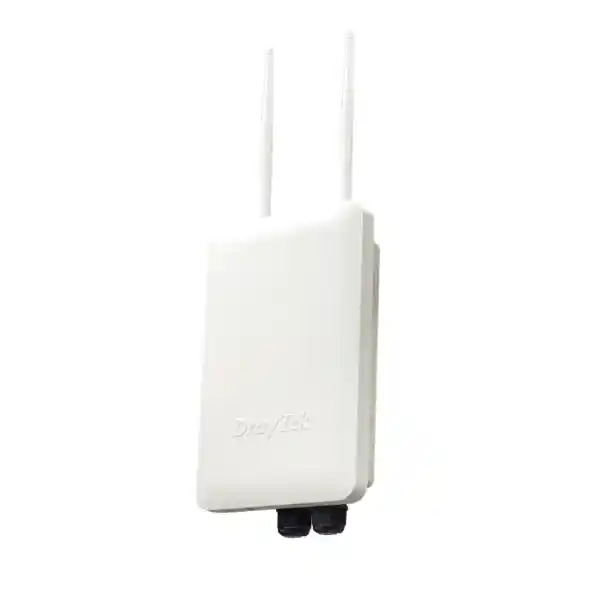
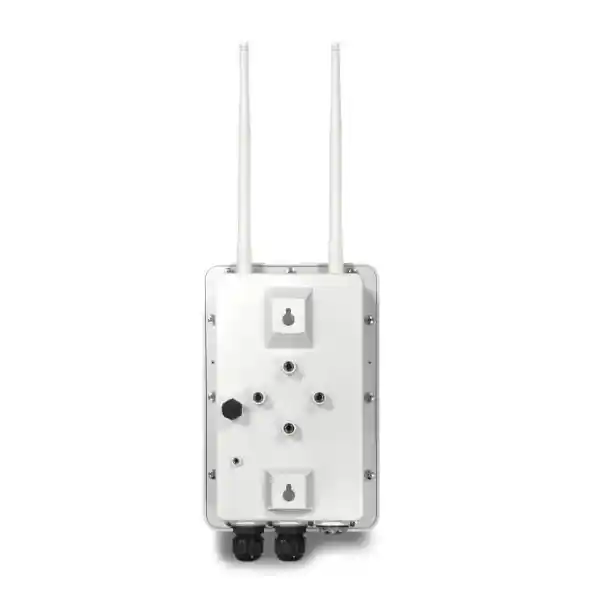
DrayTek VigorAP 918RPD Outdoor AC1300 Access Point
A rugged IP67 outdoor access point for organizations that need dependable dual-band Wi-Fi, mesh capability, enterprise authentication, assisted roaming, PoE-powered edge devices, and a practical path to centrally managed wireless coverage across campuses, compounds, hospitality areas, warehouses, yards, villas, schools, workshops, and other exposed environments in the United Arab Emirates.
What is the VigorAP 918RPD? It is DrayTek’s outdoor 802.11ac Wave 2 access point with dual Gigabit Ethernet, PoE input and PoE output, external dual-band antennas, an internal directional 5 GHz patch antenna, mesh operation, assisted roaming, VLAN-aware wireless services, and centralized management.
It is especially useful where one weather-resistant AP must provide Wi-Fi while also extending data and power to a nearby compatible PoE device such as an IP camera.
Why UAE organizations choose the VigorAP 918RPD
Outdoor resilience
The enclosure is IP67 rated for resistance to dust and water ingress. DrayTek specifies an operating temperature range from -40°C to 70°C, providing a broad environmental envelope for exposed deployments when installation, cabling, grounding, shading, surge protection, and local electrical practices are handled correctly.
AC1300 dual-band radio
The radio platform supports 802.11b/g/n on 2.4 GHz with a maximum link rate of 400 Mbps and 802.11a/n/ac Wave 2 on 5 GHz with a maximum link rate of 867 Mbps, giving a combined headline link rate of approximately 1.3 Gbps.
PoE input plus PoE output
The RPD model provides one Gigabit Ethernet PoE input and one Gigabit Ethernet PoE output. This can simplify outdoor topology by allowing the access point to receive power over Ethernet while supplying data and standards-based PoE to a second edge device, subject to a correctly sized upstream power budget.
Directional 5 GHz capability
In addition to two external dual-band dipole antennas, the 918RPD includes an internal directional 5 GHz patch antenna. That architecture supports deployment scenarios where a more focused 5 GHz radio pattern is desirable for long-range or point-to-point style connectivity.
Roaming and mesh
The platform supports mesh root and mesh node roles, along with assisted roaming features, PMK caching, pre-authentication and current DrayTek support for 802.11k, 802.11v and 802.11r capabilities. The result is a stronger foundation for multi-AP mobility than a collection of isolated standalone access points.
Central management choices
VigorAP 918R series devices can operate standalone, under compatible VigorRouter AP management, through VigorConnect, through VigorACS, or with a VigorAP acting as a root AP for centralized management of up to 30 node APs on the same LAN subnet.
DrayTek VigorAP 918RPD technical specification overview
The following table translates the manufacturer’s current product information into the details most useful for network design, procurement and implementation. Wireless link rates are physical-layer maximums rather than guaranteed application throughput, and real performance varies with client capability, radio conditions, channel width, interference, distance, network configuration and enabled services.
| Specification | VigorAP 918RPD detail |
|---|---|
| Product class | Outdoor dual-band 802.11ac Wave 2 access point |
| Maximum combined link rate | Up to approximately 1.3 Gbps: 400 Mbps on 2.4 GHz plus 867 Mbps on 5 GHz |
| 2.4 GHz standards | IEEE 802.11b/g/n |
| 5 GHz standards | IEEE 802.11a/n/ac Wave 2 |
| Antenna system | Two external dual-band dipole antennas plus one internal directional 5 GHz patch antenna |
| Ethernet | Two 1 Gigabit Ethernet interfaces |
| PoE input | PoE+ supporting IEEE 802.3af/at; specified input 48-56 V at 0.9 A |
| PoE output | PoE+ supporting IEEE 802.3af/at for powering a compatible downstream device |
| Power consumption | Up to 18 W for the AP; manufacturer lists up to 43.2 W maximum with PoE output in use |
| Outdoor rating | IP67 |
| Operating temperature | -40°C to 70°C |
| Storage temperature | -40°C to 85°C |
| Operating humidity | 5% to 95% non-condensing |
| Dimensions | 243 × 161 × 72 mm |
| Mounting | Outdoor wall or pole deployment; the RPD package includes the applicable mount kit and pipe clamp |
| Client scale | Series headline capacity up to 256 active users, with a stated maximum of 128 per radio |
| Wireless modes | Access Point, Mesh Root, Mesh Node and Range Extender |
| Roaming features | AP-assisted roaming, PMK caching, pre-authentication; current series information also describes 802.11k/v/r support |
| Traffic optimization | Airtime fairness, band steering and WMM |
| Security modes | OWE, WEP, WPA, WPA/WPA2, WPA2, WPA2/WPA3 and WPA3 options, subject to client compatibility and firmware |
| Authentication | Personal and Enterprise; built-in RADIUS server support is available |
| Network services | DHCP client, DHCP server, DHCP relay agent, static IP, MAC clone and 802.1Q tag-based VLAN |
| Monitoring and management | HTTP/HTTPS/Telnet local access, SNMP v1/v2c/v3, syslog, configuration backup/restore, e-mail alerts, firmware update via supported methods and centralized DrayTek management options |
| Environmental sensor | Integrated temperature and humidity sensor with threshold-driven monitoring/alert use cases |
Wireless architecture: what AC1300 means in a real deployment
AC1300 is a useful shorthand for the aggregate maximum physical link rates of the two radios, not a promise of 1.3 Gbps application throughput to a single user. The 2.4 GHz radio is rated up to 400 Mbps and the 5 GHz 802.11ac Wave 2 radio is rated up to 867 Mbps. A client device associates to one band and one access point at a time, so practical user throughput depends on the capabilities of that client, the negotiated modulation and spatial streams, protocol overhead, signal-to-noise ratio, channel width, neighboring networks, retransmissions and wired uplink conditions.
For outdoor business Wi-Fi, this distinction matters because high signal strength alone does not guarantee high capacity. A well-designed deployment must consider airtime. Older or distant clients consume more airtime for the same quantity of data than modern clients operating at higher modulation rates. The VigorAP’s airtime fairness function is designed to prevent slower devices from monopolizing transmission time, which is valuable in mixed client environments where smartphones, handheld terminals, laptops, scanners and embedded devices may all share the same radio.
Band steering helps encourage capable dual-band devices toward 5 GHz, leaving 2.4 GHz available for clients that require its propagation characteristics or do not support 5 GHz. In a UAE warehouse yard, hotel garden, school courtyard or villa compound, this can improve spectrum utilization when the RF plan has suitable 5 GHz coverage. It should not be treated as a substitute for coverage design: clients still make many roaming and association decisions themselves, and weak 5 GHz cells can push devices toward 2.4 GHz even when an administrator prefers the opposite.
The 802.11ac Wave 2 platform also supports MU-MIMO, which can improve efficiency when compatible clients and traffic patterns allow the AP to transmit to multiple clients in a coordinated manner. The practical benefit depends on the client population. This is why FourTeck recommends designing around application requirements and active-user concurrency rather than simply multiplying published PHY rates. For broader network architecture assistance, organizations can coordinate WLAN design with FourTeck IT Services UAE so switching, VLANs, WAN services, security, PoE budgets and wireless coverage are treated as one system.
Antenna design and the value of the internal directional 5 GHz patch
The VigorAP 918RPD combines two external dual-band dipole antennas with an internal directional 5 GHz patch antenna. That is a significant architectural difference from a simple outdoor omnidirectional access point. The external dipoles are suited to general coverage around the installation area, while the internal patch provides a focused 5 GHz radiation pattern that can be useful when the design calls for energy to be concentrated toward another location rather than spread equally in all directions.
A directional antenna does not create bandwidth; it changes where the radio energy is concentrated. In a point-to-point or point-to-area design, correct alignment can improve the received signal, reduce wasted radiation behind the AP and help overcome distance compared with an omnidirectional pattern. However, link quality still depends on clear line of sight, Fresnel-zone clearance, interference, permitted radio parameters, mounting stability, cable quality and the characteristics of the remote radio. Metal structures, reflective façades, loading bays, trees, vehicles and rooftop plant can influence outdoor RF more than a simple distance calculation suggests.
For installations that use the directional capability, mounting orientation should be documented. Technicians should know which surface points toward the intended remote area, and the mounting bracket must remain stable through wind, maintenance activity and seasonal conditions. A commissioning plan should include received-signal verification, throughput tests in both directions and monitoring under realistic traffic loads rather than relying only on a successful association indicator.
Directional-link planning questions
Confirm the distance, visual line of sight, mounting height, expected obstructions, regulatory channel options, desired throughput, acceptable latency, availability target, source and destination VLANs, surge-protection strategy, power source, cable route, grounding method and fallback path. A long-range wireless link should be treated as network infrastructure, not merely as an antenna alignment task.
PoE-in and PoE-out: a practical edge-network advantage
The second Gigabit Ethernet interface and PoE output are central reasons to select the RPD variant. In a conventional outdoor design, an access point and an IP camera might require separate cable runs back to a switch or separate local power sources. The 918RPD can receive data and power through its PoE input while making a second Ethernet connection available with PoE output for a compatible downstream device. This can simplify installation where pulling an additional cable is difficult, expensive or disruptive.
Power budgeting must still be engineered. DrayTek specifies PoE+ support on input and output and lists 48-56 V at 0.9 A for the RPD input. The AP itself has a listed maximum power consumption of 18 W, while the product specification lists a maximum of 43.2 W with PoE output. The upstream injector or switch port must therefore be selected with the intended downstream load in mind. A power source that is adequate for the AP alone may not be adequate once a camera, bridge or other PoE endpoint is attached.
A complete budget should include the upstream switch’s per-port limit, total chassis PoE budget, cable length, conductor quality, ambient temperature, connector integrity and the maximum draw of the powered device. The design should also consider what happens during boot, infrared illumination on cameras, heater activation or other peak-load conditions. Intermittent resets that appear to be network faults are often power-margin problems, particularly in outdoor installations.
The PoE-output topology also affects fault domains. If the upstream power to the VigorAP is interrupted, the downstream device loses power as well. That may be acceptable and operationally convenient, or it may be undesirable for a security camera that requires a separate resilience strategy. FourTeck can align access-point deployment with switching, surveillance and perimeter-network segmentation through the wider FourTeck UAE infrastructure portfolio.
IP67 construction, environmental range and UAE outdoor deployment
An IP67 rating means the enclosure is designed for a high level of protection against dust and water ingress under the conditions defined by the rating. It does not remove the need for correct installation. Outdoor reliability depends on the complete assembly: enclosure seals, cable glands, Ethernet jacket diameter, connector preparation, drip loops, mounting orientation, grounding, surge protection and the protection of upstream injectors or switches. DrayTek’s installation guidance specifically calls attention to the cable gland and rubber gasket because poor sealing can undermine the enclosure’s resistance to water ingress.
The manufacturer specifies -40°C to 70°C operating temperature and 5% to 95% non-condensing humidity. These figures give the AP a wide operating envelope, but a Dubai or wider UAE deployment should still avoid creating unnecessary thermal stress. South- or west-facing mounting on dark surfaces can result in high solar gain. Where practical, choose a location that preserves the intended radio pattern while avoiding heat traps, sources of hot exhaust, direct water jets and maintenance hazards. Shading must not obstruct the antenna pattern or create a structure that traps moisture around connectors.
Outdoor copper Ethernet also introduces electrical risk. The DrayTek guide instructs installers to ground the access point and warns against working on the system during lightning activity. A project design should therefore define the protective earth path, surge protection, building-entry protection where relevant and bonding practices appropriate to the site and local code. Qualified personnel should perform the installation. Outdoor networking is a combined RF, electrical and mechanical discipline.
In dusty industrial locations, periodic inspection is valuable even when the enclosure is rated for dust resistance. Teams should check mounting hardware, antenna tightness, connector seals, cable jackets, labels and visible corrosion. In coastal environments, salt exposure can accelerate material degradation. Preventive inspection schedules are inexpensive compared with troubleshooting an intermittent outdoor link after several years of exposure.
VLAN, SSID and security design for business networks
A professional WLAN should separate users and device classes according to business need. The VigorAP 918RPD supports 802.1Q tag-based VLAN operation and multiple SSIDs, allowing a network designer to map wireless services to different Layer 2 segments. An outdoor hospitality deployment, for example, can separate guest Internet access from staff devices and operational equipment. A warehouse can distinguish handheld scanners, contractor Wi-Fi and maintenance devices. A villa or residential compound can keep guest access isolated from cameras, building controls and trusted user devices.
Segmentation is useful only when the upstream network enforces it. The switch port carrying the AP should be configured for the appropriate tagged VLANs, the router or firewall should provide interfaces and policy for those VLANs, and DHCP/DNS behavior must be tested per segment. Administrators should avoid creating SSIDs without a documented business purpose because every additional SSID generates management overhead on the radio. The objective is not to maximize the number of visible networks but to create a small set of well-governed services.
Security choices include Personal and Enterprise authentication modes, with WPA-generation options that include WPA3 subject to firmware and client compatibility. Enterprise environments should consider 802.1X authentication backed by RADIUS when individual identity, centralized credential management or policy integration is required. The built-in RADIUS function can be valuable in appropriate smaller environments, while larger organizations may prefer a centralized identity platform or existing RADIUS service. The correct choice depends on resilience, user lifecycle, certificate strategy, logging requirements and administrative scale.
Legacy security modes may exist for compatibility, but compatibility should not automatically drive production policy. If an old device forces the network to use weaker settings, isolate that device class into a constrained VLAN and document the exception. WPA3 transition planning should include client testing because older clients, embedded equipment and some drivers can behave differently when modern security options are enabled.
For Internet-facing perimeter controls and segmentation policy around wireless networks, buyers can also reference Firewall Dubai by FourTeck. The access point provides wireless connectivity; the firewall, switching and identity layers determine how that connectivity is governed across the organization.
Roaming, 802.11k/v/r and mobility engineering
Roaming is often misunderstood as an access-point-only feature. In Wi-Fi, the client device plays a major role in deciding when to leave one AP and associate with another. Enterprise WLAN features can provide information, thresholds and mechanisms that make the transition faster and more predictable, but a poor RF design cannot be repaired solely by enabling roaming options. The current VigorAP 918R series feature set includes assisted roaming and describes support for 802.11k, 802.11v and 802.11r capabilities along with PMK caching and pre-authentication mechanisms.
802.11k helps compatible clients understand neighboring radio resources, 802.11v provides network-assisted information that can help steer clients, and 802.11r is designed to reduce authentication delay during transitions in supported configurations. These features are most valuable for latency-sensitive applications such as voice, video calls, mobile terminals and continuously connected business applications. They should be tested with the actual device population because client support and behavior varies.
The RF side of roaming starts with overlap. Adjacent APs need enough overlapping coverage for a client to hear a better candidate before the current connection becomes unusable, but excessive cell overlap can increase co-channel interference. Transmit power should therefore be part of the design. More power is not always better: if the AP can be heard much farther than a low-power mobile client can transmit back, the link becomes asymmetric. Balanced cells generally provide more predictable roaming than maximum-power cells.
For outdoor areas, walking routes matter. A site survey should include paths people actually take: gate to reception, warehouse to yard, restaurant to terrace, classroom block to courtyard, parking area to entrance, or security-post routes. Roaming acceptance tests should be performed while moving through those routes with representative devices and real applications, not just with static signal measurements.
Mesh operation: when wireless backhaul is useful and when wired uplink is better
The VigorAP 918RPD can operate as a Mesh Root or Mesh Node. Mesh can be extremely useful where Ethernet is unavailable at one or more AP positions, during staged deployment, or when temporary outdoor coverage is needed. It allows compatible access points to extend the WLAN using wireless links between nodes. The convenience is substantial, but every wireless backhaul design consumes radio capacity and is exposed to the same RF conditions as client traffic.
DrayTek itself recommends wired uplink where practical because a wired node does not experience the performance decay associated with wireless mesh backhaul. For permanent enterprise installations, Ethernet remains the preferred foundation when cabling is feasible. Wired uplink provides deterministic bandwidth, simplifies RF channel planning and makes it easier to understand performance under load. Mesh should be treated as an engineering option, not as an automatic replacement for structured cabling.
A hybrid design is often appropriate. Critical APs and high-traffic areas use Ethernet, while one or two difficult locations use mesh. The system can still be managed as a coordinated WLAN while limiting the amount of traffic that must traverse wireless backhaul. This is particularly relevant for large compounds where the marginal cost of trenching or conduit is high but key distribution points already have wired connectivity.
Mesh node placement should account for both client coverage and backhaul quality. An AP placed at the outer edge of coverage may serve clients but have a weak path to the root. Moving the node slightly closer to the root can often improve total user experience even if the client signal at the far edge decreases marginally. Design for end-to-end capacity, not only for the strongest local SSID signal.
Centralized management options for scalable operations
Root AP management
A VigorAP 918R series unit can function as a Root AP and manage up to 30 Node APs on the same LAN subnet. This can suit smaller and mid-sized sites that want centralized provisioning and visibility without introducing a separate controller appliance.
VigorRouter APM
Compatible DrayTek Vigor routers can provide AP management functions, bringing wireless configuration and monitoring closer to the routing platform and allowing a branch architecture to remain within the DrayTek management ecosystem.
VigorConnect
VigorConnect provides centralized network management for supported DrayTek devices. It can be useful where administrators want a dedicated management application for visibility, configuration workflows and operational consistency.
VigorACS
VigorACS supports broader centralized management and remote administration scenarios. It can be relevant to service providers, multi-site organizations and teams that need fleet-level visibility rather than isolated local web interfaces.
Whichever management method is selected, establish an operations baseline. Record firmware versions, management IPs, VLAN assignments, site names, AP names, radio channels, transmit-power policy, authentication methods, backup configuration location and administrator ownership. Central management creates the most value when configuration standards are documented and changes are controlled.
Built-in temperature and humidity sensor for operational awareness
The VigorAP 918RPD includes an internal temperature and humidity sensor. DrayTek positions this capability as a way to monitor local environmental conditions and trigger alerts when thresholds are reached. For an outdoor network, this is useful contextual telemetry. A sudden temperature increase, unusual humidity reading or repeated threshold event can help operations teams correlate environmental conditions with outages, enclosure placement, airflow or other physical factors.
Sensor readings should be interpreted as device-environment telemetry rather than as a calibrated building-management measurement unless the project has independently validated the sensor for that purpose. The access point is measuring the conditions around or within its operating environment, and factors such as solar exposure, mounting surface and internal heat can influence readings. It is most useful for trend monitoring and alerts related to the networking asset itself.
Integrate alert ownership into the support process. An alert that nobody receives or understands does not improve uptime. Define the threshold, recipient, severity and action: inspect the AP, review PoE and radio status, check local weather or site conditions, or dispatch a technician if the event persists. This turns a feature into an operational control.
Sizing methodology: how many VigorAP 918RPD units does a site need?
There is no reliable universal square-meter figure for outdoor Wi-Fi. Coverage depends on mounting height, obstructions, client transmit power, required data rate, frequency band, channel plan, interference, construction, landscape, antenna orientation and application requirements. A procurement plan that uses only an area measurement risks either dead zones or unnecessary AP density.
Start by defining the service requirement. A security guard using messaging and a mobile application needs far less capacity than an outdoor event area with hundreds of users streaming video. A warehouse scanner may require modest bandwidth but highly consistent roaming. An IP phone requires stable latency and packet delivery. A camera connected through the PoE-out port has a continuous wired data requirement that must share the AP’s uplink path. These requirements drive density and topology.
Next, map coverage zones and capacity zones separately. Coverage zones are places where a minimum usable signal is required. Capacity zones are places where many clients are expected simultaneously. One AP may cover a large open area from a signal perspective but still be insufficient when a dense group of users competes for airtime. Conversely, a small courtyard surrounded by reinforced walls may need more strategic placement than its area suggests.
Then model client mix and concurrency. The manufacturer highlights capacity up to 256 active users, with 128 per radio, but maximum association figures are not a recommended design target for high-throughput workloads. Capacity engineering should use expected simultaneous users, average and peak application demand, and acceptable contention. Keep design headroom for retransmissions, protocol overhead and future growth.
Finally, validate with a survey. Predictive modeling can identify likely AP locations, but a post-installation verification survey confirms what the environment actually does. For complex outdoor areas, temporary AP placement before final drilling or pole work can reduce rework. FourTeck can help align the wireless bill of materials with upstream switching, firewall capacity and cabling through its broader global infrastructure practice.
Recommended deployment patterns
Outdoor guest and staff Wi-Fi
Use separate SSIDs and VLANs for guest and corporate access, apply firewall policy upstream, enable band steering where appropriate, and provide overlapping AP coverage along movement paths. Suitable for hospitality terraces, schools, clinics, offices and mixed-use compounds.
Wi-Fi plus IP camera
Use PoE input to power the AP and PoE output for a compatible nearby camera. Keep camera traffic in a dedicated surveillance VLAN and verify the upstream PoE budget for the combined load. This design can reduce cabling to remote poles or perimeter positions.
Directional building-to-building link
Use the internal directional 5 GHz capability where the topology and remote endpoint are appropriate. Survey line of sight, Fresnel clearance and interference. Test throughput and stability under load before using the link for critical business services.
Warehouse yard and logistics area
Prioritize roaming paths for handheld terminals and operational devices. Account for moving vehicles, containers and metal racking that can alter RF conditions. Use wired uplinks when practical and reserve mesh for positions where cabling is genuinely difficult.
Villa and residential compound
Extend managed Wi-Fi to gardens, gatehouses, pools or detached structures while segmenting guest, family, IoT and security devices. Position APs to minimize excessive signal leakage beyond the property boundary where practical.
Temporary or staged expansion
Use mesh for a location awaiting structured cabling, then migrate the node to wired uplink later. This preserves operational continuity while moving toward a higher-capacity permanent design instead of treating temporary wireless backhaul as the final state by default.
Installation engineering checklist for Dubai and UAE projects
A reliable outdoor WLAN begins before the AP is powered on. The physical installation should be treated with the same discipline as the logical configuration. The following checks reduce avoidable faults and make future support easier.
Radio planning: channels, interference and transmit power
Outdoor radio planning should begin with a spectrum view. The 2.4 GHz band has limited non-overlapping channel options and is often crowded by neighboring Wi-Fi, IoT devices and other sources. The 5 GHz band offers more channel capacity, but available channels and permitted operation depend on regional regulatory settings and dynamic frequency selection requirements. Configure the correct country or regulatory domain and use channels permitted for the location.
Automatic channel selection can be helpful, but it is not a substitute for design in dense deployments. A multi-AP site should minimize co-channel interference while preserving adequate signal overlap for roaming. If adjacent APs share the same channel and can hear one another strongly, they share airtime even if users think of them as separate cells. A channel plan should therefore be documented and reviewed after installation.
Transmit power should be balanced with client capability. Many mobile devices transmit at lower power than an outdoor AP. If the AP transmits at maximum power, clients may still hear the SSID at long range but be unable to send frames back reliably. This creates the common symptom of “full Wi-Fi bars but poor Internet.” Reducing AP power and adding another appropriately placed AP can provide better two-way link quality than simply increasing output power.
Channel width is another trade-off. Wider channels increase potential PHY rate but consume more spectrum and are more vulnerable to interference. In a low-density clean environment, a wider 5 GHz channel may be beneficial. In a dense campus or hospitality deployment, narrower channels can improve reuse and aggregate capacity. The correct setting is site-specific and should be validated with active testing.
Performance expectations and application-level design
Published wireless link rates are useful for comparing radio generations, but business users experience application throughput, latency, jitter and reliability. Protocol overhead means useful TCP or UDP throughput is lower than the negotiated Wi-Fi PHY rate even in excellent conditions. Distance, contention and retransmissions reduce it further. A realistic design therefore sets application targets, such as stable voice, smooth video, scanner responsiveness or a minimum file-transfer speed, and tests those targets at representative locations.
For voice over Wi-Fi, latency and roaming behavior matter more than peak throughput. For an outdoor training area or guest venue, aggregate capacity across many devices may be the primary concern. For a point-to-point connection, sustained bidirectional throughput and packet-loss stability are more important than a short speed-test peak. For a PoE-connected camera, ensure that camera bitrate plus wireless client load can traverse the same upstream Ethernet connection with adequate margin.
Quality of Service can help prioritize traffic, and WMM support provides the Wi-Fi mechanism used by modern clients for access categories. End-to-end QoS still requires consistent treatment through the switch, router, firewall and WAN. Marking voice traffic at the AP has limited benefit if the upstream link is congested and ignores priority. Performance engineering should follow the packet from client to application.
When a site requires guaranteed service levels, establish acceptance criteria before installation. Examples include a minimum signal threshold, maximum packet loss, minimum throughput at defined test points, maximum roaming interruption for a supported device class, and verified operation of all intended VLANs. This makes project handover measurable rather than subjective.
Operational security and lifecycle management
Wireless security is not complete when the SSID password is configured. Administrators should protect the management plane, use HTTPS for administration where supported, limit management reachability to authorized networks, change default credentials during commissioning and keep firmware under a controlled update process. SNMPv3 is preferable where secure SNMP monitoring is required because it supports stronger authentication and privacy controls than older SNMP versions.
Configuration backups should be taken after commissioning and after major changes. Label backups with the device name, site, date and firmware version so recovery is predictable. A central inventory should record serial numbers, installation locations, switch ports, management addresses and warranty or procurement references. Outdoor APs are physically distributed assets, and poor inventory data turns a simple replacement into a prolonged discovery exercise.
Firmware management should include release-note review, compatibility verification and a rollback plan. Do not upgrade every production AP simultaneously unless the environment has been tested and an outage is acceptable. A phased approach—lab or pilot AP, small production group, then wider rollout—reduces risk. After an update, validate wireless association, authentication, mesh topology, VLAN tagging, PoE output if used, management visibility and roaming.
Logging is equally important. Send syslog to a centralized collector where practical and configure e-mail alerting for meaningful events. Alert fatigue is real, so choose thresholds and event types that trigger an actionable response. Centralized monitoring is most valuable when someone owns the response process.
Troubleshooting methodology for outdoor VigorAP deployments
A disciplined troubleshooting process separates physical, power, wired, RF, authentication and upstream routing problems. Start at Layer 1. Confirm the AP remains powered, the Ethernet link is stable, the upstream switch port is not erroring and the PoE budget has sufficient margin. If PoE-out is used, temporarily disconnect the downstream device to determine whether combined power draw is involved.
Next verify management reachability and configuration. Confirm the AP is on the expected management VLAN, has the correct address and can reach required services. Review event logs, uptime and environmental readings. A device that repeatedly reboots suggests a different investigation from a device that stays up while clients disconnect.
For client complaints, record the exact client type, location, time and SSID. “Wi-Fi is slow” is not enough. Check RSSI, band, channel, negotiated link rate, retries, roaming history, DHCP lease, DNS response and upstream latency. Compare an affected client with a known-good test device. If only one device type fails, driver or client compatibility may be more likely than an AP-wide fault.
For mesh issues, inspect the backhaul path and signal quality between nodes. A client can show excellent signal to a mesh node while the node itself has a weak link to its root, creating poor end-to-end performance. For directional links, inspect alignment and look for new obstructions such as construction equipment, signage, vegetation or relocated structures.
For intermittent outdoor faults, inspect the physical installation. Water ingress, loose glands, damaged cable jackets, corroded connectors, grounding issues and heat exposure may create failures that software diagnostics cannot resolve. Photos from the original installation are useful because they provide a visual baseline for later comparison.
VigorAP 918RPD vs VigorAP 918R: choosing the correct model
| Decision factor | VigorAP 918RPD | VigorAP 918R |
|---|---|---|
| Gigabit Ethernet | 2 ports | 1 port |
| PoE output | Yes, PoE+ 802.3af/at | No |
| Internal directional 5 GHz patch | Yes | No |
| General dual-band outdoor Wi-Fi | Yes | Yes |
| Best fit | Sites that benefit from PoE pass-through capability and/or directional 5 GHz deployment options | Sites that need a simpler outdoor AP without PoE-out or the RPD directional 5 GHz feature |
The RPD is not automatically better for every installation. If a project only needs standard outdoor dual-band Wi-Fi with one Ethernet uplink, the 918R may satisfy the requirement with less architectural complexity. Choose the RPD when its additional Ethernet/PoE capability or directional 5 GHz antenna directly supports the intended design.
Procurement considerations for Dubai and UAE buyers
A correct bill of materials includes more than the access point. Depending on the site, the project may require a PoE+ switch or injector with sufficient budget, outdoor-rated Ethernet, surge protection, patching hardware, mounting accessories, grounding materials, weatherproof junction arrangements, compatible downstream PoE devices and configuration services. Ordering the AP without these dependencies can delay installation even when the primary hardware is available.
Confirm regional product version and firmware requirements before rollout. Wireless features, permitted channels and transmit characteristics can vary by regulatory domain. The access point should be configured for the correct country, and enterprise deployments should standardize firmware rather than allowing a mixture of unmanaged versions. For fleet deployments, request consistent hardware and firmware planning as part of the quotation.
Define whether the quote is supply-only or includes design, configuration, installation, testing and support. Supply-only can be appropriate for experienced in-house teams with existing standards. Managed delivery is useful when the project spans outdoor mounting, VLAN configuration, firewall policy, PoE design, roaming tests or multi-site rollout. A clear scope avoids ambiguity over who is responsible for RF survey, cabling, civil work, electrical protection and final acceptance.
Organizations with projects beyond the UAE can coordinate broader sourcing and architecture through FourTeck global, while UAE-focused requirements can be handled through FourTeck UAE. The goal is to keep the wireless product choice aligned with the network around it rather than treating the AP as an isolated purchase.
Site-survey methodology before final placement
A survey for the VigorAP 918RPD should combine business requirements, RF measurements and physical inspection. Begin with a floor plan or site plan marked with required coverage zones, expected user density, application types and restricted mounting locations. Identify where Ethernet and PoE can be delivered, where poles or walls are structurally appropriate, and whether any directional 5 GHz link is expected.
Perform spectrum and Wi-Fi observations at different times if the environment is variable. A quiet morning reading may not represent a busy evening hospitality venue or an operating warehouse. Note neighboring SSIDs, channel utilization and non-Wi-Fi interference. For a long-range link, inspect the path visually and document the likely Fresnel zone rather than assuming that seeing the remote building is sufficient.
Temporary AP testing can validate assumptions. Place the AP near the proposed position with safe temporary power, configure representative channels and SSIDs, then measure signal and application performance at target locations. For roaming designs, test transitions between adjacent APs. For PoE-out use cases, connect the planned downstream endpoint and verify power stability during peak operation.
After permanent installation, complete a validation survey. Compare results with design targets, adjust channels and power where necessary, document final settings and store the survey with the project handover. Wireless environments evolve, so this document becomes the baseline for future troubleshooting and expansion.
Example logical architecture for a secure outdoor WLAN
Consider a business campus with indoor offices, an outdoor yard and a perimeter camera. The VigorAP 918RPD is mounted on a pole overlooking the yard. Its PoE input connects to a managed switch in the nearest communications room. That switch port carries a management VLAN plus tagged employee, guest and camera VLANs. The AP broadcasts an employee SSID using enterprise authentication and a guest SSID isolated to Internet access. The PoE-out port powers the nearby IP camera, whose traffic is placed in the surveillance VLAN.
At the firewall, each VLAN has a distinct policy. Employee devices may reach approved business services. Guest users can reach the Internet but not internal networks. The camera can communicate only with the video management platform, DNS/NTP as required and administration hosts. The management VLAN is reachable only from IT administration networks. Logging records significant policy events.
If a second outdoor AP is added on the opposite side of the yard, it is connected by Ethernet where possible and given a coordinated channel and power plan. The same SSIDs and authentication policies are provisioned to support roaming. If cable is temporarily unavailable, mesh can provide interim connectivity, with a later migration to wired uplink when civil work is completed.
This example illustrates the role of the AP as one component in a layered design. Wireless authentication, VLAN tagging, switching, firewall policy, DHCP, DNS, monitoring and physical installation all contribute to the final service. FourTeck’s UAE IT services team can scope these layers together where customers want a single implementation plan.
Commissioning sequence for a production-ready installation
Frequently asked technical questions
Is the VigorAP 918RPD Wi-Fi 6?
No. The 918RPD is an 802.11ac Wave 2 product, commonly described as Wi-Fi 5 class. It supports 2.4 GHz 802.11b/g/n and 5 GHz 802.11a/n/ac Wave 2. Buyers specifically requiring 802.11ax should evaluate a Wi-Fi 6 model instead.
Can it power an IP camera?
The RPD model has a PoE+ 802.3af/at output intended to supply power and data to a compatible downstream device such as an IP camera. Confirm the camera’s PoE class and maximum draw, and ensure the upstream power source has enough budget for both the AP and the connected device.
Can it be used for mesh Wi-Fi?
Yes. It supports Mesh Root and Mesh Node modes. Wired uplink is still preferred when feasible because wireless mesh backhaul shares radio resources and can reduce available throughput.
Can the VigorAP 918RPD handle 256 users?
DrayTek lists a series headline capacity up to 256 active users, with a maximum of 128 per radio. That figure should not be treated as a guarantee of high application throughput for 256 simultaneous heavy users. Practical sizing must consider airtime, application demand, client capability and RF conditions.
Does it support WPA3?
The current specification matrix includes WPA3 and WPA2/WPA3 options along with earlier modes. Client compatibility and firmware should be validated before production rollout, especially in environments with older embedded devices.
Can it be centrally managed?
Yes. Management options include DrayTek Root AP management, compatible VigorRouter AP management, VigorConnect and VigorACS. A Root AP can manage up to 30 node APs on the same LAN subnet according to current series information.
Is IP67 enough for every outdoor location?
IP67 provides strong enclosure protection, but project reliability still depends on proper cable sealing, grounding, surge protection, UV-resistant cabling, mounting, drainage and thermal exposure. Use qualified installation practices rather than relying on the enclosure rating alone.
Does the internal directional antenna replace the external antennas?
No. The RPD combines two external dual-band dipole antennas with an internal directional 5 GHz patch antenna. The directional element provides an additional focused 5 GHz capability for suitable link designs.
Deployment documentation that should accompany the AP
A mature network handover does not stop at username and password. For each VigorAP 918RPD, record the site name, exact physical location, mounting height, orientation, switch name and port, cable identifier, PoE source, management IP address, VLANs, SSIDs, firmware version, radio channels, transmit-power settings, upstream gateway and monitoring destination. If the directional antenna is used for a link, document the remote endpoint and alignment.
Include photographs of the installation showing the mounting bracket, cable entry, drip loop, grounding, antenna orientation and nearby environment. For a pole-mounted unit, include enough visual context that another technician can find and identify the device without relying on tribal knowledge. For sites with many APs, adopt a naming convention that encodes site and location rather than using generic labels such as AP1 and AP2.
Store an exported configuration backup in a controlled repository, along with a record of the administrator account ownership and recovery procedure. Document who is authorized to change settings and how changes are approved. If centralized management is used, record which platform owns the configuration to avoid technicians making local changes that are later overwritten by the controller.
Finally, include the acceptance-test results. A future engineer should know what “working correctly” looked like at handover: signal levels, throughput at key points, camera PoE operation, roaming behavior and any known coverage limitations. This turns the installation into a maintainable service instead of an undocumented device on a wall or pole.
Capacity planning for mixed business traffic
Outdoor networks frequently carry a more diverse mix of traffic than indoor office WLANs. A single VigorAP 918RPD might serve staff phones, guest devices, rugged handheld terminals and an IP camera connected to PoE-out. Each traffic class behaves differently. Cameras generate relatively steady upstream traffic. Video calls are bidirectional and latency-sensitive. Guest devices can create short high-volume bursts. Scanner traffic may be low bandwidth but operationally critical.
Start with the wired uplink. The AP has Gigabit Ethernet, so all wireless and downstream PoE-device traffic ultimately shares the available Ethernet path toward the network. Gigabit capacity is ample for many deployments, but the design must still ensure that upstream switches and trunks are not congested. If multiple APs aggregate into the same switch or uplink, size that aggregation based on realistic concurrent traffic rather than simply counting ports.
On the radio side, the scarce resource is airtime. A client at the edge of coverage can consume disproportionate airtime because lower modulation rates require more time to transmit data and retransmissions increase overhead. This is why capacity planning and coverage planning are linked. Improving cell placement can increase aggregate capacity without changing the AP model because clients operate at healthier radio rates.
For busy public areas, measure concurrent usage during peak periods and design with spare capacity. Capacity should not be sized to average daily load if short peak events define the user experience. If a venue has predictable events, schedule monitoring around those events and use the data to decide whether additional APs are needed.
Using the VigorAP 918RPD in security-conscious environments
Outdoor APs can sit in physically accessible or semi-accessible areas, which increases the importance of management isolation and switch-port security. Place management interfaces on a restricted network, prevent guest VLANs from reaching AP administration addresses and use firewall rules to constrain management protocols to authorized IT hosts. Do not expose the management interface directly to the public Internet.
Physical network ports also deserve attention. The PoE-out port should connect only to the intended downstream device, and the cable path should be secured where practical. If the downstream device is physically accessible, consider switch-level controls and VLAN restrictions that limit what a substituted device could reach. A camera VLAN, for example, should not have unrestricted access to business systems.
Authentication policy should match the user population. Employee WLANs can use enterprise authentication when supported by the organization’s identity architecture. Guest WLANs should be isolated from internal resources and may use portal or guest-access mechanisms appropriate to the site. IoT devices that cannot use enterprise authentication should be segregated and permitted only the network flows they actually need.
Security design benefits from coordination between wireless and firewall policy. FourTeck can align the AP with suitable perimeter and segmentation architecture through Firewall Dubai while keeping the physical and switching design consistent with the WLAN requirements.
When the VigorAP 918RPD is a strong fit—and when to choose another class of AP
The 918RPD is a strong fit when the project specifically needs a weather-resistant Wi-Fi 5 access point with dual Gigabit Ethernet, PoE-in and PoE-out, mesh flexibility and a directional 5 GHz option. It is well aligned with outdoor business coverage, perimeter installations, campus extensions, camera-plus-Wi-Fi poles, hospitality exteriors and deployments where centralized DrayTek management is already part of the network strategy.
A different AP class may be preferable when the requirement mandates Wi-Fi 6 or newer standards, multi-gigabit Ethernet, very high-density event capacity, specialized sector antennas, integrated cellular backhaul or a particular cloud-management ecosystem. Product selection should begin with requirements rather than forcing a familiar model into a job it was not designed to solve.
Similarly, if the site only needs simple outdoor Wi-Fi and does not benefit from PoE output or the directional antenna, a less complex model may be more economical. If the design requires powering a nearby camera and creating a focused 5 GHz connection, the RPD’s additional capabilities can reduce external hardware and cabling.
The most efficient procurement process is therefore requirement-led: state the coverage zones, client counts, applications, mounting environment, power availability, desired management platform, security requirements and whether a downstream PoE device is planned. FourTeck can then validate whether the 918RPD matches those requirements before finalizing the bill of materials.
UAE project rollout approach for multiple outdoor APs
For multi-building or multi-site UAE deployments, standardization reduces long-term operating cost. Define a reference configuration with approved firmware, management settings, SSID names, VLAN mappings, security profiles, syslog destinations, SNMP settings, radio policy and alerting. Clone the standard through the chosen management method and change only site-specific values such as IP addressing, channels or device names.
Roll out in phases. Install a pilot group at one representative site, observe performance through normal business cycles, capture support issues and update the standard before mass deployment. A pilot should include the hardest use case, not the easiest: high heat exposure, mesh backhaul, roaming, PoE-out camera or long-range 5 GHz link if those are part of the wider project.
Create a consistent labeling and inventory convention. A device name such as DXB-WH1-YARD-AP03 conveys more operational value than VigorAP-3. Use the same identifier in the management platform, switch description, cable label, documentation and support ticketing. Standardization shortens troubleshooting because everyone refers to the same asset in the same way.
Plan spares according to site criticality and replacement lead time. For business-critical remote sites, holding a pre-staged spare can reduce outage duration. The spare should be periodically checked for firmware alignment and configuration readiness rather than remaining forgotten in a storeroom until an emergency.
Decision recap: what you are buying with the VigorAP 918RPD
Quotation input checklist
For a fast and accurate DrayTek VigorAP 918RPD quotation in Dubai or elsewhere in the UAE, provide the following project details. These inputs help determine AP quantity, PoE requirements, mounting materials, switches, configuration scope and whether a survey is recommended.
Emirate, site type, outdoor dimensions, required coverage zones, mounting heights and available poles/walls.
Estimated peak concurrent users, device types and applications such as voice, video, guest Internet, scanners or tablets.
Existing PoE switch model and budget, cable distance, and whether PoE-out will power a camera or another endpoint.
Required SSIDs, VLANs, firewall model, DHCP source, RADIUS/identity integration and management platform.
If required, provide endpoint locations, approximate distance, line-of-sight information and intended bandwidth/application.
Specify supply-only, configuration, installation, outdoor cabling, survey, testing, documentation, support or multi-site rollout.
Plan the VigorAP 918RPD as part of the complete network
FourTeck can help scope the VigorAP 918RPD for UAE environments where outdoor Wi-Fi must integrate with switching, PoE, VLANs, firewall policy, cameras, authentication and centralized management. A design review can confirm whether the RPD model is appropriate, how many units are required, whether wired or mesh uplink should be used and what supporting components belong in the bill of materials.
For general company and infrastructure information, visit FourTeck UAE. For implementation and managed network support, see IT Services UAE. For security integration around guest, staff, IoT and surveillance VLANs, review Firewall Dubai. International requirements can be coordinated through FourTeck Global.
What FourTeck needs from you
Send the site location, expected users, coverage area, existing switch/firewall details, number of PoE devices, mounting preference and whether you need survey, supply, configuration, installation or support. That information allows the quotation to reflect the real topology rather than a generic AP count.

Reviews
There are no reviews yet.