
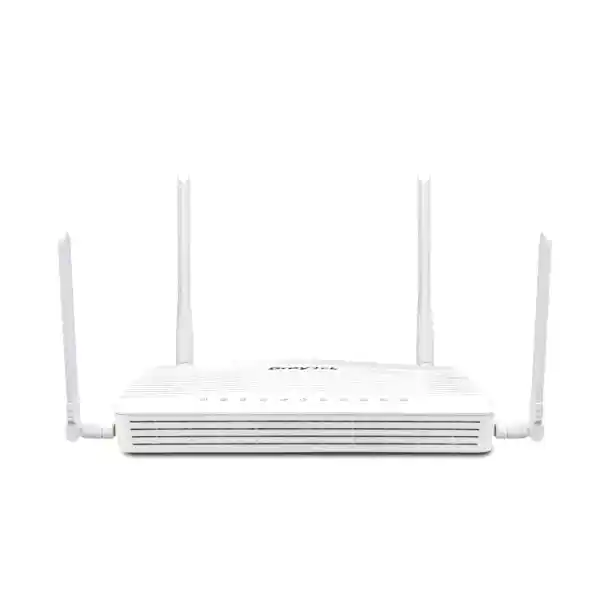
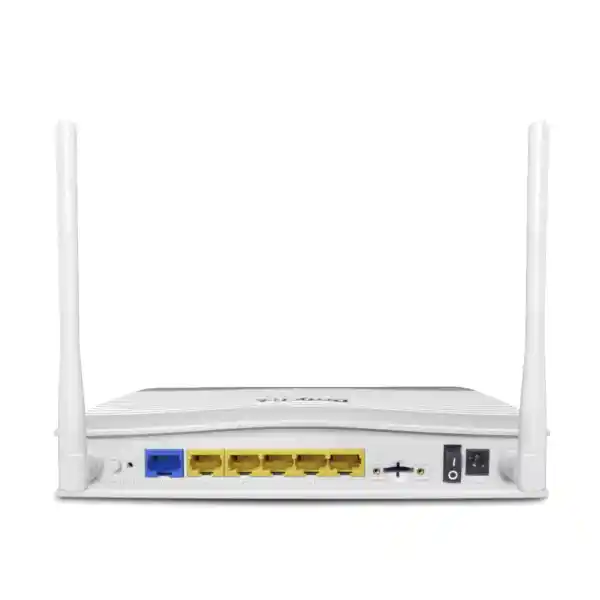
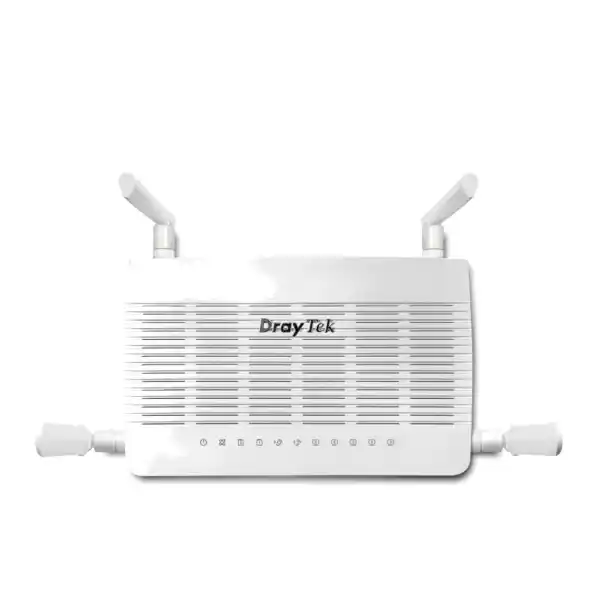
DrayTek Vigor C410 in Dubai, UAE
The DrayTek Vigor C410 is designed for organizations that need dependable cellular internet, secure site connectivity, structured network segmentation, and practical failover controls without moving to a large rack-mounted security appliance. Its integrated LTE Cat 6 modem, dual nano-SIM design, enterprise routing stack, VPN services, firewall functions, policy controls, hotspot features, and Gigabit Ethernet interfaces make it suitable for branch offices, retail stores, construction sites, warehouses, security installations, temporary offices, mobile operations, and business continuity deployments across the UAE.
Plan the router around carrier coverage, LTE signal quality, VPN load, VLAN count, user count, application mix, and continuity requirements rather than selecting solely by headline throughput.
Direct Answer: What Is the DrayTek Vigor C410?
The DrayTek Vigor C410 is a compact business-class 4G LTE cellular WAN security router built to provide internet connectivity, traffic control, branch security, remote-access capability, and WAN resilience in locations where fixed broadband is unavailable, delayed, unreliable, or intentionally supplemented by cellular service. DrayTek positions the C410 family for always-on cellular connectivity, with the embedded modem acting as a primary WAN option while Ethernet and, on supported variants, wireless WAN can participate in backup or failover strategies. The non-wireless Vigor C410 is the focus of this page; organizations requiring integrated Wi-Fi 6 should evaluate the Vigor C410ax variant separately because wireless specifications differ by model.
The router integrates an LTE Category 6 modem capable of up to 300 Mbps theoretical receive rate and up to 50 Mbps transmit rate under supported carrier, spectrum, radio, and network conditions. Two nano-SIM slots allow administrators to provision two mobile operators or two service plans while keeping one SIM active at a time. This dual-SIM arrangement is valuable in the UAE for resilience planning because carrier performance can differ substantially between buildings, industrial zones, basements, remote compounds, and temporary project sites. The objective is not to assume that both SIMs aggregate bandwidth; instead, dual SIM capability provides an operational path for changing or failing over between cellular subscriptions according to the configured policy and service condition.
Beyond cellular access, the Vigor C410 is a complete routing and security platform. It supports VLANs, multiple LAN subnets, policy routing, dynamic routing functions, IPv4 and IPv6 services, VPN technologies, content controls, quality of service, application-aware policies, remote administration, monitoring, centralized deployment workflows, and managed-network integration with supported DrayTek switches and access points. This combination makes the device particularly useful when a customer needs more than a consumer 4G hotspot and requires deterministic network segmentation, site-to-site connectivity, auditable administration, and business-grade traffic governance.
Core Hardware and Performance Profile
Integrated 4G LTE
LTE Cat 6 cellular modem with carrier aggregation support and vendor-stated maximum link rates up to 300 Mbps download and 50 Mbps upload under suitable network conditions.
Dual Nano-SIM
Two nano-SIM slots provide service-provider flexibility and resilience planning. One SIM is active at a time, which helps organizations design cellular failover without external USB modems.
VPN Capacity
Support for up to 16 VPN tunnels and vendor-stated IPsec throughput up to 370 Mbps, subject to encryption choices, packet size, services enabled, and real-world network conditions.
Gigabit Ethernet
A Gigabit Ethernet WAN port, a switchable LAN/WAN Gigabit port, and four fixed Gigabit LAN ports provide flexible handoff and segmentation for business deployments.
Why a Cellular Security Router Matters in the UAE
Connectivity projects in Dubai, Abu Dhabi, Sharjah, Ajman, Ras Al Khaimah, Fujairah, and industrial zones often face practical constraints that are not visible in a normal office broadband specification. A new branch may open before fiber is installed. A construction compound may be relocated. A retail kiosk may need immediate payment connectivity. A warehouse may require camera backhaul, handheld scanners, and cloud applications while the permanent circuit is still being delivered. A business with a strong fixed line may still need a secondary path that does not depend on the same civil infrastructure. In these cases, an embedded LTE router can shorten deployment time and create a physically diverse continuity option.
The Vigor C410 addresses these use cases by combining the cellular modem and the security router in one managed platform. This matters operationally because the IT team does not need to treat the cellular device as an unmanaged upstream hotspot. VLANs, IP policies, firewall restrictions, VPN rules, user-facing services, and monitoring can remain under the control of the router. When a branch relies on cloud ERP, Microsoft 365, hosted telephony, web applications, CCTV remote viewing, POS terminals, or secure corporate access, maintaining policy consistency between fixed WAN and cellular WAN can reduce configuration drift and simplify troubleshooting.
UAE cellular performance varies by building construction, antenna placement, tower loading, operator spectrum, local radio interference, and subscription profile. For that reason, FourTeck recommends treating LTE link-rate figures as engineering maxima rather than guaranteed application throughput. A robust deployment includes a signal survey, careful antenna positioning, provider testing, data-plan review, VPN sizing, and an agreed failover policy. For organizations that need implementation assistance, FourTeck can coordinate routing, firewall, structured IT, and branch deployment services through FourTeck IT Services UAE.
Port Architecture and Physical Connectivity
The Vigor C410 is designed around practical branch connectivity rather than high-density switching. The platform provides one fixed Gigabit Ethernet WAN port, one Gigabit Ethernet port that can be switched between LAN and WAN roles, and four fixed Gigabit Ethernet LAN interfaces. This architecture gives network designers a useful balance: a dedicated wired uplink can coexist with the built-in cellular WAN, the switchable port can provide additional WAN or LAN flexibility, and local devices can connect directly where a separate access switch is unnecessary. For larger sites, the router can uplink to managed switching infrastructure and use VLAN trunks or segmented access ports according to the required topology.
The dual nano-SIM slots sit at the core of the cellular design. Because only one SIM operates as the active cellular connection at a time, they should be viewed as resilience resources rather than parallel data pipes. An enterprise deployment may install SIMs from separate mobile operators to reduce exposure to a single provider event, but the real benefit depends on whether the two operators have sufficiently diverse radio infrastructure and coverage at the site. Administrators should document which SIM is primary, the intended failover condition, any data caps, roaming restrictions, APN settings, and escalation process.
Two external LTE antenna connections allow the cellular radio to benefit from appropriate antenna placement. This is especially important in reinforced concrete buildings, equipment rooms, metal-clad warehouses, basements, security cabins, remote pump rooms, and temporary site offices where a router placed for convenient cabling may not be positioned for strong radio reception. The correct design can separate network-equipment placement from antenna placement within the limits of appropriate cabling and RF engineering. Signal quality should be checked using actual router radio metrics rather than relying only on a phone’s signal bars.
The unit is compact, with vendor-published dimensions of approximately 207 x 131 x 42 mm. The operating environment specified by the manufacturer spans 0 to 45 degrees Celsius with non-condensing humidity from 10 to 90 percent. UAE deployments therefore need sensible thermal planning. The device should not be installed in an unventilated outdoor box exposed to direct summer heat unless the enclosure and environmental system are engineered to keep the router within its specified operating range.
LTE Cat 6 Connectivity: What the 300 Mbps Figure Really Means
LTE Category 6 supports carrier aggregation, allowing compatible networks to combine supported radio resources and deliver higher theoretical throughput than older single-carrier LTE categories. DrayTek publishes up to 300 Mbps receive and 50 Mbps transmit link rates for the Vigor C410. These numbers describe a best-case modem capability under suitable LTE network conditions; they are not guaranteed internet speed. Real throughput depends on radio band availability, cell congestion, signal-to-noise ratio, antenna placement, operator configuration, SIM plan restrictions, backhaul capacity, packet overhead, VPN encryption, and the application traffic pattern.
The router supports multiple LTE FDD bands, including bands commonly used in international and regional deployments, as well as TDD bands. Band compatibility is only one part of carrier suitability. Before procurement, the project team should confirm the exact hardware region, local operator certification expectations, supported bands for the chosen network, APN parameters, whether the subscription permits router use, and whether public or private addressing is required. Some mobile services place customers behind carrier-grade NAT. This may affect inbound VPN initiation, remote services, port forwarding, and certain monitoring tools. If inbound reachability is required, the mobile operator may need to provide a business APN, static address, private APN, or another service model.
For branch-to-head-office connectivity, outbound-initiated VPN designs can often operate successfully even when the LTE side is behind provider NAT, depending on the chosen VPN technology and peer configuration. For inbound access from the public internet, addressability needs to be confirmed explicitly. A well-designed scope therefore separates three questions: whether the radio link is strong enough, whether the data plan provides sufficient bandwidth and allowance, and whether the IP service characteristics support the intended application.
Organizations should also consider uplink performance. Cloud backup, video surveillance, remote desktop traffic, VoIP, and site-to-site replication can be sensitive to upload bandwidth and latency. An LTE plan that performs well for web browsing may not provide the same experience for continuous video streams or large upstream transfers. Application testing during the site survey is more valuable than assuming that download speed alone defines suitability.
Dual-SIM Resilience and Carrier Strategy
Primary + Secondary Operator
A common UAE design uses one operator as the preferred cellular service and a second operator as the contingency path. This can improve resilience when the operators provide genuinely different coverage behavior at the site.
Data Plan Governance
Both SIMs should be documented with plan type, monthly data allowance, fair-use policy, static or dynamic addressing, APN, renewal date, billing owner, and escalation contact. Failover is only useful if the secondary plan is active and funded.
Signal Diversity
Provider diversity can reduce risk, but it does not guarantee infrastructure diversity. A survey should compare signal metrics and application performance for both SIMs from the actual router location.
Operational Testing
Failover should be tested during commissioning, then retested after major firmware changes, carrier changes, SIM replacement, or topology changes. The test should confirm route behavior, VPN recovery, DNS operation, and critical application reachability.
A dual-SIM router does not automatically create high availability if the surrounding process is weak. Teams should know which services are expected to survive a cellular transition, how long reconvergence may take, which alarms are generated, and how the device returns to the preferred path. Where connectivity is business critical, failover design should include DNS behavior, VPN tunnel re-establishment, stateful application tolerance, voice-call impact, public IP changes, and session persistence expectations. This is particularly relevant for POS applications, remote surveillance, hosted PBX services, and cloud platforms that maintain long-lived sessions.
Firewall and Security Controls
The Vigor C410 is more than a modem. Its firewall and policy features allow administrators to control which networks, hosts, ports, applications, and destinations can communicate. At a branch, this matters because LTE connectivity may otherwise become a flat internet path shared by workstations, cameras, guest devices, IoT equipment, and management interfaces. Segmentation reduces lateral movement risk and makes policy intent easier to understand. For example, CCTV cameras can be limited to NVR and management destinations, guest users can be internet-only, payment systems can use a dedicated VLAN, and administrative interfaces can be restricted to IT subnets or VPN users.
The router supports content filtering and URL-related controls that can help enforce acceptable-use requirements. These tools should be applied with realistic expectations. Content categorization can reduce exposure and improve policy enforcement, but it does not replace endpoint protection, secure DNS strategy, email security, identity controls, patch management, or security awareness. Encrypted web traffic and modern cloud applications also mean that policy design must consider what the gateway can see without disrupting legitimate services.
DrayTek includes features such as port knocking, management access controls, brute-force protections, and network-level spoofing defenses in the platform feature set. Secure deployment still depends on configuration discipline. Default credentials must be changed, management should use encrypted protocols, remote administration should be restricted, firmware should be maintained, unnecessary services should be disabled, configuration backups should be protected, and administrative access should be logged and reviewed. Where internet-facing services are unavoidable, source restrictions and VPN-based administration are generally preferable to broad management exposure.
For projects that require additional firewall platforms, security appliances, or broader UAE network integration beyond the C410 itself, customers can review complementary solutions through Firewall Dubai by FourTeck. The correct design depends on branch size, inspection requirements, regulatory needs, application criticality, and whether the C410 is acting as the primary security gateway or as a cellular edge device in front of another firewall.
VPN Capabilities for Branches and Remote Access
The Vigor C410 supports up to 16 VPN tunnels, giving small and midsize branch environments enough capacity for common site-to-site and remote-access designs. DrayTek lists support for IPsec, L2TP over IPsec, IKEv1 and IKEv2, IKEv2-EAP, IPsec XAuth, OpenVPN, and WireGuard within the platform feature set. The best protocol should be selected according to peer compatibility, security policy, authentication requirements, performance targets, administrative standards, and client support.
DrayTek publishes IPsec throughput up to 370 Mbps for the Vigor C410 under its test conditions. In production, encrypted throughput can be lower depending on encryption suite, packet size, concurrent tunnels, QoS, firewall policies, logging, traffic direction, and internet-path quality. Cellular WAN itself can also become the bottleneck before the VPN engine. Therefore, a branch planning to send all traffic through a headquarters tunnel should be sized differently from a branch using split tunneling for cloud applications with only corporate traffic sent through VPN.
Site-to-site VPN design should define local and remote subnets cleanly. Overlapping IP ranges are a common source of deployment problems when multiple branches are connected after independently using the same private network. A structured addressing plan avoids this issue. VLAN and subnet assignments should also leave room for guest access, voice, cameras, management, IoT, and future services. Where many branches are expected, a repeatable template is preferable to unique per-site addressing decisions.
Authentication is another important consideration. Pre-shared keys may be suitable for certain controlled site-to-site deployments, while certificate-based authentication can improve manageability and identity assurance in larger environments. Remote users should be given the minimum routes and permissions required for their roles. Administrative access to the router should not automatically be available to every VPN user. Separate access policies, management groups, and logging practices help maintain operational security.
When VPN is carried over mobile internet, administrators should test tunnel recovery after SIM failover, IP address changes, temporary radio loss, and upstream NAT changes. The objective is not only to establish a tunnel once but to prove that the branch returns to service predictably after the failure modes the design is intended to survive.
Routing, Policy Control, and Multi-WAN Logic
Business routers are differentiated from consumer gateways by the degree to which traffic paths can be controlled. The Vigor C410 supports policy-based routing and static or dynamic routing functions suited to branch integration. This allows the network team to make decisions based on source, destination, service type, or route policy rather than sending all traffic through a single default path. In a mixed WAN deployment, critical business traffic may be directed toward a preferred service while backup routes remain available for continuity.
The switchable Gigabit LAN/WAN port gives the hardware additional flexibility. One design may use the dedicated Ethernet WAN for a fixed broadband service and retain LTE as the resilient secondary path. Another may use LTE as the principal access method while keeping Ethernet ready for a temporary wired handoff. At some project sites, the router can operate as the main internet gateway until fiber is delivered, then transition to a backup role without discarding the original investment.
Connection detection should be designed around actual service availability rather than physical link state alone. An Ethernet port can remain electrically up while the upstream internet service is unusable. Similarly, a cellular modem can remain registered while application traffic is impaired. Appropriate monitoring targets and failure criteria help the router make better path decisions. Overly aggressive thresholds can cause route flapping; overly permissive thresholds can delay failover. The correct balance depends on the branch application set.
Dynamic routing support can help when the C410 participates in a more sophisticated enterprise network, but it should be enabled only where there is a clear routing requirement and administrative capability. Simple branches may be better served by static and policy routes that are easier to audit. Complex sites can benefit from protocols such as OSPF or BGP when network architecture, peer support, route filtering, and change control justify them.
VLAN Segmentation for Secure Branch Design
The Vigor C410 supports IEEE 802.1Q tag-based VLAN operation and multiple LAN subnet functions. This makes it possible to isolate business roles without deploying a separate router for every function. A typical branch could place corporate workstations on one VLAN, voice devices on another, guest access on another, cameras on a restricted surveillance VLAN, and network management on a dedicated administrative network. The router then becomes the policy enforcement point for inter-VLAN traffic and internet access.
Segmentation should follow business need rather than creating VLANs simply because the feature exists. Each network introduces DHCP scope planning, firewall policy, monitoring, documentation, and troubleshooting requirements. A small site with five trusted devices may not need the same segmentation model as a retail branch with POS terminals, guest Wi-Fi, digital signage, IP phones, cameras, and contractor devices. FourTeck normally recommends identifying trust boundaries first, then mapping those boundaries to VLANs and subnets.
Inter-VLAN access should default to the minimum required. Cameras generally do not need to initiate sessions to corporate PCs. Guest users generally do not need access to internal servers. Printers may need carefully scoped access from selected user networks. Voice devices require call-control and provisioning access but not unrestricted access to administrative systems. Management interfaces should be reachable only from authorized administrative networks or secure VPN sessions.
When the router uplinks to a managed switch, the switching configuration must match the router’s VLAN tagging expectations. Native VLAN mismatches, untagged-port assumptions, incorrect trunk membership, and DHCP scope errors are frequent deployment issues. Commissioning should validate each VLAN with a known test device and confirm address assignment, DNS resolution, internet access, inter-VLAN restrictions, and management reachability.
Quality of Service for Voice, POS, and Critical Applications
Cellular bandwidth is variable, so quality of service becomes especially important when a branch shares the LTE link across multiple application classes. Without traffic management, a large cloud synchronization job, operating-system update, or camera upload can consume available bandwidth and degrade interactive services. QoS allows administrators to classify and prioritize important flows so that business-critical applications receive more predictable treatment during congestion.
Voice over IP is a common example. Voice quality depends on latency, jitter, and packet loss more than raw bandwidth. A branch may have sufficient total throughput but still experience poor calls when bursty traffic fills the uplink queue. Prioritizing voice signaling and RTP media can improve consistency, but the policy must be matched to the actual hosted PBX or SIP service. Over-prioritizing large traffic categories can simply move congestion elsewhere.
Payment terminals and POS applications usually consume little bandwidth but can be operationally critical. They should be protected from unnecessary contention and isolated from guest traffic. Cloud ERP, remote desktop, line-of-business applications, and VPN traffic may also benefit from differentiated handling. The policy should reflect business impact rather than protocol alone.
On LTE links, upstream capacity may be significantly lower than downstream capacity, making egress shaping particularly important. Administrators should measure realistic upload performance at the site and configure traffic policies conservatively. A policy based on an assumed 50 Mbps upload can fail if the real link provides only a fraction of that rate during busy periods.
Hotspot and Guest Access Scenarios
The Vigor C410 platform includes hotspot web portal capabilities and several authentication approaches, allowing it to support controlled guest or temporary access designs when paired with the appropriate LAN or wireless infrastructure. The non-wireless C410 can connect to external access points, while policy and portal functions remain centralized at the router. This can be useful for reception areas, retail branches, project offices, training spaces, temporary events, and other environments where guest internet should be separated from corporate resources.
Guest access should use its own VLAN and subnet. Firewall rules should prevent guest devices from reaching management interfaces, corporate endpoints, cameras, printers, or other internal services unless a specific business exception exists. Bandwidth limits can protect the cellular link from excessive guest consumption. Session timeouts, acceptable-use notices, logging policy, and authentication method should be aligned with organizational requirements and applicable local policies.
A captive portal is not a substitute for wireless security. External access points should still be configured with appropriate encryption and client isolation where required. If the project needs a larger managed wireless environment, the Vigor C410 can participate in DrayTek’s broader device-management ecosystem, but AP model selection, roaming requirements, RF design, and client density should be assessed separately from the router itself.
Centralized Management with VigorACS
For organizations operating multiple branches, centralized management can be as important as the router hardware. DrayTek’s VigorACS platform is intended to support remote provisioning, monitoring, policy deployment, configuration management, firmware workflows, and operational visibility across supported devices. This can reduce the amount of branch-by-branch manual administration required when many routers share a common design.
A repeatable deployment model is particularly valuable in distributed UAE businesses such as retail chains, clinics, restaurants, warehouses, remote offices, and service counters. Instead of building every site independently, the network team can define standard addressing, VPN templates, VLAN structures, naming conventions, alert thresholds, and configuration baselines. Exceptions can then be documented rather than becoming the default.
Zero-touch concepts are useful only when the pre-deployment data is accurate. Each router should be associated with the correct site, SIM, subscription, public or private addressing model, LAN scheme, VLAN plan, VPN peer, and local contact. Shipping a device with the wrong template can create more work than manual configuration. Asset management and configuration management therefore remain essential even when centralized tools automate the technical provisioning steps.
Remote management also increases the importance of administrative security. Management accounts should use strong authentication, permissions should follow role requirements, access should be reviewed, and backups should be protected. The ability to manage many sites from one platform is operationally powerful, but it also concentrates administrative privilege.
DrayTek Switch and Access Point Management Integration
The Vigor C410 can act as a management point for supported DrayTek network devices. DrayTek states that the platform can monitor and manage up to five switches through its switch-management functions. This enables centralized visibility into switch status, firmware level, uptime, port profiles, PoE behavior on supported switching hardware, VLAN configuration, and maintenance operations. For a small branch, that level of integration can reduce the need to log in separately to every component.
Port profiles are particularly useful when branch switches need repeatable configurations. A profile can define VLAN, QoS, PoE, and related settings, then be applied consistently to selected ports. This reduces manual errors when similar devices are deployed repeatedly, such as cameras, IP phones, access points, or user workstations. A documented profile strategy also makes troubleshooting faster because engineers know what a given port role is expected to contain.
The wider C410 family also supports wireless management functions when used with compatible DrayTek access points. The wireless C410ax variant can serve as part of a Wi-Fi 6 and mesh environment, while the non-wireless C410 can still manage external wireless infrastructure depending on the supported feature set and device compatibility. The distinction between the two models should be preserved during procurement: customers who need Wi-Fi radios inside the router should not assume that the base C410 includes them.
For larger wireless projects, dedicated controller or cloud-management approaches may be more appropriate. The decision should be based on AP count, roaming requirements, RF analytics, authentication, guest workflows, redundancy, and operational staffing rather than simply choosing the maximum number of devices one router can manage.
Deployment Scenario 1: Temporary Office Before Fiber Delivery
One of the strongest use cases for the Vigor C410 in Dubai is a new office that must become operational before the fixed internet circuit is installed. The router can provide immediate LTE connectivity while the LAN, switches, access points, printers, voice endpoints, and user devices are commissioned. Because the C410 is a full router rather than a simple hotspot, the branch can begin with the same VLANs, DHCP scopes, firewall policies, and VPN design that will remain after the fixed circuit arrives.
When the Ethernet service is later delivered, the router can be reconfigured so that the fixed line becomes the primary WAN and LTE becomes the secondary path. This preserves the investment and avoids redesigning the branch. The project plan should therefore anticipate the final state from the beginning. IP addressing should not be temporary unless there is a strong reason. VPN topology, LAN gateways, VLAN IDs, DHCP reservations, and management access should all be designed for the long-term architecture even if LTE is the only WAN on day one.
The commissioning checklist should record baseline LTE metrics and application performance so that the team knows what to expect if the site later fails back to cellular. This is important because users may become accustomed to higher bandwidth after fiber is installed. During a fixed-line outage, the business may need to restrict nonessential traffic to keep critical services usable over LTE.
Deployment Scenario 2: Retail and POS Connectivity
Retail branches often require continuous access to payment services, inventory systems, cloud POS platforms, workforce applications, guest Wi-Fi, music services, digital signage, and remote support. The Vigor C410 can provide the cellular component of a resilient branch design where the fixed WAN remains primary but LTE is available during outages. VLAN segmentation is especially valuable in retail because payment devices, staff systems, cameras, guest clients, and signage should not share unrestricted network access.
A practical retail design may place payment terminals in a dedicated VLAN with narrowly scoped internet access, corporate endpoints in another VLAN, cameras in a restricted surveillance VLAN, and guests in an internet-only segment. QoS can preserve critical transaction traffic during LTE failover. Guest bandwidth can be reduced or disabled when the branch is running on cellular backup. Large software updates and cloud synchronization can also be postponed until the primary link returns.
Retail failover testing should be performed during a maintenance window and should validate more than basic browsing. The team should test payment authorization, POS synchronization, VPN reachability, DNS, voice, remote support, and any cloud authentication flows. If a service is tied to a specific public IP, the application owner must confirm how it behaves when traffic exits through the cellular provider.
Deployment Scenario 3: Construction Sites and Project Offices
Construction projects commonly need connectivity before permanent utilities are complete. Site offices may move, expand, or be dismantled as the project progresses. Cellular internet is therefore attractive because it reduces dependence on civil works and fixed-line lead times. The Vigor C410 can support email, cloud collaboration, time-and-attendance systems, access-control terminals, surveillance, engineering document access, and secure VPN connectivity back to a corporate office.
The main engineering challenge is environmental. Site cabins can become hot, dusty, and electrically noisy. The router must remain within its specified operating temperature and humidity range. Power quality should be stabilized, and a UPS is recommended where connectivity supports security or operational systems. LTE antennas should be positioned for signal quality while protecting cable routes and connectors from accidental damage.
Data consumption also needs attention. Cloud cameras, large CAD files, operating-system updates, and remote backups can consume mobile data quickly. The site should use traffic policies, scheduled updates, local caching where practical, and a suitably sized business data plan. If surveillance is involved, calculate upstream bitrate continuously rather than relying on occasional speed tests.
A project office often changes faster than a permanent branch, so documentation is essential. Record SIM details, antenna location, LAN addressing, VPN configuration, rack or cabinet location, switch topology, UPS details, and site contacts. This makes relocation and handover significantly easier.
Deployment Scenario 4: CCTV and Remote Monitoring
Remote surveillance is another common reason to deploy cellular routers. A site may need camera access where fixed connectivity is unavailable, or LTE may provide an independent path for security monitoring. The Vigor C410 can route camera, NVR, and monitoring traffic while enforcing firewall rules that limit unnecessary exposure. VPN-based access is generally preferable to directly publishing camera interfaces to the internet.
The limiting factor is often uplink bandwidth. Multiple high-resolution cameras can generate sustained traffic that exceeds practical mobile upload capacity or consumes large data allowances. A better design may record locally and use remote viewing on demand, event-based uploads, sub-streams, or selected camera feeds. Continuous cloud recording requires careful bitrate calculations and carrier-plan review.
Carrier-grade NAT can also affect direct inbound access. A business APN or VPN overlay may be needed if the monitoring platform expects direct reachability. The addressing model should be confirmed with the mobile operator before deployment. When a VPN is used, the head-end firewall and route design must know the camera subnet and must restrict access to approved monitoring systems.
Security deployments should include UPS protection and service monitoring. A router that loses power is not a useful backup path. Alerts should distinguish between WAN failure, cellular registration problems, VPN loss, and total site power loss where possible.
Deployment Scenario 5: Small Branch with Fixed WAN and LTE Backup
For a conventional small branch, the Vigor C410 can operate as the central gateway with Ethernet broadband as the preferred internet path and LTE configured for failover. In this topology, business applications normally use the fixed service. The cellular modem remains available for outages, providing a path for essential cloud applications, VPN traffic, email, and voice according to the organization’s priority policy.
The router’s switchable Gigabit interface provides useful flexibility when multiple WAN handoffs or topology variations are required. The exact port design should be documented before installation to avoid confusion between LAN and WAN roles. Where a managed switch is present, a single trunk can carry multiple VLANs between the router and switch, while endpoints connect to access ports assigned to their respective networks.
During cellular failover, the branch may need to reduce nonessential bandwidth. Guest internet, cloud backups, high-resolution video streams, large downloads, and software updates can be rate-limited or suspended. Critical applications should be prioritized. This policy should be agreed with the business because a technically successful failover can still feel unsuccessful if users consume the backup link as though nothing changed.
The final design should also define return-to-primary behavior. Automatic failback is convenient, but it should not create instability if the primary circuit is intermittently failing. Monitoring thresholds and hold times should be chosen to avoid repeated transitions.
Sizing the Vigor C410 Correctly
DrayTek indicates the C410 is appropriate for approximately 30 hosts in its typical sizing guidance and publishes a 50,000-session class for the platform. Host count is only a starting point. Thirty office users running email and SaaS applications produce a different load from thirty devices that include cameras, guest clients, IP phones, cloud backups, and high-volume web applications. Sizing should therefore consider concurrent sessions, WAN throughput, encrypted traffic, VLAN count, logging, filtering, and traffic-shaping requirements.
If the branch regularly needs near-Gigabit internet performance with advanced inspection, many hundreds of users, dozens of VPNs, or significant internal routing, a larger platform may be more appropriate. Conversely, a small branch with modest traffic can benefit from the C410 because it combines cellular access and routing functions in a compact device without requiring a separate LTE modem.
VPN sizing should look at simultaneous encrypted throughput, not just tunnel count. A router may support 16 tunnels but still be constrained by aggregate traffic. If one tunnel carries all branch internet through headquarters, encrypted load can be much higher than a design where each tunnel carries only selected business applications. The encryption algorithm and peer capabilities also matter.
For cellular sizing, the carrier is part of the solution. A router cannot create radio capacity that is not present at the site. Always test the actual SIM, in the actual router, with the actual antenna position, during realistic busy periods whenever possible.
NAT, Sessions, and Real-World Throughput
The Vigor C410 is specified for NAT throughput up to approximately 940 Mbps under the vendor’s stated test conditions. This figure describes the routing capability in an optimized test scenario and should not be confused with expected LTE internet speed. The cellular modem’s own radio link and the mobile network will usually define a much lower practical ceiling. When the device uses a wired WAN, NAT performance becomes more relevant, but firewall rules, VPN encryption, QoS, traffic inspection, logging, and packet size can all change results.
Session capacity matters because modern applications open many simultaneous TCP and UDP flows. Web browsers, cloud storage, collaboration tools, mobile apps, and software updates can create a large number of sessions per endpoint. The router’s session table should therefore be monitored in busy environments. Unusual session growth can also indicate misconfigured devices, malware, peer-to-peer traffic, or scanning activity.
Performance troubleshooting should separate LAN issues from WAN issues. A user reporting a slow connection may be experiencing poor Wi-Fi from an external access point, LAN duplex problems, DNS delay, VPN overhead, congested LTE radio, policy shaping, or application-server latency. Testing should use controlled wired clients first, then compare WAN metrics, latency, packet loss, and traceroute behavior.
For repeatable benchmarking, record test time, SIM, radio metrics, test server, WAN path, firmware version, services enabled, and whether VPN is active. Without context, a single speed-test screenshot is not a reliable engineering baseline.
IPv6 and Modern Addressing Considerations
The Vigor C410 supports IPv6 functions alongside IPv4. This is increasingly important as service providers and cloud platforms expand IPv6 deployment. A branch should decide whether IPv6 will be enabled intentionally, disabled intentionally, or left partially active. An unmanaged dual-stack environment can create policy inconsistencies if security rules are built only for IPv4 while endpoints also receive IPv6 connectivity.
When IPv6 is used, firewall policy, DNS behavior, VPN design, address assignment, monitoring, and endpoint security must all include IPv6. Administrators should not assume that NAT provides the same security semantics as a firewall. IPv6 hosts can use globally unique addressing while remaining protected by stateful firewall rules. The routing and filtering model should be documented.
Carrier IPv6 behavior can differ from fixed broadband IPv6 behavior. The mobile operator may use specific prefix delegation methods, translation mechanisms, or address lifetimes. If the organization has a formal IPv6 strategy, verify that the selected mobile service supports the required mode rather than assuming that router capability alone guarantees end-to-end IPv6 functionality.
Remote Administration and Hardening Checklist
Management Plane
Restrict management interfaces to trusted LANs or VPN. Prefer HTTPS and SSH where supported. Disable unneeded protocols and avoid broad internet exposure.
Credentials
Use unique administrative credentials, strong passwords, role separation where available, and documented ownership. Remove temporary installer accounts after handover.
Firmware
Track current stable firmware, review release notes, maintain backups, schedule changes, and verify critical functions after upgrades.
Logging
Monitor authentication events, WAN changes, VPN status, policy events, and system health. Forward logs to central systems where operationally justified.
Hardening should be part of commissioning, not a later task. The router sits at the boundary between internal networks and external services, so management access deserves the same attention as firewall policy. Configuration backups should be encrypted or otherwise protected because they can contain sensitive network information, VPN parameters, and addressing details. If a device is replaced, the old unit should be reset and disposed of according to asset-management procedures.
Power, UPS, and Physical Installation
A resilient WAN design is incomplete if the router loses power during the same incident that affects the primary circuit. The Vigor C410 should therefore be connected to suitable UPS protection where continuity matters. The UPS should also support any required switch, access point, ONT, modem, or security device in the traffic path. A router running from backup power cannot provide service if the downstream switch has already shut down.
Physical placement should balance Ethernet cabling, antenna performance, ventilation, accessibility, and security. The router should not be left loose in an exposed reception area or placed behind dense metalwork that blocks LTE reception. Equipment rooms should provide adequate airflow. In dusty or industrial sites, the enclosure strategy should maintain the manufacturer’s environmental limits without trapping heat.
Cable labeling is simple but important. WAN, LAN trunk, management, and antenna connections should be clearly identified. SIM slots should be documented with provider names and account references in the asset record, not by writing sensitive billing information on the chassis. If external antennas or extension leads are used, the RF path should be engineered to avoid excessive cable loss.
The device should be mounted where authorized staff can access it for maintenance but casual users cannot reset or disconnect it. A tamper-aware installation is especially important in retail, construction, and shared facilities.
UAE Carrier and SIM Procurement Considerations
Selecting the router and selecting the mobile service are separate procurement decisions. The SIM plan must match the intended workload. A branch using LTE only for emergency failover may need modest monthly data but requires long-term service continuity. A temporary office using LTE as the primary connection may need a high-capacity business plan with predictable fair-use terms. A CCTV site may require substantial continuous upload allowance. A remote monitoring site may use little data but depend heavily on static addressing or a private APN.
Ask the carrier how the service handles public IPv4, IPv6, carrier-grade NAT, inbound connections, static IP, private APN, roaming, SIM replacement, business support, and data overage. If the branch runs VPN, confirm whether the carrier imposes any restrictions that could affect the chosen tunneling method. If the router will cross borders, confirm roaming and band support for every country involved.
For resilience, two SIMs from different operators are often preferred, but operational processes must keep both services active. Secondary SIMs can silently fail because of expired contracts, unpaid invoices, PIN changes, or replacement events. Periodic testing should confirm that the secondary service still registers and carries traffic.
FourTeck can support UAE procurement and network integration through FourTeck UAE, while multinational customers can reference broader portfolio information through FourTeck Global. Carrier contracts themselves remain subject to operator terms, local availability, and customer eligibility.
Firmware Strategy and Change Management
Router firmware updates can provide security fixes, compatibility improvements, bug corrections, and feature changes. They should be managed as controlled infrastructure changes rather than applied casually during business hours. Before upgrading a production C410, administrators should review the release notes, confirm backup availability, understand downgrade limitations, and identify any changes that affect VPN, LTE, VLAN, routing, or management behavior.
A staged approach is valuable for multi-site deployments. Update a lab or low-risk branch first, monitor stability, then expand to additional locations. Confirm that critical functions such as SIM registration, failover, VPN tunnels, DHCP, VLAN routing, content policies, and management access continue to work as expected. Where VigorACS or another central tool is used, maintenance windows and groups can help coordinate rollout.
Configuration backups should be taken before and after major changes. The backup should be associated with device identity, firmware version, date, and site. A backup without context can be difficult to restore safely. Change records should note why the change was made, who approved it, what validation was performed, and how to roll back if problems occur.
Common Design Mistakes to Avoid
Assuming dual SIM means bonded bandwidth: the C410 uses one SIM as the active cellular connection at a time. Dual SIM is primarily a resilience and provider-flexibility feature, not a method for combining two mobile links into one faster session.
Using headline LTE speed as a guarantee: 300 Mbps is a modem link-rate capability under suitable conditions. Building construction, tower loading, signal quality, provider policies, and application overhead can produce much lower throughput.
Ignoring upload capacity: cameras, cloud backup, voice, and VPN can be limited by upstream performance even when download tests look good.
Failing to test backup service: a secondary SIM that has not been tested is an assumption, not a resilience mechanism. Test failover and application recovery on a schedule.
Exposing management to the internet: remote administration should be restricted, encrypted, and ideally performed through VPN rather than broadly published management ports.
Using one flat LAN: guest devices, cameras, POS terminals, staff endpoints, and management interfaces should not automatically share unrestricted access. VLAN segmentation creates clearer trust boundaries.
Installing without thermal planning: UAE site cabins, rooftops, closets, and outdoor enclosures can exceed normal office temperatures. Keep the router within its specified operating range.
Commissioning Methodology
A professional commissioning process begins before the router is powered on. Confirm the site name, asset identifier, router model, firmware target, SIM providers, SIM slot assignment, APN settings, Ethernet WAN details, LAN addressing, VLAN IDs, DHCP scopes, DNS servers, VPN peers, administrator contacts, and monitoring requirements. This information should be captured in a deployment worksheet so that the final configuration can be audited later.
After physical installation, validate the power source and UPS, connect LTE antennas, insert the correct SIMs, and check cellular registration. Record radio metrics for the primary and secondary SIM where possible. Test DNS resolution, latency, packet loss, and practical throughput. Then validate the wired WAN if present. Fail each path deliberately to confirm route changes and service recovery.
Next, test every VLAN from a real endpoint. Confirm DHCP address assignment, default gateway, DNS, permitted internet access, blocked inter-VLAN access, and any required cross-VLAN services. Verify firewall rules using both positive and negative tests. It is not enough to confirm that intended traffic works; prohibited traffic should also be tested to confirm that segmentation is effective.
Establish VPN tunnels and test application traffic across them. Test tunnel recovery after WAN failover. Confirm that remote management remains available through the intended path. Validate QoS using controlled traffic if the branch depends on voice or other latency-sensitive applications.
Finally, export the configuration, record firmware and serial information, update network diagrams, label cabling, document support contacts, and hand over a simple operational runbook. The runbook should tell local or remote support teams how to identify WAN state, SIM state, VPN state, and common alarms without requiring them to reverse-engineer the network during an outage.
Operational Monitoring After Deployment
Monitoring should focus on conditions that indicate service degradation before users report a complete outage. Useful indicators include WAN link state, LTE registration, signal quality, packet loss, latency, VPN tunnel status, interface utilization, session count, CPU or resource health where exposed, firmware level, and repeated authentication failures. A branch that silently switches to LTE and remains there for days can incur unexpected data usage, so WAN-state changes should generate clear alerts.
Data-plan consumption deserves particular attention when LTE is used as backup. If an outage causes cloud backup, software distribution, guest traffic, and surveillance streams to move onto the mobile link, monthly allowance can be consumed quickly. Operational policy may need to apply a restricted backup mode that allows critical traffic while limiting background services.
Logs should be retained according to the organization’s support and security needs. Central log collection can help correlate events across many branches. For example, if several sites lose LTE registration at the same time, the issue may be carrier-related rather than a local router fault. If only one branch is affected, local antenna, SIM, power, or radio conditions become more likely.
Monitoring is most useful when it leads to a defined action. Each high-priority alert should have an owner, severity, escalation path, and response procedure. Otherwise, the network may generate large volumes of notifications without improving availability.
Support for Branch Growth and Network Evolution
A branch network should be designed to evolve. The Vigor C410 can begin life as the primary internet gateway for a small site and later become the backup router when a higher-capacity fixed service is installed. It can support external managed switches when the local port count is exceeded, and it can participate in a segmented VLAN design as the site adds voice, cameras, access points, and IoT equipment.
Growth does not always mean the same router should remain the core device indefinitely. If user count, VPN traffic, inspection requirements, WAN speed, dynamic routing complexity, or availability targets increase significantly, the network may need a larger firewall or SD-WAN platform. In that case, the C410 can potentially continue serving as a cellular edge or backup device depending on the architecture.
The most cost-effective deployment is therefore one that has a clear role definition. Avoid buying the C410 because it has many features and then enabling them all. Use the features that solve defined requirements, document the design, and keep future migration paths in mind.
Technical Specification Summary
| Category | DrayTek Vigor C410 |
|---|---|
| Cellular | Embedded 4G LTE, Category 6 |
| LTE Link Rate | Up to 300 Mbps receive / up to 50 Mbps transmit under supported conditions |
| SIM | 2 x nano-SIM slots, one active at a time |
| Ethernet WAN | 1 x fixed Gigabit Ethernet WAN |
| Switchable Port | 1 x Gigabit Ethernet LAN/WAN switchable port |
| LAN | 4 x fixed Gigabit Ethernet LAN ports |
| NAT | Vendor-published maximum NAT throughput up to approximately 940 Mbps |
| VPN | Up to 16 tunnels; IPsec, IKEv1/v2, L2TP over IPsec, OpenVPN, WireGuard and related functions |
| IPsec Performance | Vendor-published up to 370 Mbps under test conditions |
| VLAN | 802.1Q tag-based VLAN support with multiple LAN subnet capabilities |
| Management | Web management, remote administration options, VigorACS support, switch/AP management functions |
| Dimensions | Approximately 207 x 131 x 42 mm |
| Operating Temperature | 0 to 45°C |
| Operating Humidity | 10 to 90% non-condensing |
Performance values are manufacturer maximums obtained under controlled conditions. Production results depend on firmware, configuration, enabled services, carrier conditions, radio environment, packet mix, encryption, and traffic profile.
What Comes in the Box
DrayTek lists the Vigor C410 package with two cellular antennas, an RJ-45 Ethernet cable, power adapter, and quick-start documentation. Exact packaging can vary by market, distributor batch, and regulatory region, so the purchase order should confirm the supplied power adapter and accessories for UAE use. The C410ax wireless model adds Wi-Fi antennas, but buyers should not assume those wireless accessories are present with the base non-wireless C410.
For project deployments, additional items may be required even when the router itself is complete: UPS, managed switch, rack shelf or secure enclosure, patch leads, structured cabling, external access points, antenna extensions or alternate antennas where appropriate, surge protection, labeling materials, and installation services. These should be included in the bill of materials rather than discovered after delivery.
Who Should Choose the DrayTek Vigor C410?
Branch Offices
Small offices that need secure routing, VPN connectivity, VLAN segmentation, and either primary or backup LTE service.
Retail Locations
Stores that need resilient POS, cloud, voice, guest, and surveillance connectivity with policy control during fixed-line outages.
Temporary Sites
Construction cabins, pop-up offices, project rooms, events, and mobile deployments where fixed circuits are delayed or impractical.
Remote Infrastructure
Security, monitoring, utility, or remote-control sites that require controlled cellular access and secure VPN connectivity.
When to Consider a Larger Platform
The Vigor C410 is designed for compact business deployments. Organizations should consider a larger firewall or SD-WAN platform when they need high-throughput threat inspection, large user populations, dozens or hundreds of VPNs, multiple high-speed WAN circuits, redundant appliance pairs, deep application control, advanced sandboxing, enterprise-scale identity integration, or extensive dynamic routing. A cellular router can still play a role in these architectures as a backup WAN device, but it may no longer be the primary security gateway.
Sizing should also consider future growth. If a site is expected to expand from ten users to one hundred users within the equipment lifecycle, purchasing only for day-one load may create an early replacement. On the other hand, oversizing every small branch with a data-center-class appliance can increase cost and complexity without measurable benefit.
FourTeck can help map application, user, security, and connectivity requirements to the appropriate architecture. The objective is to choose the smallest platform that meets present requirements with sensible headroom, while keeping migration paths clear.
Frequently Asked Questions
Does the Vigor C410 include Wi-Fi?
The base Vigor C410 is the non-wireless model. The Vigor C410ax is the wireless variant with Wi-Fi 6. Procurement teams should confirm the exact model suffix before ordering.
Can both SIM cards be used at the same time?
The router provides two nano-SIM slots for resilience and provider flexibility, with one cellular SIM active at a time. It should not be treated as a dual-SIM bonding router that aggregates both connections simultaneously.
What is the maximum LTE speed?
DrayTek publishes up to 300 Mbps receive and 50 Mbps transmit link rates for the Cat 6 modem. Real internet performance depends on carrier, spectrum, radio quality, tower loading, subscription, antenna placement, and network conditions.
How many VPN tunnels are supported?
The Vigor C410 supports up to 16 VPN tunnels. Actual usable encrypted throughput depends on protocol, encryption, traffic pattern, services enabled, and WAN performance.
Can it be used as the main internet router?
Yes. It can use embedded LTE as a primary WAN and can also participate in wired-WAN and failover designs. The intended topology should be configured and tested according to the application’s continuity requirements.
Is it suitable for CCTV?
Yes, when the camera architecture is sized for LTE upload capacity and data allowance. VPN-based remote access, local recording, event-based uploads, and sub-streams can improve practicality.
Can it manage VLANs?
Yes. The platform supports 802.1Q VLAN functions and multiple LAN subnets, allowing organizations to separate users, guests, voice, cameras, management, and other device classes.
Does FourTeck provide installation in Dubai?
FourTeck supports UAE network deployment, configuration, firewall integration, branch connectivity, cabling coordination, and related IT services based on project scope and site requirements.
Decision Recap: Is the Vigor C410 a Good Fit?
Strong Fit
Small and midsize branches needing integrated LTE Cat 6, dual-SIM resilience, secure routing, up to 16 VPN tunnels, VLAN segmentation, QoS, firewall policy, and practical centralized management.
Evaluate Carefully
Sites with heavy continuous uploads, large camera estates, high user counts, sophisticated threat inspection, many VPN tunnels, or high-speed WAN requirements may need a larger gateway or a different architecture.
Key Success Factor
The best result comes from matching the router to a tested UAE carrier service, correct antenna placement, a documented failover plan, secure VLAN design, and realistic application priorities.
Model Check
Choose Vigor C410 for the non-wireless cellular router. Choose C410ax when integrated Wi-Fi 6 is required. Confirm exact model and regional hardware before purchase.
Quotation Input Checklist
For an accurate DrayTek Vigor C410 quotation and deployment recommendation in Dubai or elsewhere in the UAE, provide as much of the following information as possible. This reduces assumptions and helps ensure that the proposed router, SIM plan, accessories, and services match the real requirement.
Plan Your DrayTek Vigor C410 Deployment with FourTeck
A successful cellular router project depends on more than the hardware model. The SIM service, APN, radio environment, antenna position, firewall policy, VLAN plan, VPN architecture, QoS strategy, monitoring, UPS design, and support process all influence the final result. FourTeck can help customers in Dubai and across the UAE define these requirements, supply the DrayTek Vigor C410, configure the network, integrate the router with existing infrastructure, and validate failover before handover.
For organizations standardizing multiple sites, the deployment can be converted into a repeatable branch template covering naming, IP addressing, VLANs, VPNs, management, alerting, documentation, and change control. For a single site, the same discipline keeps the installation understandable and supportable long after commissioning.
When requesting a quotation, include the expected user count, primary WAN, desired cellular operator, critical applications, VPN requirements, approximate site location, and whether the Vigor C410 will act as the main gateway or backup WAN router. This information allows the solution to be sized around real operational needs rather than generic assumptions.

Reviews
There are no reviews yet.