
Outdoor Enterprise Wireless for Dubai & UAE
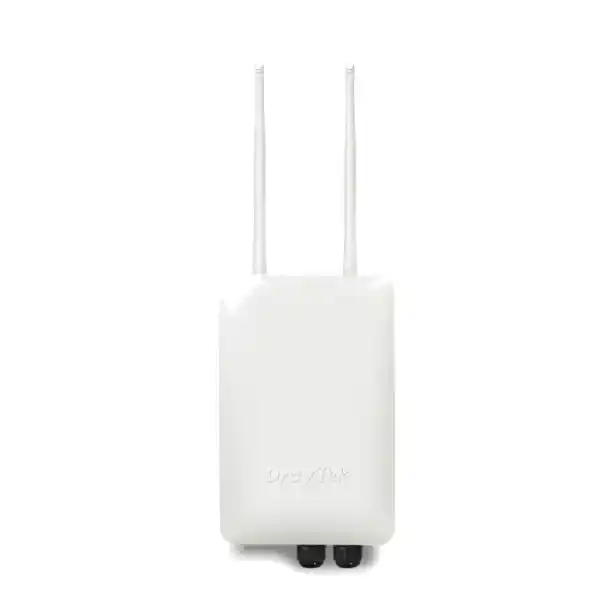
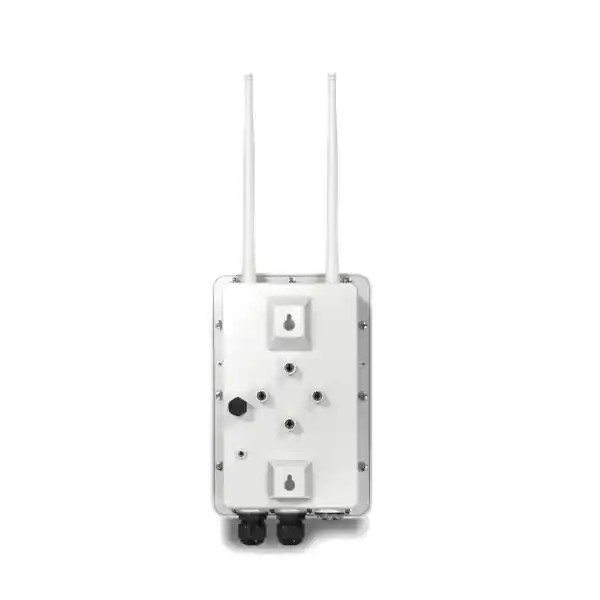
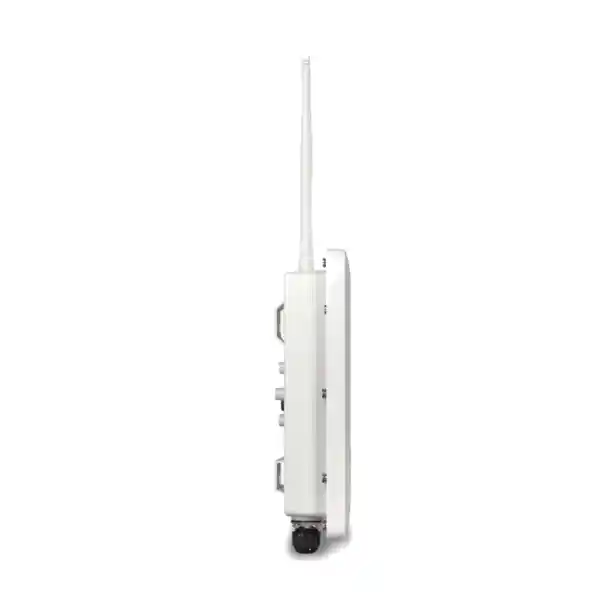
DrayTek VigorAP 918R IP67 Outdoor AC1300 Wireless Access Point
The DrayTek VigorAP 918R is designed for organizations that need dependable dual-band Wi-Fi outside conventional office interiors. It combines an IP67-rated enclosure, 802.11ac Wave 2 wireless, PoE+ input, business roaming, mesh capability, VLAN-aware SSIDs, WPA3 security options, environmental sensing and centralized management features in a compact platform suitable for wall or pole installation. For UAE deployments, the model is especially relevant to sites where heat, dust, open-air coverage, structured cabling limitations and operational continuity are more important than consumer-style headline speed.
What the VigorAP 918R Is Designed to Solve
Outdoor wireless networks fail for very different reasons than indoor WLANs. A ceiling access point inside an office normally operates in a controlled thermal envelope, has short cable runs, predictable mounting, limited direct sunlight and relatively stable radio propagation. An outdoor access point must deal with heat loading, dust, moisture, changing reflections, long open spaces, metal structures, vehicle movement, neighboring radio systems and a client mix that can range from mobile phones to handheld scanners, tablets, CCTV maintenance devices and industrial terminals. The VigorAP 918R addresses this environment with a sealed IP67-rated design, wide operating temperature specification and a feature set oriented toward managed business WLANs rather than casual hotspot use.
The radio platform is dual band. On 2.4 GHz, DrayTek specifies support for 802.11b/g/n with a maximum link rate up to 400 Mbps. On 5 GHz, it supports 802.11a/n/ac Wave 2 with a maximum link rate up to 867 Mbps. The resulting combined advertised wireless link rate is approximately 1.3 Gbps. These figures are PHY link rates rather than guaranteed application throughput. Real user throughput depends on channel width, modulation, client capability, signal-to-noise ratio, interference, protocol overhead, airtime contention and the path through the wired network. This distinction matters when designing a professional system: good WLAN engineering starts with required applications and device density, not simply the largest number printed on a data sheet.
DrayTek positions the VigorAP 918R for a large number of associated clients, with published material indicating support for up to 256 active users across the platform, with radio-level capacity considerations. In practice, capacity planning should be based on concurrent traffic rather than association count. Two hundred connected sensors sending tiny periodic messages are a very different load from fifty users simultaneously running cloud collaboration, HD streaming, VoIP and large downloads. FourTeck therefore treats client count as one input among several, together with airtime utilization, minimum RSSI targets, application class, expected roaming behavior and uplink capacity.
For procurement, integration and broader UAE network projects, organizations can coordinate through FourTeck UAE. The VigorAP 918R can be deployed as a stand-alone outdoor access point or as part of a larger routed, switched and centrally managed network where wireless configuration, VLAN policy, authentication and monitoring are designed as one system.
Core Hardware and Wireless Specifications
2.4 GHz Radio
802.11b/g/n operation with a published maximum link rate up to 400 Mbps. This band offers broader propagation and stronger obstacle penetration but is usually more exposed to neighboring Wi-Fi, Bluetooth and other 2.4 GHz sources.
5 GHz Radio
802.11a/n/ac Wave 2 operation with a maximum link rate up to 867 Mbps. 5 GHz is normally preferred for higher-throughput business clients because it offers more usable channel options and lower interference in many deployments.
Gigabit Ethernet
One Gigabit Ethernet interface on the VigorAP 918R provides wired uplink and PoE power input. This keeps outdoor installation clean by carrying data and power over a single structured cable run.
Environmental Design
IP67 protection, outdoor wall or pole mounting, specified operating range from -40°C to 70°C, storage range from -40°C to 85°C and 5% to 95% non-condensing operating humidity.
The VigorAP 918R uses two external dual-band dipole antennas. External antennas are useful in outdoor deployments because their orientation can be adjusted to suit the intended coverage plane. Antenna alignment should not be treated as cosmetic. A dipole’s radiation pattern, mounting height, nearby metalwork and polarization relative to client antennas all influence practical coverage. For a yard, terrace or parking area, the objective is usually a broad service zone rather than maximum signal directly beneath the access point. For long corridors between buildings or narrow external walkways, placement and orientation become more critical.
The standard 918R should also be distinguished from the VigorAP 918RPD variant. The RPD model adds a second Gigabit Ethernet interface capable of PoE output and includes an internal directional 5 GHz patch antenna for scenarios such as point-to-point or device extension. The standard 918R covered on this page has one Gigabit Ethernet port and no PoE-out function. That distinction is important when preparing a bill of materials. A project that expects the outdoor AP to power a downstream camera or another PoE device should be sized around the RPD variant or an external PoE distribution method rather than assuming the base 918R provides powered output.
Maximum power consumption for the VigorAP 918R is published at approximately 18 watts. The unit accepts PoE+ input using 802.3af/at-compatible infrastructure, with DrayTek specifying a 48–56 V input range. In practical UAE projects, the PoE budget should be calculated at the switch or injector level, including cable length, switch thermal conditions, all connected powered devices and redundancy requirements. It is good engineering practice to avoid designing a PoE switch at 100% of its available power budget because future additions, temperature derating and transient behavior can reduce operational margin.
802.11ac Wave 2, MU-MIMO and Real-World Capacity
802.11ac Wave 2 is a mature enterprise wireless generation that remains highly practical for many outdoor business applications. The 5 GHz radio can use 20, 40 or 80 MHz channel widths, while the 2.4 GHz radio supports 20 or 40 MHz operation. Wider channels can increase the maximum PHY rate for compatible clients, but they also consume more spectrum. In a dense installation with multiple access points, an 80 MHz design can create unnecessary co-channel contention. A professional survey often selects 20 or 40 MHz channels to increase reuse, reduce interference domains and improve consistency across many clients.
The VigorAP 918R supports MU-MIMO as part of its 802.11ac Wave 2 feature set. MU-MIMO can allow an access point to communicate with multiple compatible clients more efficiently under suitable conditions, reducing the amount of time that every device must wait for its own transmission opportunity. The practical benefit depends on client support, channel conditions and traffic patterns. It is not a substitute for good cell design. In outdoor areas with many low-power handheld clients, the uplink from the client back to the access point can become the limiting factor even when the AP transmits strongly. Increasing access point transmit power cannot fix a weak client transmitter; it can actually create asymmetric coverage in which a device hears the AP but cannot reliably return traffic.
Airtime fairness is therefore an important feature. Older or distant clients often consume more airtime to transmit the same amount of data because they operate at lower modulation rates. Without airtime management, one slow station can reduce overall WLAN efficiency. The VigorAP 918R supports airtime fairness so the network can allocate transmission opportunity more equitably. This is particularly useful in hospitality courtyards, schools, staff accommodation zones and logistics areas where a broad mixture of device generations may coexist.
Band steering helps dual-band clients favor 5 GHz when appropriate. This can reduce congestion on 2.4 GHz and preserve the lower-frequency band for legacy or coverage-sensitive devices. The configuration should still be validated against the actual client fleet. Some embedded devices have conservative roaming logic or support only 2.4 GHz. An access policy that is too aggressive can produce repeated association attempts or unstable behavior. FourTeck normally separates client categories during design so critical IoT, staff mobility, guest access and operational devices can be tested under the conditions they will actually encounter.
For organizations that need a complete network assessment rather than an isolated AP purchase, FourTeck IT Services UAE can be incorporated into the planning process for switching, VLAN architecture, cabling, security integration, Wi-Fi survey work and ongoing support.
Outdoor Radio Planning for Dubai and UAE Sites
UAE outdoor WLAN design must consider temperature, solar exposure, building materials and the geometry of open spaces. High ambient temperature is only one part of the problem. A dark enclosure or cable exposed to direct sun can experience surface temperatures significantly above the reported air temperature. The VigorAP 918R’s wide specified operating range provides useful thermal headroom, but installers should still avoid unnecessary direct solar loading where practical, maintain cable bend radius, use outdoor-rated Ethernet, protect terminations and follow correct grounding and surge-protection practices.
IP67 means the enclosure is designed for strong resistance to dust ingress and water exposure under the conditions associated with that rating. It does not eliminate the need for correct installation. The weakest point in many outdoor deployments is the cabling transition, connector gland or poorly sealed junction box rather than the AP housing. Cable entry should face and route in a way that discourages water tracking. A drip loop, appropriate outdoor cable, UV-resistant accessories and properly tightened weather seals can materially improve reliability. In exposed industrial sites, consider the entire cable path from switch to access point as an outdoor system rather than treating only the AP as weatherproof.
Mounting height should be chosen from coverage and maintenance requirements, not simply the highest available location. Mounting too high can increase the distance to handheld users and place more of the antenna pattern above the client plane. Mounting too low can expose the unit to obstruction, tampering or moving vehicles. For a warehouse yard, loading area or school courtyard, a moderate elevation with clear line of sight and controlled cell overlap is often preferable. In villa compounds and hospitality terraces, aesthetics and neighbor interference can become equally important.
RF propagation outdoors can change during operation. Parked trucks, shipping containers, temporary stages, landscaping, wet surfaces and building renovations can alter reflections and shadowing. Metal cladding is especially significant. It can create strong multipath in one direction and deep attenuation in another. The installation should therefore be validated after mounting rather than relying solely on predictive planning. Verify RSSI, SNR, roaming boundaries, packet loss and application performance at representative client heights.
For many business applications, a target received signal around the mid -60 dBm range is more useful than designing for merely detectable coverage. Voice and real-time collaboration are less tolerant of weak or fluctuating signals than basic web browsing. Roaming clients also need overlap between neighboring AP cells so they can discover the next access point before the current connection becomes unusable. Too much overlap, however, can increase contention and create sticky-client behavior. This is why access point power and minimum RSSI thresholds should be considered together.
The VigorAP 918R includes internal temperature and humidity sensing. These measurements can contribute to environmental awareness and alerting. They should not be confused with a calibrated building-management sensor, but they can help identify unusual conditions at the AP location and support preventive maintenance. DrayTek’s management features allow alerting workflows that can be incorporated into operational monitoring.
Roaming: 802.11k, 802.11v, 802.11r and Assisted Mobility
A multi-AP network is successful only when clients can move through it without excessive interruption. Wi-Fi roaming is ultimately a client decision, but modern infrastructure can provide information and mechanisms that help compatible devices make better choices. DrayTek lists support for 802.11k, 802.11v and 802.11r capabilities on the VigorAP 918R platform, together with assisted roaming functions. These mechanisms are relevant in schools, campuses, warehouses, resorts, staff accommodation areas and large compounds where users walk between coverage zones while keeping voice calls, messaging sessions or operational applications active.
802.11k helps compatible clients learn about neighboring access points so they do not have to scan every possible channel blindly. 802.11v enables network-assisted transition information and can help a client make a better roaming decision. 802.11r, often described as Fast BSS Transition, reduces parts of the authentication and key exchange process during a handoff. The result can be a shorter interruption when moving between APs, especially in enterprise-authenticated environments. Compatibility must still be tested because some older or embedded clients do not behave well with every fast-roaming mechanism enabled.
The VigorAP platform also provides AP-assisted roaming and minimum RSSI logic. A common WLAN problem is the sticky client: a device remains associated to a distant AP even after a much stronger AP is nearby. This hurts the individual client and consumes excessive airtime for everyone else. Assisted roaming can encourage a client to leave a weak connection when a better neighboring AP is available. The correct threshold depends on device behavior and application requirements. An aggressive threshold can cause unnecessary disconnects at the edge of a site, while a very low threshold allows clients to remain on inefficient links.
Roaming design also depends on consistent SSID, security and VLAN configuration. A user should not cross from one outdoor AP to another and unexpectedly land in a different IP subnet unless the network is specifically designed for routed mobility. In ordinary campus WLANs, the same SSID is mapped to the same VLAN across the relevant APs. DHCP lease duration, gateway availability, authentication policy and firewall rules should all support the intended mobility domain.
For environments that combine outdoor wireless with perimeter security, remote-access VPN or segmented guest services, integration with the broader security architecture can be planned through Firewall Dubai by FourTeck. The access point itself is one layer; the final user experience also depends on switching, DHCP, DNS, routing, firewall policy and upstream Internet quality.
Mesh, Range Extension and Wired Backhaul Strategy
The VigorAP 918R can operate as an access point, mesh root, mesh node or range extender. Mesh is valuable where running Ethernet to every location is difficult, but wireless backhaul must be designed with realistic expectations. When a mesh node uses the same radio resources for client service and backhaul, part of the available airtime is consumed carrying traffic between access points. Each additional wireless hop can reduce effective capacity and increase latency. Mesh should therefore solve a physical cabling problem, not become the default architecture when wired uplinks are feasible.
A wired Gigabit uplink remains the preferred topology for high-capacity installations. With Ethernet backhaul, each AP can use its radio airtime primarily for clients and deliver traffic directly into the switched network. This improves performance consistency and simplifies troubleshooting. It also allows the designer to segment traffic with VLANs at the switch and apply QoS or security policy upstream. For schools, warehouses, hotels and office compounds, wired backhaul to as many APs as possible is usually the strongest long-term investment.
Mesh becomes valuable for temporary areas, hard-to-reach structures, legacy buildings where new cable is disruptive, or selected outdoor positions where trenching is impractical. A mesh root should be placed where it has a high-quality wired connection and strong RF visibility to downstream nodes. Avoid positioning a mesh node in a location where client signal is good but backhaul signal is weak. The node needs reliable capacity in both directions. A site survey should therefore distinguish the client coverage map from the backhaul quality map.
Range extender mode provides another way to repeat wireless service, but it carries similar airtime tradeoffs. It can be suitable for low-demand extensions but should not be treated as equivalent to a wired AP for high-density or latency-sensitive applications. When a project grows from a simple single-AP requirement into a multi-building WLAN, it is often more economical to revisit the physical network design rather than stacking multiple repeaters.
DrayTek also supports management relationships between root and node access points. Published material for the VigorAP 918R indicates that a root AP can manage up to 30 node APs within the same LAN subnet, while mesh configurations can be used alongside this management approach. The architecture gives small and medium deployments a practical path from stand-alone operation to centrally coordinated configuration without requiring every site to begin with a dedicated wireless controller appliance.
SSID Design, VLAN Segmentation and Policy Separation
The VigorAP 918R supports multiple SSIDs per band and 802.1Q VLAN tagging. This is a critical business feature because a wireless network should rarely be a single flat trust zone. Staff notebooks, guest phones, warehouse scanners, building systems and maintenance devices have different risk profiles. By mapping SSIDs to VLANs, the WLAN can present separate logical networks through the same physical access point. The upstream switch carries the tagged traffic to the router or firewall, where inter-VLAN policy, Internet access, content controls and service restrictions can be enforced.
A typical UAE business deployment might use one SSID for corporate devices with enterprise authentication, one isolated guest SSID with Internet-only access, and a third operational SSID for scanners or specialist terminals. Additional SSIDs should be created only when they solve a real policy requirement. Every beaconed SSID consumes management airtime, particularly on 2.4 GHz. Excessive SSID count can therefore reduce efficiency. A disciplined design keeps the number of broadcast networks low and uses VLANs, identity and policy to create the necessary separation.
The AP supports DHCP client, DHCP server and DHCP relay capabilities, together with static IP configuration. In centrally routed deployments, the access point itself normally uses a management IP in a dedicated infrastructure or management VLAN, while client DHCP is provided by a router, firewall or server. The AP does not need to become the primary DHCP source merely because it has that feature. Centralizing address management improves visibility and reduces the risk of overlapping scopes.
Management traffic should also be protected from ordinary wireless clients. Where the switch and routing environment permit it, place AP management interfaces in a restricted VLAN accessible only to authorized administrators or management systems. Disable unnecessary management services and use HTTPS rather than clear-text access wherever possible. The VigorAP 918R supports local services including HTTP, HTTPS and Telnet; production policy should prefer secure protocols and limit legacy services according to operational requirements.
VLAN deployment must be coordinated end to end. The AP’s SSID tagging, switch port trunk settings, allowed VLAN list, gateway interfaces, DHCP scopes and firewall rules must all agree. A mis-tagged uplink can produce confusing symptoms in which one SSID works while another associates successfully but cannot obtain an IP address. Documenting the VLAN matrix before installation saves substantial troubleshooting time.
Wireless Security: WPA3, Enterprise Authentication and Local RADIUS
Wireless security on the VigorAP 918R includes modern WPA3 options as well as compatibility modes for older clients. DrayTek lists OWE, WPA, WPA2, WPA3 and transitional combinations in the supported security modes, together with personal and enterprise authentication. A professional deployment should select the strongest mode supported by the client estate while avoiding unnecessary legacy compatibility. WEP and obsolete WPA modes may remain visible as configuration options for backward compatibility, but they should not be used for contemporary production WLANs.
WPA2-Enterprise or WPA3-Enterprise can authenticate users or devices against RADIUS rather than relying on one shared password. This improves accountability and makes credential revocation more manageable. The VigorAP 918R includes built-in RADIUS server capability, which can be useful for smaller environments. Larger organizations may integrate with an external RADIUS platform tied to directory services, certificate infrastructure or network access control. The choice depends on scale, identity lifecycle and compliance requirements.
Guest Wi-Fi should be isolated from corporate and operational resources. Captive portal functions can support visitor access workflows, but portal authentication is not a substitute for network segmentation. The guest VLAN should be blocked from private infrastructure except for explicitly required services such as DNS and DHCP. Client isolation may also be appropriate so guests cannot communicate directly with one another. Upstream firewall rules should then control Internet access and, where needed, apply rate limits, filtering or session logging according to organizational policy.
MAC filtering is available and the platform publishes support for a substantial MAC address list. It can be useful as an operational convenience for simple device inventories, but MAC addresses are not strong authentication because they can be observed and spoofed. For sensitive networks, use certificate-based or credential-based authentication and treat MAC policy only as a supplemental control.
WPS support exists for convenience, but organizations with strict security requirements may choose to disable WPS and provision clients through controlled methods. The correct security posture depends on threat model, device capability and administrative process. The access point provides a broad feature set; security comes from selecting and governing those features appropriately.
PoE Design, Cabling and Surge Considerations
Power over Ethernet is one of the most useful characteristics of the VigorAP 918R because outdoor locations rarely have convenient protected AC power exactly where the radio should be mounted. A single Ethernet cable can deliver data and power from a PoE switch or injector, reducing installation complexity. The VigorAP 918R accepts 802.3af/at PoE input, and the design should provide sufficient budget for its maximum consumption while maintaining margin at the power source.
Cable category alone does not determine outdoor reliability. Use cable rated for the environment, including UV resistance where it is exposed to sunlight and appropriate jacket material for conduit or external routing. Maintain separation from power cabling according to local installation practice and applicable electrical rules. Avoid sharp bends, crushed sections and unsupported spans. Outdoor copper links can also introduce surge paths between structures, so bonding, grounding and surge protection should be considered especially where cables run externally or connect buildings with different earth potentials.
For inter-building links, fiber is often the safer backbone choice because it provides electrical isolation and avoids many copper surge issues. A protected indoor or sheltered switch can feed a local PoE switch near the destination, which then powers the AP over a short copper run. This topology can also simplify future expansion. The best design depends on distance, civil works, power availability and whether other outdoor devices such as cameras must share the path.
A standard Ethernet channel has length limits, and PoE voltage drop increases with cable resistance. Very long or poor-quality cable can cause intermittent behavior that appears to be a wireless problem. Symptoms may include rebooting, unstable links or failures during high load. Before tuning RF settings, verify cable certification, PoE voltage, switch events and physical connectors. Troubleshooting from layer one upward prevents unnecessary radio changes.
If the project requires an access point to power a second outdoor device, note again that this page covers the standard VigorAP 918R, which does not provide PoE-out. The VigorAP 918RPD is the model in the series designed with a PoE-out interface. Selecting the correct model at the quotation stage prevents the need for additional injectors or local power later.
Centralized Management with DrayTek Ecosystem Tools
The VigorAP 918R can be managed as a stand-alone access point, but DrayTek also supports centralized approaches. Compatible Vigor routers can provide access point management functions, while VigorConnect and VigorACS can support broader administration workflows depending on firmware and deployment architecture. This gives organizations a path to standardize configuration, monitor multiple APs and reduce the need to log in to every device independently.
Central management is valuable because WLAN consistency matters as much as individual AP capability. If neighboring APs use mismatched SSIDs, different authentication settings or conflicting channel choices, user experience suffers. Template-driven deployment reduces configuration drift. Administrators can coordinate SSID settings, security, channel plans, firmware versions and monitoring. In multi-site organizations, a central view also makes it easier to identify unreachable APs, client load anomalies or version differences.
The VigorAP 918R supports SNMP versions including v1, v2c and v3, syslog and email notification features. Where possible, SNMPv3 is preferable because it adds stronger security controls than community-string-based earlier versions. Syslog integration can help preserve operational events outside the AP and can feed a centralized monitoring or SIEM platform. These capabilities are particularly useful when wireless availability supports revenue-generating or operational workflows.
Configuration backup and restore should be part of standard maintenance. Keep a documented baseline for each AP role, including management IP, SSID-to-VLAN mappings, channel policy, transmit power, authentication settings and firmware level. After a replacement or factory reset, a known-good configuration can reduce recovery time. Backups should be stored securely because WLAN configurations can contain network information and authentication settings.
Firmware management should follow change control rather than ad hoc upgrades. Review release notes, back up configuration, verify compatibility with management systems and schedule maintenance windows for critical sites. For large estates, pilot new firmware on a limited subset before mass deployment. Wireless firmware can affect driver behavior, roaming logic and security features, so staged validation is good operational practice.
Application Scenarios in the UAE
Warehouses & Logistics
Extend managed Wi-Fi to loading bays, dispatch areas, perimeter yards and external staging zones used by handheld scanners, tablets and staff communication devices.
Hospitality & Resorts
Provide controlled guest or staff coverage around pools, terraces, outdoor restaurants, walkways and landscaped zones while retaining VLAN and captive portal capabilities.
Schools & Campuses
Create roaming coverage between buildings, courtyards, sports areas and gathering spaces with central SSID policy and user segmentation.
Villas & Compounds
Bring business-grade wireless to gardens, gates, parking areas, service buildings and outdoor entertainment spaces with discreet pole or wall mounting.
Industrial Facilities
Support maintenance tablets, mobile terminals and operational access in exposed areas where dust and temperature tolerance are important design factors.
Retail & Public Spaces
Extend staff and customer connectivity to storefront exteriors, queues, pickup areas, kiosks and covered plazas without using indoor-only hardware outdoors.
The correct number of access points varies by application. A spacious outdoor area may need fewer APs than a dense indoor floor, but obstacles, wall penetration and client transmit power can still require several cells. Conversely, a crowded event space may need multiple low-power APs even when one device could technically cover the area. Capacity and coverage are separate dimensions. Coverage asks whether the client can connect; capacity asks whether all active clients can receive acceptable service at the same time.
FourTeck also supports regional projects outside the UAE through its broader network presence, including FourTeck Africa for organizations standardizing infrastructure across multiple countries.
Capacity Planning: From Client Count to Airtime Budget
A common procurement question is how many users one access point can support. The VigorAP 918R has a high published association capacity, but an engineering answer must begin with traffic demand. Wireless is a shared medium. Every client on a channel competes for airtime, and the amount of airtime needed per packet rises as modulation rates fall. A single distant client transmitting at a low rate can consume the same airtime as several nearby clients transmitting at high rates. Capacity planning must therefore estimate simultaneous usage and expected data rate at the cell edge.
For example, a guest Wi-Fi zone with one hundred associated phones may be lightly loaded if most users are idle. A warehouse with thirty scanners can be more operationally demanding if every transaction must complete with low latency and no roaming interruption. Voice handsets require consistent latency and jitter rather than high throughput. CCTV viewing from tablets may create sustained downstream traffic. Cloud backup and software updates can produce bursts that monopolize airtime. The design should classify these traffic types before deciding AP count.
Channel utilization is a better live health indicator than association count alone. If a channel spends most of its time busy, additional clients will experience increasing delay even when the wired Internet connection has spare bandwidth. Splitting the area across more APs and more independent channels can increase total capacity, provided cell overlap and transmit power are controlled. Simply adding access points without channel planning can make interference worse.
On 2.4 GHz, usable non-overlapping channel choices are limited compared with 5 GHz. This is one reason to encourage compatible business clients onto 5 GHz. The 5 GHz band supports more channel reuse and can sustain a denser AP layout. Regulatory channel availability and transmit power must follow UAE requirements and device configuration for the local region. Installation teams should never copy a channel plan from another country without confirming regional settings.
Backhaul capacity must also be sized. A Gigabit Ethernet uplink is more than sufficient for many real-world AC1300 access point workloads because the aggregate over-the-air PHY rate is not equivalent to simultaneous usable Ethernet throughput. Wireless protocol overhead, half-duplex airtime and client capability reduce the delivered payload rate. Nonetheless, the upstream switch and router need enough aggregate capacity when many APs feed into the same network.
Internet bandwidth is the final layer. A well-designed WLAN cannot compensate for an undersized WAN circuit. During acceptance testing, measure both local LAN throughput and Internet performance so bottlenecks can be separated. If local performance is strong but Internet tests are slow across every AP, troubleshooting should move upstream rather than continuing to alter RF parameters.
Deployment Methodology for a Reliable VigorAP 918R Installation
A repeatable deployment methodology reduces surprises. Start by defining required coverage areas on a site plan and identifying applications, device types, security zones and expected user density. Mark potential mounting locations and available cable routes. Note external walls, metal structures, gates, racks, trees, glass facades and neighboring wireless sources. Determine which areas require business-grade coverage and which only need best-effort connectivity.
Next, build the logical design. Choose SSIDs, VLAN IDs, DHCP scopes, gateway interfaces, authentication method and firewall policy. Decide whether access points will be individually managed, coordinated by a root AP, managed through a Vigor router or incorporated into VigorConnect or VigorACS. Establish IP addressing for infrastructure and monitoring. Define naming conventions so each AP can be identified by site, zone and mounting location.
Then validate the physical infrastructure. Confirm PoE source capacity, switch port availability, trunk configuration and cable path. Test Ethernet cabling before mounting the AP. Where the cable exits the building, use appropriate weather protection. Confirm mounting hardware is mechanically secure and suitable for the pole or wall surface. The VigorAP 918R package supports outdoor mounting scenarios, but site-specific fixings may be necessary depending on substrate.
Initial configuration should be performed before final elevation whenever possible. Upgrade to the approved firmware version, set a strong administrator credential, configure management IP, disable unnecessary services, build SSIDs and confirm VLAN tags. Verify that a test client can authenticate and obtain the correct address on every SSID. This prevents discovering a basic configuration problem after the AP is mounted several meters above ground.
After installation, perform RF validation. Check signal at representative user locations, but also test actual applications. Walk through roaming paths while maintaining a voice or video session. Measure latency and packet loss. Confirm that guest devices cannot access corporate resources. Confirm that staff devices reach required servers and cloud services. Test during a realistic load period if the site already has users.
Finally, document the installation. Record device serial numbers, switch ports, cable identifiers, management IPs, VLAN mappings, AP names, mounting locations and firmware versions. Save configuration backups and photographs of the final mounting. Good documentation shortens future incident resolution because technicians can immediately identify what changed and where each physical link terminates.
A wireless project should have acceptance criteria before handover. Examples include minimum RSSI in defined service zones, successful roaming along selected routes, Internet throughput target, VLAN isolation, guest portal operation, monitoring visibility and alerting. Criteria turn a subjective statement such as “Wi-Fi looks fine” into a verifiable technical outcome.
Troubleshooting and Operational Diagnostics
When a VigorAP 918R installation experiences poor performance, troubleshoot systematically. First establish whether the problem is power, Ethernet, IP connectivity, authentication, RF or Internet access. If the AP itself is rebooting or disappearing from management, start with PoE, cabling and switch logs rather than channel changes. If the AP remains stable but clients cannot obtain addresses, inspect VLAN and DHCP configuration. If clients have addresses but applications fail, test gateway, DNS and firewall policy.
For RF complaints, collect signal level, noise, channel utilization, retry rate and client capability. A user saying “the Wi-Fi is weak” can describe many different faults. A device may have excellent RSSI but severe co-channel interference. It may have strong downlink reception but insufficient uplink power. It may be stuck to a distant AP due to client roaming logic. It may be connected to 2.4 GHz while 5 GHz is underutilized. Each symptom points to a different corrective action.
Channel planning is one of the first areas to review. Automatic channel selection can be useful, but outdoor environments may change and neighboring networks can appear after deployment. Record the channel state during both quiet and busy periods. If multiple APs hear each other strongly on the same channel, reduce overlap or change channels. If hidden-node behavior is suspected, consider AP placement and client geometry rather than only channel number.
Roaming complaints should be tested while logging which AP the client is associated with. If the client holds a weak AP long after a better one is available, tune assisted roaming thresholds carefully. Verify that the neighboring AP truly provides stronger usable service before forcing a transition. If only one device model has difficulty, check compatibility with 802.11r or other assisted roaming features and compare behavior with those features temporarily adjusted in a controlled test.
Environmental issues can create intermittent faults. Inspect outdoor connectors after heavy weather or maintenance activity. Verify that cable glands remain secure. Check for new physical obstructions, scaffolding or metal storage units. Review temperature and humidity indications for unusual changes. If a problem appears at the hottest part of the day, verify not only AP temperature but also PoE switch temperature and cable condition.
Monitoring reduces reactive troubleshooting. Use syslog, SNMP and centralized management to establish a normal baseline for uptime, client count and traffic. Alerts should be meaningful rather than excessive. An AP offline alert is high priority; a transient client disconnect may not be. Tune monitoring so operational staff can identify site-wide patterns without being flooded by low-value events.
How the VigorAP 918R Compares with Consumer Outdoor Wi-Fi
A consumer outdoor extender may appear cheaper and can be adequate for a single home patio, but business networks need different capabilities. The VigorAP 918R supports VLAN-tagged SSIDs, enterprise authentication, local RADIUS, centralized management, SNMP, syslog, assisted roaming, scheduled WLAN operation and business-oriented monitoring. These capabilities allow the AP to participate in an IT architecture rather than operate as an isolated radio.
The value of IP67 construction is also operational. Outdoor electronics must survive dust and water exposure over time. Using indoor hardware in a semi-covered outdoor location can create false economy if humidity, condensation or wind-driven rain reaches the unit. Even when an indoor AP works initially, its environmental rating does not match the installation. A purpose-built outdoor AP provides a more defensible design for facilities teams and managed service providers.
PoE simplifies maintenance because the AP can be power-cycled from the network closet without requiring a local AC outlet. Managed PoE switches can also report port status and consumption. When the AP is installed high on a pole or exterior wall, remote power control has real operational value. It reduces the number of situations in which a technician must physically reach the device.
Business access points also provide more control over RF policy. Features such as minimum RSSI, airtime fairness and band steering help administrators shape client behavior and preserve shared capacity. These settings require expertise; incorrectly tuned values can cause their own problems. But the ability to tune them is important in demanding deployments where default consumer behavior is not enough.
The VigorAP 918R is therefore best understood as an outdoor infrastructure component. Its value emerges when integrated with managed switching, VLAN segmentation, suitable routing and firewall policy, monitoring and a documented RF design. Buyers evaluating only headline Mbps may miss the features that determine long-term manageability.
Procurement and Sizing Guidance for Dubai Projects
A useful quotation request should describe the site rather than simply state an AP quantity. Include the approximate outdoor area, building layout, mounting height options, number and type of users, target applications, available network switches and whether PoE is already present. If the WLAN must support voice roaming, barcode scanning, guest access or point-of-sale activity, mention those requirements because they affect design and testing.
Specify whether the project needs only hardware supply or complete deployment. Hardware-only procurement is appropriate when an internal IT team already has a channel plan, VLAN design and installation capability. Full deployment may include survey, structured cabling, PoE switching, AP configuration, VLAN/firewall integration, mounting, testing and documentation. Support can also be scoped for firmware maintenance and operational monitoring.
If multiple buildings are involved, include distance and connectivity between them. A site with fiber between buildings is very different from a site that needs wireless mesh or a dedicated point-to-point bridge. The standard VigorAP 918R is an omnidirectional outdoor AP. For long-range directional links, the 918RPD variant or a purpose-designed bridge may be more appropriate depending on distance, alignment and throughput requirement.
Consider spares for critical environments. An organization with dozens of identical APs can reduce downtime by holding a pre-approved spare configuration. Standardizing on a small set of models also simplifies firmware, mounting accessories and support training. The cost of one spare unit may be lower than the operational impact of waiting for replacement hardware after a failure.
Documentation should be part of the commercial scope. Request an AP location map, cable schedule, switch-port mapping, management addressing and configuration backup. These deliverables have continuing value after installation and make future upgrades easier. They also help when another service provider must troubleshoot the network later.
For UAE multi-vendor projects, FourTeck Global can serve as an additional reference point for enterprise networking requirements that extend beyond a single product family.
Technical Specification Reference
| Category | VigorAP 918R |
|---|---|
| Wireless standard | 2.4 GHz 802.11b/g/n; 5 GHz 802.11a/n/ac Wave 2 |
| Maximum published link rates | Up to 400 Mbps on 2.4 GHz and 867 Mbps on 5 GHz; approximately 1.3 Gbps combined class |
| Antennas | Two external dual-band dipole antennas |
| Ethernet | 1 × Gigabit Ethernet |
| Power | PoE+ input, 802.3af/at, 48–56 V input range |
| Maximum power consumption | Approximately 18 W |
| Environmental rating | IP67 outdoor |
| Operating temperature | -40°C to 70°C |
| Storage temperature | -40°C to 85°C |
| Operating humidity | 5% to 95%, non-condensing |
| Dimensions | 243 × 161 × 72 mm |
| Mounting | Wall or pole |
| Operating modes | AP, Mesh Root, Mesh Node, Range Extender |
| Business WLAN features | Multiple SSIDs, VLAN tagging, airtime fairness, band steering, roaming, local RADIUS, hotspot portal functions, scheduling |
| Security modes | Includes WPA2/WPA3 options, OWE and personal/enterprise authentication support |
| Monitoring / administration | HTTPS, SNMP, syslog, configuration backup/restore, alerts, DrayTek management ecosystem support |
Published wireless rates are theoretical link rates and not guaranteed application throughput. Real performance varies with RF conditions, client capability, channel width, interference, airtime load, protocol overhead and network design. Features and firmware behavior should be validated against the selected firmware release and regional regulatory configuration at deployment time.
Frequently Asked Technical Questions
Is the DrayTek VigorAP 918R Wi-Fi 6?
No. The VigorAP 918R is an 802.11ac Wave 2 platform, commonly classified as Wi-Fi 5 on the 5 GHz radio, with 802.11n capability on 2.4 GHz. It remains suitable for many business outdoor deployments where mature client compatibility, IP67 construction, VLANs, roaming and centralized management matter more than Wi-Fi 6-specific functions such as OFDMA.
Can it be mounted outdoors in Dubai heat?
DrayTek specifies an operating temperature range from -40°C to 70°C and an IP67 environmental rating. Installation quality remains essential. Avoid unnecessary direct solar loading where practical, use outdoor-rated cabling, seal connectors correctly and verify that the PoE switch or injector is also operating within its own thermal specification.
Does the VigorAP 918R provide PoE output for a camera?
The standard VigorAP 918R does not provide PoE output. The VigorAP 918RPD variant is the member of the series that includes an additional Gigabit Ethernet interface with PoE-out capability and a directional 5 GHz antenna function.
How many SSIDs can it broadcast?
The platform supports multiple SSIDs per radio, with DrayTek specifications listing up to eight SSID profiles with active/broadcast limits depending on band and configuration. In professional design, use only the number required because every additional broadcast SSID adds management-frame overhead.
Can it roam with other DrayTek access points?
Yes. The VigorAP 918R supports DrayTek roaming features and modern roaming protocols including 802.11k, 802.11v and 802.11r behavior for compatible clients. Successful roaming also requires consistent SSID, authentication and VLAN design across the participating APs.
Can it work without a DrayTek router?
Yes. The unit can operate as a stand-alone access point and can connect to third-party switching and routing infrastructure using standard Ethernet, VLAN and IP networking. DrayTek routers and management platforms add centralized administration benefits but are not mandatory for basic AP operation.
Should I use mesh or Ethernet backhaul?
Use Ethernet backhaul whenever practical for the best capacity and predictability. Mesh is valuable where cabling is difficult or temporary coverage is required. Every wireless backhaul hop consumes airtime and should be evaluated against the actual performance requirement.
Is one AP enough for a warehouse yard?
It depends on area, obstacles, mounting position, client type, density and required performance. Outdoor open space can propagate well, but metal racking, vehicles and containers can create strong shadowing. A site survey is the correct way to determine AP count and placement.
Decision Recap: When the VigorAP 918R Is the Right Fit
Choose the DrayTek VigorAP 918R when the project requires a purpose-built outdoor access point with IP67 protection, business-class dual-band Wi-Fi, PoE-powered installation, multiple SSIDs, VLAN integration, enterprise authentication, roaming assistance, mesh flexibility and centralized management options. It is particularly well suited to commercial sites that already use managed switching and routing and need outdoor wireless to follow the same policy model as the internal network.
Strong Match
Outdoor staff Wi-Fi, guest zones, courtyards, yards, warehouse exteriors, campuses, villas, hospitality, schools and industrial facilities requiring managed network controls.
Review Alternatives
Projects that specifically require Wi-Fi 6/6E, 2.5 GbE uplinks, very high-density stadium-class performance or dedicated long-distance point-to-point bridging may benefit from other platforms.
Quotation Input Checklist
For a faster and more accurate UAE quotation, provide the information below. These inputs allow the access point quantity, PoE requirement, switching, cabling and services to be sized around the actual site rather than a generic device count.
Plan a DrayTek VigorAP 918R Deployment in Dubai
FourTeck can support the VigorAP 918R as part of a complete outdoor WLAN design that includes AP placement, PoE switching, structured cabling, VLAN segmentation, firewall integration, roaming validation, configuration and handover documentation. The objective is not merely to install an access point; it is to create a stable wireless service zone that behaves predictably under the site’s real environmental and traffic conditions.
When requesting a consultation, include site drawings or photographs where possible, indicate expected user density and identify any outdoor areas where voice, scanning, payment or operational applications must remain reliable. This information helps determine whether the standard VigorAP 918R, the 918RPD variant or another access point class is the best technical match.

Reviews
There are no reviews yet.