
Business Gigabit Switching for UAE Networks
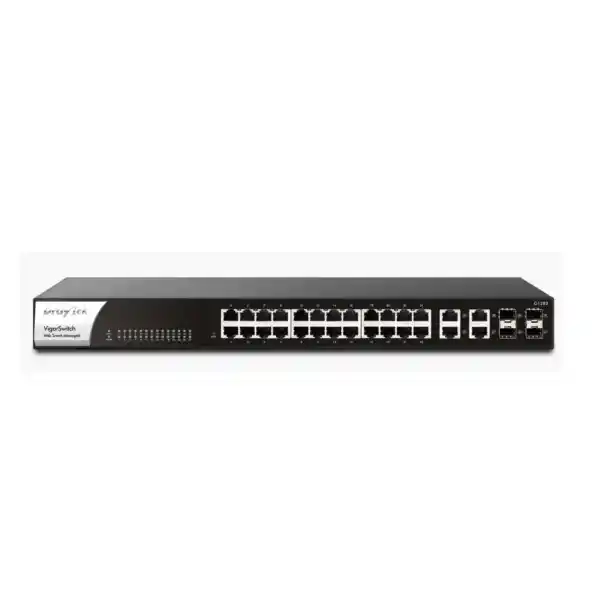
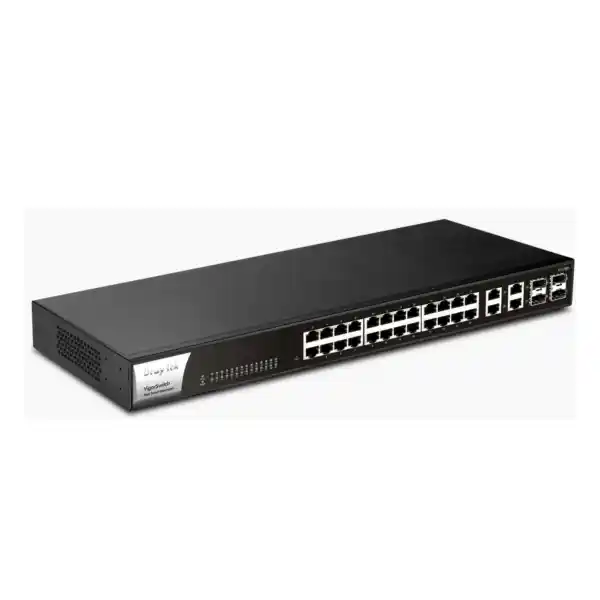
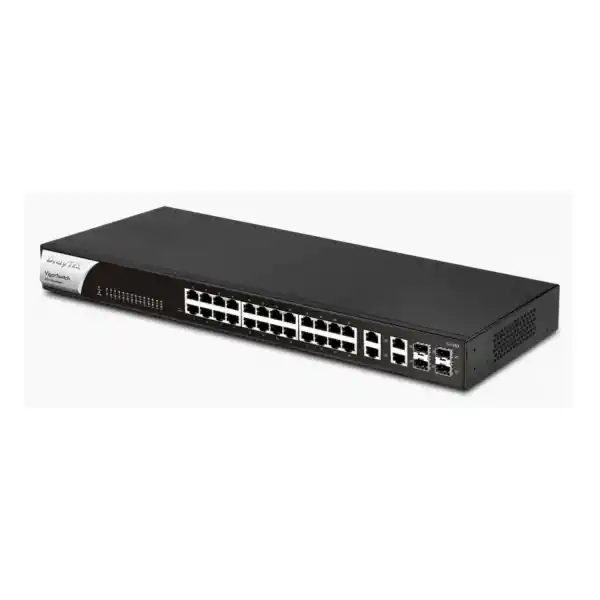
DrayTek VigorSwitch G1282 Web Smart Gigabit Switch
The DrayTek VigorSwitch G1282 is a 28-interface Web Smart Layer-2 switching platform designed for organizations that need dependable Gigabit access, flexible copper-or-fiber uplinks, practical VLAN control, traffic prioritization, surveillance-aware management and centralized administration without the cost or operational complexity of a larger Layer-3 enterprise chassis. Its physical layout combines 24 fixed 10/100/1000 Mbps RJ-45 ports with four Gigabit RJ-45/SFP combo interfaces, allowing a network designer to use the final four logical ports as copper or fiber according to the uplink topology.
Core platform snapshot
24 + 4 Combo
24× Gigabit RJ-45 access ports
4× Gigabit RJ-45/SFP combo ports
56 Gbps switching capacity
41.7 Mpps forwarding rate
1U rack-mountable format
What the VigorSwitch G1282 is designed to solve
Many small and mid-sized networks reach a point where an unmanaged switch no longer provides enough control, yet a highly complex core switch introduces cost, licensing, training and configuration overhead that the site does not need. The VigorSwitch G1282 occupies the practical middle ground. It provides management functions required for segmentation, uplink resilience, multicast handling, traffic control, monitoring and surveillance visibility while remaining focused on Layer-2 access switching. For UAE offices, retail groups, warehouses, clinics, schools, serviced apartments, hospitality sites and distributed branches, that balance can be more useful than simply buying the switch with the longest specification list.
A typical deployment might dedicate separate VLANs to corporate workstations, guest Internet access, IP telephony, cameras, building systems and network management. The G1282 can tag and transport those VLANs toward a firewall or router while applying Quality of Service treatment to traffic that should remain responsive during periods of heavy utilization. Its four combo interfaces also provide flexibility where a branch needs fiber to another floor, an intermediate distribution frame, an outdoor cabinet or a second building. The combo design is particularly useful during staged migrations because an engineer can begin with copper and move to supported Gigabit SFP optics without replacing the switch.
The platform is non-PoE, which is an important design distinction. It is therefore a strong fit when endpoint power is delivered independently, when the access layer primarily serves desktops, servers, printers and uplinks, or when PoE requirements are handled by separate PoE switches or injectors. Organizations that require the access switch itself to power phones, cameras or wireless access points should size a PoE model instead of assuming the G1282 supplies endpoint power.
Verified hardware and performance profile
Access connectivity
Twenty-four dedicated 10/100/1000 Mbps Ethernet RJ-45 ports provide the primary access layer. Auto-negotiation allows connected devices to establish the appropriate Ethernet speed supported by both ends of the link.
Flexible uplinks
Four Gigabit RJ-45/SFP combo interfaces support either copper Ethernet or 1G SFP connectivity on each combo position. Because each pair represents one logical interface, the copper and SFP sides of the same combo port are alternatives rather than additional simultaneous ports.
Switching performance
The manufacturer specifies 56 Gbps switching capacity and 41.7 million packets per second forwarding performance at 64-byte packet size. A 4.2 Mbit packet buffer supports transient traffic bursts, and jumbo frames up to 9 KB are specified for environments that use larger Ethernet frames.
Rack and power profile
The G1282 is a 1U rack-mountable switch measuring approximately 440 × 205.3 × 44 mm. It accepts 100–240V AC input and is specified for a maximum power consumption of 36 watts, making it straightforward to incorporate into standard UAE communications racks and UPS plans.
Port architecture and uplink planning
Port planning should begin with the distinction between access ports and the combo interfaces. The first 24 Gigabit Ethernet connections are straightforward copper access ports. They are suitable for desktop systems, printers, network appliances, NVRs, storage devices, servers with 1G interfaces and other wired endpoints. Ports 25 through 28 are presented as combo connections, allowing the installer to choose either the RJ-45 interface or the corresponding SFP slot. This matters when calculating usable density. The switch is described as having 28 logical interfaces, not 32 concurrently active data ports. A design that expects twenty-four access connections plus four copper uplinks plus four simultaneous SFP uplinks would over-allocate the hardware.
The combo arrangement is useful when a site has mixed media requirements. For example, a Dubai office may use one SFP uplink to a core rack on another floor, one copper connection to a local firewall, and retain two combo positions for redundancy or future expansion. Another site may use all four combo interfaces with supported fiber modules to connect remote wiring closets. Because the links remain Gigabit, the aggregate traffic model should be considered carefully. If a large number of busy access ports feed one 1G uplink, the uplink can become the throughput constraint even though the switch fabric itself is non-blocking for its port class.
A practical sizing exercise therefore looks beyond port count. Estimate typical and peak traffic from users, backup jobs, CCTV recording streams, virtualization hosts, cloud synchronization, printing, large file transfers and Internet access. Then decide how many uplinks are required and whether link aggregation is appropriate. The G1282 supports static aggregation and LACP, with up to eight aggregation groups and up to eight members per group according to the manufacturer specification. When the connected upstream device supports a compatible configuration, aggregation can improve aggregate bandwidth and offer link-level resilience, but it does not make a single flow exceed the speed of one member link.
Important: the G1282 is not a PoE switch
The VigorSwitch G1282 does not provide Power over Ethernet. Its Ethernet ports carry network data but do not supply 802.3af, 802.3at or 802.3bt power to endpoints. That makes the model appropriate where powered endpoints already have local adapters, where a separate PoE access layer exists, or where the majority of connected devices do not require PoE.
If the project includes IP cameras, Wi-Fi access points, door controllers or IP phones that must receive power through Ethernet, the bill of materials should include a suitable PoE switch or injectors. DrayTek’s related P1282 family variant is designed for PoE/PoE+ use, but it should be quoted as a different product with its own availability, power budget and project requirements. Correctly separating data-port needs from PoE power requirements avoids one of the most common switch-selection mistakes in branch and surveillance deployments.
VLAN segmentation for corporate, guest, voice and surveillance networks
A managed access switch becomes valuable when devices should not all occupy the same broadcast and security domain. The G1282 supports IEEE 802.1Q tag-based VLANs and is specified for up to 512 VLANs. It also provides MAC-based and protocol-based VLAN capabilities, along with management, voice and surveillance VLAN functions. These options enable the switch to participate in structured segmentation policies created on the upstream firewall or router.
For a conventional office, the network team might assign employee computers to a corporate VLAN, visitor ports or guest wireless infrastructure to a guest VLAN, phones to a voice VLAN, cameras and NVR infrastructure to a surveillance VLAN, and switch administration to a restricted management VLAN. The switch can enforce port membership and VLAN tagging at the access layer while the upstream security gateway controls inter-VLAN routing, firewall policy, Internet access, VPN connectivity and threat inspection. Because the G1282 is not positioned as a Layer-3 routing switch, routing between those VLANs should be deliberately designed on a suitable router, firewall or Layer-3 core rather than assumed to occur locally on the switch.
Voice VLAN and surveillance VLAN functions can reduce repetitive configuration when devices are deployed at scale. They can help classify certain endpoint categories and apply consistent handling, but they are not replacements for access-control policy. Administrators should still decide which VLANs may communicate, which services are permitted, how management access is protected and how unknown devices are handled. In a regulated or security-conscious environment, segmentation should be combined with firewall rules, secure administration, change control and monitored logging.
When deploying VLANs across several switches, trunk configuration must be consistent from edge to distribution to firewall. Native or untagged VLAN choices, allowed-tag lists and management addressing should be documented before installation. FourTeck can align switching design with routing and security requirements through the Firewall Dubai practice where the access layer must integrate with perimeter security, SD-WAN, VPN or inter-VLAN policy.
QoS: protecting latency-sensitive business traffic
Quality of Service is most useful when congestion exists and some traffic classes should receive preferential treatment. The VigorSwitch G1282 provides eight QoS queues and supports Strict Priority Queueing and Weighted Round Robin scheduling. It can classify traffic using mechanisms including CoS, DSCP, CoS-to-DSCP mapping and IP Precedence. Rate limiting is also supported. These capabilities allow an engineer to preserve responsiveness for selected applications while controlling lower-priority traffic at the access layer.
Consider a branch where business voice, cloud collaboration, CCTV recording, user file transfers and nightly backups share the same uplink. If all traffic is handled identically, a bursty file copy or backup can increase queueing delay for real-time sessions. A properly designed QoS policy can classify voice or other latency-sensitive traffic into an appropriate queue, while less urgent transfers use a weighted queue or a defined rate limit. The design must remain end-to-end: markings only deliver predictable results when adjacent switches, routers, firewalls and WAN services interpret them consistently.
QoS should not be used as a substitute for adequate bandwidth. If a network is consistently saturated, the correct response may be to add capacity, redistribute traffic, create additional uplinks or upgrade the topology. QoS is most effective as a congestion-management control that protects service quality during peaks rather than as a method for turning a permanently undersized 1G path into a higher-capacity one.
Spanning Tree, loop protection and resilient Layer-2 design
Ethernet loops can create broadcast storms and MAC-table instability that quickly disrupt an entire Layer-2 network. The G1282 supports classic Spanning Tree Protocol and Rapid Spanning Tree Protocol, alongside a dedicated loop-protection function. These controls are particularly important when redundant physical paths are installed between cabinets or when site staff can accidentally patch two access ports together.
Rapid Spanning Tree generally converges more quickly than legacy STP after a topology change, making it a better choice in many modern switched networks when all participating devices support compatible operation. The topology should be engineered so that root-bridge placement is intentional rather than left to chance. Distribution or core switches should normally receive the appropriate priority so that access switches do not unexpectedly become topology roots. Edge ports connected to normal hosts should also be configured according to the platform’s available protections and deployment standards.
Link aggregation can complement spanning tree by combining multiple physical links into a logical bundle. When both ends support LACP or the same static configuration, the individual links in a bundle can operate as one logical connection and prevent spanning tree from independently blocking them. This can provide better aggregate utilization and continued connectivity after a single member-link failure. The network team should nevertheless test failure behavior, hashing characteristics and recovery expectations instead of assuming every traffic pattern spreads evenly across all members.
For multi-floor UAE offices and campus-style sites, the best architecture is normally documented as a simple hierarchy: edge devices connect to access ports, access switches connect upstream through defined trunks or LAGs, and routing and security occur at the appropriate distribution or firewall layer. Simplicity improves fault isolation and minimizes the risk that ad-hoc cabling creates an unexpected loop.
IP conflict detection and prevention
Duplicate IP addresses can cause intermittent communication, unstable ARP behavior and difficult-to-diagnose application failures. They frequently arise when a device is manually configured with an address already issued through DHCP, when a replacement appliance reuses an old address, or when an unauthorized endpoint attempts to use a known host address. DrayTek equips the G1282 with IP Conflict Detection and Prevention features intended to identify these situations and help block a conflicting or misconfigured host.
This is operationally useful in environments containing static-address devices such as cameras, printers, NVRs, building controllers and specialist appliances. Rather than discovering a conflict only after users report intermittent failures, the switch can become part of the detection workflow. Mail alerts can also be used for selected conditions, including IP conflict notifications, depending on the configured environment and firmware behavior.
IP conflict prevention does not replace sound addressing practice. Administrators should still maintain a current IP plan, define DHCP scopes that do not overlap reserved static ranges, record infrastructure addresses, protect management networks and document device ownership. The switch feature is best understood as an additional control that improves resilience when human error or an unexpected endpoint introduces a conflict.
ONVIF-aware surveillance operations
The G1282 is notable for including ONVIF-oriented surveillance features even though it is the non-PoE version of the platform. The switch can discover supported ONVIF devices, display a surveillance topology and provide operational visibility into compatible cameras. DrayTek also describes real-time video viewing and basic ONVIF device maintenance functions such as device information, network settings, time settings, reboot and factory reset. These tools can help an administrator understand where cameras are connected and quickly identify the endpoint associated with a particular switch port.
In a surveillance network, the switching requirement is not only port count. The designer must calculate aggregate video traffic from each camera’s codec, resolution, frame rate, scene complexity and configured bitrate. That traffic converges toward the NVR, VMS server or routed destination. A few high-bitrate cameras may be trivial on a Gigabit LAN, while dozens of streams combined with workstation traffic, replication and viewing sessions can materially increase uplink utilization. The G1282’s 56 Gbps switching capacity provides adequate internal switching for its Gigabit interface set, but the selected uplink arrangement must still be sized for the actual flow pattern.
The platform also supports ONVIF snapshot alert functions in current product positioning. For an operations team, a recent image associated with an unavailable camera can help identify the physical area affected. However, because the G1282 does not supply PoE, it cannot power-cycle a camera by removing and restoring switch-port power. Recovery strategies therefore depend on the actual camera power architecture. If automatic PoE restart is a key requirement, select a compatible PoE switch rather than treating the G1282 as equivalent.
CCTV networks should also be secured like any other IP infrastructure. Place cameras in appropriate VLANs, restrict Internet access where it is unnecessary, allow management only from trusted administration networks, maintain firmware, use strong credentials, synchronize time and control communication between cameras, recorders and viewing stations through firewall policy.
Management interfaces and secure administration
The VigorSwitch G1282 provides local management through HTTP and HTTPS as well as Telnet and SSH v2. For production use, encrypted administration methods should be preferred whenever practical. Management access should be placed on a dedicated VLAN or otherwise restricted through access controls so that normal user and guest networks cannot reach the switch configuration plane.
The switch supports configuration backup and restore, which is important for change management and hardware-replacement planning. An administrator should export a known-good configuration after commissioning and again after significant changes. Store backups with clear site, device and version identification. Before restoring an old configuration to replacement hardware, verify firmware compatibility and confirm that the management IP, VLANs and uplink configuration remain correct for the current network.
Two levels of administrator privilege and multiple administrator accounts help separate full administrative control from more limited operational access. Access lists can be used to restrict administrative reachability. SNMP versions 1, 2c and 3 are supported; where monitoring infrastructure supports it, SNMPv3 is generally preferable because it can provide authentication and privacy capabilities absent from earlier community-string-based versions. SNTP support allows the switch to synchronize time, which improves the usefulness of logs, alerts and fault correlation.
Email alerts can cover events such as port status or speed changes, system restart, IP conflict, hardware monitoring, device checks and ONVIF camera snapshots. An alerting strategy should be tuned so that operators receive actionable events rather than an excessive volume of routine notifications. A well-managed switch is not merely configured once; it is monitored, backed up, time-synchronized and included in a repeatable operating process.
Centralized management with the DrayTek ecosystem
For sites already using compatible DrayTek infrastructure, the G1282 can participate in centralized management rather than being treated as an isolated switch. DrayTek positions Vigor Router Switch Management for discovery, provisioning, monitoring, hierarchy views and switch maintenance. Supported firmware also allows integration with VigorConnect and VigorACS management platforms. The current DrayTek product compatibility information lists G1282 support for VigorConnect from firmware 2.6.9 onward, while the product specification also identifies VigorACS management from that firmware level.
Central management is useful when an organization operates several switches across a building or multiple branch offices. Standardized VLAN profiles, visibility into device state, inventory information and remote maintenance reduce the need to open an individual web interface for every routine task. That becomes increasingly important when small sites have no local IT staff and changes must be delivered remotely.
Management architecture should be selected according to scale. A single office with one or two switches may be perfectly manageable through local HTTPS and a documented backup process. A distributed organization with dozens of branches benefits more from centralized monitoring, configuration consistency and alarms. FourTeck’s IT Services UAE team can help design operational processes around deployment, monitoring, remote administration and lifecycle support where switching is part of a wider managed network environment.
Security functions at the access layer
The G1282 incorporates several practical controls that help reduce common access-layer risks. IP Source Guard can constrain source behavior according to the configured environment, while storm control can limit traffic conditions that otherwise consume excessive Layer-2 capacity. DoS defense features add another defensive layer against certain abnormal traffic patterns. Loop protection and IP Conflict Prevention support network stability, and administrative access lists restrict who can reach management services.
It is equally important to understand what the switch is not. The G1282 should not be positioned as a replacement for a next-generation firewall, endpoint protection system, NAC platform or Layer-3 security gateway. It does not perform the full application inspection, intrusion prevention, web security, VPN termination and Internet policy functions associated with a dedicated security appliance. Access-layer controls and perimeter controls solve different problems and should be designed together.
The manufacturer specification for this model does not list 802.1X/MAC authentication, DHCP Snooping or Dynamic ARP Inspection as supported functions. Projects that require those specific controls as mandatory compliance items should evaluate a different switch family rather than assume that every managed switch implements the same security feature set. Procurement teams should convert security requirements into an explicit checklist and verify each required feature against the exact hardware and firmware version being quoted.
A secure deployment also includes operational discipline: change default credentials, use unique administrator accounts, disable unnecessary management protocols where feasible, prefer HTTPS and SSH over clear-text options, restrict management source networks, keep firmware maintained, back up configuration and monitor alerts. No individual feature replaces these baseline practices.
Standards and protocol support relevant to deployment
Ethernet
IEEE 802.3 10BASE-T, 802.3u 100BASE-TX, 802.3ab 1000BASE-T, flow control and auto-negotiation support allow the switch to operate with common Ethernet endpoints across mixed access speeds.
VLAN and priority
IEEE 802.1Q VLAN tagging and 802.1p Class of Service support the segmentation and traffic-priority functions expected in a business access switch.
Resilience
IEEE 802.1D STP, 802.1w RSTP and 802.3ad LACP provide tools for loop avoidance, faster spanning-tree convergence and standards-based link aggregation.
Discovery and efficiency
IEEE 802.1AB LLDP assists device discovery and topology visibility, while 802.3az Energy Efficient Ethernet can reduce link energy use under supported conditions.
Understanding the 56 Gbps switching-capacity figure
Switching capacity describes the aggregate internal bandwidth available to move traffic through the switching fabric. For a platform with twenty-eight 1 Gbps logical ports, a 56 Gbps figure corresponds to full-duplex line-rate bandwidth across all ports: 28 Gbps in one direction plus 28 Gbps in the opposite direction. This is the appropriate capacity class for a 28-port all-Gigabit switch and indicates that the internal fabric is sized for the aggregate port bandwidth.
The forwarding-rate figure expresses packet-processing capacity using very small 64-byte frames, a demanding case because more packets must be processed for the same amount of data. DrayTek specifies 41.7 Mpps for the G1282. Real application traffic contains a mix of packet sizes and protocols, so users should not interpret the laboratory forwarding figure as an application throughput guarantee. Actual network performance also depends on endpoint capability, cable quality, flow patterns, uplink contention, protocol overhead, storage performance and upstream routing or security appliances.
The 4.2 Mbit buffer is used to absorb temporary bursts when multiple ingress ports send toward a more constrained egress path. No finite buffer can compensate for sustained oversubscription. If several Gigabit clients continuously send toward one Gigabit uplink, queueing and packet loss eventually occur regardless of buffer size. This is why an accurate traffic model and uplink design are more useful than comparing a single headline specification.
For data-heavy environments such as media editing, virtualization clusters, high-performance storage or large-scale backup aggregation, a 1G access and uplink architecture may not be the right long-term platform. In those cases a switch with 2.5G, 10G or higher-speed uplinks should be considered. The G1282 is best understood as a capable Gigabit business access switch, not as a multi-gigabit data-center aggregation platform.
Jumbo frames: useful when the entire path supports them
The G1282 specification lists a maximum jumbo-frame size of 9 KB. Larger Ethernet frames can reduce per-packet overhead for certain storage, backup or bulk-transfer workloads, but the benefit appears only when every relevant device and link in the path is configured compatibly. A mismatched MTU can produce dropped traffic, fragmentation issues at routed boundaries or application behavior that is difficult to diagnose.
Before enabling jumbo frames, document the intended MTU end-to-end across servers, network adapters, switches, routers, firewalls and storage devices. Test with realistic workloads and preserve management access during the change. In ordinary office networks there is often no requirement to change the default Ethernet MTU. The capability is valuable for environments that have a validated use case, not a setting that must be enabled simply because the switch supports it.
Physical installation in UAE racks and communications rooms
The switch uses a standard 1U rack-mountable chassis and is supplied with a rack-mount kit, power cord and quick-start documentation according to the manufacturer’s package information. The approximately 205 mm chassis depth makes it suitable for many communications cabinets, but project teams should still verify the usable rack depth, front-door clearance, PDU arrangement, patch-cord bend radius and ventilation before ordering. Small wall-mounted racks can become crowded quickly once a patch panel, cable manager, firewall, UPS and additional switches are installed.
DrayTek specifies an operating temperature range of 0°C to 50°C and non-condensing operating humidity of 10% to 90%. In the UAE, room cooling and dust control deserve particular attention. A rack installed in a conditioned server room has a very different thermal environment from a cabinet placed in a warehouse, guard house, workshop or utility area. Ambient temperature inside a closed cabinet can exceed the room temperature, especially when a UPS, PoE switches and other equipment dissipate heat nearby.
The 100–240V AC input is compatible with common UAE mains arrangements when the correct supplied or approved power lead is used. The switch does not list a dedicated backup power input, so power continuity is normally provided through an external UPS. UPS sizing should consider the entire rack load, not only the switch’s maximum 36W consumption. Firewalls, routers, NVRs, storage, optical network equipment and PoE loads can dominate the total.
Good rack practice improves reliability: use horizontal or vertical cable management, label both ends of copper and fiber links, keep fiber patch cords protected from tight bends, separate power and data pathways where appropriate, record port assignments, reserve space for growth and ensure cooling airflow is not obstructed. These details matter more over a five-year operational life than a tidy installation photograph taken on day one.
Typical UAE deployment patterns
Branch office access
Connect employee PCs, printers, local servers and appliances on Gigabit access ports. Use one or more combo links toward the router or firewall and segment corporate, voice, guest and management traffic with VLANs.
CCTV aggregation without PoE
Aggregate independently powered cameras, NVRs and viewing stations where endpoint power comes from another source. Use surveillance VLANs, ONVIF visibility and multicast controls as appropriate.
Floor distribution
Deploy the switch in an intermediate communications rack and use supported SFP optics for Gigabit fiber toward a main equipment room, particularly where copper-distance limits or electromagnetic conditions make fiber preferable.
Education and training spaces
Provide managed Gigabit ports for classrooms, computer laboratories and administrative systems while separating student, staff, guest and infrastructure networks through 802.1Q VLANs.
Fiber uplink design and SFP selection
The four combo ports can accept compatible 1G SFP modules, which allows the switch to connect over fiber where required. Selecting an SFP is not only a matter of choosing a connector. The optic type must match the installed fiber medium, wavelength, distance, connector format and optic used at the far end. Multimode and single-mode optics are not interchangeable design assumptions, and both sides of a link must be compatible.
For an existing building, inspect the fiber plant before ordering transceivers. Record the cable type and core specification, available strands, patch-panel connectors, route distance and any intermediate splices. If documentation is unavailable, physical inspection and optical testing may be necessary. A mismatched optic can produce no link or unreliable operation even when the switch itself is configured correctly.
Because the G1282 supports 1G SFP rather than 10G SFP+ uplinks, it is appropriate for Gigabit distribution but not for sites that require a 10G aggregation backbone. That distinction should be decided during sizing, not after installation. If twenty or more access ports are expected to carry sustained high-volume traffic toward a central server or storage system, a higher-speed uplink platform may be a better architectural choice even if the G1282 has enough physical ports.
FourTeck can quote switching and broader network components through the FourTeck UAE portfolio. For cross-border standardization or projects spanning multiple operating regions, the FourTeck Africa practice can support regional coordination where appropriate, while the UAE page remains focused on local project requirements and delivery conditions.
Firmware lifecycle and configuration governance
Switch firmware should be managed as part of the network lifecycle rather than ignored until a problem occurs. DrayTek continues to publish G1282 firmware and documentation; as of 2026, the manufacturer’s download infrastructure lists firmware 2.9.10 dated July 2026. That does not mean every installed switch should be upgraded immediately without preparation. Production changes should follow an approved process that checks release notes, compatibility, maintenance windows, configuration backups and rollback options.
Before an upgrade, capture the current firmware version and configuration, confirm that management access is stable, record critical VLAN and uplink settings and ensure the administrator has a recovery method if connectivity is lost. After the upgrade, verify trunking, link aggregation, spanning tree, VLAN membership, monitoring, ONVIF functions and connected device reachability. Distributed sites should be upgraded in a staged sequence so that issues discovered at one pilot location do not propagate across the entire estate.
Configuration governance is equally important. Assign a naming convention, management IP, physical rack location and asset identifier to each switch. Maintain a port map that records endpoint or patch-panel references, VLAN assignment, trunk status and uplink destination. Export configuration after approved changes. These practices reduce dependence on individual staff knowledge and make incident response faster when a port or uplink must be traced under time pressure.
Sizing methodology: how to decide whether G1282 fits the project
Start with physical port demand. Count every wired endpoint that will terminate on the switch, then separate required day-one ports from planned growth. A design that uses all 24 fixed access ports on installation day leaves no simple room for expansion unless combo ports remain unused for uplinks or another switch is added. Many organizations reserve spare capacity for moves, temporary devices and growth, so a practical access-port target is often below the absolute maximum.
Next, identify which devices require PoE. If the answer is most phones, cameras or access points, the G1282 may not be the right standalone access switch. If powered devices already connect to a dedicated PoE layer and the G1282 is serving PCs, servers or uplinks, the non-PoE design may be efficient. Mixing the two requirements without documenting them can create late-stage procurement changes.
Then model bandwidth. Review whether most traffic exits through the Internet firewall, flows to local servers, traverses a fiber backbone or remains between local hosts. Estimate peak aggregate throughput on uplinks and whether one Gigabit path is adequate. If not, consider LACP where supported end-to-end or select a platform with faster uplink interfaces. Also check whether any individual endpoint needs more than 1G; if so, a different access-switch class may be required.
Finally, convert operational and security requirements into a feature matrix. Confirm the need for VLAN count, SNMP, centralized management, QoS, spanning tree, LACP, multicast, access authentication, DHCP security, PoE scheduling, Layer-3 routing and other controls. The G1282 is strong where its Web Smart feature set aligns with requirements. It should not be stretched into a role that depends on capabilities the model does not provide.
This requirements-led method prevents model selection from being based solely on price or port count. It also creates a bill of materials that can be reviewed by networking, security, facilities and procurement stakeholders before purchase.
Feature fit: where the G1282 is strong and where to choose differently
Good fit
Twenty-four Gigabit copper access connections, a small number of flexible 1G copper/fiber uplinks, VLAN segmentation, QoS, LACP, RSTP, SNMP, ONVIF-oriented monitoring and practical centralized DrayTek administration.
Consider another model
Projects requiring PoE endpoint power, 2.5G access, 10G uplinks, local Layer-3 routing, 802.1X access authentication, DHCP Snooping, Dynamic ARP Inspection, high-speed storage aggregation or large-scale stacking.
Migration from an unmanaged switch
Replacing an unmanaged switch with the G1282 provides immediate visibility and control, but the migration should still be planned carefully. Begin by documenting every existing cable and connected endpoint. A simple port spreadsheet containing current device, MAC address, IP address, VLAN requirement and destination can prevent hours of troubleshooting during cutover. Identify uplinks and loop risks before moving cables; unmanaged networks sometimes contain redundant links that have worked only because another device happened to block them.
Configure the new switch off-network where possible. Set the management address, administrator credentials, time settings, VLANs, trunks, QoS policy and monitoring before the maintenance window. Save a configuration backup. During cutover, move uplinks and critical services first, then endpoints in controlled groups. Validate DHCP, DNS, Internet access, local servers, voice, cameras and management connectivity after each stage.
A migration is also an opportunity to remove historical network debt. Retire unused patch cords, correct labels, eliminate flat VLAN designs, identify unknown devices, replace damaged cables and move infrastructure management to a restricted network. The switch’s management interface and port-state visibility make this cleanup easier than on the unmanaged device it replaces.
After the network stabilizes, export a final configuration, update diagrams and record the firmware version. The documentation produced at cutover becomes the baseline for future changes and support cases.
Deployment with a firewall or business router
In a segmented branch, the G1282 commonly operates beneath a firewall or router that provides default gateways for the VLANs. Tagged trunk links carry multiple VLANs between the switch and security gateway. The firewall then applies policy between networks and toward the Internet. This arrangement keeps Layer-2 access control and physical connectivity on the switch while centralizing routing, VPN and security inspection on the gateway.
The firewall interface capacity must match the switching design. If many VLANs and high-volume local services are routed through a single 1G firewall interface, that interface can become a bottleneck. A link aggregation design may help only if both systems support compatible aggregation and the traffic pattern benefits from multiple links. Otherwise a security appliance with higher-speed interfaces may be required.
Policy design should be explicit. Corporate users may require access to servers and the Internet; guest devices may require Internet-only access; surveillance devices may need only NVR, DNS and time services; and management interfaces should normally be reachable only from trusted administrator networks. The switch transports VLANs, while the firewall enforces the communication rules that give those VLANs security meaning.
Monitoring, SNMP and operational visibility
A production switch should be monitored for availability, interface state, errors and utilization. The G1282 supports SNMP v1, v2c and v3, making it compatible with many network-management systems. SNMP can expose interface counters and device status so that the operations team can see patterns that are invisible from user complaints alone. A rising error count may indicate cable or optic problems; sustained high utilization can reveal a capacity issue; repeated link transitions may point to a loose patch cord, failing transceiver or unstable endpoint.
When possible, use SNMPv3 with appropriate authentication and encryption because monitoring credentials and telemetry should be protected. Restrict SNMP access to dedicated management hosts and networks. Define consistent device names and locations so alerts identify the affected rack or site without requiring a separate lookup.
Monitoring thresholds should reflect business impact. A user access port going down may be expected when a laptop disconnects, while an uplink transition is operationally important. Similarly, 70% utilization for a short burst may be normal, whereas a 1G uplink above 90% throughout the workday indicates a capacity problem. Alert design should distinguish between events that require immediate response and metrics intended for trend analysis.
Centralized operational practice is particularly helpful for organizations with sites across Dubai, Abu Dhabi, Sharjah and the Northern Emirates. Remote visibility reduces the number of cases that require an on-site visit merely to discover that a cable is disconnected or an uplink is saturated.
Detailed specification summary
| Product class | Web Smart Layer-2 Gigabit Ethernet switch |
| Fixed copper access ports | 24 × 10/100/1000 Mbps RJ-45 |
| Combo interfaces | 4 × Gigabit RJ-45/SFP combo |
| Switching capacity | 56 Gbps |
| Forwarding rate | 41.7 Mpps at 64-byte packets |
| Packet buffer | 4.2 Mbit |
| Jumbo frame | Up to 9 KB |
| VLAN capacity | Up to 512 VLANs |
| Link aggregation | Static and LACP; up to 8 groups with up to 8 members per group |
| Spanning tree | STP and RSTP |
| QoS | 8 queues; SPQ and WRR; CoS, DSCP, CoS-DSCP and IP Precedence |
| Multicast | IGMP Snooping v2/v3 and IGMP Querier |
| Management | HTTP, HTTPS, Telnet, SSH v2, SNMP, configuration backup/restore, DrayTek centralized management options |
| PoE | Not supported on G1282 |
| Rack size | 1U |
| Dimensions | Approximately 440 × 205.3 × 44 mm |
| Power input | 100–240V AC, 0.7A |
| Maximum power consumption | 36W |
| Operating temperature | 0°C to 50°C |
Specifications are based on published manufacturer information and may vary by firmware revision or regional package. Confirm final bill of materials, optics and firmware requirements before deployment.
UAE procurement considerations
Enterprise switch procurement in the UAE should include more than the switch SKU. A complete quotation may need compatible SFP modules, fiber patch cords, Cat6 or Cat6A copper patch leads, rack accessories, cable managers, UPS capacity, labeling, installation, configuration and testing. Projects should also specify whether existing cabling will be reused and whether any copper or fiber certification is required.
Lead time and regional stock can change, so buyers should treat availability as a quotation-time item rather than an assumption. The same applies to warranty route and support coverage. Confirm whether support is provided by the reseller, regional distributor, manufacturer process or a managed-service agreement, and record serial numbers at delivery. For multi-site projects, stage one location first when practical, then repeat a validated configuration template across remaining sites.
Where switching forms part of a broader refresh, align procurement with the firewall, Wi-Fi, voice, CCTV and server teams. A port that is electrically compatible may still be architecturally unsuitable if the endpoint requires PoE, a dedicated VLAN, multi-gigabit speed or a particular security control. Consolidating these requirements before purchase reduces change orders and prevents equipment from being deployed outside its intended role.
FourTeck can support product supply and project scoping through its global network technology practice as well as UAE-focused engineering. A project quotation should clearly identify exact model, quantity, accessories, service scope and delivery destination so that commercial comparison is based on equivalent requirements.
Why managed Layer-2 switching still matters
Cloud applications have not removed the need for a disciplined LAN. Every cloud session still starts on a local access port or wireless access point, and the availability of the local switching path determines whether users can reach gateways, DNS, authentication and hosted services. A managed switch provides the segmentation and observability needed to keep that local layer predictable.
The G1282’s value is therefore not based on exotic data-center features. It comes from practical operational controls: seeing port state, creating VLANs, protecting against loops, aggregating links, prioritizing important traffic, handling multicast more intelligently, identifying IP conflicts and integrating with monitoring. These functions make the difference between a flat network that can only be troubleshot by unplugging cables and a managed network that can be reasoned about.
For organizations that do not need Layer-3 routing or multi-gigabit access at every edge port, a focused Web Smart switch can deliver a lower-complexity operating model. The key is matching the feature set to the actual requirement rather than buying too little or overengineering the branch.
Example design: 40-user office with surveillance
Consider a two-floor office with approximately forty users, twelve IP phones, eight cameras, two wireless access points, printers and a small server environment. The first design question is not whether one G1282 has enough total ports; it is whether the power and traffic roles should be separated. Because phones, cameras and access points need PoE, those endpoints may be placed on a dedicated PoE switch. The G1282 can then serve desktop systems, servers, printers, NVR connectivity and inter-switch links.
The network might carry corporate, voice, guest Wi-Fi, CCTV and management VLANs. A tagged link between the G1282 and firewall carries the VLANs that require routing or Internet access. A second tagged or aggregated connection may be used toward the PoE switch depending on traffic and resilience goals. The NVR can connect at Gigabit speed, while surveillance traffic remains isolated from normal user devices through VLAN and firewall policy.
If the floors are connected by fiber, one combo SFP interface can provide the uplink. If two fibers are available and both endpoint switches support compatible LACP, a two-link bundle may improve aggregate capacity and provide link redundancy. The remaining combo interfaces can be reserved for future expansion or a second distribution path.
This example illustrates why the G1282 is often most useful as part of a designed access layer rather than as an all-in-one answer. The switch handles its Layer-2 role well, while dedicated PoE, routing and security components perform the functions they are specifically built to deliver.
Example design: warehouse or industrial office edge
Warehouse and light-industrial sites often have different constraints from conventional offices. The communications cabinet may be farther from users, cable runs can approach copper-distance limits, dust levels can be higher and the ambient temperature can vary more widely. Fiber uplinks can therefore be useful between the main equipment room and remote communication points. The G1282’s 1G SFP combo interfaces support that kind of edge distribution when the environmental conditions remain within the switch’s operating specification.
Endpoints may include workstations, label printers, barcode infrastructure, local servers, time-attendance systems, cameras and building controllers. Segmenting these functions helps limit broadcast domains and provides clearer firewall policy. Operational technology or building devices should not automatically share the same unrestricted network as employee endpoints simply because they connect through Ethernet.
Physical deployment needs special attention in this scenario. A switch rated to 50°C maximum operating temperature can still be exposed to hotter conditions inside an unventilated enclosure. Site surveys should consider cabinet ventilation, UPS heat, direct sunlight, dust ingress, maintenance access and cable protection. Where the environment exceeds the switch specification, choose an appropriate industrialized platform rather than relying on a standard indoor access switch.
Example design: school or training center
Education environments often combine computer labs, staff systems, guest access, IP phones, cameras and administrative services. A managed switch allows those groups to be separated logically even when they share physical racks. The G1282 can provide Gigabit wired connectivity for classrooms and labs, with VLAN tags carried toward a firewall that applies different Internet and server-access policies to students, instructors, guests and administrators.
QoS can protect voice or real-time collaboration during periods when many systems download updates or synchronize cloud files. Link aggregation can be used toward a compatible distribution switch if aggregate traffic exceeds a single Gigabit link. Spanning tree and loop protection are important because training rooms experience frequent cable changes, and an accidental patch between two switch ports can otherwise affect the entire broadcast domain.
If the school relies heavily on Wi-Fi and IP cameras, PoE demand should be separated from the G1282’s role. A companion PoE access switch can power those devices while the G1282 handles non-PoE wired endpoints and uplinks. This modular design can make future upgrades easier because wireless power requirements often evolve more quickly than desktop Ethernet requirements.
Troubleshooting approach for a G1282 deployment
When a user reports that a device is offline, begin at Layer 1. Check port link state, negotiated speed, cabling and the endpoint interface. A device unexpectedly operating at 100 Mbps rather than 1 Gbps often indicates cabling or pair-quality issues rather than a VLAN problem. If the physical link is healthy, confirm VLAN membership, tagged or untagged status and the device’s IP addressing.
For broader outages, verify the uplink, spanning-tree state and link-aggregation status. A trunk misconfiguration can make entire VLANs disappear while leaving the switch management interface reachable. If only one application is affected, inspect routing and firewall policy before changing Layer-2 configuration. Troubleshooting should isolate the failing layer rather than changing several settings simultaneously.
Intermittent problems require data. SNMP counters, port error statistics, event alerts and IP conflict notifications can reveal patterns. Check whether errors rise on one interface, whether the uplink reaches sustained saturation, whether a port repeatedly flaps or whether the same IP appears from different hosts. Document each observation before making changes.
For surveillance issues, separate power, network and application causes. The G1282 can show ONVIF-oriented topology and device information, but a camera may still be unavailable because its external power source failed. Test link state, IP reachability, VLAN placement, recorder communication and endpoint power independently.
What to provide when requesting a FourTeck quotation
A precise quotation request speeds up technical validation and reduces the chance of receiving an incomplete bill of materials. Start with the exact product model and quantity. Add the delivery emirate and site location, target project date, whether rack mounting is required and whether installation or configuration services are part of scope.
For connectivity, state the number of copper endpoints, number of fiber uplinks, existing fiber type and approximate distance. Identify whether SFP modules and patch cords are required. If there is an upstream firewall, router or core switch, include its model when possible so that LACP, VLAN and optic compatibility can be considered.
For logical design, list required VLANs, management addressing, QoS needs, surveillance or multicast requirements and monitoring platform. If the project expects 802.1X, DHCP Snooping, Layer-3 routing or PoE, call those out explicitly because they materially affect model selection. Stating these requirements is more useful than asking for a generic ‘managed switch’ quotation.
If the site is part of a broader rollout, identify the number of locations and whether configuration templates should be standardized. The engineering effort for one standalone switch differs from a coordinated deployment across many branches, and the service scope should reflect that distinction.
Decision recap
Choose G1282 when
You need a reliable 24-port Gigabit copper access layer with four flexible Gigabit copper/SFP combo interfaces, VLANs, QoS, LACP, RSTP, SNMP, ONVIF-related tools and straightforward centralized management.
Choose differently when
The access switch must provide PoE, multi-gigabit edge ports, 10G uplinks, local Layer-3 routing, advanced access authentication or security functions absent from this Web Smart model.
Validate before order
Port count, PoE demand, uplink bandwidth, fiber type, SFP compatibility, VLAN design, rack environment, UPS capacity, management method and required firmware features.
Plan for operations
Back up the configuration, document ports and VLANs, restrict management access, monitor through SNMP or DrayTek tools, maintain firmware and record every production change.
Quotation input checklist
Hardware and site
• Required quantity and delivery emirate
• Rack type and available rack units
• Existing UPS and expected runtime
• Copper patching and cable category
• Number and type of fiber uplinks
• Required SFP modules and patch leads
Network and services
• VLAN list and subnet plan
• Upstream firewall or router model
• LACP or redundant-uplink requirement
• QoS and multicast applications
• SNMP or centralized management platform
• Installation, migration and support scope
Plan the DrayTek VigorSwitch G1282 around the network, not just the port count
The VigorSwitch G1282 is a practical fit for UAE organizations that need managed Gigabit access, flexible 1G copper or fiber uplinks, segmentation, QoS, resilient Layer-2 topology and surveillance-aware visibility without moving to a larger routing-switch platform. Its strongest deployments are those where engineers deliberately separate switching, power, routing and security responsibilities and validate each requirement before purchase.
FourTeck can assist with model validation, bill-of-materials preparation, VLAN and uplink planning, SFP selection, rack integration, firewall coordination, migration and post-installation documentation. Provide the number of users and devices, PoE requirements, switch locations, fiber distances, existing router or firewall model and expected growth. That information allows the design to be checked for capacity and compatibility before equipment reaches site.
For procurement and engineering discussions, request an exact UAE quotation for the DrayTek VigorSwitch G1282 and specify any required optics, accessories and services. Final availability, commercial terms, warranty route and project delivery schedule should be confirmed in the formal quotation.

Reviews
There are no reviews yet.