
Enterprise L2+ Managed Switching for Dubai & UAE
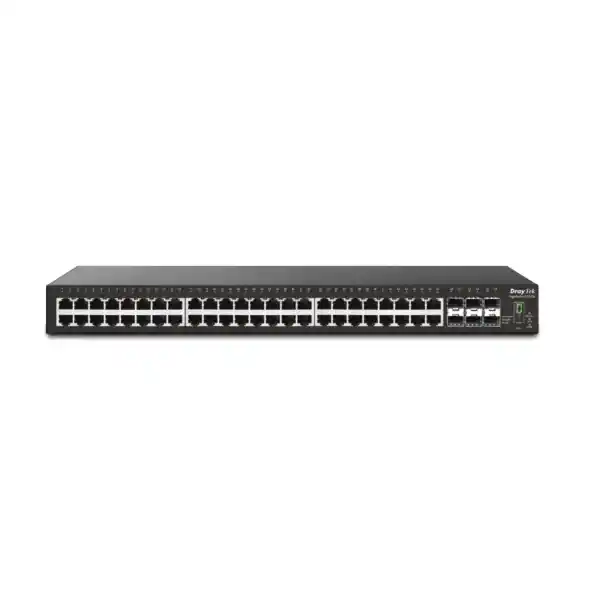
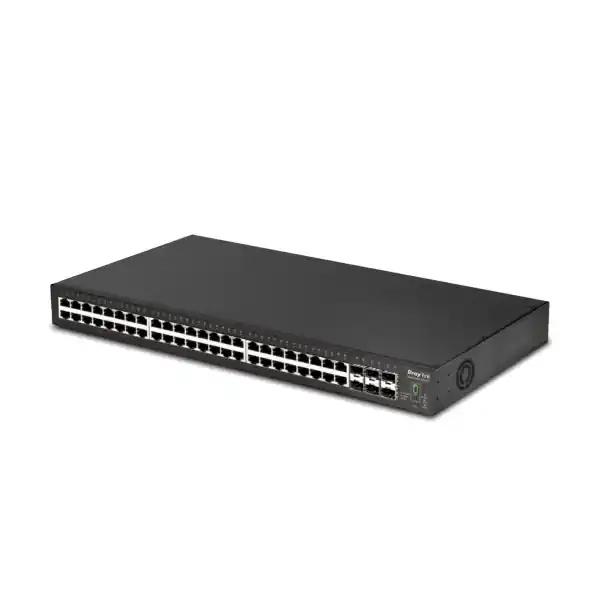
DrayTek VigorSwitch G2542x – 48-Port Gigabit Switch with 6 × 10G SFP+
The DrayTek VigorSwitch G2542x combines dense copper access, six 10 Gigabit SFP+ interfaces, VLAN-aware Layer 3 routing, policy controls, stacking and multi-platform management in a compact 1U chassis. It is designed for organizations that need a disciplined migration path from standalone Gigabit switching to resilient, centrally managed aggregation without introducing unnecessary PoE cost where powered endpoints are handled by separate access switches.
Direct answer: what is the G2542x?
It is a 48-port non-PoE Gigabit Ethernet L2+ managed switch with six SFP+ interfaces capable of 1Gbps or 10Gbps fiber connectivity. DrayTek publishes 216 Gbps switching capacity, 160.7 Mpps forwarding performance at 64-byte packets, a 16 Mbit buffer, support for up to 512 VLANs, static routing, VLAN routing and DHCP server functions.
Where does it fit?
Use it as a high-density access switch where PoE is not required, as a distribution switch aggregating multiple edge switches, or as a compact core for branch offices and mid-sized sites. The six 10G SFP+ ports make it especially useful where several server, firewall, storage, building-to-building or switch uplinks must converge without consuming copper user ports.
Why shortlist it in the UAE?
The model combines standard 100–240V AC input, a separate 12V DC backup-power socket, 1U rack mounting, VLAN segmentation, security controls, ONVIF-oriented surveillance features and management through local GUI, SNMP, SSH, DrayTek router switch management and VigorACS. That combination fits many Dubai office, retail, hospitality, education and mixed-use IT deployments.
Hardware architecture and switching performance
The VigorSwitch G2542x is built around a non-blocking-oriented 216 Gbps switching fabric sized for the aggregate bandwidth of its access and uplink interfaces. Forty-eight 1GbE RJ-45 ports provide the main edge-facing connectivity, while six SFP+ cages support 1Gbps or 10Gbps optical or direct-attach connectivity. At a practical design level, the port mix gives network architects enough uplink density to separate traffic domains instead of forcing every service onto one trunk. A typical deployment can dedicate pairs of 10G links to the firewall, virtualization cluster, storage network, access-switch aggregation or a second wiring closet while still retaining spare uplinks for growth or redundancy.
DrayTek specifies a forwarding rate of 160.7 million packets per second for 64-byte frames. That number matters because raw switching capacity alone does not describe the stress placed on packet-processing resources when traffic consists of many small frames. Voice, control-plane flows, telemetry, short application transactions and certain security appliances can generate high packet rates without consuming the full line-rate bandwidth. The published forwarding figure therefore provides a useful reference when sizing the switch for mixed enterprise workloads rather than assuming that all traffic resembles large file transfers.
The switch also includes a published 16 Mbit packet buffer and supports jumbo frames up to 12 KB. Buffering can help absorb brief microbursts when several ingress ports simultaneously transmit toward a smaller number of egress links, while jumbo-frame capability can be useful on storage, virtualization and backup networks that are deliberately engineered end to end for larger MTUs. Jumbo frames should not be enabled casually; every NIC, hypervisor vSwitch, router interface, firewall zone and intermediate switch in the path must use compatible MTU settings to prevent fragmentation or black-hole behavior.
DrayTek does not publicly identify the specific switching-silicon vendor or ASIC part number in the standard product specification, so a responsible design should avoid inventing chipset details. What is verifiable is the exposed data-plane capability: 48 Gigabit access ports, six 10G SFP+ interfaces, 216 Gbps switching capacity, 160.7 Mpps forwarding, VLAN segmentation, hardware-oriented Layer 2 forwarding and L2+ routing functions. For procurement and solution design, these published capabilities are more useful than an undocumented chipset name because they define the supported feature envelope and traffic scale that the manufacturer commits to for the platform.
Front-panel port map and physical design
Ports 1–48: Gigabit Ethernet
The forty-eight copper interfaces are 10/100/1000BASE-T RJ-45 ports. They suit desktops, servers with 1GbE NICs, printers, non-PoE wireless infrastructure, security appliances, media devices and downstream switches. LEDs provide visual indication for link state and negotiated speed, helping field engineers distinguish Gigabit connections from links that have fallen back to 10/100 Mbps.
Ports 49–54: SFP+
Six SFP+ slots operate at 1Gbps or 10Gbps, providing flexible uplink choices for fiber runs, DAC cables and compatible transceivers. This density is valuable when the switch is used as a distribution point because multiple 10G uplinks can be allocated to independent services or bundled using LACP where the network design and peer devices support it.
Console, status and stacking controls
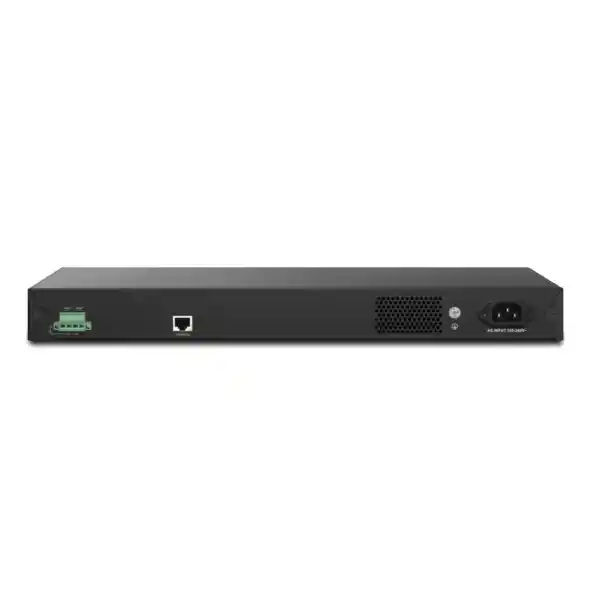
A console interface supports local command access for deployment and recovery work. The front panel also exposes system, power, monitoring and stack-state indicators. Current DrayTek documentation includes a stacking scan function that assists the discovery and joining of stack members when stacking is enabled on compatible firmware.
1U rack chassis and power
The chassis measures approximately 440 × 281 × 44 mm and weighs about 3.95 kg according to DrayTek’s published specifications. Main input is 100–240V AC, and the switch includes a 12V DC backup-power input. Maximum published power consumption is 64.2 W, which is important for UPS sizing and rack thermal planning.
Layer 2 switching functions for structured enterprise networks
A managed switch earns its value through control, not simply port count. The G2542x supports IEEE 802.1Q tag-based VLANs as well as MAC-based and protocol-based VLAN options, plus management, voice and surveillance VLAN concepts. In a Dubai office this allows administrators to separate corporate users, guest internet, voice endpoints, CCTV, building-management systems, printers, lab equipment and server networks while using the same physical switching infrastructure. Segmentation reduces the size of broadcast domains and creates boundaries that firewalls, ACLs and routing policies can enforce.
The switch supports STP, RSTP and MSTP. Spanning Tree remains essential whenever redundant physical paths can form Layer 2 loops. RSTP accelerates convergence compared with classic STP, while MSTP can map multiple VLANs into distinct spanning-tree instances so that redundant links are used more deliberately. For multi-switch campuses, the correct choice depends on the wider switching estate: a simple office may use RSTP consistently, while a larger campus can use MSTP to align VLAN groups with different preferred paths.
Link aggregation is available through static trunks or IEEE 802.3ad LACP. DrayTek lists up to eight aggregation groups with up to eight member ports in each group. LACP is commonly used to create resilient trunks between the G2542x and an upstream firewall, a server equipped with multiple NICs, a storage appliance or another managed switch. Aggregation does not make a single flow exceed the speed of one member link, because traffic is normally distributed using a hashing algorithm. Its benefit is aggregate bandwidth across many conversations and continued service if an individual physical member fails.
GVRP and basic QinQ are also supported. GVRP can help distribute VLAN registration information in environments that use it, while QinQ can encapsulate customer or departmental VLAN tags inside a service VLAN. QinQ is particularly relevant to managed-building networks, service-provider handoffs and organizations that must transport multiple tagged networks across an intermediate Layer 2 domain without renumbering the original VLAN IDs. Engineers should document tag ownership carefully because nested tagging can become difficult to troubleshoot if provider, firewall and campus configurations use overlapping conventions.
L2+ routing: keeping local VLAN traffic local
The G2542x supports static routes, VLAN routing and DHCP server functions, placing it in the L2+ category rather than limiting it to basic Layer 2 switching. Inter-VLAN routing can be moved onto the switch so that local traffic between trusted internal networks does not need to hairpin through the perimeter firewall. For example, a virtualization VLAN can communicate with a backup VLAN through switch-based routing while internet-bound traffic still follows a default route to the firewall. This reduces unnecessary load on the gateway and can lower latency for east-west traffic.
Whether VLAN routing should occur on the switch or firewall is a policy decision. Routing on the switch is efficient, but it also means that traffic can move between routed VLAN interfaces without passing through a stateful security appliance unless switch ACLs are used. High-security environments may intentionally route sensitive VLANs through a next-generation firewall so application inspection and threat controls remain in path. A hybrid architecture is common: the switch handles high-volume trusted internal routing, while regulated, guest, IoT or security-camera zones are routed through the firewall.
The DHCP server capability can be useful for branch autonomy, management networks or temporary deployments. In a larger enterprise, DHCP may remain centralized on Windows Server, a firewall, an IPAM platform or another infrastructure service. The important architectural point is that the switch supports enough Layer 3 functionality to maintain local network services and route selected VLANs even if the upstream gateway is temporarily unavailable, provided the relevant traffic does not depend on services beyond the site.
Security controls built into the switching layer
802.1X and MAC authentication
Port-based 802.1X can authenticate users or devices through a RADIUS infrastructure before granting network access. MAC authentication provides an alternative for endpoints that cannot run an 802.1X supplicant. A mature design can combine authentication with VLAN assignment, guest treatment and endpoint policy to reduce uncontrolled access from spare wall outlets.
DHCP snooping and IP Source Guard
DHCP snooping establishes trusted and untrusted port behavior and builds binding information from legitimate DHCP exchanges. IP Source Guard can then use those bindings to reduce source-address spoofing from access ports. These features are most effective when trusted uplinks and server ports are identified correctly during commissioning.
Dynamic ARP Inspection
DAI is designed to reduce ARP spoofing and man-in-the-middle opportunities by validating ARP traffic against trusted binding information. It should be rolled out methodically because statically addressed devices may require explicit treatment. Start with an inventory of gateways, servers, printers, cameras and infrastructure appliances before enforcing inspection broadly.
ACLs, storm control and DoS defenses
Access-control lists can filter traffic by IP or MAC criteria at the switch, while storm-control functions protect the LAN from excessive broadcast, multicast or unknown-unicast activity. DrayTek also lists DoS defense within the traffic-control feature set. These mechanisms complement, rather than replace, a perimeter or segmentation firewall.
IP conflict prevention and operational stability
IP conflicts are deceptively disruptive. A manually configured device that duplicates an address already assigned by DHCP can produce intermittent connectivity, ARP instability and help-desk symptoms that appear unrelated to switching. The G2542x includes DrayTek’s IP Conflict Prevention capability, intended to reduce these incidents by binding addresses to expected devices and restricting conflicting traffic. This is particularly useful in sites with mixed static and dynamic addressing, third-party contractors, legacy CCTV systems or building equipment that is not centrally administered.
The feature should be implemented alongside disciplined address management. Reserve infrastructure ranges, document static assignments, define DHCP exclusions, maintain switch-port descriptions and record MAC-to-device relationships for critical systems. When used this way, switch-level conflict prevention becomes part of an operational control framework rather than a reactive troubleshooting feature.
Quality of Service for voice, video and business applications
The G2542x provides eight QoS queues and supports strict-priority queuing and weighted round robin, together with classification based on CoS, DSCP, CoS-to-DSCP mapping and IP precedence. QoS is most valuable when congestion is possible. On an uncongested Gigabit access port every packet can normally be forwarded immediately, but uplinks can become busy during backups, large file transfers, software distribution, cloud synchronization and high-resolution video. QoS helps ensure that delay-sensitive traffic receives predictable treatment during those periods.
Voice networks commonly mark RTP media with DSCP values and use a separate voice VLAN. The G2542x supports LLDP-MED, which can help compatible IP phones learn network policy such as voice VLAN information. DrayTek also includes auto voice VLAN behavior designed to recognize voice endpoints and prioritize traffic. For enterprise deployments, automatic classification should be validated against the actual phone models in use, and DSCP trust boundaries should be defined so user devices cannot simply mark bulk traffic as high priority.
Surveillance traffic creates a different QoS problem. Cameras can produce sustained streams rather than short bursts, and dozens of cameras can fill an uplink continuously. A good design calculates aggregate camera bit rate, recording-server interface capacity and uplink headroom before relying on QoS. Priority mechanisms cannot create bandwidth that does not exist; they only decide which traffic receives preference when links are congested.
ONVIF-friendly surveillance switching
DrayTek positions the G2542x as ONVIF-friendly. Supported capabilities include discovery of compatible surveillance devices, surveillance topology views, real-time video access from the management interface and selected ONVIF device-maintenance functions. For an installer, this can shorten the time required to determine which camera is connected to which switch port, verify addressing and identify connectivity faults. It is especially useful in mixed-purpose networks where CCTV shares switching infrastructure with office users rather than running on a completely separate physical fabric.
Because the G2542x is non-PoE, it does not directly power IP cameras. That makes it more appropriate as a CCTV aggregation or core switch than as the camera-edge switch unless cameras have local power injectors or another PoE layer is present. A common topology uses PoE access switches on each floor or zone, with 10G fiber uplinks from those switches into the G2542x near the NVR or server room. This preserves the G2542x’s high-density aggregation role while locating PoE budgets closer to endpoint clusters.
Camera networks should still be segmented. Create dedicated surveillance VLANs, restrict management access, route only required streams to NVRs and monitoring stations, and prevent unnecessary internet access. If remote vendor access is required, terminate it through controlled VPN or secure support processes rather than exposing camera interfaces directly to the public network.
IPv6 readiness and multicast behavior
IPv6 support is increasingly relevant for dual-stack enterprise environments, ISP transitions and modern cloud-connected networks. DrayTek lists IPv6 ACL capability, MLD snooping and IPv6 DNS resolver functions for the G2542x. MLD snooping serves a similar purpose to IGMP snooping in IPv4 networks by limiting multicast forwarding to interfaces that have expressed interest in a multicast group. This reduces unnecessary flooding when IPv6 multicast applications are present.
For IPv4 multicast, the switch supports IGMP snooping, IGMP querier functions, multicast group filtering or throttling and Multicast VLAN Registration. DrayTek publishes support for up to 256 multicast groups. These functions can be important for IPTV, signage, certain market-data systems, conferencing appliances and one-to-many distribution applications. Incorrect multicast configuration can either flood the LAN or suppress required streams, so deployments should identify where querier responsibility lives and whether traffic must cross VLAN boundaries.
Dual-stack operations also require security parity. An organization that carefully filters IPv4 but ignores IPv6 may create an unintended bypass path. When IPv6 is enabled, mirror the segmentation model, management restrictions, ACL philosophy and monitoring approach used for IPv4. When IPv6 is not needed, document how it is treated rather than leaving behavior undefined.
Stacking: scaling to a larger logical switch
On firmware supporting the stacking feature, up to four VigorSwitch G2542x units can operate as one logical stack. DrayTek describes line and ring stacking topologies, single-IP centralized management, configuration and firmware synchronization, unified monitoring and failover behavior. With four units, the deployment can scale to 192 Gigabit Ethernet access ports. DrayTek also describes the stack as providing up to sixteen 10G SFP+ uplinks for general use, because some SFP+ interfaces are consumed by stack interconnections depending on the selected topology and design.
Stacking changes operational practice. Instead of maintaining four unrelated switch configurations, administrators can work with one logical system, reducing repetitive VLAN, QoS and security changes. It also simplifies monitoring and can improve resilience because member failures do not necessarily remove the entire switching domain. However, stacking should not be confused with full site-level redundancy. A stack can still share common risks such as the same rack, UPS, room temperature, fiber pathway or upstream firewall.
For resilient design, treat stacking as one layer of availability. Use ring stacking where supported and appropriate, distribute uplinks across members, aggregate links to upstream devices that support the design, use dual power sources where practical, and document what happens when the stack master or one stack cable fails. Change-management procedures should also include a validated firmware path because mixed or unsupported firmware can complicate stack formation.
Before quoting a stack, confirm the exact firmware version intended for shipment or commissioning and verify the current DrayTek release notes. Stacking was added through firmware evolution, so the procurement specification should include firmware preparation rather than assuming that any unit taken from older inventory will already be ready for immediate stack participation.
Management options: local control and centralized operations
Web GUI, SSH and console
The switch supports standard local administration through HTTP/HTTPS and command-line access including SSH v2, with a console interface available for direct maintenance. Telnet may be present for compatibility, but secure deployments should prefer HTTPS and SSH and restrict management access to dedicated administrator networks.
SNMP, RMON, Syslog and monitoring
SNMP v1, v2c and v3 are listed, along with RMON groups and operational monitoring functions. Use SNMPv3 where the monitoring platform supports it, forward logs to a central collector, synchronize time through SNTP and name every important port so alarms can be mapped rapidly to physical services.
Vigor Router Switch Management
Compatible DrayTek routers can provide centralized switch discovery, hierarchy views and simplified configuration workflows through Switch Management. This is useful for smaller organizations that want a unified DrayTek management experience without deploying a separate management server for every branch.
VigorACS
DrayTek VigorACS can provide centralized provisioning, monitoring, alarms, scheduled maintenance and remote administration across multiple DrayTek devices and sites. Licensing, hosting method and entitlement should be confirmed at quotation stage because centralized-management commercial terms can differ by deployment and region.
Management-plane hardening checklist
Switch security begins with the management plane. Create a dedicated management VLAN that is not exposed to ordinary user ports, restrict GUI and SSH access to administrator subnets, use unique named administrator accounts rather than sharing one credential, enable the strongest supported authentication methods, synchronize time, export logs and back up the configuration after every significant change. DrayTek provides two levels of administration privilege, which can help separate full configuration authority from more limited operational access.
If RADIUS or TACACS+ is available in the organization, use centralized authentication so administrator access can be disabled when staff roles change. Maintain at least one carefully protected local recovery account in case the authentication server is unreachable. Disable services that are not required, avoid exposing switch management to the internet, and use a VPN or secure remote-management architecture for off-site support.
Configuration backups should be stored outside the switch and tied to change records. A backup is most useful when administrators know which firmware version it was created under, which site it belongs to and what changed after the snapshot. For stacked deployments, document stack member IDs, serial-number positions, uplink assignments and expected master behavior so hardware replacement can be completed with minimum ambiguity.
Designing the six 10G SFP+ ports
The six SFP+ interfaces are one of the strongest reasons to select the G2542x. Many 48-port Gigabit switches provide only two or four high-speed uplinks, which can force a designer to combine unrelated traffic. Six ports offer more freedom. Two can form an LACP pair to a firewall or core, two can connect a virtualization cluster or storage fabric, and two can aggregate downstream switches. Alternatively, three redundant pairs can connect separate network domains while maintaining symmetrical cabling.
Optics must match both the switch and the fiber plant. Confirm whether links use multimode or single-mode fiber, connector type, distance, patch-panel loss budget and supported transceiver standards. For short in-rack or adjacent-rack links, compatible direct-attach copper cables can reduce cost and power consumption. For building-to-building links, fiber is generally preferred because it avoids electrical ground-potential issues and can cover greater distances.
When using LACP across 10G ports, remember that a two-member bundle provides up to 20Gbps aggregate bidirectional capacity across many flows, but a single TCP session typically hashes to one member and therefore remains limited to one 10Gbps link. Workloads such as hypervisor clusters, backup servers and user aggregation usually consist of many concurrent conversations and can benefit strongly from aggregated bandwidth.
Maintain spare uplink capacity in the design. A switch that uses all six SFP+ ports on day one has no simple growth path for an additional server cluster, disaster-recovery link or access-switch stack. Reserving one or two ports can be more valuable than marginally optimizing the initial cable layout.
Sizing methodology for a UAE office, campus or mixed-use site
Start with endpoint count, not switch count. Record every wired user device, server, printer, access point uplink, camera aggregation link, AV device, building controller, firewall interface and inter-switch connection. Then classify each endpoint by bandwidth, PoE requirement, VLAN, resiliency target and expected growth. Because the G2542x does not provide PoE, endpoints that require switch-supplied power must connect through separate PoE switches, injectors or local power supplies.
Next calculate oversubscription. Forty-eight 1GbE ports can theoretically present 48Gbps of one-directional access demand, but real user traffic is rarely synchronized at full line rate. The correct uplink ratio depends on workload. A general office with cloud applications may operate comfortably with far less than 1:1 uplink capacity, while video editing, engineering, backup or virtualization environments may justify multiple 10G uplinks. Measure current traffic where possible rather than relying only on user count.
Then define failure domains. Ask what happens if one switch fails, one fiber is cut, one UPS is offline or one firewall reboots. Critical sites may divide users across two access switches and use redundant uplinks to separate upstream members. Less critical branches may accept a single-switch design but keep a preconfigured spare. The G2542x’s backup DC input can form part of a power-continuity plan, but the actual external DC power source must be engineered and sized correctly.
Finally, reserve capacity. A practical procurement target is to leave enough copper and SFP+ headroom for planned moves and unplanned growth. Installing a 48-port switch at 47 active ports creates an immediate operational constraint. Spare interfaces also simplify troubleshooting because a suspect endpoint can be moved without reworking unrelated connections.
Recommended deployment topologies
High-density non-PoE access
Use the G2542x directly for office devices that do not require PoE. Connect access points, phones and cameras through dedicated PoE switches, while desktops, printers, appliances and fixed systems connect to the G2542x. Use one or more 10G links toward the firewall or core and separate user, voice, guest, IoT and server VLANs.
Distribution / aggregation layer
Deploy PoE or edge switches on floors, zones or remote cabinets and aggregate their fiber uplinks into the G2542x. This topology makes strong use of the six SFP+ interfaces and centralizes VLAN routing, ACL enforcement and monitoring near the server room or main distribution frame.
SME core switch
For a mid-sized office, the G2542x can operate as the central switching platform between access switches, servers and the security gateway. Route trusted VLANs locally, send sensitive zones through the firewall, use LACP for high-availability uplinks and integrate SNMP or VigorACS for operations.
Stacked campus block
Stack up to four compatible units to create a larger logical switch. Distribute uplinks and important services across members so a single member failure has limited impact. Use ring stack topology when appropriate, and document stack IDs, member priorities and cable paths before commissioning.
When the G2542x is not the right switch
Do not select the G2542x if the access layer must directly power a large number of IP phones, wireless access points or cameras. It has no PoE budget and no PoE output ports. In that case, choose a PoE-capable model for the edge and consider the G2542x only for aggregation or non-PoE segments. Similarly, if endpoint devices require 2.5GbE or faster copper access, this model’s 48 RJ-45 ports are Gigabit Ethernet rather than multigigabit.
It may also be unsuitable for networks that require dynamic routing protocols beyond the documented L2+ feature set. Static and VLAN routing are useful, but organizations needing advanced OSPF, BGP, VRF-heavy campus cores or large-scale routing tables should evaluate a dedicated Layer 3 switch or router architecture. The G2542x is best understood as a feature-rich managed switch with practical L2+ routing, not as a replacement for a carrier-grade router or data-center spine platform.
Finally, do not choose a switch solely because its port count matches the present requirement. Check optics, management architecture, support expectations, rack depth, UPS capacity, cabling standards, VLAN scale and firmware policy. A technically correct model can still be an operational mismatch if these surrounding requirements are ignored.
Power, cooling and UAE rack planning
DrayTek specifies 100–240V AC input and a maximum power consumption of 64.2 W for the G2542x, plus a 12V DC backup input rated in the published specification for failover use. For UPS planning, do not size only for the switch. Include firewalls, routers, optical equipment, servers, PoE switches, NVRs and environmental monitoring. Add runtime margin and account for UPS conversion losses. In sites that require long autonomy, calculate load in watts rather than relying on VA labels alone.
The operating-temperature specification published on the main DrayTek product page extends up to 50°C, while some quick-start documentation gives more conservative installation guidance. In UAE deployments, follow the currently supplied regional documentation and maintain controlled rack-room temperature rather than designing around the highest absolute device limit. Air-conditioning failure can raise cabinet temperature quickly, especially when several switches, firewalls and servers are installed in a shallow communications room.
Use front-to-rear airflow clearance, avoid obstructing vents with dense patch-cord bundles, and leave service access for the backup power connector and console port. Where the rack is in a dusty industrial or retail environment, schedule cleaning and monitor fan and temperature alarms. A 1U device may appear thermally insignificant, but multiple high-density devices can create localized hot spots if cabinet ventilation is poor.
Firmware, feature lifecycle and commissioning discipline
Managed-switch functionality evolves through firmware. Stacking support on the G2542x is an example of a capability added through later software. The project plan should therefore include firmware verification as a formal commissioning step. Record the shipping firmware, compare it with DrayTek’s current recommended release, review release notes, back up the configuration before upgrades and confirm that critical functions such as VLANs, LACP, 802.1X, DHCP snooping and stacking behave as expected after the change.
Avoid upgrading a production stack immediately before a business-critical event. Use a maintenance window, validate configuration backups and keep a recovery path. If several branches use the same switch model, test a new firmware image on a representative non-critical device before rolling it out broadly. This reduces the risk of discovering site-specific interoperability issues at scale.
For tender or managed-service environments, define who owns firmware policy. The hardware supplier, internal IT team and managed-service provider should not all assume another party is responsible. Include release monitoring, upgrade approval, backup retention and rollback procedures in the operational handover.
Licensing and management-cost considerations
Core switching features are presented by DrayTek as functions of the G2542x platform and firmware, but centralized management can introduce separate software, service or subscription considerations depending on the chosen management method. If the switch is administered locally or through a compatible DrayTek router’s switch-management interface, the commercial model differs from a larger VigorACS deployment. Procurement teams should therefore separate hardware cost, optics, support, installation and management-platform entitlement instead of assuming they are one bundled item.
For VigorACS projects, confirm the current edition, node count, hosting model, support period and renewal requirements at the time of quotation. Commercial terms can change over a product’s lifecycle. The goal is not merely to buy management software; it is to ensure that every deployed device can remain visible, backed up, patched and supportable for the planned service period.
Also budget for SFP or SFP+ modules, patch leads, fiber trays, DAC cables, rack accessories, UPS capacity and professional configuration. A switch price without the required transceivers or deployment services may look attractive but does not represent the installed solution cost.
Interoperability with firewalls, servers and third-party switches
The G2542x uses standards-based Ethernet, VLAN tagging, LACP, spanning tree, LLDP and 802.1X mechanisms, allowing it to participate in multi-vendor networks. Interoperability still depends on matching configuration. An LACP trunk must use compatible speed, duplex, VLAN tagging and aggregation settings at both ends. An MSTP domain must use consistent region parameters. An 802.1X deployment must align switch methods with the RADIUS server, endpoint supplicants and fallback policy.
When connecting to a firewall, decide whether the link carries one routed transit VLAN, multiple 802.1Q subinterfaces or an LACP bundle. For smaller sites, a tagged trunk from the switch to the firewall can centralize security between VLANs. For higher-throughput trusted networks, the switch can route selected VLANs locally and use a routed uplink to the firewall for internet and protected zones.
Server connectivity should be planned with the host operating system or hypervisor team. A 10G SFP+ NIC can connect directly to the switch with compatible optics or DAC, while multiple links can be teamed where the server stack and switch support matching modes. Verify whether the server uses LACP, switch-independent teaming or active/standby bonds because the switch configuration differs for each.
Dubai and UAE procurement considerations
For UAE projects, specify the complete installed requirement rather than only the switch model. Confirm rack location, available power sockets, UPS source, copper patching, fiber type, optic distance, connector format, VLAN count, management IP plan, redundancy expectations and whether installation must occur outside business hours. If the site is in a free zone, hotel, mall, warehouse or shared commercial property, include access permits and building-facility coordination in the schedule.
Power-cord type and included accessories can vary by market, so the quote should identify the regional pack being supplied. For fiber links, identify whether existing plant is OM3, OM4, OS2 or another standard and whether patch panels use LC connectors. Avoid ordering transceivers before verifying the actual fiber path. A 10G link that looks straightforward on a logical diagram can fail commissioning because the building has the wrong fiber grade, excessive loss or undocumented intermediate couplers.
Organizations that need local design, deployment or support can coordinate switching with broader infrastructure requirements through FourTeck UAE. For firewall-led segmentation and security integration, the Firewall Dubai practice can align VLAN architecture, uplinks and security policy. Sites requiring broader systems support can also connect switching projects with FourTeck IT Services UAE.
For customers operating across the Gulf and African regions, standardize configuration templates, optic specifications, VLAN numbering, monitoring and spare strategy where possible. Cross-border consistency reduces support friction even when local power, carrier and cabling conditions differ. Regional infrastructure planning can be coordinated through FourTeck Africa for projects extending beyond the UAE.
Migration strategy from an older 48-port switch
A successful replacement begins with discovery. Export the existing configuration if possible, record every active port, identify tagged and untagged VLANs, capture trunk settings, document MAC addresses for critical equipment and note ports with unusual speed or duplex settings. Do not assume unused-looking ports are unimportant; printers, alarms, access-control panels and building systems may communicate only intermittently.
Build the G2542x configuration before the maintenance window. Create VLANs, management addressing, trunks, LACP groups, STP parameters, ACLs, SNMP, NTP/SNTP, logging and administrator accounts. If the switch will perform VLAN routing, predefine interface addresses and routes. Use clear port descriptions that map to patch-panel labels or endpoint names. Then test a small number of non-critical connections before moving the full site.
During cutover, move uplinks and infrastructure in a controlled order. Validate management access first, then routing and DHCP behavior, then representative user, voice, camera and server devices. Check spanning-tree state before reconnecting redundant links. If the old switch had implicit behavior such as native VLANs or auto-negotiation exceptions, reproduce it deliberately rather than discovering it through outages.
After migration, monitor interface errors, negotiated speeds, packet drops, STP changes, authentication failures and uplink utilization. A successful ping test proves only basic reachability. Operational validation should include application access, voice quality, camera streams, backup throughput, management visibility and alerting.
Troubleshooting approach for common switch issues
If an endpoint links at 100 Mbps instead of 1 Gbps, check the copper patch lead, wall jack, patch panel and endpoint NIC before changing switch settings. Gigabit Ethernet requires all four twisted pairs, so cable faults that still permit 100 Mbps operation are common. Use the port LEDs and interface counters to identify negotiation state and errors.
If a VLAN cannot reach another network, verify the endpoint VLAN assignment, trunk tagging, switch VLAN interface, default gateway and route table. If routing occurs on the firewall, confirm that the firewall subinterface uses the same VLAN ID and that policy permits the traffic. If routing occurs on the G2542x, check the local route and any ACL applied to the relevant path.
For unstable networks, inspect STP topology changes, broadcast levels, loop-protection events and MAC-table movement. Repeated MAC flapping between ports often indicates a loop or an incorrectly connected downstream switch. Storm-control counters can provide additional evidence. Do not disable spanning tree simply to make a blocked link forward; determine why the link is blocked and redesign the topology if active-active capacity is required.
For fiber uplink failures, verify optic type at both ends, wavelength, supported speed, fiber polarity, connector cleanliness and optical budget. A link with one 1G optic and one 10G optic will not negotiate simply because both use the same LC connector. Document every transceiver installed so spare parts match the deployed standard.
Monitoring metrics that matter after deployment
Track utilization on every 10G uplink, not only the internet connection. A switch can be healthy while a server-facing uplink is saturated. Measure inbound and outbound bandwidth separately, watch 95th-percentile usage and correlate peaks with backups, replication, camera recording or software distribution. Sustained utilization near link capacity is a planning signal even if users have not yet reported problems.
Monitor errors and discards. CRC or alignment errors often indicate physical-layer problems, while output drops can indicate congestion. Watch interface up/down events, stack state, temperature alarms, power status and spanning-tree changes. These signals become far more useful when port descriptions identify the connected device or location.
Maintain a baseline. Record normal uplink utilization, multicast group counts, MAC-table population and device temperature after commissioning. Future deviations are easier to investigate when there is a known-good reference. Integrate SNMP and logs with the organization’s monitoring platform or centralized DrayTek management so failures are detected by systems rather than by user complaints.
Standards and protocol support in practical terms
The G2542x supports common Ethernet standards including IEEE 802.3 for 10BASE-T, 802.3u for 100BASE-TX, 802.3ab for 1000BASE-T and 802.3ae for 10 Gigabit Ethernet over supported fiber interfaces. IEEE 802.3x flow control helps manage receive congestion in compatible scenarios, while 802.3az Energy Efficient Ethernet can reduce power use on supported copper links during low activity.
For segmentation and traffic handling, the platform supports 802.1Q VLAN tagging and 802.1p class-of-service marking. Spanning-tree support includes 802.1D, 802.1w and 802.1s variants. IEEE 802.3ad LACP provides standards-based link aggregation. 802.1ad QinQ enables nested VLAN tagging for selected service or transport designs.
On the access-control side, 802.1X port authentication integrates the switch with RADIUS-based network-access systems. LLDP and LLDP-MED help neighboring devices exchange identity and policy information, which is particularly useful for VoIP endpoints and infrastructure discovery. Standards support improves interoperability, but exact feature behavior should still be validated with the specific firewall, server, phone, access point or third-party switch used in the project.
Frequently asked technical questions
Does the G2542x provide PoE?
No. The G2542x is the non-PoE model. It is ideal where endpoints have their own power or where PoE access switches sit below it in the topology. If camera, phone or AP power must come from the switch, use an appropriate PoE model or a separate PoE layer.
Are the six uplinks 10G only?
No. DrayTek specifies the SFP+ interfaces for 1Gbps or 10Gbps operation. Select transceivers and peer equipment that use matching speed and optical standards.
Can it route between VLANs?
Yes. The switch supports VLAN routing and static routing. This can offload trusted east-west traffic from the firewall, but sensitive segmentation may still be better enforced through a firewall depending on policy requirements.
How many switches can be stacked?
DrayTek currently specifies stacking for up to four G2542x units on supported firmware, with line or ring topology options. Verify firmware before deployment.
Can it connect to third-party firewalls?
Yes. Standard Ethernet, 802.1Q VLANs, LACP and static routing allow integration with a wide range of firewalls and routers. Configuration must be matched at both ends.
Is it suitable for CCTV?
Yes as an aggregation or non-PoE switching platform. DrayTek includes ONVIF-oriented discovery, topology and maintenance features, but cameras needing PoE should connect through PoE access switches or other power methods.
Decision recap: when the DrayTek VigorSwitch G2542x makes sense
Choose the G2542x when the project needs a large number of conventional Gigabit copper ports, several independent 10G uplinks, strong Layer 2 segmentation, practical L2+ routing and centralized management in a compact rack footprint. Its architecture is particularly attractive when PoE is already handled elsewhere and the design priority is aggregation density rather than endpoint power delivery.
The model is well aligned with offices that have forty or more wired endpoints, distribution cabinets collecting multiple downstream switches, server rooms that need several 10G connections, surveillance systems with PoE edge switches, and multi-VLAN networks where some east-west routing can occur locally. Stacking provides a growth path beyond a single 48-port chassis, while security functions such as 802.1X, DHCP snooping, IP Source Guard, DAI and ACLs help enforce policy at the access layer.
The main design limits are equally clear. Copper access is 1GbE rather than multigigabit, there is no PoE budget, and routing is L2+ rather than a replacement for an advanced dynamic-routing core. These are not disadvantages when they match the intended role; they simply define where the switch belongs in the architecture.
For many UAE networks, the strongest deployment model is to pair the G2542x with PoE access switches and a next-generation firewall. The G2542x handles dense switching, 10G aggregation and selected VLAN routing, while the firewall controls internet access and high-security inter-zone policy. This division keeps each platform focused on the task it performs best.
Quotation input checklist for accurate UAE sizing
A precise quotation should be based on the installed network requirement, not only the model number. Supplying the following information allows the switch, optics, accessories and services to be sized correctly and reduces change orders during commissioning.
Final consultation panel: build the switch around the network, not the other way around
The DrayTek VigorSwitch G2542x provides a strong foundation for organizations that require dependable Gigabit access, flexible 10G aggregation, VLAN discipline and manageable operational complexity. The best results come from integrating it into a documented architecture: define security zones before creating VLANs, calculate uplink demand before ordering optics, establish management access before installing the switch in a remote rack, and verify firmware before enabling stacking or other advanced functions.
A complete FourTeck consultation can cover switch placement, firewall interconnection, VLAN and IP addressing, optics selection, LACP, spanning-tree strategy, switch hardening, SNMP monitoring, centralized management, configuration backup and handover documentation. For sites with existing infrastructure, the design process can also include migration mapping from the current switch so legacy VLANs, static devices and special-purpose ports are preserved during cutover.
When comparing quotes, evaluate the whole deployment: hardware authenticity, current firmware, optics compatibility, rack accessories, implementation method, testing, support path and documented configuration. A switch is a critical shared component; a small procurement saving can be outweighed by downtime if uplinks, transceivers or migration planning are incorrect.
For a Dubai project, provide the site type, approximate endpoint count, required VLANs, firewall model, number and distance of fiber links, PoE requirements and whether the switch will be standalone or stacked. Those details are enough to build an initial bill of materials and topology. For multi-site UAE deployments, add branch count, WAN design, preferred monitoring platform and configuration-standardization requirements.
Why source the G2542x as a designed solution
A managed switch becomes valuable only when the configuration reflects the actual business network. Correctly implemented, the G2542x can consolidate dozens of endpoints, isolate departments and device classes, aggregate high-speed links, support CCTV and voice traffic, route selected VLANs locally and provide the operational visibility needed for proactive support. Incorrectly implemented, the same hardware can become a flat Layer 2 network with weak security and unclear failure behavior.
For that reason, the recommended procurement approach is to pair hardware selection with topology review and commissioning. Confirm whether six 10G ports are sufficient after accounting for stack links and redundancy, decide which VLANs require firewall inspection, choose optics from the actual fiber plant, and define how configuration and firmware will be maintained after handover. These steps turn a switch purchase into a supportable network platform.
The DrayTek VigorSwitch G2542x is especially compelling where the requirement is straightforward but not basic: many 1GbE ports, multiple 10G uplinks, enterprise VLAN and security features, useful L2+ routing, stacking growth and DrayTek management integration. It fills the space between entry-level smart switches and much more complex campus-core platforms, making it a practical option for a wide range of UAE business networks.

Reviews
There are no reviews yet.