
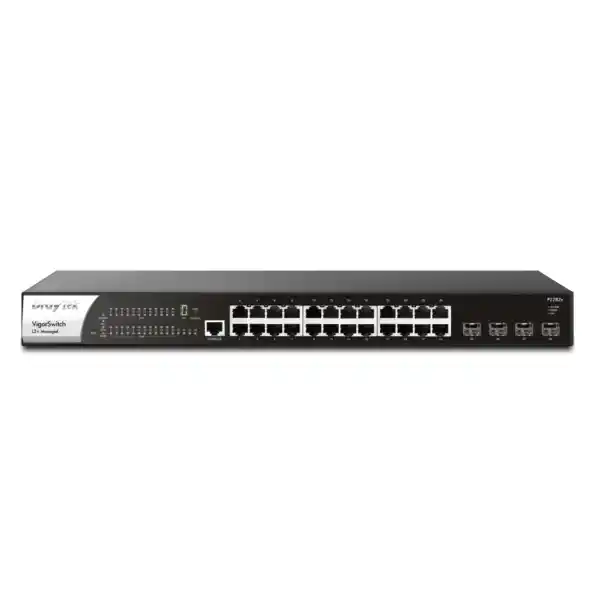
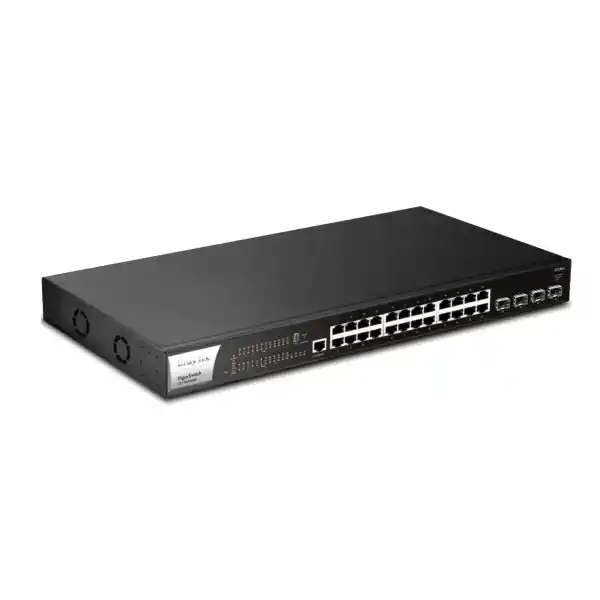
DrayTek VigorSwitch P2282x in UAE
High-density Gigabit PoE access, 10Gbps fiber aggregation, advanced Layer 2 controls, practical Layer 3 functions, hardware stacking and resilient power architecture for modern Dubai and UAE network environments.
Enterprise access switching without unnecessary complexity
The DrayTek VigorSwitch P2282x is designed for networks that have outgrown basic smart switches but do not need the operational overhead of a large chassis platform. Its architecture combines twenty-four copper Gigabit Ethernet access interfaces with standards-based PoE and PoE+, four dedicated SFP+ uplinks capable of 1Gbps or 10Gbps operation, a 400-watt PoE power pool, and a Layer 2+ feature set that allows the switch to participate more actively in segmentation, routing, availability and endpoint protection. This makes it relevant to branch offices, schools, clinics, hospitality properties, warehouses, retail sites, surveillance networks and distributed commercial buildings throughout the UAE.
A central advantage of the P2282x is that uplink capacity is not sacrificed merely because the switch is serving twenty-four powered edge devices. The four SFP+ interfaces are separate from the RJ45 access ports, so an administrator can use 10Gbps fiber or direct-attach links for aggregation while keeping all twenty-four copper ports available for cameras, access points, IP phones, terminals, controllers and ordinary user devices. This port design is especially useful where camera bitrates, wireless traffic and inter-VLAN flows are increasing faster than endpoint port counts. It also provides practical headroom for dual-uplink designs, switch stacking and redundant core connections.
P2282x technical profile at a glance
Access interfaces
24 x 10/100/1000Base-T RJ45 ports with IEEE 802.3af PoE and 802.3at PoE+ support, allowing data and power delivery over standard Ethernet cabling to compatible powered devices.
High-speed uplinks
4 x SFP+ slots supporting 1Gbps and 10Gbps fiber connectivity for core aggregation, server links, inter-switch transport, stacking topologies and high-bandwidth distribution.
Forwarding resources
128Gbps switching capacity and a vendor-stated forwarding rate of 95.2Mpps at 64-byte frames, with support for jumbo frames up to 12KB and a 12Mbit packet buffer.
PoE system
400W shared PoE budget across 24 PoE/PoE+ ports, plus scheduling, power monitoring and device-check functions that can help automate recovery of selected powered endpoints.
Segmentation and routing
Up to 512 VLANs, 802.1Q tagging, voice and surveillance VLANs, MAC- and protocol-based VLAN methods, GVRP, basic QinQ, static routing, VLAN routing and DHCP server capability.
Rack and power format
1U rackmount chassis measuring approximately 440 x 281 x 44mm, AC 100–240V input and separate DC backup inputs for switch logic and PoE power continuity.
Port architecture: 24 Gigabit access ports plus four dedicated 10G uplinks
The front panel layout is straightforward for installation teams. Ports 1 through 24 are copper RJ45 interfaces capable of 10Mbps, 100Mbps or 1000Mbps Ethernet. On the P2282x, those same interfaces are the power-sourcing ports. Four SFP+ cages, presented as the high-speed uplink block, add 1Gbps or 10Gbps connectivity without consuming a copper access port. A console interface supports local administration and recovery workflows. Status indicators provide link, activity, PoE and system information so technicians can distinguish common cabling, power and boot-state issues directly at the rack.
For a typical UAE office floor, the twenty-four RJ45 ports can be allocated among Wi-Fi access points, desk phones, IP cameras, printers, time-attendance terminals, building controllers and wired user outlets. The SFP+ ports can then connect upward to a distribution switch, firewall aggregation layer, storage network or adjacent access switch. Because 10G transport is available on four interfaces, the design does not force every deployment into a single-uplink topology. Administrators can create LACP bundles where the far-end equipment supports compatible aggregation, maintain separate production and resilience paths, or reserve one or more high-speed interfaces for expansion.
This separation is valuable when a site has many low-to-medium bandwidth powered devices whose combined traffic can nevertheless become significant. Twenty IP cameras may each use modest average bitrate, yet simultaneous high-motion scenes, firmware downloads, NVR replay, analytics traffic and management sessions can create bursts. Multiple Wi-Fi access points similarly concentrate dozens or hundreds of client sessions onto the wired access layer. A Gigabit uplink can therefore become the limiting point even when no single edge device approaches 1Gbps. The P2282x responds to that problem with four 10Gbps-capable uplinks and a switching fabric sized to forward traffic across all access and uplink interfaces without treating the uplink as an afterthought.
The SFP+ design also gives infrastructure teams medium flexibility. Depending on approved transceivers and optical design, an uplink can be built with fiber for electrically isolated building-to-building transport or longer campus distances, while compatible direct-attach copper can be practical for short rack-to-rack or device-to-device connections. For procurement, the important step is to specify the required link speed, fiber type, wavelength, connector format and distance rather than ordering optics solely by appearance. FourTeck can align the switch, transceiver and patching bill of materials so that the physical layer matches the intended topology.
Switching performance and traffic headroom
DrayTek specifies 128Gbps switching capacity for the VigorSwitch P2282x. That figure corresponds well to the aggregate full-duplex bandwidth represented by twenty-four 1Gbps access ports plus four 10Gbps uplinks: 24Gbps of one-direction access capacity plus 40Gbps of one-direction SFP+ capacity, doubled for full duplex, equals 128Gbps. This relationship is useful because it indicates that the published switching capacity is aligned with the port complement rather than reflecting a substantially oversubscribed internal fabric.
The vendor also states a 95.2 million packets-per-second forwarding rate for 64-byte frames. Packet-per-second capacity matters in a different way from raw bandwidth because many small packets can require more forwarding decisions than a smaller number of large packets carrying the same amount of data. Voice signalling, DNS, application transactions, management traffic and certain security-camera control flows can create high packet rates. A network designer should still treat vendor performance figures as laboratory maxima and validate application behavior, enabled features, traffic patterns and uplink design when sizing a production environment.
The switch supports jumbo frames up to 12KB. Jumbo framing can reduce protocol overhead in controlled environments such as storage or large data-transfer segments, but it should be deployed consistently end to end. Merely enabling a larger MTU on one switch does not make a path jumbo-safe. Servers, hypervisors, storage interfaces, upstream switches and routed boundaries must all use compatible settings. For mixed office networks, standard Ethernet MTUs are usually simpler, while jumbo frames can be reserved for carefully engineered VLANs with a clear operational reason.
A 12Mbit buffer provides temporary packet storage when ingress traffic must wait for an egress interface. Buffering cannot remove sustained congestion, but it can absorb short bursts and reduce immediate packet loss when traffic briefly converges on a busy uplink. Network operations teams should combine buffer awareness with interface utilization monitoring, QoS policy and uplink capacity planning. If a 1Gbps server interface is continuously receiving traffic from several access ports, no switch buffer can create additional server-side bandwidth; the correct response is to increase capacity, tune application behavior or shape traffic according to business priority.
400W PoE budget: powering cameras, access points, phones and edge systems
All twenty-four copper ports on the P2282x support standards-based IEEE 802.3af PoE and 802.3at PoE+. The shared power budget is 400 watts. This is a substantial pool for a 24-port access switch and gives designers room to mix device classes rather than assuming every endpoint draws the same amount. A simple average calculation shows why the total budget must be considered separately from port count: 400W divided equally across 24 ports is roughly 16.7W per port, but real deployments rarely distribute power evenly. Some phones may draw only several watts, fixed cameras may use modest power, and selected access points, PTZ cameras or devices with heaters and motors can draw considerably more.
PoE sizing should therefore start with each powered device’s maximum or engineering design draw, not only its typical idle consumption. Add the devices by port, total their maximum expected requirement, and reserve operational headroom. For example, a building may use eight Wi-Fi access points, ten fixed cameras, four desk phones and two controllers. If the access points are budgeted at 20W each, cameras at 12W, phones at 8W and controllers at 10W, the engineering total is 332W. That fits inside a 400W budget and leaves 68W of headroom. The exact numbers must be taken from the chosen endpoint datasheets, because PoE class, radio configuration, infrared illumination, USB accessories and environmental features can change demand.
The P2282x includes PoE scheduling. Administrators can use schedules to turn selected powered ports on or off at defined times, which may be useful for non-critical endpoints outside business hours, controlled reboot windows or power policy enforcement. The switch also supports a ping-based device-check workflow. A selected device can be monitored for reachability, and when the configured check fails, the switch can power-cycle the relevant PoE port and/or generate an alert. This is particularly useful for cameras, access points or embedded devices that may occasionally require a hard power reset but are installed in ceilings, poles or other inconvenient locations.
PoE scheduling and automated restart logic should be used deliberately. A ping failure can be caused by upstream routing, an ACL, an ICMP policy, a server outage or a maintenance window rather than a frozen endpoint. If the switch is configured to power-cycle a device for every transient communication problem, troubleshooting can become harder and sensitive endpoints may reboot unnecessarily. A sound operational design chooses reliable target addresses, reasonable timeout thresholds and notification rules, and documents which ports are subject to automatic recovery.
Power monitoring is also important in UAE deployments where a rack may be backed by UPS systems with a finite runtime. The switch’s maximum specified power consumption is 460.4W, which reflects the possibility of substantial PoE load in addition to the switch itself. UPS sizing should account for the actual PoE portfolio, the firewall, routers, NVRs, servers and any fiber equipment sharing the rack. The goal is not merely to keep the switch powered, but to preserve the complete traffic path. A PoE switch that remains online while the gateway, NVR or uplink device loses power may not deliver the intended business continuity.
For installations that require a review of switching, UPS, firewall and structured-cabling dependencies together, FourTeck’s UAE IT services team can help convert the endpoint count and floor plan into a practical power and connectivity design rather than treating the switch as an isolated component.
10G SFP+ uplinks for aggregation, resilient cores and server connectivity
The four SFP+ ports are one of the defining reasons to select the P2282x over a conventional 24-port Gigabit PoE switch. They allow access traffic to leave the switch at 10Gbps speeds when paired with compatible optics or cabling and a suitable far-end interface. In a single-floor office, one 10G uplink may connect to the core while a second provides redundancy. In a surveillance environment, one high-speed path can serve the NVR or recording network while another uplink connects toward the routing and management core. In a compact server room, a short 10G direct-attach connection can link the switch to a compatible aggregation device without deploying optical transceivers.
LACP can combine multiple physical links into a logical bundle when both devices support compatible configuration. The P2282x supports up to eight aggregation groups with up to eight members per group. Link aggregation can add capacity and resilience, but the result must be understood correctly: a two-link 10G LAG provides 20Gbps of aggregate bandwidth, yet a single flow will generally follow one member based on the load-balancing algorithm. LACP is therefore most useful where many independent conversations can be distributed across members. It is not a mechanism for turning one ordinary TCP session into a 20Gbps stream.
Spanning Tree Protocol remains relevant when redundant physical links exist outside an aggregation group. The switch supports classic STP, Rapid STP and Multiple STP. RSTP reduces convergence time compared with traditional STP, while MSTP allows multiple spanning-tree instances to be associated with VLAN groups. Correct design prevents Layer 2 loops while still retaining redundant paths. The important operational rule is to determine which device should be the root bridge and configure priorities accordingly. Allowing a random access switch to become root because of default settings can lead to inefficient traffic paths and unpredictable recovery behavior.
When optical links cross buildings, floors or equipment rooms, transceiver selection, fiber type and loss budget should be treated as part of the switch design. Single-mode and multimode links use different optics and distance assumptions. Patch panels, couplers and splices add loss. A 10G link that is marginal at commissioning can become unstable after additional patching or environmental changes. Procurement should therefore specify the complete link, not just the switch. This is especially important for campus, warehouse and hospitality projects where riser distances are longer than they appear on a logical diagram.
VLAN design for secure multi-service networks
The P2282x supports up to 512 VLANs and several VLAN assignment methods, including 802.1Q tag-based VLANs, MAC-based VLANs, protocol-based VLANs, management VLAN, voice VLAN and surveillance VLAN functions. This allows one physical switch to serve multiple logical services while keeping broadcast domains and access policy boundaries separate. A typical business design may place corporate users, guest wireless, IP phones, cameras, building-management systems, printers and switch administration in different VLANs. The firewall or Layer 3 routing policy can then determine which groups are permitted to communicate.
802.1Q tagging is the foundation of most designs. Access ports usually present an untagged network to a simple endpoint, while trunk ports carry multiple VLANs using tags between the switch and an upstream device, wireless access point, hypervisor or another managed switch. Voice deployments may use a voice VLAN so compatible phones can receive one network assignment while a workstation connected through the phone’s pass-through port remains in another VLAN. Surveillance VLAN functions can similarly help administrators organize camera traffic and simplify recognition of surveillance endpoints.
The management VLAN deserves deliberate treatment. Switch management should not be exposed broadly to ordinary user segments. Place the management interface in a dedicated administrative VLAN, permit access only from defined IT workstations or management systems, and use encrypted services such as HTTPS and SSH where supported. Combine this with strong credentials, role separation and configuration backups. A managed switch is part of the security control plane; if its management interface can be reached by every user or guest, the segmentation benefits of the rest of the design are weakened.
GVRP support can assist with dynamic VLAN registration in environments that use it, while basic QinQ can encapsulate customer or service VLAN tags for specific provider or multi-tenant scenarios. QinQ should not be introduced simply because it is available. It is most useful when a design has a clear requirement to transport multiple tagged customer networks across a provider-style infrastructure. In ordinary single-enterprise LANs, straightforward 802.1Q trunks are generally easier to document and troubleshoot.
VLAN segmentation is not a substitute for firewall policy. It creates logical broadcast boundaries and enables the routing layer to apply policy between networks. For higher-assurance deployments, pair the P2282x with a properly sized security gateway and explicit inter-VLAN rules. FourTeck’s Firewall Dubai solutions can be reviewed alongside the switch when a project requires coordinated LAN segmentation, Internet security, VPN and application control.
Layer 2+ routing
The P2282x supports static routing and VLAN routing. This lets selected inter-VLAN traffic be forwarded at the switch rather than forcing every packet through an external router. In a larger LAN, local routing can reduce unnecessary load on a gateway when high-volume traffic needs to move between trusted internal networks.
Use this selectively. Security-sensitive VLANs often still need a firewall to inspect, log and control inter-zone traffic. The correct boundary depends on policy. High-volume server-to-user traffic may benefit from local routing, while guest, IoT and surveillance segments may require stricter firewall enforcement.
DHCP server capability
Integrated DHCP server functionality can provide addressing for VLANs when the network design calls for local services at the access layer. This may be helpful in branch or resilience scenarios where basic LAN operation should continue even if a primary gateway service is unavailable.
In managed enterprise networks, DHCP ownership should be documented clearly. Avoid running multiple uncoordinated DHCP servers in the same broadcast domain. Define scopes, exclusions, default gateway values, DNS settings and lease policy, then back up the switch configuration as part of change management.
Access-layer security: DHCP Snooping, DAI, IP Source Guard and authentication
A switch at the edge of the network sees endpoint behavior before traffic reaches the firewall, which makes access-layer controls important. The P2282x includes DHCP Snooping, Dynamic ARP Inspection, IP Source Guard, IP conflict prevention, 802.1X/MAC authentication, port security-related controls, storm control and denial-of-service defense functions. These mechanisms address different problems, and they are most effective when deployed as a coordinated policy rather than enabled individually without understanding their dependencies.
DHCP Snooping identifies trusted and untrusted DHCP directions and can build a binding table that associates assigned IP addresses with client MAC addresses and switch ports. This helps block unauthorized DHCP servers from issuing misleading network parameters to clients. In a well-designed topology, the uplink toward the legitimate DHCP server is trusted while ordinary endpoint ports remain untrusted. Misclassifying trust can interrupt address assignment, so deployment should be tested on a controlled set of ports before network-wide activation.
Dynamic ARP Inspection can use trusted binding information to validate ARP traffic. This helps reduce certain address-spoofing attacks in which a malicious endpoint sends false ARP mappings to redirect local traffic. IP Source Guard can further restrict source addresses on access ports based on known bindings or policy. These controls are particularly relevant on shared office floors, education environments and guest-access networks where the administrator does not fully control every connected device.
802.1X provides identity-based network access when integrated with a compatible authentication server such as RADIUS. The switch also supports MAC authentication, which can be useful for devices that cannot perform 802.1X, although MAC addresses are weaker identity signals and should not be treated as equivalent to certificate-backed authentication. TACACS+ and RADIUS support can also help centralize administrative authentication depending on the management design. Keep local recovery credentials available under controlled procedures so a remote AAA outage does not eliminate emergency access.
Storm control limits excessive broadcast, multicast or related traffic that can otherwise consume switch and endpoint resources. Loop protection is also important because an accidental cable loop at an unmanaged endpoint can generate a severe Layer 2 storm. The combination of spanning-tree design, loop protection, storm control and careful edge-port policy provides better resilience than any single feature. Where a port is known to face only an endpoint, administrators should avoid unnecessarily allowing it to behave like a network-to-network trunk.
Security configuration should be introduced with operational visibility. SNMP, syslog, alerts and port monitoring help administrators distinguish a blocked attack from an accidental policy error. A network that silently discards traffic with no documented monitoring plan may be secure in theory but difficult to support. The goal is both prevention and diagnosability.
QoS for voice, video and business-critical applications
The P2282x provides eight QoS queues and supports strict priority and weighted round-robin scheduling, along with classification methods that include Class of Service, DSCP, CoS-to-DSCP mapping and IP precedence. QoS is useful when links become congested and some traffic deserves preferential treatment. It does not create bandwidth; it determines how limited bandwidth is shared under contention. This distinction matters because a network with persistently saturated uplinks usually needs additional capacity even if QoS is configured correctly.
For IP telephony, an administrator may preserve voice marking from trusted phone devices and map that traffic into a queue with appropriate priority. For video conferencing, a different DSCP class can receive predictable treatment without starving ordinary business data. Surveillance traffic can be rate-limited or assigned according to recording importance, while guest traffic can be prevented from overwhelming enterprise applications. The specific policy should be coordinated end to end. Marking a packet on an access switch has limited value if the core, firewall or WAN device discards or rewrites the classification.
Rate limiting is also available and can be useful on guest, IoT or test ports where a maximum share is appropriate. Apply limits based on service intent rather than arbitrary numbers. An IP camera that needs 12Mbps during a high-motion scene should not be capped at 8Mbps simply because average traffic appears lower. Similarly, wireless AP uplinks may experience bursty usage as many clients become active at once. Capacity baselines should therefore be taken during real workload peaks.
Multicast controls for IPTV, discovery and video distribution
Multicast traffic can be efficient when one sender needs to reach many receivers, but unmanaged multicast may flood ports unnecessarily. The P2282x supports IGMP Snooping, IGMP Querier functions, MLD Snooping for IPv6, multicast group filtering or throttling and Multicast VLAN Registration. DrayTek specifies support for up to 256 multicast groups. These features are relevant to IPTV, digital signage, certain conferencing systems, discovery protocols and video distribution environments.
IGMP Snooping observes membership signaling and forwards IPv4 multicast only toward ports that have joined the group, reducing unnecessary replication. An IGMP Querier is needed in the broadcast domain to maintain group membership state when no multicast router is present. For IPv6, MLD Snooping performs a similar role. Multicast behavior should be tested with the actual endpoint ecosystem because some consumer or embedded devices use discovery methods that administrators can accidentally disrupt with aggressive filtering.
MVR can separate multicast source delivery from subscriber VLANs in certain service-provider or hospitality designs. This can simplify shared IPTV distribution while keeping user VLANs logically separate. It is a specialized function; standard office networks may never need it. The presence of advanced multicast controls is most valuable because it allows the P2282x to support both conventional enterprise switching and more media-intensive deployments without replacing the access platform.
ONVIF-friendly surveillance operation
Surveillance is a natural use case for a 24-port PoE+ switch with 10G uplinks. The P2282x includes ONVIF-oriented discovery and management features that can recognize compatible devices, present surveillance topology information, support real-time video viewing from the management interface and provide selected maintenance functions. These capabilities can reduce the time needed to identify cameras and understand which physical switch ports correspond to surveillance endpoints.
The key operational benefit is visibility. In a conventional rack, an engineer may know that a camera is unreachable but still need to trace patch-panel labels or physically disconnect cables to identify the correct port. With appropriate discovery information, the switch can help map endpoint details to the access layer. Combined with PoE device checking and remote power cycling, this can shorten recovery time for cameras mounted in ceilings, warehouses, outdoor housings or other difficult-to-access locations.
Surveillance VLAN functions can separate camera traffic from office users. A sensible design places cameras in one or more dedicated VLANs, NVR or VMS systems in controlled server segments, and camera management access behind explicit policy. Cameras generally do not need unrestricted Internet access or direct reachability from guest devices. If cameras require vendor cloud services, DNS, NTP or firmware repositories, permit only the required paths according to the security policy.
The four 10G SFP+ interfaces become particularly useful as camera density rises. Twenty-four cameras can produce sustained traffic, and recording systems can add replay, analytics and backup flows on top of live streams. A 10G uplink provides comfortable aggregate capacity for many 1G camera ports, while additional SFP+ interfaces offer resilience or a separate path toward recording infrastructure. Actual sizing should still use camera codec, resolution, frame rate, scene complexity, retention model and VMS behavior rather than a simplistic per-camera average.
Stacking up to four switches for unified operation
DrayTek documents stacking support for up to four compatible units, using line or ring topology. A stack can scale the access footprint to as many as ninety-six Gigabit ports when four 24-port units are combined, while providing a single management structure instead of treating every switch as an unrelated island. Stacking is especially attractive in larger wiring closets where a floor may need fifty, seventy or ninety powered ports but still benefits from centralized configuration and monitoring.
The platform supports configuration and firmware synchronization across a stack, helping administrators maintain consistent VLAN, QoS and software state. Centralized management under a single IP can reduce repetitive work and the risk that one access switch drifts from the standard template. When engineers apply changes to a production stack, however, they should still follow staged change control. A configuration error synchronized perfectly is still an error. Backups, maintenance windows and a documented rollback path remain important.
Ring stacking provides path resilience compared with a simple linear chain because traffic can have an alternate direction around the stack if a link fails, assuming the stack design and supported behavior are configured correctly. DrayTek also describes master-failure resilience so another unit can maintain operation. The goal is not to treat stacking as a substitute for every form of redundancy, but to simplify management and improve fault tolerance inside the access-switch group.
Compatibility must be checked before mixing models. DrayTek states that stacking is supported between models with the same port configuration, such as P2282x and G2282x, rather than arbitrarily across unrelated series. This is useful because a site can potentially combine PoE and non-PoE members where their port architecture matches, but procurement should validate the supported combination and firmware level before purchase.
Stack planning must also account for the SFP+ interfaces consumed by inter-member links. A switch may physically have four SFP+ ports, but not every one remains available for upstream connectivity once the stack topology is built. The bill of materials should therefore reserve the required stacking links and then count remaining uplink ports. This prevents a common design mistake in which every high-speed interface is allocated twice on a diagram.
Centralized and local management options
The P2282x can be managed locally through services that include HTTP, HTTPS, Telnet and SSH v2, with encrypted management methods preferred for production. Configuration backup and restore, dual-image capability, administrative privilege separation, access controls, SNMP and RMON provide a practical toolkit for day-to-day network operations. SNTP allows the switch to maintain consistent time, which is essential for useful logs, event correlation and incident investigation.
SNMP v1, v2c and v3 support allows integration with network monitoring systems. SNMPv3 is preferable when the monitoring platform supports it because it offers stronger authentication and privacy features than community-string-based versions. Monitoring should include interface status, utilization, errors, PoE consumption, temperature or hardware alarms where available, and uplink state. Thresholds should reflect real baselines so operators receive actionable alerts rather than constant noise.
Syslog or mail alerts can help surface system restarts, PoE warnings, IP conflicts, hardware conditions and device-check events. Central logging is especially useful across multiple switches because it preserves event history if a device later reboots or fails. Logs should use synchronized time and be retained according to operational requirements. For larger environments, central monitoring is more scalable than relying on engineers to open each switch interface manually.
DrayTek offers management through VigorRouter Switch Management, VigorConnect and VigorACS. Depending on the wider DrayTek estate and software version, these systems can support discovery, provisioning, monitoring, hierarchical views, maintenance and related workflows. VigorRouter SWM is convenient where a compatible DrayTek router already acts as the local management center. VigorConnect provides software-based visibility for DrayTek switches and access points, while VigorACS is positioned for broader centralized management and service-provider style operations.
Management architecture should be selected according to site count and operational model. A single office with one switch may be comfortable with local HTTPS and monitored SNMP. Ten branches need standardized templates, centralized alerting and repeatable backups. A managed service provider overseeing many customer sites benefits from centralized provisioning and hierarchy. The P2282x supports each of these scales without forcing every customer into the same toolset.
Resilient power architecture with AC and DC backup inputs
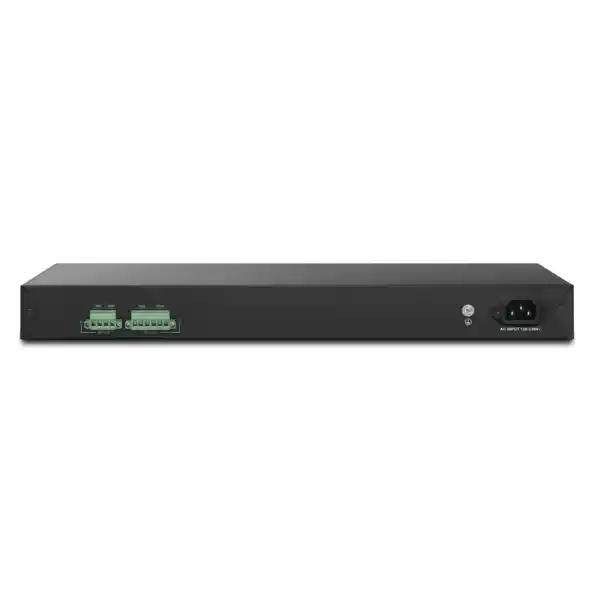
The switch accepts 100–240V AC input and also provides separate DC backup power connections. DrayTek specifies DC 12V at 5A and DC 54V at 7.4A backup inputs on the P2282x. This architecture is important because switch logic and PoE delivery have different voltage requirements. A 12V backup source can support the switching system, while the 54V input is associated with maintaining PoE power availability. For continuity of powered endpoints, the backup design must account for both functions rather than assuming one low-voltage feed sustains the entire PoE load.
In practice, resilient power design begins with the service objective. If the requirement is simply to preserve network management during a brief AC interruption, the backup approach may be different from a requirement to keep twenty-four cameras recording for an hour. Camera continuity requires enough stored energy for the switch, its PoE load, the uplink path and the NVR or VMS. Wireless continuity similarly requires AP power, switching, routing, firewall services and upstream Internet equipment. A complete power map prevents a nominally redundant component from becoming isolated when another device on the path loses power.
The front indicators include DC input status, while system and monitor indicators help identify normal operation or conditions such as overtemperature or incorrect voltage. The PoE alert indicator can show when power consumption exceeds 80 percent of the available PoE budget. Operators should treat the 80 percent state as a planning signal rather than waiting for ports to fail because the budget is exhausted. A growing site may add cameras or access points over time, so periodic reviews of the PoE load are appropriate.
For projects using external DC systems, confirm connector requirements, supply ratings, earthing, electrical protection and installation practices with qualified personnel. DC backup is a resilience capability, not an invitation to improvise power wiring. The switch should remain inside supported electrical and environmental limits, and power design should comply with the site’s safety standards.
Physical installation and environmental planning for UAE sites
The VigorSwitch P2282x uses a 1U rackmount form factor and measures approximately 440mm wide, 281mm deep and 44mm high. DrayTek lists a weight of about 4.26kg. These dimensions fit conventional 19-inch equipment racks, but rack depth should still be checked when the cabinet also contains a UPS, patch panels, cable managers, firewalls and servers. Adequate rear clearance is needed for the AC cable, DC backup wiring and ventilation.
The manufacturer’s published operating range is 0°C to 50°C with 10 to 90 percent non-condensing humidity, while storage is listed from -20°C to 70°C with 5 to 90 percent non-condensing humidity. A quick-start guide may state more conservative installation guidance, so deployments should follow the documentation supplied with the unit and any local warranty requirements. In UAE environments, the critical issue is usually not outside ambient temperature but the condition inside the communications room. A closed wall cabinet exposed to solar heating or installed beside a kitchen, workshop or plant area can exceed safe temperatures even when the building is air-conditioned elsewhere.
Provide reliable cooling, dust control and airflow. Do not pack cable bundles against ventilation openings. High PoE load increases heat because the switch is delivering hundreds of watts to connected devices, and the power supply itself dissipates energy. Rack temperature monitoring is worthwhile in sites that depend on CCTV, access control or wireless service. Temperature alerts can reveal failed air-conditioning before switch hardware reaches shutdown conditions.
Cabling should use standards-compliant copper and fiber components appropriate to link speed and distance. PoE circuits are sensitive to connector quality, cable conductor size and installation condition. Large bundles carrying substantial PoE load can experience temperature rise, so structured-cabling design should follow relevant standards and manufacturer guidance. Label both ends, document patch-panel mapping and keep spare ports available for maintenance or growth.
FourTeck’s UAE infrastructure portfolio can be used to coordinate switching with rack, cabling, wireless, security and supporting network components when the project requires a complete deployment rather than a standalone box.
Deployment blueprints
Office floor with Wi-Fi and IP telephony
Allocate access ports to wireless APs, phones and selected wired desks. Separate corporate, voice, guest and management VLANs. Use LLDP/LLDP-MED where appropriate, prioritize voice with QoS, and uplink at 10G to the distribution layer. This design keeps powered endpoints centralized while avoiding a 1G aggregation bottleneck.
CCTV and surveillance edge
Connect IP cameras to PoE+ ports, place them in surveillance VLANs, use ONVIF visibility and device-check functions for operations, and send aggregate traffic toward the recording environment over 10G SFP+. Reserve PoE headroom for infrared, heaters, motors or future camera upgrades.
Retail or hospitality access layer
Separate POS, staff, guest Wi-Fi, CCTV, voice and building systems. Use ACLs and upstream firewall policy to prevent lateral movement. Multiple 10G uplinks provide capacity for Internet breakout, core access and local services while the 400W PoE pool powers distributed edge devices.
Stacked wiring closet
Use up to four compatible members where a floor requires more than 24 access ports. Build a supported line or ring stack, synchronize configuration and firmware, and calculate how many SFP+ interfaces remain after stacking links are assigned. Document master priorities and uplink redundancy.
These blueprints are starting points rather than one-size-fits-all templates. Final VLAN IDs, PoE allocations, uplink counts, spanning-tree root placement, routing boundaries and authentication policy should reflect the actual service inventory. A camera-heavy warehouse has very different traffic and power behavior from an office with many phones and access points, even when both use twenty-four switch ports.
Sizing the P2282x: a practical engineering method
Start with physical port count. Count every device that requires a copper connection, then add spare capacity. If the initial plan uses all twenty-four access ports, the design has no room for temporary devices, replacement testing or expansion. In many installations, targeting 70 to 85 percent planned port utilization gives better operating flexibility. If the project already requires more than twenty ports and expansion is likely, consider a stacked design or a larger access platform from the outset.
Next calculate PoE. For each endpoint, record its standard, maximum input and expected operating draw. Sum the engineering maxima, then add headroom for startup behavior, future devices and model substitutions. Do not assume that because a port supports PoE+ the entire switch can deliver PoE+ maximum power simultaneously to all twenty-four ports; the total 400W budget is the governing resource. Also check whether any planned device requires PoE++/802.3bt. The P2282x supports PoE and PoE+ on its 24 ports, not PoE++.
Then estimate traffic. For cameras, use codec, resolution, frame rate and retention design. For Wi-Fi, use expected client density, Internet service speed and internal application traffic. For office devices, include backup windows, software deployment and file services. For servers, consider east-west traffic between VLANs. Uplink sizing should reflect aggregate busy-hour demand, not the theoretical sum of every endpoint at line rate, but it should leave comfortable headroom for growth and bursts.
Choose the routing boundary. If all inter-VLAN traffic must be inspected by a firewall, trunk the VLANs toward that firewall or a suitable routed core. If trusted internal VLANs exchange heavy traffic, the P2282x’s VLAN routing can reduce load on the gateway. This is a policy decision as much as a performance decision. Document where ACLs, firewall rules, default gateways and DHCP services reside so support teams know which device owns each function.
Finally, design for failure. Ask what happens if an uplink fails, a stack member fails, AC power is lost or a central DHCP service disappears. Decide whether dual uplinks, ring stacking, DC backup, UPS support or local DHCP capability are necessary. Not every site needs every resilience feature, but these questions expose single points of failure before deployment.
For multi-country groups or projects standardized beyond the UAE, FourTeck’s global network infrastructure services can help keep model selection, documentation and deployment methodology consistent across locations while still adapting cabling, power and support to each site.
Feature-by-feature engineering detail
Spanning tree
STP, RSTP and MSTP provide loop prevention and controlled use of redundant Layer 2 paths. RSTP is usually appropriate for faster convergence in modern Ethernet networks, while MSTP is helpful where VLAN groups need different logical topologies. Configure root priorities intentionally and document which uplinks should block during normal operation.
Link aggregation
Static aggregation and LACP are supported, with up to eight groups and eight members per group. LACP provides negotiation and operational state awareness, making it generally preferable when both ends support it. Hash-based load balancing distributes flows; it does not merge several links into one faster path for a single flow.
LLDP and LLDP-MED
LLDP allows neighboring network devices to advertise identity and capabilities. LLDP-MED extends discovery for media endpoints such as IP phones. These protocols improve inventory visibility and can support voice-network provisioning, but discovery information should be integrated into documentation rather than treated as a replacement for accurate port labels.
Energy Efficient Ethernet
IEEE 802.3az support can reduce link energy consumption during low utilization when compatible with connected devices. In environments using specialized real-time equipment, test latency-sensitive behavior before enabling aggressive energy-saving features universally. Power savings are useful, but service stability remains the priority.
Port mirroring
Traffic can be copied to a monitoring interface for packet analysis, troubleshooting or security inspection. Mirroring is valuable for diagnosing protocol issues that are not visible from counters alone. Avoid sending more mirrored traffic to the analyzer than its interface can receive, or captures may silently drop packets.
sFlow
sFlow sampling can provide visibility into traffic composition and high-volume conversations without capturing every packet. Used with a compatible collector, it helps identify top talkers, unusual patterns and application growth. Flow visibility complements, rather than replaces, SNMP interface counters and packet capture.
Procurement considerations for Dubai and UAE organizations
A switch purchase should include more than the chassis part number. Define the required power cord, rack accessories, SFP+ transceivers or DAC cables, fiber patch leads, copper patch cords, UPS or DC backup components, and any spare optics. The P2282x package includes rack-mount hardware, a console cable, power cord and quick-start documentation, but the exact deployment still needs project-specific connectivity components. If an uplink is fiber, specify both ends of the link and confirm the far-end interface supports the selected optic and speed.
Firmware should be standardized before a multi-switch rollout. Record the approved version, back up configuration before upgrades and review release notes for changes that affect stacking, PoE, VLAN or management behavior. In a stacked environment, firmware consistency is particularly important. Schedule upgrades at a time when reboot or reconvergence can be tolerated, and verify switch state after maintenance instead of assuming a successful upload guarantees full service restoration.
Support planning matters for sites where the switch powers business-critical devices. Keep a current configuration backup and, for high-availability operations, consider holding a compatible spare switch or maintaining a clear replacement process. Spare optics and patch leads can resolve common uplink failures faster than waiting for a complete switch replacement. Document console access, rack position, uplink ports, management address, VLAN trunks, PoE device mapping and any non-default security settings.
Warranty terms can vary by region and channel, so confirm the applicable warranty and support conditions at the time of quotation. The manufacturer’s quick-start documentation references a two-year warranty for the original purchaser under its stated terms, but local sales conditions, proof-of-purchase requirements and regional policies should be confirmed in the final supply agreement. Firmware support and product lifecycle should also be checked for long-lived infrastructure projects.
For organizations buying several switches, the most useful quote is usually one that states the complete bill of materials, expected delivery, optics, rack and cabling assumptions, configuration scope and support boundaries. This avoids a low headline switch price followed by unexpected transceiver, fiber or installation costs during deployment.
Operations checklist after installation
Day-one configuration
Set a secure management IP and VLAN, change credentials, enable encrypted management, synchronize time, define DNS and logging, create VLANs, configure trunks and access ports, document spanning-tree priorities, apply PoE settings and save a tested configuration backup.
Security baseline
Restrict management access, disable unused services, apply 802.1X or MAC authentication where appropriate, plan DHCP Snooping trust boundaries, introduce DAI and IP Source Guard carefully, enable loop protection and confirm unused ports are administratively controlled.
Monitoring baseline
Record normal uplink utilization, error counters, PoE draw and environmental state. Configure SNMP, syslog and alerts. Capture a known-good topology and port map so later troubleshooting has a reference instead of relying on memory.
Resilience test
Test one failure at a time during a maintenance window: remove a redundant uplink, verify spanning-tree or LACP behavior, simulate a stack-link event where supported, test backup power and confirm that monitoring actually reports the incident.
When the P2282x is the right fit
The P2282x is a strong architectural match when a site needs roughly two dozen powered Gigabit endpoints, expects meaningful aggregate traffic, and benefits from multiple 10G uplinks. It is particularly relevant where camera, wireless and voice systems share the same access layer but must remain segmented. The 400W PoE budget gives flexibility for mixed endpoint classes, while L2+ routing, multicast controls and security features provide more local intelligence than a basic smart switch.
It is less appropriate when endpoints require multi-gigabit copper access or 802.3bt PoE++. The copper ports are 1Gbps and support PoE/PoE+, so a deployment dominated by Wi-Fi 7 access points with 2.5Gbps or higher uplinks, high-power PTZ systems requiring bt-class power, or workstations needing multi-gig connectivity may be better served by a different switch family. Selecting the right model means matching edge requirements, not simply choosing the product with the largest headline PoE budget.
The platform is also not a replacement for a security firewall. VLANs, ACL-style controls, DHCP Snooping and authentication improve access security, but advanced threat prevention, Internet security, VPN concentration and application-aware inspection belong on an appropriate security gateway. The P2282x and firewall should therefore be designed as complementary layers.
If a project is likely to expand beyond twenty-four ports, the stacking capability offers a clean growth path provided compatible models and available SFP+ resources are planned in advance. For a very large access layer, however, it may be more efficient to compare higher-density switches rather than building several small stacks. Port count, PoE density, uplink capacity, rack space and operational standardization should be evaluated together.
Frequently asked technical questions
Does the VigorSwitch P2282x support 10G on the RJ45 ports?
No. Ports 1–24 are 10/100/1000Mbps copper RJ45. The four high-speed interfaces are SFP+ slots supporting 1Gbps or 10Gbps operation. A 10G copper connection may be possible through a compatible SFP+ 10GBase-T module subject to vendor support, distance, heat and power considerations, but the native access ports themselves are Gigabit Ethernet.
Can every port deliver full PoE+ power simultaneously?
The ports support PoE/PoE+, but all ports share a 400W total power budget. Twenty-four ports each drawing the theoretical PoE+ maximum would exceed that budget. Size the deployment by adding the maximum expected draw of actual devices and retaining headroom. This total-budget approach is more accurate than looking only at the per-port standard.
Can the switch route between VLANs?
Yes. Static routing and VLAN routing are supported. This can offload internal inter-VLAN traffic from a router, but security-sensitive flows may still need to pass through a firewall. Decide the routing boundary according to trust zones, logging requirements and application behavior.
Can it be used for CCTV?
Yes. The combination of 24 PoE+ ports, 400W budget, 10G uplinks, surveillance VLAN functions, ONVIF-oriented discovery and PoE device checking makes it well suited to IP surveillance. Final design must still verify per-camera PoE demand, aggregate bitrate, NVR capacity, uplink resilience and security segmentation.
How many switches can be stacked?
DrayTek specifies up to four stackable devices in line or ring topology. Stacking requires compatible models with the same supported port configuration. Confirm firmware and model compatibility before purchase, and reserve sufficient SFP+ interfaces for the chosen stack topology.
Does it support redundant power?
The switch includes AC input plus DC backup inputs. The P2282x specifies 12V DC and 54V DC backup power connections, supporting resilience for the switching system and PoE function when engineered with suitable external supplies. A complete continuity design should also protect the core, firewall, storage and WAN equipment needed by the powered devices.
Why buy the DrayTek VigorSwitch P2282x through FourTeck UAE?
A managed PoE switch is most valuable when it is selected as part of the network rather than as a commodity line item. FourTeck can help validate port counts, power budgets, SFP+ requirements, VLAN design, firewall integration, wireless dependencies and deployment accessories before the order is finalized. That reduces the risk of receiving a capable switch with the wrong optics, insufficient PoE headroom or no remaining high-speed ports after the stack is cabled.
For existing environments, a pre-deployment review can identify current uplink speeds, VLANs, spanning-tree behavior and powered-device requirements. For new sites, the same process can begin from floor plans and endpoint schedules. This is particularly useful in projects combining CCTV, access points, IP telephony and office data, where each system may be supplied by a different contractor but must ultimately share the same switching infrastructure.
The outcome should be a clear bill of materials and implementation boundary: switch quantity, optics, stacking links, PoE assumptions, rack position, management addressing, VLAN trunks, installation scope and post-deployment support. That level of definition makes quotation comparison easier and reduces last-minute changes during commissioning.
Decision recap: what the P2282x gives your network
Quotation input checklist
For an accurate UAE quotation, provide the information below. It allows the switch, optics, power design and services to be sized together rather than corrected after purchase.
Number of cameras, APs, phones, terminals and non-PoE devices, including planned future additions.
Maximum wattage and PoE standard for each powered endpoint, especially high-power cameras or access points.
Required 1G or 10G speed, number of links, expected distance, fiber type and far-end switch or firewall interface.
List corporate, voice, CCTV, guest, IoT, server and management networks plus the intended default gateway location.
State whether the site requires dual uplinks, stack ring, DC backup, UPS runtime or continued PoE operation during AC failure.
Clarify whether supply only, rack installation, configuration, cabling, migration, testing, documentation or ongoing support is required.
Plan the P2282x around the network you actually operate
Share your port count, PoE device list, uplink distances, VLAN requirements and resilience goals. FourTeck can review whether the DrayTek VigorSwitch P2282x fits the site, define required SFP+ components and prepare a UAE-ready bill of materials for procurement and deployment.
Site location • number of switches • powered endpoint models • approximate cable distances • uplink target • rack availability • required installation date • configuration or support scope.

Reviews
There are no reviews yet.