
Multi-Gigabit Smart Lite Switching for Dubai & UAE
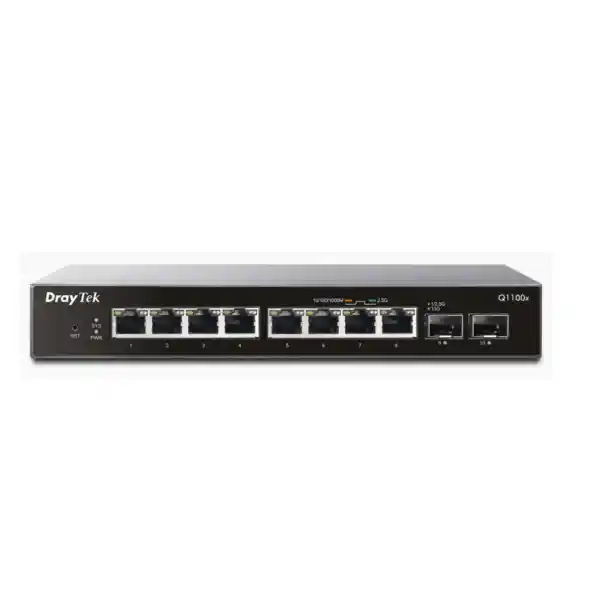
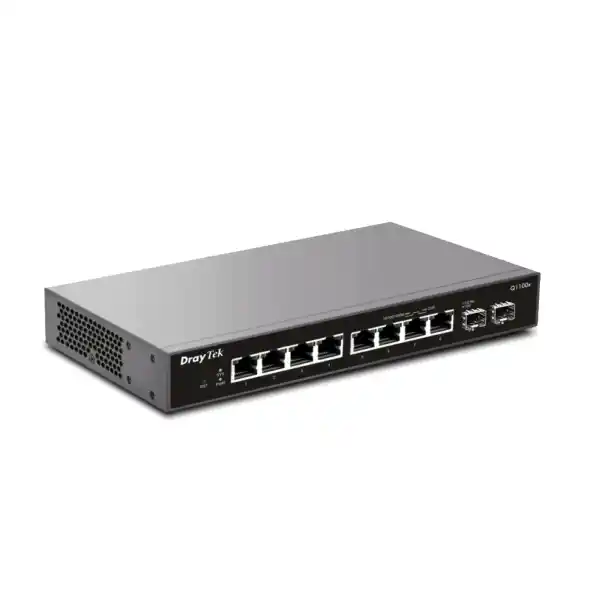
DrayTek VigorSwitch Q1100x — 8× 2.5GbE Access with Dual 10G SFP+ Uplinks
The DrayTek VigorSwitch Q1100x is engineered for networks that have outgrown conventional 1GbE access switching but do not require the cost, power budget or management depth of a full enterprise Layer 3 platform. Its eight copper multi-gigabit ports operate at 10 Mbps, 100 Mbps, 1 Gbps and 2.5 Gbps, while two SFP+ interfaces provide 1G, 2.5G or 10G fiber or compatible direct-attach connectivity for uplinks, high-speed storage paths or inter-switch connections. With an 80 Gbps switching capacity, 59.52 Mpps forwarding rate at 64-byte packets, Smart Lite management, VLAN, QoS, spanning-tree support and a maximum power consumption of only 18 watts, the Q1100x fits branch offices, creative studios, professional services firms, retail back offices, clinics, training facilities and high-density Wi-Fi 6 environments across Dubai and the wider UAE.
RJ45 ports supporting 10M/100M/1G/2.5G Ethernet for multi-gigabit endpoints.
SFP+ interfaces supporting 1G, 2.5G and 10G operation for aggregation or backbone links.
Capacity sized to service the eight 2.5G access ports and dual 10G uplinks without creating an obvious fabric bottleneck.
Published 64-byte forwarding rate for workloads with large numbers of small packets.
Low electrical draw for edge closets, deskside installations and small communications rooms.
Web-based control with practical VLAN, QoS, loop, multicast and management features for SMB networks.
Why the VigorSwitch Q1100x matters in a modern UAE network
For many years, 1GbE was the default edge-network speed because desktop computers, printers, IP phones and older wireless access points rarely required more throughput. That assumption is changing. Wi-Fi 6 access points can aggregate traffic from dozens of wireless clients at rates that are capable of exceeding a single Gigabit Ethernet uplink, modern workstations routinely use NVMe storage, NAS appliances increasingly ship with 2.5GbE interfaces, and media or engineering teams move multi-gigabyte project files as a normal part of the working day. The VigorSwitch Q1100x addresses that transition by keeping familiar copper Ethernet at the edge while increasing each access link to 2.5Gbps and providing 10Gbps SFP+ paths upstream.
This architecture is especially useful for organisations that want an incremental upgrade rather than an expensive rip-and-replace project. Multi-gigabit Ethernet can often operate over existing standards-compliant structured cabling when channel quality and length are appropriate, so a 2.5GbE switch can unlock more bandwidth for selected devices without immediately requiring every horizontal cable to be replaced by fiber. That makes the Q1100x attractive for offices in Dubai where fit-out work, ceiling access, landlord permissions and after-hours cabling can create more cost and disruption than the switch hardware itself.
The design is also well balanced for smaller networks. Eight 2.5GbE access ports provide a focused high-performance edge rather than dozens of unused ports, while the two SFP+ interfaces let an integrator create a fast uplink to a core switch, firewall-side aggregation layer, server switch or storage network. The result is a compact platform that can sit between standard Gigabit access and larger managed 10G switching. FourTeck can integrate the Q1100x into broader UAE infrastructure projects through FourTeck UAE, including routing, firewall, wireless and structured-network requirements.
Port architecture: eight 2.5GbE RJ45 interfaces
The eight copper ports on the VigorSwitch Q1100x support 10BASE-T, 100BASE-TX, 1000BASE-T and 2.5GBASE-T operation. In practical terms, an existing endpoint does not have to be 2.5GbE-capable to use the switch. A legacy printer or management appliance can negotiate at 100 Mbps, a standard workstation can connect at 1 Gbps, and a newer PC, NAS or access point with a 2.5GbE network interface can negotiate the higher multi-gigabit rate. This mixed-speed capability makes phased migration possible, because the network can be upgraded endpoint by endpoint rather than through a single disruptive cutover.
At 2.5Gbps, the theoretical line rate is two and a half times that of 1GbE. Actual application throughput is lower after Ethernet, IP, TCP or UDP overhead, storage limitations and endpoint processing are taken into account, but the additional headroom is still significant. A 2.5GbE workstation can move large design files to a suitably fast server much faster than a Gigabit host, and a multi-user access point can forward concurrent wireless sessions without its Ethernet uplink becoming the first obvious bottleneck. The benefit becomes especially visible when several endpoints are active at the same time and the switch is connected upstream through 10G.
For deployment planning, port speed should never be treated in isolation. A 2.5GbE NIC connected to the Q1100x will not deliver a sustained 2.5Gbps application transfer if the server has a 1GbE connection, if the firewall path is limited to 1Gbps, if the storage array is saturated, or if the cabling channel cannot reliably maintain 2.5GBASE-T signalling. FourTeck therefore treats the switch as one component in an end-to-end performance chain, validating endpoint NICs, uplinks, core capacity, firewall interfaces, server connectivity, storage performance and cabling before promising a specific user-level result.
Dual 10G SFP+ uplinks for aggregation and backbone design
The two SFP+ ports are the architectural feature that turns the Q1100x from a simple multi-gigabit desktop switch into a useful aggregation component. Each port can operate at 1G, 2.5G or 10G with compatible optics, modules or direct-attach connectivity. A 10G uplink gives the eight 2.5GbE access ports a much wider path toward the rest of the network than a conventional 1GbE uplink would provide. This does not mean every access port can simultaneously send 2.5Gbps through one 10G link without contention; it means the uplink is materially better matched to a multi-gigabit access layer and can carry several high-speed conversations at once.
A common design uses one SFP+ interface as the primary uplink to a larger core or distribution switch and the second for a server, NAS, secondary switch or alternate network segment. In a small creative studio, for example, the eight copper ports might connect editing workstations while a 10G SFP+ link connects to a storage server. In a Wi-Fi focused installation, several high-capacity AP uplinks can terminate on the 2.5GbE ports while a 10G fiber link carries aggregated wireless traffic back to the core. In a branch office, one 10G port might connect to the local server cabinet and the other to an upstream distribution switch.
SFP+ also gives an installer flexibility over physical media. Depending on distance, environment and compatible transceivers, 10G may be delivered over multimode fiber, single-mode fiber or direct-attach copper. DrayTek lists compatible SFP+ optical transceiver and direct-attach options for the platform, but module compatibility, wavelength, fiber type and optical budget should be checked against the exact deployment. In Dubai buildings with multiple floors, separate communications rooms or electrically noisy pathways, fiber can provide useful distance and electromagnetic-isolation advantages compared with copper uplinks.
80 Gbps switching capacity and 59.52 Mpps forwarding: what the numbers mean
DrayTek publishes an 80 Gbps switching capacity for the VigorSwitch Q1100x. Switching capacity is an internal fabric metric and should not be confused with Internet bandwidth. It represents the amount of traffic the switching architecture is designed to move across its ports under defined conditions, typically counting bidirectional traffic. The figure aligns logically with the physical port set: eight 2.5GbE interfaces represent 20 Gbps of one-direction access capacity, while two 10G SFP+ interfaces add another 20 Gbps; doubled for simultaneous transmit and receive, the aggregate reaches 80 Gbps.
The 59.52 Mpps forwarding figure is important for workloads dominated by small Ethernet frames. Throughput measured in gigabits per second tells only part of the performance story because a switch must make a forwarding decision for every packet. A flow made of large 1500-byte frames requires far fewer forwarding operations per second than the same bit rate delivered as 64-byte frames. By publishing the 64-byte packet forwarding rate, DrayTek provides a useful indicator of packet-processing capability under a more demanding packet-count scenario.
In production, performance depends on traffic distribution, frame sizes, endpoint behaviour, queueing, enabled features and upstream constraints. The key engineering point is that the Q1100x is not built like an eight-port 2.5GbE switch with a single low-speed uplink bolted on. Its dual 10G interfaces and published fabric specifications make it structurally appropriate for concentrated multi-gigabit access. For customers evaluating a switch because a NAS benchmark, Wi-Fi speed test or workstation transfer is underperforming, FourTeck recommends tracing the complete path rather than assuming the access switch is the only limiting device.
VLAN segmentation for business networks
The VigorSwitch Q1100x supports IEEE 802.1Q tag-based VLAN functionality and port-based VLAN operation, with DrayTek specifying support for up to 32 VLANs on the model. VLANs allow one physical switch to carry multiple logically separated Layer 2 networks. In a Dubai office, this can be used to isolate corporate workstations from guest Wi-Fi, keep IP cameras separate from employee devices, create a dedicated management segment for infrastructure equipment, or separate laboratory and training systems from production business traffic.
The Q1100x itself is not positioned as a Layer 3 routing platform, so inter-VLAN routing normally belongs on an upstream router, firewall or Layer 3 core switch. That separation of roles is often desirable. The access switch handles frame forwarding and VLAN tagging, while the security gateway applies firewall policies between VLANs, controls Internet access, performs logging and enforces application or identity-based security where available. A trunk from the Q1100x can therefore carry several tagged VLANs toward an appropriately configured upstream device.
A practical segmentation plan starts with business requirements, not arbitrary VLAN numbers. Management interfaces should be reachable only by authorised administrators. Guest devices normally need Internet access without access to internal systems. Voice or conferencing equipment may need predictable quality of service. Cameras and other embedded devices often benefit from a restricted policy that limits where they can communicate. Servers may require tightly controlled access from selected user segments. The switch gives the network designer the Layer 2 building blocks; the firewall and routing policy complete the security model.
For organisations refreshing both switching and security at the same time, FourTeck can align VLAN design with firewall policy through its Firewall Dubai infrastructure practice, reducing common deployment errors such as untagged/tagged mismatches, incorrect native VLAN assumptions, management interfaces exposed to user networks or trunks that do not permit all required VLANs.
Quality of Service with seven queues, SPQ and WRR
The Q1100x provides seven QoS queues and supports Strict Priority Queueing and Weighted Round Robin scheduling, together with classification mechanisms based on CoS, DSCP and CoS-to-DSCP handling. QoS is useful when multiple applications compete for the same constrained link and some traffic is more sensitive to delay, jitter or packet loss than bulk transfers. Voice, video conferencing and interactive remote-desktop traffic can suffer noticeably when a large file transfer fills an uplink queue; QoS provides a method to influence how that queue is serviced.
Strict Priority Queueing gives selected traffic preferential treatment by servicing the highest-priority queue before lower-priority queues. This can be effective for small volumes of real-time traffic, but it must be configured carefully because excessive high-priority traffic can starve other queues. Weighted Round Robin distributes service between queues according to configured weights, which can offer a more balanced approach when several traffic classes need predictable access to bandwidth. The correct policy depends on application mix, bottleneck location and upstream behaviour.
DSCP markings can carry traffic-class intent in the IP header, while 802.1p/CoS markings can be used within VLAN-tagged Ethernet. The switch can participate in a broader end-to-end QoS design, but markings must be trusted and mapped consistently across access switches, routers, wireless systems and firewalls. Prioritising a packet on one switch cannot protect it after it reaches a separate WAN link that ignores or rewrites the markings. For branch connectivity, cloud calling or unified communications, the complete path must be considered.
Rate limiting is also available on the platform, providing another tool for controlling traffic. Rather than treating QoS as a speed booster, FourTeck uses it as a congestion-management mechanism. The goal is to decide which traffic receives service first when demand temporarily exceeds available capacity. When every link is uncongested, correctly configured QoS should have little effect on application throughput; its value appears when queues begin to build.
Spanning Tree, loop protection and storm control
Layer 2 loops are among the most disruptive faults in an Ethernet network. If two switch ports are connected in a loop without an appropriate control mechanism, broadcast and unknown-unicast frames can circulate repeatedly, consuming bandwidth and switch resources. Symptoms can include intermittent connectivity, high CPU utilisation on network devices, extreme packet loss and an apparently “dead” LAN even though every physical link shows up. The Q1100x supports Spanning Tree Protocol and Rapid Spanning Tree Protocol, along with loop-protection functionality and storm control.
STP and RSTP are designed to prevent bridging loops by calculating a loop-free active topology and blocking redundant paths where necessary. RSTP converges more quickly than traditional STP after topology changes in compatible designs. The presence of these features is valuable even in a small office because accidental loops are not limited to large campuses. A patch cable connected between two wall outlets, an unmanaged switch installed under a desk, or an incorrectly cabled secondary switch can create a serious incident.
Storm control provides another layer of resilience by limiting excessive broadcast, multicast or unknown traffic according to supported configuration. It does not replace correct network design, but it can reduce the blast radius of certain failures. Loop protection can help identify or mitigate loop conditions at the edge. These controls are particularly useful in shared office environments where non-technical users may move cables, connect small unmanaged devices or repurpose outlets without involving the IT team.
For a controlled deployment, FourTeck documents uplink ports, edge ports and expected topology, then aligns spanning-tree settings with the upstream network. Redundancy should be intentional. Adding a second cable “for backup” without understanding the Layer 2 control plane can create the exact outage it was intended to prevent. The Q1100x provides the necessary foundational safeguards, but predictable behaviour still depends on consistent configuration across every participating switch.
IPv6 and multicast awareness
DrayTek positions the VigorSwitch Q1100x as IPv6-ready and lists IPv6-related functions including MLD snooping and IPv6 ACL capability in the product feature set. IPv6 support matters even in networks that primarily use IPv4 because modern operating systems, cloud services and service-provider networks increasingly use dual-stack connectivity. A switch does not need to route IPv6 to forward IPv6 Ethernet frames, but management and multicast-control functions should understand the protocol rather than treating it as unknown background traffic.
For IPv4 multicast, the Q1100x supports IGMP snooping. Without snooping, a Layer 2 switch may flood multicast traffic to ports that do not need to receive it, which can waste bandwidth and create unnecessary endpoint load. IGMP snooping observes group membership information and limits forwarding of multicast streams to relevant ports. This can be beneficial for selected video distribution, IPTV-style services, collaboration appliances and other applications that use multicast delivery.
Multicast design should be validated end to end. The switch may snoop memberships, but the wider network may still require an IGMP querier or routing function depending on topology. Incorrect multicast configuration can create symptoms that resemble ordinary congestion because large streams are replicated where they should not be. Likewise, enabling a feature without understanding which device owns the querier or multicast-routing role can make troubleshooting harder.
In mixed IPv4/IPv6 environments, access-control policies should be applied consistently. It is a mistake to secure IPv4 traffic while leaving IPv6 paths unreviewed simply because users are not consciously using IPv6. FourTeck therefore includes protocol awareness in switch and firewall design reviews, ensuring that segmentation, management access and monitoring assumptions remain valid for both address families where they are active.
Web management and operational control
The Q1100x provides browser-based management over HTTP and HTTPS, making it possible to configure switching functions without a dedicated console interface. For a small IT team, this lowers the operational barrier compared with a platform that requires command-line expertise for every change. The switch also supports configuration backup and restore, dual-image capability, access-list based management controls, LLDP, time synchronisation and selected integration with DrayTek Switch Management on compatible Vigor routers.
Operational discipline remains important even with a web interface. The management address should be assigned deliberately rather than left as an accidental part of a user subnet. Administrative credentials should be unique and protected. HTTPS should be preferred where practical. Configuration backups should be taken after approved changes and stored securely so that replacement or recovery does not depend on reconstructing every VLAN, QoS rule and port setting from memory. Firmware should be reviewed against DrayTek release information before production rollouts.
LLDP can help administrators understand connected devices and neighbouring network equipment when both sides support the protocol. In troubleshooting, accurate neighbour information is often more useful than labels on an old patch panel. It can help identify which switch port reaches an upstream device, access point or other infrastructure endpoint. The information should still be validated against physical documentation because cabling changes can outpace records.
DrayTek’s switch-management integration can be useful in environments already built around compatible Vigor routers, providing a more coordinated operational view. Organisations with broader monitoring platforms should confirm which telemetry and management functions they require before purchase. The Q1100x is a Smart Lite switch, not a substitute for a high-end managed campus platform with deep automation, extensive Layer 3 protocols or large-scale stacking. Its strength is providing the core controls most small and mid-sized edge deployments need without unnecessary complexity.
Important design point: the Q1100x does not provide PoE
The VigorSwitch Q1100x has no PoE or PoE+ power budget. This is a critical procurement detail because many devices commonly connected to access switches—wireless access points, IP phones, cameras and door-access controllers—are often powered over Ethernet. The Q1100x can carry Ethernet traffic for those devices, but it does not supply their operating power through the network cable. A connected device therefore needs its own local power adapter, an external injector or a separate PoE-capable switching design.
This limitation is not necessarily a disadvantage. In a workstation or NAS-focused environment, paying for a large PoE power supply would add cost and heat without providing value. The Q1100x’s 18W maximum consumption is attractive precisely because it is a non-PoE design. For offices where only one or two access points need power, external injectors may be acceptable. In deployments with many powered endpoints, however, a PoE-capable multi-gigabit switch is usually operationally cleaner.
A correct bill of materials must therefore distinguish between bandwidth and power requirements. A Wi-Fi 6 access point may need a 2.5GbE data uplink and PoE+ power; the Q1100x satisfies the data-rate requirement but not the power requirement. An installer who focuses only on port speed can end up with a technically fast switch that cannot power the intended endpoints. FourTeck checks each endpoint’s Ethernet speed, PoE class, expected draw, cabling and physical location before recommending the final switch combination.
Where a broader multi-vendor network refresh is required, FourTeck IT Services UAE can coordinate switching, rack, cabling, wireless, endpoint and migration work so that power delivery, bandwidth and segmentation requirements are handled as one deployment rather than as disconnected purchases.
A strong match for Wi-Fi 6 access-point uplinks
One of DrayTek’s key use cases for the Q1100x is providing 2.5GbE connectivity to Wi-Fi 6 access points. The reasoning is straightforward: an access point can serve many wireless clients at once, and the combined wireless traffic can exceed the practical throughput of a 1GbE wired uplink. Connecting an AP with a 2.5GbE Ethernet interface to a 2.5GbE switch removes that single-gigabit ceiling and creates more headroom between the wireless cell and the wired LAN.
The switch is only one element of Wi-Fi performance. A 2.5GbE uplink does not guarantee multi-gigabit speed to a single wireless client. Radio channel width, spectrum availability, interference, client capability, spatial streams, distance, roaming, AP CPU, encryption and Internet bandwidth all affect results. The value of the faster Ethernet uplink is that it reduces the chance that the wired connection becomes the limiting factor when many capable clients are active.
For an office with several high-density meeting rooms or collaborative spaces, a Q1100x can aggregate selected high-throughput APs while using a 10G SFP+ link back to the core. VLAN tagging allows corporate, guest and device SSIDs to map into separate network segments. QoS can participate in prioritising voice or collaboration traffic. RSTP and loop protection contribute to Layer 2 resilience. The design remains compact while preserving a clean upgrade path from legacy 1GbE switching.
Power remains the planning caveat. Because the Q1100x is non-PoE, the APs require another power source. For ceiling-mounted APs, local adapters are often impractical, so a PoE injector or a PoE-capable alternative should be planned. Where injectors are used, they must support the AP’s required PoE standard and the intended Ethernet rate; an old Gigabit-only injector inserted in the path can silently reduce a 2.5GbE design back to 1GbE.
High-speed workstations, NAS and content-production networks
The Q1100x is particularly well suited to small teams that move large files between local workstations and shared storage. Architectural drawings, raw photography, video projects, virtual-machine images, software repositories, backups and scientific datasets can turn a 1GbE network into a visible productivity constraint. A 2.5GbE connection gives each compatible workstation more bandwidth, while a 10G connection to the storage system or upstream switch creates a faster shared path.
Consider a design studio with six multi-gigabit workstations and a NAS. If all workstations connect at 2.5GbE and the NAS is connected through 10G, multiple users can perform high-throughput transfers without every conversation being forced through a single 1GbE uplink. Real-world throughput still depends on the NAS disks, RAID layout, filesystem, protocol, CPU, encryption and client storage, but the network is less likely to be the first hard ceiling. This is often a more cost-effective improvement than deploying 10GbE to every desktop.
The two SFP+ ports also create topology choices. One can serve the storage system while the other connects to the office core, or both can be used for separate high-speed segments. The exact design should account for traffic direction. If most large transfers are between workstations and the local NAS, placing both on the same switch keeps that traffic local. If users frequently access a server located elsewhere, the uplink becomes the key path and should be sized accordingly.
For storage networks, frame size should be managed deliberately. The Q1100x supports jumbo frames up to 10 KB, but enabling jumbo frames is not automatically beneficial. Every device along a path must use compatible MTU settings, and a mismatch can cause difficult-to-diagnose connectivity problems. Standard MTU operation is often perfectly adequate at 2.5G and 10G. Jumbo frames should be introduced only where there is a tested application reason and the entire path is controlled.
Structured cabling considerations in Dubai offices
Multi-gigabit Ethernet can provide a useful upgrade path over existing copper infrastructure, but cabling quality must be treated as an engineering variable rather than an assumption. Channel category, permanent-link length, patch-cord quality, termination workmanship, electromagnetic environment and bundling all influence whether a link can maintain its negotiated rate reliably. A cable that has carried 1GbE for years without obvious errors is not automatically guaranteed to deliver stable 2.5GbE under every condition.
For new office fit-outs, Cat6 or better structured cabling is commonly selected to provide additional margin for multi-gigabit operation and future upgrades, subject to standards-based design and tested installation. Existing Cat5e channels may support 2.5GBASE-T when they meet applicable performance requirements, which can make the Q1100x attractive for retrofit projects. The correct approach is to test questionable runs rather than infer performance from the printing on the cable jacket alone.
Patch panels and outlets also matter. A marginal termination, excessive untwist, damaged conductor or poor patch lead can introduce errors that become more visible at higher signalling rates. Link LEDs may still show a negotiated speed while packet errors and retransmissions reduce effective performance. In troubleshooting, counters, endpoint statistics and controlled throughput tests should be used alongside physical inspection.
Dubai installations can include long risers, mixed tenant cabling, older office refurbishments and communications rooms with high equipment density. Where copper distance, pathway conditions or electrical isolation become concerns, the Q1100x’s SFP+ uplinks provide a natural transition to fiber. FourTeck can combine switch deployment with cabling verification so that a multi-gigabit upgrade is delivered as a tested system rather than a nominal port-speed change.
Using SFP+ fiber correctly: module, fiber and distance planning
SFP+ is a modular interface rather than a single cable type. The electrical cage in the switch accepts a compatible transceiver or direct-attach cable, and that module determines the physical medium, wavelength and supported reach. For short connections inside the same cabinet or adjacent racks, a compatible direct-attach copper cable can be simple and power-efficient. For longer building links, optical transceivers and fiber are typically preferred.
Multimode optics are commonly used for shorter data-center and building links where multimode fiber is installed. Single-mode optics support longer distances and are appropriate for suitable single-mode plant. The two ends of an optical link must match in speed, wavelength and fiber type, and connectors must be clean and correctly patched. Mixing incompatible optics or fiber types can produce no link, intermittent link or inadequate optical margin.
Because DrayTek publishes specific compatible accessory families for the Q1100x, procurement should prefer validated modules where possible. Third-party modules may function, but compatibility should be confirmed before a production rollout, especially where diagnostic reporting or support expectations matter. For brownfield environments, existing optics should not be assumed compatible merely because they fit physically into an SFP+ cage.
Fiber design also affects operational resilience. Label both ends, record the strand allocation, maintain appropriate bend radius and protect patch leads from accidental disconnection. Where redundant physical pathways are required, they should be routed separately rather than sharing the same vulnerable conduit. The Q1100x provides two SFP+ interfaces, but physical redundancy only has value when the switching topology and spanning-tree design are also configured to handle it safely.
Firewall and router integration
A high-speed access switch does not replace a firewall or router. The Q1100x operates primarily at Layer 2, forwarding Ethernet frames within configured VLANs. Routing between VLANs, Internet connectivity, NAT, VPN, advanced security inspection and WAN failover belong on an upstream gateway or Layer 3 device. A well-designed network therefore treats the Q1100x as part of a layered architecture rather than as a standalone security appliance.
When multiple VLANs are carried to a firewall, the uplink must have enough capacity for expected inter-VLAN and Internet traffic. A 10G SFP+ uplink from the switch is valuable only if the upstream platform can accept an appropriate interface and process traffic at the required rate. A firewall with 1GbE LAN interfaces will still impose a 1Gbps physical ceiling on routed traffic even if every endpoint connects to the Q1100x at 2.5GbE. Local traffic that remains within the same VLAN can stay on the switch, but traffic that must traverse the firewall is constrained by the firewall path.
This distinction helps avoid a common misunderstanding in network upgrades. Increasing switch port speed may dramatically improve workstation-to-NAS transfers on the same Layer 2 segment while leaving Internet speed unchanged because the WAN circuit or security gateway remains the bottleneck. Conversely, upgrading to a multi-gigabit Internet service will not benefit users if the LAN side of the firewall and access network remain at 1Gbps. Capacity planning should identify the slowest element in each important traffic path.
FourTeck’s Dubai firewall team can coordinate switch VLANs with gateway interfaces and security policy so that the physical multi-gigabit upgrade is matched by an appropriate routing and inspection design.
Deployment topology 1: multi-gigabit edge with a 10G core uplink
The most direct topology uses all eight 2.5GbE ports as access interfaces and one SFP+ port as a 10G uplink to the main office switch or core. This design works well when a cluster of high-performance endpoints is located in one area: a design department, engineering team, training room, laboratory or high-density wireless zone. Standard Gigabit endpoints can coexist on the same switch, while selected devices negotiate 2.5GbE.
The core uplink should carry the VLANs required by the access devices. If the core performs Layer 3 routing, inter-VLAN traffic leaves the Q1100x over that 10G path. If a firewall performs routing, the core may simply extend the trunks toward the firewall. This topology centralises policy and makes the Q1100x a compact high-speed edge node. The second SFP+ port can be reserved for expansion, a local server or a second distribution path where the wider topology supports it.
Traffic engineering should consider oversubscription. Eight clients at 2.5GbE represent 20Gbps of potential one-direction access demand, while a single 10G uplink provides 10Gbps. That 2:1 ratio is often reasonable because not every endpoint transmits at line rate simultaneously, but the acceptability depends on workload. For a render farm or storage-heavy environment where all hosts may perform sustained transfers at once, local server placement or a different switch architecture may be preferable.
The topology is appealing because it adds multi-gigabit capability only where needed. Existing lower-speed access switches elsewhere in the building can remain in service, reducing project cost. The Q1100x becomes a targeted performance island connected to the broader network through 10G, allowing organisations to upgrade based on measurable demand rather than replacing every switch at once.
Deployment topology 2: small office with local 10G storage
A second pattern uses the Q1100x as the primary high-speed switch for a small office. Workstations connect to the 2.5GbE copper ports, a NAS or server connects at 10G through one SFP+ interface, and the second SFP+ interface links to the router, firewall or another switch. This keeps high-volume local storage traffic on the Q1100x while still providing a fast path toward the rest of the network.
This arrangement is effective when local file access matters more than Internet bandwidth. Video editors, photographers, CAD users, developers and backup operators often move far more data inside the LAN than across the WAN. A 2.5GbE desktop connection can therefore yield a meaningful improvement even if the Internet circuit is only 500Mbps or 1Gbps. The NAS should have storage performance capable of feeding several clients, otherwise the network upgrade simply shifts the bottleneck from Ethernet to disks or CPU.
Segmentation can still be applied. Production workstations may occupy one VLAN, administrative devices another and guest wireless a third. The router or firewall handles inter-VLAN policy. QoS can protect interactive applications from large backup transfers if the traffic converges on a constrained uplink. Rate limiting can prevent a non-critical device from consuming disproportionate capacity where required.
The absence of PoE is usually less problematic in this topology because most connected devices are workstations, servers and storage appliances with their own power. If a small number of APs or phones are also present, they can remain on a separate PoE switch. This separation can be operationally sensible: the Q1100x handles multi-gigabit data, while the PoE switch handles powered edge devices, and both connect upstream according to the required VLAN and bandwidth design.
Deployment topology 3: Wi-Fi 6 aggregation without replacing the entire access layer
Many organisations have perfectly serviceable Gigabit access switches but need faster wired uplinks for a handful of new wireless access points. The Q1100x can be introduced as a dedicated multi-gigabit aggregation switch for those APs while the existing 1GbE access layer remains unchanged. This avoids replacing dozens of ports simply to gain several 2.5GbE connections.
The AP Ethernet interfaces connect to the 2.5GbE ports, subject to separate PoE powering, and the Q1100x uses 10G SFP+ to reach the distribution layer. Tagged VLANs can carry multiple SSIDs, such as corporate, guest, voice and IoT networks. The upstream switch or firewall must allow the same VLANs, and DHCP scopes, DNS, security policies and captive-portal functions should be validated before cutover.
This topology is particularly valuable when wireless density grows faster than wired seat count. Modern offices may have fewer fixed desktops but many phones, tablets and laptops per user. A single access point can therefore aggregate substantial traffic even though the building still needs only a modest number of wired desk ports. Investing selectively in multi-gigabit AP uplinks can improve network balance without overspending on unused high-speed copper ports elsewhere.
Site survey remains important. Ethernet uplink capacity cannot correct poor RF design, overlapping channels, excessive transmit power or inadequate AP placement. FourTeck treats switching and wireless as interdependent layers: the RF design determines where APs should be placed and how much traffic they may carry, while the switching design provides the required VLANs, uplink rate, power architecture and path back to the core.
Sizing methodology: how many Q1100x switches does a site need?
Sizing begins with endpoint count, but port count alone is not enough. The first step is to identify which endpoints genuinely benefit from 2.5GbE. High-performance workstations, NAS devices, Wi-Fi 6 APs and selected servers may justify multi-gigabit connectivity; printers, building controllers and basic office endpoints often do not. Assigning every low-bandwidth device to a premium multi-gigabit port can consume capacity that would be better reserved for systems with measurable demand.
The second step is traffic mapping. Determine which endpoints communicate heavily with each other and where their destination resides. If six workstations frequently access one local NAS, placing those devices on the same Q1100x can keep a large portion of traffic local. If endpoints primarily communicate with cloud services, the firewall and WAN path become more important than local switching fabric. If traffic crosses to a central data room, uplink utilisation becomes the central sizing metric.
The third step is growth and operational reserve. An eight-port switch should not necessarily be installed with all eight ports committed on day one. Spare capacity is useful for troubleshooting, temporary devices and future expansion. The number of available 10G uplinks also matters. If every site requires separate core, server and redundant uplink connections, a model with more SFP+ ports may be more appropriate.
Finally, power requirements can change the model choice. If most intended 2.5GbE devices also require PoE, a non-PoE Q1100x may lead to too many injectors and a complicated power arrangement. In that case, a PoE-capable multi-gigabit switch should be evaluated. FourTeck sizes the switch around total system requirements rather than trying to force every project into the same hardware template.
Performance engineering: identifying the real bottleneck
A user reporting a “slow network” may be experiencing a limitation at any point between the application and destination. The Q1100x can increase edge bandwidth, but it cannot accelerate a server that reads data slowly from disk, an overloaded firewall, a congested WAN circuit, a poorly performing Wi-Fi client or an application constrained by CPU. Good troubleshooting therefore starts with a path diagram and measurable evidence.
For local transfers, confirm negotiated link speed at both ends, check interface errors, measure throughput with a controlled test, and compare the result with storage capability. A 2.5GbE link should be capable of significantly more throughput than Gigabit, but protocol overhead and endpoint limits mean the application result will not equal the raw line-rate number. Multiple parallel flows can help determine whether a single TCP session or storage process is the limiting factor.
For routed traffic, test both sides of the gateway. If workstations can transfer quickly within a VLAN but not across VLANs, the router or firewall path deserves attention. If inter-VLAN traffic is fast but Internet access is slow, test the WAN independently. If only wireless clients are affected, compare a wired client on the same VLAN and inspect RF conditions. This process prevents unnecessary switch replacement and makes upgrades evidence-driven.
The Q1100x is most valuable when the existing access network is demonstrably limiting capable endpoints. Moving from 1GbE to 2.5GbE provides a clear increase in link capacity, and the dual 10G uplinks reduce concentration bottlenecks. The switch should be selected because those characteristics match the traffic model, not simply because a higher number appears on a specification sheet.
Energy, thermal and physical deployment considerations
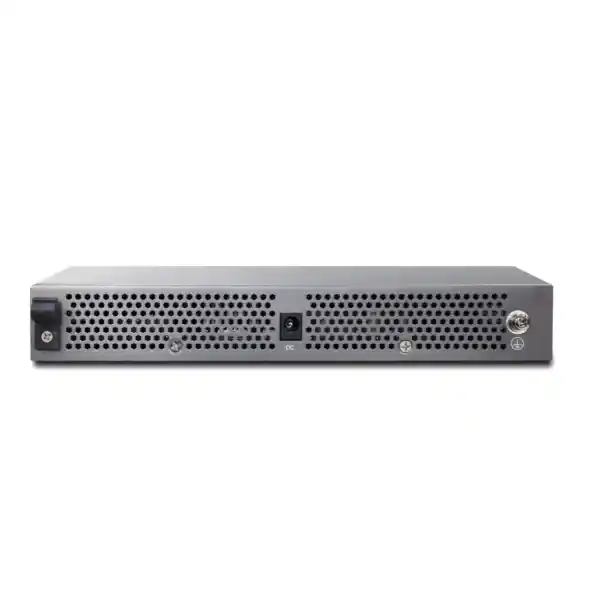
DrayTek specifies a maximum power consumption of 18 watts and a 12V DC, 1.5A power input for the Q1100x. That modest electrical requirement is useful in small network cabinets, deskside technical areas and branch offices where available UPS capacity and cooling are limited. Because the switch does not provide PoE, its own power draw remains independent of connected endpoint power requirements.
The chassis measures approximately 220 × 115 × 32 mm, making it compact compared with a full-width 1U access switch. Compact size does not eliminate environmental requirements. DrayTek specifies an operating temperature range of 0°C to 45°C and operating humidity of 10% to 90% non-condensing. Equipment should therefore be installed where ventilation is adequate, direct heat exposure is avoided and air intake or exhaust paths are not obstructed.
In UAE deployments, room temperature deserves particular attention. An office may be comfortable during business hours while a small communications closet becomes much warmer overnight if building air conditioning is reduced. Thermal load from firewalls, UPS systems, PoE switches and servers can accumulate in an enclosed cabinet. A low-power switch helps, but the entire cabinet environment must stay within equipment limits.
Power resilience should also be planned. Connecting the Q1100x to a suitable UPS can keep local switching available during short utility interruptions, but upstream equipment must be protected as well. A powered switch provides little business continuity if the firewall, ISP handoff or storage server loses power. UPS sizing should account for actual equipment draw, desired runtime, battery condition and future additions rather than using only the switch’s 18W figure.
Security hardening for a managed access switch
A managed switch is part of the security control plane and should be treated accordingly. The Q1100x management interface should not be exposed broadly to user or guest networks. Where practical, place infrastructure management on a dedicated VLAN and restrict access to authorised administration hosts through the upstream firewall or management policy. Use HTTPS for browser access where supported and avoid shared credentials.
Configuration backups should be protected because they can reveal VLAN design, management addresses and other operational details. Firmware should be reviewed regularly against DrayTek support and security information. Before an upgrade, read the release notes, confirm hardware applicability, take a configuration backup and schedule a maintenance window. After an upgrade, validate critical VLANs, uplinks, management access and endpoint connectivity rather than assuming a successful reboot means every service is correct.
Layer 2 security also depends on limiting physical access. An unused live wall outlet on a sensitive VLAN can bypass higher-layer controls if any visitor can connect a device. Port assignments should reflect business needs, and unused interfaces can be administratively disabled where operationally appropriate. Guest areas should not share the same unfiltered Layer 2 segment as management systems or servers.
The Q1100x provides useful segmentation and management tools, but switch features are only one part of a secure network. Endpoint security, authentication, firewall policy, patching, Wi-Fi security, physical control and logging all contribute. FourTeck can combine switching with wider infrastructure services through IT Services UAE when customers require implementation rather than supply-only procurement.
Firmware lifecycle and change management
DrayTek lists the VigorSwitch Q1100x as an available product with full support status. The model was introduced in 2025, and DrayTek has continued to publish firmware for it. Production deployments should nevertheless avoid treating the factory firmware as permanently correct. Network infrastructure firmware changes over time to address stability, compatibility, management and security issues.
A controlled firmware process starts with inventory. Record the model, serial information, current firmware, management address, location and role. Before updating, verify the release is intended for the exact model and review release notes. Take a configuration backup. If the switch is business-critical, plan how service will be restored if an update fails or a configuration behaves differently afterward. The Q1100x’s dual-image capability is useful operationally, but it should not replace preparation.
After upgrading, test actual services rather than only the management page. Confirm that all copper and SFP+ links return at expected speeds, VLAN tagging is correct, spanning tree is stable, DHCP-dependent clients receive addresses, multicast services function where required, and QoS or rate-limiting policies remain applied. If the switch sits in a Wi-Fi path, verify AP connectivity and SSID VLAN mappings. If it connects storage, validate representative file transfers.
For organisations with multiple branches, firmware changes should be staged. Update a representative low-risk site first, observe operation and then expand the deployment. Standardised configuration templates and documented rollback procedures reduce risk. FourTeck can include firmware baselining and configuration documentation as part of a managed deployment so that the switch enters service with a known operational state.
Where the Q1100x fits—and where a different switch is better
The VigorSwitch Q1100x is a strong fit when the requirement is eight or fewer multi-gigabit copper endpoints, at least one high-speed SFP+ uplink, practical VLAN and QoS controls, compact size and low power draw. It is especially compelling as a targeted 2.5GbE upgrade for workstations, NAS environments or Wi-Fi 6 aggregation where standard 1GbE access switching is becoming a bottleneck.
A different model should be considered when PoE is mandatory for many endpoints. The Q1100x cannot directly power access points, IP phones or cameras. A larger managed switch may also be more appropriate if the site requires dozens of ports, extensive Layer 3 routing, hardware stacking, high-density 10GbE access or advanced enterprise automation. The Q1100x is intentionally a Smart Lite platform, so customers should not buy it expecting the full control-plane feature set of a large campus distribution switch.
Likewise, a pure unmanaged switch may be sufficient for a very small flat network where VLANs, QoS and topology controls are not required. The value of the Q1100x comes from combining multi-gigabit physical performance with management features. If those features will never be used and the network has no segmentation or performance requirement, the additional capability may not provide business value.
The right decision is based on topology, endpoint mix, power requirements and operational maturity. FourTeck’s broader global network infrastructure portfolio can support projects that extend beyond a single switch model, while UAE customers can use the local team for design, supply and implementation coordination.
Technical specification summary
| Category | DrayTek VigorSwitch Q1100x | Deployment meaning |
|---|---|---|
| Copper ports | 8 × 10/100/1000/2500 Mbps RJ45 | Supports legacy Ethernet and 2.5GbE endpoints on the same switch. |
| SFP+ ports | 2 × SFP+ supporting 1G/2.5G/10G | High-speed uplink, server, storage or inter-switch connectivity. |
| Switching capacity | 80 Gbps | Fabric sized for the aggregate physical port architecture. |
| Forwarding rate | 59.52 Mpps at 64-byte packets | Relevant for high packet-rate workloads. |
| Packet buffer | 8 Mbit | Provides buffering during short traffic bursts and contention. |
| Jumbo frame | Up to 10 KB | Can support controlled large-MTU environments where all endpoints match. |
| VLAN | Up to 32; 802.1Q tag-based and port-based | Separates users, guests, devices and infrastructure at Layer 2. |
| QoS | 7 queues; SPQ/WRR; CoS/DSCP; rate limiting | Helps manage congestion and protect time-sensitive traffic. |
| Loop resilience | STP, RSTP, loop protection, storm control | Reduces risk from accidental Layer 2 loops and traffic storms. |
| PoE | No PoE | Powered endpoints require adapters, injectors or a separate PoE switch. |
| Power input | 12V DC @ 1.5A | External DC-powered compact design. |
| Maximum consumption | 18 W | Low switch-side power demand for edge locations. |
| Dimensions | 220 × 115 × 32 mm | Compact footprint for small offices and technical spaces. |
| Operating range | 0°C to 45°C; 10–90% RH non-condensing | Cabinet ventilation and UAE room temperature must be managed. |
UAE procurement and project planning
A network-switch purchase is most successful when the bill of materials includes the items around the switch, not only the chassis. For the Q1100x, that may include compatible SFP or SFP+ modules, fiber patch leads, direct-attach cables, Cat6 patch cords, UPS capacity, labeling, rack or shelf arrangements, PoE injectors for powered endpoints, and any required changes to the upstream firewall or distribution switch. Missing one transceiver can delay an otherwise complete installation.
For UAE deployments, FourTeck can prepare the quotation around the intended topology. A customer who says “I need eight 2.5G ports” may actually require six workstation ports, one 2.5GbE AP, one spare access port, a 10G NAS connection and a 10G fiber uplink to another floor. That description immediately changes the accessory list and determines whether the two SFP+ ports are sufficient. It also reveals the PoE requirement for the AP.
Project timing should account for configuration and testing. Shipping a switch in a box is different from placing it into a production network with VLANs, IP addressing, upstream trunks, spanning tree, QoS and documented management. If the site is operational, migration may need an after-hours window and a rollback plan. Existing patch-panel labels should be validated before moving cables because inaccurate labels can turn a short cutover into extended troubleshooting.
Customers planning a wider regional rollout can also work through FourTeck Global for multi-site coordination, while UAE projects remain anchored through local design and implementation resources. Availability, lead time, warranty terms and transceiver stock should be confirmed at quotation stage because these commercial details can change independently of the technical specification.
Recommended commissioning workflow
A production deployment should begin on a bench or controlled network segment. Record the factory state, assign the planned management address, secure administrative access, set time configuration and confirm the intended firmware baseline. Create VLANs and port memberships according to the design document rather than improvising at the rack. Label uplinks and high-priority endpoint ports before the switch is moved into service.
Next, validate copper link negotiation. Connect representative 1GbE and 2.5GbE endpoints and confirm they negotiate at the expected rates. For SFP+ links, verify module recognition, optical or DAC connectivity and 10G negotiation. If fiber is used, inspect connector cleanliness and ensure transmit/receive paths are correct. A link that comes up intermittently should be investigated before migration, not accepted as “good enough.”
Then test VLAN behaviour. An access port should place an untagged endpoint into the intended VLAN. A trunk should carry only the required tagged networks. Confirm DHCP, DNS, gateway access and firewall policy from a test client in each important segment. If the network uses guest isolation, verify that a guest client cannot reach internal management addresses. If QoS is configured, test under load rather than assuming that markings are interpreted as intended.
Finally, capture a clean configuration backup and update site documentation. Record switch location, management address, uplink destination, SFP+ module types, VLAN mappings and spare-port status. Good documentation turns future troubleshooting from a discovery exercise into an operational task. FourTeck can provide this commissioning approach as part of a managed installation, or supply the Q1100x for customer-led deployment where an internal IT team already maintains equivalent standards.
Troubleshooting checklist for 2.5GbE and 10G links
When a copper endpoint connects at only 1Gbps instead of 2.5Gbps, start with endpoint capability and configuration. Confirm the NIC actually supports 2.5GBASE-T and that its driver is current. Check auto-negotiation settings, then replace the patch cable with a known-good cable and test a different switch port. If the problem persists on one wall outlet but not another, structured cabling becomes the primary suspect.
For poor throughput despite a 2.5GbE link, inspect the full path. A network interface can negotiate at 2.5Gbps while the destination is limited to 1Gbps. Storage can be slower than the network. Endpoint security software can reduce file-transfer speed. A single-threaded application may not use the path efficiently. Test with a controlled network benchmark between known-capable systems to separate network performance from application performance.
For SFP+ links, verify transceiver compatibility and speed at both ends. A 10G optic will not necessarily interoperate with a port forced to another rate. Confirm fiber type and wavelength, clean connectors, and check that transmit on one side reaches receive on the other. With DAC cables, confirm length and compatibility. If a link flaps, do not immediately blame the switch; module temperature, dirty fiber, marginal optics and peer configuration can produce identical symptoms.
For VLAN problems, compare both ends of the trunk. A VLAN tagged on the Q1100x but untagged or disallowed upstream will fail even though the physical link is healthy. For loops or intermittent broadcast storms, inspect recent cabling changes, unmanaged downstream switches and redundant connections. A structured troubleshooting process that isolates physical, Layer 2, routing and application layers is faster than changing multiple settings at once.
Frequently asked deployment questions
Can a 1GbE device connect to the Q1100x?
Yes. The eight RJ45 ports support 10M, 100M, 1G and 2.5G rates, so standard Gigabit devices can coexist with multi-gigabit endpoints. The link negotiates to a mutually supported rate.
Does the Q1100x power Wi-Fi access points?
No. The switch has no PoE budget. An AP can use a 2.5GbE data connection through the Q1100x, but it requires an appropriate external power adapter, PoE injector or separate PoE switch.
Can I use a 10G NAS?
Yes, where the NAS interface and chosen transceiver or DAC are compatible with the SFP+ port. A 10G storage link is a common way to provide several 2.5GbE clients with a faster shared server path.
Does the switch route between VLANs?
The Q1100x is positioned as a Smart Lite Layer 2 switch rather than a Layer 3 routing platform. Inter-VLAN routing should be performed by an upstream firewall, router or Layer 3 switch.
Will 2.5GbE work on my existing cables?
It may, depending on category, length, termination quality and channel condition. Existing cabling should be validated rather than assumed capable, especially in older or heavily patched office environments.
Is 80 Gbps the Internet speed?
No. The 80 Gbps figure is switching capacity for the internal Ethernet fabric. Internet performance depends on the WAN service, firewall/router capability and end-to-end path.
Decision recap: when the DrayTek VigorSwitch Q1100x is the right fit
Choose the Q1100x when the project needs a compact concentration point for up to eight copper multi-gigabit devices and one or two high-speed SFP+ connections. It is particularly well aligned with selective 2.5GbE upgrades where replacing a full access layer would be wasteful. Wi-Fi 6 uplinks, high-performance desktop groups, NAS-connected teams and small server environments are all credible deployment scenarios.
Its strongest technical characteristics are balanced port speeds, dual 10G SFP+ connectivity, an 80 Gbps switching fabric, 59.52 Mpps packet forwarding and practical Smart Lite controls. VLANs provide segmentation, QoS offers traffic prioritisation, STP/RSTP and loop protection strengthen Layer 2 resilience, multicast snooping helps control group traffic, and web management keeps administration accessible to smaller IT teams.
The major qualification is PoE. If several intended endpoints depend on Ethernet-delivered power, include injectors or evaluate a PoE-capable alternative. Also verify that the upstream network can use the 10G advantage, that endpoint NICs support 2.5GbE, and that the cabling plant is capable. When those conditions are met, the Q1100x provides a focused way to move from Gigabit access toward a multi-gigabit LAN without introducing the size and complexity of a large enterprise switch.
Quotation input checklist for Dubai & UAE customers
Endpoint information
Provide the number of 2.5GbE workstations, APs, NAS devices, servers and ordinary 1GbE endpoints. Identify which devices require PoE and which have their own power adapters.
Uplink requirement
Specify whether each SFP+ port will connect to a core switch, firewall, server or storage device, together with required distance and existing fiber type where applicable.
VLAN and routing design
List required user, guest, voice, camera, server and management VLANs and identify which upstream device will perform inter-VLAN routing and security enforcement.
Cabling environment
Share cable category, approximate run lengths, patch-panel details and whether cabling certification or remediation is required before enabling 2.5GbE links.
Installation scope
Confirm whether the requirement is supply only, pre-configuration, on-site installation, after-hours migration, testing, documentation or an integrated network refresh.
Resilience and growth
Indicate spare-port expectations, UPS runtime, future AP or workstation growth, and whether a second high-speed path or redundant upstream topology is planned.
FourTeck consultation and deployment support
For a straightforward supply request, FourTeck can quote the DrayTek VigorSwitch Q1100x with the required transceivers, DAC cables, patch leads and related accessories. For a deployment request, the engagement can include network review, port and VLAN planning, multi-gigabit cabling validation, upstream switch or firewall coordination, commissioning, performance testing and documentation.
The fastest path to an accurate quotation is to provide the endpoint count, required VLANs, intended SFP+ destinations, fiber or copper distances and whether any connected devices require PoE. FourTeck can then determine whether the Q1100x is correctly sized, whether additional switching is required, and which accessories should be included from the start.
For wider UAE infrastructure requirements, visit FourTeck UAE. The objective is not simply to install a switch that links at 2.5G or 10G, but to deliver an end-to-end network path whose cabling, VLANs, security gateway, endpoints and operational procedures are aligned with the performance the business expects.

Reviews
There are no reviews yet.