
DrayTek VigorSwitch PQ2121x Dubai
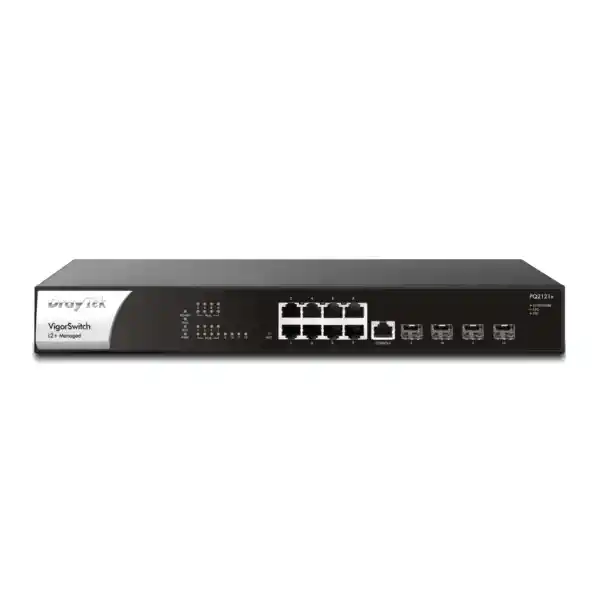
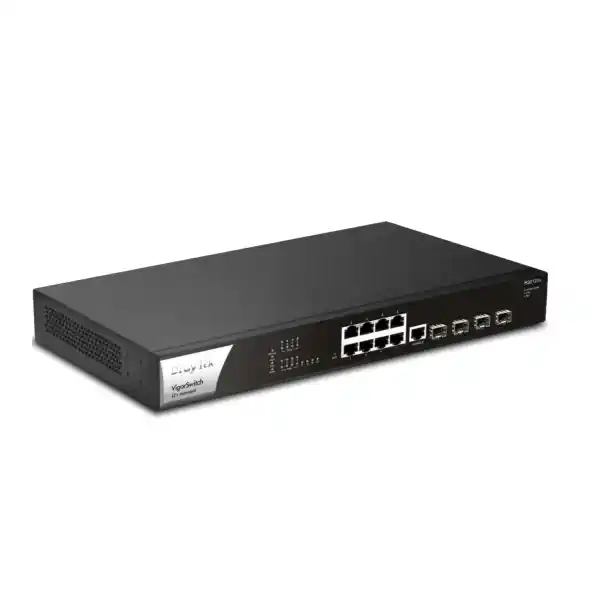
The DrayTek VigorSwitch PQ2121x is a compact 1U Layer 2+ managed switch built for organizations that need more than conventional Gigabit access switching. Eight 10M/100M/1G/2.5GbE copper interfaces provide PoE and PoE+ for powered edge devices, while four 1G/10G SFP+ interfaces provide high-speed fiber or direct-attach uplinks. With 120 Gbps switching capacity, a 140-watt PoE budget, VLAN routing, DHCP services, advanced security controls and DrayTek centralized management integration, the platform is well suited to modern branch offices, hospitality environments, schools, retail sites, clinics, surveillance networks and Wi-Fi 6 deployments across Dubai and the wider UAE.
This product page is written for technical buyers, consultants, system integrators and IT teams evaluating the PQ2121x as an access, distribution or compact core switch. It explains the physical interfaces, switching architecture, PoE design, Layer 2 and Layer 3 capabilities, segmentation strategy, security features, surveillance functions, deployment methods, sizing factors and procurement considerations that should be reviewed before quotation and implementation.
Why the PQ2121x matters in a modern Dubai network
A large number of business networks in the UAE were designed around 1GbE access switching because desktop PCs, printers, older access points and IP phones rarely needed more than a single Gigabit per port. That design assumption changes once a site introduces Wi-Fi 6 access points with aggregate wireless capacity above one Gigabit, high-resolution surveillance cameras, network storage, media workflows, multi-gigabit internet handoffs or workstation docks that can move data faster than legacy copper access ports. The VigorSwitch PQ2121x addresses that transition without forcing an immediate move to a much larger chassis. Its eight 2.5GbE RJ-45 interfaces retain familiar copper cabling while increasing available port speed, and all eight access ports can deliver standards-based PoE/PoE+ power.
The four SFP+ uplink interfaces are especially important in compact deployments. Rather than consuming the same copper ports used for endpoints, administrators can connect the switch upstream at 1Gbps or 10Gbps using suitable SFP/SFP+ optics or supported direct-attach cabling. This helps maintain a clean separation between access and uplink roles. A small office can use one 10G link to a firewall or core switch and reserve the remaining SFP+ interfaces for a server, storage appliance, secondary switch or redundant aggregation design. A hospitality or education site can use the platform as a floor or zone switch and carry multiple VLANs back to a distribution layer over 10G fiber.
The switch is not merely a fast port concentrator. DrayTek positions the PQ2121x as an L2+ managed platform, with capabilities that include IEEE 802.1Q VLANs, link aggregation, spanning tree, multicast controls, VLAN routing, static routing, DHCP server functions, authentication, traffic controls, network monitoring, ONVIF surveillance awareness and integration with DrayTek management systems. That matters because multi-gigabit speed alone does not solve operational problems. A professionally designed LAN also needs predictable segmentation, loop prevention, address control, service prioritization, event visibility and recoverability.
For customers purchasing through FourTeck in the UAE, the design objective should be to match the switch to the complete topology rather than selecting it by port count alone. The team at FourTeck UAE can be engaged for network planning, while organizations combining switching with firewall segmentation can also review solutions through Firewall Dubai. This is particularly useful where the PQ2121x will carry tagged VLAN trunks toward a security gateway and policy enforcement must be coordinated across switch and firewall layers.
Hardware architecture and port map
8 × 2.5GbE RJ-45
Each copper access interface supports 10M, 100M, 1G and 2.5GbE operation. The multi-rate design allows newer 2.5G endpoints to coexist with legacy Gigabit and Fast Ethernet devices on the same switch.
8 × PoE / PoE+
All eight copper ports can supply IEEE 802.3af or 802.3at power, subject to the shared 140-watt switch power budget. This is useful for wireless APs, phones, cameras and other compatible powered devices.
4 × SFP+
Four uplink/downlink slots support 1G or 10G operation, enabling fiber aggregation, short-reach DAC connections and high-bandwidth links to routers, servers, storage or downstream switches.
RJ-45 console + 1U chassis
A dedicated console interface supports local administrative access, while the 355 × 205 × 44 mm enclosure fits a standard 1U rack position for structured telecom-room installation.
The switching capacity is specified at 120 Gbps, and DrayTek publishes a forwarding rate of 89.28 million packets per second for 64-byte frames. These figures are consistent with a design intended to handle simultaneous high-speed traffic across multiple access and uplink interfaces. In practical deployment, achieved throughput depends on frame sizes, traffic distribution, endpoint capability, uplink design, configuration and the surrounding network. The most useful interpretation is not that every workload will reach a fixed benchmark, but that the internal switch fabric is dimensioned for multi-gigabit access with 10G aggregation rather than being built as a legacy 1G device with one faster marketing port.
The front-panel architecture is suitable for clean rack documentation. The eight powered copper interfaces form the access edge, the four SFP+ ports can be labelled according to their role, and the dedicated console path gives technicians an out-of-band style local method for recovery or configuration when web access is unavailable. A deployment worksheet should record each port’s VLAN mode, expected endpoint, negotiated speed, PoE requirement, link aggregation membership where relevant and upstream dependency. That simple discipline becomes important when a compact switch is used for mixed workloads such as wireless, CCTV and voice, because the physical port count is low enough that every interface typically has a defined role.
The switch accepts AC 100–240V input and DrayTek lists maximum power consumption at 200 watts for the PQ2121x. The operating temperature range is 0 to 50°C, with storage from -20 to 70°C and 10 to 90 percent non-condensing operating humidity. In Dubai and other UAE locations, those environmental specifications should be interpreted as equipment-room requirements, not as permission to place the switch in unconditioned outdoor cabinets. Thermal load, dust exposure, UPS runtime, rack ventilation and air-conditioning continuity should be included in the design, particularly where the switch powers critical cameras or access points continuously.
2.5GbE access: where multi-gigabit actually adds value
The central reason to choose the PQ2121x over a conventional Gigabit PoE switch is the eight-port 2.5GbE access layer. IEEE 802.3bz 2.5GBASE-T is designed to increase Ethernet speed over twisted-pair copper without requiring the same physical infrastructure decisions associated with moving every endpoint to 10GBASE-T. For many existing office buildings, this makes 2.5GbE a practical step between legacy 1GbE access and higher-cost 10GbE copper switching. The endpoint and installed cabling still need to be evaluated, but the switch can negotiate down to lower rates when a device or link cannot support 2.5Gbps.
Wi-Fi 6 is one of the clearest use cases. A modern access point can serve many concurrent wireless clients and may present an aggregate wired-side demand greater than one Gigabit. If that access point is connected to a 1GbE Ethernet port, the wired uplink can become an artificial ceiling even though the radio system has additional capacity. Connecting a compatible AP to a 2.5GbE port removes that immediate Gigabit bottleneck. The result is most noticeable in dense user environments, file-transfer workloads, high-speed internet access, cloud applications and networks where multiple wireless clients are active at once. The PQ2121x can therefore be deployed as a focused multi-gigabit access switch for a small number of higher-performance access points rather than replacing every switch in a building.
Other workloads can benefit as well. A workstation with a 2.5GbE adapter can move files to a fast NAS more quickly than a 1GbE client if the rest of the path is designed accordingly. A small virtualization host, backup appliance or media workstation may use 2.5G as a cost-effective edge connection. Some modern IP cameras and encoders remain well below one Gigabit individually, but a surveillance server or NVR may require significantly more aggregate bandwidth than a camera endpoint. In those designs, the SFP+ ports are usually more appropriate for the NVR or aggregation path while the powered copper interfaces connect cameras or wireless bridges.
Multi-gigabit switching should not be treated as a substitute for capacity planning. If eight 2.5G endpoints are active and all traffic converges on a single 1G upstream link, the faster edge ports do not eliminate oversubscription. The uplink should be sized for expected concurrent demand. The four 10G-capable SFP+ interfaces give the PQ2121x flexibility here: a 10G uplink can carry multiple access flows with much more headroom, and LACP can be used where the topology and peer equipment support aggregated links. Traffic distribution across a link aggregation group is flow-based rather than a guarantee that one single session will equal the sum of all member links, so application behavior matters.
For structured IT projects, a useful design sequence is to identify which endpoints genuinely benefit from 2.5G, confirm their NIC or AP capabilities, validate cabling, estimate their concurrent traffic, and then size the 10G uplink path accordingly. This keeps the investment focused. A Dubai office may only need two or three multi-gigabit APs today but can reserve spare PQ2121x access ports for future APs, workstations or edge appliances. That approach often provides more useful upgrade headroom than deploying a larger number of 1G PoE ports with no multi-gigabit capability.
PoE and PoE+ engineering with a 140-watt budget
Power over Ethernet simplifies physical deployment by carrying DC power and network data over the same Ethernet connection. On the PQ2121x, the eight 2.5GbE copper interfaces support PoE and PoE+ and share a total PoE budget of 140 watts. The key engineering point is that the presence of eight powered interfaces does not mean every attached device can consume its theoretical maximum simultaneously without reference to the total budget. The correct design method is to build a power table for all powered devices, record their expected and maximum demand, include reasonable margin, and verify that the aggregate remains within the switch budget.
For example, a network using six enterprise access points should not be sized from the average power shown during quiet office hours. Wireless radios, USB interfaces, additional spatial streams and peak client activity can change consumption. Likewise, PTZ cameras can draw more power when heaters, infrared illumination or motors are active, depending on the camera model. IP phones are generally lower-power devices, but add-on sidecars or video features may increase their requirement. The deployment should therefore use vendor-rated maximum or specified PoE class information rather than informal estimates.
PoE scheduling is another operational feature. The PQ2121x can schedule powered ports on and off, which can support energy management or controlled device restart routines. That capability should be used with awareness of the application. Scheduling an office access point off outside business hours may be acceptable in some environments but not where security devices, facilities systems or after-hours staff depend on coverage. Scheduled cycling can also be used as part of a maintenance practice for non-critical endpoints, although a root-cause investigation is preferable to repeated power cycling when a device is unstable.
Remote power control becomes particularly useful when the switch is centrally managed. A technician who can identify an unresponsive AP or camera and selectively cycle only that PoE port can resolve some faults without dispatching staff to the ceiling, pole or locked telecom cabinet. The benefit is operational rather than merely electrical. In multi-site UAE deployments, reducing unnecessary site visits can significantly simplify support. However, remote PoE reboot must be governed by documentation so that support personnel know which port feeds which device and do not interrupt the wrong service.
List every powered endpoint, its standard, maximum expected wattage, quantity and criticality. Add the total, preserve design headroom, and verify that the aggregate stays below 140 watts. If the project is likely to expand, reserve budget for future ports instead of sizing exactly to today’s connected load.
The physical power architecture should also be matched with UPS planning. A PoE switch does not only keep itself alive during an outage; it may be the power source for wireless, phones and cameras. UPS runtime calculations should therefore include the switch’s own draw plus the connected PoE load. For a surveillance deployment, a short UPS runtime may cause every camera on the switch to fail simultaneously even if the NVR has a larger battery. For voice and Wi-Fi, the same issue can affect emergency communication and business continuity. Treat the PQ2121x, its PoE endpoints and its uplink device as one power-protection system when selecting the UPS.
10G SFP+ uplinks and aggregation design
The four SFP+ interfaces are what allow the PQ2121x to function as more than a standalone edge switch. Each slot can operate at 1G or 10G with appropriate transceivers or cabling, creating options for fiber uplinks, direct-attach copper between nearby rack devices, server connections and inter-switch aggregation. In a small branch, one SFP+ interface may connect at 10G to the main firewall or distribution switch, a second to a storage system, and the remaining two can be reserved for redundancy or future expansion. In a larger campus, the PQ2121x can operate as an access switch with dual uplinks to a higher-level switching layer.
Optics selection should be treated as a compatibility and path-engineering exercise. The fiber type, connector type, wavelength, reach, patch-panel infrastructure and peer transceiver all have to match. A short rack-to-rack connection may be more economically served by a compatible direct-attach cable, while longer building links commonly require optical transceivers and installed fiber. The correct choice depends on distance, media, electromagnetic environment, existing structured cabling and the equipment at the remote end. Procurement should therefore include transceivers and patch leads as part of the switch bill of materials rather than assuming the SFP+ slots are complete links by themselves.
Link aggregation can combine multiple physical links into a logical group where both ends support compatible configuration. The PQ2121x supports static aggregation and LACP, with up to eight aggregation groups and up to eight members per group according to DrayTek’s published feature set. On this model, the practical member count is naturally constrained by the physical ports and the roles assigned to them. LACP is generally preferable where dynamic negotiation is desired because it can help detect configuration mismatches and link-state changes, but both sides must be configured consistently.
It is important to set expectations correctly: aggregation increases total available bandwidth across multiple simultaneous flows and can add resiliency, but it does not normally make a single ordinary TCP flow run at the sum of every member link. Switch hashing chooses an individual member based on traffic attributes. Therefore, two 10G links in an LACP group can improve aggregate throughput for many clients or sessions, but one file transfer may still use only one physical member. This is normal Ethernet behavior and should be considered when sizing server, storage and backup workloads.
For organizations that need implementation support beyond the switch itself, FourTeck IT Services UAE can be relevant for cabling, network migration and managed IT requirements. Projects that involve global offices or cross-region standardization can also refer to FourTeck Global when the same design methodology must be carried beyond a single UAE site.
VLAN architecture, segmentation and Layer 2 control
A managed switch earns its place in an enterprise network by enforcing structure. The PQ2121x supports IEEE 802.1Q tag-based VLANs and a range of VLAN modes including MAC-based, protocol-based, management, voice and surveillance VLAN functions. DrayTek specifies support for up to 512 VLANs. In most small and mid-size UAE networks, the operational requirement is far below that number; the value is having enough logical separation to build a clear security and broadcast-domain model rather than operating the entire office as one flat subnet.
A common design may place corporate workstations in one VLAN, staff wireless in another, guest Wi-Fi in an internet-only segment, IP phones in a voice VLAN, cameras in a surveillance VLAN, building-management devices in an IoT or facilities VLAN, and switch management on a dedicated administrative network. The exact VLAN IDs are arbitrary, but the documentation should be consistent across switches, access points, firewalls and DHCP scopes. Each access port should have an explicit untagged or tagged role, and each trunk should list which VLANs are allowed. Avoid using broad trunks that carry every VLAN everywhere unless there is a clear design reason.
Voice and surveillance VLAN features can reduce configuration overhead in environments where endpoint identification is predictable. LLDP-MED can assist IP telephony integration, while automatic surveillance recognition can help classify camera traffic. Automation should still be validated against the actual endpoint models in use. A deterministic port profile is often easier to troubleshoot than a heavily automated policy when the environment contains mixed vendors, unmanaged intermediate devices or non-standard endpoint behavior.
Spanning Tree Protocol is essential in networks where redundant physical paths can exist. The PQ2121x supports STP, RSTP and MSTP. Classic STP prevents Layer 2 loops by blocking redundant paths, RSTP improves convergence behavior, and MSTP can map groups of VLANs to spanning-tree instances in more advanced topologies. In a simple office with one uplink, administrators may rarely notice spanning tree. In a network with multiple switches, redundant links, temporary patching or user-accessible cabling, loop prevention becomes critical. A Layer 2 loop can generate broadcast storms and destabilize the entire LAN within seconds.
Loop protection and storm control complement spanning tree. Storm control can limit certain forms of excessive broadcast, multicast or unknown-unicast traffic, while loop protection can help detect pathological conditions. These controls should be configured with thresholds suitable for the traffic profile rather than enabled blindly at overly restrictive values. Video distribution, discovery protocols and some clustered systems can legitimately create bursts that differ from ordinary desktop traffic.
QinQ support can be useful when VLAN tags need to be encapsulated for provider or multi-tenant designs. It is less common in ordinary office access networks, but it illustrates that the PQ2121x is positioned for more structured deployment than an unmanaged or smart-lite switch. If QinQ is part of the requirement, validate the exact handoff model, tag ownership and service-provider expectations before configuration because double-tagging designs are sensitive to mismatched assumptions between network domains.
Layer 3 functions: VLAN routing, static routes and DHCP services
DrayTek equips the PQ2121x with L2+ functions that go beyond traditional Layer 2 forwarding. The switch can perform static routing and VLAN routing and can provide DHCP server functions. The main architectural benefit of routing at the switch is the ability to move traffic between local VLANs without sending every inter-VLAN packet to an upstream router or firewall. For selected trusted traffic flows, this can reduce unnecessary load on the gateway and improve local performance.
Whether inter-VLAN routing should be performed on the switch or firewall is a policy decision. If two internal networks are trusted and need high-speed communication, such as a user VLAN accessing a local file server VLAN under a simple control model, switching-layer routing may be efficient. If traffic between segments must be inspected, logged, filtered by application, protected by intrusion prevention or subject to granular security policy, routing through a firewall may be more appropriate. The presence of Layer 3 capability does not automatically mean all VLAN gateways should be moved to the switch.
A hybrid design is often useful. The PQ2121x can route selected infrastructure or high-throughput internal VLANs while using a default route toward the firewall for internet access and security-sensitive segmentation. Alternatively, the switch can remain primarily Layer 2 and use its routing features only for specific operational needs. The choice should be documented because it affects where access control, troubleshooting and packet captures are performed. Network teams should always know which device owns the default gateway for each subnet.
DHCP server capability can provide address assignment when a dedicated server or firewall-based DHCP service is unavailable. This is valuable for branches or isolated networks, but enterprises should consider centralized IP address management, redundancy and audit requirements before moving scopes to access switches. If DHCP is delivered from another VLAN, helper or relay behavior in the wider topology may be relevant. Where the switch provides DHCP locally, address pools, reservations, default gateways and DNS settings should be tracked in the same configuration repository as the VLAN plan.
The PQ2121x also supports DHCP Snooping, which serves a different purpose. DHCP Snooping can help distinguish trusted DHCP server ports from untrusted user-facing ports and build binding information that supports other protections. This is useful against accidental or malicious rogue DHCP servers that could otherwise distribute incorrect gateways or DNS information. When enabling DHCP Snooping, ensure uplinks or legitimate server-facing interfaces are correctly marked as trusted, or clients may fail to obtain addresses.
For resilient branch operation, Layer 3 features can also reduce dependency on a single upstream device for local east-west communication. If internet service or the security gateway fails, locally routed VLANs may continue to communicate where the design permits. That can matter for internal services, printers, cameras, NVRs or local applications. However, resilience should be tested rather than assumed; DNS, authentication, licensing or cloud dependencies can still make applications unusable even if packets can route locally.
Security controls for access-layer hardening
802.1X and MAC authentication
Use identity-based network access with RADIUS-backed 802.1X where endpoints support it, while MAC authentication can provide a controlled path for devices that cannot run an 802.1X supplicant.
IP Source Guard and DAI
Binding-aware controls can help reduce address spoofing and ARP manipulation when deployed with DHCP Snooping and a correctly trusted topology.
Access lists and management security
Administrative access can be restricted by access policy, with HTTPS and SSH v2 available for more secure management than clear-text alternatives.
Traffic and loop protection
Storm control, DoS defense and loop-protection functions help contain common access-layer faults and abnormal traffic conditions.
The access layer is one of the most important security boundaries in a wired network because every endpoint must physically or logically enter through a switch port. The PQ2121x supports RADIUS and TACACS+ as authentication server options and includes 802.1X/MAC authentication. In an enterprise environment, 802.1X can be used to require endpoint or user authentication before a port receives normal network access. This allows policy to be based on identity rather than assuming that any device connected to a wall socket belongs on the corporate LAN.
Not every endpoint can authenticate interactively. Printers, cameras, building controls and embedded devices may require MAC-based authentication or a dedicated VLAN and port policy. MAC addresses can be spoofed, so MAC authentication should be viewed as a practical compatibility mechanism rather than equivalent to strong certificate-based endpoint identity. The network design should classify device types and use the strongest feasible control for each category.
Dynamic ARP Inspection can help protect against ARP spoofing by validating ARP messages against known bindings, while IP Source Guard can restrict traffic based on valid source address information. These features are most effective when DHCP Snooping bindings are accurate and static-address devices are handled correctly. If deployed carelessly, anti-spoofing controls can block legitimate hosts, so staged rollout and logging are recommended. Begin with a documented pilot VLAN, verify address behavior, and then extend the policy to broader access areas.
The switch also provides IP conflict prevention and can issue alerts related to network or hardware conditions. IP address conflicts are a frequent cause of intermittent connectivity in networks with unmanaged static addressing. While prevention features can reduce the impact, the root operational solution is disciplined IP address management. Static infrastructure devices should have documented addresses or reservations, and arbitrary manual addressing by users should be avoided.
Administrative security deserves equal attention. Disable or avoid clear-text management where possible, restrict management access to a dedicated VLAN, use strong credentials, integrate centralized authentication where appropriate, keep configuration backups and document firmware versions. The PQ2121x supports HTTPS, SSH v2, SNMP versions including SNMPv3, dual image capability and configuration backup/restore. These functions help create a maintainable lifecycle, but they only reduce risk when incorporated into a repeatable operating procedure.
ONVIF-friendly surveillance switching
The PQ2121x includes functionality specifically designed for ONVIF-aware surveillance environments. It can discover ONVIF devices, display surveillance topology, provide direct viewing access for camera images and perform selected remote maintenance operations such as device information review, network configuration, time settings, reboot and factory reset where supported. DrayTek also describes an ONVIF snapshot alert function that can monitor cameras and provide alerts when a camera becomes unavailable. These features can make the switch a useful operational point for small and mid-size CCTV networks.
Surveillance networks create a distinct traffic pattern. Cameras generally transmit continuously toward an NVR, VMS server or recorder rather than generating short user-initiated bursts. The engineer should calculate aggregate bitrate from camera resolution, frame rate, codec, scene complexity and recording settings. A set of cameras that each averages a modest bitrate may still produce significant continuous uplink traffic. The 10G SFP+ interfaces give the PQ2121x substantial headroom for connecting toward an NVR or surveillance core, but storage throughput and recorder capacity must also be sized correctly.
PoE budgeting is equally important for cameras. Fixed indoor cameras may have modest requirements, while outdoor units with infrared, heaters or motorized pan-tilt-zoom systems can consume more. The 140-watt shared PoE budget should be validated against the exact camera models. If the surveillance design approaches the budget limit, either redistribute cameras across switches or select a platform with a larger PoE reserve. Avoid engineering a security system with essentially zero power margin because endpoint changes or peak device consumption can create avoidable instability.
VLAN separation is strongly recommended. Cameras should generally not share the same unfiltered broadcast domain as ordinary users. A surveillance VLAN can restrict camera communication to the NVR, management stations, time servers and other required services. If inter-VLAN traffic passes through a firewall, security policy can further control which hosts may reach cameras. If routing is performed locally on the PQ2121x, ensure the access model remains appropriate for the organization’s risk requirements.
ONVIF visibility is operationally valuable but should not replace the VMS or security platform. The switch can help network administrators identify connectivity and device issues, while the recorder remains responsible for recording retention, user roles, evidence handling and camera analytics. In a well-designed deployment, the two layers complement one another: the switch provides reliable transport, power and network-level diagnostics; the surveillance application provides video-centric operations and security workflow.
QoS, voice, multicast and application prioritization
The PQ2121x provides eight QoS queues and supports strict-priority and weighted round-robin scheduling, together with classification based on CoS, DSCP, CoS-to-DSCP relationships and IP precedence. Quality of Service is relevant when multiple application types compete for the same constrained uplink. Voice signaling and RTP streams, interactive video, business applications, bulk backup and ordinary web traffic do not have the same latency and loss sensitivity. QoS creates a framework to preserve service quality during congestion, but it cannot create bandwidth that does not exist.
A common mistake is to mark large volumes of traffic as high priority. If every application is classified as critical, the classification loses meaning. The correct method is to define a small number of service classes, map trusted traffic into them, police or rate-limit where appropriate, and preserve a default class for ordinary traffic. Markings from untrusted endpoints should be rewritten or ignored unless the network intentionally permits them; otherwise a user device could mark bulk downloads as priority traffic.
Voice VLAN capabilities and LLDP-MED can simplify IP phone deployment. Phones can be placed into a dedicated voice segment and given appropriate QoS treatment while a connected PC uses a separate data VLAN. That architecture improves policy control and troubleshooting. However, voice quality also depends on end-to-end treatment through routers, firewalls and WAN connections. Prioritizing a packet on the access switch does not guarantee priority once it enters a service provider’s network unless corresponding QoS is implemented upstream.
For multicast applications, the PQ2121x supports IGMP Snooping and MLD Snooping. IGMP Snooping allows the switch to observe multicast group membership and forward multicast frames only toward ports that need them rather than flooding them everywhere in a VLAN. This can be important for IPTV, digital signage, streaming or other one-to-many applications. DrayTek lists IGMP v2/v3 support and a maximum of 256 multicast groups, along with multicast filtering and throttling capabilities. IPv6 multicast control is supported through MLD Snooping.
Multicast design is topology-sensitive. If the VLAN has no multicast router or querier where one is required, group memberships may age out or traffic may behave unexpectedly. Before enabling advanced controls, identify the source, receivers, group ranges and routing behavior. The switch should be configured as part of the complete multicast domain rather than as an isolated appliance. This is especially relevant in hospitality properties, education campuses and AV-over-IP environments where multicast can be a central application transport.
Management, monitoring and centralized operations
The VigorSwitch PQ2121x can be administered locally through standard management services and can also participate in DrayTek centralized management ecosystems. DrayTek lists support for VigorRouter Switch Management, VigorConnect and VigorACS, with VigorConnect and VigorACS support indicated from firmware version 2.8.1. This gives organizations several operational models: standalone web management for a single switch, router-assisted management in a compact DrayTek environment, or centralized software/cloud-style management for multiple sites and devices.
Local services include HTTP, HTTPS, Telnet and SSH v2. In a production environment, HTTPS and SSH should be preferred, while insecure clear-text management should be disabled or restricted if not required. Administrative access can be protected with local accounts or centralized authentication through RADIUS or TACACS+. Two-level administration privileges help separate full configuration rights from more limited operational access.
SNMP support includes versions 1, 2c and 3. SNMPv3 is the preferred choice where monitoring infrastructure supports it because it can provide stronger authentication and privacy controls than community-string-based SNMP. Monitoring systems can track interface status, utilization, errors, system health and other available counters. sFlow support provides an additional mechanism for traffic visibility by sampling flows for external analysis. RMON groups are also available for historical and statistical monitoring functions.
Operational resilience includes configuration backup and restore and dual-image support. Configuration backups should be taken after approved changes and stored outside the switch, ideally with version history and change records. Dual image can help reduce firmware-upgrade risk by maintaining alternate software images, but administrators should still review release notes, confirm compatibility and schedule changes during controlled maintenance windows. A firmware rollback mechanism is not a substitute for testing.
Mail alerts can notify administrators about conditions such as port status, port speed, system restart, IP conflict, hardware monitor events, device checks and ONVIF camera snapshot issues. Alerting should be tuned to actionable events. Too many low-value alerts train operators to ignore the system. A useful rule is that every alert should have a clear owner, severity and next step. For example, a 10G uplink dropping to 1G may be high priority, while an unused edge port changing state may not require immediate action.
Time synchronization through SNTP is another simple but important management function. Accurate timestamps make logs, alerts and packet captures far easier to correlate across firewalls, servers, switches and applications. Network devices should use consistent time sources and the correct timezone policy. In a multi-site organization, consider whether logs should use local time or UTC and apply the policy consistently across platforms.
Deployment topologies for the PQ2121x
Wi-Fi 6 access switch
Connect several 2.5GbE PoE+ access points, segment staff and guest SSIDs with VLANs, and use a 10G SFP+ uplink toward the core or security gateway. This is a strong fit where only selected zones need multi-gigabit access.
Compact surveillance switch
Use powered copper ports for cameras or wireless bridges, an SFP+ path to the NVR/core and surveillance VLAN controls. ONVIF-aware functions can add device-level operational visibility.
Branch office distribution
Aggregate local APs, phones and workstations while using VLAN routing for selected internal networks and a 10G uplink toward the branch firewall or WAN edge.
Server-room edge
Provide 2.5G connectivity to appliances or management interfaces and reserve SFP+ ports for high-speed storage, server, core-switch or firewall connectivity.
In the Wi-Fi 6 topology, the switch’s value comes from the combination of 2.5GbE and PoE+. Access points can receive data and power from one cable while avoiding a hard 1Gbps wired-side ceiling. Multiple SSIDs can map to tagged VLANs carried over the AP trunk, while the switch transports those VLANs over a 10G SFP+ uplink. Guest traffic can be routed toward a firewall for internet-only access, corporate wireless can reach internal services according to policy, and a dedicated management VLAN can isolate AP administration.
In a surveillance topology, physical resilience is often more important than burst performance. Cameras need continuous power and transport, the recorder needs sustained throughput, and the uplink must not become a single unnoticed bottleneck. The PQ2121x can power a small group of cameras or related devices and use a 10G uplink to the NVR environment. If the recorder is in another building, fiber SFP+ can provide electrical isolation and longer reach than copper, subject to the selected optics and installed fiber plant.
For branch offices, the PQ2121x can combine several roles in one compact 1U device. Voice, wireless, user access, CCTV and management VLANs can coexist with suitable segmentation. The switch can either remain Layer 2 under a firewall-centric routing model or perform local inter-VLAN routing for trusted services. This flexibility is helpful in sites where rack space and power are limited but the organization still wants enterprise-like segmentation and monitoring.
A server-room edge design can use the SFP+ interfaces differently. One port may uplink to the core, another may connect to a 10G server or NAS, and the remaining ports can provide redundancy or downstream expansion. The eight 2.5G copper interfaces can support management appliances, hypervisor hosts, backup targets or high-performance workstations. The switch should not be selected as a substitute for a larger data-center switch where many 10G server ports, redundant power supplies or advanced fabric features are required; its strength is compact mixed 2.5G access and 10G aggregation.
Performance planning and oversubscription
Switch capacity figures are useful, but network design should be based on traffic relationships. Eight 2.5GbE access ports represent up to 20 Gbps of one-direction aggregate access capacity, while four 10G SFP+ interfaces create substantial uplink flexibility. Most real sites do not drive every access port continuously at line rate, but some applications can produce correlated demand. Backups may start at the same scheduled time, classrooms may download the same content, or wireless clients may simultaneously synchronize cloud data. Those peak periods matter more than quiet averages.
Oversubscription is not inherently bad. Enterprise access networks routinely provision more edge bandwidth than uplink bandwidth because users do not all transmit at maximum speed simultaneously. The objective is to choose an oversubscription ratio appropriate to the workload. A 10G uplink for eight 2.5G access ports may be more than adequate for an office AP deployment, while a storage-heavy environment may need multiple uplinks or direct 10G connections for the highest-volume systems.
Measure existing traffic when possible. Interface counters from the current switch, firewall or monitoring platform can reveal 95th-percentile utilization, burst behavior and error rates. If the existing 1G uplink frequently reaches saturation, moving endpoints to 2.5G without upgrading the uplink will not solve the congestion. Conversely, if the access edge is the bottleneck and the core already has spare 10G capacity, the PQ2121x may be an efficient targeted upgrade.
Packet rate can also matter for workloads dominated by small frames. DrayTek publishes 89.28 Mpps forwarding at 64-byte frames, which indicates the platform is engineered for high packet handling relative to its port mix. In ordinary business networks, application throughput and uplink design are usually more intuitive planning metrics, but packet rate becomes relevant for voice, transaction systems, security telemetry and other environments with many small packets.
Jumbo frames can reduce protocol overhead for selected storage or server workloads, and the PQ2121x supports large frames up to the published 10K class. Jumbo frames are an end-to-end setting: every device in the path must support compatible MTU configuration. Mixing MTUs incorrectly can cause fragmentation or black-hole behavior that is difficult to diagnose. Enable jumbo frames only where a defined application requires them and test the complete path from source to destination.
Cabling, rack, optics and physical installation in the UAE
A successful multi-gigabit switch installation depends on the surrounding physical layer. Copper links should be certified for the intended speed and distance, terminations should be clean, and patch panels should be included in the validation. Existing cabling that supported 1GbE may be able to operate at 2.5GbE, but building age, cable category, bundle conditions, connector quality and interference all influence results. A professional migration should not assume that every old cable will deliver multi-gigabit performance simply because the switch and endpoint support it.
Cable testing is particularly important for ceiling-mounted APs and cameras because replacement can be disruptive once interiors are complete. Certify the permanent link where possible, label both ends, and record the cable identifier in the switch port map. For PoE endpoints, conductor resistance and termination quality affect power delivery as well as data. Poor cabling can produce intermittent resets that appear to be a switch or endpoint fault.
The PQ2121x is a 1U rackmount device with dimensions of 355 × 205 × 44 mm. Allow sufficient front and rear clearance for patch leads, fiber bend radius and ventilation. Avoid tightly bundling active optical or copper cabling against heat exhaust paths. If the rack also contains firewalls, servers, NVRs and UPS equipment, total heat generation should be considered rather than evaluating the switch in isolation.
Dubai’s ambient climate makes environmental control especially important. The switch is specified for 0 to 50°C operating temperature, but a closed wall cabinet near a ceiling or in an unconditioned utility space can exceed room temperature significantly. Dust also accumulates quickly in poorly sealed spaces and can affect cooling. Use clean, ventilated telecom rooms, maintain air-conditioning where business continuity requires it, and include environmental monitoring for high-value racks.
Fiber uplinks should be documented by type and polarity. Multimode and single-mode optics are not interchangeable design choices, and patch leads must match the optical system. Direct-attach cables are useful within a rack or between adjacent racks when supported, but their fixed length and cable thickness may be less convenient in structured pathways. Build the exact optics or DAC requirement into the quotation so installation teams do not arrive with an incomplete uplink path.
UPS capacity should be based on real powered load. Because the PQ2121x can source up to 140 watts of PoE and has a published maximum power consumption of 200 watts, a fully utilized unit can represent a meaningful portion of a small UPS. Calculate runtime using the switch plus attached PoE endpoints, upstream firewall or router, optical devices where applicable and any local controller that must remain available. A network with a battery-backed switch but an unprotected upstream firewall still loses service during an outage.
Configuration methodology for a clean production deployment
A structured deployment starts before the switch is powered on. Create a port schedule with endpoint names, VLAN assignments, expected link speeds and PoE requirements. Define the management IP, default gateway, DNS and time source. Decide whether routing will occur on the switch or upstream firewall. Record uplink configuration, allowed VLANs and any link aggregation groups. Identify which interfaces are trusted for DHCP Snooping and which ports should accept 802.1X or MAC authentication. This preparation turns configuration into implementation of a known design rather than improvisation at the rack.
After initial access, update administrative credentials immediately and restrict management to approved source networks. Configure HTTPS and SSH, disable unneeded services, set SNTP and confirm time. Establish SNMPv3 or the organization’s preferred monitoring method. If centralized DrayTek management is used, onboard the switch only after local reachability and addressing are stable. Then create VLANs and assign the management network before changing user-facing ports.
Configure uplinks next because every downstream service depends on them. Verify SFP+ module recognition, link speed and error counters. If using LACP, confirm the peer sees the same aggregation members and that traffic hashes across the group as expected. Test redundancy by disconnecting one member during a maintenance window. A configuration that looks correct in the interface should still be validated with real failover behavior.
Build access port profiles by device type. Wireless AP trunks may carry multiple tagged client VLANs plus an untagged or dedicated management VLAN. IP phone ports may use voice VLAN and LLDP-MED. Cameras should use the surveillance VLAN with the correct PoE state. Ordinary workstations generally need a simple access VLAN and may use 802.1X. Disable unused ports or place them into a restricted unused VLAN according to organizational standards.
Enable security features in stages. DHCP Snooping, DAI and IP Source Guard can be very effective, but their dependencies mean an incorrect trusted-port setting can interrupt an entire VLAN. Start with one segment, observe logs and bindings, verify static hosts, and then extend coverage. The same staged approach applies to authentication. A pilot group helps uncover endpoint incompatibilities before policy is enforced everywhere.
QoS should follow application requirements. Identify trusted voice or video markings, establish queue policy, and avoid excessive high-priority classification. For multicast, confirm IGMP/MLD behavior and querier presence. For PoE, record actual consumption after endpoints are connected and compare it with the design worksheet. Watch for ports that negotiate below expected speed; a 2.5G-capable AP running at 1G may indicate endpoint configuration or cabling problems.
Once testing is complete, export the final configuration, capture screenshots or reports of key settings, save the firmware version, update the network diagram and record asset information. A switch without documentation becomes difficult to support as soon as the original installer is unavailable. Good documentation should allow another engineer to understand what every port does, where every VLAN routes and which upstream services the switch depends on.
Firmware lifecycle, change control and support readiness
Managed switches are software-driven infrastructure and should be included in a formal firmware lifecycle. Review new releases for security fixes, stability improvements, feature changes and compatibility notes. Do not upgrade solely because a newer version exists, but do not leave network infrastructure indefinitely on unsupported or vulnerable firmware either. Establish a periodic review cycle and document the reason for each upgrade.
Before a firmware change, export the configuration, verify that backup files can be restored to the target version, record the current software image and confirm access to local console recovery. DrayTek’s dual-image functionality can reduce risk, but a planned maintenance window remains best practice. After the upgrade, verify uplinks, VLANs, PoE state, authentication, routing, management access and monitoring. Do not consider the change complete merely because the web interface loads.
Configuration changes should follow similar discipline. A switch is often shared by multiple services, so one incorrect trunk or spanning-tree change can affect wireless, phones, cameras and servers at once. Use change records that state the intended result, exact interfaces affected, implementation steps, validation steps and rollback plan. In organizations with formal IT governance, peer review of core networking changes is worthwhile even for a compact switch.
Keep an offline copy of key support information: serial number, purchase details, rack location, management IP, firmware, uplink mapping, optics part numbers and support contacts. When an incident occurs, the first minutes are often spent trying to rediscover basic facts. A current asset record shortens that process and also helps procurement teams plan spares and lifecycle replacement.
For multi-site rollouts, standardize the configuration template while allowing site-specific addressing and VLAN IDs where required. A known-good baseline can include management hardening, SNTP, SNMP, alert destinations, access security, default QoS and unused-port settings. Central management through VigorConnect, VigorACS or supported VigorRouter management can then help maintain consistency, but baseline governance remains important because centralized tools will faithfully distribute bad settings as easily as good ones.
Use-case sizing: when the PQ2121x is the right class of switch
The PQ2121x is best viewed as a focused multi-gigabit switch rather than a universal access switch for every building. Eight powered copper ports make it ideal when a project has a limited number of high-value endpoints that benefit from 2.5GbE, and four SFP+ ports provide unusually flexible high-speed connectivity for such a compact chassis. Typical examples include a floor with six Wi-Fi 6 access points, a branch with several APs plus cameras, a small server room requiring 2.5G edge ports and 10G uplinks, or a surveillance zone where ONVIF awareness and PoE are valuable.
It may be less suitable when the primary requirement is simply dozens of low-bandwidth 1GbE user ports. In that case, a 24-port or 48-port access switch can be more efficient by rack unit and cost per port. Likewise, if many endpoints require PoE++ rather than PoE+, or if total powered-device demand exceeds 140 watts, a higher-power model should be considered. The correct choice depends on endpoint count, power class, bandwidth demand and uplink architecture.
A useful selection method is to separate requirements into four dimensions. First is port density: how many copper endpoints need to connect now and within the expected lifecycle? Second is speed: which endpoints need 2.5G versus 1G? Third is power: how many endpoints need PoE and what is their worst-case aggregate wattage? Fourth is uplink: how much traffic must leave the switch and through which medium? The PQ2121x is compelling when these four dimensions align with eight multi-gigabit PoE ports, a 140-watt budget and one or more 10G uplinks.
Do not overlook management fit. Organizations already using DrayTek routing, VigorACS or VigorConnect may gain operational value from keeping the access switch within the same management family. Conversely, enterprises standardized on a different network-management platform should evaluate whether standalone or SNMP-based management is acceptable. Technical capability and operational consistency are both legitimate selection criteria.
Finally, account for lifecycle growth. A project using all eight copper ports and nearly the full 140-watt budget on day one has little room to expand. If expansion is likely, either reserve ports and PoE headroom or plan a second switch and uplink from the beginning. Capacity planning is cheaper during design than after the rack, patching and UPS have already been built around an undersized assumption.
Dubai and UAE procurement considerations
Purchasing a managed switch should include more than the base chassis. A complete bill of materials may include the PQ2121x, rack mounting accessories, SFP/SFP+ transceivers, DAC cables, fiber patch cords, copper patch leads, UPS capacity, cabinet hardware and spare optics. If the project uses PoE access points or cameras, confirm their power standards and total budget during quotation. If the uplink uses fiber, specify the exact optical type rather than leaving the selection until installation day.
Lead time also matters in project planning. Network upgrades are often tied to office handovers, branch openings, CCTV commissioning or ISP cutovers. If a specific transceiver or accessory has a longer lead time than the switch, the entire project can be delayed even though the main chassis is available. Procurement teams should request a complete line-item quotation and confirm availability of the components required for the final topology.
Warranty and support pathways should be documented at purchase. Record serial numbers and invoice references, and identify who will handle first-line troubleshooting, firmware questions and replacement procedures. For managed-service customers, define whether configuration backup and monitoring are included. For in-house IT teams, ensure administrator credentials and documentation remain under organizational control even when an external integrator performs the installation.
Projects spanning multiple UAE offices benefit from standardization. Using the same switch model for comparable branch roles reduces spare-parts variety and simplifies configuration templates. It also allows engineers to develop consistent troubleshooting procedures. Standardization should not become rigidity, however: a site with double the port count or PoE load should receive a correctly sized switch rather than forcing the PQ2121x into a role it was not designed to fill.
When requesting a quotation, provide enough technical context for accurate sizing. Include site location, number and model of powered devices, required copper port count, number and speed of uplinks, fiber type if known, VLAN requirements, preferred management platform and whether installation or configuration services are needed. That information allows the quotation to include the right accessories and reduces the chance of costly changes during commissioning.
Design considerations for mixed wireless, voice and surveillance networks
Many real-world branch networks are mixed environments rather than single-purpose deployments. A single PQ2121x may power several Wi-Fi access points, one or two cameras and a small number of IP phones while also providing high-speed connectivity to a local server or NAS. This is technically possible, but the design must coordinate bandwidth, VLANs, PoE budget and failure domains. If the switch fails, every service attached to it fails together, so the operational impact of consolidation should be understood.
Start with VLAN separation. Wireless guest traffic should not share the same Layer 2 domain as cameras. Voice should have its own addressing and QoS policy. Infrastructure management should be restricted to administrative systems. If the switch routes between some of those VLANs, confirm that the routing policy still matches the organization’s security requirements. A flat configuration may be easy to install but creates unnecessary lateral access between unrelated devices.
Next evaluate PoE. A high-performance access point can use substantially more power than a basic desk phone. Cameras with illumination can change draw between day and night. Add worst-case endpoint demand rather than average demand. If the combined figure approaches 140 watts, move lower-priority devices to another switch or use a larger PoE platform. Keeping margin improves resilience and allows future endpoint replacement with models that may require more power.
Then evaluate uplink bandwidth. Wireless users and camera streams may simultaneously traverse the same SFP+ uplink. A 10G path will usually provide substantial headroom for a compact eight-port switch, but traffic should still be measured after commissioning. If two SFP+ links are aggregated, verify that the distribution of flows actually improves throughput for the workload. A large single backup session may use one member while many independent wireless and camera flows can distribute more effectively.
Finally, plan maintenance. Rebooting the switch for firmware updates interrupts every attached service. If that is unacceptable, distribute critical devices across separate switches or provide redundant wireless coverage and surveillance overlap. High availability is a topology property, not a checkbox on one switch. The PQ2121x can participate in a resilient design through multiple uplinks and spanning-tree or aggregation mechanisms, but the rest of the network must also provide alternate paths.
This is where a small amount of up-front engineering produces disproportionate value. The hardware is capable of carrying several service types at once; the goal is to ensure those services remain isolated, powered, observable and supportable. A clear design diagram should show port roles, VLANs, gateways, PoE devices, uplinks and dependencies. That diagram becomes the shared reference for installers, help-desk staff and security teams.
Troubleshooting approach for multi-gigabit and PoE issues
When a 2.5GbE endpoint performs below expectations, start with link negotiation. Confirm that both the switch port and endpoint report 2.5Gbps rather than 1Gbps or 100Mbps. If the speed is lower than expected, test with a known-good patch lead, inspect the permanent cabling and verify that the endpoint NIC or AP is configured for auto-negotiation or the correct mode. Multi-gigabit problems are frequently physical-layer problems before they are switching problems.
For intermittent connectivity, check interface error counters, link flaps and speed changes. CRC errors can indicate cabling faults or optical issues. An SFP+ interface that repeatedly drops may have an incompatible transceiver, dirty fiber connector, excessive optical loss or peer-side problem. If LACP is in use, verify that all members are active and that the peer sees the same aggregation state. A partial bundle can leave the network working but with reduced capacity.
For PoE faults, identify whether the switch detects the powered device and how much power is allocated. Confirm the total PoE budget has not been exhausted. Swap the endpoint to another known-good powered port and test the same cable with a different device where practical. If a camera reboots at night, consider whether infrared or heater functions increase its draw after dark. If an AP resets only under load, compare its power requirement with the delivered PoE standard.
VLAN problems should be debugged systematically. Verify the access VLAN or trunk tagging on the endpoint port, confirm the VLAN is permitted on the uplink, and check where its default gateway resides. DHCP failure can be caused by a missing VLAN on the trunk, an incorrect untagged VLAN, a DHCP Snooping trust problem, or an absent relay. Avoid making several configuration changes at once because that obscures the real cause.
Authentication problems require logs from both the switch and RADIUS or TACACS+ server. Check time synchronization first because certificate and log-correlation issues are difficult to diagnose with incorrect clocks. For 802.1X, confirm supplicant configuration, credentials or certificate trust, VLAN assignment policy and fallback behavior. For MAC authentication, verify the address format expected by the authentication server.
When a problem affects many services simultaneously, work from common dependencies: switch power, uplink, gateway, spanning tree and VLAN trunks. If only one endpoint fails, begin at that port. This scope-based troubleshooting method prevents unnecessary changes to healthy parts of the network. Configuration backups and documented port maps greatly accelerate the process because engineers can compare current state with a known-good baseline.
FAQ: DrayTek VigorSwitch PQ2121x Dubai
Does the PQ2121x support 2.5GbE on all copper ports?
Yes. The eight RJ-45 access interfaces support 10M, 100M, 1G and 2.5GbE operation, allowing mixed-speed devices to connect to the same switch.
Are the 2.5GbE ports powered?
Yes. All eight copper ports support PoE/PoE+ for compatible powered devices, with a total shared switch budget of 140 watts.
How many 10G uplinks are available?
There are four SFP+ interfaces that can operate at 1G or 10G with appropriate modules or supported direct-attach cabling.
Can it route between VLANs?
Yes. The switch supports VLAN routing and static routing. Whether traffic should route locally or through a firewall depends on performance and security-policy requirements.
Can the switch provide DHCP?
Yes. DHCP server capability is included. It also supports DHCP Snooping as a security feature for controlling trusted DHCP sources.
Is it suitable for Wi-Fi 6 access points?
Yes, particularly where the access point has a 2.5GbE interface and is compatible with PoE+. Multi-gigabit access helps avoid the 1GbE wired bottleneck common on older switches.
Can it be used for IP cameras?
Yes. It offers PoE/PoE+, surveillance VLAN support and ONVIF-friendly functions for discovery, topology, viewing and selected device maintenance.
Does it support LACP?
Yes. Static link aggregation and LACP are supported, useful for aggregate bandwidth and resiliency when the peer device is configured compatibly.
What centralized management options are available?
The platform supports DrayTek VigorRouter Switch Management and can be managed through VigorConnect and VigorACS in supported firmware environments.
Is the PQ2121x rackmountable?
Yes. It is a 1U rackmount switch measuring 355 × 205 × 44 mm, suited to standard structured network cabinets and racks.
What is the switching capacity?
DrayTek specifies 120 Gbps switching capacity and 89.28 Mpps forwarding for 64-byte frames.
What should be included in a Dubai quotation?
Include the switch, required SFP/SFP+ optics or DACs, patch leads, rack accessories, UPS sizing, configuration services and any required installation or support scope.
Decision recap: what the PQ2121x is designed to solve
The DrayTek VigorSwitch PQ2121x is designed for sites that have outgrown ordinary 1GbE PoE switching but do not need a large, high-density chassis. Its strongest combination is eight multi-gigabit 2.5GbE powered edge ports plus four 10G-capable SFP+ uplinks in a single 1U enclosure. That mix allows a small number of performance-sensitive access devices to connect at higher speed while maintaining a high-bandwidth path toward the core, firewall, server or storage layer.
From an operational perspective, the switch also brings the controls needed for a structured business LAN: VLAN segmentation, spanning tree, aggregation, QoS, multicast handling, static and VLAN routing, DHCP functions, access authentication, source validation, monitoring, configuration backup and centralized DrayTek management. The ONVIF feature set adds special value for camera environments, while PoE scheduling and remote device power control improve support flexibility.
The purchasing decision should therefore be based on a complete fit check. Confirm that eight copper ports are enough, that the 140-watt budget covers every powered endpoint with margin, that 2.5GbE provides real benefit for the connected devices, and that the SFP+ uplinks match the required fiber or DAC design. If those conditions align, the PQ2121x can serve as a compact, capable foundation for a high-performance branch, floor, wireless or surveillance network.
Quotation input checklist for FourTeck UAE
1. Endpoint inventory
Provide the number of access points, cameras, phones, servers, workstations and other devices. Include exact models for powered devices wherever possible.
2. PoE requirement
List PoE/PoE+ class or maximum wattage per device. This allows the 140-watt budget to be checked with realistic expansion headroom.
3. Uplink media
State whether the uplink will use multimode fiber, single-mode fiber, direct-attach cable or another supported method, plus required distance and peer equipment.
4. VLAN and routing scope
Identify staff, guest, voice, CCTV, management and other VLANs, and specify whether the switch or firewall will provide inter-VLAN routing.
5. Management model
Confirm whether the switch will run standalone, under VigorRouter SWM, VigorConnect, VigorACS or an external SNMP monitoring platform.
6. Services required
Specify whether the requirement is supply only or includes rack installation, cabling, configuration, migration, testing, documentation and ongoing support.
Plan the PQ2121x as part of the complete network, not as an isolated box
A correct quotation for the DrayTek VigorSwitch PQ2121x should account for endpoint speed, PoE draw, uplink optics, VLAN segmentation, firewall policy, rack conditions, UPS runtime and management requirements. FourTeck can use those details to prepare a deployment-oriented bill of materials for Dubai and wider UAE projects.
For organizations replacing an older Gigabit PoE switch, the migration can be staged. Existing 1G devices may continue to negotiate at their supported rates while selected Wi-Fi 6 or workstation endpoints use 2.5GbE. The 10G SFP+ uplinks provide room for the aggregation layer to scale without immediately redesigning every access segment.
• Total PoE/PoE+ wattage
• 10G uplink count and media
• VLAN / firewall architecture
• Rack and UPS availability
• Installation and support scope

Reviews
There are no reviews yet.