
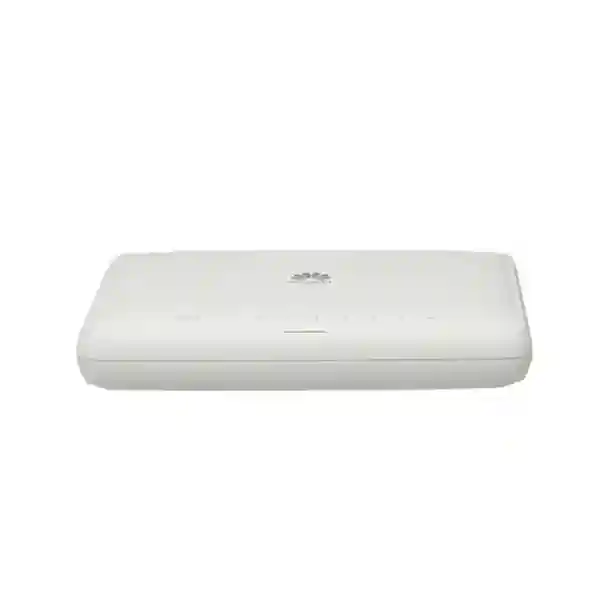
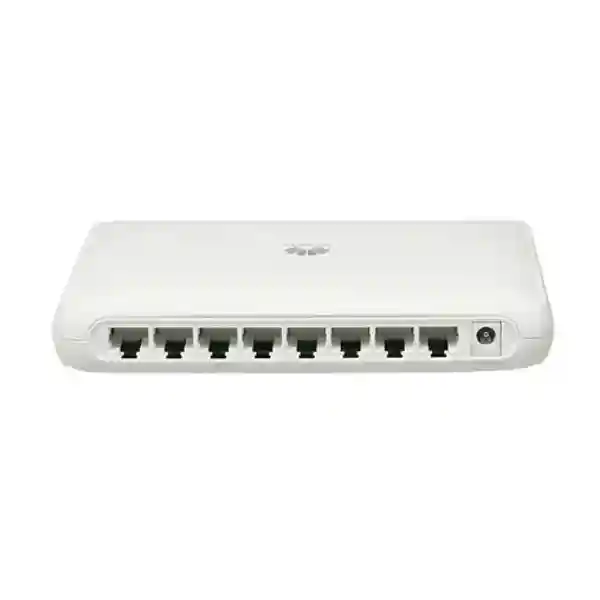
Huawei CloudEngine S1730S-L8T-A
An eight-port, fanless Gigabit Ethernet switch for simple edge connectivity where organizations need dependable copper access without the operational overhead of a managed switching platform.
For UAE deployments, the S1730S-L8T-A is especially practical in small branches, meeting rooms, reception desks, retail counters, CCTV or NVR cabinets without PoE requirements, lab benches, classrooms, temporary project offices, and compact network extensions behind a router or firewall.
Direct answer: what the S1730S-L8T-A is designed to do
The Huawei CloudEngine S1730S-L8T-A is an unmanaged SOHO-class Ethernet access switch. In practical terms, it expands one local Ethernet segment to as many as eight copper Gigabit ports without requiring a web interface, command-line configuration, VLAN design, controller onboarding, licensing workflow, or day-to-day switch administration. Connect the supplied power adapter, attach Ethernet cabling, and the switch negotiates link speed and duplex with compatible endpoints. That operating model is valuable when the requirement is basic Layer 2 connectivity rather than policy enforcement or segmented campus switching.
Huawei lists eight 10/100/1000BASE-T ports, a 16 Gbit/s switching capacity and roughly 12 Mpps of packet forwarding for this model. The chassis is compact at approximately 28 mm × 160 mm × 120 mm, with a fanless natural-cooling design. The S1730S-L8T-A is not a PoE switch. It does not provide electrical power to access points, IP phones, cameras, intercoms or other powered devices through the Ethernet cable. Those endpoints must use their own power source or an external injector, or the project should specify a PoE-capable switch instead.
The strongest fit is a small Layer 2 access domain where every connected device can safely share the same upstream network policy. If the site requires VLANs, loop protection configuration, spanning-tree tuning, port authentication, traffic monitoring, SNMP, link aggregation, QoS policy, ACLs, dedicated voice or guest segmentation, or remote switch administration, the project should move to a managed model. FourTeck can help map that requirement through its UAE networking portfolio rather than forcing an unmanaged switch into a design that needs control-plane features.
Huawei CloudEngine S1730S-L8T-A technical specification snapshot
| Specification | S1730S-L8T-A detail | Deployment meaning |
|---|---|---|
| Ethernet ports | 8 × 10/100/1000BASE-T RJ45 | Eight copper endpoint or uplink connections with auto-negotiated Ethernet speeds. |
| Switching capacity | 16 Gbit/s | Matches full-duplex aggregate bandwidth across eight 1 GbE ports for non-blocking Layer 2 forwarding. |
| Forwarding performance | Approximately 12 Mpps | Suitable for line-rate Gigabit forwarding at the access edge in normal small-network use. |
| MAC table | Up to 8K entries in Huawei’s S1730S SOHO unmanaged feature table | Ample Layer 2 address-learning scale for a small switch, while the actual broadcast domain should still be sized sensibly. |
| Jumbo frame | Up to 10,000 bytes in the unmanaged-series feature table | Useful only when all endpoints and the complete path are configured consistently for larger frames. |
| Cooling | Fanless, natural heat dissipation | No fan noise and no fan as a moving wear component; adequate ventilation remains important. |
| Power | External 12 V / 0.5 A adapter; model literature lists up to about 5 W consumption | Low heat load and easy desktop installation; confirm supplied adapter and plug type with the quotation. |
| Operating environment | Approximately -5°C to +45°C; 5%–95% RH non-condensing | Install indoors in a conditioned, clean, ventilated location; do not treat the switch as outdoor-rated equipment. |
| Dimensions | 28 × 160 × 120 mm (H × W × D) | Compact sub-1U desktop form factor, not a conventional rack-width access switch. |
| PoE | Not supported on S1730S-L8T-A | Use locally powered endpoints, injectors, or specify a PoE-capable model when the network must power devices. |
Packet path, switching architecture and what 16 Gbit/s actually means
An eight-port Gigabit switch is often described only by its port count, but the more important engineering question is whether the internal forwarding path can carry simultaneous traffic without forcing unrelated ports to compete for a narrow backplane. Each 1 GbE port can transmit at 1 Gbit/s and receive at 1 Gbit/s at the same time when operating in full duplex. Across eight ports, that creates an aggregate bidirectional figure of 16 Gbit/s. Huawei’s published 16 Gbit/s switching capacity therefore aligns with the arithmetic required for full-duplex line-rate movement across the eight copper interfaces.
The roughly 12 Mpps forwarding figure is also meaningful. At minimum-size Ethernet frames, packet rate rather than bit rate becomes the harder test because the switch must make a forwarding decision for a much larger number of frames per second. A theoretical 1 GbE interface handles about 1.488 million minimum-size packets per second in one direction. Across eight interfaces, the aggregate value is close to the published forwarding rate. For a small unmanaged access switch, this indicates that the forwarding engine is designed around wire-speed Layer 2 switching rather than a heavily oversubscribed internal bus.
The model learns source MAC addresses and associates them with physical ports. When a frame arrives for a destination already present in the MAC table, the switch can forward it only toward the relevant port. Unknown unicast, broadcast and certain multicast traffic is flooded within the same Layer 2 domain as Ethernet behavior requires. Because this is an unmanaged product, the administrator does not create VLAN boundaries or apply port-level policies on the switch itself. Segmentation decisions therefore have to occur elsewhere in the topology, typically on a managed upstream switch, router, firewall or another device capable of enforcing network policy.
Huawei does not publish a customer-configurable ASIC profile for this small unmanaged model, and there is no reason to invent one. The operational point is simpler: the device exposes fixed-function Layer 2 behavior, automatic address learning, hardware-speed packet forwarding and flow-control capabilities without a management plane that the installer needs to tune. That reduces configuration effort but also deliberately limits control. For a straightforward access extension this is an advantage; for a policy-heavy enterprise edge it is a design constraint.
Eight copper ports: cabling, negotiation and port planning
10/100/1000BASE-T
Each RJ45 interface can negotiate 10 Mb/s, 100 Mb/s or 1 Gb/s Ethernet with the connected device. In a modern UAE business LAN, Gigabit should be the normal target. Lower negotiated speeds are useful for backward compatibility but can also reveal old endpoint NICs, damaged pairs, marginal patch cords or cabling terminated to an older standard.
Full-duplex operation
With correctly negotiated Gigabit links, each port can send and receive concurrently. Administrators do not manually configure duplex on this unmanaged switch. If a legacy endpoint behaves unexpectedly, test the endpoint and cable rather than looking for a switch-side CLI setting that does not exist.
Copper distance
Standard structured-cabling practice applies. For 1000BASE-T, use properly installed four-pair Category 5e or better cabling within the applicable Ethernet channel length, with compliant patching, bend radius, labeling and separation from electrical interference. The switch cannot compensate for a poor physical layer.
No dedicated uplink port
There is no separate SFP or special uplink interface on this model. Any of the eight RJ45 ports can connect upstream to a router, firewall or managed switch. That flexibility is convenient, but the uplink consumes one of the eight available copper ports, leaving seven for local devices when a single uplink is used.
Port budgeting should therefore start with the uplink. A common mistake is to specify an “eight-port switch” for eight endpoints and forget that one port may be required to reach the rest of the LAN. If the requirement is eight local devices plus one copper uplink, this model is already undersized. Choosing a larger switch from the beginning usually produces cleaner cabling and avoids cascading multiple small unmanaged switches. Cascades can work electrically, but they consume ports, create extra fault points and make physical tracing more difficult.
Plug-and-play operation: what “unmanaged” gives you and what it intentionally leaves out
For many small network extensions, unmanaged switching is exactly the right level of complexity. The S1730S-L8T-A does not need an IP address for administration, does not require a management password, and does not depend on a cloud portal for basic forwarding. This shortens deployment time and removes a class of operational tasks such as configuration backups, switch credential rotation, management-plane ACLs and routine interface-policy changes. A field technician can install the unit, connect the uplink and endpoints, verify link LEDs and begin service without building a switch configuration template.
Huawei’s unmanaged-series service table includes automatic port attribute negotiation, automatic wire-sequence negotiation, IEEE 802.3x flow control, automatic port sleeping, jumbo-frame handling and MAC learning. These functions happen without administrator intervention. Flow control can help a receiving device signal temporary congestion on a compatible full-duplex link. Automatic port sleeping reduces unnecessary power use when a port has no active connection. MAC aging removes old dynamic entries so that endpoints can move through the network without stale forwarding state persisting indefinitely.
The trade-off is equally important. You cannot create access and trunk VLANs on this switch, intentionally isolate one port from another, set an 802.1X authentication policy, configure spanning tree, collect SNMP counters, mirror traffic to a packet analyzer, establish a link aggregation group, tune queue scheduling, define ACLs, set per-port rate limits, or remotely disable a port through a management interface. If any of those requirements appear in the design brief, the right response is not to improvise around the limitation. Specify a managed access switch.
This distinction matters in security-sensitive environments. An unmanaged switch can extend an already trusted segment, but it should not be expected to become a policy enforcement point. FourTeck’s UAE IT services team can align switching, firewalling, addressing and segmentation so that the simplicity of an unmanaged edge does not accidentally weaken the larger network architecture.
Sizing the S1730S-L8T-A for real traffic, not just port count
A sound switch selection asks four different capacity questions: how many physical ports are needed, how much simultaneous throughput is expected, how many Layer 2 addresses may appear behind those ports, and whether the uplink becomes the actual bottleneck. The S1730S-L8T-A performs well when used as a local edge fan-out device, but an eight-port switch does not create eight gigabits of Internet bandwidth. If seven client devices all reach servers through one 1 GbE uplink, their aggregate upstream traffic still shares that single Gigabit connection.
Consider a small branch where the switch connects four desktop PCs, one multifunction printer, one NAS appliance and one conference-room codec, with the eighth port leading to the firewall. Local PC-to-NAS traffic and printer traffic may remain inside the switch while Internet traffic uses the firewall uplink. This is a sensible use case because the internal switching fabric can handle concurrent local flows while the single upstream link carries only traffic that actually leaves the local segment. By contrast, if every endpoint continuously transfers large files to a central data center through the same uplink, uplink utilization rather than switch fabric capacity will dominate user experience.
Small-packet applications also deserve attention. The published packet rate indicates that the switch is designed for line-rate access forwarding, but endpoint behavior, cabling quality, upstream congestion and protocol overhead still shape actual application performance. A switch cannot make a slow NAS disk faster, increase WAN bandwidth, repair duplex problems on an old NIC or remove latency created by an overloaded firewall. When troubleshooting, separate Layer 1, Layer 2, Layer 3 and application components rather than using a generic “network is slow” diagnosis.
Capacity planning should also include growth. If the initial project uses six or seven ports, there is almost no expansion headroom after reserving an uplink. If the office is likely to add access points, IP phones, cameras, printers, room systems or another server, select a 16-port or managed/PoE model early. The hardware cost difference is usually smaller than the labor and disruption associated with rebuilding an improvised cascade later.
Fanless design, power profile and UAE thermal planning
The S1730S-L8T-A uses fanless natural heat dissipation. For desks, meeting rooms, hotel back offices and quiet reception areas, this removes the acoustic signature of a cooling fan. It also removes a moving mechanical component that can accumulate dust and eventually fail. Fanless does not mean heatless, however. Electronic components still convert electrical power into heat, and the chassis must exchange that heat with surrounding air.
Huawei literature for the model lists maximum power consumption of about 5 W. That is small compared with PoE access switches or rack-mounted aggregation hardware, and it simplifies UPS sizing for a single unit. Even so, the AC adapter and switch should be installed where air can circulate around them. Do not bury the chassis under paperwork, place it directly on hot equipment, trap it in a sealed decorative cabinet, or mount it against insulation. Compact network cabinets in the UAE can become much hotter than the conditioned room around them when they contain routers, firewalls, NVRs, power supplies and UPS systems.
The published operating range for this generation is approximately -5°C to +45°C, with storage from about -40°C to +70°C and 5%–95% relative humidity without condensation. Those values describe equipment limits, not a recommendation to run an office network continually at the thermal ceiling. A conditioned indoor environment with margin below the maximum temperature gives electronics a more predictable operating life and reduces thermal stress across all devices in the cabinet.
For Dubai, Abu Dhabi and other UAE locations, the most important design distinction is indoor versus outdoor exposure. This switch is not a weatherproof outdoor device. Do not install it in an unconditioned rooftop box, exposed security pole, external gate enclosure or location subject to direct sun, blowing dust, moisture or condensation unless a properly engineered environmental enclosure and thermal solution has been designed around it. When the endpoint is outdoors, keep the switch in a suitable conditioned space and extend compliant Ethernet within distance limits, or use purpose-built industrial/outdoor networking equipment.
Power adapter, surge resilience and practical electrical protection
The S1730S-L8T-A uses an external DC adapter rather than a full-size internal AC power supply. Huawei model literature identifies a 12 V / 0.5 A adapter and specifies the associated AC operating range for the adapter variant. Procurement teams should still verify the exact adapter, approved plug type and local package contents on the quotation because regional packaging can differ by channel and production batch. In a UAE commercial installation, use a properly grounded, compliant electrical outlet and avoid unapproved travel adapters or improvised extensions.
Huawei’s 2022 S1730S brochure lists elevated surge-protection figures for service and power ports on this model generation. Surge tolerance can improve resilience against short transients, but it should not be interpreted as a substitute for building-level earthing, structured surge protection, UPS design or compliant cabling practices. The actual network is only as robust as its entire electrical path. Long copper runs between buildings, outdoor cable exposure and poor grounding can create much higher risk than a desktop switch is intended to absorb.
For critical business connectivity, a small UPS is often sensible. The switch itself draws little power, but uptime depends on the upstream router, firewall, ONT or modem, and perhaps the endpoint devices as well. A UPS sized only for a 5 W switch does not preserve connectivity if the firewall and WAN termination lose power. Build the backup runtime calculation around the complete chain. Where the site has generator transfer or unstable utility conditions, choose a UPS topology and surge-protection strategy appropriate to the electrical environment.
Cabling routes also matter. Keep data cabling away from high-current conductors, motors, fluorescent ballasts and other interference sources according to local structured-cabling practice. Where links leave the protected building environment, consider optical isolation or properly designed surge protection rather than depending on the switch’s port protection alone.
Deployment patterns that match the S1730S-L8T-A well
1. Small branch office extension
Place the switch behind a security gateway when a branch needs several locally powered Ethernet endpoints but no per-port segmentation. PCs, printers and a small NAS can share the existing trusted LAN while the firewall performs routing, VPN and Internet security.
2. Meeting-room connectivity
A single structured-cabling outlet can feed the switch, which then connects a room PC, conferencing codec, control processor, display controller and presentation gateway. Because many AV devices use their own power supplies, non-PoE Ethernet can be sufficient.
3. Retail counter or back office
POS terminals, receipt systems, stock PCs and printers can connect through one compact switch when all devices belong to the same trusted network. Payment-card segmentation requirements must still be enforced by the broader architecture rather than assumed from an unmanaged switch.
4. CCTV/NVR cabinet without PoE
The model can connect an NVR, management workstation and locally powered cameras or encoders. It is not suitable when cameras expect the switch to provide PoE. For that requirement, choose a correctly budgeted PoE model and account for total wattage.
5. Lab or staging bench
Integrators can use the fanless switch for temporary device staging, imaging, firmware work or isolated bench testing where simple Layer 2 connectivity is enough. The absence of management configuration makes it easy to redeploy between temporary tasks.
6. Server-room auxiliary segment
The switch can serve low-criticality management appliances or temporary service connections when segmentation already exists upstream. For permanent server production traffic, redundant managed switching is normally the more appropriate architecture.
Across these patterns, the consistent theme is simplicity: one Layer 2 segment, locally powered devices, modest port density, no need for remote switch management, and a clear upstream device that handles security and routing. When one of those assumptions changes, revisit the switch class rather than stretching the design.
Security architecture: where an unmanaged switch belongs
An unmanaged Ethernet switch is not a firewall and should not be evaluated as one. Its job is local frame forwarding. It does not inspect applications, terminate VPN tunnels, perform user authentication, enforce web filtering or build security zones. If a user connects an unauthorized device to an available port, this switch has no configurable network-access-control mechanism to challenge that endpoint. Physical access to switch ports therefore matters.
In a well-designed topology, the security gateway and managed switching layers provide the controls that the S1730S-L8T-A intentionally omits. For example, a branch firewall can separate corporate, guest and IoT networks on different interfaces or VLANs upstream. The unmanaged switch can then be used only inside one of those already defined trust zones. Do not connect devices with materially different security requirements to the same unmanaged switch and assume the switch will isolate them.
Loop prevention is another concern. Because the administrator cannot configure spanning tree on the S1730S-L8T-A, avoid accidental redundant cabling that connects two switch ports back into the same Layer 2 network. A simple patching mistake can create a loop and generate severe broadcast amplification. Label the uplink, document patching, use one intended upstream connection, and keep spare wall outlets and patch leads controlled.
For firewall sizing, segmentation and secure branch design in Dubai and the wider UAE, the FourTeck Firewall Dubai practice can pair the access switch with the appropriate perimeter and internal security controls. The goal is not to make the small switch more complicated; it is to place it in a topology where its simplicity is safe.
Interoperability with routers, firewalls, servers, NAS and endpoint NICs
Ethernet standards are the foundation of interoperability. The S1730S-L8T-A supports standard 10BASE-T, 100BASE-TX and 1000BASE-T connectivity, so it can normally connect to Ethernet interfaces from many vendors. A Huawei switch does not require a Huawei router, Huawei firewall or Huawei endpoint. What matters is that the link partners support a common Ethernet mode, use correctly terminated cabling and are configured consistently at higher protocol layers.
With firewalls and routers, any copper Gigabit interface can serve as the uplink. The upstream device supplies DHCP, routing, NAT, VPN and security policy as required; the switch simply extends the local Ethernet segment. If the firewall port carries multiple tagged VLANs, remember that an unmanaged switch is not the right place to deliberately assign different endpoint ports to those VLANs. Use a managed switch when VLAN trunking and access-port assignment form part of the design.
With NAS and servers, Gigabit Ethernet provides up to 1 Gbit/s link rate per connected port, but file-transfer throughput will be lower after Ethernet, IP, TCP and application overhead. Storage media, CPU, SMB/NFS behavior, encryption and the client link can all become bottlenecks. The switch’s 16 Gbit/s fabric prevents its internal backplane from being the obvious limitation for ordinary eight-port line-rate switching, but it cannot make a single 1 GbE server interface exceed its negotiated line rate.
Jumbo frames can reduce per-packet processing overhead in some storage workflows, and Huawei lists jumbo-frame support up to 10,000 bytes for the unmanaged series. Use this feature conceptually with care: an unmanaged switch gives you no interface to coordinate MTU policy. Every relevant endpoint and routed path must already be configured compatibly. Mixed MTUs can produce confusing application failures or fragmentation behavior. For a small office network, standard Ethernet MTU is often the lowest-risk choice unless there is a measured reason to change it.
Legacy 100 Mb/s printers and controllers can coexist with Gigabit devices because each switch port negotiates independently. A slow endpoint does not force every port to the same speed. However, traffic sent to or from that endpoint remains limited by its own link rate. During troubleshooting, link LEDs and endpoint NIC statistics are useful first checks because there is no switch management dashboard to expose per-port counters.
When to choose this model — and when to move to another switch class
Choose S1730S-L8T-A when
You need up to seven local devices plus one uplink, or another port arrangement that fits within eight total copper connections.
All connected devices can share one trusted Layer 2 segment and do not require port-level VLAN assignment.
Endpoints have their own electrical power and do not require PoE.
Silent, fanless operation is beneficial.
Simple installation and very low administrative overhead are more important than monitoring and policy features.
Move to managed or PoE switching when
You need VLANs, 802.1X, ACLs, STP/RSTP/MSTP, SNMP, port mirroring, LACP, QoS policy or remote administration.
Access points, phones, cameras or intercoms must receive power through Ethernet.
The design needs resilient uplinks, fiber interfaces, 2.5/10 GbE, stacking or redundancy.
Eight ports leave no safe expansion margin.
The switch will serve a production server environment where monitoring, dual paths and deterministic change control are required.
UAE installation methodology: from carton to verified service
A small switch can be installed quickly, but disciplined installation prevents avoidable faults. Start by verifying the exact model label. Huawei has several S1730S-L variants with similar names, including PoE and later revision models. Confirm that the delivered unit is specifically S1730S-L8T-A and that the supplied adapter matches the approved power requirements. Record the serial number for asset tracking before the device disappears into a cabinet or desk installation.
Next, inspect the intended location. Provide a stable surface, enough clearance for natural cooling, protection from liquids and cleaning chemicals, and a cable route that does not place strain on RJ45 connectors. If the switch is placed in a communications cabinet, secure cables so the small chassis is not pulled by heavy patch leads. Because it is a compact desktop-format device rather than a conventional rack-width unit, plan a shelf or suitable mounting surface instead of leaving it unsupported among power supplies.
Label the upstream port even though no port is electrically dedicated to uplink service. This makes future tracing easier. Connect the upstream cable to the router, firewall or managed distribution switch, then connect endpoints one at a time. Observe link status and verify that Gigabit-capable devices negotiate at 1 Gb/s. Where a device connects only at 100 Mb/s, replace the patch lead, test the permanent link and inspect the endpoint NIC settings before assuming the switch is faulty.
Functional testing should match the actual service. Confirm DHCP address assignment, default-gateway reachability, DNS resolution, local file access, printing, Internet access and any required VPN or application path. If the switch serves a NAS or local server, perform a representative transfer test rather than relying solely on a ping. Ping validates reachability and latency at a basic level; it does not prove application throughput under load.
Finally, document the eight ports, connected device names, cable IDs, upstream switch/firewall port and power source. Unmanaged devices have little configuration to back up, so physical documentation becomes the primary operations record. A labeled topology diagram can save far more time than the few minutes it takes to create.
Troubleshooting guide for an unmanaged Gigabit edge switch
No link light
Verify endpoint power, cable seating and cable continuity. Test a known-good patch cord and another switch port. Check whether the endpoint NIC is disabled. Because the ports auto-negotiate, there is no switch-side administrative shutdown to reverse.
Link is only 100 Mb/s
Gigabit Ethernet needs all four copper pairs. A cable or termination fault can leave 100 Mb/s working while 1 Gb/s fails. Test Category 5e or better cabling, connectors and the endpoint NIC. Auto-negotiation on both sides is normally the correct setting.
Internet unavailable but local links work
The switch does not supply routing, DHCP or Internet service. Check the upstream firewall/router, WAN circuit, addressing, DHCP lease, default gateway and DNS. A healthy Layer 2 link does not prove that Layer 3 services are available.
Intermittent network storms
Inspect for accidental cable loops between switches or wall outlets. Since you cannot configure spanning tree on this device, physical loop prevention is essential. Remove redundant paths unless the redundancy is engineered on managed equipment that can control it.
Slow file copies
Check negotiated speed, disk performance, server CPU, antivirus inspection, SMB settings, upstream congestion and whether multiple users share one 1 GbE server or uplink. Run local and routed tests separately to identify the constrained segment.
Switch feels warm
A fanless device relies on its enclosure and ambient air to dissipate heat. Warm surfaces can be normal, but blocked ventilation or excessive cabinet temperature is not. Measure ambient conditions and correct airflow rather than attaching improvised fans to the chassis.
Procurement and lifecycle considerations for UAE organizations
The S1730S-L8T-A belongs to a product family that has evolved through multiple revisions and regional variants. Procurement should therefore be model-specific. Do not accept a quotation that says only “Huawei 8-port switch” if the project requires this exact part. Ask the supplier to state the full model, hardware revision where applicable, power adapter type, package contents, warranty basis, lead time and whether the unit is new and sourced through an appropriate commercial channel.
This is particularly important when comparing the S1730S-L8T-A with newer S1730S-L8T-A1 or similarly named products. Port count may remain the same while power specifications, surge figures, MAC-table scale, branding or regional certification details vary. Treat the suffix as part of the model identity. For a replacement in an existing standardized site, match the intended bill of materials rather than assuming every eight-port S1730S-L device is interchangeable in documentation.
A business quotation should also reflect system needs rather than the switch alone. Confirm the number and length of patch cords, cabinet shelf or mounting provision, UPS outlet availability, structured cabling, cable certification, labeling, and any upstream firewall or managed-switch port required. If the unit extends connectivity to a server or NAS area, the FourTeck Server Dubai team can coordinate server-side NIC, storage and rack requirements with the network design so that the access switch does not become an isolated purchasing decision.
Lifecycle planning should account for operational criticality. An inexpensive desktop switch may be entirely appropriate for a low-risk room or branch extension, but a single unmanaged unit should not be made the sole dependency for a mission-critical service that requires redundancy and monitored failover. Where downtime has material business cost, use managed redundant switching, dual power where required, diverse paths and monitoring appropriate to the service-level objective.
FourTeck can supply the switch as part of a broader UAE network bill of materials, including firewall integration, structured connectivity, rack planning, server links and implementation services. The value of a correct quotation is not only getting the right box; it is ensuring the box fits the topology, power environment and growth plan.
Designing around the absence of PoE
The “T” model here is a non-PoE copper switch. That can be an advantage when the connected equipment already has power and the project wants a compact, low-consumption switch without an oversized power supply. Desktop PCs, printers, many NAS systems, servers, firewalls, routers and industrial controllers normally use their own power source. In those cases, paying for a PoE budget may provide little benefit.
The limitation becomes important with modern edge devices. Wireless access points, IP phones, IP cameras, door controllers, intercoms and IoT gateways are frequently designed around IEEE 802.3af, 802.3at or newer PoE standards. Connecting their Ethernet cable to an S1730S-L8T-A will provide data only. The device will not power up unless it has a separate local supply or an external PoE injector placed in the link.
External injectors can solve isolated cases, but they add another power supply, another physical component and another troubleshooting point. If several endpoints need PoE, selecting a PoE switch is usually cleaner. Calculate the required total power budget from the maximum draw of all powered devices, not just the number of PoE-capable ports. Also leave headroom for device boot peaks, future expansion and higher-power endpoints.
PoE choice also affects UPS design. A non-PoE switch around 5 W is easy to support, while a PoE switch feeding cameras or access points may draw tens or hundreds of watts depending on load. If network availability during an outage matters, include the endpoint power delivered through the switch in the UPS runtime calculation. This is one reason a disciplined bill of materials is preferable to choosing a switch solely from port count.
Why an 8K MAC table is more than enough for typical small-switch use — but not a reason to build a huge flat LAN
A MAC address table stores the Layer 2 addresses the switch has learned and the ports on which they were seen. Huawei’s S1730S unmanaged-series feature table lists up to 8K MAC entries. That number is far larger than the eight directly attached ports might suggest because each port can lead toward another switch and therefore expose many downstream source MAC addresses. In a normal small office deployment, the table scale is unlikely to be the limiting factor.
However, large MAC capacity should not be interpreted as an invitation to build a massive flat broadcast domain behind a small unmanaged switch. Network scale is constrained by many factors beyond table entries: broadcast rates, fault isolation, security zoning, troubleshooting complexity, uplink capacity and the operational requirement to understand where devices are connected. Managed switching and routed boundaries become more valuable as the endpoint count grows.
Huawei lists a five-minute aging time for dynamic MAC entries in the unmanaged series. Aging is normal Ethernet behavior. If a learned address is not refreshed, the switch eventually removes the entry so that future traffic can be relearned on the correct port. This helps when laptops or other devices move. It is not a security feature and does not permanently bind an identity to a port.
In a small branch, a clean design might expose dozens of learned addresses through the uplink while only a few devices attach locally. That is still fine. The more important engineering question is whether all those devices belong in the same Layer 2 security zone. If not, segmentation should occur on managed infrastructure upstream or the edge switch itself should be replaced with a managed model.
Jumbo frames: capability, consistency and when not to use them
Huawei’s unmanaged S1730S feature table lists jumbo frames up to 10,000 bytes. Larger Ethernet frames can reduce packet-processing overhead for bulk transfers because the same payload is carried in fewer frames. Storage networks are the classic example, although modern CPUs and NIC offload features mean the real-world benefit varies by workload.
The important word is consistency. Jumbo frames work reliably only when every device along the path supports and is configured for a compatible maximum frame size. A server may be set to an MTU of 9000 while a router, firewall or destination remains at 1500. Depending on protocol and path behavior, the result can be fragmentation, dropped packets or strange application failures where small tests succeed but larger transfers stall.
Because the S1730S-L8T-A is unmanaged, there is no switch GUI where an administrator can define a per-port MTU or inspect a jumbo-frame mismatch. The forwarding capability is present, but path design remains an endpoint and upstream-infrastructure responsibility. In a simple office LAN, standard MTU is normally the safest default. Enable jumbo frames only when the application benefits have been measured and the entire path is under administrative control.
For NAS or server workloads, test both throughput and reliability after any MTU change. Use a planned configuration record so that future equipment replacements preserve the same setting. If the site depends heavily on storage performance, a managed switch with better telemetry and higher-speed 2.5/10 GbE uplinks may offer more practical value than jumbo frames on 1 GbE access ports.
Frequently asked technical questions
Is the S1730S-L8T-A managed?
No. It is an unmanaged S1730S-L SOHO switch. There is no routine web or CLI configuration for VLANs, SNMP, ACLs or spanning-tree policy.
Does it support Gigabit on every port?
Yes. All eight fixed RJ45 interfaces are 10/100/1000BASE-T and can negotiate Gigabit Ethernet with compatible endpoints and correct four-pair cabling.
Does it provide PoE?
No. S1730S-L8T-A is a non-PoE model. Devices that need power over Ethernet require injectors or a different PoE-capable switch.
Can it connect to a firewall?
Yes. Any of the eight RJ45 ports can act as the copper connection to a firewall or router. The upstream device remains responsible for routing and security policy.
Can I use all eight ports for endpoints?
Only if the switch does not need an Ethernet uplink to the rest of the network. In most installations one port is consumed by the uplink, leaving seven local connections.
Is it silent?
The chassis uses fanless natural heat dissipation, so there is no cooling-fan noise. Other nearby equipment or the external power environment may still contribute ambient noise.
Can it be rack mounted?
It is a compact sub-1U desktop-format model rather than a standard rack-width access switch. A shelf or appropriate enclosure arrangement is normally used when placing it in a rack cabinet.
Does it need a license?
Basic unmanaged forwarding does not depend on a separate feature license or cloud subscription. Confirm commercial warranty and support terms with the supplier.
Can I create VLANs?
Not as an administrator on this unmanaged model. If VLAN access/trunk configuration is required, specify a managed switch.
Will it improve Internet speed?
It can remove a 100 Mb/s local bottleneck when endpoints and upstream devices support Gigabit, but it cannot make the WAN circuit faster than the subscribed or routed service.
Can I connect another switch to it?
Yes, but cascades should be planned. Each additional switch shares the upstream path and adds a fault domain. Avoid loops and use managed distribution where the network grows beyond a simple edge extension.
Is it suitable outdoors?
No. Treat it as indoor enterprise/SOHO equipment. Outdoor exposure requires a properly engineered environmental solution or a purpose-built outdoor/industrial device.
Engineering perspective: simplicity is a feature only when the topology is simple
The S1730S-L8T-A is easy to understand because it does one job: local Gigabit Layer 2 switching across eight copper ports. That focus can produce a very clean solution. There is almost no configuration surface to mismanage, no fan to maintain, no PoE budget to calculate, and no subscription needed for basic packet forwarding. In a small trusted segment, those characteristics reduce deployment time and support burden.
Problems begin when a project asks the switch to solve requirements that belong to another product class. If an office needs separate corporate, voice, CCTV and guest networks, an unmanaged eight-port switch is not a segmentation platform. If an access point needs PoE, this model is not a power source. If a server environment needs redundant uplinks, telemetry and link aggregation, this is not a data-center access switch. If an operations team needs centralized visibility, the lack of management becomes a liability rather than a benefit.
A good design therefore starts with service requirements and works backward to the hardware. Count ports including uplinks and spare capacity. Classify endpoint power requirements. Decide whether devices can share one broadcast domain. Identify security controls, remote monitoring requirements, link speeds, redundancy expectations and environmental constraints. Only then select the model.
Within that method, the Huawei CloudEngine S1730S-L8T-A has a clear and useful role: a compact, silent and low-power Gigabit fan-out switch for uncomplicated Ethernet access. FourTeck can provide the unit individually or include it in a complete branch, office or equipment-room design with installation and integration services.
Decision recap for UAE buyers
Eight auto-negotiating 10/100/1000BASE-T copper ports. No SFP interface and no separate uplink port.
16 Gbit/s switching capacity and about 12 Mpps forwarding, aligned with non-blocking eight-port Gigabit Layer 2 access.
Unmanaged plug-and-play behavior. Ideal when simplicity is desired; unsuitable when VLAN, SNMP, ACL, STP or remote administration is mandatory.
Low-power external-adapter design with fanless cooling. No PoE output for cameras, phones or access points.
Indoor desktop/sub-1U format. Provide ventilation and a conditioned location rather than exposed outdoor or sealed hot-cabinet installation.
Small offices, meeting rooms, retail back offices, labs and auxiliary network extensions using locally powered endpoints on one trusted segment.
Quotation input checklist
To receive an accurate UAE quotation and avoid mismatched hardware, provide the following project information with the enquiry. The checklist lets the network team determine whether the S1730S-L8T-A is the correct fit or whether a managed, PoE or higher-port-density model would be more appropriate.
Final consultation panel
Request the Huawei CloudEngine S1730S-L8T-A for a straightforward eight-port non-PoE requirement, or share the endpoint list and FourTeck can validate whether a larger, managed or PoE alternative better matches the project. For general UAE infrastructure and procurement, visit FourTeck UAE. For implementation and support scope, use FourTeck IT Services UAE.
A useful pre-sales response should confirm the exact model, quantity, lead time, adapter/package details, warranty basis, required cabling and whether the topology needs any features outside unmanaged Layer 2 switching.
Model: Huawei CloudEngine S1730S-L8T-A
Region: UAE
Network: number of endpoints + uplink type
Power: confirm non-PoE acceptance
Service: supply only, installation, migration or support

Reviews
There are no reviews yet.