
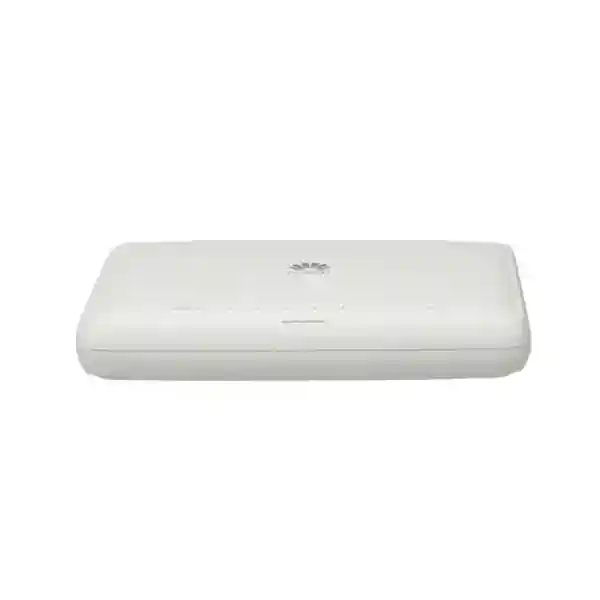
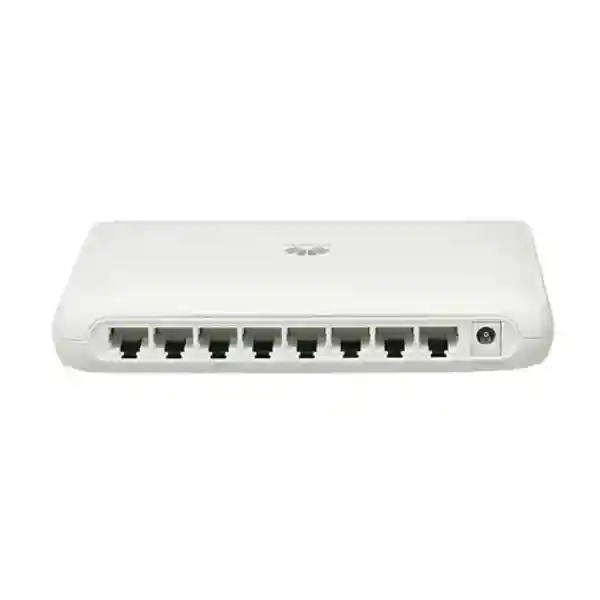
Huawei CloudEngine S1730S-L8T-MA
A compact eight-port Gigabit Ethernet switch for quiet, space-constrained access networks where PoE is not required. The S1730S-L8T-MA combines eight 10/100/1000BASE-T copper interfaces, fanless cooling, low power demand, and a desktop-friendly chassis for branch offices, retail points, classrooms, hospitality back-office areas, service counters, small server rooms, and other UAE edge-network locations.
Choose this model when the requirement is eight copper Gigabit access ports, silent fanless operation, compact physical size, and no need to power endpoints through Ethernet. Confirm the exact order code, power cord, software release, included accessories, and local project requirements before purchase.
Eight 10/100/1000BASE-T copper Ethernet interfaces for endpoint and upstream connectivity.
Use local endpoint power, an external injector, or a dedicated PoE switch where powered devices are required.
Small footprint for desktops, counters, shelves, compact cabinets, and distributed edge locations.
Natural convection removes fan noise and avoids a mechanical fan as a maintenance item.
What the S1730S-L8T-MA is designed to do
The Huawei CloudEngine S1730S-L8T-MA sits at the practical edge of a wired Ethernet network. Its role is to provide a small concentration point for devices that already have their own power source and need reliable copper Ethernet access at 10, 100, or 1000 Mbit/s. Typical attached devices include desktop PCs, laptops through docking stations, printers, point-of-sale terminals, thin clients, smart displays, NVR management ports, building-management gateways, access-control controllers with local power, servers with modest edge requirements, and uplinks to a router or firewall. The eight-port layout makes the switch particularly useful when a project does not justify a 16- or 24-port access switch but still benefits from a purpose-built networking device rather than a consumer-grade desktop switch.
The model is also useful as a controlled building block in distributed deployments. A retailer may place one switch behind a service counter, a clinic may use one inside an administration area, or a branch office may place one in a small communications cabinet. The value is not only the port count. The compact chassis, low electrical demand, and fanless cooling can simplify installation where noise, heat, and space are constrained. Because the unit does not provide PoE, its best fit is a topology in which endpoint power is handled separately. That distinction matters: an eight-port switch can look interchangeable on a bill of materials, but an IP phone, wireless access point, or surveillance camera may require PoE. The network designer should therefore classify every endpoint before choosing this SKU.
For UAE projects, FourTeck can help position the S1730S-L8T-MA within a broader campus or branch design rather than treating it as an isolated box. The switch can form the final wired access layer behind a security gateway, while larger aggregation, wireless, voice, server, or firewall requirements are sized separately. For broader infrastructure planning, visit FourTeck UAE for local enterprise networking and integration capabilities.
Model-specific technical snapshot
Specification values should be validated against the exact Huawei part number, current hardware documentation, and supplied accessory set at quotation stage. Software features can vary by release and product variant; FourTeck does not recommend assuming a feature solely because it is present on another S1700-family model.
Eight Gigabit ports: understanding the physical access layer
Each 10/100/1000BASE-T interface is designed for standard twisted-pair Ethernet. In a correctly cabled installation, a connected endpoint and the switch negotiate the highest mutually supported rate and duplex mode. That makes the S1730S-L8T-MA suitable for mixed environments in which some legacy devices still operate at Fast Ethernet while newer systems use Gigabit Ethernet. The practical advantage is migration flexibility: a branch can refresh endpoints over time without replacing the access switch simply because one printer or controller still uses 100 Mbit/s. For Gigabit operation, use standards-compliant structured cabling, appropriate patch leads, correct terminations, and tested channel lengths. The switch cannot compensate for damaged pairs, excessive untwist, poor-quality connectors, or patching that exceeds Ethernet channel requirements.
Port planning should reserve capacity for the upstream path. If all eight ports are used for local devices and there is no dedicated uplink port, one of the eight ports normally has to connect toward the router, firewall, or upstream switch. That leaves seven ports for downstream endpoints. This simple arithmetic is important when engineers size small switches. A requirement described as “eight users” may actually need nine physical ports once the uplink is counted, making a larger model more appropriate. Conversely, if the switch is used as a local extension and only five or six endpoints are present, the S1730S-L8T-MA can provide useful spare ports without the cost and footprint of a larger access platform.
Copper edge design should also account for cable labels, patching sequence, physical security, and serviceability. In retail counters or reception areas, patch leads can be disturbed during cleaning or furniture changes. In a cabinet, unlabeled cables can turn a simple move/add/change task into unnecessary troubleshooting. FourTeck recommends assigning a port map, recording the upstream port, labeling critical endpoints, and documenting which devices have static addressing or special firewall rules. That operational discipline adds more long-term value than treating all eight ports as anonymous sockets.
Switching capacity and packet-forwarding interpretation
An eight-port Gigabit Ethernet switch is commonly described with a 16 Gbit/s switching-capacity figure. The reason is straightforward: each Gigabit port can transmit and receive simultaneously in full-duplex operation, so eight ports × 1 Gbit/s × two directions produces an aggregate theoretical fabric requirement of 16 Gbit/s. This calculation does not mean a single device will transfer 16 Gbit/s through one cable. A single 1000BASE-T link remains a 1 Gbit/s line-rate link in each direction. The larger number describes the internal switching capacity required so multiple ports can communicate concurrently without the switching fabric itself becoming the bottleneck under normal Ethernet conditions.
Packet-forwarding rate is another metric frequently misunderstood in procurement. For eight Gigabit ports, a roughly 12 Mpps class figure corresponds closely to the theoretical minimum-frame packet rate across eight 1 GbE interfaces. Small Ethernet frames create the highest packet-per-second workload because the switch must make many forwarding decisions for a given amount of payload bandwidth. Large file transfers usually use larger frames and therefore require fewer packet decisions for the same traffic volume. When comparing this product with another eight-port switch, capacity numbers should be interpreted in the context of port count and line rate rather than treated as an application-performance benchmark.
Real application throughput also depends on the endpoints, protocol overhead, cabling quality, server performance, storage speed, firewall policies, WAN bandwidth, and whether traffic must traverse a slower upstream link. If seven local devices share one 1 GbE uplink to a router, the uplink becomes the aggregate path for traffic leaving the local switch even though the switch fabric can handle simultaneous local conversations. This is why network sizing must distinguish east-west local traffic from north-south traffic headed to the internet, data center, or another VLAN. The S1730S-L8T-MA is best assessed as one element of an end-to-end topology, not as an isolated throughput number.
Forwarding architecture without unsupported silicon claims
Enterprise switch product pages often make vague statements about “advanced ASICs.” For an accurate procurement document, the better approach is to describe what the forwarding architecture must accomplish without inventing an unpublished chip model. The S1730S-L8T-MA is designed to learn source MAC addresses, associate them with physical ports, and forward Ethernet frames toward the port on which the destination is known. Unknown unicast, broadcast, and selected control traffic may need to be flooded according to the switch’s forwarding behavior. This is the basic operation that allows multiple attached devices to communicate without every unicast frame being transmitted to every port.
At an engineering level, the important questions are table scale, forwarding consistency, buffering behavior under contention, and how the device behaves when several ingress ports target one egress port. No eight-port desktop switch can eliminate congestion created when multiple Gigabit senders simultaneously transmit toward a single Gigabit receiver. In that situation, the egress link is the limiting resource. Buffering can absorb short bursts, but sustained oversubscription eventually requires queuing or frame drops. Application design should therefore avoid assuming that aggregate fabric capacity creates unlimited bandwidth to one server or uplink.
For most small-office and branch access use, the practical architecture question is whether the switch provides sufficient port density and line-rate behavior for the endpoint set. If the environment requires deep buffers, highly granular QoS policy, advanced telemetry, redundant uplinks, stacking, complex routing, or large-scale segmentation, a different managed campus switch should be considered. The S1730S-L8T-MA is strongest when used for a clearly bounded access requirement rather than forced into a role intended for a larger distribution or core platform.
No PoE: a specification that must drive the design
The S1730S-L8T-MA does not provide Power over Ethernet. This is not a minor feature omission; it changes how the switch should be used. A conventional desktop computer, printer, locally powered point-of-sale terminal, or server interface does not need PoE and can connect normally. By contrast, many IP phones, wireless access points, security cameras, door controllers, intercoms, and IoT gateways are commonly powered through the network cable. Those endpoints will require their own compatible power adapter, a suitable external PoE injector, or a different switch with a PoE power budget.
Using individual injectors can be valid for one or two devices, but it introduces extra power supplies, patching, cable management, and failure points. In a project with several powered endpoints, a native PoE switch is usually easier to operate because power delivery can be centralized. The decision is therefore economic and operational rather than purely technical. If all eight devices are non-PoE, selecting a non-PoE switch avoids paying for power-delivery hardware that will never be used. If several endpoints require 802.3af or 802.3at power, the bill of materials should be redesigned before purchase instead of trying to retrofit the requirement after installation.
For UAE offices, this distinction is especially relevant in mixed voice, Wi-Fi, and CCTV projects. A branch may begin with PCs and printers but later add an IP phone system or wireless access points. FourTeck recommends documenting both present and expected powered-device counts. If PoE growth is likely, reserve rack space and electrical capacity for a PoE access layer or choose an appropriate PoE model from the outset. For wider structured IT planning, FourTeck IT Services UAE can support endpoint, cabling, infrastructure, and deployment requirements alongside the switch selection.
Fanless thermal design and low-noise placement
A fanless switch is valuable in quiet workplaces because there is no fan motor generating continuous acoustic noise. That makes the S1730S-L8T-MA suitable for desks, reception counters, small meeting rooms, classrooms, cashier areas, boutique offices, and other spaces where a fan-equipped network device could be distracting. Fanless operation also removes a moving component that can accumulate dust and eventually fail. The trade-off is that the enclosure depends on natural convection, so the installer must not block ventilation surfaces or place the unit inside an unventilated compartment with heat-producing equipment.
UAE ambient conditions make placement discipline important. The product is intended for controlled indoor conditions, not direct exposure to outdoor heat, solar radiation, moisture, or dust. A cabinet installed near a window, in a warehouse roof space, or inside an unconditioned utility enclosure can experience temperatures far above the room thermostat value. Designers should examine the actual microenvironment around the switch, especially when a small cabinet also contains a firewall, router, NVR, power adapters, and UPS. Even devices with low individual power consumption can raise cabinet temperature when airflow is poor.
Leave physical clearance around the chassis, avoid stacking heat sources directly on top of one another, and keep the switch away from water pipes or locations where cleaning liquids can enter the enclosure. Where the installation is business-critical, include environmental inspection in the site survey rather than assuming all indoor spaces are equivalent. The fanless design is an advantage when used correctly, but it does not remove the need for temperature control and sensible equipment placement.
Power profile, UPS sizing, and surge considerations
Published model-specific references for the S1730S-L8T-MA list a rated 170–240 V AC, 50/60 Hz range, with maximum power consumption around 5 W and a typical value around 2 W under a representative traffic load. These are exceptionally small figures compared with PoE switches because the unit is not supplying endpoint power. For UPS planning, however, the switch is only one component. The firewall, ISP equipment, optical network terminal, wireless devices, local servers, and any endpoint power supplies must be added to the load calculation. Runtime should be sized against the entire communications path required to keep the business service available during a power interruption.
Low power consumption also helps with heat management. Nearly all electrical power consumed by compact networking equipment ultimately becomes heat in the room or cabinet. A few watts are easy to dissipate in an air-conditioned office, but designers should still consider cumulative load when many distributed switches are installed. In a large retail rollout with dozens of branches, total energy use and UPS battery sizing become operational factors even though each individual switch is modest.
Model-specific references also publish surge-protection values for the power input and service ports. These figures should not be interpreted as a substitute for correct building earthing, surge protection devices, protected power distribution, and structured cabling practices. In locations exposed to unstable power or long copper runs between buildings, consult an electrical and network specialist. Copper Ethernet should not be used casually between buildings with different earth potentials. Fiber isolation or appropriate surge engineering may be required. FourTeck can incorporate the switch into a wider power, UPS, and network-resilience design when preparing a UAE quotation.
UAE environmental and installation guidance
The published operating range for this model extends into normal commercial indoor temperatures, with derating considerations at high altitude. In the UAE, altitude is rarely the dominant issue for typical city installations; ambient heat, dust, enclosure ventilation, and electrical conditions are more practical concerns. Install the switch in a conditioned indoor environment whenever possible. Do not place it on a window ledge, above a ceiling tile in a hot plenum, inside a sealed outdoor box, or immediately beside equipment that exhausts warm air onto the chassis. When the switch is installed in a small wall cabinet, measure or estimate cabinet temperature under normal business load rather than relying only on room temperature.
Dust management is another practical factor. Fanless equipment does not pull air through a fan, which can reduce internal dust movement, but exposed RJ45 ports and surfaces can still collect debris. Unused ports may be protected according to site practice, and cabinets should be kept clean. Patch cords should be routed so that connector latches are not under tension. Avoid tight bends, crushed cables, and bundles placed against sharp metal edges. A compact switch is often installed in improvised locations; disciplined cabling prevents the small footprint from becoming an excuse for poor physical workmanship.
For business-critical sites, record the switch location, circuit or UPS source, upstream connection, endpoint assignments, and responsible support contact. This is particularly useful in multi-branch UAE operations where central IT staff may troubleshoot remotely. A photograph of the final labeled installation and port map can save substantial time during a later incident.
Small-office and branch-office topology
A common branch design places an ISP handoff or ONT in front of a business firewall, with the firewall’s trusted LAN interface connected to the access switch. The S1730S-L8T-MA can then serve locally powered users and devices. In a seven-device branch, for example, one switch port may connect to the firewall and the remaining seven ports can connect to workstations, a printer, a local NAS, or other Ethernet devices. If a wireless access point or IP phone requires PoE, it must be powered separately or attached to a PoE-capable access switch.
The firewall remains responsible for security policy, internet access control, VPN termination, NAT, and—depending on the selected platform—threat inspection. The access switch provides Ethernet connectivity; it should not be treated as a substitute for a security gateway. This separation of roles is critical in professional network design. For firewall sizing, high availability, VPN, or UTM requirements, review Firewall Dubai by FourTeck alongside the access-switch bill of materials.
When branch traffic is primarily internet-bound, the WAN speed may be lower than the local Gigabit access rate. That is normal. The value of Gigabit switching remains relevant for local printing, file access, backups, and future bandwidth. If the branch uses cloud applications only, the primary bottlenecks may instead be the WAN circuit and firewall. A correct design therefore sizes each layer independently: endpoint access speed, switch capacity, firewall throughput, VPN requirements, and internet service level.
Retail, hospitality, clinic, and service-counter deployments
Small Ethernet switches are frequently deployed outside traditional server rooms. A retail counter may need connectivity for POS terminals, a receipt printer, a back-office PC, a payment gateway, an inventory terminal, and an uplink. A clinic reception area may need workstations, a label printer, and a locally powered controller. A hotel back-office desk may connect administration terminals and service equipment. In all these cases, the S1730S-L8T-MA can provide a neat local concentration point when the endpoint count is modest and PoE is not required.
The network design must still consider segmentation and security. Payment systems, guest services, building systems, staff workstations, and surveillance infrastructure should not be placed together simply because spare switch ports exist. Segmentation policy is normally enforced through the wider network architecture and firewall or managed switching features appropriate to the deployment. If the exact S1730S-L8T-MA software release and configuration are intended to participate in VLAN or policy design, those capabilities should be validated against Huawei documentation before quotation. Do not infer advanced control-plane features from the chassis appearance or from a different model in the same family.
Physical access matters too. A switch behind a cash desk may be reachable by non-technical staff or contractors. Place it where patch leads cannot be easily disconnected, provide strain relief, label the upstream cable, and avoid exposing power adapters to accidental removal. Small-network reliability often depends more on these installation details than on theoretical bandwidth.
Education and training-room use
A training room with a handful of wired laptops or desktops can be a good match for an eight-port Gigabit switch. The fanless design keeps acoustic noise low, while Gigabit copper supports fast local file distribution and access to learning platforms. The switch can also serve a teacher’s desk, lab demonstration area, or small equipment bench. If the room uses centrally powered Wi-Fi access points, VoIP handsets, or IP cameras, those devices require a separate PoE plan because this model does not provide Ethernet power.
Education environments benefit from robust cable discipline. Patch leads are handled frequently, desks move, and temporary devices are connected. Use durable labeled cabling and avoid running unprotected Ethernet leads across walking areas. Where students or visitors can physically reach network ports, the overall network should enforce access policy upstream. A simple access switch should not be the only security control between an unknown endpoint and sensitive administration resources.
For computer labs with more than a few devices, calculate the real port requirement before standardizing on multiple small switches. Several daisy-chained eight-port units may consume more sockets, create more power points, complicate troubleshooting, and concentrate traffic on inter-switch links. A single higher-density access switch may be cleaner. The S1730S-L8T-MA is most appropriate when the endpoint cluster is genuinely small or physically remote from a larger access layer.
Sizing method: determine whether eight ports are really enough
Start with a device inventory, not a preferred switch model. Count every wired endpoint that must connect at the location: workstations, printers, servers, terminals, controllers, appliances, phones, access points, cameras, uplinks, management interfaces, and temporary service connections. Mark which devices need PoE, which require more than 1 GbE, and which can remain wireless. Then identify the uplink. If the switch does not have a separate dedicated uplink interface, reserve one of the eight ports for that purpose. The remaining access-port count is the number available to endpoints.
Next add growth. A site using seven of eight physical ports on day one has no easy expansion path. One new printer or terminal can force an unplanned switch replacement or daisy chain. A practical small-office design should leave at least one or two spare ports where future change is plausible. In locations with high turnover—retail, project offices, training rooms, temporary facilities—growth allowance is especially important because device counts change quickly.
Then examine traffic. If several devices routinely transfer large files to one local server, the server’s single 1 GbE interface may be the bottleneck. If most traffic goes to the internet, the WAN and firewall matter more. If video surveillance is involved, sustained camera traffic must be sized separately and PoE requirements considered. If the location contains a virtualization host, high-speed NAS, Wi-Fi 6/6E access point with multigigabit demand, or a large number of downstream users behind another device, an 8 × 1 GbE access switch may be underspecified.
Finally, examine management and resilience requirements. If the project needs redundant uplinks, stacking, link aggregation, advanced QoS, detailed telemetry, centralized campus management, or large VLAN scale, select a platform built for those functions. Port count is only the first filter. FourTeck can convert this sizing exercise into a bill of materials that aligns switching, firewall, wireless, server, and cabling requirements.
Cabling standards and link-quality fundamentals
Gigabit Ethernet depends on all four pairs in a conventional twisted-pair copper channel. A cable that previously worked at 100 Mbit/s may fail to negotiate at 1 Gbit/s if one pair is damaged, incorrectly terminated, or affected by poor workmanship. When troubleshooting a port that falls back to 100 Mbit/s, test the patch lead and permanent link before assuming the switch is faulty. Replace suspect patch cords with a known-good certified lead, inspect connector latches, and test structured cabling with appropriate equipment.
For new installations, use cabling appropriate to the building standard and expected service life. Category 6 is a common choice for business access networks because it provides strong margin for Gigabit Ethernet and can support higher rates under defined conditions. Cable selection should also consider fire rating, pathway, bend radius, electromagnetic environment, patch-panel quality, and local regulations. Do not route Ethernet alongside high-voltage conductors without required separation, and avoid improvised terminations.
Document cable IDs from the switch port to the outlet. A simple schedule such as “Port 1 – Firewall LAN; Port 2 – Reception PC; Port 3 – Printer; Port 4 – POS-01” makes support faster. If a device is moved, update the record. The switch’s compact size can make its installation look simple, but professional structured-cabling practices remain essential to reliability.
Integration with a firewall and secure branch architecture
The S1730S-L8T-MA belongs on the access side of the security architecture. A firewall or security gateway placed upstream can enforce internet access rules, site-to-site VPNs, remote-access VPNs, NAT, application controls, intrusion prevention, web filtering, and other capabilities depending on the selected platform and subscription. The switch’s job is to move Ethernet frames between local ports and the upstream path. This division keeps design responsibilities clear and makes troubleshooting easier: physical link issues are investigated at the access layer, while routing and security-policy issues are investigated at the gateway.
A typical small branch may use one firewall LAN port to connect to the S1730S-L8T-MA. If the organization requires several security zones, the engineer must determine whether segmentation is implemented through VLAN-capable switching, separate physical interfaces, another managed access switch, or a different topology. The exact software feature set of the S1730S-L8T-MA should be validated before assigning it a role in a VLAN trunk or managed segmentation design. It is safer to select equipment based on confirmed features than to assume all CloudEngine variants behave identically.
Security also includes operations. Unused wall outlets should not automatically provide trusted access to sensitive systems. Endpoint authentication, NAC, switch security features, firewall policy, physical controls, and user identity can all contribute depending on the project. For a very small office, the control set may be simple; for regulated or multi-tenant environments, it can be much more stringent. The S1730S-L8T-MA can be part of either design only when its role is explicitly defined.
Software release and feature-validation discipline
Huawei’s current support catalog identifies the CloudEngine S1730S-L8T-MA within the S1700 family and associates support information with the V200R022C00 software train. That does not mean every command or feature available on larger S1700/S2700 platforms is necessarily exposed on this exact hardware variant. Product families commonly share documentation frameworks while individual models differ in management capability, interface types, table scale, and licensed or unsupported functions. For a production purchase, engineers should validate required features against the exact SKU and release rather than copy a feature list from a neighboring model.
This matters when a specification includes requirements such as VLAN tagging, loop prevention, storm control, QoS classification, LLDP, link aggregation, SNMP, web management, centralized cloud management, or port security. Any one of these may be important to the project, but the correct response is to verify support, configuration method, scale, and software dependency before committing the bill of materials. If a requirement is mandatory and the documentation is ambiguous, choose a model with clearly documented support rather than relying on an assumption.
The same rule applies to optics: this particular model is positioned around copper access and should not be treated as an SFP-uplink model unless the exact hardware front panel and official documentation confirm otherwise. For long-distance uplinks, inter-building links, or fiber backbones, select a model with the required SFP/SFP+ interfaces and compatible transceivers. Accurate model matching prevents costly onsite surprises.
Management expectations and operational fit
The most important operational question is not whether a switch can pass traffic; it is whether the organization can support it in the intended environment. A small edge switch may be installed once and left untouched for years, or it may sit in a branch where central IT needs visibility into link state and faults. If remote monitoring, SNMP polling, centralized configuration backup, firmware management, or event logging are required, confirm the exact management interfaces and features available on the S1730S-L8T-MA. If those requirements exceed the model’s documented capabilities, select a more fully managed CloudEngine platform.
Operations teams should also define a replacement strategy. In a low-cost edge role, keeping a preconfigured or known-compatible spare may provide faster recovery than repairing a failed unit. In a multi-branch deployment, standardizing on a small number of switch models simplifies spares, documentation, and technician training. However, standardization should not override technical fit; branches that require PoE or fiber uplinks need a different device even if the eight-port copper model is common elsewhere.
Record serial numbers, purchase date, site, rack or desk location, upstream device, support entitlement, and any configuration details. Asset records are especially valuable when equipment is distributed across Dubai, Abu Dhabi, Sharjah, and other emirates. A clear asset map reduces the chance that remote support staff troubleshoot the wrong switch or order an incompatible replacement.
Migration from 10/100 switches and legacy edge hardware
Replacing an old Fast Ethernet switch with the S1730S-L8T-MA can remove a 100 Mbit/s bottleneck for endpoints that support Gigabit Ethernet. The benefit is most visible when local users access shared storage, transfer large files, perform backups, or use high-bandwidth local applications. Internet browsing may not change noticeably if the WAN circuit remains slower than 100 Mbit/s. Network upgrades should therefore be measured against actual traffic paths rather than assumed to accelerate every application.
Before migration, inspect cabling. Older networks may contain Category 5, marginal terminations, two-pair patching, or damaged leads that worked at 100 Mbit/s but do not support stable 1000BASE-T. Test critical outlets and replace poor patch cords. Check endpoint NIC settings and drivers if a device does not negotiate Gigabit. Avoid manually forcing speed and duplex unless a specific interoperability problem requires it; auto-negotiation is the normal mechanism for modern Ethernet.
Also review IP addressing, DHCP, firewall rules, printer mappings, and any fixed MAC or port-security expectations before moving cables. The switch replacement may be electrically simple, but an undocumented branch can contain hidden dependencies. Taking a photo of the old port layout and labeling each cable before migration provides a safe rollback path.
When this switch is the wrong choice
A well-written product page should identify boundaries as clearly as benefits. The S1730S-L8T-MA is not the right choice when the project requires PoE for several endpoints. It is not the right choice when eight ports are insufficient after reserving an uplink and growth capacity. It is not the right choice for multigigabit endpoint access, 10 GbE uplinks, high-density server aggregation, redundant modular architecture, or large campus distribution. It may also be unsuitable if the organization requires a specific advanced management, routing, telemetry, stacking, or policy feature that is not confirmed for this exact SKU.
It is also a poor choice for harsh outdoor placement without a suitable environmental enclosure and engineering assessment. Commercial indoor equipment should not be exposed directly to UAE summer heat, dust, rain, or condensation. Similarly, long inter-building copper Ethernet runs can create lightning and earth-potential risks; fiber is often preferable for building-to-building connections.
Choosing a larger or more capable switch is not a failure of sizing. It is better to change the model during design than discover the mismatch after cabling and endpoint deployment. FourTeck can compare alternatives within Huawei or a multi-vendor bill of materials according to port density, PoE budget, uplink media, management requirements, environmental conditions, and budget.
Procurement and bill-of-materials checks for UAE buyers
A correct quotation should name the exact model S1730S-L8T-MA and should not silently substitute a similar S1730S-L variant. Suffixes matter because they can indicate differences in port count, uplinks, PoE, enclosure, power, or regional configuration. Confirm the product code printed on the quotation, carton, and device label. If a project is based on a consultant specification, match the requested part number and document any proposed alternative before purchase.
The bill of materials should also identify the required power cord or adapter arrangement, mounting expectations, patch cords, cabinet accessories, UPS connection, and any upstream firewall or router interface. Because the switch is compact, buyers sometimes assume everything needed for deployment is automatically included. A professional quotation separates the switching hardware from site-specific accessories so the installer arrives with the correct power and cabling components.
Stock status and lead time should be confirmed at the time of order. Enterprise networking models can move between active, regional, and lifecycle availability states. Where continuity is important, ask about warranty terms, replacement procedure, and whether a compatible spare should be held locally. For multi-country organizations that standardize network designs beyond the UAE, FourTeck’s Africa infrastructure practice can support related regional planning while keeping the UAE bill of materials aligned with local requirements.
Finally, do not treat online marketplace descriptions as authoritative engineering documents. Distributor pages can contain copied specifications from adjacent models. The exact SKU, official support references, current hardware documentation, and physical front-panel configuration should be reconciled before deployment. FourTeck’s quotation process can capture these verification points so the delivered item matches the intended topology.
Installation sequence for a clean first deployment
1. Verify the model
Check the carton and chassis label for S1730S-L8T-MA. Confirm eight copper ports, power accessories, physical condition, and procurement records before installation.
2. Inspect the location
Choose a dry, ventilated indoor position with adequate clearance, stable power, and no direct heat source. Verify that cabling reaches without tension.
3. Connect upstream first
Identify the firewall, router, or upstream switch port and connect it using a tested patch lead. Label this cable so support staff can find it quickly.
4. Add endpoints methodically
Connect one endpoint at a time, check link state, verify addressing, and confirm application access. Record the port assignment as each device is commissioned.
5. Validate performance
Confirm Gigabit negotiation where expected, test internet and local services, and investigate any port that falls back to 100 Mbit/s or shows intermittent connectivity.
6. Document and secure
Save the port map, site photo, serial number, power source, upstream device, and support contact. Tidy patch leads and prevent accidental disconnection.
Troubleshooting methodology for common edge-switch symptoms
No link on one port: verify that the endpoint is powered, reseat both connectors, replace the patch lead with a known-good cable, test another switch port, and test the endpoint on a known-good network connection. If the permanent cable is involved, use a cable tester. A single-port issue is often cabling or endpoint related rather than a switch-wide failure.
Link negotiates at 100 Mbit/s instead of 1 Gbit/s: suspect cabling first, because Gigabit Ethernet needs all four twisted pairs. Check cable category, terminations, patch panels, couplers, and damaged connector pins. Confirm the endpoint NIC supports Gigabit and is configured for auto-negotiation.
All local devices work but internet is down: inspect the uplink, firewall, router, ISP handoff, DHCP, DNS, and gateway path. The access switch may be functioning correctly while the upstream service has failed. Determine whether local peer-to-peer communication still works and whether the firewall LAN interface has link.
Intermittent performance: check for damaged cabling, loops, overloaded upstream links, endpoint errors, or application/server bottlenecks. If multiple high-bandwidth devices share one uplink, congestion may be expected. Review traffic patterns rather than replacing hardware without evidence.
Switch appears dead: verify the AC source, power connector, UPS outlet, and any external adapter or cord. Test a known-good power source only when safe and compatible. If power is present but the unit does not initialize, follow the warranty or replacement process rather than opening the chassis.
Traffic engineering in a small eight-port topology
The most common misconception in small networks is that every Gigabit port guarantees every application a dedicated Gigabit of end-to-end throughput. It does not. Ethernet access speed is only one segment in the path. Consider six PCs attached to the S1730S-L8T-MA and one uplink to a firewall. Each PC may have a 1 GbE local link, but all internet traffic converges on the single uplink and then on the WAN service. If the WAN circuit is 500 Mbit/s, internet traffic cannot exceed that service rate. If all six PCs simultaneously download from a local server connected to the same switch through one 1 GbE port, the server-facing port becomes the shared bottleneck.
Local switching still provides important concurrency. Two pairs of devices can exchange traffic independently at high speed while another device accesses the internet, subject to the egress capacity of the ports involved. This is where non-blocking fabric capacity matters. However, any many-to-one pattern creates contention at the destination port. Buffering can smooth brief bursts but cannot make a 1 GbE port transmit several gigabits per second.
For workloads that regularly exceed a single Gigabit link—large media production, server virtualization, high-performance storage, intensive backups, or aggregation of multiple high-rate APs—consider switches with faster uplinks and endpoints with 2.5, 5, 10, or higher Gigabit interfaces. The S1730S-L8T-MA is an access switch for modest edge requirements, not a high-speed server aggregation platform.
Lifecycle planning, spares, and standardization
Network hardware is most reliable when procurement, deployment, and support are planned together. If an organization has many small branches with identical non-PoE requirements, standardizing on a verified switch model can reduce support complexity. Technicians learn one physical layout, central IT maintains one installation guide, and a small spare pool can cover several sites. The S1730S-L8T-MA can fit that strategy when eight copper ports are genuinely sufficient.
The organization should still monitor product lifecycle and software status. Before a large rollout, confirm that the exact SKU is appropriate for the deployment horizon and that support arrangements meet business expectations. If a long project will be delivered in phases, lock down acceptable substitutes in advance. A similar model may differ in PoE, uplinks, management, dimensions, or power supply even if the front-panel port count looks familiar.
For critical sites, spare strategy can be simple: keep a compatible replacement switch, tested patch leads, and documented port maps. Because the device is small, an onsite spare can be practical. The goal is not to make every edge switch redundant; it is to make recovery predictable. When the branch can tolerate a short outage, rapid swap-and-restore may be more economical than complex redundancy.
Why low power and compact size matter at scale
A maximum power figure of only a few watts can look insignificant, but at scale it affects UPS capacity, cooling, electrical load, and operating cost. In a distributed estate with dozens or hundreds of small sites, every continuously powered device contributes to energy consumption. A fanless, non-PoE access switch is naturally efficient because it is not supplying dozens of watts to attached endpoints. For an installation where endpoint power is already available locally, this can be the most energy-proportionate approach.
Compact dimensions also help with deployment consistency. A 160 × 120 × 28 mm enclosure can fit into small communications shelves and desk-side locations where a full-width rack switch would be impractical. That said, small size does not eliminate the need for secure mounting or placement. The switch should not hang by its cables, sit beneath heavy equipment, or be hidden where ventilation and access are poor.
At scale, consistent installation templates create value: the same labeled uplink position, the same power arrangement, the same patch-cord color scheme, and the same site record format. FourTeck can help standardize those details for multi-branch rollouts so the S1730S-L8T-MA becomes a repeatable infrastructure component rather than an ad hoc desktop device.
Frequently asked technical questions
Does it provide PoE?
No. The S1730S-L8T-MA is a non-PoE switch. Phones, APs, cameras, and other powered devices need local power, injectors, or a PoE-capable switch.
How many user devices can it connect?
There are eight copper ports total. If one port is used as the uplink to a router, firewall, or upstream switch, seven remain for downstream endpoints.
Is it silent?
The model uses fanless natural cooling, so there is no cooling-fan noise. Keep ventilation surfaces clear and use it in an appropriate indoor environment.
Can it run Gigabit on all ports?
The interfaces are 10/100/1000BASE-T. Actual negotiated rate depends on the endpoint, cable quality, and channel. End-to-end application speed also depends on the rest of the network path.
Can it replace a firewall?
No. An access switch forwards Ethernet traffic. Internet security, VPN, NAT, and threat inspection belong on an appropriate firewall or security gateway.
Should I choose a larger switch?
Choose a larger model if eight total ports do not leave enough room for the uplink and future growth, or if you need PoE, fiber, faster uplinks, or advanced management functions.
Engineering comparison: what to evaluate against another 8-port switch
When comparing the Huawei CloudEngine S1730S-L8T-MA with another eight-port Gigabit switch, do not stop at the headline port count. First compare power architecture: PoE versus non-PoE, internal versus external supply, input range, and UPS implications. Second compare physical design: dimensions, mounting options, fanless or fan-cooled operation, environmental range, and installation clearances. Third compare forwarding: all ports should support the required rate, and the switching fabric should be appropriate for simultaneous traffic.
Next compare management and software. Does the project need VLANs, QoS, loop prevention, link aggregation, SNMP, web management, centralized controller integration, or remote firmware management? Verify exact support on both products. Avoid a comparison where one vendor’s family-level marketing sheet is matched against another vendor’s model-specific data sheet; that produces misleading conclusions.
Finally compare lifecycle, warranty, local support, replacement process, and availability. A switch that meets every technical line item but cannot be replaced quickly at a branch may carry operational risk. Conversely, paying for enterprise features that will never be used can be unnecessary. The S1730S-L8T-MA is compelling when the requirement is exactly what it provides: compact, quiet, low-power eight-port Gigabit copper access without PoE.
Decision recap: when the S1730S-L8T-MA fits
Good fit
Small branch, counter, classroom, clinic desk, or office cluster with up to eight copper links, locally powered endpoints, limited space, and a preference for silent operation.
Reconsider if
You need PoE, more than seven downstream devices plus an uplink, fiber, multigigabit access, advanced campus management, redundant uplinks, or high-density server aggregation.
Verify before ordering
Exact SKU, power accessory, current software release, required management features, environmental conditions, warranty, stock, lead time, and the final port map.
Plan around it
Size the upstream firewall, WAN, cabling, UPS, and powered endpoints independently. The switch is one layer of the total branch architecture.
Quotation input checklist for FourTeck UAE
To prepare an accurate Huawei CloudEngine S1730S-L8T-MA quotation, send the information below. This prevents avoidable changes after purchase and helps FourTeck determine whether this eight-port non-PoE model is the correct fit or whether another switch should be proposed.
FourTeck consultation for Huawei switching in Dubai and the UAE
FourTeck can support more than a box-only quotation. For small network deployments, our team can review endpoint counts, confirm whether PoE is required, validate the uplink design, check copper cabling needs, size the firewall and UPS relationship, and prepare an implementation-ready bill of materials. For larger projects, switching can be reviewed as part of the overall LAN architecture, including access, aggregation, wireless, security, servers, voice, and structured cabling.
The Huawei CloudEngine S1730S-L8T-MA is a particularly practical choice when requirements are intentionally modest: eight Gigabit copper interfaces, no PoE, fanless operation, compact placement, and low power demand. Its value is highest when those characteristics match the site rather than when the device is stretched beyond its intended role. A short pre-sales review can establish that fit and prevent common mistakes such as forgetting the uplink port, assuming PoE is available, or overlooking future growth.
Send FourTeck your site count, endpoint list, preferred Huawei model, required delivery location, and any firewall or installation scope. The result can be a cleaner bill of materials, more predictable deployment, and easier long-term support across UAE branches.

Reviews
There are no reviews yet.