
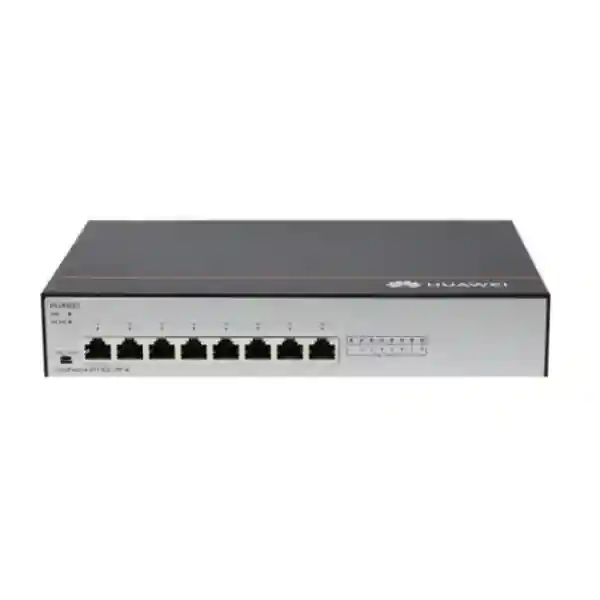
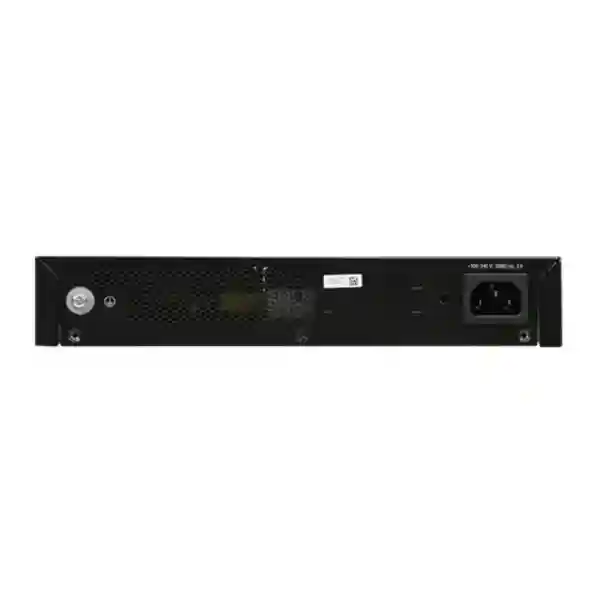
Huawei CloudEngine S1730S-L8P-A 8-Port Gigabit PoE+ Switch
The Huawei CloudEngine S1730S-L8P-A is a compact unmanaged access switch for sites that need dependable Gigabit Ethernet and integrated PoE+ without a management-plane learning curve. Eight 10/100/1000BASE-T interfaces provide data connectivity and IEEE 802.3af/802.3at power delivery, while the fanless chassis, AC input, surge-resilience design and 124 W available PoE budget make the platform practical for branch offices, surveillance pods, retail outlets, reception areas, classrooms, clinics, workshops and other edge locations across the UAE.
For organizations standardizing compact access networks in Dubai, Abu Dhabi, Sharjah and the Northern Emirates, the S1730S-L8P-A offers a deliberately simple operating model: install the unit, cable the endpoints, validate PoE demand and uplink capacity, and place policy enforcement on the upstream managed switching, firewall or routing layer.
Direct answer: what the S1730S-L8P-A is designed to do
The S1730S-L8P-A is best understood as a small, fixed-configuration, unmanaged Layer 2 edge switch with eight copper Gigabit Ethernet PoE+ ports. It is intended for straightforward local Ethernet fan-out where centralized configuration, routing protocols, ACL programming, telemetry, stacking and advanced Layer 2 control are not required on the device itself. Its role is to connect powered or non-powered endpoints to an upstream network while delivering low-friction access switching in locations where simplicity is a design objective rather than a compromise.
Each of the eight RJ45 interfaces supports 10/100/1000BASE-T Ethernet. On the PoE side, the platform supports standard IEEE 802.3af and IEEE 802.3at powered devices. The published total PoE output budget is 124 W, so the switch can comfortably support common mixes of IP phones, cameras and wireless access points when the aggregate draw remains within that envelope. Because endpoint power demand varies widely, the correct design method is to work from each device’s maximum or worst-case draw rather than from its idle consumption. That approach avoids a deployment that appears stable during normal business hours but becomes power-constrained when cameras enable infrared illumination, access points increase radio activity, or endpoints boot simultaneously.
The product is fanless and uses natural heat dissipation. That matters in reception desks, AV cabinets, retail counters, small meeting rooms and other acoustically sensitive spaces where fan noise is undesirable. It also removes a moving component from the system, although proper ventilation remains essential in the UAE. A fanless switch does not mean a heat-agnostic switch: installers should preserve clearance around the chassis, avoid enclosed unventilated boxes, prevent direct solar loading, and account for the manufacturer’s specified ambient range when the unit is placed above ceilings, in wall cabinets or in utility spaces.
For broader UAE network planning, FourTeck can align this edge device with upstream switching, structured cabling and security architecture through the FourTeck UAE portfolio. Where the branch edge also requires next-generation firewalling, secure internet breakout or VPN termination, the access switch can sit behind an appropriately sized security gateway sourced through Firewall Dubai.
Verified technical specification summary
Ethernet interfaces
Eight 10/100/1000BASE-T RJ45 Ethernet ports. The ports are the data plane and PoE attachment points for local endpoints.
PoE capability
PoE+ support for IEEE 802.3af and IEEE 802.3at powered devices, with a published aggregate PoE budget of 124 W.
Switching performance
The platform is commonly specified with 16 Gbit/s switching capacity and about 12 Mpps packet forwarding, appropriate to eight line-rate Gigabit access interfaces.
Power input
Rated input is 100–240 V AC at 50/60 Hz, with a specified maximum operating input envelope of 90–264 V AC at 47–63 Hz.
Power consumption
Maximum draw is specified at 10 W without PoE load and 143 W with full PoE loading, of which up to 124 W is available for powered devices. Typical non-PoE system draw is around 8 W at a light traffic load.
Thermal design
Fanless, natural heat dissipation. The published ambient operating range is -5°C to +45°C at 0–1800 m, with temperature derating at higher altitude.
Environmental limits
Storage temperature is -40°C to +70°C. Relative humidity is specified at 5% to 95% non-condensing. Operating altitude is specified up to 5000 m with applicable thermal derating.
Surge protection
Service-port common-mode surge protection is specified up to ±7 kV, while power-input surge protection is specified at ±6 kV in both differential and common modes.
Eight-port access architecture and traffic behavior
The most important design fact about the S1730S-L8P-A is not simply that it has eight Gigabit ports; it is that all eight ports participate in a compact local switching domain without the configuration abstractions that characterize a managed campus switch. Ethernet frames are received, learned and forwarded through the switch’s Layer 2 forwarding logic. The device uses store-and-forward switching behavior, which means a received frame is buffered sufficiently for error checking before forwarding. This is a conventional approach for enterprise Ethernet access because malformed frames can be discarded instead of propagated toward the rest of the LAN.
A 16 Gbit/s switching fabric is mathematically sensible for an eight-port Gigabit switch because eight 1 Gbit/s ports can each transmit and receive simultaneously. Counting both directions, the internal switching requirement at full duplex is 16 Gbit/s. This does not mean that any single endpoint gets more than 1 Gbit/s; rather, it indicates that the internal fabric is dimensioned to accommodate concurrent full-duplex traffic across the set of eight interfaces without creating an artificial backplane bottleneck. In practical deployments, the limiting factor is often the uplink path rather than the switching fabric itself. If seven endpoints ultimately converge on one port connected to an upstream switch or router, that single 1 Gbit/s uplink becomes the shared egress ceiling for those flows.
That convergence characteristic should guide camera and wireless designs. Eight 4K IP cameras may each produce relatively modest average traffic, but bursts, firmware downloads, VMS playback, multicast behavior and simultaneous event recording can increase utilization. Similarly, multiple Wi-Fi access points can aggregate many users behind a single wired port. The access switch can move frames at Gigabit speed per port, yet the uplink still needs to be sized for the total expected offered load. A clean engineering worksheet should therefore include average throughput, estimated busy-hour throughput, burst allowance and uplink utilization target.
Because the unit is unmanaged, advanced traffic segmentation and policy should be implemented upstream. If the deployment requires multiple VLANs, voice VLAN treatment, loop prevention controls, spanning-tree tuning, port security, storm-control profiles, QoS classification or detailed monitoring, choose a managed model for that function or ensure those capabilities are provided where traffic exits the S1730S-L8P-A. The unmanaged model is strongest where the cabling topology is simple, trusted, physically controlled and intentionally flat at the local segment.
This distinction is especially important in commercial UAE environments where security, compliance and troubleshooting requirements can evolve after installation. A small PoE switch may be exactly right for a locked camera cabinet or a dedicated reception pod, but less appropriate as the primary distribution point for a multi-department office. FourTeck’s IT Services UAE team can help map endpoint counts, uplink demand and operational requirements before hardware is finalized.
PoE+ engineering: turning 124 W into a dependable endpoint plan
Power over Ethernet is often the decisive reason to choose the S1730S-L8P-A. The switch supports PoE+ and provides up to 124 W of aggregate PoE output. The total budget is shared across the powered ports, so the design question is not simply whether a device is “PoE compatible.” The correct question is how much each powered device can demand at its worst operating point and whether the sum remains below the switch’s available budget with enough engineering margin.
IEEE 802.3af, commonly called PoE, was created for lower-power devices such as many desk phones, basic access points and fixed cameras. IEEE 802.3at, commonly called PoE+, raises the power available to compatible devices. The S1730S-L8P-A supports both standards, allowing a mixed environment in which different endpoints negotiate according to their capability. In a typical office, one port might feed an IP phone, another a ceiling access point, and several others fixed cameras. The aggregate load is what matters to the switch power supply.
A practical sizing method is to list the maximum input rating or vendor-stated worst-case PoE draw for every device, then add the figures and preserve headroom. Suppose four cameras are rated to draw 12 W each at maximum, two access points require up to 18 W each, and one access-control terminal requires 10 W. The calculated maximum is 94 W. That fits within 124 W and leaves 30 W of budget. The remaining margin provides room for startup variation, an additional device or a future endpoint replacement with slightly higher consumption. By contrast, eight devices that can each demand 20 W would require 160 W and would exceed the switch’s aggregate capability even though every port individually supports PoE+.
Camera designers should pay particular attention to infrared illumination, heaters, motorized zoom and PTZ mechanisms. A camera that uses little power during daylight can draw materially more at night when IR LEDs are enabled. Wireless designers should consider peak radio load, USB accessories and multi-radio operation. Voice endpoints may also power expansion modules. Quotation-stage power calculations should therefore use worst-case specifications rather than a handheld meter reading captured during an idle period.
The S1730S-L8P-A also includes a PD compatibility-check control associated with PoE and E-PoE behavior. In its standard PoE mode, compatibility checking is disabled for non-standard devices and the switch supplies power to powered devices that comply with IEEE 802.3af or 802.3at. In E-PoE mode, compatibility detection is broadened so that the switch can detect and power certain non-standard devices or standards-compliant devices that external conditions cause to be detected unusually. For enterprise deployments, standards-compliant powered devices remain the preferred design target because their electrical behavior is predictable and easier to support.
Cable quality also affects PoE success. Use properly terminated, standards-compliant copper cabling of the correct category, conductor gauge and channel length. Poor connectors, excessive resistance, copper-clad-aluminium conductors or damaged pairs can create voltage drop, heat and intermittent device behavior. PoE budget and structured-cabling quality should be reviewed as one system, not as independent line items.
Fanless design, thermal management and UAE installation practice
A fanless switch is attractive because it reduces acoustic output and eliminates fan maintenance, but natural cooling still depends on the surrounding environment. Huawei specifies the S1730S-L8P-A for operation from -5°C to +45°C at altitudes from 0 to 1800 m, with the maximum supported ambient temperature decreasing at higher elevations. The published storage range is -40°C to +70°C, and operating relative humidity is 5% to 95% non-condensing. These ratings are useful boundaries, but installation quality determines whether the electronics actually experience the room temperature or a much hotter microclimate.
In Dubai and other UAE cities, small network switches are frequently installed in wall boxes, CCTV cabinets, ceiling voids, guard rooms and reception furniture. Those locations can have localized temperatures significantly above the air-conditioned room. A compact metal enclosure with poor ventilation can trap heat from the switch, its internal AC power section and adjacent equipment. PoE loading further increases thermal output because the power supply is delivering energy to attached devices. Good practice is to preserve free air around the chassis, avoid placing heat-generating equipment directly against it, keep vents unobstructed and verify cabinet temperature during peak environmental conditions.
The switch’s typical non-PoE power consumption is modest, with published figures around 8 W at a light traffic load and a maximum of 10 W without powered devices. Under maximum PoE loading, total input consumption is specified up to 143 W, including the energy delivered to endpoints. That difference matters for UPS sizing and cabinet heat calculations. A UPS should be selected from the combined load of the switch and the powered endpoints, not merely from the switch electronics. If the PoE ports keep cameras and access points alive during an outage, the UPS is effectively backing those devices through the switch.
For backup-runtime planning, start with the maximum realistic aggregate input load, choose a UPS with adequate VA and watt capacity, and calculate expected runtime using the UPS manufacturer’s discharge curve rather than a simple battery-watt-hour division. If the business requires 30 or 60 minutes of continuity, verify that the selected UPS can sustain the expected PoE load for that duration. Remember that batteries age and high ambient temperature shortens service life, so design margin is useful.
A fanless edge switch can run quietly and efficiently for years when its thermal context is engineered properly. The key UAE-specific lesson is simple: air-conditioned building space does not automatically mean every cabinet is within specification. Measure or reasonably model the actual installation environment, especially for enclosed security and AV locations.
Electrical resilience, grounding and surge protection
The S1730S-L8P-A includes published surge-protection characteristics that are useful in edge installations: the Ethernet service ports are specified for common-mode surge protection up to ±7 kV, while the AC power input is specified at ±6 kV in both differential and common modes. These values indicate deliberate protection engineering inside the device, but they should not be interpreted as a substitute for a properly grounded building, coordinated surge-protection devices or good cable-routing practice.
The rear panel provides a grounding point, and available product documentation notes a minimum grounding-conductor cross-sectional area equivalent to 18 AWG. Local electrical codes, project specifications and site standards may require a larger conductor, specific bonding hardware or a defined path to protective earth. The installation team should follow the current Huawei hardware guide, UAE electrical regulations and the facility’s earthing design. A network switch should never be used as an improvised path between separate earth potentials.
Surge exposure is influenced by cable geography. Copper runs that leave the building, connect separate structures, travel near large motors or share pathways with high-energy electrical services deserve extra scrutiny. Where lightning or ground-potential rise is a concern, optical fibre is often the preferred medium between buildings because it breaks the metallic data path. The S1730S-L8P-A itself is an eight-port copper model, so an optical transition would normally be handled by an upstream switch, media converter or another properly engineered device.
Power quality should also be considered. The switch accepts a wide AC range, but sensitive network sites benefit from a correctly selected UPS with surge suppression and stable transfer behavior. A UPS can provide ride-through for short interruptions and keep attached PoE endpoints online, but it must be sized for the total powered load. In CCTV deployments, the business impact of a switch outage may include loss of multiple cameras at once, so the access switch is often more critical than its compact size suggests.
For sites with demanding electrical conditions, document the upstream breaker, UPS circuit, earth connection, cabinet bonding, cable route and any external surge-protection components as part of the handover pack. That record dramatically improves troubleshooting if intermittent faults appear later.
Deployment topology 1: compact CCTV access switch
One of the most natural roles for the S1730S-L8P-A is a dedicated camera access switch in a small surveillance zone. A typical topology places six or seven PoE cameras on local ports and uses the remaining port as a Gigabit uplink to a managed aggregation switch, NVR network or security VLAN gateway. This arrangement simplifies power distribution because the camera data and DC power share the structured cabling, reducing the need for separate local power adapters near each camera.
The engineering work begins with camera power and bitrate. For each camera, record maximum PoE draw, codec, frame rate, resolution, average bitrate, peak bitrate and any special functions such as IR, heater, wiper or PTZ. The total PoE draw must remain under 124 W with sensible headroom. The total network load should be checked against the 1 Gbit/s uplink. Most small camera groups are comfortably below that ceiling, but 4K streams, high frame rates, multi-stream recording and simultaneous playback should be included in the estimate.
A dedicated camera segment also needs a security boundary. Because the S1730S-L8P-A is unmanaged, VLAN assignment and access-control policies belong upstream. For example, the uplink can connect to an access port on a managed aggregation switch that places the entire downstream camera pod into a surveillance VLAN. The firewall or Layer 3 switch can then restrict camera communication to the NVR, management station, DNS, NTP and any explicitly required services. This design keeps the small edge switch simple while maintaining centralized policy.
Physical access matters as well. An unmanaged switch accepts any Ethernet endpoint connected to an active port, so the unit should be installed in a locked or otherwise controlled location. If unused ports are accessible, consider physically securing them or using an upstream architecture that assumes the downstream segment is untrusted. For high-security facilities, a managed switch with per-port authentication or port security may be more appropriate.
Finally, connect the switch and NVR infrastructure to backup power where surveillance continuity is required. Since PoE keeps the cameras powered through the switch, UPS sizing should use the complete camera load plus switch overhead. This can turn a compact CCTV pod into a resilient, easy-to-service subsystem.
Deployment topology 2: Wi-Fi, voice and front-office devices
A second practical topology is a small front-office or branch pod with a combination of wireless access points, IP phones and service devices. The S1730S-L8P-A can power compatible endpoints while providing Gigabit access to the upstream network. This is especially useful when the physical location has only one upstream copper run but several local devices need network access around a reception area, meeting-room cluster or temporary service desk.
The simplicity of the switch means network architects should think carefully about segmentation. If the branch needs separate voice, corporate, guest and IoT VLANs on individual edge ports, an unmanaged switch is not the ideal endpoint for that requirement. Some devices can carry tagged traffic themselves, but relying on a flat unmanaged domain for a complex multi-VLAN design creates avoidable operational ambiguity. A managed access switch should be specified whenever per-port VLAN policy, QoS, 802.1X or detailed observability is part of the requirement.
Where a simple single-segment topology is acceptable, the unit is attractive because deployment does not require a switch configuration session. Cabling can be documented by port number, and the upstream network can provide DHCP, routing, internet security and monitoring. IP phones that need PoE can be attached directly. Access points that draw within the PoE+ envelope can also be powered without local adapters, reducing cable clutter and simplifying UPS-backed operation.
Wireless uplink planning deserves special attention. A modern access point can serve many clients and may generate bursts approaching the capacity of a Gigabit Ethernet port. If two or three access points sit behind this small switch, their aggregate traffic shares the single upstream connection selected for uplink duty. That architecture may still be perfectly adequate for a small office, but the design should be based on expected concurrent throughput rather than on the theoretical radio data rates printed on AP marketing material.
Organizations expanding beyond a single pod can review broader network and infrastructure options through FourTeck Global, while UAE implementation, cabling and support requirements can remain coordinated through local FourTeck resources.
Unmanaged operation: advantages, boundaries and licensing impact
The S1730S-L8P-A is an unmanaged switch. That has direct operational consequences. There is no requirement to create a management IP address, define VLANs in a local switch interface, configure SNMP, maintain a switch administrator account or purchase an advanced software feature license for ordinary switching operation. For installations that deliberately want a plug-and-connect access device, this can shorten deployment time and reduce the number of configuration objects that must be backed up and maintained.
The same simplicity also defines the boundaries. An unmanaged switch does not provide the same tools that network teams use on managed enterprise switches to inspect MAC tables, graph per-port traffic, mirror a port for packet capture, shut an interface remotely, enforce 802.1X, create ACLs or tune spanning-tree behavior. When a fault occurs, troubleshooting relies more heavily on physical observation, endpoint diagnostics and instrumentation on the upstream managed device.
That is why the best use cases are intentionally scoped. A small camera pod in a locked enclosure, a straightforward voice island, a kiosk cluster or a simple office extension may benefit from a switch that has almost no configuration burden. A multi-tenant office floor, a compliance-sensitive environment or a campus access layer generally benefits from managed switching instead. The decision should be driven by operations and security, not just by port count.
From a licensing perspective, the unmanaged design simplifies commercial planning because the switch’s fundamental forwarding and PoE behavior is not based on subscriptions that need annual renewal. However, associated services in the wider solution can still carry licenses: wireless access points may require controller or cloud subscriptions, firewalls may use security-service bundles, and surveillance software may license cameras or recording channels. The switch should therefore be treated as one component inside the bill of materials rather than the entire licensing picture.
For procurement teams, this distinction is useful when comparing total cost of ownership. The purchase price of the switch is only one number. Include mounting or shelf hardware, UPS capacity, structured cabling, patching, rack space, spare units, onsite support, endpoint licenses and the operational cost of troubleshooting. A low-complexity switch often lowers lifecycle overhead when its capabilities align closely with the application.
Port planning, uplink selection and oversubscription
All eight ports on the S1730S-L8P-A are 10/100/1000BASE-T interfaces, so there is no dedicated high-speed uplink port. In most designs, one of the eight copper ports is reserved as the connection to the upstream network. That leaves seven local ports for endpoints. If the unit is used purely to interconnect local devices with no upstream path, all eight ports remain available, but this is less common in enterprise deployments.
Because the uplink is 1 Gbit/s, downstream concurrency should be considered. Seven endpoints can each have a 1 Gbit/s link to the switch, but their traffic toward upstream resources shares that single 1 Gbit/s path. This is oversubscription by design. Oversubscription is not inherently a problem; most access networks rely on the fact that users and devices do not all transmit at line rate simultaneously. The objective is to ensure that the expected busy-hour aggregate stays comfortably below the uplink capacity and that bursts do not create unacceptable latency or packet loss.
A camera switch is a good example. If seven cameras average 12 Mbit/s each, their combined upstream load is roughly 84 Mbit/s before overhead, far below 1 Gbit/s. A wireless pod may be different: several high-capacity APs serving active clients can produce far more burst traffic. A workstation cluster transferring large files to a NAS can also saturate the uplink quickly. The right answer depends on traffic shape, not on endpoint count alone.
When the calculated demand approaches the uplink ceiling, moving to a switch with SFP or SFP+ uplinks is usually preferable to adding more small unmanaged switches. A higher-capacity managed access switch can also provide LACP, VLANs, QoS and monitoring. The S1730S-L8P-A should be chosen where its single-Gigabit convergence model matches the actual workload.
During installation, label the chosen uplink port clearly and document where it terminates upstream. In small networks, a surprising amount of downtime comes from unknown patching rather than failed electronics. A simple port schedule listing device name, room, patch-panel position, cable ID, PoE requirement and uplink destination creates a useful maintenance record with very little effort.
Compatibility mode and non-standard powered devices
The front-panel PD compatibility control is a distinctive element of the S1730S-L8P-A. In standard PoE mode, the switch is intended to provide power to devices that correctly present themselves as IEEE 802.3af or 802.3at powered devices. In E-PoE compatibility mode, detection behavior can be broadened to accommodate certain non-standard powered devices or standard devices that are incorrectly detected because of external conditions.
This capability can be useful in brownfield installations where legacy cameras or specialized appliances do not behave exactly like modern standards-compliant equipment. However, compatibility mode should not be treated as permission to connect arbitrary passive-PoE equipment or undocumented devices. Passive PoE systems can place voltage on conductors without IEEE negotiation, and wiring expectations vary. Before connecting a non-standard endpoint, verify the device vendor’s electrical requirements and confirm that the intended mode is explicitly supported.
For new builds, standards compliance is the cleaner path. IEEE-compliant PoE simplifies vendor interoperability, replacement planning and troubleshooting. If a camera fails years later, a standards-based replacement is much easier to source than an endpoint that depends on unusual detection behavior. Procurement documents should therefore specify IEEE 802.3af/802.3at compatibility for powered devices unless there is a documented exception.
When compatibility mode is used, record that fact in the site documentation. A future engineer needs to know whether the switch is operating in standard or extended detection mode and which endpoint required the change. Without that note, an apparently innocent replacement of the switch or powered device can create an outage that is difficult to diagnose.
The broader principle is that PoE is an electrical subsystem carried over data cabling. Treat it with the same discipline applied to AC power: define the standard, verify the load, document exceptions and avoid undocumented adapters or improvised wiring.
Physical form factor, mounting strategy and cable management
Published product documentation for the S1730S-L8P-A specifies a compact chassis with basic dimensions of approximately 43.6 mm high × 250 mm wide × 180 mm deep, with the maximum depth increasing to about 185.4 mm when protruding parts are included. The enclosure is much smaller than a full-width 19-inch rack switch, which makes it convenient for small cabinets, shelves and decentralized edge points. That compactness should be used intentionally rather than allowing the unit to become loose equipment resting on other devices.
A proper shelf or manufacturer-supported mounting arrangement keeps connectors stable and preserves airflow. The AC cable should have strain relief, and RJ45 patch cords should be routed so that their weight does not pull on the sockets. If the switch sits in a small wall cabinet, use short patch leads with sensible bend radius and enough slack to service the device without unplugging every endpoint.
Labeling should be readable from the service position. Each switch port can be associated with a cable ID and endpoint description such as “Cam-Lobby-01,” “AP-Reception,” or “Door-Controller-East.” The upstream port should be visually distinct or tagged in the cabinet. These small practices become extremely valuable when a site technician needs to isolate a fault quickly.
Grounding access must remain unobstructed. The rear grounding point should be bonded according to the current hardware instructions and local project requirements. Avoid mounting arrangements that place the ground connection against the cabinet wall or force the conductor into an unsafe bend. Similarly, leave room to disconnect AC power without moving unrelated equipment.
For multi-site deployments, standardize the cabinet layout. Using the same switch orientation, port numbering convention, uplink position and labeling format across branches reduces support time. A technician who has never visited a particular branch can understand the local topology from the standard drawing and port schedule.
Structured cabling requirements for Gigabit Ethernet and PoE+
The switch can only perform as well as the copper plant attached to it. Gigabit Ethernet uses all four twisted pairs, so faults that were invisible on older 100 Mbit/s links can prevent a stable 1000BASE-T connection. PoE also depends on conductor resistance and termination quality. That makes cabling certification especially important when the switch is used to power cameras or access points over long horizontal runs.
For new commercial installations, use recognized Category 6 or better cabling where appropriate to the project specification, with solid copper conductors and compliant patch components. Avoid copper-clad aluminium cable in enterprise PoE deployments. CCA has higher resistance than solid copper and can contribute to voltage drop and heating. The channel should remain within Ethernet length limits and should be installed with proper separation from high-voltage circuits according to applicable standards and local codes.
Termination quality matters at both ends. Maintain pair twists close to the termination point, avoid excessive untwisting, respect bend radius and use rated jacks and patch panels. A link may pass basic continuity yet still experience errors at Gigabit speed if pair geometry is poor. Certification testing provides a much stronger handover record than a simple wire-map result.
For PoE troubleshooting, measure the complete path. A device that repeatedly reboots may be suffering from marginal voltage at the far end rather than a failed switch. Cable length, conductor gauge, patch cords, intermediate connectors and endpoint peak draw all contribute. Infrared cameras are a classic example: the network may operate all day and fail only after dark when power demand increases.
FourTeck can integrate the switch into a wider structured-cabling and network-service scope so that copper certification, labeling, rack organization and active equipment are treated as a single deliverable instead of isolated purchases.
Security architecture when the edge switch itself is unmanaged
An unmanaged switch can still participate in a secure network, but the security controls need to be placed elsewhere in the architecture. The most common method is to connect the S1730S-L8P-A to a managed upstream access or distribution switch and assign the entire downstream segment to a dedicated VLAN. Routing and firewall policy can then restrict what that VLAN may reach.
For a CCTV segment, permit cameras to communicate only with recording servers, time services, management systems and any explicitly required cloud services. For building-control endpoints, restrict traffic to the relevant application servers. For a voice pod, permit the call-control, DNS, NTP and management flows required by the telephony platform. This “least necessary connectivity” approach limits lateral movement if an IoT endpoint is compromised.
Physical control is equally important. Because there is no local port-authentication mechanism on an unmanaged switch, someone with access to an active cable may be able to connect an unauthorized device to that segment. Install the unit in controlled cabinets, secure exposed patching and consider managed switching where ports are accessible to the public or untrusted staff. Security requirements should drive the hardware class.
Monitoring should occur upstream. A firewall, managed switch or network-monitoring platform can observe aggregate traffic, MAC behavior and unusual communications. DHCP logs and endpoint inventories provide additional context. If deep per-port visibility is required at the access edge, the requirement itself points toward a managed switch rather than an unmanaged one.
In other words, the S1730S-L8P-A is not a security-policy platform; it is a forwarding and power-delivery component. It works well inside a secure design when network segmentation, access control and monitoring are deliberately assigned to infrastructure that is built to perform those functions.
Procurement guidance for Dubai and UAE projects
A good quotation for the Huawei CloudEngine S1730S-L8P-A should be based on the complete deployment context, not only the switch part number. Start by confirming quantity, delivery location, required lead time and whether the project is a new installation, a replacement or a standardization rollout. Then document the endpoint count, PoE power profile, uplink topology and environmental conditions.
For each switch, identify how many of the eight ports will serve local devices and whether one port must be reserved for uplink. If all eight local ports are required and an uplink is also needed, this model is already undersized in port count. The next decision should then be a higher-port-count model rather than attempting to cascade multiple small switches without an architectural reason.
Power accessories should be included in the bill of materials. Confirm the AC cord standard, UPS requirement and any site-specific plug or PDU arrangement. If the switch will supply critical cameras, access points or door systems, define backup runtime and ensure the UPS is sized for the switch plus all powered endpoints. For a branch rollout, standardizing the UPS and cabinet configuration can simplify spares and support.
Cabling scope matters as much as active hardware. Include patch cords, patch panels, labels, copper certification, cabinet shelves or mounting accessories, earthing components and any fiber transition equipment required upstream. If existing cabling will be reused, consider testing representative runs before finalizing the PoE design, especially on long camera links.
Warranty and product origin should be clarified at quotation stage. Ask for the offered warranty term, replacement process, support route and exact supplied part number. Huawei product families can have regional or revision variants with similar names, so the purchase order should match the exact S1730S-L8P-A designation requested for the project.
Finally, align the hardware with the wider network roadmap. If the organization expects near-term requirements for VLANs, remote monitoring, 10 Gigabit uplinks or centralized management, moving directly to a managed access platform may avoid a second purchase. If the requirement is intentionally simple and stable, the S1730S-L8P-A remains a focused, efficient edge choice.
Sizing worksheet: a repeatable method for project engineers
A repeatable sizing method prevents common edge-switch mistakes. Begin with port count. Count every endpoint that needs a direct connection and reserve one port for the upstream network unless the topology provides an alternative. If the result exceeds eight, select a larger model. Do not plan around spare ports that do not exist.
Next calculate PoE. For every powered endpoint, record the PoE standard, the device’s maximum draw and any operating mode that changes consumption. Sum the figures, then compare them with the 124 W budget. Preserve headroom rather than designing to exactly 124 W. A conservative margin makes future replacements and environmental variation easier to absorb.
Third, estimate traffic. Record average and peak bitrates for cameras, APs, phones or other devices. Calculate the busy-hour aggregate toward the uplink. If the number is close to 1 Gbit/s, the model’s single-Gigabit convergence architecture may be too restrictive even though the port count fits. Consider bursty traffic, backups, firmware distribution and management operations, not just steady-state user traffic.
Fourth, classify the operational requirements. Does the site need VLAN configuration at the edge, 802.1X, SNMP, port mirroring, spanning-tree control, LACP, LLDP policy, remote port shutdown or per-port statistics? If yes, the correct answer may be a managed switch. Avoid specifying an unmanaged device and then expecting software features it was not designed to provide.
Fifth, validate environment and power. Check cabinet temperature, ventilation, AC source, grounding, UPS runtime and cable routes. The switch is fanless, but PoE loading still produces heat. UAE projects should pay particular attention to ceiling and outdoor-adjacent enclosures where local temperatures can exceed conditioned-room values.
Finally, document growth. If a seven-device installation is likely to become ten devices within months, a larger switch may be more economical than immediate cascading. If the site is fixed by design, such as a six-camera entrance cluster, the compact eight-port model is usually a neat fit.
Performance expectations in real applications
In a correctly cabled local network, the S1730S-L8P-A provides Gigabit Ethernet on every access port. That is sufficient for a wide range of IP edge devices. A typical fixed surveillance camera uses only a fraction of a Gigabit link. Most desk phones use very little bandwidth. Many building-control and access-control devices also generate modest traffic. For those applications, the switch has ample per-port capacity.
Wireless access points deserve more analysis because their user population can aggregate substantial traffic. An AP may have radio links whose theoretical aggregate rate exceeds 1 Gbit/s even though its wired interface is 1 Gbit/s. In such cases the Ethernet port itself becomes the ceiling. That can still be acceptable if real client demand is lower, but high-density Wi-Fi designs should consider multi-gigabit switching rather than assuming any PoE+ switch is equivalent.
Latency is generally not a concern in normal office, voice or CCTV use when the switch is lightly to moderately loaded. Congestion, however, can increase delay and packet loss if multiple downstream devices simultaneously compete for the uplink. Voice and interactive traffic are more sensitive to queueing than bulk file transfers. Because this unmanaged model does not expose advanced QoS configuration, the safest strategy is to avoid persistent uplink saturation and place traffic policy upstream where it can be controlled.
The switch’s store-and-forward behavior also contributes to error containment by preventing corrupted frames from being propagated. In a healthy network, Ethernet frame errors should be rare. If the upstream managed switch reports CRC or alignment errors on the uplink, investigate the patch lead, connectors and horizontal cable before blaming the switching silicon.
Performance validation should therefore be practical: confirm every device negotiates at the expected speed, observe upstream utilization during busy periods, verify PoE stability during peak endpoint load and monitor for error counters on the managed side. Those measurements reveal far more about real service quality than headline bandwidth alone.
Installation and commissioning checklist
1. Verify the delivered model
Check the label and purchase documentation for the exact S1730S-L8P-A part number. Record serial information according to the organization’s asset-management process.
2. Inspect the site
Confirm temperature, ventilation, AC availability, cabinet dimensions, grounding path and physical security before mounting the switch.
3. Validate the copper plant
Use certified cabling and known-good patch leads. Confirm runs are within standards and that all pairs are correctly terminated for Gigabit Ethernet.
4. Confirm PoE calculations
Review maximum endpoint power draw and verify the combined requirement remains below the 124 W budget with design headroom.
5. Define the uplink
Choose and label the port that connects upstream. Document the destination switch port, VLAN treatment and any security policy applied there.
6. Test endpoints under load
Check link speed, network reachability and powered-device stability. For cameras, test night mode where possible; for APs, verify peak traffic and power behavior.
Commissioning should end with an as-built port schedule, cabinet photograph, UPS record and escalation contact. A compact unmanaged switch is simple to operate, but documentation still matters because the connected services may be business-critical.
Troubleshooting guide for common field symptoms
A powered device does not start: verify that the endpoint supports IEEE 802.3af or 802.3at, confirm the PoE budget is not exhausted, test with a short known-good patch lead and inspect the structured-cabling run. If the device is known to be non-standard, review the compatibility-mode documentation rather than assuming any passive-PoE format is supported.
A camera reboots at night: check whether infrared LEDs, heaters or PTZ functions increase the device’s power draw. Measure or calculate worst-case demand and inspect the cable for excessive resistance or poor termination. The issue may be power delivery rather than packet switching.
An endpoint links at 100 Mbit/s instead of 1 Gbit/s: Gigabit Ethernet needs all four pairs. Test the patch cords and permanent link, looking for a damaged pair, split pair or faulty termination. A basic continuity tester is not equivalent to certification.
Users report intermittent slowness: inspect the upstream managed port for utilization, errors and drops. If several downstream devices converge on one Gigabit uplink, busy-hour congestion may be the cause. Also confirm that no accidental loop or excessive broadcast source exists on the flat segment.
All endpoints fail together: check AC input, UPS status, switch indicators and the single upstream path. Because many devices depend on one compact switch, a common-mode failure can affect them simultaneously. Keep a tested spare for sites where recovery time is critical.
The switch feels hot: a fanless metal enclosure conducts heat to the case, but ambient conditions still need verification. Check cabinet temperature, ventilation and neighboring equipment. Do not block the chassis or enclose it in a sealed box without thermal analysis.
How the S1730S-L8P-A fits into a layered UAE network
In a well-structured network, the S1730S-L8P-A normally occupies the outermost access edge. Above it sits a managed switching or routing layer that owns segmentation, policy and observability. A firewall or secure router provides WAN access, VPN termination and internet security. Servers, NVRs or cloud services consume the traffic generated by the local endpoints. This layered model lets the small switch focus on the job it does best: local Ethernet forwarding and PoE delivery.
For example, a branch can use the S1730S-L8P-A for six cameras and one uplink. The upstream managed switch assigns that port to a dedicated CCTV VLAN. A firewall then allows the VLAN to reach only the recording server and approved management services. Users on the corporate LAN cannot connect directly to camera web interfaces unless policy explicitly permits it. The edge switch itself remains configuration-free, yet the overall system is segmented and controlled.
The same pattern works for other IoT devices. Access-control panels, small sensors or digital signage endpoints can share a local segment if their trust level and communication requirements are similar. What matters is that the flat downstream domain is intentional and that the upstream boundary constrains traffic appropriately.
As networks grow, the role of the compact unmanaged switch may become more specialized rather than broader. Core office users migrate to managed switches with policy and monitoring, while the S1730S-L8P-A remains useful in contained edge pods. This is often a better lifecycle strategy than forcing one small device to satisfy every network requirement.
FourTeck can supply the switch as part of an integrated architecture covering active networking, security, structured cabling and support. The goal is to align each layer with its operational responsibility so that the final network is easier to secure, troubleshoot and expand.
When to select a different switch
The S1730S-L8P-A is not intended to replace every managed access switch. Select a different platform if the requirement includes more than seven downstream endpoints plus uplink, multi-gigabit access, optical uplinks, 10 Gigabit aggregation, local VLAN configuration, spanning-tree tuning, link aggregation, port mirroring, SNMP monitoring, centralized management, 802.1X authentication, detailed QoS policy or redundant uplink design.
Similarly, choose a higher PoE-capacity model if the connected endpoints can exceed 124 W in aggregate. The number of physical ports is not the only sizing dimension. Eight high-power endpoints may be electrically unsuitable even when they fit physically. Conversely, a six-camera design may fit very comfortably and leave useful power headroom.
If the switch must connect separate buildings or long-distance network zones, consider a model with optical SFP interfaces or an engineered fiber transition. Copper cabling between buildings can create lightning and grounding concerns. Fiber provides electrical isolation and longer distance options, though transceiver selection and optical budget must then be engineered correctly.
If the site is difficult to access or requires detailed remote troubleshooting, a managed switch can reduce support cost because technicians can inspect port state and statistics remotely. The cheapest acquisition price is not always the lowest lifecycle cost. Site criticality and travel cost should influence the decision.
The right selection criterion is therefore fit. Use the S1730S-L8P-A when the need is a compact, fanless, eight-port Gigabit PoE+ edge switch with simple operation. Move to a managed or higher-capacity model when the project asks for capabilities beyond that mission.
Decision recap for UAE buyers
Choose it for simplicity
Ideal when the project needs straightforward unmanaged Gigabit access with PoE+ and does not require local VLAN or management features.
Validate the 124 W budget
Add worst-case PoE draw for every endpoint and keep margin for startup, IR illumination, replacement devices and future changes.
Plan one port for uplink
A normal branch topology leaves seven ports for local devices because one of the eight Gigabit ports connects upstream.
Engineer the environment
Fanless operation is quiet, but cabinet temperature, ventilation, grounding, surge exposure and UPS design remain critical in UAE sites.
Quotation input checklist
Provide the following project data with your request so the quotation can be sized around the real deployment rather than only the switch model number.
Number of switches required and whether delivery is to Dubai, Abu Dhabi, Sharjah or another UAE location.
Device type, model, quantity, network speed and whether each endpoint requires PoE.
Maximum watts for every powered device, including night mode, heaters, radios or expansion accessories.
Where the switch will connect upstream, expected aggregate traffic and any VLAN or security requirement.
UPS availability and required runtime for cameras, APs, phones or other critical PoE devices.
Cabinet type, temperature, cable lengths, existing category rating, certification status and grounding arrangement.
Structured consultation panel: from switch request to deployable design
A technically correct purchase begins by confirming that the S1730S-L8P-A matches the endpoint count, PoE budget, security model and operational expectations. FourTeck can review those inputs and build a supply scope that includes the switch, compatible network components, cabling requirements and supporting infrastructure.
Step 1 — Confirm fit
Validate ports, PoE headroom, uplink bandwidth and the need for unmanaged versus managed operation.
Step 2 — Build the BOM
Add patching, cabinet hardware, UPS capacity, cable certification and upstream network components where required.
Step 3 — Plan commissioning
Define labeling, endpoint tests, PoE validation, uplink policy and as-built documentation before installation begins.
Step 4 — Support the lifecycle
Maintain spares, warranty records, UPS health and cabling documentation so field recovery remains straightforward.
For a Dubai or UAE quotation, share the project location, switch quantity, endpoint list and PoE power requirements. This information allows the design to be checked before equipment reaches the site, reducing late-stage changes and improving deployment predictability.

Reviews
There are no reviews yet.