
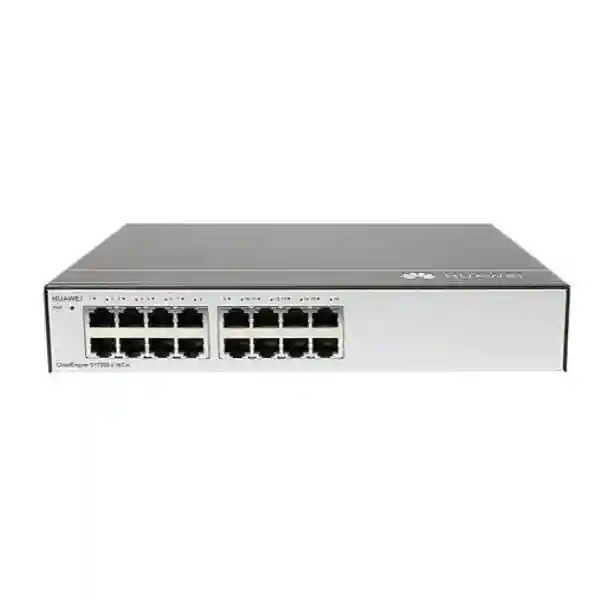
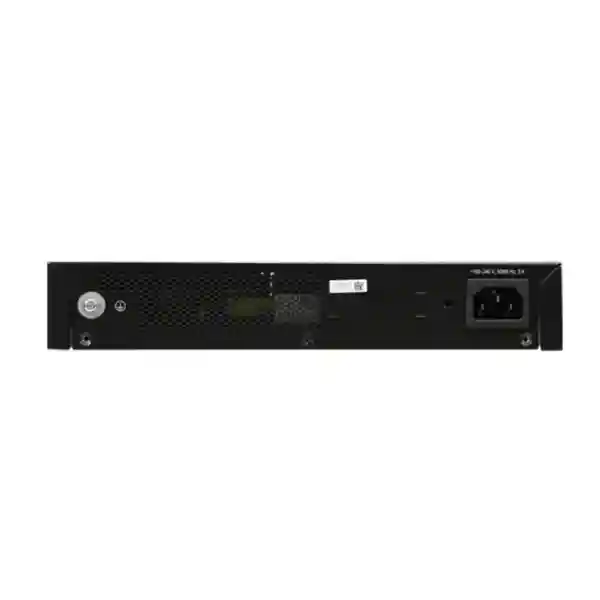
Huawei CloudEngine S1730S-L16T-A 16-Port Gigabit Ethernet Switch
The Huawei CloudEngine S1730S-L16T-A is a compact fixed-configuration access switch for networks that need straightforward Gigabit Ethernet connectivity without PoE delivery or complex switch administration. Its sixteen 10/100/1000BASE-T copper interfaces make it a practical fit for desktop users, printers, IP endpoints with separate power, small servers, NAS appliances, access points that use external injectors, test benches, branch offices and other edge environments where simple Layer 2 forwarding is the core requirement.
Direct answer: what is the Huawei S1730S-L16T-A designed to do?
The S1730S-L16T-A is designed to provide simple wired Gigabit Ethernet fan-out at the access edge. In practical terms, an uplink from a router, firewall, upstream switch or local aggregation point is connected to one port, while the remaining ports connect local Ethernet devices. The switch learns source MAC addresses, associates them with physical ports, and forwards Ethernet frames toward the relevant destination. For small networks that do not need per-port VLAN configuration, access-control lists, link aggregation, SNMP administration, advanced Layer 3 routing or central switch telemetry, this architecture reduces setup effort and makes replacement straightforward.
The model should therefore be evaluated primarily as a connectivity appliance rather than as a policy-control platform. It can extend the number of available copper Ethernet connections in a branch or equipment area, but security segmentation and routing policy normally belong upstream on a capable firewall, router or managed switch. That distinction is important in UAE projects: a low-cost unmanaged access switch can be entirely appropriate when the logical network design is already enforced elsewhere, but it should not be substituted where the tender requires managed VLANs, 802.1X, spanning-tree tuning, port security, PoE budgets, redundant uplinks or remote operations tooling.
Port architecture and switching capacity
The defining hardware feature of the Huawei CloudEngine S1730S-L16T-A is its set of sixteen 10/100/1000BASE-T Ethernet interfaces. Each RJ45 port can negotiate with common Ethernet endpoints at 10 Mb/s, 100 Mb/s or 1 Gb/s according to the capabilities of the connected device and cabling. In a properly cabled modern office network, Gigabit Ethernet should be expected for workstations, current printers, IP phones with external power, network storage appliances, mini servers and modern wireless access points whose uplink demand does not exceed 1 Gb/s. Older devices remain usable because the copper interfaces support the slower Fast Ethernet and legacy Ethernet rates as well.
A sixteen-port Gigabit switch is often described with an aggregate full-duplex switching figure around 32 Gb/s because each of the sixteen 1 Gb/s interfaces can transmit and receive simultaneously. The practical significance is not that any single client can exceed 1 Gb/s; it is that the internal forwarding path is intended to accommodate traffic across multiple ports without forcing all conversations through one shared half-duplex medium. Real application throughput remains affected by Ethernet framing overhead, endpoint performance, storage speed, upstream bottlenecks, cabling quality and the traffic pattern itself.
For procurement teams, the absence of dedicated SFP or SFP+ uplink ports is as important as the presence of sixteen copper ports. A deployment that requires fibre uplinks, long-distance building interconnects, 10 Gigabit aggregation, resilient dual uplinks or separate uplink media should use another switch model or place this unit behind a managed aggregation switch. The S1730S-L16T-A is best treated as a compact copper-edge expansion device. It solves a very specific problem efficiently: adding a useful number of Gigabit RJ45 ports in a location where copper Ethernet is already the selected access medium.
Port planning should reserve capacity for growth instead of consuming all sixteen interfaces on day one. FourTeck typically recommends that designers identify the mandatory endpoints, likely additions over the next twelve to thirty-six months, the uplink requirement and any temporary service ports used by technicians. If a location already needs fifteen or sixteen active devices before the switch is commissioned, stepping up to a higher port-density switch may reduce future recabling and equipment sprawl. Conversely, a branch with eight to twelve fixed wired endpoints can gain a comfortable expansion margin from a sixteen-port form factor without paying for a forty-eight-port chassis it may never use.
What the unmanaged design means in a real network
Fast installation
There is no need to build a management IP plan, load a startup configuration or define basic access ports before ordinary Ethernet forwarding begins. This can shorten installation time in small branch, retail or temporary environments.
Minimal operational overhead
Technicians do not need credentials, configuration backups or per-device software templates for ordinary use. Replacement can be relatively simple when the physical topology and upstream policy remain unchanged.
Limited visibility
The tradeoff is reduced administrative control. Do not expect the same per-port telemetry, VLAN assignment, event logs, remote shutdown controls or policy features provided by a managed enterprise access switch.
Upstream policy matters
Firewall rules, routing boundaries, DHCP scopes, network access control and segmentation should be designed on upstream infrastructure. The unmanaged access device should sit inside a topology where those controls are already clear.
Layer 2 forwarding: how traffic actually moves
At Layer 2, an Ethernet switch builds a forwarding database by observing the source MAC address of frames arriving on each port. Once it has learned where a MAC address resides, it can forward frames for that destination only toward the appropriate egress port rather than repeating traffic to every interface. Broadcast and certain unknown-destination traffic is still flooded within the local broadcast domain. This normal learning behavior is what allows a compact unmanaged switch to connect many Ethernet endpoints efficiently without requiring an administrator to manually map addresses to ports.
The practical design consequence is that all locally attached devices should be considered members of the same switching context unless segmentation is performed elsewhere. If a branch firewall exposes a single LAN interface to the switch, the attached endpoints normally share that LAN’s broadcast domain. If a project requires employee, guest, CCTV, voice and building-management devices to reside in separate VLANs on the same physical access switch, a managed model is normally the correct choice. Trying to force complex policy through a switch that is intentionally simple undermines both maintainability and auditability.
Store-and-forward switching, as commonly implemented in this class of enterprise access switch, receives a frame and validates it before forwarding. This can help prevent certain corrupted frames from propagating between ports. It does not, however, replace endpoint security, firewall inspection or application controls. Ethernet switching and cybersecurity policy solve different layers of the network problem. A well-designed Dubai office may use this switch to provide reliable local connectivity while a next-generation firewall upstream performs Internet security, VPN termination, web filtering and inter-VLAN enforcement.
Network performance should also be considered on a conversation-by-conversation basis. Two local devices communicating through the same Gigabit switch can exchange traffic without every packet traversing the Internet firewall if they share the same local Layer 2 domain and IP subnet. This is useful for local file transfers, printer access and appliance communication, but it also means that lateral security controls may be limited unless segmentation is introduced. For environments with strict compliance requirements, the ability to configure policy directly at the access layer may be more important than the simplicity of an unmanaged switch.
Copper cabling requirements for Gigabit Ethernet
The quality of the copper cabling system often has a greater effect on edge reliability than the switch itself. For 1000BASE-T operation, all four twisted pairs in the Ethernet cable are used. A damaged conductor, poorly terminated keystone, low-quality patch cord or split pair can cause the link to negotiate at a lower speed, generate errors or flap intermittently. In new commercial projects, properly installed Category 6 or better structured cabling provides comfortable performance margin for Gigabit access and supports a cleaner pathway to later multi-gigabit upgrades when the full channel is designed accordingly.
Channel length should follow Ethernet cabling standards, with horizontal permanent links and patch cords kept within the appropriate maximum channel limits. In UAE offices where cable routes pass through ceilings, risers, floor boxes and equipment rooms, installation quality matters. Avoid sharp bends, excessive untwisting at terminations, crushed bundles and unnecessarily long patch leads. Keep data cabling appropriately separated from high-voltage electrical circuits and sources of electromagnetic interference. Where cables transition between buildings or are exposed to outdoor conditions, standard indoor copper Ethernet may no longer be the best medium; fibre can provide better distance and electrical isolation.
The S1730S-L16T-A does not provide optical interfaces, so a fibre requirement must be solved using another switch or a suitable media-conversion architecture. In a campus scenario, for example, a managed aggregation switch with SFP/SFP+ fibre uplinks can terminate the building backbone, while the S1730S-L16T-A can be used downstream only where a short copper access fan-out is justified. This layered approach keeps the compact switch in the role it is designed to perform rather than expecting it to act as a building-distribution switch.
Before blaming a switch for unstable connectivity, engineers should check link LEDs, negotiated speed, the patch lead, wall outlet, patch panel termination and endpoint network interface. Cable certification results are particularly valuable in newly delivered sites. For repeated drops on one run, moving the same endpoint and patch lead to another known-good cable path is a simple isolation test. FourTeck’s UAE IT services team can help coordinate structured cabling, patching, network-room preparation and deployment work where the switching requirement is part of a broader office infrastructure project.
Where the Huawei S1730S-L16T-A fits well
Small and mid-size offices
Use the switch to connect desktops, printers, conference-room equipment and non-PoE peripherals in a work area where one upstream LAN already provides addressing, routing and security. A sixteen-port count gives useful headroom without the footprint of a large access chassis.
Retail and point-of-service zones
Counters may need Ethernet for POS terminals, receipt systems, label printers, small controllers and an uplink. Fanless operation can be valuable where equipment is located near staff or customers, provided connected devices do not require PoE from the switch.
Labs and staging benches
Technical teams can use a simple Gigabit fan-out for appliance preparation, imaging, test devices and temporary staging. Because the switch is not a managed policy device, labs needing VLAN emulation or traffic monitoring should instead select configurable infrastructure.
Server-room edge connectivity
Low-bandwidth management appliances, console accessories, environmental controllers or utility devices can be grouped on a simple copper switch when the security design allows it. Production servers with high east-west traffic may require faster uplinks and managed redundancy.
CCTV with separate power
The unit can carry Ethernet traffic from cameras that are powered independently or through separate injectors. It is not a PoE switch, so it should not be chosen where the access switch must directly power IP cameras, door controllers or intercoms.
Branch network expansion
A branch with a secure firewall/router and insufficient LAN ports can add the S1730S-L16T-A as a straightforward local fan-out. This is most suitable when a single trusted LAN segment is acceptable and centralized switch management is not mandatory.
Typical Dubai office topology
A common small-office design starts with the ISP handoff connected to a business firewall or router. That edge device performs WAN termination, NAT, DHCP, VPN and security inspection. A LAN port from the firewall connects to one port on the Huawei S1730S-L16T-A. The remaining switch ports then serve desktop users, local printers, network storage and other wired endpoints. If wireless access points need PoE, they can be powered using approved external injectors or, more cleanly, placed on a separate PoE switch. The topology remains easy to understand: security and IP policy live upstream; the S1730S-L16T-A provides local Ethernet fan-out.
This simple arrangement is usually appropriate only when the devices can share one LAN security zone. If the business needs several isolated networks, the architecture changes. One option is to place a managed VLAN-capable switch behind the firewall and use separate logical networks for employees, voice, CCTV, guest services and infrastructure. Another is to use distinct physical switches for separate zones where operational simplicity matters more than port efficiency. The correct choice depends on the firewall’s interface count, compliance obligations, support model and growth expectations.
For customers building a complete perimeter design, FourTeck’s UAE networking portfolio can be used to plan switching together with security, wireless, server and structured-cabling requirements rather than treating the access switch as an isolated purchase.
Sizing methodology: is sixteen ports enough?
Port-count sizing should start with an endpoint inventory, not with the number printed on the switch carton. Count every wired device expected at the installation location: PCs, printers, NVRs, NAS appliances, conference systems, controllers, access points, IP phones using separate power, uplink connections, management appliances and service ports. Then separate devices that genuinely need wired Ethernet from devices that can remain on a designed wireless network. This produces the baseline demand.
Next, add growth margin. A branch using twelve ports on day one may appear to fit comfortably, but a new printer, CCTV recorder, meeting-room appliance and secondary uplink can consume the remaining capacity quickly. A good design avoids emergency mini-switches hidden under desks because those ad hoc additions complicate troubleshooting, power management and documentation. If the likely requirement exceeds roughly thirteen or fourteen permanent connections, compare the cost and operational simplicity of moving to a higher-density switch rather than chaining multiple unmanaged devices.
Bandwidth sizing is equally important. Sixteen Gigabit access ports do not mean every endpoint will receive a dedicated Gigabit path to the Internet. If all traffic leaves through one 1 Gb/s uplink, that uplink is the aggregate ceiling for simultaneous upstream communications, and the ISP circuit may be slower still. For ordinary office workloads this is often acceptable because traffic is bursty, but video editing, centralized backups, virtualization, high-resolution surveillance and large file replication can generate sustained flows. These workloads may justify a managed switch with multi-gigabit or 10 Gigabit uplinks even when the number of endpoints is modest.
Also determine whether each endpoint needs PoE. A non-PoE switch can be economical when devices already have power adapters. However, if most ports will connect to cameras, IP phones, door readers or access points, adding one injector per endpoint increases cabling clutter and introduces more individual power components. In that situation, a PoE switch with an appropriate wattage budget is normally cleaner. The S1730S-L16T-A is therefore strongest in environments dominated by self-powered Ethernet devices.
Finally, decide whether the network needs management capabilities. A low-complexity branch may not need them. A larger organization may require SNMP monitoring, remote port statistics, VLAN trunks, LLDP visibility, loop-protection configuration, 802.1X authentication or centralized operations. Those requirements immediately move the project into a managed-switch category. The important engineering discipline is to select the simplest platform that still meets every operational and security requirement, rather than buying on port count alone.
For tendering, document the port count, access speed, uplink type, PoE need, VLAN requirement, rack format, operating environment, support expectation and quantity per site. This prevents model mismatches and allows suppliers to quote an exact bill of materials. FourTeck can review that matrix before commercial submission so a sixteen-port unmanaged switch is not accidentally specified where the project actually needs a managed or powered edge.
Power, fanless cooling and UAE environmental planning
The S1730S-L16T-A uses AC input and is designed as a low-power fixed switch. Published channel documents for this model and closely related revisions are not fully consistent about maximum consumption and input-voltage details, so procurement teams should verify the exact hardware part number, regulatory label and datasheet supplied with the offered unit before using electrical figures in a formal design. This is especially important for UPS sizing, equipment schedules and tenders that specify precise power values.
The fanless thermal design is operationally useful. Without a mechanical fan, the switch avoids normal fan noise and removes one moving component that can collect dust or wear over time. This makes it attractive for offices, reception counters, small clinics, classrooms, meeting spaces and retail environments where a buzzing access switch would be distracting. Fanless does not mean ventilation is optional. The enclosure still dissipates heat passively and needs free air around it. Do not wrap the switch in cable bundles, place it on top of a hot power supply or seal it inside an unventilated cabinet.
Regional environmental conditions deserve attention. Dubai and other UAE locations can experience very high ambient temperatures outdoors, while indoor technical spaces are normally air-conditioned. A switch specified for commercial indoor operation should be installed inside a controlled environment, away from direct sun, roof spaces, unconditioned outdoor cabinets and areas where ambient temperature can exceed the product limit. If the installation is in a warehouse, guardhouse or remote enclosure, confirm the actual thermal profile across summer conditions rather than assuming office-room temperatures.
Humidity is another factor. Published specifications for this model family commonly allow a broad non-condensing humidity range, but condensation itself remains a risk. Equipment moved from cold storage or strong air-conditioning into a hot humid loading area should be allowed to acclimatize before power-up if condensation is possible. Network rooms should also be protected from water leaks, cleaning chemicals and airborne contaminants.
Surge protection figures are sometimes listed for service and power ports on reseller specification sheets, but surge ratings should never be treated as a substitute for building-level electrical protection. Use a properly grounded electrical system, reputable UPS or surge-protection equipment where required, and appropriate protection for copper cabling that leaves the building. Inter-building copper runs can expose networking equipment to large potential differences and lightning-related transients; fibre is often the safer engineering choice between structures because it provides electrical isolation.
For critical branches, place the switch and upstream firewall on the same UPS so local connectivity does not disappear during short power disturbances while the Internet edge remains online. UPS runtime should be calculated from the combined real load of the firewall, switch, ONT/modem and any other essential network equipment, with battery aging and expansion margin included. Where remote continuity is essential, monitoring of the UPS and upstream managed devices can provide visibility even though the S1730S-L16T-A itself is not the central monitoring platform.
Important: this model does not provide PoE
PoE is one of the most common causes of switch-selection mistakes. The Huawei S1730S-L16T-A should be treated as a non-PoE switch. An Ethernet cable connected to this model carries data but does not supply the standardized electrical power required by PoE-powered devices. If you connect an IP camera, Wi-Fi access point, VoIP phone, intercom or access-control reader that expects PoE, the device will still need a separate approved power source.
External PoE injectors can solve isolated requirements. For example, if a small office has ten self-powered PCs and printers plus one ceiling access point, using a suitable injector for the single AP may be reasonable. When many endpoints require PoE, a dedicated PoE switch is usually better because it centralizes power, simplifies UPS backup, reduces adapter clutter and enables a cleaner cable plant. Managed PoE switches may also provide per-port power controls and status information that are useful for rebooting or diagnosing remote powered devices.
PoE planning must consider both port count and wattage. Even a switch with sixteen PoE-capable ports may not have enough total power budget to drive sixteen high-demand devices at their maximum draw. Always calculate the endpoint classes, worst-case wattage, cable length, redundancy expectations and UPS capacity. The S1730S-L16T-A avoids that complexity by not acting as the power source; use it only when this matches the endpoint design.
Physical deployment and installation discipline
The enclosure is compact, with published basic dimensions around 43.6 mm high, 250 mm wide and 180 mm deep, with slightly greater maximum depth when protruding parts are included. This form factor is convenient for shelves, wall cabinets and compact network areas, but mechanical planning should use the exact supplied unit and mounting accessories. Do not assume that every compact switch includes 19-inch rack ears or that a particular third-party tray is compatible.
When placed on a shelf, leave space for front-panel patch leads and rear power cabling. Patch cords should bend naturally without sharp strain near the RJ45 plug. Use Velcro-style cable management rather than overtightened plastic ties where possible, and label both ends of permanent and patch connections. A small switch can become difficult to troubleshoot when sixteen identical cables disappear into an unlabeled bundle. Port documentation is cheap and saves time during outages or office moves.
Keep the power lead separated from data bundles where practical and secure it so cleaning staff or nearby users cannot easily disconnect it. If the unit sits in an accessible office area, consider a locked or semi-secure cabinet. Physical access to an unmanaged switch may allow someone to disconnect network links or attach an unauthorized device. In higher-security environments, switch placement should be within controlled communications spaces and network admission should be enforced upstream or at a managed access layer.
A commissioning checklist should verify power, uplink connectivity, negotiated link speed on critical endpoints, DHCP/addressing, Internet reachability, local service access and any firewall policies that depend on the connected subnet. Record the switch model, serial number, location, purchase reference and upstream connection in the asset register. Even simple hardware benefits from professional documentation because branch support teams may need to identify it years later.
Security implications of an unmanaged access switch
An unmanaged switch is not inherently insecure, but it offers fewer controls at the access layer. Security therefore depends heavily on topology and upstream enforcement. If all connected devices belong to one trusted office LAN and the edge firewall protects traffic entering or leaving that LAN, the design can be appropriate. If the same physical area contains contractors, guests, IoT devices, CCTV equipment and corporate workstations with different trust levels, placing them all on one unmanaged segment can create unnecessary lateral exposure.
Segmentation is the first question. Managed switches can normally assign ports to VLANs so devices in different security zones use the same physical switch without sharing a broadcast domain. The S1730S-L16T-A is not the right place to build that policy. If segmentation is required, use a managed switch or create physically separate switching domains. The firewall can then apply explicit inter-zone policy, logging and threat inspection.
Admission control is the second question. Enterprise access networks may use 802.1X authentication, MAC-based access policies, network access control platforms or dynamic VLAN assignment. Such functions require managed infrastructure and supporting authentication services. A simple unmanaged switch cannot provide the same enforcement. In environments handling sensitive financial, healthcare or government information, verify whether the organization’s security baseline requires access-layer controls before choosing this model.
Monitoring is the third question. Managed switches can provide port counters, error statistics, MAC tables, SNMP data and event logs that help diagnose congestion, loops or faulty cabling. With an unmanaged unit, troubleshooting relies more on physical indicators, endpoint diagnostics and upstream observations. This is acceptable for many small sites, but organizations with centralized NOC operations may prefer a managed switch even when the local topology is simple because remote visibility reduces travel and support time.
Loop risk should also be considered. A user can accidentally connect two switch ports together through patching or another unmanaged switch, potentially creating a Layer 2 loop. Managed switches can provide configurable spanning-tree and loop-detection behavior, whereas a simple unmanaged design offers much less control. Clear patching standards and restricted access reduce this risk. For larger networks with multiple redundant links, use managed infrastructure designed to handle topology control deliberately.
The firewall remains a central control point for a small branch. Businesses that need next-generation inspection, VPN connectivity, web filtering, application control or segmented LANs should architect those functions upstream. FourTeck’s Dubai firewall solutions can be planned together with the access layer so the switch role and security role remain clearly separated.
Interoperability with firewalls, routers, servers and wireless systems
Ethernet standards allow the S1730S-L16T-A to interoperate with a broad range of vendors at the physical and data-link layers. A Gigabit copper port can normally connect to a firewall LAN interface, router Ethernet interface, server NIC or another switch port as long as both ends support compatible Ethernet signaling and the cabling is correct. Vendor matching is not usually required for a simple access link. A Huawei switch can sit behind a Fortinet, Sophos, Palo Alto Networks, Cisco, HPE, MikroTik or other standards-based edge platform without needing a proprietary protocol for basic Ethernet forwarding.
The limitation appears when advanced features are expected. If an upstream managed switch sends an 802.1Q trunk carrying multiple VLANs, an unmanaged downstream switch does not provide normal per-port VLAN assignment controls. A design that depends on tagged/untagged behavior must be validated carefully and should generally use managed switching. Likewise, link aggregation requires compatible configuration on both ends and is not a feature to assume on this model. High availability designs that use dual uplinks need a switch capable of controlling redundant paths.
Servers and NAS devices deserve bandwidth analysis. A single 1 Gb/s interface can deliver roughly Gigabit-class access, but multiple workstation backups or large media transfers may saturate the server link. If the storage appliance supports 2.5GbE, 10GbE or multiple aggregated interfaces and the workload benefits from them, a more capable switch can unlock that performance. The S1730S-L16T-A is best suited when 1 Gb/s per endpoint and copper-only connectivity are sufficient.
Wireless systems have similar considerations. A modern Wi-Fi 6 or Wi-Fi 7 access point may support multi-gigabit Ethernet and commonly relies on PoE. Connecting such an AP through this non-PoE 1 Gb/s switch may impose both a power challenge and a wired uplink bottleneck. For modest access points with 1 Gb/s Ethernet and external power, the fit can be entirely adequate. Match the switch to the AP’s actual wired interface and power requirements rather than to the Wi-Fi marketing rate.
For server and storage projects where edge switching is only one component, the FourTeck Server Dubai site covers infrastructure options that may need faster switching, redundant power, higher uplink capacity or rack integration than a compact unmanaged switch can provide.
When to choose this model — and when not to
Strong fit
Choose the S1730S-L16T-A when the requirement is primarily sixteen-port-class Gigabit copper expansion, endpoints are self-powered, a single LAN segment is acceptable, fanless operation is useful and remote switch management is not mandatory.
It is especially practical for small offices, retail counters, branch expansions, local equipment shelves, temporary staging and simple infrastructure subnets where an upstream firewall/router already defines the security boundary.
Choose another platform
Use a different switch if the project needs PoE, fibre uplinks, 10 Gigabit aggregation, configurable VLANs, spanning-tree control, link aggregation, 802.1X, SNMP, centralized monitoring, high availability or per-port policy.
Also step up to managed switching if the organization has compliance requirements that demand access-layer logging, segmentation or configuration governance, even when a simple unmanaged device would technically pass traffic.
Detailed procurement guidance for Dubai and UAE buyers
Enterprise hardware procurement should begin with exact model verification. Huawei product families often contain closely named variants that differ in port count, PoE support, management capability, uplink type, power supply or target market. A quotation should therefore state the full model S1730S-L16T-A, any available manufacturer part number, quantity, condition, included accessories and warranty terms. If a distributor offers a superficially similar suffix, confirm the differences before substituting it into a bill of materials.
Next, verify electrical compatibility and the supplied power cord or plug standard. Channel documentation from different sources can reflect hardware revisions, regional versions or data-entry differences. For formal projects, rely on the label and manufacturer documentation tied to the actual unit being supplied. This prevents errors in UPS design and ensures the equipment schedule matches the product delivered to site.
Warranty scope is also important. Ask whether the quote includes manufacturer warranty, distributor warranty or reseller warranty, and identify the process for DOA replacement or RMA. For branch rollouts, the turnaround time can matter more than a small unit-price difference. Organizations deploying dozens of sites may choose to keep one or more spare switches locally because an unmanaged fixed unit is easy to swap when cabling and topology are documented.
Availability should be checked against project dates. Networking product lifecycles change over time, and specific legacy models may move from broad distribution to limited channel availability. If the S1730S-L16T-A is being purchased for standardization across new sites, confirm that the expected quantity and lifecycle align with the rollout schedule. If it is being purchased as a replacement for an installed base, verify physical dimensions and port requirements so the replacement can be introduced with minimal disruption.
A commercial quote should also include related items that are often forgotten: Cat6 patch cords, cable managers, rack shelf or mounting hardware if needed, a suitable UPS, labels, surge protection where applicable and installation labor. Buying only the switch can leave the site incomplete. For distributed branches, pre-labeling and a standard port plan can reduce onsite technician time considerably.
Businesses operating beyond the UAE may also need country-specific sourcing, logistics and support. FourTeck maintains regional coverage through its Africa technology platform for organizations coordinating infrastructure across multiple markets. Product availability, warranty and regulatory requirements should still be confirmed per destination.
Finally, avoid selecting solely by lowest price. For a low-cost switch, the operational cost of an incorrect model can exceed the hardware price quickly if installers discover on site that PoE, VLANs or fibre uplinks were required. A ten-minute requirements review before purchase is often the highest-value step in the procurement process.
Performance planning beyond headline port speed
Gigabit Ethernet is a line rate, not a guarantee that every application will transfer files at 1,000 Mb/s. Protocol overhead reduces payload throughput, and endpoints may be limited by disk speed, CPU load, encryption, Wi-Fi links, application behavior or remote server performance. A workstation copying data from a NAS can only run as fast as the slowest part of the path. If both devices connect at 1 Gb/s but the NAS has a single slow disk, storage may be the bottleneck. If the NAS has 10GbE but the switch is 1GbE, the access link becomes the bottleneck.
Simultaneous traffic patterns matter too. Twenty endpoints cannot connect to a sixteen-port switch, but even ten active endpoints can generate more than a single upstream Gigabit link can carry if they all send large flows at once. Office web browsing rarely behaves this way; backups and surveillance often do. When sizing, estimate sustained rather than only peak theoretical load. For example, an NVR ingesting multiple camera streams creates continuous traffic, while user web browsing is bursty and often Internet-limited.
Latency inside a local switch is usually small relative to WAN latency, but congestion can introduce queuing delay. If several clients compete for one uplink, packets wait. A faster aggregation link or managed quality-of-service design may be needed for latency-sensitive voice or real-time applications when the network is busy. Because this model is a simple access switch, it should not be chosen as the point where advanced traffic engineering is expected.
Broadcast and multicast traffic also consume capacity. In a small healthy LAN, the load is normally modest. A faulty device, loop or chatty discovery protocol can increase broadcast volume significantly. Managed switches provide better diagnostic tools for identifying these conditions. In an unmanaged environment, clean topology, controlled device counts and good endpoint hygiene become more important.
For applications whose performance depends on deterministic throughput, capture the real traffic requirements and test the end-to-end path. Do not assume that replacing a 100 Mb/s switch with a 1 Gb/s switch will improve a cloud application if the WAN link is 50 Mb/s. Similarly, do not assume that a Gigabit access switch is adequate for high-speed local storage because the Internet circuit is only 500 Mb/s. Local and WAN bottlenecks are separate design questions.
Deployment examples
Example 1: professional office with twelve wired endpoints
Consider a Dubai professional-services office with eight desktop PCs, two network printers, one meeting-room codec and one NAS appliance. A business firewall provides DHCP, DNS forwarding, Internet security and site-to-site VPN. Wireless access points are on a separate PoE switch. The twelve wired office devices can connect to the S1730S-L16T-A, leaving several spare ports for future growth. Because all devices belong to the same trusted staff LAN and do not require switch-supplied power, the simple access role fits well.
Example 2: small retail branch
A shop may have four POS terminals, two back-office computers, a printer, a local controller and an NVR. If cameras themselves connect to a PoE NVR or separate PoE switch, the S1730S-L16T-A can provide the remaining wired fan-out. Fanless operation helps in customer-facing areas. The branch firewall should isolate any payment-related network if the business’s security requirements call for segmentation; if multiple VLANs must terminate on the access switch, use a managed model instead.
Example 3: staging and preconfiguration bench
An integrator preparing routers, firewalls or small servers may need a temporary Ethernet island for firmware loading, imaging and reachability tests. A simple sixteen-port Gigabit switch is useful because it can be connected quickly and does not require configuration. However, engineers performing VLAN, trunking or redundancy tests should use a managed lab switch when those features are part of the validation plan.
Example 4: CCTV aggregation with external power
A legacy camera deployment may use cameras powered by local adapters rather than PoE. Their Ethernet connections can be aggregated through the switch if the total traffic and security design are suitable. Calculate video bitrates carefully: multiple high-resolution streams can create significant sustained load to an NVR. A dedicated surveillance VLAN cannot be configured on a simple unmanaged switch, so if the same hardware must carry user traffic and cameras with isolation, move to managed switching.
Example 5: utility-device network in a server room
Environmental monitors, UPS network cards, KVM appliances and management interfaces often require low-bandwidth Ethernet. A compact fanless switch can aggregate these connections when they are intentionally placed in one management subnet and upstream security is enforced. For highly sensitive management networks, however, organizations may still prefer a managed switch for authentication, logging and remote diagnostics.
Migration and replacement planning
If the S1730S-L16T-A is replacing an older unmanaged switch, migration is usually straightforward but should still be controlled. Photograph and label the existing connections before disconnecting anything. Identify the uplink, critical servers, printers and infrastructure devices. Confirm that the replacement has enough ports and that all required devices use standard copper Ethernet. If the old switch supplied PoE, do not replace it with this model unless separate power has been arranged for every powered endpoint.
Perform the swap during an agreed maintenance window if business services depend on the switch. Connect power first, then the uplink, then endpoints in logical groups. Verify link status and core services after each group rather than moving all cables at once and troubleshooting a large unknown state. A simple test set includes DHCP lease acquisition, gateway ping, Internet access, printer reachability, file access and access to any local business applications.
If the old switch was managed, a like-for-like physical port count does not mean functional equivalence. Review its saved configuration for VLANs, trunks, spanning-tree settings, link aggregation, port security and monitoring. Any of those features indicate that an unmanaged replacement could break the network or weaken controls. The correct replacement should preserve required functionality, not merely connector count.
For fleet replacements across many branches, standardize a patching diagram and naming convention. Store a spare unit with known-good patch leads and a printed quick-swap procedure. Simple hardware becomes highly maintainable when deployment standards are consistent.
Frequently asked questions
Is the S1730S-L16T-A a PoE switch?
No. It should be specified as a non-PoE model. Cameras, access points, phones and other powered devices need their own adapter, an external injector or a separate PoE switch.
How many Gigabit ports does it have?
The model provides sixteen 10/100/1000BASE-T RJ45 ports. Each can negotiate down to slower Ethernet rates when connected to compatible legacy equipment.
Does it have fibre uplinks?
This model is centered on copper RJ45 access ports and is not the right choice when the design requires SFP/SFP+ optical uplinks. Use a switch with dedicated fibre interfaces for building or long-distance links.
Can I configure VLANs on it?
Do not select this unmanaged model when per-port VLAN configuration is a requirement. A managed access switch is the appropriate platform for defined VLAN membership, trunks and related controls.
Is it suitable for a small office?
Yes, when the office needs straightforward Gigabit connectivity for self-powered devices and one logical LAN is acceptable. Check port growth, PoE needs and uplink bandwidth before purchase.
Is the switch fanless?
Published specifications identify fanless operation, making the unit suitable for noise-sensitive indoor spaces. It still requires adequate passive ventilation around the chassis.
Can it connect to a Fortinet or other firewall?
Yes for standard Ethernet connectivity. One firewall LAN port can connect to the switch to fan out a local network. Advanced segmentation requirements should use managed switching or separate firewall interfaces.
Can it be used with Wi-Fi access points?
It can carry Ethernet data for APs whose wired interface is compatible, but it does not power them. Modern high-performance APs may also need 2.5GbE or faster uplinks, so check the AP specification.
What cabling should I use?
For new Gigabit office installations, professionally installed Category 6 cabling is a strong baseline. Existing Cat5e can support 1000BASE-T when the full channel is compliant and in good condition.
Can I connect two switches together?
A standard Ethernet link can connect switches, but avoid accidental loops and understand that the inter-switch link becomes a shared bottleneck. Larger cascaded designs should use managed switching and deliberate topology control.
Is it good for CCTV?
It can carry CCTV traffic from independently powered devices if bandwidth is sufficient. It cannot directly power PoE cameras, and it does not provide managed surveillance VLAN controls.
What should I confirm before ordering?
Confirm exact model, part number, quantity, condition, warranty, power input label, included accessories, port requirement, PoE requirement, installation method and whether managed features are needed.
Troubleshooting guide for common field issues
No link light: verify that both devices are powered, replace the patch lead with a known-good cable, test another switch port and confirm the endpoint NIC is enabled. If the path runs through structured cabling, test the wall outlet and patch-panel termination. A completely dark link usually points to a physical-layer issue before IP configuration becomes relevant.
Link negotiates at 100 Mb/s instead of 1 Gb/s: suspect cabling first. Gigabit Ethernet uses all four twisted pairs, while 100BASE-TX can operate over two pairs. A broken pair may therefore allow a 100 Mb/s link but prevent Gigabit negotiation. Replace both patch cords and certify the permanent link if the issue persists.
Local network works but Internet does not: the switch may be forwarding correctly while the upstream firewall, DHCP, DNS or ISP path is failing. Check that the endpoint receives the expected IP address, subnet mask, gateway and DNS servers. Test the default gateway, then a public IP, then DNS resolution. This sequence separates local switching from routing and name-resolution problems.
Intermittent drops: inspect loose connectors, damaged wall jacks, power instability, overheating and upstream port errors. Move the endpoint to a different known-good port and cable path. If multiple endpoints drop simultaneously, investigate the uplink or power source rather than every access cable independently.
Network becomes extremely slow after a patching change: check for loops created by connecting switch ports together through another path. In unmanaged environments, accidental loops can cause broadcast storms and widespread disruption. Remove the most recent patch changes and restore a simple tree topology.
PoE device does not turn on: remember that the S1730S-L16T-A is non-PoE. The Ethernet link alone will not provide power. Add a compatible injector or move the device to an appropriate PoE switch.
One application is slow but others are normal: investigate the application server, endpoint storage, WAN path and remote service before assuming the switch is at fault. Ethernet access performance is only one part of the end-to-end system.
Lifecycle, support and documentation strategy
Simple access switches are often installed and then forgotten until a move or failure occurs. A better operating model is to document them like any other infrastructure asset. Record the serial number, model, purchase date, warranty source, physical location, upstream device and the business function served. Add a photo of the cabinet or shelf and a basic port map. This information can be stored in the organization’s CMDB, asset register or branch documentation.
Because unmanaged switches do not provide rich remote telemetry, physical documentation becomes even more valuable. If a branch user reports that “the network box is not working,” support personnel need to know which switch serves that area and what the link LEDs should look like. A labeled uplink and a spare pretested patch cord can shorten diagnosis dramatically.
Plan replacement before a product reaches the point where identical hardware is difficult to source. Standardizing indefinitely on one legacy model can create procurement risk. Instead, define functional requirements—sixteen-port-class Gigabit access, non-PoE, fanless, unmanaged, AC-powered—and review current supported alternatives periodically. When exact hardware compatibility matters, maintain controlled spares while they are available.
For larger fleets, support policy should state which faults trigger immediate replacement and which require troubleshooting first. Given the relatively low complexity of an unmanaged fixed switch, swap testing with a known-good unit can be faster than extended diagnosis, provided cabling and upstream services have been ruled out. Retain serial and warranty records so a failed unit can be processed correctly after service restoration.
Decision recap for UAE network planners
Straightforward 16-port-class Gigabit copper expansion, quiet fanless operation, self-powered endpoints and simple branch or office access.
PoE delivery, fibre aggregation, 10GbE uplinks, configurable VLANs, advanced monitoring, 802.1X, redundant uplinks or access-layer policy.
Exact model and part number, hardware revision, power label, warranty, accessories, physical mounting, quantity, delivery date and UAE project requirements.
Keep routing, firewall policy, segmentation, DHCP and advanced network controls on the appropriate upstream managed infrastructure.
The Huawei CloudEngine S1730S-L16T-A is most compelling when its simplicity is an intentional design choice. Used in the right place, an unmanaged fanless switch reduces configuration overhead and delivers practical Gigabit Ethernet access. Used where management, power delivery or resilient uplinks are expected, it can become a constraint. The purchasing decision should therefore follow topology and policy requirements rather than price alone.
Quotation input checklist
For a faster and more accurate commercial quote, provide the following information with your enquiry. A complete input set helps FourTeck distinguish a straightforward switch purchase from a wider installation requirement and avoids quoting a non-PoE unmanaged model where managed or powered access is actually needed.
Number of units and Dubai/UAE installation locations.
PCs, printers, cameras, APs, NAS, phones and other wired devices.
Whether any endpoints expect power from the Ethernet switch.
Copper, fibre, 1GbE, multi-gigabit or 10GbE requirement.
VLANs, SNMP, 802.1X, link aggregation, remote monitoring or other controls.
Supply only, rack work, cabling, configuration, testing and documentation.
UPS requirement, runtime target and any surge-protection constraints.
Required delivery date, rollout phases and warranty expectations.
Need the S1730S-L16T-A or a better-fit managed/PoE alternative?
Send the required quantity, endpoint count, PoE need, uplink type, site location and whether VLAN management is required. FourTeck can review the access-layer role, match it to the upstream firewall or router, and prepare a UAE-focused bill of materials rather than quoting on model name alone.
This approach is particularly useful for office relocations, new branches, CCTV expansions, retail rollouts and mixed server/network projects where the switch must fit a wider infrastructure plan. The objective is to confirm that the proposed hardware meets both today’s connectivity requirement and the operational model the IT team will support after handover.
• Dubai or UAE delivery site
• Required warranty
• PoE endpoints
• VLAN or management needs
• Cabling / installation scope
• Delivery deadline

Reviews
There are no reviews yet.