
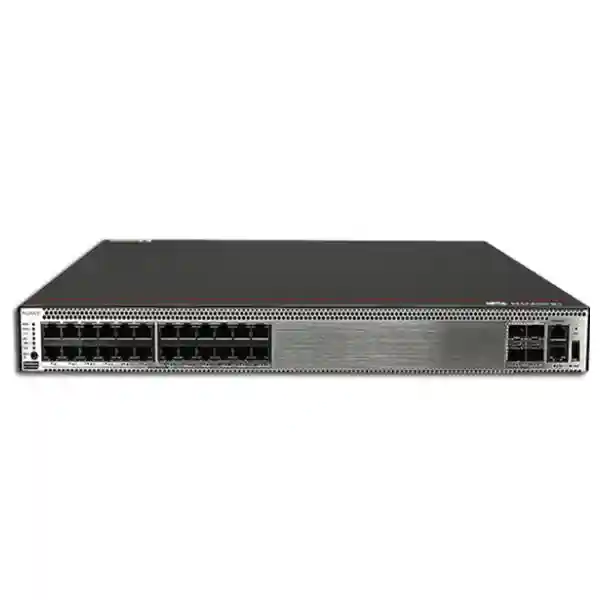
Huawei CloudEngine S5731-S24T4X
A resilient 24-port Gigabit Ethernet campus switch with four 10GE SFP+ uplinks, hardware-assisted Layer 2/Layer 3 forwarding, Huawei VRP services, iStack virtualization, rich access security and dual removable power-module capability for enterprise networks in Dubai and across the UAE.
Direct answer
Choose the S5731-S24T4X when the design requires copper Gigabit access for up to 24 wired endpoints, high-speed fiber uplinks to an aggregation or core layer, enterprise routing and access-control functions, and resilient power without moving to a 48-port chassis. This specific T model is a non-PoE switch; use a PoE model in the S5731-S family when access points, cameras or phones must receive power from the switch.
Product overview and where the S5731-S24T4X fits
The Huawei CloudEngine S5731-S24T4X belongs to the CloudEngine S5731-S family of standard Gigabit enterprise switches. Huawei positions the family for campus access, campus aggregation and selected metropolitan access roles where organizations need dependable Gigabit edge connectivity together with 10 Gigabit uplinks, enhanced Layer 3 services and mature IPv6 support. The S5731-S24T4X is the 24-port copper access model with four fixed 10GE SFP+ uplink interfaces and removable power modules capable of operating in a 1+1 redundant arrangement. That combination makes the platform especially useful in medium-density wiring closets, branch headquarters, hotel back-office networks, education buildings, clinics, industrial offices and distributed enterprise sites where the physical endpoint count is modest but uplink resilience and routing capability remain important.
Its forwarding performance is specified at 96 million packets per second. Huawei lists the switching capacity as 128 Gbit/s at device level and 672 Gbit/s as system switching capability. The distinction matters in procurement because the two values are not competing measurements of the same operating state: Huawei explicitly identifies the value before the slash as the device switching capability and the value after the slash as the system switching capability. For practical design work, the more important observation is that the platform is engineered to forward traffic at wire-speed characteristics appropriate to its 24 Gigabit access interfaces and four 10 Gigabit uplinks when deployed within supported feature and traffic profiles.
The switch runs Huawei’s Versatile Routing Platform, commonly referenced as VRP. The software feature set goes well beyond basic unmanaged or Layer 2 access switching. Supported functions include VLAN segmentation, link aggregation, spanning-tree variants, ring-protection options, static and dynamic IPv4 routing, extensive IPv6 capabilities, multicast controls, DHCP services, access control lists, 802.1X and MAC authentication, anti-spoofing mechanisms, QoS, SNMP, NETCONF/YANG, NetStream and telemetry-oriented operations. Some advanced data-center-style overlay functions, including specific VXLAN gateway and BGP-EVPN capabilities, are listed by Huawei as requiring an additional license, so any project that depends on those features should validate the intended VRP release and license package at quotation stage.
For UAE projects, the S5731-S24T4X is most compelling when it is treated as part of an engineered access layer rather than as a standalone box. A complete deployment plan should cover the upstream core or distribution pair, fiber type and optic distance, VLAN and IP addressing, gateway placement, authentication source, logging destination, NTP, software baseline, configuration backup, spare power strategy, rack cooling and UPS runtime. FourTeck can align the switching layer with broader UAE enterprise network infrastructure so that switching, routing, security and server connectivity are designed as one operational system.
Key verified hardware specifications
Access interfaces
24 × 10/100/1000Base-T Ethernet ports for copper user, server, appliance and infrastructure connectivity.
Uplink interfaces
4 × 10GE SFP+ ports for high-speed optical or supported direct-attach uplinks to distribution, core or adjacent switching.
Forwarding
96 Mpps forwarding performance with 128 Gbit/s device switching capacity and 672 Gbit/s system switching capability.
Form factor
1U rack-mount chassis measuring approximately 43.6 × 442 × 420 mm (H × W × D).
Control hardware
1.4 GHz quad-core CPU and 2 GB RAM according to Huawei’s current S5731-S hardware table.
Management ports
Dedicated ETH management interface, RJ45 console interface and USB 2.0 service interface are supported.
Power architecture
Two removable power-module positions support 1+1 redundancy; supported module families include 150 W AC, 600 W AC, 180 W DC and 1000 W DC options for the T model.
Important model note
The S5731-S24T4X is not the PoE access variant. Select S5731-S24P4X or another suitable PoE-capable model when powered endpoints are required.
Port architecture and uplink planning
A 24-port access switch is often selected simply by counting desks, but enterprise sizing benefits from a more deliberate port map. On the S5731-S24T4X, the 24 copper interfaces should be divided into operational categories before installation. Typical allocations can include staff workstations, printers, meeting-room systems, building-management devices, security appliances, local servers, hypervisor management ports, out-of-band devices and inter-switch connections. Reserving several ports for growth and break/fix scenarios reduces the risk that a new endpoint forces an unplanned switch replacement. In environments with high endpoint churn, leaving 15 to 20 percent of access ports free is often more operationally sensible than designing to exactly 24 active connections on day one.
The four 10GE SFP+ interfaces provide the most important design flexibility. A small site can use one or two 10GE uplinks to the core while keeping the remaining ports available for future redundancy, an additional aggregation path or a high-bandwidth server. A larger campus can split uplinks across two distribution switches and use Eth-Trunk/LACP to improve both capacity and link resilience. When the upstream topology supports multi-chassis resiliency, the design objective is to remove a single cable, optic or upstream switch from the failure path. The S5731-S series supports link aggregation, and Huawei also lists extensive Ethernet protection mechanisms, but the exact resilient topology must be matched to the upstream platform and software capabilities rather than assumed from the access switch alone.
Optics should be selected from distance, fiber plant and connector constraints, not only from nominal speed. For short in-rack or adjacent-rack connections, a supported direct-attach cable can reduce optic cost and simplify installation. For multimode fiber inside a building, an appropriate 10GE short-reach transceiver may be suitable when the installed OM grade and path length are known. For single-mode links across a campus or between buildings, the required optical budget must be calculated from fiber length, connector losses, splice losses, patch panels and engineering margin. Using a long-reach optic on an extremely short path can also require attention to receiver power, so the correct design is not simply to select the longest-distance optic available.
The 10GE uplink ratio is also relevant to oversubscription. Twenty-four Gigabit access ports represent a theoretical 24 Gbit/s of one-direction aggregate edge bandwidth, while four 10GE uplinks provide substantial uplink headroom when used together. Real enterprise traffic is normally bursty and not every edge port drives line rate simultaneously, so the architecture is generally comfortable for office and campus access. If the switch is used for server-heavy workloads, video ingest, backup traffic or storage-adjacent flows, actual traffic matrices should be measured or estimated. In those cases, uplink placement and LACP distribution become more important than the nominal access-port count.
A practical commissioning document should identify each copper port, expected VLAN, endpoint type, authentication method, speed/duplex policy, storm-control policy and any required ACL. Each SFP+ uplink should have a peer device, peer port, transceiver type, fiber pair ID, trunk VLAN list, link-aggregation group and failure-domain designation. This level of documentation is especially useful in UAE multi-site estates where several contractors may touch cabling, security, AV and IT systems during the life of the building.
Forwarding architecture, ASIC-assisted processing and capacity interpretation
Huawei states that the CloudEngine S5731-S uses hardware ASIC support for Layer 2/Layer 3 forwarding, access control lists and quality of service. That is the technically important fact for network architects: routine forwarding and policy functions are designed to be handled in hardware rather than pushed entirely to the general-purpose CPU. The public product material does not identify a merchant-silicon part number or expose enough low-level pipeline detail to justify naming a specific forwarding ASIC, so a responsible design should avoid invented claims about chip vendor, exact pipeline stages or internal buffer architecture. What can be relied on is the published forwarding performance, switching-capacity figures and supported feature scale.
The listed 96 Mpps forwarding performance is a packet-rate metric. Packet rate matters because a stream of minimum-sized Ethernet frames stresses a switch differently from an equivalent bit rate composed of large frames. The 128 Gbit/s device switching capability addresses aggregate switching bandwidth, while the larger 672 Gbit/s system value reflects Huawei’s stated system switching capability. Neither number should be used in isolation to claim application throughput. Real application performance also depends on packet size, enabled services, uplink design, congestion, endpoint behavior and whether traffic is switched locally or routed through higher layers.
The control CPU, specified at 1.4 GHz with four cores and 2 GB RAM, is responsible for management and protocol functions rather than line-rate forwarding of every user packet. Good network hygiene therefore protects the control plane. Features such as CPU attack defense, rate controls, trusted management networks, strong AAA, SNMPv3, secure management protocols and restricted access to the management plane should be included in the baseline configuration. This distinction between data plane and control plane is important when diagnosing performance: high interface utilization is not automatically evidence of CPU stress, and high CPU utilization is not automatically proof that the switching fabric is saturated.
For architects sizing campus blocks, the most useful interpretation is that the S5731-S24T4X is built as an enterprise access/aggregation platform with sufficient hardware capability for extensive Layer 2 policy, IPv4/IPv6 routing and QoS at the edge. It is not a substitute for a high-capacity data-center leaf switch when every port must operate at multi-gigabit or tens-of-gigabit server speeds, nor is it a simple smart switch whose role is limited to VLAN tagging. It sits between those categories: an enterprise campus switch with meaningful hardware forwarding and routing depth.
Where workloads are sensitive to microbursts, deterministic latency or specialized storage behavior, confirm application-specific requirements against Huawei documentation for the exact software release and, where needed, perform acceptance testing. The available public datasheet supports strong conclusions about port speed, forwarding scale and feature support, but it should not be stretched into undocumented guarantees about internal packet buffers or latency under every possible traffic profile.
Layer 2 segmentation and resilient Ethernet design
The S5731-S family provides a broad Layer 2 feature set suitable for enterprise segmentation. Huawei lists support for up to 4094 active VLANs and up to 1024 VLANIF interfaces, giving designers ample logical separation for departments, device classes, tenants, operational technology zones, guest access, voice networks, management networks and service-specific segments. Access, trunk, hybrid and QinQ operating modes are available, along with VLAN assignment based on interfaces, protocols, IP subnets, MAC addresses and combined identity criteria. Voice VLAN, guest VLAN, MUX VLAN, VLAN mapping, selective QinQ, Super-VLAN and Sub-VLAN mechanisms extend the design options for service-provider-like or highly segmented campus scenarios.
The published MAC address scale is 64K, with support for automatic learning and aging, static entries, dynamic entries, blackhole entries, sticky MAC behavior, MAC learning limits and flapping detection. In a conventional 24-port office access role, this scale is generous. The more relevant operational question is how learning controls are applied. Limiting learned MAC addresses on ports that should serve a single device can reduce accidental mini-switch proliferation. Sticky MAC can help maintain endpoint consistency in controlled environments. MAC flapping alarms can reveal loops, mispatching or virtualization behavior that is moving an address rapidly between interfaces.
Loop prevention and fast recovery are equally important. The platform supports STP, RSTP and MSTP, along with protections such as BPDU protection, root protection and loop protection. Huawei also lists VBST, Smart Link, Monitor Link, SEP, RRPP and Ethernet Ring Protection Switching based on G.8032. A UAE campus with conventional hierarchical switching may use MSTP or a routed access design, while industrial or ring-shaped physical plants may take advantage of ring protection technologies when they are supported consistently across the participating devices. The presence of many mechanisms is not an invitation to enable all of them simultaneously; it is a toolkit from which one coherent failure-recovery design should be chosen.
Link aggregation is provided through LACP and Eth-Trunk. Aggregation can combine multiple physical uplinks into one logical interface, increase usable bandwidth and preserve connectivity when one member fails. The distribution algorithm still maps flows to individual physical members, so a single flow does not normally gain the sum of all member bandwidths. For example, a two-member 10GE Eth-Trunk can provide 20 Gbit/s of aggregate capacity across many flows, but a single TCP transfer may remain constrained by one member path depending on the hashing method and endpoints.
A clean campus design normally pairs these Layer 2 capabilities with clear boundaries: define where VLANs terminate, where routing occurs, which device is spanning-tree root, which links are trunks, which edge ports are protected, and how a failed uplink converges. The S5731-S24T4X can participate in sophisticated Layer 2 designs, but the most maintainable design is usually the simplest architecture that meets redundancy and segmentation objectives.
Layer 3 routing, IPv6 and multicast capabilities
The CloudEngine S5731-S is not limited to Layer 2 forwarding. Huawei lists static IPv4 routing, VRF, DHCP client/server/relay functions, URPF checks, routing policies, RIPv1, RIPv2, OSPF, BGP, MBGP, IS-IS and policy-based routing. The published IPv4 route scale is 32K. This allows the S5731-S24T4X to serve routed access, branch aggregation or localized Layer 3 functions where moving gateways closer to users reduces broadcast domains and simplifies failure boundaries. Whether the switch should actually host default gateways depends on the wider architecture, security policy and redundancy model.
VRF support is valuable for organizations that need multiple logical routing tables on one physical switch. A managed-services environment, mixed corporate/guest building or operational-technology deployment can use VRFs to separate route domains even when the same hardware platform carries multiple services. VRF is not a firewall by itself; it creates routing separation. When traffic must cross from one VRF or security zone to another, the interconnection should pass through an explicitly controlled policy point such as a firewall or carefully designed routing policy, depending on the organization’s security requirements.
IPv6 support is described as mature across the S5731-S family. Huawei lists the IPv6 protocol stack, Neighbor Discovery, ND snooping, DHCPv6 snooping, DHCPv6 server and relay, RIPng, OSPFv3, BGP4+ and IS-IS for IPv6. The platform also supports IPv6 security functions and ACLs. This makes it suitable for dual-stack campus migration where IPv4 remains in service while IPv6 is introduced in controlled segments. A good migration plan should account for DNS, address allocation, first-hop security, routing protocol choice, monitoring, firewall policy and staff tooling; simply enabling IPv6 on interfaces without equivalent security controls can create unmanaged reachability.
Multicast functions include IGMP versions 1, 2 and 3, PIM-DM, PIM-SM, MSDP and multicast routing policies, with published IPv4 and IPv6 multicast route capacities of 1K each. These features are useful for IPTV, enterprise video, digital signage, market-data distribution and selected industrial applications. Multicast should be engineered deliberately: access switches need appropriate snooping behavior, routers need correct rendezvous or source-tree design where applicable, and unwanted flooding should be avoided.
In a branch or campus block, the S5731-S24T4X can therefore do much more than relay frames. It can participate in dynamic routing, maintain multiple route domains, enforce policy-based forwarding decisions and support dual-stack operation. This depth is one reason the platform can remain useful as networks evolve from traditional Layer 2 access toward routed access or fabric-oriented architectures.
Access security, identity and attack protection
Campus security begins at the access port. The S5731-S supports 802.1X authentication, MAC address authentication, portal authentication and hybrid authentication, with AAA integration options including local authentication, RADIUS and HWTACACS. These functions allow network access to be based on user or device identity rather than merely on physical connection. In a mature design, successful authentication can be tied to authorization policy so that VLAN, QoS and access-control behavior is applied dynamically to the session.
Huawei lists DHCP snooping and Option 82 support, along with dynamic rate limiting for DHCP packets. DHCP snooping creates a binding relationship between legitimate address assignments and switch ports, helping distinguish trusted DHCP sources from unauthorized ones. When paired with IP source guard, ARP inspection and related features, the access layer can reduce common local-network attacks such as rogue DHCP service, IP/MAC spoofing and ARP manipulation. The platform supports Dynamic ARP Inspection, Static ARP Inspection and Egress ARP Inspection, as well as strict ARP learning and several proxy ARP modes.
The switch also provides protections aimed at the device itself. Huawei documents CPU attack defense and defenses against malformed packets, UDP floods, TCP SYN floods, ICMP floods and packet-fragment attacks. These controls are important because the management and routing processes share a control-plane environment that should not be exposed indiscriminately to user traffic. Infrastructure ACLs, management-plane restrictions and authenticated administration remain essential even when built-in attack protection is available.
ACL functions cover packet filtering from Layer 2 through Layer 4. The published table includes basic and advanced IPv4 ACLs, basic and advanced IPv6 ACLs, Layer 2 ACLs, user-group ACLs and user-defined ACLs. Huawei lists 2K IPv4 ACL and 2K IPv6 ACL capacity in the current feature table. ACL planning should account not only for the number of written rules but also for how policy is compiled into hardware resources on the target software release. Large multi-tenant or microsegmented designs should validate scale during detailed engineering instead of assuming that every theoretical rule combination consumes resources identically.
A secure UAE enterprise baseline typically places switch management in a dedicated management VLAN or VRF, permits SSH/HTTPS and SNMP only from authorized operations subnets, uses SNMPv3 where monitoring supports it, integrates administrator authentication with centralized AAA, synchronizes time through trusted NTP, forwards logs to a central collector and disables unused access ports. User-facing ports can then apply 802.1X or MAC authentication, DHCP snooping, source validation, BPDU protection, storm controls and MAC limits as appropriate to endpoint type.
Switch access controls complement perimeter and internal firewalls rather than replace them. Projects that need coordinated segmentation between access switches and security gateways can align the S5731-S24T4X with dedicated firewall and network-security architecture in Dubai, ensuring that VLAN, VRF and identity boundaries map cleanly to enforceable security policy.
QoS for voice, video and business-critical traffic
The S5731-S series supports traffic classification based on ACLs, traffic filtering, committed access rate policing, priority modification, VLAN modification, egress traffic shaping, queue shaping, Weighted Random Early Detection, tail drop, Priority Queuing and Weighted Deficit Round Robin. Huawei lists eight priority queues. This gives the switch enough QoS depth to enforce a structured campus policy for voice, video, transactional applications, control traffic and best-effort data.
QoS is most effective when it is end-to-end. Marking a voice packet as high priority on one switch has limited value if another device later removes the marking or if the WAN edge ignores it. A practical policy begins by defining trust boundaries. Managed IP phones may be trusted to mark voice correctly, while ordinary user PCs should generally not be allowed to promote arbitrary traffic into the highest class. The access switch can classify traffic based on interface, VLAN, ACL or packet fields and then remark or police traffic before it enters the upstream network.
Priority Queuing is useful for genuinely delay-sensitive traffic but must be controlled so that a misbehaving priority class cannot starve the rest of the link. Weighted scheduling provides more balanced service to non-priority classes, while shaping can smooth bursts on selected interfaces or queues. WRED can begin discarding packets probabilistically before a queue completely fills, helping congestion-aware protocols reduce sending rates. Tail drop remains a simpler behavior where appropriate. The right mix depends on application expectations and congestion points.
On a typical S5731-S24T4X access deployment, congestion is more likely to appear on an uplink, WAN-bound path or oversubscribed service than on an individual Gigabit desktop port. Engineers should therefore identify where contention actually occurs. A four-uplink design with substantial 10GE capacity may experience little local congestion, while a branch with a much smaller WAN circuit can still require careful egress classification at the router or firewall. The access switch can preserve and enforce policy markings so that the constrained downstream device can make intelligent decisions.
For video surveillance, conferencing and unified communications, testing under realistic load is valuable. Voice quality can deteriorate because of WAN latency or jitter even when LAN switching is healthy. Similarly, camera streams may be locally stable but overwhelm a recorder uplink. QoS should therefore be considered alongside topology, bandwidth, multicast design and application placement rather than treated as a standalone checkbox.
iStack, power redundancy and availability engineering
Huawei’s iStack technology can virtualize up to nine supported physical switches into one logical switch. A stack can simplify management because administrators operate the stack as a single logical device, while member switches contribute ports and processing resources. Stacking is useful where a wiring closet needs more than 24 access ports or where logical consolidation reduces operational complexity. It can also support inter-device link aggregation so uplinks can be distributed across different physical members, reducing dependence on one chassis.
A stack is not automatically equivalent to two entirely independent networks. Members share a logical control structure, configuration errors can propagate, and the physical stack topology itself must be designed for resilience. Projects should validate supported stacking ports or media, topology, software compatibility, member limits and upgrade procedures for the exact product release. A resilient stack design should consider what happens if a member, stack link, power feed or software process fails and whether downstream endpoints have redundant physical connections.
The S5731-S24T4X provides two removable power-module positions and supports 1+1 power backup. For high-availability UAE deployments, the best use of this feature is to connect redundant power modules to different upstream electrical sources where possible. Feeding both modules from the same power strip protects against module failure but not against strip, PDU or circuit failure. Connecting each module to a separate PDU backed by appropriate UPS infrastructure creates a stronger electrical failure boundary. Data centers and critical facilities should also document circuit loading and UPS runtime rather than assuming redundant supplies guarantee runtime during utility loss.
Huawei lists 150 W AC, 600 W AC, 180 W DC and 1000 W DC pluggable power options for the non-PoE S5731-S24T4X family table. The switch’s maximum published power consumption is 114 W, with representative figures of 88 W at 30 percent traffic load and 91 W at 100 percent traffic load in Huawei’s hardware specification table. Minimum power consumption is listed at 74 W. These numbers are useful for UPS and cooling estimates, but project calculations should add engineering margin and account for the actual installed power-module efficiency, ambient conditions, other rack equipment and future additions.
Huawei publishes an MTBF value of 57.73 years for the S5731-S24T4X in the current hardware table, an MTTR value of two hours and listed availability greater than 0.99999. These are reliability statistics under defined assumptions, not guarantees that an individual installed switch will operate without interruption for decades. Real service availability depends on the whole system: cabling, optics, power, upstream devices, configuration quality, software maintenance, spares and operating procedures.
For critical facilities, the most useful reliability strategy combines redundant power, dual uplinks, protected upstream switching, documented configuration backup, spare optics and clearly defined replacement procedures. Hardware redundancy without operational readiness can still produce extended outages when a fault occurs.
Environmental, rack and UAE deployment considerations
The S5731-S24T4X is a 1U switch measuring approximately 43.6 mm high, 442 mm wide and 420 mm deep. Huawei lists a packaged chassis weight of 8.4 kg for the model. The depth is significant for wall-mounted cabinets and shallow telecommunications enclosures; confirm usable rail depth, rear-cable clearance and power-cord bend radius before procurement. A cabinet may be described commercially as 600 mm deep while providing substantially less usable device depth after doors, vertical PDUs and cable managers are considered.
The switch uses air-cooled heat dissipation with intelligent fan-speed adjustment. For this model Huawei describes airflow entering from the front side and exhausting through the rear panel, with built-in dual fans. Rack layout should therefore preserve front intake and rear exhaust paths. Do not pack loose cabling directly against ventilation openings. In mixed-vendor racks, check that adjacent equipment does not create opposing airflow that recirculates hot exhaust into the switch intake.
Huawei lists long-term operating temperature from -5°C to 45°C at 0 to 1800 metres. Above 1800 metres and up to 5000 metres, the allowed operating temperature decreases by 1°C for each additional 220 metres. Storage temperature is listed from -40°C to +70°C, and relative humidity from 5 to 95 percent non-condensing. The UAE has hot outdoor conditions, but enterprise switches should normally be installed in climate-controlled indoor rooms. The specification does not mean a standard campus switch should be placed in an unconditioned rooftop cabinet exposed to solar heat.
Dubai and other UAE sites can experience dust, construction debris and rapid temperature changes when building systems are commissioned. Telecommunications rooms should be kept clean, sealed appropriately, and maintained within design temperature and humidity. After fit-out or renovation work, filters and rooms should be cleaned before sensitive network equipment is energized. Condensation risk matters when equipment is moved from cold storage or strongly air-conditioned spaces into humid environments; equipment should acclimatize according to site procedure.
The published acoustic figures are also worth noting in small offices. Huawei lists normal-temperature sound power of 57.5 dB(A) and sound pressure of 47.5 dB(A) for the S5731-S24T4X, with higher sound power under high-temperature operation. This is a rack-mounted enterprise switch and should not be treated as a silent desktop device. Place it in a proper communications room rather than beside occupied desks when acoustic comfort is important.
For implementation projects that include rack audits, patching, labeling, UPS planning, monitoring and onsite support, FourTeck’s UAE IT services capability can be coordinated with the switch deployment so that the installation environment is addressed together with logical configuration.
Management, telemetry and operational visibility
A production switch is only as manageable as the visibility built around it. The CloudEngine S5731-S feature set includes Ping, Tracert, Network Quality Analysis, NTP, iPCA, Smart Application Control, NetStream, SNMPv1/v2c/v3, HTTP, HTTPS, RMON, RMON2 and NETCONF/YANG. Huawei also describes telemetry capability that can collect device data in real time for analysis by Huawei campus-management platforms such as CampusInsight. This range supports both traditional NMS operations and more programmatic approaches to configuration and telemetry.
For a new UAE installation, the operational baseline should be decided before the switch enters service. Assign a management IP from a dedicated subnet, set a unique hostname that encodes site and rack location, configure NTP, define DNS only if required, set timezone appropriately, integrate AAA, enable secure administration, send logs to a central collector and configure monitoring credentials. Record the serial number, software version, installed power modules, optic part numbers and upstream neighbor information in the asset system. These steps are simple, but they prevent hours of uncertainty during future incidents.
SNMPv3 is generally preferable when the monitoring system supports it because it can provide authentication and privacy controls absent from early SNMP versions. NETCONF/YANG offers a structured automation interface that can be useful for repeatable configuration across many branches. However, automation should be governed by version control, test environments and change approval; a scripted mistake can modify many devices faster than a manual mistake. Telemetry and NetStream can provide richer traffic and state information but also add collector, storage and analysis requirements.
Operational monitoring should cover interface errors, discards, flaps, utilization, optical receive/transmit levels where supported, CPU and memory, temperature, fan status, power-module status, spanning-tree changes, routing-neighbor state and authentication failures. Alert thresholds should be tuned to avoid noise. A single interface running at 80 percent for a few seconds may be normal; sustained congestion, increasing errors or repeated link flaps are more actionable patterns.
Configuration backups are essential. Keep a known-good baseline after commissioning, then capture configurations after approved changes. The restore procedure should be documented and tested in a controlled manner. For sites where a replacement switch may need to be installed outside normal business hours, having a current configuration, port map, software image and optic inventory can dramatically reduce recovery time.
The management architecture should therefore be designed with the same care as the forwarding architecture. The S5731-S24T4X exposes the tools required for professional operations, but organizations still need monitoring platforms, naming standards, access policies and maintenance procedures to convert those capabilities into dependable service.
Software features, licensing and VRP release control
Huawei’s published feature table for the S5731-S includes a large set of enterprise functions, but feature availability should always be validated against the actual VRP version and license level delivered with the unit. This is especially important when a design depends on overlay technologies. Huawei explicitly marks VXLAN Layer 2 gateway, VXLAN Layer 3 gateway, centralized gateway, distributed gateway and BGP-EVPN functions as requiring an additional license in the current series datasheet. A bill of materials that includes only the base chassis may therefore be incomplete for a fabric deployment.
Software lifecycle planning also matters. Standardize the release used across a site or switch stack unless a vendor-supported exception is required. Before upgrading, review Huawei release notes, feature changes, known issues, upgrade path, boot-ROM prerequisites and compatibility with stack members and management systems. Back up configuration and software information, verify sufficient storage and define rollback criteria. Critical campuses should have a maintenance window that includes time for post-upgrade routing, authentication, uplink and monitoring tests.
Feature licenses should be documented as assets. Record license identifiers, entitlements and associated device information in the same system that tracks serial numbers and support contracts. If a failed switch is replaced under warranty, confirm the process for transferring or reissuing licenses. This is particularly important when advanced features are central to the architecture rather than optional enhancements.
Configuration templates are useful for repetitive branch deployments, but templates should separate universal policy from site-specific values. A universal template might define AAA, logging, NTP, secure management, spanning-tree edge protection, DHCP snooping defaults and QoS classes. Site variables should include hostname, management address, VLAN IDs, gateway addresses, uplink peer details and authentication exceptions. Treating these as structured variables reduces copy-and-paste errors and makes audits easier.
When requesting a quotation, specify any mandatory protocol or overlay requirement explicitly rather than assuming the phrase “Layer 3 switch” includes every advanced feature. Stating requirements such as OSPF, BGP, VRF, BGP-EVPN, VXLAN, 802.1X, NETCONF/YANG or telemetry allows the supplier to confirm software and license alignment before delivery.
Reference deployment topologies
Branch access switch
Use the 24 GE ports for staff devices, printers and local infrastructure, with two 10GE uplinks aggregated or split toward a resilient branch core. Local VLANs can terminate at the switch or upstream firewall depending on security policy. This design suits branches that need enterprise controls without 48 access ports.
Campus wiring closet
Deploy one or more S5731-S24T4X units in an access stack, distribute uplinks across different members, and connect to redundant distribution switches. Use 802.1X, DHCP snooping, BPDU protection and QoS at the edge. This gives centralized policy with resilient fiber uplinks.
Server or appliance aggregation
For devices that need only Gigabit copper access, the S5731-S24T4X can aggregate servers, management controllers, security appliances and service nodes while using 10GE uplinks to the core. Validate server throughput requirements before using a campus switch for data-intensive applications.
Routed access block
Place VLAN gateways on the access switch, run OSPF or another supported routing protocol northbound, and reduce large Layer 2 failure domains. This can improve convergence and simplify spanning-tree scope when the broader architecture is designed for routed access.
Each topology changes the failure model. In a branch design, the switch may be a single point for all local users unless a second unit is installed. In a stacked campus, a common logical control plane simplifies management but creates stack-specific dependencies. In routed access, failure boundaries are smaller but routing design and IP address management become more important. In server aggregation, application traffic profiles and redundancy at the server NIC level need consideration. The correct topology is therefore determined by business availability requirements, not simply by available interfaces.
Where the S5731-S24T4X connects virtualization hosts, backup nodes or application servers, the switch design can be coordinated with server infrastructure projects in Dubai so NIC bonding, VLAN trunks, management networks and uplink bandwidth are planned together.
Sizing methodology for UAE enterprise projects
Start with endpoint count, but do not stop there. Create a port schedule for every device expected on day one and every device likely to appear during the design life. Separate powered devices from non-powered devices because the S5731-S24T4X does not provide PoE on its copper ports. If the building includes Wi-Fi access points, IP cameras or desk phones that require PoE, either select a PoE-capable switch for those endpoints or provide an intentional external powering design. Mixing a non-PoE switch into a PoE-dependent bill of materials is one of the easiest procurement mistakes to avoid.
Next, estimate bandwidth by traffic class. Office endpoints often generate modest average traffic with occasional bursts. Video editing, imaging, software distribution, local backups and surveillance can create sustained heavy flows. Document which traffic remains within the access switch, which traffic crosses uplinks and which traffic leaves over a WAN circuit. The uplink plan should be sized to the busy-hour aggregate rather than simply multiplying every port by 1 Gbit/s and assuming all hosts peak simultaneously.
Define availability requirements. If a one-hour local outage is acceptable, a single switch with one power module may meet the business need. If the site hosts revenue-critical, safety-related or operational systems, consider dual power modules, independent PDUs, dual upstream switches, link aggregation, redundant gateways and possibly dual access switches for key endpoints. Availability targets should be translated into architecture and spare strategy rather than represented by a generic “high availability” label.
Define routing scale and protocol requirements. The S5731-S family supports a broad range of dynamic routing, but an access switch should not accumulate complexity without purpose. Count expected VLANIF interfaces, IPv4 routes, IPv6 routes, VRFs, multicast groups and ACL policy. For standard campus access, these values are usually far below platform limits. For service-provider edge or highly segmented multi-tenant environments, scale validation becomes more important.
Define optics and cabling. For each SFP+ port, specify peer device, speed, fiber type, connector, distance and redundancy role. Check whether existing fibers are single-mode or multimode and whether patch panels introduce connector transitions. Do not order optics from memory based on a previous building; campus fiber plants vary substantially even within the same organization.
Finally, size operations. Determine who manages the switch, where monitoring data goes, how configuration backup works, how authentication is integrated, who approves changes and how quickly a failed unit can be replaced. A technically capable switch can still produce poor service if the organization lacks monitoring and replacement procedures. Conversely, a standardized and well-documented access platform can be maintained efficiently across dozens of sites.
This method turns the procurement question from “Is this a good switch?” into the more useful engineering question: “Does this exact model, power configuration, software package and uplink design satisfy the traffic, security, resilience and operational requirements of this site?”
Model selection inside the CloudEngine S5731-S family
The S5731-S24T4X should not be selected simply because its model number resembles other S5731-S switches. Huawei offers related variants with different port counts, power systems and PoE capabilities. The S5731-S24P4X provides 24 Gigabit copper ports and four 10GE SFP+ uplinks but adds PoE+, making it more appropriate for powered edge devices. The S5731-S48T4X doubles copper access density to 48 ports while retaining four 10GE uplinks. The S5731-S48P4X combines 48-port density with PoE support. Additional S5731-S variants provide different optical or multi-gigabit access arrangements.
A 24-port non-PoE model is often the cleanest choice when the connected devices are desktops, printers, servers, controllers or appliances with independent power. It avoids paying for PoE capacity that will not be used and can simplify power-budget planning. On the other hand, a modern office with Wi-Fi access points and IP phones may quickly make a non-PoE access switch inconvenient. Mixed environments can use separate PoE and non-PoE switch blocks, but that strategy should be intentional so patching and redundancy remain clear.
The fixed-power S5731-S24T4X-A and S5731-S24T4X-D are also distinct from the deeper redundant-power S5731-S24T4X chassis. Huawei lists the A variant with built-in AC power and the D variant with built-in DC power, both in a shallower chassis of approximately 220 mm depth. The base S5731-S24T4X described on this page is the 420 mm-deep model with removable power modules and 1+1 power backup capability. Procurement documents should therefore include the full suffix or explicitly state the redundant-power requirement; “S5731-S24T4X” and “S5731-S24T4X-A” should not be treated as interchangeable.
For sites with shallow wall cabinets, the physical difference may be decisive. The fixed-power A/D variants can fit where a 420 mm-deep redundant-power chassis cannot. For critical sites, however, removable redundant power may be more valuable than cabinet depth. The correct model balances physical constraints, availability objectives and electrical design.
FourTeck can build a model-selection matrix around endpoint count, PoE demand, cabinet depth, uplink optics, redundant power and software features so the ordered part corresponds to the actual network design rather than a shortened product description.
Procurement and compatibility checks before purchase
Enterprise-switch procurement should be treated as a system order. The chassis is only one line item. Confirm the number and type of power modules, power cords suitable for the UAE installation, rail or mounting accessories, required 10GE optics or direct-attach cables, spare optics, stacking accessories if a stack is planned, software entitlement, advanced-feature licenses and support coverage. A switch delivered without the intended second power module does not provide the planned 1+1 power resilience even though the chassis is capable of it.
Check optic compatibility against the exact Huawei hardware and software release. Third-party optics may operate in some environments, but enterprise support policy should be considered before standardizing on them. For links crossing buildings, also validate grounding and fiber choice; optical fiber is generally preferred for inter-building data links because it avoids conductive paths and supports longer distance. Where copper is used inside a building, confirm category, patch length and certification for Gigabit Ethernet.
Confirm rack depth and airflow direction. The redundant-power S5731-S24T4X is about 420 mm deep, not including cable and connector clearance. The front-to-rear airflow must remain unobstructed. Reserve vertical space for cable management so copper bundles do not block intake areas. In dense cabinets, include the switch’s heat output in room-cooling calculations rather than assuming network equipment is thermally negligible.
Confirm software and feature licensing. If the project requires only VLANs, routing, ACLs, QoS and standard management, the base software may be sufficient subject to the ordered package. If VXLAN or BGP-EVPN is part of the architecture, explicitly request the required license confirmation. Record the intended VRP release and do not assume that a future unit received from stock will ship with the same version as existing switches.
Confirm support and replacement expectations. Determine warranty terms, local stock availability, replacement lead time and whether a cold spare is justified for critical sites. For organizations operating many branches, a centrally held spare configured from a standard template can be more useful than relying entirely on ad-hoc replacement logistics.
Finally, check regulatory and organizational requirements. Government, healthcare, finance and critical-infrastructure projects may have approved-vendor, logging, data-handling or security-hardening standards beyond the switch datasheet. Those requirements should be included in the technical submittal before purchase, not discovered during handover.
Migration from an existing access switch
Replacing an existing switch is rarely a pure hardware swap. Begin by collecting the current configuration, port status, MAC address table, VLAN list, uplink topology, spanning-tree state, LACP groups, routing neighbors, DHCP relay configuration, ACLs, authentication settings and management integrations. The goal is to distinguish intentional configuration from historical residue. Migrating every old command blindly can preserve design problems that the refresh was meant to solve.
Build a new logical configuration based on requirements, then map old ports to new interfaces. Use a spreadsheet or structured migration sheet that records old port, new port, cable label, endpoint, VLAN, special policy and test result. Label patch cords before the outage window. If the old switch uses vendor-specific features, identify the Huawei VRP equivalent and confirm behavior in a lab or staging environment.
Uplink migration deserves special attention. Confirm trunk VLANs, native or default VLAN behavior, LACP mode, spanning-tree role and optic type. A mismatch on one of these elements can isolate the entire access layer even if every user port is correct. When possible, stage one uplink first, verify management reachability and routing, then move user links in controlled batches.
Authentication migrations should include a rollback method. If 802.1X or RADIUS policy changes at the same time as the switch hardware, troubleshooting becomes more complex because a failed user connection may have several possible causes. For high-impact sites, keep the initial hardware migration configuration as close as practical to the existing authentication policy, then introduce policy changes after the platform is stable.
Post-change testing should verify more than ping. Test DNS, DHCP, Internet access, internal applications, voice, printing, authentication, multicast or video where relevant, routing neighbors, redundant uplinks, monitoring, syslog and configuration backup. Simulate a single uplink failure and, where permitted, a single power-supply failure to confirm that the installed design behaves as documented.
A formal handover should include final configuration, software version, asset details, port map, topology diagram, credentials handoff through an approved secure process, backup location and outstanding observations. This turns the switch refresh into an auditable infrastructure change rather than a one-time cabling exercise.
Frequently asked technical questions
Does the S5731-S24T4X provide PoE?
No. The S5731-S24T4X is the non-PoE 24-port copper model. Huawei offers PoE-capable variants such as the S5731-S24P4X for endpoints that need switch-supplied power.
How many 10 Gigabit uplinks are available?
Four fixed 10GE SFP+ ports are provided. They can be used for fiber or other supported SFP+ connectivity according to the approved transceiver and cabling design.
Can it perform Layer 3 routing?
Yes. The series supports static routing and dynamic protocols including OSPF, BGP and IS-IS, along with VRF, policy-based routing and extensive IPv6 routing capabilities.
Can multiple switches be stacked?
Yes. Huawei describes iStack support with up to nine physical switches virtualized into one logical switch. Exact stacking design and software compatibility should be checked for the intended release.
Does it support redundant power?
The base S5731-S24T4X chassis supports two removable power modules and 1+1 power backup. The shallower S5731-S24T4X-A and -D variants use built-in power and should not be confused with this configuration.
Are VXLAN and BGP-EVPN included automatically?
Huawei lists VXLAN Layer 2/Layer 3 gateway and BGP-EVPN functions as requiring an additional license in the current series datasheet. Confirm the exact license before ordering.
Is it suitable for an office wiring closet?
Yes, provided the 24-port non-PoE density, cabinet depth, cooling and uplink requirements fit the site. Its enterprise security, QoS, routing and management features are well suited to managed campus access.
What should be ordered with the switch?
Typical orders may require one or two power modules, suitable UAE power cords, rack accessories, SFP+ transceivers or DACs, fiber patch leads, optional feature licenses, stacking components and support coverage.
Implementation standards and acceptance testing
A strong installation standard starts with physical workmanship. Mount the chassis securely, maintain airflow, use horizontal and vertical cable managers, label both ends of every copper and fiber cable, secure power cords without excessive strain and keep redundant feeds physically distinguishable. Copper patch leads should be appropriate category and length. Fiber connectors should be inspected and cleaned before insertion. Spare fibers and ports should be capped and documented.
The base configuration should be built from an approved template. At minimum, that normally includes device identity, management addressing, AAA, secure management services, NTP, logging, SNMP or telemetry, VLANs, spanning-tree policy, uplinks, routing or gateway interfaces, security controls and configuration-save procedures. Default credentials and unnecessary services should be addressed before production connection.
Acceptance testing should include physical status, interface negotiation, packet errors, LACP state, VLAN continuity, routing neighbor state, default-route behavior, DHCP, DNS reachability, authentication, ACL enforcement, voice or video traffic where applicable, management access, monitoring visibility and log reception. The engineer should verify that each redundant path is actually used as intended by disconnecting one member at a time in a controlled maintenance window.
For optical uplinks, record transmit and receive levels where available. A link that is technically up but operates close to its optical limit may become unstable after connector contamination or temperature change. Comparing measured levels with the transceiver’s supported optical budget provides an early warning before handover. Long campus links should also have fiber test records available from the cabling contractor.
Performance acceptance does not always require synthetic line-rate testing, but it should reflect business use. Confirm that large file transfers, voice, video, application access and backup behavior meet expectations during representative traffic. If the site has strict throughput or latency criteria, define a formal test methodology before deployment so both customer and integrator agree on success conditions.
After testing, capture a final configuration and operational snapshot. The handover package should show which ports are active, how uplinks are bundled, what software and licenses are installed, which alarms are expected and how the device is monitored. This documentation is the starting point for reliable ongoing operations.
Decision recap: when this model is the right fit
Choose it when
You need up to 24 Gigabit copper access ports, four 10GE uplinks, enterprise Layer 2/Layer 3 services, strong edge security, IPv6 readiness, iStack and the option for redundant removable power modules.
Choose another model when
Your endpoints require PoE, you need 48 copper ports in one chassis, the rack cannot accommodate a 420 mm-deep unit, or the application requires higher-speed server access than 1 Gigabit on most ports.
Validate before ordering
Power-module quantity and type, optics, fiber distance, cabinet depth, VRP version, stacking design, advanced licenses, support coverage, UAE power connection, monitoring integration and replacement strategy.
Operational priority
Treat secure management, configuration backup, monitoring, documentation and failover testing as part of the deployment. Reliability comes from the engineered system, not from the chassis specification alone.
Quotation input checklist
Providing the following information with an RFQ helps convert a generic switch quotation into an implementation-ready bill of materials. It also reduces the chance that optics, redundant power or licensing is discovered as a missing requirement after delivery.
Emirate, building, rack location, available RU space, cabinet depth, PDU type, UPS availability and environmental constraints.
Current copper port count, expected growth, endpoint categories and confirmation that attached devices do not require PoE from this switch.
Number of 10GE uplinks, peer switch models, LACP requirement, fiber type, connector type, distance and redundancy objective.
Single or dual removable power modules, AC or DC preference, independent feeds and any UPS runtime requirement.
VLANs, VRFs, OSPF, BGP, IPv6, multicast, 802.1X, DHCP snooping, QoS, NETCONF/YANG, telemetry, VXLAN or BGP-EVPN requirements.
AAA source, monitoring platform, syslog destination, NTP source, naming convention, configuration-backup process, support SLA and spare strategy.
Structured UAE consultation for the S5731-S24T4X
A useful consultation should confirm more than stock and price. FourTeck can review the endpoint schedule, rack depth, uplink topology, fiber type, routing design, security controls, dual-power requirement, software feature set and monitoring expectations before the final bill of materials is issued. This is particularly important when the switch is being used in a redundant campus architecture or where advanced licensing is required.
For a straightforward office deployment, the output can be a concise recommendation covering chassis, two or four uplink optics, power configuration and basic implementation. For a multi-building or multi-site environment, the design can expand into switch stacking, distribution redundancy, routing protocol selection, VRF/VLAN structure, access authentication, firewall policy mapping and operational monitoring. The goal is to ensure that the ordered switch arrives as part of a usable network design rather than as an isolated hardware component.
To request a project review, prepare the quotation checklist above and include any existing topology diagram, fiber schedule and current-switch configuration that can be shared. FourTeck can then identify compatibility questions before procurement and coordinate installation, migration and handover requirements with the wider infrastructure team.
Recommended RFQ subject
Huawei CloudEngine S5731-S24T4X UAE – chassis, redundant power, 10GE uplinks, licensing and deployment support.
Include site location, port count, fiber distances, upstream switch model and whether the project needs installation or configuration support.

Reviews
There are no reviews yet.