
Huawei CloudEngine S5731-S32ST4X-A in Dubai, UAE
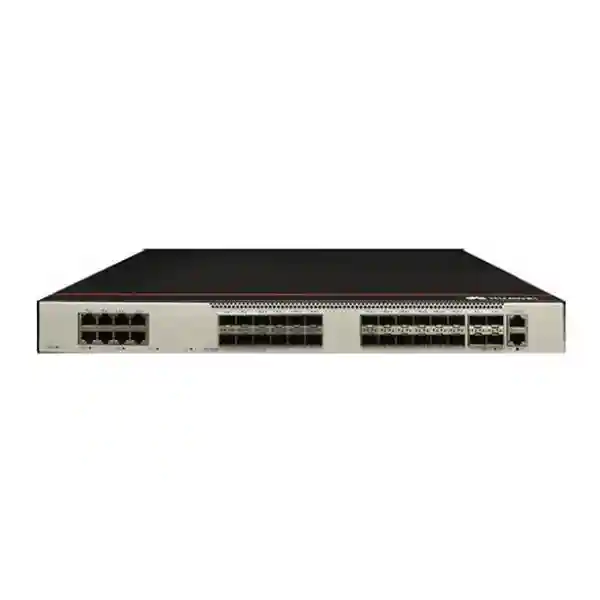
A fiber-centric 1U enterprise switch with 24 x 1/2.5GE SFP access ports, 8 x Gigabit copper ports and 4 x 10GE SFP+ uplinks, designed for campus access, aggregation and metro-style edge deployments where optical density, mature routing and operational control matter.
FourTeck UAE positions the S5731-S32ST4X-A for organizations that need a practical bridge between conventional Gigabit access and higher-speed fiber connectivity without moving immediately to a larger chassis platform. The model combines Huawei VRP software, intelligent stacking, Layer 2/Layer 3 services, IPv6, multicast, QoS, security controls and automation-oriented management in a compact fixed-port form factor.
What is the Huawei CloudEngine S5731-S32ST4X-A?
The Huawei CloudEngine S5731-S32ST4X-A is a fixed-configuration enterprise Ethernet switch in the CloudEngine S5731-S family. Its defining characteristic is the unusually useful mix of twenty-four optical SFP access interfaces, eight copper 10/100/1000BASE-T interfaces and four 10 Gigabit SFP+ uplinks. This makes the platform especially relevant when a site has a large quantity of fiber-connected endpoints or downstream switches but still needs local copper ports for management systems, appliances, servers, controllers or nearby devices. Instead of deploying one all-copper access switch plus a second optical aggregation switch simply to obtain the required media mix, designers can consolidate many mixed-media requirements into one rack unit.
Huawei specifies the S5731-S32ST4X-A at 125 Mpps forwarding performance and 216 Gbit/s device switching capability, with a stated 672 Gbit/s system switching capability. The model uses an integrated AC power design rather than the field-replaceable power architecture used by some other members of the family. It is therefore best evaluated as a compact, dense, operationally straightforward platform for sites where a single built-in AC feed is acceptable. The non-PoE design also matters: this is not the switch to choose when the primary objective is to power large numbers of IP phones, wireless access points or cameras directly from the access layer. Its strength is high-density optical and conventional data switching.
On supported software, the twenty-four SFP interfaces can operate at 1GE and, from Huawei VRP V200R023C00 onward, can be configured for 2.5GE operation using the appropriate port mode command. That detail creates a useful migration path for organizations that have installed or are planning endpoint optics requiring more than 1 Gbit/s while retaining the same physical SFP access density. As always, optic compatibility, software version, port mode and the capabilities of the remote transceiver or device must all align before a 2.5GE link can be treated as a production design.
For customers sourcing Huawei switching in the UAE, FourTeck can combine the hardware discussion with optics, patching, cabinet, power and implementation planning through the FourTeck UAE portfolio. That matters because the switch itself is only one element of a dependable fiber network: the optic type, fiber category, connector polish, patch-panel design, link loss budget, uplink redundancy and software feature plan usually determine whether the installed network performs as intended.
Hardware architecture and port map
1/2.5GE SFP ports
Optical-oriented access ports intended for Gigabit SFP operation by default, with 2.5GE port-rate support available on applicable software releases and compatible optics.
10/100/1000BASE-T ports
Copper Ethernet interfaces for devices that remain local to the rack, nearby network appliances, management hosts and equipment that does not need an optical handoff.
10GE SFP+ uplinks
High-speed uplinks for aggregation, core connectivity, server interconnect or resilient dual-homing, subject to the selected topology and software configuration.
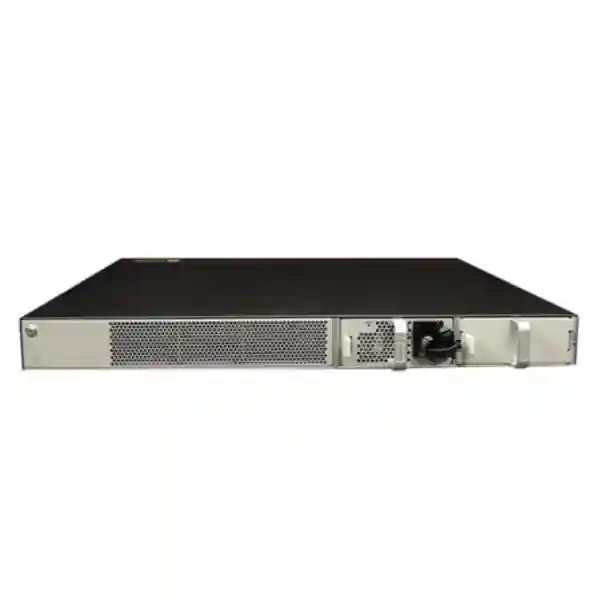
Compact rack footprint
A 43.6 mm high chassis designed for standard enterprise racks, with the built-in AC architecture helping reduce depth compared with modular-power variants in the same family.
The S5731-S32ST4X-A is approximately 43.6 mm high, 442 mm wide and 220 mm deep. The compact depth is valuable in wall-mount cabinets and shallow telecommunications racks where a conventional 400 mm-plus enterprise switch can create clearance problems around doors, patch leads and power strips. Rack design should still reserve adequate room for optical bend radius, airflow and service access. Fiber patch cords should not be bent sharply against the cabinet door, and technicians should be able to remove or insert SFP modules without pulling adjacent patch leads under tension.
Huawei lists an Ethernet management port, an RJ45 console port and USB 2.0 support for this hardware group, together with a 1.4 GHz four-core CPU, 2 GB memory and 1 GB flash. These resources support the control plane, protocol processes, management functions, logs and software operations. They should not be confused with packet-forwarding throughput, because high-speed data forwarding is handled by dedicated switching hardware rather than the general-purpose control CPU.
Forwarding performance, switching capacity and real network throughput
A specification such as 125 Mpps is most useful when interpreted as an indication of the platform’s packet-processing capability under the vendor’s test methodology. Packet rate becomes important when traffic consists of many small frames, because a switch handling a large number of minimum-sized Ethernet packets performs more forwarding decisions per second than a switch carrying the same bit rate in large frames. For a typical enterprise campus, actual utilization is usually driven by a mixture of application flows: client-server traffic, cloud access, voice, video, surveillance, backups, storage traffic, management protocols and east-west communications between local systems. The S5731-S32ST4X-A’s published forwarding figure places it comfortably in the role of a high-density fixed switch rather than an entry-level unmanaged access device.
The published switching capacity should also be read carefully. Huawei presents 216 Gbit/s as the device switching capability and 672 Gbit/s as the system switching capability for this model. For solution sizing, the useful question is not simply whether one number is larger than the arithmetic total of all front-panel port speeds. A network architect should map expected simultaneous traffic, oversubscription, uplink use, link aggregation and failure conditions. If all twenty-four SFP access ports are heavily used while multiple copper ports are also active, the four 10GE uplinks become the obvious boundary that determines how much traffic can leave the switch toward upstream layers at a particular moment.
That does not automatically mean the design is undersized. Enterprise access networks are commonly oversubscribed because user and endpoint traffic is bursty, and not every access port sends line-rate traffic toward the core simultaneously. The correct oversubscription ratio depends on workload. Office clients may tolerate a substantially higher access-to-uplink ratio than backup servers, media production systems, dense virtualization hosts or storage traffic. Designers should therefore collect realistic traffic data where possible instead of assigning a universal ratio.
For a Dubai office campus, hotel, school, hospital wing, industrial facility or distributed branch aggregation point, FourTeck typically treats the four 10GE SFP+ interfaces as a design resource rather than merely an uplink count. They can be allocated to a pair of upstream switches, an Eth-Trunk, a local server or appliance, a downstream aggregation segment or a staged migration. The final topology should reserve enough resilience that a single uplink or upstream-device failure does not force all traffic through a path that was never sized for failover conditions.
Why the 24 optical access ports are important
Many enterprise access switches are built around copper ports with only a small number of optical uplinks. The S5731-S32ST4X-A reverses that emphasis by making fiber a major part of the access layer. This is valuable when endpoints are separated by distances beyond conventional horizontal copper design, when there is electrical-noise exposure, when building-to-building connections require galvanic isolation, or when the organization’s structured cabling strategy already uses fiber to telecommunications rooms, cabinets or specialized devices.
The first design decision is the optic type. A Gigabit SFP link may use multimode or single-mode transceivers depending on distance and installed fiber. The connector, wavelength, link budget and fiber grade must match on both sides. For 2.5GE operation, compatibility becomes more specific: the switch software release, port mode, optic coding and remote interface must all support the selected rate. A generic assumption that every 1G SFP will automatically operate at 2.5G would be unsafe. For procurement, the bill of materials should list exact transceiver part numbers and expected operating mode instead of treating optics as interchangeable accessories.
Fiber also changes operational practice. Cleanliness becomes critical because microscopic contamination on connector end faces can create insertion loss, reflections and intermittent faults. Patch-panel labeling, polarity control and optical power testing should be part of handover. Where the switch aggregates fibers from multiple floors or buildings, consistent labeling between distribution frames, patch panels and switch ports reduces troubleshooting time dramatically. A strong deployment standard records the source and destination of each strand, optic type, wavelength, interface description and logical service.
The S5731-S32ST4X-A therefore works well as a compact fiber concentration point. It can aggregate remote cabinets, media converters, industrial Ethernet devices, access switches or fiber-fed endpoints while the eight copper interfaces remain available for nearby equipment. The combination reduces the need for external media converters, which can otherwise add power supplies, unmanaged failure points and confusing cabling to a rack.
10GE SFP+ uplinks: topology choices for campus and aggregation networks
Four 10GE SFP+ interfaces give the S5731-S32ST4X-A enough uplink flexibility for several common enterprise designs. A simple branch or small campus might use two 10GE uplinks in an Eth-Trunk toward one upstream switch, leaving two ports for expansion. A more resilient design can distribute uplinks across two upstream devices where the architecture and software support the intended multi-device redundancy. Another option is to dedicate a 10GE interface to a high-throughput local appliance or server while retaining multiple uplinks toward the core.
The optic and fiber choice must match the actual distance. Short-range multimode optics may be appropriate within a building or data room, while single-mode optics are typically chosen for longer campus runs. Link budget, connector loss, number of patch points and environmental conditions should be checked before installation. In the UAE, outdoor or inter-building pathways may experience higher temperatures than air-conditioned IT rooms, so cable specification and enclosure planning should account for the actual route, not only the conditions at the switch.
Where uplink aggregation is used, LACP is generally preferred over static bundling because it provides protocol-based member negotiation and helps detect certain configuration mismatches. Huawei’s CloudEngine S5731-S feature set includes LACP and Eth-Trunk functions. The logical trunk should be designed with hashing behavior in mind: one high-volume flow does not necessarily spread evenly across all physical members, because load distribution commonly uses header fields to keep packets of the same flow in order. For applications dominated by a few large flows, the aggregate link’s practical behavior can differ from a simple sum of member bandwidth.
Resilience testing should include the loss of one physical uplink, one optic, one fiber path and, where applicable, one upstream device. The goal is not only to see whether connectivity survives but also to verify convergence time, remaining bandwidth, routing adjacency behavior, spanning-tree state, application impact and monitoring alerts. A redundancy design that has never been failure-tested is only a diagram.
Layer 2 switching and VLAN design
64K MAC scale
The series supports up to 64,000 MAC entries, helping it serve dense campus and aggregation segments with large endpoint populations.
VLAN flexibility
The platform supports a broad VLAN feature set including interface-, protocol-, IP subnet- and MAC-based assignment options in the family software.
Loop protection
Spanning-tree and Ethernet ring mechanisms can be selected according to topology, convergence requirements and interoperability constraints.
Link aggregation
LACP and Eth-Trunk support allow multiple physical links to operate as one logical connection where the architecture requires additional bandwidth or redundancy.
A robust campus configuration starts by separating logical services before port-by-port configuration begins. Typical VLAN groups might include corporate users, voice, cameras, building management, guest services, network infrastructure, servers and out-of-band management. The exact segmentation model should reflect security policy, broadcast containment and routing boundaries. A common mistake is to create numerous VLANs without a routing or security rationale; another is to use one flat VLAN because it appears simpler. Both extremes create operational issues. Segmentation should have a purpose that can be described, documented and monitored.
Trunk ports between switches should carry only the VLANs required at the far end. Allowing every VLAN on every trunk may simplify initial deployment but increases the blast radius of mistakes and can carry unnecessary broadcasts across the network. Native or untagged VLAN behavior should be standardized, and unused access interfaces should be administratively disabled or placed into a non-routed quarantine VLAN. Interface descriptions should identify the connected device or patch-panel destination.
For networks with mixed vendors, interoperability deserves specific lab testing. Huawei documents VBST compatibility with common per-VLAN spanning-tree approaches and provides features intended to ease coexistence with other environments. Even when protocols are standards-based, differences in defaults, timers, priority selection, VLAN handling and link aggregation can cause surprises. A staged migration should test the exact neighboring platforms, software releases and intended features before a live cutover.
Layer 3 routing: access switch, aggregation switch or routed edge?
The CloudEngine S5731-S software family supports a broad Layer 3 feature set that includes static routing, OSPF, BGP, IS-IS, RIP, policy-based routing and VRF functions, together with IPv6 protocols such as OSPFv3, BGP4+ and IS-IS for IPv6. Huawei’s current datasheet also lists a 32K IPv4 route scale and 8K IPv6 route scale for the family. This gives the platform far more routing capability than a basic Layer 2 access switch and allows it to participate directly in routed campus designs when the required license and software feature set are in place.
Static routing can be appropriate for small, predictable topologies where few routes change and simplicity is important. Dynamic routing becomes more useful as the number of links, upstream paths and failure scenarios grows. OSPF is common in enterprise networks because it provides standardized link-state routing, while BGP can be valuable for policy control, large-scale route exchange or integration with WAN and data-center designs. IS-IS is also supported and may be selected by organizations that standardize on it internally. The key is to choose one routing approach that the operations team can troubleshoot confidently rather than enabling multiple protocols without a clear architecture.
VRF functionality helps separate routing domains on the same physical switch. This can be useful for isolating departments, tenants, operational technology, management traffic or shared-service environments. Segmentation at Layer 3 should be paired with explicit security policy. A VRF creates routing separation, but organizations still need to define where traffic is permitted to cross between segments and whether that crossing occurs on the switch, a firewall or another security device.
In many UAE enterprise designs, the best placement of inter-VLAN routing depends on security requirements. If east-west inspection is mandatory, routing certain sensitive VLANs through a firewall may be more appropriate than routing them directly on the access or aggregation switch. For environments where performance and local convergence matter more than inspection between every VLAN, routed SVIs on the S5731-S32ST4X-A can reduce unnecessary hairpin traffic. FourTeck’s Firewall Dubai team can align switch segmentation with firewall zones and inspection policy so routing and security are designed together rather than as separate projects.
iStack, resilience and failure-domain design
Huawei lists service-interface-based stacking for the CloudEngine S5731-S family. Stacking allows multiple compatible switches to operate as a single logical system for selected management and forwarding functions. This can simplify topology and provide link or device redundancy, but it should not be treated as a universal requirement. Whether stacking is the right design depends on the number of switches, physical proximity, software compatibility, maintenance model and the organization’s preference for shared versus independent control planes.
The major advantage of a stack is operational simplicity: one logical device can reduce the number of separate configurations and enable links from downstream or upstream devices to terminate on different physical members while participating in one logical aggregation. The trade-off is that the stack becomes a shared operational domain. Software upgrades, configuration errors and certain control-plane problems can potentially affect multiple members. For critical sites, the design review should compare stacking with independent switches using dynamic routing or multi-chassis techniques supported by the broader architecture.
Regardless of the chosen approach, resilience should be defined as a set of failure cases. These include switch failure, power-feed loss, optic failure, fiber cut, upstream-device failure, routing neighbor loss and software maintenance. Because the S5731-S32ST4X-A uses a built-in AC supply, power redundancy is generally achieved outside the chassis through the site power architecture rather than by inserting a second hot-swappable PSU into this particular model. A rack-level UPS, dual-fed PDU arrangement where applicable, generator-backed circuits and redundant upstream paths can all contribute to availability, but each must be matched to the site’s electrical design.
High availability also depends on observability. SNMP, logs, alarms, NTP synchronization, interface counters and flow visibility should be integrated into monitoring before the site is considered complete. A redundant topology that fails silently can leave the organization operating on one remaining path for days, turning the next minor fault into a major outage. Alarm thresholds and escalation ownership should be part of the handover documentation.
Security capabilities and secure campus operation
A campus switch sits close to users and endpoints, so access-layer security is not optional. The S5731-S family includes ARP security functions, anti-spoofing controls, ACLs, user authentication mechanisms, secure management options and traffic-analysis capabilities that can contribute to a layered defense. The platform also supports packet filtering from Layer 2 through Layer 4, with IPv4 and IPv6 ACL resources available for policy enforcement. These controls should be designed as part of an overall security architecture rather than enabled one by one without understanding traffic flows.
At a minimum, management access should be separated from user traffic. Administrators should prefer secure protocols such as SSH and HTTPS where supported and disable unnecessary services. SNMPv3 is preferable when the monitoring platform supports it because it adds authentication and privacy capabilities compared with earlier SNMP versions. Management-plane ACLs can restrict which networks or hosts are allowed to reach the switch. Local accounts, AAA integration, privilege levels and configuration backups should follow the organization’s access-control policy.
At the edge, DHCP snooping, ARP protection and source-validation mechanisms can help reduce the impact of rogue services and address-spoofing attacks when configured correctly. These features require careful trust-boundary design. For example, an uplink toward an authorized DHCP server or relay path may need different treatment from a user-facing access port. Incorrect trust configuration can block legitimate traffic, so deployment should include test cases for normal client address assignment, renewal, roaming and failover.
802.1X or other authentication methods can be introduced where the identity architecture supports them. Network access control projects should plan for devices that cannot perform interactive authentication, such as cameras, printers, building-management controllers and industrial equipment. MAC-based or policy-based alternatives may be used for exceptions, but exceptions should be inventoried and monitored rather than becoming a permanent bypass for large portions of the network.
Switch security also includes configuration hygiene: unused ports disabled, default credentials removed, time synchronized, logs exported, software maintained, backups validated and management access restricted. These operational controls often have more day-to-day security value than an advanced feature that was enabled once and never monitored.
QoS, multicast and application-sensitive traffic
Huawei documents eight priority queues and scheduling mechanisms including Priority Queuing, Weighted Deficit Round Robin and combined PQ+WDRR for the S5731-S family. These capabilities allow a network team to define how traffic is treated when interfaces become congested. QoS is most valuable when it protects latency-sensitive applications during contention. It cannot create bandwidth that does not exist, and an overly complex policy may be harder to operate than a simple, well-documented class model.
Voice, interactive video, control traffic and business-critical applications may receive different treatment from bulk transfers or guest traffic. The first task is classification: deciding where traffic markings are trusted and where the switch should remark them. User endpoints should not automatically be allowed to claim the highest priority. Trust boundaries commonly begin at controlled devices, authenticated phones, access points or network edges where policy can validate the source.
The family also supports IGMP snooping, MLD snooping and Layer 3 multicast functions including PIM. This is useful for IPTV, video distribution, market data, certain building systems and other one-to-many applications. Without proper multicast control, traffic can flood unnecessary ports and consume bandwidth. With snooping and routing configured correctly, streams are forwarded only where receivers have expressed interest, subject to the selected multicast architecture.
For hotels, campuses and education networks in Dubai, multicast design often becomes important when IPTV or digital signage is present. The network should define querier placement, VLAN scope, uplink behavior and failure handling before large-scale rollout. Testing should include channel changes, receiver joins/leaves and upstream interruptions, not just a single static stream.
Management, telemetry and automation
The S5731-S platform supports familiar operational tools including ping, traceroute, NQA, NTP, SNMP, RMON, NetStream, HTTPS and NETCONF/YANG. These interfaces allow the switch to fit into both traditional CLI-driven operations and more automated management models. The right choice depends on the organization’s tooling maturity. A small site may rely on CLI, SNMP and centralized configuration backups; a larger enterprise may use controller-based operations, telemetry, templates and API-driven workflows.
NETCONF/YANG is particularly useful when infrastructure teams want machine-readable configuration and state rather than screen-scraping CLI output. Model-driven automation can improve repeatability, but it requires disciplined source-of-truth data and change control. Automating a poor configuration standard simply makes mistakes faster. A sensible progression is to standardize interface templates, VLAN naming, routing policy, NTP, logging, AAA and monitoring first, then automate those known-good patterns.
NetStream can assist with traffic visibility by exporting flow information for analysis. Flow data helps answer questions that raw interface utilization cannot: which hosts are communicating, which applications dominate bandwidth, whether traffic patterns changed after a migration and which destinations consume the most capacity. Flow telemetry should be balanced against collector capacity and the chosen sampling or export configuration.
NQA provides active measurement functions that can be used for reachability and performance checks. Combined with routing or monitoring, active probes can help detect conditions that a simple link-up/link-down alarm misses. For example, an interface may remain electrically up while an upstream service becomes unreachable. Monitoring should therefore combine physical status, protocol state, utilization, errors, optical levels where available and end-to-end service checks.
Organizations that need design, deployment or managed operational support around this platform can integrate switching work with broader infrastructure services through FourTeck IT Services UAE, including documentation, rack integration, migration planning, testing and post-deployment support.
VXLAN and advanced virtualization: understand the licensing boundary
Huawei’s S5731-S family can support VXLAN Layer 2 and Layer 3 gateway functions, but the current datasheet identifies these VXLAN gateway capabilities as requiring an additional license. That distinction matters during solution design. Hardware capability does not automatically mean every advanced software function is active on every delivered unit. A project that depends on VXLAN, BGP-EVPN or other licensed features should confirm the exact software release and license entitlement in the commercial bill of materials before purchase.
VXLAN can be valuable when an organization wants to extend logical Layer 2 or Layer 3 segments over an IP underlay, build virtualized campus fabrics or automate network segmentation at greater scale. It introduces new operational concepts such as VTEPs, VNIs, underlay routing and overlay control. Those capabilities should be adopted because they solve a defined architectural problem, not simply because they are available. For a small campus with a few VLANs, a conventional routed design may be easier to operate and troubleshoot.
If VXLAN is part of the requirement, the design workshop should establish the underlay protocol, loopback addressing, VNI plan, gateway placement, redundancy model and controller or management approach. Interoperability with existing core switches, firewalls and data-center infrastructure should be validated. Licensing, software support and upgrade paths should be documented alongside the technical diagram.
The same procurement discipline applies to other software features. Feature tables commonly describe a family or release train, while an order is for a specific model, software image and entitlement. FourTeck therefore recommends validating each mandatory feature against the precise project configuration rather than relying on a generic family feature list.
Power, thermal behavior and physical installation
The S5731-S32ST4X-A uses a built-in AC power supply. Huawei lists a rated AC input range of 100 V to 240 V at 50/60 Hz for the AC model, with a broader maximum AC range of 90 V to 290 V under the specified frequency range. The model’s compact 220 mm depth makes it attractive for enterprise racks and telecommunications cabinets, but installers should not treat shallow depth as permission to ignore airflow. The hardware specification shows built-in dual fans and a side-oriented airflow path, with air entering from the front and left side and exhausting from the right side for the A/D chassis group. Rack layout must keep these intake and exhaust areas clear.
Huawei lists maximum power consumption of 94 W for the S5731-S32ST4X-A/D hardware group. Typical measured values in the datasheet are lower under the specified traffic conditions, but electrical design should use the appropriate worst-case or engineering allowance rather than the most optimistic runtime value. UPS sizing should include the switch, optics, any associated equipment in the rack and the required backup duration. Where the switch serves a critical aggregation role, UPS monitoring and battery maintenance are as important as nominal VA capacity.
The long-term operating temperature is listed as -5°C to 45°C up to 1,800 meters altitude. Above 1,800 meters and up to 5,000 meters, the allowable operating temperature is reduced by 1°C for each additional 220 meters of altitude. Relative humidity is specified at 5% to 95% non-condensing. These values describe the device’s supported environment, not a target operating condition. In Dubai and the wider UAE, network equipment should normally be installed in clean, conditioned spaces with stable cooling, because sustained high ambient temperatures can reduce component life and make fan noise and thermal margins worse.
Dust control is also important. Fine dust can accumulate on vents and heat sinks, especially in construction areas, warehouses and industrial sites. Cabinets should be located away from direct dust sources, and maintenance schedules should include visual inspection of airflow paths. When equipment is installed in non-office environments, enclosure rating, filtration and room design may matter as much as the switch’s published temperature range.
Fiber management deserves physical planning too. Use horizontal or vertical managers to protect bend radius, separate power leads from optical patch cords where practical, and leave enough service loop for maintenance without creating congested bundles across the front panel. Labels should remain readable after all ports are populated.
Deployment scenarios in UAE enterprise networks
Fiber-rich campus access
Where user zones, remote cabinets or specialist endpoints are already connected by fiber, the 24 SFP ports provide much higher optical density than conventional copper access switches. The four 10GE uplinks can connect the block back to a campus core or aggregation pair.
Building-to-building aggregation
A single switch can terminate fibers arriving from multiple buildings or telecommunications rooms, apply VLAN and routing policy, and forward traffic upstream over 10GE. Optical budget and lightning-protection strategy for inter-building pathways should be handled at the cabling layer.
Hospitality and IPTV networks
Hotels may combine fiber risers, IPTV multicast, back-office systems and multiple network zones. The switch’s optical density, multicast features, QoS and Layer 3 functions can support these designs when access control and service separation are properly engineered.
Education and multi-building sites
Schools and universities often require resilient links between blocks, laboratories, administrative areas and data rooms. Fiber access and 10GE uplinks create a compact aggregation option without moving immediately to a chassis switch.
Industrial and utility edge
Fiber is useful around electrically noisy environments and long runs. The enterprise feature set can provide segmentation and routing at an aggregation point, while enclosure, temperature, grounding and environmental requirements are validated separately for the actual site.
Data-room edge aggregation
The switch can aggregate lower-speed fiber links and hand traffic to higher-speed upstream infrastructure. For server-heavy environments, architects should verify oversubscription and flow patterns carefully so the four 10GE interfaces match expected peak demand.
The important common factor is that the S5731-S32ST4X-A is strongest where optical connectivity is a design requirement rather than an occasional uplink. Sites dominated by copper endpoints needing PoE should be evaluated against other CloudEngine models with PoE support. Selecting the correct port personality at the start avoids buying a technically capable switch that does not match the physical network.
Sizing methodology: how to decide whether one S5731-S32ST4X-A is enough
Switch sizing begins with a port inventory, but a professional design goes further. List every required endpoint, its media type, speed, VLAN or routing role, PoE requirement, redundancy requirement and expected growth. For this model, the critical counts are the twenty-four SFP access positions, eight copper Gigabit ports and four 10GE SFP+ ports. Reserve capacity for growth rather than filling every port on day one. A common target is to keep a practical percentage of ports free, but the exact reserve depends on how quickly the site changes and how difficult future expansion will be.
Next, map bandwidth demand. Count not only nominal endpoint speeds but also where traffic goes. Twenty access links sending mostly north-south traffic toward centralized applications place a different load on the uplinks than twenty links whose traffic remains local. Backups, surveillance recording, replication, media workflows and storage traffic can produce long-duration high utilization that differs from ordinary office bursts. Where these workloads exist, use traffic measurements from the existing network or application requirements from the project team.
Then model failure conditions. If two 10GE ports normally carry traffic and one fails, can the remaining path handle the expected peak? If the design uses two upstream switches, what happens during maintenance on one side? If a stack member or optical distribution point fails, which users are affected? Capacity planning should be performed for the degraded state, not only for normal operation.
The next step is feature validation. Create a list of mandatory functions such as OSPF, BGP, VRF, IPv6, multicast, 802.1X, VXLAN, NetStream or controller integration. Confirm software and licensing for each. Some organizations need only standard Layer 2/Layer 3 operation, while others require advanced fabric capabilities. The hardware can be the same while the software bill of materials differs materially.
Power and environment must be included in sizing. The built-in AC architecture is convenient, but sites demanding dual hot-swappable internal PSUs should choose a different variant or model. UPS capacity, cabinet depth, side airflow, fiber management and ambient temperature all determine installation suitability. A switch that fits electronically but blocks cabinet airflow or leaves no room for fiber bend radius is not properly sized for the site.
Finally, include operational capacity. The network team should be able to configure, monitor and troubleshoot the selected protocols. A complex routed fabric may reduce some manual tasks once fully automated, but it requires stronger design discipline and tooling. A simpler architecture may be preferable for a small IT team if it still meets availability and performance goals.
FourTeck can use this sizing process during presales consultation: port count, media, optics, distance, VLANs, routing, uplinks, redundancy, software, environmental constraints and support expectations are turned into a bill of materials rather than quoting the switch in isolation.
Optics, fiber type and cabling selection
The optical ports are only useful when the transceiver and cabling plan is correct. Start with distance and installed fiber type. Multimode fiber is common for shorter in-building links, while single-mode fiber is preferred for longer distances and many campus backbones. The exact supported reach depends on the selected Huawei-compatible transceiver and the condition of the fiber plant. Never choose an optic solely by connector appearance; wavelength, fiber mode, transmit power, receive sensitivity and link budget all matter.
Calculate the optical loss budget when a link passes through multiple patch panels, connectors or splices. Each connection introduces loss, and aged or contaminated connectors can add more than expected. The received optical power should sit within the transceiver’s supported range with enough engineering margin for temperature, aging and future patching changes. Very short single-mode links can also require attention if a transceiver’s receive power could be exceeded, depending on the optic type.
For the twenty-four 1/2.5GE SFP ports, validate the intended rate before ordering. Huawei notes that the ports operate as GE by default and that 2.5GE mode can be set from V200R023C00 onward. That is a software capability statement, not a guarantee that every legacy SFP optic or remote endpoint will negotiate or operate at 2.5GE. The transceiver pair and far-end interface must be confirmed for the desired speed.
For the 10GE SFP+ uplinks, choose optics based on the actual path. Direct-attach copper may be appropriate within a rack when supported by both ends and within cable reach. Optical 10GE is usually preferred for longer paths, electrical isolation and structured cabling. If the uplink crosses buildings, single-mode fiber is often the practical choice, but the project should still validate the exact route and optic specification.
Documenting optic serials and port assignments can simplify maintenance in larger deployments. When a link degrades, technicians can compare optical power, errors and transceiver information against baseline values instead of replacing components blindly. Good documentation turns fiber troubleshooting from guesswork into a structured process.
UAE deployment considerations: climate, procurement and lifecycle planning
A network switch deployed in the UAE is normally installed in air-conditioned IT space, but the wider environment still affects design. Outdoor pathways, rooftop cabinets, warehouses, construction zones and telecom rooms without reliable cooling can experience temperatures far above office conditions. The S5731-S32ST4X-A’s published operating limits should be treated as boundaries, not as an excuse to run the switch continuously at the thermal ceiling. Stable cooling, clean airflow and sensible rack spacing improve reliability and reduce the risk of thermal alarms during HVAC faults.
Power quality and backup time should also be planned. Even where mains power is stable, short interruptions can reset network equipment and create a site-wide application outage. UPS design should account for the switch’s maximum consumption, connected rack equipment, desired runtime and battery aging. If the switch is part of a broader resilient architecture, the upstream switches, firewalls and WAN equipment must remain powered too; keeping only the access switch online does not preserve service.
Procurement should confirm hardware region, power cord, software version, licenses, support coverage and optic compatibility. Part numbers that look almost identical may differ by power architecture or bundled components. The S5731-S32ST4X-A is the integrated AC variant; the non-A and D versions use different power arrangements. A quotation should therefore state the full model string rather than abbreviating it to S5731-S32ST4X.
Lifecycle planning is equally important. Ask whether the new switch must coexist with older Huawei or third-party equipment, whether configuration templates already exist, whether future software releases are required for security or feature reasons, and how replacement units will be handled. Keeping one spare onsite may be justified for critical remote locations where delivery time would otherwise extend an outage. For centrally located Dubai sites with rapid logistics, a support contract with defined response may be more appropriate.
For projects extending beyond the UAE, FourTeck can also coordinate broader sourcing and regional infrastructure requirements through FourTeck Global, while maintaining a consistent product and configuration standard across sites.
Migration planning from an existing access or aggregation switch
Replacing a production switch requires more than copying interface numbers. Begin by exporting the current configuration and mapping every connected device. Record VLANs, trunks, link aggregates, routing neighbors, spanning-tree roles, DHCP functions, ACLs, QoS policies, multicast settings, management addresses and monitoring dependencies. Physical labels should be matched against the logical configuration so the migration team knows exactly where each cable or fiber will land.
If the current switch is from another vendor, translate intent rather than syntax. A command that appears equivalent may have different defaults or behavior. VLAN tagging, LACP timers, spanning-tree mode, route preference, MTU, DHCP snooping trust, multicast querier behavior and authentication are all areas where assumptions can cause disruption. Build the Huawei configuration from a design sheet and test it in a lab or isolated staging environment when the site is important.
A staged cutover can reduce risk. Preconfigure the new switch, load the approved software, verify licenses, set management and monitoring, insert optics, and test unused uplinks before the maintenance window. During migration, move one logical service group at a time when possible. Validate link state, VLAN reachability, routing adjacency and application behavior before proceeding. This provides a clear rollback point if a problem appears.
For optical links, compare received power and error counters after migration. A link that comes up is not necessarily healthy; marginal optical power can create intermittent errors under temperature or movement. For copper links, verify speed and duplex negotiation. For link aggregation, confirm all intended members are forwarding and that hashing is distributing traffic as expected.
After cutover, observe the network during a normal business cycle. Review interface utilization, discards, errors, CPU and memory trends, routing changes, logs, multicast behavior and user-reported issues. Final documentation should reflect the as-built state, not the original plan. The completed package should include configuration backup, rack and port mapping, IP addresses, optic inventory, software version, license record and support information.
Operations and maintenance after deployment
The most reliable switch is one that is monitored and maintained consistently. Establish a baseline after commissioning: normal interface utilization, CPU and memory levels, optical power, fan state, temperature, routing-neighbor count, MAC table size and error counters. Baselines help distinguish a genuine problem from normal variation. They also reveal slow trends, such as increasing uplink utilization or growing error counts, before they become outages.
Configuration backups should occur after every approved change and on a periodic schedule. Store them outside the device in a controlled repository. A backup is only useful if the recovery process is known, so teams should test restoration in a lab or spare unit when practical. Versioning configuration files also makes it easier to identify what changed before an incident.
Software maintenance requires planning. Review vendor advisories, new release notes and security information, then assess whether an upgrade is necessary for the features in use. Do not upgrade simply because a new image exists, but do not remain indefinitely on an obsolete release either. For stacked or redundant deployments, document the upgrade procedure, compatibility requirements and expected service impact. Backups and rollback steps should be ready before maintenance starts.
Monitoring should generate actionable alarms rather than endless noise. Useful alerts include link-down events on critical ports, high utilization sustained over time, CRC or optical errors, temperature warnings, fan problems, route-neighbor changes, authentication failures and configuration modifications. Thresholds should reflect the site’s normal behavior. A 70% uplink alarm may be useful on one network and meaningless on another.
Periodic physical inspection still matters. Check that vents are clear, fiber cords are not crushed, labels remain readable, rack doors close without pressing on connectors and no unauthorized equipment has been added. Network reliability is a combination of hardware quality, clean design and disciplined operations.
When the S5731-S32ST4X-A is the right fit — and when another model may be better
The S5731-S32ST4X-A is a strong fit when the network genuinely needs many fiber access interfaces, a modest quantity of local copper ports, four 10GE uplinks and mature enterprise Layer 2/Layer 3 software in a compact chassis. It is particularly attractive for optical aggregation points, building distribution, fiber-to-the-desk or fiber-to-zone architectures, mixed-media racks and environments where 24 optical links would otherwise require a larger or more expensive platform.
Another model may be more appropriate when the requirement is dominated by PoE. This switch does not provide PoE+, so powering phones, wireless access points and cameras directly from the access switch is not its purpose. An all-copper PoE access model can be a better fit for conventional user floors. Likewise, if the site requires dual field-replaceable internal PSUs in every switch, the integrated AC architecture of the -A variant should be reviewed against models with modular redundant power.
Higher-speed campus cores may require 25GE, 40GE or 100GE uplinks that this model does not provide. The four 10GE interfaces are well suited to many access and aggregation roles, but they should not be stretched into a core use case where projected traffic already exceeds them. Conversely, a very small branch with only a handful of copper endpoints would not make good use of the 24 SFP positions and may be better served by a simpler fixed switch.
The selection should therefore be driven by port media, bandwidth, resilience, power, software features and growth. Product family prestige is not a sizing method. FourTeck’s presales process can compare the requested topology against the exact port map and feature requirements so the final SKU aligns with the real network.
Technical feature reference for solution architects
| Model | Huawei CloudEngine S5731-S32ST4X-A |
| Access interfaces | 24 x 1/2.5GE SFP plus 8 x 10/100/1000BASE-T |
| Uplink interfaces | 4 x 10GE SFP+ |
| Forwarding performance | 125 Mpps |
| Switching capacity | 216 Gbit/s device switching capability / 672 Gbit/s system switching capability |
| Power | Built-in AC power supply; rated AC input 100–240 V, 50/60 Hz |
| PoE | Not supported |
| Dimensions | 43.6 x 442 x 220 mm, 1U |
| Control-plane resources | 1.4 GHz four-core CPU, 2 GB RAM, 1 GB flash for the model group |
| Management | ETH management, RJ45 console, USB 2.0, SNMP, HTTPS, NETCONF/YANG, RMON, NetStream and other VRP tools |
| Routing | Static routing, OSPF, BGP, IS-IS, RIP, PBR, IPv6 routing and multicast functions within the supported software feature set |
| Stacking | Service-interface-based stacking supported in the S5731-S family |
| VXLAN | Layer 2 and Layer 3 gateway functions supported with additional license according to Huawei’s current datasheet |
| Operating environment | Long-term -5°C to 45°C at 0–1,800 m; derating above 1,800 m; 5%–95% RH non-condensing |
Specifications and feature availability can vary by software release, license, optic choice and deployment mode. Final quotations should validate the exact hardware, software and support configuration for the project.
Licensing, support and procurement checklist
A production order should describe more than the chassis. Confirm the exact S5731-S32ST4X-A model, required transceivers, software version expectations, advanced feature licenses, rack accessories, power lead type and vendor support. If the project depends on VXLAN, controller integration or a specific routing feature, list that capability explicitly in the request for quotation. This prevents a situation where the hardware arrives but the required software entitlement is missing.
Optics should be listed by quantity and type for both ends of each link. Include spares if the network is critical or remote. Fiber patch cords should specify connector type, fiber mode and length. Where existing fiber is being reused, testing and certification may be more valuable than simply ordering new optics. Old, damaged or poorly labeled fiber can undermine a new switch deployment.
Support planning should define who opens vendor cases, where serial numbers are recorded, what response time is expected and whether a spare unit is held locally. Configuration backups and software files should be available to authorized engineers. For multi-site rollouts, standardize one approved software baseline and configuration template to reduce variation between branches.
Finally, decide whether the project requires supply only, installation, migration, after-hours cutover, testing, documentation, training or managed support. Stating the service scope early produces a more accurate commercial proposal and avoids treating implementation as an afterthought.
Frequently asked technical questions
Does the S5731-S32ST4X-A support PoE?
No. This model is designed for data switching and does not provide PoE+. If phones, access points or cameras must be powered from the switch, select a PoE-capable CloudEngine model or use another approved powering method.
Can all 24 SFP ports run at 2.5GE?
Huawei states that ports GE 9–32 are GE by default and can be configured for 2.5GE mode from V200R023C00 onward. The actual link still depends on compatible optics and a far-end interface that supports the selected rate.
Can it perform Layer 3 routing?
Yes. The S5731-S family supports static routing and dynamic protocols including OSPF, BGP and IS-IS, plus IPv6 routing features. Validate the exact software and license required for the project.
Does it have redundant internal power supplies?
The -A model uses a built-in AC power design rather than dual field-replaceable PSU bays. If internal PSU redundancy is mandatory, review another variant or platform and design rack power resilience accordingly.
What is the role of the four 10GE ports?
They are commonly used as uplinks toward aggregation or core switches, as members of an Eth-Trunk, or for high-speed local connections. The exact allocation depends on the topology and resilience design.
Is VXLAN included by default?
Huawei’s current datasheet marks VXLAN Layer 2 and Layer 3 gateway functions as requiring an additional license. Confirm license entitlement before designing the switch around VXLAN.
Decision recap for the Huawei CloudEngine S5731-S32ST4X-A
Choose this model when your design is centered on optical access or compact aggregation: up to twenty-four SFP links, eight local copper Gigabit ports and four 10GE SFP+ interfaces in one rack unit. It offers mature enterprise switching and routing functions, IPv6, multicast, QoS, stacking, security controls and model-driven management capabilities while keeping the hardware footprint compact.
Before purchase, confirm five items: the exact number and type of optics, required software release, any advanced licenses, uplink topology under normal and failure conditions, and the site’s power/airflow design. If PoE, dual modular PSUs or uplinks faster than 10GE are mandatory, compare alternatives rather than forcing the S5731-S32ST4X-A into a role it was not designed to fill.
For most successful deployments, the key advantage is not one isolated specification. It is the port mix: high optical density plus a small number of copper ports and multiple 10GE uplinks, combined with a feature-rich VRP platform. That combination can reduce device count and simplify mixed-media aggregation in enterprise networks.
Quotation input checklist
To receive an accurate technical and commercial proposal for the S5731-S32ST4X-A in Dubai or elsewhere in the UAE, provide as many of the following project details as possible. This prevents over-ordering optics, under-sizing uplinks or missing a software requirement.
Plan the switch, optics and deployment as one system
The Huawei CloudEngine S5731-S32ST4X-A can be an excellent fit for UAE networks that need dense optical access and 10GE aggregation, but the best result comes from treating the chassis, transceivers, fiber plant, routing policy, security segmentation, power and operational monitoring as one design. FourTeck can help translate an existing network diagram or project requirement into an itemized bill of materials and implementation plan.
For broader infrastructure planning, visit FourTeck’s approved UAE and global service channels referenced above or use the contact action below for a project-specific quotation.
Optic type and distance
Uplink design
Required licenses
Installation location
Support expectation

Reviews
There are no reviews yet.