
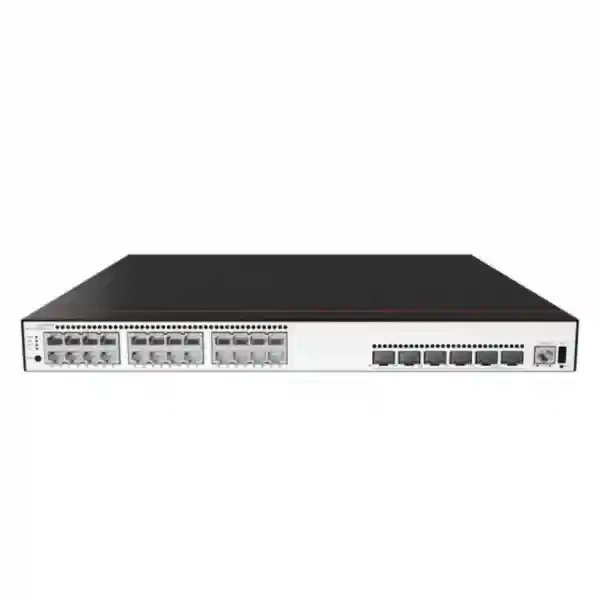
Huawei CloudEngine S5735-S24T4XE-Q-V2
A resilient 24-port Gigabit Ethernet campus switch with four 10GE SFP+ uplinks, two dedicated stack ports, enhanced Layer 3 routing, mature IPv6 support, intelligent operations capabilities, and 1+1 power backup for UAE enterprise access and aggregation networks.
4 × 10GE SFP+
2 × Stack Ports
1+1 Power Backup
UAE deployment fit
Designed for wired user access, server and appliance attachment, branch aggregation, campus distribution edge, and multi-VLAN enterprise environments where reliable uplinks and Layer 3 control are required.
For quotation planning, FourTeck can align the switch with compatible optics, redundant power, rack design, fiber distances, routing policy, VLAN architecture, and lifecycle support.
International regional specification for the Q-V2 model.
Device/system switching capacity notation used by Huawei outside mainland China.
Copper Gigabit Ethernet access for endpoints and downstream devices.
SFP+ uplinks for distribution, core, server, firewall, or aggregation connectivity.
What the Huawei CloudEngine S5735-S24T4XE-Q-V2 is designed to do
The Huawei CloudEngine S5735-S24T4XE-Q-V2 is positioned in the CloudEngine S5735-S-V2 family as a standard Gigabit Ethernet campus switch. Its hardware profile is straightforward and practical: twenty-four 10/100/1000BASE-T electrical interfaces serve user devices and downstream network equipment, four 10 Gigabit Ethernet SFP+ interfaces provide higher-speed uplink paths, and two stack interfaces enable multiple switches to operate in a coordinated topology. Unlike PoE-oriented variants in the broader family, this specific Q-V2 model is listed without PoE. That distinction matters for procurement because it makes the switch particularly suitable where access points, phones, cameras, and other powered devices receive electricity from separate injectors, dedicated PoE access switches, local adapters, or another power architecture.
In a UAE enterprise network, the model can be considered for office floors, education blocks, clinics, retail administration networks, warehouses, hospitality back-office networks, commercial towers, branch offices, server rooms, and campus aggregation points where Gigabit access remains appropriate and 10GE northbound capacity is required. The four SFP+ interfaces are valuable because they allow the access layer to avoid being constrained to a single uplink. Depending on the topology and supported configuration, links can be assigned toward redundant distribution switches, used for link aggregation, connected to security appliances, or reserved for server and storage-facing workloads. The two dedicated stack ports preserve those SFP+ interfaces for actual network traffic instead of consuming uplink ports solely for stacking.
Huawei describes the S5735-S-V2 platform as supporting wire-speed forwarding, enhanced Layer 3 functions, mature IPv6, flexible Ethernet networking, and simplified operations and maintenance. For a buyer, the practical significance is that this is not merely an unmanaged access device. It can participate in structured enterprise designs that separate users and services into VLANs, route between networks, exchange routes with upstream infrastructure, protect gateway availability with first-hop redundancy, and expose operational data for monitoring and troubleshooting. FourTeck can help map these capabilities to a specific bill of materials and deployment standard through its UAE technology solutions practice.
Port architecture and practical traffic design
24 Gigabit copper ports
The twenty-four RJ45 data ports support 10/100/1000BASE-T Ethernet. They are the normal attachment point for desktops, printers, thin clients, building controllers, non-PoE wireless devices, IP endpoints with external power, small servers, test equipment, security appliances, and downstream access switches. When planning the access layer, engineers should estimate not only the number of active endpoints but also spare capacity. A practical design often reserves some ports for growth, maintenance, temporary equipment, or future moves and changes rather than operating at 100 percent port occupancy from day one.
Four 10GE SFP+ uplinks
Four SFP+ slots give the switch substantially more uplink flexibility than a device with one or two high-speed ports. The ports can be populated with supported optical transceivers or other compatible media options according to Huawei’s approved component matrix and the required distance. In a dual-distribution architecture, uplinks can be divided across separate upstream switches. In compact sites, a pair may form an aggregated uplink while remaining interfaces connect to a firewall, server, or secondary network path. Optics must be selected by wavelength, fiber type, connector, distance, and remote-end compatibility.
Two stack ports
Dedicated stack interfaces are valuable because stacking can be implemented without sacrificing normal user or SFP+ uplink interfaces. In a properly engineered stack, multiple physical switches can be managed and designed as a coordinated switching system, simplifying some forms of redundancy, link aggregation, and access-layer expansion. The detailed stack size, cable type, topology, version compatibility, and software prerequisites should always be checked against the exact Huawei release and hardware documentation used in the project.
Non-PoE by design
The Q-V2 model is specified without PoE. This prevents a common purchasing error: assuming that every S5735-S family member powers access points or IP phones. Where endpoint power is required, the network bill of materials should include an appropriate PoE-capable switch model or a separate power method. In environments where most endpoints are PCs, servers, appliances, or devices with local power, choosing a non-PoE switch can simplify the power budget and keep the access layer focused on data switching.
Performance numbers: how to interpret 132 Mpps and 176/520 Gbps
For the Huawei international product specification applicable outside mainland China, the CloudEngine S5735-S24T4XE-Q-V2 is listed with 132 Mpps forwarding performance and switching capacity expressed as 176 Gbps/520 Gbps. Huawei explains the slash notation on the family page as a distinction between device switching capability and system switching capability. These figures should be interpreted in the context of Huawei’s regional documentation rather than mixed with figures shown on mainland-China pages, where platform reporting conventions and published values may differ.
Packets per second is especially relevant when considering workloads composed of many small packets. A network may consume relatively little bandwidth while still producing a high packet rate. Voice signaling, transactional applications, telemetry, DNS, control traffic, and security appliances can create substantial packet processing demand without saturating nominal link bandwidth. Switching capacity, meanwhile, describes the aggregate traffic-handling capability of the switching system. Neither number should be treated as a promise that every real deployment will achieve a single universal application throughput because actual results depend on packet size, feature usage, topology, software, oversubscription, congestion, and connected systems.
For sizing, the correct question is not simply whether 176 Gbps is larger than the sum of current user traffic. Engineers should map access demand, uplink oversubscription, east-west traffic, server flows, backup windows, inter-VLAN routing, multicast, and failover conditions. A 24-port access switch can theoretically face a scenario in which many 1GE endpoints become active at the same time. Four 10GE uplinks offer useful headroom, but the actual uplink design should be driven by measured traffic and service-level requirements rather than by port counts alone.
Layer 2 segmentation for structured enterprise networks
The switch supports up to 4094 VLANs together with Voice VLAN and MUX VLAN functionality. VLANs remain one of the most important design tools in a campus network because they allow administrators to separate broadcast domains and apply different security, routing, quality, and operational policies to different categories of endpoints. A typical UAE office may use separate VLANs for corporate users, guest access, voice, CCTV transport, building management, printers, servers, network management, and contractors. The exact number of VLANs should be kept purposeful: more segmentation can improve control, but unnecessary fragmentation can increase operational complexity.
Huawei lists VLAN assignment methods based on MAC address, protocol, IP subnet, policy, and port. This flexibility can help organizations move beyond a strictly physical-port-centric design. Port-based VLANs remain common because they are easy to understand and troubleshoot, while policy-driven or identity-adjacent methods may support environments with more dynamic endpoint behavior. Voice VLAN can simplify separation of voice traffic when compatible endpoint behavior and network policy are implemented. MUX VLAN can be relevant where groups of users require controlled isolation or selective communication while sharing a larger VLAN structure.
MAC functions include automatic learning and aging, static, dynamic, and blackhole MAC entries, packet filtering based on source MAC addresses, and interface-based MAC learning limits. These features give administrators tools to control how endpoints are learned and to reduce the impact of unexpected device proliferation. MAC controls should not be treated as a complete security system on their own because MAC addresses can be spoofed. They are most effective when combined with authentication, access policy, network segmentation, monitoring, and upstream security controls.
For networks that need mixed-vendor compatibility, Huawei lists VBST interoperability with PVST, PVST+, and RPVST environments, as well as LNP functionality described as similar to DTP. Such interoperability claims are useful during migration from an existing switching estate, but real projects should validate the required protocol behavior in a lab or staged deployment. Multi-vendor spanning-tree behavior, VLAN propagation conventions, native VLAN handling, timers, and edge-port settings deserve particular attention before cutover.
Enhanced Layer 3 routing: more than basic access switching
Huawei lists static routing, RIPv1/v2, RIPng, OSPF, OSPFv3, ECMP, IS-IS, IS-ISv6, BGP, BGP4+, VRRP, and VRRP6 for the Q-V2 model. This protocol set gives the switch the ability to participate in substantially more sophisticated Layer 3 designs than a simple Layer 2 edge device. Static routes may be enough for small branches with a clear default path. OSPF is often better for enterprise campus networks that need dynamic convergence and structured area design. IS-IS may appear in larger routed environments. BGP can be relevant in designs that exchange larger or policy-controlled routing domains, although its use on an access-class switch should be justified by topology and operational requirements rather than enabled simply because the feature exists.
ECMP, or equal-cost multi-path routing, can distribute eligible traffic across multiple equal-cost paths, improving utilization and resiliency where the design provides parallel routed paths. VRRP and VRRP6 help create resilient default-gateway designs by allowing multiple routers or Layer 3 switches to coordinate a virtual gateway address. In a campus distribution context, this can reduce reliance on a single gateway device. The implementation should be aligned with failure domains, uplink design, spanning tree or routed access strategy, and upstream firewall architecture.
IPv6 support is important even for organizations whose current business applications remain predominantly IPv4. New operating systems, cloud services, service-provider networks, IoT platforms, and modern application frameworks increasingly encounter IPv6. A mature campus architecture should decide intentionally whether IPv6 will be enabled, blocked, dual-stacked, routed, or monitored. Ignoring IPv6 while endpoints self-configure it can create visibility gaps. The presence of RIPng, OSPFv3, IS-ISv6, BGP4+, and VRRP6 gives network teams options for a controlled dual-stack strategy.
Protocol availability can vary by software release, license entitlement, and regional commercial package. For production procurement, FourTeck recommends validating the required feature set against the exact VRP version and entitlement planned for the site. This is especially important when the project depends on advanced routing scale, specialized policy controls, centralized management, or integration with a broader Huawei campus solution.
Uplink design for UAE offices, campuses, and branches
The most consequential architectural decision around this switch is often the use of its four 10GE SFP+ interfaces. A small branch may require only one active 10GE uplink and one standby path, leaving two interfaces available for growth. A larger office floor may use two or four uplinks in link aggregation to increase total bandwidth and provide path redundancy. A campus design may connect each access switch or stack to two distribution switches so that the failure of an uplink, optic, patch lead, or upstream device does not isolate the entire access block.
Optic selection must be engineered rather than guessed. The correct transceiver depends on whether the link is multimode or single-mode fiber, the required distance, the fiber grade, the connector type, patch-panel path loss, remote-end transceiver support, and environmental conditions. Short in-building runs can often use multimode solutions, while campus buildings, warehouses, data halls, and geographically separated facilities may require single-mode optics. The procurement team should capture actual link distances and fiber test results where available. Buying an optic only by speed, without validating wavelength and fiber type, is a common cause of commissioning delays.
If uplinks terminate on a firewall, the firewall’s interface capacity and routing design should be examined carefully. Sending all inter-VLAN traffic through a security appliance can provide policy enforcement, but it can also create a bottleneck if the appliance is undersized. Some organizations perform local inter-VLAN routing on campus switches and send only north-south traffic through the firewall. Others intentionally centralize segmentation at the firewall. FourTeck’s Firewall Dubai engineering team can help align switching uplinks with firewall port speeds, high-availability design, transceiver type, and expected inspected throughput.
Uplink resilience should also account for maintenance. A design that survives accidental cable loss but fails whenever firmware is upgraded may not meet the actual availability objective. Dual-homing, stacked access, redundant upstream switches, first-hop redundancy, and maintenance procedures should be considered together. The best topology is the one that satisfies the required service level with a level of complexity the operations team can consistently support.
Stacking strategy and access-layer resiliency
Dedicated stacking can simplify the operational model when several access switches serve the same floor or cabinet. Instead of treating every chassis as an entirely isolated management and topology unit, an engineered stack can present a coordinated switching system. This may simplify link aggregation toward upstream switches because member links can originate from different physical units while participating in the same logical uplink design, subject to the platform’s supported stacking behavior and configuration rules.
Stacking should not be treated as automatic high availability. A stack reduces some failure scenarios but introduces its own design considerations. Stack cabling must be protected from accidental removal, member numbering should be documented, software versions must remain compatible, and power should be distributed sensibly across separate electrical sources where possible. Engineers should understand master or active-role election behavior, reboot impact, stack split conditions, upgrade methods, and what happens to traffic when an individual member fails. Operational runbooks should include procedures for replacing a member without introducing configuration ambiguity.
The S5735-S24T4XE-Q-V2 is specified with 1+1 power backup. The resilience benefit depends on how power modules and feeds are actually installed. Two modules connected to the same single PDU and the same upstream breaker do not deliver the same failure isolation as modules connected to independently protected power paths. In a server room or campus cabinet, one practical objective is to map each redundant power input to different PDUs or UPS-backed circuits where the facility permits. Power design is part of network availability and should be documented with the same care as link redundancy.
For sites using several stacked switches, spare strategy matters. Keeping a compatible replacement unit, correct stack cables, optics, and power modules can reduce mean time to repair. Configuration backups and a tested replacement procedure are equally important. Hardware redundancy without configuration discipline only solves part of the problem.
Operations, telemetry, and troubleshooting workflow
Huawei positions the S5735-S-V2 family around simplified operations and maintenance and supports telemetry-based data collection in the broader platform architecture. Telemetry is useful because conventional polling can miss short-lived events or provide data at relatively coarse intervals. Streaming or higher-frequency operational data can improve visibility into interface utilization, errors, packet drops, route behavior, and user-impacting conditions when integrated with compatible management and analytics systems.
A well-operated access switch should be monitored for more than whether it responds to ping. Useful indicators include uplink utilization, discard rates, CRC and physical-layer errors, interface flaps, MAC churn, CPU and memory trends, temperature and environmental alarms, routing adjacency changes, spanning-tree topology events, power-module state, stack health, and log messages. Baselines matter because an interface running at 65 percent average utilization may be normal for one site and a warning sign for another. Capacity planning becomes more accurate when the team has several weeks or months of real data.
Troubleshooting should follow layers. Physical checks confirm power, link state, optic type, fiber cleanliness, patching, and error counters. Layer 2 checks validate VLAN membership, trunk allowances, MAC learning, loop protection, and spanning-tree state. Layer 3 checks confirm interface addressing, ARP or neighbor discovery, routing tables, protocol adjacencies, gateway redundancy, and policy. Application testing then examines DNS, authentication, firewall rules, server availability, and latency. This sequence prevents teams from changing configurations randomly when the underlying fault is a damaged patch lead or incorrect VLAN assignment.
FourTeck’s UAE IT services can be aligned with switch commissioning, configuration documentation, monitoring integration, firmware lifecycle planning, network audits, and incident response. The exact scope should be agreed before deployment so responsibilities for the switching layer, firewall, cabling, ISP, server environment, and applications are clear.
Security design: controls at the switching layer
Campus security is strongest when access switching is treated as an enforcement and visibility layer rather than a passive collection of ports. VLAN segmentation can reduce unnecessary lateral reach. MAC learning controls can restrict unexpected endpoint growth. Routing policy can determine which subnets communicate. Upstream firewalls can inspect traffic between security zones. Authentication and identity systems can decide who or what is allowed onto the network. Logging and telemetry can reveal anomalies. No single feature provides complete protection, so the architecture should combine controls around identity, segmentation, least privilege, monitoring, configuration management, and physical security.
A practical design starts by classifying endpoint types. Employee laptops, printers, IP phones, guest devices, CCTV cameras, building systems, servers, hypervisors, management interfaces, and contractor equipment should not necessarily share the same trust level. Once categories are defined, the network team can map them to VLANs and IP subnets, identify where inter-zone traffic must cross a firewall, and decide which communications can remain local. This makes policy easier to understand than a flat network where every endpoint can reach every other endpoint by default.
Management access deserves special treatment. Switch administration should be restricted to approved management networks and authenticated administrators. Configuration backups should be protected. Default credentials must not remain in service. Time synchronization is important because log analysis depends on accurate timestamps. Remote administration protocols should be selected and configured securely, and access lists or management-plane policy should limit unnecessary exposure. Where centralized AAA is used, a local emergency access procedure should still be documented for outages.
Firmware and software lifecycle management are security controls as well as operational tasks. The team should track the VRP version deployed, review vendor advisories, test updates in a controlled environment where possible, maintain rollback information, and plan maintenance windows. Network switches often remain in service for many years; a documented lifecycle prevents them from becoming invisible infrastructure that is only touched after a failure.
Important: this Q-V2 model does not provide PoE
PoE requirements are one of the most common causes of incorrect switch selection. The Huawei CloudEngine S5735-S24T4XE-Q-V2 is listed without PoE, so it should not be specified as the sole access switch for a floor full of access points, IP phones, surveillance cameras, door controllers, and other powered devices unless those endpoints have another power method. The data interfaces can carry Ethernet traffic for such devices, but electrical power must come from an external source.
This is not necessarily a disadvantage. In server rooms, branch cabinets, industrial office areas, or aggregation points where attached devices already have local power, a non-PoE model may be exactly the correct fit. It avoids paying for a PoE power subsystem that the site does not use and eliminates the need to calculate a large per-switch PoE wattage budget. It can also serve mixed designs in which dedicated PoE switches handle powered endpoints while the Q-V2 provides data aggregation and uplink connectivity.
Before ordering, count every device that requires power over Ethernet, record its standard and maximum wattage, and decide whether redundant PoE operation is required. Wireless access points can have very different power requirements depending on radio count and USB or IoT features. Cameras may draw additional power for heaters or infrared illumination. Phones are usually lighter loads, but hundreds of phones can still produce a meaningful aggregate requirement. If these endpoints must be powered by the access switch, a PoE-capable S5735-S-V2 variant or another Huawei model should be evaluated instead.
Sizing methodology: selecting the right number of switches
1. Count active ports
Start with the actual endpoint inventory, not just the number of desks. Include printers, AV endpoints, security appliances, building systems, servers, out-of-band devices, test ports, and network-management connections. Separate PoE and non-PoE endpoints so the Q-V2 is assigned only where its non-PoE profile fits.
2. Add realistic growth
Avoid filling all twenty-four ports on installation day. Spare ports support expansion, moves, temporary devices, maintenance, and unexpected requirements. Growth allowances should reflect the organization’s actual planning horizon rather than a generic percentage applied without context.
3. Model uplink demand
Use traffic measurements from the current network if available. Identify peak business hours, backup windows, video traffic, cloud usage, large file transfers, and east-west flows. Decide whether 10GE uplinks will be active-active, aggregated, or reserved for resilience.
4. Define failure tolerance
Ask how many users can be affected by a single switch failure, whether two upstream paths are required, and whether redundant power feeds are available. This determines whether switches should operate standalone, in stacks, or in a distributed topology.
A 24-port model often fits cabinets with moderate endpoint density better than a 48-port switch because it can reduce the size of a failure domain and avoid purchasing unused ports. Conversely, a high-density office floor may be more cost-effective with 48-port models if rack space, power, cabling, and port utilization justify them. There is no universal rule. The correct approach evaluates total cabinet design, including patch panels, cable management, UPS runtime, ventilation, stack layout, and spare strategy.
The access layer should also be sized around the upstream architecture. If ten access switches all send traffic through one constrained distribution link, adding more access ports will not improve user experience. Capacity planning must follow the complete path from endpoint to switch, distribution, firewall, WAN, Internet service, server, and application.
Example deployment topology: office floor to redundant core
Consider a commercial office floor with eighteen wired workstations, two printers, one meeting-room codec, one local appliance, and two spare data ports. The twenty-four copper interfaces on the S5735-S24T4XE-Q-V2 can accommodate that population with minimal waste. Wireless access points and phones may be connected to a separate PoE access switch or powered through another approved method. The Q-V2’s first pair of 10GE SFP+ interfaces can then uplink to two distribution switches on separate fiber paths.
If the organization requires higher throughput or link-level redundancy, additional 10GE interfaces can be incorporated into aggregated links, depending on the upstream topology and configuration design. The dedicated stack ports can connect a second Q-V2 when another twenty-four data interfaces are required, keeping all four SFP+ ports available for uplinks and service connections. VLANs can separate corporate users, printers, infrastructure, and management. Layer 3 routing may occur at the access stack, distribution layer, or firewall depending on the segmentation and security model.
In a more security-centric design, user VLAN gateways can reside on a high-availability firewall pair so inter-VLAN traffic is inspected. In a performance-centric campus design, some trusted internal routing can occur on the switching layer while selected traffic is redirected or routed through security zones. Both approaches are valid in the right context. The decision should be based on security policy, firewall throughput, operational skills, application flows, and troubleshooting requirements.
This example illustrates why switch selection is part of a system design rather than a standalone purchase. The same S5735-S24T4XE-Q-V2 can be deployed very differently depending on where gateways live, whether the uplinks are Layer 2 or Layer 3, whether access switches are stacked, how the fiber plant is built, and what availability target the business expects.
Server-room and appliance connectivity
Although the S5735-S24T4XE-Q-V2 is primarily a campus switching product, its port mix can also serve selected server-room and appliance connectivity requirements where Gigabit copper access and 10GE uplinks are appropriate. Examples can include management interfaces, backup appliances, low-to-moderate throughput servers, monitoring systems, PBX platforms, network controllers, virtualization management ports, physical security servers, and infrastructure devices that do not require data-center-class switching features.
The distinction between campus and data-center switching should still be respected. High-density virtualization, storage fabrics, low-latency east-west traffic, large-scale VXLAN overlays, high-speed leaf-spine designs, or workloads requiring many 25GE, 40GE, 100GE, or faster interfaces generally belong on a purpose-built data-center platform. The Q-V2 should be selected where its 1GE access and 10GE uplink profile fits the application. Using a campus switch for a workload it was not designed to serve can create avoidable bottlenecks and operational limitations.
For server-room deployments, cable labeling and port documentation become especially important. Every appliance interface should be mapped to VLAN, IP addressing, link aggregation group where applicable, upstream gateway, and business service. Dual-homed servers should be designed so that link redundancy actually extends across independent failure domains where required. A server with two cables connected to the same single switch still depends on that switch.
FourTeck can coordinate switching with rack and compute requirements through its Server Dubai infrastructure practice, helping ensure network interfaces, optics, rack layout, UPS capacity, cable management, and server NIC requirements are considered together rather than purchased independently.
UAE procurement considerations
Enterprise switch procurement in the UAE should capture the exact model suffix, required power modules, optics, stack components, software entitlement, support level, and delivery expectations. Product families can contain visually similar models with meaningful differences in PoE, uplink density, expansion slots, power architecture, and environmental design. The string “S5735-S24T4XE-Q-V2” should therefore appear consistently on the quote, purchase order, and acceptance documents rather than being shortened to a generic “S5735 switch.”
Optics and cables should be itemized rather than assumed to be included. The four SFP+ interfaces are valuable only when the project also supplies the correct transceivers, patch leads, fiber panels, and remote-end compatibility. Stack ports likewise require the correct approved connection method. Redundant power requires the appropriate second power module and separate power path if true feed redundancy is part of the design. A bill of materials should make each of these dependencies visible.
Lead time can matter on large rollouts. If a project has dozens of cabinets, consider phased delivery, staging, configuration templates, asset labeling, and spare allocation. Standardizing optics, VLAN numbering, interface descriptions, routing templates, and monitoring configuration reduces deployment variation. For organizations with sites in Dubai, Abu Dhabi, Sharjah, Ajman, Ras Al Khaimah, Fujairah, or Umm Al Quwain, the logistics plan should include where equipment will be staged, who owns site access, and how acceptance testing will be documented.
Support should be selected according to business impact. A switch serving a small training room may tolerate next-business-day replacement, while an access stack serving a critical operations floor may require faster hardware response and an on-site spare. Warranty and support terms should be confirmed on the commercial quotation because they can vary by source, contract, and regional availability.
Migration from an existing access switch
Replacing an existing access switch is usually simple physically but can be complex logically. The migration plan should export and review the old configuration before building the new one. Engineers need to map VLANs, trunk settings, access ports, port descriptions, link aggregation, spanning-tree behavior, management addressing, routing, gateway redundancy, authentication, logging, SNMP or telemetry, NTP, DNS, AAA, and security policies. Blindly copying syntax from another vendor is unsafe because equivalent features may use different defaults and operational behavior.
A staged migration begins with an inventory of every connected cable and endpoint. Port labels should be matched to physical patch-panel identifiers. Unknown live ports should be investigated rather than ignored. The new Huawei switch can then be configured off-network, software-aligned, authenticated, and tested before the maintenance window. Uplink optics should be validated with the remote switch, and management connectivity should be proven before user cables are moved.
During cutover, move critical infrastructure in a controlled sequence. Confirm link state, VLAN membership, IP connectivity, DNS, authentication, application access, printing, voice where relevant, and monitoring after each logical group. Maintain a rollback point until the business validates service. After migration, review logs and interface counters for errors that may not have been visible immediately. A successful cutover is not merely one in which link LEDs turn green; it is one in which the intended network policy and application experience are restored and documented.
Multi-vendor environments require additional care around spanning-tree interoperability, link aggregation behavior, VLAN tagging, and routing protocol timers. Huawei lists VBST compatibility with PVST-family environments, which can aid coexistence, but a controlled validation remains preferable to assuming all vendor defaults align.
Software, feature entitlement, and lifecycle discipline
A switch’s feature list is only one part of the deployment decision. Production capabilities can depend on the installed VRP software release, feature entitlement, management platform integration, and regional commercial package. Procurement should therefore document required functions before placing the order. If the design depends on BGP, IS-IS, specific IPv6 behavior, telemetry, centralized campus management, advanced policy, or a particular interoperability feature, the exact support status should be checked against the software release planned for deployment.
Software standardization reduces risk. Running different releases across otherwise identical access stacks can produce inconsistent commands, bug exposure, feature behavior, and upgrade procedures. Organizations should nominate an approved release train, record exceptions, maintain configuration backups, and track release notes. Before a major upgrade, review known issues and test critical features such as stack operation, routing adjacencies, authentication, uplinks, and monitoring.
Change management should include a pre-change snapshot of configuration and health, an implementation plan, success criteria, rollback procedure, and post-change validation. For stacked switches, the upgrade procedure may have different service implications from a standalone unit. Business owners should understand whether traffic interruption is expected and how long application testing will continue after the network is technically reachable.
Licensing and entitlement should be treated as commercial line items when applicable. Avoid building a design around a feature that is available only under an entitlement not included in the quote. FourTeck can align the requested technical functions with the proposed hardware and commercial package before submission so the final bill of materials reflects the actual project requirement.
Technical specification summary for UAE deployments
| Item | Huawei CloudEngine S5735-S24T4XE-Q-V2 | Design implication |
|---|---|---|
| Access interfaces | 24 × 10/100/1000BASE-T | Wired Gigabit access for locally powered endpoints and downstream equipment. |
| Uplinks | 4 × 10GE SFP+ | Supports redundant, aggregated, or service-specific high-speed links. |
| Stacking | 2 stack ports | Preserves normal SFP+ interfaces for network traffic when stacking is used. |
| Forwarding performance | 132 Mpps | International model specification outside mainland China. |
| Switching capacity | 176 Gbps / 520 Gbps | Huawei device/system capacity notation for the international page. |
| PoE | Not supported on this model | Use external power or choose a PoE-capable model for powered endpoints. |
| Power architecture | 1+1 power backup | Can improve resiliency when modules and upstream electrical feeds are designed correctly. |
| VLAN capability | 4094 VLANs, Voice VLAN, MUX VLAN | Supports structured segmentation for users and services. |
| Routing | Static, RIP/RIPng, OSPF/OSPFv3, ECMP, IS-IS/IS-ISv6, BGP/BGP4+, VRRP/VRRP6 | Suitable for routed campus and resilient gateway designs when software and entitlement support are validated. |
| Interoperability | VBST with PVST-family compatibility; LNP with DTP-like function | Useful for migration and mixed-vendor campuses; test critical behavior before production cutover. |
Why four 10GE uplinks matter on a 24-port Gigabit access switch
A 24-port Gigabit switch can theoretically aggregate substantial endpoint traffic, but real enterprise workloads are bursty. Most user ports sit well below 1 Gbps for much of the day, then produce short peaks during cloud synchronization, software distribution, file transfers, video activity, backups, and collaboration. Four 10GE SFP+ interfaces give the architect room to design around these peaks instead of forcing every traffic path through one narrow uplink.
The benefit is not only aggregate bandwidth. Multiple uplinks create topology choices. Two ports can connect to separate distribution nodes, improving device-level resilience. A third can provide a dedicated high-speed path to a local firewall or service appliance. A fourth can connect a server, another aggregation point, or remain as protected growth capacity. The exact role depends on the site, but having four interfaces reduces the likelihood that the access design must be reworked simply because one new service requires a 10GE connection.
Link aggregation can combine eligible interfaces into one logical channel, but it should not be misunderstood as making every single flow run at the sum of all member speeds. Hashing usually distributes different flows across member links. A single flow may remain limited to one physical member while multiple simultaneous flows share the aggregate capacity. This is normal and should be considered when sizing high-throughput applications.
Redundancy and bandwidth are related but separate goals. Two uplinks in the same duct to the same upstream chassis may protect against a transceiver failure while still sharing major failure domains. True resilience examines physical path diversity, upstream device diversity, power diversity, and routing or switching convergence. The S5735-S24T4XE-Q-V2 provides the ports needed for sophisticated designs, but the final availability level depends on how those ports are used.
Designing VLANs and IP subnets around business services
A good campus design uses VLANs to express business and security boundaries rather than simply mirroring physical floors. For example, finance workstations may need different access policy from guest devices even when both sit on the same floor. CCTV cameras may need access only to recording servers and management systems. Printers may need to accept jobs from employee networks but should not initiate arbitrary connections to user devices. Network-management interfaces should be reachable only from administrative systems.
Subnet size should match endpoint scale and operational practice. Very large Layer 2 domains increase broadcast scope and can enlarge the impact of loops or endpoint issues. Very small subnets can create excessive routing and IP-management overhead. The right balance considers endpoint count, mobility, DHCP design, security policy, summarization, and troubleshooting. VLAN and subnet numbering should be documented consistently across sites so engineers can quickly identify purpose and location.
Where the Q-V2 performs inter-VLAN routing, switched virtual interfaces or equivalent Layer 3 constructs should be assigned according to the campus design. Dynamic routing toward distribution or core devices can reduce dependence on static route management. Where a firewall performs the routing instead, switch trunks must carry the required VLANs accurately and the firewall must have sufficient interface and inspection capacity. Both models can work, but mixing them inconsistently across the same campus can complicate troubleshooting.
Change control is especially important for VLANs. An accidental trunk allowance or native VLAN mismatch can create outages or unintended reachability. Interface descriptions, configuration templates, peer review, and post-change validation significantly reduce these mistakes. The goal is not only a technically capable switch; it is a network that another engineer can understand under pressure.
Routing protocol selection guidance
Static routing is appropriate when the topology is small, stable, and easy to document. A branch with one primary route toward a firewall may not need a dynamic protocol. Static routes are predictable, but they become difficult to maintain as the network grows and they do not automatically adapt to many path failures unless additional tracking mechanisms are used.
OSPF is a common enterprise choice for dynamic internal routing. It supports hierarchical design, path calculation, convergence, and route exchange without requiring every path to be maintained manually. OSPFv3 provides corresponding capabilities for IPv6 environments. Successful OSPF design requires deliberate area planning, interface types, authentication where applicable, route summarization, timer consistency, and clear boundaries between the access, distribution, core, and WAN layers.
IS-IS and IS-ISv6 can be suitable in larger routed infrastructures or organizations that standardize on IS-IS. BGP and BGP4+ are policy-oriented protocols frequently associated with Internet, data-center, service-provider, or large enterprise routing. The fact that a campus switch supports BGP does not mean every campus should use it. BGP introduces policy flexibility but also operational complexity. It should be selected where route control, scale, multi-domain exchange, or architectural standardization justify it.
VRRP and VRRP6 solve a different problem by providing gateway redundancy rather than general route exchange. They can be combined with OSPF, IS-IS, BGP, or static routing. ECMP can make use of multiple equal-cost next hops where the network provides them. A coherent architecture assigns each protocol a clear purpose rather than enabling multiple protocols without operational need.
Configuration standards that improve supportability
A technically powerful switch can still become difficult to operate when every site uses a different naming convention and configuration style. Standardization should begin with hostname format, management addressing, interface descriptions, VLAN naming, trunk policy, routing process identifiers, authentication, NTP, logging, monitoring, configuration backups, and banner or legal text where required. Templates reduce human error and make peer review faster.
Interface descriptions are unusually valuable during incidents. A port labeled only as “GE1/0/17” reveals little, while a description such as “Finance-Printer-03 / Patch B17 / VLAN 220” gives immediate context. Uplinks should identify the peer device and peer interface. Stack links, firewall links, server links, and provider handoffs should be documented clearly. The configuration should agree with rack labels and network diagrams.
Unused ports should follow a defined security policy. Depending on organizational standards, they may be administratively disabled, placed in a non-routed parking VLAN, or monitored for unauthorized activation. Active access ports should have only the VLANs and features required for their purpose. Trunk ports should not carry every VLAN by default unless the design genuinely requires it.
Backups must be automated or scheduled consistently. A recent configuration backup dramatically shortens recovery when hardware must be replaced. Backups should be stored securely and include enough inventory metadata to identify which chassis and software release they belong to. Documentation, monitoring, and backups may not appear in the switch datasheet, but they are central to reliable operations.
Environmental and rack planning
Network reliability depends on the cabinet environment as much as on the switch. Before installation, verify rack depth, mounting compatibility, cable-management space, front and rear service clearance, PDU placement, UPS capacity, grounding, and airflow. Do not place new access switches into an overcrowded cabinet without evaluating heat and cable bend radius. Even low-power devices can suffer when hot air recirculates or when vents are obstructed by cabling.
Power redundancy should be physically meaningful. Where the switch is equipped for 1+1 power backup, connect redundant power modules according to the approved hardware guidance and, when the facility design allows, to separate protected power paths. Label both feeds. Document the associated UPS and circuit. During acceptance testing, verify that the switch remains operational when one planned power path is removed, provided such testing is allowed by site policy.
Fiber patch cords require controlled routing and cleaning. Dust contamination can create intermittent optical problems that resemble software faults. Maintain protective caps, clean connectors using approved methods, avoid tight bends, and record optical paths through patch panels. Copper patching should also respect bend radius and cable-category requirements, especially for long permanent links operating at Gigabit speeds.
In the UAE, equipment rooms may experience high ambient conditions if air conditioning fails. Standard enterprise switches should be installed within their specified environmental limits rather than expected to tolerate uncontrolled heat. Facilities monitoring, temperature alarms, and sensible rack layout can prevent environmental incidents from becoming network outages.
When the S5735-S24T4XE-Q-V2 is a strong fit
This model is a strong candidate when the requirement is approximately twenty-four locally powered Gigabit Ethernet endpoints, several high-speed fiber uplinks, enterprise VLAN and routing features, redundant power architecture, and the option to stack. It is particularly sensible in cabinets where PoE is unnecessary or supplied elsewhere. The four 10GE uplinks provide room for resilient distribution connectivity without forcing the buyer into a much higher-density platform.
It can also be a good fit in phased migrations. An organization may retain existing 1GE user cabling while upgrading the backbone to 10GE. The switch supports that transition cleanly: endpoints continue using standard copper Ethernet while SFP+ uplinks connect into a faster distribution or core layer. Later, additional switches or stacks can be deployed as more floors or branches are migrated.
The model is less appropriate when the project needs switch-delivered PoE, multi-gigabit copper access, very high-density 48-port access in each cabinet, 25GE or faster server connectivity, or specialized industrial environmental tolerance. In those cases, another CloudEngine model should be evaluated. Choosing the right adjacent model is better than forcing the Q-V2 into a role that conflicts with its hardware profile.
FourTeck can compare the Q-V2 with PoE, higher-density, multi-gigabit, optical-access, or data-center switching alternatives based on the actual endpoint matrix, uplink design, cabinet count, fiber plant, and support requirement.
When to choose a different switch model
If the site needs to power Wi-Fi access points, IP phones, cameras, biometric readers, or IoT devices directly from the switch, choose a PoE-capable model with enough power budget rather than adding a large collection of midspan injectors. If the site has more than twenty-four permanent data outlets in one cabinet and is likely to grow, a 48-port model may reduce rack consumption and simplify cabling. If Wi-Fi 6E or Wi-Fi 7 access points require 2.5GE or faster wired access, a multi-gigabit downlink switch should be considered so the wired edge does not restrict wireless performance.
If the site is primarily optical, an all-optical access variant may fit better than copper. If the device will be installed in a harsh industrial environment with extended temperature requirements, use an industrial or extended-temperature model designed and certified for those conditions. If the use case is a data-center leaf with high-speed server attachments, select a CloudEngine data-center platform whose buffers, port speeds, automation, and overlay features match that workload.
This decision discipline keeps the network architecture clean. Product families often contain many similar names, so the quotation process should begin with requirements and finish with a model—not the other way around.
Frequently asked technical questions
Does this switch support PoE?
No. The S5735-S24T4XE-Q-V2 is listed without PoE. Use a PoE-capable variant or another power method when endpoints require power over Ethernet.
How many 10GE uplinks are available?
Four 10GE SFP+ ports are provided. They can support fiber uplinks, redundancy, aggregation, or selected service connections according to the network design and supported media.
Can the switch perform Layer 3 routing?
Yes. Huawei lists static routing, RIP, OSPF, IS-IS, BGP, ECMP, and corresponding IPv6 capabilities, plus VRRP and VRRP6. Exact software and entitlement support should be checked for the planned release.
Does it support stacking?
Yes. The model is specified with two stack ports. Stack topology, cable requirements, member limits, and software compatibility should be validated against the exact Huawei documentation for the deployed release.
Can it be used with another vendor’s campus?
Huawei lists VBST interoperability with PVST/PVST+/RPVST and LNP with DTP-like functionality. Mixed-vendor designs should still be lab-tested for spanning tree, trunks, aggregation, routing, and operational behavior.
Is it suitable for a server room?
It can serve selected server-room access and appliance roles where 1GE copper and 10GE uplinks are adequate. High-speed data-center workloads should use a data-center switching platform designed for those requirements.
Acceptance testing after installation
A switch should not be considered fully commissioned simply because all expected interfaces show link. Acceptance testing should prove the intended design. Begin with hardware inventory, power-module state, stack health where applicable, software version, configuration backup, time synchronization, and management reachability. Verify that monitoring systems receive the expected data and that alarms are generated when a test condition is introduced.
At Layer 2, confirm VLAN membership, trunks, allowed VLANs, MAC learning, loop-prevention state, and link aggregation. At Layer 3, test gateway reachability, routing adjacencies, route tables, ECMP behavior where used, and gateway redundancy. For IPv6, validate neighbor discovery, addressing, routing, and security policy rather than assuming dual-stack operation based on IPv4 success.
Test failover deliberately. Disconnect one redundant uplink during an approved window and observe convergence. If dual power feeds are implemented, test a single-feed loss according to site safety procedures. If the switch is stacked, validate member visibility and documented failure behavior. Record results so future engineers know what was actually proven at handover.
Finally, perform application testing with representative users. Network-layer success does not guarantee that authentication, DNS, printing, voice, ERP, cloud access, or site-to-site applications work correctly. A structured acceptance sheet turns commissioning from an informal visual check into an auditable handover.
Performance planning without oversimplification
It is tempting to size a switch by adding the nominal speeds of its user ports and comparing the result with a single switching-capacity number. Real traffic does not behave that neatly. Most endpoints are idle much of the time, while some applications produce short bursts. Traffic may be local to the same switch, routed through an uplink, inspected by a firewall, or sent across a WAN. Packet size also affects forwarding demand. Therefore, performance planning should combine vendor specifications with empirical traffic data and failure scenarios.
For an existing site, collect interface statistics over representative periods. Identify the 95th-percentile uplink utilization, peak bursts, error rates, discard counters, and top talkers. Look at different business cycles, including backup windows, month-end processing, software updates, and video events. If the site is new, use application estimates and compare them with similar deployed locations. Leave growth margin for new users, cloud adoption, higher-resolution media, and future endpoint changes.
Failure-state sizing is equally important. If two 10GE uplinks normally share traffic but one fails, can the remaining path carry the expected peak? If a stack member fails, how many users move to alternative ports? If a firewall cluster is in failover, does the surviving unit have enough inspected throughput? These questions often reveal bottlenecks that normal-state calculations miss.
The S5735-S24T4XE-Q-V2 provides a balanced port profile for many Gigabit access scenarios, but good engineering turns those ports into a resilient service. Capacity, redundancy, security, and operational simplicity should be evaluated as one system.
Planning for IPv6 from day one
The presence of mature IPv6 routing features allows organizations to prepare for dual-stack networking instead of postponing IPv6 until it becomes urgent. A responsible IPv6 plan includes addressing, route aggregation, DNS, DHCPv6 or SLAAC policy, router advertisements, first-hop security, monitoring, firewall rules, logging, and application testing. Simply turning on IPv6 interfaces without these controls can create unmanaged reachability.
In a dual-stack campus, IPv4 and IPv6 should be treated as parallel production protocols. Security policy must cover both. Monitoring should alert on both. DNS should return appropriate records. Troubleshooting procedures should include IPv6 path tests. OSPFv3, IS-ISv6, BGP4+, RIPng, and VRRP6 give the network team several ways to build IPv6 routing, but the protocol choice should align with the organization’s broader routing standard.
Even organizations that are not yet deploying IPv6 should decide how it is handled on user segments. Endpoints may enable IPv6 by default. A defined policy—support, filter, or monitor—is safer than accidental behavior. The Q-V2’s IPv6 capabilities make it possible to transition intentionally when the business is ready.
Documentation package recommended for enterprise handover
Every production deployment should finish with documentation that allows another engineer to support the site without relying on personal memory. The handover pack should include a logical network diagram, physical rack diagram, switch inventory, serial and support information, management IP addresses, VLAN and subnet table, routing summary, uplink map, optic list, stack topology, power-feed map, software version, backup location, and monitoring configuration.
Port-level documentation can be kept in a structured spreadsheet or IPAM/DCIM platform. Each interface should identify the connected device, patch-panel reference, VLAN or trunk role, speed, aggregation group if any, and important notes. Spare ports should be marked deliberately rather than appearing as unexplained blanks. If a port is disabled for security, record why.
Change history is also useful. Record major firmware upgrades, stack-member replacements, uplink changes, routing redesigns, and security-policy modifications. During troubleshooting, knowing what changed immediately before a symptom began can save hours. Documentation should be updated as part of the change process, not months later when details have been forgotten.
A concise operational runbook should cover backup and restore, hardware replacement, power-feed failure, uplink failure, stack-member failure, management access, escalation contacts, and vendor support procedures. Enterprise networking is most resilient when both the technology and the operating process are engineered.
Commercial specification checklist for a correct quotation
A quotation request should contain enough technical detail that the supplier does not have to guess the design. Include the exact model, quantity, delivery location, required power configuration, support term, optics, fiber type, uplink distance, stack requirement, software or feature requirements, rack accessories, and installation scope. If the project is replacing another switch, include the existing model and major configuration requirements so migration effort can be estimated.
For optics, state the speed, medium, distance, connector, and quantity at both ends. For stacking, state the number of members per stack and physical rack arrangement. For power, state whether dual power feeds and specific module types are required. For routing, identify the protocols the switch must run in production. For management, identify whether the device must integrate with a central Huawei platform, third-party monitoring, syslog, AAA, or configuration backup system.
Clear inputs improve both technical accuracy and commercial comparability. Two quotes that appear to contain the same switch can differ significantly if one includes redundant power, optics, support, stack components, and installation while the other includes only the chassis. Compare complete bills of materials rather than headline unit price alone.
Decision recap: what you are buying with the S5735-S24T4XE-Q-V2
Access profile
Twenty-four Gigabit copper interfaces make this a practical access switch for locally powered users, appliances, printers, servers, infrastructure devices, and downstream equipment. It is not a PoE switch, so powered endpoints need another solution.
Uplink profile
Four 10GE SFP+ ports provide enough flexibility for redundant distribution, link aggregation, firewalls, or service connections. Optics should be engineered to the site’s fiber type and distance.
Resiliency profile
Two stack ports and 1+1 power backup support a more resilient access design when implemented with correct stack topology, redundant upstream links, and genuinely separate power paths.
Routing profile
The listed Layer 3 protocol set supports static and dynamic routing, IPv4 and IPv6, ECMP, and gateway redundancy. Validate exact release and entitlement requirements before production.
The key purchasing decision is therefore straightforward: choose this model when you need enterprise Gigabit access with strong uplink and routing flexibility but do not need PoE on the twenty-four copper ports. If your endpoint matrix is dominated by access points, phones, cameras, or other powered devices, evaluate a PoE variant instead.
Quotation input checklist
Number of switches, emirate, building, floor, rack location, target installation date, and whether equipment is for a new deployment, expansion, or replacement.
Number of PCs, printers, servers, appliances, cameras, phones, APs, building devices, and any endpoints requiring PoE so the non-PoE fit is confirmed.
Uplink speed, multimode or single-mode fiber, approximate distance, connector type, number of uplinks, and remote-end switch model.
Standalone or stacked design, redundant distribution, link aggregation, dual power feeds, UPS requirements, spare units, and target support response.
Required routing protocols, gateway placement, IPv6 requirement, ECMP, VRRP, route summarization, and any firewall segmentation dependencies.
Whether the scope includes configuration, migration, rack installation, labeling, testing, documentation, monitoring, maintenance, and post-cutover support.
FourTeck consultation for Huawei campus switching in the UAE
A correct S5735-S24T4XE-Q-V2 deployment begins with more than a chassis quantity. FourTeck can help translate endpoint counts, VLAN policy, routing requirements, fiber distance, redundancy targets, rack conditions, and support expectations into a complete bill of materials. This can include switch hardware, compatible uplink optics, stacking components, redundant power requirements, patching assumptions, configuration scope, migration planning, acceptance testing, and operational documentation.
For multi-site UAE rollouts, the design can be standardized around repeatable configuration templates and site-specific variables. This helps maintain consistency while still accounting for different WAN links, floor layouts, endpoint counts, and uplink distances. For existing networks, migration can be planned around the current vendor topology and maintenance windows so spanning tree, routing, trunks, and firewall dependencies are reviewed before cutover.
The result should be a switching platform that is technically appropriate, commercially complete, and supportable after handover. Use the consultation request to provide your site count, expected port density, PoE requirements, uplink distances, preferred routing design, and target deployment schedule.
Before requesting a quote
✓ Confirm non-PoE suitability
✓ Count required access ports
✓ Record fiber type and distance
✓ Define redundant uplink needs
✓ Define routing and IPv6 needs
✓ Specify installation and support scope
Regional specification note
Huawei publishes different performance figures on some mainland-China product pages compared with the international specification intended for regions outside mainland China. For UAE product planning, this page uses the international S5735-S24T4XE-Q-V2 figures: 132 Mpps forwarding performance and 176 Gbps/520 Gbps switching capacity. Buyers should always validate the final quoted hardware revision, software release, and datasheet supplied for the UAE commercial package at the time of order.
Specifications, feature availability, software entitlement, supported transceivers, and lifecycle status can change by release or regional package. Final engineering should therefore be tied to the exact Huawei documentation and bill of materials supplied with the project.

Reviews
There are no reviews yet.