
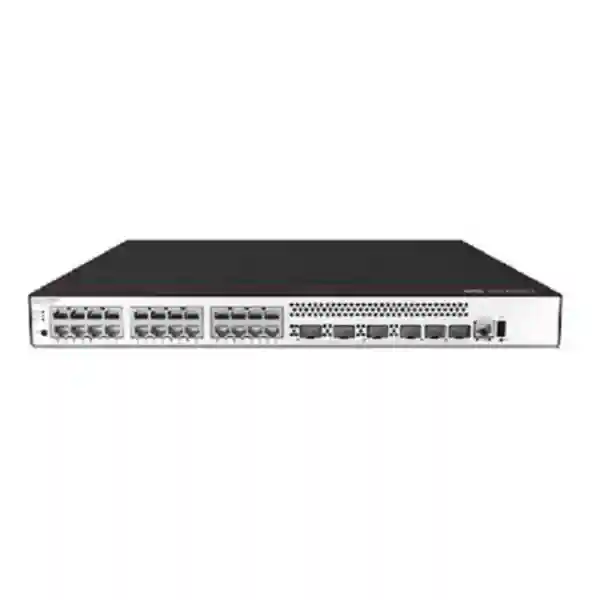
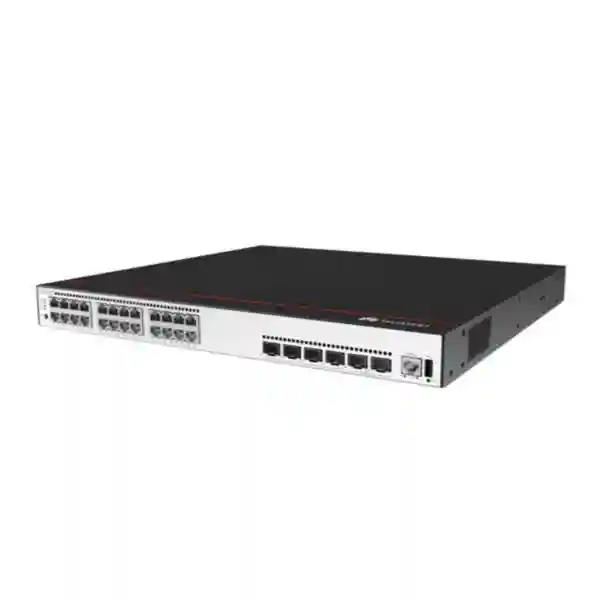
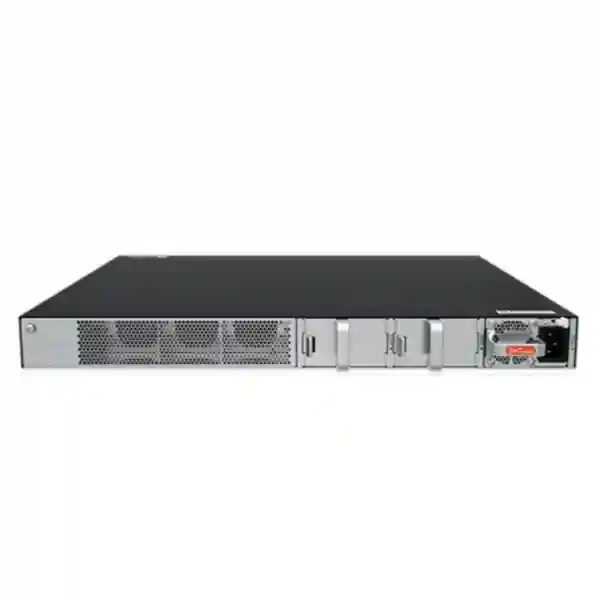
Huawei CloudEngine S5735-S24P4XEZ-V2 in UAE
The Huawei CloudEngine S5735-S24P4XEZ-V2 is a 1U-class enterprise access switch built for networks that need dependable Gigabit Ethernet at the edge, PoE+ for powered endpoints, 10 Gigabit Ethernet uplinks, physical stacking, modular expansion and power redundancy. Its architecture makes it particularly suitable for offices, schools, hotels, healthcare environments, retail sites, government branches, surveillance networks, IP telephony deployments and distributed enterprise campuses across the UAE.
For buyers comparing access-layer platforms, the important point is that this model is not simply a 24-port PoE switch. It is designed as a managed enterprise switching platform with Layer 2 and Layer 3 functions, IPv4/IPv6 routing, strong access security, centralized operations options and dedicated stack connectivity. That combination allows one hardware platform to serve user access, wireless AP access, IP phone connectivity, camera networks and departmental segmentation while retaining a clear path to resilient aggregation.
Direct answer: what you get
Access connectivity
Twenty-four 10/100/1000Base-T copper interfaces provide standard Gigabit Ethernet connectivity for PCs, printers, IP phones, wireless access points, cameras, controllers and other Ethernet devices. PoE+ support allows data and power to share the same structured cabling where endpoint requirements are compatible.
High-speed uplinks
Four 10GE SFP+ interfaces create flexible fiber or DAC uplinks toward distribution switches, core switches, routers, firewalls, servers or adjacent access switches. Multiple uplinks can be allocated to redundancy, aggregation or separate network roles according to the campus topology.
Dedicated stacking
Two 12GE stack ports support Huawei iStack designs, allowing compatible switches to operate as a coordinated logical system. Stacking simplifies management and can improve physical and logical resilience when links, uplinks and devices are distributed appropriately.
Expansion and resilience
The XEZ variant adds one expansion slot and uses three power-module positions with an N+1 backup design. This gives system designers more options for resiliency and lifecycle planning than a basic fixed-power edge switch.
Huawei S5735-S24P4XEZ-V2 technical specification overview
The specification set below focuses on the details that matter most during procurement and network design. Final configurations should always be checked against the intended Huawei software release, power-module combination, optics, stack accessories and feature licensing because enterprise switch capabilities can vary by release and bill of materials.
| Product model | Huawei CloudEngine S5735-S24P4XEZ-V2 |
| Fixed access ports | 24 x 10/100/1000Base-T Ethernet ports |
| Uplink ports | 4 x 10GE SFP+ ports |
| Stack ports | 2 x dedicated 12GE stack ports |
| Power over Ethernet | PoE+ supported |
| Forwarding performance | 132 Mpps |
| Switching capacity | 176 Gbps device switching capability / 520 Gbps system switching capability |
| Expansion | 1 expansion slot |
| Power architecture | 3 power-module positions, N+1 power backup design |
| Physical size | Approximately 43.6 mm x 442 mm x 420 mm (H x W x D) |
| Typical chassis consumption reference | Approximately 39.4 W referenced for the platform before attached PoE load; actual input depends on configuration and powered devices |
| Primary deployment role | Enterprise campus access, branch access, converged edge, selected aggregation roles and data-center access scenarios where feature and interface fit is appropriate |
Why this switch fits modern UAE campus access networks
A large percentage of enterprise endpoints still connect at 1 Gigabit Ethernet even when the upstream network has moved to 10GE. Desktop computers, IP phones, access-control terminals, many cameras, printers, room systems and numerous wireless access points can be served effectively by a well-designed Gigabit access layer. In that environment, the S5735-S24P4XEZ-V2 concentrates the investment where it has the most practical effect: reliable edge ports, PoE+ delivery, higher-speed uplinks, enterprise routing, robust segmentation and resilient power.
For a 24-port floor switch, four 10GE uplinks are particularly useful. A design can dedicate two links to a redundant upstream pair while keeping additional 10GE interfaces available for local servers, firewall handoffs, inter-switch links or future architecture changes. Alternatively, uplinks can be bundled using link aggregation where the upstream design supports it. The right approach depends on traffic concentration, failure-domain objectives, oversubscription targets and the physical cabling available in the building.
UAE projects also frequently combine voice, video surveillance, wireless and data services in the same communications room. That creates more pressure on availability than a simple data-only switch. A failed access switch may simultaneously affect telephones, cameras, Wi-Fi, door controllers and business workstations. The S5735-S24P4XEZ-V2 addresses that operational reality with stacking capability, modular power and enterprise software functions instead of relying solely on a collection of standalone unmanaged edge switches.
Best-fit use cases
The model is well suited to projects that need approximately 24 powered copper access ports per wiring location and want 10GE optical uplinks without moving immediately to a higher-cost multi-gigabit edge platform.
- Corporate office floors with PCs, desk phones, printers and Wi-Fi access points.
- Hotels and serviced apartments with converged voice, wireless and operational technology endpoints.
- Schools and universities requiring user segmentation, campus routing and high-density PoE access.
- Retail branches and warehouses combining POS, APs, CCTV, scanners and back-office devices.
- Healthcare and clinic environments where multiple service VLANs must share the same access infrastructure.
- Government and enterprise branches that require controlled authentication, IPv6 readiness and centralized monitoring.
- CCTV-heavy edge cabinets when camera bandwidth is within Gigabit access limits and the PoE budget is properly engineered.
- Small server or equipment rooms where 10GE uplinks, Layer 3 functions and resilient power are more important than 2.5GE/5GE edge access.
PoE+ architecture: size the power budget, not only the port count
The S5735-S24P4XEZ-V2 supports PoE+, which is a major reason to select the P variant. However, correct PoE engineering is more detailed than confirming that all 24 copper ports are PoE capable. A project should calculate the real power draw of every powered device, classify endpoints by worst-case demand and add operational headroom. Access points can consume different power levels depending on radio configuration, USB accessories, additional Ethernet functions and software state. PTZ cameras may draw more power when motors, heaters or infrared illuminators are active. Video phones and room panels can also have higher peaks than basic voice handsets.
Huawei documentation for this platform family shows a high available PoE budget when suitable power modules are installed, but the actual deliverable PoE capacity depends on the specific power-module population, input voltage, redundancy objective and system configuration. That distinction matters. A design that fills all available power positions for maximum PoE output is not identical to a design optimized for N+1 redundancy. During quotation, FourTeck should therefore receive the endpoint list, device wattage or model numbers, desired redundant-power policy and any planned future expansion. This lets the bill of materials be engineered around required usable power rather than an assumed headline value.
PoE also affects UPS sizing and room cooling. If a switch powers a large number of endpoints, the UPS must support both the switch electronics and downstream powered devices. An access cabinet serving twenty-four powered endpoints can represent a much larger electrical load than the switch chassis specification alone suggests. For resilient sites, calculate runtime during utility loss, UPS efficiency, battery aging, future endpoint growth and whether all connected PoE devices truly need backup power for the full target duration.
Port map and uplink design
The fixed interface mix is straightforward but powerful: twenty-four Gigabit copper downlinks, four 10GE SFP+ uplinks and two dedicated 12GE stack interfaces. In a typical office deployment, the copper ports face users and powered devices while the SFP+ interfaces connect to an aggregation or core layer. This creates an access-to-uplink ratio that is appropriate for many mixed enterprise workloads, particularly where not every edge port is continuously saturated.
A common topology uses two 10GE links to different upstream switches or to separate members of an upstream stack. This improves path diversity compared with a single uplink, assuming the logical design, spanning-tree or multi-chassis architecture supports the intended failure behavior. Another option is a two-link aggregation toward one logical upstream system, increasing available bandwidth and preserving connectivity if one member link fails. The remaining SFP+ ports can support a second uplink group, a local high-speed device or a temporary migration path.
Optics selection is a design task in its own right. The transceiver type must match fiber category, connector type, optical budget, wavelength, distance and the corresponding interface at the far end. For short links within a rack or adjacent racks, direct-attach cabling may be an option if supported for the exact platform and required distance. For building-to-building or floor-to-core runs, single-mode or multimode fiber choices should be aligned with existing structured cabling and future bandwidth plans. Mixing optics based purely on connector fit is not sufficient; compatibility and link-budget validation are essential.
The dedicated stack ports should not be confused with normal network uplinks. They are intended for iStack interconnection among supported devices. Using purpose-built stack connectivity preserves the 10GE SFP+ interfaces for network traffic and can create a cleaner access-layer architecture. Stack topology, member count, cabling direction, physical rack placement and software compatibility should all be documented before implementation.
Switching performance and traffic engineering
Huawei specifies 132 Mpps forwarding performance for the S5735-S24P4XEZ-V2 and a switching-capacity figure expressed as 176 Gbps device capability and 520 Gbps system capability. These numbers describe the platform’s packet-forwarding and switching architecture, but they should be interpreted together with the actual port mix and traffic pattern. Real campus performance is influenced by packet sizes, uplink utilization, policy features, multicast behavior, link aggregation, routing, queueing and the degree of oversubscription between access and aggregation layers.
For most enterprise access layers, the objective is not to guarantee that every user port can simultaneously transmit at maximum rate to the core. Instead, designers estimate realistic concurrency and application behavior. Office productivity traffic is usually bursty. Voice traffic is low bandwidth but latency sensitive. Video conferencing creates sustained bidirectional flows. CCTV can produce predictable upstream traffic. Wireless access points can aggregate traffic from many clients into a single wired port. Understanding this mix determines whether two 10GE uplinks are sufficient, whether four should be used, and whether traffic should be separated physically or logically.
A good design also protects critical applications using QoS rather than relying solely on raw bandwidth. Voice signaling and RTP media, interactive video, business applications and management traffic can be classified and prioritized according to enterprise policy. QoS is most effective when markings and trust boundaries are consistent end to end. An access switch should not automatically trust every endpoint marking; the design should define which ports, devices and traffic classes are permitted to set or retain priority values.
The four 10GE uplinks provide useful headroom for traffic growth, but they do not eliminate the need for measurement. After deployment, monitor link utilization, discards, errors, CPU behavior, queue statistics and application experience. Capacity planning should be evidence based. If sustained uplink utilization approaches policy thresholds, additional links or a higher-capacity access architecture can be planned before users encounter visible congestion.
Layer 2 segmentation and campus control
The S5735-S-V2 platform supports enterprise VLAN functions including up to 4094 VLANs, voice VLAN, MUX VLAN and VLAN assignment based on attributes such as MAC address, protocol, IP subnet, policy and port. In a real deployment, this means the same physical access switch can support multiple logical service zones without mixing broadcast domains indiscriminately.
A typical corporate floor may separate employee endpoints, corporate Wi-Fi, guest Wi-Fi, IP telephony, CCTV, building-management systems and switch management into different VLANs. Segmentation makes security policy clearer and can reduce unnecessary broadcast scope. It also allows upstream firewalls or Layer 3 policies to enforce communication rules between services. The number of VLANs should remain understandable and governed; creating excessive one-off VLANs without an address plan or ownership model often increases operational risk.
Interoperability functions such as Huawei’s VBST can be relevant in mixed-vendor spanning-tree environments because it is intended to interoperate with PVST-family behaviors. Link type negotiation and VLAN management interoperability features may also be available depending on release. When integrating with an existing non-Huawei campus, a lab test or staged migration is preferable to assuming identical protocol behavior across vendors.
Layer 3 routing for access and aggregation
Huawei lists a broad Layer 3 feature set for this series, including static routing, RIP/RIPng, OSPF/OSPFv3, IS-IS/IS-ISv6, BGP/BGP4+, ECMP, VRRP and VRRP6. This allows the platform to participate in routed access or selected aggregation designs instead of being restricted to a purely Layer 2 edge role.
Routed access can reduce dependence on large spanning-tree domains by placing Layer 3 boundaries closer to users. Whether that is the right architecture depends on the organization’s operational model, controller strategy, security policy and campus scale. Some enterprises prefer centralized routing at distribution blocks; others use access switches as routed nodes with dynamic protocols and ECMP. The S5735-S24P4XEZ-V2 provides options for both styles when software support and design requirements align.
Dynamic routing should be designed with route filtering, summarization, authentication where appropriate, consistent timers and clear failure-domain boundaries. Enabling a protocol is not the same as designing a stable network. FourTeck can help map VLAN gateways, routed links, redundancy protocols and upstream firewall boundaries before configuration is built.
Enterprise access security: control who connects and what they can do
Access switching is part of the security architecture because the edge is where users, phones, cameras and unmanaged devices first enter the network. Huawei documents several security controls for the S5735-S-V2 family, including bindings among IP address, MAC address, interface and VLAN; port isolation; port security; sticky MAC; blackhole MAC entries; limits on learned MAC addresses; IEEE 802.1X authentication; portal authentication; AAA; RADIUS; HWTACACS; NAC integration; SSH; HTTPS; CPU defense; blacklist and whitelist functions; DHCP snooping; DHCP services and relay functions.
IEEE 802.1X can support identity-aware access where user or device credentials are validated before normal network access is granted. In many enterprises, 802.1X is combined with RADIUS and endpoint policy so that corporate users, phones, printers and other device classes receive different VLANs or access policies. MAC-based methods may be used for devices that do not support interactive authentication, but they should be treated with appropriate security expectations because a MAC address by itself is not a strong identity credential.
DHCP snooping helps protect against unauthorized DHCP servers and can create binding information that other anti-spoofing controls use. This is particularly relevant in open office spaces, schools, hotels and branch environments where anyone with physical access to an Ethernet socket could potentially attach equipment. Port security and MAC learning limits can further reduce exposure to accidental loops, unmanaged mini-switches or inappropriate endpoint proliferation, although policies must be tuned carefully to avoid disrupting legitimate use cases such as desk phones with downstream PCs.
Management-plane protection is equally important. Production switches should use secure administrative protocols, authenticated administrators, role separation where supported, centralized AAA, management ACLs, secure NTP, logging and configuration backup. Telnet may exist for compatibility on some software releases, but secure management using SSH and HTTPS should be preferred. Place switch management interfaces in a controlled management network rather than exposing them directly to general user VLANs.
IPv6 readiness and dual-stack campus planning
The S5735-S-V2 family is designed with mature IPv6 capabilities rather than treating IPv6 as an afterthought. Huawei lists IPv6 variants of key routing and redundancy protocols, including RIPng, OSPFv3, IS-ISv6, BGP4+ and VRRP6. This is valuable for enterprises that are introducing dual stack, preparing for provider requirements or building new environments where IPv6 needs to be part of the lifecycle plan from day one.
A dual-stack project should not simply enable IPv6 on all VLANs and consider the job complete. Address planning, router advertisements, DHCPv6 strategy, DNS, security policy, logging and management tooling all need equivalent treatment. A network that has strong IPv4 controls but permissive or unmonitored IPv6 can create an unexpected security gap. Access-layer ACLs, authentication and monitoring should account for both protocol families.
IPv6 also affects operational troubleshooting. Teams should be comfortable reading IPv6 routes and neighbor tables, tracing paths, interpreting link-local addresses and identifying which address-selection behavior applications use. If the organization is not yet ready for production IPv6, the switch can still be selected as part of a future-ready architecture while IPv6 deployment is staged according to policy.
For UAE enterprises with regional or global connectivity, adopting hardware that supports both IPv4 and IPv6 routing avoids a later replacement solely because addressing requirements change. The practical objective is not to deploy every protocol immediately; it is to avoid painting the campus into a corner.
Stacking and operational simplification
Huawei iStack support allows multiple compatible switches to be operated as a coordinated logical system. The product family documentation references stack bandwidth and fast stack upgrade capabilities. Stacking can simplify management because administrators work with a logical switch rather than independently managing every physical member.
Resilience benefits depend on topology. If all critical uplinks terminate on only one stack member, that member remains a concentration point. Better designs distribute uplinks and important endpoint connections across members where possible, select an appropriate stack topology and verify power redundancy for each chassis.
Stacking also helps during access-layer expansion. A 24-port deployment can grow by adding compatible members rather than immediately redesigning the logical access block. Software compatibility, maximum supported members, stack-cable types and supported topology should be verified for the selected release before implementation.
Power redundancy and availability
The S5735-S24P4XEZ-V2 uses three power-module positions and an N+1 backup architecture. For a PoE access switch, redundant power protects more than the forwarding plane: it can preserve power to attached phones, cameras and wireless APs when the design and power budget are sized correctly.
True availability also requires diverse upstream circuits, UPS protection and sensible maintenance. Two power modules connected to the same overloaded PDU do not provide the same resilience as feeds arranged across independent protected circuits. Likewise, redundant switch power cannot compensate for a single non-redundant upstream fiber path.
For critical UAE sites, treat availability as an end-to-end property: utility feed, UPS, rack PDU, switch power, stack, optics, fibers, upstream switches and routing all need to be considered together.
Intelligent operations, monitoring and troubleshooting
Enterprise switching becomes expensive when faults are difficult to locate, not merely when hardware is expensive. Huawei positions telemetry and intelligent operations as key capabilities in the CloudEngine campus portfolio. The S5735-S-V2 family can participate in environments using Huawei management and analytics platforms, while standard management functions such as SNMP, RMON, HTTPS and NETCONF/YANG provide integration options for existing operations systems.
Telemetry changes the monitoring model from occasional polling toward more granular data collection for supported metrics and platforms. That can help operations teams identify patterns such as rising errors, congestion, intermittent endpoint issues or performance degradation more quickly. However, telemetry is only useful when it is integrated into an operational process. Decide who receives alarms, which thresholds matter, how long data is retained and what actions follow each event class.
Virtual Cable Test functions can assist with copper troubleshooting by helping identify certain physical cabling faults from the switch side. This is useful in office and hospitality deployments where the switch room may be distant from the wall outlet. It does not replace structured-cabling certification, but it can shorten first-line diagnosis when a port fails to establish connectivity.
Configuration management is equally important. Maintain standard templates for VLANs, uplinks, authentication, logging, NTP, SNMP, routing and management ACLs. Back up configurations after approved changes. Record serial numbers, rack positions, switch roles, stack-member identities, optics and patch-panel references. Consistent documentation reduces recovery time when hardware must be replaced.
Organizations that need broader support around monitoring, configuration standards, LAN migration and day-two operations can also review FourTeck’s UAE IT services capabilities as part of the overall campus project rather than treating the switch purchase as an isolated transaction.
Designing a secure converged edge for voice, Wi-Fi, CCTV and users
A major strength of a 24-port PoE+ enterprise switch is its ability to consolidate multiple endpoint types into a single access platform. Consolidation saves rack space and simplifies cabling, but it increases the importance of segmentation and capacity planning. A phone port should not automatically share the same policy as a camera port. Guest wireless traffic should not have unrestricted access to business systems. Building-management devices may require communication with a small set of controllers but nothing else.
Start with a service matrix. For each endpoint class, define the VLAN, IP subnet, authentication method, DHCP behavior, DNS requirements, allowed destinations, required QoS and monitoring policy. Then map those requirements to switch access templates. This approach produces repeatable configuration and reduces manual port-by-port variation. If a site has standard desk ports with phone plus PC, create a consistent template for voice and data behavior. If cameras use fixed switch ports, create a separate template with the required VLAN, PoE behavior, security controls and MAC limits.
For wireless access points, determine whether the AP expects an access port or VLAN trunk, which management VLAN it uses and how client VLANs are transported. The switch port configuration must match the WLAN architecture. Remember that this particular model provides Gigabit copper downlinks. If high-performance Wi-Fi 6E or Wi-Fi 7 access points require more than 1 Gbps of wired throughput, a multigigabit access model may be a better choice. The S5735-S24P4XEZ-V2 is strongest where Gigabit Ethernet is sufficient and resilient PoE+ plus 10GE aggregation is the priority.
For surveillance, calculate both PoE and bandwidth. Twenty-four cameras streaming continuously can create a predictable upstream load that differs from bursty office data. Codec, resolution, frame rate and retention architecture determine traffic volume. If cameras send directly to a local recorder, the traffic pattern differs from a centralized VMS hosted elsewhere. Design uplinks around real video bitrate and allow for bursts, management traffic and future camera upgrades.
When the switching project is part of a larger perimeter-security or segmentation upgrade, FourTeck’s Firewall Dubai solutions can be aligned with the LAN design so that VLAN boundaries, gateway placement and firewall policy are created as one architecture.
UAE deployment engineering: heat, power, racks and cabling
The UAE operating environment makes physical infrastructure planning especially important. Most enterprise switches are installed in conditioned telecom rooms, but access closets can still experience elevated temperatures when cooling is undersized, doors are left open, filters are blocked or the room shares heat with other equipment. A switch should not be selected only by logical features; airflow, rack depth, cable management and electrical capacity must also fit the site.
The chassis depth of approximately 420 mm requires suitable rack clearance behind the switch for power modules, cabling and airflow. Shallow wall-mount cabinets intended for small passive patch panels may not be appropriate. Check internal usable depth, rail arrangement, rear clearance and bend radius for fiber patch cords. A cabinet that can physically close only by crushing patch leads is not a valid installation.
Power planning should account for the switch, all expected PoE endpoints and growth. Use rack PDUs and UPS systems rated for the actual load. Where N+1 switch power is part of the resilience strategy, feed modules from appropriately designed protected circuits where possible. Proper earthing and surge protection practices should follow site standards and applicable electrical requirements.
Structured cabling quality directly affects Gigabit Ethernet reliability and PoE performance. Verify cable category, length, termination quality and patching. High-resistance connections can create voltage drop and heat under PoE load. For new installations, certification testing provides evidence that permanent links meet the intended standard. For existing cabling, a switch upgrade is a good opportunity to identify marginal links before they become intermittent production problems.
Fiber uplinks require equal care. Confirm whether the installed backbone is multimode or single-mode, identify connector types, verify link length and inspect patching. Choose supported optics for each endpoint. For projects covering multiple UAE offices or remote branches, FourTeck can coordinate the switch design with broader infrastructure supplied through FourTeck UAE.
How to size the S5735-S24P4XEZ-V2 for a real project
Good switch sizing begins with endpoints, not with a model number. Count every wired device expected during the project’s useful life. Separate devices that need PoE from those that do not. Identify current speed requirements and likely future upgrades. Reserve sensible spare ports for moves, additions and changes. A switch with 24 ports should not normally be commissioned with all 24 permanently consumed on day one unless expansion is handled by an adjacent switch or a planned stack.
Next, calculate the traffic profile. Office users may average low utilization but create short bursts. Cameras generate steady traffic. APs aggregate many wireless clients. Local servers may require sustained high throughput. Based on this profile, choose the number and speed of uplinks and determine whether link aggregation or diverse upstream paths are needed. Four available 10GE interfaces provide flexibility, but cabling and upstream port availability must be included in the bill of materials.
Then calculate power. Create a table of each PoE device, quantity, expected draw and maximum engineering draw. Add a margin for replacements and growth. Decide what happens if one switch power module fails: must all endpoints remain powered, or can lower-priority devices be shed? That availability requirement determines how aggressively the installed power budget can be used.
Finally, map software functions. List required routing protocols, authentication methods, management integrations, multicast features, QoS, IPv6 functions and any advanced capabilities. Validate the software release and licensing for those requirements before purchase. Enterprise switches often support a broad family feature set, but specific functionality can depend on version or license level. A procurement quote should reflect the operating requirement, not just the base chassis.
Migration from an existing access switch
Replacing a production access switch requires more than moving cables from the old front panel to the new one. Begin by exporting the existing configuration and documenting every active port. Record VLAN assignments, trunks, voice settings, PoE devices, MAC limits, authentication, ACLs, link aggregation, uplinks, spanning-tree settings, management addresses and monitoring integrations. This creates a baseline and exposes legacy configuration that may no longer be necessary.
Build the Huawei configuration from an approved design rather than translating every old command literally. Different vendors implement similar functions using different terminology and operational behavior. Validate VLAN tagging, native or untagged behavior, LACP settings, spanning-tree interoperability, authentication timers and routing adjacencies in a controlled environment where possible.
For PoE endpoints, confirm that phones, cameras and APs power correctly before the maintenance window ends. Verify device registration, not only link state. An IP phone may receive power but fail to reach the call platform due to VLAN or DHCP errors. A camera may come online but send traffic through an incorrect gateway. An AP may boot but not join its controller. Post-change testing should therefore cover application function for each endpoint class.
Uplinks require particular attention because a tagging or aggregation mistake can affect the entire floor. Test one uplink path at a time where the design permits, verify MAC and route learning, then validate redundant paths. Monitor errors and optical levels where available. Once service is stable, update diagrams and asset records so that operational documentation matches the new network.
For multi-site rollouts, use a pilot location first. Capture lessons from the pilot, refine the configuration template and acceptance checklist, then apply the standardized design to remaining sites. This approach reduces repeated mistakes and makes support simpler after deployment.
When to choose this model — and when to choose a different access switch
The S5735-S24P4XEZ-V2 is a strong choice when the access requirement is primarily Gigabit Ethernet, PoE+ is needed, four 10GE uplinks are useful, the project values power redundancy and stacking, and the organization wants enterprise routing and security features. It is especially practical for 24-port edge blocks where reliability matters more than extreme edge speed.
Choose a different model if a significant number of endpoints require 2.5GE, 5GE or 10GE copper access. High-end Wi-Fi 7 APs can exceed 1 Gbps of wired throughput and may also need higher PoE classes than ordinary PoE+. In those cases, a multi-gigabit PoE++ platform may better protect the investment. Similarly, if the site requires 48 copper access ports in one chassis, a 48-port model may provide better rack density than deploying two 24-port units purely for port count.
For a non-PoE environment, paying for a PoE-capable switch may be unnecessary if no powered devices are planned. A non-PoE model can reduce cost and power-system complexity. Conversely, if surveillance or WLAN requirements demand very high PoE budgets, verify that the selected S5735-S24P4XEZ-V2 power configuration can meet the requirement with the desired redundancy; do not assume every power-module combination delivers the same usable PoE capacity.
The decision should therefore be based on access speed, PoE class, port density, uplink bandwidth, resilience and software requirements together. FourTeck can compare these factors across suitable Huawei platforms and broader enterprise switching options available through FourTeck’s global technology portfolio.
Procurement considerations for Dubai and the wider UAE
Enterprise switching quotes can appear identical while containing materially different bills of materials. The chassis model is only one line item. A complete solution may require power modules, country-appropriate power cords, SFP+ transceivers, stack cables, rack accessories, software entitlements, support coverage, fiber patch cords and implementation services. Clarifying these items before purchase prevents a common problem: receiving the main switch but lacking the components needed to place it into production.
State the required power redundancy in the request for quotation. Because this model uses three power-module positions with an N+1 design, the correct module population depends on PoE load and resilience goals. If the project requires all planned powered devices to remain available after a power-module failure, that requirement must be explicit. Likewise, specify AC input expectations and whether feeds will be split across UPS-backed circuits.
State uplink distances and fiber types. Requesting four generic 10GE optics without identifying the actual optical plant can result in incompatible transceivers. Provide building names, approximate distances, fiber mode, connector type and the upstream switch model. If existing optics will be reused, validate support and warranty implications.
For multi-branch projects, standardize the BOM where practical. Using the same access switch, power strategy, optic families and configuration templates across sites simplifies spares, training and operations. Where site sizes differ, use a small number of approved variants rather than unique hardware at every location.
Also define support expectations: hardware replacement targets, software access, remote troubleshooting and onsite assistance. A resilient hardware design should be paired with an operational support process that matches business criticality.
Configuration blueprint for a typical enterprise floor
Consider a UAE office floor with twenty-four potential access connections. Twelve desks use IP phones with downstream PCs, four ceiling APs serve corporate and guest wireless, four cameras cover entrances and corridors, and the remaining ports are reserved for printers, meeting-room devices and growth. The S5735-S24P4XEZ-V2 can consolidate these endpoint classes while keeping them logically separated.
Desk ports can place phone traffic in a voice VLAN and user traffic in a corporate data VLAN. Authentication policy can identify users or devices where a RADIUS/NAC architecture is in place. AP ports can use tagged VLAN transport according to the WLAN design, carrying management plus mapped client networks as required. Camera ports can be assigned to a dedicated surveillance VLAN with restrictive upstream policy. Switch management should remain in a separate administrative network accessible only from approved management systems.
Two 10GE uplinks can connect to an upstream distribution pair or stack, while one or two additional SFP+ ports remain available for local requirements or future growth. The exact redundancy mechanism depends on the upstream architecture. If the access switches themselves are stacked, distribute uplinks across members so that a single member failure does not remove every upstream path.
Apply DHCP snooping on user-facing segments according to design, define trusted uplink interfaces carefully, use secure management access, send logs to a central system and synchronize time. Apply QoS so voice and critical interactive traffic receive appropriate treatment without allowing arbitrary endpoints to self-declare highest priority. Monitor PoE consumption and create alerts before the power budget becomes constrained.
This blueprint is intentionally generic because production configuration must align with the organization’s addressing plan, authentication system, upstream vendor, firewall policy and software release. The principle is consistent: treat the access switch as a policy-enforcement and service-delivery node, not just as a port expander.
Lifecycle planning, firmware and change control
Enterprise switch lifecycle management begins before installation. Record the approved software release, boot software, feature licenses, power modules, optics and stack accessories in the project documentation. Keep this information linked to the asset record so that future engineers can determine the exact deployed state without inspecting each rack manually.
Firmware upgrades should follow a controlled process. Review release notes, prerequisites, resolved issues and known limitations. Confirm interoperability with authentication systems, monitoring platforms and adjacent network devices. For stacks, understand the upgrade sequence and expected service impact. Maintain configuration backups before changes and define rollback criteria.
Security maintenance should include periodic review of administrator accounts, AAA servers, management ACLs, SNMP communities or credentials, certificates and unused services. Retire old protocols when dependencies no longer require them. Check that logging reaches the intended collector and that alerts are actionable rather than ignored due to excessive noise.
Capacity reviews should examine port occupancy, PoE utilization, uplink bandwidth, error rates and stack health. A switch that was correctly sized on day one may become constrained after several years of AP upgrades, camera additions and office expansion. Monitoring trends provides time to add stack members or migrate selected users before capacity becomes a service incident.
Finally, keep a spare strategy appropriate to the number of deployed units and business impact. Large rollouts may justify onsite spare hardware or pre-positioned optics and power modules. Smaller environments may rely on vendor support with documented replacement procedures. The correct approach balances failure probability, recovery objectives and cost.
Frequently asked technical questions
Does the S5735-S24P4XEZ-V2 support PoE?
Yes. This model supports PoE+ on its Gigabit copper access interfaces. Available aggregate PoE power depends on the installed power modules, input conditions and redundancy plan, so the endpoint load should be calculated before the BOM is finalized.
How many 10GE ports are included?
Four 10GE SFP+ ports are fixed on the platform. They are commonly used for fiber uplinks, aggregated connections or local high-speed devices, depending on the design.
Can the switch be stacked?
Yes. It provides two dedicated 12GE stack ports and supports Huawei iStack functionality within the compatible platform and software constraints. Stack design should include supported member count, cabling and upgrade planning.
Does it support Layer 3 routing?
The S5735-S-V2 family supports substantial Layer 3 functionality including static routes and dynamic routing protocols such as OSPF, IS-IS and BGP, plus IPv6 equivalents and VRRP/VRRP6. Validate the exact software release and license for project-specific requirements.
Is this a 2.5GE access switch?
No. The fixed copper access ports on this model are 10/100/1000Base-T. If endpoints require multi-gigabit copper access above 1 Gbps, select a model designed for 2.5GE or higher edge speeds.
Why choose the XEZ variant?
The XEZ variant combines the standard 24-port PoE+ access profile with one expansion slot, giving designers additional platform flexibility while retaining four 10GE uplinks and dedicated stack interfaces.
What is the forwarding performance?
Huawei specifies 132 Mpps forwarding performance for the S5735-S24P4XEZ-V2. This should be considered together with uplink design, feature usage and real application traffic when sizing a network.
Can it support CCTV and VoIP together?
Yes, provided PoE, bandwidth, VLAN, QoS and security policies are correctly designed. Separate service VLANs and controlled inter-VLAN policy are recommended instead of placing all endpoints into one broadcast domain.
Decision recap: is the Huawei S5735-S24P4XEZ-V2 the right fit?
Use this decision recap before requesting a quote. The model is a strong fit when the project needs enterprise-grade Gigabit access with PoE+, multiple 10GE uplinks, stacking, an expansion slot and resilient power. It is less suitable when the primary requirement is multi-gigabit copper access or very high per-port PoE beyond ordinary PoE+ use cases.
Choose it when
You need around 24 Gigabit copper access ports, PoE+ endpoints, resilient power, Layer 3 routing, strong access security, 10GE uplinks and a stackable enterprise platform with room for controlled expansion.
Reconsider when
Your APs or workstations need 2.5GE/5GE/10GE copper, your endpoint count is significantly above 24 per cabinet, or your powered devices require PoE++ classes beyond the intended PoE+ design.
Validate before order
Confirm power modules, usable PoE budget, optics, stack cables, software release, licenses, support level, rack depth, fiber type and required implementation services.
Plan beyond day one
Reserve access ports, PoE headroom and uplink capacity for future devices. Standardize configuration and monitoring so that future growth does not create uncontrolled operational complexity.
Quotation input checklist
Sending the information below allows a more accurate UAE quotation and reduces back-and-forth over power modules, optics and accessories. Where a detail is unknown, provide the endpoint models or site diagram and the design can be developed from there.
Number of switches, branch names, floor locations and rack positions.
AP, phone, camera and other powered-device models with quantities.
N+1 power expectations, UPS feeds and required service continuity.
Fiber type, distance, upstream switch model and required number of 10GE links.
Standalone or stacked design, number of members and physical arrangement.
Routing, authentication, NAC, IPv6, multicast, telemetry and management needs.
Current vendor, VLAN plan, firewall architecture and migration constraints.
Supply only, configuration, installation, migration, testing, documentation and support.
FourTeck consultation for Huawei switching projects in UAE
For a production-ready proposal, share your endpoint count, PoE devices, existing network topology, fiber distances, redundancy objective and required software functions. FourTeck can align the Huawei CloudEngine S5735-S24P4XEZ-V2 with the correct power configuration, optics, stack accessories and implementation scope, then integrate the access layer with routing, firewall and wider infrastructure requirements.
The objective is to deliver a complete bill of materials and deployment plan rather than a chassis-only quote. That means confirming what the switch must power, where traffic goes, how failures are handled, how the device is managed and how the design will scale over its expected lifecycle.
Project-ready outputs
Model validation • power-module sizing • PoE calculation • optic selection • stack design • VLAN/routing plan • migration method • acceptance testing • documentation • support planning.
Final technical summary
The Huawei CloudEngine S5735-S24P4XEZ-V2 is an enterprise PoE+ access switch built around a practical and resilient interface profile: 24 x Gigabit Ethernet copper ports, 4 x 10GE SFP+ uplinks, 2 x 12GE dedicated stack ports and one expansion slot. Huawei specifies 132 Mpps forwarding performance and 176 Gbps/520 Gbps switching-capacity figures for this model. Three power-module positions support an N+1 backup architecture, making the switch well suited to converged edge deployments where endpoint power is part of service availability.
The platform extends beyond basic switching through VLAN functions, dynamic routing, IPv6, access authentication, DHCP security, secure management, stacking and centralized operations capabilities. These features allow the same device to support conventional Layer 2 access, routed access, voice/data convergence, surveillance networks, wireless access and multi-service campus designs, subject to the software release and project requirements.
For UAE procurement, the most important step is to size the complete solution. Confirm endpoint PoE demand, redundant-power expectations, SFP+ optics, fiber type, stack accessories, software features, rack depth, UPS capacity and support scope. With those inputs defined, the S5735-S24P4XEZ-V2 can be engineered as a predictable, supportable access-layer component rather than deployed as an isolated switch.

Reviews
There are no reviews yet.