
Huawei CloudEngine S5735-S24T8J4XE-XA-V2 in UAE
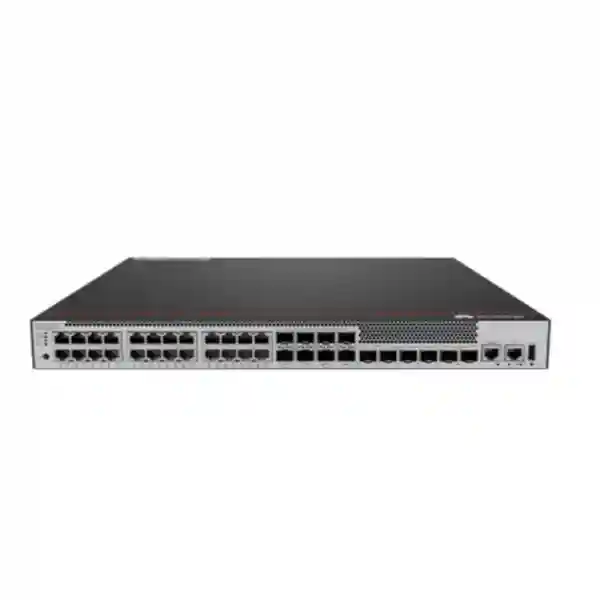
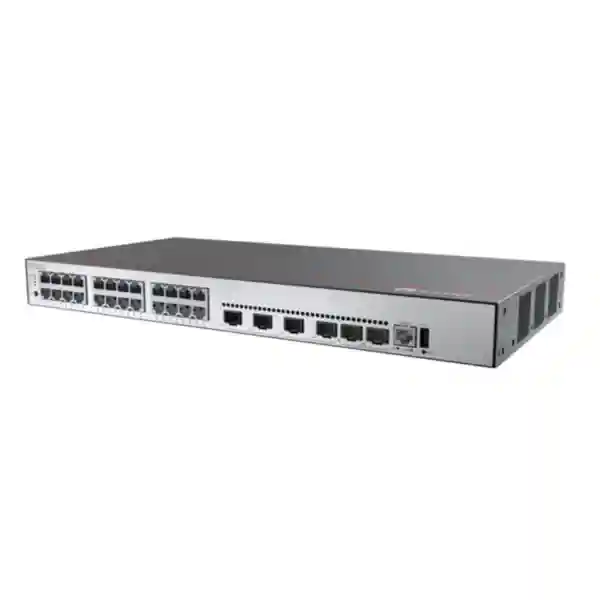
The Huawei CloudEngine S5735-S24T8J4XE-XA-V2 is a resilient campus switching platform for offices, branch networks, education environments, government facilities, hospitality back offices, healthcare sites and distributed enterprise deployments that require dense Gigabit copper access together with stronger-than-usual uplink flexibility. Its port design combines twenty-four 10/100/1000BASE-T interfaces, eight 2.5GE SFP interfaces that can be switched into a two-port 10GE SFP+ mode, four additional 10GE SFP+ interfaces and two dedicated 12GE stack ports. The model is non-PoE, uses two built-in AC power supplies in a 1+1 redundant arrangement and delivers 162 Mpps forwarding performance with a published switching capacity of 216 Gbps at the device level and 520 Gbps at the system level. For UAE organizations planning dependable access switching with room for optical distribution, higher-speed uplinks and stack-based resilience, it is a technically balanced option when PoE delivery is not required at the edge.
10/100/1000BASE-T user, server, appliance or downstream device connectivity.
Ports can be switched to a 2 x 10GE SFP+ operating option for alternate uplink designs.
High-speed optical or DAC uplinks for distribution, core, firewall or server-side connectivity.
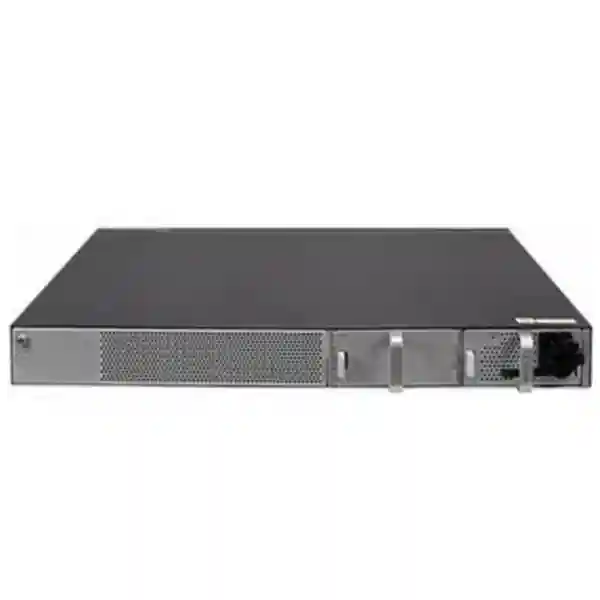
Two built-in AC power supplies provide power redundancy without requiring pluggable PSU selection.
Direct answer: what is the S5735-S24T8J4XE-XA-V2 designed to do?
The S5735-S24T8J4XE-XA-V2 is best understood as a feature-rich enterprise campus access switch with unusually flexible optical and uplink resources for a 24-port copper model. The twenty-four Gigabit Ethernet copper interfaces cover conventional endpoint access, while the optical interfaces give the designer multiple ways to reach distribution switches, remote cabinets, servers or network security devices. Four fixed 10GE SFP+ ports provide the obvious high-speed northbound path. The additional eight 2.5GE SFP interfaces add another layer of design flexibility and can be changed to a two-port 10GE SFP+ mode when the topology requires fewer but faster links. Dedicated 12GE stack ports keep stacking resources separate from the normal service uplink pool, which can simplify capacity planning when two or more switches need to operate as a resilient logical unit.
This exact model does not provide PoE. That is an important design distinction, not a limitation to overlook. It is well suited to environments in which access endpoints are desktop computers, printers, storage appliances, non-PoE industrial or building systems, IP devices powered locally, or downstream switches that do not need inline power. Where Wi-Fi access points, IP phones, cameras or IoT endpoints depend on switch-supplied power, a PoE-capable sibling from the S5735-S-V2 family may be more appropriate. Selecting the non-PoE model deliberately can reduce unnecessary power-system complexity when endpoint power delivery is handled elsewhere.
For UAE projects, the device fits common enterprise patterns such as floor distribution in office towers, IDF access in schools and universities, branch-office consolidation, non-PoE server-room access, aggregation of smaller access switches, and migration projects where 1GE copper must remain available while backbone links move toward 10GE. Its Layer 2, Layer 3, IPv6, routing, policy and management capabilities depend on the installed software release and feature package, so production designs should always validate the planned software train and exact feature requirements before configuration standards are finalized.
Port architecture: why the interface mix matters
A conventional 24-port access switch often gives the designer one simple decision: connect endpoints at 1GE and use a small set of 10GE ports as uplinks. The S5735-S24T8J4XE-XA-V2 adds a second optical tier. Its eight 2.5GE SFP ports can support higher-speed optical connectivity without consuming the four main 10GE uplinks. This can be useful when an enterprise has distributed fiber runs that need more bandwidth than 1GE but do not require a dedicated 10GE link per destination, or when an aggregation design must collect several fiber-fed edge devices while retaining the fixed 10GE ports for core-facing redundancy.
The same eight-port bank can be changed to a mode that provides two 10GE SFP+ interfaces. The practical value is topology flexibility. A project can choose between a broader set of 2.5GE optical channels and a smaller set of faster 10GE channels according to traffic concentration, distance, optics availability and upstream design. This choice should be made during the low-level design because changing port mode can affect physical patching, transceiver selection and available interface count. It is good practice to define the intended mode in the bill of materials, configuration template and rack-elevation drawing so that procurement and deployment teams do not make incompatible assumptions.
The four fixed 10GE SFP+ ports should normally be treated as the primary high-speed service uplink resource. In a resilient campus, two may connect toward one distribution device and two toward another, or two may form an Eth-Trunk while the remaining links serve a firewall, server, storage gateway or secondary aggregation path. The exact pattern depends on spanning-tree, routing and link-aggregation strategy. Where the switch is used as a small aggregation node, the 10GE ports can collect high-volume northbound and east-west traffic while copper access remains dedicated to local endpoints.
Dedicated 12GE stack ports are operationally valuable because stacking does not need to consume the four normal 10GE uplinks. That separation preserves service-interface capacity and makes the design easier to explain. When a stack is used, engineers should document stack member numbering, stack-link topology, master election expectations, configuration synchronization behavior, software consistency and failure procedures. Stacking improves operational simplicity, but it does not remove the need to design against common-mode risks such as shared power distribution, single upstream devices, poor cable routing or maintenance mistakes affecting multiple members.
1GE copper access
Twenty-four copper interfaces provide the predictable endpoint density expected in an enterprise access layer. They are appropriate for desktops, thin clients, printers, building systems, locally powered IP endpoints, test equipment and downstream appliances. Because this model is non-PoE, the power design is cleanly separated from Ethernet switching. This can be desirable in sites where endpoints already use local adapters or where dedicated power systems are mandated.
2.5GE optical flexibility
The eight 2.5GE SFP interfaces are the differentiating element in this exact SKU. They enable fiber-based distribution at a rate above classic 1GE without requiring every link to consume 10GE resources. Designers should verify supported optical modules, wavelength, fiber type, link budget and software compatibility for the selected transceiver set rather than treating all generic SFP optics as interchangeable.
10GE uplink strategy
Four fixed 10GE SFP+ ports give enough uplink density for redundant distribution paths and additional high-speed services. A common design is to aggregate two or more interfaces when upstream devices support the same link-aggregation method. Routing to the access layer is another option where failure containment, convergence and broadcast-domain boundaries justify it.
Dedicated stack connectivity
Two 12GE stack ports enable a dedicated stack topology without consuming the production SFP+ uplinks. This is especially useful in 24-port deployments that need a two-switch logical access block, simplified management and link redundancy while preserving all four 10GE ports for network traffic.
Switching capacity and forwarding performance in practical terms
Huawei publishes 162 Mpps forwarding performance for the S5735-S24T8J4XE-XA-V2. Packet-per-second capability matters because a switch may be required to process a very large number of smaller packets even when the total bandwidth appears moderate. Voice signaling, transactional applications, virtualized environments, telemetry streams and security-heavy architectures can increase packet rates significantly. A healthy design therefore considers both aggregate throughput and packet rate instead of focusing only on interface speeds.
The switching-capacity specification is shown as 216 Gbps/520 Gbps in Huawei material. Huawei explains this notation as a device switching capability followed by a system switching capability. For procurement, the important point is to use the vendor’s own convention consistently when comparing S5735-S-V2 models. Avoid mixing figures from unrelated families or assuming that the higher system number is equivalent to user-facing full-duplex traffic on every combination of ports. Capacity should be evaluated together with the actual active interface mode, oversubscription targets, traffic mix and uplink design.
At the access layer, oversubscription is not automatically a problem. Twenty-four 1GE user ports rarely transmit at line rate simultaneously in typical knowledge-worker environments. The engineering task is to identify the applications that can create sustained traffic concentration: backups, video distribution, virtual desktop environments, imaging systems, scientific data, large file transfers, workstation rendering or local server access. Those workloads drive the number and aggregation of 10GE uplinks. Where several switches feed a common distribution layer, the sum of access demand and failure-state traffic should be modeled so that a single surviving uplink or distribution node can handle the expected load.
For UAE enterprise networks, this is particularly relevant in new office fit-outs where Wi-Fi, cloud services and video collaboration can change traffic patterns after opening day. Even if the switch itself is non-PoE, connected wired workstations and locally powered devices may generate more traffic than legacy office planning assumptions. It is therefore sensible to retain uplink headroom and build monitoring baselines after commissioning.
Layer 2 design: VLANs, loop prevention and link aggregation
Huawei lists support for up to 4094 VLANs on the S5735-S-V2 platform, together with voice VLAN, MUX VLAN and VLAN assignment based on items such as MAC address, protocol, IP subnet, policy and port. In real deployments, the value is not the theoretical VLAN count but the ability to create clean segmentation boundaries for users, operations, printers, building systems, servers, guest services, management and specialized applications. A good campus design keeps VLAN purpose clear and avoids extending broadcast domains farther than operationally necessary.
Spanning-tree design remains important whenever Layer 2 redundancy is used. The objective is to prevent loops while preserving predictable failover. Huawei’s platform supports enterprise Ethernet mechanisms and interoperability features including VBST for environments that must interoperate with PVST-family behavior. The exact spanning-tree mode should be standardized across the site, root placement should be explicit, and edge ports should use appropriate protection controls. Unplanned topology changes are a common source of intermittent network behavior, so operational monitoring should alert on repeated topology events instead of treating them as harmless background activity.
Link aggregation can combine multiple physical interfaces into one logical path, increasing bandwidth and providing resilience where both ends support the chosen aggregation method. On the S5735-S24T8J4XE-XA-V2, 10GE uplinks are natural candidates for aggregated distribution links. Engineers should decide whether each uplink is Layer 2 or Layer 3 before configuration begins. A Layer 2 Eth-Trunk may carry multiple VLANs, while a routed aggregate can limit failure domains and simplify convergence. Both approaches can be correct; the campus architecture determines which is appropriate.
The 2.5GE SFP bank introduces another planning variable. If those ports are being used for optical access to remote zones, the design should specify whether each remote link is an access port, a tagged trunk, an aggregated service or a routed point-to-point interface. Documenting this early prevents inconsistent configurations across cabinets and makes troubleshooting much faster when a remote device is replaced.
Layer 3 routing and resilient gateway options
Huawei identifies a broad set of routing capabilities for the S5735-S-V2 family, including static routes, RIP and RIPng, OSPF and OSPFv3, IS-IS and IS-ISv6, BGP and BGP4+, ECMP, routing policies, policy-based routing, VRRP and VRRP6. These capabilities allow the switch to operate as more than a simple Layer 2 edge when the network architecture calls for local routing or resilient gateway services. Feature availability should be validated against the exact software release and license package planned for production, particularly when advanced protocols are part of the design requirement.
Static routing is often sufficient for small branches where there are only a few known paths. OSPF can be appropriate in larger campus networks where dynamic convergence and consistent route propagation are required. IS-IS may be used in designs standardized around that protocol, and BGP can support more advanced policy or segmentation architectures. The presence of these features does not mean every deployment should enable them. The operational model should remain as simple as the business requirements allow.
VRRP can provide a resilient default gateway when two Layer 3 devices serve the same VLAN. If the S5735-S24T8J4XE-XA-V2 is used in a stacked pair, designers may instead choose a topology in which the logical stack itself acts as the gateway, depending on the broader architecture. In either case, first-hop redundancy should be tested under realistic failure scenarios, including loss of an uplink, loss of a stack member, maintenance reboot and upstream distribution failure.
ECMP is useful where multiple equal-cost routed paths are intentionally available. It can improve path utilization and reduce dependence on a single uplink. However, routed access changes troubleshooting practices: teams need visibility into routing adjacencies, route tables, convergence timers and traffic hashing rather than only VLAN and spanning-tree state. FourTeck can align the switch design with the firewall and routed core architecture through Firewall Dubai integration services when the project requires coordinated campus and security-layer deployment.
IPv6 readiness and dual-stack campus planning
The S5735-S-V2 family includes mature IPv6 routing capabilities, including IPv6 versions of dynamic routing and redundancy protocols. This matters even for organizations that have not yet moved end users to IPv6. New cloud services, IoT deployments, service-provider links and future application requirements can introduce IPv6 dependencies gradually. Selecting campus equipment that can participate in dual-stack routing reduces the risk of a forced hardware replacement when IPv6 adoption becomes an operational requirement.
A sensible IPv6 migration does not simply enable the protocol everywhere. The design should include address planning, router advertisements, DHCPv6 strategy where required, first-hop security, management-plane reachability, monitoring, DNS behavior and firewall policy. Because IPv6 can create alternate paths around assumptions built into an IPv4-only security model, access policy must be equally deliberate for both protocol families.
For branches and campus zones, dual-stack routing should be introduced in a controlled manner with documented rollback procedures. Monitoring systems must collect IPv6 neighbor, route and interface information alongside IPv4. The switch’s ability to support OSPFv3, IS-ISv6, BGP4+ and VRRP6 gives architects multiple options, but the protocol choice should match existing network skill sets and operational standards.
Security segmentation
Access switching is a critical policy enforcement point. VLAN assignment, source-based controls, access control lists, authentication workflows and DHCP-related safeguards should be applied according to endpoint trust. The objective is to prevent a compromised or misconfigured endpoint from gaining unnecessary reach while keeping operational troubleshooting manageable.
Management-plane protection
Administrative access should be restricted to dedicated management networks or jump-host paths. Use secure management protocols supported by the deployed release, central authentication where appropriate, strong credential policy, source restrictions and configuration logging. The web interface, if enabled, should not be exposed broadly to user VLANs.
Endpoint admission
Enterprises can combine switch-side access controls with centralized identity services so that user or device state influences network access. The exact authentication method should be validated against the selected software version and identity platform. Guest, contractor, printer, building-system and administrative endpoints normally require different policy treatments.
Operational hardening
Unused ports should be disabled or placed into a restricted state, default credentials must be changed, software should be maintained according to vendor guidance, logging should be centralized and configuration backups should be tested. Physical rack access is also part of switch security because console and cabling access can bypass higher-layer controls.
Quality of Service for converged enterprise traffic
Modern access networks carry mixed traffic with very different delay and loss sensitivity. Voice, interactive video, remote desktop, transactional applications, backups, file transfers, monitoring and bulk software distribution can all compete for the same uplink. Quality of Service is therefore not only a carrier-network feature; it is a practical campus tool for protecting latency-sensitive business traffic when congestion occurs.
A sound QoS design starts with classification. Traffic can be identified by VLAN, interface, IP information, protocol or higher-level policy depending on the supported feature set and enterprise standard. Marking should be trusted only from controlled endpoints or rewritten at the access layer. Queuing and scheduling then determine how competing classes are handled on congested interfaces. Rate limiting or policing can constrain traffic that would otherwise consume disproportionate bandwidth.
The critical engineering principle is that QoS cannot create bandwidth. It allocates scarce capacity during congestion. If utilization is routinely high, the first response should be to increase capacity, reduce unnecessary traffic or redesign the path. QoS is most effective as a protection mechanism for short congestion periods and mixed traffic priorities, not as a permanent substitute for adequate uplink sizing.
When the switch feeds a firewall or WAN edge, QoS policy should be coordinated across devices. A voice class that receives priority at the access switch but is discarded or remarked upstream will not deliver predictable end-to-end behavior. The configuration template should therefore document trust boundaries, DSCP treatment, queue mapping and WAN handoff expectations.
Multicast and media distribution considerations
Enterprise campuses increasingly carry multicast traffic from IPTV, digital signage, video distribution, market-data feeds, building systems or specialized applications. Uncontrolled multicast can behave like broadcast traffic and consume bandwidth on interfaces that do not need it. A managed multicast design allows receivers to signal interest and constrains forwarding to relevant network paths.
If multicast is part of the project, the design should identify where Layer 2 snooping operates, where Layer 3 multicast routing is required, how querier functions are provided and how receiver churn affects convergence. The chosen feature set must be validated for the exact software release. Monitoring should include group membership and upstream state so that teams can distinguish application failure from network forwarding problems.
In hotels, schools, universities and large public facilities in the UAE, multicast may be operationally important even when ordinary office traffic dominates the network. Reserving design attention for it early prevents later changes to VLAN boundaries, uplink capacity or routing topology.
Intelligent operations, telemetry and centralized management
Huawei positions the S5735-S-V2 family for simplified operations and maintenance and supports telemetry-based collection in the broader CloudEngine campus ecosystem. The operational advantage of streaming or structured telemetry is faster visibility into interface state, utilization, errors and device health compared with relying only on periodic manual checks. In larger deployments, centralized platforms can correlate switch data with user experience and topology information.
The switch can also be managed through standard network-administration workflows supported by the deployed software, including command-line access, web-based management where enabled, MIB-based monitoring and model-driven interfaces in supported releases. The management method should be chosen for consistency with the enterprise toolchain. A site with ten switches may be manageable with carefully controlled templates and monitoring, while a site with hundreds of access devices benefits from centralized provisioning, compliance checks and automated configuration drift detection.
Configuration backup is essential. A switch replacement should not depend on one engineer’s laptop or memory. The organization should maintain current encrypted backups, device inventory, software versions, optics inventory, rack location, serial information, port descriptions and upstream dependencies. Port descriptions are particularly valuable; labeling every interface with room, rack, endpoint or circuit purpose reduces troubleshooting time dramatically.
FourTeck’s broader IT services in the UAE can be used to align switch installation with rack preparation, structured cabling, monitoring, configuration standards and migration support rather than treating the hardware as an isolated purchase.
Stacking strategy and high availability
The two dedicated 12GE stack ports are a key availability feature for organizations that want two or more switches to operate with a unified management and forwarding model. In a typical two-member access block, each switch can serve separate endpoint groups while redundant uplinks are distributed across members. If one member fails, the surviving switch can preserve connectivity for endpoints attached to it and continue forwarding over the remaining upstream path. Actual failover behavior depends on stack design, gateway placement and upstream topology.
Stacking is not a substitute for resilient power. The S5735-S24T8J4XE-XA-V2 includes two built-in AC power supplies in a 1+1 arrangement, but both supplies should not be connected to the same single point of failure if the site has dual power feeds or separate UPS distribution. Where practical, feed each PSU from a different protected source. The rack power design should account for the entire cabinet, not only the switch. A redundant switch attached to one failing PDU is still vulnerable.
Cable routing should also avoid common-mode failure. Stack cables, uplinks and power cords should be labeled and routed so that maintenance on one side of the cabinet does not disconnect both paths. In dual-switch access blocks, uplinks should terminate on different distribution devices when the architecture supports it. The objective is to survive realistic failures: a PSU problem, cable removal, member reboot, uplink fault, upstream maintenance or software upgrade.
High availability must be tested. A commissioning plan should include controlled link failures, power-supply isolation, stack-member restart, upstream path removal and restoration. The team should measure whether traffic resumes within the business application’s tolerance and verify that monitoring systems generate useful alerts. Resilience that exists only on a diagram is not yet operational resilience.
Power, cooling and physical installation in UAE equipment rooms
The S5735-S24T8J4XE-XA-V2 uses two built-in AC power supplies with 1+1 redundancy. Huawei’s current hardware documentation lists a typical power consumption of approximately 41.18 W and a static power consumption of approximately 22.45 W for this model, with maximum heat dissipation listed around 188.07 BTU/hour. Published portfolio material may show different typical figures depending on document revision or measurement conditions, so procurement and facilities planning should use the datasheet applicable to the exact hardware and software release being supplied.
Cooling is air-based with intelligent fan-speed adjustment. Air is drawn from the left, front and right and exhausted at the rear. Rack placement must preserve that airflow. Avoid pushing the switch tightly against cable bundles, blanking material or enclosure structures that block side intake. Rear exhaust space is equally important. Good cable management is therefore a thermal requirement as well as an aesthetic one.
Huawei lists long-term operation from -5°C to +50°C at altitudes from 0 to 1800 m. Above 1800 m, the allowed operating temperature reduces as altitude increases. The storage range is -40°C to +70°C, relative humidity is 5% to 95% non-condensing and the listed operating altitude reaches 5000 m with applicable derating. In the UAE, outdoor ambient temperatures can exceed data-room design targets by a large margin, so these environmental figures should never be interpreted as permission to install enterprise switching equipment in an unconditioned enclosure. The rack environment should use controlled cooling, dust management and stable power.
The chassis dimensions are approximately 43.6 mm high, 442 mm wide and 420 mm deep. The 43.6 mm height corresponds to a compact 1U-class rack footprint. Depth planning should include not only the chassis but also rear cable bend radius, power connectors, PDU position and front patch-cord clearance. A shallow wall cabinet may physically accept a 1U device while still failing practical depth and airflow requirements.
The product documentation lists two fan modules and a normal-temperature sound-power figure around 41.9 dB(A). Noise is usually not a concern in a dedicated communications room, but it can matter in small branches where the rack is located near occupied desks. In those situations, cabinet ventilation and acoustic placement should be reviewed during site survey rather than after installation.
Transceiver and fiber selection: avoid the most common procurement mismatch
A switch with many optical interfaces creates flexibility, but it also increases the importance of correct transceiver selection. Every optical link should be specified by interface speed, wavelength, fiber type, connector, distance and supported module. A 10GE SFP+ link over multimode fiber is not the same design as a 10GE single-mode link across a campus. Likewise, the 2.5GE SFP ports should not be populated with modules simply because they fit mechanically. Module support should be checked against Huawei compatibility information for the software and hardware release.
For new structured fiber, designers should decide whether the site standard is multimode or single-mode based on distance, upgrade path and installed infrastructure. Single-mode fiber is often selected for inter-building and long campus runs because it provides strong distance headroom and a straightforward path to higher speeds. Multimode may remain practical inside buildings where distances are controlled and an existing OM3 or OM4 plant is already in place. The decision should consider future bandwidth, not only the first-generation optic.
Direct-attach copper cables may be suitable for short 10GE connections inside the same rack or adjacent racks when the device and cable type are supported. They can reduce optical module count and simplify short server or aggregation connections. However, cable reach, bend radius and transceiver coding requirements still apply. Active optical cables are another option in some architectures but should be validated for compatibility before purchase.
Every fiber circuit should be labeled at both ends and represented in the logical design. The bill of materials should include spare optics for critical links. A network can have redundant switches and redundant power yet remain operationally vulnerable if a single failed transceiver requires an emergency import. Keeping compatible spares in the UAE reduces restoration time.
Where this switch fits in a campus hierarchy
In a traditional three-tier campus, the S5735-S24T8J4XE-XA-V2 can serve as an access-layer switch beneath distribution switches. Copper endpoints connect locally, while the 10GE SFP+ interfaces provide redundant northbound connectivity. In a smaller collapsed-core design, a stack of these switches can aggregate endpoints and smaller downstream devices before connecting directly to a firewall or core pair. Whether that is appropriate depends on scale, traffic, routing requirements and the importance of maintaining clear failure domains.
The additional 2.5GE optical interfaces can be particularly useful in facilities with fiber-fed remote zones. For example, a central communications room may use several 2.5GE links to remote equipment areas while retaining the fixed 10GE uplinks for the main distribution layer. This is not a universal design, but it demonstrates why the port mix can be more useful than a simpler 24-port switch with only four uplinks.
For a branch office, the switch can aggregate local wired devices and provide redundant 10GE connections to a firewall pair or branch-core pair. If the branch requires many PoE endpoints, however, a non-PoE model should not be chosen merely because its switching specification is attractive. The total access design must include endpoint power. Mixed deployments are also possible: use this model for non-PoE devices and a PoE sibling for phones, cameras or access points.
In a server room, the model can connect management interfaces, appliances and lower-bandwidth servers, but it should not automatically be treated as a data-center top-of-rack switch. Server workloads requiring dense 10GE, 25GE or higher-speed interfaces need a platform designed for those interface densities and buffering patterns. The strength of the S5735-S24T8J4XE-XA-V2 is enterprise campus flexibility, not an attempt to replace every switching tier.
Corporate office floors
Use copper access for desktops, printers and locally powered devices, with redundant 10GE uplinks to the building distribution layer. The compact 24-port density is useful in smaller floor zones where a 48-port chassis would leave many interfaces unused.
Education networks
Libraries, labs, administrative areas and technical rooms often need mixed copper and fiber connectivity. The 2.5GE optical bank can support distributed fiber-fed zones while 10GE uplinks connect the main campus distribution infrastructure.
Healthcare and clinics
Non-PoE medical workstations, administrative endpoints, printers and network appliances can be segmented on a resilient access platform. Healthcare designs should emphasize change control, redundancy, monitoring and clear separation of clinical and general-purpose traffic.
Branch and retail back offices
The model can consolidate locally powered endpoints and appliances while providing multiple high-speed paths to security gateways, WAN routers or distribution switches. Compact branch deployments benefit from built-in dual AC power supplies.
Integration with firewalls and security gateways
The switch often sits immediately below or beside a firewall in small and medium enterprise architectures. In that arrangement, design clarity is essential. Decide whether inter-VLAN routing happens on the switch or on the firewall. Routing on the switch can provide high-speed local forwarding and reduce firewall load, while routing on the firewall provides a natural policy enforcement point between VLANs. Hybrid designs are also common, with high-trust internal routing on the switch and security-sensitive segments routed through the firewall.
If 10GE SFP+ links connect directly to a firewall, verify the physical media on both ends. Some firewalls use SFP+, some use fixed copper, and some require vendor-qualified optics. The bill of materials must include compatible modules and patching for both devices. Link aggregation should also be validated end to end because aggregation protocols and supported bundle sizes vary by product family.
The VLAN and routing plan should be shared between switching and security teams before implementation. A common deployment problem occurs when the switch team expects a tagged trunk while the firewall team expects separate routed interfaces, or when both devices are configured as the default gateway. Clear responsibility for DHCP relay, first-hop gateway, routing protocol, NAT boundaries and management reachability prevents those conflicts.
For integrated UAE projects, FourTeck UAE can coordinate switching, firewall, rack, cabling and deployment requirements under one implementation plan, reducing the gap between product procurement and a working production design.
Sizing methodology for the S5735-S24T8J4XE-XA-V2
Start with endpoint count, but do not stop there. A 24-port switch should not be specified solely because the current spreadsheet shows twenty-two devices. Reserve ports for growth, temporary equipment and troubleshooting. In many enterprise environments, a practical design leaves a measured amount of free capacity rather than filling every access port on day one. The right reserve depends on cabinet space, expansion forecasts and whether another switch can be added easily.
Next, separate PoE and non-PoE demand. Because this model does not supply inline power, every endpoint requiring PoE needs either another PoE switch, a power injector or local power. Using injectors at scale usually complicates operations, so mixed switch selection is often cleaner: deploy the S5735-S24T8J4XE-XA-V2 where power is unnecessary and a PoE model where endpoint power is intrinsic to the application.
Then size uplinks. Estimate normal and peak traffic from connected endpoints, identify heavy consumers, and consider the failure state. If two 10GE uplinks normally share traffic, can one 10GE path handle the important load during maintenance or failure? If not, aggregate more capacity or distribute users differently. Video, backup and large data transfers should be modeled explicitly because averages can hide short periods of severe congestion.
Evaluate fiber needs. Count remote optical destinations, required speed and distance. This determines whether the eight 2.5GE SFP interfaces provide meaningful value or whether the project mainly needs the four fixed 10GE ports. If the flexible bank will be changed into two 10GE ports, record that choice in the low-level design. Port-mode assumptions should not be discovered during installation.
Finally, size operational requirements. Decide whether the switch will participate in Layer 3 routing, stack with another unit, use centralized monitoring, integrate with a controller, authenticate users, export logs or run complex policy. Hardware bandwidth is only one dimension. The software release, licensing, management platform and team skill level are equally important to a successful deployment.
A good sizing exercise ends with a complete bill of materials rather than a single switch part number. Include optics, stack cables, patch leads, rack accessories, labels, UPS/PDU feeds, console access, spare modules where applicable and support coverage. This is the difference between buying a switch and delivering a deployable network block.
Migration from older access switches
Replacing an existing access switch should begin with discovery. Export the current configuration, map every active interface, identify VLANs, trunks, routed interfaces, spanning-tree settings, link aggregation, management addresses, monitoring dependencies and endpoint power requirements. Check error counters and utilization before migration; an old link with high errors may indicate a cabling problem that a new switch will not fix.
The new Huawei configuration should be built from an approved template rather than copied line by line from another vendor. Equivalent features often use different terminology and defaults. Review VLAN tagging behavior, native or untagged VLAN handling, aggregation protocol, spanning-tree priority, management authentication, DHCP relay, routing metrics and security controls. Interoperability should be tested in a staging environment when the new switch will connect to an existing multi-vendor network.
A migration window should have a port-by-port cut sheet showing old port, new port, endpoint, VLAN and cable label. This reduces the chance of moving a device into the wrong security zone. If a stack is being introduced, build and validate the stack before the outage begins. Software versions should be aligned, configuration saved and management connectivity confirmed in advance.
The rollback plan must be realistic. Keep the previous switch configuration, label old patching, preserve old hardware until acceptance and define the point at which the team will stop troubleshooting and revert. Post-migration validation should test gateways, DNS, DHCP, critical applications, monitoring, routing adjacencies, redundancy and a sample of endpoint types.
After stabilization, update drawings and asset records. A migration is incomplete when production traffic works but documentation still points to the old device. Accurate records improve every later change, audit and incident response.
Deployment checklist for UAE network teams
1. Site readiness
Confirm rack depth, front and rear clearance, air conditioning, dust control, UPS capacity, PDU outlets, dual power-feed availability and grounding. Verify that the cabinet can support the 420 mm chassis depth plus cable bend radius.
2. Port plan
Assign every copper, 2.5GE, 10GE and stack port before installation. Record VLAN, trunk, routed role, link aggregation membership, transceiver type and remote endpoint.
3. Software baseline
Select a supported software release, review release notes, validate feature requirements and standardize the version across stack members. Do not introduce untested firmware during the production change window.
4. Security baseline
Restrict management sources, use secure administrative protocols, integrate central authentication where required, disable unused services and ports, configure logging and back up the final configuration.
5. Resilience test
Test redundant uplinks, stack behavior and each power feed. Verify routing and gateway convergence, not only physical link state. Record observed recovery behavior for operations staff.
6. Documentation
Update rack elevation, topology, IP plan, port map, asset records, support details and spare inventory. Store configuration backups in the approved operational repository.
Understanding the XA variant versus neighboring S5735-S-V2 models
The model suffix matters. Huawei lists the S5735-S24T8J4XE-XA-V2 alongside closely related variants such as the S5735-S24T8J4XEZ-V2 and S5735-S24P8J4XEZ-V2. Their names are similar, but power design, PoE capability and expansion options differ. The XA model covered here is non-PoE, has two built-in AC power supplies with 1+1 redundancy and does not provide the reserved rear expansion slot associated with the XEZ variant.
The S5735-S24P8J4XEZ-V2 is the PoE+ option in the same general port-layout group. It is more appropriate when access points, phones, cameras or powered IoT endpoints must receive energy from the network switch. PoE selection should be based on total power budget, per-port power class and redundancy requirements, not simply on whether the switch supports PoE in principle.
The XEZ non-PoE variant uses pluggable power supplies and includes a reserved rear card slot, which may be relevant to customers who value field-replaceable power-module choices or specific expansion options. By contrast, the XA design simplifies procurement because the dual AC supplies are built into the unit. The trade-off is that power-module architecture and expansion flexibility differ.
When requesting a quotation, always specify the complete SKU including XA and V2. Shortening the request to “S5735-S24T” can lead to a different power, PoE or interface configuration being quoted. The same discipline should be applied to optics and stack accessories.
UAE procurement and project-planning considerations
Enterprise switch procurement in the UAE should account for more than unit price. Lead time, warranty path, support entitlement, software access, optics availability, spare strategy and project staging all affect operational risk. For critical deployments, identify the required quantity and target installation date early enough to avoid substituting a different model late in the project.
The bill of materials should specify the switch, supported transceivers, fiber patch cords, stack cables, rack accessories and any required console or management items. If the switch is being integrated with an existing Huawei estate, confirm the planned software level and management-platform compatibility. If it will join a multi-vendor network, schedule interoperability testing for routing, spanning tree, aggregation and monitoring before rollout.
Local deployment conditions deserve special attention. Equipment rooms in Dubai, Abu Dhabi, Sharjah and other Emirates should maintain controlled temperature and humidity even when the outside climate is extreme. UPS runtime should reflect business requirements and generator-transfer behavior. Dust management, cabinet filtration where appropriate and periodic maintenance can improve reliability in harsh building environments.
For multi-site organizations, standardization reduces support cost. Use the same software baseline, naming conventions, VLAN strategy, monitoring configuration, authentication method and backup process across branches where possible. The switch model can be standardized for sites with similar port density, while PoE variants can be reserved for locations that need endpoint power.
FourTeck supports UAE and cross-border technology projects through its local and international channels. Customers coordinating broader multi-country rollouts can also reference FourTeck global services for regional planning consistency.
Licensing, software and feature validation
Hardware specifications alone do not guarantee that every software feature is available in every release or license combination. Huawei documentation for the CloudEngine S5700 family spans multiple V600 releases and includes separate references for routing, QoS, multicast, security, virtualization, system management, telemetry, NETCONF/YANG and other functions. Before an advanced feature becomes a procurement requirement, it should be checked against the exact model and target software release.
This is especially important for projects using advanced routing, automation, controller integration, specialized security, network slicing, VXLAN or other features that may vary by platform, release or feature package. The correct design process is to create a requirement matrix and validate each mandatory function against vendor documentation. Do not rely on a feature being present merely because another model in the same broad series supports it.
Software lifecycle also matters. New deployments should avoid selecting a release purely because it is the newest. Review stability guidance, known issues, security fixes, controller compatibility and support policy. If the switch joins an existing Huawei estate, a common baseline may simplify operations. If a newer release is required for a specific function, test it under representative traffic before broad deployment.
Support entitlements, software access and replacement terms should be documented with the purchase. Operations teams need to know who can open a support case, where entitlement records are stored and what information is required when a device fails. This administrative preparation can save significant time during an outage.
Performance engineering without unverified ASIC claims
Switch marketing sometimes emphasizes ASIC architecture, but reliable design should use published behavioral specifications rather than unsupported chip-level assumptions. For the S5735-S24T8J4XE-XA-V2, Huawei publishes interface counts, forwarding performance, switching capacity, routing support and environmental characteristics. Those are the figures that should drive a procurement comparison unless Huawei supplies additional model-specific silicon documentation for the exact hardware revision.
The practical questions are straightforward. Can the switch forward the required packet rate? Does it provide enough uplink bandwidth in normal and failure states? Are the required routing and policy functions available in the selected software? Does the platform support the chosen optics and stack design? Can it be monitored and automated with the organization’s toolchain? If these answers are positive, knowledge of the internal ASIC brand is usually not necessary for a campus access decision.
For applications sensitive to buffering, microbursts or unusual traffic patterns, conduct workload-specific testing. Generic throughput figures cannot fully predict every application. This is particularly true when large data sources feed a lower-speed destination or when traffic converges suddenly on one uplink. A pilot or lab test provides stronger evidence than assumptions based on model positioning.
Operational best practices after go-live
Establish a baseline during the first stable week of operation. Record average and peak interface utilization, CPU and memory behavior, temperature, fan state, power alarms, error counters, discards, routing adjacency status and stack health. A baseline gives the operations team a reference for distinguishing normal variation from emerging problems.
Monitor physical errors. CRC errors, input errors, flaps and optical receive-power anomalies often indicate cabling, connector or transceiver problems rather than a switch software issue. Fiber links should be kept clean, properly capped during maintenance and tested when repeated errors appear. Copper cabling should meet the required category, distance and termination quality.
Review unused and down ports periodically. A port that has been disconnected for months may no longer need to remain configured in a sensitive VLAN. Configuration hygiene reduces attack surface and makes documentation more accurate. The same applies to stale static routes, old monitoring entries and temporary troubleshooting configuration.
Schedule configuration backups after every approved change. Version them so that an engineer can see what changed and restore a known-good state. Central logging should retain security and operational events according to the organization’s policy. Time synchronization across switches, firewalls and servers is essential because incident analysis depends on consistent timestamps.
Finally, plan software maintenance instead of waiting for a critical vulnerability or bug to force an emergency upgrade. Review vendor advisories, test new software, maintain rollback images where supported and schedule change windows that include redundancy testing. A well-maintained access layer is easier to operate and less likely to become the source of avoidable outages.
Frequently asked technical questions
Does this model provide PoE?
No. The S5735-S24T8J4XE-XA-V2 is a non-PoE model. Devices that require switch-supplied power need a PoE-capable switch, injector or local power source.
How many 10GE uplinks are available?
There are four fixed 10GE SFP+ ports. In addition, the bank of eight 2.5GE SFP ports can be switched to provide two 10GE SFP+ ports, subject to the selected port mode.
Can it be stacked?
Yes. The hardware includes two dedicated 12GE stack ports. Stack topology, software consistency and supported member limits should be verified for the target software release.
Are the power supplies removable?
This XA model uses two built-in AC power supplies in a 1+1 redundant arrangement. It differs from XEZ variants that use pluggable power modules and include a rear expansion option.
What is the switching performance?
Huawei publishes 162 Mpps forwarding performance and switching capacity of 216 Gbps/520 Gbps using its device/system capacity convention.
Can it run dynamic routing?
The S5735-S-V2 family supports protocols including OSPF, OSPFv3, IS-IS, BGP, RIP and their relevant IPv6 variants. Validate exact feature and license requirements for the planned software release.
Is it suitable for Wi-Fi access points?
It can switch traffic for an access point that has another power source, but it cannot directly supply PoE. Most enterprise AP deployments are better served by a PoE-capable access switch unless local powering is intentional.
Can it connect to a firewall at 10GE?
Yes, when the firewall provides compatible 10GE interfaces and supported optics or DAC cabling. Physical media, aggregation and VLAN or routing mode must match on both ends.
What rack space is required?
The chassis is approximately 43.6 mm high, 442 mm wide and 420 mm deep. Allow additional depth for power connections, airflow, cable bend radius and cabinet PDUs.
Is the switch appropriate for harsh UAE heat?
The documented operating range reaches +50°C at low altitude, but enterprise deployments should still use properly conditioned equipment rooms. Outdoor ambient conditions and enclosed cabinets can exceed safe limits quickly.
Should I use Layer 2 or Layer 3 uplinks?
Either can be appropriate. Layer 2 is familiar for traditional campus designs, while routed access can reduce broadcast domains and improve convergence. Choose based on the overall architecture and operations model.
What should be included in a quotation?
Specify switch quantity, exact XA-V2 model, optics, stack cables, patch leads, rack requirements, support coverage, software expectations, delivery location and implementation scope.
Decision recap: when this Huawei model is a strong fit
Choose the Huawei CloudEngine S5735-S24T8J4XE-XA-V2 when the project needs twenty-four reliable Gigabit copper access ports, flexible optical distribution, multiple 10GE uplinks, dedicated stacking and redundant built-in AC power without a PoE requirement. It is particularly compelling in sites where fiber flexibility is more valuable than endpoint power delivery and where the access layer may also need dynamic routing, IPv6, resilient gateway or centralized management functions.
Quotation input checklist
A precise quotation is faster and more accurate when the technical scope is clear. Include the information below with the request so that switch quantity, optics, accessories and implementation services can be aligned to the actual topology.
Number of units, city or site, rack location, expected installation date and whether devices are standalone or stacked.
Current endpoint count, growth reserve, VLAN groups and confirmation that connected devices do not require PoE from this switch.
Required speeds, single-mode or multimode fiber, approximate distances, connector type and number of 2.5GE or 10GE links.
Destination devices, Layer 2 or Layer 3 mode, aggregation requirements, routing protocols and redundancy expectations.
Required software version, centralized management platform, telemetry, monitoring, authentication and advanced feature needs.
Staging, rack installation, migration, configuration, testing, documentation, after-hours change window and post-deployment support.
FourTeck consultation for Huawei switching projects in the UAE
FourTeck can support the S5735-S24T8J4XE-XA-V2 as part of a complete campus or branch networking project, including model validation, bill-of-material preparation, optical-module selection, rack and power review, stack design, VLAN and routing architecture, firewall integration, migration planning and commissioning. The objective is to ensure that the quoted hardware matches the intended network rather than leaving interface, optics or redundancy decisions until installation day.
For organizations replacing older switches, FourTeck can help structure the migration around inventory discovery, port mapping, configuration translation, staged testing and rollback preparation. For new sites, the design can begin with endpoint count, uplink demand, fiber topology, PoE separation, routing boundaries and monitoring requirements. This creates a repeatable deployment standard that can be used across additional UAE branches.
The S5735-S24T8J4XE-XA-V2 is most valuable when its interface flexibility is used deliberately. The eight 2.5GE SFP ports, optional two-port 10GE mode, four fixed 10GE uplinks and dedicated stack ports should be mapped to real topology requirements before purchase. A complete design also specifies compatible optics, spare strategy, software release and management integration.
For a coordinated quotation, technical review or deployment scope, use FourTeck’s UAE network team and provide the quotation checklist above. Product and regional capability information is also available through the company’s approved technology channels, while project-specific recommendations should be based on the exact site topology and operational requirements.

Reviews
There are no reviews yet.