
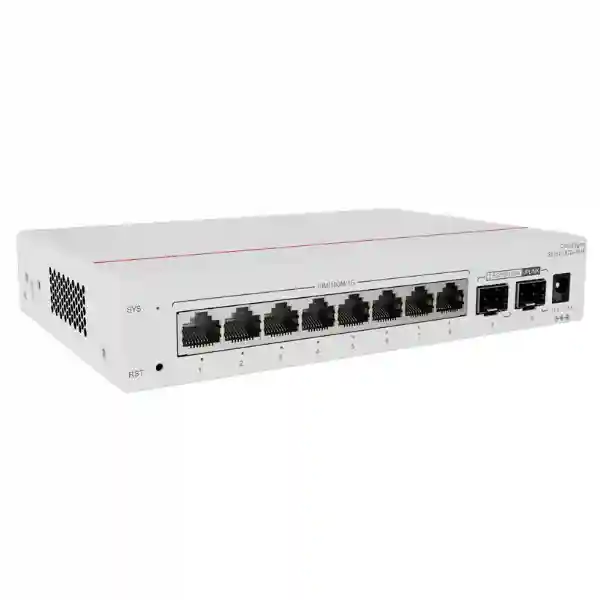
Huawei CloudEngine S5751-L8T2J-RUA
A compact, fanless eight-port Gigabit Ethernet remote unit with dual 100M/1GE/2.5GE SFP uplinks, engineered for Huawei simplified campus architecture and centrally operated edge connectivity.
For UAE organizations designing dense office floors, hotel rooms, classrooms, clinics, branch sites, service counters, meeting areas, or other distributed access zones, the S5751-L8T2J-RUA provides a practical way to move Ethernet ports closer to users while retaining centralized network control. It is particularly useful where full-size access switches would add rack space, fan noise, local configuration effort, and operational complexity.
What this model is
The CloudEngine S5751-L8T2J-RUA is a remote unit in Huawei’s S5751-L family. In Huawei’s simplified campus design, the remote unit behaves as distributed port expansion for a supported central switch rather than as an independently administered traditional access switch. This architectural distinction matters during design, quotation, migration, and commissioning because the value of the device comes from central control, plug-and-play behavior, centralized policy, and reduced local configuration.
Who should consider it
The model is well suited to organizations that need a small number of copper access ports at many physical locations. Typical examples include UAE office clusters, executive suites, retail counters, hotel floors, classrooms, nurse stations, CCTV aggregation points, reception zones, kiosks, and branch rooms where an eight-port footprint is more efficient than installing a larger conventional switch.
Important PoE note
The S5751-L8T2J-RUA is the non-PoE variant. Its eight RJ45 downlink ports provide data connectivity but do not supply PoE to IP phones, wireless access points, or cameras. Projects requiring powered endpoints should select an appropriate PoE-capable S5751-L model or provide endpoint power separately. Confirming this point during bill-of-material preparation prevents incorrect field expectations.
UAE design relevance
Its fanless enclosure, compact dimensions, low consumption, optical uplink capability, and central management model make it useful where equipment may be mounted close to users rather than in a conventional air-conditioned telecom rack. Final installation still requires proper temperature, ventilation, cable routing, electrical grounding, optical design, and environmental review for the actual Dubai, Abu Dhabi, Sharjah, or wider UAE site.
Model-specific hardware specification
Huawei publishes the S5751-L8T2J-RUA with eight 10/100/1000BASE-T downlink ports and two SFP uplink interfaces supporting 100 Mbit/s, 1 Gbit/s, and 2.5 Gbit/s rates. The international product information lists 19.5 Mpps forwarding performance and 98 Gbps switching capacity. This model uses an external power adapter, is fanless, and is designed for desktop or wall installation.
| Parameter | S5751-L8T2J-RUA detail | Design interpretation |
|---|---|---|
| Downlink interfaces | 8 × 10/100/1000BASE-T | Copper edge connectivity for PCs, printers, non-PoE phones, terminals, controllers, and other Ethernet endpoints. |
| Uplink interfaces | 2 × 100M/1GE/2.5GE SFP | Fiber-oriented uplink flexibility with headroom above 1GE when supported optics, cabling, and central-switch ports are selected. |
| Forwarding performance | 19.5 Mpps | Appropriate for an eight-port remote edge role and the published interface mix. |
| Switching capacity | 98 Gbps | Published platform capacity; actual project throughput also depends on topology, uplink rate, traffic pattern, central-switch design, and policy. |
| Dimensions | 35 × 195 × 130 mm (H × W × D) | Compact enclosure for distributed mounting where a 19-inch access switch would be excessive. |
| Weight | Approximately 0.83 kg without packaging | Suitable for wall or furniture-adjacent mounting when the structure and installation method are approved. |
| Power supply | External power adapter, 12 V rated range | Local power must be planned at the remote-unit position for this specific J model. |
| Maximum consumption | Huawei lists 7.46 W for the body and 10.93 W for device plus adapter | Low electrical demand simplifies distributed deployments but does not remove the need for protected power and correct adapter use. |
| Cooling | Fanless, natural heat dissipation | No fan noise and no fan maintenance; mounting must preserve natural airflow. |
| Operating temperature | -5°C to +45°C | Indoor site planning must keep the equipment inside the published operating envelope. |
| Storage temperature | -40°C to +70°C | Relevant to warehousing and logistics, not a substitute for the narrower powered operating range. |
| Relative humidity | 5% to 95%, non-condensing | Protect against condensation, water ingress, and unsuitable ceiling or outdoor spaces. |
| Power-port surge specification | Differential mode ±4 kV; common mode ±4 kV | Useful platform resilience specification, while site-level earthing and surge protection remain part of the overall electrical design. |
Simplified campus architecture: why the remote-unit approach matters
Traditional campus networks commonly divide switching into access, aggregation, and core layers. That approach remains valid for many environments, but it also places configuration, software lifecycle, monitoring, troubleshooting, and replacement responsibilities on numerous access switches. Huawei’s simplified architecture changes the operating model by splitting access functions between central switches and remote units. The remote units extend physical ports toward users while the central switch carries the primary management and policy role.
For the S5751-L8T2J-RUA, this means deployment should be evaluated as part of a system, not as a standalone eight-port switch purchase. The remote unit connects upstream to a compatible central switching platform through optical links. Huawei states that supported central-switch families can work with remote modules when running the required software release, with R24C00 or later noted in current product literature for the listed central-switch families. A project engineer should validate the exact central switch model, board, software train, license position, optical module compatibility, and topology before ordering.
The main operational advantage is reduction of configuration points. A remote unit can be treated as an extension of the central switch, allowing a network team to apply access behavior from a centralized control point. During expansion, a remote unit can be added close to the endpoint cluster rather than building another traditional switching location with its own full configuration. During replacement, the objective is to simplify recovery by allowing the central system to recognize and operate the replacement remote unit with less device-by-device configuration effort.
This model is therefore strongest in repeatable building designs: office floors with eight-port work areas, hotel zones where ports are distributed by corridor or room group, classroom clusters, healthcare wings, small retail areas, and branch offices. When the same pattern is repeated across many physical zones, the simplification benefit compounds. The architecture can reduce the number of independently administered access devices and can make network behavior more consistent, but successful results depend on careful central capacity planning and an accurate mapping of every remote unit to its upstream path.
Port architecture and traffic design
Eight Gigabit copper downlinks
Each downlink supports 10/100/1000BASE-T negotiation, allowing the remote unit to serve modern Gigabit clients and older Ethernet devices where necessary. For new deployments, Cat6 or better horizontal cabling is typically a sensible design baseline, subject to project standards and distance requirements. The eight-port count is especially useful where the physical endpoint density is known and deliberately constrained.
Dual multirate optical uplinks
The two SFP uplink interfaces support 100M, 1GE, and 2.5GE rates. This flexibility helps designers align the uplink with the installed fiber plant and the capabilities of the central switch. Using 2.5GE uplinks can provide additional aggregation headroom compared with a single 1GE path, but the final effective bandwidth depends on whether one or both links are active, the configured aggregation method, central-switch support, and traffic distribution.
Uplink link aggregation
Huawei lists uplink-port link aggregation among the S5751-L feature set. In a validated architecture, aggregation can be used to combine physical links for capacity and resilience objectives. The exact implementation should be designed with the central switch, supported optics, fiber paths, failure domains, and forwarding behavior in mind. Two cables do not automatically create path diversity if they share the same tray, patch panel, line card, or upstream fault domain.
Non-PoE data access
Because this T model does not provide PoE on its access ports, its power budget is independent of endpoint load. This keeps the remote unit itself simple and efficient, but it also means the network designer must identify which attached devices need local adapters or separate power infrastructure. For environments dominated by PCs, printers, terminals, digital signage controllers, or other self-powered clients, the non-PoE design can be entirely appropriate.
Performance engineering: reading 19.5 Mpps and 98 Gbps correctly
Switch specifications are often reduced to headline numbers, but an enterprise design needs to interpret them in context. Huawei lists 19.5 million packets per second of forwarding performance and 98 Gbps of switching capacity for the S5751-L8T2J-RUA in the international product material. These figures describe the platform’s published forwarding characteristics; they do not mean that every attached endpoint will continuously receive the switching-capacity figure as usable application throughput.
The physical interface mix places a practical boundary around traffic entering and leaving the device. Eight 1GE copper access ports represent the edge side, while the two optical uplinks can each operate up to 2.5GE. A deployment should therefore be sized from real traffic behavior: average and peak workstation usage, video conferencing bursts, file replication, backup windows, print traffic, imaging, application delivery, internet access, and east-west communication patterns. The uplink rate and topology determine how much aggregate traffic can move toward the central switch at a given moment.
For many office and hospitality environments, endpoint traffic is naturally bursty. Eight connected users do not normally transmit at line rate simultaneously for long periods. In those cases, a 2.5GE optical uplink can provide useful consolidation without requiring a full 10GE access uplink. In specialized environments such as high-throughput workstations, media production, storage access, imaging laboratories, or heavy local replication, a designer should validate whether the eight-port S5751-L8T2J-RUA and 2.5GE uplink ceiling are appropriate or whether a higher-uplink S5751-L variant is a better fit.
Packet rate also becomes important when traffic consists of large numbers of small frames rather than a smaller number of large packets. The published 19.5 Mpps figure provides a useful model reference, but application experience still depends on the complete path: access endpoint, cabling, remote unit, optic, fiber, central switch, upstream routing, firewall, WAN or internet edge, and destination service. FourTeck can help map the remote-unit specification into a full campus design through FourTeck UAE engineering and project planning services.
Central management and operational model
One of the most important reasons to choose a remote unit rather than a generic compact switch is operational consistency. Huawei describes the S5751-L remote units as port expansion modules managed through the central switch. Instead of treating every eight-port device as a separate configuration island, the network team can build a centrally controlled access fabric. This is particularly valuable in multi-floor buildings where dozens of small edge locations would otherwise require individual switch configuration, credentials, software maintenance, backups, monitoring, and troubleshooting.
Central operation also changes how project teams should document the network. A useful deployment record should include remote-unit identifier, physical location, upstream central-switch port, fiber pair, optical module type, patch-panel position, endpoint port map, VLAN assignment, security policy, and local power source. When this information is maintained as structured as-built documentation, field support becomes faster because the central configuration and the physical installation can be correlated quickly.
Huawei’s product literature describes intelligent upgrade behavior in which the central switch can manage remote-unit software alignment. The design objective is to reduce the manual effort associated with device-by-device upgrades and to allow the central platform to coordinate software versions. Before a production upgrade, however, network teams should still follow change-management controls: verify the supported upgrade path, read release notes, validate central and remote compatibility, confirm maintenance windows, protect configuration backups, and define rollback or replacement procedures.
Huawei also positions the architecture for centralized monitoring and cloud-assisted operations. The central switch can collect status information from connected remote units, and supported management platforms can use that data for visibility and troubleshooting. In a UAE enterprise, this can be useful for a network operations team responsible for multiple sites or large campuses because a fault at a distributed edge location can be investigated from a central operational view before dispatching a technician.
Organizations that want broader assessment, rollout support, structured cabling coordination, migration planning, network operations, or managed IT integration can align the switching project with services available through FourTeck IT Services UAE. The objective should be a complete operating model, not simply installation of hardware.
Layer 2 controls, VLAN design, and endpoint separation
Huawei lists support for up to 128 VLANs in the S5751-L remote-unit feature set, together with port-based VLAN assignment, automatic MAC address learning, automatic MAC aging, port up/down detection, auto-negotiation, port-rate setting, and port isolation. These functions support the core job of an access edge: place endpoints into the intended Layer 2 segment, learn their Ethernet identity, and maintain controlled connectivity through the upstream central switching policy.
For an eight-port remote unit, the number of locally attached endpoints may be small, but segmentation can still be important. A single device may serve a combination of corporate workstations, printers, building controllers, guest-service terminals, or specialist equipment. The physical proximity of those endpoints does not mean they should share the same broadcast domain or security policy. VLAN assignment should reflect business function and security requirements rather than the fact that ports happen to be on the same remote unit.
Port isolation can be useful where endpoints should communicate upstream but not directly with one another at Layer 2. This can reduce unwanted peer-to-peer visibility in selected access scenarios. The exact security outcome depends on the central switching and routing policy, so isolation should be treated as one control within a broader architecture that may include authentication, firewall enforcement, endpoint protection, network access control, and application-layer controls.
A sound UAE campus design normally establishes a repeatable access template. For example, port roles can be documented by zone, VLAN IDs can be standardized across buildings, reserved ports can be identified for future growth, and uplink mappings can be kept consistent. The compact nature of the S5751-L8T2J-RUA makes disciplined documentation especially important because many units may be deployed across a site. Consistent templates reduce commissioning errors and improve the quality of future troubleshooting.
MACsec and access-edge security
Huawei states that S5751-L series remote units support MACsec on all ports. MACsec is a Layer 2 security technology designed to protect Ethernet frames through mechanisms that include data confidentiality, integrity checking, peer authentication within the supported design, and replay protection. In a campus architecture, this can add protection to Ethernet links where policy and platform support are correctly engineered end to end.
The presence of MACsec capability should not be interpreted as an automatic security guarantee. The feature must be supported, configured, and operationally managed across the intended link peers. Key management, authentication method, central-switch compatibility, software release, interface role, failure behavior, and performance impact should be validated for the specific topology. Security teams should also decide which links need encryption based on threat modeling rather than enabling a feature without an architectural objective.
In a UAE office building, for example, fiber and copper routes may pass through shared risers, ceiling spaces, floor boxes, or intermediate distribution areas. MACsec can form part of a defense-in-depth strategy for selected links, while physical security remains essential. Locked telecommunications rooms, protected patch panels, controlled access to wall-mounted remote units, tamper-aware installation, and accurate asset records all reduce exposure.
The network edge must also be considered together with upstream firewalling and segmentation. The S5751-L8T2J-RUA is not a perimeter firewall and should not be positioned as one. It extends and enforces access-layer behavior under the central switching design. Internet and inter-zone security controls should be provided by the appropriate routing, firewall, identity, and security architecture. For broader edge-security solutions, FourTeck can integrate campus switching with server, network, and security infrastructure rather than treating each component in isolation.
Fiber uplink planning for UAE buildings and campuses
The two SFP uplink ports are a defining feature of the S5751-L8T2J-RUA. By using optical uplinks, the remote unit can be placed farther from the central switch than a conventional copper horizontal run would normally allow, subject to the selected transceiver, fiber type, optical budget, and project standards. This can be valuable in towers, villas converted to offices, schools, healthcare facilities, warehouses with office pods, hotels, and large commercial spaces where copper-only topology would create too many intermediate switching rooms.
Optical design begins with fiber type. The project must establish whether the installed plant is single-mode or multimode, the available strand count, connector type, patching method, route length, splice loss, connector loss, reserve margin, and expected future expansion. The transceiver chosen for the remote unit must match the central-switch optic and the fiber plant. Simply specifying “SFP” is not enough for procurement because wavelength, reach, fiber category, connector, and supported data rate all matter.
The multirate 100M/1GE/2.5GE capability provides migration flexibility. An existing network may initially operate a link at 1GE and later move to 2.5GE if the central interface, optical modules, and fiber design support the change. A new build can also use 2.5GE from day one when traffic modeling justifies the extra headroom. The design should verify actual supported transceiver combinations in Huawei compatibility documentation for the chosen software release.
Resilience needs a physical-path review. Two uplink ports can support aggregation objectives, but genuine redundancy requires separation of failure domains. If both fibers leave the remote unit through the same damaged conduit and terminate on the same upstream hardware path, a dual-link configuration may still fail together. Critical environments should review riser diversity, patch-panel diversity, central-switch architecture, power diversity, and operational recovery procedures.
When the switching estate also connects to local compute, storage, or application infrastructure, the remote access layer should be planned together with the data-center side. FourTeck’s Server Dubai portfolio can be referenced for broader infrastructure projects where campus connectivity and server deployment need coordinated bandwidth, redundancy, and security planning.
Fanless design, acoustics, power, and physical deployment
Natural cooling
The S5751-L8T2J-RUA uses natural heat dissipation rather than fans. Huawei lists the model as noise-free with acoustic power below 30 dB(A) and acoustic pressure below 20 dB(A) under the stated normal-temperature conditions. This is advantageous in quiet offices, reception areas, classrooms, hospitality spaces, executive rooms, or wall-mount positions close to occupants. Fanless operation also removes a moving component that would otherwise collect dust and require mechanical maintenance.
Local power planning
This specific model uses a power adapter and a 12 V rated input range at the device. Huawei lists a maximum of 7.46 W for the body and 10.93 W for device plus adapter. The modest load is useful for distributed deployment, yet every mounting point still needs a secure and appropriately protected power source. Extension leads hidden above ceilings or unsupported adapters dangling from furniture are poor installation practice.
Compact mounting
At approximately 35 × 195 × 130 mm and 0.83 kg, the unit is materially smaller than a full-width rack switch. Huawei supports desk and wall mounting. The chosen position should still provide cable bend radius, adapter strain relief, optical patch protection, label visibility, service access, and air circulation. Installers should avoid sealing the device inside unventilated decorative joinery or placing it where cleaning fluids, moisture, or accidental impact are likely.
Environmental envelope
The published operating range is -5°C to +45°C with 5% to 95% relative humidity, non-condensing. These values support normal indoor deployment but do not make the unit an outdoor switch. UAE roof spaces, sun-exposed cabinets, non-air-conditioned service areas, and some ceiling voids can exceed safe conditions. Actual ambient temperature at the mounting point should be verified during site survey.
Reliability and surge considerations
Huawei’s hardware table lists an MTBF figure of 102.91 years and availability greater than 0.99999 for the S5751-L8T2J-RUA. MTBF is a statistical reliability metric, not a promise that an individual unit will operate for a century. It is useful for comparative engineering and fleet-level planning, but real service life is influenced by temperature, power quality, component aging, installation quality, firmware lifecycle, physical handling, and environmental exposure.
The published power-port surge specification is ±4 kV in both differential and common mode. That specification is valuable, especially in regions where electrical disturbances can affect distributed equipment, but it does not replace facility-level surge protection, earthing, UPS design, and electrical compliance. A remote unit fed from an unstable or poorly protected circuit can still experience service interruption even if the device itself has platform-level surge resilience.
For critical business areas, the complete dependency chain should be reviewed. The S5751-L8T2J-RUA requires local power; if the local circuit fails, its eight attached endpoints lose network access even when the central switch remains operational. Where continuity is important, the local adapter may need to be supported by a suitably sized UPS or protected supply. If the endpoints also need backup power, their loads must be included separately because this model does not power them over Ethernet.
Optical resilience should also be considered independently from electrical resilience. A local UPS protects against one class of failure; it does not protect against fiber cuts, optic faults, accidental patching changes, or upstream central-switch issues. Good architecture combines power protection, path design, spare strategy, monitoring, configuration control, and documented recovery procedures.
Deployment scenario 1: corporate office floors
Modern UAE offices often need network ports in meeting suites, executive zones, reception areas, printer rooms, training spaces, and small clusters of desks that are physically distant from the nearest telecommunications room. Installing a 24- or 48-port switch for each small cluster can waste ports and introduce unnecessary fan noise and management overhead. An eight-port remote unit can place connectivity closer to the users while using optical fiber for the upstream connection.
Consider a floor where a meeting area requires six wired endpoints: a room controller, two video-conferencing components, a digital signage player, a dedicated workstation, and a local AV control processor. If the attached equipment is self-powered, the non-PoE S5751-L8T2J-RUA can be a good physical fit. Two spare ports remain for future devices. The unit can be wall-mounted inside an accessible service cabinet, with a fiber uplink back to the central switching environment.
The central architecture can apply VLANs appropriate to AV, corporate, and building-system traffic rather than forcing every local device into one network. Port isolation can be considered where endpoints should not communicate directly. MACsec capability can be evaluated for links requiring Layer 2 protection. Monitoring remains centralized so the support team can identify whether a fault is local to a port, remote unit, uplink, optic, or upstream network.
For office rollouts repeated across many floors, standardization is important. A design template can define mounting height, power outlet, fiber termination, optic type, labeling convention, central-switch mapping, port roles, VLAN scheme, and spare-port policy. Once the template is validated, deployment becomes repeatable and audit-friendly.
Deployment scenario 2: hotels and hospitality
Hospitality networks combine guest services, property systems, staff operations, digital signage, room technology, back-office applications, CCTV, telephony, wireless, and building automation. Not every cluster needs PoE, and not every location justifies a full access switch. The S5751-L8T2J-RUA can serve self-powered Ethernet equipment in distributed hotel zones where silent operation and compact mounting are useful.
A hotel project could use remote units in service areas, administration offices, AV rooms, or other controlled indoor locations. Fiber uplinks can extend back to central switching without creating additional conventional aggregation points at every small zone. This is particularly useful in properties where riser space is constrained or where network equipment must be kept discreetly away from guest-facing environments.
Segmentation is critical. Guest-related systems, corporate administration, payment infrastructure, building controls, AV devices, and operations platforms should not be mixed simply because they terminate on the same physical device. VLAN assignment and upstream policy must follow the hotel’s security architecture. The remote unit’s role is to provide controlled Layer 2 access; firewall boundaries, routing, identity, internet policy, and application security remain part of the broader network.
PoE planning is equally important. Many hospitality endpoints—wireless APs, IP phones, and cameras—often require PoE. Those devices should not be assigned to this non-PoE model unless they have an acceptable alternative power method. Where powered endpoints dominate, a PoE-capable S5751-L variant may be more appropriate. A mixed design can use the T model for self-powered clusters and PoE variants where power delivery is required.
Deployment scenario 3: education and training facilities
Schools, universities, academies, and corporate training centers frequently have small wired clusters distributed across classrooms, laboratories, instructor stations, examination rooms, and administrative areas. An eight-port remote unit can reduce the need to install a traditional managed switch in every teaching zone, particularly when the central campus design already uses Huawei-compatible switching.
A classroom may need wired connections for an instructor PC, smart display controller, assessment terminal, local server appliance, lab console, or other self-powered devices. The fanless design is beneficial in learning environments because it avoids continuous fan noise. Wall installation can keep the unit away from desktops, although physical security and controlled access remain important in student-accessible spaces.
Education networks also benefit from standardized VLAN templates. Teaching devices, administration systems, lab equipment, and guest services can be assigned according to policy. Centralized management reduces the burden on IT teams that may support many rooms with limited staff. Rather than maintaining unique configuration on every small switch, the remote-unit architecture is designed to centralize the operational model.
For high-performance labs, designers should review traffic profiles carefully. Eight 1GE ports can generate more aggregate demand than a single 1GE uplink under simultaneous heavy use, so 2.5GE uplink operation may be preferable where supported. If the application involves sustained multi-gigabit storage or media workflows, a model with 10GE uplinks may be the more appropriate choice. The correct decision comes from measured or forecast traffic, not from port count alone.
Deployment scenario 4: healthcare, clinics, and distributed service areas
Healthcare environments often distribute networked devices across consultation rooms, administration points, nursing stations, laboratories, imaging support rooms, and service counters. Some endpoints are PoE-powered, while others use their own regulated power supplies. The S5751-L8T2J-RUA is best considered for the latter category when a compact, silent, centrally managed access extension is required.
The fanless design can be useful in noise-sensitive indoor environments. Central management may also reduce the amount of local intervention needed for configuration and routine maintenance. However, healthcare network design must follow the organization’s clinical risk, cybersecurity, segmentation, availability, and compliance requirements. A remote unit should not be introduced merely because it is physically convenient; it must fit the approved architecture for the systems connected to it.
Where endpoint continuity matters, local power resilience deserves particular attention because the S5751-L8T2J-RUA depends on a local adapter. A protected circuit or UPS may be required. If a connected device has its own UPS or internal battery, that does not automatically protect the network unit. Conversely, backing up the remote unit does not protect self-powered endpoints unless their supplies are also protected.
Network teams should document which ports are permitted for biomedical systems, general IT, administrative devices, or facility controls, and should enforce separation through VLAN and upstream security policy. MACsec capability can be reviewed as part of the link-security design, but it should complement rather than replace broader controls such as endpoint authentication, secure management, access control, firewalling, monitoring, and physical security.
Deployment scenario 5: retail, branches, and service counters
Retail and branch environments frequently need a compact access device for POS terminals, back-office PCs, printers, digital signage players, queue systems, controllers, or service-desk equipment. Many of these devices are self-powered, which can make the non-PoE S5751-L8T2J-RUA an efficient fit when the broader network already supports Huawei remote units.
The device’s small footprint simplifies placement in controlled back-office spaces. Optical uplinks can be useful in large stores, malls, warehouses, or campuses where the service counter is too far from the main communications room for a simple copper home run. Centralized management can also help multi-site IT teams maintain consistent port roles and segmentation across repeated branch designs.
Retail resilience planning should account for transaction traffic and business hours. If a remote unit supports point-of-sale or order-processing systems, local power protection and spare strategy may be justified. A failed adapter can be as disruptive as a failed switch, so the spare inventory should include the correct approved power components and optics, not only the remote unit itself.
Remote troubleshooting procedures should define what the branch staff can safely check—power indicator, cable seating, endpoint state—before an engineer is dispatched. The central network team should retain responsibility for configuration and security changes. This separation helps prevent ad hoc local changes that could undermine a standardized branch architecture.
Choosing optics, fiber, and patching components
A correct S5751-L8T2J-RUA bill of materials includes more than the switch and its power adapter. The uplink design requires compatible transceivers at both ends, patch cords, fiber termination, and a documented link budget. Where two uplinks are planned, the quantity of optics and fiber pairs doubles. Where physical diversity is required, cable routing may also need separate pathways.
The most common procurement error is treating optical modules as interchangeable accessories. They are not. A 1GE multimode optic, a 1GE single-mode optic, and a 2.5GE optic may use different wavelength, reach, fiber, and compatibility parameters. Both ends of the link must be intentionally matched, and the selected modules must be supported by the Huawei platforms and software releases in use. Third-party optics should only be considered when the organization’s support policy and compatibility requirements explicitly allow them.
Patching quality is equally important. Dirty connectors, excessive bends, poor splices, polarity errors, and incorrect patch-panel labeling can produce intermittent faults that appear to be switch problems. Commissioning should include visual inspection, cleaning procedures, link verification, and—where project scope requires it—optical power or certification testing. Results should be captured in the as-built documentation for future troubleshooting.
Because the unit supports 100M, 1GE, and 2.5GE optical uplink rates, engineers should explicitly set or verify the intended operating mode. An unexpectedly negotiated lower rate can become a hidden bottleneck. Monitoring should record actual link speed, errors, utilization, and flaps so that uplink problems are detected before users report poor performance.
Migration from conventional access switching
Moving to a remote-unit architecture should be treated as a network redesign rather than a one-for-one hardware replacement. A traditional access switch may terminate many VLANs, uplinks, local management functions, PoE loads, monitoring integrations, and cabling runs. Replacing it with several S5751-L remote units changes the physical and operational topology. The migration plan therefore needs a complete inventory of existing endpoints, cable destinations, uplink paths, security controls, power dependencies, and software integrations.
Start with port mapping. Record every active switch port, attached MAC address, VLAN, speed, duplex state, PoE requirement, description, and observed traffic profile. This identifies which endpoints can move to the non-PoE S5751-L8T2J-RUA and which require a PoE-capable model. Next, group endpoints by physical location. The objective is to position remote units close enough to endpoint clusters that copper cabling remains simple while fiber carries the upstream connection.
The central switch must then be sized for remote-unit count, uplink interfaces, aggregate traffic, software compatibility, and resilience. Migration sequencing should minimize simultaneous risk. A pilot area can validate optics, configuration templates, VLAN behavior, monitoring, failure handling, labeling, wall-mount practice, and support procedures before the design is repeated across the building.
Change windows should include rollback criteria. If a remote unit does not register correctly, an optic is incompatible, a fiber path fails testing, or an endpoint application behaves unexpectedly, the team should know whether to restore the previous access switch or move to a predefined alternative path. Good migrations are designed around predictable failure handling rather than the assumption that every component will work first time.
After migration, remove obsolete configurations and update the operational baseline. Network diagrams, rack elevations, floor plans, cable schedules, asset registers, monitoring systems, and service documentation should all reflect the new central-plus-remote topology. This documentation is what turns a technically successful cutover into a maintainable production network.
Commissioning methodology for the S5751-L8T2J-RUA
Commissioning should be systematic. Before power-on, verify the device model on the label, check the approved adapter, confirm the mounting location, inspect the fiber patching, confirm optical-module type, and compare the physical port map with the implementation drawing. The unit should have enough clearance for airflow and cable service, and all connections should be strain-relieved.
After power-up, verify that the remote unit is recognized by the supported central switch and that its software state is compatible with the intended deployment. Confirm uplink rate, link stability, and any aggregation configuration. Check that the correct access VLAN or port policy is applied to each downlink. Test endpoints at their actual negotiated speed, not merely by confirming that a link LED is illuminated.
Functional testing should reflect the project. For office users, validate DHCP, DNS, authentication, internal applications, internet access, printing, and conferencing as relevant. For AV or building systems, test the required controllers and management paths. For segmented networks, confirm that permitted traffic succeeds and prohibited lateral traffic is blocked according to policy.
Resilience testing should also be considered. If dual uplinks are configured, test a single-link failure and observe convergence, endpoint impact, and alarms. If a UPS protects the local power supply, test the expected backup behavior under controlled conditions. If centralized monitoring is used, verify that interface state, device status, and alerts are visible to the operations team.
Close commissioning with documentation. Record serial numbers, physical location, central-switch association, port descriptions, optic models, fiber pair IDs, VLAN mapping, test outcomes, and any approved deviations from the design. A photograph of the final labeled installation can be valuable for remote support. This discipline is especially important when dozens or hundreds of compact remote units are distributed across a campus.
Operations, monitoring, and troubleshooting
The operational model should begin with centralized visibility. A support engineer needs to know whether the remote unit is online, which uplink is active, the negotiated rate, whether errors or flaps are occurring, which downlink ports are up, and whether endpoint MAC addresses are being learned as expected. Baseline information from a healthy state makes later fault isolation much faster.
When a single user loses connectivity, start at the edge: endpoint NIC state, patch lead, wall outlet, horizontal cable, and remote-unit port. If multiple endpoints on the same S5751-L8T2J-RUA fail together, inspect remote-unit power, uplink status, optic state, fiber path, and central-switch relationship. If multiple remote units fail simultaneously, the shared central switch, line card, uplink path, power domain, or management policy becomes a stronger suspect.
Optical errors deserve specific attention. A link can remain nominally up while suffering increased error rates due to contamination, weak optical power, marginal splices, or bending. Monitoring should therefore include more than binary up/down status where the platform provides suitable diagnostics. Repeated flapping should trigger physical-layer inspection before configuration changes are made.
Configuration troubleshooting should follow the centralized policy model. Verify VLAN assignment, port isolation behavior, uplink aggregation state, MAC learning, and any security controls. Changes should be recorded through normal change management rather than applied as undocumented emergency fixes. If a replacement remote unit is required, preserve the failed unit for diagnosis when support procedures call for it and update the asset register after replacement.
A small stock of validated spares can shorten outages in distributed deployments. The spare plan should consider remote units, approved adapters, optical modules, and patch cords. A shelf full of switches is not sufficient if the actual failure is an optic or power adapter. Spare quantities should reflect installed population, business criticality, lead times, and support contract coverage.
Capacity planning and sizing methodology
Sizing begins with endpoint count, but it should not end there. An eight-port remote unit is most efficient when the endpoint cluster is stable enough that several ports will be used while some growth margin remains. Deploying a unit for only one device may be inefficient unless distance or architectural constraints justify it. Filling all eight ports on day one may also be short-sighted if the location is likely to grow.
A common planning target is to reserve capacity for foreseeable additions. The right reserve depends on the environment. An executive meeting area may change slowly, while a training room or retail counter may be reconfigured frequently. Document expected one-year and three-year port demand, and decide whether spare ports should be local or provided by an adjacent remote unit.
Traffic sizing should evaluate peak concurrency, not only average utilization. Eight office PCs may average very little bandwidth but create bursts during cloud synchronization, software updates, video meetings, or backup activity. A 2.5GE uplink can absorb more concurrent demand than 1GE, provided the optics and central side support it. Where traffic is predictably heavy, measure or model it before selecting the model.
Central-switch capacity is equally important. Each remote unit consumes upstream interfaces and contributes traffic, MAC addresses, VLAN membership, and management state. Large rollouts should calculate the total remote-unit count per central device, uplink-port requirements, oversubscription, redundancy design, and expected failure domain. Centralization reduces operational complexity only when the central layer itself is sized and protected correctly.
Power and space sizing remains relevant even for low-power devices. Hundreds of remote units distributed through a building can represent a meaningful aggregate electrical load and a significant number of local power outlets. The project should account for adapters, UPS capacity where required, electrical circuit distribution, mounting hardware, and access for maintenance.
When the S5751-L8T2J-RUA is the right model—and when it is not
Strong fit
Choose this model when you need up to eight self-powered Gigabit Ethernet endpoints at a distributed location, want optical uplinks up to 2.5GE, are building around a compatible Huawei central-switch architecture, value fanless operation, and prefer centralized access management over independently configuring many compact switches.
Review alternatives
Consider a different S5751-L model when endpoints require PoE, when more than eight copper ports are needed, when 10GE uplinks are required for sustained high-throughput traffic, or when the chosen central platform does not support the remote-unit architecture. A conventional standalone access switch may also be preferable where the site must operate independently of the Huawei central-switch model.
Do not assume PoE
The “T” model discussed on this page is non-PoE. Similar S5751-L model names can represent PoE-capable variants, multigigabit copper variants, or 10GE-uplink variants. Procurement teams should match the complete model code, not only the S5751-L family name.
Verify software and optics
Remote-unit support is architecture-dependent. Confirm the exact central switch, software version, supported optic, fiber type, and intended uplink speed before purchase. A correct remote unit with an incompatible upstream design will not produce a successful deployment.
S5751-L family comparison logic
Huawei offers multiple S5751-L models with similar physical concepts but different access and uplink capabilities. The S5751-L8T2J-RUA sits at the straightforward end of the range: eight Gigabit copper data ports, two SFP uplinks up to 2.5GE, no PoE, and external adapter power. This combination keeps the enclosure compact and the power demand low.
PoE variants add the ability to power endpoints and therefore use a different power profile. Other models add 2.5GBASE-T access interfaces for higher-speed clients. Models with “2X” uplink designations provide SFP+ uplinks up to 10GE, which may be better for dense or high-throughput edge zones. Larger members of the family provide more copper ports. Hybrid optical-electrical models support specialized power delivery methods in supported designs.
The selection process should be driven by four questions: How many endpoints are in the zone? Which of them need PoE? What is their peak aggregate bandwidth? What upstream medium and rate are available? A fifth question—how is the remote unit powered—becomes important where local electrical outlets are limited or where a centralized power concept is preferred.
Avoid selecting a more expensive model simply because it has a higher headline specification. A 10GE uplink does not improve a small office cluster that generates only modest traffic, just as a non-PoE model is unsuitable for a ceiling full of IP cameras. The best design matches the capability to the actual workload and infrastructure. For broader vendor-neutral or multi-vendor network planning, FourTeck Global can be referenced alongside UAE-specific engineering requirements.
UAE procurement and project-delivery considerations
Enterprise switching procurement should preserve the exact Huawei model code throughout the quotation, purchase order, delivery note, and installation records. S5751-L variants can look similar while differing materially in PoE capability, uplink speed, port count, power method, and physical design. The requested line item should therefore read “Huawei CloudEngine S5751-L8T2J-RUA” rather than a generic “Huawei S5751 switch.”
The bill of materials should also identify transceivers, fiber patch cords, mounting accessories, approved power adapters, central-switch interfaces, and any required licenses or software support associated with the broader architecture. Where spare units are included, spare optics and adapters should be considered too. Delivery inspection should verify model labels and quantities before equipment is distributed to multiple sites.
UAE site readiness is another procurement factor. A remote unit may be delivered before the local power outlet, fiber termination, or wall-mount surface is ready. Coordinating civil, electrical, structured cabling, and networking workstreams prevents devices from being left unsecured or temporarily installed in ways that later become permanent. A site survey can identify these dependencies before deployment begins.
Support planning should define who owns central-switch configuration, who can replace a remote unit, how failed hardware is returned, what spare stock is held locally, and which maintenance windows apply. Multi-site customers may benefit from keeping regional spares in Dubai or another central logistics point rather than storing a unit at every branch. The right model depends on lead time and business criticality.
Finally, project acceptance should be based on tested functionality rather than physical installation alone. A remote unit is complete only when uplinks are stable, ports are correctly mapped, VLAN behavior is validated, endpoints reach required services, monitoring is operational, labels are accurate, and documentation has been handed over.
Network design checklist before ordering
1. Endpoint inventory
Count the devices, note their network speeds, identify PoE requirements, record security classification, and estimate growth. Confirm that no more than eight copper ports are required at each planned remote-unit location.
2. Central-switch validation
Confirm that the chosen Huawei central platform and software release support the S5751-L remote-unit design. Validate interface availability, scale, redundancy, and planned remote-unit count.
3. Fiber path
Document fiber type, strand availability, distance, connector, patch panel, route, optical budget, and whether a second physically diverse path is required.
4. Uplink speed
Choose 100M, 1GE, or 2.5GE only after reviewing traffic needs and the supported optic combination. For modern deployments, 1GE or 2.5GE will typically be the relevant choices.
5. Local power
Provide an approved, protected local power source for the adapter. Decide whether UPS protection is required for the business function served by the remote unit.
6. Mounting environment
Keep the device within the published operating temperature and humidity range, protect it from moisture and accidental damage, and preserve airflow for natural cooling.
7. Security policy
Define VLANs, port isolation, MACsec requirements, upstream firewall policy, endpoint authentication, physical access, and monitoring responsibilities.
8. Operations
Plan naming, labels, central mapping, monitoring, backup, upgrade, spare parts, replacement workflow, documentation, and escalation before the first production unit is installed.
Frequently asked technical questions
Does the S5751-L8T2J-RUA provide PoE?
No. This exact T model provides eight Gigabit Ethernet data ports without PoE. If the attached AP, IP phone, or camera needs power from the switch, select a suitable PoE-capable S5751-L variant or provide an approved alternative power method.
Can the uplinks run at 2.5GE?
Yes. Huawei specifies two 100M/1GE/2.5GE SFP uplink ports. The actual rate depends on compatible optics, fiber, central-switch interfaces, and configuration.
Is it fanless?
Yes. Huawei lists natural heat dissipation with no fans for this model. That reduces acoustic impact and mechanical maintenance, provided the unit is installed with adequate passive airflow.
Can it be wall-mounted?
Yes. Huawei lists desk or wall mounting. The installer should use appropriate mounting methods, preserve cable bend radius and ventilation, and keep the unit accessible for service.
Does it support MACsec?
Huawei’s S5751-L remote-unit documentation lists MACsec on all ports. Project use still depends on the supported peer, software release, configuration, and security design.
Is it a standalone switch?
Its intended role is a remote unit in Huawei’s simplified architecture, operating as port expansion managed through a compatible central switch. Treat it as part of that architecture rather than assuming the same operational model as a conventional independently managed access switch.
How many VLANs are supported?
Huawei lists up to 128 VLANs for the remote-unit feature set. The actual network design should align VLAN use with the central switching architecture and organizational segmentation policy.
What is the operating temperature?
Huawei lists -5°C to +45°C for the S5751-L8T2J-RUA. UAE installations should verify the actual mounting-point temperature because ceiling voids, sun-exposed cabinets, and unconditioned spaces can exceed room temperature substantially.
Decision recap: what the S5751-L8T2J-RUA brings to a UAE network
The Huawei CloudEngine S5751-L8T2J-RUA is best understood as a compact remote edge for a centrally operated campus architecture. It gives network designers eight Gigabit copper access ports in a small fanless enclosure and provides two multirate SFP uplinks that can operate up to 2.5GE. Its published 19.5 Mpps forwarding rate and 98 Gbps switching capacity are paired with a low-power, adapter-fed hardware design intended for distributed indoor placement.
The technical value is not limited to port count. Centralized remote-unit management can reduce the number of independently configured access devices. VLAN assignment, port isolation, uplink aggregation capability, automatic MAC learning and aging, and MACsec support provide a controlled Layer 2 foundation. Intelligent software coordination and centralized monitoring can simplify lifecycle operations when deployed with the appropriate Huawei central-switch platform and management architecture.
The model has clear boundaries. It does not provide PoE. It does not offer 10GE uplinks. It depends on local adapter power. It should be deployed as part of a compatible Huawei remote-unit architecture. Those are not disadvantages when the project matches them intentionally; they are selection criteria. A self-powered eight-endpoint cluster with modest-to-moderate aggregate traffic may be an excellent fit, while a Wi-Fi 7 AP cluster, high-density camera deployment, or heavy workstation pod may require a different model.
For procurement, the most important step is to quote the complete solution rather than only the remote unit. Central-switch compatibility, software release, transceivers, fiber, patching, power, mounting, spares, support, and commissioning determine whether the hardware produces the expected business result.
Quotation input checklist
To prepare an accurate UAE quotation and avoid model or accessory mismatches, provide the following project information. Even partial details are useful; the engineering team can identify the remaining questions during technical review.
Number of S5751-L8T2J-RUA units required now and expected expansion quantity.
Exact Huawei model, installed software release, available optical interfaces, and redundancy design.
Single-mode or multimode, approximate route length, connector type, and available fiber pairs.
1GE or 2.5GE target, plus whether dual-uplink aggregation or diverse routing is required.
Device types per remote unit, including any endpoint that requires PoE.
Wall or desktop placement, service access, environmental conditions, and enclosure requirements.
Availability of local outlets, UPS requirement, protected circuits, and site electrical standards.
Supply only, installation, fiber testing, configuration, migration, commissioning, documentation, or ongoing support.
Plan the S5751-L8T2J-RUA as part of the complete network
FourTeck can help UAE customers validate the Huawei CloudEngine S5751-L8T2J-RUA against the central switching platform, fiber plant, endpoint mix, uplink-speed requirement, power design, security segmentation, installation conditions, and support model. A short technical review before ordering can prevent the most common mistakes: selecting a non-PoE unit for powered endpoints, omitting optics, choosing the wrong fiber type, under-sizing central interfaces, or overlooking local power.
Share the current topology or simply provide the endpoint quantity, building type, fiber availability, and central-switch model. The solution can then be developed into a bill of materials that covers remote units, optical modules, patching, accessories, services, and deployment documentation. The goal is a supportable architecture with a clear migration path rather than an isolated hardware purchase.
Confirm quantity, central-switch model, fiber type, uplink rate, endpoint PoE needs, and site location. FourTeck can then align the correct Huawei remote-unit variant and accessories for your UAE project.

Reviews
There are no reviews yet.