
Huawei CloudEngine S5751-L8LP2J-RUA Remote Unit Switch
Compact 8-port PoE+ edge access with dual 2.5GE optical uplinks, fanless operation and centralized remote-unit management for modern UAE campus networks.
The Huawei CloudEngine S5751-L8LP2J-RUA is designed for organizations that want to simplify the physical edge of a campus network without giving up enterprise control. Instead of treating every access location as an independent switch that must be planned, configured, upgraded and monitored separately, Huawei positions the S5751-L remote-unit family as an extension of a compatible central switch. The practical goal is a flatter access architecture: centralize intelligence and policy while placing compact port expansion close to users, wireless access points, IP phones, cameras and other Ethernet endpoints.
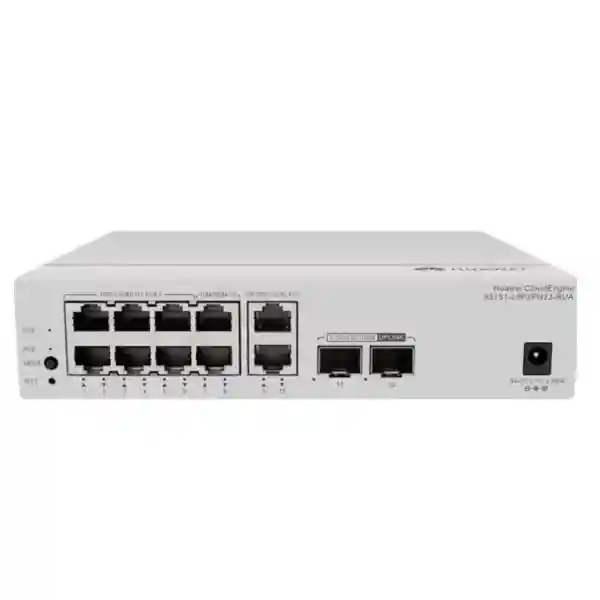
For UAE deployments, this design is particularly useful in offices, hospitality properties, clinics, education buildings, retail branches, meeting-room clusters and distributed floor zones where eight copper access ports are sufficient but a full-size access switch would be unnecessarily large. The S5751-L8LP2J-RUA combines eight 10/100/1000BASE-T PoE+ downlink ports with two optical SFP uplinks capable of 100M, 1GE or 2.5GE operation. Huawei lists forwarding performance at 19.5 Mpps and switching capacity at 98 Gbps for the model. The published hardware table also identifies fanless natural heat dissipation, desk or wall mounting, an operating range of -5°C to +45°C, 5% to 95% non-condensing relative humidity and a compact 43.6 × 195 × 160 mm chassis.
FourTeck can support design, supply and integration around this product for UAE network projects. Buyers comparing the S5751-L8LP2J-RUA should focus not only on port count, but also on the central-switch architecture, uplink optics, PoE demand, software compatibility, physical mounting, UPS strategy and endpoint mix. Those factors determine whether the remote-unit approach delivers the operational simplification expected from the platform.
Huawei S5751-L8LP2J-RUA Technical Snapshot
What Makes a Remote Unit Different from a Conventional Access Switch?
The most important design decision is architectural. A conventional managed access switch usually acts as a full network node: it has its own configuration context, management identity, software lifecycle, feature set and operational responsibility. A remote unit is intentionally different. In Huawei’s simplified campus architecture, the central switch carries the larger control and management burden while the remote unit behaves as a controlled port-expansion element. This can reduce the number of individually administered access nodes and shift operational attention toward fewer central systems.
That difference changes the project workflow. An installer should not begin with the assumption that the S5751-L8LP2J-RUA will be deployed like a generic eight-port managed switch. The first task is to confirm the intended central switch platform, software release and remote-unit interoperability. Huawei documentation for the S5751-L family notes that supported CloudEngine S16700, S12700E, S8700, S6700 and S5700 series central switches can operate with remote modules when running the required software generation; Huawei specifically references R24C00 or later in the current brochure. Compatibility must still be validated against the exact central-switch model and software release used in the project.
Once that relationship is established, deployment becomes more systematic. Floor or room access ports can be delivered through smaller remote units installed near endpoint clusters. Uplinks return to the central switching layer over fiber, which is useful when copper distance limits, riser design, electromagnetic conditions or building layout make traditional horizontal aggregation less attractive. The result is not simply a smaller switch; it is a different operating model built around centralized network policy, visibility and lifecycle control.
For organizations with lean IT teams, this can materially reduce repetitive work. A replacement remote unit can be introduced into an established architecture without recreating the full configuration process normally associated with a standalone switch. Centralized software alignment and remote-unit management are intended to make moves, additions, replacements and routine maintenance more predictable. The value is highest when the campus design is standardized rather than assembled as isolated one-off closets.
Port Architecture and Uplink Engineering
Eight Gigabit Ethernet downlink ports make the S5751-L8LP2J-RUA a natural fit for compact access zones. Typical combinations include several desk phones plus PCs, a small group of Wi-Fi access points, IP cameras, room-booking panels, digital signage controllers, building systems or mixed office endpoints. The port count is intentionally modest, which helps place connectivity closer to the devices rather than concentrating every cable in a distant telecommunications room.
The two SFP uplinks support 100M, 1GE and 2.5GE rates. That flexibility matters because a remote unit can be introduced into brownfield and greenfield networks with different optical requirements. A project may use 1GE optics where bandwidth needs are moderate, or 2.5GE optics where aggregated user traffic, camera flows or wireless access demand more headroom. Optical module selection must match the central switch interface, fiber type, connector type, wavelength, distance and link budget. Mixing multimode and single-mode assumptions or ordering the wrong optic class is a common procurement error, so the bill of materials should explicitly identify both ends of every uplink.
Dual uplinks also create design options around resiliency and aggregation, subject to the supported topology and central-switch configuration. Huawei lists uplink-port link aggregation as a supported function for the remote-unit family. In engineering terms, this allows designers to consider whether links should be used for redundancy, capacity, or a defined aggregate behavior rather than leaving the second optical interface unused. The correct design depends on the central architecture and failover objective; it should be documented before installation so that fiber paths and transceiver quantities are correct.
The published 19.5 Mpps forwarding figure and 98 Gbps switching capacity provide substantial internal headroom for an eight-port Gigabit edge device. The more practical constraint in most deployments will be the selected uplink rate and application traffic profile. Eight users copying large files simultaneously behave very differently from eight IP phones. Likewise, several high-resolution cameras can produce a sustained traffic pattern that should be sized by actual codec and bitrate rather than nominal port speed. FourTeck designs can therefore treat the S5751-L8LP2J-RUA as a building block and size upstream links from measured or forecast service demand.
PoE+ Engineering: Understanding the 32 W Budget
The S5751-L8LP2J-RUA provides PoE+ on its eight copper downlink ports, but the total available PoE budget must be understood before endpoint selection. Huawei’s hardware table for this model lists a maximum full-PoE-load condition of 55.82 W with PoE power of 32 W. This makes the device suitable for low-to-moderate aggregate powered-device demand, but it should not be specified as though every port can simultaneously deliver the maximum theoretical PoE+ power associated with an individual port standard.
The correct sizing method begins with the actual powered-device draw of each endpoint. For an IP phone, use the manufacturer maximum or negotiated power class rather than a generic assumption. For a wireless access point, check radio configuration, USB or IoT accessories and whether peak operation increases power demand. For cameras, consider heaters, infrared illuminators, pan-tilt-zoom motors or other features that can change consumption. Add the worst-case powered-device values, then include a design margin. If the resulting number exceeds the 32 W system budget, select a higher-PoE variant or distribute endpoints across more remote units.
A compact PoE budget can be an advantage when used intentionally. Many office desk-phone clusters consume relatively little power per device, and a remote unit can serve data plus power without introducing local injectors. The same is true for low-power cameras or room devices. Problems arise only when the name PoE+ is interpreted as an unlimited total budget. In a professional design, the switch’s aggregate PoE capacity, each endpoint’s maximum draw and the UPS load are calculated together.
Huawei also documents fast PoE and perpetual PoE behavior for PoE remote units. Fast PoE is designed to begin powering connected devices rapidly after the switch receives power, reducing the interval before phones, cameras or access points start. Perpetual PoE is intended to maintain powered-device supply during certain software reboot scenarios. These behaviors can improve service continuity, but the complete operational result still depends on upstream power, the central switch, the adapter and site UPS design.
For UAE projects using PoE at the edge, FourTeck recommends that the quotation include a powered-device schedule. A simple table listing endpoint model, quantity, expected watts, port count and reserve capacity prevents later surprises. It also identifies when the S5751-L8LP2J-RUA is the right compact choice and when a larger PoE model would be more appropriate.
Power and thermal profile
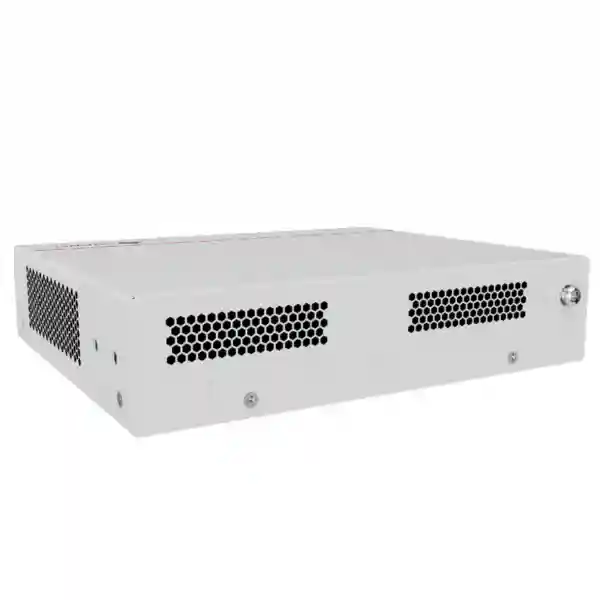
Huawei lists 13.60 W maximum device power without PoE, 15.59 W including the power adapter in that state, and 55.82 W at the documented full PoE load. Typical consumption is listed at 13.14 W and static consumption at 7.15 W. The unit uses natural heat dissipation with no fan, which reduces moving parts and avoids fan noise in occupied areas.
Physical installation
The 43.6 × 195 × 160 mm enclosure and approximately 1.16 kg weight support discreet desk or wall installation. This is useful for distributed floor zones, cabinets and room-side access where full-width rack equipment is impractical. Mounting must still preserve ventilation and service access around the power and network connectors.
Security at the Campus Edge
A simplified architecture is valuable only if access security remains enforceable. Huawei lists port isolation, port-based VLAN assignment, automatic MAC address learning and aging, and MACsec encryption among the S5751-L series functions. These capabilities address different layers of edge security. VLAN assignment helps separate logical services, port isolation can restrict unwanted peer-to-peer communication at the access layer, and MACsec is designed to protect Ethernet frames against interception and manipulation when deployed as part of a compatible end-to-end design.
For an enterprise office, VLAN planning may separate corporate users, voice, guest services, cameras, building management and administrative devices. In hospitality, guest-room systems, staff devices, CCTV and operational technology may require distinct trust zones. In healthcare, clinical devices, general users and facilities equipment can carry very different risk profiles. The remote unit itself is not a substitute for an overall segmentation architecture; rather, it provides controlled access ports that participate in the policy delivered by the central campus network.
MACsec deserves specific attention. Encryption at the Ethernet layer can be useful where physical network paths cannot be assumed trustworthy or where compliance requirements call for protected Layer 2 transport. Successful deployment requires capability alignment across the link and correct key or authentication design. It should therefore be treated as an engineered security function rather than a checkbox. When MACsec is part of the requirement, validate support on the central switch, software version and exact link topology during design.
FourTeck can also align the switching edge with broader security controls. The Firewall Dubai practice can help customers coordinate campus segmentation with perimeter and internal security policy, while the FourTeck IT Services UAE team can support implementation, testing and operational documentation.
Centralized Operations, Telemetry and Upgrade Workflow
One of the strongest reasons to adopt a remote-unit architecture is to reduce the number of edge devices that must be operated independently. Huawei describes the remote units as being managed in a unified manner by the central switch. In a compatible cloud-management deployment, visibility and configuration can be presented through the central switching layer, reducing the need to visit individual access locations for routine work.
The platform documentation also describes telemetry-based status collection with CampusInsight, where the central switch collects status information from itself and connected remote units. In an operational model, this means troubleshooting can start from a centralized view of device and link state rather than from a technician checking small switches room by room. That can be especially helpful in hotels, schools, clinics and multi-floor offices where remote units may be dispersed across a large site.
Huawei’s intelligent-upgrade workflow is designed around the central switch. The central system can obtain an upgrade path, download required versions and coordinate remote-unit software. The documentation also describes automatic version matching when a remote unit comes online. From an operations perspective, this supports consistent software baselines and simplifies replacement. It does not eliminate change control: organizations should still maintain maintenance windows, configuration backups, software validation and rollback procedures. The benefit is that those activities can be organized around a central control point.
A well-run deployment should include device naming, physical location records, fiber identifiers, central-switch port mappings and endpoint documentation. Centralized management reduces configuration effort, but clear asset records remain essential. FourTeck can provide deployment documentation that maps each S5751-L8LP2J-RUA to its room, floor, uplink path, optical module type, powered devices and upstream central-switch interfaces.
Deployment Topologies for UAE Buildings
The S5751-L8LP2J-RUA is most effective when it is placed where its compact port density solves a real cabling or operational problem. In a conventional campus, a telecommunications room may host a stack of access switches and large copper patch fields. Every endpoint cable returns to that room. A remote-unit design can move small access blocks closer to users while retaining optical connectivity back to a central switching layer. The result can reduce long copper runs, distribute access ports more logically and simplify future expansion in localized zones.
Office floors: A remote unit can serve a meeting-room cluster, executive office zone, reception area or group of workstations. Phones and PCs can use the Gigabit copper ports, while fiber returns to the central switching location. If wireless access points are included, PoE demand must remain within the aggregate budget. Quiet fanless operation helps when the unit is installed in an occupied area rather than a dedicated equipment room.
Hospitality: Hotels often have distributed service areas with cameras, phones, access points, digital signage and operational devices. A small remote unit can provide local connectivity without installing a full access cabinet for every small zone. Fiber uplinks are useful over long building paths and across areas where copper distance or interference would be problematic. The remote-unit architecture also supports centralized operations, valuable when technical staff must manage many floors with minimal onsite intervention.
Education: Classrooms, labs and administration areas can be organized as repeatable access zones. Standardizing on a remote-unit pattern can make port provisioning and replacement easier across multiple buildings. The same central policy model can be applied consistently, while the physical unit remains compact enough for wall or cabinet placement near endpoints.
Healthcare: Clinics and healthcare facilities contain a mixture of user devices, phones, cameras, wireless systems and specialized equipment. A distributed switch should be used only after environmental, power, security and device-compatibility requirements are validated. The S5751-L8LP2J-RUA’s fanless operation and compact enclosure can be advantageous in quiet areas, but installation must still provide controlled access, adequate airflow and appropriate segregation.
Retail and branch spaces: A branch with a handful of endpoints may need more resilience and central control than a consumer-grade small switch can provide. When a compatible Huawei campus core is already present, the S5751-L8LP2J-RUA can extend the same architecture into localized zones with fewer independently managed devices.
Sizing Methodology: How to Decide Whether One Unit Is Enough
Start with endpoint count, but do not stop there. An eight-port switch should rarely be specified for exactly eight planned devices if the site is expected to change. Reserve capacity is useful for troubleshooting, expansion and temporary equipment. If a zone already requires seven or eight permanent ports, using a higher-density remote unit may produce a cleaner design than filling every interface on day one.
Second, calculate PoE. List every powered endpoint and its maximum draw. Compare the total with the 32 W published PoE budget and include engineering margin. If the endpoint mix includes high-power access points, cameras with heaters or other devices with large peak draw, the aggregate PoE limit may become the decisive factor before port count does. A unit with eight PoE-capable interfaces is not automatically suitable for eight simultaneously high-power loads.
Third, size uplink bandwidth. Estimate sustained and burst traffic from all endpoints. Voice traffic is modest, general office browsing is bursty, video surveillance can be sustained, and wireless access points can aggregate many clients behind a single switch port. If the expected combined load could approach 1 Gbps during busy periods, a 2.5GE uplink may provide useful margin. If one optical path is reserved for resiliency, understand whether available bandwidth changes during a failure condition.
Fourth, validate central-switch scale. The central switch must support the number and type of remote units planned, along with the required software release and management features. A small proof-of-concept can confirm onboarding, version behavior, VLAN delivery, PoE operation, optics and monitoring before a large rollout.
Finally, size power backup. The remote unit, its adapter and powered devices contribute to UPS load. Where phones, access points or cameras are business-critical, calculate runtime using actual watts rather than VA labels alone. The result should account for UPS efficiency, battery aging and desired reserve. A distributed access architecture is only resilient if both the central switch and edge power strategy are resilient.
UAE Environmental and Installation Considerations
The published operating temperature for the S5751-L8LP2J-RUA is -5°C to +45°C, with storage from -40°C to +70°C and relative humidity from 5% to 95% non-condensing. Those numbers should be compared with the actual micro-environment at the installation point, not only the building’s room thermostat. Wall cavities, ceiling voids, compact metal enclosures and poorly ventilated cabinets can run significantly warmer than occupied space.
In the UAE, air-conditioning is common, but equipment spaces may still experience heat during maintenance events, power interruptions or after-hours HVAC scheduling. A fanless switch relies on natural heat dissipation, so installers should not tightly wrap the enclosure with other heat-generating devices or block ventilation surfaces. The absence of a fan reduces acoustic noise and mechanical maintenance, but passive cooling depends on adequate ambient conditions.
Dust and construction activity also matter. Compact network equipment placed outside a sealed telecom room can be exposed to fine dust from fit-out work. Deployment teams should sequence installation after heavy construction where possible and use appropriate enclosures when the environment demands them. Humidity must remain non-condensing; equipment should not be placed where cold surfaces, water lines or uncontrolled outdoor air can create condensation risk.
Huawei lists ±4 kV differential-mode and ±4 kV common-mode surge protection at the power port in the current hardware table. This is a device specification, not a substitute for facility-level surge protection, proper earthing or UPS design. In projects with sensitive equipment, power quality should be treated as part of the network design rather than as an afterthought.
Fiber, Optics and Structured Cabling Design
The dual SFP uplinks are central to the value of this model. Fiber removes the 100-meter horizontal distance constraint associated with standard copper Ethernet and provides electrical isolation between network zones. However, fiber projects fail when optical assumptions are left implicit. Every link should have a defined fiber type, strand count, connector, patch-panel arrangement, transceiver type and test requirement.
For short building links, multimode fiber may be appropriate when it matches the chosen optical modules and existing cabling. For longer campus links or standardized backbone designs, single-mode fiber often offers greater distance flexibility. The SFP module must be compatible with both the remote unit and central-switch interface at the selected speed. A 2.5GE-capable SFP port does not mean any arbitrary SFP will operate at 2.5GE; procure modules from the supported compatibility list for the relevant hardware and software release.
Optical loss budgets should include fiber length, connector loss, splice loss and design margin. Patch leads at both ends should be labeled consistently with the network drawing. If dual uplinks are used for redundancy, consider physical-path diversity. Two fibers in the same cable tray may provide logical redundancy but not protection from a single cable cut. Where uptime requirements justify it, diverse risers or pathways may be appropriate.
On the copper side, use standards-compliant structured cabling suitable for Gigabit Ethernet and the intended PoE load. Cable category, bundle size, ambient temperature and termination quality can affect PoE performance. Certification test results should be retained as part of handover. FourTeck’s UAE technology team can coordinate the switching bill of materials with broader network and infrastructure requirements.
Wireless, Voice and Video Endpoint Planning
A remote access switch often serves multiple application types, and each affects sizing differently. Wireless access points may use one physical port but aggregate dozens of client sessions. IP phones use relatively little bandwidth but require predictable latency and power continuity. Video cameras may generate continuous upstream traffic. Mixing these applications on the same S5751-L8LP2J-RUA is entirely possible when the port, PoE and uplink budgets are designed rather than guessed.
Wireless: For each access point, record the Ethernet rate, expected peak throughput and maximum PoE draw. The S5751-L8LP2J-RUA downlinks are Gigabit Ethernet, so a Wi-Fi access point requiring multi-gigabit copper connectivity would need a different access model even if its average traffic is lower. If Gigabit connectivity is sufficient, the next check is PoE. Several low-power APs may fit within 32 W; multiple higher-power APs may not.
Voice: IP phones are often a good match for distributed PoE access because their bandwidth needs are light and centralized UPS-backed power can maintain service during short outages. VLAN and QoS behavior should be validated through the central campus design. If PCs are connected through phone pass-through ports, endpoint count and traffic calculations should reflect both devices even though they share one switch interface.
Video surveillance: Camera bandwidth should be calculated from actual encoding profiles. Resolution alone does not determine bitrate; frame rate, codec, scene complexity and compression settings matter. Add all camera streams that traverse the uplink and include headroom for management, firmware and event bursts. PoE calculations must account for night-mode infrared, heaters or motors where present.
In mixed-use zones, segregate applications with VLANs and security policy while preserving operational visibility. A small remote unit can therefore support a surprisingly capable edge, but its effectiveness depends on disciplined endpoint engineering.
Reliability, Noise and Lifecycle Planning
Huawei publishes an MTBF figure of 84.12 years and availability greater than 0.99999 for the S5751-L8LP2J-RUA in its hardware table. MTBF is a statistical reliability metric used for engineering populations; it is not a warranty promise that an individual unit will operate for that number of years. The practical value is comparative planning and an indication that the platform is intended for sustained enterprise use.
The switch is fanless, with Huawei listing acoustic power below 30 dB(A) and acoustic pressure below 20 dB(A) at normal temperature. This is attractive for quiet offices, meeting rooms, clinics, classrooms and hospitality locations. Fanless design also eliminates a common moving component, but thermal design remains important because heat must leave the enclosure passively.
Lifecycle planning should address more than hardware. Confirm central-switch software support, remote-unit firmware alignment, optical-module support and spare strategy. A distributed deployment with many identical remote units benefits from keeping a small quantity of tested spares. Because the architecture is centrally managed, a failed unit can potentially be replaced with less local configuration effort than a standalone switch, but the physical replacement still depends on correct labeling and documentation.
For larger networks, define a standard kit: one S5751-L8LP2J-RUA, specified power adapter, approved optical modules, patch leads, mounting accessories, labels and installation record. Standard kits reduce variation across sites and make support easier over the service life.
Software Compatibility and Feature Validation
A remote-unit project must be validated as a system. Huawei’s current S5751-L brochure describes operation with compatible CloudEngine central switches and notes that supported S16700, S12700E, S8700, S6700 and S5700 series platforms can be upgraded to R24C00 or later to work with remote modules. This is a family-level statement, not a guarantee for every individual chassis, card or feature combination. The exact central-switch model and release should be checked before purchase.
Feature validation should cover uplink rate, link aggregation, VLAN behavior, MACsec requirements, PoE functions, telemetry, cloud management and the upgrade workflow. If the organization uses a specific management platform, authentication system or automation process, verify the integration in a lab or pilot. The objective is to avoid treating a hardware specification table as a complete architecture document.
Licensing requirements can also vary by central platform, management service and software feature. The S5751-L8LP2J-RUA procurement line should therefore be reviewed alongside any central-switch licenses, cloud subscriptions, support services or software entitlements required for the intended design. FourTeck can build the quote around the complete topology rather than supplying an isolated unit without its operational dependencies.
This system-first approach is particularly important in migration projects. If an existing Huawei campus is being extended, record its central-switch model, software version, free optical interfaces and current management method. That information quickly determines whether the S5751-L8LP2J-RUA can be integrated directly or whether upstream changes are required first.
Choosing Between S5751-L8LP2J-RUA and Higher-Capacity Variants
The S5751-L family includes models with different uplink speeds, port mixes and PoE budgets. The L8LP2J-RUA is best understood as a compact PoE+ variant with 2.5GE-capable SFP uplinks and a modest aggregate PoE budget. If the project needs 10GE uplinks, models using SFP+ interfaces may be more suitable. If the access zone contains high-power devices or multi-gigabit copper endpoints, other variants in the family should be evaluated.
Do not choose a larger model simply because its headline numbers are higher. A small eight-port remote unit can be operationally cleaner when endpoints are physically clustered and bandwidth demand is moderate. Conversely, forcing a compact unit into a zone that needs more ports, more PoE or faster downlinks usually creates unnecessary splitters, injectors or secondary switches. The right model minimizes auxiliary hardware and keeps the topology understandable.
A practical comparison uses five dimensions: required copper port count, required downlink speed, aggregate PoE watts, uplink speed and installation form factor. Add central-switch compatibility as a mandatory sixth item. Once those are known, the appropriate S5751-L variant is usually clear.
FourTeck can provide model selection support for UAE projects and, where the design spans multiple technologies, coordinate switching with servers, security and communications. The FourTeck global site provides broader company context for multi-country and enterprise requirements.
Procurement and Bill-of-Materials Guidance for UAE Projects
A complete quote should specify more than the switch part number. The S5751-L8LP2J-RUA depends on a compatible central-switch design, optical uplinks and power. The bill of materials should therefore identify the switch unit, power adapter, required mounting items, SFP transceivers, fiber patch cords, central-side optics, any patch-panel components and support services. When dual uplinks are planned, quantities should reflect both links rather than a single default optic pair.
Regional sourcing should also verify product variant and documentation because vendor portfolios can differ by market. The model suffix must match the intended region and technical design. FourTeck can quote against the exact requested S5751-L8LP2J-RUA part identification and align supporting components with UAE deployment requirements.
Lead time and project phasing matter in larger rollouts. If dozens of remote units are required, it can be useful to stage the deployment: first central-switch readiness, then pilot remote units, then floor-by-floor expansion. This allows software, optics, PoE behavior and installation standards to be validated before all units are installed. A repeatable commissioning checklist reduces errors and improves handover quality.
For customers deploying related infrastructure across the Middle East or Africa, architecture and documentation can be standardized even when local sourcing changes. FourTeck’s Africa technology practice can support broader regional planning where a common network template spans multiple countries.
Installation and Commissioning Workflow
1. Validate architecture
Record the central-switch model, software version and planned remote-unit topology. Confirm the required release and feature support before ordering hardware.
2. Survey the location
Check mounting surface, ambient temperature, ventilation, power outlet, UPS availability, physical security and cable pathways.
3. Engineer optics
Choose supported SFPs based on speed, fiber type, connector and distance. Document both central and remote ends.
4. Calculate PoE
Build a powered-device schedule and confirm the aggregate stays within the 32 W published budget with sensible margin.
5. Commission and test
Verify remote-unit discovery, uplink state, VLAN policy, endpoint connectivity, PoE delivery, failover behavior and monitoring.
6. Document handover
Capture serials, physical location, central-switch port mapping, optic types, fiber IDs, connected endpoints and support contacts.
Detailed Design Notes for Enterprise Architects
A remote-unit network benefits from a deliberate fault-domain strategy. If many edge units depend on a single central switch, the central platform becomes correspondingly important. Designers should assess supervisor, power, fabric and uplink resiliency on that central system in line with business availability requirements. Simplifying the edge should not create an unexamined single point of failure upstream.
The same principle applies to power. Each S5751-L8LP2J-RUA uses a local power adapter in the referenced configuration. If critical endpoints rely on its PoE output, protect that adapter with suitable UPS power. If the building has generator-backed circuits, confirm transfer behavior and expected runtime. Label the power source so facilities teams understand that disconnecting the adapter also removes power from connected phones, cameras or access points.
From a logical perspective, standardize port profiles. A repeatable template for voice, user data, camera, wireless AP and building systems reduces manual variation. Even when management is centralized, operational errors can occur if site-by-site policies drift. Use naming conventions that connect logical records with physical labels. For example, a remote unit identifier can encode building, floor and zone, while the central-switch interface description records the same information.
Traffic engineering should consider failure modes. If two optical uplinks are aggregated, document expected behavior when one member fails. If only one link is active, test convergence and make sure monitoring generates an actionable alarm. A design is not complete merely because links turn green during commissioning; it should have a defined response to fiber failure, power loss, endpoint overload and hardware replacement.
Finally, security teams should understand the physical distribution of ports. Remote units may be installed closer to users than traditional locked network closets. Where a unit is accessible, use secure mounting or enclosure practices and maintain port-level policy that limits misuse. Physical and logical controls should reinforce one another.
Why the Fanless Form Factor Matters
Fanless networking hardware is valuable whenever switching must be placed near occupied spaces. Mechanical fans generate acoustic noise, draw power and can accumulate dust. By using natural heat dissipation, the S5751-L8LP2J-RUA is easier to place in quiet environments such as executive rooms, classrooms, clinics and hotel areas where a conventional rack switch might be intrusive.
The trade-off is that passive cooling relies strongly on ambient conditions. Wall mounting should respect the orientation and clearance recommendations in Huawei installation documentation. Do not install the unit directly against hot equipment or inside an unventilated small enclosure simply because there is no fan. If the location is above a suspended ceiling, measure or estimate the actual ceiling-plenum temperature during the hottest operating period.
A fanless switch can also simplify maintenance because there is no fan module to inspect or replace. This is useful for distributed networks with many edge locations. However, maintenance should still include visual inspection, cable condition, power-adapter health, error counters and software compliance. The remote-unit design reduces operational touchpoints but does not remove the need for lifecycle discipline.
Where acoustic sensitivity is a major design criterion, include the mounting location in user-acceptance testing. Huawei’s published noise figures indicate a very quiet device, but the complete installation can still include UPS alarms, nearby HVAC or other equipment. The network design should consider the entire environment.
Operational Scenarios and Practical Examples
Scenario A: Meeting-suite access. A company has four meeting rooms with a mixture of room controllers, IP phones, scheduling panels and one access point. An S5751-L8LP2J-RUA can serve the local Ethernet requirement if the total powered-device draw fits the 32 W budget. A 2.5GE optical uplink provides additional aggregation headroom back to the compatible central switch. The fanless enclosure can be located discreetly in a nearby cabinet, avoiding the need for a full rack-mounted access switch.
Scenario B: Small camera zone. A corridor and reception area require several PoE cameras. The network engineer calculates the maximum watts for all cameras, including infrared operation, and confirms that total consumption remains below the switch budget with reserve. Camera bitrates are summed to validate the uplink. VLAN and port-isolation policy are delivered from the central campus design. Fiber provides an electrically isolated return path to the main distribution area.
Scenario C: Hotel service area. A localized cluster includes desk phones, a low-power wireless AP and operational terminals. Rather than extend every copper cable to a distant floor room, a remote unit is wall-mounted near the service area. Centralized management allows the IT team to monitor the unit along with the rest of the campus. A spare unit can be kept onsite for rapid replacement if required.
Scenario D: Education building. A school standardizes each classroom wing around compact remote units. Fiber runs from a central switching location to each wing. Endpoint VLANs and software baselines are controlled centrally. The design team reserves one or two ports per unit for growth and documents every fiber pair and central-switch interface. This creates a repeatable network module rather than a collection of individually configured small switches.
These examples illustrate the design principle: use the S5751-L8LP2J-RUA where centralized control, compact edge placement and moderate PoE demand align. If any one of those conditions changes substantially, reevaluate the model rather than forcing it into the topology.
Frequently Asked Technical Questions
Is the S5751-L8LP2J-RUA an 8-port PoE switch?
Yes. Huawei lists eight 10/100/1000BASE-T downlink ports with PoE+ capability. The important qualification is that this is a remote-unit model designed to operate within Huawei’s simplified campus architecture, not merely a generic standalone unmanaged PoE switch.
What is the total PoE budget?
Huawei’s published hardware table identifies a full-PoE-load condition with 32 W of PoE power for the S5751-L8LP2J-RUA. Endpoint power requirements should be totaled before purchase.
What uplink speeds are available?
The model has two SFP uplink ports that support 100M, 1GE and 2.5GE operation. Optics must be selected for the required speed, fiber type and distance.
Is it fanless?
Yes. Huawei specifies natural heat dissipation with no fan and lists very low acoustic output at normal temperature.
Can it be wall mounted?
Yes. Huawei lists desk or wall mounting for this chassis. The exact mounting method should follow the official installation instructions and preserve cooling clearances.
Does it support MACsec?
Huawei lists MACsec encryption as a security feature for the S5751-L remote-unit family. End-to-end use depends on compatible peer hardware, software and configuration.
What should be checked before ordering?
Confirm the compatible central switch and software release, optic type, fiber path, endpoint port count, PoE demand, mounting environment and power-backup requirement. A complete BOM should cover both switch ends of the optical path and all supporting accessories.
FourTeck UAE Integration Approach
FourTeck can supply the Huawei CloudEngine S5751-L8LP2J-RUA as part of a broader network design rather than as an isolated hardware line. The process can begin with central-switch compatibility and a site survey, then move through endpoint counts, PoE calculations, optics, fiber pathways, mounting, UPS requirements and security segmentation. This produces a deployment that can be commissioned and supported systematically.
For greenfield projects, the remote-unit topology can be designed into the structured-cabling plan from the start. For brownfield networks, existing central switching and fiber availability are assessed first. Pilot deployment is often valuable when the organization has not previously used Huawei remote units because it allows the operations team to validate discovery, software workflow, monitoring and replacement procedures.
Documentation is treated as a deliverable. Asset records can include device serial numbers, room or zone, mounting position, central-switch port, primary and secondary fiber IDs, optic model, VLAN role, powered-device list and UPS circuit. These details shorten troubleshooting and reduce dependency on individual staff knowledge.
Customers can use FourTeck as a single point of coordination for switching, structured connectivity, security integration and ongoing technical services. This is especially useful when the project spans multiple floors, branches or countries and requires a consistent template.
Decision Recap: When S5751-L8LP2J-RUA Is a Strong Fit
Choose this model when the access zone needs up to eight Gigabit copper connections, the aggregate PoE requirement can be kept within the published 32 W budget, and optical uplinks at up to 2.5GE provide enough upstream capacity. It is especially attractive when the organization already has, or is planning, a compatible Huawei CloudEngine central-switch architecture and wants remote units to reduce the number of independently managed access devices.
The model is also a good physical fit where noise and space matter. Fanless operation, a compact chassis and wall or desk mounting allow it to be placed close to endpoints in areas that cannot accommodate a traditional rack switch. Fiber uplinks can simplify long-distance building paths and reduce dependence on long copper runs.
Do not select it solely because eight PoE+ ports appear to match the endpoint count. Check the total PoE watts, not just the number of ports. Likewise, validate whether Gigabit downlinks are suitable for the intended wireless APs or other high-speed devices. If the zone needs multi-gigabit copper, higher PoE power or 10GE uplinks, consider another S5751-L variant instead.
The central-switch relationship is mandatory to evaluate. Confirm exact hardware, software and management requirements before procurement. A short design review can prevent common issues such as incompatible optics, insufficient PoE budget, wrong uplink speed or unsupported software combinations.
Quotation Input Checklist
For an accurate Huawei CloudEngine S5751-L8LP2J-RUA quotation in the UAE, provide the following project information. If some details are unknown, FourTeck can help determine them during the design review.
Existing or planned CloudEngine central-switch model, software release and available optical ports.
Number of rooms, floors, zones or branches requiring an eight-port access block.
Quantity and model of PCs, phones, access points, cameras and other connected devices.
Maximum watts for each powered endpoint and expected spare capacity.
Single-mode or multimode, approximate distance, connector type and required uplink speed.
Single or dual uplinks, path diversity, UPS runtime and spare-unit strategy.
Desk, wall or enclosure mounting, ambient temperature, cabinet size and physical security.
Supply only, configuration, fiber/structured cabling, commissioning, documentation or support.
Plan Your Huawei Remote-Unit Deployment with FourTeck UAE
The Huawei CloudEngine S5751-L8LP2J-RUA is a focused enterprise access product: compact enough for distributed edge placement, capable enough for Gigabit endpoint connectivity, and designed to participate in a centralized Huawei campus architecture. Its strongest applications are not those that need the largest port count or the highest PoE output. They are the environments where a small, quiet and centrally controlled access block simplifies the network while preserving enterprise policy and visibility.
FourTeck can review your central switch, remote-unit quantity, fiber paths and endpoint power requirements, then build a bill of materials around the full solution. This reduces procurement risk and helps ensure that optics, software compatibility, PoE capacity and installation details are correct before rollout.
For UAE enterprise networking projects, use the consultation request to share the site location, central-switch details, number of required remote units and endpoint types. The technical team can then map the S5751-L8LP2J-RUA into a practical deployment plan with appropriate accessories and services.

Reviews
There are no reviews yet.