
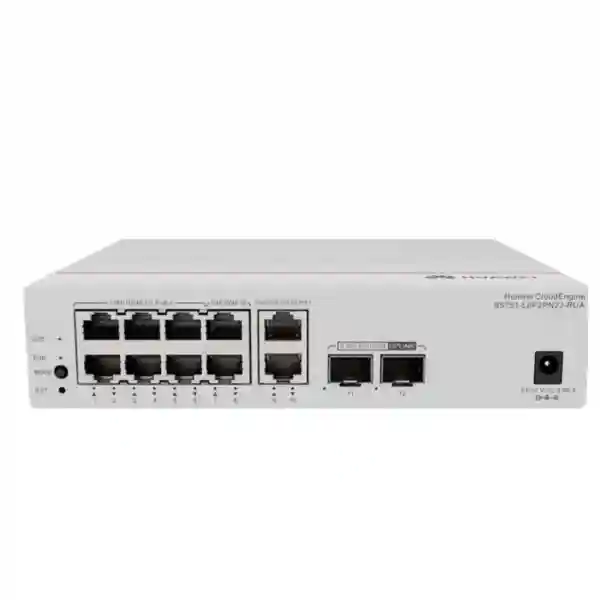
Huawei CloudEngine S5751-L8P2J-RUA
A compact eight-port PoE+ remote unit engineered for simplified campus access, with dual 2.5GE-capable optical uplinks, a 128 W PoE budget, fanless thermal design, centralized operation through a compatible Huawei campus switching architecture, and the physical flexibility required for distributed UAE enterprise environments.
What the S5751-L8P2J-RUA is designed to do
The Huawei CloudEngine S5751-L8P2J-RUA is not simply a small standalone access switch placed at the edge of a network. It belongs to Huawei’s CloudEngine S5751-L remote unit family, which is built around a simplified campus design in which remote units operate as distributed port-extension resources under a compatible central switch. In practical terms, this changes the design conversation. Instead of treating every small wiring location as an independent switch that requires a complete configuration, individual software-management process, and separate operational lifecycle, the remote unit can participate in a centrally controlled architecture. The result can be particularly valuable in buildings where users, wireless access points, IP phones, cameras, room systems, and other Ethernet endpoints are spread across floors, corridors, guest areas, classrooms, clinics, retail zones, or branch spaces.
For this exact model, the access side consists of eight 10/100/1000BASE-T electrical Ethernet ports with PoE+ capability. The network-facing side provides two SFP uplinks supporting 100M, 1GE, and 2.5GE speeds. This is an important specification distinction because the model suffix matters: the S5751-L8P2J-RUA is the 2.5GE-uplink variant. Buyers who require 10GE SFP+ uplinks should not assume that capability merely because the overall S5751-L family includes 10GE-capable models. Huawei’s X-suffix variants provide 10GE SFP+ on relevant models, whereas this J-suffix unit is designed around dual 2.5GE-class optical uplinks. Correct model selection therefore begins with the intended uplink rate, optics type, central-switch architecture, endpoint count, and PoE power requirement.
In a UAE project, that distinction is useful because compact distributed switching is often chosen to solve a physical-cabling or service-delivery problem rather than to maximize raw port density. The S5751-L8P2J-RUA gives designers eight powered copper access ports in a small fanless enclosure that can be placed much closer to endpoints than a conventional 24- or 48-port access switch. Fiber can then carry the uplink back toward the central switching layer. This can reduce large bundles of horizontal copper in appropriate designs, simplify local endpoint concentration, and support quieter deployment areas where fan noise is undesirable. The architecture should still be engineered against the full Huawei compatibility matrix, software release, optical budget, PoE load, redundancy requirement, and local environmental conditions before procurement.
Verified hardware specification overview
| Model | CloudEngine S5751-L8P2J-RUA |
| Downlink interfaces | 8 × 10/100/1000BASE-T ports with PoE+ |
| Uplink interfaces | 2 × 100M/1GE/2.5GE SFP ports |
| Forwarding performance | 19.5 Mpps |
| Switching capacity | 98 Gbps |
| PoE budget | 128 W at full PoE load |
| Power supply | External power adapter for this model |
| Dimensions, H × W × D | 43.6 × 195 × 160 mm, excluding packaging |
| Weight | Approximately 1.2 kg without packaging |
| Cooling | Fanless, natural heat dissipation |
| Installation | Desktop or wall mounting |
| Operating temperature | -5°C to +45°C |
| Storage temperature | -40°C to +70°C |
| Relative humidity | 5% to 95%, non-condensing |
Specifications should be validated against the Huawei documentation and the exact regional bill of materials at quotation time, especially optics, adapter, software compatibility, and accessories.
Compact powered access
Eight PoE+ Gigabit ports concentrate endpoints near the point of use, making the unit suitable for access points, IP telephony, video surveillance, room systems, and other Ethernet powered devices when their aggregate power demand fits the available 128 W budget.
Optical uplink flexibility
Two SFP uplinks allow 100M, 1GE, or 2.5GE operation. This enables fiber-based reach and gives designers a path to aggregate local Gigabit endpoints without treating the remote unit as a 10GE-capable model when it is not.
Quiet thermal design
Fanless natural heat dissipation removes a mechanical fan from the enclosure. That is useful in meeting rooms, hotel areas, classrooms, healthcare spaces, and distributed cabinets where acoustic output and moving-part maintenance matter.
Centralized campus model
The remote unit concept is intended to operate with compatible Huawei central switches, reducing the number of independently managed edge devices and supporting centralized monitoring, configuration, and lifecycle operations.
Simplified campus architecture: why the remote-unit concept matters
Traditional campus LAN design is commonly described as access, aggregation, and core. That model remains appropriate for many networks, especially where access switches need substantial autonomous feature sets, local resiliency, high port density, or complex policy. Huawei’s remote-unit approach targets a different optimization point. The architecture can collapse elements of the conventional hierarchy by using a central switch and distributed remote units, with the remote units acting more like managed port-expansion resources than fully independent access layers. Huawei describes this as a streamlined architecture intended to reduce deployment and management complexity.
The benefit is easiest to understand operationally. If a conventional building contains many small edge switches, the network team must consider software versions, configuration templates, credentials, monitoring, backup, replacement procedure, and fault isolation for each unit. A remote-unit design shifts more of that operational intelligence toward the central device. The remote units can be discovered and managed through the central switch, and Huawei documentation describes automated version matching and upgrade behavior in supported designs. This can reduce the number of independently administered network nodes even though the physical Ethernet ports remain distributed throughout the site.
For a UAE enterprise, that architectural change can be valuable in multi-floor offices, hotel properties, education campuses, healthcare buildings, retail facilities, and mixed-use developments. These environments often contain endpoint clusters that are physically distant from a main equipment room but do not justify a full rack-mounted access switch in every location. A small remote unit can serve a local group of endpoints while optical cabling provides the uplink path. The approach can also improve flexibility during expansion: an additional remote unit can be placed where a new endpoint cluster appears, subject to central-switch capacity, uplink availability, optical budget, and software compatibility.
The architecture should not be selected solely because it has fewer boxes in a logical topology diagram. A professional design still needs to address failure domains, uplink diversity, central-switch redundancy, PoE power behavior, fiber routes, optical transceiver selection, environmental limits, cable pathways, labeling, spares, and the service impact of any central component. FourTeck can align the switching layer with broader UAE infrastructure requirements through FourTeck UAE, ensuring that the remote-unit decision is evaluated as part of the campus design rather than as an isolated product purchase.
Port architecture and traffic engineering
The S5751-L8P2J-RUA provides eight 10/100/1000BASE-T downlink ports. Each port can serve a standard Ethernet endpoint at the negotiated rate supported by the connected device and cabling. The presence of PoE+ on all eight downlinks means data and power can share the same copper run for compliant powered devices. From an engineering perspective, however, the eight-port count is only the first sizing variable. The design must also consider simultaneous traffic demand, endpoint packet behavior, uplink oversubscription, PoE draw, VLAN assignment, security policy, and whether the connected devices are expected to burst together.
The dual SFP uplinks support 100M, 1GE, and 2.5GE. This gives the designer multiple options for integration with the central switching layer. Two uplinks can provide additional aggregate capacity or be used according to Huawei-supported link aggregation and topology design. Because the unit has eight Gigabit downlinks, a single 1GE uplink can become a concentration point if several endpoints transmit heavily at the same time. A 2.5GE uplink increases the available aggregate bandwidth and is therefore often a better match for endpoint groups that include modern wireless access points, surveillance streams, or other sustained traffic sources. The second uplink adds further design flexibility, but the exact supported redundancy and aggregation behavior should be configured according to the central-switch design and Huawei software documentation.
The published forwarding performance of 19.5 Mpps and switching capacity of 98 Gbps indicate that the hardware platform has substantial internal packet-processing headroom relative to the physical port mix. These headline values should not be read as a promise that every real-world deployment will deliver a specific application throughput, because end-to-end performance depends on frame sizes, traffic patterns, uplink design, central switching, policy, optics, cable quality, endpoint behavior, and upstream services. They are nevertheless useful for confirming that the device is designed as a hardware-forwarding campus component rather than a low-end unmanaged PoE injector with switching functionality added as an afterthought.
A practical port plan should identify every endpoint before the bill of materials is finalized. Separate ordinary user devices from powered infrastructure devices, document expected VLANs, identify any endpoint requiring more than Gigabit access, and calculate the bandwidth expected toward the central switch. If even one endpoint requires 2.5GE copper access, this particular model is not the right fit because its eight downlink ports are Gigabit Ethernet. Huawei has other S5751-L variants with 2.5GE electrical interfaces. Likewise, if 10GE optical uplinks are mandatory, an X-suffix model should be evaluated instead of assuming the J variant can be upgraded through optics alone.
PoE+ engineering: 128 W is a system budget, not a per-port promise
The S5751-L8P2J-RUA is listed with eight PoE+ downlink ports and a full-load PoE budget of 128 W. That figure is central to correct sizing. A PoE-capable switch does not automatically mean that every port can draw the maximum power associated with the PoE+ standard simultaneously. The total available power must be shared across all connected powered devices. For example, eight endpoints averaging 12 W require about 96 W before allowing for engineering margin. Eight devices averaging 16 W require about 128 W and would consume the published budget. If the endpoints have higher peak draw, start-up surges, heaters, motors, pan-tilt-zoom functions, USB peripherals, or future feature expansion, the design needs additional margin or a different switch model.
This matters for wireless. A modern enterprise access point may advertise a broad power range depending on radio configuration, USB use, IoT modules, or feature mode. The correct value for switch sizing is not a generic number copied from the access point’s product family; it is the power requirement of the exact AP model and intended configuration. The same principle applies to IP cameras. A fixed indoor camera may consume modest power, while an outdoor PTZ camera with heater or infrared illumination can consume much more. IP phones are often lower-power devices, but expansion modules and large displays can increase their requirements. The power worksheet should therefore list maximum or design-case draw per endpoint, not just device counts.
Huawei documentation for the S5751-L family describes Fast PoE and Perpetual PoE capabilities in supported configurations. Fast PoE is intended to deliver power to powered devices rapidly after switch power-up, rather than requiring the complete switch boot sequence before endpoint power becomes available. Perpetual PoE is intended to maintain power to connected powered devices during certain software reboot or upgrade events. These capabilities can be operationally important because a network software action does not necessarily need to cause the same endpoint outage as a complete power interruption. In surveillance and wireless environments, reducing endpoint reboots can shorten service disruption and avoid camera or access-point restart cycles.
The device itself also has a published power profile. Huawei lists approximately 14.60 W device consumption without PoE, around 17.59 W for device plus adapter without PoE, a maximum of approximately 161.02 W at full PoE load with 128 W delivered as PoE, typical power consumption of 16.74 W, and static power consumption of 7.15 W. These values help with UPS sizing, heat-load estimates, and electrical planning. For a deployment with many remote units, multiplying the maximum or design-case load by the number of units provides a more meaningful facility power estimate than multiplying only the switch’s non-PoE consumption.
A good PoE design also documents what happens during failure. If the local power adapter loses input, all powered endpoints on that unit lose power unless a suitable upstream or local resilient power architecture has been engineered. The fact that some models in the wider S5751-L family support optical-electrical hybrid power should not be generalized to this exact S5751-L8P2J-RUA model. Huawei’s current model documentation lists this unit with power-adapter supply. If centralized remote power over hybrid cabling is a project requirement, a hybrid-capable HJ or HX variant should be evaluated instead.
For UAE installations, include the remote units in the UPS and distribution-board strategy, verify adapter input and regional plug details in the quoted bill of materials, and reserve PoE headroom for endpoint variation. The output of that exercise should be a port-by-port power schedule showing device type, expected class, design wattage, priority, and total budget. This makes it easier to determine whether 128 W is comfortably sufficient, marginal, or inadequate before the equipment reaches site.
Why dual 2.5GE SFP uplinks can be the right fit
A frequent specification error with compact switches is to judge the uplink only by the number of access ports. Eight Gigabit ports create a theoretical access-side aggregate much greater than a single Gigabit uplink, but actual applications rarely sustain maximum traffic on every port simultaneously. The uplink should therefore be sized from real traffic models rather than simple port-speed multiplication. A 2.5GE uplink can be a practical middle ground for remote access clusters: materially more headroom than 1GE, lower optics and upstream-port requirements than 10GE in some designs, and sufficient capacity for many endpoint groups that consist of phones, cameras, office clients, and wireless devices.
The second SFP interface provides architecture choices. In a supported design it can contribute to link aggregation, provide an additional network path, or support other topology requirements defined by the Huawei central-switch configuration. The presence of two physical uplinks does not by itself guarantee hitless failover or a particular protection behavior; resiliency depends on how both ends are configured, the central-switch topology, software features, and physical path diversity. If both fibers share the same conduit, patch panel, upstream line card, or power domain, the apparent redundancy may still contain common-mode failure points.
Optics must be selected as part of the design. The switch’s SFP port speed capability does not determine fiber type or reach by itself. The chosen transceiver must be supported by the device and matched to the central-side optic, wavelength, fiber type, connector, optical power budget, and required distance. Multimode fiber may be appropriate inside a building for shorter runs, while single-mode fiber may be preferred for longer distances, campus pathways, or future flexibility. Existing cabling should be inspected for fiber type, core availability, connector condition, patch losses, and labeling before transceivers are ordered.
For procurement, specify the remote unit and optics as separate line items unless the quotation explicitly bundles them. A complete scope should state quantity of S5751-L8P2J-RUA units, adapter requirement, SFP type and count, fiber patch leads, wall or desktop installation accessories, central-switch port requirement, software version requirement, and any spare ratio. This prevents a common deployment delay in which the switches arrive but the correct optical modules or patch cords were not included.
Packet-forwarding position
At 19.5 Mpps published forwarding performance, the unit is engineered for hardware packet movement appropriate to its compact access role. The value should be interpreted together with the physical 8×GE plus 2×2.5GE port mix and the intended central-switch architecture.
For sizing, focus on endpoint traffic profiles, peak concurrency, multicast/video behavior, uplink rate, and upstream bottlenecks. A large switching-capacity number cannot compensate for an undersized uplink or congested central network.
98 Gbps switching capacity
Huawei publishes 98 Gbps switching capacity for the model outside mainland China. This specification reflects platform capacity and provides useful assurance that the internal switching architecture is not designed around a narrow software-forwarding path.
Application performance remains end-to-end. Wireless controllers, WAN links, firewalls, servers, storage, cameras, codecs, and internet circuits can all become the limiting point even when the local remote unit is operating normally.
Security controls at the distributed edge
Small edge devices still sit in a security-sensitive position because they connect users and operational endpoints to the campus. Huawei documents MACsec support on all ports of the S5751-L series remote units. MACsec provides Layer 2 frame protection through mechanisms that can include authentication, encryption, integrity checking, and replay protection when deployed with compatible peers and a properly designed keying architecture. Its presence is valuable where the link itself is considered part of the threat model, but it should not be confused with a complete endpoint security stack or a replacement for firewalling, network access control, segmentation, identity services, and application-layer protection.
The remote-unit platform also supports port isolation. This is useful when multiple endpoints share the same physical access unit but should not communicate directly at Layer 2. In a centralized architecture, user data can be forwarded according to policies applied through the central switching design. That can help prevent a distributed remote switch from becoming an uncontrolled local bridge between devices that belong to different trust zones. The actual policy outcome depends on VLAN design, central-switch configuration, authentication method, and upstream security controls.
Huawei lists support for up to 128 VLANs on the S5751-L remote unit platform, together with port-based VLAN assignment, automatic MAC address learning, automatic MAC address aging, port up/down detection, auto-negotiation, and port rate setting. These features are enough to support structured access segmentation for many remote-unit use cases. The VLAN limit should still be checked against the site’s design. A large multi-tenant property or highly segmented operational-technology environment may require more VLAN scale or a different architecture than a small office, hotel floor, classroom cluster, or clinical zone.
Security design should start with endpoint classification. Identify corporate clients, guest systems, voice devices, cameras, wireless APs, building-management devices, payment systems, printers, room-control systems, and any third-party managed equipment. Determine which devices require isolation, which services they need, and where inter-VLAN policy will be enforced. The remote unit then becomes a controlled access point within that larger security framework rather than the place where all security decisions are expected to occur.
Centralized operations, telemetry, and software lifecycle
One of the strongest reasons to select a remote-unit architecture is operational consistency. Huawei describes the S5751-L remote units as being managed through a compatible central switch rather than as isolated access switches requiring separate administration. In supported designs, the central switch can collect status information from the remote units and integrate with Huawei management capabilities for visualization, monitoring, inspection, and cloud-based operations. This centralization can reduce the number of individual edge devices that engineers must visit or configure manually.
Huawei also documents intelligent upgrade behavior. The central switch can obtain an appropriate upgrade path, download software, and coordinate remote-unit software updates. Remote units can be automatically matched to the software version required by the central environment, reducing the risk of a replacement device being installed with an incompatible version. Pre-loading can shorten the service-interruption window in relevant upgrade processes. These mechanisms are especially useful when remote units are located in ceiling zones, corridor cabinets, guest areas, classrooms, or other spaces where physical access is inconvenient or disruptive.
The operational model does not eliminate the need for change control. Centralization can increase the blast radius of a poorly planned central configuration, so enterprises should maintain version standards, tested templates, rollback procedures, maintenance windows, configuration backups, and inventory records. Replacement units should be staged or validated when possible, and software upgrades should follow vendor compatibility guidance. Monitoring should include uplink status, port errors, PoE consumption, endpoint state, optical health where supported, device temperature indicators, and alarms from the central management platform.
Organizations that want the switching deployment tied into broader monitoring, documentation, cabling, wireless, security, and support processes can coordinate these requirements through FourTeck IT Services UAE. The goal is to make the remote unit part of a maintainable operating model: documented ports, known software baselines, labeled fibers, predictable spares, and clear escalation paths.
Deployment scenarios in UAE enterprise networks
Enterprise offices
Use a remote unit for a local cluster of desk phones, wireless access points, meeting-room devices, printers, and security cameras where a conventional high-density access switch would be physically excessive. The fanless enclosure suits quiet spaces, while fiber uplinks can connect the local cluster back to the central network. Design attention should be given to desk-density growth and whether eight powered ports leave sufficient expansion capacity.
Hotels and hospitality
Distributed guest areas often need a mix of access points, IP phones, cameras, IPTV-related endpoints, room-control gateways, and back-office devices. A compact PoE+ unit can serve a localized group while minimizing fan noise. Hospitality designs must carefully model service continuity because a single remote unit may power several guest-facing or security devices at once.
Education
Classrooms, labs, libraries, corridors, and administrative areas can create small endpoint islands throughout a campus. Remote units can bring powered Gigabit access closer to those endpoints while centralizing operations. Wireless AP placement and camera coverage often make PoE budget the governing factor, so the eight-port count should always be paired with a wattage schedule.
Healthcare and clinics
Clinics and healthcare spaces may need quiet networking close to phones, wireless, cameras, information displays, and non-clinical IP devices. Fanless operation can be advantageous, but any use near clinical systems requires careful segmentation, availability design, facilities coordination, and confirmation that environmental and compliance requirements are satisfied.
Retail and branches
A branch or retail zone may need only a handful of powered devices: cameras, phones, access points, signage controllers, printers, and workstation connections. The S5751-L8P2J-RUA can provide a compact local access layer while the central architecture supplies consistent operations. Payment and business systems should remain appropriately segmented from guest and IoT networks.
Surveillance clusters
Eight PoE+ ports and a 128 W budget can suit a localized camera cluster when the cameras’ aggregate design power remains within budget. The uplink should be sized from codec, resolution, frame rate, recording behavior, and concurrency. High-power PTZ or heated outdoor cameras can change the power calculation significantly and may require another model.
UAE environmental and installation planning
The published operating temperature for the S5751-L8P2J-RUA is -5°C to +45°C, with a storage range of -40°C to +70°C and relative humidity of 5% to 95% non-condensing. Those limits need to be interpreted at the actual device location. UAE outdoor ambient conditions can exceed the switch’s operating limit, so the unit should not be treated as an outdoor switch simply because it is compact and fanless. Install it in a suitable indoor or environmentally controlled enclosure where the local temperature around the chassis remains within specification.
Fanless natural heat dissipation means the chassis relies on convection and surrounding air rather than forced airflow. Do not bury the unit inside insulation, pack it tightly against heat-producing power supplies, or mount it in a sealed enclosure with no thermal analysis. Provide clearance around the device and adapter, keep ventilation paths unobstructed, and account for the heat generated by PoE conversion when the unit is heavily loaded. Huawei publishes approximately 16.74 W typical switch consumption and up to roughly 161 W at full PoE load including the powered-device load, so a dense cabinet containing several remote units can create a meaningful heat source even if each enclosure has no fan.
Wall mounting is useful when the unit is placed close to endpoint cable routes, but mounting surfaces, fasteners, cable bend radius, optical patch protection, and maintenance access should be planned before installation. A technician should be able to identify the device, trace both uplinks, read port labels, access the power adapter, and replace the unit without disturbing unrelated services. Desktop placement may be acceptable in protected technical spaces, but open office surfaces can expose the switch and fiber connectors to accidental movement.
Power quality also deserves attention. The model is supplied through an external adapter, and the project bill of materials should confirm the exact regional adapter and plug arrangement. Critical deployments should include the adapter load in UPS sizing and verify that the upstream electrical circuit, UPS autonomy, and generator behavior meet the site’s service objective. Surge protection and grounding should follow the building’s electrical design and the manufacturer’s installation guidance rather than relying only on the switch’s internal protection specification.
Physical design, acoustics, and placement
At approximately 43.6 × 195 × 160 mm and 1.2 kg without packaging, the S5751-L8P2J-RUA is substantially smaller than a conventional 19-inch high-density access switch. That size opens placement options that are difficult with a full-width rack device. It can fit in purpose-designed low-profile cabinets, wall-mounted technical enclosures, localized communications areas, and protected shelves. Compact size, however, should not be used as justification for placing the switch in inaccessible ceiling voids or unventilated spaces. Operational access remains important for fiber cleaning, adapter replacement, visual inspection, port testing, and physical swap-out.
Huawei lists the unit as fanless with natural heat dissipation and noise-free fan behavior, with acoustic figures below 30 dB(A) sound power and below 20 dB(A) sound pressure at normal temperature in the published hardware table. The practical advantage is the absence of fan noise and fan wear. This makes the platform attractive for acoustically sensitive areas such as meeting rooms, executive spaces, classrooms, hospitality areas, and quiet clinical environments. It also removes one common mechanical failure component, though the switch still depends on proper thermal conditions and a reliable external power adapter.
Cable management should separate copper bundles, optical patch leads, and power cabling sufficiently to prevent accidental stress. Fiber connectors should remain capped until installation, cleaned before mating, and routed within the manufacturer’s bend-radius recommendations for the chosen patch cable. PoE copper runs should be certified to the required category and channel length, especially when bundles are dense or installed in warm pathways. Physical workmanship directly influences the stability of a distributed architecture because a small remote unit may concentrate several user-facing services in one local point.
How to size the S5751-L8P2J-RUA correctly
Start with endpoint count, but do not stop there. The model has eight copper downlinks, so a design with eight endpoints has no spare access capacity. In many enterprise projects, that is too tight because an additional access point, camera, room panel, phone, or maintenance device may appear after commissioning. A useful engineering practice is to document both day-one and forecast endpoint counts. If the day-one requirement is already seven or eight ports, compare the cost and operational impact of installing a larger remote unit or an additional unit rather than assuming no expansion will occur.
Next calculate PoE. Build a table with endpoint model, quantity, worst-case or design wattage, and total. Add allowance for future devices and configuration changes. Compare the result with the published 128 W budget. Do not size from average measured consumption unless the project can tolerate power denial during peaks. If endpoint priority matters, define which devices must remain powered first under an abnormal power condition. Cameras covering critical areas and wireless APs serving essential operations may deserve different treatment from convenience endpoints.
Then calculate uplink demand. A group of desk phones and low-utilization office clients may work comfortably on a 1GE uplink, while several high-throughput access points or a surveillance cluster may justify 2.5GE. Consider both average and burst behavior. Eight 1080p cameras, for example, may produce a relatively predictable aggregate stream, whereas wireless clients can create highly variable bursts. If the central switch supports it and the design requires it, dual uplinks can be used according to Huawei-supported aggregation or resiliency methods. Confirm the actual topology rather than assuming both links always increase usable bandwidth.
Check VLAN and segmentation scale. Huawei lists up to 128 VLANs for the remote-unit feature set. For most small endpoint clusters this is ample, but a heavily segmented multi-service environment should verify the number of VLANs that must be presented through the remote unit and how those VLANs are handled centrally. Consider voice, corporate data, guest wireless, cameras, building management, printers, IoT, and management traffic separately.
Validate the environment. The operating ceiling is +45°C, so identify the expected enclosure temperature rather than only the room thermostat setpoint. A cabinet near a roof, kitchen, plant room, external wall, or sun-exposed service area can operate much hotter than the conditioned office. Evaluate humidity, dust, condensation risk, airflow, and physical security. If the environment cannot stay within specification, use an appropriate controlled enclosure or select equipment designed for harsher conditions.
Finally, validate the central architecture. Huawei documentation notes support for remote-unit networking with central-switch families including CloudEngine S16700, S12700E, S8700, S6700, and S5700 when using appropriate software releases, with Huawei referencing R24C00 or later in the current brochure for the remote-unit function. The exact central model, line card, port type, software version, license requirement, maximum number of remote units, supported topology, and optics must be checked against the current Huawei documentation. A quote should never assume compatibility based only on belonging to the same CloudEngine family.
Choosing between the J, X, and hybrid S5751-L variants
Huawei uses closely related model names in the S5751-L family, and a single letter can materially change the hardware. The S5751-L8P2J-RUA described on this page has eight Gigabit PoE+ downlinks and two optical uplinks supporting up to 2.5GE. The S5751-L8P2X-RUA is a different model with 10GE-capable SFP+ uplinks. Hybrid variants such as HJ or HX models are designed around optical-electrical hybrid interfaces and remote power options that are not equivalent to the standard J model’s adapter-powered design. This is why a purchase request that says only “S5751-L eight-port PoE” is incomplete.
Choose the J variant when the endpoint count, PoE budget, and 2.5GE maximum uplink rate match the design and when local adapter power is acceptable. Choose an X variant when 10GE optical uplink capability is necessary for traffic aggregation, future headroom, or central-switch standards. Evaluate hybrid models when the project specifically needs combined optical and remote-power characteristics supported by Huawei’s hybrid architecture. Also compare LP and P variants carefully because PoE budgets differ. Huawei’s current brochure identifies the L8LP2J-RUA with a lower PoE budget than the L8P2J-RUA, even though both expose eight PoE+ downlink ports.
Model selection should therefore be performed against four independent requirements: access interface speed, uplink interface speed, PoE output budget, and power-input method. Only after those are confirmed should physical size, optics, software, and accessories be finalized. This method prevents substitution errors and ensures that the product code in the purchase order corresponds to the intended architecture.
Migration from conventional access switching
A remote-unit design is often introduced during a floor renovation, wireless refresh, surveillance expansion, hotel refurbishment, or campus modernization. Migration should begin with discovery rather than replacement. Audit existing switches, uplinks, VLANs, endpoint MAC addresses, PoE consumption, cable routes, fiber availability, cabinet conditions, and service dependencies. Record which existing access ports are truly used and which are merely patched. This frequently reveals that a 24- or 48-port switch is serving only a small local endpoint cluster and that a compact remote unit could be appropriate.
Next build the target topology. Map every remote unit to its central switch, uplink fibers, optics, power source, UPS, and endpoint group. Assign identifiers before installation so labels and documentation follow a repeatable pattern. Decide whether each location needs one or two uplinks and whether physical path diversity is possible. If the migration reuses existing fiber, test it before the cutover and verify that the connector type and optical specification match the selected transceivers.
PoE migration needs its own plan. A powered endpoint may reboot when moved from the old switch to the new remote unit, so schedule cutovers based on service impact. Cameras may temporarily stop recording, access points will take time to rejoin the WLAN, and phones may need to re-register. Where Fast PoE or Perpetual PoE provides benefit during future operations, confirm the relevant software behavior after deployment rather than assuming it changes the initial physical migration outage.
After cutover, validate more than link lights. Check negotiated speed, VLAN assignment, endpoint reachability, DHCP behavior, authentication, PoE draw, uplink utilization, packet errors, camera streams, voice registration, wireless AP status, and central monitoring. Keep the old configuration and a rollback path until the new design has passed acceptance testing. A remote-unit migration is successful when the operational model is simpler without sacrificing visibility, resilience, or endpoint performance.
Reliability, lifecycle, and maintenance considerations
Huawei publishes an MTBF figure of 84.12 years and availability greater than 0.99999 for the S5751-L8P2J-RUA in its hardware table. MTBF is a statistical reliability metric derived under defined assumptions; it is not a guarantee that an individual unit will operate for that number of years. For operations planning, the more useful question is how quickly service can be restored when a device, adapter, fiber, or upstream component fails. A sensible design therefore combines reliable hardware with a clear spare and replacement strategy.
Fanless construction simplifies maintenance because there is no internal fan to clog or fail. However, dust can still accumulate on surfaces and around ventilation areas, adapters can fail, patch cords can be damaged, and fiber connectors can become contaminated. Periodic inspection should include enclosure condition, cable stress, adapter seating, temperature environment, port errors, optical alarms where available, and any persistent PoE negotiation issues. Cleaning should follow appropriate electronics and optical-fiber procedures rather than using uncontrolled compressed air or touching fiber ferrules.
Spares should match the deployed model exactly unless a documented substitution plan exists. Keeping an S5751-L8P2X-RUA as a spare for an L8P2J-RUA may sound attractive because the X model has faster uplinks, but differences in optics, software profile, bill of materials, and deployment standards can complicate a replacement. A spare kit should ideally include the correct switch, adapter, approved optics if those are considered field-replaceable spares, and the patching items most likely to be damaged.
Lifecycle planning also includes software. Because the remote-unit architecture relies on the central switch for management and version coordination, maintain a compatibility record for central software and remote-unit versions. Test major upgrades in a representative environment when feasible, review release notes, and confirm support for the deployed topology and optics. Centralized upgrade automation can reduce manual effort, but change management remains essential.
Integration with wireless, IP telephony, cameras, and IoT
Wireless access points are a natural use case for powered edge switching, but verify both Ethernet rate and power. The S5751-L8P2J-RUA downlinks are Gigabit Ethernet, so an access point with a 2.5GE or higher Ethernet interface will negotiate according to its supported fallback modes and the switch port’s Gigabit capability. If the wireless design requires multi-gigabit wired access to each AP, choose a Huawei remote-unit model with compatible multi-gigabit downlink ports instead. The 2.5GE capability on the S5751-L8P2J-RUA applies to its SFP uplinks, not the eight copper downlinks.
IP telephony generally places modest bandwidth load on the network but depends strongly on availability, VLAN consistency, DHCP, voice services, and PoE. A phone may also provide a pass-through connection for a PC, so the port plan should document whether the phone and workstation share an access port and how voice/data segmentation is implemented. If the remote unit powers phones serving emergency, reception, security, or guest operations, UPS autonomy and failure impact become more important than raw switch throughput.
Video surveillance is more predictable in bandwidth but can be power-intensive. Calculate camera bitrates from the actual codec, frame rate, resolution, scene complexity, and recording profile rather than using one generic value for all cameras. Add the streams that cross the uplink and allow headroom for live viewing, firmware downloads, camera management, and bursts. For PoE, account for infrared illuminators, heaters, wipers, PTZ motors, and edge analytics. A camera that normally draws 8 W may have a significantly higher maximum requirement under certain operating conditions.
IoT and building systems vary widely. Some devices use PoE and Ethernet directly; others connect through gateways. The switch can provide a clean segmented transport for gateways, controllers, and management devices, but security policy should reflect the trust level of the system. Where IoT devices are managed by third parties, isolate them from corporate user networks and define only the flows needed toward their management platforms or controllers.
Procurement details that should appear on a UAE quotation
A technically complete quotation should identify the exact model as Huawei CloudEngine S5751-L8P2J-RUA, not merely “Huawei 8-port PoE switch.” The line item should also state quantity, region, intended power adapter, warranty or support scope, and whether optical transceivers are included or separate. Because similar-looking S5751-L models have different uplink speeds, PoE budgets, and power methods, the full model string is necessary to prevent an incorrect substitute.
The optics schedule should identify speed, fiber type, wavelength, connector, and distance for each uplink. If dual uplinks are planned, quote the correct number of transceivers on both the remote and central sides, plus spare optics where required. Include patch leads with the correct connector type and fiber grade. If the existing fiber plant is uncertain, add testing or survey work before final optics are ordered.
The central-switch scope must be explicit. State the central CloudEngine model, available ports, required software release, any licenses, and whether the central hardware needs modules or upgrades to support the remote-unit design. Huawei’s current remote-unit documentation references support with several central-switch families on appropriate software, but procurement should validate the exact combination. This is particularly important in brownfield networks where the existing central switch may be several software generations behind.
Installation scope should define wall or desktop placement, enclosure, power source, UPS connection, structured cabling, fiber termination, labeling, testing, configuration, migration, acceptance criteria, documentation, and handover. If the remote unit replaces an existing edge switch, include cutover planning and after-hours requirements. If it is part of a new site, coordinate with electrical, ELV, security, Wi-Fi, and facilities contractors so power and pathways are ready before network commissioning.
For organizations purchasing a broader secure-network stack, related firewall and perimeter requirements can be coordinated through Firewall Dubai by FourTeck. This is useful when switching segmentation, wireless networks, WAN connectivity, and security policy need to be engineered together rather than purchased as separate hardware lists.
Technical FAQ
Does the S5751-L8P2J-RUA have 10GE uplinks?
No. This exact J-suffix model has two SFP uplinks supporting 100M, 1GE, and 2.5GE. Huawei offers other S5751-L variants with 10GE SFP+ uplinks. Do not select optics or central ports on the assumption that the J model supports 10GE.
Are all eight access ports PoE+?
Yes. Huawei lists eight 10/100/1000BASE-T downlink ports with PoE+ for this model. The aggregate published PoE budget is 128 W, so endpoint power must be calculated across all active powered ports.
Can it power eight 30 W devices simultaneously?
Not from a 128 W aggregate PoE budget. Eight devices each drawing 30 W would require 240 W before losses and margin. Use the actual endpoint design wattages and select a switch or distribution strategy with sufficient total power.
Is it fanless?
Yes. Huawei specifies natural heat dissipation without fans for the S5751-L8P2J-RUA. The fanless design reduces acoustic noise, but the unit still requires suitable ambient temperature, clearance, and installation conditions.
Can it be wall mounted?
Huawei lists desk or wall mounting. Final installation should provide secure mechanical support, cable strain relief, adequate airflow, service access, and protection for fiber connectors and the external power adapter.
Does this model use hybrid optical-electrical power?
The standard S5751-L8P2J-RUA is documented with a power adapter. Hybrid optical-electrical power applies to specific HJ/HX variants in the broader series. Select the exact hybrid model when remote power over hybrid cabling is required.
What is the switching capacity?
Huawei publishes 98 Gbps switching capacity and 19.5 Mpps forwarding performance for the model in regions outside mainland China. Actual application throughput depends on the full end-to-end network design.
What central switches can be used?
Huawei’s current series documentation references central-switch families including S16700, S12700E, S8700, S6700, and S5700 on suitable software. Exact model, release, interface, licensing, and topology compatibility must be validated for the project.
Engineering notes for architects, consultants, and IT managers
When the S5751-L8P2J-RUA appears in a design specification, define its architectural role clearly. Calling it an “access switch” without explaining the remote-unit relationship can lead an installer to deploy it like a conventional standalone switch. State that it is intended for a Huawei simplified campus remote-unit design and identify the central switch. Include the maximum uplink rate of 2.5GE so tender responses do not replace it with a superficially similar 10GE or 1GE device without review.
For PoE, place the 128 W aggregate budget in the design notes and require the contractor to submit a powered-device load schedule. This turns PoE sizing into an auditable engineering step rather than an assumption. If the endpoint list is not final, reserve a defined percentage of headroom or specify an alternate model with a larger budget. Also identify whether Fast PoE and Perpetual PoE behavior is required for operational continuity and ensure the deployed software supports the intended function.
For fiber, define the physical medium and optical modules separately from the switch. A statement such as “2.5G fiber uplink” is incomplete without distance, fiber type, connector, and transceiver. Dual uplinks should also state whether they are for aggregation, resilience, or future use. If resilience is required, specify diverse physical routes and independent upstream termination where the architecture supports it; otherwise two fibers in the same pathway may not meet the intended availability objective.
For handover, require an as-built package containing remote-unit IDs, serial numbers, physical locations, central-switch mappings, uplink fibers, optical modules, VLANs, endpoint port assignments, PoE load, software versions, and support contacts. The operational advantage of centralized remote units is greatest when physical documentation is equally disciplined.
Commercial design choices that affect total project cost
The purchase price of the remote unit is only one component of the deployment cost. A comparison with conventional access switching should include central-switch capacity, optics, fiber installation, copper savings, local cabinets, power adapters, UPS capacity, installation labor, software/support entitlement, spares, and future expansion. A remote-unit architecture can reduce cabling or management complexity in the right building, but the economics depend on topology and existing infrastructure.
In a greenfield project with abundant fiber pathways, placing small remote units close to endpoint clusters can reduce the length and concentration of horizontal copper runs. In a brownfield site with no spare fiber but extensive usable copper, replacing the existing layout with remote units may require new fiber work that outweighs other benefits. Likewise, a site with many eight-to-ten endpoint clusters may benefit from compact units, while a dense open office with hundreds of endpoints around a central closet may remain better suited to high-density conventional access switches.
Operational cost can also shift. Fewer independently managed edge switches may reduce configuration overhead, site visits, and software-management complexity. On the other hand, the central switch becomes more important to the overall service model, so central resilience and support should be sized accordingly. A complete cost comparison should evaluate at least a three-to-five-year operating period and include expected moves, additions, changes, replacement effort, and support response.
FourTeck can coordinate multi-site and cross-region infrastructure requirements through FourTeck Global when a UAE deployment is part of a broader organization standard. Keeping model selection, optics, labeling, configuration templates, and documentation consistent across sites can be more valuable than optimizing each location independently.
Commissioning and acceptance checklist
Commissioning should prove that the remote unit works as part of the intended architecture, not merely that its LEDs illuminate. A structured acceptance process should include the following checks and record the result against the exact installed unit.
Acceptance documentation should capture baseline counters and PoE draw after the endpoint environment is stable. These baseline values are useful later when troubleshooting growth in errors, rising power consumption, or unexpected traffic changes.
Decision recap: when this exact model is a strong fit
Choose S5751-L8P2J-RUA when
You need up to eight Gigabit copper access ports in a compact location, all eight may need PoE+, and a 128 W aggregate PoE budget is sufficient for the endpoint mix.
A maximum optical uplink rate of 2.5GE matches the bandwidth plan, local adapter power is acceptable, and the site benefits from a fanless wall- or desktop-mount remote unit.
The network uses or is being designed around a compatible Huawei central-switch architecture with the required software and operational model.
Evaluate another model when
You require 10GE uplinks, multi-gigabit copper downlinks, more than eight access ports, more than 128 W aggregate PoE, or remote power through Huawei optical-electrical hybrid cabling.
The intended installation is exposed to temperatures above +45°C, uncontrolled outdoor conditions, or a location that cannot provide suitable ventilation and physical protection.
The existing central switch, software, line card, optics, or management architecture cannot support the remote-unit topology required by the project.
The key is to purchase the model for its architectural fit rather than only its port count. The L8P2J-RUA combines powered Gigabit access, a comparatively strong 128 W PoE budget, dual 2.5GE optical uplinks, compact fanless construction, and centralized remote-unit operations. When those characteristics map cleanly to the site, it can be an efficient building block for a distributed Huawei campus. When the project needs 10GE, multi-gig access, hybrid power, or higher density, a neighboring S5751-L model may be the more appropriate choice.
Quotation input checklist for Huawei S5751-L8P2J-RUA UAE
Providing the information below allows the quotation to include the correct switch quantity, optics, power accessories, central-side requirements, and deployment services instead of only the switch chassis.
Final consultation panel
Use the Huawei CloudEngine S5751-L8P2J-RUA where the requirement is precise: eight Gigabit PoE+ endpoints, up to 128 W aggregate PoE, dual optical uplinks up to 2.5GE, compact fanless placement, and centralized operation through a compatible Huawei campus architecture. Its value is strongest when it reduces edge-management complexity and places powered access exactly where the building needs it.
Before ordering, validate the central switch and software, optics, fiber path, PoE worksheet, local environment, power resilience, and spare strategy. These checks separate a correct remote-unit deployment from a simple hardware purchase.
What to send for a technical quote
Share the site location in the UAE, quantity, endpoint types, PoE wattages, fiber distances, central-switch details, target uplink speed, and whether installation or configuration is required.
FourTeck can then align the exact model, optics, accessories, and deployment scope with the intended topology rather than quoting an incomplete switch-only bill of materials.

Reviews
There are no reviews yet.