
Huawei CloudEngine Remote Unit • UAE Enterprise Campus Access
Huawei CloudEngine S5751-L8T2X-RUA
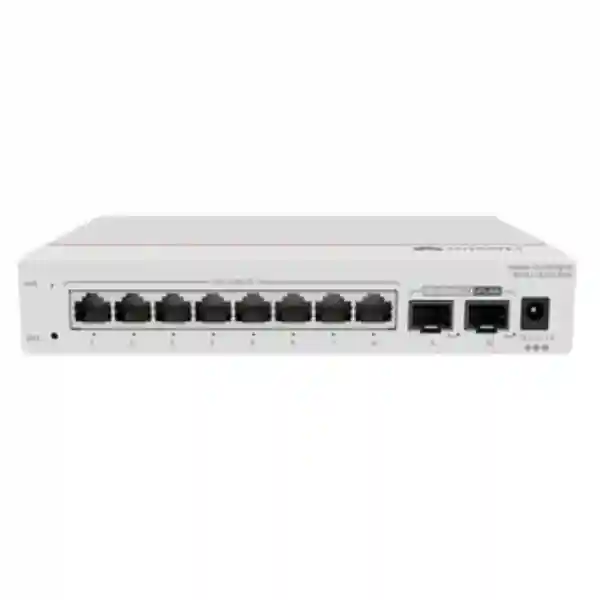
The Huawei CloudEngine S5751-L8T2X-RUA is a compact remote unit switch built for organizations that want to extend wired access ports from a centrally controlled campus switching architecture. This model combines eight Gigabit Ethernet copper downlinks with two multi-rate SFP+ uplinks supporting rates up to 10GE. Its fanless metal chassis, small 195 mm by 130 mm footprint, low power profile and wall-or-desk installation options make it particularly useful where a conventional rack-mounted access switch would be oversized, acoustically undesirable, difficult to cable, or operationally inefficient.
For UAE projects, the S5751-L8T2X-RUA can help architects place network ports closer to users and devices while retaining a simplified upstream design. It is intended for use as part of Huawei’s streamlined campus approach, where compatible central switching platforms provide the broader control and forwarding framework and remote units extend access into rooms, work areas, corridors, retail counters, small technical spaces and edge zones.
Core Hardware at a Glance
What the S5751-L8T2X-RUA Is Designed to Solve
Traditional campus access designs often place a full access switch in every telecommunications room, floor cabinet or remote zone. That approach works well when each location needs dozens of ports, local power delivery and a broad independent feature set. It becomes less efficient when a project has many small clusters of endpoints distributed across a building. Eight desks in a meeting suite, a group of room-control devices, a set of digital signage endpoints, a back-office retail area, a classroom cluster, a guard station, a branch reception area or a collection of wired IoT endpoints may require only a handful of ports. Installing a conventional 24-port or 48-port switch for each small cluster consumes rack space, electrical outlets, cooling capacity, patching hardware and operations time.
Huawei’s remote unit concept is intended to move edge connectivity closer to these endpoints without reproducing the full operational footprint of a conventional independently managed access switch at every location. The S5751-L8T2X-RUA is the non-PoE eight-port model with 10GE-capable uplinks. It can be placed on a desk or wall mounted, and because it has no fan, it avoids the acoustic impact associated with small high-speed fan-cooled switches. In offices, hotels, education facilities and customer-facing locations, this physical characteristic can matter as much as port density because the equipment may sit near people rather than in a dedicated network room.
The two SFP+ uplinks provide a flexible physical interface for upstream connectivity and can operate at multiple rates. This lets designers choose optics and link speeds appropriate to distance, aggregation architecture and bandwidth planning. The eight copper downlinks are standard 10/100/1000BASE-T interfaces for conventional Ethernet endpoint connectivity. Because this exact T-model does not provide PoE on its downlink ports, endpoints such as access points, cameras and IP phones that require power over Ethernet need separate power, a local injector, or a different S5751-L variant with PoE capability. Making that distinction during specification prevents a common procurement error in which an architect assumes every model in a series has the same power-delivery behavior.
For projects managed by FourTeck in the UAE, the practical value of this architecture is not simply that the device is physically small. The larger design goal is to simplify where access switching functions are physically distributed, keep the high-value control point at the compatible central switching layer, and deploy only the port extension required at each edge location. This can reduce unused port inventory, shorten local copper runs, help avoid oversized edge cabinets, and support a cleaner architecture when endpoint clusters are naturally dispersed.
Verified Hardware Specification Profile
Access and Uplink Ports
The S5751-L8T2X-RUA provides eight 10/100/1000BASE-T electrical downlink ports and two 100M/1GE/2.5GE/10GE SFP+ uplink ports. The multi-rate uplinks are a significant design advantage because the remote unit can fit into different aggregation plans without forcing every deployment to use the same optic speed from day one.
Forwarding and Switching
Huawei’s current international product information lists 42 Mpps forwarding performance and 98 Gbps switching capacity for this model. These figures place the unit comfortably above the aggregate line-rate demand generated by eight Gigabit downlinks and support the intended role of a compact campus remote access device rather than a high-density distribution switch.
Mechanical Format
The basic chassis dimensions are approximately 35 × 195 × 130 mm, excluding protruding elements, and the published unpackaged weight is approximately 0.83 kg. The compact metal enclosure can be deployed on a desk or mounted on a wall, which suits edge locations where a 19-inch rack is unnecessary or unavailable.
Cooling and Acoustics
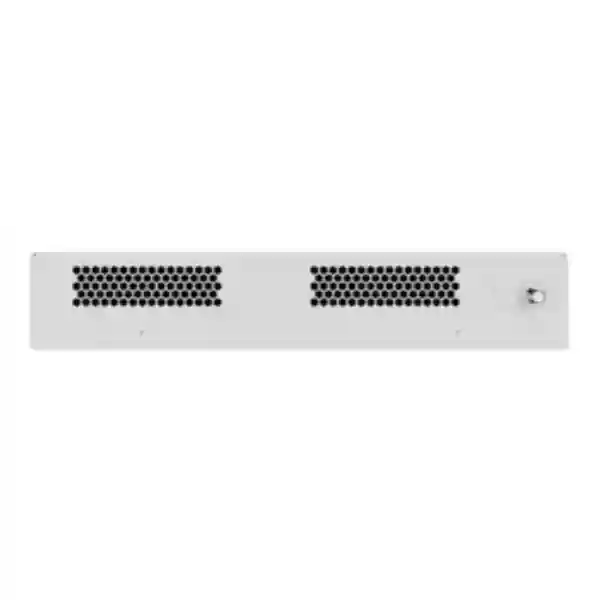
The unit uses natural heat dissipation and has no fan modules. Published acoustic figures describe it as noise-free in the normal-temperature operating context, with acoustic power below 30 dB(A) and acoustic pressure below 20 dB(A). This makes the platform suitable for occupied spaces where small-switch fan noise would be undesirable.
Port Architecture and Traffic Engineering
The physical port map is intentionally simple: eight copper access ports face the endpoints and two SFP+ ports face the upstream network. From a capacity-planning perspective, eight Gigabit downlinks create a theoretical aggregate ingress or egress requirement of up to 8 Gbps if every endpoint transmits in the same direction at line rate. A single 10GE uplink therefore has enough nominal bandwidth to carry the aggregate traffic from the eight Gigabit access ports in common oversubscription-free edge scenarios, while the second SFP+ interface can be used according to the central architecture and deployment design. Actual traffic engineering should still account for protocol overhead, burst behavior, upstream topology and the functions provided by the compatible central switch.
The uplink interfaces are not limited to 10GE. Their support for 100M, 1GE, 2.5GE and 10GE rates allows phased migration. A site can use a lower-rate optic or link where bandwidth needs are modest and later move to a faster transceiver when applications grow, provided the chosen optics, fiber plant and central-side interface are mutually compatible. This flexibility is particularly useful in mixed-age UAE buildings where fiber routes may have been installed at different times and where network modernization happens floor by floor rather than as a single greenfield project.
When selecting optics, the architecture team should treat the transceiver as part of the link rather than as a generic accessory. Fiber type, connector standard, wavelength, optical budget, supported distance, patch-panel losses and the capabilities of the far-end switch port all need to align. Multi-mode fiber may be suitable for shorter in-building runs, while single-mode designs are often chosen for longer campus paths or when the owner wants a cable plant with greater distance headroom. FourTeck can align the bill of materials with the actual fiber environment instead of assuming one optic type for all locations.
The eight copper downlinks should also be planned around endpoint behavior. Standard desktops, printers, building controllers, point-of-sale terminals and many appliances operate comfortably at 1GE or below. If a device needs 2.5GE or 5GE copper access, this specific model is not the right downlink choice because its eight RJ45 interfaces are Gigabit Ethernet ports. That is an important sizing checkpoint for modern Wi-Fi access points and high-performance edge devices, some of which can exceed 1 Gbps of wired throughput. In those cases, a different access model with multi-gigabit copper downlinks may be more appropriate.
Remote Unit Architecture in a Simplified Campus
Huawei positions the S5751-L family as remote units that work with compatible CloudEngine central switches to create a streamlined campus design. The underlying idea is to reduce the number of conventional autonomous access-layer devices that must be individually treated as full switching nodes. In a traditional three-tier design, access switches connect to aggregation switches, which in turn connect to the core. In smaller and medium campus environments, a remote-unit approach can collapse operational complexity by keeping more of the control and policy role at the central switch while extending physical ports to where endpoints actually reside.
This does not mean the remote unit should be thought of as an unmanaged desktop switch. It is an enterprise component intended to participate in a vendor-defined architecture. Compatibility with the chosen central switch family, software version, uplink technology and feature requirements should be validated before procurement. This is especially important in mixed-vendor environments. A project may have standard Ethernet on both ends of a fiber link, but the broader remote-unit operating model depends on Huawei’s supported topology and software behavior rather than solely on electrical or optical link compatibility.
For architects, the benefit of centralization appears in lifecycle operations. Instead of treating every small edge enclosure as a separate full-function switch installation, the design can place a compact remote unit at the edge and concentrate configuration intent upstream. That can simplify moves, additions and changes when the physical requirement is primarily to add access ports to a remote area. It can also reduce the number of locations where technicians need to interact with fans, replaceable power modules or large rack hardware because the S5751-L8T2X-RUA itself is fanless and externally powered.
A centralized model can also support consistent access behavior across many small edge zones, but implementation quality still depends on the upstream design. VLAN structure, segmentation policy, authentication methods, monitoring, redundancy, uplink utilization and failure-domain planning should be documented at the campus level. The remote unit is an enabler of a cleaner physical topology; it does not eliminate the need for deliberate network architecture.
Power, Thermal and Environmental Planning for UAE Sites
Low Device Power
Huawei publishes a maximum device consumption of about 7.46 W for the body and about 10.93 W for the device plus its adapter, with typical consumption listed around 10.52 W in the current brochure data. The modest load is useful when dozens of remote units are distributed across a campus because cumulative edge power becomes easier to budget than with full-size access switches.
This exact model is not a PoE downlink switch, so its power budget is not consumed by attached powered devices. If phones, cameras or access points require PoE, planners should either select the corresponding PoE-capable model or provide an approved alternative power method. Mixing assumptions between the T and P/LP variants can create deployment delays after cabling is complete.
Fanless Heat Dissipation
Natural heat dissipation removes a mechanical fan as a noise source and maintenance component. The tradeoff is that installation clearances and ambient temperature become important. The chassis should not be wrapped in insulating material, placed directly against a heat source or installed in an enclosure whose internal temperature significantly exceeds the published operating range.
For UAE deployments, room ambient conditions deserve particular attention. Outdoor ambient temperature is not the same as the temperature experienced by equipment in a shaded, ventilated, conditioned or sealed enclosure. Designers should validate the worst-case internal cabinet temperature, solar exposure, air circulation and nearby heat-generating equipment before treating an edge location as suitable.
Published environmental data for the family and model includes storage temperatures extending from approximately -40°C to +70°C and operating relative humidity from 5% to 95% non-condensing. Huawei hardware documentation also indicates that the achievable upper operating temperature can depend on the power adapter and altitude conditions. For practical UAE engineering, this means that the project should validate the exact supplied adapter, mounting method and site environment rather than relying on a single temperature number taken out of context.
Power quality also matters. The compact unit uses an external adapter rather than an internal redundant PSU. If the edge service must remain available during utility interruptions, the adapter’s AC source should be backed by an appropriate UPS or protected circuit. Redundant power is not a native feature of this chassis, so service continuity must be achieved through the surrounding electrical and network design. Where a branch or room has critical endpoints, this should be captured in the resilience requirement before hardware selection.
Physical Deployment: Desk, Wall and Edge Cabinet Scenarios
At roughly 195 mm wide, 130 mm deep and 35 mm high in its basic chassis dimensions, the S5751-L8T2X-RUA can fit where a traditional rack-mount switch cannot. Wall mounting is useful behind service counters, inside suitable low-voltage cabinets, in classroom technology zones, near room clusters or in protected ceiling/utility areas where the environment and access conditions meet installation requirements. Desk placement is appropriate for controlled back-office locations or temporary deployments where equipment is secured and cable routing is managed.
Compact placement does not remove cable-management requirements. Copper patch leads should have enough service loop to avoid connector strain, fiber connectors should be protected from sharp bends, and the SFP+ transceivers need adequate clearance for insertion and removal. The power adapter should not hang from its cable, and the wall surface or cabinet should support the unit securely. If the remote unit is installed above a suspended ceiling, building regulations, fire requirements, service access and environmental conditions need to be considered by the project team.
The lack of fans can make orientation more forgiving from an airflow perspective, but convection still requires free space around the chassis. Network contractors should avoid stacking multiple units tightly together or covering ventilation surfaces. Labeling should include the device identifier, serving central switch, uplink fiber IDs, room or zone name, and power-circuit reference. That information greatly reduces troubleshooting time when many small remote units are spread across a large property.
FourTeck’s UAE IT services team can incorporate this type of remote-unit installation into structured cabling, switch deployment, testing and handover workflows. The goal should be to leave each edge location both technically correct and operationally understandable, with documented uplinks and a clean physical installation rather than simply adding ports.
Common UAE Deployment Patterns
Corporate Office Zones
Meeting-room clusters, executive suites, reception areas and small groups of desks often need fewer than ten wired ports but are physically separated from the main telecommunications room. A remote unit can place Gigabit copper ports close to users while using high-speed fiber back to the central switching area.
Retail and Branch Locations
Point-of-sale terminals, back-office PCs, printers, signage controllers and inventory devices can be grouped around a small edge switch location. The fanless format is beneficial where equipment is close to staff or customers and where a large rack is impractical.
Education and Training Rooms
Classrooms and training rooms may need wired instructor systems, presentation controllers, displays and fixed PCs. A compact unit can serve that room locally while keeping the upstream network centered on the campus switching platform.
Hospitality and Service Areas
Hotels, serviced residences and large venues contain dispersed back-of-house systems that need reliable Ethernet but not necessarily a full 24-port access switch in every area. Small remote-unit clusters can make physical port placement more proportional to demand.
Building Systems Edge
Controllers, gateways, management appliances and non-PoE wired devices can be connected locally where the building system architecture calls for network presence near plant or service zones. Environmental suitability and segregation policy should be verified carefully.
Temporary Project Spaces
Project offices, show units, exhibition support rooms and temporary operational zones can benefit from a small fanless edge device that provides eight copper ports while linking back to a permanent network over fiber.
Non-PoE Model: Why the Suffix Matters
The S5751-L family includes multiple models that look similar in name but differ substantially in access-port power and uplink type. The S5751-L8T2X-RUA discussed here has eight Gigabit copper downlinks without PoE and two conventional multi-rate SFP+ uplinks up to 10GE. Models with LP or P designators add PoE capability, while H-designated variants can use hybrid optical-electrical uplink concepts. Procurement teams should therefore quote the full exact part number rather than shortening the requirement to “S5751-L eight-port switch.”
A non-PoE model can be the right technical choice when endpoints already have local power or when the connected equipment does not use PoE. PCs, many printers, industrial controllers, media players, appliances and certain building-management gateways are examples. Avoiding an unnecessary PoE power stage can reduce power-system complexity and keeps the remote unit compact. However, the moment the port plan includes Wi-Fi access points, IP phones, surveillance cameras or other powered devices, the designer should confirm how those endpoints will be powered.
Using local injectors is technically possible in some scenarios, but it introduces extra components, sockets and potential failure points. In a permanent enterprise deployment, a PoE-capable member of the family may be operationally cleaner if multiple endpoints need network-delivered power. Conversely, specifying the more expensive PoE version when no attached device needs power can be unnecessary. The correct choice is a port-by-port decision based on the endpoint schedule, not simply a preference for the model with more features.
This page therefore treats the S5751-L8T2X-RUA as a data-only copper access remote unit. Any quotation should preserve that distinction in the item description and line-level bill of materials. If the project changes and PoE endpoints are later added, the hardware selection should be revalidated rather than assuming the existing unit can enable PoE through software.
Uplink Optics, Fiber Plant and Distance Planning
The SFP+ uplinks are one of the most important reasons to choose this model. Copper Ethernet is typically constrained by the standard 100-meter horizontal-cabling limit, which can make it difficult to serve remote rooms from a central telecommunications space. Fiber allows longer reach, electrical isolation and a smaller cable profile for backbone links. By placing a compact remote unit near the endpoint cluster and running fiber upstream, the designer can keep local copper drops short while spanning the building or campus over optical media.
Transceiver selection must begin with the installed fiber. OM3 or OM4 multimode fiber is common in modern buildings for shorter backbone runs, while OS2 single-mode fiber provides much greater distance capability and is common for campus and long-building links. The exact optical modules selected for the S5751-L8T2X-RUA and the central switch must be supported by both devices and must match wavelength, connector style and fiber type. A 10GE link is not defined by the switch ports alone; it is a complete optical channel with loss budget, patching and cleanliness requirements.
Fiber workmanship has a disproportionate impact on reliability. Dirty LC connectors, stressed patch cords, excessive bend radius, undocumented intermediate couplers and poor patch-panel labeling can cause intermittent optical faults that are difficult to diagnose. A professional deployment should record source and destination ports, optic types, fiber cores, patch-panel positions and measured test results. For critical links, teams may also document optical power readings during commissioning to establish a baseline for future troubleshooting.
Because each remote unit has two SFP+ interfaces, the physical design can support more than a basic single-uplink concept, subject to Huawei’s supported remote-unit topology and central switch design. Do not assume that every generic link-aggregation or redundancy pattern is supported exactly as it would be between two autonomous switches. The remote-unit architecture should be checked against the central switch model and software release chosen for the project.
FourTeck can source the remote unit together with compatible optical modules and cabling components through its broader UAE enterprise networking portfolio. Keeping the active equipment and optical bill of materials aligned is preferable to buying the switch first and solving transceiver compatibility only during installation.
Performance Sizing Beyond the Datasheet Numbers
Switching capacity and forwarding rate provide useful technical boundaries, but they are not a substitute for traffic characterization. The S5751-L8T2X-RUA’s published 98 Gbps switching capacity and 42 Mpps forwarding performance are ample for its port count in the intended remote-unit role. The more important project question is whether the eight Gigabit copper ports and available uplink bandwidth align with the actual applications.
For ordinary office endpoints, average utilization is usually far below 1 Gbps per device. Web applications, email, cloud productivity and voice generate bursty rather than continuously saturated traffic. In that environment, a 10GE uplink provides substantial headroom. In contrast, a cluster of local backup targets, high-resolution media workstations, imaging devices or servers can create sustained large flows. Those workloads should be analyzed by application, even if the switch itself is technically capable of forwarding the traffic.
Packet rate also matters when traffic consists of large numbers of small frames. Security appliances, telemetry collectors and certain transaction systems may produce packet-per-second patterns that differ from large-file transfers. The published 42 Mpps figure is useful as an upper architectural indicator, but production performance should be evaluated in the context of the complete central switching path and enabled features. Remote-unit deployments ultimately depend on the end-to-end system, not on one isolated device metric.
A practical sizing worksheet should list each planned port, endpoint type, expected link speed, PoE requirement, VLAN or security zone, criticality, normal bandwidth, peak bandwidth and growth expectation. Summing only link speeds often overstates ordinary demand, while ignoring peak workflows can understate it. For example, eight 1GE ports do not automatically create a continuous 8 Gbps requirement, but if several devices regularly move large files simultaneously, uplink sizing should acknowledge that behavior.
Future growth should be addressed at both the port and bandwidth levels. An eight-port unit with seven active endpoints leaves very little physical headroom. If the area is likely to expand to twelve or sixteen wired devices, a larger remote unit or a different access platform may be more economical than adding a second box later. Conversely, for a stable four-to-six-device cluster, the S5751-L8T2X-RUA can be a precise fit with enough spare ports for normal change.
Segmentation, Security and Operational Control
Huawei’s remote-unit design supports centralized forwarding and access-policy concepts through the compatible central switch, and the S5751-L family supports flexible downlink-port isolation. The architectural benefit is that edge ports can participate in a centrally defined campus policy rather than being treated as an unmanaged Layer 2 island. For enterprise deployments, the project should define how users, printers, building systems, guest devices, operational technology and other endpoints are segmented and what communication paths are permitted between those segments.
Port isolation can be useful when connected devices should reach upstream services but should not communicate directly with one another. This pattern can apply to guest-facing terminals, certain surveillance or IoT endpoints and service environments where lateral movement between edge devices is undesirable. However, the actual segmentation strategy may also involve VLANs, access control, authentication and upstream security enforcement. The correct combination depends on the organization’s security architecture and the capabilities of the selected central switch software.
Physical security should not be overlooked simply because the device is compact. A wall-mounted remote unit in an accessible area should be installed where unauthorized users cannot easily disconnect the uplinks, move patch cords or remove the power adapter. If that is impossible, a lockable low-voltage enclosure may be appropriate. Unused downlink ports should be managed according to the organization’s access policy, and documentation should identify which ports are intended for which device categories.
Monitoring should focus on both device state and the service delivered to endpoints. Link status, errors, interface utilization and upstream connectivity can reveal cabling issues or congestion. At the central architecture level, operations teams should have a clear way to identify which physical remote unit and port correspond to a user report. Naming conventions that encode building, floor, room and unit number are far more useful than generic switch labels once a deployment scales to dozens or hundreds of distributed devices.
Security policy should be verified during commissioning, not merely documented. Test cases can include expected access from each endpoint class, blocked lateral paths, correct VLAN or policy assignment, link recovery after power interruption and behavior when an uplink is disconnected. These checks convert a configuration into an evidence-based handover and help catch mismatches between the low-level port map and the intended network design.
Reliability and Service Continuity Considerations
Fanless Reliability
With no fan modules, the unit removes a common mechanical wear component found in compact switches. Huawei publishes an MTBF value of approximately 102.91 years for this model and availability above 0.99999 in its product material. Those are manufacturer reliability metrics rather than a guarantee of uninterrupted site service, but they demonstrate the design intent of a low-maintenance edge device.
External Power Adapter
The chassis does not provide an internal redundant power supply. The external adapter and the AC circuit feeding it therefore form part of the service path. Critical locations should use suitable UPS-backed power and should keep spare adapters or replacement strategy aligned with support requirements.
Fiber Link Protection
The uplink fiber route should be protected against accidental bending, crushing and unauthorized patching. Where service continuity is important, route diversity and redundancy should be evaluated at the campus level rather than assuming that the presence of two SFP+ ports automatically provides independent physical paths.
Operational Spares
Organizations deploying many identical remote units can benefit from holding a small number of prequalified spares. A standardized hardware and optic set can shorten replacement time because technicians are not forced to validate a new platform during an incident.
Service continuity is ultimately an end-to-end property. A highly reliable remote unit will still be unavailable if its upstream central switch, optic, fiber core, electrical circuit or core network fails. Architects should map the failure domain for each user group and decide which elements require redundancy. A small meeting room may tolerate a simple single path; a revenue-generating point-of-sale zone or operational control area may require stronger protection. The S5751-L8T2X-RUA should be selected as one component within that broader availability design.
How to Decide Between a Remote Unit and a Conventional Access Switch
A remote unit is attractive when port clusters are small, physically dispersed and naturally connected back to a compatible central switch over fiber. It is also useful when fan noise, limited cabinet space or operational simplicity makes a compact device preferable. A conventional access switch remains a better fit when a location needs high port density, independent switching features, large PoE budgets, many multi-gigabit copper ports, modular power, local stacking requirements or a vendor-neutral architecture.
Consider a floor with sixty wired endpoints concentrated in one telecommunications room. A pair of standard access switches may be simpler and more cost effective than deploying many eight-port remote units. Now consider a large hospitality floor with small groups of endpoints distributed across corridors, service pantries and back-office zones. Pulling long copper home runs from every endpoint to a central room may be less attractive than placing compact remote units near the clusters and using fiber for the upstream path. The physical geometry of the building often determines which architecture makes sense.
PoE is another dividing line. The S5751-L8T2X-RUA specifically is optimized for data-only downlinks. If a zone contains eight cameras or access points, a PoE-capable remote unit or traditional PoE access switch is likely to be a more direct choice. If the same zone contains eight powered desktops, printers and controllers, the non-PoE T-model avoids paying for a power-delivery feature that is not used.
Management standards and lifecycle policy also influence the choice. Organizations that have standardized on Huawei’s campus architecture can gain more from remote units because the central and edge components are designed to operate as a system. Organizations with a strict requirement that every access switch be independently manageable through a multi-vendor orchestration platform should confirm that the remote-unit operating model aligns with that policy.
FourTeck’s broader enterprise infrastructure portfolio can support side-by-side evaluation of remote-unit, conventional access-switch and supporting optical options. The correct outcome is the topology that meets port demand, resilience, operational control and budget without introducing unnecessary hardware layers.
Procurement and Bill-of-Materials Planning in the UAE
A complete quotation for the S5751-L8T2X-RUA should include more than the remote unit itself. At minimum, procurement should confirm the exact model number, supplied power adapter, quantity and type of SFP/SFP+ transceivers, fiber patch cords, any wall-mounting accessories required by the planned installation, copper patch leads, labeling materials and any UPS or power-distribution elements serving the edge location. If existing fiber is being reused, the quotation should also identify whether cleaning, testing or recertification is included.
Compatibility should be checked before purchase. The central switch model and software train should support the intended remote-unit deployment. Optics should be matched to the central and remote interfaces. If the customer has a preferred optic standard, that preference should be reviewed against vendor support policy. The temptation to treat all 10G SFP+ modules as interchangeable can create avoidable commissioning risk.
For UAE projects, lead time can be influenced by model-specific stock, optical module choice and project quantities. An eight-port non-PoE remote unit may not be stocked in exactly the same volume as mainstream rack switches. It is therefore useful to freeze the endpoint schedule and model selection early enough that substitutions do not have to be made late in the deployment. When an alternative model is proposed, compare port type, PoE behavior, uplink speed, physical dimensions, power method and central compatibility—not just the number of ports.
Warranty and support expectations should be defined in the same commercial schedule as the hardware. A customer may require only product supply, or may require installation, configuration, acceptance testing, documentation and post-deployment support. These are different scopes and should be quoted clearly. FourTeck can structure the offer around supply-only requirements or a broader project engagement through its Dubai enterprise infrastructure team.
The best bill of materials is one that is traceable to the final network design. Each remote unit should map to a physical zone and endpoint count, each optic to a documented fiber link, and each power adapter to a known socket or UPS circuit. This discipline makes procurement easier to audit and reduces the number of miscellaneous accessories discovered only when installers arrive on site.
Installation and Commissioning Methodology
A structured commissioning process should begin before the device is mounted. Verify the model label, supplied adapter, central-switch compatibility, optic types and intended physical location. Inspect the fiber path and confirm that patch-panel labels match the design. Check that the wall, desk or enclosure provides adequate access for patching and future replacement. If the location is inside a cabinet, validate ambient temperature and ensure the adapter can be safely secured.
After physical installation, technicians should connect the uplink in the planned sequence and confirm optical or Ethernet link state at both ends. The remote unit should be associated with the correct central switching context according to the Huawei design. Each downlink should then be patched to the intended endpoint one at a time so that port mapping can be verified against documentation. This avoids the common problem of having eight active cables with no reliable record of which port serves which device.
Functional testing should include link speed, basic reachability, endpoint policy, segmentation behavior and performance appropriate to the application. If a port is intended for a printer VLAN, camera management path or building controller zone, verify that it lands in the correct network and cannot access disallowed segments. If the environment uses authentication or access-control policy at the central layer, test both successful and failed cases.
Resilience testing should match the service requirement. At minimum, a controlled power cycle can confirm that the unit and connected endpoints recover as expected. Where multiple uplink paths or higher-level redundancy are configured, each failure scenario should be tested deliberately. Record recovery behavior and any manual intervention needed. A design that appears redundant on a diagram should not be accepted as redundant until the failure path has been demonstrated.
Handover documentation should include the final model and serial information, physical location, mounting method, central-switch association, uplink ports and optics, fiber core IDs, downlink port map, IP or management references where relevant, test results and photos of the installed unit. For campuses with many remote units, a spreadsheet or network-management inventory that uses consistent location naming makes future changes dramatically easier.
Post-installation observation is useful during the early life of the deployment. Interface counters can reveal cabling faults, duplex negotiation problems or unusual error rates. Utilization statistics show whether an assumed low-bandwidth edge cluster is actually approaching uplink constraints. Temperature and environment should be reviewed if units are located in enclosed spaces. These checks help convert the initial design assumptions into validated operational data.
Lifecycle Operations and Growth Planning
The S5751-L8T2X-RUA is most valuable when it is treated as part of a repeatable campus standard rather than as an isolated small switch. Standard deployment templates can define where remote units are used, how they are named, which uplink speeds and optic types are approved, how wall mounting is performed, how cables are labeled and what central-switch policies apply. That consistency lowers the operational cost of scaling from a few units to dozens.
Capacity reviews should look for two growth signals: port exhaustion and bandwidth growth. If units regularly reach seven or eight occupied downlinks, the organization should determine whether the relevant zones are still best served by an eight-port form factor. Adding a second small unit can solve the immediate problem but may create unnecessary device count. In a growing area, a larger remote unit or standard access switch may produce a cleaner long-term design.
Bandwidth growth can be handled differently. Because the uplink ports support rates up to 10GE, a deployment operating at a lower optical rate may have migration headroom without changing the remote unit. Upgrading still requires compatible far-end ports, optics and fiber, but the multi-rate interface reduces the chance that the edge chassis itself becomes the first bottleneck. This can be valuable in phased campus upgrades where core and aggregation capacity are improved over time.
Software lifecycle is primarily a system-level consideration because the remote unit participates in the compatible Huawei campus architecture. Before central-switch upgrades, teams should review release notes and compatibility guidance for the remote-unit family. Maintenance procedures should include a rollback plan and representative test cases for remote edge connectivity. A central change can affect many distributed access zones simultaneously, so disciplined change control becomes more important as the architecture scales.
Hardware spares should be standardized around the exact model and optic set in production. If multiple S5751-L variants are used, label spares clearly so a non-PoE T-model is not mistakenly installed where PoE is required. The same principle applies to power adapters. A visually similar adapter is not automatically equivalent; replacement power hardware should meet the supported electrical specification for the unit.
Technical Fit by Endpoint Type
For desktop computers and standard office terminals, the eight 1GE copper ports are a straightforward fit. Many enterprise PCs still connect at 1GE, and the 10GE-capable uplink provides substantial aggregate headroom. Printers, scanners, time-attendance devices and many point-of-sale terminals also sit comfortably within the Gigabit access profile. In these cases, the absence of PoE is not a limitation because the endpoints use their own power supplies.
For IP phones, Wi-Fi access points and surveillance cameras, the data interface may be compatible but the power model requires extra attention. These device categories are commonly powered by PoE. Unless the endpoint has a local power supply or an approved injector is part of the design, the S5751-L8T2X-RUA is not the most direct choice. A PoE-capable S5751-L model or another PoE access platform should be considered.
For servers, high-performance NAS devices or media workstations, the 1GE copper downlink can become the limiting factor even though the uplink reaches 10GE. The remote unit should not be selected merely because the upstream interface is fast; the endpoint-facing port speed is what constrains each connected device. Workloads requiring 2.5GE, 5GE or 10GE copper at the edge need a different access product.
For building-management controllers, access-control panels and wired IoT gateways, 1GE is often more than sufficient, but environmental and security requirements may dominate. Confirm whether the device location is within temperature and humidity limits, whether the network needs isolation from user traffic, and whether any critical control function requires UPS-backed power. The compact fanless form factor is attractive for service zones, but it should still be installed in an appropriate protected environment.
For temporary or event networks, the unit can be useful when a fiber-fed cluster of standard Ethernet ports is needed in a quiet or space-limited area. Teams should still secure the power adapter and optical patching, because temporary environments often have more cable movement and accidental disconnection risk than permanent rooms.
Why UAE Organizations Consider Distributed Fiber-Fed Access
Modern UAE facilities often combine large floor plates, architectural finishes, mixed-use spaces and high endpoint density. Copper-only access can force network rooms to be located according to the 100-meter channel limitation rather than according to operational convenience. Fiber-fed remote access changes that equation by allowing long-distance backbone connectivity to a small edge device that serves a local copper cluster. The result can be fewer oversized closets and shorter copper runs, although the optimal design depends on the building and should be confirmed by a structured cabling study.
Renovation projects are another strong use case. A building may already have fiber cores available between technical zones while copper routes are congested or difficult to extend. A compact remote unit can make use of that optical backbone and provide new copper ports near the renovated area. This can reduce disruptive cable work, but only if the existing fiber type, quality and core availability are verified.
High-quality architectural spaces benefit from smaller equipment footprints. In executive floors, luxury hospitality venues, boutiques and customer-facing service areas, a noisy fan-cooled access switch in visible space is often unacceptable. The fanless S5751-L8T2X-RUA can be easier to integrate discreetly, provided the installation remains serviceable and thermally appropriate. The device should not be hidden so aggressively that technicians cannot reach it or convection is impaired.
Distributed access can also make expansions more modular. Instead of installing a high-capacity switch and leaving most ports unused in anticipation of future growth, the network can add remote units where demand materializes. This approach can align capital deployment more closely with occupancy phases. However, very large numbers of small units can increase inventory and documentation overhead, so architects should identify a practical threshold at which a standard higher-density access switch becomes the better option.
Organizations evaluating this approach can combine the switch selection with wider architecture work across FourTeck UAE, while complex global or multi-site standardization can be aligned through FourTeck’s global infrastructure practice. The technical objective remains consistent: place the right amount of network capability at each edge location and avoid designing the physical topology around assumptions that no longer match the building.
Specification Detail Table
| Product model | Huawei CloudEngine S5751-L8T2X-RUA |
| Downlink ports | 8 × 10/100/1000BASE-T RJ45 |
| Uplink ports | 2 × 100M/1GE/2.5GE/10GE SFP+ |
| PoE on downlinks | Not supported on this T-model |
| Forwarding performance | 42 Mpps, per current Huawei international specification |
| Switching capacity | 98 Gbps, per current Huawei international specification |
| Basic chassis dimensions | Approximately 35 × 195 × 130 mm |
| Weight without packaging | Approximately 0.83 kg |
| Cooling | Fanless, natural heat dissipation |
| Installation | Desk or wall mounting |
| Maximum device power | Approximately 7.46 W for the body; approximately 10.93 W including adapter in Huawei’s published data |
| Typical power consumption | Approximately 10.52 W in Huawei’s current brochure data |
| Storage temperature | Approximately -40°C to +70°C |
| Relative humidity | 5% to 95%, non-condensing |
| Power architecture | External power adapter; no native redundant PSU in this chassis |
Technical specifications can vary by region, hardware revision, supplied adapter and software release. Final project quotations should validate the exact supplied part number and current Huawei compatibility documentation.
Frequently Asked Technical Questions
Does the S5751-L8T2X-RUA provide PoE?
No. This specific T-model provides eight Gigabit data downlinks without PoE. If your endpoint schedule includes phones, wireless access points, cameras or other powered devices, select an appropriate PoE-capable model or design a separate supported power method.
Can the uplinks run at 10 Gigabit Ethernet?
Yes. The two SFP+ uplink ports support multiple rates up to 10GE, including 100M, 1GE, 2.5GE and 10GE according to Huawei’s current international specification. Actual operation depends on compatible optics, fiber and far-end port capability.
Is it a rack switch?
It is a compact remote unit intended for desk or wall mounting rather than a conventional 19-inch rack access-switch format. Its size is one of the main reasons to deploy it near small endpoint clusters.
Does it have fans?
No. It uses natural heat dissipation. This eliminates fan noise and one mechanical maintenance component, but installers must still maintain appropriate clearance and ambient conditions.
Can it replace any normal eight-port switch?
Not automatically. It is designed as a Huawei CloudEngine remote unit used within a compatible central-switch architecture. Projects should validate topology, software and central-platform support before specifying it as a generic standalone replacement.
Is it suitable for Wi-Fi 6 or Wi-Fi 7 access points?
Only if the specific access point’s wired and power requirements fit. The S5751-L8T2X-RUA has 1GE copper downlinks and no PoE, while many newer access points benefit from multi-gigabit Ethernet and require PoE. Check each access point datasheet before choosing the switch.
What should be included with a quotation?
The exact remote unit model, correct power adapter, required supported SFP/SFP+ optics, fiber and copper patching, mounting accessories where applicable, installation scope, central-switch compatibility confirmation, testing, documentation and support terms should all be defined. A complete bill of materials avoids last-minute accessory and compatibility gaps.
Decision Recap: When This Exact Model Fits
Strong Fit
Choose the S5751-L8T2X-RUA when you need up to eight standard Gigabit copper ports in a small edge zone, want fiber uplinks that can scale to 10GE, already use or plan a compatible Huawei CloudEngine central architecture, prefer fanless operation, and do not need PoE on the endpoint ports.
Review Alternatives
Review another model if the area needs more than eight copper ports, requires PoE, needs multi-gigabit copper downlinks, must operate as an independently managed multi-vendor access switch, requires native redundant power, or will be installed in an environment outside the published operating conditions.
The core design question is not whether the unit has enough specifications on paper. It is whether its role matches the physical and operational topology of the site. When the answer is yes, the S5751-L8T2X-RUA provides a compact way to distribute enterprise access ports while keeping high-speed optical connectivity to the central campus layer.
Quotation Input Checklist
To produce an accurate UAE quotation and avoid substituting the wrong S5751-L variant, provide the following project inputs. These details allow the hardware, optics and services to be aligned as one deployable solution rather than as separate line items.
Number of remote units, building names, floors, rooms or branches, and whether each unit will be wall or desk mounted.
Device type on every port, expected link speed, whether local power exists, and confirmation that PoE is not required.
Exact Huawei CloudEngine central switch model, software release if known, and available uplink port types.
OS2, OM3, OM4 or other fiber type, estimated distance, connector type, patch-panel route and whether existing fiber has been tested.
Whether each site will operate at 1GE, 2.5GE or 10GE and whether future upgrades should be included in optic selection.
Availability of local AC power, UPS requirement, socket location and any branch standards for power protection.
Supply only, installation, configuration, fiber patching, acceptance testing, documentation and post-deployment support requirements.
Whether each zone is standard office service or mission-critical, and whether redundant upstream paths or spare units are required.
FourTeck UAE Consultation and Deployment Support
FourTeck can assist with product supply, topology review, Huawei-compatible central switching design, optic selection, structured cabling coordination, remote-unit placement, installation, testing and handover. A useful consultation begins with the floor plan and endpoint schedule rather than with a switch quantity. That allows the design team to determine where eight-port remote units genuinely simplify the architecture and where a higher-density access switch would be more suitable.
For a new campus, the design can be developed from the central layer outward: define core and central switching, identify fiber paths, determine remote access zones, size each zone’s endpoint count, then select the correct remote-unit variant. For an existing building, the process starts with the installed cable plant and current switch estate. Existing fiber availability, closet space, PoE needs and migration constraints often determine how quickly the remote-unit architecture can be introduced.
Projects that combine switching with security infrastructure can also be coordinated through the Firewall Dubai engineering team, while wider implementation and managed technical work can be aligned through FourTeck IT Services UAE. Keeping switching, security, cabling and support under one documented design reduces integration gaps at handover.

Reviews
There are no reviews yet.