
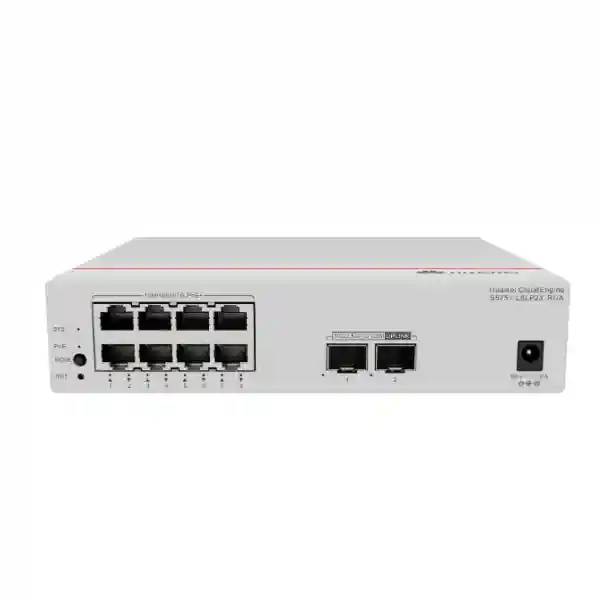
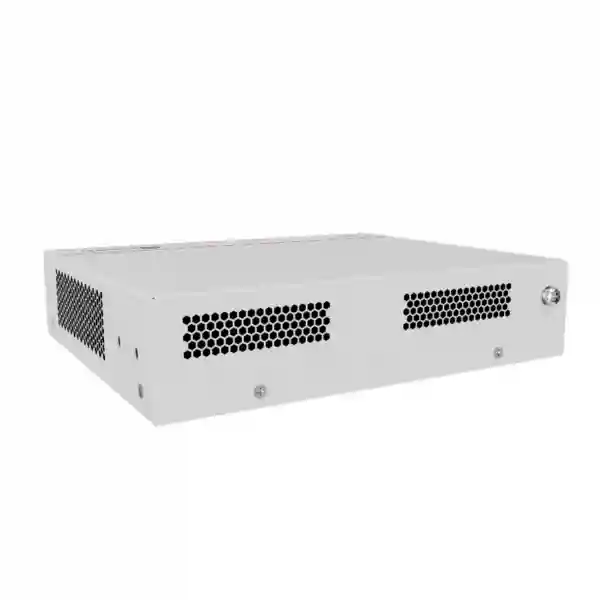
Huawei CloudEngine S5751-L8P2X-RUA Dubai
Compact 8-port PoE+ remote unit with dual 10GE-capable SFP+ uplinks, 128 W PoE budget, fanless cooling and centrally controlled Huawei simplified-campus operation.
Direct answer: what is the Huawei CloudEngine S5751-L8P2X-RUA?
The Huawei CloudEngine S5751-L8P2X-RUA is a compact remote unit, or RU, designed for Huawei enterprise campus networks that use a central switch plus distributed remote access units. In practical terms, the device places eight Gigabit Ethernet PoE+ user ports close to desks, rooms, cameras, wireless access points, phones or other edge endpoints while returning traffic to the central switching layer over one or two high-speed SFP+ optical uplinks. The model is engineered to reduce the amount of conventional access-switch infrastructure required in many building layouts and to simplify the way edge ports are deployed, operated and replaced.
For the S5751-L8P2X-RUA specifically, Huawei publishes eight 10/100/1000BASE-T PoE+ downlink interfaces and two 100M/1G/2.5G/10GE SFP+ uplink interfaces. The platform provides 98 Gbit/s switching capacity and 42 Mpps forwarding performance. Its published PoE budget is 128 W, giving designers a useful power envelope for mixed IP phones, cameras, sensors and selected wireless access points while retaining a compact physical footprint. It uses natural heat dissipation rather than a fan, an important consideration for hotel rooms, meeting spaces, retail areas, clinics, education environments and office zones where acoustic noise matters.
The RU concept is different from selecting an ordinary standalone access switch solely by port count. The design value comes from the relationship between the remote unit and the Huawei central switch. In Huawei’s simplified architecture, remote units operate as distributed port expansion resources under centralized control. This can reduce per-floor configuration work, simplify fault replacement and allow designers to bring access ports closer to users using optical uplinks. For UAE projects, where high-density buildings, long corridors, hospitality floors, campuses and distributed edge locations are common, that architecture can be useful when the complete solution is designed around compatible Huawei campus switching software and optics.
Verified model specifications at a glance
Why the remote-unit architecture matters
A conventional enterprise campus commonly places full-function access switches in telecom rooms on each floor, aggregates them upstream and then connects to the core. That remains a valid design, but it can create large numbers of independently deployed access devices, additional equipment-room requirements and repeated configuration work at the edge. Huawei’s remote-unit approach changes the operational boundary. The central switch carries the intelligence and policy role, while remote units extend physical access ports closer to users. For many projects, the important question is not whether the RU contains the same autonomous feature set as a traditional access switch; it is whether centralized operation can simplify the overall building network.
The S5751-L8P2X-RUA fits this model particularly well because its eight PoE+ copper ports are paired with dual 10GE-capable optical uplinks. Eight ports is a practical size for a room cluster, small office zone, retail island, classroom group, corridor camera cluster or hospitality segment. Instead of pulling every copper cable back to a distant floor distributor, designers can place the remote unit nearer the endpoints and use fiber for the longer upstream run. Fiber removes the familiar 100-meter Ethernet copper channel constraint from the backbone portion and also provides electrical isolation between areas.
Centralization can also simplify moves, adds and changes. When remote units are deployed as managed extensions of compatible Huawei central switches, the architecture is intended to minimize local planning and configuration. A replacement RU can therefore be treated more like a field-replaceable access extension than an independently engineered switch. For multisite UAE organizations, this can reduce variation between small edge locations and make standardized templates easier to enforce. The exact operational behavior depends on the central-switch model, software release and deployment mode, so those elements should always be validated together during design.
Eight PoE+ edge ports
Eight Gigabit copper interfaces let the RU directly connect common enterprise endpoints. PoE+ support reduces local power-adapter dependence for compatible phones, cameras, access points and IoT equipment. In a correctly designed PoE plan, one data cable provides both network service and endpoint power.
Dual multi-rate SFP+ uplinks
Each uplink supports multiple rates up to 10GE, which provides useful design flexibility for migration, optic selection and upstream capacity. Dual interfaces can also support topology choices defined by the compatible central-switch architecture and software release.
Fanless mechanical design
Natural cooling removes fan noise and eliminates a moving component. This is useful where the device sits outside a traditional noisy equipment room, provided the installation maintains the required airflow clearance and environmental range.
Compact edge footprint
At roughly 195 mm wide and 160 mm deep, the enclosure can fit locations that would be awkward for a full-width rack switch. Huawei lists desktop and wall mounting methods, giving project teams more freedom in concealed or distributed access layouts.
Port architecture and traffic engineering
The eight 10/100/1000BASE-T interfaces are designed for common copper-connected endpoints. Because each port supports Gigabit Ethernet, the aggregate theoretical edge demand can reach several gigabits when multiple endpoints transmit simultaneously. The two SFP+ interfaces provide a substantial upstream ceiling, and the 98 Gbit/s switching-capacity figure means the switching fabric is not sized as a simple eight-gigabit-only device. For real deployments, the actual usable throughput is governed by endpoint speed, uplink speed, protocol overhead, central-switch topology and traffic patterns rather than by a single headline number.
The 42 Mpps forwarding rating is particularly relevant for workloads composed of smaller packets. A surveillance stream usually consists of relatively large packets and predictable sustained throughput, while voice, transactional traffic and certain control workloads can generate different packet profiles. The published forwarding rate provides confidence that the RU is designed for line-rate campus access behavior in its intended architecture. Network designers should still size uplinks based on expected aggregate demand rather than assuming every access port will continuously transmit at full rate.
The multi-rate nature of the two SFP+ uplinks is operationally useful. It allows an organization to align optics and upstream interfaces with the central switch instead of treating 10GE as the only valid rate. In brownfield environments, this can make staged upgrades easier. A project may begin with a lower-rate compatible optical connection and migrate to 10GE as central switching or bandwidth demand changes. Optic type, fiber grade, wavelength, reach and Huawei compatibility must be checked as part of the bill of materials; the presence of an SFP+ cage alone does not determine the correct transceiver.
PoE engineering: how to use the 128 W budget correctly
The S5751-L8P2X-RUA has a published 128 W PoE budget and eight PoE+ downlink ports. This does not mean that every endpoint should automatically be assumed to receive an equal 16 W allocation, nor does it mean every attached device will consume its maximum class power continuously. PoE design should start with each powered device’s standard, negotiated class, maximum draw and practical operating draw. The combined worst-case requirement should then be compared with the available budget while retaining design margin for device variation, startup behavior, future endpoint replacement and environmental conditions.
A typical office cluster might contain several IP phones, one or two cameras and one wireless access point. Such a combination can fit comfortably within 128 W when the actual powered-device requirements are moderate. A different cluster containing eight higher-power wireless devices could exceed the desired design margin even though the port count is sufficient. This distinction is important: port availability and power availability are separate capacity dimensions. The correct bill of materials needs both.
For surveillance designs, calculate the camera’s maximum draw with infrared illumination, heater or other accessories active rather than using only daytime consumption. For Wi-Fi designs, check whether the selected access point reduces radio capability when powered below its preferred class. For phones, include attached expansion modules if present. Where the deployment contains mixed endpoint types, a simple PoE worksheet prevents unexpected power oversubscription.
Huawei publishes maximum full-PoE-load device consumption of approximately 161.02 W for this model, with 128 W attributed to PoE, while the device-only non-PoE and typical figures are much lower. This difference matters for UPS and circuit sizing. The upstream electrical design should consider the switch plus PoE delivery rather than only the switch’s electronics. In UAE installations, also account for the power adapter, socket location, UPS strategy, grounding practice and heat around concealed cabinets or wall spaces.
10GE optical uplinks for distributed UAE buildings
The most important physical-design advantage of an optical-uplink RU is the ability to separate user-side copper cabling from the building backbone. Copper Ethernet is excellent for the short endpoint run because it is economical, easy to terminate and supports PoE. Fiber is better suited to long inter-room or inter-floor backbone paths because it supports greater distance, high bandwidth and immunity to electromagnetic interference. The S5751-L8P2X-RUA combines those roles in one compact edge node: eight powered copper ports facing users and two optical interfaces facing the central switch.
In a hotel, the RU can serve a small group of rooms or a service zone while fiber returns traffic to a communications room. In education, an RU can serve classrooms, labs or corridor devices. In healthcare, it can support non-clinical endpoint clusters where silent operation and centralized network control are beneficial. In retail, the unit can sit near point-of-sale, AP, camera and signage endpoints. In office towers, it can reduce long copper bundles for zones that are better reached over fiber.
The uplink design must be engineered, not guessed. The project should identify multimode or single-mode fiber, connector type, optic wavelength, distance, patch-panel arrangement and whether both uplink ports are required by the target topology. Optical loss budget should include connectors, splices, patch panels and engineering margin. Where existing structured cabling is reused, test results should be reviewed before selecting optics. FourTeck can align the RU, central switch, compatible transceivers and fiber design as one BOM rather than treating the remote unit as an isolated SKU.
Office and enterprise floors
Use the RU where groups of phones, printers, cameras, room systems or work-area devices are physically distant from the main switching location. The small port count can match zoned office layouts without installing a larger 24- or 48-port switch merely to serve a limited group of endpoints.
Hospitality and residences
Fanless cooling and compact dimensions are advantageous in quiet occupied areas. A single RU can support room or corridor endpoints such as access points, phones and cameras while optical uplinks provide a clean path back to the central switching layer.
Education campuses
Distributed classrooms and teaching spaces often need a small number of wired and PoE ports. The remote-unit model can help centralize policy while putting physical connectivity close to teaching endpoints, wireless APs and security devices.
Retail and branch environments
A compact RU can serve POS terminals, IP phones, cameras, access points and management endpoints in a store zone. Fiber uplinks can be advantageous in malls and large sites where the nearest network room is beyond conventional copper reach.
Healthcare and clinics
Quiet edge networking and centralized operation can suit selected administrative, public-area and communications endpoints. Any medical environment must additionally follow the facility’s electrical, isolation, cyber-security and clinical-network policies.
Video surveillance clusters
Eight PoE+ ports and a 128 W budget can fit camera clusters when each camera’s worst-case power and aggregate video bitrate are calculated. Optical uplinks are especially useful for distant parking, corridor, warehouse or perimeter zones.
Fanless operation and thermal planning in Dubai
Huawei specifies natural heat dissipation for the S5751-L8P2X-RUA. A fanless design produces very low acoustic noise and removes a common mechanical wear component. That is a major benefit when a network device must be installed near occupied spaces. It also reduces the chance that a blocked or aging fan becomes the source of an avoidable field failure. However, fanless does not mean ventilation-free. The metal enclosure still needs surrounding air to transfer heat away from internal components.
The published operating range is -5°C to +45°C. UAE indoor enterprise environments are normally climate controlled, but wall cavities, ceiling spaces, service cupboards and small cabinets can become significantly warmer than the occupied room. A remote unit should therefore be positioned where ambient temperature remains within specification at peak load. Avoid packing power adapters tightly against the chassis, blocking ventilation areas or mounting the device directly beside heat-producing equipment without adequate separation.
For sites where cooling can be interrupted, thermal behavior should be considered together with UPS runtime. If an air-conditioning failure causes a closet to exceed the permitted ambient range, keeping network equipment powered for hours may not be desirable. Monitoring and facility escalation procedures should address both electrical and thermal failure modes. The published storage range of -40°C to +70°C does not replace the narrower operating limit.
Humidity is specified from 5% to 95% non-condensing. Condensation is the critical qualifier. Equipment moved from cold storage or air-conditioned transport into hot humid air should be allowed to acclimatize before energization. Outdoor use requires an engineered enclosure and environmental solution; the S5751-L8P2X-RUA should not be treated as an outdoor-hardened switch simply because Dubai projects may place network nodes near external areas.
Physical installation planning
With dimensions of approximately 43.6 × 195 × 160 mm and a weight of about 1.2 kg, the S5751-L8P2X-RUA is much smaller than a conventional full-width rack access switch. Huawei lists desktop and wall mounting. That compact size gives architects and network designers options, but the installation should still be treated as enterprise infrastructure. The chosen location needs secure access, cable bend radius, fiber protection, service clearance, stable power and a route for heat to dissipate.
Wall mounting can be useful in utility rooms, behind controlled-access panels or inside suitable communications enclosures. The surface must support the unit and cabling without strain. Copper patch cords should be dressed so that connectors are not carrying the weight of cable bundles. Fiber should never be sharply bent or pinched by enclosure doors. If an external power adapter is used, secure it so that its DC lead cannot be accidentally pulled from the switch.
Desktop placement is appropriate only where the device will not be moved, covered or exposed to spills, dust accumulation or unauthorized handling. In open commercial spaces, a purpose-designed enclosure is usually preferable. An enclosure must have enough volume and ventilation for both the RU and power equipment. For ceiling deployments, comply with building, fire and electrical codes and use approved mounting methods rather than resting equipment above ceiling tiles.
Labeling should identify the RU, central-switch relationship, uplink fiber, power source and served endpoint zone. Good labeling makes the simplified architecture easier to operate because field technicians can rapidly trace a remote node to the correct central device. Photographic documentation and port schedules should be captured at handover, especially in large hotels, schools, hospitals or office towers with many similar RUs.
Power consumption, UPS sizing and electrical resilience
The switch electronics consume far less than the maximum figure seen when PoE endpoints are powered. Huawei lists a static power figure around 7.15 W, a typical figure around 16.74 W and a maximum full-PoE-load figure around 161.02 W, of which the attached powered-device load can account for 128 W. This wide range is why UPS sizing should use the planned endpoint inventory rather than a generic switch-only value.
Suppose a remote unit serves four phones, two cameras and two access points. The design should add the maximum expected power of all eight devices, the RU’s own consumption and conversion losses. Multiply that figure across all RUs connected to the same UPS circuit, then choose the target autonomy time. A UPS sized only on average consumption may provide much less runtime when cameras enable infrared LEDs or access points run at peak load.
Power resilience should also match application criticality. A hospitality voice endpoint may need to remain online during brief power interruptions; a security-camera cluster may require longer backup; a non-critical room AV endpoint may not. The RU architecture can make centralized network operation simpler, but local power strategy still determines whether endpoints stay alive during building power events.
Where the project relies on PoE to eliminate endpoint adapters, confirm that every critical powered device is actually connected to the backed-up RU and not to an unprotected local injector. Document which UPS circuit feeds each RU. In larger UAE sites, coordinate this information with facilities teams so network power dependencies are included in generator and maintenance procedures.
Central-switch compatibility and software planning
The S5751-L series is intended to work with compatible Huawei campus switches acting as central switches. Huawei documentation identifies CloudEngine S16700, S12700E, S8700, S6700 and S5700 families as capable of supporting remote-unit simplified networking when running suitable software releases, with Huawei noting R24C00 or later in the relevant product documentation. This is a family-level compatibility statement, not a guarantee that every model, card, optical combination or software build supports every RU feature.
A production design should validate four layers of compatibility: the exact central-switch model, its installed software version, the interface or line card used for the RU uplink, and the intended optical module. If one element is mismatched, an otherwise correct RU can become difficult to commission. This is especially important in brownfield environments where the central switch may be several software generations old.
Before procurement, record the current central-switch version and planned target version. Review any feature-license or controller requirements for the wider campus solution. Confirm whether the design uses simple RU extension, specific redundancy behavior, MACsec, telemetry or other features that may have version dependencies. If upgrading the core or central switch is required, perform that activity as a planned change rather than discovering it during edge installation.
FourTeck can help assemble the RU and central-switch components as a matched architecture. For broader UAE network integration and related implementation services, visit FourTeck IT Services UAE. The goal is to confirm the complete dependency chain before equipment reaches site.
Security model and traffic isolation
In a simplified campus architecture, security should be designed around centralized policy rather than treating the remote unit as an unmanaged edge box. Huawei describes support for flexible port isolation on RU downlink interfaces, with user traffic forwarded according to access policies applied through the central switching architecture. This model helps organizations maintain consistent segmentation for voice, cameras, corporate users, guests and IoT devices while reducing local configuration variation.
The S5751-L family also participates in Huawei remote-unit MACsec capabilities documented for relevant software releases. Huawei’s configuration guidance indicates MACsec can be enabled on RU ports within supported platform limits. Whether MACsec should be used depends on threat model, central-switch support, software version and operational requirements. It can be useful when Ethernet links cross less-trusted building areas, but key-management and compatibility must be planned carefully.
At the access layer, use VLAN and policy design to separate endpoint classes. A camera should not automatically share the same trust zone as a staff laptop simply because both plug into the same RU. Likewise, IP phones, building-management devices and wireless access points may require different VLANs, QoS policies or authentication behavior. Centralized architecture makes consistency easier only when the policy model itself is well designed.
Physical security remains equally important. A compact RU installed near users should be placed in a secured enclosure or controlled area. Unused ports should be administratively controlled according to organizational policy. Fiber and power cabling should be protected from accidental disconnection. Security is strongest when physical, Layer 2, identity, segmentation and upstream firewall controls are treated as one system.
Voice, video and wireless traffic considerations
The S5751-L8P2X-RUA can serve several real-time endpoint categories at once. Voice handsets typically require modest bandwidth but are sensitive to latency, jitter and packet loss. Cameras consume sustained upstream bandwidth and can generate high aggregate traffic if configured for high resolution, frame rate and multiple streams. Wireless access points may produce bursty traffic as user devices enter and leave active transmission periods. A successful design therefore uses both bandwidth planning and quality-of-service policy.
For voice, identify the IP telephony platform, handset models, codecs and whether phones pass through workstation traffic. Apply suitable voice VLAN and QoS design on the central architecture. For cameras, calculate bitrate using the actual codec, resolution, frame rate, scene complexity and retention strategy. The 10GE-capable uplinks provide ample headroom for many eight-port edge scenarios, but the wider path to the video recorder or VMS must also be sized.
For wireless, the S5751-L8P2X-RUA downlinks are Gigabit Ethernet. That is appropriate for many AP deployments, but it is not a 2.5GBASE-T multigig downlink model. If the selected AP requires or materially benefits from a 2.5GE wired interface, another S5751-L variant with 2.5GBASE-T access ports may be more suitable. This is an important model-selection distinction. A 10GE uplink does not turn the eight GE downlinks into multigig ports.
When mixed endpoints share an RU, document expected traffic and power for every port. That simple step helps verify that both the 1 Gbit/s per-port limit and 128 W total PoE budget are appropriate. It also improves support because a future technician can see why specific ports, VLANs and priorities were assigned.
Choose this model when
You need eight Gigabit PoE+ user ports, strong total PoE capacity, compact fanless operation and optical uplinks up to 10GE within a compatible Huawei remote-unit campus design. It is especially attractive for small edge clusters where a full 24-port access switch would be oversized.
Choose another model when
You require multigig 2.5GBASE-T user ports, PoE++ for high-power devices, more than eight standard access ports, industrial environmental ratings, a conventional standalone switch architecture or feature behavior not supported by the selected Huawei central-switch/RU combination.
S5751-L8P2X-RUA versus adjacent S5751-L variants
Huawei offers multiple S5751-L variants because port speed, PoE level, uplink type and port count differ by deployment. The S5751-L8P2X-RUA sits in a useful middle position: eight GE PoE+ downlinks and two 10GE-capable SFP+ uplinks with a 128 W power budget. The nearby S5751-L8LP2X-RUA also provides eight GE PoE+ ports and two 10GE-capable uplinks, but Huawei lists a substantially smaller PoE budget for that lower-power variant. If the endpoint mix is mostly phones or very low-power devices, the lower-budget model may be sufficient. If several APs or cameras are expected, the 128 W version provides more design flexibility.
The S5751-L8T2X-RUA has similar 10GE-capable optical uplinks but no PoE+ on the eight Gigabit downlinks. It can be attractive where all endpoints have independent power and the organization wants to avoid paying for unused PoE capability. The S5751-L8P2J-RUA keeps the 128 W PoE concept but uses uplinks up to 2.5GE rather than 10GE. That may be sufficient for lower-traffic sites and can align with different central-switch interfaces.
Other family members add 2.5GBASE-T user interfaces or PoE++ depending on model. Those variants are worth evaluating for high-performance Wi-Fi access points. Model selection should therefore begin with an endpoint matrix rather than a habit of choosing the highest uplink speed. Record quantity, endpoint port speed, maximum PoE draw, uplink distance, expected aggregate bandwidth and installation environment. The correct SKU becomes clear when those requirements are visible.
FourTeck can supply broader Huawei and enterprise networking solutions through FourTeck UAE, with product selection aligned to the actual campus architecture rather than treating adjacent model numbers as interchangeable.
Capacity planning methodology
A good RU design can be completed with a simple repeatable worksheet. Start by dividing the building into physical service zones. A zone should group endpoints that are close enough for practical copper runs and that can share an upstream fiber path. Count current endpoints and reserve a realistic number of spare ports. Because the S5751-L8P2X-RUA has eight downlinks, a zone with eight already-used ports has no immediate growth capacity. In many projects, designing for six or seven initial endpoints provides better flexibility than filling all eight on day one.
Next, classify every endpoint by link speed. Standard phones, printers, many cameras and numerous IoT devices fit comfortably on Gigabit Ethernet. Some modern wireless APs and specialist devices may benefit from 2.5GE or more. Those endpoints should be moved to a multigig-capable RU or conventional switch rather than constrained to 1GE simply because the PoE budget is adequate.
Third, add the maximum PoE requirement of all powered devices. Use vendor datasheets and include accessory loads. Keep margin under the 128 W aggregate budget. Fourth, estimate aggregate traffic. Camera clusters require particular care because all streams may transmit continuously. Fifth, identify the uplink distance and fiber type. Sixth, validate the central-switch interface count: a design with dozens of RUs can consume significant optical port density at the central layer.
Finally, test failure scenarios. If an RU fails, how many users or devices are affected? If a central switch fails, how many RUs are affected? Is there an alternate topology or redundancy design? How quickly can a spare RU be installed? Capacity engineering is not only about normal operation; it is also about containing faults and restoring service.
This worksheet approach is useful for UAE projects because it creates a consistent basis for quotations. Instead of requesting only a switch model and quantity, the procurement package can include optics, patching, power, mounting, central-switch ports, spares and implementation effort.
Optics and fiber bill-of-materials planning
An SFP+ uplink is a slot, not a complete optical connection. Every link needs compatible transceivers at both ends, suitable fiber, connectors and patching. Begin with distance. Short in-building runs over existing multimode fiber may use an appropriate multimode optic. Longer campus or inter-building runs may require single-mode optics. Do not select optics solely by the 10GE label; wavelength and reach must match at both ends.
Check the central switch’s supported transceiver list and the RU documentation for the intended software release. Use matched optic types on each end unless Huawei explicitly supports another combination. If a building has older multimode fiber, verify its grade and measured loss before assuming it will carry the desired 10GE distance. Fiber certification is less expensive than diagnosing intermittent link issues after go-live.
Patch panels should be labeled by RU and central-switch port. Maintain bend radius through trays and enclosures. Dust caps should stay on unused optical interfaces. Clean and inspect connectors before commissioning. A large percentage of optical faults come from contamination, incorrect patching or excessive loss rather than switch hardware.
Where dual uplinks are used, document the purpose of each link. Depending on the validated Huawei topology, the second interface may participate in redundancy, chaining or another architectural function. Do not assume a generic LACP design unless the supported RU mode calls for it. The remote-unit architecture has its own operational model, and the central-switch configuration should follow Huawei’s documented method for the selected software release.
Cabling strategy: copper near the endpoint, fiber in the backbone
The RU architecture works best when its physical placement is intentional. Keep copper horizontal runs short and structured. Category cabling should match the endpoint and local standard, be tested after installation and terminate in accessible patching where possible. Because PoE is delivered over the same copper pairs as data, cable quality, conductor gauge, bundle size and ambient temperature can affect performance. Large tightly packed PoE bundles can run warmer than data-only bundles.
Fiber should handle the longer distance back to the central switching area. This can reduce the need for intermediate telecom rooms in designs where building codes, redundancy and equipment density permit. However, reducing switch rooms does not eliminate the need for accessible service points. An RU still needs power, physical security and maintenance access.
For retrofit projects, existing copper topology may dictate whether an RU makes sense. If all cables already return neatly to a well-equipped floor distributor, replacing a conventional access switch with many distributed RUs may offer little benefit. If copper distances are problematic or new remote zones are being added, the RU can solve a real physical limitation. Architecture should follow building constraints rather than fashion.
Document cable IDs from endpoint through RU port, fiber patch panel and central switch. In large developments, this end-to-end record dramatically reduces troubleshooting time. It also makes future moves and renovations easier because technicians can distinguish network zones without tracing every cable manually.
Operations and maintenance model
A primary goal of Huawei’s remote-unit design is simplified operation. Rather than treating every edge box as an independent configuration domain, the network team manages the campus from the central-switch architecture. This can reduce local CLI work and make remote replacement easier. The benefit becomes more significant as RU count grows, because configuration consistency is often harder to maintain than raw hardware capacity.
Operational procedures should still define how RUs are inventoried, monitored and replaced. Maintain the serial number, installation location, central-switch association, uplink ports and endpoint zone in the asset system. Keep one or more pre-approved spare units when the business impact of an RU outage is high. A spare is most useful when mounting accessories, power adapter and tested optics are also available.
Monitoring should focus on link state, endpoint availability, PoE power consumption, environmental alarms available through the architecture and central-switch health. Repeated PoE resets can indicate endpoint faults, cabling problems or budget issues. Optical errors may indicate dirty connectors or marginal fiber. A centrally visible architecture makes correlation easier if alerts are integrated into the NOC workflow.
Change management remains important. Firmware or central-switch software upgrades can alter supported features and behavior. Before a major upgrade, review release notes, RU compatibility and optical dependencies. Test representative services such as voice, Wi-Fi, cameras and authentication. Simplified edge hardware does not remove the need for disciplined lifecycle management; it concentrates that discipline into the central platform.
Reliability and serviceability
Huawei publishes an MTBF figure of approximately 84.12 years for the S5751-L8P2X-RUA and availability above 0.99999 in its product specifications. MTBF is a statistical engineering metric, not a promise that an individual unit will operate for decades without failure. Its value is best used for comparative reliability planning and fleet modeling. Actual service availability also depends on power, optics, cabling, upstream equipment, environment and operational processes.
Fanless design improves serviceability by eliminating a mechanical fan assembly. At the same time, external power adapters and optical transceivers become part of the field-replaceable dependency chain. Stocking only the RU chassis may not be sufficient if a power adapter or optic fails. A practical spares package can include a spare RU, compatible power unit, representative optics and patch cords.
Failure domains should be consciously designed. An eight-port RU limits a single-unit failure to a relatively small endpoint group, which can be beneficial compared with very high-density access switches. Conversely, many RUs may share one central switch, making the central layer more critical. Redundancy and maintenance strategy should therefore focus strongly on central devices and their power supplies, uplinks and software.
For mission-critical sites, define replacement SLAs and escalation paths before deployment. Identify who can access the RU location, who owns fiber troubleshooting and who can change central-switch configuration. A well-designed architecture can still suffer long outages if responsibilities are unclear. FourTeck can support procurement and integration planning through FourTeck Global for organizations coordinating standards across multiple regions.
Deployment sequence for a controlled rollout
1. Validate architecture. Confirm the central-switch model, software release, RU support and target topology. Record current and required software versions before hardware procurement.
2. Survey the site. Verify RU mounting locations, available power, cable routes, fiber type, endpoint counts, ambient conditions and physical security. Identify any zones where eight ports are insufficient or where 2.5GBASE-T endpoints require another model.
3. Build the detailed BOM. Include RUs, compatible optics, fiber patch leads, copper patch leads, power adapters, wall-mount accessories if required, central-switch interfaces, cable management, UPS capacity and spares. Avoid quotations that list only switch chassis.
4. Stage equipment. Verify part numbers, software compatibility and optics before site dispatch. Where possible, connect a sample RU to the target central switch and test representative endpoints.
5. Install and certify cabling. Test copper links, inspect fiber connectors and measure optical paths when needed. Label both ends before active equipment is connected.
6. Commission central and remote components. Follow Huawei’s documented remote-unit procedure for the specific software release. Verify RU discovery, uplinks, port status, PoE delivery, VLAN assignment and monitoring.
7. Test services. Place calls, pass user traffic, validate cameras, test AP operation and confirm segmentation. Simulate a power interruption where the project requires UPS validation.
8. Handover documentation. Deliver port schedules, optical mapping, software versions, serial numbers, power allocation and support contacts. A standardized handover makes future expansion much easier.
Common design mistakes to avoid
Treating the RU as a generic standalone switch. The product’s key value is the Huawei central-switch remote-unit architecture. Confirm compatibility before ordering.
Ignoring the difference between uplink and downlink speed. The SFP+ uplinks reach 10GE, but the eight copper user ports are Gigabit Ethernet. A multigig AP on a GE downlink remains limited to GE.
Counting ports but not watts. Eight PoE+ ports do not guarantee any arbitrary eight-device power combination. Add endpoint power and compare it with the 128 W total budget.
Installing fanless equipment in sealed hot spaces. Natural cooling needs air movement around the chassis. Validate ambient temperature under peak UAE summer building conditions and during cooling outages.
Ordering SFP+ slots without optics. Include compatible transceivers, fiber patching and central-side optics in the same BOM.
Failing to reserve central optical ports. A design with many RUs can consume substantial central-switch interface density. Count uplinks at the central layer early.
Skipping documentation. Distributed RUs are easy to operate only when technicians know which central switch and fiber path serve each physical zone. Asset mapping is part of the solution, not optional paperwork.
Dubai and UAE procurement considerations
Enterprise hardware procurement in the UAE should address more than lead time and unit price. Confirm the exact Huawei part number, power adapter variant, included accessories and warranty channel. Product family names can contain closely related models with different PoE budgets or uplink capabilities, so quotations should list the complete S5751-L8P2X-RUA designation rather than an abbreviated S5751-L reference.
For project stock, separate equipment needed for initial deployment from recommended operational spares. Large distributed campuses can benefit from keeping spare RUs and optics on site because the hardware is compact and easy to store. The number of spares should reflect RU quantity, service criticality and replacement lead time.
Confirm delivery phasing for construction projects. RUs installed too early may be exposed to dust, uncontrolled heat or physical damage. Coordinate active-equipment installation with fit-out completion, stable power and functional HVAC. Fiber and copper passive infrastructure can be tested earlier while active devices remain safely stored.
For organizations with UAE and African operations, it can be useful to standardize a small group of approved access models and repeat the same design methodology across branches. Local regulations, power conditions, fiber availability and support logistics still differ, but standard BOM templates reduce engineering variation. FourTeck’s broader network and security portfolio can be reviewed through Firewall Dubai by FourTeck for projects that need to integrate campus access with perimeter and segmentation architecture.
Pricing should be requested against quantity, required optics, installation scope, support terms and availability. A low switch-only price can be misleading if the final project later requires unplanned optics, adapters, fiber work or central-switch upgrades.
Sizing example: an eight-device office zone
Consider a Dubai office zone with three IP phones, two fixed cameras, two standard Wi-Fi access points and one room-scheduling panel. The endpoint count fits exactly into eight ports, but an engineer should still decide whether zero spare ports is acceptable. If growth is likely, two smaller zones or a higher-port-count access model may be preferable.
Assume the phones draw modest PoE power, the cameras consume more when infrared is active, the APs have moderate PoE+ requirements and the panel has a low draw. The combined maximum must remain within 128 W with sensible margin. If one AP is later replaced with a higher-power model, the team should recheck both its power class and whether Gigabit Ethernet remains adequate.
Traffic is also mixed. Voice is low bandwidth but delay sensitive. Cameras produce sustained upstream flows. Wi-Fi is bursty. The dual 10GE-capable uplinks provide ample headroom for this example, but the selected topology and central interface should still be documented. QoS and segmentation should be centrally applied so phones, cameras, AP management and room systems do not share an undifferentiated access domain.
This example demonstrates the correct decision process: count endpoints, reserve growth, calculate watts, check port speeds, estimate traffic, select optics, validate central compatibility and document policy. The switch model is only one line in that engineering chain.
Sizing example: surveillance edge cluster
A surveillance zone is an excellent use case for a compact optical-uplink PoE switch, but camera design exposes mistakes quickly. Suppose six 4K cameras are connected to the RU, leaving two spare ports. First verify each camera’s maximum PoE draw with infrared, heater, analytics or motorized functions active. The aggregate must stay comfortably below the 128 W budget. Second, determine expected bitrate rather than multiplying resolution by a generic value; modern codecs, frame rate, scene activity and quality settings can change bandwidth substantially.
If each camera transmits continuously, the uplink sees a predictable sustained flow. This is normally well within a 10GE uplink, but recording traffic may converge with dozens of other RUs at the central layer. Therefore, capacity planning must continue from the RU to the core, firewall where relevant, video-management servers and storage network.
Power resilience is often more important for surveillance than ordinary user access. Connect the RU to a UPS sized for both switch and cameras. Check required runtime against generator start time or security policy. If the cameras are located in an external or hot area, remember the RU itself still needs an environment within its published operating range unless housed in an engineered climate-controlled enclosure.
Finally, apply network segmentation and restrict camera access. The physical convenience of PoE should never translate into flat network design. Place surveillance endpoints in appropriate VLANs and enforce policy at the central and security layers.
Sizing example: hotel floor distribution
Hospitality networks combine strict uptime expectations with aesthetic constraints. Network devices may need to sit in service areas close to guest rooms where fan noise, cabinet size and heat are important. A group of S5751-L8P2X-RUA units can distribute PoE+ access to room phones, corridor cameras, APs and selected building devices while using fiber for the upstream path.
The design should not place an RU inside an inaccessible sealed ceiling solely because the unit is small. Maintenance staff must be able to reach it without disrupting guests, and natural cooling must be preserved. Wall-mounted service cabinets in controlled back-of-house areas are often more practical. Fiber patching should be protected from housekeeping or maintenance activity.
Power allocation should distinguish guest-service endpoints from security infrastructure. If a single RU serves both, an outage affects multiple service categories. Some hotels may prefer separate RUs or UPS groups for security cameras and guest telephony. Central-switch redundancy also becomes important because many guest-floor RUs can depend on the same central platform.
From an operations perspective, centralized RU management can be valuable in properties with limited on-site networking staff. A standardized floor design, consistent labeling and pre-positioned spares allow technicians to replace hardware quickly while the main configuration remains controlled from the central architecture.
Commissioning and acceptance tests
A professional handover should verify more than link lights. Begin by confirming the RU is correctly recognized by the central switch and that the expected software relationship is healthy. Verify both uplink interfaces according to the approved topology. Check optical transmit and receive levels where the platform exposes them and compare against transceiver limits.
Test every copper port with the intended endpoint class or an appropriate tester. Confirm negotiated speed, VLAN, authentication behavior and PoE delivery. Record PoE consumption under realistic load. For phones, make internal and external calls and observe voice quality. For cameras, verify full-resolution streams, recording and night mode. For APs, test client association, throughput and roaming where applicable.
Validate segmentation. A guest or camera endpoint should not be able to reach prohibited networks. Confirm management access is restricted to approved administration systems. If MACsec or another security feature is used, verify status and failure behavior.
Perform a power test if the design includes UPS protection. Remove utility input to the UPS under controlled conditions and verify the RU and critical endpoints remain operational for the expected period. Restore power and confirm normal recovery. Where service permits, test RU replacement procedure on a pilot device so the operations team understands the actual field workflow.
The acceptance pack should include topology diagrams, port maps, optic types, fiber IDs, PoE measurements, software versions, serial numbers and photographs. This information becomes invaluable months later when the site is expanded or a fault occurs.
Lifecycle and expansion planning
Campus networks rarely remain static. Endpoints increase, Wi-Fi standards evolve, cameras become higher resolution and organizations change room layouts. The S5751-L8P2X-RUA should therefore be deployed within a documented expansion strategy. Leave spare central-switch uplink ports, optical patch-panel capacity, rack power and backbone fiber strands where practical.
At the RU level, preserve at least one spare downlink in zones expected to grow. If an area is already near eight devices, compare the cost of another RU with a higher-port-count family model. Repeatedly adding single RUs without checking central capacity can produce an awkward architecture even though each local addition seems simple.
Track software support throughout the central-switch lifecycle. An RU depends on the broader platform; future features may require central upgrades. Maintain a test environment or pilot zone for major releases. Schedule upgrades around critical voice, security and wireless services.
Optical standards may also evolve, but the 10GE-capable SFP+ uplink gives this model substantial bandwidth headroom for typical eight-port Gigabit edge clusters. The main future constraint is more likely to be user-port speed or endpoint PoE class than raw uplink capacity. If high-end Wi-Fi migration is expected, identify which zones will need 2.5GBASE-T or PoE++ and avoid overcommitting the GE PoE+ model there.
Energy efficiency and operational impact
A distributed campus can contain dozens or hundreds of edge devices, so watts per access point matter. Huawei positions the S5751-L family around energy-efficient chips and simplified architecture, with fanless operation on models such as the S5751-L8P2X-RUA. Low switch-electronics consumption means most of the power drawn under load can be attributed to the endpoints that the device powers rather than to the switch itself.
Energy planning should distinguish switch efficiency from endpoint consumption. A 128 W PoE budget is capacity, not a constant draw. If connected devices collectively consume 45 W, the RU does not automatically consume the full 128 W allocation. This means accurate endpoint inventories improve both UPS and energy estimates.
Fanless units also avoid the energy consumed by cooling fans, although the building still needs adequate environmental control. At large scale, simpler edge locations can potentially reduce the amount of dedicated cooling infrastructure required compared with dense conventional telecom rooms, but this depends heavily on building design and should be evaluated with facilities engineers rather than assumed.
For sustainability reporting, use measured consumption after deployment instead of relying solely on maximum nameplate values. Central monitoring, smart power distribution and periodic review of unused PoE endpoints can identify savings. Shutting down abandoned ports and removing obsolete devices can reduce both energy use and security exposure.
Integration with firewall and security architecture
The RU is an access-layer component, so it should be integrated into the organization’s wider segmentation and firewall model. A well-designed campus uses access policy to classify endpoints and upstream security controls to restrict traffic between trust zones. Cameras may communicate only with recording servers and management systems. Guest wireless should reach the internet but not internal applications. Building-management devices should be limited to approved controllers. Staff phones and PCs may require different policy paths.
The central-switch architecture can enforce consistent VLAN and access behavior across multiple remote units. Upstream firewalls then provide Layer 3/Layer 7 inspection, inter-zone controls, VPN and internet security as required. This division of responsibility avoids overloading the edge design with functions better handled centrally.
When a project combines Huawei campus switching with another vendor’s firewall, document routing boundaries, VLAN handoff, dynamic or static routing, redundancy and failure behavior. Avoid creating a single oversized Layer 2 domain solely for simplicity. Segmentation should reflect business risk and application requirements.
FourTeck can coordinate access switching with security infrastructure so the RU deployment aligns with the wider network design. This is particularly useful in brownfield Dubai environments where new Huawei access infrastructure must connect into an existing firewall, WAN and data-center architecture.
What should be included in a complete quotation?
A complete quotation for the Huawei CloudEngine S5751-L8P2X-RUA should state the exact model and quantity, not merely the S5751-L family. It should identify the required power adapter, compatible optical modules, fiber patch leads and any wall-mount accessories. If the project needs dual uplinks, optics must be counted accordingly at both RU and central-switch ends.
The quotation should also address the central-switch side. Are enough compatible interfaces available? Is a line card required? Does the central switch need a software upgrade? Are licenses or management components part of the wider campus solution? If these questions are not answered, a switch-only quote may understate the real deployment cost.
For installation scope, specify rack or wall mounting, fiber termination, copper patching, labeling, testing, commissioning and documentation. If existing cabling will be reused, clarify whether certification is included. For PoE deployments, state whether endpoint power verification and UPS sizing are included in engineering scope.
Support terms should define warranty channel, response expectations and whether on-site replacement is required. For larger rollouts, include spare units and optics. Clear scope makes competing quotations easier to compare because each supplier is pricing the same architecture rather than a different subset of parts.
Technical FAQ
Does the S5751-L8P2X-RUA provide PoE?
Yes. All eight 10/100/1000BASE-T downlink ports support PoE+, and Huawei publishes a 128 W aggregate PoE budget for this model.
Are the user ports 2.5 Gigabit?
No. The eight copper downlinks on this exact model are Gigabit Ethernet. The two SFP+ uplinks support rates up to 10GE. Other S5751-L variants provide multigig copper ports.
Is the switch fanless?
Yes. Huawei specifies natural heat dissipation and fanless operation. The installation must still provide adequate ventilation and remain within the operating-temperature range.
Can it work as a normal independent access switch?
The product is designed as a remote unit in Huawei’s simplified campus architecture. Deployment should be validated with a compatible Huawei central switch and supported software release rather than assumed to behave like a conventional standalone access switch.
What is the switching capacity?
Huawei publishes 98 Gbit/s switching capacity and 42 Mpps forwarding performance for the S5751-L8P2X-RUA.
What type of optics should I order?
Optic selection depends on fiber type, distance, central-switch interface and Huawei compatibility. Confirm the complete optical path before ordering transceivers.
Why buy Huawei CloudEngine S5751-L8P2X-RUA through FourTeck?
The value of this product is strongly tied to correct architecture. FourTeck can help customers avoid common procurement errors such as choosing the wrong S5751-L variant, under-sizing PoE, omitting optics, overlooking central-switch software requirements or specifying a Gigabit downlink model for multigig wireless endpoints. The objective is to build a usable bill of materials rather than simply supply a box.
For Dubai and wider UAE projects, FourTeck can align the RU with Huawei campus switching, fiber connectivity, endpoint requirements, UPS planning and network security. This is useful for new construction as well as retrofit projects where existing fiber and central switching must be assessed before expansion.
Customers can use the product as part of a broader office, hotel, education, healthcare, retail or surveillance solution. The engineering conversation should include endpoint count, expected PoE draw, fiber distance, required service availability and existing Huawei central-switch details. With those inputs, the quotation can identify the correct RU quantity, optics and dependencies.
FourTeck supports enterprise infrastructure projects across the region, combining product sourcing with design and implementation capability. The focus is on compatibility, lifecycle planning and clear documentation so the installed solution remains supportable after handover.
Decision recap: is the S5751-L8P2X-RUA the right RU for your project?
Strong fit
Eight or fewer GE endpoints per zone, meaningful PoE demand, desire for fanless edge hardware, 10GE-capable optical uplinks and a compatible Huawei central-switch architecture.
Recheck requirements
Any 2.5GBASE-T user requirement, PoE++ endpoints, more than eight edge ports, harsh outdoor temperatures, standalone-switch expectations or an unverified central-switch/software combination.
Key capacity test
Add maximum endpoint PoE draw, preserve margin under 128 W, count spare ports, verify 1GE downlinks are adequate and size the optical uplink for aggregate traffic.
Key compatibility test
Validate exact Huawei central-switch model, software release, interface type, optics and remote-unit feature support before purchase.
Quotation input checklist
Send the following information with your enquiry so the proposed BOM can be checked for port, PoE, optical and central-switch compatibility.
Number of RUs, project city, building type and expected installation schedule.
Count of phones, cameras, APs, IoT devices, printers and other equipment per RU zone.
Maximum watts or PoE class of each powered device, including future planned replacements.
Exact Huawei model, software version, available interface type and free uplink-port count.
Single-mode or multimode fiber, approximate distance, connector type and existing test results.
UPS runtime, central redundancy, critical endpoints, spares requirement and support expectations.
Technical consultation scope
FourTeck can review your endpoint inventory, central Huawei platform, software level, fiber distances and PoE requirements before finalizing the order.
The resulting recommendation can cover RU quantity, optics, central interface requirements, UPS sizing assumptions, mounting, cabling, commissioning and spares.
For Dubai and UAE projects
Use the exact model Huawei CloudEngine S5751-L8P2X-RUA when requesting availability to avoid confusion with lower-PoE, 2.5GE-uplink or multigig-downlink variants.
Include project quantity and delivery location so stock, lead time and implementation options can be aligned to your schedule.

Reviews
There are no reviews yet.