
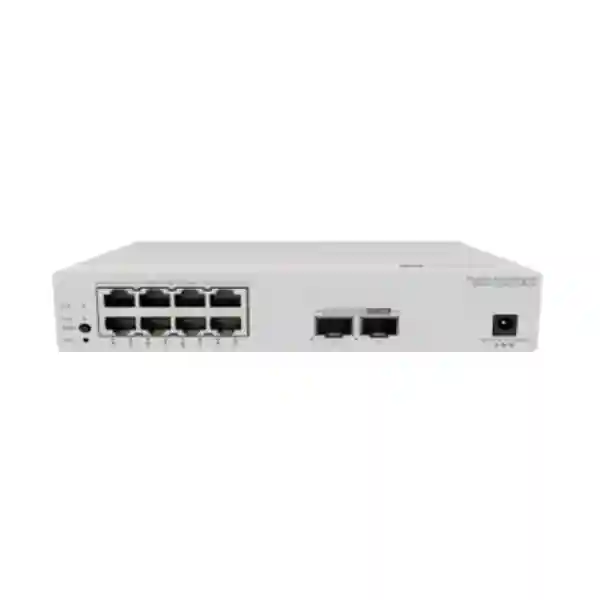
Huawei CloudEngine S5751-L8P2HJ-RUA Remote Unit Switch for UAE Campus Networks
A compact PoE+ access platform with hybrid optical-electrical 2.5GE uplinks, centralized campus control, and deployment flexibility for modern distributed network edges.
Direct Answer: What Is the Huawei CloudEngine S5751-L8P2HJ-RUA?
The Huawei CloudEngine S5751-L8P2HJ-RUA is an eight-port PoE+ remote unit in Huawei’s CloudEngine S5751-L family. It is designed for a streamlined campus architecture in which compatible Huawei central switches provide centralized forwarding, policy, management, and expansion functions while remote units bring copper Ethernet and Power over Ethernet closer to users and devices. This particular model combines eight 10/100/1000BASE-T PoE+ downlink ports with two 100M/1G/2.5G SFP uplink ports that support a hybrid optical-electrical design. Huawei publishes 19.5 Mpps forwarding performance and 98 Gbps switching capacity for the international version of the model.
The practical value of this architecture is not simply that it adds eight access ports. The design addresses a common campus problem: network endpoints are often distributed through corridors, meeting areas, classrooms, hotel floors, clinics, retail zones, security points, production support areas, and other locations where installing a traditional access switch cabinet can be expensive or operationally awkward. A remote unit can place network connectivity nearer to those endpoints while allowing the broader access policy to remain coordinated from the central switching layer. In projects that use the supported hybrid optical-electrical ecosystem, data and power can be engineered together over extended distances, reducing the dependence on local electrical outlets at each remote switching position.
For UAE organizations, the S5751-L8P2HJ-RUA is therefore best evaluated as part of a complete Huawei campus access design rather than as an isolated eight-port switch. The right bill of materials must consider the compatible central switch, transceivers or hybrid connectivity, required power method, endpoint PoE demand, cable routes, physical mounting, software release, feature support, and operational model. FourTeck can help map those dependencies into a deployable configuration for offices, schools, hospitality sites, healthcare facilities, government buildings, retail environments, and multi-floor enterprise campuses.
Verified Hardware Profile and Port Architecture
| Specification | S5751-L8P2HJ-RUA Detail |
|---|---|
| Product family | Huawei CloudEngine S5751-L Series Remote Unit |
| Downlink interfaces | 8 × 10/100/1000BASE-T Ethernet ports with PoE+ |
| Uplink interfaces | 2 × 100M/1G/2.5G SFP hybrid optical-electrical ports |
| Forwarding performance | 19.5 Mpps |
| Switching capacity | 98 Gbps |
| PoE class | PoE+ on eight GE downlink ports |
| Power options | Hybrid power cabling / Phoenix terminal arrangements or power-adapter supply, subject to the selected deployment design and compatible accessories |
These specifications establish the model’s intended position: it is an edge-focused remote unit with Gigabit PoE+ access and 2.5GE-capable hybrid uplinks. The 19.5 Mpps forwarding figure is suitable for a device whose purpose is concentrated endpoint aggregation rather than high-density core switching. The 98 Gbps switching capacity provides architectural headroom relative to the physical interface set, while the two uplinks support topology flexibility and resilience choices when used in supported designs.
Port planning should always start with actual endpoint behavior rather than theoretical port counts. Eight physical downlinks do not automatically mean eight identical endpoint profiles. An access point can produce a different traffic pattern from an IP phone, surveillance camera, thin client, printer, room-booking panel, badge reader, IPTV endpoint, or building automation controller. The switch should therefore be sized not only for the number of connected devices but also for PoE draw, average and burst traffic, segmentation requirements, maintenance windows, link redundancy, and expected expansion.
Why Huawei Uses a Remote Unit Architecture
Fewer Traditional Access Closets
Conventional campus networks often distribute full access switches across multiple telecommunications rooms. That model is appropriate when high port density is needed, but it can become expensive when only a small group of endpoints exists in a remote area. A remote unit can extend centrally managed access closer to those endpoints without reproducing the full operational footprint of a standard access layer switch at every location.
Centralized Control
Huawei positions the S5751-L family to work with compatible campus central switches. In that architecture, access policy and forwarding behavior can be coordinated centrally. This reduces the number of individually managed nodes and can simplify operations for teams responsible for many floors, buildings, or distributed endpoint zones.
Closer Endpoint Placement
Compact remote units can be located nearer to device clusters. Shorter horizontal copper runs can be valuable where ceiling zones, service corridors, kiosks, counters, classrooms, guest areas, or security points make centralized copper homeruns inconvenient. This does not eliminate structured cabling design; it changes where copper transitions to the optical or hybrid transport layer.
Power and Data Coordination
The HJ model’s hybrid optical-electrical uplinks are important because the remote location may need both data and electrical power. In supported Huawei designs, hybrid connectivity can transport optical data while providing a coordinated power path, allowing network designers to reduce dependence on local sockets at remote nodes. Actual distance and power feasibility must be calculated for the selected central equipment, cable type, accessories, load, and route.
This streamlined approach is particularly useful where the network team wants a physically distributed edge but an operationally centralized architecture. The result can be fewer configuration points, consistent endpoint policy, easier expansion, and a cleaner demarcation between the central switching layer and compact remote access nodes. It is not a universal replacement for every traditional access design. High-density floors, large local east-west traffic domains, specialized industrial interfaces, or sites requiring independent local switching may still call for conventional access platforms. The S5751-L8P2HJ-RUA is strongest when the project intentionally adopts Huawei’s remote-unit model and engineers the central-to-edge relationship as a system.
Hybrid Optical-Electrical Uplinks: What They Mean in Practice
The defining interface feature of the S5751-L8P2HJ-RUA is its pair of hybrid optical-electrical SFP uplink ports supporting 100M, 1G, and 2.5G data rates. Traditional fiber is excellent for distance, electromagnetic immunity, and bandwidth, but fiber itself does not provide device power. Standard copper Ethernet can transport data and PoE, but its distance is normally constrained by Ethernet cabling limits. Huawei’s hybrid approach is designed to combine an optical communications path with an electrical power path in the same deployment concept, allowing a remote unit to sit farther from the central switching environment while still receiving power through a supported architecture.
Huawei states that selected CloudEngine S5751-L remote-unit configurations can support long-distance centralized power supply reaching up to 1200 meters. That figure should be understood as an architecture capability, not as a guarantee that every project, cable, central switch, power module, load, and installation route will deliver the same distance. A real design requires voltage-drop analysis, cable selection, compatible central equipment, connector and accessory confirmation, environmental review, power budget calculations, and validation against the vendor’s current design guides. UAE projects should also account for pathways through risers, ceiling spaces, service ducts, outdoor transitions, and areas exposed to elevated ambient temperatures.
The two uplinks also give designers a choice of physical topology. Depending on the Huawei central-switch design and current software support, links can be planned for primary and secondary paths, expansion or stacking models, or other supported remote-unit connectivity patterns. The physical presence of two uplinks does not by itself define redundancy behavior, so procurement documentation should describe the intended topology rather than assuming automatic active-active protection. A bill of materials should identify the central switch model, interface type, required optics or hybrid modules, cable construction, termination method, maximum route distance, and expected failover behavior.
For retrofit projects, hybrid optical-electrical connectivity can be attractive because it may solve both distance and power-placement challenges. In greenfield projects, it can also influence building-services coordination because fewer local AC outlets may be required at remote switching locations. The network team should involve MEP, facilities, ELV, and structured-cabling stakeholders early so the physical infrastructure matches the intended network architecture.
PoE+ Design for Wireless, Voice, Security, and IoT Endpoints
All eight copper downlink ports on the S5751-L8P2HJ-RUA are published as PoE+ capable. This makes the model suitable for endpoint clusters where data and power should be delivered over the same Ethernet connection. Common examples include wireless access points, VoIP phones, surveillance cameras, door controllers, sensors, room-booking displays, compact edge controllers, and selected IoT devices. The operational advantage is obvious: a single network cable can handle communications while the access infrastructure provides managed power.
However, PoE engineering is a power-budget exercise, not merely a port-count exercise. A project with eight low-power phones can have very different requirements from a project with multiple pan-tilt-zoom cameras or high-performance wireless access points. Designers should collect the maximum device draw, expected normal draw, power class, startup behavior, and any environmental derating assumptions for each endpoint. The total remote-unit load must then be checked against the selected power-delivery method and supported Huawei design limits. Reserve capacity is valuable because endpoints can draw more during startup, firmware upgrade, radio activation, heater operation, IR illumination, or peripheral use.
Huawei’s S5751-L remote-unit portfolio also advertises Fast PoE and Perpetual PoE capabilities in supported PoE configurations. Fast PoE is intended to shorten the time before powered devices receive power after the switching equipment starts, while Perpetual PoE is designed to maintain power delivery during certain switch reboot or software-upgrade events. These functions can be important for access points, phones, and cameras because endpoint uptime may matter even when the network control plane is restarting. Feature availability should be verified against the deployed software version, central-switch combination, and specific remote-unit operating mode before it is written into a service-level commitment.
In critical UAE installations, the end-to-end power chain deserves the same attention as the data path. If the central source is UPS backed, a remotely powered access unit can extend that protected power domain to edge endpoints, potentially avoiding many small local UPS devices. The design still needs to account for central UPS runtime, conversion losses, cable loss, peak endpoint load, redundancy, and failure domains. For surveillance, hospitality, healthcare, and public-service environments, documenting this chain makes future maintenance and incident response considerably easier.
Security Controls at the Remote Edge
Huawei describes the CloudEngine S5751-L remote-unit architecture as centrally controlled, with flexible port-isolation options and user traffic forwarded according to access policies applied by the central switch. This design can reduce inconsistent configuration across many small edge nodes. Rather than treating every remote unit as an independently administered access switch, the architecture can centralize enforcement decisions and operational visibility.
The S5751-L series documentation also states support for MACsec on all ports. MACsec protects Ethernet frames using link-layer authentication, encryption, integrity checking, and replay protection. In appropriate designs, this can strengthen protection for traffic crossing physically exposed or shared cabling paths. MACsec deployment still requires compatible peer behavior, key-management planning, software compatibility, and performance validation. It should be treated as one control in a layered campus security design, not as a replacement for identity, segmentation, firewalling, endpoint security, or application-layer encryption.
A secure implementation should map endpoint classes to defined access policy. Corporate workstations, guest devices, phones, cameras, printers, building controllers, and administrative equipment typically should not share a single unrestricted broadcast domain. VLAN segmentation, authentication, access control, DHCP protection, anti-spoofing controls, logging, and upstream firewall policy should be planned together. The remote-unit model can help by putting physical ports under a consistent central policy framework, but the effectiveness of that framework depends on how the central switch and surrounding security controls are configured.
For organizations that need broader perimeter and segmentation design, FourTeck’s Firewall Dubai practice can be used to align campus switching with firewall zones, secure internet access, branch segmentation, and policy enforcement. The objective is to prevent the access layer from becoming an isolated design exercise and instead connect edge identity, network segmentation, and security inspection into one operational model.
Performance Interpretation: 19.5 Mpps and 98 Gbps in Context
Performance figures are useful only when interpreted against the physical role of the device. Huawei publishes 19.5 million packets per second of forwarding performance and 98 Gbps switching capacity for the S5751-L8P2HJ-RUA. The eight downlink ports are Gigabit Ethernet, while the two uplinks operate at up to 2.5 Gbps each. This physical interface profile places the model in a compact endpoint-access role rather than a high-density aggregation role.
The switching-capacity figure represents internal switching capability, while packet-forwarding performance expresses the rate at which packets can be processed under the vendor’s stated conditions. Neither figure should be interpreted as guaranteed application throughput. Real application performance depends on packet size, traffic mix, protocol overhead, uplink utilization, central-switch behavior, congestion, queueing, QoS configuration, security features, endpoint performance, and upstream network capacity.
For a typical eight-port remote zone, the more important design question is oversubscription. If multiple downlinks simultaneously generate heavy traffic, their aggregate demand can exceed a single 2.5GE uplink. In many office, hospitality, voice, camera, and IoT use cases, traffic is naturally bursty and does not drive all ports at line rate at the same time. Where sustained high-bandwidth endpoints are expected, designers should model the busy-hour profile and confirm whether the intended uplink topology provides sufficient capacity. Video surveillance recording, high-throughput Wi-Fi backhaul, workstation imaging, media production, and large data transfers deserve particular attention.
QoS planning is equally important. Voice traffic needs predictable latency and jitter, while bulk data can tolerate queueing. Camera streams may be steady but sensitive to packet loss. Wireless access points can aggregate many users and generate bursts. Proper classification and upstream policy help ensure that a small number of aggressive flows do not degrade time-sensitive services. The remote unit should therefore be specified as part of an end-to-end traffic-engineering plan rather than chosen solely from headline switching capacity.
Compatible Central-Switch Planning
Huawei positions the CloudEngine S5751-L remote units to work with compatible S6700 and S5700-series campus switches acting as central switches. The exact compatible model, software version, port type, remote-unit scale, supported topology, and power arrangement should be validated for the project. Compatibility should never be assumed merely because both devices belong to the CloudEngine campus family.
The central switch has several responsibilities in this architecture. It provides the higher-level campus switching and management context, connects remote units into the broader network, and can centralize policy and forwarding functions. In hybrid power designs, the central side can also participate in the long-distance power architecture. That makes central-switch selection a major design decision. Port density must cover current remote units plus growth, while uplink bandwidth must match the aggregate traffic expected from attached remote zones.
Resilience should be defined at the architecture level. Engineers should identify what happens if one remote uplink fails, if a central line card or port fails, if the central switch reloads, if an upstream core connection is unavailable, or if the central power path is interrupted. Where the business requires high availability, the design may require dual central devices, redundant uplink paths, resilient power feeds, UPS support, or other mechanisms. The goal is to remove ambiguity before installation rather than discover the failure behavior during an outage.
Software lifecycle matters as well. Feature support can vary by release, and interoperability may depend on central and remote versions. Change-management procedures should include release-note review, configuration backup, rollback planning, and maintenance-window coordination. In a centralized remote-unit architecture, software standardization can be an advantage because many distributed edge devices are governed as part of a common system, but it also means that central changes should be tested carefully for broad impact.
Deployment Scenarios Across the UAE
Enterprise Offices
Use remote units in meeting-room clusters, executive areas, collaboration zones, reception areas, and lightly populated floor sections where eight powered access ports are more practical than a full-size access switch. Phones, access points, room systems, printers, and badge terminals can share a centrally governed edge design.
Hospitality
Hotels can use distributed remote access for corridor access points, IP phones, cameras, IPTV support systems, back-of-house devices, and service-area endpoints. Hybrid optical-electrical connectivity is particularly relevant when remote network points are far from conventional telecom rooms.
Education
Schools and campuses can position compact remote units near classrooms, labs, libraries, common spaces, and surveillance zones. Centralized policy can help IT teams apply consistent access rules across many distributed areas without maintaining a full conventional access switch in every location.
Healthcare and Clinics
Remote-unit deployment can support nurse stations, consultation areas, imaging-support rooms, administrative spaces, cameras, phones, and wireless coverage while keeping network policy centralized. Clinical projects should separately validate device certification, isolation needs, redundancy, and critical-service requirements.
Retail and Branch Environments
Stores and service branches often need small endpoint clusters for POS-support devices, cameras, access points, phones, signage, and back-office systems. The eight-port format can be efficient when the broader organization already uses a Huawei campus architecture and wants centralized operations.
Security and Building Systems
Cameras, badge readers, environmental sensors, controllers, and other ELV endpoints often appear in clusters far from traditional IT closets. PoE+ access combined with extended hybrid uplink options can simplify these zones when the solution is designed with appropriate segmentation and power resilience.
Each scenario should be engineered around the building rather than forced into a template. Dubai high-rise offices can have different riser and fire-stopping constraints from Abu Dhabi campuses, Sharjah industrial facilities, or distributed sites in the Northern Emirates. Route distance, ceiling temperature, equipment accessibility, local power, UPS strategy, cable containment, dust exposure, maintenance access, and future expansion all affect the correct architecture. A technical site survey should translate these physical realities into port placement, cable schedules, rack or enclosure planning, and power design.
UAE Environmental and Installation Considerations
Network equipment deployed in the UAE often operates in buildings with strong air-conditioning, but that does not mean every remote installation point has data-center conditions. Ceiling voids, service risers, plant-adjacent areas, outdoor enclosures, warehouses, and utility spaces can experience significantly higher temperatures than occupied rooms. Equipment placement should therefore be based on the manufacturer’s environmental specifications and a realistic assessment of the installation location.
Heat also affects PoE and power-cabling design. Cable bundles carrying power can run warmer than data-only bundles, and ambient temperature can influence allowable current and long-term reliability. Structured-cabling selection should consider conductor gauge, category, bundle size, pathway ventilation, and applicable project standards. Hybrid power cable routes should likewise be engineered for their electrical role rather than treated as ordinary fiber pathways.
Dust is another practical concern. Remote units placed above ceilings or in service areas may be exposed to construction dust and maintenance activity. Enclosures should maintain airflow and serviceability without trapping excessive heat. Contractors should avoid burying devices behind inaccessible panels, because future troubleshooting may require visual inspection, cable testing, port tracing, or hardware replacement. Labeling should identify both the remote unit and its associated central-switch ports.
Power quality and continuity are equally relevant. If the solution uses local adapters, the availability and protection of the local AC source must be assessed. If it uses centralized hybrid power, the central source and UPS design become critical. Engineers should define the desired outage behavior: which endpoints must remain powered, for how long, and under which failure scenarios. That requirement determines UPS capacity and may influence whether cameras, wireless access points, phones, or control devices are split across different remote units.
For project execution support, FourTeck’s IT Services UAE resources can be aligned with site survey, implementation, migration, and support planning. Product procurement is only one part of a successful remote-unit deployment; physical installation standards, documentation, test results, and operational handover determine how well the network performs after commissioning.
Detailed Sizing Methodology
A reliable S5751-L8P2HJ-RUA design can be developed through a structured sizing process. The first step is endpoint inventory. Record every intended device, physical location, Ethernet speed, PoE requirement, VLAN or security zone, criticality, and expected traffic profile. Do not rely on a floor plan that simply marks eight network outlets; identify what each outlet is expected to support. That makes power and bandwidth calculations more accurate and reveals where spare ports are genuinely useful.
The second step is port reserve. Using all eight downlink ports on day one may appear cost-efficient, but it leaves no local capacity for an additional access point, camera, phone, temporary workstation, sensor, or replacement device. Many projects benefit from reserving one or two ports where expansion is plausible. If every location is already fully populated, it may be better to reconsider the number or density of remote units before installation.
The third step is PoE budget. For each powered device, record the negotiated class and the actual maximum demand from its data sheet. Sum worst-case requirements, then apply sensible reserve. Consider startup conditions, future device upgrades, and whether an endpoint may add peripherals. If power is supplied through a long hybrid path, use the vendor’s power-planning tools or validated design tables to account for cable loss and supported distance. The selected powering method must have sufficient capacity at the remote unit after all losses.
The fourth step is traffic modeling. Estimate normal and peak traffic on each downlink. Phones typically consume little bandwidth but demand low latency. Cameras generate sustained upstream flows, with bitrate varying by resolution, frame rate, codec, scene complexity, and recording mode. Wireless access points can be highly bursty and may aggregate many client sessions. User devices can generate large short bursts during software updates or file transfers. Sum these patterns and compare them with the planned uplink capacity and redundancy arrangement.
The fifth step is failure-domain analysis. Determine the business impact if one remote unit fails. If all devices in a critical area depend on one eight-port node, consider splitting essential endpoints across separate units or alternative paths. The same principle applies to power. A single centralized power feed can simplify operations, but it also concentrates dependency. Where continuity matters, the architecture should include the appropriate level of power and path redundancy.
The sixth step is central-switch capacity. Count remote units, uplink ports, uplink speeds, power requirements, and expected aggregate bandwidth. Check current capacity and growth. The central device should not be selected just to support the initial number of remotes; it should fit the network’s lifecycle. Expansion to another floor, additional cameras, denser Wi-Fi, or office reconfiguration can quickly consume spare ports and power headroom.
The seventh step is cabling and physical-path validation. Measure actual routes, not straight-line distances. Include vertical risers, horizontal pathways, service loops, patching, transition points, and enclosure locations. Confirm bend radius, pulling tension, fire rating, containment, separation from electrical services, and access for future maintenance. Hybrid cables introduce both optical and electrical considerations, so termination and testing procedures should reflect both functions.
The eighth step is operational planning. Define naming, port descriptions, VLAN standards, monitoring, alarm handling, configuration backup, software upgrade procedure, and spare strategy. Decide whether onsite technicians will replace remote units directly and how quickly spare stock can be delivered. Centralization can simplify administration, but only when documentation clearly maps each physical endpoint to the correct remote and central ports.
The final step is acceptance testing. Test connectivity, PoE negotiation, throughput where relevant, redundancy, monitoring, endpoint reachability, policy enforcement, and failure recovery. Verify labels and as-built documentation before the installer leaves the site. For large rollouts, pilot one representative area first. A controlled pilot can expose cable, power, mounting, software, and policy issues before they are repeated across dozens of remote nodes.
Wireless Access Point Connectivity
Wireless access is a natural use case for PoE remote units because access points are frequently mounted in ceilings, corridors, meeting areas, guest spaces, or other positions without convenient local power. The S5751-L8P2HJ-RUA can deliver Gigabit Ethernet and PoE+ on its copper downlinks, allowing compatible access points to receive both data and power through a single cable.
The main design question is whether a Gigabit downlink is sufficient for the selected access point and expected client density. Some modern Wi-Fi access points use multigigabit Ethernet to avoid wired-side bottlenecks. Because this S5751-L8P2HJ-RUA model provides Gigabit copper downlinks, projects using high-end multigigabit APs should confirm whether one-gigabit wired connectivity meets the performance objective. If not, another S5751-L family variant with multigigabit downlinks may be more appropriate.
For mainstream office, hospitality, classroom, and general enterprise wireless coverage, a Gigabit AP connection can still be entirely appropriate depending on radio design and user demand. Engineers should compare expected application throughput rather than simply the access point’s theoretical aggregate radio rate. RF airtime, client capability, channel width, interference, roaming, and WAN bandwidth often constrain real-world performance well before headline radio speed is reached.
PoE power class should be checked carefully. An access point may operate with reduced radio, USB, or feature capability when supplied below its preferred power level. The procurement team should therefore compare the AP’s maximum and recommended PoE requirements with the remote-unit power plan. This avoids a situation in which devices link successfully but operate in a restricted mode.
IP Surveillance and Physical Security Networks
IP cameras often drive the need for small PoE clusters in distributed parts of a property. An eight-port remote unit can serve corridor cameras, entrance areas, parking-support zones, lift lobbies, retail sections, or perimeter-adjacent indoor spaces while returning traffic toward centralized recording and security systems. The hybrid uplink concept is particularly relevant where the camera cluster is distant from the main communications room.
Surveillance design should model aggregate video bitrate rather than assuming each camera consumes a fixed amount. Resolution, frame rate, codec, variable versus constant bitrate, scene movement, low-light noise, analytics, dual streams, and retention design all influence traffic. A group of eight 4K cameras using high-quality streams can generate a substantially different load from eight low-bitrate fixed cameras. The uplink must have enough sustained capacity plus margin for management, firmware, and retransmission overhead.
Power demand can also vary widely. Fixed cameras may draw relatively little, while PTZ models, heaters, IR illuminators, or accessory outputs can consume more. PoE planning should use the maximum published demand for each model and account for any UAE environmental conditions that activate cooling or other features. Critical cameras should be mapped to the network power-resilience plan so recording coverage is preserved during local power disruptions.
Security segmentation is essential. Camera networks should not automatically share unrestricted access with business users. The central campus design should place cameras in controlled network segments, restrict management sources, limit internet access as required, and integrate with upstream security policy. This is an area where switching and firewall design must be coordinated from the start rather than configured independently after installation.
VoIP, Collaboration, and User Access
PoE+ downlinks make the S5751-L8P2HJ-RUA suitable for IP phones, video collaboration endpoints, room-booking panels, and related workplace devices. Voice traffic uses little bandwidth compared with bulk data, but it has strict sensitivity to latency, jitter, and packet loss. The switching design should therefore preserve QoS markings, apply appropriate queueing, and ensure that congested uplinks do not disrupt calls.
In desk environments, an IP phone may provide a passthrough Ethernet connection for a computer. This can conserve switch ports, but it also creates a shared dependency: phone failure, cabling issues, or power events can affect the attached workstation. The network team should decide where passthrough is acceptable and where separate data outlets are preferable. Voice and data VLAN policy should be centrally standardized for predictable provisioning.
Meeting rooms increasingly contain multiple IP devices: conference bars, touch controllers, room schedulers, digital signage players, wireless presentation systems, and environmental sensors. An eight-port PoE remote unit can be a clean way to aggregate these devices near the room cluster. However, not every collaboration appliance is powered by PoE, and some require higher data rates or specialized USB/AV connectivity. A room-by-room equipment schedule should therefore precede switch placement.
Organizations planning a wider voice environment can also reference FourTeck’s broader UAE technology portfolio when coordinating switching, telephony, wireless, and structured connectivity. The most maintainable deployments are those where device, network, power, and support responsibilities are documented as one service architecture.
Operations, Monitoring, and Troubleshooting
A key reason to select a remote-unit architecture is operational simplicity. The physical edge is distributed, but administrative control can be concentrated. To realize that benefit, teams should build a consistent monitoring model. Every remote unit should have a unique site and location identifier, with its downlink ports mapped to endpoint type and physical destination. Central-switch interfaces should carry descriptions that reference the remote node and cable identifier.
Monitoring should cover link state, errors, PoE events, utilization, device reachability, and abnormal changes. A repeatedly flapping uplink can indicate cabling, optic, connector, power, or environmental issues. Rising error counters may point to physical-layer degradation. PoE negotiation failures can indicate endpoint, cable, or power-budget problems. Consistent alarm thresholds help operators distinguish normal edge-device behavior from conditions that require intervention.
Troubleshooting should follow the architecture. When an endpoint is offline, engineers should determine whether the failure is endpoint-specific, downlink-specific, remote-unit-wide, uplink-specific, central-switch-related, or upstream. This layered approach prevents unnecessary device replacement. For example, if all eight downlinks lose connectivity simultaneously but power remains present, the uplink and central relationship become prime investigation areas. If only one powered endpoint is down, local cabling and PoE negotiation may deserve attention first.
Spare strategy should reflect business impact and site distribution. A large campus may keep one or more compatible remote units, cables, and power accessories onsite. A distributed business may prefer centrally held spares with documented replacement procedures. Because hybrid components can be more specialized than standard copper patching, the organization should identify which accessories are project-specific and maintain enough stock to meet its recovery objective.
Configuration management, monitoring, and lifecycle planning can be supported as part of a broader enterprise network service. FourTeck’s global technology services can be referenced where customers need consistent multi-site standards beyond the UAE, including documentation templates, rollout methods, and repeatable support practices across regions.
Procurement Checklist for S5751-L8P2HJ-RUA Projects
Ordering the remote unit by itself may not produce a deployable solution. Procurement should be based on a complete bill of materials built from the intended architecture. The central switch, hybrid connectivity, transceivers or interface modules, power method, mounting accessories, patching, cable terminations, and any project-specific spares should be validated as a single system.
The quotation should also state warranty assumptions, lead time, country-specific supply terms, installation scope, configuration scope, software responsibilities, and acceptance criteria. If a project requires special compliance documentation, approved-vendor registration, or consultant submittals, these should be requested before order placement. This reduces the risk of receiving correct hardware that does not match the project’s documentation or handover requirements.
How the S5751-L8P2HJ-RUA Compares with Adjacent S5751-L Variants
Huawei’s S5751-L family includes models with different uplink rates, downlink densities, PoE capabilities, and power arrangements. The S5751-L8P2HJ-RUA should not be confused with the S5751-L8P2J-RUA or S5751-L8P2X-RUA. The HJ designation is associated with hybrid optical-electrical 2.5GE-capable uplinks, which is central to this model’s deployment value. A J model uses optical SFP uplinks without the same hybrid designation, while X-family variants can provide higher 10GE-capable uplink options depending on the exact SKU.
If the main requirement is eight Gigabit PoE+ downlinks and ordinary optical 2.5GE uplinks with local power available, a non-hybrid variant may be sufficient. If the requirement includes higher uplink bandwidth for aggregated high-throughput endpoints, a 10GE-uplink model may be more appropriate. If the endpoints themselves require multigigabit copper access, designers should look at S5751-L variants that provide 2.5GBASE-T downlinks rather than assuming the eight GE ports on this model can negotiate above 1 Gbps.
Model selection should therefore follow the bottleneck. If distance and remote powering are the primary problems, the HJ hybrid model has clear architectural relevance. If local power is easy and uplink bandwidth is the limiting factor, a 10GE optical model may offer better alignment. If Wi-Fi 7 or other multigigabit endpoints dominate, multigigabit copper downlinks may be the priority. If the area needs more than eight access ports, higher-density S5751-L variants or conventional access switches should be considered.
This is why procurement should not substitute a visually similar SKU without technical approval. Small suffix changes can represent meaningful differences in interface rate, PoE behavior, or power architecture. FourTeck can help validate the exact model against the cable, endpoint, central-switch, and performance requirements before the bill of materials is finalized.
Migration from Traditional Access Switching
Organizations moving from a conventional three-tier or distributed access-switch model should treat remote units as an architectural change, not a one-for-one hardware refresh. The cabling topology, power strategy, management boundaries, and failure domains can all change. A migration plan should begin with the existing physical plant: telecom rooms, copper horizontal runs, fiber backbones, UPS distribution, rack capacity, patch panels, and endpoint locations.
A pilot area is often valuable. Select a representative floor or zone with a mix of endpoint types and realistic cable distances. Deploy the chosen central switch, remote unit, hybrid or optical path, PoE endpoints, security policy, and monitoring. Validate user experience, endpoint power behavior, failover, software upgrades, and operations. Document the installation method so it can be repeated across the wider estate.
Migration sequencing should minimize business disruption. Remote units can be installed and cabled in advance, while endpoint cutover is performed by area. Voice phones, access points, cameras, printers, and access-control devices may have different maintenance windows and stakeholder owners. A detailed port matrix helps coordinate the sequence and reduces the chance that a security or facilities endpoint is overlooked during an IT-led cutover.
Post-cutover validation should extend beyond a simple ping test. Confirm VLAN assignment, authentication where used, DHCP behavior, DNS reachability, voice registration, camera streaming, wireless AP adoption, PoE stability, monitoring alarms, and application connectivity. Where MACsec or other security features are enabled, verify that expected protection is active and that fallback behavior is understood.
A well-planned migration can reduce distributed management effort and modernize cabling architecture without forcing every endpoint location into a full access-switch footprint. The business case is strongest where physical distribution and centralized operations are both important.
Lifecycle, Firmware, and Change Control
Campus switching is long-lived infrastructure. The S5751-L8P2HJ-RUA should therefore be purchased with a lifecycle plan covering software, security updates, configuration standards, support entitlement, spares, and eventual replacement. The relevant Huawei software train and supported central-switch combinations should be documented at commissioning.
Firmware changes should be tested because the remote-unit architecture can make central software changes affect multiple distributed locations. This centralization is operationally efficient, but it raises the importance of change discipline. Teams should review release notes, identify feature or interoperability changes, test representative endpoints, back up configuration, schedule a maintenance window, and establish a rollback plan.
Power-dependent endpoints require extra attention during upgrades. Where Fast PoE or Perpetual PoE behavior is part of the design, validate it under the actual software and topology before relying on it for critical services. A function described at a product-family level may still have version, mode, or compatibility requirements. Production acceptance testing should capture actual behavior so the operations team knows what to expect.
Asset records should include serial number, exact SKU, installation location, central-switch association, uplink ports, power method, cable ID, software version, warranty status, and replacement history. This information reduces mean time to repair and makes future expansion easier because designers can see the installed architecture without repeating a full physical survey.
Designing for Growth Without Overbuilding
The advantage of an eight-port remote unit is its ability to place a modest amount of access capacity exactly where it is needed. The risk is that a design can become fragmented if too many small nodes are added without an architectural plan. Growth should therefore be modeled at both the remote-zone level and the central-switch level.
At the remote zone, reserve downlink capacity for foreseeable endpoint additions. At the building level, reserve central ports and power capacity for additional remote units. At the campus level, confirm that core and distribution bandwidth can accommodate the added access traffic. A good design avoids both extremes: purchasing large unused capacity everywhere and installing every node at maximum utilization with no room for change.
Wireless growth deserves special attention because AP density and wired requirements can change during RF redesigns. Camera counts can also rise as coverage objectives evolve. Meeting rooms gain new collaboration devices, and building-management systems add sensors. Keeping accurate endpoint and cable records allows the network team to decide whether an existing remote unit has spare capacity or whether a new node is warranted.
Where UAE organizations operate additional regional sites, the same design method can be standardized across locations while adapting to local building and regulatory conditions. FourTeck’s Africa technology practice can support organizations that need aligned network architectures across UAE headquarters and African operations without forcing every site into an identical physical layout.
Frequently Asked Technical Questions
Does this model provide PoE?
Yes. Huawei lists all eight 10/100/1000BASE-T downlink ports on the S5751-L8P2HJ-RUA as PoE+ capable. The project still needs a complete PoE budget based on endpoint demand and the chosen power method.
Are the copper ports 2.5G?
No. The eight downlink ports on this exact model are Gigabit Ethernet. The two hybrid SFP uplinks support 100M, 1G, and 2.5G. Projects needing multigigabit copper downlinks should select a different family variant.
Does the model have 10GE uplinks?
No. The S5751-L8P2HJ-RUA uplinks are rated up to 2.5GE. Huawei offers other S5751-L variants with 10GE-capable uplink options where higher uplink bandwidth is required.
What makes the HJ version different?
The HJ model uses hybrid optical-electrical uplink ports. This supports architectures where optical data connectivity and a coordinated electrical power path are delivered to a remote unit through the supported Huawei ecosystem.
Can it be used as a standalone switch?
It is primarily positioned by Huawei as a remote unit working with compatible CloudEngine campus central switches. Project design should therefore validate the supported operating model rather than assuming the behavior of a conventional independently managed access switch.
Can hybrid power reach 1200 meters?
Huawei describes up to 1200 meters for supported long-distance power architectures in the S5751-L family. Actual project distance depends on compatible equipment, cable, load, topology, and design rules, so it must be validated rather than assumed.
Engineering Notes for Consultants and System Integrators
Consultant specifications should describe functional intent, not only a model number. A useful specification can state the required count of Gigabit PoE+ downlinks, hybrid optical-electrical uplink capability, supported uplink speeds, central-switch integration, security requirements, power architecture, management model, and environmental expectations. This helps prevent substitutions that match port count but not deployment architecture.
Drawings should distinguish conventional fiber, hybrid cabling, copper downlinks, local power, and centrally delivered power. Cable schedules should include origin, destination, length, cable type, termination, pathway, and test requirement. If the remote unit is installed outside a rack, the drawing should show its enclosure or mounting location and maintenance access. This becomes especially important in hospitality and high-rise projects where remote nodes can be hidden in ceiling or service zones.
Method statements should cover handling and termination of hybrid cable, electrical safety, fiber inspection, cleaning, labeling, grounding where applicable, and test documentation. Installers should not assume that a hybrid link can be treated exactly like a standard duplex fiber patch lead. Both optical and power characteristics need to meet the approved design.
Acceptance documentation should include link tests, PoE validation, endpoint testing, central-switch registration or recognition, software versions, failover tests where applicable, and updated as-built drawings. A photo record can help future operations teams locate remote devices in non-obvious positions. Asset labels should be readable without dismantling building finishes wherever possible.
For tender evaluation, compare complete system cost rather than switch unit price alone. Hybrid remote-unit architecture can reduce some local infrastructure requirements, but it may introduce specialized central equipment and cabling. The right comparison includes equipment, optics or hybrid modules, cabling, electrical work, rack space, UPS, installation labor, commissioning, management effort, maintenance access, and future expansion.
Technical Decision Recap
Choose This Model When
You need eight Gigabit PoE+ access ports close to endpoints, want a Huawei streamlined campus architecture, require hybrid optical-electrical 2.5GE uplinks, and prefer centralized control from a compatible Huawei central switching platform.
Review Another Variant When
You need 10GE uplinks, multigigabit copper downlinks, more than eight local access ports, no remote-unit architecture, unusual industrial interfaces, or a different power model. Adjacent S5751-L variants can be a better fit for those requirements.
Validate Before Ordering
Central-switch compatibility, software release, hybrid cabling, power method, PoE budget, uplink topology, route distance, endpoint bandwidth, environmental conditions, accessories, spares, warranty, and commissioning scope.
Plan for Operations
Document each remote location, cable ID, central port, endpoint assignment, power source, software version, monitoring status, and replacement procedure so the streamlined design remains easy to support throughout its lifecycle.
Quotation Input Checklist for UAE Projects
A technically complete quotation can be prepared faster when the project team provides the following information. These inputs allow the switch, central platform, hybrid connectivity, power, and accessories to be sized as one solution instead of pricing an isolated SKU.
Consult FourTeck for the Complete Huawei Remote-Unit Design
The Huawei CloudEngine S5751-L8P2HJ-RUA is most valuable when its hybrid uplinks, PoE+ edge ports, central-switch integration, cabling, power architecture, and endpoint requirements are designed together. FourTeck can support UAE customers with model validation, topology review, bill-of-material preparation, switching and security integration, deployment planning, migration strategy, and lifecycle support.
For a quotation, provide the expected number of remote units, endpoint list, PoE loads, central-switch information, cable distances, required redundancy, and target deployment date. The resulting design can then identify the correct Huawei components and avoid common issues such as insufficient power, wrong uplink variant, unsupported central pairing, missing hybrid accessories, or undersized bandwidth.
This model is well suited to organizations that want a compact eight-port PoE+ access point within a centrally managed Huawei campus architecture and need hybrid optical-electrical reach to distributed edge locations. Correct engineering remains essential: the switch should be selected as one component of the complete access system, not as a standalone line item.

Reviews
There are no reviews yet.