
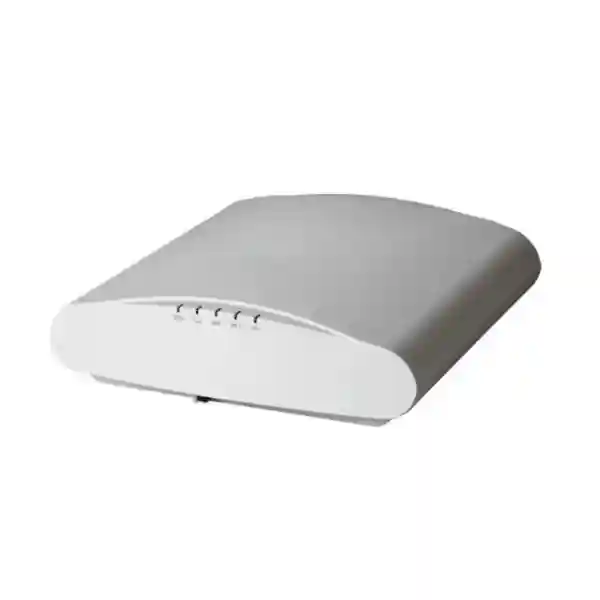
RUCKUS R730 Indoor Access Point
The RUCKUS R730 is a dual-band, dual-concurrent 802.11ax indoor access point designed for very high client density. Its published radio architecture combines 8×8:8 on 5 GHz with 4×4:4 on 2.4 GHz for 12 spatial streams, while a 1/2.5/5 GbE uplink helps prevent a basic Gigabit backhaul from becoming the immediate wired bottleneck. It also includes BeamFlex+ adaptive antennas, OFDMA, MU-MIMO, BLE and Zigbee capabilities for enterprise environments that need more than simple office Wi-Fi.
Lifecycle note: RUCKUS currently categorizes the R730 as End of Life. That makes source validation, software compatibility, management-platform support, support entitlement and replacement planning essential parts of any buying decision. FourTeck can help evaluate whether an R730 is appropriate for a legacy expansion or whether a current RUCKUS model should be considered instead.
Direct answer for buyers
Choose the R730 only when its lifecycle status, exact firmware path, management compatibility and available support fit the project. For a new greenfield network, compare current-generation RUCKUS indoor APs before standardizing on an EOL platform.
For legacy estates, the R730 can still be relevant where matching hardware, radio behavior, mounting, controller design and operational consistency matter more than adopting a new AP generation immediately.
12 spatial streams
8×8:8 at 5 GHz and 4×4:4 at 2.4 GHz for high-density indoor capacity planning.
Multi-gigabit uplink
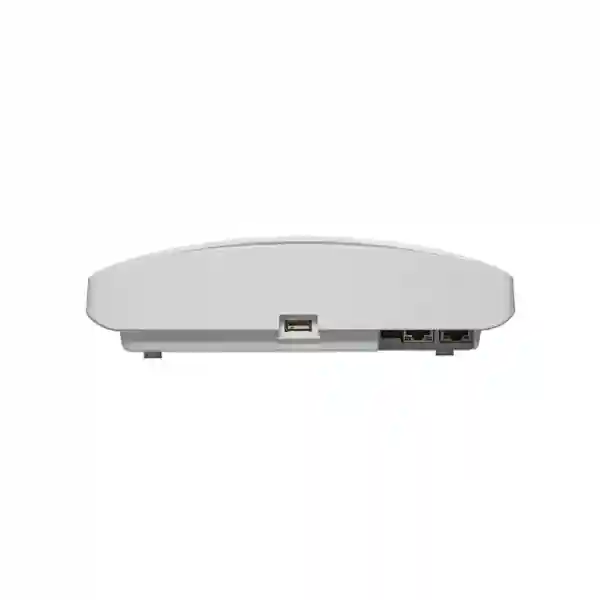
One RJ-45 interface supports 1/2.5/5 GbE, plus a second 10/100/1000 Mbps Ethernet port.
Published capacity
RUCKUS lists up to 1,024 clients per AP, subject to real RF design, traffic demand and configuration.
IoT capability
Integrated BLE and Zigbee radios can support IoT use cases when paired with the appropriate RUCKUS software architecture.
What the RUCKUS R730 was built to solve
The R730 was created for indoor spaces where ordinary access points can struggle with client concentration, airtime contention and heavy application demand. Typical design contexts include auditoriums, large conference spaces, transit facilities, education venues, hospitality properties, event spaces and other indoor areas where many users may associate at the same time. Its 5 GHz radio provides eight spatial streams and its 2.4 GHz radio provides four, giving the platform substantial radio resources for a Wi-Fi 6 generation product.
RUCKUS combines the radio design with BeamFlex+ adaptive antennas. Rather than relying only on a fixed omnidirectional pattern, the AP can select from thousands of antenna-pattern combinations to improve the RF path for connected devices. That does not eliminate the need for a proper survey, sensible AP placement, channel planning or interference control, but it is a core part of the R730 architecture and one reason the model has been used in challenging indoor environments.
The buying question in 2026 is different from the original launch question. It is no longer simply whether the R730 has enough performance. The more important questions are whether an EOL unit can be sourced responsibly, whether the proposed management and firmware combination remains supported for the required functions, whether power and switch infrastructure can operate it correctly, and whether investing in a current RUCKUS indoor AP would produce a cleaner lifecycle for the organization.
Verified technical specification summary
R730 lifecycle, firmware and management checks
RUCKUS support resources now place the R730 in the End-of-Life product family. A buyer should therefore treat lifecycle verification as part of the technical specification, not as a purchasing footnote. Ask whether the unit is new old stock, previously deployed, refurbished or otherwise sourced; request the exact hardware part number and regulatory region; confirm that the proposed software release supports the AP; and establish who will provide replacement assistance if a unit fails.
Management compatibility also needs current confirmation. RUCKUS currently lists the R730 among devices supported by RUCKUS One only with AP firmware 6.2.0. Legacy SmartZone, Virtual SmartZone, ZoneDirector, standalone and earlier cloud references appear in historical product documentation, but the correct option depends on the version and lifecycle of the customer environment. Do not assume that a controller release used by another RUCKUS model will automatically be suitable for the R730.
For an organization already operating R730 units, a controlled extension may still be reasonable when consistency, spares and migration timing are understood. For a fresh deployment, compare the cost and risk of obtaining EOL hardware with the operational value of a current platform, newer software lifecycle and longer forward support window.
Power, switching and cabling considerations
The R730 is not an AP that should be connected to any available PoE port without checking the power mode. The vendor documents a maximum draw of about 31 W in full-power DC, PoH or uPoE operation, with both radios, multi-gigabit networking, USB and IoT functions available. Under 802.3at the documented configuration reduces the 5 GHz radio from 8×8 to 4×4 and disables Zigbee/BLE, while 802.3af is explicitly described as not recommended. For high-density projects, this difference matters because an installation can physically power up while not operating with the intended feature set.
The wired network also needs to be designed for the AP. If high aggregate wireless throughput is expected, a 2.5 or 5 GbE switch port can make better use of the AP’s multi-gigabit interface than a standard 1 GbE uplink. Cabling category, patch panels, switch port capability and PoE budget should be checked together. A multi-gigabit port is useful only when the entire copper path and switch configuration can negotiate it reliably.
A practical quotation should therefore include the access point, required power method, mounting accessories, switch capability, cabling validation, controller or cloud management requirement, software compatibility and any installation scope. Buyers can review wider business technology options through FourTeck UAE while preparing a complete network bill of materials.
RUCKUS R730 Indoor Access Point Dubai
Customers searching for the RUCKUS R730 Indoor Access Point Dubai typically fall into two groups: organizations extending an existing RUCKUS network and buyers trying to source a high-density Wi-Fi 6 AP for a new site. Those two scenarios should be handled differently. If the project is an expansion of an established R730 estate, matching the existing hardware and management design can reduce operational variation, but only when the AP’s End-of-Life status and software path are acceptable. If the site is new, the R730 should be compared with current RUCKUS indoor access points before procurement so the customer does not begin a new standard on an EOL platform without understanding the trade-off.
Dubai deployments often involve dense indoor environments such as corporate floors, hospitality properties, education facilities, meeting venues, showrooms and customer-facing spaces. In these sites, AP count should not be estimated from floor area alone. Concrete walls, glass partitions, atriums, ceiling height, neighboring WLANs, meeting-room occupancy and the mix of phones, laptops, scanners, collaboration devices and IoT endpoints all affect the RF design. A high-capacity AP can still produce poor user experience if channels, transmit power, placement and roaming behavior are not planned correctly.
For a Dubai quotation, provide the number of existing APs, controller or cloud platform, current software version, floor plans, estimated concurrent devices, internet and LAN speeds, PoE switch models, ceiling type and expected applications. Because the R730 can use a 5 GbE uplink and has different capabilities depending on power mode, the switch inventory is particularly important. Ask for the exact regulatory-region part number rather than assuming that every R730 unit offered online is suitable for UAE deployment.
FourTeck can help review the requirement, but availability, source condition, licensing, support and lifecycle should be confirmed in writing before a purchase order is issued. The goal for a Dubai buyer is not simply to obtain an R730; it is to obtain a supportable design that fits the existing RUCKUS environment and has a clear next-generation migration path.
RUCKUS R730 Indoor Access Point UAE
A UAE buyer evaluating the RUCKUS R730 Indoor Access Point should start with architecture rather than model name. A multi-site organization may have a headquarters, branches, warehouses, retail units or hospitality locations spread across different emirates, each with different client density and cabling conditions. The R730’s high-density radio design may make sense in selected high-traffic zones, while lower-density areas could require a different AP class. Standardizing every area on the same high-end model can increase cost and power demand without improving real user experience.
The UAE procurement check should include exact part number, regulatory domain, power source, mounting kit, software release, management method and hardware condition. RUCKUS documentation identifies regional ordering variants, so a generic R730 listing without a confirmed region code should not be treated as sufficient. Buyers should also document whether the unit is intended to join SmartZone, an older controller estate, standalone operation or RUCKUS One. Current RUCKUS information notes R730 support in RUCKUS One with AP firmware 6.2.0, while the product itself is EOL, making version control especially important.
For network design, verify the PoE switch budget and multi-gigabit uplink capability. An 802.3at port can power the AP, but the vendor documents feature reductions in that mode, including reduced 5 GHz radio operation and disabled BLE/Zigbee. A UAE enterprise expecting the full 8×8 5 GHz design should therefore confirm full-power operation instead of discovering the limitation after installation.
For organizations already using R730s across the UAE, FourTeck can help structure a quotation around matching APs, compatible switching, deployment support and replacement planning. For new projects, the technical review should also compare current RUCKUS options, total lifecycle and support availability before the organization decides whether an EOL R730 is commercially sensible.
RUCKUS R730 Indoor Access Point Uganda
Organizations researching the RUCKUS R730 Indoor Access Point Uganda may be planning enterprise Wi-Fi for offices, education, hospitality, healthcare, NGO facilities or multi-building business sites. The R730 can be attractive where many users compete for airtime, but the decision should be based on actual density and infrastructure. A smaller office with ordinary client demand may not benefit from a high-capacity 12-stream AP, while a lecture space, training room or busy shared facility can place much greater value on efficient client scheduling and strong 5 GHz capacity.
The lifecycle position is central to procurement in Uganda because the R730 is now listed by RUCKUS as End of Life. Buyers should ask whether the proposed units are new old stock, used, refurbished or pulled from another deployment, and should request serial-level condition, warranty or seller support terms where available. When a site is far from the source of replacement hardware, keeping a tested spare strategy and documenting the firmware image can be more important than it is for a small single-site office.
Power and switching should be checked before the AP is shipped. Full R730 operation can require more than ordinary PoE+, and the device offers a 5 GbE-capable uplink. If the local switch provides only standard 1 GbE and limited PoE, the AP may still connect but not deliver the intended feature set. Network teams should record switch models, available PoE budget, cabling category and controller version as part of the RF design. This prevents a high-performance AP from being constrained by the wired network.
For Uganda-focused procurement and project discussions, customers can also review FourTeck Uganda technology solutions. A useful R730 request should include quantity, city, existing RUCKUS environment, management platform, software version, switch model, floor plan and whether the requirement is a legacy extension or a completely new WLAN.
RUCKUS R730 Indoor Access Point Kampala
For Kampala buyers, the RUCKUS R730 Indoor Access Point is most relevant when the challenge is concentrated indoor usage rather than simple coverage. Multi-floor offices, training centers, universities, busy hospitality venues and shared business facilities can produce clusters of users that overload airtime even when signal strength looks acceptable. In such environments, a WLAN design should estimate concurrent clients per room or zone, the share of 5 GHz-capable devices, voice and video usage, guest access, roaming requirements and the amount of traffic that stays local versus going to the internet.
Kampala sites can also vary widely in building construction. Reinforced walls, internal partitions, reflective surfaces and mixed ceiling types affect where an R730 should be mounted. The product’s BeamFlex+ adaptive antenna system can help optimize radio paths, but it does not replace measured design. A predictive plan should be followed by verification in the real building, especially in boardrooms, lecture rooms, event areas and corridors where client behavior changes by time of day.
Because the R730 is an EOL product, Kampala organizations should build resilience into the purchase decision. If the AP is joining an existing controller-managed estate, record the exact controller and firmware versions before adding units. If the project is intended to run for several years, compare the cost of legacy R730 acquisition and spare holdings with the cost of moving to a current RUCKUS model. The cheapest individual AP is not automatically the lowest-cost network when software support and replacement risk are considered.
A strong quotation request for Kampala should therefore include site type, floor plan, expected peak users, existing RUCKUS models, switch and PoE details, internet bandwidth, required VLANs and authentication method. This gives the supplier enough information to advise on compatibility and prevents the R730 from being treated as a stand-alone box rather than one component in an end-to-end WLAN.
RUCKUS R730 Indoor Access Point Arua
Customers looking for the RUCKUS R730 Indoor Access Point Arua may be supporting branch offices, education facilities, healthcare sites, NGO operations, logistics activity or shared workspaces that need dependable indoor wireless access. The main planning question is whether the site genuinely needs the R730’s high-density architecture. For a branch with a modest user count, coverage, power resilience and simple support may matter more than maximum spatial streams. For a training room or high-occupancy hall, however, client scheduling and high 5 GHz capacity can become much more important.
Arua projects should pay particular attention to supportability and spares because the R730 is now in RUCKUS’s EOL family. If replacement hardware has to travel from another market, downtime planning should include at least a clear spare policy, configuration backups and a documented migration option. Buyers should not rely on an online listing that simply says R730; they should request the exact part number, condition, regulatory variant, included mounting hardware and power accessories.
Power delivery is also critical. RUCKUS documents full-power and reduced-power behavior, and 802.3af is not recommended. A site using older PoE switches may need a switch upgrade or suitable injector rather than assuming that existing ports can operate the AP correctly. Likewise, a 5 GbE uplink offers value only when cabling and switching can support it. Where 1 GbE is the practical limit, the design should account for that constraint rather than using headline wireless rates as expected application throughput.
For Arua, the best procurement process is therefore requirement-led: list users, applications, rooms, switch models, controller version, authentication method and expected growth. Then decide whether adding R730 units preserves a stable legacy architecture or whether a current RUCKUS platform would reduce long-term operational risk. FourTeck can help structure that comparison without assuming local stock or a fixed delivery time.
RUCKUS R730 Indoor Access Point Mbarara
The RUCKUS R730 Indoor Access Point Mbarara search commonly makes sense for institutions that expect many indoor users, mixed device types and sustained access to cloud, collaboration or business applications. Education facilities, clinics, professional offices, hospitality properties and larger commercial sites can each have very different traffic patterns, so AP selection should start with peak concurrency and application behavior rather than a simple count of registered users.
In a teaching environment, for example, a room can move from lightly used to heavily loaded within minutes when a class begins. In a hospitality property, clients may be distributed but demand higher bandwidth during evenings or events. Healthcare and professional sites may place more emphasis on roaming stability, secure authentication and separation of staff, guest and device networks. The R730 supports multiple SSIDs, VLAN-based designs, 802.1X capabilities and high-density radio functions, but each feature should be mapped to an actual network policy instead of enabled without a plan.
Mbarara buyers should also plan for the model’s EOL status. If an existing R730 network is performing well, extending it can preserve operational consistency, but software compatibility and support must be checked before ordering. For a new site, current RUCKUS models may provide a cleaner lifecycle. The decision should include controller compatibility, firmware availability, spare strategy and the expected number of years the WLAN must remain in service.
Finally, validate the wired layer. The R730 can use 1/2.5/5 GbE and its full radio/IoT feature set depends on suitable power. Record switch port speeds, PoE standards, total PoE budget, cable type and distances. A well-designed Mbarara deployment treats Wi-Fi, switching, authentication, internet capacity and lifecycle as one system. That approach is more reliable than buying an AP based only on a high published PHY rate.
RUCKUS R730 Indoor Access Point Gulu
A Gulu deployment using the RUCKUS R730 should be justified by density, reliability and compatibility needs. Business offices, learning environments, NGO facilities, healthcare operations, hospitality sites and event rooms can all require Wi-Fi, but their radio requirements are not the same. A large open hall with hundreds of active devices needs different AP placement and channel reuse from a corridor of small offices. The R730’s 12-stream Wi-Fi 6 design is intended for demanding environments, yet coverage and capacity still have to be modeled separately.
Where an organization already has RUCKUS infrastructure, compatibility discovery should happen before any Gulu purchase. Record the management platform, controller release, AP firmware, VLAN design, authentication method, RADIUS integration, guest-access workflow and monitoring tools. RUCKUS currently identifies the R730 as EOL, so the operational question is whether the existing software stack can continue supporting the AP for the required period and what the replacement plan will be when hardware can no longer be economically maintained.
The physical installation also deserves attention. The unit is larger and heavier than many entry-level APs, and its mounting location should suit the ceiling or wall construction. Full-power operation and the multi-gigabit interface should be matched with an appropriate switch. If the facility has limited PoE reserve, a complete power-budget calculation is better than checking one port at a time. If a network uses UPS protection, the extra PoE load should also be included when estimating runtime.
For Gulu procurement, request a written bill of materials covering the AP, mounting, power method, switching, management, configuration and support scope. If the intent is to add only a few units to a working R730 estate, that should be stated clearly. If the project is new, ask for a lifecycle comparison with current RUCKUS indoor models before deciding. This protects the organization from solving a short-term sourcing need while creating a long-term support problem.
RUCKUS R730 Indoor Access Point Kenya
The RUCKUS R730 Indoor Access Point Kenya is a relevant search for organizations maintaining high-density RUCKUS Wi-Fi in corporate, education, hospitality, healthcare and large public-facing indoor environments. In Kenya, as in any market, the technical value of the R730 depends on matching the AP to real traffic. A campus lecture hall can benefit from high client capacity and efficient airtime use, while a small branch may be better served by a lower-power, current-generation AP with a longer support horizon.
For an existing R730 estate, a Kenya buyer should document the controller architecture and software level first. RUCKUS’s current support resources categorize the R730 as End of Life, while current RUCKUS One information lists the model only with AP firmware 6.2.0. That combination makes version planning a procurement requirement. If the network uses SmartZone or another legacy management platform, the exact compatibility matrix and planned upgrade path should be checked rather than inferred from older datasheets.
High-density design also requires switching and cabling checks. The R730’s 5 GbE-capable uplink can be useful in demanding areas, but older access switches may provide only Gigabit Ethernet or insufficient PoE for full feature operation. A site survey should therefore capture AP locations, cable routes, port capabilities, switch power reserve and uplink capacity. Authentication, guest access, VLAN segmentation and roaming should be defined before rollout so the wireless layer aligns with the security design.
Kenya buyers can review broader regional technology offerings through FourTeck Kenya. For a useful R730 quotation, include quantity, destination, existing models, required management platform, switch details and whether the project is a legacy expansion or a new deployment. FourTeck can then help frame compatibility, sourcing and migration questions without assuming that EOL stock or a specific lead time is guaranteed.
RUCKUS R730 Indoor Access Point Kuwait
A Kuwait customer considering the RUCKUS R730 Indoor Access Point may be designing Wi-Fi for an office tower, hotel, education site, large meeting space, customer facility or other indoor area where many clients need concurrent access. The R730 is an indoor AP, so environmental control matters: it should be installed within the manufacturer’s operating conditions and not treated as an outdoor or exposed-area solution simply because the wider climate is demanding.
In dense indoor environments, the benefit of the R730 comes from capacity features rather than raw signal strength alone. More transmit power does not solve airtime congestion and can make channel reuse worse. A Kuwait WLAN design should consider room occupancy, device mix, 5 GHz use, neighboring APs, wall materials, voice and video demand, guest access and roaming. BeamFlex+ can help optimize RF paths, but channel design and AP placement remain essential.
The model’s End-of-Life status is the other major factor. Procurement should verify the exact regional hardware, source condition, mounting accessories and software compatibility. If the R730 is being purchased as a spare or expansion unit for an existing network, state the current firmware and management platform in the RFQ. If the project is new, request a comparison with current RUCKUS indoor APs so the organization can evaluate support horizon, management options and future software updates before choosing an EOL model.
Power should also be engineered. RUCKUS documents reduced capabilities under 802.3at and does not recommend 802.3af for the R730. A Kuwait deployment that expects the full 8×8 5 GHz configuration should confirm appropriate PoE or power supply and a multi-gigabit-capable switch where required. This prevents a situation where the AP is installed successfully but cannot operate with the performance profile the project was designed around.
RUCKUS R730 Indoor Access Point Ghana
Organizations searching for the RUCKUS R730 Indoor Access Point Ghana may be planning Wi-Fi for enterprise offices, hospitality, education, healthcare, event facilities or multi-site operations. The R730’s 12 spatial streams and high published client capacity can be useful where many devices share the same indoor area, but the AP should not be selected purely because its specifications are larger. Capacity planning should look at simultaneous active clients, application mix, per-user throughput expectations, voice or video sensitivity and how many APs can reuse channels without creating excessive co-channel contention.
Ghana procurement should also account for the fact that RUCKUS lists the R730 as End of Life. Ask the supplier to identify the hardware condition and source, provide the exact ordering code, clarify included accessories and describe available warranty or replacement terms. A business-critical network should not depend on uncertain spare availability. If the R730 is being used to keep a legacy estate consistent, document how many spare units are required and when the organization expects to migrate to a newer platform.
The wired infrastructure is part of the decision. The AP supports a 1/2.5/5 GbE uplink and has specific power behavior across DC, uPoE/PoH and 802.3at modes. A switch that powers the unit but forces reduced capability may not meet the intended design. Confirm PoE standard, per-port power, total chassis power budget, cable category, controller version and VLAN/authentication design before shipping equipment to the site.
Ghana customers can explore related regional technology services through FourTeck Ghana. A complete quote request should include quantity, destination city, use case, floor plan, existing RUCKUS environment, expected user density and desired installation or configuration scope. That information allows the discussion to focus on lifecycle fit and network outcomes instead of treating the R730 as a commodity item.
RUCKUS R730 Indoor Access Point Nigeria
The RUCKUS R730 Indoor Access Point Nigeria can be relevant for dense offices, university facilities, hospitality properties, large meeting areas, healthcare campuses and other indoor networks where many users expect consistent Wi-Fi at the same time. Large business environments in cities such as Lagos or Abuja can also face substantial neighboring RF activity, making channel reuse and interference management just as important as AP capacity. The R730’s BeamFlex+ system, OFDMA and MU-MIMO support can contribute to a strong design, but they do not remove the need for disciplined RF engineering.
A Nigeria deployment should begin by dividing the site into usage zones: ordinary offices, meeting rooms, high-density halls, guest areas, executive spaces, service zones and any IoT-heavy locations. Estimate peak active devices and traffic for each. That approach avoids placing expensive high-density APs uniformly where they may not be needed, and it also reduces the risk of under-designing the busiest spaces.
Lifecycle risk is especially important for organizations that need long-term standardization. RUCKUS now lists the R730 as EOL. Before ordering, confirm whether the product is being purchased to extend an existing estate or to start a new deployment. For legacy expansion, firmware, controller and spare strategy should be documented. For new projects, compare current RUCKUS options and support horizon. A lower acquisition price for EOL hardware can be outweighed by higher replacement and migration cost later.
For regional procurement guidance, buyers can also review FourTeck Nigeria. Include switch models and power details in the RFQ because the R730’s full feature profile depends on suitable PoE. Also list required security and authentication design, management platform, quantity and destination. FourTeck can help assemble a practical bill of materials and lifecycle discussion while current stock, warranty and delivery timing remain subject to confirmation.
RUCKUS R730 Indoor Access Point Seychelles
For Seychelles, the RUCKUS R730 Indoor Access Point is most likely to be considered for hotels, resorts, offices, education facilities or other indoor venues where dependable high-density wireless access is important. Island operations can make logistics and replacement planning more significant than in a market where equivalent hardware is readily available nearby. Because the R730 is now EOL, a Seychelles buyer should treat spare strategy, shipping practicality and migration planning as part of the network design from the beginning.
Hospitality environments can be particularly demanding. Guest rooms, conference spaces, restaurants, lobbies and staff areas each have different occupancy and RF characteristics. A high-capacity AP placed in the wrong location will not compensate for walls, service shafts or poor channel reuse. Site design should separate coverage objectives from capacity objectives and should account for guest devices, staff handhelds, voice, streaming, property systems and any IoT network. The R730’s adaptive antennas and high 5 GHz capacity can be useful in the right zone, but a full property should normally be designed as a system rather than around a single AP model.
Seychelles procurement should verify regulatory region, exact part number, power method, mounting hardware, software version and management platform. If the unit will join an existing R730 network, capture the current configuration and controller release before ordering. If the project is new, request a current-generation comparison so that the chosen platform has an appropriate support horizon. Remote support access, configuration backups and local spare availability should also be included in operational planning.
The switch layer should support the intended design. Full R730 capability can require more power than ordinary PoE+, and the AP offers multi-gigabit Ethernet. A Seychelles project should therefore verify PoE capacity, switch uplinks, cabling and UPS runtime together. This is especially useful for hospitality and business sites where service continuity is important and equipment replacement may involve longer logistics than a simple local branch purchase.
Where the R730 fits — and where it may not
Potential fit
- Adding matched units to a documented R730 estate where software compatibility is known.
- Maintaining consistent RF behavior and operations during a phased migration.
- High-density indoor areas where existing architecture was designed around R730 capacity.
- Projects with validated spares, support plan, power and controller compatibility.
Reconsider the model
- Brand-new networks that need a long forward software and hardware lifecycle.
- Sites with only basic PoE and no plan to address reduced-power operation.
- Small low-density offices where the R730’s capabilities would be underused.
- Projects where source condition, warranty or compatible software cannot be verified.
Deployment and configuration checklist
Define whether the R730 is a spare, a legacy expansion or a new standard. This changes the acceptable risk.
Capture controller/cloud platform, current AP firmware and planned upgrade path before purchase.
Use floor plans and expected client density; verify the design after installation rather than relying only on predicted coverage.
Confirm per-port and total switch power budget. Reduced power can reduce the intended feature set.
Validate cable category, patching and switch multi-gigabit support where 2.5/5 GbE is required.
Define SSIDs, VLANs, authentication, guest access, RADIUS dependencies and management access.
An EOL estate should have a replacement strategy and configuration backups rather than relying on future spot availability.
Identify the current-generation target platform and trigger point for replacing remaining R730 units.
Frequently asked questions about the RUCKUS R730
Is the RUCKUS R730 still a current product?
RUCKUS currently lists the R730 in its End-of-Life product family. Buyers should therefore confirm source condition, support, software compatibility and replacement planning before purchase.
Does the R730 support Wi-Fi 6?
Yes. The R730 is an 802.11ax dual-band access point. The vendor lists 8×8:8 operation on 5 GHz and 4×4:4 on 2.4 GHz for a total of 12 spatial streams.
What Ethernet connection does it use?
It provides one 1/2.5/5 GbE RJ-45 port and one additional Gigabit Ethernet RJ-45 port. The wired network should be sized according to expected traffic rather than assuming every installation needs a 5 GbE switch port.
Can ordinary PoE+ power the full AP?
The vendor documents operation under 802.3at, but with reduced functionality compared with full-power DC, PoH or uPoE operation. In the documented 802.3at mode, Zigbee/BLE are disabled and the 5 GHz radio is reduced. Confirm power requirements for the exact intended configuration.
Can the R730 be managed by RUCKUS One?
RUCKUS currently lists the R730 as supported by RUCKUS One only with AP firmware 6.2.0. Because the product is EOL, check the current support documentation and the customer’s environment before migration or onboarding.
Should I buy R730 for a completely new network?
A new network should compare the R730 with current RUCKUS indoor models before deciding. The R730 can still be relevant for legacy consistency, but a current platform may offer a longer lifecycle and cleaner forward support path.
What should I send for a quotation?
Provide quantity, destination, existing RUCKUS models, management platform and software version, switch models, PoE capability, floor plan, expected client density, SSID/VLAN requirements and whether installation or configuration support is needed.
FourTeck buying and project assistance
FourTeck can help buyers turn an R730 request into a complete technical requirement covering AP quantity, lifecycle, switch power, multi-gigabit connectivity, management compatibility, RF planning and deployment scope. For broader regional procurement, use the relevant FourTeck network resources above so the request includes destination and project context rather than only a model number.
Because the R730 is EOL, any quotation should clearly identify the source condition, exact part number, accessories, commercial support terms and any migration recommendation. Availability and lead time should be confirmed at quotation stage rather than assumed from a product listing.
Decision recap
The R730 remains technically capable, but lifecycle is now the deciding factor. Its 12-stream Wi-Fi 6 radio platform, BeamFlex+ antennas, 5 GbE uplink and high-density features can still fit existing RUCKUS estates. However, the product’s EOL status means every purchase should include software, support, power, spare and replacement planning.
For a legacy expansion, verify compatibility first and buy only against a documented plan. For a new network, compare current RUCKUS indoor access points before standardizing on the R730. This approach keeps the decision focused on total operational value rather than headline specifications alone.
Quotation checklist
- Required R730 quantity and destination
- Exact existing RUCKUS AP models
- Management platform and current software version
- Switch make, model, PoE standard and available budget
- 1/2.5/5 GbE port requirement and cabling category
- Floor plans and target AP locations
- Peak concurrent client estimate by zone
- SSID, VLAN, guest and authentication requirements
- Mounting and power accessories required
- Installation, configuration and testing scope
- Spare-unit strategy for EOL hardware
- Preferred replacement or migration timeline
Related planning before you order
Current-model comparison
Compare current RUCKUS indoor APs for support horizon, management fit and replacement availability before selecting an EOL model for a new site.
PoE switch review
Confirm power budget and multi-gigabit capability so the intended radio configuration is not constrained by the wired layer.
RF validation
Use density, interference and application requirements to determine AP count and placement rather than relying only on square-meter coverage estimates.
Security design
Define authentication, VLANs, guest access, admin access and logging so the wireless deployment aligns with the wider network security policy.
Request an R730 compatibility and lifecycle review
Share the number of APs required, your location, current RUCKUS management platform, firmware, switch models and expected client density. FourTeck can use those details to help determine whether an R730 legacy expansion is technically sensible and what should be included in the bill of materials.
For new WLAN projects, ask for a current-generation alternative as part of the same discussion so lifecycle and support can be compared before purchase.

Reviews
There are no reviews yet.