
Enterprise network security • Multi-gigabit connectivity • Regional procurement guidance
WatchGuard Firebox M595
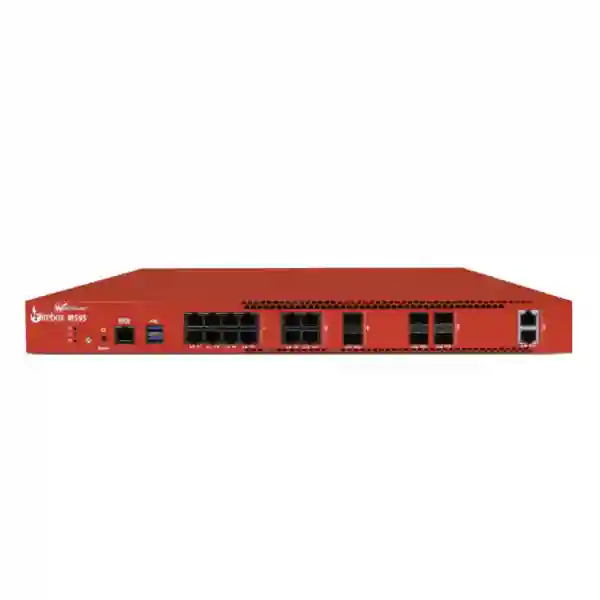
The WatchGuard Firebox M595 is a rack-mount firewall designed for demanding enterprise environments that need substantial security inspection capacity, large VPN scale and a flexible mix of 2.5 GbE, 10 GbE copper and SFP+ interfaces. WatchGuard publishes 7.2 Gbps UTM throughput, 4.8 Gbps HTTPS inspection and sizing guidance for up to 1,200 users. Those figures make the M595 a serious candidate for headquarters, large branches, campuses, multi-site organisations and security gateways where encrypted traffic, cloud applications, remote access and internal segmentation all compete for firewall resources.
7.2 Gbps UTM
Vendor-published full security inspection figure used as a sizing input, not a guaranteed production speed.
4.8 Gbps HTTPS
Published HTTPS inspection performance for planning encrypted traffic workloads and future bandwidth growth.
Up to 1,200 users
Manufacturer sizing guidance for demanding enterprise environments, subject to actual workload and services.
20 network interfaces
Twelve 2.5G RJ45, two 1G SFP, four 10G SFP+ and two 10G RJ45 interfaces support varied network designs.
Direct answer for WatchGuard Firebox M595 buyers
The WatchGuard Firebox M595 is best evaluated as an enterprise security platform rather than a simple high-speed router. Its published headline firewall throughput is much higher than its fully inspected throughput, so procurement teams should size the appliance around the security services they intend to enable, the amount of encrypted traffic that will be inspected, the number of VPN users and tunnels, the expected concurrent sessions, and the uplink speeds between internet, switching and server networks. A buyer who only compares internet circuit speed can miss the real bottlenecks created by TLS inspection, intrusion prevention, malware scanning, logging, application control, VPN encryption and complex policy sets.
The hardware is notably flexible. WatchGuard documents an Intel Core i5-14401E processor, 16 GB DDR4 memory, 128 GB M.2 PCIe SSD storage, twelve multi-rate 2.5G RJ45 interfaces, two 1G SFP ports, four 10G SFP+ ports and two 10G RJ45 ports. This interface mix lets network designers separate WAN, LAN, server, DMZ, management, guest, voice, CCTV and inter-switch traffic without immediately relying on an external media converter. Exact transceivers, cabling, switching design and port allocation should still be confirmed before ordering.
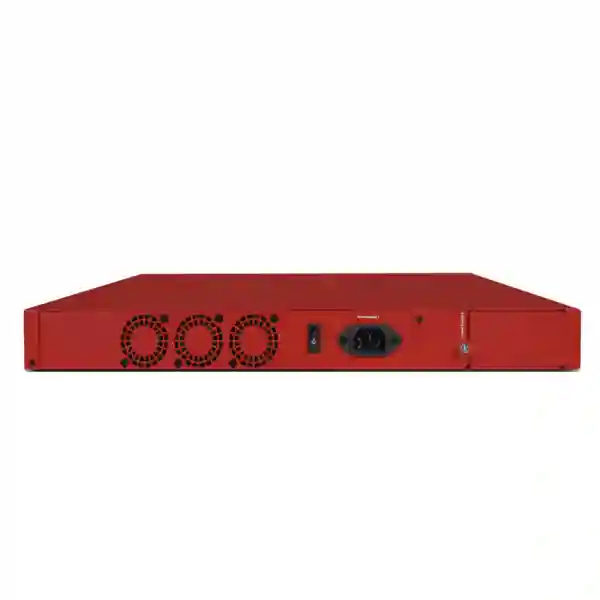
For resilience, the M595 has an internal power supply and supports an optional 250W redundant power supply module. WatchGuard states that the redundant module is not hot-swappable, so maintenance procedures must account for power-down requirements. The platform can be managed locally or through WatchGuard Cloud, depending on the selected operational model. Security capabilities and cloud retention depend on the purchased support and security subscription, so the hardware model should never be quoted in isolation from licensing requirements.
Verified WatchGuard Firebox M595 specifications
| Specification | WatchGuard Firebox M595 |
|---|---|
| UTM throughput | 7.2 Gbps vendor-published figure |
| HTTPS inspection | 4.8 Gbps vendor-published figure |
| Recommended user scale | Up to 1,200 users in manufacturer guidance |
| Processor | Intel Core i5-14401E |
| Memory | 16 GB DDR4 |
| Storage | 128 GB M.2 PCIe SSD |
| 2.5G copper | 12 x RJ45, supporting 2.5G/1G/100M/10M |
| 1G fibre | 2 x SFP |
| 10G fibre | 4 x SFP+ with compatible SFP+/SFP transceivers |
| 10G copper | 2 x RJ45 |
| I/O | 2 x USB-A 3.2 and 1 x RJ45 serial port |
| Redundant power option | Optional 250W common redundant power supply, part WG9037; not hot-swappable |
| Rack installation | Rack-mount appliance; ear brackets are documented by the manufacturer |
Performance figures are vendor test results and should be treated as comparative sizing inputs. Actual throughput depends on traffic profile, packet size, encryption, security services, software version, policy complexity, reporting and network architecture.
How to size the M595 correctly
Start with inspected traffic, not raw internet speed. If a business has several high-speed ISP links, cloud backups, SaaS applications, voice, video, large file transfers and encrypted web sessions, the firewall may process very different traffic simultaneously. Estimate peak inbound and outbound bandwidth, then decide which traffic must pass through HTTPS inspection, IPS, gateway antivirus, application control and other services. Add growth headroom so the appliance does not begin its life close to the intended performance ceiling.
Next, count users and devices separately. A site with 500 employees may have several thousand active endpoints once laptops, phones, Wi-Fi clients, printers, cameras, access-control systems, servers, IoT devices and guest devices are included. Session count and connection rates can matter more than employee count in a busy application environment. For distributed organisations, include branch VPNs, remote-access sessions, cloud tunnels and third-party connections in the design.
Finally, map the physical interfaces. The M595 provides a useful combination of 2.5G copper, 10G copper and 10G fibre. Buyers should confirm switch uplink speed, transceiver type, cable length, fibre standard, WAN handoff, high-availability cabling and whether dedicated interfaces are needed for management, DMZ or server segments. This prevents a technically powerful appliance from being constrained by the wrong optics or an incomplete bill of materials.
Licensing and subscription planning
The M595 hardware should be paired with the correct WatchGuard security subscription and support term. Different bundles can change the security services available, support level, reporting depth and cloud data retention. Before issuing a purchase order, ask for a quotation that identifies the exact hardware SKU, subscription package, term length, support entitlement, renewal requirement, transceivers, power accessories and professional services. This is more useful than comparing appliance-only prices that may exclude the services the organisation expects to use.
If the project is replacing an older Firebox or another firewall, treat migration as a policy review rather than a configuration copy. Address objects, NAT rules, VPN definitions, certificates, routing, authentication, logging, security profiles and unused rules should be examined. A clean migration can reduce legacy exceptions and make future administration easier.
Regional buying guidance
The following sections reflect the different questions buyers tend to ask by market: price and availability, licensing, import and procurement documentation, power and rack requirements, branch connectivity, central management, VPN, high availability, deployment skills and support planning. FourTeck does not assume stock, delivery time or local engineering presence in any location unless confirmed during quotation.
WatchGuard Firebox M595 Dubai
Businesses searching for WatchGuard Firebox M595 Dubai usually need more than a model number. Dubai headquarters, regional offices, hotels, logistics operations, professional firms, schools, healthcare groups and multi-site companies often run fast internet links alongside cloud applications, IP telephony, CCTV, guest Wi-Fi, remote access and branch VPNs. The M595 is relevant when the firewall must inspect substantial encrypted traffic while also providing enough interface flexibility for core switching, WAN links, server networks and segmented business services. Its published 7.2 Gbps UTM and 4.8 Gbps HTTPS inspection figures give buyers a useful starting point, but final sizing should reflect real traffic and the security services that will remain enabled during peak hours.
For a Dubai deployment, clarify whether the device will sit at an internet edge, data-centre boundary, headquarters core or consolidated multi-branch gateway. A headquarters design may need dual ISP links, route-based VPN, SD-WAN policies, separate guest and corporate networks, server DMZs and secure administrator access. A hospitality or retail environment may prioritise VLAN separation and reliable branch connectivity, while a professional-services office may place more emphasis on remote user VPN, cloud application inspection and reporting. The M595 has twelve 2.5G copper ports plus six 10G interfaces across fibre and copper, which can reduce interface constraints in a busy rack.
Dubai buyers should request an itemised quote that separates hardware, WatchGuard subscription, support term, optics, power cord, optional redundant power module and implementation services. Do not assume a security bundle is included with an appliance-only listing. If the project requires migration, prepare the existing firewall configuration, public IP information, VPN inventory, VLAN list, routing table and critical business applications before the change window. FourTeck’s Firewall Dubai resource can be used to frame the wider security requirement, while the sales team can confirm current commercial details for the exact M595 package.
Environmental planning also matters in Dubai. The firewall should be installed indoors in a secure rack with controlled power and sufficient airflow. Avoid placing the appliance in an unconditioned space or blocking ventilation. If resilience is a priority, discuss the optional 250W redundant power supply and whether the overall design also requires a second firewall for high availability. Power redundancy and firewall high availability solve different failure scenarios, so both should be evaluated independently.
WatchGuard Firebox M595 UAE
For WatchGuard Firebox M595 UAE enquiries, the most important step is to define the role of the firewall across the organisation rather than treat every site as identical. A company may have a large Dubai headquarters, an Abu Dhabi office, smaller branches in Sharjah or other emirates, cloud workloads and staff connecting remotely from inside and outside the country. The M595 can be considered as a central security gateway where substantial performance, VPN scale and multi-gigabit interfaces are required. A design should document WAN circuits, internal routing, branch topology, security zones, cloud connectivity, user authentication and the expected amount of encrypted inspection.
Procurement teams should compare the required security subscription term with the planned ownership period. A one-year quote may look lower initially but can create earlier renewal work; a longer term may simplify budgeting if it matches internal procurement rules. Ask the quotation to state the exact support and security bundle, not only “WatchGuard license.” Also confirm regional power-cord requirements because WatchGuard documents separate regional power cords and does not include a power cord with the device. If redundant power is required, the WG9037 common redundant power supply is optional and not hot-swappable.
The UAE network design should also account for local internet circuits and internal switching speeds. Many enterprise networks now use 2.5G access or aggregation connections and 10G uplinks. The M595’s twelve 2.5G RJ45, four 10G SFP+ and two 10G RJ45 interfaces can support mixed-media designs, but optics and cabling must be specified correctly. If a fibre handoff is expected from an ISP or core switch, identify the required standard before purchasing transceivers.
FourTeck UAE provides a broader business technology context through FourTeck UAE. For a firewall project, share the user count, device count, internet bandwidth, branch count, VPN requirement, required inspection services, rack environment, target deployment date and existing firewall model. This gives sales and technical teams enough information to discuss whether the M595 is appropriately sized and what should be included in the bill of materials.
WatchGuard Firebox M595 Uganda
WatchGuard Firebox M595 Uganda searches commonly indicate a buyer is planning a central firewall for a sizeable organisation, institution, service provider, campus or multi-branch business rather than a very small office. In Uganda, the design discussion should begin with available internet capacity, branch connectivity, remote-site reliability, power conditions and the number of users and devices that will depend on the firewall. The M595’s performance profile can suit a demanding head-office or aggregation role, but its capacity should still be matched to the actual security services enabled and to the expected growth of the network.
Where branches connect to Kampala or another central site, list every site-to-site VPN and identify whether internet traffic exits locally at each branch or is backhauled through the main firewall. Backhauling can increase inspection load at headquarters because branch web traffic, cloud access and software updates all traverse the central appliance. Remote user VPN should be counted separately from branch tunnels. If the organisation uses cloud platforms, determine whether traffic goes directly to the cloud, through the central gateway or over private connectivity because each path changes firewall demand.
Power resilience deserves early attention. A firewall cannot protect the network when upstream power, switching or ISP equipment is unavailable. The M595 supports an optional redundant power supply, but the wider rack should also be planned around suitable UPS capacity, stable power distribution and maintenance procedures. The redundant supply is not hot-swappable, so it should be treated as a resilience component rather than an online maintenance shortcut. Cooling and secure rack placement are equally important.
For procurement, request a complete package that names the appliance, subscription, support, optics, cables, power accessories and any configuration service. Avoid comparing quotes where one supplier includes a security suite and another lists hardware only. Organisations coordinating wider African projects can review FourTeck IT Solutions Africa for regional technology context. When requesting a WatchGuard Firebox M595 Uganda quote, include final delivery location, quantity, required subscription term, business use, VPN counts and whether the project is new deployment or migration.
WatchGuard Firebox M595 Kampala
A WatchGuard Firebox M595 Kampala requirement often centres on a head office, campus, large commercial facility or organisation that links multiple branches to the capital. The local design question is not simply whether the appliance is “fast enough”; it is how much traffic will be encrypted, inspected, logged and routed through the device during the busiest business periods. Kampala offices may have staff using cloud productivity suites, ERP platforms, video meetings, IP telephony, guest wireless access, CCTV systems and remote-access VPN concurrently. Each workload affects session volume and security inspection differently.
If the M595 will serve as the primary gateway for several departments, define segmentation before configuration. Finance, servers, guest Wi-Fi, CCTV, voice, administration and general user networks should not automatically share unrestricted access. Use VLAN and firewall policy design to permit only the required flows. The M595’s port density allows several physical zones, but logical segmentation through managed switches is normally more scalable. Document which 10G ports are intended for core switching or server uplinks and which 2.5G ports are reserved for WAN, backup WAN or local network use.
For organisations migrating from an older firewall in Kampala, the change plan should include rule review, NAT mapping, VPN re-creation, route validation, authentication testing, DNS behaviour, logging and rollback. Old rules should not be transferred without understanding their purpose. A maintenance window should include test cases for critical applications such as payment systems, cloud portals, email, voice and site-to-site connectivity. Configuration backups and administrator access controls should be established before production cutover.
Commercially, ask for the exact WatchGuard package and support term, because the security capabilities available to the appliance depend on the chosen subscription. Confirm whether any SFP or SFP+ transceivers are required and whether they are included. Buyers should also state whether they need an optional redundant power module or a high-availability appliance pair. FourTeck can use these details to make the Kampala quotation discussion more precise without assuming stock or delivery time before confirmation.
WatchGuard Firebox M595 Arua
WatchGuard Firebox M595 Arua enquiries are likely to come from organisations that need a robust gateway for a significant local operation, regional branch aggregation or a project that must remain manageable from a central IT team. In a city-level deployment, the key question is whether the M595 belongs at the Arua site itself or at a central data hub that the Arua location connects to. If the Arua site has moderate traffic but depends on a larger headquarters, a smaller branch firewall may be more economical while the M595 performs central inspection elsewhere. If the Arua site is a regional centre with many users, servers or connected branches, the M595 may be more appropriate.
Connectivity design should document primary and backup WAN options, expected bandwidth and how failover will behave. A second internet path is useful only when routing, DNS, VPN and application behaviour are tested for failover. If a cellular or alternative WAN is used, bandwidth may be lower than the primary link, so security policies and business-critical traffic should be prioritised. The firewall should not assume every service can continue at full performance during a degraded link condition.
Arua buyers should also consider remote administration. If local specialist IT resources are limited, centralised management, clear documentation and secure remote access become more valuable. Administrators should use named accounts, strong authentication where supported, controlled management interfaces and configuration backups. Logging should be planned so important events remain available for troubleshooting without creating unnecessary storage or bandwidth pressure.
For procurement, provide FourTeck with the intended site role, user estimate, branch count, internet speeds, VPN needs, rack environment, required fibre or copper interfaces and subscription term. This allows the quotation to reflect the actual system rather than only the appliance. The M595’s twelve 2.5G ports and six 10G ports offer substantial connectivity, but unused port capacity is not a reason by itself to choose a larger device. The final decision should balance inspected throughput, network growth, operational simplicity and total subscription cost.
WatchGuard Firebox M595 Mbarara
For WatchGuard Firebox M595 Mbarara projects, buyers may be planning security for a university environment, healthcare organisation, hospitality group, financial operation, distribution business, manufacturing site or regional office. These environments often combine ordinary user internet access with specialised traffic such as ERP, cameras, guest networks, point-of-sale systems, remote branches and cloud services. The M595 can provide the capacity and interfaces for a consolidated security edge, but the business should first identify which systems are critical and which traffic must be isolated.
Network segmentation should be designed around business function. Guest Wi-Fi should not automatically reach internal servers; CCTV networks should be limited to required management systems; payment or finance systems should have controlled access; and administrator interfaces should be restricted. The firewall can enforce policy between zones, but the switching infrastructure must support the VLAN and uplink design. With 10G SFP+ and 10G copper ports, the M595 can connect to higher-speed core switches, while 2.5G ports can support WAN or internal links where appropriate.
If the Mbarara site is part of a wider Uganda network, decide whether VPNs terminate centrally or at each site. A centralised model can simplify policy visibility but may concentrate bandwidth and processing load. A distributed model can reduce backhaul but requires consistent configuration across branches. WatchGuard Cloud management may help organisations that want to monitor and configure multiple Fireboxes from a central interface, subject to the chosen management model and subscription.
Procurement should include operational details, not only price. Ask who will activate the appliance, register subscriptions, configure policies, test VPNs, create backups and document the final environment. Confirm support entitlement and renewal dates. If fibre interfaces are planned, state the required transceiver type and cable standard. If high availability is required, include the second appliance and HA design in the same scope instead of treating it as a later add-on. These steps make a WatchGuard Firebox M595 Mbarara deployment easier to support over its full service life.
WatchGuard Firebox M595 Gulu
A WatchGuard Firebox M595 Gulu deployment should be evaluated around continuity, remote management and the mix of local and branch traffic. Organisations with a regional office, education campus, hospital, NGO operation, logistics hub or distributed business may need reliable site-to-site connectivity and clear security controls even when technical staff are not permanently present at the site. The M595’s enterprise performance can be useful for a large regional gateway, but good design and support planning are just as important as throughput.
Start by separating business-critical services from general internet traffic. Voice, ERP, cloud authentication, payment traffic, VPN tunnels and remote-management sessions may need priority during congestion or ISP degradation. If multiple WAN connections are available, define link-monitoring and failover rules, then test them. A backup link should be sized for the most important applications rather than assumed to replace the full capacity of the primary circuit.
For remote support, establish a secure administration path that does not expose management interfaces unnecessarily. Maintain documented IP addressing, VLANs, routing, VPN peers and policy owners. Schedule configuration backups and firmware planning as part of operations. If central management is used, clarify which team is responsible for policy changes and incident review. The goal is to prevent the firewall from becoming a black box that only one person understands.
Gulu procurement teams should request a quote that separates hardware, security subscription, support, optics and services. If the site has a rack and core switch with 10G fibre, include the required SFP+ modules in the bill of materials. If power reliability is a concern, plan UPS capacity for the firewall, switches, ISP equipment and any local servers, and discuss the optional redundant power supply for the M595. When the device forms part of a wider regional standard, use the same naming, logging and policy templates across sites wherever practical to reduce operational variation.
WatchGuard Firebox M595 Kenya
WatchGuard Firebox M595 Kenya buyers are typically looking for enterprise firewall capacity, secure multi-branch connectivity and a platform that can sit at a headquarters, campus, data centre or large commercial site. The Kenyan market includes organisations with fast fibre links, hybrid cloud use, distributed branches and increasingly application-heavy traffic. The M595 should therefore be sized around inspected throughput rather than the raw 43 Gbps firewall headline found in some product tables. WatchGuard’s 7.2 Gbps UTM and 4.8 Gbps HTTPS inspection figures are more useful for security-focused planning because they reflect heavier inspection workloads.
A Kenya deployment may connect Nairobi headquarters to branches in other cities, cloud environments and remote employees. Build a VPN inventory that lists every branch tunnel, cloud tunnel and mobile user group. Identify which traffic is encrypted, which networks need segmentation and whether internet access is centralised or local. If hundreds of users rely on SaaS platforms, HTTPS inspection can become a major sizing factor. Exclusions for privacy or application compatibility should be designed carefully rather than used as a broad method to improve speed.
The M595’s interface mix is useful for Kenyan organisations upgrading switching infrastructure. Twelve 2.5G copper interfaces can handle multi-gigabit local links, while four 10G SFP+ and two 10G RJ45 interfaces support higher-speed aggregation. Confirm optics, fibre type and switch compatibility before ordering. Also confirm rack power, UPS and cooling. If downtime tolerance is low, assess both optional redundant power and firewall high availability; these address different risks.
For local procurement context, FourTeck maintains a FourTeck Kenya platform covering business IT and firewall enquiries. Share the intended quantity, location, support term, security bundle, WAN speeds, users, VPN requirements and deployment scope. Current price and availability should be confirmed through quotation because security bundles, exchange rates, sourcing and logistics can change.
WatchGuard Firebox M595 Kuwait
For WatchGuard Firebox M595 Kuwait enquiries, buyers may be securing a corporate headquarters, industrial facility, multi-site business, hospitality operation, healthcare group or education environment. High-speed internet, cloud applications, remote workforce access and branch VPNs create a workload where encrypted inspection and session scale matter. The M595 provides a strong combination of security performance and interface density, but project success depends on matching the appliance to actual network traffic and licensing the required security services.
Kuwait buyers should document the internet service handoff and internal switching design. If the ISP delivers a copper or fibre service above 1 Gbps, confirm the exact interface requirement. The M595 provides 10G copper and SFP+ options as well as multiple 2.5G ports, giving flexibility for both WAN and LAN designs. For fibre, confirm supported transceivers and the optical standard used by the switch or carrier equipment. Procurement teams should not assume optics are included with the firewall.
Environmental and power planning are particularly important for rack-mounted security appliances. Install the firewall in a conditioned indoor rack with clear airflow and stable power. If the business requires power redundancy, WatchGuard supports an optional 250W common redundant power supply for the M595, but it is not hot-swappable. For higher service continuity, a second firewall may be required as part of an HA design, alongside redundant switches, power and internet circuits.
Commercially, ask for an exact security bundle and support term. Confirm which services, cloud retention and support level are included, and record the renewal date. FourTeck’s Kuwait business IT platform provides regional context for networking and cybersecurity enquiries. To request a useful M595 quotation, include user count, site count, WAN bandwidth, VPN requirements, required security features, interface media, rack environment, quantity and whether migration from an existing firewall is part of the project.
WatchGuard Firebox M595 Ghana
A WatchGuard Firebox M595 Ghana project is most suitable for organisations that have substantial network traffic, multiple business units, branch connectivity or demanding security inspection requirements. Corporate offices in Accra, institutions, service providers, financial organisations, hospitality groups, education networks and regional operations may need a central firewall capable of handling encrypted cloud traffic while maintaining VPN and segmentation policies. The M595 can fit this role when sizing confirms that its inspected throughput and session capacity provide enough operational headroom.
The first planning task is to build a traffic profile. Record primary and backup internet speeds, cloud applications, video use, software updates, public-facing servers, remote users, branch VPNs and any large internal transfers that cross firewall zones. If the firewall will inspect traffic between internal segments as well as the internet edge, include that east-west traffic in the estimate. A device can be correctly sized for internet access but overloaded later when additional internal security zones are introduced.
For Ghana deployments, power and connectivity resilience should be treated as part of the firewall solution. Use suitable UPS protection for the M595 and the associated switches and ISP equipment. If the optional redundant power supply is specified, remember that it is not hot-swappable. Where business continuity is critical, design redundancy across the full path: power, firewall, switching and internet connectivity. A single redundant component does not remove every single point of failure.
Procurement should focus on total solution cost. Request the exact WatchGuard security suite, support term, hardware SKU, required transceivers, power accessories and implementation scope. Confirm availability and delivery arrangements before promising a deployment date internally. For multi-country organisations, using common firewall policy standards, naming conventions and central management can simplify support. FourTeck’s Africa platform can be used to coordinate broader regional enquiries where Ghana is one part of a larger deployment.
WatchGuard Firebox M595 Nigeria
WatchGuard Firebox M595 Nigeria enquiries may come from enterprises, financial organisations, education groups, hospitality operators, large offices, industrial sites and multi-branch businesses that need a powerful security gateway. In Lagos, Abuja and other business centres, networks often combine high user counts, cloud services, VPN connectivity, video traffic, public applications and multiple internet links. The M595 offers a substantial platform for these workloads, but buyers should base the decision on measured traffic and intended security inspection rather than raw firewall throughput alone.
Nigeria projects with many branches should document tunnel count and topology. A hub-and-spoke design concentrates VPN processing at the central M595, while local internet breakout can reduce backhaul. If branches send all internet traffic through headquarters for inspection, central bandwidth and UTM capacity must include that additional load. Remote users should also be counted, particularly when employees or contractors access internal systems through VPN during busy periods.
Security policy should be structured before deployment. Create separate zones for user networks, servers, guest access, voice, cameras and management. Restrict inter-zone access to required services and log important policy decisions. The M595’s 20 documented network interfaces provide flexibility, but most enterprise designs will still use managed switching and VLANs to scale segmentation. 10G SFP+ and 10G copper connectivity can support higher-speed core uplinks where required.
For procurement, ask for a quote that states hardware, subscription, support, optics and services separately. Confirm warranty and support entitlement, renewal dates and any registration requirements. If the organisation is standardising across several Nigerian sites, create a template for naming, VPN configuration, logging and administrative access so each deployment remains consistent. Broader regional coordination can use the FourTeck Africa platform, while current price, sourcing and delivery should always be confirmed for the final destination and quantity.
WatchGuard Firebox M595 Seychelles
A WatchGuard Firebox M595 Seychelles requirement is likely to involve a larger hotel or resort group, financial institution, government-related environment, education organisation, service provider or multi-site business that needs centralised security and dependable VPN connectivity. Island deployments often make logistics, spares and remote support planning particularly important. Before choosing the M595, determine whether its capacity is required at the local site or whether a smaller branch appliance connecting to a regional hub would be more efficient. The M595 is most compelling when the site itself carries substantial inspected traffic or aggregates several locations.
Internet resilience should be designed carefully. If multiple circuits or carriers are used, document how failover will work and which business services receive priority if backup capacity is lower. Test VPN reconnection, DNS behaviour and public-service reachability during failover. A firewall configuration that works on the primary link can still fail operationally if routes, NAT or peer settings are not prepared for the secondary path.
Because replacement logistics may take time, configuration backups, support entitlement and hardware resilience deserve attention. The optional redundant power supply can protect against one power-supply failure, but it is not hot-swappable. Organisations with strict uptime requirements should consider a high-availability firewall pair and maintain compatible spares or support arrangements appropriate to the site. The network rack should have controlled cooling, stable UPS-backed power and clear cable labelling so remote troubleshooting is easier.
When requesting a Seychelles quote, provide the final island or site, quantity, subscription term, required interfaces, user and device count, internet speeds, branch VPNs and implementation scope. Ask for the expected package to include any necessary optics and regional power accessories. For hospitality or distributed sites, also include guest Wi-Fi segmentation, property systems, voice, cameras and remote management in the design discussion. These details help determine whether the M595 offers the right balance of performance, resilience and long-term operating cost.
Deployment and migration checklist
Before purchase
Confirm internet bandwidth, inspected traffic target, user and device counts, concurrent VPN use, branch tunnels, WAN handoffs, LAN uplinks, fibre or copper media, security subscription, support term, rack space, UPS, redundant power requirements and growth expectations.
Before migration
Collect current configuration, address objects, routes, NAT rules, VLANs, VPN peers, certificates, authentication sources, public services, logging settings and application dependencies. Identify obsolete rules instead of copying them blindly.
Before cutover
Stage licenses and firmware, verify administrator access, configure backups, test interfaces, validate routing and VPNs, prepare rollback steps and create business test cases for internet, cloud apps, email, voice, servers and remote access.
Frequently asked questions
What is the WatchGuard Firebox M595 designed for?
It is a rack-mount Firebox aimed at demanding enterprise environments that need substantial inspected throughput, multi-gigabit interfaces, VPN scale and flexible security policy. Manufacturer guidance lists 7.2 Gbps UTM throughput, 4.8 Gbps HTTPS inspection and capacity for up to 1,200 users.
How many network interfaces does the M595 have?
WatchGuard documents twelve 2.5G RJ45 interfaces, two 1G SFP ports, four 10G SFP+ ports and two 10G RJ45 ports, for a total of twenty data interfaces. Compatible optics and cabling must be selected separately where fibre is used.
Does the Firebox M595 support redundant power?
Yes. WatchGuard documents an optional 250W common redundant power supply, part WG9037, for the M595. The manufacturer also states that the redundant power supply is not hot-swappable.
Is 7.2 Gbps the normal internet speed I will get?
No performance figure should be treated as a guaranteed internet speed. The 7.2 Gbps value is a vendor-published UTM throughput figure under test conditions. Real performance changes with traffic type, packet size, enabled security services, VPN encryption, HTTPS inspection, policy complexity, logging and software version.
Which WatchGuard security license should I buy?
The correct bundle depends on the security services, support level and reporting required. Ask for a quotation that clearly identifies the chosen suite, support term and renewal conditions. Do not assume all security services are included with hardware-only pricing.
Can the M595 be managed in WatchGuard Cloud?
WatchGuard documents cloud management for this Firebox generation as well as local management options. The chosen operational model should be defined during deployment so administration, templates, logging and change ownership are consistent.
What information should I provide for a quote?
Provide the destination country and city, quantity, internet bandwidth, user and device counts, branch VPN count, remote-access demand, required security services, preferred support term, copper or fibre interface needs, rack environment and whether installation or migration assistance is required.
Decision recap
Choose the WatchGuard Firebox M595 when your measured requirement justifies enterprise-level inspected throughput, high VPN scale and a dense mix of multi-gigabit copper and fibre interfaces. Confirm that the selected security subscription, interface media, power design and support model match the deployment. If the site is materially smaller, a lower model may reduce total cost; if inspection load, session scale or growth exceeds the M595 profile, evaluate the next capacity tier before purchase.
Large offices, headquarters, campuses, multi-site hubs and demanding security gateways.
Inspected throughput, VPN scale, subscription, optics, rack power and future growth.
Price, stock, delivery time, included subscriptions, optics or local installation availability.
Related FourTeck resources
For firewall architecture, deployment planning and migration topics, use the Firewall Dubai specialist site. UAE organisations can review the broader technology portfolio at FourTeck UAE. Kenya buyers can use FourTeck Kenya, Kuwait buyers can use FourTeck Kuwait, and multi-country African organisations can review FourTeck IT Solutions Africa. These links provide regional context; current M595 availability and commercial terms should still be confirmed through a direct quotation.
Quotation checklist
Send: required quantity; country and city; current firewall model; internet circuit speeds; user and device count; branch VPN count; remote-access user estimate; security services required; desired subscription term; 2.5G, 10G copper or SFP+ requirements; existing core switch details; high-availability requirement; redundant power requirement; rack and UPS information; preferred deployment date; and whether migration, configuration, testing or documentation support is required.

Reviews
There are no reviews yet.