

Direct answer for buyers
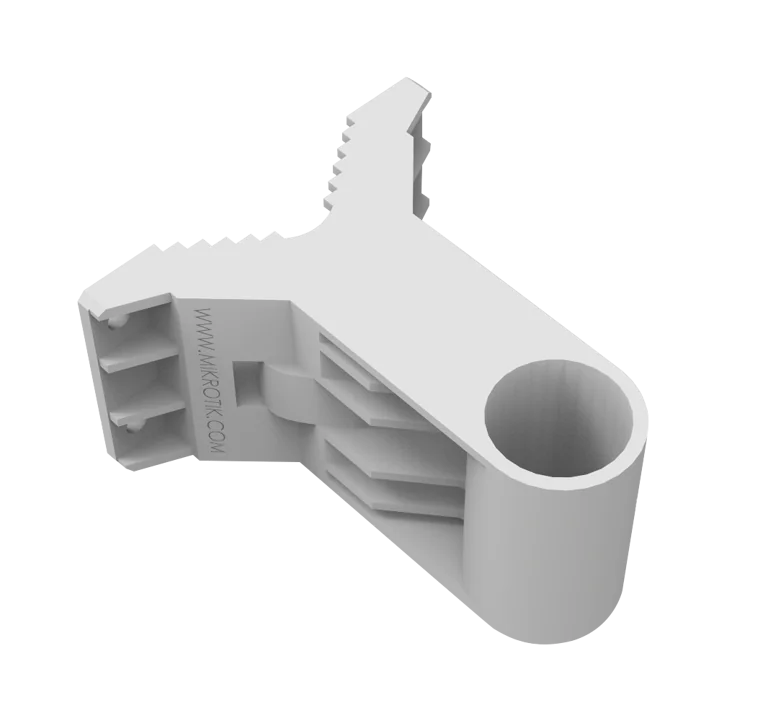
The MikroTik QM is a basic quickMOUNT accessory for positioning small point-to-point and sector antennas on a wall or adapting them to a larger pole. It is mainly used when the standard antenna clip does not provide the required mounting geometry or when an installer needs a wider horizontal turning range. Wireless internet providers, contractors, facilities teams and businesses using compatible MikroTik outdoor radios may consider it. Before proceeding, confirm the exact radio or antenna model, whether one or two devices will be mounted, the pole or wall condition, cable direction, exposure to wind and weather, and the fastening hardware required for the site.
What the MikroTik QM does
The QM creates a stable physical interface between a wall or larger pole and the mounting clip of a small outdoor antenna. Its purpose is mechanical rather than electronic: it does not add radio power, network throughput, RouterOS features or antenna gain. Instead, it helps the installer place a compatible antenna at a useful angle and maintain a more suitable mounting position.
MikroTik specifies that the quickMOUNT can rotate the antenna within a 190-degree range. That can be useful where the wall faces away from the remote link, where a pole is too large for the original small clip, or where a radio must be directed across a yard, road, warehouse area or neighbouring building. The mount can also accommodate two SXT devices in a supported physical arrangement, which may be considered for repeater or broader sector layouts after the wireless design has been reviewed.
Who should consider it
The accessory is relevant to organisations that already use, or plan to use, compatible small MikroTik point-to-point or sector antennas and need a simple mounting adapter. Typical buyers include wireless internet service providers, network installers, security-system integrators, industrial facilities, schools, hospitality properties, farms, compounds and multi-building businesses.
It is most appropriate when the project issue is physical alignment rather than radio performance. A buyer troubleshooting poor signal should not assume that replacing the mount alone will solve link quality. Obstructions, frequency planning, antenna selection, channel width, transmit power, cable condition, interference and device configuration also influence results. FourTeck can help separate mounting needs from broader wireless-design questions before the bill of materials is finalised.
Business challenges the mount can help address
Awkward wall direction
A building wall may not face the remote site directly. The QM can provide a broader turning range so a compatible directional antenna can be aimed away from the wall line.
Large pole, small clip
Where the original device clip is intended for a smaller diameter, the quickMOUNT can act as an intermediate adapter. The actual pole size and fastening method should still be checked.
Two-device arrangement
The mount can physically support two SXT units in selected layouts. Radio planning, separation, cabling, power and interference implications must be considered separately.
Cleaner project planning
Specifying the right mounting accessory early can reduce improvisation at site and help the installer arrive with the correct hardware, tools and access plan.
Capability band
Product-fit matrix
| Requirement | Suitable when | Confirm before ordering |
|---|---|---|
| Wall mounting a small outdoor radio | The radio uses a compatible small antenna clip and needs horizontal redirection. | Wall material, anchors, clearances, cable route and antenna model. |
| Adapting to a larger pole | The existing pole cannot accept the smaller device clip directly. | Pole diameter, ring size, wind loading and access method. |
| Mounting two SXT devices | A repeater or multi-direction design has been technically reviewed. | Device fit, separation, PoE, cable paths, frequency plan and maintenance access. |
| Precise elevation adjustment | Only basic horizontal positioning is required. | Consider a more advanced mount if vertical adjustment or graduated alignment is needed. |
Verified product information
| Brand | MikroTik |
|---|---|
| Product name | quickMOUNT |
| Product code | QM |
| Product type | Basic wall mount and pole adapter for small point-to-point and sector antennas |
| Turning range | Up to 190 degrees |
| Dual-device capability | The manufacturer states that two SXT devices can be mounted simultaneously |
| Included parts | One metal ring and K-41 fastening set |
| MTBF guidance | Approximately 100,000 hours at 25°C, as stated by MikroTik |
| License or subscription | Not applicable to the mechanical accessory |
| Compatibility | Confirm against the exact antenna or radio model and installation arrangement |
| Availability | Contact FourTeck for current UAE options, quantity and lead time |
Mechanical suitability depends on the complete installation. Site conditions, fasteners, pole dimensions and attached equipment must be assessed by the installer.
Compatibility and dependency notice
QM is the product code for the basic quickMOUNT, not the QM-X or QMP. These accessories serve different mounting requirements. The QM provides broad horizontal rotation for small point-to-point and sector antennas. QM-X is intended to add vertical and horizontal adjustment for selected pole-mounted SXTsq devices, while the quickMOUNT pro family provides a more advanced alignment arrangement. Buyers should not substitute one part number for another without confirming the device, mounting surface and required axes of adjustment.
The mount does not determine radio compatibility by brand name alone. The physical clip, enclosure shape, loading, fastening method and available space must all be checked. Outdoor installations also require attention to cable drip loops, grounding practices where applicable, weather exposure, corrosion, rooftop access, safe working methods and local building requirements. These items are part of installation planning and are not automatically included with the accessory.
Purchase and deployment journey
Identify the device
Share the exact MikroTik radio or antenna model, quantity and existing mounting parts. Photos of the site can help clarify the physical requirement.
Review mounting geometry
Confirm whether the installation is on a wall, mast or pole, the required direction, pole diameter, access constraints and any need for two devices.
Confirm the bill of materials
Determine whether QM alone is sufficient or whether the project also needs cable, PoE equipment, surge protection, grounding, brackets or another mounting accessory.
Quote and coordination
FourTeck can coordinate current availability, quantity, delivery destination and any requested installation or configuration scope.
Wide-angle positioning for constrained sites
Outdoor wireless links often begin with a simple design drawing, but the actual building face, parapet, pole position or line of sight can force the antenna to point at an unexpected angle. A basic straight wall bracket may place the device too close to the wall or restrict the direction of the radio. The QM addresses this physical problem by creating a projecting adapter and permitting a wide turning range. This gives the installer more freedom to orient a compatible antenna toward the remote endpoint without constructing an improvised bracket.
That flexibility is valuable, but it should not replace accurate link planning. The installer still needs to establish the azimuth, elevation, path clearance and mounting height. A directional radio aimed incorrectly may connect at a low modulation rate, experience unstable signal or create unnecessary interference. For longer links, small changes in direction can have a meaningful effect. The QM helps with the physical direction; signal analysis and configuration remain separate tasks.
Buyers should also consider service access. A mount that can turn widely should be positioned so a technician can reach the fasteners without removing unrelated equipment. Cable slack must allow adjustment while remaining secured. The Ethernet cable should not carry the mechanical load of the radio, and the bend radius should remain suitable for the cable type. In exposed locations, the complete assembly should be checked after high winds or maintenance work.
A practical adapter between pole and antenna clip
Many outdoor radios include a compact mounting clip intended for a limited pole diameter. On an existing telecommunications mast, warehouse column or rooftop pole, that clip may be too small or may sit at an unusable angle. The QM can act as an intermediate mounting interface: the included metal ring secures the quickMOUNT to the larger support, while the device clip connects to the mount. This can simplify a retrofit where replacing the full mast is unnecessary.
The phrase “large diameter pole” is relative, so the actual dimension must be measured. A project should not rely on a photograph alone. Confirm the outside diameter or circumference, material, structural condition and whether the ring can be tightened securely without damaging the support. Painted, galvanised or coated surfaces may behave differently under clamping pressure. On tapered or irregular poles, an alternative bracket may be more appropriate.
Wind loading deserves attention even for a lightweight radio. The mount transfers force from the antenna to the wall or pole, so the supporting structure and fasteners carry the total load. The QM itself is an accessory, not a structural certification for the entire installation. For exposed rooftops, coastal environments or high elevations, the installer should review corrosion, vibration, fastening retention and local safety requirements. FourTeck can assist with product selection and scope discussions, while final structural suitability remains a site-engineering responsibility.
Two-device mounting and wireless design implications
MikroTik states that two SXT devices can be mounted simultaneously on the quickMOUNT, enabling a repeater access point or broader sector arrangement. This is a useful physical capability, but the network design should be evaluated before two radios are placed together. The devices may need different channels, appropriate separation, independent PoE feeds and carefully routed cables. Their intended coverage directions should be documented so future maintenance does not disturb the alignment.
A repeater design can mean different things. It may involve one radio receiving a point-to-point backhaul and another serving a local area, or two directional links connecting separate locations. Band, frequency availability, RouterOS mode, bridge or routing design, throughput expectations and interference conditions influence whether the arrangement is suitable. The mount only provides the physical platform; it does not combine the radios electrically or configure them automatically.
When two units share one mount, the installation team should consider access to reset buttons, Ethernet ports, enclosure latches and cable glands. Each cable should be labelled and protected from strain. The combined assembly may present more surface area to wind, and the supporting wall or pole should be assessed accordingly. Buyers requesting a complete repeater package should provide the endpoint distances, required bandwidth, frequency environment, power source and network topology so FourTeck can discuss the relevant equipment and services.
Ideal business environments and use cases
Multi-building offices
A directional wireless link between an office, warehouse and guardhouse may need a wall-mounted radio turned toward another building rather than straight ahead.
Wireless service providers
Installers can use the mount when adapting compatible client or sector devices to existing poles and when a basic wide-angle bracket is sufficient.
Hospitality and compounds
Outdoor links connecting remote villas, service buildings or recreation areas may require discrete wall mounting and flexible direction.
Industrial and logistics sites
Warehouses, yards and workshops often have existing poles that can be reused after physical compatibility and structural condition are confirmed.
CCTV backhaul projects
A compatible wireless radio may carry camera traffic from a remote point, with the QM helping orient the device. Capacity and reliability depend on the radio design.
Education and campus links
Schools and campuses can use point-to-point connections between buildings where trenching is difficult, subject to line-of-sight and radio planning.
Installation and operational considerations
Mounting is one component of an outdoor wireless deployment. The project should start with a site survey or at least a documented review of the path, height, obstructions and available mounting surfaces. The selected point should provide line of sight where the radio technology requires it and should be accessible for safe installation. Rooftop work, ladder use and work near electrical services may require trained personnel and site permits.
Fasteners must suit the substrate. Concrete, blockwork, steel and lightweight cladding require different anchors and installation techniques. The quickMOUNT package includes its specified fastening components, but wall anchors or supplementary structural hardware may be required depending on the site. Do not assume that a general screw or plug is appropriate for every surface. The mount should be secured without distortion, and all hardware should be tightened according to practical installation guidance.
Cable management should be planned before final alignment. Outdoor-rated Ethernet cable, suitable gland sealing, drip loops and strain relief help protect the radio and connector. Surge protection and grounding requirements depend on the device, local electrical practice and exposure. Power-over-Ethernet equipment should match the radio model; the QM itself has no electrical requirement. When installation services are needed, include the device count, cable distance, access method, working hours and testing expectations in the quotation request.
After mounting, the radio should be aligned and tested using signal, modulation, throughput and error indicators appropriate to the device. A visual alignment alone may not be enough. Document the final direction, device identity, cable label and configuration backup. For critical links, schedule periodic inspection of the bracket, pole, cable ties and enclosure, especially after construction activity or severe weather.
Questions to resolve before ordering
Provide the full model code rather than only the product family.
The fastening method, pole diameter and wall material affect suitability.
Projects needing controlled vertical adjustment may require another mount.
A dual-radio setup needs additional design, power and cable planning.
Wind, heat, coastal air, vibration and rooftop conditions should be considered.
Product supply, mounting labour, cabling, alignment and configuration should be itemised separately.
Procurement checklist
- Confirm product code QM rather than QM-X, QMP or another quickMOUNT variant.
- Record the exact attached radio or antenna model.
- State the required quantity and whether spare units are needed.
- Measure the pole diameter or describe the wall construction.
- Confirm the required horizontal and vertical adjustment.
- Identify whether one or two SXT devices will be mounted.
- Review cable type, length, routing and strain relief.
- Confirm PoE, surge protection and grounding needs for the radio.
- Check installation access, permits and safe-work requirements.
- Specify delivery location and requested project timeline.
- Include installation, alignment or configuration scope when required.
- Ask for current availability and warranty guidance in the quotation.
How FourTeck can assist
FourTeck can review the requested mounting application, confirm that the part number is QM, discuss compatible related options and prepare a quotation based on quantity and destination. Where a complete wireless project is involved, the discussion can also include radio selection, PoE, cabling, surge protection, installation, alignment and configuration scope.
For faster evaluation, send the antenna model, site photographs, pole measurement, wall type, required direction and number of links. This information helps distinguish a straightforward accessory order from a wider installation requirement.
UAE availability and support guidance
Contact FourTeck to confirm current UAE availability for the MikroTik QM. Supply may depend on quantity, vendor lead time and the timing of the request. Delivery and project coordination can be discussed after the exact requirement is confirmed.
Installation and configuration are not inherent to the mount purchase. Where they are required, ask for those activities to be included in the quotation, together with access requirements, cable work, alignment testing and handover expectations.
Dubai, Abu Dhabi, Sharjah and Ajman coverage
FourTeck can coordinate product enquiries and project discussions for organisations in Dubai, Abu Dhabi, Sharjah and Ajman. The same requirement review applies across the UAE: provide the exact device model, quantity, installation location and expected scope. For a product-only order, delivery arrangements can be discussed after availability is confirmed. For an installation requirement, site access, work permits, mounting height, cable distances and testing responsibilities should be agreed before scheduling. Projects outside these emirates can also be reviewed based on destination and scope.
GCC availability
FourTeck can assist organisations planning MikroTik mounting accessories and wireless deployments across GCC markets, including the United Arab Emirates, Saudi Arabia, Kuwait, Qatar, Bahrain and Oman. Support can begin with a requirement review to establish whether the QM is the correct quickMOUNT variant, whether the attached radio is physically suitable and whether additional accessories or services belong in the bill of materials. Quotation coordination may cover product quantity, delivery destination, installation planning, configuration scope and related network components. Product availability, delivery schedules, service visits and vendor lead times can vary by country, quantity and project conditions. Buyers should share the destination country, exact product model, required quantity, deployment site and expected timeline. Where installation is requested, include mounting height, access constraints, cable requirements and any local contractor or permit dependencies so the proposed scope can be reviewed accurately.
Africa availability
For organisations sourcing wireless accessories for projects in Africa, FourTeck can help review the MikroTik QM requirement, associated radios, mounting conditions, power accessories and deployment expectations. Enquiries may relate to East Africa, West Africa, Southern Africa, Central Africa or individual markets such as Kenya and Uganda. Availability and fulfilment depend on the destination, quantity, vendor lead time, shipping arrangements and local project conditions. Outdoor wireless projects may also require attention to pole dimensions, wind exposure, power standards, surge protection, installation access and technical support. Buyers should provide the destination country, exact part number, quantity, preferred deployment schedule and whether supply-only or installation assistance is required. This allows FourTeck to discuss suitable procurement and support pathways without assuming local inventory, fixed delivery dates or country-wide onsite coverage.
Related products, services and alternatives
MikroTik wireless products
Browse related network and wireless product options and discuss the correct radio for the intended link.
Installation and alignment
Plan mounting, cabling, antenna alignment, testing and documentation as a defined project scope.
QM-X and QMP comparison
Ask FourTeck to compare adjustment axes and device fit before choosing another quickMOUNT variant.
Business network planning
Review the mount as part of a complete point-to-point, campus or remote-site connectivity design.
Why businesses contact FourTeck
A small accessory can still delay a project when the wrong variant, ring size or mounting approach is selected. Businesses contact FourTeck to clarify the requirement before purchase, compare related MikroTik mounting options and coordinate a bill of materials that reflects the real site. The discussion can cover product identity, device compatibility, quantity, accessories, delivery destination and installation scope.
For network projects rather than accessory-only orders, FourTeck can also help structure the conversation around link purpose, distance, bandwidth, radio model, PoE, cabling, surge protection, mounting and testing. This does not replace a site engineer’s structural judgement, but it helps procurement and technical teams keep the product order aligned with the deployment plan.
Use the FourTeck contact page to share the exact requirement, or learn more about the company through the FourTeck business technology profile.
Frequently asked questions
What is the MikroTik QM?
It is the basic quickMOUNT wall and pole adapter for small point-to-point and sector antennas. Its product code is QM.
How far can the QM turn?
MikroTik specifies a turning range of up to 190 degrees. The usable range at a site depends on the wall, pole, antenna dimensions and nearby obstructions.
Can it mount two antennas?
The manufacturer states that two SXT devices can be mounted simultaneously. The complete wireless, power, cable and structural design should be reviewed first.
Is QM the same as QM-X?
No. QM is the basic quickMOUNT. QM-X is a different adapter intended to add vertical and horizontal adjustment for selected pole-mounted SXTsq devices.
Does the mount improve signal strength?
It does not amplify radio signals. Better physical alignment may help a link perform as designed, but radio selection, line of sight, interference and configuration remain critical.
What parts are included?
MikroTik lists one metal ring and a K-41 fastening set. Site-specific wall anchors, cable accessories or structural hardware may still be required.
Does QM require a license or subscription?
No. It is a mechanical accessory. Any RouterOS license, radio configuration or subscription requirement belongs to the attached network device, not the mount.
How do I confirm compatibility?
Share the exact antenna model, mounting clip, pole diameter or wall type, required angle and installation photographs with FourTeck for review.
Is the MikroTik QM available in Dubai?
Contact FourTeck to confirm current UAE availability, quantity and lead time. Availability should not be assumed until the quotation is prepared.
Can FourTeck include installation?
Installation, cabling, alignment and configuration can be discussed as a separate scope. Provide site access details, mounting height, device count and test expectations.
Confirm the right mount before the installer reaches site
Send FourTeck the antenna model, quantity, wall or pole details and required direction for a MikroTik QM quotation and compatibility discussion.


Reviews
There are no reviews yet.