
HPE Aruba Networking 9240 Campus Gateway Dubai
A high-capacity 1RU gateway for large campus WLAN, policy enforcement, secure tunnelling and VPN concentration, with four SFP28 data ports and software-selectable capacity tiers.
Direct answer for buyers
The 9240 is HPE Aruba Networking’s high-capacity 9200 Series campus gateway appliance, built to aggregate and secure large wireless environments and to serve selected VPN concentration and SD-Branch roles.
It centralises tunneled campus traffic, applies user and device policy, supports roaming and high availability, and provides high-speed uplinks to the campus core or aggregation layer.
Medium and large enterprises, universities, healthcare groups, hospitality campuses, government environments and other sites with high AP, client, tunnel or throughput requirements.
The operating architecture and license tier. Base, Silver and Gold capacities differ, and AOS 10 sizing is not the same as AOS 8 controller sizing.
Required capacity, regional hardware variant, subscriptions, transceivers, redundant power, clustering, migration scope and a practical bill of materials for the UAE deployment.
Where the 9240 fits
The HPE Aruba Networking 9240 is not simply an access-point controller with a faster port count. It is intended for large, policy-driven campus and headend environments where traffic from many access points, users and devices needs to be terminated, inspected, segmented and moved toward the core with predictable performance. HPE positions the 9200 Series for medium and large enterprises that require high availability and scalable Wi-Fi services, and the 9240 sits at the high-capacity end of that platform family.
For a buyer in Dubai, the strongest reason to select a 9240 is usually architectural rather than cosmetic: the network needs substantial gateway scale, 25 GbE-capable physical connectivity, room for license-based capacity growth, or a resilient clustered design. A smaller branch gateway may be more economical if the site only needs a few thousand clients or modest WAN and tunnelling capacity. Conversely, a design that is expected to grow substantially should be checked against the current AOS 10 capacity model before hardware is fixed.
A key procurement distinction
The generic name “HPE Aruba Networking 9240 Campus Gateway” does not by itself identify the exact orderable regional SKU. HPE publishes separate US, RW, IL, JP and EG variants, with TAA alternatives also listed. A UAE quotation should therefore confirm the manufacturer-authorised regional part number rather than assuming that a part number from another market is interchangeable.
The same principle applies to optics and subscriptions. Four SFP28 interfaces are present on the gateway, but the fibre transceiver, DAC or active optical cable must suit the speed, fibre type, reach and switch at the other end. Software capacity and service subscriptions should be selected from the intended design, not added as an afterthought.
Performance and capacity: size the software tier as carefully as the hardware
The 9240 uses one hardware platform with capacity unlocked through licensing. In HPE’s current QuickSpecs, the base hardware provides 20 Gbps firewall throughput, Silver raises this to 30 Gbps, and Gold raises it to 40 Gbps. Encrypted throughput depends on cipher and license tier, so the relevant number should be checked against the actual traffic profile rather than treating “40 Gbps” as a universal figure for every encrypted workload.
| Capacity item | Base hardware | Silver | Gold |
|---|---|---|---|
| Firewall throughput | 20 Gbps | 30 Gbps | 40 Gbps |
| AOS 10 maximum clients | 32K | 48K | 64K |
| AOS 10 maximum AP devices | 4K | 8K | 16K |
| AOS 10 concurrent IPsec tunnels | 32K | 64K | 128K |
| AOS 8 maximum campus/remote APs | 512 | 1K | 2K |
These numbers show why a quotation needs an architecture statement. A buyer migrating from an AOS 8 controller design should not take AOS 10 device limits and apply them to the old controller model, or vice versa. The gateway may also be used for VPN concentration or SD-Branch-related functions, and the relevant tunnel, session, routing and security capacities then become part of the sizing exercise. FourTeck can map the intended software train and deployment role to the correct limits before a bill of materials is finalised.
Physical interfaces and data-centre connectivity
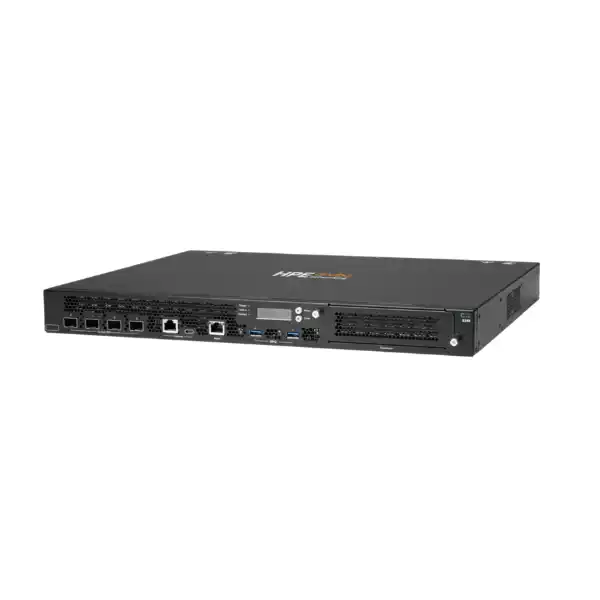
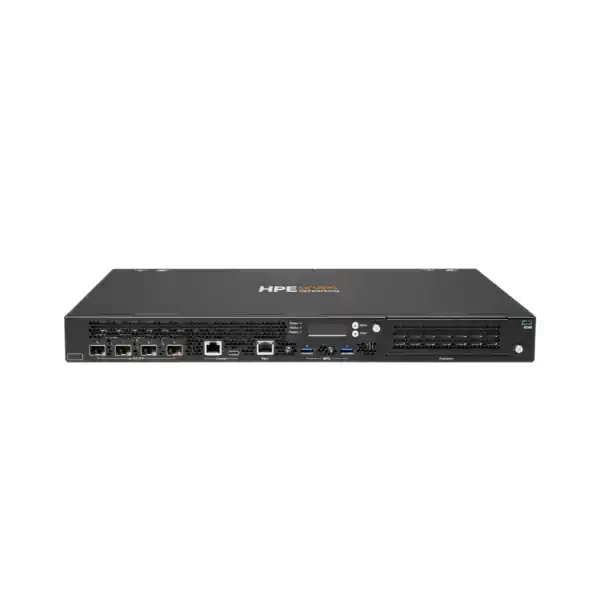
The four front-panel SFP28 data interfaces support high-speed uplink designs and can be matched to compatible 1G, 10G or 25G optics and cabling according to the supported transceiver matrix. HPE lists 25G SR, eSR and LR optical options as well as direct-attach and active optical cables.
An out-of-band RJ45 management port separates appliance management from production data paths. This matters in enterprise operations because engineers can preserve a dedicated administrative route for troubleshooting, monitoring and controlled access.
The appliance includes USB-C and RJ45 console access plus two USB 3.0 Type-A interfaces. For installation teams, this gives practical options for local commissioning and recovery without consuming a production SFP28 port.
HPE specifies one expansion slot reserved for future use. It should not be treated as a currently available way to add production interfaces unless HPE explicitly releases a supported expansion option for the intended software and hardware revision.
A common procurement mistake is ordering a gateway and assuming that the required optical connectivity is automatically included. The interface cage and the transceiver are separate design decisions. The quotation should identify the existing or planned aggregation switch, requested link speed, fibre mode, connector, distance, redundancy requirement and whether the design uses optics or DAC/AOC cabling. For a 25G campus core connection, both ends must support the selected 25G media and the chosen optic must be on the applicable compatibility list.
Security and segmentation are central to the gateway role
Policy enforcement firewall
The 9200 Series uses a built-in Layer 4–7 stateful policy enforcement firewall. In a tunneled campus architecture, traffic can be brought to the gateway so policy is consistently applied according to user, device, role, application or location rather than relying only on VLAN boundaries.
Dynamic segmentation
Dynamic segmentation is useful where employee, guest, contractor and IoT traffic must be treated differently. The value is operational consistency: access policy can follow the identity or device role instead of forcing administrators to create a large set of static network segments for every use case.
ClearPass integration
HPE positions the gateway alongside ClearPass Policy Manager for advanced user, device and IoT policy. If ClearPass is already deployed, the quotation should include the integration and migration work needed to preserve roles, authentication behaviour and enforcement logic.
Security feature availability can also depend on the chosen subscription and capacity model. In particular, current HPE documentation notes differences for 9240 capacity licenses under AOS 10, so advanced security requirements such as IDPS should be validated against the exact Base, Silver or Gold licensing path before purchase. This is one of the cases where “same hardware” does not automatically mean “same enabled security capability.”
High availability, clustering and live operations
Large campuses rarely buy a gateway of this class to operate as an isolated single point of failure. HPE supports clustered and redundant deployment models, and the 9200 platform is designed to support live-upgrade workflows that reduce disruption during maintenance. The correct high-availability design depends on whether the gateway is functioning in an AOS 10 campus architecture, an AOS 8 mobility-controller architecture, or a headend/VPN role.
Gateway count
Define resilience before quantity. Two appliances may satisfy a site that needs pair redundancy, while larger designs may use clusters for scale and maintenance flexibility. Cluster limits vary between AOS 10 and AOS 8, so count should follow the target architecture.
Power resilience
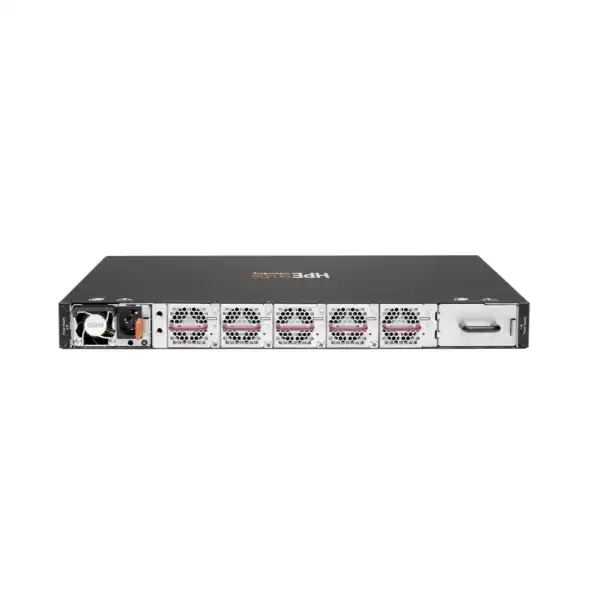
The chassis provides power-supply capacity for a primary plus redundant supply. The spare 550W AC power supply is separately orderable. A high-availability quotation should explicitly state whether the second PSU is included and whether separate UPS/PDU feeds are available in the rack.
Link resilience
Appliance redundancy is incomplete if both gateways depend on one switch, one fibre path or one power domain. The design should cover uplink diversity, switching topology, routing behaviour, gateway failover and how client tunnels are redistributed during maintenance or failure.
Live upgrade is valuable, but it is not a substitute for design validation. Maintenance behaviour depends on software versions, cluster health, AP placement, client roaming and the features in use. For change-controlled UAE environments, a pre-upgrade validation plan and rollback procedure are often as important as the hardware itself.
Power, rack space and environmental planning in the UAE
The 9240 is a standard rack appliance but still needs deliberate facilities planning. Its published maximum power consumption is 190 W and maximum heat dissipation is 648 BTU/hour. The power supply accepts 100–240 VAC at 50–60 Hz. These figures help facilities teams estimate PDU and cooling requirements, while the 1RU form factor and approximately 39.6 cm chassis depth help verify cabinet clearance and cable management.
Dubai deployments often operate in heavily cooled technical rooms while outside ambient temperatures are much higher. The relevant condition is the inlet environment seen by the appliance, not the weather outside. HPE specifies a 0–40 °C operating range for the chassis, so a rack located in a poorly conditioned telecom room, warehouse enclosure or remote facility should be checked carefully. Airflow also needs to remain unobstructed, especially when redundant appliances and dense optical cabling are installed together.
For a resilient design, consider two independent power feeds through appropriate UPS/PDU infrastructure and confirm whether a second PSU is included in the commercial offer. The hardware can provide redundant power capability, but actual resilience only exists when the electrical path is also redundant.
Licensing and subscriptions: what needs to be on the quotation
The 9240 supports multiple software and consumption models, which is why a hardware-only price is rarely enough for a complete enterprise comparison. HPE’s current ordering information includes gateway WLAN, SD-Branch and security subscription options in terms ranging from one to ten years, with both electronic subscription and SaaS variants listed for selected offers. HPE also supports capacity licensing that can increase throughput and scale on the same physical appliance.
Questions that should be answered before licensing is selected
- Is the target architecture AOS 10 managed through HPE Aruba Networking Central, or an AOS 8 controller design?
- Is the appliance serving campus WLAN, SD-Branch, VPN concentration, a DMZ role, or more than one function?
- What are the expected AP, client, tunnel, firewall-session and throughput levels at day one and at the end of the planning horizon?
- Are advanced security capabilities required, and are they supported under the selected capacity and subscription combination?
- What subscription term aligns with the organisation’s support, budget and renewal policy?
- Is the buyer purchasing outright or evaluating a GreenLake for Networking consumption model?
An accurate comparison should separate hardware cost, capacity license, Central or other subscriptions, optics, redundant power, support services and implementation. This makes alternative designs easier to assess because a lower appliance price can be misleading if the required software and accessories are omitted.
Migration from 7200 Series controllers and existing Aruba estates
HPE positions the 9240 platform as the successor path for several 7200 Series capacity points. In the current capacity table, the Base, Silver and Gold levels align with replacement positions for the 7210, 7220 and 7240XM respectively. That does not mean a migration should be treated as a one-for-one chassis swap. Software architecture, management model, licensing, AP compatibility, forwarding mode, policy structure and high-availability behaviour may all change.
For an existing AOS 8 estate, start by inventorying current controller software, AP models, active licenses, Mobility Conductor dependencies, tunneled SSIDs, VLANs, roles, authentication paths, ClearPass integrations, VPN clients, remote APs and third-party integrations. Then define whether the target remains AOS 8 on newer hardware or transitions to an AOS 10 / Central-managed architecture. AOS 10 changes operational ownership and capacity assumptions, so the target state should be decided before the final hardware and software order.
Migration sequencing matters because authentication and policy failures can look like wireless RF issues to users. A controlled project usually validates management onboarding, licenses, uplinks, routing, NTP/DNS, certificates, RADIUS, role mapping and a limited AP/client pilot before broad cutover. Where the campus cannot tolerate a large maintenance window, staged migration and parallel operation may be preferable, subject to the exact design and software interoperability.
When the 9240 is a strong fit — and when to evaluate another option
Strong fit
- Large campus environments that need centralised tunnelling and role-based policy enforcement.
- Designs needing 25 GbE-capable gateway uplinks to the core or aggregation layer.
- Networks expecting capacity growth and wanting software tier upgrades without replacing the chassis.
- High-availability deployments where clustering, live maintenance and redundant power are important.
- Large VPN concentrator or SD-Branch headend requirements that match the current tunnel and throughput limits.
Evaluate alternatives
- A small branch or modest office where 9240 scale would be substantially underused.
- A design that needs a different local copper-port mix, integrated PoE or a smaller footprint.
- A project where required advanced security functions are not supported by the selected 9240 capacity/license combination.
- An architecture where distributed forwarding removes the need for a large central gateway at the site.
- A growth model that exceeds the planned cluster, session, tunnel or throughput limits and justifies a different architecture.
A balanced shortlist often compares the 9240 against lower-capacity HPE Aruba Networking gateways for smaller sites and against an alternative architecture for very large or distributed estates. The deciding metric should not be “largest model available”; it should be the combination of performance, port topology, operational model, resilience, feature licensing and future growth that delivers the lowest deployment risk.
Deployment journey for a Dubai campus
Discover
Collect AP count, client concurrency, application requirements, existing controller/gateway models, uplink topology, fibre details, security policies and software subscriptions.
Size
Match throughput, AP/client scale, tunnel counts, sessions, encryption, routing and growth requirements to the Base, Silver or Gold capacity model and chosen ArubaOS architecture.
Build the BOM
Select the correct regional gateway variant, license/subscription term, optics or cables, redundant PSU, support coverage and any related Central or policy-management requirements.
Stage and integrate
Onboard the appliance, validate software, management, routing, authentication, certificates, role policy, monitoring, uplinks and cluster formation before production change.
Cut over and verify
Move controlled workloads or AP groups, validate client roaming and application behaviour, test redundancy and record the final configuration for ongoing operations.
For greenfield sites, the sequence can be simpler because policy and addressing do not need to be preserved from an old controller. For migration projects, discovery and pilot testing deserve more time because a gateway change touches authentication, routing and traffic-policy behaviour at once.
Practical use cases
Large multi-building campus
A university, corporate campus or healthcare complex may use the 9240 to terminate tunneled WLAN traffic and apply consistent role policy while users move between buildings. Seamless roaming and large client capacity become more important than local branch features.
High-density hospitality
Hotels and mixed-use properties can generate heavy guest and IoT concurrency. The gateway can centralise segmentation and application policy, but guest traffic design, internet breakout, captive portal, redundancy and peak-event throughput must be included in sizing.
VPN concentrator headend
Large distributed organisations may deploy the 9240 as a VPN concentration point. In this role, encrypted throughput, concurrent IPsec tunnels, routing scale and HA behaviour matter more than the AP count alone.
Policy-sensitive IoT estate
Campuses with cameras, sensors, building systems, medical or industrial endpoints can benefit from identity-aware segmentation. The value is strongest when device profiling and policy systems are already part of the network design.
Buyer questions that change the quotation
Do not assume so. The SFP28 ports require compatible transceivers or cables chosen for link speed, distance and fibre type. The exact media should be a line item in the BOM.
The chassis supports redundant power, but the commercial configuration should explicitly identify whether an additional 550W PSU is supplied.
Yes, HPE positions software capacity upgrades as a way to move from the base tier to higher scale without replacing the appliance. Compatibility with the target software version should still be checked.
No. Gold provides the highest listed throughput and scale, but paying for unused capacity may not be justified. Security feature requirements and AOS version also influence the correct tier.
HPE maps the Gold tier to the 7240XM replacement position, but migration still requires software, licensing, AP, policy and topology validation rather than a blind chassis swap.
HPE publishes several regional variants. The UAE order should use the manufacturer-authorised variant confirmed at quotation time instead of reusing a US, JP, IL or EG SKU from another market.
Technical specification snapshot
| Form factor | 1RU rack-mount gateway |
| Data interfaces | 4 × SFP28 |
| Out-of-band management | 1 × RJ45 |
| Console | USB-C and RJ45 |
| USB | 2 × USB 3.0 Type-A |
| Expansion | 1 slot reserved for future use |
| Power supply slots | Primary plus redundant position |
| Maximum power consumption | 190 W |
| Dimensions | 4.4 × 44.2 × 39.6 cm (H × W × D) |
| Weight | 8.2 kg |
| Operating temperature | 0 °C to 40 °C |
| Base / Silver / Gold firewall throughput | 20 / 30 / 40 Gbps |
Published capacity figures are platform limits under defined software and license conditions, not a promise that every production network will sustain the headline number for every traffic mix. Packet size, encryption, enabled services, topology and software release can affect real-world design. For procurement, the safest approach is to size from the workload and required feature set, then confirm the chosen release and entitlement.
Support and lifecycle considerations
HPE’s current QuickSpecs list one-year hardware parts/labour coverage and 90 days for mobility controller software, both extendable with support contracts. Enterprise buyers should align the support term with their operating model rather than relying only on the baseline entitlement. A campus gateway normally sits in a critical path, so response time, software access, escalation process and replacement logistics should be considered alongside purchase price.
Lifecycle planning also includes software support. The 9240 supports AOS 8 from 8.10 in the controller capacity table, while the current AOS 10 table lists Base support from AOS 10.4 and Silver/Gold capacity support from AOS 10.6. The selected software train should be checked against AP models, Central features, security functions and the organisation’s change policy. If the project is a migration, use the target supported release as the reference point for testing rather than assuming the newest available release is automatically the best production choice.
For organisations with strict governance, the handover package should document serial numbers, license entitlements, support references, software release, port mapping, optics, power feeds, routing and authentication dependencies. This makes future upgrades and fault isolation considerably easier.
Dubai and UAE procurement guidance
A useful HPE Aruba Networking 9240 quotation should be specific enough that two suppliers are pricing the same solution. Ask for the exact gateway variant, quantity, capacity tier, software/subscription term, transceivers or cables, redundant PSU, support level and implementation scope. If the project includes existing Aruba infrastructure, provide the current hardware and software inventory so migration dependencies can be priced rather than discovered during installation.
Lead time and stock should be treated as quotation-time information because enterprise networking availability changes. Avoid relying on an old web price or an overseas SKU as evidence of local availability. A Dubai/UAE commercial offer should state the applicable part number, warranty/support route, delivery location and any onsite services separately.
For larger projects, it is often worth separating the equipment BOM from professional services. Hardware supply can then be approved independently of design, staging, migration, cutover and post-implementation support, while still keeping technical responsibility clear. FourTeck can also help normalise quotations where one option includes capacity licensing and optics while another appears cheaper because those components are excluded.
Decision recap
Choose the 9240 when campus or headend scale, 25G-capable uplinks and enterprise HA justify a high-capacity gateway.
Base, Silver and Gold change throughput and scale. Size the correct software tier rather than buying only the chassis.
AOS 8 and AOS 10 have different limits and operational models. Confirm the target before applying capacity figures.
Specify optics, DAC/AOC, fibre and peer-switch compatibility for each required SFP28 uplink.
Gateway count, second PSU, power feeds and switching diversity all contribute to real availability.
Compare hardware, software, support, accessories and migration services on the same basis.
What FourTeck needs for an accurate 9240 quotation
With these inputs, the quote can be built around the intended architecture rather than a generic appliance line item. That reduces the risk of missing optics, selecting the wrong capacity, underestimating support needs or discovering a software dependency after purchase.
Plan the HPE Aruba Networking 9240 around your real campus load
Share your AP count, client scale, uplink design, ArubaOS target, resilience requirement and subscription term. FourTeck can turn those details into a Dubai/UAE bill of materials covering the gateway, capacity, optics, redundant power, support and deployment scope.

Reviews
There are no reviews yet.