
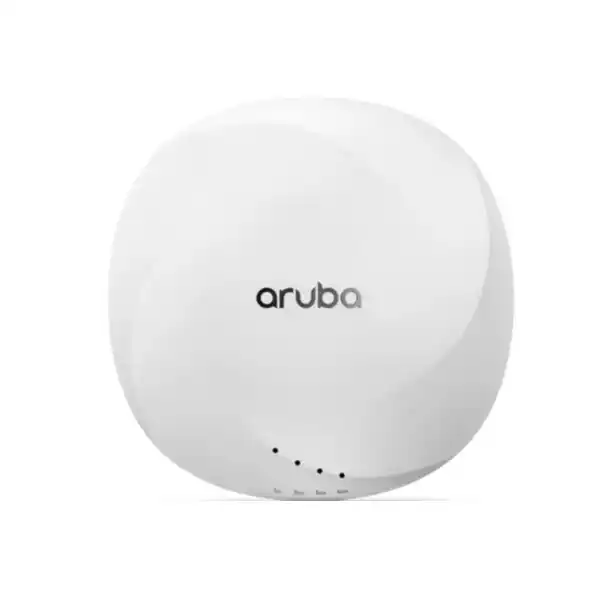
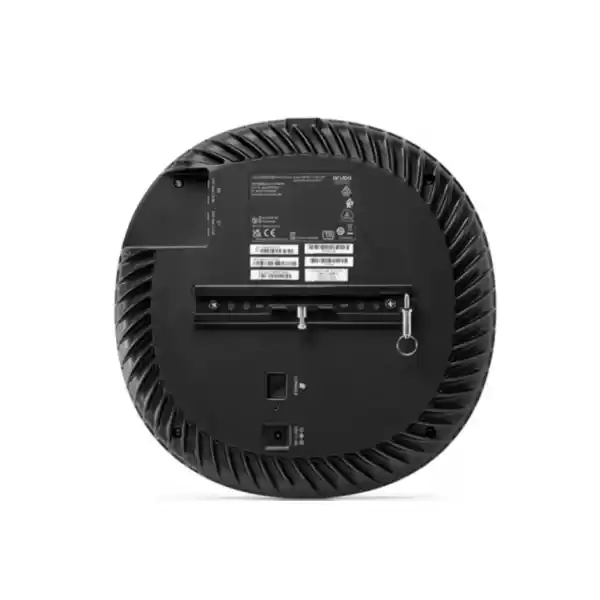

AP-534 (RW variant commonly used for rest-of-world markets)
Dual-radio Wi-Fi 6, 4×4 MIMO
Four RP-SMA external antenna connectors
Two 100/1000/2500/5000BASE-T ports
PoE or 48V DC, power budget dependent
Quick answer for buyers
HPE Aruba Networking AP-534 is an indoor enterprise Wi-Fi 6 access point designed for demanding wireless environments and for projects that need external antennas rather than the integrated antenna arrangement used by the AP-535. It supports concurrent 2.4 GHz and 5 GHz operation with 4×4 MIMO, two multi-gigabit Ethernet interfaces, Bluetooth Low Energy and Zigbee capabilities, and Aruba controller-based or controllerless deployment options. Organisations should consider it when RF coverage needs to be shaped with approved external antennas or when a site requires a high-capacity campus access point. Before ordering, confirm the correct regional part number, approved antenna type and gain, mounting kit, PoE source, switching uplinks, software platform, management licensing and installation scope.
What the AP-534 does
The AP-534 provides enterprise wireless connectivity for indoor environments where many users and devices share the same radio space. Its Wi-Fi 6 feature set includes OFDMA and multi-user MIMO, technologies that improve the way airtime is shared among compatible clients. Instead of treating every wireless endpoint as an isolated conversation, the access point can schedule and serve multiple devices more efficiently when the client mix and channel conditions support those mechanisms. That matters in offices, classrooms, conference areas and similar spaces where laptops, phones, collaboration devices, scanners, sensors and guest devices may all contend for capacity.
The model also bridges wireless traffic into the wired network through two HPE SmartRate Ethernet interfaces. Each port can negotiate 100 Mbps, 1 Gbps, 2.5 Gbps or 5 Gbps. This gives network designers more freedom than a traditional single-gigabit uplink when the switching infrastructure and cabling are capable of multi-gigabit operation.
Who should consider it
The AP-534 is most appropriate for organisations that already have, or intend to build, a managed enterprise wireless environment and have a reason to use external antennas. A standard office with uncomplicated ceiling placement may be easier to serve with an internal-antenna model such as the AP-535, while a warehouse aisle, auditorium edge, high-ceiling space, specialised coverage zone or design that requires directional control can make the AP-534 a more useful candidate. Antenna selection is not merely an accessory choice: it becomes part of the RF design and regulatory compliance of the installation.
IT managers, wireless engineers, system integrators, consultants and procurement teams should therefore evaluate the AP-534 as a component within a complete WLAN design. FourTeck can help align the AP, approved antenna, mounting, switching, cabling, power and management requirements into a coherent bill of materials rather than quoting the access point alone.
Business challenges this model can help address
Crowded wireless spaces
High-density areas create contention as more devices compete for airtime. Wi-Fi 6 scheduling mechanisms and four spatial streams per radio give the network more tools to manage that demand, although actual throughput remains dependent on clients, RF conditions, channel width and the wider network.
Coverage that needs shaping
The AP-534 exposes four external antenna connectors, allowing professional installers to select manufacturer-approved antenna patterns for the planned environment. This makes it useful when coverage must be directed or adapted rather than relying on a fixed built-in pattern.
Multi-gigabit access layer
Two 5 GbE-capable copper ports help prevent the access point from being constrained by a 1 GbE-only wired edge when the switch, cable and upstream design can support higher negotiated rates. LACP can also be used between the interfaces where supported in the network design.
Wireless and IoT convergence
Integrated Bluetooth 5 Low Energy and Zigbee capabilities can support location, asset and IoT use cases without automatically requiring a separate radio overlay. Whether a specific application is supported depends on the management platform, software version and intended IoT workflow.
Core capabilities at a glance
Concurrent 2.4 GHz and 5 GHz Wi-Fi 6 operation for enterprise client environments.
Wi-Fi 6 mechanisms intended to improve multi-user efficiency with compatible clients.
Each Ethernet port supports auto-negotiated speeds up to 5 Gbps.
Integrated Bluetooth 5 Low Energy and Zigbee radio for supported location and gateway functions.
Is the AP-534 a good fit for your requirement?
| Requirement | Suitable when | Confirm before ordering |
|---|---|---|
| External antenna control | The RF design benefits from directional, sector, downtilt or other approved external antenna patterns. | Exact approved antenna model, gain, connector arrangement and regulatory settings. |
| High-density indoor Wi-Fi | Many users or devices share a room, floor or venue and the design requires enterprise Wi-Fi 6 radios. | Active client count, traffic mix, RF survey, channel plan and AP placement. |
| Multi-gigabit switching | The access switch supports 2.5/5 GbE and the uplink architecture can make use of it. | Switch ports, cabling grade, PoE class, VLAN design and uplink capacity. |
| Controllerless branch deployment | The design uses Aruba Instant software in a supported release and does not require a separate controller architecture. | Software release, feature requirements, scale and management method. |
| Cloud management | Centralised cloud operations are desired through HPE Aruba Networking Central. | Subscription or licensing requirements, tenant design and feature compatibility. |
Verified AP-534 technical information
The following table focuses on model-specific information confirmed in current HPE Aruba Networking product and installation documentation. Regional SKU and ordering details should still be checked for the destination country because radio products are subject to regulatory domain rules.
| Brand | HPE Aruba Networking |
|---|---|
| Product | AP-534, 530 Series Campus Access Point |
| UAE / RW part number | JZ331A for the AP-534 (RW) non-TAA variant shown on the HPE UAE store; confirm current regional ordering requirement before purchase. |
| Product type | Indoor enterprise Wi-Fi 6 access point with external antenna connectors. |
| Wi-Fi radios | Concurrent 2.4 GHz and 5 GHz 802.11ax, dual 4×4 MIMO; legacy 802.11a/b/g/n/ac services supported. |
| Published aggregate data rate | HPE commercial product listings state up to 2.97 Gbps combined aggregate data rate. Actual user throughput is lower and environment dependent. |
| Antenna interface | Four female RP-SMA connectors, A0 through A3, used by both radio bands through diplexing circuitry. External antennas must be approved and professionally installed. |
| Ethernet | Two RJ-45 HPE SmartRate ports supporting 100/1000/2500/5000BASE-T, auto-sensing MDI/MDIX. |
| Link aggregation | LACP support between the two network ports for supported redundancy/capacity designs. |
| PoE | 802.3at class 4 or 802.3bt class 5 PoE input. Both Ethernet ports support PoE-in. |
| DC power | 48V DC input; compatible power adapter is an optional item. |
| Power behaviour | Unrestricted operation is supported with DC, 802.3bt, or dual 802.3at sources. A single 802.3at source can apply restrictions to USB and the second Ethernet port unless Intelligent Power Monitoring is used. |
| IoT radio | Bluetooth 5 Low Energy and Zigbee / IEEE 802.15.4 support for compatible location and IoT applications. |
| USB | USB 2.0 Type-A host interface, up to 5W / 1A for selected peripherals when power budget permits. |
| Security slot | Kensington lock slot. |
| Dimensions | Approximately 57 x 240 x 240 mm for AP-534. |
| Weight | Approximately 1.0 kg. |
| Operating environment | Indoor use. Operating temperature 0°C to +50°C; 5% to 93% non-condensing humidity. |
| Mounting | Ceiling or wall deployment using an appropriate mount kit. Mount kit is sold separately. |
| Management | Controller-based ArubaOS 8 or controllerless Aruba Instant OS 8 are supported in documented releases; HPE Aruba Networking Central management is available subject to platform and subscription requirements. |
| Warranty guidance | HPE currently lists a limited lifetime warranty for the 530 Series. Exact coverage, terms and regional entitlement should be confirmed against the supplied SKU and quotation. |
Important dependencies before purchase
The AP-534 should not be treated as a complete wireless installation by itself. The connectorised chassis requires approved external antennas, and the installation documentation specifies professional installation with the configured antenna gain recorded in the management system. The mount kit is also a separate ordering item. Power is another design dependency: an AP can boot and operate differently depending on whether it receives DC power, 802.3bt PoE, dual 802.3at or only a single 802.3at source. If the power budget is limited, the USB interface and second Ethernet port can be affected, so the switch PoE design should be validated before finalising the bill of materials.
Management and licensing must be confirmed separately. A deployment may use a controller-based architecture, Aruba Instant, or HPE Aruba Networking Central depending on software, scale and operational requirements. Cloud management can require a subscription; it should not be assumed to be included with the access point. Radio regulations also vary by country, making the correct regional SKU and regulatory domain a procurement requirement rather than a cosmetic part-number choice.
A practical purchase and deployment journey
Define the wireless outcome
Document the space, expected users, client types, applications, coverage objective, roaming requirement and whether external antenna control is genuinely needed.
Plan RF and antenna choice
Select only approved antennas for the required pattern and gain. Consider wall material, ceiling height, interference, nearby metal, ducts, shelving and other RF factors.
Validate switching and power
Confirm access-switch port speed, PoE budget, cable capability, VLAN architecture and upstream capacity. Decide whether one or both Ethernet links will be used.
Choose management mode
Align the AP with the intended controller, Instant or Central architecture and confirm software release compatibility and any subscription requirements.
Build the quotation
Include APs, antennas, mount kits, power accessories if needed, switches, licences or subscriptions, installation scope and configuration services in the commercial request.
Install and validate
Professional installation should verify physical placement, antenna configuration, PoE state, uplink speed, radio operation, client access, roaming and management visibility.
External antennas are the defining AP-534 design choice
The most important distinction between the AP-534 and a conventional integrated-antenna ceiling AP is the connectorised radio design. Four RP-SMA connectors sit on the AP-534 chassis and are shared by the 2.4 GHz and 5 GHz radios. That flexibility allows a wireless designer to select an antenna that suits the physical environment rather than accepting a fixed antenna pattern. In practice, the value of that flexibility depends entirely on correct RF planning. A more directional antenna can concentrate energy into a target area, while a broader pattern can cover an open zone, but the best choice depends on mounting position, client locations, obstructions, regulatory limits and the intended cell size.
For buyers, the implication is straightforward: an AP-534 quotation that does not identify the intended antenna is incomplete. The antenna type, gain and mounting method should be part of the design discussion. HPE documentation also requires external antennas to be professionally installed and the antenna gain to be recorded in the management configuration. Organisations with no need for external antenna control may prefer to compare the AP-535 internal-antenna model because it can simplify the bill of materials and installation workflow. FourTeck can help make that comparison before procurement.
Multi-gigabit wired access and PoE planning
A high-capacity wireless access point can only perform within the limits of the wired network behind it. The AP-534 includes two active copper Ethernet ports, and both can negotiate at 100 Mbps, 1 Gbps, 2.5 Gbps or 5 Gbps. This matters for modern enterprise access layers because a Wi-Fi 6 AP can aggregate traffic from many clients even when no individual endpoint reaches the headline radio rate. Multi-gigabit ports allow an organisation to use existing twisted-pair cabling more effectively where the cable plant, switch and link quality permit higher negotiated rates.
Power should be designed with equal care. The AP can use 48V DC or PoE, and HPE documents unrestricted operation with DC, 802.3bt, or two 802.3at power sources. When only a single 802.3at source is available, the access point can disable the USB interface and the second Ethernet port unless Intelligent Power Monitoring is used to manage power constraints. An 802.3af source is not supported for startup. These details make switch selection and port configuration part of the AP purchase decision. If the design requires both Ethernet links, USB peripherals or a predictable full-function power state, confirm the exact PoE capacity before installation rather than discovering a limitation after mounting.
Management, policy and security operations
The AP-534 belongs in a managed WLAN architecture, and the operating model should be selected before deployment. HPE documentation supports controller-based ArubaOS 8 and controllerless Aruba Instant OS 8 for the 530 Series, while HPE Aruba Networking Central provides a cloud management path for organisations that want broader visibility across wired and wireless infrastructure. Current Instant release documentation continues to list AP-534 and AP-535 in the 530 Series support matrix. Software version selection still matters because features, security fixes and platform support change over time, so the deployment should follow the release path approved for the organisation.
Security capabilities include WPA3 support and Enhanced Open in documented 530 Series capabilities, along with Aruba policy functions that can help segment user and IoT access. These features do not remove the need for a sound network design. Identity, authentication, VLAN or role architecture, firewall policy, guest access, certificate handling and logging remain design responsibilities. FourTeck can help define whether the quotation should include configuration support, controller or Central onboarding, SSID design, authentication integration, guest access planning or post-install validation. Licensing and subscription requirements are dependent on the chosen platform and should be stated explicitly in the commercial scope.
Where AP-534 is most useful
Large offices and collaboration floors
Open-plan areas, meeting clusters and hot-desking environments can create variable client density. External antennas may be useful where coverage needs to be shaped around physical boundaries or particular zones.
Training and education spaces
Classrooms, training rooms and lecture areas can produce concentrated traffic at predictable times. AP quantity and placement should be based on active-user load and application demand rather than floor area alone.
Healthcare and professional facilities
The 530 Series is designed for indoor enterprise use and HPE documentation includes professional healthcare environments. Site-specific radio, security and compliance requirements still need to be reviewed for the intended application.
Warehouses and controlled coverage zones
External antenna options can help designers create a more deliberate RF footprint around aisles, racks or work zones, subject to approved antennas and a professional RF plan.
Integration and operational considerations
The AP-534 connects into a broader access network, so buyers should verify the complete path from wireless client to application. At the physical layer, confirm Cat5e or better cabling as required by the installation guide, but also assess whether the existing cable run can reliably support the desired multi-gigabit rate. At the switching layer, confirm PoE class, SmartRate or equivalent multi-gigabit capability, VLAN configuration, spanning tree, link aggregation if used, switch uplink headroom and monitoring. At the service layer, confirm DHCP, DNS, authentication, controller discovery where relevant, RADIUS or identity integrations and access policies.
RF planning is equally important. HPE installation guidance advises choosing a position near the centre of the intended coverage area and accounting for absorbers, reflectors and interference. Concrete, water, metal racks, ducts and other materials can materially change propagation. Wireless planning should therefore be based on the actual building rather than a generic square-metre rule. A pre-deployment survey or predictive design can reduce uncertainty; a post-install validation can confirm whether the final antenna, channel and power choices are producing the expected client experience.
Questions to resolve before asking for a quotation
Associated-client limits do not equal practical active-client design. Application type, airtime and channel reuse matter.
Clarify the required pattern, mounting position, cable arrangement and approved antenna gain.
Power availability affects whether all interfaces can operate without restriction.
Decide whether redundancy or link aggregation is part of the design and verify switch support.
Controller, Instant and Central deployments have different architecture and licensing considerations.
Installation, antenna mounting, configuration, migration, testing and documentation should be included when required.
Procurement checklist for the AP-534
- Confirm the AP-534 regional variant and vendor part number.
- Confirm required quantity and deployment sites.
- Identify manufacturer-approved external antennas.
- Confirm antenna gain, pattern and professional installation scope.
- Select the correct ceiling or wall mounting kit.
- Check switch port speed and PoE class.
- Decide whether both Ethernet ports will be used.
- Validate cable plant for multi-gigabit operation.
- Choose controller, Instant or Central management.
- Confirm any required subscription or licence.
- Define SSID, authentication and segmentation scope.
- Include installation, configuration and validation services where needed.
How FourTeck can support the buying decision
FourTeck can help convert a general request for “AP-534 access points” into a usable procurement scope. That process can start with the number of locations, floor plans, user density, application profile and preferred management platform. From there, the requirement can be reviewed for AP quantity, external antenna type, mount kits, access switching, PoE capacity and related services. This is useful because the AP-534 is not a plug-and-forget item: its external antenna design makes RF planning and accessory selection integral to the purchase.
For organisations comparing a refresh or expansion, FourTeck can also help identify whether the AP-534 is the right 530 Series choice or whether an internal-antenna model, newer product family or different deployment architecture better matches the requirement. The objective is to reduce mismatched accessories, incorrect regional SKUs, underpowered switch ports and unmanaged licensing assumptions before the purchase order is raised. Buyers can review related business technology products, discuss installation and configuration services, or send the requirement through the FourTeck contact team.
UAE availability and support guidance
The HPE UAE store currently lists the AP-534 (RW) JZ331A model for quotation, but commercial availability can change with vendor lead time, quantity, regional allocation and lifecycle conditions. FourTeck therefore treats availability as something to confirm against the current requirement rather than as a permanent stock claim. When requesting a UAE quotation, provide the number of APs, required antenna type if already known, management platform, mounting requirement, preferred delivery location and whether installation or configuration should be included.
A complete UAE scope may also involve access switches, PoE capacity, structured cabling checks, Central subscriptions or controller requirements, configuration support and post-install testing. FourTeck can coordinate these items after the technical requirement is clear. Buyers can also learn more about the company through FourTeck business technology support or discuss a wider infrastructure requirement through FourTeck UAE.
Dubai, Abu Dhabi, Sharjah and Ajman coverage
Organisations in Dubai, Abu Dhabi, Sharjah and Ajman can discuss AP-534 procurement, RF planning requirements, compatible antenna selection, switching and PoE design, installation scope and quotation coordination with FourTeck. The same model can be used in many types of indoor business premises, but the final design should reflect each site rather than applying one AP count or antenna pattern across every location. Multi-site projects should identify whether the WLAN configuration is standardised centrally, whether each branch uses the same switch platform and whether local ceiling, wall or high-bay mounting conditions differ. Delivery and project coordination can then be discussed after the exact regional model, quantity, accessories and service scope are confirmed.
GCC Availability
For GCC projects, the AP-534 requirement should be reviewed country by country because wireless regulatory domains, product variants, vendor lead times, service logistics and project responsibilities can differ. FourTeck can assist businesses planning deployments in the United Arab Emirates and other GCC markets such as Saudi Arabia, Kuwait, Qatar, Bahrain and Oman with requirement review, model selection, external antenna planning, quotation coordination and deployment scope. A regional project may also need consistent management licensing, standardised SSIDs, common authentication policy and compatible switching across several sites. Buyers should provide the destination country, quantity, required antenna pattern, preferred management platform, expected project timing and whether installation or configuration is needed. Product availability, licensing, delivery schedules and service visits remain dependent on current vendor conditions and the final scope. For Kuwait-related coordination, organisations can also review FourTeck Kuwait resources.
Africa Availability
African deployments often add another layer of planning around regional product variants, shipping, power infrastructure, remote-site support and local installation conditions. FourTeck can help organisations evaluate the AP-534 together with its approved antennas, mount kits, switching, PoE, management subscriptions and configuration requirements before a cross-border purchase is arranged. This can be useful for businesses with offices, schools, healthcare facilities, hospitality sites, warehouses or managed-service networks in East Africa and other regions. Availability and fulfilment may depend on destination, quantity, regulatory domain, vendor lead time and the practical installation environment. Buyers should share the destination country, exact AP quantity, antenna requirement, desired deployment schedule and support expectations so the quotation reflects the complete requirement. Organisations considering Kenya, Uganda or broader regional projects can review FourTeck Africa technology support for additional regional coordination context.
Related products, services and alternatives to consider
HPE Aruba Networking AP-535
The closely related 530 Series model uses integrated internal antennas. It can be a simpler choice where standard indoor ceiling coverage is appropriate and external antenna control is not required.
Approved external antennas
Antenna type and gain should be selected from HPE-approved options for the host country and installation design. Compatibility should be confirmed against the AP-534 ordering guidance.
Mounting and power accessories
The appropriate mount kit is a separate item, and optional DC or PoE accessories may be required depending on the switch and installation method.
Aruba switching and Central
A complete design may include SmartRate-capable PoE switches and HPE Aruba Networking Central subscriptions. Exact compatibility and licensing should be confirmed for the intended architecture.
Wireless planning services
Predictive planning, RF review, installation and post-deployment validation can be included where coverage quality and antenna orientation are important to the project.
What buyers commonly need to know before choosing this access point
A frequent starting question is whether AP-534 is simply a faster office access point. That description misses the main reason to select it. The model belongs to a high-density Wi-Fi 6 family, but its defining procurement difference is the external-antenna design. Buyers should therefore begin with the RF requirement rather than the headline radio speed. If the site can be served well by an integrated antenna mounted in a conventional ceiling position, an internal-antenna model can reduce accessory and installation complexity. If the site needs a directional pattern, elevated mounting, specialised coverage shape or a deliberate antenna choice, the AP-534 becomes more relevant.
How many AP-534 units does a site need?
There is no reliable unit-per-square-metre answer. AP count depends on active clients, application throughput, wall and ceiling materials, interference, channel reuse, roaming expectations, antenna pattern and transmit power. A meeting centre may require more capacity than an office floor of the same size. A warehouse aisle may require a different antenna strategy from an open lobby. A predictive RF plan or survey gives a better basis for quantity than a generic coverage radius.
Does it need a wireless controller?
Not necessarily. Current HPE documentation lists both controller-based ArubaOS 8 and controllerless Aruba Instant OS 8 deployment for the 530 Series. HPE Aruba Networking Central offers another operational model for cloud management. The right choice depends on the rest of the network, feature requirements, administrative model and lifecycle plan. A buyer replacing existing Aruba APs should check whether the planned software release and controller or Central environment support the AP-534 before ordering.
What is required besides the access point?
At minimum, most AP-534 deployments need the appropriate mount kit, network cabling, PoE or DC power and approved external antennas. Many projects also require access switching, management licensing or subscriptions, configuration work and installation. The antenna requirement is particularly important because the AP-534 does not provide the integrated Wi-Fi antennas of the AP-535. Quotations should therefore identify the antenna selection rather than treating it as a later optional extra.
Can existing 1 GbE switching still be used?
The Ethernet ports can negotiate 1 Gbps, so an AP can connect to a gigabit switch. Whether that is a good design depends on the expected traffic and upgrade plan. If a site is investing in a high-density Wi-Fi 6 deployment, multi-gigabit access switching can provide more headroom. The PoE budget may be even more important than the link speed: limited PoE can restrict AP features, so both power and bandwidth should be reviewed together.
Buyers also search for the difference between AP-534 and AP-535. The simplest practical distinction is antenna architecture: AP-534 is connectorised for external antennas, while AP-535 uses integrated antennas. Their shared 530 Series platform makes them similar in radio generation and enterprise use, but they should not be treated as interchangeable without considering mounting and RF design. A project that already has a professional antenna plan may favour AP-534; a standard office rollout may favour AP-535 for simplicity.
Another common question concerns the advertised data rate. HPE commercial listings for the 530 Series state up to 2.97 Gbps combined aggregate data rate, but that is not the same as real application throughput for a laptop or phone. Wireless performance is shared, protocol overhead is unavoidable and most clients use fewer spatial streams than the AP supports. Wired backhaul, channel width, interference, signal level and client capability also influence the result. Procurement teams should therefore size around user experience and traffic demand, not use the headline rate as a guaranteed per-user figure.
Finally, quotation preparation is easier when the buyer supplies floor plans, approximate active-client counts, known application demands, current switch models, preferred management platform and the reason external antennas are required. FourTeck can use that information to separate confirmed items from design decisions still needing review. This produces a more useful commercial offer and helps avoid a situation where AP hardware arrives without the correct antennas, mount kits or PoE support.
Decision questions answered in practical terms
Should a branch office choose AP-534 just because it supports Wi-Fi 6?
Wi-Fi 6 alone is not enough reason to choose this particular model. A branch should first decide whether the external antenna design is useful. If the building needs normal ceiling-mounted coverage, an internal-antenna AP may simplify installation. AP-534 becomes more compelling when the RF pattern must be selected deliberately or when the organisation already has a design based on approved external antennas.
What happens if the switch provides only standard 802.3at PoE?
The AP can operate from a single 802.3at source, but HPE documents power restrictions. Without enough power, the USB interface and second Ethernet port can be disabled; Intelligent Power Monitoring can dynamically manage functionality. If the design depends on both Ethernet links or USB peripherals, plan for 802.3bt, dual 802.3at or DC power as appropriate.
Can the AP-534 be installed outdoors under a roof?
No. Current HPE installation guidance identifies the 530 Series as indoor equipment and states that the AP, AC adapter, external antennas and connected cables are not to be installed outdoors. A protected canopy or overhang does not turn an indoor model into an outdoor-rated access point. Outdoor projects should use a purpose-built outdoor product family.
Do external antennas increase coverage automatically?
Not automatically. An antenna changes how RF energy is distributed. A higher-gain or directional design can improve signal in one direction while reducing coverage elsewhere, and regulatory EIRP limits still apply. Professional antenna selection should be based on the site and recorded correctly in management settings.
What information gives FourTeck enough detail for an accurate quote?
Share the destination, quantity, floor plan or coverage description, active-client estimate, antenna objective, switch model, PoE capability, preferred management method and required services. If some details are unknown, state that clearly. FourTeck can then identify which items are fixed product requirements and which need a design discussion before final pricing.
Is HPE Aruba Networking Central included with the AP?
Cloud management should not be assumed to be included with the hardware. Central capabilities are generally subscription dependent, and the exact entitlement depends on the management and licensing model selected. The quotation should state any required subscription separately so the operational plan is clear before deployment.
Why businesses contact FourTeck for this model
The value of assistance on an AP-534 project is usually in requirement clarification rather than a generic product claim. Buyers may know the model number but not the correct RW regional SKU, antenna, mount kit, PoE plan or management entitlement. FourTeck can help separate those questions into a workable bill of materials and identify where further RF design or software validation is needed. That can reduce the risk of purchasing a connectorised AP without a suitable antenna, installing it on an underpowered switch port or discovering that the preferred management architecture requires additional licensing.
FourTeck can also coordinate wider network requirements such as compatible enterprise switching, configuration scope, authentication integration and deployment planning. For an overview of wider infrastructure supply and services, visit FourTeck UAE technology solutions. Commercial terms, warranty entitlement, delivery timing and service scope should always be confirmed in the final quotation rather than assumed from a generic product page.
Frequently asked questions
What is the HPE Aruba Networking AP-534?
It is an indoor 530 Series enterprise access point with dual 4×4 Wi-Fi 6 radios, two multi-gigabit Ethernet ports and four connectors for approved external antennas.
What is the difference between AP-534 and AP-535?
AP-534 uses external antenna connectors, while AP-535 uses integrated internal antennas. That difference affects RF design, accessories and installation choice.
Does AP-534 include external antennas?
The AP-534 is a connectorised access point. Approved external antennas should be selected separately for the planned deployment and installed professionally.
Does the AP-534 require a mount kit?
Yes. HPE installation guidance states that an appropriate mount kit is required and sold separately. The correct kit depends on the wall, ceiling or other supported mounting surface.
Can AP-534 run without a wireless controller?
Yes, the 530 Series supports controllerless Aruba Instant OS 8 as well as controller-based ArubaOS 8. The exact software release and feature requirements should be validated.
What PoE does AP-534 need?
It supports 802.3at and 802.3bt PoE. Unrestricted operation is documented with 802.3bt, dual 802.3at or DC power; a single 802.3at source can impose feature restrictions.
Can the AP-534 be used outdoors?
No. HPE documentation identifies the AP-534 as an indoor access point and states that the AP and connected external antenna installation are not intended for outdoor deployment.
Is Aruba Central licensing included?
Do not assume it is included. HPE Aruba Networking Central management is subscription dependent, so the required entitlement should be confirmed separately in the quotation.
How can I request a UAE quotation for AP-534?
Send FourTeck the quantity, deployment location, antenna requirement, switch and PoE information, preferred management platform and any installation or configuration scope so the quotation can include the correct accessories and dependencies.
Plan the AP-534 purchase around the real site
For a useful quotation, share the deployment area, client density, antenna objective, quantity, switch model, PoE capability and preferred Aruba management platform. FourTeck can help turn those details into an AP, antenna, mounting, power, licence and service scope suitable for the UAE project.


Reviews
There are no reviews yet.