
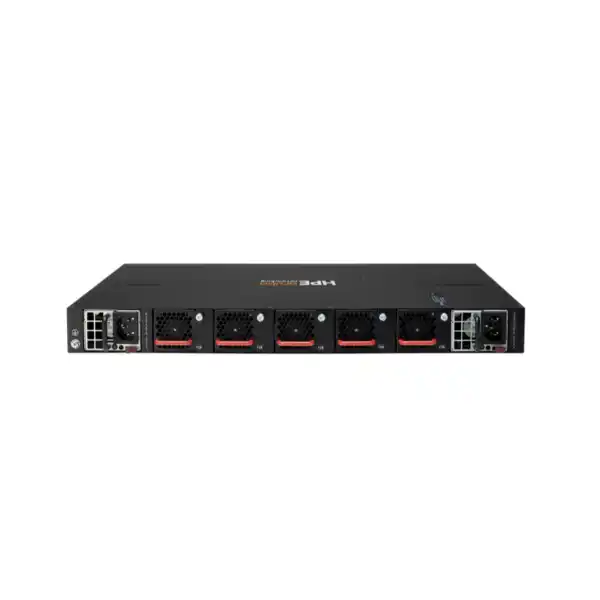
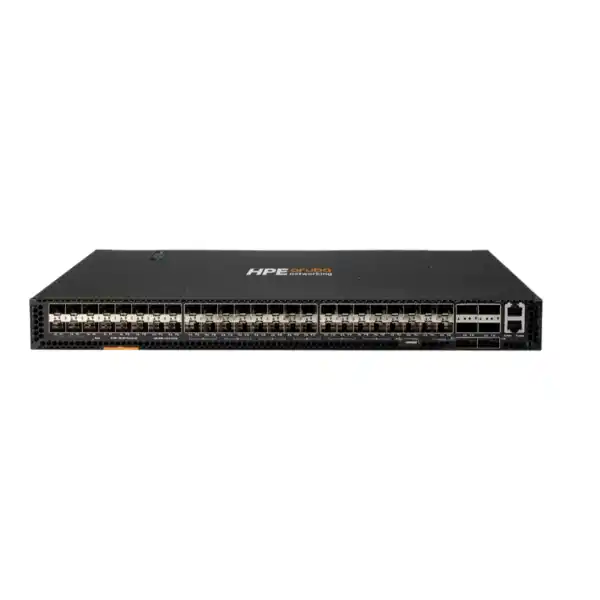
HPE Aruba Networking CX 8320 Dubai
A high-performance 1U AOS-CX switch family for organizations that need dense 10GbE or 40GbE connectivity, advanced Layer 2/3 services, programmable operations and resilient core or aggregation design. The key buying decision is not simply “CX 8320”; it is choosing the correct port variant, optics, breakout strategy and resilience design for the network you are actually building.
Direct answer for Dubai buyers
The CX 8320 is an HPE Aruba Networking fixed 1U switch family with 1/10GbE and 40GbE models designed for enterprise core, aggregation and selected top-of-rack deployments.
It is used to aggregate access switches, connect high-speed server or network links, provide Layer 3 routing at the campus core, and build resilient switching pairs using VSX.
Organizations with established 10G/40G requirements, existing Aruba AOS-CX operations, or a need for high-density fixed switching with strong automation and routing capabilities.
Confirm the required physical media and port mix. JL479A, JL579A and JL581A are materially different switches, so the wrong choice can create unnecessary optics, cabling or migration work.
FourTeck can help map your current links, uplink speeds, fibre or copper media, optics, breakout needs, resilience plan and quantity to the most appropriate CX 8320 bundle and accessories.
Where the CX 8320 fits in an enterprise network
The HPE Aruba Networking CX 8320 occupies a specific position in the switching portfolio: it is a fixed, high-capacity platform intended for environments where 10GbE and 40GbE remain central to the physical design. It can serve as an enterprise campus core or aggregation switch, and HPE also positions the family for top-of-rack use in data centers that need 10GbE connectivity toward servers and 40GbE connectivity toward a spine. That makes the product particularly relevant to organizations refreshing an existing 10G/40G architecture without automatically moving every link to 25G or 100G.
The buying question is therefore architectural rather than purely performance-driven. A network with many existing SFP+ fibre links may naturally align with JL479A. A design built around dense 40G interfaces may be better served by JL579A. A server or infrastructure environment that uses twisted-pair 10GBASE-T can make JL581A more practical. All three belong to the same series, but their port economics, cabling requirements and migration consequences are different. For a Dubai deployment, it is sensible to compare the intended port population on day one with the expected port population over the next refresh cycle rather than sizing only for the immediate rack.
The series runs AOS-CX, HPE Aruba Networking’s modern network operating system. Built-in REST APIs and Python scripting support automation, while the Network Analytics Engine provides monitoring and operational visibility. NetEdit support can assist with automated configuration and verification workflows. These capabilities are most valuable when they are incorporated into an operational model; they should not be treated as stand-alone marketing features. A team planning to automate configuration, validation and change control should define how the switch will be managed, who owns the automation logic, how configuration changes are reviewed and what telemetry is required before rollout.
CX 8320 model options: select the port architecture first
HPE currently documents three principal CX 8320 switch bundles. Each includes two power supplies and five fan trays, but the front-panel connectivity is different.
JL479A supports SFP and SFP+ transceivers on its 48 1/10G ports and QSFP+ on its six 40G ports. HPE also documents optional 1GBASE-T and 10GBASE-T transceivers for this model, along with 4×10G breakout cables for the 40G interfaces. JL579A provides 32 QSFP+ 40G ports and supports optional 4×10G breakout. JL581A provides 48 10GBASE-T ports, with 1G/10G operation, plus six 40G QSFP+ ports and optional 4×10G breakout. If a quotation is being prepared from a port count alone, the media type must still be stated: “48 ports” does not distinguish fibre SFP+ from copper 10GBASE-T.
Performance, routing and high availability
Switching performance
The series is specified at up to 2.5 Tbps switching capacity and 1,905 Mpps. This is designed for high-speed aggregation rather than ordinary access-edge switching.
Layer 3 capability
HPE lists advanced Layer 2/3 support including BGP, OSPF, VRF and IPv6, making the CX 8320 suitable for routed core and aggregation designs where segmentation and dynamic routing are required.
VSX resilience
Virtual Switching Extension supports high-availability architectures using a pair of switches while preserving independent control planes, an important consideration for campus core and aggregation designs.
Replaceable components
Power supplies and fans are field-replaceable and hot-swappable. The standard documented bundles include two power supplies and five fan trays, helping avoid a design with obvious single-component power or cooling dependencies.
Performance figures are useful only when interpreted against the intended design. A switch can have sufficient aggregate fabric capacity while still being a poor fit because the required port speeds are unavailable, the traffic pattern depends on a different buffer profile, or future servers require interfaces beyond the platform’s native generation. Buyers should therefore separate three questions: Can the CX 8320 forward the expected traffic? Does it offer the correct physical interfaces? Will the interface mix remain appropriate over the planned service life? The answer can be different for each question.
For high availability, a resilient pair is usually more important than the specification of an individual unit. VSX is designed for this type of deployment, enabling two switches to participate in a resilient architecture while maintaining separate control planes. The exact inter-switch connectivity, keepalive path, downstream link aggregation and upstream routing design should be documented before implementation. Redundant power supplies are valuable, but they should also be fed from suitable independent power sources where the facility design supports it. Redundancy inside the chassis cannot protect against a common upstream electrical failure if both supplies are connected to the same vulnerable feed.
AOS-CX operations, automation and visibility
The CX 8320 uses AOS-CX, which is central to the value of the platform. HPE highlights built-in REST APIs and Python scripting for programmability, the Network Analytics Engine for monitoring and remediation workflows, and NetEdit support for automated configuration and verification. These features help teams move from device-by-device administration toward more repeatable operations, but they do not eliminate the need for network standards. The most successful deployments start with clear interface naming, VLAN and VRF conventions, routing policy, configuration ownership, backup processes and change-control rules.
Operational tooling should be selected according to the organization’s existing environment. SNMP is supported, along with an RJ-45 serial console and an out-of-band Ethernet management port. HPE documentation also lists USB file-management capability. For a core switch, out-of-band access is particularly important because the management path should remain reachable when the production forwarding network is being changed or recovered. A separate management VLAN on the same production fabric is not always equivalent to a physically independent management path.
Automation also changes procurement requirements. A buyer planning API-driven provisioning may need to validate software release compatibility, automation scripts, orchestration integrations and internal support skills before standardizing the hardware. Conversely, an organization using conventional CLI operations can still benefit from AOS-CX, but it should avoid purchasing on the assumption that automation benefits appear automatically. The technology creates the capability; the operating model determines the outcome.
Optics, cabling and breakout planning
Transceiver selection is one of the most common sources of avoidable delay in a 10G/40G switch project. JL479A and JL579A rely heavily on pluggable optics or direct-attach cabling, while JL581A uses copper 1G/10GBASE-T for its 48 primary ports and QSFP+ for 40G. A complete bill of materials therefore requires more than the switch part number. For each link, record the two endpoint devices, port speed, connector type, fibre mode or copper category, approximate distance and whether the link is permanent or temporary. This determines whether an SFP+, QSFP+, DAC, breakout assembly or another supported media option is appropriate.
The 40G QSFP+ ports can also be important for migration because HPE documents optional 4×10G breakout cables. Breakout can increase the practical number of 10G connections from a 40G interface, but it must be treated as a lane-based physical design rather than as a generic port multiplier. The downstream device must use a compatible 10G interface, and the specific cable or optical approach must suit the distance and connector requirements. When several breakouts are planned, cable labeling and rack documentation become critical because a single QSFP+ parent port maps to multiple child links.
For JL581A, 10GBASE-T can simplify deployment where Cat6A or suitable copper infrastructure already exists and the required distances are within Ethernet limits. However, copper 10GbE can create a different thermal and power profile from optical 10GbE. In a densely populated rack, power draw, airflow direction and cable management should be reviewed as part of the rack design rather than after installation. Copper may reduce transceiver complexity but can increase cable bulk; fibre may reduce bulk and support longer links but adds optics and fibre-management considerations.
Physical, power and rack considerations
The CX 8320 is a compact 1U platform intended for standard 19-inch rack or equipment-cabinet installation. The documented bundles include rack hardware, two power supplies and five fan trays. HPE lists field-replaceable, hot-swappable power supplies and fans. These details matter during facilities planning because the switch should be installed with appropriate clearance, supported airflow, suitable power circuits and an operational process for replacing components without disturbing adjacent cabling.
HPE documents an operating temperature range of 0°C to 40°C for the JL579A product specification page. In Dubai, this reinforces the need to evaluate the controlled equipment-room environment rather than outdoor ambient conditions. Network switches of this class should be operated in a properly cooled technical space. Rack inlet temperature, room cooling redundancy, dust control and the possibility of localized hot spots all matter more than the city’s outside temperature. When equipment is being installed in a warehouse, branch room or lightly conditioned site, environmental suitability should be confirmed explicitly.
Power planning should also consider resilience at the facility level. The switch bundle may include redundant power supplies, but dual supplies provide their greatest value when connected to independent UPS/PDU paths. If both feeds terminate on one PDU, one breaker or one UPS output, a common failure can still remove the entire switch. For a business-critical core, the electrical path should be documented with the same care as the network path.
Deployment and migration approach
Inventory existing links
Document current switch ports, speeds, optics, cable types, VLANs, LAGs, routed links and dependencies. This exposes media or port-count mismatches before hardware arrives.
Choose the exact variant
Select JL479A, JL579A or JL581A according to actual fibre, copper and 40G requirements. Include a realistic allowance for growth and migration.
Design resilience
Define VSX, inter-switch links, keepalive, upstream routing, downstream LAGs and independent power paths. Redundancy should be tested, not assumed.
Validate software and policy
Confirm the AOS-CX release, routing features, monitoring approach, AAA, logging, NTP, management access and configuration standards required by the organization.
Stage and test
Preconfigure the pair, verify optics, test LAG and routing behavior, and perform controlled failure tests before connecting production services.
Migrate with rollback
Move links in defined groups, validate forwarding and application reachability, preserve rollback options and update rack, port and topology documentation.
A migration from an older core is rarely just a physical swap. Existing networks accumulate dependencies such as static routes, spanning-tree roles, special VLAN trunks, multicast behavior, ACLs, management source addresses and monitoring assumptions. These should be translated deliberately into the target AOS-CX design. A clean migration is also an opportunity to remove obsolete configuration rather than carrying every historical command forward. The goal is functional equivalence where required, not command-by-command imitation of the previous platform.
When the CX 8320 may not be the best fit
The CX 8320 remains a strong option for 10G/40G designs, but it should not be selected automatically just because it is an enterprise core switch. New data-center projects centered on 25GbE server access or 100GbE uplinks should compare newer platforms with native 25G/100G interfaces. Likewise, a branch or access-layer project that only needs standard 1GbE user ports and PoE would normally be better served by a different switch family. Paying for high-capacity aggregation hardware does not create value if the port types and operational role are wrong.
An existing CX 8320 environment can still justify additional units because common operations, spares, optics and configuration practices may have significant value. In a greenfield environment, however, buyers should compare the CX 8320 with adjacent current HPE Aruba Networking core and data-center options based on native interface speeds, forwarding requirements, software compatibility, lifecycle expectations and budget. The correct comparison is architecture-to-architecture, not simply model-to-model.
Typical Dubai and UAE use cases
Campus core refresh
A pair of CX 8320 switches can aggregate multiple distribution or access blocks using routed uplinks or link aggregation, with VSX supporting a resilient design. This is relevant where 10G access-switch uplinks and 40G core interconnects remain appropriate.
Data-center top-of-rack
JL479A or JL581A may suit racks that require many 10GbE server links and 40G uplinks, depending on whether the servers connect over SFP+ fibre/DAC or 10GBASE-T copper.
40G aggregation
JL579A provides dense QSFP+ connectivity and can be relevant where the installed estate already uses 40G heavily, including designs that use supported breakout to multiple 10G interfaces.
Network standardization
Organizations already operating AOS-CX may prefer the CX 8320 where its port generation is appropriate because common workflows, automation patterns and operational skills can reduce platform variation.
Procurement questions that improve quotation accuracy
A useful quotation should distinguish the switch chassis bundle from the complete deployed solution. The base switch may not be the only item required. Optics, DACs, breakout cables, compatible power cords, rack accessories, support services and installation effort can materially change the final bill. The precise requirement should therefore be stated before comparing prices from different suppliers; otherwise two quotations may appear to describe the same product while containing different assumptions.
Is the requirement JL479A, JL579A or JL581A?
Is this one switch, a VSX pair, or multiple sites?
How many 1G, 10G and 40G links, over what media and distances?
Will any 40G interfaces operate as four 10G links?
Which AOS-CX release, monitoring platform and automation workflows are required?
Is hardware supply enough, or are staging, migration, configuration and post-cutover support needed?
Buyer FAQ
Is the HPE Aruba Networking CX 8320 a core switch?
Yes. HPE positions the CX 8320 for enterprise core and aggregation roles, and it can also be used as a top-of-rack switch in data centers that need 10GbE server connectivity and 40GbE uplinks.
Does every CX 8320 have the same ports?
No. JL479A provides 48 SFP/SFP+ 1/10G ports plus six 40G QSFP+ ports; JL579A provides 32 40G QSFP+ ports; JL581A provides 48 1G/10GBASE-T copper ports plus six 40G QSFP+ ports.
What is the switching capacity?
HPE specifies the CX 8320 series at up to 2.5 Tbps switching capacity with 1,905 Mpps throughput. Port architecture and the intended traffic design should still be checked alongside aggregate performance.
Does the CX 8320 support redundant operation?
The family supports VSX for high-availability switching designs, while the documented bundles include two hot-swappable power supplies and five hot-swappable fan trays. End-to-end resilience also depends on upstream, downstream and electrical design.
Can 40G ports be used for 10G links?
HPE documents optional 4×10G breakout cables on CX 8320 40G interfaces. The exact cable, optics and downstream interface compatibility should be confirmed for the intended link.
Should a new 25G/100G data center still buy CX 8320?
Not automatically. The CX 8320 is optimized around 10G and 40G connectivity. A greenfield environment centered on 25G servers or 100G fabric links should compare newer HPE Aruba Networking platforms with native interfaces at those speeds.
Decision recap
What FourTeck needs for an accurate CX 8320 quotation
The fastest route to a useful quotation is to provide the design inputs that determine the actual bill of materials, not only the series name.
Plan the right HPE Aruba Networking CX 8320 configuration for Dubai
Share your required port speeds, media type, quantity, resilience design and migration scope. FourTeck can help translate those requirements into the correct CX 8320 part number, optics and deployment bill of materials without over-specifying the project.


Reviews
There are no reviews yet.