
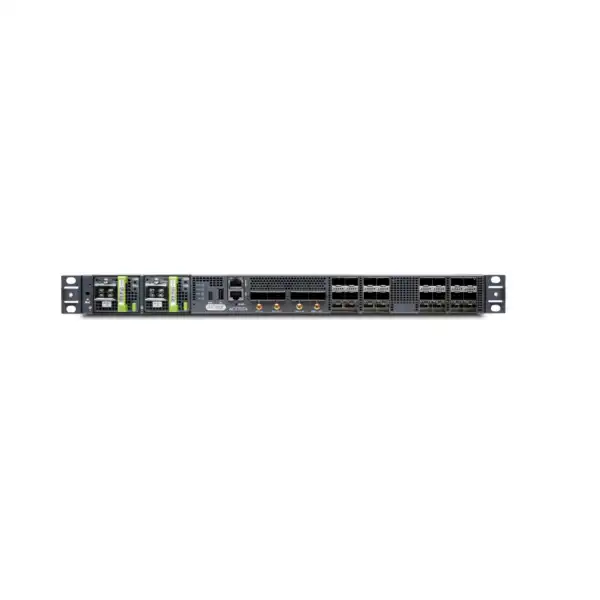
Juniper ACX7024 Cloud Metro Router Dubai
A compact industrial-temperature 1U metro access platform for organisations that need dense 1/10/25GbE access, 100GbE uplinks, precision timing, and a Junos OS Evolved operational model without moving immediately to a larger modular chassis.
Direct answer for Dubai and UAE buyers
What exactly is it? The Juniper ACX7024 is a fixed, industrial-temperature-rated Cloud Metro router in the ACX7000 family. It is built around a compact 1U chassis and provides 360 Gbps of system throughput.
What is it mainly used for? It is primarily suited to metro access and aggregation-edge roles where operators need flexible Ethernet service delivery, 1GbE through 100GbE connectivity, precision timing, and modern routing and service protocols in a shallow form factor. Typical contexts include service-provider access, mobile transport, wholesale Ethernet, enterprise metro edge, distributed edge sites, and environments where industrial temperature tolerance matters.
Who should consider it? Network operators, carriers, managed service providers, large enterprises, infrastructure operators, and systems integrators should consider it when 24 multirate access ports and four 100GbE ports align with the required physical topology and the 360 Gbps platform capacity is appropriate for expected traffic.
What is the most important factor to confirm? Do not select the ACX7024 from port count alone. Confirm traffic design, oversubscription, optic types and distances, AC or DC power, PSU redundancy, environmental conditions, timing requirements, required Junos OS Evolved functions, automation and service-assurance integration, and the exact supported feature set for the intended software release.
What can FourTeck help determine? FourTeck can translate the service requirement into a practical bill of materials and quotation scope, including the router variant, power configuration, optics and cabling, installation expectations, migration inputs, support requirements, and whether the ACX7024 or a nearby ACX7000 model is the better fit.
Why the ACX7024 exists in a Cloud Metro design
Metro networks increasingly carry several traffic types over the same physical infrastructure: enterprise Ethernet services, broadband aggregation, mobile xHaul traffic, internet access, cloud connectivity, telemetry, and operational traffic. The access layer therefore has to do more than simply provide ports. It must support predictable forwarding, traffic engineering, service separation, modern routing protocols, operational visibility, accurate timing where mobile services are involved, and a physical design that fits constrained edge locations. The ACX7024 is positioned for that kind of role. It combines a compact fixed chassis with a relatively dense set of multirate access interfaces and 100GbE uplinks, allowing a site to terminate many lower-speed handoffs while connecting upstream at higher capacity.
For a Dubai deployment, the industrial-temperature rating is particularly relevant when equipment may be installed outside a tightly controlled enterprise data hall. The ACX7024 operating specification extends from -40°C to +65°C under its stated environmental classification. That does not remove the need for correct rack ventilation, airflow planning, clean power, dust control, and site engineering, but it gives the platform a broader environmental envelope than the commercial-temperature ACX7024X. The distinction matters for roadside cabinets, telecom shelters, utility sites, transport facilities, remote aggregation points, and other locations where ambient conditions can be more demanding than a conventional air-conditioned server room.
The strongest reason to shortlist the ACX7024 is therefore not simply that it is a Juniper router. It is the combination of 360 Gbps throughput, 24 native multirate SFP28 interfaces, four 100GbE QSFP28 interfaces, shallow 1U construction, precision timing support, and the Junos OS Evolved operational environment. A good design should map each of those characteristics to a defined service requirement. If the traffic forecast, service scale, port mix, resilience target, or expected growth exceeds what this fixed platform is intended to provide, a higher-capacity ACX7000 option should be evaluated instead of forcing the ACX7024 into an unsuitable role.
Verified ACX7024 hardware profile
| Specification | ACX7024 value | Buyer relevance |
|---|---|---|
| Chassis | Fixed 1U | Simple fixed-platform deployment; capacity expansion may require additional nodes or migration to a larger family member. |
| System throughput | 360 Gbps | Traffic forecasts and oversubscription assumptions should be checked against the complete service design, not only interface line rates. |
| Access interfaces | 24 × 1GbE/10GbE/25GbE SFP28 | Supports mixed access speeds when the selected optics, cables, and software configuration support the intended mode. |
| High-speed interfaces | 4 × 100GbE QSFP28 | Useful for uplinks, rings, aggregation, or high-capacity service handoffs; optic selection must match distance and fibre type. |
| Processor and memory | Intel 4-core CPU, 16 GB DDR4 RAM | Relevant when comparing the ACX7024 with the ACX7024X and when validating control-plane requirements. |
| Dimensions | 19 × 1.75 × 9.6 in (48.2 × 4.4 × 24.4 cm) | Shallow depth is useful for access racks and edge cabinets; allow extra clearance for field-replaceable units, cables, bend radius, and maintenance. |
| Fully configured weight | Approximately 12.5 lb / 5.66–5.67 kg | Supports planning for rack installation, handling, and cabinet load. |
| AC input | 90 VAC to 264 VAC | Confirm cord type, distribution, redundancy, UPS design, and site electrical standards. |
| DC input | -48 VDC through -60 VDC | Suitable for telecom-style DC plants when the correct PSU variant, cabling, grounding, and protection are specified. |
| Power draw | 97 W typical at 25°C without optics; 150 W maximum without optics | Optics, ambient temperature, traffic, and operating conditions affect real site power; calculate cabinet and UPS budgets with margin. |
| Operating temperature | -40°C to +65°C, industrial rating | A key differentiator from the commercial-temperature ACX7024X for demanding edge locations. |
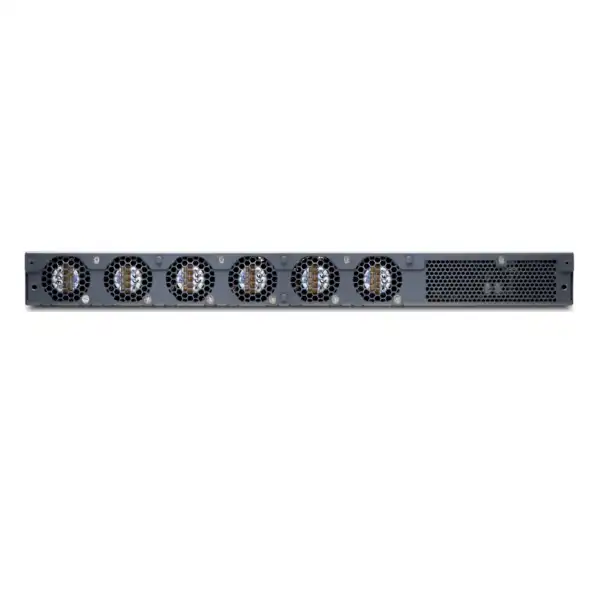
| Cooling | Six integrated fans, 5+1 redundancy, front-to-back airflow | Rack airflow direction and cabinet ventilation must remain compatible with the platform. |
| Operating humidity | 5% to 90% RH, noncondensing | Environmental monitoring and enclosure design remain important in high-humidity or outdoor-adjacent installations. |
Published values describe the platform, but the ordered hardware code still matters. Juniper hardware listings include AC and DC versions and configurations with one or two power supplies. The final quotation should therefore identify the exact power variant rather than treating “ACX7024” as a complete orderable bill of materials.
Port architecture: where the ACX7024 can simplify an access site
The ACX7024 front-end mix is one of its most practical advantages. Twenty-four SFP28 ports support native 1GbE, 10GbE, or 25GbE speeds, while four QSFP28 ports support 100GbE. That combination can reduce the number of separate devices required in a metro access site where customer or cell-site handoffs arrive at different Ethernet rates. Instead of dedicating one platform to 1/10GbE access and another to 25GbE growth, a design can use the same multirate access bank and allocate ports according to the actual service mix. This can be valuable during migrations because existing lower-speed circuits and newer higher-speed services may coexist for a significant period.
The port count should not be interpreted as a promise that every theoretical line-rate combination can be driven simultaneously without considering the 360 Gbps system throughput and the forwarding architecture. A buyer should model realistic traffic, expected peak utilisation, ring or uplink topology, protection behaviour, and service growth. For example, a site might physically connect many 25GbE interfaces while statistically carrying much less aggregate traffic. That can be a valid oversubscribed access design when engineered intentionally. It would be a poor design if the expectation is that every connected service will demand full line rate at the same time and the aggregate traffic profile exceeds the platform capacity.
The four 100GbE ports can be used for upstream connectivity, ring construction, high-capacity handoffs, or interconnection with aggregation infrastructure depending on the network design. Their real value depends on topology. A dual-homed access node may allocate two interfaces to separate upstream paths while reserving others for additional rings, service handoffs, or future expansion. A simpler single-site design may use fewer high-speed interfaces. The correct allocation must consider failure scenarios as well as normal operation; when a link fails, protected traffic may converge on fewer surviving interfaces and change the bandwidth profile dramatically.
Port speed is only one part of interface planning. Every optical or electrical handoff needs a supported transceiver or cable, correct fibre type, compatible wavelength, distance budget, connector format, and receive/transmit power characteristics. A quotation for an ACX7024 that excludes this physical-layer work is incomplete for most deployments. FourTeck can use the intended link distances and peer equipment to identify which optics and patching requirements need to be included or validated.
Six practical deployment patterns
Metro access edge
Use the multirate SFP28 ports for customer or downstream access and the 100GbE ports toward metro aggregation. This is attractive when a site needs a dense fixed platform but not the capacity or modularity of a larger chassis. Service scale, traffic engineering, uplink protection, and optical reach still need to be modelled.
4G/5G transport
The platform’s precision-timing interfaces and compact industrial design make it relevant to mobile transport, especially where timing accuracy, small rack footprint, and mixed Ethernet speeds are required. The transport architecture must define the specific timing profile, source, redundancy, holdover expectations, and software configuration.
Wholesale Ethernet
Service providers can use the platform where they need multiple access handoffs and high-speed upstream connectivity while delivering logically separated customer services. The buyer should validate the required service encapsulation, OAM, scale, protection model, and interoperability with the surrounding network.
Enterprise metro edge
Large organisations with multiple campuses, industrial locations, utility sites, or private metro fibre can use ACX-class routing where conventional enterprise switching no longer provides the service-provider-style routing, transport, or operational capabilities required. The design should justify that complexity and confirm internal operational skills.
Industrial or remote aggregation
The -40°C to +65°C operating range can be useful in hardened telecom environments and remote infrastructure locations. It does not replace enclosure engineering. Heat load, ingress protection, dust, humidity, grounding, surge protection, power quality, maintenance clearance, and airflow must all be addressed at site level.
Migration bridge
Because the access ports can operate at several common Ethernet rates, an ACX7024 may support a phased migration in which legacy 1/10GbE services remain online while selected circuits move to 25GbE and upstream links transition to 100GbE. Migration planning must still validate optics, peer negotiation, routing, addressing, service mapping, and rollback.
Throughput and sizing: convert 360 Gbps into a real traffic plan
The headline throughput of 360 Gbps is a platform characteristic, not a substitute for capacity engineering. A buyer first needs to establish what traffic will enter and leave the router during normal operation, expected peak periods, maintenance events, and failures. This is especially important at metro access because many individual access circuits can be statistically multiplexed onto fewer uplinks. Oversubscription is normal in many networks, but it should be intentional, measured, and supported by the service-level objective rather than occurring accidentally because the interface count was mistaken for guaranteed aggregate forwarding capacity.
Start with the number of active services rather than the maximum number of physical ports. Record contracted bandwidth, observed peak use where available, expected growth, burst behaviour, and whether traffic is symmetric or asymmetric. Then map those services to uplinks and protection paths. If dual uplinks normally split traffic, ask what happens when one uplink fails. The surviving path may need to carry significantly more traffic. Where restoration moves traffic between routers, also model the capacity of adjacent nodes. A design that looks comfortable in steady state can become congested precisely during the outage when customers are most sensitive to packet loss and delay.
Control-plane and feature scale should be validated separately from raw bandwidth. Route tables, MPLS or segment-routing labels, EVPN state, policy complexity, telemetry frequency, service OAM, filtering, and automation sessions can influence platform suitability even when measured traffic is well below 360 Gbps. Juniper publishes software documentation and feature support by release, and the intended Junos OS Evolved version should be part of design validation. The right question is therefore not “Does 360 Gbps sound enough?” but “Does this exact hardware and software combination support the traffic, service scale, protocol features, resilience behaviour, and operational model required over the planned lifecycle?”
For greenfield projects, include a reasonable growth horizon. If the network is expected to move rapidly toward 100GbE access, much higher aggregate traffic, 400GbE upstream links, or deeper service scale, the ACX7024 can become an unnecessarily short intermediate step. A larger ACX7000 family platform may cost more initially but provide a cleaner expansion path. Conversely, if the site has modest traffic and only a few lower-speed connections, a smaller platform can be more economical and operationally simpler. Capacity should drive model selection, not brand familiarity.
Optics, cabling, and 100GbE reach deserve their own design step
An ACX7024 chassis can be correctly selected while the project still fails at the physical layer if the optical bill of materials is wrong. The SFP28 and QSFP28 cages describe form factors and supported Ethernet speeds; they do not tell you which transceiver is appropriate for a specific fibre span. Each connection needs a link budget based on speed, distance, fibre type, wavelength plan, connector loss, patch panels, splice loss, peer transceiver, and any passive optical components in the path. Existing fibres should be documented rather than assumed to be suitable simply because an older service operated on them.
For 1GbE, 10GbE, 25GbE, and 100GbE connections, the precise compatible optic should be checked against Juniper hardware compatibility information and the target software release. This is particularly important when the network uses long-reach optics, coherent 100GbE modules, third-party optics, breakout arrangements, unusual wavelengths, or connections to equipment from another vendor. Optical power consumption and thermal load also matter. The ACX7024 family is designed to support demanding optics, but the total site thermal and power design must still include the actual modules being installed rather than the chassis-only draw.
In a Dubai metro environment, fibre routes can traverse building risers, campus ducts, street infrastructure, carrier meet-me rooms, and long inter-site spans. The same router may therefore need a mix of short-reach and long-reach optics. Label each proposed link with its A-end, Z-end, speed, expected distance, fibre type, patching path, connector standard, redundancy role, and proposed optic. Doing this before ordering reduces one of the most common causes of deployment delay: a router arriving on time while the required transceiver, patch lead, adapter, or compatible peer configuration is missing.
If the project includes direct 100GbE optical transport over a metro span, clarify whether the design expects grey optics into a separate DWDM system or a direct coherent optic. That decision changes reach, optical engineering, power consumption, cost, and operational ownership. FourTeck can include optic selection in the quotation discussion when the link distances and existing optical infrastructure are provided.
Precision timing for mobile and time-sensitive transport
The ACX7024 includes timing-oriented interfaces in addition to Ethernet forwarding. Published platform information lists an RJ-45 timing interface with time-of-day capability, 1 PPS/10 MHz input and output, and GNSS antenna support through USB. Juniper also positions the platform for precision timing in 4G and 5G transport. These capabilities are meaningful only when they are integrated into a complete timing architecture. A mobile network does not become correctly synchronized simply because the access router has timing connectors.
The design should define the authoritative time or frequency source, how that source reaches the ACX7024, what protocol and profile is required, which ports participate, how timing quality is monitored, and what happens if the primary source fails. In a GNSS-assisted design, antenna placement, cable length, surge protection, sky visibility, building access, lightning protection, and local installation practice become part of the network project. In a packet-based timing design, path asymmetry, boundary or transparent clock behaviour, QoS treatment, and the upstream timing hierarchy can affect accuracy.
The phrase “supports precision timing” should therefore trigger more questions, not fewer. Is the service mobile fronthaul, midhaul, or backhaul? Is frequency synchronization enough, or is phase/time accuracy required? What is the target timing profile? Is there a primary reference clock or grandmaster already in the network? Are redundant timing sources required? What alarms should be integrated into the NOC? How will holdover and source switching be tested? Answering these questions before procurement prevents the timing requirement from being discovered late during acceptance testing.
For enterprise or wholesale deployments with no precision-timing requirement, these functions may simply remain unused. They are not a reason by themselves to choose the platform. The ACX7024 should still be justified by the service, port, environment, and routing requirements of the site.
Junos OS Evolved, routing, and service architecture
The ACX7024 runs Junos OS Evolved. For organisations already operating Juniper routing platforms, this can reduce conceptual friction because familiar routing, policy, telemetry, and automation practices can be extended into the metro access layer. For organisations new to Juniper, the operating system should be treated as a platform decision rather than a cosmetic interface difference. Configuration management, software lifecycle, image validation, rollback procedures, operational tooling, authentication, logging, and staff skills all need to be planned around Junos OS Evolved.
Juniper positions the ACX7000 family for modern service-provider functions including segment routing, SRv6, MPLS, EVPN-VXLAN, network slicing, telemetry, and programmability. The presence of a feature in family literature does not mean every desired combination, scale value, or hardware acceleration characteristic is identical across every release and platform. A serious design should document the exact functions needed: for example, whether the network uses MPLS L2VPN services, EVPN for Ethernet service control, segment routing for traffic engineering, SRv6 in an IPv6-centric transport architecture, BGP for service and underlay control, or an IP-only design without MPLS. Then validate those requirements against the selected Junos OS Evolved release and ACX7024 support matrix.
Service architecture also determines how ports are consumed. A physical port might represent one customer handoff, carry many logical services, connect to another access router, or transport a trunk into an aggregation environment. VLAN design, encapsulation, MTU, QoS, OAM, filtering, routing adjacencies, and redundancy protocols can all differ. The bill of materials may be the same while the engineering effort is completely different. That is why a useful quotation should separate hardware supply from configuration, migration, testing, and support services when those services are required.
Automation is another design dimension. Juniper associates the ACX7000 family with the Paragon Automation portfolio and embedded active assurance capabilities. Buyers should determine whether they want only stand-alone router operation, integration with an existing network management stack, or a broader automation and service-assurance architecture. The answer affects software, integration, telemetry, API use, operational processes, and potentially subscription or entitlement requirements. It should not be assumed that every automation capability is included merely by buying the chassis.
In a mixed-vendor metro network, interoperability testing becomes especially important. Routing standards may be open, but operational defaults, timer behaviour, encapsulation details, OAM, QoS mapping, optics, and edge cases can differ between implementations. Lab validation or a controlled pilot is recommended for complex migrations, especially when the ACX7024 must interoperate with existing carrier Ethernet, MPLS, EVPN, timing, or automation systems.
Power, cooling, and environmental engineering in the UAE
The ACX7024 is available in AC and DC power configurations. Published electrical input ranges are 90–264 VAC for AC operation and -48 to -60 VDC for DC operation. Juniper’s hardware information lists orderable variants with one or two power supplies, so the desired redundancy level must be explicitly identified. For critical metro sites, dual power feeds may be appropriate, but redundancy only provides value when the two supplies are connected to genuinely independent upstream power paths where the site design supports that arrangement. Connecting two PSUs to the same failed distribution point does not create meaningful electrical resilience.
The stated typical power draw is about 97 W at 25°C without optics, with a maximum of 150 W without optics. Those figures are useful for baseline planning but should not be copied directly into a UPS or thermal design. Real consumption varies with optics, ambient temperature, operating conditions, unit variation, and configuration. High-power optical modules can materially change the total load. A cabinet containing several routers, transport devices, environmental controllers, and power conversion equipment should therefore be sized from the complete load inventory with suitable engineering margin.
Cooling uses six integrated fans with 5+1 redundancy and front-to-back airflow. Rack layout should preserve that direction and avoid recirculating exhaust air into the intake side. In shallow telecommunications cabinets, cable bundles and rear equipment can restrict airflow if installation is not planned carefully. The chassis depth itself is only about 9.6 inches, but usable cabinet depth must also allow for field-replaceable components, power connectors, optical bend radius, service loops, patching, and maintenance access. Juniper hardware specifications list a greater depth when field-replaceable units are included, reinforcing the need to plan real clearance rather than rack space from the bare chassis dimension alone.
The industrial operating range of -40°C to +65°C is valuable in demanding deployments, but it should not be used to justify poor site design. Direct solar load, dust, salt, humidity, blocked filters elsewhere in the cabinet, insufficient ventilation, and high internal heat density can all produce conditions that differ from a simple ambient-temperature measurement. Outdoor or semi-outdoor UAE sites require appropriate enclosure selection, environmental monitoring, ingress protection, grounding, surge protection, and scheduled maintenance. The router is one component within that environmental system.
Noise also matters in occupied spaces. Juniper publishes acoustic values around 59–61 dBA at 27°C for listed ACX7024 configurations. This is a network infrastructure device, not a silent office appliance. If the proposed installation is near workstations, meeting rooms, reception areas, or other occupied spaces, the noise and airflow characteristics should be reviewed before placement.
Resilience: distinguish component redundancy from service resilience
The ACX7024 family uses six integrated fans with 5+1 fan redundancy, and configurations are available with redundant power supplies. Those hardware protections are useful, but service resilience depends on the architecture around the router. A single ACX7024 in a site remains a single routing node. If the chassis, software, rack, fibre route, or entire facility fails, redundant PSUs and fans cannot preserve every service. Buyers with strict availability targets should evaluate dual routers, diverse upstream paths, separate power domains, fibre diversity, redundant timing sources, and the routing or service mechanisms used for convergence.
A dual-node design introduces its own decisions. Should customer services be dual-homed? Are both routers active, or is one primarily standby? How is state distributed? Which protocols provide fast reroute or path selection? Can upstream and downstream peers support the same redundancy method? Are link capacities sufficient when one node carries additional traffic after failure? Is the operational team prepared to test failure behaviour rather than assuming it from diagrams? These questions have more impact on service continuity than the number of power supplies alone.
Maintenance is another form of failure that should be designed deliberately. Software upgrades, optic replacement, fibre work, and cabinet maintenance may require traffic movement. If the network has no alternate path, routine maintenance becomes a planned outage. For critical services, the topology should allow maintenance while keeping service within the required performance envelope. That may influence whether one ACX7024 is sufficient for a small site or whether a redundant pair is justified.
Resilience requirements should be written in measurable terms: acceptable outage duration, target convergence time, maintenance policy, protected failure scenarios, and any single points of failure that the business accepts. Once those targets are clear, the ACX7024 can be evaluated as part of a resilient design rather than being expected to create resilience by itself.
Licensing, software release, automation, and support dependencies
Enterprise and service-provider routing projects often fail to budget correctly when hardware is quoted before the required software functions and support terms are defined. The ACX7024 should be specified together with the target Junos OS Evolved release, required routing and service features, management integrations, automation expectations, and support coverage. Feature availability can vary by software release, and some operational capabilities may require additional components, entitlements, subscriptions, or controller systems. The safest procurement approach is to list required outcomes first and ask the proposed bill of materials to show how each outcome is provided.
For example, a network that only needs basic routed Ethernet access has a different software and operational profile from one that expects segment routing, EVPN services, telemetry streaming, active assurance, and Paragon-driven automation. Both might use the same chassis, but the engineering scope and ecosystem dependencies differ. Similarly, a buyer migrating from classic Junos platforms should confirm operational differences associated with Junos OS Evolved, software packaging, upgrade processes, and compatibility with existing orchestration or configuration management systems.
Support should also match business criticality. Clarify the desired coverage period, response expectations, replacement process, software entitlement, access to updates, and whether onsite engineering support is required. For remote or unmanned sites, spare strategy can be as important as the support contract. A central spare may be sufficient when travel time is short and the network is redundant. A more critical or geographically distributed deployment may justify local spares, pre-staged configuration, labelled optics, and documented replacement procedures.
FourTeck can incorporate these software and support questions into the pre-sales process, but the buyer should provide enough information to avoid a hardware-only quotation when the project actually requires a complete operational solution.
Deployment workflow from design to acceptance
1. Define the service objective
Document what the router will actually do: number and speed of handoffs, service types, expected bandwidth, uplink topology, routing protocols, service encapsulation, redundancy, timing, management, monitoring, and security policy. This prevents the project from being reduced to a model-name purchase.
2. Validate model fit
Compare the required port mix and traffic profile with 24 multirate SFP28 ports, four 100GbE ports, and 360 Gbps throughput. Check control-plane scale, environmental requirements, power, rack depth, noise, timing, and future growth. If several areas are marginal, evaluate another ACX7000 model before locking the BOM.
3. Build the physical BOM
Specify the exact AC or DC router variant, PSU count, power cords or DC cabling, rack hardware, grounding materials, optics, DACs where applicable, fibre patch leads, labels, management cables, spare optics, and any external timing components required by the design.
4. Validate software and interoperability
Choose a suitable Junos OS Evolved release and confirm required features. Review peer devices, routing adjacencies, MTU, optics, VLAN/service mapping, timing, APIs, AAA, syslog, telemetry, NTP/PTP design, and orchestration. Complex multi-vendor services should be lab-tested when practical.
5. Prepare site and configuration
Confirm rack units, depth, airflow, power feeds, grounding, fibre delivery, patching, management network, console access, environmental conditions, and maintenance clearance. Build and peer-review the configuration before the maintenance window rather than creating it live at the rack.
6. Migrate with rollback
Sequence circuits and routing changes, define checkpoints, establish success criteria, preserve console access, and document a practical rollback path. For live networks, avoid changing physical topology, software, addressing, and service policy simultaneously unless the test plan explicitly manages that risk.
7. Test failures, not only normal traffic
Verify routing adjacencies, service reachability, latency, packet loss, QoS, timing where applicable, alarms, telemetry, logging, and traffic capacity. Then test link, PSU, upstream, or node failures that the architecture claims to protect. Acceptance should prove resilience behaviour rather than assuming it.
8. Hand over operationally
Store configuration backups, diagrams, serial and inventory records, software versions, optic details, support information, escalation paths, password or credential procedures, monitoring thresholds, and maintenance notes. A router is not fully deployed until the operations team can support it without relying on the installation engineer’s memory.
Migration from an existing metro router
A replacement project should begin by discovering the behaviour of the current network, not merely copying its configuration. Collect interface inventory, VLAN and encapsulation details, IP addressing, routing protocols, route policies, QoS policies, ACLs or filters, service OAM, MTU, multicast requirements, management access, AAA, logging, telemetry, timing, redundancy, and any undocumented operational workarounds. Old configurations often contain years of accumulated policy that no longer maps cleanly to the new architecture. Blind translation can preserve mistakes or create feature mismatches.
The ACX7024’s multirate ports can make physical migration easier because 1GbE, 10GbE, and 25GbE handoffs can coexist, but peer compatibility remains essential. Confirm negotiation settings, FEC requirements for higher-speed links, optics, connector types, and the exact service mapping. If upstream connectivity moves to 100GbE at the same time, test the new optical path independently before the final cutover whenever possible. Pre-staging physical links and management connectivity can shorten the outage window significantly.
Routing migration should be planned around control-plane behaviour. For BGP, document AS numbers, neighbour addresses, authentication, address families, communities, route policies, maximum-prefix controls, and convergence expectations. For IGP or segment-routing environments, verify metrics, areas or levels, adjacency parameters, SID planning where relevant, and traffic-engineering policy. For MPLS or EVPN services, define the sequence in which control-plane and data-plane state will move. The objective is to avoid a cutover where both the physical transport and service control change in an unobservable way.
A rollback plan must be physically and logically possible. If cables are permanently repatched, old equipment powered down, address space reused, and software changes made to peers, rollback can become much slower than expected. Identify the exact decision point at which the project either continues or reverts. Preserve old configurations, label original connections, and define who has authority to call rollback. For critical metro services, a rehearsal or lab proof can be more valuable than additional documentation.
After migration, validate business services rather than stopping at successful ping tests. Check actual customer VLANs, routed prefixes, internet reachability, application paths, voice or mobile transport where applicable, QoS markings, throughput, packet loss, alarms, monitoring, telemetry, and support visibility. A technically “up” interface does not prove that every service policy survived the move.
When the ACX7024 may be the wrong choice
A balanced recommendation includes reasons not to buy. The ACX7024 may be too small when the design needs substantially more than 360 Gbps of forwarding capacity, a large number of 100GbE interfaces, 400GbE connectivity, deeper service scale, modular expansion, or a growth path that would quickly exceed a fixed 1U access platform. In those cases, a larger ACX7000 member can be a more appropriate long-term investment even if the initial hardware cost is higher.
It can also be more platform than necessary. A small enterprise branch with a few 1GbE circuits and no service-provider routing, precision timing, EVPN/MPLS, metro transport, or high-speed uplink requirement may be better served by a simpler router or switch. Buying sophisticated metro routing capability without an operational need can increase cost, software complexity, training burden, and support requirements.
The environmental rating should be selected deliberately. If the installation is a controlled commercial environment and the buyer values the higher control-plane resources of the ACX7024X, that related model deserves comparison. Conversely, if the site genuinely requires industrial-temperature operation, the ACX7024’s broader stated temperature range is a significant reason to prefer it over the ACX7024X. The two models share the same 360 Gbps throughput and physical port density, but they are not identical.
Finally, the ACX7024 should not be selected solely because an existing network uses Juniper. Standardisation can reduce operational overhead, but the chosen model still needs to match ports, capacity, timing, environment, feature support, resilience, and lifecycle requirements. A short design review before quotation is cheaper than discovering a mismatch after hardware delivery.
ACX7024 vs ACX7024X vs ACX7020: nearby choices to compare
| Decision area | ACX7024 | ACX7024X | ACX7020 |
|---|---|---|---|
| Primary distinction | Industrial-temperature 360 Gbps access router | Commercial-temperature 360 Gbps variant with higher CPU/RAM resources | Smaller 100 Gbps ACX7000 access platform |
| Throughput | 360 Gbps | 360 Gbps | 100 Gbps |
| Port position | 24 × 1/10/25GbE + 4 × 100GbE | 24 × 1/10/25GbE + 4 × 100GbE | 16 × 1/10GbE + 4 × 1/10/25GbE |
| Published CPU / RAM | 4-core CPU / 16 GB RAM | 8-core CPU / 64 GB RAM | Validate against current platform documentation for the exact variant |
| Environment | -40°C to +65°C industrial rating | 0°C to 40°C commercial rating | Industrial-rated family position; confirm exact ordered version |
| Best comparison question | Do we need this port density and industrial temperature range? | Is a controlled environment available, and do we value the higher control-plane resources? | Can a lower-throughput, lower-density platform meet the site requirement more economically? |
The ACX7024 and ACX7024X share the same 360 Gbps system throughput, the same 24 multirate SFP28 plus four 100GbE QSFP28 interface structure, and the same compact 1U dimensions. The important difference is not forwarding bandwidth. The ACX7024 is the industrial-temperature version with a published 4-core CPU and 16 GB of RAM, while the ACX7024X is a commercial-temperature version with an 8-core CPU and 64 GB of RAM. For a harsh edge environment, the ACX7024’s temperature specification can be decisive. In a controlled equipment room, the ACX7024X deserves evaluation because its control-plane resources are higher.
The ACX7020 occupies a smaller access position in the family, with 100 Gbps throughput and fewer high-speed multirate interfaces. It can make sense where the ACX7024 would be materially underutilised. Buyers should compare required traffic and port counts over the expected lifecycle rather than choosing the larger model by default. When the forecast extends beyond the ACX7024 in the opposite direction, compare higher-capacity ACX7000 platforms that add more throughput, higher-speed ports, or modularity.
Security and operational visibility
Metro routers sit at an important trust boundary. They may connect customer handoffs, transport networks, mobile sites, management systems, and upstream infrastructure. Security should therefore include both control-plane protection and operational access. Define management interfaces and source networks, AAA integration, role-based privileges, secure protocols, logging, configuration audit, key management, route-policy controls, filter policy, and procedures for software updates. Default settings should be reviewed against the organisation’s security standard before production deployment.
Visibility is equally important. Streaming telemetry, logs, interface counters, routing state, environmental alarms, optics diagnostics, service OAM, and performance testing can provide evidence of service health. Juniper associates the ACX7000 family with active service assurance and automation capabilities, but buyers should decide what information must feed their existing NOC or observability platform. A router that produces rich telemetry provides little operational benefit if no system collects, correlates, or alarms on it.
For customer-facing services, monitoring should separate physical failures from service degradation. Optical power can drift before a link fails. Packet loss can occur while an interface remains up. Congestion may affect one traffic class while aggregate bandwidth looks acceptable. Timing quality can degrade independently of Ethernet connectivity. Building dashboards and alarm thresholds around the service objective improves troubleshooting and can shorten the time between an emerging fault and corrective action.
Security and assurance requirements can also affect software release selection and integration scope. Include the intended AAA, syslog, telemetry, NMS, automation, and assurance systems in the design questionnaire so compatibility can be validated before installation.
Procurement details that should appear in an accurate quotation
“One Juniper ACX7024” is not enough information for a dependable commercial quote. The final orderable configuration should identify whether the site requires AC or -48/-60 VDC input, whether one or two power supplies are required, the relevant regional power cords or DC accessories, rack-mounting components, optics for every planned interface, patch cables, grounding materials, management connectivity, spare optics, and any timing accessories. Where a project includes multiple sites, the quantities should be separated by site because power, optics, and fibre distances can differ.
The software portion should identify required functionality and support rather than relying on assumptions. Provide the target routing and service features, automation or controller integration, support term, replacement expectations, and whether installation, configuration, migration, testing, documentation, or training services are needed. If the buyer already owns compatible optics, subscriptions, or support entitlements, that should be stated so they can be validated and excluded appropriately from the new BOM.
Lead time and lifecycle should also be considered. Large infrastructure projects often sequence civil work, power, fibre delivery, rack installation, and network change windows around equipment availability. A delay in one accessory can block the entire deployment. The procurement schedule should therefore track the router, PSUs, optics, cables, timing components, support activation, and any spares as distinct dependencies. For multi-site rollouts, an initial pilot site can validate the BOM before the remaining quantity is ordered or deployed.
Accurate procurement begins with technical completeness. It is better to spend an additional design session resolving interface and power questions than to receive a lower-looking quote that later grows through missing optics, support, cabling, or engineering work.
Frequently asked buyer questions
Is the Juniper ACX7024 a switch or a router?
It is a Cloud Metro multiservice router in Juniper’s ACX7000 family. Although it provides a dense set of Ethernet interfaces and can participate in Ethernet service architectures, it is designed for routing and service-provider-style metro functions rather than being positioned as a conventional campus access switch. Buyers should select it when routing, metro transport, service delivery, precision timing, automation, or provider-edge capabilities justify the platform.
How much throughput does the ACX7024 provide?
Juniper publishes 360 Gbps of system throughput for the ACX7024. That number should be used as part of a capacity model, not compared mechanically with the sum of all physical port line rates. Real design work needs traffic forecasts, oversubscription assumptions, failure-state load, service scale, and the required forwarding features. Sites expecting much higher sustained aggregate traffic should compare larger ACX7000 platforms.
Which Ethernet speeds are available?
The router provides 24 SFP28 interfaces supporting native 1GbE, 10GbE, and 25GbE speeds, plus four QSFP28 100GbE interfaces. The actual usable connection depends on the selected optic or cable, peer equipment, fibre plant, and software support. A port capable of a given speed does not remove the need to validate optical reach, FEC, connector, wavelength, or interoperability requirements.
Can the ACX7024 be used for 5G transport?
Juniper positions the ACX7024 for 4G/5G mobile network deployments and includes precision-timing capabilities. A mobile project still needs an engineered timing architecture, correct transport profile, bandwidth planning, QoS, synchronization source, resilience, and interoperability validation. The router provides the platform capability; it does not by itself define the end-to-end mobile transport design.
Is the ACX7024 suitable for high-temperature locations?
The published operating range is -40°C to +65°C under the stated industrial environmental classification. That wider range is one of the main distinctions from the commercial-temperature ACX7024X. A harsh-site deployment still requires proper enclosure design, ventilation, airflow, dust and humidity management, grounding, power conditioning, maintenance clearance, and monitoring. The device rating should be considered within the complete site environment.
Does it support AC and DC power?
Yes. Published specifications list 90–264 VAC input for AC variants and -48 to -60 VDC for DC variants. Juniper hardware listings show configurations with one or two PSUs, so the quotation must specify the required power type and redundancy. Telecom sites commonly prefer DC, while enterprise rooms may prefer AC with UPS-backed distribution, but the correct choice depends on the facility standard.
How much rack space is needed?
The ACX7024 is a 1U chassis measuring about 19 inches wide, 1.75 inches high, and 9.6 inches deep before allowing for the full field-replaceable-unit and cable envelope. The shallow chassis is useful in edge cabinets, but planners should still reserve depth for power connectors, optical bend radius, service loops, airflow, maintenance access, and any front or rear cable management.
What is the difference between ACX7024 and ACX7024X?
Both provide 360 Gbps throughput and the same 24 × 1/10/25GbE plus four × 100GbE port density. The ACX7024 is industrial-temperature rated and publishes a 4-core CPU with 16 GB RAM. The ACX7024X is commercial-temperature rated from 0°C to 40°C and publishes an 8-core CPU with 64 GB RAM. Site environment and control-plane requirements are therefore important comparison points.
Are optics included with the router?
Do not assume that the chassis purchase includes every optic required for the deployment. Optics should be specified from the link plan and checked for platform compatibility, speed, fibre type, wavelength, reach, connector, peer compatibility, and power requirements. A complete quote may therefore include separate SFP/SFP+/SFP28 or QSFP28 modules, patch leads, DACs where appropriate, and spares.
Can it run MPLS, EVPN, segment routing, and SRv6?
Juniper lists MPLS, EVPN-VXLAN, segment routing, SRv6, telemetry, programmability, and related modern service functions within the ACX7000 platform capabilities. Buyers should validate the exact feature combination, scale, and hardware-specific limitations against the intended Junos OS Evolved software release. Family-level marketing should not replace a release-specific feature check for production design.
Does the ACX7024 require Paragon Automation?
Juniper positions the ACX7000 family for operation with Junos OS Evolved and the Paragon Automation portfolio, but the precise management architecture depends on the deployment. A buyer may operate the router with existing management and automation practices or adopt broader Paragon capabilities. The required software, integrations, subscriptions, and operational processes should be confirmed rather than assumed from the hardware purchase.
How should we size power and cooling?
Use the published 97 W typical and 150 W maximum chassis figures as a baseline, then add the actual optical modules and site engineering margin. Review the complete cabinet heat load, UPS or DC plant capacity, redundant feeds, ambient temperature, and front-to-back airflow. High-power optics and elevated ambient temperatures can materially affect real operating conditions, so chassis-only values should not be the final facility calculation.
What information is needed for a Dubai quote?
Provide quantity, site type, AC or DC preference, PSU redundancy, access and uplink speeds, number of ports, fibre distances, optic requirements, expected traffic, required routing and service features, timing needs, rack conditions, deployment location, support term, installation requirements, migration scope, and any existing Juniper or third-party network equipment that must interoperate. The more complete those inputs are, the more accurate the bill of materials can be.
Should we choose dual routers?
That depends on the service availability target. Dual PSUs protect against some power-supply failures, but a single chassis remains a single routing node. Critical sites may need two routers, diverse power, separate fibre paths, dual upstream connections, and protocols designed for convergence. The decision should be based on acceptable outage duration, failure scenarios, maintenance policy, and business impact rather than a generic rule.
Operational lifecycle and long-term ownership
The cost of a metro router is not limited to the purchase price. Long-term ownership includes software maintenance, support, spares, optics, power, rack space, network management, engineering time, upgrades, configuration compliance, monitoring, and eventual migration. The ACX7024’s compact footprint and relatively low chassis power consumption can be attractive at distributed sites, but those benefits should be evaluated across the full fleet. A standardised deployment can reduce spare variety and simplify training when many sites have similar requirements.
Software lifecycle planning should be established before the first production cutover. Identify approved Junos OS Evolved releases, testing procedures, upgrade frequency, emergency patch handling, backup and rollback methods, and how configuration changes are audited. If automation is used, decide whether the automation system or the router configuration is the source of truth. Unclear ownership can cause configuration drift, especially when engineers make emergency CLI changes that are later overwritten by an orchestrator.
Spare strategy should reflect the network topology. A highly redundant metro ring may tolerate the time needed to move a central spare to a failed site. A single-homed remote location with strict restoration targets may need a nearer spare or a more robust design. Spare optics can be especially useful because different wavelengths and reaches are not always interchangeable. Record which transceivers are used at each site so the operations team can dispatch the correct part quickly.
Environmental maintenance is also part of lifecycle ownership. In edge cabinets, dust, cable movement, fan obstruction, heat, and power quality can change over time. Monitoring should include temperature, fan status, power-supply state, optical levels, and interface errors where practical. Trend data can identify a deteriorating fibre or cooling condition before it becomes an outage. For timing-sensitive mobile networks, timing quality and source alarms should be included in the same operational discipline.
Finally, review capacity periodically. A site that initially carries a modest load can become a bottleneck as more access circuits are added. Tracking peak throughput, port utilisation, route or service scale, and projected growth helps identify when the ACX7024 should be augmented or replaced before customer experience is affected. Good lifecycle management makes the original model selection more valuable because the platform is used within a planned operating envelope.
Decision recap: the six questions that determine ACX7024 fit
1. Capacity
Will the 360 Gbps platform capacity support normal and failure-state traffic with acceptable growth margin?
2. Interfaces
Do 24 multirate 1/10/25GbE ports and four 100GbE ports match the physical topology and future port mix?
3. Environment
Is industrial temperature tolerance required, and is the rack designed for airflow, heat, humidity, dust, and maintenance?
4. Software
Does the selected Junos OS Evolved release support the required routing, service, assurance, timing, and automation functions?
5. Resilience
Are PSU redundancy, node redundancy, diverse fibre paths, timing sources, and failure-state bandwidth aligned with the service SLA?
6. BOM completeness
Have power variants, optics, cables, rack items, support, software dependencies, installation, and migration services been explicitly included?
What FourTeck needs from the buyer for an accurate quotation
A useful quotation can be prepared much faster when the technical requirement arrives with the commercial request. The following inputs help determine whether the ACX7024 is the right model and which accessories or services belong in the scope.
How many routers are required and whether each site uses the same design.
AC or DC, single or dual PSU, feed diversity, UPS or telecom DC plant details.
Required 1GbE, 10GbE, 25GbE, and 100GbE connections and expected growth.
Fibre type, link length, connector information, peer device, wavelength constraints, and redundancy path.
Peak bandwidth, service count, route scale, oversubscription assumptions, and failure-state load.
MPLS, EVPN, segment routing, SRv6, QoS, telemetry, OAM, automation, or other required functions.
Whether the design needs frequency or phase/time synchronization, GNSS, PTP, or external timing interfaces.
Rack dimensions, cooling, ambient conditions, noise constraints, grounding, and maintenance access.
Existing router, protocols, service types, addressing, change window, rollback requirements, and cutover assistance.
Coverage term, replacement expectations, software access, onsite support, spares, and training needs.
Build the right ACX7024 configuration for your Dubai network
The ACX7024 is strongest when its 360 Gbps capacity, multirate access ports, 100GbE uplinks, industrial temperature range, timing capabilities, and Junos OS Evolved feature set align directly with a defined metro requirement. Share your port plan, link distances, power standard, traffic forecast, software functions, resilience target, and deployment environment. FourTeck can use those inputs to prepare a more complete quotation and identify whether the ACX7024, ACX7024X, a smaller ACX option, or a larger ACX7000 platform deserves the final shortlist.


Reviews
There are no reviews yet.