
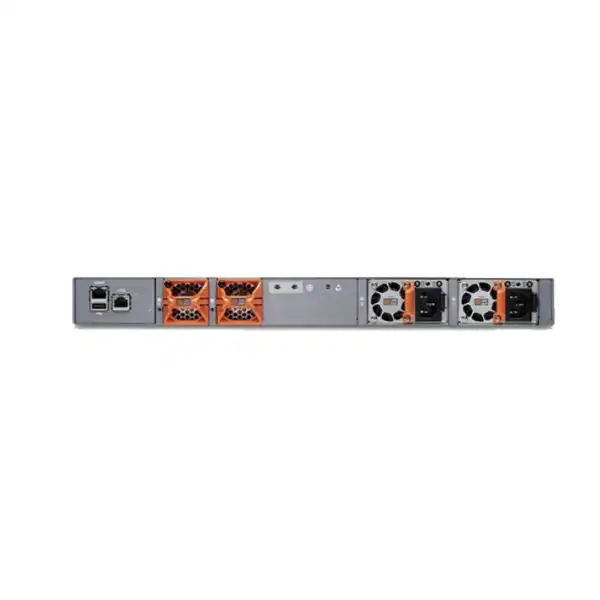
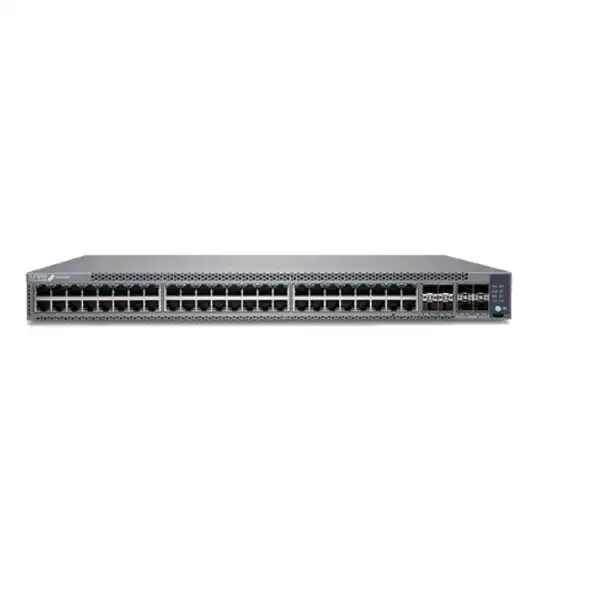
Juniper EX4100 Ethernet Switch Dubai
The Juniper EX4100 is a cloud-ready, fixed 1U access switching platform built for enterprise branch and campus networks that need dependable Gigabit Ethernet access, high-speed uplinks, resilient stacking, modern segmentation and the option of AI-driven operations through Juniper Mist Wired Assurance. The family includes 24-port and 48-port PoE and non-PoE models, allowing buyers to match edge connectivity, power delivery and operational requirements without moving immediately to a larger switching class.
Direct answer: what is the Juniper EX4100 and who is it for?
Why the EX4100 occupies an important access-layer position
Access switches sit at the point where users and operational devices actually enter the enterprise network. That makes the purchasing decision more consequential than a simple count of copper ports. A modern access switch needs to support endpoint growth, segmentation, quality of service, monitoring, resilient uplinks and an operational model that the network team can sustain for years. The Juniper EX4100 addresses that role with a hardware platform that combines familiar 1GbE access with faster uplink and stacking interfaces, while also supporting cloud-driven workflows and campus-fabric architectures.
For many Dubai offices, schools, healthcare sites, hospitality operations, retail groups and enterprise branches, the standard EX4100 is particularly relevant when the endpoint edge is still predominantly 1GbE. A desktop PC, IP phone, printer, access-control reader, many cameras and numerous building-management endpoints do not necessarily require multigigabit access. In that environment, the decision is less about chasing the highest possible access-port speed and more about providing reliable access, sufficient PoE, clean uplink capacity, consistent policy enforcement and manageable operations.
At the same time, the EX4100 should not be treated as a universal answer. If a large percentage of access points or workstations require 2.5GbE, 5GbE or 10GbE at the edge, a multigigabit member of the EX4100 line or another Juniper platform may fit better. If an environment requires greater aggregation capacity, different port media, higher-scale campus roles or specialized data-center characteristics, the correct comparison may move beyond the standard EX4100 entirely. The practical value of the EX4100 therefore comes from matching its port architecture and operational capabilities to a well-defined access-layer requirement.
EX4100 model selection: the first decision is not 24 versus 48 ports
The model name supplied for a quotation should be more precise than “EX4100.” Juniper offers standard EX4100 variants that differ in access-port quantity, PoE support, power input and airflow. Those differences affect not only purchase price but also rack power, connected-device support, redundancy design and the number of spare ports available for growth.
| Model | Access ports | PoE | Power / airflow note |
|---|---|---|---|
| EX4100-24T | 24 x 10/100/1000BASE-T | No | 150 W AC, front-to-back airflow |
| EX4100-48T | 48 x 10/100/1000BASE-T | No | 150 W AC, front-to-back airflow |
| EX4100-48T-AFI | 48 x 10/100/1000BASE-T | No | 150 W AC, back-to-front airflow |
| EX4100-24T-DC | 24 x 10/100/1000BASE-T | No | 150 W DC, front-to-back airflow |
| EX4100-48T-DC | 48 x 10/100/1000BASE-T | No | 150 W DC, front-to-back airflow |
| EX4100-24P | 24 x 10/100/1000BASE-T | 24 PoE+ ports, up to 30 W per port | 920 W AC PSU platform, front-to-back airflow |
| EX4100-48P | 48 x 10/100/1000BASE-T | 48 PoE+ ports, up to 30 W per port | 920 W AC PSU platform, front-to-back airflow |
A 48-port model can reduce rack-unit consumption when many endpoints terminate in the same closet, but that does not automatically make it the better design. Port utilization, failure-domain preferences, uplink oversubscription, PoE load and cable-management density all matter. Some organizations prefer two 24-port switches for operational separation or incremental growth; others prefer a 48-port unit for rack efficiency. The correct decision should be based on active ports plus a realistic reserve, not only the present-day patch-panel count.
Verified platform specifications that affect network design
Form factor and dimensions
The standard EX4100 is a fixed 1U access switch. Juniper lists dimensions of approximately 1.72 inches high by 17.4 inches wide by 13.8 inches deep. That depth is manageable in many enterprise racks, but cabinet depth, rear cable bend radius, power-supply access and airflow still need to be checked before installation.
Uplinks and stacking
Standard 24-port and 48-port models provide four 1/10GbE uplinks plus four 10/25GbE interfaces for stacking or uplink use. This gives the access layer more flexibility than a design limited to 1GbE uplinks and allows capacity to be matched to distribution architecture, redundancy and growth.
Virtual Chassis
Juniper specifies support for a 10-member Virtual Chassis and a 200 Gbps Virtual Chassis interconnect for standard EX4100 models. A Virtual Chassis can simplify management by operating multiple interconnected switches as one logical system, but member design, cabling and failure scenarios should be planned rather than assumed.
Switching performance
Juniper lists 164/328 Gbps data rate and 244 Mpps throughput for 24-port standard models, and 188/376 Gbps data rate with 279 Mpps throughput for 48-port standard models. Those figures describe platform capability; real network design must still account for traffic patterns, uplink topology and endpoint behavior.
Tables and frames
Published specifications include 64,000 MAC addresses and jumbo frames up to 9,216 bytes. The platform also lists substantial IPv4 and IPv6 unicast and multicast route capacities. These values can matter when the access layer participates in routed or fabric designs rather than operating only as simple Layer 2 switching.
Telemetry and QoS
The EX4100 supports sFlow, IPFIX and flow-based telemetry. Juniper also specifies 12 QoS queues per port, comprising eight unicast and four multicast queues. These capabilities help with operational visibility and traffic treatment when policies are designed around real application requirements.
PoE planning: count watts, not just powered ports
The EX4100-24P and EX4100-48P support PoE+ on their RJ-45 access ports, with up to 30 W per port. This makes them suitable for many IP phones, wireless access points, cameras and other powered devices. The important procurement point is that the phrase “48-port PoE switch” does not mean every device can always draw its maximum power simultaneously from every port under every power-supply configuration.
One 920 W PSU
Juniper documents a 740 W PoE budget for both EX4100-24P and EX4100-48P when operating with one 920 W power supply. That can be more than enough for many deployments, but the design must total expected powered-device consumption and leave suitable headroom.
Two 920 W PSUs
With two 920 W power supplies, Juniper lists a maximum 1,440 W PoE budget for the standard EX4100-24P and EX4100-48P. The second supply therefore matters both for resilience and for the amount of endpoint power available.
A disciplined PoE calculation starts with the actual endpoint schedule. Record the device type, quantity, expected power class, whether peak draw differs from normal draw, and whether any devices are likely to be upgraded during the life of the switch. A camera with infrared illumination may draw differently at night; an access point may have higher power requirements when more radios or USB functions are enabled; an IP phone with an attached expansion module may consume more than the base handset. Those details turn a generic switch request into a reliable power design.
The distinction between standard EX4100 PoE+ and EX4100 multigigabit models is also important. The EX4100-24MP and EX4100-48MP are designed for multigigabit access and can support PoE++ with a higher maximum two-PSU PoE budget than standard 24P/48P models. If the project includes modern high-performance wireless access points that require multigigabit links or higher per-port power, selecting a standard EX4100-24P solely because it has PoE can create a bandwidth or power mismatch later.
For a Dubai quotation, it is useful to provide the endpoint list with the switch quantity. FourTeck can then distinguish between a simple PoE requirement and a design that needs higher power, redundant supplies, multigigabit access or a different edge platform. That reduces the chance of receiving a quote that is technically compatible on paper but constrained in real operation.
Mist Wired Assurance and Junos OS: choose the operating model deliberately
The EX4100 is cloud-ready and supported by Juniper Mist Wired Assurance. With the appropriate Mist subscription, organizations can claim and onboard the switch to the Mist cloud, use cloud-based configuration workflows and gain experience-oriented visibility into wired service behavior. Juniper positions Mist AI and its telemetry model as a way to simplify operations and provide greater insight into connected-device experience. For distributed businesses, that can be particularly useful because the operations team can standardize many activities across sites rather than managing each branch as an isolated device.
Cloud management is not the only way to operate the switch. Juniper documentation explicitly states that an EX4100 without a Mist Wired Assurance license can be configured using the Junos OS command-line interface. This distinction is important for procurement. Buyers should not assume the hardware becomes unusable without a cloud subscription, nor should they assume cloud-based Wired Assurance functions are automatically included with every hardware purchase. The intended management model should be stated in the quotation requirement.
Mist-managed operations
Best suited to organizations that value centralized cloud workflows, consistent onboarding, service-level visibility and the broader Mist operational model. Subscription class and term need to match the switch port class and support choice.
Junos CLI operations
Useful where the network team already has strong Junos skills, local management is preferred or the organization does not intend to use Mist Wired Assurance. Configuration standards, monitoring and lifecycle processes then remain the buyer’s operational responsibility.
Hybrid operational planning
Some enterprises migrate in phases. In that case, hardware can be selected for the desired end state while onboarding, templates, change control and subscription timing are planned around the migration schedule rather than purchased without context.
Juniper lists Wired Assurance subscription options for 24-port and 48-port EX classes in one-year, three-year and five-year terms, with variations tied to support packages. Optional associated subscriptions can add capabilities such as Marvis for Wired or Premium Analytics. Because subscription SKUs can change and support combinations depend on the commercial program, a buyer should define required outcomes—cloud management, troubleshooting assistance, analytics, support term and renewal expectations—before locking the exact subscription line items.
This is also a budgeting issue. A hardware-only comparison can make one switch appear less expensive while hiding the operating model that the IT team actually intends to use. Conversely, automatically attaching every available subscription can increase cost without buyer value. The right bill of materials reflects the desired management architecture, not a generic bundle.
Virtual Chassis, EVPN-VXLAN and campus-fabric implications
A key reason the EX4100 is more than a basic access switch is its participation in broader Juniper campus architectures. The platform supports Virtual Chassis and EVPN-VXLAN campus fabrics. These are different design tools and should not be treated as interchangeable marketing terms.
Virtual Chassis allows multiple supported switches to operate as one logical device. Juniper states that the EX4100 can form a Virtual Chassis with up to 10 members. The operational attraction is straightforward: instead of treating every physical access switch as an entirely separate device, a group can be managed as a logical system. This can simplify configuration and reduce the number of independently managed devices. It can also provide resilient topology options when links and member roles are planned correctly.
However, stacking is not a substitute for architecture. Designers still need to consider how many members should share a logical failure domain, where uplinks terminate, how software maintenance will be handled, what happens during member or cable failures, and how the access closet is cabled physically. A 10-member maximum describes platform capability, not an instruction to build every stack with 10 switches. Smaller Virtual Chassis groups may be operationally cleaner depending on closet size and business impact.
EVPN-VXLAN addresses a different layer of the problem. In a campus fabric, EVPN provides a control plane while VXLAN provides the overlay encapsulation used to extend network segments and policy across the fabric. For organizations modernizing segmentation and campus design, this can reduce dependence on large traditional Layer 2 domains and support more scalable policy approaches. The EX4100’s role at the access layer means the buyer can select an edge platform that participates in that design rather than treating fabric capability as a future rip-and-replace project.
The most important purchasing implication is that fabric capability has dependencies. Distribution or core design, Junos software feature support, configuration standards, optics, uplink speed and operations tooling must all align. A business should therefore describe whether it wants ordinary VLAN-based access, Virtual Chassis, a new EVPN-VXLAN campus fabric or integration into an existing Juniper fabric. Those are materially different scopes even when the same EX4100 hardware appears in the quote.
Security capabilities and what they mean at the edge
Juniper highlights several security-oriented capabilities for the EX4100, including MACsec AES-256 and standards-based microsegmentation using group-based policies. These features matter because the access layer is where users, cameras, phones, printers, sensors and unmanaged devices often share physical infrastructure while requiring different trust levels.
MACsec provides link-layer encryption for supported Ethernet links. In practical terms, it can protect traffic on links where MACsec is enabled and supported at both ends. It should not be confused with application encryption, VPN tunneling or an internet firewall. A design that needs encrypted switch-to-switch links must verify interface support, peer compatibility, software configuration and key-management approach. Simply purchasing a switch with MACsec capability does not automatically encrypt every connected cable.
Group-based policy and microsegmentation can help an organization express access controls based on endpoint or group identity rather than relying only on broad VLAN boundaries. That can be valuable in modern campus environments where device types change frequently and the same physical access switch may serve corporate users, IoT equipment, voice devices and building systems. The benefit depends on the surrounding policy architecture and operational discipline; segmentation rules still need to be designed, tested and maintained.
A procurement conversation should therefore connect security features to a concrete control objective. Examples include separating CCTV devices from user workstations, restricting building-management controllers, encrypting sensitive switch interconnects or applying differentiated policy to employee and contractor endpoints. When the required control is stated, the switch configuration, licensing and integration dependencies can be evaluated accurately.
Uplinks and optics: avoid treating SFP interfaces as “included fibre”
The standard EX4100 provides four 1/10GbE uplink interfaces and four 10/25GbE interfaces that can be used for stacking or uplink roles. That flexibility is valuable, but optical transceivers and fibre patching must be selected for the actual network. An SFP, SFP+ or SFP28-capable port is the socket for a supported transceiver; it is not itself a complete fibre link.
Before ordering optics, confirm the desired speed, fibre type, connector type, link distance and the interface on the device at the other end. A short multimode link inside a building, a longer single-mode link between buildings and a direct-attach copper connection inside a rack are different physical designs. They may use different transceiver families, cable types and link budgets even though the switch port can support the required Ethernet rate.
The distribution switch also matters. If the upstream platform only has 10GbE interfaces, ordering 25GbE optics for the EX4100 does not create a 25GbE end-to-end link. Conversely, if the organization is refreshing the distribution layer and expects future traffic growth, using the EX4100’s higher-speed uplink capability can preserve headroom. Link aggregation can provide additional capacity and resilience when both ends and the topology support it, but the number of links, hashing behavior and failure expectations should be engineered.
For a quotation, providing the upstream switch model and approximate fibre distance is often more useful than simply writing “SFP required.” It allows the optics and patching requirement to be matched to the actual path, and it helps prevent two common problems: buying incompatible optics or omitting them entirely from the project budget.
Where the standard EX4100 fits — and where another model deserves comparison
Strong fit for standard 1GbE edge access
Choose the standard 24T/48T or 24P/48P class when most endpoints need 1GbE, uplink capacity can be handled with the available 10/25GbE interfaces, and PoE+ is sufficient for powered devices. This is common for user access, IP telephony, many cameras, printers and general business endpoints.
Compare EX4100 multigigabit for faster edge devices
If modern wireless access points, high-performance workstations or other devices need 2.5GbE, 5GbE or 10GbE access, compare the EX4100 multigigabit variants. They provide multigigabit copper ports and PoE++ support that the standard 1GbE PoE models are not intended to replace.
Compare EX4100-F for different cost and resiliency priorities
EX4100-F is a related fixed-power-supply family with different model sizes and hardware characteristics. It can be relevant where a more compact or cost-oriented access design is preferred, but buyers should compare redundancy, PoE budget, form factor and uplink details rather than treating it as an identical chassis.
Evaluate a higher platform when the role changes
If the requirement includes substantially higher access density, different media, greater aggregation responsibility, specialized data-center needs or a larger performance envelope, the correct answer may be another EX or QFX platform. The switch should be selected for its architectural role, not only its brand family.
Sizing an EX4100 deployment for a real office or campus
Port count is the starting point, not the entire sizing exercise. A useful access-switch design separates ports into categories: permanently occupied user ports, powered infrastructure devices, fixed non-user devices, spare ports for growth and ports reserved for operational flexibility. A 48-port patch panel does not necessarily mean a 48-port switch should be filled to 48 active connections on day one. Leaving appropriate spare capacity makes desk moves, temporary devices and growth easier to handle without emergency expansion.
Next, estimate traffic concentration. Most office endpoints do not transmit at line rate continuously, so a 48-port 1GbE access switch can operate effectively with a smaller number of high-speed uplinks. However, the right uplink capacity depends on workload. A floor dominated by ordinary business applications behaves differently from an engineering department transferring large project files, a media team working with high-resolution assets or a dense camera deployment sending continuous streams. The uplink design should reflect aggregate behavior rather than a theoretical sum of every access-port speed.
Resilience should be treated as a business requirement. Ask what happens if the switch fails, a power supply fails, an upstream link fails or the distribution device is unavailable. Some sites accept a single switch and single uplink because the business impact is low. Others need dual power, redundant uplinks and a Virtual Chassis or fabric design because a single closet outage affects a large number of employees or critical devices. There is no universally correct redundancy level; there is only a design that matches the cost of downtime.
PoE adds another sizing dimension. Total the expected powered-device load, determine whether one PSU provides sufficient budget, and then decide whether the second supply is needed for increased PoE headroom, hardware resilience or both. Do not assume that adding a second PSU is merely a spare. On the standard EX4100 PoE models, the documented maximum PoE budget increases from 740 W with one 920 W PSU to 1,440 W with two.
Finally, plan software and operations. If Mist Wired Assurance is part of the design, include the correct subscription class and term. If the team will manage through Junos CLI, identify how configuration backups, monitoring, alerts, upgrades and support escalation will be handled. A switch that is perfectly sized electrically can still be operationally expensive if it does not fit the organization’s management model.
Practical EX4100 use cases in Dubai and the UAE
Corporate office floors
A 24-port or 48-port EX4100 can provide wired access for employee desks, printers, phones and selected wireless access points while using 10GbE or 25GbE-capable uplinks toward the distribution layer. PoE models are useful when the same closet powers phones and access points.
Branch standardization
Organizations with multiple UAE branches can standardize on a small set of EX4100 models, selecting 24 or 48 ports according to site size. Mist management can be especially attractive where a central network team is responsible for remote branches and wants consistent visibility.
Education access networks
Schools and training facilities often combine user devices, IP phones, cameras and wireless infrastructure. The EX4100 can fit closets where 1GbE edge connectivity remains appropriate, while segmentation and telemetry help operations teams distinguish different endpoint groups.
Hospitality and retail sites
Hotels, retail outlets and customer-facing sites may need access switching for staff systems, POS infrastructure, cameras, phones, access control and Wi-Fi. These mixed endpoint types make PoE planning and segmentation as important as raw port count.
CCTV and physical-security access
PoE+ models can power many common IP cameras, but camera power draw, continuous traffic, retention architecture and uplink concentration must be calculated. Large or high-bitrate camera environments may need a more specialized topology than a generic office access design.
Campus refresh projects
When an organization is moving from traditional standalone switches toward Virtual Chassis, Mist operations or EVPN-VXLAN campus fabrics, the EX4100 can serve as an access-layer building block. The migration plan should cover topology, policy, optics, software and cutover sequence.
Installation conditions for UAE equipment rooms
Juniper requires the EX4100 to be installed in a dry, clean, well-ventilated and temperature-controlled rack or cabinet environment. For normal operation, Juniper specifies a temperature range of 0°C to 45°C and relative humidity from 10% to 85% noncondensing, with no performance degradation up to 1,524 meters altitude under the documented conditions. Juniper also notes that when a 10GBASE-T pluggable is used, the maximum operating temperature is reduced to 40°C up to 5,000 feet.
These values are particularly relevant in the UAE because network closets can be affected by building cooling schedules, dust and localized hot spots. Room air-conditioning set point alone does not prove that the intake temperature at the switch is acceptable. Rack loading, blocked perforations, cable bundles, adjacent exhaust and cabinet door design can all raise the temperature around the chassis. A reliable deployment therefore checks real airflow and keeps intake and exhaust paths clear.
Airflow direction must match the rack strategy. Most standard EX4100 variants use front-to-back airflow, while the EX4100-48T-AFI is specifically available with back-to-front airflow. Juniper warns against mixing power supplies or fan modules with different airflow directions in the same chassis. An ordering error here can create thermal problems or alarms even when every component is individually valid.
The equipment-room checklist should also cover grounding, suitable power feeds, UPS capacity, rack space, maintenance clearance and structured cabling. PoE models can draw substantially more input power than non-PoE models, especially when high PoE budgets are used. UPS and electrical planning should therefore be based on the complete switch and powered-device design, not on the chassis name alone.
Migration planning from an existing access-switch environment
Replacing an access switch looks simple until the existing configuration is examined. A production closet may contain dozens of VLAN assignments, voice-VLAN behavior, trunks, spanning-tree settings, link aggregation, 802.1X controls, MAC-based exceptions, PoE priorities, storm control, DHCP protection, monitoring integrations and device-specific workarounds. A safe migration begins by documenting what the current switch is actually doing, not only by copying the number of ports.
The target EX4100 configuration should then be designed according to the intended future state. If the goal is a straight platform replacement, the priority may be behavioral equivalence and a controlled cutover. If the goal is modernization, the project may also introduce Mist management, new authentication policy, Virtual Chassis, EVPN-VXLAN or revised segmentation. Combining all changes into one maintenance window can increase risk, so the sequence should be chosen according to the organization’s testing capability and tolerance for rollback.
Physical migration deserves equal attention. Patch-panel mappings should be current, uplink fibre should be verified, optics should be ready, PoE endpoints should be identified and console access should be available. If phones, cameras or access points will lose power during the change, business owners need to know the outage window. A rollback plan should state how the old switch can be restored if a critical dependency appears during cutover.
For cloud-managed deployments, onboarding should be prepared before the maintenance window. Claim codes, organization permissions, site assignment, templates and internet reachability need to be in place. For CLI-managed deployments, baseline Junos configuration, management addressing, AAA integration, NTP, logging and monitoring should be prepared and reviewed. In both cases, post-cutover validation should confirm endpoint connectivity, VLAN assignment, PoE delivery, uplink state, routing or fabric adjacency where relevant, and management visibility.
Migration quality is therefore a service-design question as much as a hardware question. A correct EX4100 SKU can still result in a poor project if the existing access behavior is not understood. Buyers requesting installation or migration assistance should include the old switch models, current port counts, topology diagram if available, authentication method, maintenance-window constraints and desired target architecture.
Power-supply resilience is also a service-availability decision
Standard EX4100 models use field-replaceable power supplies, and Juniper documents that when a second compatible PSU is installed and running, the supplies are redundant, load-sharing, hot-removable and hot-insertable. That can support maintenance and fault tolerance without shutting down the switch. The hardware normally ships with one power supply preinstalled, so a design that expects dual-power resilience must explicitly include the second PSU in the bill of materials.
Redundant PSUs provide the most value when they are connected to independent power paths. Plugging both supplies into the same power strip reduces protection against a strip, PDU or upstream electrical failure. In higher-availability rooms, each PSU may be connected to a separate UPS or PDU path where the electrical design supports it. The exact arrangement depends on building infrastructure and criticality.
For PoE models, resilience planning needs one extra question: what happens to powered endpoints if one PSU is lost? A configuration may have enough combined power for all connected devices when both PSUs are active but less PoE headroom after a supply failure. If keeping every camera, phone or access point powered through a PSU failure is mandatory, the load must fit the surviving power budget or be prioritized accordingly.
This is why “dual PSU” and “redundant service” are related but not identical. The network designer should examine the entire chain—switch power, PoE load, uplink redundancy, upstream switch redundancy and management reachability—to determine what service continues during each failure mode.
Procurement details that improve EX4100 quotation accuracy
Enterprise switching quotations are often delayed by missing information rather than by product complexity. A useful request should specify whether the requirement is for EX4100-24T, EX4100-48T, EX4100-24P, EX4100-48P or another exact variant. If the buyer does not yet know the model, the request should provide the endpoint count and requirements so the model can be selected rather than guessed.
Availability, commercial lead time, warranty handling and support options can vary by exact SKU and order date. Those items should be confirmed on the current FourTeck quotation rather than assumed from a generic web listing. This is particularly important for projects with fixed opening dates, branch rollouts or coordinated maintenance windows.
Questions buyers should ask before approving an EX4100 purchase
A good switch quotation should answer the following questions directly. They are more useful than a generic feature list because each one can change the model, accessories, licenses or deployment scope.
Do we need PoE, and how much?
If powered endpoints are present, total their likely wattage and determine whether a single 740 W budget is enough or whether two supplies and up to 1,440 W are needed on standard PoE models.
Are 1GbE access ports enough?
If many endpoints need multigigabit speeds, the standard EX4100 may not be the best edge choice. Compare EX4100 multigigabit or another suitable platform before committing.
What uplinks will connect upstream?
Select link speed, number of paths, optics and fibre based on the distribution platform and traffic profile. An uplink port specification alone does not define the complete connection.
Will we use Mist?
If yes, include the appropriate Wired Assurance subscription and term. If not, ensure the team has a clear Junos configuration, monitoring and lifecycle process.
What failure must the design survive?
Define expectations for PSU, uplink, switch and upstream-device failures. Resilience features only produce business value when the topology and power design use them properly.
Is the rack environment suitable?
Check temperature, dust, rack depth, airflow, electrical supply, grounding, UPS capacity and maintenance clearance before installation, particularly in high-density or warm equipment rooms.
Frequently asked questions about the Juniper EX4100
Is the Juniper EX4100 a Layer 2 or Layer 3 switch?
The EX4100 is an enterprise access platform with both switching and routing capabilities under Junos OS. Juniper publishes MAC-address capacity as well as IPv4 and IPv6 route capacities, and the platform supports EVPN-VXLAN campus fabrics. The exact features used in a deployment depend on Junos software support, configuration and architecture. A buyer should therefore describe the intended role—traditional Layer 2 access, routed access, Virtual Chassis or campus fabric—rather than reducing the product to a single Layer 2/Layer 3 label.
How many ports does the standard EX4100 provide?
Standard EX4100 access models are available with 24 or 48 1GbE RJ-45 access ports. Juniper also provides four 1/10GbE uplinks and four 10/25GbE stacking or uplink interfaces on these models. PoE variants are EX4100-24P and EX4100-48P; non-PoE variants include EX4100-24T and EX4100-48T, with additional DC and airflow-specific versions.
Does the EX4100 support PoE++?
The standard EX4100-24P and EX4100-48P models support PoE+ up to 30 W per port. Juniper’s EX4100 multigigabit models provide PoE++ support and higher per-port power capability. If the project includes devices that need more than PoE+ or require multigigabit access, compare the multigigabit models rather than assuming every EX4100 PoE model has identical power capabilities.
What is the PoE budget of EX4100-24P and EX4100-48P?
Juniper documents a maximum PoE budget of 740 W with one 920 W PSU and 1,440 W with two 920 W PSUs for both standard EX4100-24P and EX4100-48P models. Actual deployment planning should include switch system consumption, powered-device demand, redundancy expectations and headroom rather than allocating the entire theoretical budget without margin.
Can the EX4100 be managed without Mist?
Yes. Juniper states that the EX4100 can be configured using the Junos OS CLI when a Mist Wired Assurance license is not used. Mist Wired Assurance adds the cloud-managed operational model and associated visibility. Buyers should decide which approach matches the network team and include any required subscription in the commercial scope.
How many switches can form an EX4100 Virtual Chassis?
Juniper lists support for a Virtual Chassis of up to 10 members. The design should still consider closet size, member roles, cabling, software maintenance, uplink placement and failure domains. Maximum supported member count is a platform boundary, not necessarily the ideal number for every site.
Does the EX4100 support 25GbE?
Yes. Standard EX4100 models include four 10/25GbE ports that can be used for stacking or uplink roles. A complete 25GbE connection still requires compatible optics or cables and a 25GbE-capable peer at the other end. Fibre type, distance and Juniper transceiver compatibility should be checked during quotation.
Does the EX4100 support EVPN-VXLAN?
Yes. Juniper lists EVPN-VXLAN campus-fabric support for the EX4100. Using it requires an architecture that extends beyond a single switch, including compatible upstream devices, software features, control-plane design, addressing and operational workflows. It is best treated as part of a campus-fabric project rather than as a checkbox on an isolated access switch.
What environmental temperature does the EX4100 support?
Juniper documents normal operation from 0°C to 45°C under its stated environmental conditions, with relative humidity from 10% to 85% noncondensing. A note reduces the maximum temperature to 40°C when using a 10GBASE-T pluggable up to 5,000 feet. Good rack airflow and room cooling remain essential.
Should a business choose EX4100-24P or EX4100-48P?
Choose according to active port count, growth reserve, rack density, uplink design and failure-domain preferences. A 48-port switch can improve port density, while 24-port units can offer more incremental capacity planning. Both standard PoE models use the same published one-PSU and two-PSU maximum PoE budgets, so endpoint count and total wattage should be considered together.
Are power supplies and optics included automatically?
The exact shipment and bill of materials should always be confirmed by SKU. Juniper documents standard EX4100 models as shipping with one power supply preinstalled, while a second supply is an explicit design choice for redundancy and, on PoE models, increased power budget. Optical transceivers must be selected according to the required uplink or stacking medium and distance; they should not be assumed to be part of a generic switch request.
Can FourTeck supply and configure the EX4100 in Dubai?
FourTeck can prepare a requirement-based quotation for Dubai and UAE projects covering the switch model, power supplies, optics, subscriptions and relevant deployment services. For configuration or migration work, provide the current topology, old switch models, VLAN and authentication requirements, uplink details, maintenance-window constraints and desired management approach so the scope can be defined accurately.
Decision recap for an EX4100 shortlist
What FourTeck needs for an accurate Juniper EX4100 quotation
The fastest route to a useful quotation is to provide the deployment facts that can change the hardware or service scope. You do not need to know the exact SKU if you can provide the requirement.
Build the EX4100 bill of materials around your actual network
A reliable Juniper EX4100 purchase starts with the correct access-port model and continues through PoE budget, redundant power, uplink optics, management subscriptions, rack conditions and migration scope. FourTeck can review those inputs and prepare a Dubai/UAE quotation that distinguishes required items from optional upgrades, helping you avoid underpowered PoE designs, incompatible optics, unnecessary subscriptions or a model that does not match future access speeds.


Reviews
There are no reviews yet.