
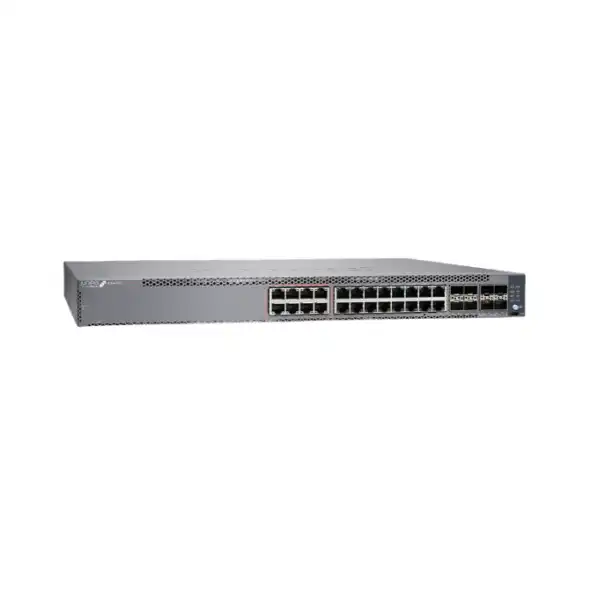
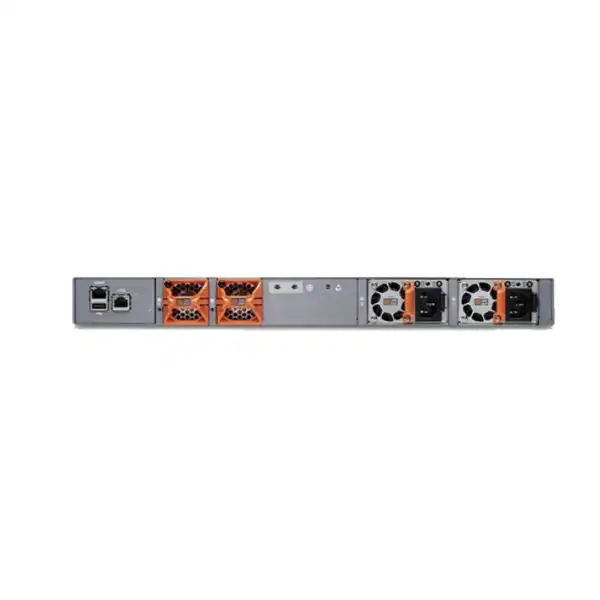
Juniper EX4100M Multigigabit Ethernet Switch Dubai
The Juniper EX4100 Multigigabit family brings PoE++, multigigabit copper access, high-speed 10/25GbE stacking and uplink flexibility, Junos OS, Virtual Chassis, EVPN-VXLAN and Mist cloud-management options into a 1U enterprise access-switching platform. For buyers, the first decision is not simply whether to choose “EX4100M”; it is whether the 24-port EX4100-24MP or 48-port EX4100-48MP matches the actual endpoint, PoE, uplink, resiliency and licensing requirement.
What is the Juniper EX4100M?
EX4100M is commonly used to refer to Juniper’s EX4100 Multigigabit Ethernet Switch family. The orderable multigigabit models are EX4100-24MP and EX4100-48MP. They are fixed 1U access switches intended for modern campus and branch networks that need a combination of 1GbE and multigigabit copper access, PoE++, high-speed uplinks, Junos OS and optional Mist cloud operations.
EX4100M family position: why the exact suffix matters
A frequent purchasing mistake is treating “EX4100M” as a single switch with one fixed port map. Juniper’s published hardware lineup identifies the multigigabit variants as EX4100-24MP and EX4100-48MP. The “MP” models belong to the broader EX4100 line, but their access-port behavior differs from the standard 1GbE EX4100-24P, EX4100-24T, EX4100-48P and EX4100-48T models. The multigigabit variants are specifically relevant when a deployment has endpoints whose Ethernet requirement is greater than 1Gbps, or where newer powered devices require PoE++ rather than ordinary PoE+.
This distinction affects far more than the product label. It changes copper port speeds, PoE capability, switch throughput, electrical load, cabling expectations, uplink planning, budget and potentially the number of access switches needed. A school adding high-throughput wireless access points may value a smaller number of 5GbE or 10GbE copper ports. A corporate floor with many ordinary phones, printers and desktops but a smaller number of 2.5GbE wireless access points may value a 48-port unit with a different speed mix. Both scenarios may be described casually as “multigigabit switching,” yet they lead to different hardware decisions.
The EX4100M page therefore should be treated as a family-selection page rather than a promise that every port on every model supports every multigigabit rate. FourTeck should match the endpoint schedule to the individual port capabilities before a bill of materials is finalized. That check is especially important when an organization expects 5GbE or 10GbE over copper, because those higher access speeds are provided on the EX4100-24MP’s multigigabit ports, while the EX4100-48MP’s multigigabit access ports are specified up to 2.5GbE.
EX4100-24MP vs EX4100-48MP: buyer-focused comparison
| Decision area | EX4100-24MP | EX4100-48MP | Buyer implication |
|---|---|---|---|
| Copper access ports | 24 total | 48 total | Start with actual endpoint count plus growth, not simply current occupied ports. |
| Multigigabit access | 8 × 100M/1/2.5/5/10GbE | 16 × 100M/1/2.5GbE | The 24MP is the stronger fit when selected edge devices genuinely need 5GbE or 10GbE copper. |
| 1GbE access | 16 × 1GbE | 32 × 1GbE | The 48MP provides greater density for conventional enterprise endpoints while retaining 16 multigigabit ports. |
| Dedicated uplinks | 4 × 1/10GbE SFP+ | 4 × 1/10GbE SFP+ | Optics or DAC choices should be designed around link distance, fibre type and upstream interface compatibility. |
| Stacking / uplink ports | 4 × 10/25GbE SFP28 | 4 × 10/25GbE SFP28 | These ports support high-speed Virtual Chassis or uplink designs and need correct transceiver/cabling selection. |
| PoE capability | PoE++, up to 90 W per supported port | PoE++, up to 90 W per supported port | Per-port maximum is not the same as total PoE budget; calculate the combined endpoint draw. |
| Bidirectional data rate | Up to 472 Gbps | Up to 424 Gbps | The throughput figures reflect each model’s physical port architecture and should not be confused with Internet speed. |
| L2/L3 throughput | Up to 351 Mpps | Up to 315 Mpps | Both are enterprise access-class systems; final design still depends on traffic patterns and upstream architecture. |
| Virtual Chassis | Up to 10 members | Up to 10 members | Useful for simplified management and resilient access designs, but stacking topology and link media must be planned. |
| Power system | 920 W AC PSU family, supports dual load-sharing supplies | 920 W AC PSU family, supports dual load-sharing supplies | A second PSU can increase resilience and available PoE capacity; confirm exact BOM and power feed design. |
Six decisions that determine whether EX4100M is the right access switch
1. Real multigigabit demand
Identify exactly which endpoints require more than 1Gbps. Wireless access points are a common driver, but not every AP or endpoint needs 5GbE or 10GbE. Overbuying multigigabit ports increases cost without improving application performance when the connected device, cabling or upstream network remains the bottleneck.
2. PoE wattage profile
Build a device-by-device PoE budget. A switch that supports up to 90 W on a port does not automatically provide 90 W simultaneously to every port. Count APs, cameras, phones, displays, sensors and other powered devices, then include sensible reserve for startup behavior and future additions.
3. Uplink oversubscription
A floor may contain many 2.5GbE endpoints, yet application traffic still exits through a limited number of uplinks. Model expected concurrency, local traffic, Internet usage and server access before selecting 10GbE or 25GbE uplink paths and aggregation capacity.
4. Junos and Mist operating model
EX4100M can be operated as a Junos switch and can also participate in Juniper Mist Wired Assurance workflows. The right licensing and operational model depends on whether the organization wants local CLI-centric management, centralized cloud operations, additional analytics or a broader Juniper campus architecture.
5. Resilience objective
Decide whether redundancy is required at the power-supply, uplink, switch and management levels. A second PSU, redundant upstream paths and a well-designed Virtual Chassis can address different failure domains, but they should not be purchased as isolated features without an availability design.
6. Physical environment
Rack depth, airflow, electrical circuits, grounding, ambient temperature, cable routing and maintenance clearance matter in real deployments. The EX4100 multigigabit models use front-to-back airflow with AFO power and fan components, so cabinet and hot-aisle planning should preserve that direction.
Multigigabit access: where the EX4100-24MP and EX4100-48MP differ most
Multigigabit Ethernet allows selected copper links to run above 1Gbps without requiring every edge connection to move to fibre. That is valuable in existing buildings because suitable twisted-pair cabling may continue to be used at higher negotiated rates, depending on cable category, link length, installation quality and the endpoint’s supported Ethernet standard. It is especially relevant when access points or specialist workstations can exceed the practical ceiling of a 1GbE uplink.
The EX4100-24MP provides eight access ports supporting 100M, 1GbE, 2.5GbE, 5GbE and 10GbE, plus sixteen 1GbE copper ports. This makes it attractive when the design needs a relatively small number of very fast copper edge connections rather than simply a high overall port count. An example is a high-density wireless deployment where several APs have 5GbE or 10GbE Ethernet interfaces, combined with a smaller collection of ordinary 1GbE endpoints.
The EX4100-48MP instead provides sixteen multigigabit access ports supporting up to 2.5GbE and thirty-two 1GbE ports. It can be a better density choice for a standard office floor where many endpoints still operate at 1GbE while newer APs or other devices use 2.5GbE. The 48MP is not simply “twice the 24MP.” It provides twice the physical access-port count but has a different maximum rate on its multigigabit access group.
For procurement, this is one of the most important checks on the entire page. If a specification calls for 5GbE or 10GbE copper access, the EX4100-48MP should not be selected merely because it has more ports. Conversely, if the design only needs 2.5GbE for a number of Wi-Fi APs, using multiple 24MP units may be unnecessarily expensive or rack-intensive compared with a 48MP design. Endpoint-by-endpoint speed mapping is the cleanest way to avoid that mismatch.
PoE++ planning: 90 W per port does not mean unlimited power
Both multigigabit models support PoE++ and Juniper identifies support for up to 90 W on a port. This is useful for modern Wi-Fi access points, high-power cameras, certain building systems and other devices that exceed the 30 W range associated with PoE+. However, the switch’s total available PoE power is governed by the installed power supplies and the platform’s power budget. The published EX4100 data lists a 740 W PoE budget with one 920 W PSU and up to 1620 W with an appropriate dual-PSU configuration for the multigigabit models.
A correct PoE calculation starts with the powered-device schedule. Record each device’s expected draw and its maximum requested class rather than using a single assumed wattage across the whole floor. Access points may draw differently when radios, USB peripherals or IoT modules are enabled. Pan-tilt-zoom cameras can consume more power during motion or when heaters are active. Phones are usually modest consumers, while certain displays or building devices can be much more demanding. The design should retain reserve so that adding or replacing an endpoint does not immediately exhaust the power budget.
The EX4100 Multigigabit platform also supports fast and perpetual PoE functions. In practical terms, these capabilities are intended to reduce power interruption to connected devices during certain switch boot or reboot situations. That can be operationally significant for APs, phones and surveillance devices because preserving endpoint power may reduce the time needed for them to restart and rejoin services. The exact behavior still depends on configuration and the overall maintenance event, so it should be tested in environments with strict service requirements.
For a Dubai installation, the electrical design should also consider rack PDUs, UPS capacity, circuit loading and heat. A fully powered access switch can place a much larger load on a communications room than a non-PoE switch. If the quote includes a second 920 W PSU to increase power availability or resilience, the site should provide suitable independent power feeds where the availability design calls for them. Redundant PSUs connected to the same single failed circuit do not provide the same protection as genuinely diverse feeds.
Power supplies, fans and airflow
920 W AC power system
EX4100-24MP and EX4100-48MP use the JPSU-920-AC-AFO power-supply family. The chassis supports two PSUs, enabling 1+1 redundancy and additional PoE capacity when correctly configured. Juniper’s standard ordering information indicates that the normal EX4100-24MP and EX4100-48MP switch SKUs include one JPSU-920-AC-AFO; exact regional BOM contents should still be checked at order time.
Front-to-back airflow
The multigigabit models are specified with AFO, front-to-back airflow: cooler air enters at the port side and warm air exits toward the rear. Rack placement should maintain this direction. Power supplies and fan modules with conflicting airflow directions must not be mixed, because mismatched airflow reduces cooling effectiveness and can trigger alarms.
Hot-removable FRUs
The EX4100 power supplies and fan modules are field replaceable. When redundancy is correctly in place, a failed component can be replaced without treating the whole switch as a disposable unit. That matters for enterprise lifecycle planning because spares can be held for critical sites and service procedures can target the failed FRU rather than the entire chassis.
Uplinks, SFP+ and SFP28: avoid treating optics as an afterthought
Each EX4100 multigigabit model provides four 1/10GbE SFP+ uplink ports and four 10/25GbE SFP28 ports that can be used for stacking or uplink functions. These high-speed interfaces are one of the reasons the platform can support modern access-layer designs, but the switch chassis alone does not complete the connection. Optical transceivers, direct-attach cables or other supported media must match the port type, required speed, link distance, fibre plant and upstream switch or router.
For short intra-rack or adjacent-rack links, a supported DAC may be simpler and lower cost than installing optical modules and fibre patch leads. For longer runs, fibre type matters. Existing multimode fibre may support the required reach with the appropriate optics, while longer building or campus links may require single-mode fibre. The exact choice should be confirmed through Juniper’s current Hardware Compatibility Tool and the specification of the device at the far end. A physically compatible SFP form factor is not sufficient evidence that a particular optic is supported at the desired speed.
Uplink speed also needs a traffic model. Connecting twenty or forty-eight edge devices does not mean every endpoint transmits at line rate at the same moment, but newer wireless networks can create substantial bursts and east-west traffic patterns. A pair of 10GbE uplinks may be entirely suitable for a typical office floor, while a high-density Wi-Fi or media environment may justify 25GbE paths. The access switch should be considered as part of an end-to-end architecture rather than specified in isolation.
Redundant uplinks should terminate into a topology that genuinely protects against failure. Two cables connected to one upstream switch do not protect against that switch failing. Depending on the design, resilient paths may terminate into separate aggregation devices or participate in a Juniper fabric architecture. Link aggregation, routing and spanning-tree behavior must match the intended topology. FourTeck can use the current core or distribution platform, fibre inventory and port availability to turn the uplink requirement into a complete parts list.
Performance and scale: what the published numbers mean
Juniper specifies the EX4100-24MP at up to 236 Gbps unidirectional packet switching, 472 Gbps bidirectional data rate and 351 Mpps L2/L3 throughput. The EX4100-48MP is specified at up to 212 Gbps unidirectional, 424 Gbps bidirectional and 315 Mpps. These figures reflect the switch fabric and packet-forwarding capability of the respective hardware models; they are not a statement that every application will experience that speed, nor are they an Internet-throughput guarantee.
At the access layer, real performance is shaped by endpoint NIC speed, Ethernet negotiation, cable condition, VLAN and routing design, uplink capacity, policy features, traffic patterns and the performance of the servers, WAN or security appliances further upstream. A laptop on a 1GbE port remains limited to its negotiated link rate even when the switch fabric is capable of hundreds of gigabits. Likewise, a 2.5GbE access point cannot deliver an aggregate user experience beyond what its radios, backhaul, uplinks and application paths allow.
The EX4100M should therefore be sized by architecture, not headline throughput. Use the switch capacity to verify that the platform has appropriate forwarding headroom, then focus the design process on where congestion can actually occur. In many enterprise floors, uplink oversubscription and WAN or firewall capacity matter more than raw local switching fabric. In specialist environments with heavy local east-west traffic, the relationship between access-port demand and uplink bandwidth deserves more detailed modelling.
Junos OS, Mist Wired Assurance and the management decision
EX4100 Multigigabit switches run Junos OS, giving organizations a familiar Juniper operational model for configuration, policy, monitoring and troubleshooting. The platform is also cloud-ready and supports Juniper Mist Wired Assurance. Those two facts should not be collapsed into the assumption that every buyer must operate the switch from the cloud. The operating model should be selected according to the network team’s processes, desired automation, visibility requirements, subscription strategy and existing Juniper estate.
Mist Wired Assurance can provide cloud-based onboarding, provisioning, operational visibility and service-level insights for supported switches. Juniper positions the EX4100 as an AI-driven switching platform when integrated into the Mist environment, using rich telemetry to help identify wired experience problems. For organizations already using Mist-managed wireless, bringing access switching into the same operational environment can simplify troubleshooting across wired and wireless layers. This is particularly useful when teams want to trace user experience from an AP or endpoint back through the switch rather than correlate separate management platforms manually.
Cloud management does not remove the need for sound network design. VLANs, routing, authentication, redundancy, uplinks and PoE policies still need to match the site. It also introduces subscription and organizational considerations: cloud account ownership, role-based access, change-control procedures, licensing term and renewal budgeting should be agreed before deployment. An organization with strict operational separation or an existing Junos automation stack may choose a different management balance than a distributed enterprise seeking centralized cloud operations.
When requesting a quote, indicate whether the project requires Juniper Mist Wired Assurance and whether related services such as Marvis for Wired are being evaluated. That lets the license term and hardware class be matched correctly. The 24-port EX4100-24MP is treated as a Class 2 switch for Flex licensing, while the 48-port EX4100-48MP falls into Class 3. A generic “Juniper license” line item is not precise enough for procurement.
Flex licensing: Standard, Advanced and Premium are procurement decisions
Juniper’s EX Series Flex licensing model includes Standard software capabilities and additional Advanced or Premium tiers. Standard features are available with the Junos OS image that ships with the switch. Advanced and Premium licenses unlock additional functions according to the current Juniper licensing matrix. Because feature entitlements can evolve by software release, the correct procedure is to map required functions to the current licensing documentation rather than assume that a feature belongs to a particular tier based on an older project.
Standard
Suitable when the required network functions are covered by the standard Junos software included with the switch. The bill of materials still needs to consider support services and any separate Mist cloud subscription requirement.
Advanced
Adds licensed feature entitlements beyond Standard. Perpetual and subscription approaches exist in the Flex model; subscription bundles may also include Mist Wired Assurance depending on the SKU and current program.
Premium
Targets deployments that need the higher licensed feature tier. The decision should be driven by explicit required capabilities, not simply by choosing the most expensive tier as a default.
Subscription terms and support bundles should be aligned with the customer’s budgeting and lifecycle horizon. A three-year project may prefer one licensing structure while a long-lived campus standard may choose another. Before ordering, FourTeck can verify the current Juniper SKU, device class, term and support combination for the intended EX4100-24MP or EX4100-48MP deployment.
Virtual Chassis: up to ten EX4100 members, with design implications
Juniper Virtual Chassis allows multiple compatible EX4100 switches to operate as a single logical system. The EX4100 platform supports Virtual Chassis configurations of up to ten members. For an access network, that can simplify management and create flexible scale-out designs because multiple physical switches can be configured and monitored as one logical device rather than as separate islands.
The availability value depends on topology. A Virtual Chassis should not be described simply as “stacking” without considering which links connect which members, where uplinks terminate, what happens when a member or cable fails and how the control role is distributed. A ring or other resilient topology can provide a different failure response from a simple chain. The four 10/25GbE SFP28 ports give the EX4100M substantial flexibility for Virtual Chassis interconnects and high-speed uplinks, but consuming them for one purpose changes what remains available for the other.
Physical distance also matters. Switches in the same rack can often be interconnected using short supported direct-attach media. Switches in different cabinets or rooms may require optical links and fibre plant. The exact Virtual Chassis media, speed and compatibility should be confirmed against Juniper’s current supported options. If the design spans floors or buildings, failure domains, cable routes and maintenance boundaries should be documented before adopting a single logical chassis across that distance.
Virtual Chassis is particularly useful when a building requires more ports than one switch provides but the operations team wants a unified configuration and predictable expansion model. It is less compelling when the organization deliberately wants each access switch to remain an independent failure and change domain. The right choice is operational as well as technical.
EVPN-VXLAN and campus fabric readiness
Juniper lists EVPN-VXLAN support as part of the EX4100 campus-fabric capability. For buyers planning a modern campus, this can position the EX4100M as more than a basic VLAN-only access switch. EVPN-VXLAN architectures can provide scalable segmentation and control-plane-driven network behavior across a fabric, but the value appears only when the wider design—including distribution or core switches, routing, policy, management and licensing—has been engineered as a fabric.
A small branch that needs conventional VLAN access should not be forced into an EVPN-VXLAN project simply because the switch supports it. Conversely, a large campus standardizing on Juniper fabrics should confirm the exact role the EX4100M will play, which software features are required and how edge policies will be provisioned. Fabric capability is a platform option, not an automatic deployment mode.
For a new Dubai campus, FourTeck can help separate the hardware purchase from the architecture decision. If the project is a simple access refresh, the bill of materials may be straightforward. If it is part of a broader EVPN-VXLAN modernization, the quotation should include the necessary design inputs, licensing, optics, aggregation compatibility, implementation and migration effort rather than treating each switch as an isolated box.
Security and telemetry capabilities that matter at the access edge
Access switches sit close to users and devices, so visibility and link security can be as important as raw port count. The EX4100 multigigabit platform supports MACsec AES-256 for link-layer encryption on supported interfaces, helping protect traffic on Ethernet links from unauthorized interception. Whether MACsec is needed depends on the threat model and link topology. It may be particularly relevant on switch-to-switch links that traverse less controlled building pathways or shared physical infrastructure.
The platform also supports flow-based telemetry, sFlow, IPFIX and streaming operational data. Juniper highlights per-flow analytics as a way to observe traffic patterns without relying solely on coarse interface counters. In a managed environment, telemetry can contribute to anomaly detection, troubleshooting and service-level insight. This does not replace a full security monitoring stack, but it gives network teams more evidence when investigating unusual traffic or performance degradation.
The EX4100 family provides twelve QoS queues per port, with eight unicast and four multicast queues. That is relevant for environments with voice, video, business applications, building systems and other traffic classes that need predictable treatment under congestion. A queue count alone does not create good QoS; classification, marking trust, scheduling and upstream consistency still need to be designed end to end.
The switch also supports jumbo frames up to 9216 bytes and substantial Layer 2 and Layer 3 scale for an access platform, including a large MAC-address table. These features may matter for specific campus or top-of-rack scenarios, but they should be matched to the actual application. Enabling jumbo frames indiscriminately, for example, can create path-MTU problems if the rest of the network is not configured consistently.
Physical specifications and installation considerations
| Specification | EX4100 Multigigabit guidance |
|---|---|
| Form factor | Fixed 1U access switch. |
| Approximate chassis dimensions | About 1.72 in high × 17.4 in wide × 13.8 in deep before allowing for rear FRUs, cabling and service space. |
| Operating temperature | 0°C to 45°C under published normal operating conditions. Site cooling should be designed so the rack inlet remains within supported limits. |
| Airflow | Front-to-back on the EX4100-24MP and EX4100-48MP standard AFO configuration. |
| Maintenance clearance | Juniper hardware guidance lists 30 inches / 76.2 cm maintenance clearance. Cabinet layout should provide practical front and rear service access. |
| Management and console | Dedicated RJ-45 management, RJ-45 console, USB-C console and USB Type-A interfaces are listed for the multigigabit models. |
| Memory and storage | 4 GB DRAM and 8 GB internal storage are published for EX4100 multigigabit models. |
Dubai and UAE deployment: cooling, power and communications-room discipline
The published operating range for EX4100 switches reaches 45°C, but that figure should not be used as a reason to run a communications room hot. Enterprise switch reliability depends on stable inlet temperature, unobstructed airflow and a clean environment. In the UAE, building cooling outages or poorly ventilated telecom closets can raise temperature rapidly. A room that is comfortable under normal office conditions may become unsuitable after hours if its air-conditioning schedule changes.
Rack design should preserve the switch’s front-to-back airflow and prevent hot exhaust from one device from feeding the intake of another. Blank panels, cable management and sensible device placement can improve airflow. The front of the EX4100M carries dense copper and optical connections, while the rear contains power and cooling FRUs, so both sides need accessible service space. Avoid routing heavy bundles in a way that obstructs vents or makes fan and PSU replacement difficult.
Power planning should distinguish switch electronics from PoE load. A non-PoE access switch can often be supported by a modest UPS allocation, while a PoE++ switch powering many APs and cameras may require significantly more runtime capacity. If the business expects phones, wireless and surveillance to remain available during an outage, the UPS design must include the connected PoE load, not just the switch chassis. Backup generator transfer time and battery autonomy should be considered together.
Grounding, local electrical compliance and rack PDU design should be handled by qualified personnel. For a resilient deployment, it is often useful to feed redundant PSUs from separate PDUs backed by independent circuits or UPS paths, where the site infrastructure allows. This creates a more meaningful failure boundary than simply installing two PSUs on one electrical source.
Cabling: multigigabit results depend on the copper plant
Buying a multigigabit switch does not automatically make every existing cable run suitable for the desired rate. Negotiated speed depends on the endpoint, switch port, cable category, total channel length, connector quality, patch panels, patch cords and electromagnetic environment. Older cabling may support 2.5GbE or 5GbE satisfactorily over many installed channels, but a requirement for 10GbE copper demands closer attention to category, distance and installation quality.
For a Wi-Fi refresh, the best process is to map each AP location to its cable test result and intended Ethernet speed. A high-end AP connected through a degraded or incorrectly terminated cable may fall back to a lower rate, creating a hidden bottleneck that can be mistaken for a switch or wireless problem. Certification testing is especially valuable when the access layer is being upgraded specifically to exploit multigigabit rates.
PoE adds another dimension because cable heating and bundle size can matter when many high-power endpoints are energized. Structured-cabling design should follow the applicable standards and the cable manufacturer’s guidance for high-power PoE bundles. A complete EX4100M project may therefore include network-switch procurement, cable validation, patching cleanup and AP or endpoint migration rather than a simple one-for-one switch replacement.
Typical EX4100M use cases
High-density Wi-Fi access
Wireless access points are a primary reason to deploy multigigabit edge switching. Wi-Fi 6, Wi-Fi 6E and newer AP designs can exceed a single 1GbE backhaul under suitable client loads. EX4100M provides multigigabit copper plus PoE++ so selected APs can receive both higher Ethernet speed and higher power from the same access switch.
Corporate campus floors
A mixed endpoint floor may combine phones, desktops, printers and cameras at 1GbE with APs at 2.5GbE or faster. The 48MP is often attractive when density dominates and 2.5GbE is sufficient, while the 24MP is worth evaluating when several endpoints require 5GbE or 10GbE copper.
Education and training facilities
Schools, universities and training centers often support high wireless concurrency and many PoE devices. Multigigabit ports can remove AP uplink bottlenecks, while centralized management and Virtual Chassis can simplify operations across repeated access closets.
Hospitality and large venues
Hotels, event spaces and similar sites may have dense Wi-Fi, IP surveillance, phones and IoT endpoints. The design should place equal emphasis on PoE budget, uplink capacity, room cooling and operational visibility because endpoint quantity can be substantial.
Healthcare and smart buildings
Where networks carry cameras, sensors, wireless infrastructure and building devices, PoE++ and segmentation capability can be valuable. Procurement should verify device certification, security policy, uptime targets and any special cabling or electrical requirements before finalizing the switch standard.
Branch modernization
Larger branches that need local switching, PoE and cloud-ready operations can use the EX4100M as a standardized access platform. The business case is strongest when multigigabit endpoints, Juniper management consistency or future access-layer growth justify the capability over a simpler 1GbE switch.
When the EX4100M may be more switch than you need
A balanced product page should also identify when a different option deserves consideration. If nearly every endpoint is 1GbE and PoE+ is sufficient, a standard EX4100 PoE model may meet the requirement at a lower cost and with simpler power planning. Paying for multigigabit and PoE++ capability has limited value when there is no device roadmap that can use it.
If the network requires substantially higher uplink bandwidth, greater switching capacity or a different port architecture, Juniper’s EX4400 family is one nearby comparison. Juniper positions EX4400 as a higher-performance access platform with 100GbE uplink/stacking capability on relevant models and greater overall switching capacity. That does not make EX4400 automatically better; it makes it a different fit for designs with more demanding aggregation, uplink or growth requirements.
If a site only has a handful of powered endpoints and no 2.5GbE, 5GbE or 10GbE copper need, a smaller switch family may also be more appropriate. Conversely, if a site expects every access port to require 5GbE or 10GbE, neither EX4100M model should be assumed to meet that density without careful mapping. The right network standard often combines more than one access-switch SKU across different building types.
The goal is not to maximize switch specification. It is to select enough port speed, PoE, uplink and feature headroom for the business without creating avoidable cost, power draw or operational complexity.
Migration from an older access-switch environment
Replacing existing access switches is usually more than moving patch cords. A proper migration begins with the current configuration: VLAN assignments, voice VLANs, spanning-tree settings, link aggregation, routing interfaces, authentication policies, port-security rules, DHCP relay, QoS, SNMP or telemetry, management addressing and uplink design. Each function must be mapped to the target Junos configuration and tested before the change window.
Port mapping is especially important when moving to a model with mixed 1GbE and multigigabit interfaces. High-speed APs or workstations should be deliberately assigned to multigigabit ports. Ordinary endpoints can remain on 1GbE ports. If the migration team patches devices arbitrarily, the organization may purchase multigigabit capability but fail to use it where it matters.
PoE behavior should be reviewed during migration. Older switches may use different power budgets or PoE standards. Confirm that every powered device is supported and that the new switch has enough budget with the installed PSU configuration. For critical APs, phones or cameras, plan the sequence so endpoint downtime is predictable. Fast and perpetual PoE features may reduce certain interruptions after the platform is configured, but the initial physical migration still requires careful scheduling.
Operational tooling may also change. A team moving from another vendor’s CLI or controller to Junos and Mist should allow time for template design, admin-role configuration, alert tuning, documentation and staff familiarization. Cloud onboarding should be tested before the production cutover rather than left to the final hour. If NAC or 802.1X is used, integrate and validate authentication behavior with representative endpoint types.
Finally, plan rollback. Keep the old configuration, cable map and previous switch available until the new system has passed connectivity, PoE, uplink, redundancy and monitoring checks. A migration method that can reverse cleanly is often safer than a faster method with no recovery path.
Compatibility and accessories that should be confirmed in the quote
Optics and DACs
Select supported SFP+ or SFP28 media by speed, reach, fibre type and the interface at the far end. Do not assume a third-party or legacy optic is supported simply because it fits the cage.
Second PSU
A second JPSU-920-AC-AFO may be required for 1+1 resilience, higher available PoE budget or both. Include the correct power cords and verify independent electrical feeds where required.
Rack mounting
Confirm whether the standard rack kit is sufficient or whether an adjustable four-post or wall-mount solution is needed for the installation. Cabinet depth and rear service access should be checked.
Licenses and subscriptions
Map Advanced or Premium Flex features, Mist Wired Assurance, Marvis for Wired and support requirements to the exact 24-port or 48-port class and subscription term.
Structured cabling
Validate copper cable category and test results for the desired 2.5GbE, 5GbE or 10GbE link rates, particularly on long or older installed runs.
Support and spares
Define response expectations, replacement coverage and whether local spare PSUs, fans or an entire standby switch are justified by business criticality.
Designing the bill of materials instead of ordering only the chassis
Enterprise switch quotations are most accurate when they are built as a bill of materials rather than a single product line. The chassis SKU is only the start. A practical EX4100M BOM can include the chosen switch model, a second PSU if required, correct UAE-compatible power cords, supported transceivers or DACs, rack accessories, software licenses or subscriptions, support coverage, installation services and any migration or configuration work.
The current network architecture determines many of those items. A switch connecting to an existing 10GbE multimode-fibre core needs different optics from one connecting over 25GbE single-mode fibre. A site using two independent upstream switches may require twice the number of uplink optics compared with a single-homed design. A Mist-managed deployment has different subscription requirements from a Junos-only deployment. A high-PoE site may need a second 920 W PSU even if a lighter office would not.
Quantity planning should include spare capacity. Filling all 48 ports on day one may appear efficient, but it leaves no room for future APs, cameras, desks or temporary connections. A typical design keeps a deliberate percentage of spare ports, though the right reserve depends on how frequently the site changes. The same logic applies to PoE and uplinks: capacity should not be engineered so tightly that a small change immediately triggers another hardware purchase.
Procurement teams should also distinguish production switch SKUs from spare chassis SKUs and TAA-compliant variants where applicable. Those parts may have different included components. The quote should state what is included and what must be ordered separately, especially optics, power supplies, fans and licensing.
Practical model-selection examples
Example A: 18 endpoint floor, eight high-speed APs
If eight access points genuinely require 5GbE or 10GbE copper and the remaining endpoints fit within sixteen 1GbE ports, EX4100-24MP aligns naturally with the port map. The next checks are PoE budget, uplink requirement and growth. If the floor is likely to exceed 24 endpoints soon, a different layout may be more economical than adding another switch later.
Example B: 40 endpoint office with twelve 2.5GbE APs
EX4100-48MP can be attractive because its sixteen multigigabit ports cover the AP requirement while thirty-two 1GbE ports support conventional endpoints. The design should still reserve spare capacity and confirm the AP power profile. If several future devices will need 5GbE, the 48MP’s 2.5GbE maximum on its multigigabit access group becomes a limitation.
Example C: mostly 1GbE branch
If the branch has one or two ordinary APs and all endpoints are 1GbE, a standard EX4100 PoE model deserves comparison. EX4100M may still be chosen for standardization or planned Wi-Fi upgrades, but that should be a deliberate lifecycle decision rather than an assumption that “multigigabit” is always preferable.
Example D: high-growth campus edge
If the access layer is expected to expand into higher uplink speeds, richer campus fabrics and denser multigigabit access, EX4100M should be compared with higher-end EX families before standardization. The decision may be less about today’s port count and more about the uplink architecture and five-year network roadmap.
Operations after deployment: what should be monitored
A successful access-switch deployment includes an operations baseline. Record normal interface utilization, uplink load, PoE consumption, device temperatures, fan and PSU status, error counters and key service-level indicators. Baselines make it easier to recognize change. A 10GbE uplink at 20 percent utilization is not a concern merely because it is busy, while an uplink whose utilization jumps sharply after an AP refresh may indicate that the network has moved closer to a real bottleneck.
PoE telemetry is particularly useful in EX4100M deployments because powered endpoints can represent a large part of the switch’s electrical load. Monitor remaining budget and identify ports with unexpected draw. If a new AP model requires substantially more power than the previous generation, the margin can disappear quickly across a large floor. Capacity review should be part of change control, not only part of the original installation.
Environmental alarms also deserve attention. Fan failure, PSU failure, high temperature or airflow problems can develop into outages if left unresolved. The presence of redundant components buys maintenance time; it does not remove the need to replace the failed component. Sites with strict uptime targets may keep compatible spares locally so replacement does not depend on international logistics.
Configuration backup, software maintenance and license tracking should be included in the operating runbook. If Mist is used, define who owns the organization, who can change configuration, how alerts are routed and how subscriptions are renewed. If local Junos operations are used, retain a controlled backup process and documented recovery method. The switch is a long-lived infrastructure component, so operational discipline matters as much as the purchase specification.
Frequently asked buyer questions
Is EX4100M one model?
No. EX4100M is commonly used as a shorthand for the EX4100 Multigigabit family. The two orderable multigigabit models are EX4100-24MP and EX4100-48MP, and their access-port speed mixes differ.
Does every EX4100M port support 10GbE copper?
No. EX4100-24MP has eight copper access ports that support up to 10GbE and sixteen 1GbE ports. EX4100-48MP has sixteen multigigabit ports up to 2.5GbE and thirty-two 1GbE ports. The dedicated SFP+/SFP28 interfaces provide separate high-speed optical or DAC uplink/stacking options.
Can EX4100M power Wi-Fi 6E access points?
The platform supports PoE++ up to 90 W per supported port, which is suitable for many high-power AP designs. The exact AP model, requested PoE class, total switch PoE budget and cable plant still need to be verified.
How much PoE power is available?
Published EX4100 data lists 740 W with one 920 W PSU and up to 1620 W with the dual-PSU configuration for the multigigabit models. Final usable budget should be confirmed for the exact hardware and software configuration at quotation time.
Are optics included?
Juniper ordering information states that optics are sold separately for the standard EX4100 multigigabit switch SKUs. The required SFP+ or SFP28 modules or DACs must be selected for the specific uplink or Virtual Chassis design.
Does the switch include a power supply?
The standard EX4100-24MP and EX4100-48MP ordering descriptions indicate one JPSU-920-AC-AFO is included. Spare-chassis SKUs are different and may exclude power supplies and fans, so the exact part number matters.
Can I add a second PSU?
Yes. The multigigabit models support two 920 W AC power supplies with 1+1 redundancy. A second PSU can also increase available PoE capacity. The electrical feed design should match the intended resilience level.
Does EX4100M support Virtual Chassis?
Yes. The EX4100 platform supports Virtual Chassis with up to ten members. Topology, media, uplink use and failure behavior should be designed rather than treated as a default checkbox.
Is Juniper Mist mandatory?
No. EX4100 runs Junos OS and can be managed using traditional Juniper operational methods. Mist Wired Assurance is an available cloud-management and assurance option and may be included with or purchased through relevant subscription licensing.
Which license class applies?
EX4100-24MP is a Class 2 24-port switch in Juniper Flex licensing. EX4100-48MP is Class 3. Advanced and Premium license SKUs therefore differ between the two models and must match the required feature tier and term.
Can EX4100M be used in an EVPN-VXLAN campus?
The EX4100 platform supports EVPN-VXLAN campus-fabric capabilities. Whether that is the correct deployment mode depends on the larger Juniper architecture, software entitlements, aggregation/core design and operational model.
What must be checked for a Dubai quotation?
Confirm the exact model, quantity, endpoint count, required copper speeds, PoE device list, uplink speed and distance, fibre type, redundancy target, licensing or Mist requirement, rack environment, power feeds, installation scope and support term.
Procurement risk checklist
The following risks are worth clearing before a purchase order is released. They are common because they sit between networking, facilities and procurement rather than inside one team.
What should determine the final EX4100M selection?
What FourTeck needs from the buyer
You do not need a completed low-level design before requesting a quote. The following inputs are enough to turn a generic EX4100M inquiry into a much more accurate model, license and accessory recommendation.
Number of switches, floors, buildings or branches and whether a common standard is required.
Approximate count of APs, phones, cameras, workstations, IoT and other devices per switch.
How many endpoints need 1GbE, 2.5GbE, 5GbE or 10GbE copper connectivity.
Powered-device models or wattage estimates and whether maximum PoE resilience is required.
10GbE or 25GbE, fibre type, approximate distance, connector environment and upstream device model.
Single or dual PSU, redundant uplinks, Virtual Chassis requirement and acceptable failure domains.
Junos-only or Mist-managed preference, needed advanced features, desired subscription term and support level.
Supply only, rack installation, configuration, migration, testing, documentation and onsite support requirements.
Build the right Juniper EX4100M configuration for your Dubai network
A useful EX4100M quotation should identify the exact 24MP or 48MP hardware, multigigabit port fit, PoE headroom, PSU redundancy, 10/25GbE uplink media, Juniper licensing, Mist requirements, rack accessories and migration scope. Share your endpoint and uplink requirements with FourTeck so the bill of materials reflects the network you are actually deploying rather than a generic switch description.

Reviews
There are no reviews yet.