
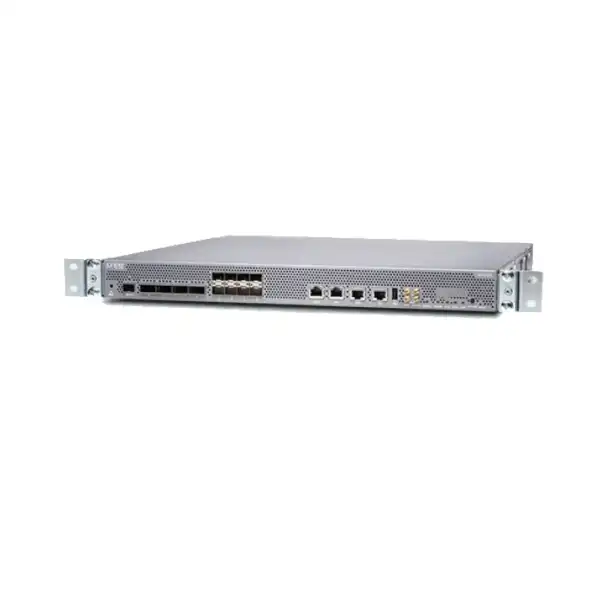
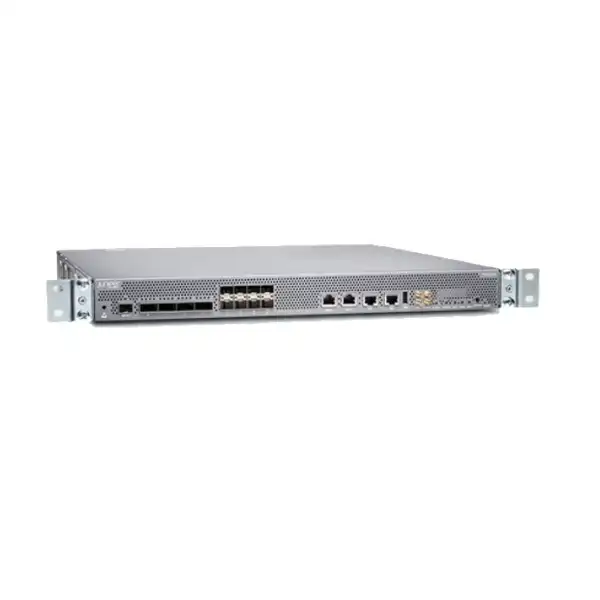
Juniper MX204 Universal Routing Platform in Dubai, UAE
The Juniper MX204 is designed for buyers who need dense 10GbE, 40GbE, or 100GbE edge connectivity without moving to a large modular chassis. Its 400 Gbps system capacity, compact 1U footprint, Junos operating environment, Trio packet-forwarding architecture, redundant power supplies, and built-in timing interfaces make it relevant to service-provider edge, metro aggregation, internet peering, data-center interconnect, mobile transport, and demanding enterprise WAN designs.
Direct answer for buyers evaluating the MX204
Where the Juniper MX204 fits in a modern network
The MX204 occupies a useful position between smaller branch or access routers and larger modular edge systems. It is not simply a high-port-count Ethernet switch, and it is not a chassis designed for unlimited line-card expansion. Its value comes from placing a substantial portion of MX Series routing and service functionality into a compact fixed platform. For buyers, that distinction matters because the purchasing decision should be based on the services the router must perform, the traffic it must forward, and the interface combinations it must expose—not only on the headline 400 Gbps number.
At the provider edge, the MX204 can aggregate high-speed Ethernet connections and participate in sophisticated routing designs while keeping rack consumption low. In a peering deployment, it can terminate 10G, 40G, or 100G handoffs and run Junos routing policy in a familiar operational framework. In a metro environment, it can sit at an aggregation point where multiple customer, access, or transport links converge. In a data-center interconnect or cloud-edge design, it can provide a dedicated routing boundary rather than forcing core switching infrastructure to absorb every WAN or external-routing function.
The platform is also relevant when timing and synchronization are part of the requirement. Juniper documents integrated hardware-based timing support, including Synchronous Ethernet and Precision Time Protocol capabilities, together with dedicated timing-related interfaces. That makes the MX204 materially different from general-purpose enterprise routers that may offer high-speed Ethernet but lack the same service-provider timing focus. Mobile backhaul, financial-services timing, and other synchronization-sensitive designs should still be engineered against the exact Junos release, timing profile, clock architecture, and upstream or downstream equipment involved.
Because the MX204 is fixed-configuration, its strengths and limits are unusually clear. A buyer gains a compact, dense platform with predictable physical characteristics, but loses the expansion model of a large modular MX chassis. If the planned network is expected to outgrow 400 Gbps quickly, needs many more 100GbE interfaces, requires hardware modules unavailable on the MX204, or needs a different redundancy architecture, the better design may be a larger MX platform rather than forcing the MX204 into a role beyond its intended scale.
Verified MX204 hardware and platform specifications
| Specification | MX204 detail | Buyer relevance |
|---|---|---|
| System capacity | 400 Gbps | Size the design against real bidirectional traffic, services, growth, and port mix rather than assuming every physical interface can be loaded independently without architectural limits. |
| Form factor | 1U fixed configuration | Strong fit for rack- and power-conscious edge locations; expansion comes through external topology or a different platform rather than additional line cards. |
| Rate-selectable data ports | 4 ports supporting 100GbE or 40GbE, with 10GbE breakout options | Port mode and breakout design must be confirmed before optics and cabling are ordered. |
| Fixed SFP+ data ports | 8 x 10GbE SFP+ ports; supported 1GbE operation depends on configuration and Junos support | Useful for mixed-speed aggregation, but transceiver compatibility and speed configuration should be validated for each link. |
| Maximum published Ethernet counts | Up to 24 x 1GbE, 24 x 10GbE, 4 x 40GbE, or 4 x 100GbE in supported configurations | These are platform maxima, not a promise that all maxima coexist; design against valid port combinations. |
| Operating system | Junos OS | Existing Junos skills, automation, routing policy, monitoring, and operational standards can reduce integration friction, but release selection remains important. |
| Routing Engine | Single built-in Routing Engine, 8-core architecture, 32 GB DDR4 class memory and SSD storage as documented by Juniper | The Routing Engine is integrated rather than field-swappable as a redundant pair, an important resilience consideration compared with larger modular MX systems. |
| Power | AC or DC variants with two power-supply modules and 1+1 PSU redundancy | Choose the correct base hardware variant for the site and confirm independent power feeds where power redundancy is required. |
| Power consumption | Juniper Hardware Explorer lists approximately 240 W average and 280 W maximum for referenced AC/DC base variants | Use maximum and site-specific engineering values for PDU, UPS, thermal, and capacity planning rather than relying on marketing efficiency figures alone. |
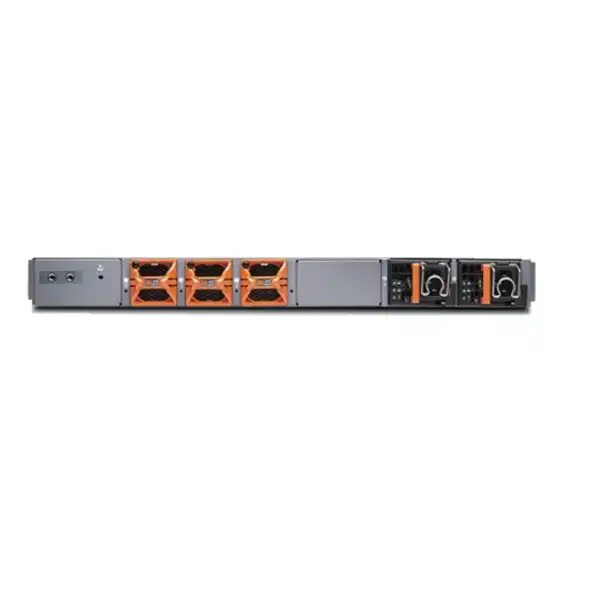
| Cooling | Three fan modules; front-to-back airflow is documented for current base variants | Rack hot-aisle/cold-aisle orientation and service clearance should match the ordered airflow direction and site design. |
| Dimensions | Approximately 44.7 cm wide, 4.4 cm high, and about 47 cm deep for the chassis; depth increases with FRU handles | Confirm cabinet depth, front/rear clearance, cable bend radius, and rail or mounting requirements before installation. |
| Weight | Approximately 10.3 to 10.5 kg fully equipped, depending on the documented variant/reference | Relevant for rack loading, handling, and installation planning. |
| Operating environment | 0°C to 55°C operating temperature; 5% to 90% RH noncondensing in Juniper published specifications | Data-center and telecom-room design must remain within supported environmental conditions under actual load. |
| Management interfaces | RJ-45 console, 10/100/1000 management Ethernet, USB and timing-related interfaces | Plan out-of-band management, console access, NTP/PTP architecture, monitoring, and remote recovery as part of deployment. |
Specification values should be matched to the exact Juniper orderable hardware variant, current Junos release, supported transceiver list, and project design at quotation time. Small differences between product pages, hardware guides, and current hardware-explorer records can reflect measurement conventions or hardware revisions.
Understanding the MX204 port architecture before you buy
The front-panel Ethernet design is one of the most important reasons to evaluate the MX204 carefully rather than purchase it by capacity alone. The platform provides four rate-selectable ports that accept QSFP-class optics and eight additional SFP+ ports. The four rate-selectable ports can be configured for 100GbE or 40GbE operation, or channelized into 10GbE lanes with the appropriate breakout approach. The eight SFP+ ports are primarily 10GbE interfaces and can support 1GbE operation under supported Junos and configuration conditions. This gives the platform flexibility, but the flexibility is governed by valid hardware and software combinations.
A buyer planning four 100GbE uplinks has a different design from a buyer planning two 100GbE carrier handoffs plus a bank of 10GbE customer or server links. Likewise, a metro aggregation site using 40GbE optics may require a different port-speed configuration than an internet-edge router using 100GbE transit. The physical sockets are only the starting point. Junos port mode, PIC mode, supported port combinations, optic compatibility, breakout components, and the intended use of the eight SFP+ interfaces all affect whether the final interface plan is valid.
100GbE edge
Use the rate-selectable ports with supported QSFP28 optics for 100GbE links. Confirm optic reach, fibre type, connector type, FEC requirements, peer compatibility, and whether all four 100G ports are required immediately or should leave capacity for growth.
40GbE aggregation
The same rate-selectable ports can operate at 40GbE with supported QSFP+ optics. This can be useful for existing metro, core, or data-center environments that have not moved every interconnect to 100GbE.
10GbE breakout
Channelizing multirate ports can expand 10GbE density, but the required breakout cable or optic system and valid Junos configuration must be confirmed. A theoretical lane count is not a substitute for an approved bill of materials.
Dedicated 10GbE SFP+
Eight front-panel SFP+ ports provide a straightforward home for 10GbE links. For 1GbE requirements, confirm the exact optic and Junos support because 1GbE operation is configuration-dependent rather than a simple assumption.
Mixed-speed designs
Mixed 100G, 40G, and 10G designs are where port-level configuration matters most. Validate the intended combination before finalizing transceivers, patching, remote-side interfaces, and migration sequencing.
Juniper’s current port-speed documentation distinguishes PIC-level and port-level configuration. In PIC mode, related ports operate under a common speed configuration and heterogeneous use is restricted. Port mode offers more granular combinations, but only documented combinations are valid, and changing mode or speed can require PIC resets. For an operational network, this has a direct migration implication: a speed change is not merely a label change on an interface. The maintenance plan must account for configuration commit behavior, interface resets, peer coordination, and service impact.
For procurement, list every expected link in a simple interface schedule: local MX204 port type, required speed, remote device and port, media type, fibre or DAC length, connector, optic SKU if known, redundancy relationship, and planned activation date. That schedule allows FourTeck to check the hardware and optics combination and also reveals whether the platform has enough practical headroom for the next growth stage.
Junos OS, Trio forwarding and service-edge capability
The MX204 belongs to the MX Series ecosystem and runs Junos OS, so its role extends beyond forwarding Ethernet frames at high speed. Junos provides the routing policy, protocol, automation, management, telemetry, and operational framework that allows the platform to function as a serious network edge. Juniper positions the MX204 for carrier-grade switching and routing, VPN services, high-speed transport, broadband and multiservice edge functions, and data-center internetworking. The programmable Trio architecture handles packet forwarding with the buffering, queuing, and service awareness expected from the MX family.
For enterprise buyers, the practical advantage is consistency. If the organization already operates Junos on MX, EX, QFX, SRX, ACX, or other Juniper platforms, network teams can reuse many familiar concepts around candidate configuration, commit workflow, routing policy, interface hierarchy, logging, NETCONF, telemetry, and automation. Familiarity does not eliminate design work, but it can reduce the operational discontinuity that appears when an edge-router refresh introduces a completely different command model and automation stack.
For service-provider buyers, the important question is which services will actually be enabled on the MX204 and what their scale characteristics are. Internet routing, MPLS-based services, Layer 2 services, Layer 3 VPNs, QoS, subscriber or service-edge functions, flow monitoring, tunnelling, and automation do not all create the same resource profile. Route scale, policy complexity, queueing design, telemetry volume, interface count, number of logical systems or routing instances, and service encapsulation can affect practical sizing. A platform that is comfortable as a 100G peering edge may need different validation when asked to combine peering, VPN termination, intensive telemetry, complex QoS, and large route tables in the same box.
Juniper also documents inline service functions in the MX family, including functions such as flow monitoring, 1:1 NAT, port mirroring, GRE and IP tunnelling, and other service features depending on platform and release. Buyers should not interpret a broad family-level feature list as automatic entitlement for every desired function on every MX204 software version. Feature availability, scale and licensing can vary with Junos release and commercial package. The correct process is to create a feature checklist from the intended design and validate each required capability against the exact release and license plan.
Automation is another strong reason to consider the platform. Junos exposes structured management approaches such as NETCONF and model-driven interfaces, while Juniper’s broader automation portfolio can support configuration and assurance workflows. The business value appears when automation is tied to real operating procedures: controlled configuration deployment, compliance checks, interface turn-up, telemetry collection, backup, change validation, and incident investigation. A purchase proposal should therefore include the intended management model, not only the router hardware.
Timing and synchronization: a differentiator for mobile and financial networks
The MX204 includes hardware-oriented timing capabilities that can be important in networks where time and frequency are operational requirements rather than background services. Juniper documents Synchronous Ethernet for frequency synchronization and Precision Time Protocol for frequency and phase synchronization, with the ability to combine timing approaches in a hybrid design. The chassis also exposes timing-related connections such as BITS, 1PPS, 10 MHz, time-of-day, and a PTP grandmaster-related interface. These are not decorative ports; they can be central to mobile transport and other synchronization-sensitive architectures.
A mobile transport project should define the timing hierarchy before hardware is ordered. Identify the grandmaster or primary reference clock, boundary or transparent clock roles if applicable, required PTP profile, SyncE requirements, holdover assumptions, clock-quality monitoring, timing redundancy, and the exact downstream devices that consume synchronization. The router should then be validated against that architecture and the planned Junos release. Timing failures can produce service effects that are difficult to diagnose if the network was built from a generic routing bill of materials with synchronization treated as an afterthought.
Financial-services buyers may have a different motivation. The router’s timing interfaces and packet transport functions can form part of a broader deterministic or timestamp-sensitive network, but the MX204 alone does not define the accuracy of an end-to-end financial timing system. The reference clock, PTP topology, timestamping behavior of adjacent devices, cabling asymmetry, monitoring, software configuration, and application architecture all matter. If the requirement is regulatory timestamp accuracy or extremely tight trading-system synchronization, treat the router as one component in an engineered timing chain.
For a normal enterprise WAN with no special timing requirement, these capabilities may not influence the buying decision. That is a useful example of balanced sizing: a feature can be technically impressive without being commercially relevant to every customer. The MX204 should be selected because the complete mix of throughput, ports, services, operational model, resilience and lifecycle fits the project.
Power, cooling, rack design and physical installation
A 1U form factor makes the MX204 easy to place conceptually, but physical deployment still requires proper engineering. Juniper offers AC-powered and DC-powered base variants, and current hardware specifications show two power supplies with 1+1 redundancy. The correct variant must match the facility. A data-center rack supplied by redundant AC PDUs will normally require the appropriate AC hardware and two independent feeds if true power-source redundancy is desired. A telecommunications environment may instead require the DC variant and compliant DC power distribution, cabling and grounding.
Current Juniper Hardware Explorer records for the base variants list approximately 240 W average and 280 W maximum power consumption. Use the maximum or project-approved engineering value when sizing UPS load, branch circuits and cooling; average consumption is useful for operating-cost estimates but should not be the only number used for infrastructure design. In a rack containing many MX204 units, small per-device differences accumulate, so PDU capacity, A/B feed design, breaker load and hot-aisle heat rejection deserve explicit calculation.
Cooling is front-to-back on current documented variants, with three fan modules and redundant fan capability in the product family description. Align that airflow with the data center’s cold-aisle/hot-aisle policy. Do not install a router with airflow opposing adjacent equipment unless the facility design explicitly supports it. Fibre management should also preserve clear intake and exhaust paths; tightly packed patch leads hanging across vents create avoidable thermal and maintenance problems.
Juniper’s physical documentation places the chassis at roughly 44.7 cm wide and about 47 cm deep, with additional depth when handles and field-replaceable components are considered. The hardware guide also specifies rack and cabinet requirements and service clearances. A procurement team should therefore confirm cabinet depth, front and rear door clearance, rail or mounting kit, cable bend radius, patch-panel position, power lead direction, grounding, and maintenance access before delivery. A nominally deep enough rack can still be awkward if power, fibre and rear-service clearances were ignored.
Dubai and UAE deployments may range from modern colocation facilities to enterprise communications rooms and outdoor-adjacent telecom spaces. The published operating range is broad, but the equipment should still be installed in a controlled environment that remains within Juniper’s temperature, humidity, dust and airflow requirements. Room-level environmental quality is part of reliability; the router’s operating specification is not a substitute for proper cooling and housekeeping.
Practical deployment patterns for the MX204
Internet edge and peering
An MX204 can terminate high-speed upstream, IX, cloud or private-peering links and apply Junos routing policy at the edge. The design should account for route scale, filtering, RPKI or routing-security architecture where used, BGP convergence expectations, DDoS response integration, telemetry, and the number and speed of external links.
A pair of routers may be preferred when service continuity is important. Remember that hardware redundancy inside one MX204 does not replace node-level redundancy; a single chassis still contains a single built-in Routing Engine and remains one failure domain.
Metro Ethernet aggregation
The combination of high-speed uplinks, breakout 10G options and MX service features can suit aggregation roles where access or customer services converge into a compact edge. Define VLAN, EVPN/VPLS or MPLS service architecture, QoS hierarchy, OAM, redundancy and the expected number of logical services.
If port density or service count is expected to expand aggressively, compare the fixed platform with a larger modular MX rather than sizing only for today’s connections.
Data-center interconnect edge
The MX204 can form a routed DCI boundary between facilities, carriers, clouds or WAN services. Confirm whether the requirement is pure Layer 3 transport, MPLS, EVPN, encryption elsewhere in the path, traffic engineering, telemetry or service separation. Optical reach often becomes as important as router selection.
For dark fibre or wavelength services, validate the exact optical design and any coherent or DWDM requirement with Juniper’s current compatibility resources rather than assuming every optic type is supported directly.
Enterprise WAN core or aggregation
Large enterprises can use the MX204 as a WAN aggregation router where multiple high-bandwidth carriers, data centers or campus cores meet. Its Junos routing policy and service capabilities are useful when the edge must handle more than simple default routing.
It may be excessive for a small branch or simple internet breakout. In those cases, a smaller platform can reduce cost and operational complexity while still meeting the actual requirement.
Mobile transport and synchronization
The integrated timing focus makes the MX204 relevant where packet transport must coexist with SyncE and PTP requirements. Map the clock topology, interface speeds, QoS, transport tunnels, failure behavior and monitoring before selecting optics and software.
A timing-capable router does not remove the need for a properly engineered grandmaster and reference-clock architecture.
Compact service-provider POP
Where rack space and power are expensive, a 1U 400 Gbps router can deliver a strong density profile. A pair can be deployed for node-level resilience without consuming the footprint of a modular chassis. This can be attractive in smaller points of presence, colocation racks and remote metro sites.
The trade-off is future modular expansion. If the POP is expected to become a major aggregation hub, model the three- to five-year interface and capacity trajectory before standardizing on the fixed form factor.
How to size the MX204 correctly
Start with traffic, but do not stop with traffic. The 400 Gbps system-capacity figure is a foundational limit, while real deployment suitability depends on the number of links, their speed, expected utilization, routing and service workload, failure scenarios, and future growth. A pair of 100G uplinks carrying 20 Gbps today may look small, but a failover scenario can concentrate traffic on one path. Conversely, a site with many low-utilization 10G services may be constrained by port count long before it reaches aggregate forwarding capacity.
Build a capacity model with at least three states: normal operation, single-link or single-node failure, and expected growth. For each state, estimate ingress and egress traffic, busiest-hour utilization, oversubscription policy, and reserve margin. Then compare that model with the interface schedule. If the planned design requires four 100G physical connections, those ports may be consumed even when actual traffic is far below 400 Gbps. Physical connectivity and forwarding capacity are separate sizing dimensions.
Route and service scale should be considered as well. An internet edge receiving large BGP tables, multiple address families and complex policy has different control-plane demands from a transport router carrying a small set of static or interior routes. A multiservice edge using many routing instances, MPLS labels, Layer 2 services, QoS constructs and telemetry streams also has a different profile. Juniper publishes scale information by Junos release and feature; use the intended software train and service mix when validating the design.
Resilience changes sizing. Two MX204 routers operating as independent redundant edge nodes can provide a stronger service architecture than one router with redundant power supplies. The pair must still be sized so that either surviving node can handle the intended failure-state load where that is a design objective. If both routers normally run at 70 to 80 percent of the relevant resource limit, a full failover may not be safe even though the normal-state dashboard looks acceptable.
Finally, choose an upgrade horizon. If the organization expects traffic to double within a year and the current requirement already consumes most of the platform’s practical capacity or 100G port count, buying the MX204 may defer rather than solve the scaling problem. A larger or newer MX platform can cost more initially but reduce an early forklift upgrade. If growth is moderate and the interface map remains within the fixed chassis, the MX204 can be an efficient way to avoid overbuying a large modular system.
For a quotation, provide FourTeck with current traffic levels, growth expectations, number of 1G/10G/40G/100G links, route and VPN requirements, resiliency model, optics distances, and target support term. Those inputs are far more useful than a request for “one MX204” because they expose whether the requested hardware actually fits the network.
Optics, cabling and compatibility planning
Transceivers are often the difference between a correct router purchase and an incomplete delivery. The MX204’s eight fixed 10GbE ports use SFP+ form-factor optics, while its four rate-selectable ports support QSFP28 for 100GbE and QSFP+ for 40GbE. Breakout operation introduces additional cable or transceiver choices. The correct part number depends on speed, fibre type, distance, wavelength, connector, peer device, link budget, and Junos support.
Do not select optics by connector alone. Two transceivers may both be QSFP28 and still serve completely different reaches or fibre plants. A short-reach multimode link inside a data hall, a single-mode 10 km carrier handoff, a longer metro connection, a passive DAC, and an active optical cable have different engineering constraints. The remote interface must also support the same Ethernet standard, FEC behavior and optical characteristics.
Juniper maintains a Hardware Compatibility Tool that should be used to verify the current transceivers, cables and adapters supported by the MX204 and the intended Junos version. This is especially important for 1GbE operation on ports normally associated with 10GbE and for adapter-based designs. A historical compatibility statement may refer to an older Junos release or an adapter that now has its own lifecycle status. The correct procurement decision is based on the present supported combination, not an old forum post or a generic optic vendor claim.
For breakout, define the far-end topology before ordering. A 40G or 100G-class physical socket being channelized into 10G lanes usually means multiple logical interfaces emerge from one physical port. The cabling must physically fan out to compatible SFP+ or equivalent endpoints, and Junos must be configured for the supported channelization mode. Labelling becomes important: field engineers should be able to map each breakout leg back to the parent port and logical interface without tracing fibres under pressure during an outage.
A complete optics schedule should therefore include local port, speed, optic or cable part number, fibre type, connector, wavelength, distance, far-end device, far-end optic, and spare requirement. For critical edge deployments, carrying validated spare optics can be as important as carrying a spare power supply because an optic failure can isolate a high-capacity link even when the router itself remains healthy.
Licensing, Junos release selection and support coverage
Hardware is only one part of an MX204 deployment. Juniper software licensing and support must be matched to the functions the organization expects to use. The exact commercial model can change over time, and specific features may be included, licensed, subscription-based, or dependent on Junos release and package. Rather than treating “Junos included” as the end of the discussion, create a list of required capabilities and map them to the current Juniper licensing structure at quotation time.
Typical questions include whether the router will perform internet edge routing, MPLS, Layer 3 VPN, Layer 2 services, advanced QoS, telemetry, automation, NAT, firewall functions, subscriber services, or other service-edge tasks. Some capabilities may be available broadly in Junos while others can have license or platform constraints. Scale can also differ by release. If the project depends on one specific feature, validate that feature explicitly instead of assuming that because it appears in an MX Series data sheet it is available in the desired form on every MX204 configuration.
Junos release selection deserves the same discipline. Newer is not automatically better for every production network. The operations team may standardize on a recommended release because it has completed internal certification, matches the rest of the fleet, supports required optics, resolves specific defects, and fits automation tooling. The selected release should support all required protocols and transceivers, and its known limitations should be reviewed before deployment.
Support coverage is a separate commercial decision. A production edge router carrying internet, cloud, metro, mobile or financial traffic should normally have an appropriate Juniper support plan that aligns with business criticality. Response target, software entitlement, RMA logistics, access to support resources, and contract term can affect operational risk. In the UAE, replacement logistics and onsite operational procedures should be considered alongside the nominal support tier.
Lifecycle status should also be checked at the time of purchase. Juniper’s current product and documentation pages continue to list the MX204 as an active supported platform, but lifecycle notices can change. Procurement teams should ask for current orderability, recommended software, support term and any published end-of-life or end-of-support notices applicable to the exact SKU being quoted. This is particularly important for long-lived infrastructure projects where the expected service life can extend several years beyond the purchase date.
FourTeck can incorporate the hardware, optics and support assumptions into the quotation so that the commercial offer reflects the design rather than a bare chassis price. If the buyer already has Juniper enterprise agreements or support contracts, provide those details so compatibility with existing commercial arrangements can be reviewed.
High availability and failure-domain planning
The MX204 has redundant power-supply capability and multiple fan modules, but it has a single built-in Routing Engine. That distinction is important. Redundant PSUs protect against a power-supply failure or, when connected correctly, a feed failure. Redundant cooling components improve hardware resilience. They do not turn one chassis into two independent routers. A motherboard, Routing Engine, software, maintenance, configuration, or site-level fault can still affect the entire node.
For critical networks, node-level redundancy is normally achieved with two routers placed in an appropriate topology. The exact design can use diverse carrier links, redundant upstreams, redundant downstreams, ECMP, first-hop redundancy elsewhere, routing-protocol failover, MPLS fast reroute, or other mechanisms depending on the architecture. The key objective is to prevent a single MX204 from becoming the only path for essential traffic.
Physical diversity should match logical diversity. Two routers in the same rack fed by the same PDU and connected through the same fibre tray are not independent against every failure. Where business impact justifies it, separate power feeds, rack locations, patching routes, upstream devices and carrier paths should be considered. Dubai data-center deployments often offer A/B power and diverse cross-connect options; those facility capabilities only create resilience when the network design actually uses them.
Software maintenance is another reason to use two nodes. Junos upgrades, feature changes, optic replacements and port-mode changes can require planned intervention. A redundant topology allows services to be drained or reconverged away from one router while maintenance occurs, provided capacity planning has left enough headroom on the surviving node. Maintenance-safe design is a business requirement, not a cosmetic architecture preference.
When requesting an MX204 quotation, state whether the router will be deployed singly, as a redundant pair, or as part of a larger fabric. If the design goal is no single point of failure, the bill of materials should reflect duplicated chassis, optics, cabling, power feeds and potentially support services rather than quoting one device and expecting software configuration alone to create physical redundancy.
Migration and implementation journey
Capture the existing network
Document current routers, circuits, BGP or IGP peers, VRFs, VLANs, MPLS services, static routes, QoS, filters, NAT or firewall functions, monitoring, management access, addressing, timing inputs, and operational dependencies. Migration quality depends on discovering what the old platform actually does rather than reproducing only the obvious interface configuration.
Design the MX204 interface map
Assign every planned link to a supported MX204 port and speed. Decide PIC or port-level speed behavior where relevant, identify breakout requirements, and reserve sensible capacity for growth. This stage should happen before optics are ordered.
Validate software and licensing
Select a Junos release that supports the required features and transceivers, aligns with organizational standards, and has reviewed known issues. Confirm licenses, subscriptions and support entitlements for the desired service set.
Build and pre-stage
Install the router in a lab or staging area where possible, upgrade or standardize Junos, apply baseline security and management configuration, configure interfaces and routing, load certificates or automation credentials where required, and verify optics. Pre-staging reduces work during the change window.
Test the intended failure behavior
Verify routing convergence, redundant links, power-feed behavior, monitoring alarms, out-of-band access and—where relevant—timing failover. Testing the happy path only is insufficient for an edge router expected to operate through faults.
Execute a controlled cutover
Use a written method of procedure with pre-checks, traffic move sequence, peer coordination, validation steps, rollback criteria and clear ownership. Port-speed changes or breakout activation should not be improvised during a production migration.
Baseline after migration
Record interface utilization, errors, optical levels, CPU and memory, route counts, queue statistics, BGP state, telemetry, environmental values and timing status. A clean post-migration baseline makes later fault diagnosis much faster.
Operational management, telemetry and automation considerations
A router of this class should be integrated into the operations environment from day one. At minimum, plan secure out-of-band management, role-based administrative access, centralized authentication where appropriate, configuration backup, syslog, time synchronization, interface and routing monitoring, environmental alarms, and a defined method for software upgrades. The dedicated management Ethernet port and console interface support a management path that is separate from production forwarding.
Telemetry should be selected according to operational questions, not collected indiscriminately. Interface counters, queue occupancy, drops, routing adjacencies, BGP prefix counts, optical diagnostics, CPU, memory, storage, temperature, power and fan status are common baseline signals. A service-provider edge may also need per-class QoS metrics, MPLS or VPN state, flow data and automation-driven health checks. The volume and retention period should be sized so the monitoring system remains useful during an incident.
Junos automation options can support repeatable configuration and validation. Commit scripts, operational scripts, NETCONF workflows, structured APIs and model-driven telemetry can help organizations move away from untracked manual changes. However, automation should include safeguards: version control, review, test environments, rollback, device targeting controls and clear ownership. Automating a poor process only makes mistakes faster.
Configuration standards should include interface descriptions, naming, routing-instance structure, policy naming, filter documentation, prefix-list ownership, BGP community conventions, NTP or PTP settings, AAA, logging, SNMP or telemetry, and reserved ports. A consistent template makes a pair of MX204 routers easier to audit and reduces differences that complicate failover behavior.
For UAE organizations subject to internal security frameworks or sector regulations, management-plane hardening should be aligned with the organization’s policy. That may include source restrictions, cryptographic settings, secure management protocols, credential rotation, audit logging, configuration-change controls and integration with centralized security monitoring. The MX204 provides the platform; compliance depends on how it is configured and operated.
Important limitations and reasons to consider another platform
The MX204 is capable, but it is not the correct answer for every routing requirement. The most obvious limit is fixed system scale. With 400 Gbps capacity and four multirate high-speed ports, it cannot offer the interface density or multi-terabit expansion of larger MX systems. If the design requires many 100GbE links today, expects rapid growth beyond the 400 Gbps class, or needs a chassis that can add line cards later, a larger MX platform should be evaluated.
The second limitation is control-plane redundancy within the chassis. The MX204 has one built-in Routing Engine. Redundant power and cooling improve component resilience, but organizations requiring dual Routing Engines in one chassis should compare modular MX alternatives. In many edge designs, two independent MX204 routers provide the desired node-level resilience, but that is a topology decision and doubles certain hardware, optics and support requirements.
The third limitation is port-combination complexity. The high-speed ports are flexible, yet speed modes and valid combinations are not completely arbitrary. A buyer who needs a very specific simultaneous mix of 100G, 40G, many breakout 10G and fixed 10G must validate the exact arrangement. Another router with a different native port map can be operationally simpler even if its aggregate capacity looks similar.
A fourth consideration is service specialization. Some advanced security, subscriber, encryption or service functions in the wider MX portfolio can require dedicated hardware, licenses or larger platforms. Do not assume that every feature associated with the MX family is present on the MX204 in the same scale or implementation. If a feature is business-critical, validate it explicitly.
Finally, the MX204 may be more platform than necessary for a basic branch or small enterprise internet edge. If the requirement is a few low-speed WAN circuits, simple routing and standard security handled elsewhere, a smaller router may reduce cost, power use and operational complexity. Good procurement matches capability to need; it does not reward the largest specification on the shortlist.
MX204 compared with nearby routing choices
| Choice | When it can make sense | Why not automatically choose it |
|---|---|---|
| Juniper MX204 | Compact 1U edge with up to four 100G-class ports, dense 10G options, Junos, Trio forwarding, strong service-edge features and integrated timing capabilities. | Fixed 400 Gbps scale and fixed hardware architecture can become limiting for aggressive growth or very high 100G/400G density. |
| Larger modular MX platform | Better when the requirement needs multi-terabit capacity, more interface slots, expansion, specialized service hardware or chassis-level routing-engine redundancy. | Higher rack, power and budget commitment can be unnecessary for a compact edge that comfortably fits within MX204 limits. |
| Newer compact high-capacity MX generation | Worth comparing when 400G interfaces, substantially higher throughput, newer silicon, greater future headroom or a longer modernization runway are priorities. | May increase project cost or provide capacity that the current design will not use. Existing standards and validated software can also favor MX204 in some environments. |
| Smaller enterprise or service router | Appropriate for lower bandwidth, fewer interfaces and simpler routing where 100G density and MX-class service features are unnecessary. | Can lack the capacity, port flexibility, service scale, timing features or operational fit needed for a serious metro, peering or provider edge. |
The correct comparison is requirement-driven. If a project is already close to the MX204’s high-speed port or capacity ceiling, compare upward before ordering. If the requirement is far below the platform’s capabilities and does not need MX service features, compare downward. A balanced shortlist is usually cheaper than discovering after installation that the selected router is either undersized or unnecessarily complex.
Buying the Juniper MX204 in Dubai and the UAE
For Dubai and UAE buyers, the most useful quotation is one that identifies the exact orderable hardware variant and the components required to make the router operational in the intended site. A line item that says only “MX204” leaves too many variables unresolved. The proposal should distinguish AC versus DC base hardware, quantity, power supplies, rack accessories where applicable, optics, breakout components, software and license requirements, Juniper support, and any installation or migration services.
Lead time and availability should be confirmed at the point of quotation rather than stated as permanent stock. Enterprise networking supply can vary by hardware variant, optic, support term and regional distribution. If the project has a fixed go-live date, share that date early so sourcing options and delivery risk can be considered alongside the technical design.
Warranty and support should be distinguished clearly. Manufacturer warranty addresses defined hardware conditions, while a Juniper support service can provide software access, technical assistance and hardware replacement terms according to the purchased level. Business-critical routers often justify active support even when the hardware itself is reliable because operational incidents can involve software behavior, configuration, interoperability or a need for accelerated replacement.
Installation scope also varies. Some customers need supply only because their network team already operates MX Series equipment. Others need rack installation, cabling validation, baseline Junos configuration, BGP or MPLS migration, high-availability testing, monitoring integration and documentation. Defining the scope prevents a product quotation from being mistaken for a complete migration project.
FourTeck can prepare a Dubai/UAE quotation around the actual interface and deployment plan. Providing the current router model, link speeds, optic distances, required protocols, quantity, power type, support term, site location and target migration date gives enough context to identify obvious compatibility or sizing issues before purchase.
Frequently asked buyer questions about the Juniper MX204
Is the MX204 a 400 Gbps router?
Yes. Juniper publishes 400 Gbps system capacity for the MX204. That number should be interpreted together with the platform’s supported physical port combinations and service workload. A router can be limited by port availability, route or service scale, failure-state capacity, or future growth before every theoretical bit of aggregate forwarding capacity becomes the practical constraint. Size the network using both traffic and interface requirements.
How many 100GbE ports does the MX204 have?
The MX204 has four rate-selectable front-panel ports that can operate as 100GbE ports with supported QSFP28 transceivers. Those same physical ports can also be configured for 40GbE or breakout 10GbE use. Because the ports are multirate, the correct count for a real design depends on the chosen speed mode and the other interfaces that must remain active.
Can the MX204 provide 24 x 10GbE?
Juniper publishes a maximum of 24 10GbE interfaces in supported configurations. This is achieved using the eight fixed SFP+ ports together with channelization of the four multirate ports. Port mode and PIC mode rules matter, and some mixed-speed combinations reduce the number of available 10G lanes. Validate the exact interface schedule before ordering breakout cables and optics.
Does the MX204 support 1GbE?
Juniper documents 1GbE operation on supported 10GbE interfaces from relevant Junos releases, and the broader platform data lists up to 24 1GbE interfaces in supported configurations. However, 1GbE is not simply a rate selectable at every level of configuration, and optic compatibility matters. If 1GbE is important to the project, identify each required port and validate the exact SFP, Junos release and configuration method.
Does the MX204 have redundant power?
Yes. Current Juniper hardware specifications show two power supplies with 1+1 redundancy for the base AC and DC variants. To benefit from power-source redundancy, the two PSUs should be connected according to the site’s resilient power design—for example, separate A and B feeds in a data center where appropriate. Two PSUs connected to one upstream source do not protect against failure of that common source.
Does the MX204 have dual Routing Engines?
No. Juniper documents a single built-in Routing Engine on the MX204. This is an important architectural difference from larger modular MX systems that can provide redundant control-plane components. For critical services, organizations commonly address node-level resilience by deploying two independent routers in a redundant topology, with enough capacity for the required failure state.
What power options are available?
Juniper provides AC and DC MX204 variants. The public specifications list 100 V to 240 V AC for the AC platform and a -40 V to -72 V DC input range for the DC option. The orderable chassis must match the site’s electrical design. Confirm plug, cord, grounding, PDU and feed requirements as part of the bill of materials rather than assuming they are universal.
What is the MX204’s typical power consumption?
Juniper Hardware Explorer lists approximately 240 W average and 280 W maximum power consumption for referenced AC and DC base variants. Site design should use the manufacturer-approved maximum or project engineering value for PDU, UPS and cooling calculations. Actual consumption can vary with configuration and operating conditions.
Does the MX204 support Precision Time Protocol?
Yes. Juniper documents integrated hardware-based timing with Precision Time Protocol and Synchronous Ethernet, together with physical timing interfaces such as BITS, 1PPS, 10 MHz and time-of-day connections. Timing-sensitive deployments should still validate the specific PTP profile, Junos release, clock topology and interoperability needed by the project.
Are optics included with the MX204?
Do not assume so. Router chassis, power hardware, transceivers, DACs, breakout cables and support can be separate commercial items depending on the quote. A useful proposal should list the required optics explicitly. The correct optic is determined by port speed, reach, fibre type, wavelength, connector, peer compatibility and Juniper’s current support matrix.
Can the MX204 be used for internet BGP?
Yes, the MX204 is designed for carrier-grade routing and is commonly relevant to internet edge and peering roles. The exact design should validate route scale, address families, routing policy, convergence expectations, telemetry, DDoS architecture and redundancy against the selected Junos release. A platform capability statement is not a substitute for control-plane sizing when full internet routes or complex policies are involved.
Is the MX204 suitable for a data center?
It can be very suitable as a routed data-center edge, DCI, peering or WAN aggregation platform, particularly where compact 1U deployment and 100GbE connectivity are valuable. It is not intended to replace every top-of-rack or leaf switch function. Choose it when MX routing and service capabilities are required at a clear network boundary.
Is the MX204 appropriate for a small office?
Usually not if the requirement is only ordinary branch internet access and a few low-speed WAN links. The MX204 is an edge and service-routing platform aimed at substantially higher bandwidth and feature requirements. A smaller router can be more economical and easier to operate. The MX204 becomes compelling when its 10G/40G/100G interfaces, MX service model, timing, routing scale or compact provider-edge density are actually needed.
What should I send FourTeck for an accurate MX204 quote?
Provide quantity, required AC or DC power, every planned interface speed, optic distances and fibre type, expected traffic, routing protocols, VPN or MPLS services, timing requirements, desired Juniper support term, site location, rack constraints and migration scope. If replacing another router, include the existing model and a sanitized interface/service summary. This allows the quotation to address compatibility and deployment risk rather than pricing a bare chassis in isolation.
Decision recap: when the MX204 is a strong fit
What FourTeck needs for a quotation-ready MX204 design
The fastest route to an accurate proposal is a concise technical input set. Not every project needs all of the following, but providing the relevant items reduces the risk of omitted optics, incorrect power hardware, unsupported port combinations or a support package that does not match the service.
Single device, redundant pair, multiple POPs or spare strategy.
Number of 1G, 10G, 40G and 100G links, plus expected breakout use.
Fibre type, distance, connector, wavelength or carrier handoff details for each link.
Current busiest-hour load, failure-state load and expected growth horizon.
BGP, OSPF/IS-IS, MPLS, VPN, EVPN, QoS, telemetry, NAT or other required features.
AC or DC requirement, A/B feeds, rack depth, airflow and deployment location.
Required Juniper support duration and operational response expectations.
Supply only, staging, configuration, cutover, testing, documentation or ongoing support.
Plan the right Juniper MX204 configuration for your Dubai network
The MX204 is strongest when its 400 Gbps capacity, port-speed plan, optics, Junos features, resilience model and site conditions are validated together. Share your link speeds, quantity, power preference, routing requirements and deployment scope, and FourTeck can prepare a quotation around the actual network rather than an incomplete chassis-only request.

Reviews
There are no reviews yet.