
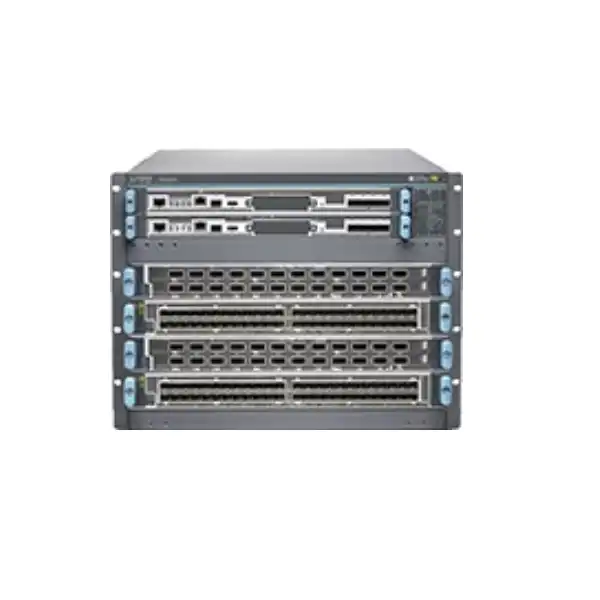
Juniper MX10004 Universal Routing Platform Dubai
A compact 7U member of Juniper’s MX10000 modular family, engineered for high-density multiservice routing where throughput, port mix, operational resilience and long-term scaling matter more than buying a fixed-port appliance. The platform supports four line-card slots and can scale to 38.4 Tbps per chassis with appropriate high-capacity line cards and fabric.
Direct answer: what is the Juniper MX10004 and who is it for?
Why the MX10004 is different from a fixed-port router
The Juniper MX10004 is not simply a router with a published number of ports. Its value comes from modularity. The chassis provides four horizontal line-card slots, while forwarding density and port personality come from the installed line cards. Control-plane resilience comes from the Routing and Control Board configuration, and the switch fabric determines how traffic is moved between line cards. Power and cooling must then be engineered around the installed components. This architecture is attractive when a network needs to evolve over several years because the physical chassis can host different line-card generations and interface mixes instead of forcing every site into one fixed hardware profile.
That modularity also makes procurement more demanding. Two quotations both labelled “MX10004” can represent very different systems. A base chassis with a single Routing and Control Board, limited fabric, no line cards and no optics is not equivalent to a redundant chassis populated with high-capacity line cards, six fabric boards, the required software licenses and a complete optical bill of materials. Buyers comparing prices should therefore compare complete configurations rather than chassis part numbers alone. This distinction is especially important in UAE projects where import lead times, rack power availability and migration windows can make late bill-of-material changes expensive.
The design target should start with the service, not the box. Define what traffic must enter and leave the router, the expected growth horizon, the protection model, the required network services and the operational standard. Only then should the MX10004 be populated. In a peering role, dense 100G or 400G ports may dominate. In a metro aggregation role, a mix of lower-speed and high-speed interfaces may be more important. In a broadband edge role, licensing and subscriber features can become just as important as raw interface density. In an enterprise core or WAN edge, deterministic failover, route scale, automation and compatibility with the existing Junos operating model can be the deciding factors.
MX10004 verified platform specifications
| Specification | MX10004 buyer reference |
|---|---|
| Chassis type | Modular MX10000 Universal Routing Platform |
| Form factor | 7 rack units; designed for a standard 19-inch four-post rack |
| Line-card slots | Four horizontal line-card slots |
| Maximum system throughput | Up to 38.4 Tbps with an appropriate six-fabric-board and high-capacity line-card configuration |
| Supported Ethernet speeds | Depending on line card and optics: 1GbE, 10GbE, 25GbE, 40GbE, 50GbE, 100GbE and 400GbE |
| Control subsystem | One or two Routing and Control Boards; redundant configuration supports primary/backup operation |
| Switch fabric | Up to six JNP10004-SF2 switch-fabric boards; redundancy behavior depends on line-card type and required line rate |
| Power options | AC and DC chassis configurations are available; actual power design depends heavily on line cards, fan trays and redundancy |
| Operating system | Junos OS; minimum software release can vary by installed hardware, particularly newer line cards |
| Security capabilities | Hardware-assisted MACsec is supported on applicable ports/configurations, and the MX10000 family supports inline IPsec capabilities subject to hardware, software and licensing requirements |
| Cooling | Two fan trays and two fan-tray controllers form the chassis cooling system |
| Temperature reference | Juniper publishes 0°C to 46°C operating temperature at sea level for the platform; site-specific environmental and altitude derating should be checked during design |
Published dimensions and weight vary somewhat by chassis bundle and installed FRUs. Current Juniper hardware documentation lists the chassis at approximately 17.4 inches wide and 12.2 inches high, with depth dependent on the fan tray and EMI-door arrangement. Because a fully configured chassis is heavy, rack load, installation method and front/rear service clearance should be treated as engineering inputs rather than afterthoughts.
Line-card choice is the centre of MX10004 sizing
The MX10004 supports several line-card families with very different forwarding capacities and port designs. Current Juniper documentation identifies the MX10K-LC2101, MX10K-LC480, MX10K-LC9600, MX10K-LC4800 and MX10K-LC4802 among the supported options. Their nominal line-rate capacities range from 480 Gbps on the LC480 to 9.6 Tbps on the LC9600. That range is why an “MX10004 port count” is not meaningful without naming the line cards. The same four-slot chassis can be optimized for legacy aggregation, dense 100G, 400G growth or mixed-speed migration depending on what is installed.
MX10K-LC9600
Up to 9.6 Tbps line-rate throughput. Four such slots are what make the 38.4 Tbps chassis headline possible. This is the high-capacity direction for buyers whose design is driven by dense 100G/400G scale, but it also has important fabric and power implications.
MX10K-LC4800
Up to 4.8 Tbps line-rate throughput with a flexible mix of SFP56-DD and QSFP56-DD connectivity. It can be relevant where the design needs a range of Ethernet speeds and 400G capability while preserving a different port-density profile than LC9600.
MX10K-LC4802
A 36-port, 4.8 Tbps line card with 32 QSFP28 and four QSFP56-DD ports. It supports 100G and 400G deployment patterns plus channelization, but exact breakout modes and supported software release must be checked as part of the design.
MX10K-LC2101
Up to 2.4 Tbps line-rate throughput. It remains relevant when the required interface mix, operational standard or installed-base compatibility aligns with this generation rather than the newest maximum-capacity cards.
MX10K-LC480
Up to 480 Gbps. This lower-capacity card can still be appropriate in specific mixed-generation deployments or where legacy interface needs and existing operational standards matter more than maximum slot throughput.
A line-card decision should therefore be made port by port. Start with the required physical interface speed and connector type, then account for breakout behavior, oversubscription policy, expected utilization and optics reach. If a 400G interface will be channelized into multiple 100G links, validate that the selected card supports the exact breakout mode and that adjacent ports are not disabled by the chosen configuration. Some cards impose relationships between port modes that can surprise buyers who count faceplate cages without reading the port-mode rules.
Software release compatibility is another reason to finalize the bill of materials before deployment. Newer hardware can require a newer Junos OS release than an older line card. For example, Juniper documents the LC4802 for MX10004 operation from Junos OS 25.2R1 onward. In a brownfield network, that requirement may influence maintenance planning, testing, feature validation and rollout sequence. A technically correct procurement design therefore includes the target Junos release as well as the chassis and hardware part numbers.
Fabric capacity and redundancy: the most overlooked design dependency
The MX10004 can contain up to six switch-fabric boards. These boards form the internal switching plane that carries traffic between line cards. The published 38.4 Tbps system capacity assumes the appropriate fabric population. However, redundancy is not identical across every line-card type. Juniper documents a 5+1 fabric-redundancy model for the LC2101 and LC480 with JNP10004-SF2, while the LC9600 and LC4800 use all six fabric boards to deliver their full line-rate design and therefore do not have the same spare-fabric model at maximum throughput. Current fabric-plane documentation also describes LC4802 as using the high-capacity SFB2 generation without the traditional 5+1 redundancy model.
This distinction affects architecture discussions. A buyer may say, “We need full hardware redundancy,” but that phrase needs to be unpacked. Dual Routing and Control Boards can protect the control plane. Multiple power supplies protect power feeds according to the selected bundle and electrical design. Redundant fans and controllers protect cooling subsystems. Fabric behavior, however, depends on line card and target throughput. If one internal fabric element fails, the device may continue forwarding, but the relationship between failure tolerance and guaranteed line-rate capacity can differ by configuration. The desired SLA should therefore be expressed as a measurable requirement: for example, whether the router must maintain every provisioned interface at full offered load after a single fabric failure.
For high-value core, peering or aggregation nodes, this is a procurement issue as much as a technical one. The quotation should identify the number and generation of fabric boards, the exact line cards, and the intended redundancy behavior. A low-priced chassis that omits fabric capacity required for the target line cards can create an unexpected upgrade before production. Conversely, buying maximum fabric and maximum-throughput cards everywhere may be unnecessary if the site traffic profile does not justify it. The correct answer is the one that matches the failure model and growth plan.
Routing and Control Boards, Junos OS and high availability
The Routing and Control Board combines routing-engine and chassis-control functions in a field-replaceable unit. The MX10004 can operate with one or two RCBs. A base configuration may ship with a single control board, while redundant chassis bundles include two. With two boards installed, one operates as the primary and the other as backup. Juniper’s high-availability model can use mechanisms such as graceful Routing Engine switchover and nonstop active routing when the software configuration and feature set support the intended behavior.
For a production UAE edge node, dual control boards are normally worth evaluating even when the initial traffic load is modest. Control-plane redundancy protects against a different failure class than link redundancy or routing protocol reconvergence. If a single control board is acceptable for a lab, staging platform or low-criticality node, that can reduce initial cost; but the choice should be intentional. Buyers should also confirm the RCB generation supported by the chosen line cards. Newer line cards can have explicit compatibility requirements with particular control-board, fabric, power-supply and fan-tray generations.
Junos OS consistency is one of the operational reasons organizations standardize on MX. Teams already using Juniper routing can reuse familiar policy constructs, routing protocols, operational commands, telemetry approaches and automation practices. That does not remove the need for validation. A change from a compact MX router to an MX10004 can introduce different physical interfaces, hardware scale, fabric behavior and software minimums. Existing configuration should be reviewed for platform-specific statements, forwarding features, interface naming, class-of-service behavior and service scale rather than copied without testing.
During procurement, define a target software train rather than accepting “latest Junos” as the only requirement. Production networks often have approved software baselines for interoperability, security and operational stability. If a desired new line card requires a later release than the network standard, that can affect the business case. The right BOM may therefore include a different line card, an operating-system upgrade project, or a phased deployment in which the software standard is raised before the hardware enters service.
Power, cooling and rack planning for Dubai data-centre conditions
A chassis-class router should never be ordered before power and mechanical requirements are checked against the destination rack. Juniper publishes AC and DC options for the MX10004, and the actual power draw depends substantially on the selected line cards, control boards, fabric boards and fan trays. The commonly cited typical figure for a fully loaded platform is not a substitute for component-based sizing. Juniper’s power-planning data shows how widely line-card demand can vary: the LC480 is measured in hundreds of watts, while a high-capacity LC9600 can require well over one kilowatt per card under planning conditions. Four populated slots therefore create a very different electrical design depending on which cards are used.
Power redundancy must be designed with the feed topology. A router may have multiple power supplies, but resilience only exists if the supplies are connected to independent circuits or appropriate A/B feeds and the available capacity is sufficient after a feed or supply failure. Confirm plug type, input voltage, PDU capacity, breaker rating, cable routing and the power-supply part numbers included in the quote. For DC systems, review the site’s -48 VDC distribution and installation standards. For AC systems, Juniper’s platform specifications reference 200–240 VAC, so a buyer should verify the actual facility service rather than assume compatibility from the word “AC.”
Cooling deserves the same attention. Juniper’s published operating-temperature reference is up to 46°C at sea level for the platform, but that does not mean the equipment room should be designed to run at the limit. In Dubai and the wider UAE, external heat makes HVAC resilience particularly important even when the router sits in a controlled facility. Consider inlet temperature, cold-aisle delivery, hot-air exhaust, rack-door restrictions, neighbouring equipment and the impact of a cooling-system failure. High-density cards can produce substantial heat and may expose weaknesses in racks previously used for lower-power equipment.
Physical depth also matters. Juniper documentation lists chassis depth around 36.7 inches with current fan-tray arrangements and about 42.7 inches with the EMI door in one current hardware reference. Other published datasheets reflect different measurement points or earlier component generations. The practical lesson is to validate the exact current hardware bundle against the chosen rack, including front and rear clearance, cable bend radius and service access. A rack that nominally fits a 19-inch device can still be unsuitable because of depth, PDU position or rear-door clearance.
Weight and handling are not minor details. Juniper explicitly recommends a mechanical lift for installation because the chassis is heavy. The rack should be checked for point load and total load, and the installation team should have the correct four-post mounting kit and safe handling plan. In a live data centre, this becomes part of the change window: moving a large chassis, fitting rails, routing high-count optics and connecting redundant power feeds can require significantly more preparation than replacing a 1U router.
Licensing: hardware capacity is not the whole entitlement
Juniper MX platforms support both perpetual and subscription licensing models, and the modular MX10000 family uses Flex Licensing structures that can tie software tiers to bandwidth or feature requirements. Current Juniper licensing material identifies Advanced and Premium tiers, full-bandwidth licenses and Scale-on-Demand options for modular MX products. It also lists separate licensing considerations for MACsec bandwidth, subscriber services and inline IPsec features. The exact license set required for an MX10004 therefore depends on what the router will do, not just how many ports are installed.
A common purchasing error is to treat the base line-card SKU as if it automatically includes every feature at every throughput level. Juniper’s published ordering information separates hardware from software entitlements for cards such as the LC480, LC4800, LC4802 and LC9600. Subscription terms can be offered for multiple years, while perpetual choices can have different support implications. Scale-on-Demand allows capacity to be licensed incrementally in certain designs. For a buyer, this changes the financial model: the cheapest hardware acquisition may not be the lowest total cost if the planned services require additional licenses or future bandwidth activation.
MACsec is a good example. The MX10004 architecture supports high-speed MACsec capability, but Juniper also publishes MACsec license SKUs by bandwidth class. If the project requires encrypted point-to-point Ethernet links, confirm which ports will carry MACsec, the aggregate licensed bandwidth, the line-card support and the required software feature set. Do not assume that the presence of a MACsec-capable port means the complete entitlement is already included in a generic chassis quote.
Subscriber edge use cases require still more care. Broadband network gateway functions, subscriber scale and related feature packs can have distinct licensing structures. If the MX10004 will terminate residential or enterprise subscriber sessions, the quotation inputs should include subscriber counts, expected session growth, address-management needs and any control/user-plane architecture. A peering router and a BNG can use the same chassis family while requiring very different software economics.
The safest quotation method is to describe the services in plain language and map them to entitlements. Provide the intended role, throughput, port activation, security features, subscriber requirements and license term. Ask for each software SKU to be listed separately so renewal obligations and perpetual rights remain visible. This produces a clearer comparison between proposals and reduces the risk of discovering a missing entitlement during acceptance testing.
Use-case fit matrix
| Use case | Why MX10004 can fit | What to verify |
|---|---|---|
| Internet peering / edge | High chassis throughput, dense 100G/400G options, routing scale and modular growth. | Route-table scale, port breakout, optics reach, DDoS architecture, fabric behavior and control-plane redundancy. |
| Metro aggregation | Flexible interface mix and strong aggregation capacity in a 7U chassis. | Lower-speed density, breakout modes, QoS requirements, timing, protection topology and uplink growth. |
| Broadband edge / BNG | MX software heritage and scalable multiservice edge capabilities. | Subscriber scale, session features, licensing tier, address management, redundancy architecture and telemetry. |
| Mobile transport | High bandwidth, timing capabilities and resilient routing for aggregation/backhaul roles. | Timing profile, synchronization design, QoS, protection, interface type and operational software baseline. |
| Data-centre edge / DCI | 400G-ready modular routing with MACsec-capable architecture and automation interfaces. | Optical reach, encryption licensing, interconnect protocols, buffer/QoS requirements and rack power. |
| Large enterprise WAN edge | Useful when the enterprise needs carrier-class modular scale, many high-speed circuits or long-term capacity growth. | Whether a smaller compact MX model could meet the requirement with lower rack, power and operational overhead. |
When the MX10004 may be more platform than you need
The MX10004 is compelling because it concentrates significant modular capacity into 7U, but modularity has a cost in space, power, component count and planning effort. A branch, small enterprise edge, low-capacity internet gateway or site with only a few 10G/100G links may be better served by a compact fixed-port MX platform. The buyer should compare total deployment requirements rather than treating a larger modular chassis as automatically more future-proof.
A smaller router can reduce rack depth, electrical demand, optics count, installation complexity and spare-parts inventory. It may also offer a simpler licensing and software lifecycle. If the traffic forecast shows that the site will remain below the smaller platform’s comfortable capacity throughout the design horizon, unused MX10004 slots do not create business value by themselves. The correct reason to choose MX10004 is a credible need for modular line-card flexibility, high aggregate throughput, resilience or growth that would be awkward on a fixed platform.
At the opposite end, some networks should compare the larger MX10008. If the site is expected to outgrow four line-card slots quickly, or if port growth requires more physical slot count than the MX10004 can provide, installing a larger chassis from the beginning can avoid a near-term second router or forklift upgrade. The decision should incorporate rack space, power, traffic growth, redundancy strategy and whether scaling out with multiple MX10004 systems is preferable to scaling up within a larger chassis.
This balanced comparison is important during budget approval. “Maximum 38.4 Tbps” is a capability ceiling, not a sizing recommendation. A good network design leaves practical headroom without buying capacity that cannot be used because the interfaces, licenses, power or upstream circuits are not there. FourTeck can quote the MX10004 alongside a smaller or larger Juniper alternative when the edge case is close, so the selection is based on usable architecture rather than headline specifications.
Optics, breakout cables and physical-interface planning
A complete MX10004 design needs an optical plan. The router’s line cards expose cages such as SFP-family, QSFP28 and QSFP56-DD depending on the card, but the transceiver determines media type, reach, wavelength and often the exact breakout possibility. Buyers should list every link with its speed, fibre type, approximate distance, connector environment and whether the far-end device has a matching optical standard. A port that supports 100G does not guarantee that every 100G optic is supported on every software release or line-card revision.
Breakout can be very useful when a high-speed cage must connect to several lower-speed circuits. The LC4802, for example, supports multiple channelization modes on its QSFP-class interfaces, and the LC4800 has its own port-mode rules. But breakout changes lane mapping, cable requirements and the number of logical interfaces. Some modes cannot be mixed within one cage, and certain 400G configurations can affect adjacent ports on specific cards. Port planning should therefore use Juniper’s compatibility information for the exact line card instead of assuming that every faceplate port can be used independently at any supported speed.
For data-centre interconnect or campus-to-data-centre links, decide early whether the design uses short-reach multimode, single-mode LR-class optics, coherent/transport handoff or third-party optical systems. Longer-reach transport designs may need a separate optical platform rather than a router pluggable. For internet exchange deployments, the exchange’s cross-connect standard may determine the transceiver. For carrier circuits, the service handoff may be 10G, 100G or 400G with a specific optic specification. Each case changes the BOM.
Optics can materially affect project cost and delivery time. The quotation should therefore distinguish chassis hardware, line cards, supported Juniper optics, breakout cables, patch leads and any required adapters. If customer-supplied or third-party optics will be used, support policy and compatibility should be confirmed explicitly. It is better to resolve this before shipment than during a maintenance window when a port remains down because the optical coding, wavelength or connector is wrong.
Security capabilities: MACsec, IPsec and architecture boundaries
The MX10000 architecture includes hardware-assisted security options that can protect high-speed traffic without turning the router into a general-purpose firewall. MACsec is particularly relevant for point-to-point Ethernet encryption. It can secure links between compatible endpoints, such as data-centre interconnects or carrier Ethernet segments, while preserving the operational model of Ethernet. The MX10004 supports MACsec on applicable hardware, and Juniper publishes bandwidth-based MACsec license SKUs for MX platforms including the MX10004.
Inline IPsec is another available capability in the MX10000 family, with AES-GCM modes documented for supported forwarding-engine designs. However, hardware support, software release and licensing must be validated for the intended service. A buyer planning encrypted WAN overlays should specify tunnel count, aggregate encrypted throughput, packet-size assumptions, routing interaction and high-availability requirements. “IPsec supported” is not enough to size a production encryption service.
It is equally important to understand what the router is not. The MX10004 is a routing platform, not a next-generation firewall replacement. Security policy architecture may still require separate firewall platforms for application inspection, threat prevention, remote-access VPN, web filtering or other security controls. MACsec and IPsec on the router solve link or tunnel encryption problems; they do not automatically provide the full inspection stack associated with dedicated security appliances.
For procurement, separate security requirements into layers. Ask whether links must be encrypted, whether traffic must be inspected, whether subscriber or tenant segmentation is required, and where policy enforcement belongs. This prevents overloading the router requirement with functions better delivered elsewhere and helps determine which MX licenses are genuinely needed.
Migration planning from an existing router
Inventory the current edge
Record circuits, VLANs, routing protocols, VRFs, MPLS services, QoS policies, filters, subscriber functions, monitoring, management paths and optical handoffs. Include route scale and peak traffic, not just interface labels.
Map services to hardware
Translate every required physical port and service into line-card, optic, breakout, fabric and license choices. Reserve realistic growth rather than filling every slot on day one without a reason.
Validate software
Choose a Junos release that supports all selected hardware and required features. Rehearse configuration conversion and feature behavior in a lab or staging process whenever the service is business critical.
Prepare physical installation
Verify rack depth, rail kit, lifting method, power feeds, PDU capacity, grounding, cooling, cable paths and spare optics. A migration window should not begin with mechanical surprises.
Build a rollback path
Define acceptance checks and a point at which the team will revert. Keep old circuits and hardware available long enough to protect against unanticipated optical, routing or policy issues.
Test under realistic load
Check forwarding, routing convergence, telemetry, redundancy, QoS, encryption and management. Validate the conditions that matter to the business rather than stopping when interfaces simply show up.
Migration risk usually comes from dependencies, not from mounting the new chassis. A legacy router may contain years of accumulated routing policy, route filters, class-of-service behavior and operational scripts. Some functions can be carried forward directly; others should be redesigned. Use the MX10004 deployment as an opportunity to document intended service behavior and remove obsolete configuration, but avoid combining too many unrelated network changes into one maintenance window unless there is a strong reason.
Automation, telemetry and day-two operations
High-capacity routing hardware creates the most value when operations can manage it consistently. Junos OS supports programmatic interfaces and streaming telemetry approaches that can integrate with network-management and automation systems. For a new MX10004 deployment, buyers should consider day-two operations during design rather than after installation. Define how configurations will be generated, reviewed and backed up; how routing and interface health will be monitored; how alarms will reach the operations team; and how software upgrades will be tested.
Telemetry is especially valuable on a chassis with multiple forwarding components because it can expose utilization trends before a physical slot or fabric limit becomes a production problem. Monitor interface throughput, errors, optics levels, queue drops, CPU and memory health, routing protocol stability, environmental sensors and chassis alarms. In a 400G environment, averages can hide short bursts, so the monitoring platform should collect data at useful intervals and retain enough history for capacity planning.
Automation should also account for hardware inventory. A modular router may contain line cards of different generations, multiple RCBs, fabric boards and power supplies. Configuration templates can be standardized, but validation should still understand which hardware is installed. This becomes important when a command or feature is supported on one line card but not another, or when a new card requires a different Junos release.
For organizations operating several UAE sites, consider whether the MX10004 will be part of a common automation domain. Standardized interface descriptions, routing policy objects, naming conventions, telemetry paths and maintenance procedures reduce human error. The commercial decision can then include not only hardware and support but also implementation services, configuration staging, baseline templates and handover documentation.
How to size an MX10004 without overbuying
Start with traffic in three dimensions: current committed traffic, short-term peak traffic and credible growth over the intended service life. The router should have enough headroom for failure scenarios and expansion, but the design should not multiply every forecast by an arbitrary safety factor. Separate north-south internet traffic, east-west data-centre traffic, customer aggregation, replication, backup and management flows if they behave differently. This gives a clearer picture of which interfaces are capacity-critical and which primarily need connectivity.
Next, convert throughput into physical ports. A site carrying 1 Tbps of traffic might need ten 100G links, three 400G links, or a mixed design depending on upstream services and redundancy. Port count often drives line-card selection before total throughput does. Include spare interfaces for known circuit orders, but distinguish real planned links from hypothetical growth. A card with the right mix can leave more useful chassis slots open than a higher-capacity card whose port geometry does not match the network.
Then model single-failure conditions. If one uplink, one line card, one fabric component, one RCB or one power feed fails, what traffic remains and where does it go? High availability can require capacity to be deliberately underutilized during normal operation so the surviving path can absorb traffic. This is why raw chassis throughput should never be used as a safe service-capacity figure without topology context.
Finally, add service scale. Routing-table size, VRFs, VPNs, subscribers, queues, filters, tunnels, MACsec or IPsec requirements and telemetry can influence platform design. Not every feature scales independently to the same ceiling. For complex deployments, validate the planned combination against current Juniper scale documentation and the target software release. This is particularly important for broadband edge and multiservice configurations where several scale dimensions can interact.
A well-sized MX10004 therefore has a written rationale: why each line card exists, which ports are activated, what growth it accommodates, which failures it survives and what software/license features it must run. That record makes future expansion easier because the next engineer can see whether an empty slot was reserved for a known purpose or simply left unused.
MX10004 base, premium and configuration-bundle considerations
Juniper publishes multiple MX10004 base and premium bundle variants, including AC and DC options and configurations with different numbers of switch-fabric boards. Historically and in current ordering references, a base unit can include one Routing Engine/RCB, two power supplies, fan components and a set of fabric boards, while premium or redundant bundles include a second control board, additional power capability and more fabric. Exact current bundle contents should be checked against the ordered SKU because Juniper refreshes component generations and bundle definitions as the platform evolves.
This means the chassis suffix matters. A quote should not shorten the product to “MX10004 chassis” if the underlying SKU is MX10004-BASE, MX10004-PREMIUM, a 3-fabric or 4-fabric variant, or another current bundle. The included RCB, switch-fabric count, power-supply type and fan generation can change what must be added separately. An apparently inexpensive base may be exactly right for a staged deployment, or it may create more line items than a premium bundle once redundancy is added.
When comparing proposals, request a bill of materials with quantities. Check that it includes the chassis bundle, RCBs, SFBs, line cards, power supplies, fan trays/controllers where applicable, rack-mount kit, power cords, optics, breakout cables, software licenses and support. If any item is customer-supplied, mark it explicitly. This is more reliable than comparing headline chassis prices and assuming the remainder is standard.
For phased rollouts, it can be sensible to buy fewer line cards initially while provisioning the control, fabric and power subsystems for future additions. The economics depend on budget and forecast certainty. If a second phase is almost guaranteed within months, buying core redundancy once may reduce operational disruption. If growth is uncertain, a modular starting point can preserve capital. The important part is to document the intended maximum state so today’s base bundle does not block tomorrow’s card.
Important limitations and procurement risks
Maximum throughput needs the right hardware
38.4 Tbps is not available from every card mix or partial fabric population. It represents a maximum chassis architecture, not a default characteristic of any MX10004 order.
Fabric redundancy varies
Some line cards support a 5+1 fabric model, while high-capacity cards use all six fabric boards for full line-rate operation. Define the performance expected after a fabric fault.
New cards can raise the software baseline
A newer line card may require a newer Junos release. Confirm the target operating-system train before purchasing hardware for an existing standardized network.
Licenses can be service-specific
Advanced/Premium software, bandwidth activation, MACsec, subscriber services or IPsec may require entitlements beyond the physical hardware. Quote the service, not just the chassis.
Rack depth and power are substantial
The 7U height is compact for the capacity class, but depth, weight and fully loaded power remain data-centre-class requirements. Validate the destination rack and feeds before shipment.
Port cages are not all independent
Breakout and 400G modes can impose port-group rules on some cards. Use a port-level plan rather than multiplying cage count by headline speed.
Support, spares and lifecycle planning
An MX10004 is usually deployed in a network role where downtime is expensive. Hardware support should therefore be selected according to restoration objectives, not simply added as a generic warranty line. Consider the time required to replace a failed line card, RCB, fabric board or power supply; whether the site can tolerate shipment from a regional depot; and whether critical FRUs should be held as local spares. A network with two geographically redundant edge routers may accept a different service level than a single-node site carrying all traffic.
Spare optics deserve particular attention because optical modules fail more often and are easier to replace than large FRUs. Keeping a small set of the exact production optics and breakout cables can shorten recovery. For specialized 400G or long-reach interfaces, lead times can be different from standard 10G/100G optics. Record serial numbers and supported revisions so spares are not mixed across incompatible environments.
Software lifecycle should be part of the plan as well. Junos releases move through maintenance and support phases, and hardware support is tied to minimum release requirements. Establish an annual or semiannual process for reviewing recommended releases, security advisories and hardware compatibility. A modular platform may stay in service for years, during which line cards and control boards can be refreshed. Maintaining a tested software baseline helps the network absorb those changes without emergency upgrades.
Finally, keep the original BOM and deployment drawings. Chassis systems evolve. Years later, the difference between an SF and SF2 fabric generation or between two RCB variants can determine whether a planned card is compatible. Good asset documentation turns future expansion from a rediscovery exercise into an engineering decision.
Practical UAE quotation checklist
A useful MX10004 quotation request contains enough information to select hardware and software accurately. The following checklist is intentionally practical; incomplete inputs can still be quoted, but each missing item becomes an assumption that should be documented.
Frequently asked buyer questions about the Juniper MX10004
Is the MX10004 really a 38.4 Tbps router?
Yes, 38.4 Tbps is Juniper’s published maximum system throughput for the MX10004. That figure is achieved with the appropriate high-capacity line cards and full fabric required for that design. It should not be interpreted as the throughput of every MX10004 chassis regardless of configuration. A chassis populated with lower-capacity line cards has lower aggregate forwarding capacity.
How many line cards does it support?
The MX10004 has four horizontal line-card slots. The maximum useful port count depends on which supported cards are installed and how their ports are configured. Because some ports can be channelized and some high-speed modes impose group restrictions, the design should be calculated from the required interfaces rather than a single faceplate-port total.
Does the MX10004 support 400GbE?
Yes. Juniper positions the MX10004 for dense 100GbE and 400GbE deployments, and compatible line cards provide 400G interfaces. The exact number of 400G ports, breakout options, optics and software minimum depend on the selected line card. The 400G design should therefore be specified at line-card level.
Can it run with one Routing and Control Board?
Yes. The chassis can operate with one RCB, and base configurations may be supplied that way. For high-availability production roles, two RCBs are normally evaluated so one can operate as primary and the second as backup. The desired failover behavior also requires correct Junos high-availability configuration.
Are the switch-fabric boards redundant?
It depends on the line card and throughput target. Juniper documents 5+1 fabric redundancy for some older/lower-capacity line cards with the SFB2 design, while cards such as LC9600 and LC4800 use six fabric boards for full line-rate operation and therefore do not provide the same spare-fabric model at maximum capacity. Define the acceptable degraded state before ordering.
Does it support MACsec?
The MX10004 supports MACsec capability on applicable hardware, and Juniper publishes MACsec bandwidth licenses for the model. Confirm port support, aggregate encrypted bandwidth, license requirement and software release. MACsec is useful for securing Ethernet links but does not replace a next-generation firewall.
Does it support IPsec?
The MX10000 architecture supports inline IPsec capabilities on supported forwarding hardware, with licensing and feature requirements documented by Juniper. For a real deployment, specify encrypted throughput, tunnel scale, algorithms, packet sizes and required HA so the design can be validated rather than relying on a generic support statement.
Can I mix line-card types?
The platform supports multiple line-card families and Juniper documents interoperability among several of them, but the exact combination must be checked against fabric, RCB, power, fan and software requirements. A mixed-card strategy can help migrations, yet it should be validated as a complete chassis configuration.
What Junos OS version should I use?
There is no single answer for every hardware mix. The platform runs Junos OS, but minimum releases differ by component. Newer cards such as LC4802 have newer release requirements. Choose a release supported by every installed FRU and by the network features you intend to use, then align it with your organization’s tested software policy.
How much power does an MX10004 need?
Power depends on the exact configuration. Juniper publishes component-level planning values because a chassis with lower-capacity cards draws materially less than one with four high-capacity cards. The site calculation should include line cards, switch fabric, RCBs, fan trays and redundancy, then verify PDU and circuit capacity under a failure condition.
Is it suitable for a normal enterprise branch?
Usually not unless the branch has unusually high capacity, modularity or service requirements. The MX10004 is a carrier-class modular platform. Most branch sites should compare smaller fixed-port routers because they can be easier to power, rack and operate. The MX10004 makes more sense at major hubs, data centres, aggregation points and service-provider edges.
What should be compared with the MX10004?
Compare a compact MX platform if four modular slots and chassis-level scale are unnecessary. Compare the larger MX10008 if the project expects to exceed four line-card slots or needs a larger scale-up envelope. The decision should use traffic, port count, redundancy, rack, power and lifecycle economics rather than model hierarchy alone.
Buyer scenario: turning a requirement into a configuration
Consider a Dubai data-centre edge that currently has eight 100G upstream/downstream links and expects to add several 400G services during the next three years. The technical team also wants dual control planes, redundant power feeds, MACsec on selected inter-data-centre links, and enough spare physical capacity for expansion. It would be tempting to begin with the 38.4 Tbps figure and simply order the highest-capacity line cards. A better process begins by mapping the eight 100G links, the planned 400G links and the redundancy topology to real ports.
If the future 400G requirement is firm, choose a line-card family that supports the necessary 400G cage count and validate any adjacent-port or breakout rules. If the existing 100G links can be terminated on the same card efficiently, the design may preserve additional slots for growth. If a migration period requires many lower-speed links, a mixed card population could be more practical. The resulting fabric requirement should then be checked so full intended throughput and failure behavior are understood.
Next, size power for the final planned population rather than only day one. This avoids installing a chassis into a rack whose PDU can support the initial cards but not the expansion. At the same time, specify dual RCBs and the desired GRES/NSR operational model. Then identify which encrypted links use MACsec and add the corresponding entitlement, rather than licensing every possible port without need.
The optical schedule should list each 100G and 400G link, fibre type and distance. For cross-connects within the same facility, short-reach optics may be appropriate; for inter-site links, the transport design may require different optics or a separate DWDM platform. Finally, the target Junos release is validated against every selected line card and the existing automation stack. Only after those steps is the “MX10004 quote” complete.
This scenario illustrates why the MX10004 is best purchased through configuration engineering. The chassis is the foundation, but the real product delivered to the network is a combination of forwarding cards, fabric, control plane, power, optics, licenses and software. Good procurement captures those relationships explicitly.
Decision recap: six points that should be settled before purchase
What FourTeck needs for an accurate MX10004 quotation
You do not need a finished Juniper BOM before contacting FourTeck. Send the network requirement in operational terms and we can use it to structure the hardware and software discussion. The most useful inputs are below.
Build the right Juniper MX10004 configuration for your UAE network
For an MX10004 project, the most useful quotation is one that shows exactly how the chassis, RCBs, switch fabric, line cards, optics, power, software licenses and support fit your traffic and resilience requirements. Share your interface schedule or even a high-level network requirement, and FourTeck can help turn it into a configuration that is easier to compare, budget and deploy.

Reviews
There are no reviews yet.