
Juniper NFX250 Network Services Platform Dubai
A software-driven 1U network services platform for organizations that want to consolidate routing, security, SD-WAN and other virtualized network functions at the branch or customer premises without deploying a separate hardware appliance for every service.
Up to 8 VNFs by model
1GbE copper + SFP + 1/10GbE SFP+
Dual-CPE high availability support
Direct answer: what is the Juniper NFX250 and who is it for?
The Juniper NFX250 Network Services Platform is a universal customer-premises equipment, or uCPE, platform designed to run physical network forwarding and virtualized network functions in the same branch appliance. It is mainly used where an enterprise or managed-service provider wants to combine branch connectivity, secure routing, firewall services, SD-WAN functions and other VNFs without maintaining several separate boxes at each site.
Organizations that should consider the NFX250 include multi-site enterprises, service providers, managed network operators, distributed businesses and larger branches that need a flexible service platform with 1GbE access, optical uplinks, 10GbE-capable SFP+ WAN connectivity and local compute resources for service virtualization.
The most important factor to confirm is the exact NFX250 model and software architecture required for the intended workload. The NFX250-S1, NFX250-S1E and NFX250-S2 differ in memory and SSD capacity, and model-specific VNF limits matter when multiple virtual services will run simultaneously. Software release compatibility, vSRX version, licenses, optics and support entitlement should therefore be treated as part of the product selection rather than as afterthoughts.
FourTeck can help determine which NFX250 variant is appropriate, whether the required WAN and LAN interfaces are available natively or need transceivers, how much VNF headroom is sensible, which software and licenses should be quoted, and whether NFX250 remains the right architectural choice compared with another Juniper NFX platform for a new Dubai or UAE deployment.
Why the NFX250 was built for service consolidation
Traditional branch networks often grow appliance by appliance. A router arrives first, then a firewall, an optimization device, an SD-WAN edge, a monitoring component and sometimes an additional virtual appliance host. The result can be several systems with separate maintenance windows, independent power requirements, different operating tools and multiple support contracts. The NFX250 takes a different approach: it combines a purpose-built packet forwarding layer with x86 compute resources so that physical connectivity and virtual network services can coexist on one platform.
That architecture is particularly relevant to service providers and enterprises that want a repeatable branch design. Instead of deciding the complete service chain at the moment the site is installed, the organization can deploy a common physical platform and activate approved functions as requirements evolve. Juniper positions the NFX250 as a software-driven CPE device able to host multiple VNFs and support secure service delivery. The platform also supports Juniper vSRX as a virtual firewall and can participate in SD-WAN designs, including Juniper Session Smart based solutions where the surrounding software architecture is compatible.
For buyers, the value is not simply that several functions can run on one chassis. The more important question is whether consolidating those functions improves operations without creating a resource bottleneck or support complication. Each VNF consumes CPU, memory, storage and network I/O. A branch that only needs routing and basic firewalling may not need the same NFX250 variant as a service-provider CPE hosting several virtualized functions. The NFX250 should therefore be selected as a small edge infrastructure platform, not merely as a router with extra features.
NFX250 family position and model choices
The NFX250 name describes a family rather than one fixed memory-and-storage configuration. Juniper documentation identifies NFX250-S1, NFX250-S1E and NFX250-S2 variants, while hardware references also include NFX250-LS1. The mainstream S1, S1E and S2 models share the same 1U physical format and broadly similar external interface set, but their compute resources and intended service scale differ. That distinction matters when a quote simply says “NFX250” without a complete part number.
| Model | Processor / memory | Internal storage | Planning implication |
|---|---|---|---|
| NFX250-LS1 | 4-core Intel CPU, 16 GB memory | 100 GB SSD | Lower-resource model; verify service feature and throughput requirements carefully. |
| NFX250-S1 | 6-core Intel CPU, 16 GB memory | 100 GB SSD | Suitable where the VNF set is controlled and storage demand is modest. |
| NFX250-S1E | 6-core Intel CPU, 16 GB memory | 200 GB primary SSD; Juniper documentation also describes a secondary boot SSD | Adds storage depth and a different resilience profile; confirm software architecture and exact BOM. |
| NFX250-S2 | 6-core Intel CPU, 32 GB memory | 400 GB SSD | Provides the strongest local resource headroom in the NFX250 family and supports the highest documented VNF count. |
Juniper’s hardware compatibility information lists 64 Gbps forwarding throughput across the NFX250 family. It also distinguishes VNF count by model: the NFX250-S2 is documented for up to eight VNFs, while some other variants have lower limits. This is why a buyer planning a multi-function service chain should never size from the chassis name alone. VNF count is only the first check; the workload profile of each VNF can be more important than the raw number of instances.
A practical quotation should therefore state the exact model, memory, storage, required software image and planned virtual functions. This avoids a common procurement problem in which two quotes both say “NFX250” but actually represent different capacity and support assumptions.
Physical interface architecture
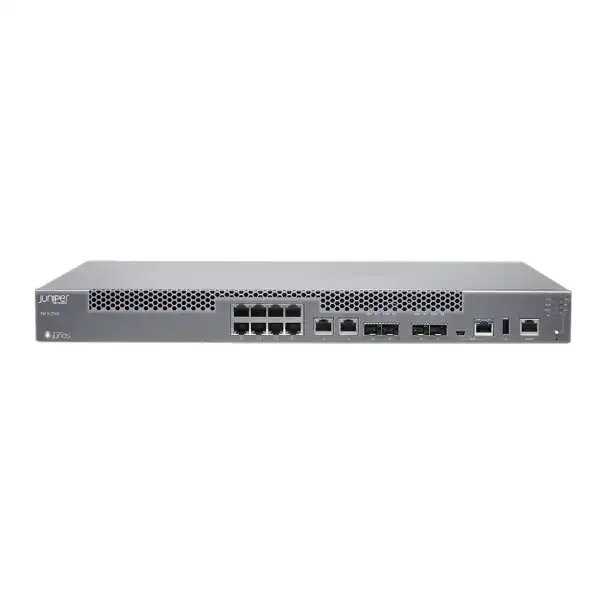
One of the NFX250’s practical strengths is that it combines ordinary branch copper connectivity with optical uplinks and faster SFP+ WAN connectivity in the same 1U appliance. Juniper documentation for the platform lists eight 10/100/1000BASE-T RJ-45 LAN ports, two additional 10/100/1000BASE-T RJ-45 ports that can be used as LAN or WAN connections, two 100/1000BASE-X SFP ports, two 1GbE/10GbE SFP+ uplink ports and a dedicated 10/100/1000BASE-T management port. Console access is available through RJ-45 and mini-USB, and the chassis includes a USB port.
Copper access
Eight dedicated 1GbE RJ-45 access ports plus two additional copper ports that can serve access or uplink roles make the platform suitable for conventional branch LAN handoff and WAN Ethernet circuits.
SFP connectivity
Two 100/1000BASE-X SFP ports provide optical or compatible transceiver-based connectivity. The correct optic depends on fiber type, wavelength, distance, connector and peer equipment.
1/10GbE SFP+
Two SFP+ uplink ports can operate at 1GbE or 10GbE, giving the NFX250 a path to higher-speed WAN, aggregation or service-provider handoff designs where compatible optics are selected.
The port list is not the same as a complete circuit design. An SFP or SFP+ cage does not automatically include the transceiver required for a particular fiber service. Buyers should identify whether each connection is copper, multimode fiber, single-mode fiber, direct attach or another supported medium; confirm required speed and reach; and check the transceiver against Juniper’s hardware compatibility information. The same principle applies where a carrier provides a managed NTE and hands off Ethernet: the physical medium at the NFX250 must match the carrier handoff, not merely the contracted bandwidth.
Juniper also documents ADSL2 and VDSL2 support through an SFP module for applicable deployments. This capability is specialized and should be verified against the exact transceiver, line service and software version before being included in a new design. In many contemporary UAE branches, Ethernet, fiber or provider-managed access will be more common, but the existence of the option illustrates the NFX250’s broad CPE role.
Packet forwarding and VNF performance are different sizing questions
The NFX250 is often described using a 64 Gbps Packet Forwarding Engine figure and up to 20GbE WAN throughput. Those numbers are useful, but they should not be interpreted as a promise that every virtual firewall, encrypted tunnel, inspection feature and service chain can process traffic at the same rate. The packet forwarding layer and the x86-hosted VNF workload are related but distinct resources.
A simple Layer 2 or Layer 3 forwarding path can have a very different resource profile from a path that traverses a stateful firewall, application identification, intrusion prevention, antivirus or multiple chained VNFs. Encryption also changes the capacity model. Juniper’s hardware compatibility data publishes model-specific security performance values for certain operating modes, demonstrating that security throughput is not interchangeable with raw forwarding throughput.
For a serious design, the traffic profile should therefore be defined in operational terms. How much peak bidirectional traffic is expected? How many sites or tunnels terminate on the platform? What percentage of traffic requires encryption? Will the firewall perform advanced inspection? Are several VNFs chained in sequence? Is local breakout used, or does traffic backhaul to a data center or cloud security service? What growth margin is required over the expected three-to-five-year deployment period?
These questions determine whether the NFX250 is comfortably sized, merely adequate or the wrong platform. The correct buying decision is rarely based on one headline throughput number. FourTeck can use the expected application mix, WAN speeds, service functions and growth assumptions to narrow the required NFX250 model and identify cases where a larger NFX platform or a different Juniper edge architecture should be evaluated instead.
Virtualized network functions: what “up to 8 VNFs” means in practice
Network Functions Virtualization replaces dedicated appliances with software instances running on standardized compute resources. On the NFX250, the platform provides an environment in which supported VNFs can be hosted and service-chained. Juniper’s product material highlights support for vSRX and an open framework for third-party VNFs. This flexibility is central to the NFX proposition, but buyers should distinguish theoretical platform capacity from a validated production service chain.
A VNF consumes CPU cores or shares, memory, storage space and virtual network interfaces. Some functions have light resource footprints; others need substantial RAM or disk and may become CPU intensive under inspection or encrypted traffic. Running six small functions is not necessarily more demanding than running two large security functions. The correct planning method is to start with the published resource requirements of each VNF version, reserve host overhead, define performance headroom and then map the combined requirement to the selected NFX250 variant.
The NFX250-S2 is the most natural variant to assess for denser service chains because it carries 32 GB memory and 400 GB SSD storage in Juniper’s published specifications. The S1 and S1E use 16 GB memory and provide less storage. The exact maximum VNF count also differs by model in Juniper’s hardware compatibility information. If a deployment requires the upper end of the VNF count, the S2 should be evaluated first rather than assuming every NFX250 can host eight production VNFs.
Third-party VNF support should also be approached as a compatibility project. “Open framework” does not mean every arbitrary virtual appliance is automatically supported with every software release. The VNF image format, CPU architecture, memory demand, drivers, orchestration method and vendor support policy all matter. A quotation involving third-party VNFs should identify the exact VNF vendor, product, release, expected resource allocation and required service chain so that compatibility can be checked before hardware is ordered.
vSRX security on the NFX250
Juniper positions the NFX250 with the vSRX Virtual Firewall as a core secure-services use case. vSRX brings Junos-based firewall capabilities into a virtual machine, allowing security to be deployed as a VNF rather than requiring a separate SRX hardware appliance at the same branch. This is valuable where a service provider wants a common uCPE platform but needs different security packages for different customers or where an enterprise wants security functions to be software-controlled within the branch service chain.
The commercial and technical design still requires more than adding “vSRX” to the bill of materials. The vSRX release must be compatible with the NFX250 platform software. Juniper publishes an NFX product compatibility matrix showing mappings between NFX250 Junos OS releases and corresponding vSRX versions. Starting with later software generations, platform software and vSRX versions are aligned more directly, but legacy installations may have specific upgrade paths and intermediate releases.
Security licensing also affects the result. Features such as intrusion prevention, application identification, antivirus, web filtering and cloud-based threat services can depend on the license package and subscription. The presence of a vSRX instance does not automatically mean every advanced security feature is licensed. For a branch replacement project, the team should list the security functions currently in use and map them to the proposed Juniper license bundle rather than comparing only base firewall throughput.
It is equally important to recognize when a dedicated physical firewall may still be preferable. If the branch is primarily a security edge with demanding inspection throughput, strict appliance separation requirements or a simple operational model, a dedicated SRX platform may be easier to size and operate. The NFX250 is strongest when service consolidation and virtualization are genuine design goals, not when virtualization is being added without an operational reason.
SD-WAN and multi-transport branch design
The NFX250 can participate in Juniper SD-WAN architectures and Juniper’s product information references Session Smart technology. The hardware’s mix of copper WAN-capable ports, SFP and SFP+ uplinks makes it suitable for branches with more than one transport type. A typical design might combine a primary enterprise fiber service with a secondary Ethernet circuit, or use separate provider links for resilience and policy-based path selection.
SD-WAN value comes from the control and policy system around the edge, not simply from having two WAN ports. Buyers need to identify the desired orchestration platform, monitoring or assurance system, routing method, security integration, tunnel or session architecture, and how sites will be brought into service. Existing subscriptions and management platforms should be checked because the optimal NFX250 configuration depends on whether the organization is extending an established Juniper WAN architecture or creating a new one.
For a managed-service provider, the NFX250 can be attractive because a common physical platform can be deployed across customer sites while the software service package varies. For an enterprise, the same concept can simplify branch standardization. Yet standardization only works when the selected model has enough headroom for the largest intended service profile. Otherwise the organization may save on appliance diversity while creating multiple NFX250 variants that are operationally difficult to distinguish.
A useful branch standard defines a minimum supported software release, the exact platform variant, approved optics, WAN interface roles, VNF resource allocations, licensing tier, logging destination, high-availability policy and support entitlement. That standard is more valuable than a generic statement that the site “uses NFX250 for SD-WAN.”
Best-fit deployment scenarios
Large enterprise branch
A branch needs routing, secure internet access, SD-WAN and additional virtualized services, but the organization wants to avoid installing a separate appliance for every function. The NFX250 can provide physical WAN/LAN connectivity and local VNF hosting in one rack unit.
Managed-service CPE
A service provider wants one standardized customer-premises platform that can deliver different managed routing, firewall and application services through software. NFX250 is specifically aligned with virtual managed-service and Cloud CPE concepts.
Service consolidation project
A site currently has multiple edge appliances with overlapping life cycles and management systems. A correctly sized NFX250 may reduce physical appliance count while preserving distinct network functions as virtual services.
Flexible WAN edge
A branch requires a mixture of copper Ethernet, optical links and 10GbE-capable uplinks. The NFX250’s fixed interface mix can reduce the need for additional media-conversion or aggregation devices when the port plan fits.
Distributed secure services
An organization wants security functions delivered locally at branches rather than forcing all traffic through a central location. vSRX and other supported VNFs can form a local service chain, subject to performance and licensing design.
Hybrid CPE architecture
Some functions run at customer premises while others are provided from a data center or cloud environment. NFX250 can serve as the local edge component when the overall orchestration and service design supports that hybrid model.
When the NFX250 may not be the right choice
A balanced procurement process should include clear reasons not to choose the NFX250. The platform can be excessive for a small branch that only needs straightforward routing and security, particularly if there is no requirement to host multiple VNFs. In that case, a simpler dedicated edge platform may reduce cost and operational complexity.
At the other end of the spectrum, a branch may outgrow the NFX250 when it needs more local compute, more storage, higher encrypted or inspected throughput, more VNF capacity or a different interface profile. Juniper’s NFX350 is positioned for larger branch deployments and provides materially greater resources. The fact that an NFX250 has 10GbE-capable uplinks does not mean it is automatically the best platform for every 10Gbps-class secure workload.
The NFX250 is also not a substitute for a detailed lifecycle review. Organizations buying for a new multi-year deployment should verify current orderability, software support, recommended Junos releases, security subscription availability, replacement strategy and support entitlement. This is particularly important when sourcing enterprise equipment that has existed across multiple software generations.
Finally, a virtualization platform is only useful if the operations team is prepared to manage its added software layers. If the organization lacks a clear VNF lifecycle process, image validation method, configuration standard, monitoring integration and upgrade procedure, consolidating appliances onto a uCPE can transfer complexity rather than remove it.
Sizing the correct NFX250 configuration
Sizing should begin with the service architecture, not with a favorite model number. List every function that must run locally and identify whether it is implemented by Junos, vSRX, another supported VNF or an external system. Then document the expected CPU, RAM and storage requirement of each VNF version. Add host overhead and growth headroom rather than allocating every available resource on day one.
Memory is usually the first obvious differentiator between NFX250 variants. Sixteen gigabytes may be sufficient for a controlled service set, but a 32 GB NFX250-S2 gives more space for multiple VNFs and future growth. Storage also matters because VNF images, logs, package files and operational data can consume space. The S2’s 400 GB SSD provides considerably more storage than the S1’s 100 GB SSD, while the S1E sits between them in primary storage.
Network throughput must then be assessed per path. A site with a 1Gbps internet connection and a 1Gbps private WAN does not necessarily require the same VNF performance as a site using 10GbE uplinks. Similarly, a 10GbE physical interface can connect to a higher-speed aggregation network even if the branch’s sustained inspected traffic is lower. Interface speed and security-service throughput are separate design parameters.
Encrypted traffic requires special attention. IPsec performance depends on the operating mode, software, cryptographic profile and traffic characteristics. If several high-bandwidth VPNs are expected, the design should be validated against Juniper performance guidance for the relevant NFX250 model and security configuration. Do not size VPN capacity from raw forwarding throughput.
Finally, consider failure behavior. If one VNF fails, can the service restart without affecting the whole branch? If the appliance fails, is there a second NFX250, an alternate WAN path or another recovery mechanism? Capacity planning and availability planning should be completed together because a single fully loaded appliance may have no safe place to fail over its workloads.
High availability and dual-CPE design
Juniper identifies dual-CPE clustering as a supported NFX250 capability. Chassis cluster designs use redundant Ethernet interfaces and control links so that paired nodes can provide service continuity. In a critical branch, this can be more appropriate than relying on a single uCPE that hosts several important functions. Consolidation increases the number of services affected by a hardware failure, so resilience often becomes more important as appliance count decreases.
A high-availability design must account for more than purchasing two chassis. Physical WAN circuits should be examined to determine whether both nodes can reach the carrier handoffs. LAN connectivity should be redundant where required. The control link and redundant Ethernet design must use supported interfaces, and the surrounding switch topology should avoid creating a shared failure point. Power feeds should be considered as well because two devices connected to the same single power source do not provide full site resilience.
VNF behavior during failover is another planning area. Some services may maintain state differently from basic routing functions, and recovery objectives should be defined for each critical service. A branch that requires near-continuous firewall and VPN connectivity may need a stricter validation process than a site where a short interruption is acceptable.
For quotation purposes, buyers should state whether high availability is required, which services must survive a node failure, how many WAN circuits are available, whether redundant switching exists and whether installation work includes HA configuration and failover testing. These details materially change the bill of materials and professional-services scope.
Junos OS, NFX software architecture and compatibility planning
NFX250 software has evolved over time, and that history matters when upgrading an installed device or purchasing equipment that may already contain a particular software generation. Juniper documentation identifies nfx-2 and nfx-3 software architecture periods, with nfx-2 support ending after the transition around Junos OS Release 19.1R1. Juniper also publishes supported Junos release information and upgrade-path guidance for NFX250 systems.
An upgrade should never be treated as a generic “install the latest image” task. Some older releases require intermediate steps, and Juniper documentation provides prescribed upgrade paths. The maintenance window must also account for image transfer, host upgrade, VNF compatibility checks, reboot time and post-upgrade validation. In a remote branch, console or out-of-band access should be available before major software changes so that recovery does not depend on the production path being operational.
vSRX compatibility is equally important. Juniper’s compatibility matrix maps NFX250 Junos OS releases to vSRX versions. A VNF that is stable on one platform release should not be assumed compatible with another without checking the documented combination. Third-party VNFs add another compatibility layer and may have their own supported hypervisor, kernel, driver or image requirements.
For an existing NFX250 estate, the first technical discovery should capture the exact chassis model, serial information, current Junos OS release, software architecture, active VNFs, VNF versions, installed licenses, storage utilization and management platform. That baseline determines whether an upgrade is direct, staged or better handled as a hardware refresh.
For a new Dubai deployment, the quotation should specify the intended software baseline rather than leaving software entirely undefined. This improves repeatability across branches and gives the operations team a clear target for configuration templates, security policies, monitoring and future patch management.
Licensing and subscription decisions
Hardware alone does not define the complete NFX250 service. Juniper licensing for NFX Series platforms can include perpetual and subscription models, while security and advanced service features may be tied to specific software tiers. A quote that includes only the chassis can therefore be incomplete if the intended deployment requires advanced firewall services, threat intelligence, web filtering, cloud security functions or other licensed capabilities.
The license design should start with business functions rather than SKU names. For example, does the branch need stateful firewalling only, or also intrusion prevention? Is application identification required for policy decisions? Does the organization require antivirus inspection, web filtering or cloud-based threat prevention? What subscription term aligns with the hardware support period? Once the required functions are clear, the appropriate Juniper software tier and term can be matched to them.
Managed-service providers may also need to decide who owns and renews the subscription. In some commercial models the provider supplies a complete managed service and includes license renewal in the monthly charge. In others, the enterprise owns the licenses directly. Renewal responsibility should be documented because an expired security subscription can affect service capability even when the hardware remains operational.
Third-party VNFs can introduce separate license agreements. A branch running a Juniper vSRX plus another vendor’s virtual service may need licenses from more than one software publisher. Support boundaries should be clear so that troubleshooting does not become a sequence of vendors disputing responsibility for the host, VNF or orchestration layer.
A precise FourTeck quote can separate hardware, Juniper software, security subscriptions, optics, support and implementation services. That structure makes it easier for procurement teams to compare proposals on equivalent scope rather than choosing a lower chassis price that omits required operating licenses.
Management, orchestration and zero-touch service activation
Juniper’s NFX positioning emphasizes automated service activation and Cloud CPE use cases. The operational advantage is strongest when the platform is integrated into an orchestration process that can discover a device, apply a standard configuration, deploy approved VNFs and connect them into the required service chain. This can reduce branch visits and accelerate rollout across many locations.
However, automation should be designed, not assumed. An organization needs an authoritative source of site data, secure onboarding credentials, configuration templates, IP addressing standards, version control, VNF images, license assignment and monitoring integration. A zero-touch workflow also needs a recovery path when a branch has the wrong carrier handoff, incorrect DHCP information, failed DNS, blocked management traffic or a physical cabling problem.
Out-of-band management is valuable for precisely this reason. The NFX250 provides a dedicated management interface, allowing the management path to be separated from production data where the network design supports it. For critical UAE branches, an independent management network or alternate access method can significantly reduce the need for site visits during failed upgrades or configuration errors.
Logging and telemetry should also be planned before deployment. Determine which events stay local, which are sent to centralized syslog, SIEM or network management tools, how long logs must be retained and which alerts require operational response. Virtual service consolidation can simplify hardware but increase the value of centralized observability because several logical functions now share one physical platform.
A successful NFX250 rollout therefore connects procurement to operations. Hardware standardization, software baselines, automation templates, logging, license management and support processes should be agreed before the first large batch of devices is deployed.
Dubai installation and environmental planning
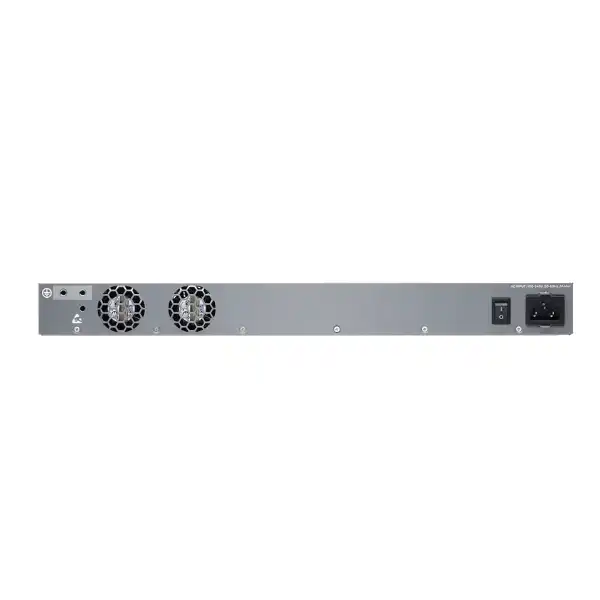
The NFX250 is a 1U appliance measuring approximately 17.36 inches wide, 1.72 inches high and 12 inches deep. Juniper specifies front-to-back forced airflow for NFX250 models and an operating temperature range of 0°C to 50°C, with non-condensing operating humidity from 5% to 90%. These ratings are generous for normal conditioned IT rooms, but they do not remove the need for proper rack ventilation and environmental control.
Dubai and UAE installations can face high ambient outdoor temperatures and dust exposure. Enterprise network hardware should therefore be installed in a suitable indoor, cooled and reasonably clean communications room or cabinet rather than in an unconditioned space simply because the device’s maximum operating temperature is high. Rack airflow should follow the front-to-back direction, cable bundles should not obstruct intake or exhaust areas, and sufficient maintenance clearance should be maintained.
Power planning should confirm the supplied AC power arrangement, plug type, PDU compatibility, UPS capacity and site grounding. Where the branch is business critical, connect the NFX250 and associated carrier equipment to appropriately protected power. If a dual-CPE design is used, placing both nodes on the same unprotected PDU undermines the resilience objective.
Rack depth is rarely a problem because the chassis is relatively shallow, but rear clearance, fiber bend radius, front patching space and service access still matter. The NFX250 front panel carries the network interfaces, console connections, management interface and status indicators, so cable management should allow technicians to access ports and LEDs without disturbing adjacent circuits.
For remote branches, installation documentation should include rack position, PDU outlet, WAN port mapping, carrier circuit identifiers, LAN uplink destination, optic types, management addressing and console procedure. This small amount of discipline materially improves future troubleshooting, especially when the device hosts several services and the engineer attending the site was not involved in the original deployment.
Optics, transceivers and cabling: a common source of quotation errors
The NFX250’s SFP and SFP+ cages create flexibility, but they also create one of the most frequent procurement gaps: the appliance is quoted correctly while the required transceivers are omitted or specified incorrectly. The correct optic depends on the physical link, speed, fiber type, wavelength, reach, connector and compatibility requirements at both ends.
For multimode fiber inside a building, the optical requirement may differ from a long single-mode provider handoff. A 10GbE link requires a different transceiver class from a 1GbE connection, even though an SFP+ cage may support both speeds. Direct attach copper can be appropriate for short in-rack connections where supported, while longer links generally require optical modules. Carrier handoffs should be verified from the service-provider circuit document rather than guessed from a previous branch.
Transceiver compatibility should be checked against Juniper’s Hardware Compatibility Tool for the exact NFX250 model and software context. If third-party optics are being considered for cost reasons, the organization should understand the support implications and its own standardization policy. In critical deployments, using validated Juniper-compatible optics can simplify fault isolation because the hardware vendor is less likely to reject a link problem as an unsupported component issue.
Cabling requirements also include patch cords, fiber connector type, labeling and spare strategy. A complete quote for multiple UAE branches may include standardized spare optics and patch leads so that a failed transceiver can be replaced quickly without waiting for a site-specific part to arrive.
Migration from separate branch appliances
A common NFX250 project begins with an existing branch that already has a router, firewall and perhaps an SD-WAN appliance. The migration goal may be to consolidate those functions, but the safest path is to document the current service before designing the replacement. Record WAN circuits, public addressing, VLANs, routing protocols, NAT rules, firewall policies, VPNs, QoS, DHCP services, monitoring destinations and any application dependencies that are tied to the existing appliances.
The next step is to map each current function to its future location. Some services may run in Junos, others in vSRX and others in a third-party VNF. The service chain must define how traffic moves between physical interfaces and virtual functions. This is where a uCPE design differs from a simple hardware swap: replacing three boxes with one NFX250 still requires all three logical functions to be recreated and connected correctly.
A staged migration is often safer than changing every element at once. The NFX250 can be installed and brought under management first, then connected to a test or secondary path. VNFs can be validated with representative traffic before the production cutover. If the existing branch is critical, a rollback path should remain available until routing, security policy, VPN and application behavior are confirmed.
Configuration translation deserves special care. Firewall rules copied mechanically from a legacy appliance may carry obsolete objects or overly broad permissions. A migration is an opportunity to verify required flows and remove unused policy, but that cleanup should be performed deliberately with application owners rather than improvised during the cutover window.
FourTeck can scope migration work separately from product supply. The required professional-services effort depends on the number of existing devices, policy complexity, WAN providers, site count, desired automation level and whether the customer wants a like-for-like migration or a redesigned branch architecture.
Greenfield deployment workflow
List routing, firewall, SD-WAN, VPN, monitoring and third-party VNF requirements, including expected traffic and growth.
Choose S1, S1E, S2 or another appropriate platform based on memory, storage, VNF count and performance needs.
Map every WAN, LAN, management and HA connection to a physical port and identify required optics or cables.
Define Junos OS baseline, vSRX release, third-party VNF versions, orchestration and management integrations.
Match required functions to Juniper and third-party license tiers, subscription terms and support entitlements.
Load software, configure management, deploy VNFs, test performance and confirm monitoring before site cutover.
Detailed specification summary for buyer evaluation
| Specification | NFX250 family detail |
|---|---|
| Form factor | 1U fixed platform |
| Dimensions | Approximately 17.36 x 1.72 x 12 in (44.09 x 4.37 x 30.48 cm) |
| Packet forwarding | 64 Gbps Packet Forwarding Engine as published by Juniper |
| VNF capacity | Model dependent; up to 8 VNFs on NFX250-S2 in Juniper hardware data |
| Memory | 16 GB to 32 GB depending on model |
| Storage | 100 GB to 400 GB SSD depending on model |
| Copper LAN | 8 x 10/100/1000BASE-T RJ-45 access ports |
| Flexible copper | 2 x 10/100/1000BASE-T RJ-45 ports usable for access or uplink roles |
| SFP interfaces | 2 x 100/1000BASE-X SFP ports |
| SFP+ uplinks | 2 x 1GbE/10GbE SFP+ uplink ports |
| Management | Dedicated 10/100/1000BASE-T RJ-45 management port |
| Console | RJ-45 and mini-USB console access |
| High availability | Dual-CPE clustering supported; architecture and interface allocation must be designed |
| Cooling | Front-to-back forced airflow |
| Operating temperature | 0°C to 50°C |
| Operating humidity | 5% to 90%, non-condensing |
Specifications should be tied to the exact ordered model and current Juniper documentation. Performance under security, encryption and VNF workloads depends on software, enabled services, traffic profile and resource allocation.
Understanding the internal service path
The NFX250 is more than an x86 server with network cards. Juniper combines a dedicated data-plane function with a software environment that can connect traffic to VNFs. This separation allows ordinary forwarding to remain efficient while selected flows are directed through virtual services. For architects, the important task is to decide which traffic should be switched or routed directly and which traffic must traverse a service chain.
Service chaining should be kept as simple as the business requirement permits. Every additional virtual hop adds configuration, monitoring and troubleshooting complexity. If internet traffic needs firewall inspection and SD-WAN policy, that path should be clearly documented. Internal traffic that does not require those services may use a different path. The design should avoid sending all packets through every VNF simply because the platform makes chaining possible.
Troubleshooting procedures also need to reflect the layered architecture. A connectivity failure could originate at the physical interface, switching or routing layer, virtual switch/backplane, VNF, service policy or remote orchestrator. Operations teams should have a documented method to isolate each layer. Central monitoring should expose both host health and service health so that a healthy chassis does not hide a failed firewall VNF.
This is one of the most important operational differences between a traditional router and a uCPE. The physical device can remain reachable while an individual service is degraded. Buyers planning a large NFX250 rollout should include monitoring and troubleshooting design in the project scope rather than treating it as post-deployment documentation.
Security architecture beyond the firewall VNF
Running vSRX on the NFX250 is only one part of securing the branch. Management access should be restricted, administrative authentication should follow the organization’s privileged-access policy, and configuration backups should be protected. Out-of-band management networks should not be exposed casually to user VLANs or the public internet.
The host software and VNFs also require patch management. A service consolidation platform can reduce hardware count but creates a shared dependency: an outdated host release can affect several virtual services. Maintenance planning should therefore track Junos/NFX software, vSRX and any third-party VNF versions separately while preserving tested compatibility between them.
Logging should distinguish infrastructure events from security events. Hardware alarms, interface failures and VNF resource issues belong in network operations monitoring, while firewall, IPS and threat events may need to feed a SIEM or SOC platform. Time synchronization is critical so that events across the host, VNFs and remote systems can be correlated during an incident.
For highly regulated environments, architecture teams may need to decide whether combining several security and routing functions on one physical platform meets internal segregation requirements. Virtual separation can be operationally strong, but some policies require physical separation or dedicated trust zones. The NFX250 should be evaluated against those requirements before consolidation is approved.
Security design therefore involves identity, patching, logging, segmentation and support procedures in addition to firewall feature licensing. Treating the NFX250 as a platform encourages a more complete view than simply asking which firewall rules it can enforce.
Procurement guidance for Dubai and UAE buyers
A useful NFX250 quotation should identify the exact hardware part number, required quantity, software baseline, licenses, subscription duration, support entitlement, optics, cabling, rack accessories and any implementation services. If the customer requires high availability, the quote should make the second chassis and duplicated accessories explicit. If the deployment uses several branches, it should state whether the same model applies to all sites or whether there are branch size tiers.
Availability and lifecycle status should be verified at the time of quotation. Enterprise hardware can remain technically documented even when commercial availability, replacement recommendations or support milestones change. For a new multi-year project, the best purchasing decision may be the NFX250, a later NFX platform or a different Juniper branch architecture depending on current support policy and the customer’s required service life.
Warranty and support expectations should be stated clearly. Buyers should know whether they require next-business-day replacement, faster response, software download entitlement, JTAC access or onsite services. The support plan should match the branch criticality. A retail branch with alternate connectivity has a different business impact from a logistics hub or regional office whose operations depend on the NFX250.
For imported or region-specific equipment, power cords and regulatory variants should also be checked. The quotation should identify what is included in the package and what must be supplied separately. This is especially important for optics and licenses because they may not be bundled with the base chassis.
FourTeck can structure the bill of materials so technical and commercial assumptions are visible. That gives procurement teams a defensible comparison between suppliers and reduces the risk of discovering after delivery that the chassis is missing the storage tier, optics, license term or support coverage required by the design.
NFX250 versus NFX150 and NFX350
The NFX250 sits between lighter and heavier NFX family use cases. Juniper’s NFX150 is positioned for smaller secure SD-WAN, secure routing and managed-security deployments and offers form-factor and connectivity options aimed at branch flexibility. The NFX350 is positioned for larger branches and offers significantly more compute and storage resources for demanding virtualized services. The NFX250’s purpose is the middle ground: more VNF scale and service capacity than smaller CPE choices without moving to the resource profile of the NFX350.
| Decision area | Consider NFX150 when… | Consider NFX250 when… | Consider NFX350 when… |
|---|---|---|---|
| Branch size | The site needs a smaller branch platform and simpler service set. | The site requires multiple virtual services with moderate-to-high local capacity. | The branch requires greater compute, storage and VNF scale. |
| Virtualization | Virtual service needs are limited or the integrated security design is sufficient. | Several VNFs or a richer service chain must run locally. | High-density or more resource-intensive virtual services are expected. |
| Growth | Traffic and service expansion are modest. | The organization wants balanced branch headroom without oversizing substantially. | Future workloads justify a higher-capacity platform from day one. |
The correct comparison should use the exact current models and software options available at the time of purchase. A platform that is technically larger is not automatically better if it adds unnecessary cost, power use or operational complexity. Conversely, choosing the smallest acceptable system can be expensive if a second hardware refresh is required when the branch adds another VNF or higher-speed circuit.
For a fleet rollout, it can be sensible to define two approved branch tiers rather than forcing one model everywhere. Small branches can use a lighter platform while larger or strategic sites use NFX250 or NFX350. The trade-off is operational simplicity versus capacity efficiency, and the right balance depends on site diversity and support processes.
Designing for internet breakout, private WAN and cloud traffic
Modern branches often carry several traffic classes at the same time: private application traffic to data centers, internet traffic to SaaS platforms, voice or collaboration traffic, and management traffic. The NFX250’s multi-interface design can support separate physical transports, but the logical policy should be built around business intent.
Local internet breakout can improve SaaS performance by avoiding unnecessary backhaul, but it increases the importance of branch security because internet-bound traffic is inspected locally. If vSRX provides that inspection, the security policy, subscription features and performance budget must be included in the NFX250 sizing. If cloud-delivered security is used instead, the NFX250 may steer traffic to that service while performing routing or SD-WAN functions locally.
Private WAN paths can remain available for data-center applications or regulated traffic. SD-WAN policy may choose among internet and private transports based on application, latency, loss or business priority. The physical NFX250 provides the connectivity, but orchestration and routing policy determine how those paths are used.
Management traffic deserves its own design. The dedicated management port can support an out-of-band path, while production management may use an in-band network depending on the organization’s architecture. Remote troubleshooting is substantially easier when the team can reach the device after a routing or firewall policy error on the production interfaces.
For each site, the design document should map every carrier service and VLAN to a physical NFX250 port, identify the intended routing or service chain, and show failover behavior. That information gives installers and support engineers a common reference and prevents port assignments from becoming undocumented local knowledge.
Operational monitoring and capacity management
A uCPE platform should be monitored at both hardware and service levels. Hardware monitoring includes CPU, memory, storage, temperature, fan health, interface state and packet errors. VNF monitoring adds instance state, assigned resources, service-specific performance and application health. A branch can have clean physical links while a virtual firewall is exhausted, so both views are necessary.
Capacity baselines should be recorded soon after deployment and reviewed as services change. Memory pressure is particularly important on the 16 GB models because adding a new VNF may leave little reserve. Storage should be monitored as well, especially if local logs, images or package files accumulate. A planned service addition should include a resource review rather than being deployed simply because a free VNF slot exists.
Interface statistics can reveal whether the branch is approaching WAN limits or experiencing errors from cabling or optics. Packet drops and queue behavior should be interpreted in the context of QoS policy and actual traffic demand. If the NFX250 is part of an SD-WAN architecture, path quality metrics and application experience may be available through the broader management platform.
Operational thresholds should trigger action before users experience failure. Examples include sustained high memory utilization, SSD space approaching a defined limit, repeated VNF restarts, rising interface errors or persistent WAN saturation. A platform that consolidates multiple services deserves proactive monitoring because one resource problem can affect several business functions simultaneously.
Important limitations and dependencies to confirm
- The maximum number of VNFs is model dependent. Do not assume every NFX250 variant supports eight production VNFs.
- Raw packet-forwarding capacity is not the same as vSRX, IPsec, advanced security or multi-VNF service-chain throughput.
- SFP and SFP+ ports require the correct compatible transceivers for the physical link. Optics may need to be quoted separately.
- Software compatibility matters. NFX250 Junos OS, vSRX and third-party VNF versions should be validated as a supported combination.
- Older software may require a staged upgrade path rather than a direct jump to a newer release.
- Some advanced security functions depend on license tier and active subscriptions.
- Third-party VNF support should be verified by exact product and version rather than inferred from the platform’s open-framework positioning.
- High availability requires a complete paired design, not simply the purchase of a second appliance.
- New-project procurement should include a current lifecycle and support review before committing to a multi-year standard.
- The NFX250 is a fixed 1U platform; if interface, compute or storage requirements exceed the family’s limits, another platform should be evaluated rather than forcing the design.
Support and lifecycle considerations
Enterprise edge platforms should be purchased with their intended service life in mind. Juniper maintains product, documentation and end-of-life resources for the NFX family, and those resources should be checked at quotation time because hardware availability, replacement guidance and support milestones can change independently of the technical documentation.
For a customer extending an existing NFX250 estate, continued use may make strong operational sense because the team already has templates, monitoring and skills. In that case, the key questions are whether the proposed hardware can still receive the required support, whether the software baseline remains maintainable and whether spare strategy is adequate. A like-for-like replacement can be preferable to introducing a new architecture in the middle of a large deployed fleet.
For a brand-new architecture expected to operate for many years, the analysis should be stricter. Current Juniper roadmap alignment, orderability, software support horizon and alternative platforms should be reviewed before the NFX250 is adopted as a corporate standard. This does not mean the NFX250 is unsuitable; it means lifecycle is part of technical suitability.
Software support should also be separated from hardware support. A chassis may be physically reliable while its deployed software release is no longer the right operational baseline. Junos release policies, security fixes and VNF compatibility should be included in the maintenance plan.
FourTeck can reflect lifecycle findings in the quote and, where appropriate, recommend an alternative Juniper model for comparison. That gives the buyer a current procurement decision rather than a static product description.
Planning a multi-branch rollout
The NFX250 becomes most valuable operationally when it is deployed as part of a repeatable branch standard. Start by grouping sites according to traffic, user count, criticality, WAN circuit type and required service chain. A small sales office may not need the same VNF allocation as a regional operations center even if both use the same general network design.
A pilot site should represent a realistic branch rather than the easiest branch. The pilot should test provisioning, software installation, VNF deployment, carrier connectivity, security policy, routing, failover, monitoring and remote support. Measurements from the pilot can confirm whether the selected model has the expected performance and resource headroom.
Configuration templates should separate common policy from site-specific values. Common elements can include management security, logging, NTP, routing policy, interface conventions and monitoring settings. Site-specific data includes addressing, circuit identifiers, VLAN numbers and local service exceptions. This separation improves automation and reduces configuration drift.
Spare strategy should reflect deployment size and replacement SLA. A national or regional fleet may benefit from holding preapproved spare NFX250 units and common optics. If device replacement requires software staging and VNF images, the spare procedure should define how quickly a blank replacement can become production-ready.
Finally, keep asset data tied to the logical service. Record which NFX250 variant, serial number, software release, license package and VNF set belongs to each branch. That inventory becomes essential when planning upgrades, renewals and future hardware refreshes across the UAE estate.
Buyer questions and practical answers
Can one NFX250 replace a router and firewall?
Potentially, yes, when the routing and security functions are implemented in the selected NFX250 software and supported VNFs. The design must still meet throughput, feature, license and resilience requirements. Replacement should be based on a function-by-function mapping, not simply on appliance count.
Does every NFX250 support eight VNFs?
No. Juniper’s hardware compatibility information identifies model-dependent VNF limits. The NFX250-S2 supports the highest published count in the family. Resource requirements may limit practical density even before the numerical maximum is reached.
Are SFP or SFP+ transceivers included?
Do not assume so. The chassis provides the cages, while the required optic depends on the connection. The quotation should list each transceiver explicitly where fiber or supported direct-attach connectivity is required.
Can the NFX250 use 10GbE WAN links?
The platform has two 1GbE/10GbE SFP+ uplink ports. The presence of 10GbE interfaces does not guarantee that every security or encrypted workload will operate at 10Gbps, so service throughput must be sized separately.
Is vSRX built into the NFX250?
Juniper positions vSRX as the virtual firewall used on NFX250. The exact software package, version compatibility and licenses should be confirmed for the intended deployment rather than assumed from the hardware purchase alone.
Can the NFX250 run third-party VNFs?
Juniper describes the platform as using an open framework that supports third-party VNFs. Compatibility should still be validated for the exact VNF vendor, release, resource profile and orchestration method before purchase.
Which model has the most headroom?
Within the NFX250 family, the S2 provides 32 GB memory and 400 GB SSD storage, giving it the strongest published local resource profile for multi-VNF deployments.
Does the platform support high availability?
Yes, Juniper documents dual-CPE clustering. A complete HA design still needs paired hardware, interface allocation, control links, WAN and LAN resilience, power planning and failover testing.
Is NFX250 suitable for new deployments?
It can be, but new projects should include a current orderability, support and lifecycle review. Technical fit and commercial lifecycle are separate questions, especially for a platform that has existed through several Junos generations.
Can FourTeck supply and install it in Dubai?
FourTeck can scope product supply, compatible accessories, software and licensing requirements, rack installation, configuration and migration based on the exact site and service requirements. Final scope should be defined before quotation.
How to compare NFX250 quotations correctly
Two NFX250 proposals can look similar while covering very different scopes. Start by comparing the full hardware part number rather than the family name. Check memory and storage, because an S1 and S2 are not equivalent. Confirm whether the quote includes rack accessories and the correct UAE power components.
Next compare optics and cabling. A lower quote may exclude SFP or SFP+ transceivers, leaving the customer unable to connect the intended WAN or fiber links. Every optical port that will be used should have a corresponding media requirement and compatible module.
Then compare software and licenses. Identify the proposed Junos baseline, vSRX package, security subscription tier, term and support coverage. If a third-party VNF is included, verify whether its license and support are part of the quote or supplied separately.
Implementation services should be separated into staging, configuration, migration, onsite installation, testing, documentation and post-cutover support. A simple hardware delivery is not comparable to a turnkey branch migration. Ask suppliers to state assumptions about the existing configuration, carrier readiness and customer-provided information.
Finally, compare lifecycle and lead-time assumptions. A technically correct part number may have different regional availability or support considerations at the time of purchase. A complete proposal should make those dependencies visible rather than hiding them in a generic product description.
What FourTeck can validate before order placement
Deployment documentation that should accompany the hardware
A well-documented NFX250 deployment is easier to operate than a technically identical installation with poor records. At minimum, the as-built package should include the exact hardware model, serial number, software release, VNF list, license references, management IP, interface map, WAN circuit identifiers, VLAN assignments, routing summary, security policy references and monitoring destinations.
For optical links, record the transceiver type and remote peer. For HA pairs, identify the node roles, control-link interfaces and redundant Ethernet mappings. For power, document the rack, PDU outlet and UPS arrangement. These details are small at installation time but become valuable during a failure when the engineer needs to understand the site without relying on memory.
Configuration backup should be automated where possible and stored according to the organization’s security policy. VNF images and approved software packages should be version controlled or retrieved from trusted repositories. If a device is replaced, the team should be able to recreate the service without searching across personal laptops or email attachments for the correct image.
Change records should capture both host and VNF changes. A firewall policy update may not alter the underlying NFX host, while a host upgrade can affect several VNFs at once. Separating these change domains makes troubleshooting and rollback more predictable.
Performance testing before production acceptance
Acceptance testing should reflect the real service chain rather than a simple ping test. Validate physical link speed and errors, routing convergence, DNS where relevant, application reachability, firewall policy, VPN establishment, failover behavior, management access and monitoring visibility. If the branch uses SD-WAN, test the intended path-selection behavior under a primary-link failure.
Performance testing should use representative packet sizes and application patterns where possible. Small-packet traffic can stress packet-processing systems differently from large sequential transfers. Encrypted tunnels and advanced inspection should be enabled during tests if they will be enabled in production; otherwise the benchmark may significantly overstate usable capacity.
VNF resource utilization should be observed during load. A service may pass traffic successfully while running near CPU or memory limits, leaving little reserve for traffic bursts or future growth. Acceptance criteria can include a headroom target rather than simply “no packet loss at today’s average traffic.”
For HA deployments, test both planned and unplanned failure modes. Confirm what happens when a WAN link fails, when a node is rebooted, when a control link is interrupted and when a VNF restarts. The goal is not only to prove that failover happens, but to understand session impact and recovery time.
A documented acceptance test gives the customer a baseline for future troubleshooting. If performance later degrades, operations can compare current behavior with the original validated state.
Decision recap: the six choices that determine a successful NFX250 deployment
1. Exact model fit
Select the model from memory, storage, VNF density and service-performance needs. A generic NFX250 reference is not sufficient for purchasing.
2. Real service capacity
Size security, IPsec and chained VNFs using their own performance requirements rather than relying on the platform’s raw 64 Gbps forwarding figure.
3. Software compatibility
Confirm Junos OS, NFX architecture, vSRX release and any third-party VNF versions as a supported combination.
4. Licensing scope
Identify which security and service features require subscriptions or perpetual licenses and align the term with the deployment plan.
5. Physical connectivity
Map every copper, SFP and SFP+ interface to the actual WAN and LAN handoff and include compatible optics and cabling.
6. Lifecycle and support
Verify current availability, support entitlement, software maintenance path and whether another Juniper platform should be considered for the required service life.
What FourTeck needs from you for an accurate NFX250 quotation
The more clearly the intended service is defined, the more accurately the hardware, optics, licenses and implementation work can be quoted. The following inputs are usually enough to begin a technical review.
Build the right Juniper NFX250 bill of materials for your UAE branch
The NFX250 is most effective when the exact model, VNF workload, software release, licenses, optics, WAN design and support plan are selected as one solution. Share your branch requirements with FourTeck for a model and bill-of-materials review before purchase, especially if you are consolidating existing appliances or planning a multi-site rollout.

Reviews
There are no reviews yet.