
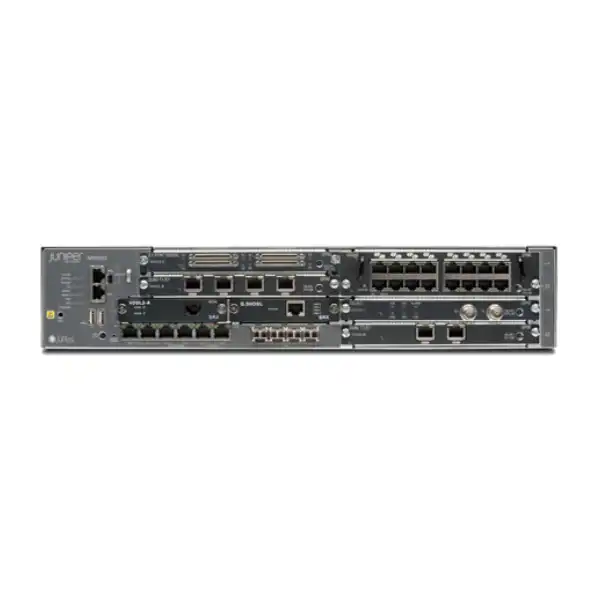
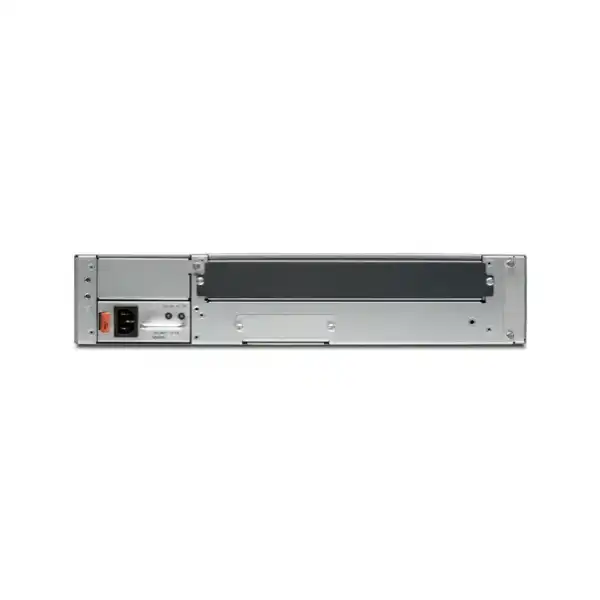
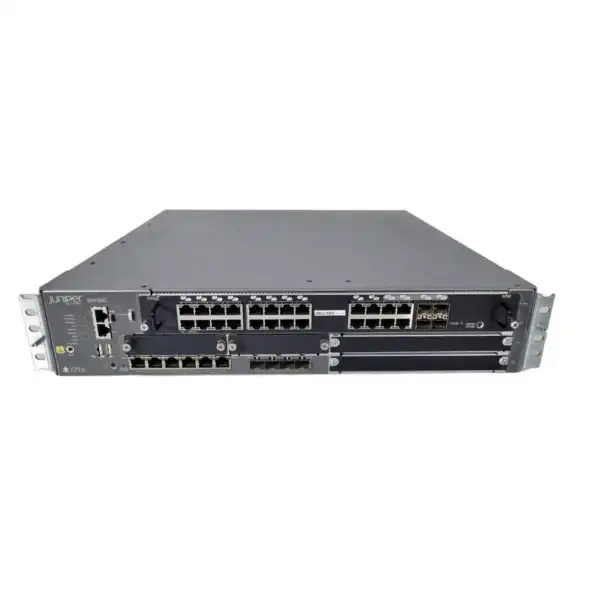
Juniper SRX550 Firewall Dubai
The Juniper SRX550 is a modular 2U Services Gateway designed to combine stateful firewalling, routing, VPN, switching and WAN connectivity for substantial branch and distributed enterprise sites. It remains relevant mainly where an installed SRX550 estate must be supported, replaced, expanded with compatible legacy hardware or migrated with minimal disruption. Because the original SRX550 platform has reached end of support, lifecycle status is now as important as throughput and port count when making a purchasing decision.
Direct answer: what is the Juniper SRX550 and should you still buy one?
SRX550 model identity, lifecycle and the distinction buyers must not miss
A request for a “Juniper SRX550 firewall” can refer to more than one practical procurement situation. It may mean an original SRX550 chassis already installed in a network, an SRX550-645AP or SRX550-645DP base system, a high-memory SRX550M variant, a replacement chassis, an interface module, a power supply, or simply a requirement to reproduce the function of an older SRX550 with current hardware. These are not interchangeable purchasing requests. The correct starting point is the exact label on the chassis and the bill of materials in the existing configuration.
Juniper’s lifecycle records make this distinction especially important. The original SRX550-645AP and SRX550-645DP hardware was announced end of life in 2018, had a last-order date in November 2018, and reached end of support on 30 November 2024. The later high-memory SRX550M family has its own milestone schedule: Juniper lists the SRX550M base systems and associated power-supply hardware as end of life with end of support on 15 March 2028. A buyer looking at an advertisement, reseller stock list or used chassis should therefore avoid assuming that “SRX550” and “SRX550M” imply the same support position.
This lifecycle reality changes the commercial logic. A legacy SRX550 can still have operational value when it is already part of a stable production design, when a like-for-like spare is required to reduce short-term downtime, when a laboratory needs parity with a deployed environment, or when migration is planned but cannot be completed immediately. That does not make it an ideal default choice for a new perimeter deployment. For a new firewall project, current SRX platforms should normally be evaluated because they offer an active product lifecycle, newer software support paths, current security-service options and a better runway for future change.
The model also sits in a particular architectural era. The SRX550 was designed as a modular branch Services Gateway rather than as a small fixed-port appliance. Its 2U chassis, six GPIM-capable slots, two Mini-PIM slots, dual power-supply positions and integrated copper/SFP connectivity gave network architects room to combine security with WAN interfaces and branch switching. That flexibility is still the reason some organizations retain the platform: replacing the firewall can also mean redesigning serial links, legacy WAN circuits, local switching, PoE delivery, routing adjacencies and high-availability behavior.
Original SRX550
Treat this as a legacy platform. Exact original SRX550 base systems have passed Juniper end of support, so availability may come from existing inventory, secondary-market channels or installed spares rather than normal current-product supply.
SRX550M high-memory variant
This later hardware must be identified explicitly. Its lifecycle differs from the original SRX550, and Juniper’s published milestone table lists 15 March 2028 as end of support for the named SRX550M base hardware.
New project requirement
If the actual need is “an SRX550-class firewall” rather than the exact old chassis, the better discussion is about required performance, interfaces, routing, VPN, resilience and security services so a current model can be sized accurately.
Performance numbers in context: what the SRX550 specifications mean in a real network
Juniper lists maximum firewall performance of 7 Gbps for the SRX550, IPsec VPN throughput of 1.0 Gbps, IPS performance of 800 Mbps, 27,000 sustained new TCP sessions per second and up to 375,000 concurrent sessions. These figures are useful reference points, but they should not be treated as a promise that every security design will deliver the same application throughput. Enterprise firewall sizing depends on packet size, traffic mix, enabled inspection services, encryption, policy complexity, logging, software release, interface choice and the percentage of sessions subjected to deeper security processing.
The 7 Gbps figure is best understood as a maximum firewall benchmark. A buyer replacing a simple router-and-firewall deployment with only stateful policy enforcement may be able to use much more of the platform’s raw forwarding capability than a buyer enabling IPS, application control, antivirus, URL filtering and extensive logging on the same traffic. Juniper separately states 800 Mbps for IPS, which illustrates why security-service throughput deserves its own sizing calculation. If the business requires one gigabit or more of continuously inspected internet traffic, an SRX550 should not be selected merely because the headline firewall number is higher.
The 1.0 Gbps IPsec VPN reference is equally dependent on design. Site-to-site VPN throughput can be affected by encryption settings, tunnel count, traffic distribution, packet sizes and whether other services are applied before or after the encrypted path. A branch with several dozen low-bandwidth site-to-site tunnels may have a different bottleneck from a regional hub carrying heavy encrypted replication, cloud connectivity and user traffic. The SRX550 specification supports up to 2,000 IPsec VPN tunnels in Juniper’s published platform data, but tunnel scale and aggregate throughput are two different dimensions. A design can be within the tunnel-count limit and still exceed practical bandwidth or processing requirements.
Session scale matters for environments with large user populations, many short-lived web connections, NAT, guest networks, voice systems, cameras, IoT devices or server workloads. Juniper’s published maximum of 375,000 concurrent sessions and sustained 27,000 TCP sessions per second give useful scale boundaries for the platform. They should be compared with actual peak values from the existing firewall, not just average daily traffic. A migration assessment is stronger when it includes peak concurrent sessions, peak connection creation rate, internet bandwidth, encrypted traffic percentage and the highest observed CPU or service utilization during business hours.
Policy scale is another consideration. Juniper’s current SRX550 specification page lists a maximum security-policy count in the thousands, while some product literature for later SRX550M positioning shows an 8,000-policy figure. Rather than designing to the theoretical ceiling, review the actual rule base: number of policies, address objects, application definitions, NAT rules, zones and logging actions. Very large inherited rule sets often contain duplication and obsolete entries. A hardware migration is a useful point to rationalize policy structure instead of automatically transferring every old rule.
| Published metric | SRX550 reference | Buyer interpretation |
|---|---|---|
| Maximum firewall performance | 7 Gbps | Headline forwarding reference; do not use it alone to size threat-inspected traffic. |
| IPsec VPN throughput | 1.0 Gbps | Compare with aggregate encrypted traffic, tunnel design and expected growth. |
| IPS performance | 800 Mbps | More relevant than raw firewall throughput when intrusion prevention is a core requirement. |
| Concurrent sessions | 375,000 maximum | Check peak session telemetry, especially in NAT-heavy or device-dense networks. |
| New TCP sessions | 27,000 per second sustained | Useful for bursty web, client and service environments; verify real peaks instead of averages. |
Interfaces and modular expansion: why the chassis stayed useful in complex branches
The SRX550’s defining hardware characteristic is not only its firewall performance; it is the combination of fixed connectivity and modular expansion. Juniper specifies six onboard 10/100/1000BASE-T Ethernet ports and four Gigabit Ethernet SFP ports. The chassis also provides two SRX Series Mini-PIM slots and six Gigabit-backplane Physical Interface Module positions, with supported combinations of GPIM and XPIM modules. This architecture allowed one device to accommodate local Ethernet, fiber uplinks and a variety of branch connectivity requirements without adding a separate appliance for every WAN interface.
For a replacement or spare-unit request, the chassis alone is therefore not enough information. Two SRX550 deployments can look identical from the front but have completely different interface populations. One may use only onboard Ethernet, while another may depend on an eight-port SFP XPIM, PoE Ethernet expansion, serial interfaces or T1/E1 modules. Juniper’s compatibility tooling lists legacy options such as 16-port and 24-port Gigabit Ethernet XPIMs, PoE variants, an eight-port SFP XPIM, an eight-port serial GPIM and dual or quad T1/E1 GPIMs for the SRX550 family. Availability and support status for those modules must be checked independently because accessory lifecycle can differ from chassis lifecycle.
SFP ports introduce another procurement dependency. The presence of four onboard SFP cages does not mean optical transceivers are automatically included or that every SFP type is appropriate. The fiber medium, wavelength, connector type, distance, carrier handoff and installed switch optics must all align. In a legacy environment, the safest approach is to record the exact optic part numbers currently installed and confirm whether the replacement plan preserves them or intentionally changes the media design.
Power over Ethernet can also matter. Juniper publishes support for up to 40 802.3af/at PoE ports with a maximum PoE budget around 247 W on applicable configurations. That number describes a platform capability with appropriate hardware rather than a guarantee that an arbitrary chassis and module combination provides 40 powered ports. A branch using the SRX550 to feed phones, access points or other PoE devices must inventory the actual PoE modules, power-supply type and real endpoint power draw before a replacement is selected. Moving to a new firewall may also be the right moment to separate security and access switching rather than reproducing the old integrated PoE design.
Legacy WAN interfaces are often the strongest reason an organization delays migration. A current firewall may have substantially higher security performance but lack a direct equivalent for an old serial or T1/E1 module. In that case, the migration project may need a carrier change, an external handoff device, a router, a media converter or a redesigned WAN edge. That dependency should be discovered before the old SRX550 is removed. A successful firewall replacement preserves not just IP addresses and policies but also the physical circuits and operational responsibility around them.
Fixed copper
Six onboard 10/100/1000BASE-T ports provide immediate Gigabit Ethernet connectivity without consuming expansion slots.
Fixed fiber-ready
Four onboard Gigabit SFP ports support fiber or compatible SFP-based handoffs, with transceiver selection treated as a separate compatibility decision.
Six GPIM-class positions
Modular expansion was a central design feature and can be the most difficult part of a like-for-like migration when legacy WAN modules remain in service.
Two Mini-PIM slots
Mini-PIM support extends branch connectivity options, but exact compatibility must be matched to the hardware revision and software environment.
Optional PoE ecosystem
PoE-capable module and power combinations can support powered branch endpoints; verify both port count and total wattage rather than assuming PoE from the chassis name.
Security services, Junos OS and licensing: capability is not the same as entitlement
The SRX family was built around Junos OS and zone-based security policy. Core functions include stateful firewalling, routing, NAT and VPN, while advanced security functions can include intrusion prevention, application visibility and control, URL filtering, antivirus, antispam and threat-intelligence services depending on software release, platform support and licensing. Buyers should separate three questions that are often combined incorrectly: what the hardware can technically support, what the installed software release exposes, and what the organization is legally and operationally entitled to use.
That distinction is especially important on an end-of-life platform. An advertisement that says “SRX550 with IPS” may describe a historical feature capability but tell you nothing about whether a usable subscription, signature service, support contract or transferable entitlement exists today. Some original SRX550 security subscription SKUs have themselves passed end-of-support milestones. In a legacy purchase, the commercial value of the chassis can therefore be very different from the security value of the complete solution.
For organizations keeping an SRX550 in service temporarily, record the exact Junos OS release, installed licenses, active subscriptions, signature update status and support entitlement before making changes. Juniper’s archived SRX550 documentation remains useful for configuration reference, but archived documentation is not equivalent to an active support lifecycle. If the firewall protects an internet edge, a regulated environment or critical application path, the risk assessment should explicitly account for the age of the platform and the status of software and threat-content maintenance.
For a migration to a current SRX model, licensing should be redesigned rather than copied by name. Juniper’s current next-generation firewall service structure separates standard functions from advanced security service tiers, and current subscriptions may package IPS, application security, security intelligence, URL filtering, antivirus, antispam and cloud-delivered threat services differently from historical SRX550 subscriptions. The correct license choice depends on what inspection the organization actually uses and what security policy it intends to enforce after migration.
Logging and management also deserve attention. A firewall rule that permits traffic may be straightforward to migrate, but the operational environment around that rule can include syslog destinations, SNMP monitoring, authentication integration, centralized management, configuration backups, event retention and administrator access controls. If the SRX550 participates in an established Junos operational model, preserving command-line familiarity and routing behavior may favor another Juniper SRX platform. If the organization is also changing management architecture, the replacement project should include that change in testing and acceptance criteria.
Core network functions
Firewall, routing, NAT, switching and VPN are the foundation. Confirm how heavily each function is used because the replacement may need to absorb roles beyond security.
Advanced inspection
IPS, application control, URL filtering and malware-oriented services affect both licensing and effective throughput. Do not size from the 7 Gbps firewall figure alone.
Software lifecycle
Record the exact Junos release and upgrade constraints. Legacy hardware can be operationally stable while still lacking the lifecycle runway expected for a new security deployment.
Subscription status
A historical license label does not prove current entitlement or update access. Request documentation for any subscription or support claim included with legacy equipment.
Operations and visibility
Monitoring, event export, administrative authentication, configuration backups and central management can be as important to migration success as packet forwarding.
Policy cleanup opportunity
Use replacement work to identify obsolete objects, duplicate rules, unused VPNs and expired exceptions. Migrating less technical debt improves both security and troubleshooting.
Sizing an SRX550 replacement: measure the network, not the model name
When an SRX550 is being replaced, the most reliable sizing method starts with the live environment. Old platform names can become misleading because internet circuits, cloud use, encrypted traffic and security policy often grow substantially during the life of a firewall. A site that originally purchased an SRX550 for a few hundred megabits may now have multi-gigabit WAN connectivity, many more users and a higher proportion of SaaS traffic. A like-for-like performance class can therefore be undersized even if the old firewall appears to have operated acceptably.
Start with traffic telemetry. Record peak inbound and outbound internet throughput, private WAN traffic, site-to-site VPN traffic, remote-access demand if applicable, and east-west flows that actually traverse the firewall. Note whether peaks are short bursts or sustained business-hour loads. Then add a realistic growth horizon. Security appliances are rarely replaced every year, so the selected platform should retain useful headroom after planned bandwidth upgrades, new offices, cloud migrations and additional inspection services.
Next measure session behavior. Peak concurrent sessions and session creation rates can expose constraints that bandwidth graphs do not. A retail, hospitality, education or guest-access network can create large numbers of short-lived sessions even when aggregate throughput is moderate. An enterprise with many IoT devices, IP phones or cameras may maintain persistent sessions throughout the day. The SRX550’s published 375,000-session maximum and 27,000 new TCP sessions per second provide reference numbers for the old platform, but the replacement should be selected against observed peaks plus headroom.
Then inventory security services. Determine which zones and policies use IPS, application identification, antivirus, URL filtering or other advanced inspection. If inspection is currently disabled because of performance limitations, ask whether the business actually wants it enabled on the replacement. This avoids a common mistake: sizing a new firewall only to replicate the old configuration even though the purpose of the project is to improve security coverage.
Encryption deserves its own calculation. Record the number of site-to-site VPNs, aggregate encrypted throughput, tunnel termination locations, cryptographic requirements and whether the firewall will participate in SD-WAN or dynamic path selection. If remote access is provided by another platform, note that too. Do not inflate a firewall purchase based on functions it will not perform, but do not omit planned consolidation projects that will move new workloads onto the device.
Finally, size the physical network. Count copper Ethernet, SFP/SFP+ requirements, carrier handoffs, legacy serial or T1/E1 circuits, PoE dependencies and any out-of-band management needs. The old SRX550 may combine roles that a modern architecture will separate among a firewall, switch, WAN router and SD-WAN edge. That can be a better design, but it must be budgeted and cabled as a system rather than as a single appliance swap.
A practical sizing worksheet for Dubai and UAE sites
- Peak and average internet throughput, including any committed upgrade already ordered from the service provider.
- Peak concurrent sessions and connection rate from monitoring or firewall statistics.
- Percentage of traffic that will receive IPS, application control, URL filtering or malware inspection.
- IPsec VPN tunnel count, aggregate encrypted throughput and expected new branches or cloud tunnels.
- Number and type of physical ports, including copper speed, fiber speed, optics and WAN handoffs.
- Existing GPIM, XPIM and Mini-PIM functions that must be retained, replaced or retired.
- High-availability requirements, acceptable maintenance window and failover expectations.
- Logging destinations, centralized management, AAA integration and monitoring requirements.
- Three-to-five-year growth assumptions for users, sites, cloud adoption and link capacity.
Power, rack space, environmental conditions and high availability
The SRX550 is a 2U rack-mount platform, so replacement planning should account for rack units, airflow, power feeds and cable reach. Juniper’s hardware documentation for the SRX550 high-memory chassis lists dimensions of approximately 3.5 inches high, 17.5 inches wide and 18.2 inches deep, with a chassis weight around 21.96 lb when fitted with one power supply and no interface modules. Exact shipping weight and operating weight vary with installed modules and power supplies, so a rack survey should use the actual configuration rather than the bare-chassis value.
The platform supports dual power-supply positions, which can be important where the firewall is part of a resilient branch design. A second power supply improves power-path resilience only when the electrical design supports it properly. Two modules plugged into the same power strip, UPS or branch circuit do not provide the same failure isolation as feeds from independent protected sources. In a migration, verify available PDU outlets, connector types, UPS capacity and whether the replacement firewall uses the same airflow and power orientation.
Juniper specifies an operating temperature range of 0°C to 40°C for SRX550M hardware and requires proper grounding. In UAE deployments, the equipment may live in an air-conditioned server room, branch communications cabinet or data-center rack, but ambient conditions should never be assumed from outdoor temperature alone. Check cooling at the actual rack, especially where telecom rooms are lightly monitored or where other equipment exhausts warm air into the firewall intake.
High availability is broader than installing a second chassis. An SRX cluster or resilient design needs compatible hardware, software alignment, appropriate links, synchronized configuration and a documented failover model. The business should know which failures must be tolerated: a power-supply failure, a complete firewall failure, an ISP outage, a switch failure, or a building-side circuit problem. The correct answer can lead to different physical topologies.
For a legacy SRX550 pair, replacement planning should also consider whether both nodes are changed together. Mixing lifecycle states or keeping one old chassis as a long-term fallback can create operational complexity. A staged migration may still be valid, but the rollback plan, configuration parity and spare strategy should be written before the maintenance window begins.
Where the SRX550 still makes sense—and where it does not
An end-of-support firewall is not automatically useless, but its role should be deliberate. The strongest reason to source an original SRX550 today is usually continuity. An organization may operate several identical sites and need a cold spare for a limited migration window. A laboratory may need the same hardware and Junos behavior as production. A temporary project may require an exact replacement to restore service while a broader network redesign is already funded. In those situations, the purchase is about operational continuity rather than long-term platform strategy.
Another valid case is configuration recovery. If a failed chassis contains a design that depends on specific interface modules or old WAN circuits, an exact compatible unit can reduce the number of changes made during incident response. That can be valuable when downtime is more urgent than modernization. However, the recovery plan should still establish a deadline for migration because restoring an EOL platform simply resets the immediate hardware failure risk; it does not restore an active product lifecycle.
The SRX550 is a weak choice for a greenfield internet edge that must provide multi-year vendor support, current threat-content subscriptions, modern high-speed interfaces or significant security-service headroom. It can also be unsuitable where the new WAN is faster than the old design, where advanced inspection throughput is central to the requirement, or where operational policy requires only actively supported security platforms.
For a branch modernization project, the goal should be functional equivalence rather than physical imitation. If the SRX550 currently performs firewalling, routing, switching, PoE and WAN termination, decide whether those functions still belong in one chassis. Modern branch designs often separate access switching from security while integrating SD-WAN and cloud management more deliberately. A cleaner architecture may reduce troubleshooting boundaries even when it uses more than one physical device.
Reasonable legacy use
- Short-term cold spare for an installed SRX550 estate.
- Lab or test environment requiring configuration parity.
- Emergency like-for-like recovery while migration is planned.
- Controlled environment with documented risk acceptance and no expectation of long-term vendor support.
Better to evaluate current hardware
- New internet-edge or branch-security deployment.
- Requirement for active multi-year vendor support.
- Higher inspected throughput or faster modern interfaces.
- New advanced-security subscription strategy, SD-WAN architecture or broader modernization program.
Migration from SRX550: a practical sequence that reduces outage risk
A firewall migration succeeds when the project team understands both packet flow and operational dependencies. Begin by collecting the current SRX550 configuration, interface inventory, routing table, zone design, security policies, NAT rules, VPNs, DHCP or relay functions, switching configuration, monitoring targets and administrative settings. Do not rely on the configuration file alone; compare it with live status information because unused configuration can remain for years after the associated service has disappeared.
The second step is to identify physical dependencies. Map every cable from the SRX550 to a carrier handoff, switch, server, management network or interface module. Photograph labels, note VLAN tagging and record optic part numbers. For GPIM, XPIM and Mini-PIM modules, document exactly what function each one provides. If a module terminates a legacy WAN service, involve the carrier early. The replacement firewall may require a different demarcation or an additional router.
Third, classify configuration items into migrate, redesign and retire. Security policies that protect active applications usually migrate. Old temporary exceptions, disabled VPNs and obsolete objects should be reviewed. NAT rules may need redesign if public IP allocations or WAN interfaces change. Routing can often be translated cleanly within the Juniper ecosystem, but interface names and capabilities will differ on a new platform. Clustering, management and licensing may also use different constructs depending on the target model and software release.
Fourth, define acceptance tests before the maintenance window. List critical applications, inbound services, outbound internet flows, site-to-site VPNs, DNS, authentication, monitoring and management access. For each, identify a business owner or technical test. A firewall change can appear successful because basic internet browsing works while a less visible service is broken. Written validation turns troubleshooting from guesswork into a sequence.
Fifth, prepare rollback. Keep the old SRX550 configuration backup, record all cable moves, preserve any required optics or adapters, and define the point at which the team stops troubleshooting the new platform and restores the old path. A rollback threshold is particularly important for branches with limited local technical staff. If the site is remote from the implementation team, out-of-band access or a local hands plan can materially reduce risk.
Finally, treat the first days after cutover as part of the project. Monitor CPU, memory, session counts, interface errors, VPN stability, route changes, security events and user-reported application behavior. Confirm backups and monitoring. Only after the new environment is stable should the old SRX550 be removed from the rollback plan. If the old hardware is retained as a spare, document the limits of that strategy so staff do not assume it has current vendor support.
Capture
Configuration, live state, logs, routes, sessions and licenses.
Map
Ports, optics, modules, circuits, VLANs and physical dependencies.
Rationalize
Separate required configuration from obsolete technical debt.
Build & test
Pre-stage the target and validate critical flows before cutover.
Cut over
Move services with a defined rollback threshold and ownership.
Observe
Monitor stability, security events and application behavior after change.
Compatibility and accessories: the hidden cost in a legacy SRX550 quote
A legacy firewall quote can look inexpensive until missing components are discovered. For the SRX550, the first accessory question is power. Confirm whether the offered chassis includes the correct AC or DC power supply, whether one or two supplies are required, whether the power cord is included, and whether the site PDU matches. The original platform had named AC and DC base-system variants, and the later SRX550M also used specific 645 W power-supply options. Treat “chassis only” and “complete system” as different products.
The second question is rack mounting. Verify rails or rack-mount brackets, cage nuts and any site-specific mounting requirement. A used appliance may be removed from a rack without its original kit. This is easy to miss in remote procurement and can delay installation even when the electronics are fully functional.
Third are transceivers and cables. SFP cages require the correct optics or copper modules for the link design. Do not assume that optics shown in a product photograph are included. Record vendor part numbers and link distances. If the SRX550 connects to an ISP through fiber, check whether the carrier expects a specific wavelength or presentation. If it connects to an internal switch stack, ensure both ends of each optical link are compatible.
Fourth are interface modules. A replacement chassis with empty GPIM or Mini-PIM slots may not recreate the existing service. Inventory the exact module type, hardware revision and port usage. Some modules may be harder to source than the chassis itself. In a time-critical repair, this can determine whether moving existing modules into a replacement chassis is feasible. In a modernization project, it can reveal which legacy interfaces should be eliminated instead of carried forward.
Fifth is software and configuration compatibility. A spare chassis must be able to run an appropriate software release and accept the needed configuration. If an organization has standardized on a specific Junos version for the SRX550 estate, validate the replacement against that standard. A backup configuration is most useful when the hardware, software and interface population are understood together.
Finally, consider provenance. For pre-owned or old-stock equipment, request clear information about condition, testing, included modules, serial visibility, cosmetic state, power-on status and return terms. Those details do not replace manufacturer support, but they help distinguish a controlled spare purchase from an unknown-risk hardware purchase.
Comparing the SRX550 with a newer Juniper firewall: use requirements, not a one-line replacement label
There is no responsible one-line answer to “what replaces an SRX550?” because the SRX550 could have been purchased for very different reasons. One organization may use it as a straightforward branch firewall with a few copper ports. Another may use its modular slots for legacy WAN connectivity, local switching and PoE. A third may rely heavily on routing, VPN scale and high availability. The correct newer model depends on which of those functions still matter and how the performance requirement has changed.
For smaller modern branches, a current fixed-port SRX appliance may deliver far more security performance than the old deployment needs while using less rack space and power. For larger branches or regional hubs, a higher-capacity SRX platform may be justified by inspected throughput, faster interfaces, growth or resilience. The goal is not to find a chassis with the closest physical dimensions; it is to find the smallest current architecture that meets security, connectivity and lifecycle requirements with useful headroom.
Port speed is often the quickest differentiator. The SRX550’s fixed onboard connectivity is Gigabit-class. If the modern design includes multi-gigabit ISP links, 10 Gigabit uplinks, higher-speed server segments or significant east-west traffic, the replacement must be evaluated around those interfaces. Installing a new firewall that immediately requires external bottlenecks defeats much of the purpose of modernization.
Security service performance is the next differentiator. Current internet edges usually face more encrypted and application-rich traffic than when the SRX550 was introduced. If the organization wants broad IPS, application control, URL filtering or other inspection enabled, use the target platform’s security-service performance data and a realistic traffic mix. Do not assume a new firewall with a similar raw firewall number is equivalent.
Management and SD-WAN requirements can also reshape the shortlist. If the business wants centralized orchestration, application-aware path selection, cloud-delivered security or broader automation, include those objectives before choosing hardware. A migration is an opportunity to reduce the operational compromises inherited from the old branch design.
| Decision area | Legacy SRX550 question | Replacement question |
|---|---|---|
| Performance | What traffic and inspection load does the current unit actually carry? | What inspected throughput is required after growth and new security policy? |
| Interfaces | Which onboard ports and GPIM/XPIM/Mini-PIM functions are in use? | Which physical functions remain, and which can move to switches, routers or carrier handoffs? |
| VPN | How many tunnels and how much aggregate encrypted traffic exist? | Will cloud, SD-WAN or new branches increase encryption scale? |
| Lifecycle | Is the exact unit already end of support? | How many years of supported service life are required? |
| Operations | Which Junos workflows, monitoring and routing behavior must be preserved? | What should stay familiar, and what should be modernized? |
Common SRX550 use cases in UAE enterprise environments
Regional branch gateway
Historically, the SRX550 suited branches needing firewall, routing, VPN and several WAN or LAN interface types in one rack appliance. A modernization project should verify which of those roles still belong together.
Legacy WAN aggregation
Organizations with older serial or T1/E1 connectivity may keep SRX550 hardware because modular interfaces are embedded in the design. Carrier modernization is often a prerequisite for removing the device.
Site-to-site VPN hub
The platform can terminate many IPsec tunnels, but replacement sizing should focus on aggregate encrypted throughput, cryptographic policy, traffic growth and failover behavior rather than tunnel count alone.
Cold spare strategy
A tested spare can provide temporary continuity for a remaining SRX550 estate. Its value is highest when configuration, software version and module compatibility are documented in advance.
Migration laboratory
A lab SRX550 can be useful for validating configuration extraction, routing behavior and legacy interface dependencies before a production migration, particularly where the installed estate is complex.
Buying a Juniper SRX550 in Dubai: procurement questions that reduce risk
Because the original SRX550 is no longer an actively supported current product, procurement needs more detail than a normal new-hardware quote. Start by asking for the exact part number. “SRX550” is not sufficiently precise. Determine whether the offer is for an original SRX550-645AP, SRX550-645DP, SRX550M variant, chassis-only unit or configured system. Then list included power supplies, rack hardware, interface modules, optics and cables.
Ask for condition. New old stock, manufacturer-refurbished, reseller-refurbished and used equipment are different commercial categories. Request the testing scope and warranty provided by the seller. A device that merely powers on is not equivalent to one tested under traffic with ports, fans, power supplies and storage verified. For a critical spare, organizations may choose to stage and test the exact unit before placing it in the emergency inventory.
Ask what software state is included. The device may arrive with a particular Junos release, but that does not automatically grant access to different software images, security-content updates or support services. If the intended use depends on a specific release or advanced security feature, validate entitlement separately. Avoid making a security plan based solely on the feature list of historical product literature.
Ask how the unit will be used. A one-for-one spare can be specified from the existing chassis and module inventory. A replacement for production should be compared with a current platform. A lab unit may not need redundant power or every interface module. A temporary migration bridge may need only the interfaces required for a few months. Clarifying the operational role prevents overpaying for scarce legacy parts or under-specifying a production requirement.
For UAE delivery, also confirm shipment terms, local availability, warranty handling, installation location and whether onsite assistance is required. A firewall purchase can involve configuration backup, rack installation, power validation, cable work, change-window coordination and post-cutover testing. Separating hardware price from implementation scope makes quotations easier to compare.
Most importantly, place a time horizon on the legacy decision. If the organization buys an SRX550 spare, define how long that spare is intended to protect the estate and when migration will occur. A legacy purchase becomes much more rational when it supports a controlled transition plan instead of indefinitely postponing one.
Technical buyer questions about the Juniper SRX550
Is the SRX550 still supported by Juniper?
The original SRX550 hardware, including SRX550-645AP and SRX550-645DP entries in Juniper’s lifecycle table, reached end of support on 30 November 2024. The later SRX550M high-memory base hardware has a separate end-of-support date of 15 March 2028. Always identify the exact part number before applying a lifecycle date.
What is the SRX550 firewall throughput?
Juniper publishes up to 7 Gbps maximum firewall performance. That benchmark should not be treated as the expected throughput with every security service enabled. IPS is separately listed at 800 Mbps, which is a better reminder that inspected traffic has a different performance profile.
What is the SRX550 IPsec VPN performance?
Juniper lists 1.0 Gbps IPsec VPN throughput for the platform and up to 2,000 IPsec tunnels in published product data. Real sizing should still account for cryptographic settings, packet size, traffic mix and concurrent security functions.
How many ports are built into the SRX550?
The fixed I/O includes six 10/100/1000BASE-T copper Ethernet ports and four Gigabit SFP ports. Additional interfaces can be provided through supported GPIM, XPIM and Mini-PIM expansion modules. An exact quote should list the modules and optics separately.
Does the SRX550 support PoE?
Applicable SRX550 configurations can support PoE through compatible hardware, with Juniper publishing support for up to 40 802.3af/at ports and a maximum PoE budget around 247 W. The actual capability depends on installed modules and power configuration, so PoE must be verified against the bill of materials.
Can I buy an SRX550 for a new office?
It is technically possible to source legacy hardware from remaining stock or secondary channels, but the original SRX550 is not a sensible default for a new long-term security deployment because it is end of support. A current Juniper SRX model should normally be evaluated against the office’s actual performance, interface and licensing requirements.
Can an SRX550 be replaced without changing the whole network?
Often yes, but the effort depends on how many roles the old chassis performs. Standard Ethernet, routing, firewall and VPN functions can usually be mapped to modern designs. Legacy serial, T1/E1, PoE or specialized module dependencies may require additional hardware or carrier changes.
Should we copy every existing policy to the new firewall?
Not automatically. The migration is a good opportunity to review disabled rules, obsolete address objects, expired temporary access, unused VPNs and duplicate policies. Preserve business-required behavior, but avoid transferring technical debt without review.
Is an SRX550M the same as an original SRX550?
No. The SRX550M is the later high-memory version and has a separate lifecycle record. The chassis family looks similar and shares major architectural traits, but procurement and support decisions must use the exact part number rather than treating all SRX550 names as identical.
What information is needed for an accurate replacement quote?
Provide the exact chassis part number, photos of the front and rear, installed module list, port usage, internet and WAN speeds, peak traffic, VPN count, security services, HA design, Junos release, required support term and planned growth. That information is more valuable than the model name alone.
Can we keep the old SRX550 as a rollback unit?
Yes, a tested legacy chassis can be retained temporarily as part of a migration rollback strategy, provided the organization understands its support limitations and preserves compatible configuration, software and modules. It should not silently become the permanent recovery plan for an actively supported new environment.
What usually causes an SRX550 migration to become complicated?
The difficult parts are usually not basic firewall rules. Complexity comes from legacy WAN modules, undocumented NAT, old VPN peers, carrier circuits, local switching, PoE, routing dependencies, management integration and a lack of current traffic data. Discovery work reduces those risks before the outage window.
Support strategy for an installed SRX550 estate
Organizations that still operate original SRX550 firewalls should treat the estate as a transition program rather than as ordinary current infrastructure. The first objective is visibility: identify every deployed unit, exact part number, serial record, software release, interface module, power configuration, business owner and site criticality. Without that inventory, it is difficult to distinguish a low-risk lab appliance from a branch gateway whose failure would interrupt revenue or customer service.
Next establish a spare policy. A spare can reduce recovery time where like-for-like replacement is operationally justified, but the spare itself must be tested. It should have a documented configuration-restoration process and any required modules or optics. Storing an unknown used chassis on a shelf does not create a reliable recovery plan. If several sites have different module combinations, one spare may not serve all of them.
Then classify sites by migration difficulty. Sites using only Ethernet and standard IPsec may be comparatively easy to move. Sites with serial interfaces, T1/E1 circuits, local PoE, complex routing or custom provider handoffs need earlier engineering. This prioritization helps the organization retire the easiest devices quickly while giving difficult sites enough lead time for carrier changes and architectural redesign.
Security risk should influence the schedule. A firewall exposed directly to the internet has a different risk profile from a lab unit isolated behind multiple controls. Regulatory obligations, vulnerability management policy and cyber-insurance requirements may also restrict the acceptable use of unsupported security equipment. Those requirements should be reviewed with the organization’s security and governance teams rather than assumed.
Finally, budget for the whole transition. Hardware is only one line item. Licensing, optics, switching, WAN changes, configuration conversion, testing, after-hours implementation and project management can materially affect cost. A complete migration budget reduces the temptation to renew the life of the old platform simply because the replacement appliance price was estimated without the surrounding work.
Configuration discovery checklist before touching the production firewall
An SRX550 that has been in service for years may contain far more history than the current network diagram shows. Before replacement, export and review the configuration, but also collect live operational data. Interfaces configured in the file may be disconnected. Policies may never receive traffic. VPN definitions may belong to offices that closed years ago. Conversely, a critical dynamic route or NAT translation may be easy to overlook if the team reads only the high-level design.
Interface discovery should capture physical link state, negotiated speed and duplex, VLAN tagging, IP addressing, zone membership and any LACP or switching behavior. For SFP links, record optic part numbers and optical medium. For expansion modules, note the exact module code and ports in use. This inventory becomes the physical acceptance checklist for the new design.
Routing discovery should include static routes, dynamic protocols, route preferences, policy-based routing if present and any default-route tracking. A branch gateway may exchange routes with an MPLS CE router, core switch, SD-WAN device or another firewall. During migration, the packet path can fail even when the security policy is correct if next-hop behavior changes.
Security discovery should map zones, policies, address books, applications, schedules, screens and NAT. Look for broad rules added during incidents, temporary vendor access, old public NAT entries and objects with unclear ownership. Where possible, use hit counts or logs to identify inactive rules, but do not delete them solely because they appear idle; some rules exist for monthly or emergency processes.
VPN discovery should include peer addresses, local and remote networks, IKE and IPsec parameters, authentication method, tunnel monitoring, routing over tunnels and business ownership. If the remote peer is managed by another company, migration coordination may need to begin weeks before cutover. A technically simple VPN can become a schedule risk when nobody knows who controls the other endpoint.
Operational discovery completes the picture: admin users, TACACS+/RADIUS, NTP, DNS, SNMP, syslog, configuration archival, monitoring, alerting and change procedures. These services determine whether the replacement is manageable on day one. A firewall that forwards traffic but disappears from monitoring is not a complete migration.
How FourTeck can scope an SRX550 request in Dubai and across the UAE
A useful SRX550 conversation starts by identifying whether the request is for legacy hardware supply, troubleshooting continuity, spare strategy, configuration assistance or migration. Those objectives lead to different quotations. A customer who needs a tested replacement chassis for a failed branch has an immediate compatibility problem. A customer planning a refresh has a sizing and architecture problem. A customer who wants to expand an existing chassis may actually have a lifecycle problem that is better solved by migration.
For a hardware-supply request, FourTeck can use the exact part number, required power type, installed modules, optics, condition requirement and warranty expectation to define the bill of materials. Where legacy availability is uncertain, the quotation should state what is included rather than relying on a generic product title. That is particularly important for modular systems because an empty chassis and a production-ready configured system can have very different values.
For a replacement project, the scope can include discovery of the existing configuration, traffic and session data, port mapping, VPN inventory, security-service usage, HA requirements and management integrations. From that information, a current Juniper SRX platform can be compared on inspected performance, interface speed, license needs, rack design and lifecycle. The recommended model should be justified by measured requirements rather than by the historical SRX550 class.
For migration implementation, the project can be broken into assessment, target design, configuration preparation, lab or pre-production testing, change-window execution, rollback planning and post-change monitoring. The exact service scope should reflect site criticality. A small branch with simple internet access needs less engineering than a regional hub with many VPNs and legacy WAN circuits.
The commercial objective is clarity. A buyer should know whether the quote solves a short-term legacy need or creates a supported long-term platform. Mixing those goals is how organizations end up paying for scarce old hardware while still facing an urgent migration a few months later.
Decision recap: what matters most before you order
What FourTeck needs from you for an accurate SRX550 quotation or migration plan
A few precise inputs can turn a vague “SRX550 firewall price” request into a technically useful quotation. If some details are unavailable, photos and configuration exports can often close the gaps.
For example, identify whether it is an original SRX550 or SRX550M variant.
Production replacement, spare, lab unit, expansion or full migration.
Onboard ports, GPIM/XPIM/Mini-PIM modules, optics, PoE and carrier handoffs.
Internet, WAN, VPN throughput, concurrent sessions and growth expectations.
IPS, application control, URL filtering, antivirus, NAT, logging and policy count.
Site-to-site tunnels, remote peer ownership, routing protocols and cloud links.
Single appliance, redundant power, firewall pair, dual ISP or other HA design.
Dubai/UAE site, rack constraints, power type, cooling and remote-hands needs.
How long the solution must remain supported and whether this is a transition purchase.
Supply only, configuration, migration, onsite cutover, testing or post-change support.
Decide whether to maintain, replace or migrate your SRX550
If you have an installed Juniper SRX550 in Dubai or elsewhere in the UAE, the right next step depends on the exact hardware, interface modules, software state, traffic profile and business timeline. FourTeck can help distinguish a short-term spare requirement from a long-term firewall refresh, identify legacy WAN dependencies, document the current configuration and size a supported replacement around real inspected traffic and connectivity needs.


Reviews
There are no reviews yet.